rear view mirror BMW 535I 2013 User Guide
[x] Cancel search | Manufacturer: BMW, Model Year: 2013, Model line: 535I, Model: BMW 535I 2013Pages: 246, PDF Size: 5.39 MB
Page 114 of 246
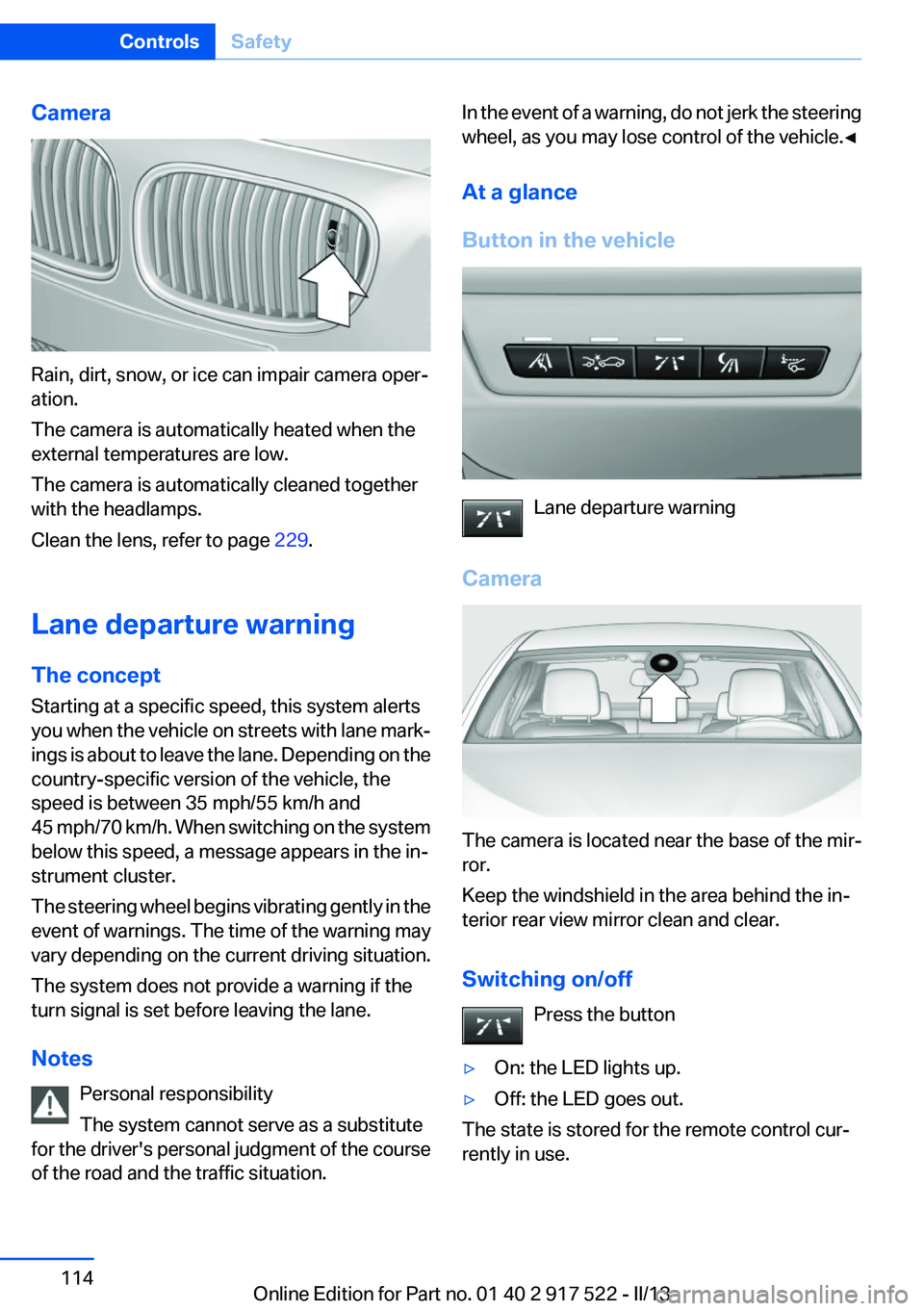
Camera
Rain, dirt, snow, or ice can impair camera oper‐
ation.
The camera is automatically heated when the
external temperatures are low.
The camera is automatically cleaned together
with the headlamps.
Clean the lens, refer to page 229.
Lane departure warning
The concept
Starting at a specific speed, this system alerts
you when the vehicle on streets with lane mark‐
ings is about to leave the lane. Depending on the
country-specific version of the vehicle, the
speed is between 35 mph/55 km/h and
45 mph/70 km/h. When switching on the system
below this speed, a message appears in the in‐
strument cluster.
The steering wheel begins vibrating gently in the
event of warnings. The time of the warning may
vary depending on the current driving situation.
The system does not provide a warning if the
turn signal is set before leaving the lane.
Notes Personal responsibility
The system cannot serve as a substitute
for the driver's personal judgment of the course
of the road and the traffic situation.
In the event of a warning, do not jerk the steering
wheel, as you may lose control of the vehicle.◀
At a glance
Button in the vehicle
Lane departure warning
Camera
The camera is located near the base of the mir‐
ror.
Keep the windshield in the area behind the in‐
terior rear view mirror clean and clear.
Switching on/off Press the button
▷On: the LED lights up.▷Off: the LED goes out.
The state is stored for the remote control cur‐
rently in use.
Seite 114ControlsSafety114
Online Edition for Part no. 01 40 2 917 522 - II/13
Page 115 of 246
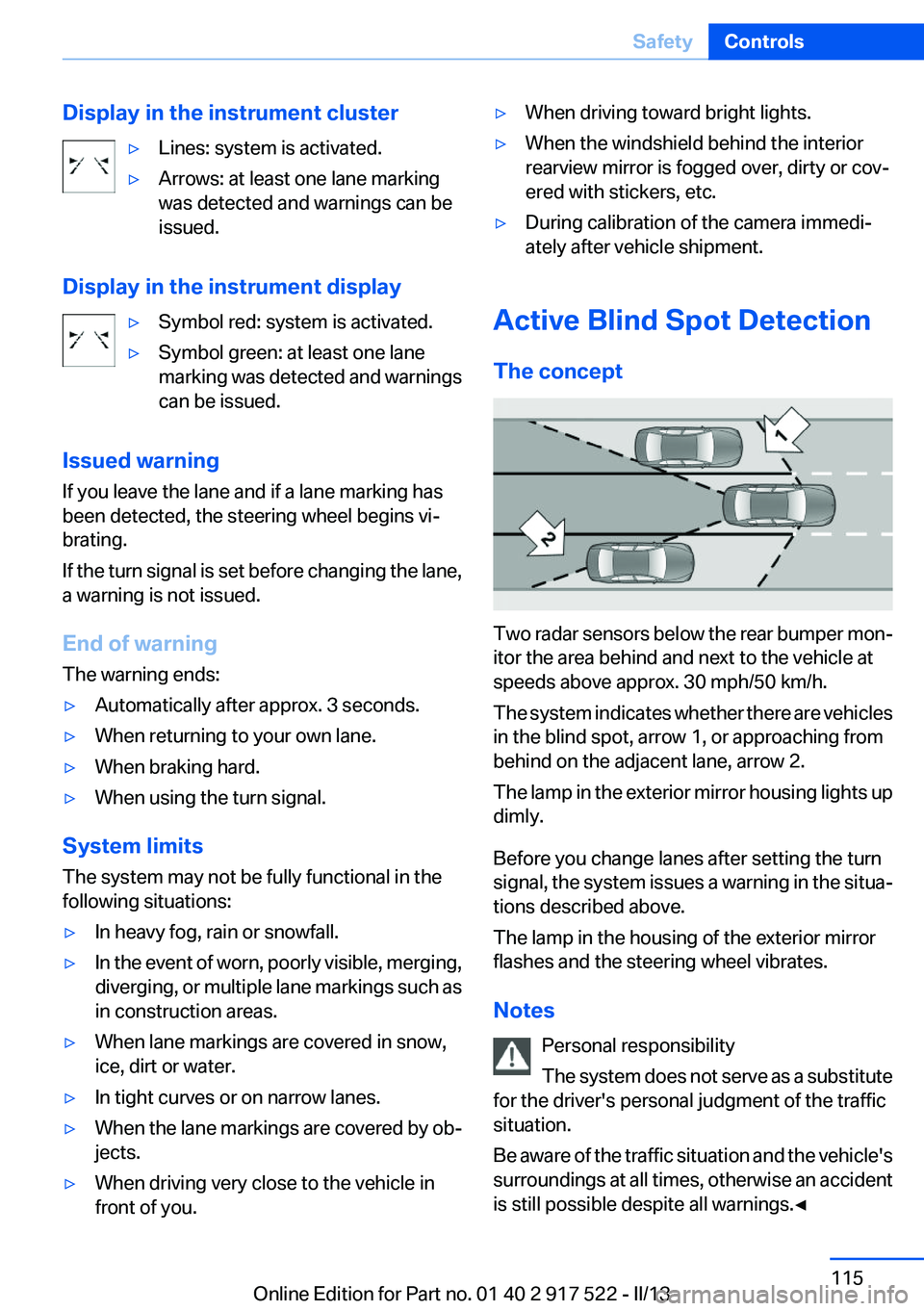
Display in the instrument cluster▷Lines: system is activated.▷Arrows: at least one lane marking
was detected and warnings can be
issued.
Display in the instrument display
▷Symbol red: system is activated.▷Symbol green: at least one lane
marking was detected and warnings
can be issued.
Issued warning
If you leave the lane and if a lane marking has
been detected, the steering wheel begins vi‐
brating.
If the turn signal is set before changing the lane,
a warning is not issued.
End of warning
The warning ends:
▷Automatically after approx. 3 seconds.▷When returning to your own lane.▷When braking hard.▷When using the turn signal.
System limits
The system may not be fully functional in the
following situations:
▷In heavy fog, rain or snowfall.▷In the event of worn, poorly visible, merging,
diverging, or multiple lane markings such as
in construction areas.▷When lane markings are covered in snow,
ice, dirt or water.▷In tight curves or on narrow lanes.▷When the lane markings are covered by ob‐
jects.▷When driving very close to the vehicle in
front of you.▷When driving toward bright lights.▷When the windshield behind the interior
rearview mirror is fogged over, dirty or cov‐
ered with stickers, etc.▷During calibration of the camera immedi‐
ately after vehicle shipment.
Active Blind Spot Detection
The concept
Two radar sensors below the rear bumper mon‐
itor the area behind and next to the vehicle at
speeds above approx. 30 mph/50 km/h.
The system indicates whether there are vehicles
in the blind spot, arrow 1, or approaching from
behind on the adjacent lane, arrow 2.
The lamp in the exterior mirror housing lights up
dimly.
Before you change lanes after setting the turn
signal, the system issues a warning in the situa‐
tions described above.
The lamp in the housing of the exterior mirror
flashes and the steering wheel vibrates.
Notes Personal responsibility
The system does not serve as a substitute
for the driver's personal judgment of the traffic
situation.
Be aware of the traffic situation and the vehicle's
surroundings at all times, otherwise an accident
is still possible despite all warnings.◀
Seite 115SafetyControls115
Online Edition for Part no. 01 40 2 917 522 - II/13
Page 139 of 246
Display settings
Brightness
With the backup camera switched on:1. Select the symbol.2.Turn the controller until the desired setting
is reached and press the controller.
Contrast
With the backup camera switched on:
1. Select the symbol.2.Turn the controller until the desired setting
is reached and press the controller.
System limits
Detection of objects
High, protruding objects such as ledges may not
be detected by the backup camera.
Top View
The concept
Top View assists you in parking and maneuver‐
ing. The area around the doors and the road area
around the vehicle are shown on the Control
Display for this purpose.
General information
The image is captured by two cameras
integrated in the exterior mirrors and by the
backup camera.
The range is at least 7 ft/2 m to the side and rear.
In this way, obstacles up to the height of the ex‐
terior mirrors are detected early.
Notes
Check the traffic situation as well
Check the traffic situation around the ve‐
hicle with your own eyes. Otherwise, an accident
could result from road users or objects located
outside the picture area of the cameras.◀
At a glance
Button in the vehicle
Top View
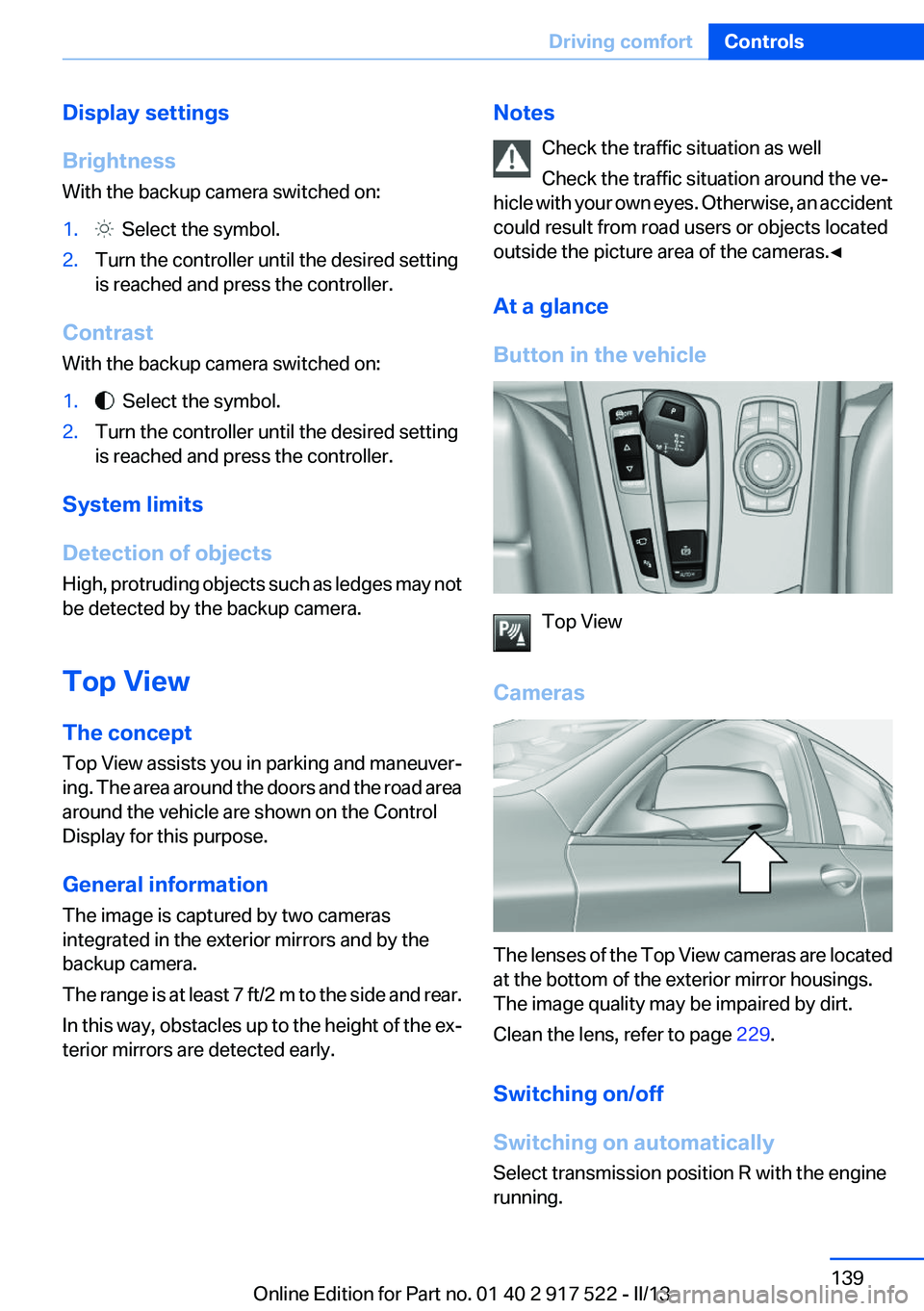
Cameras
The lenses of the Top View cameras are located
at the bottom of the exterior mirror housings.
The image quality may be impaired by dirt.
Clean the lens, refer to page 229.
Switching on/off
Switching on automatically
Select transmission position R with the engine
running.
Seite 139Driving comfortControls139
Online Edition for Part no. 01 40 2 917 522 - II/13
Page 155 of 246
Interior equipmentVehicle equipment
All standard, country-specific and optional
equipment that is offered in the model series is
described in this chapter. Therefore, equipment
is also described that is not available in a vehicle,
e. g., because of the selected optional equip‐
ment or country variant. This also applies for
safety-related functions and systems.
Integrated universal remote
control
The concept
The integrated universal remote control can op‐
erate up to 3 functions of remote-controlled sys‐
tems such as garage door drives or lighting sys‐
tems. The integrated universal remote control
replaces up to 3 different hand-held transmit‐
ters. To operate the remote control, the buttons
on the interior rearview mirror must be program‐
med with the desired functions. The hand-held
transmitter for the particular system is required
in order to program the remote control.
During programming
During programming and before activat‐
ing a device using the integrated universal re‐
mote control, ensure that there are no people,
animals, or objects in the range of movement of
the remote-controlled device; otherwise, there
is a risk of injury or damage.
Also follow the safety instructions of the hand-
held transmitter.◀
Before selling the vehicle, delete the stored
functions for the sake of security.
Compatibility If this symbol is printed on the packaging
or in the instructions of the system to be
controlled, the system is generally com‐patible with the integrated universal remote
control.
If you have any questions, please contact:▷Your service center.▷www.homelink.com on the Internet.
HomeLink is a registered trademark of Johnson
Controls, Inc.
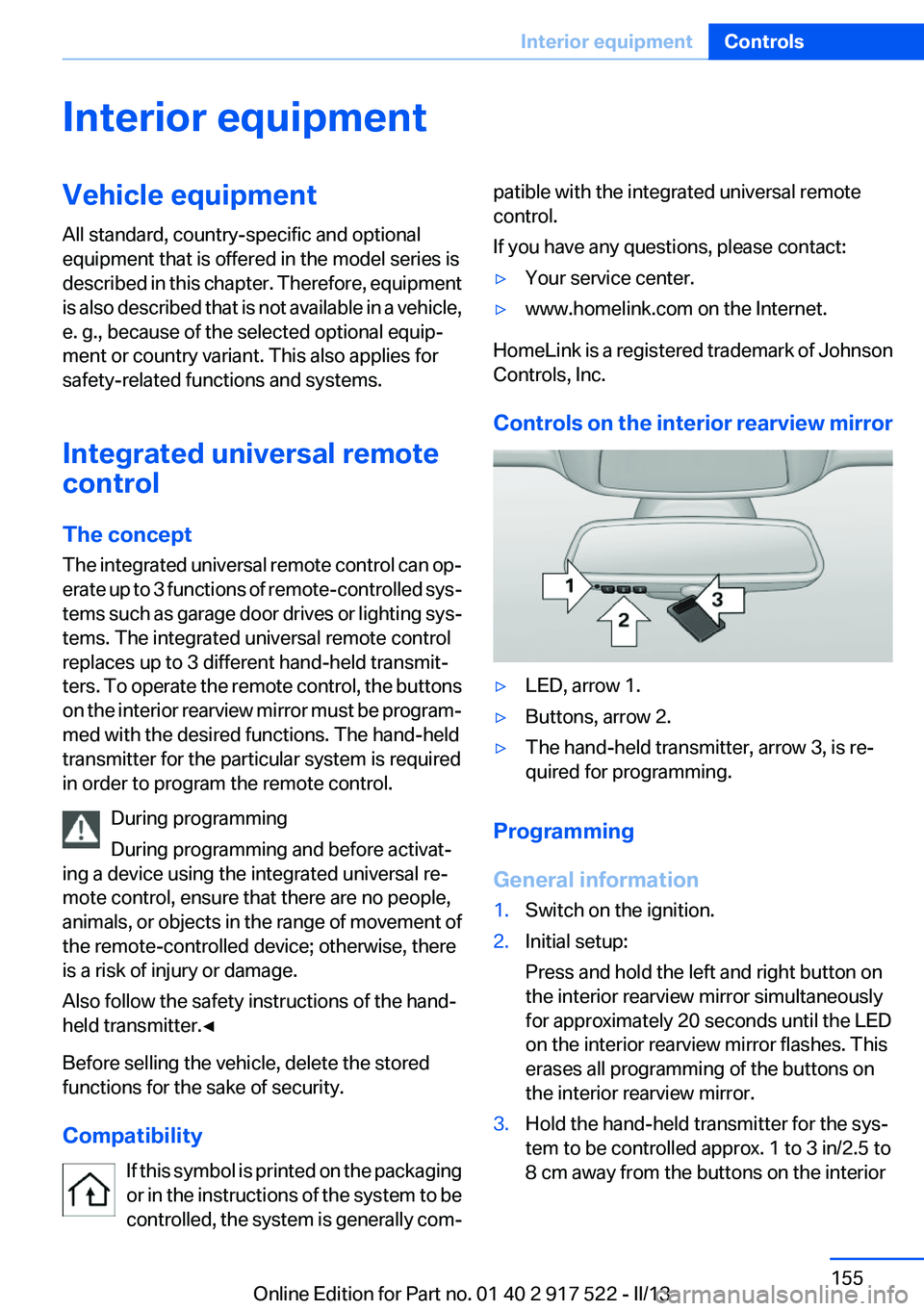
Controls on the interior rearview mirror
▷LED, arrow 1.▷Buttons, arrow 2.▷The hand-held transmitter, arrow 3, is re‐
quired for programming.
Programming
General information
1.Switch on the ignition.2.Initial setup:
Press and hold the left and right button on
the interior rearview mirror simultaneously
for approximately 20 seconds until the LED
on the interior rearview mirror flashes. This
erases all programming of the buttons on
the interior rearview mirror.3.Hold the hand-held transmitter for the sys‐
tem to be controlled approx. 1 to 3 in/2.5 to
8 cm away from the buttons on the interiorSeite 155Interior equipmentControls155
Online Edition for Part no. 01 40 2 917 522 - II/13
Page 156 of 246
rearview mirror. The required distance de‐
pends on the manual transmitter.4.Simultaneously press and hold the button of
the desired function on the hand-held trans‐
mitter and the button to be programmed on
the interior rearview mirror. The LED on the
interior rearview mirror will begin flashing
slowly.5.Release both buttons as soon as the LED
flashes more rapidly. When the LED is flash‐
ing faster, this indicates that the button on
the interior rearview mirror has been pro‐
grammed.
If the LED does not flash faster after at least
60 seconds, change the distance between
the interior rearview mirror and the hand-
held transmitter and repeat the step. Several
more attempts at different distances may be
necessary. Wait at least 15 seconds be‐
tween attempts.
Canada: if programming with the hand-held
transmitter was interrupted, hold down the
interior rearview mirror button and repeat‐
edly press and release the hand-held trans‐
mitter button for 2 seconds.6.To program other functions on other but‐
tons, repeat steps 3 to 5.
The systems can be controlled using the interior
rearview mirror buttons.
Special feature of the alternating-code
wireless system
If you are unable to operate the system after re‐
peated programming, please check if the sys‐
tem to be controlled features an alternating-
code system.
Read the system's operating manual, or press
the programmed button on the interior rearview
mirror longer. If the LED on the interior rearview
mirror starts flashing rapidly and then stays lit
constantly for 2 seconds, the system features
an alternating-code system. Flashing and con‐
tinuous illumination of the LED will repeat for
approximately 20 seconds.
For systems with an alternating-code system,
the integrated universal remote control and the
system also have to be synchronized.
Please read the operating manual of the system
being set up for information on how to syn‐
chronize the system.
Synchronizing is easier with the aid of a second
person.
To synchronize:1.Park the vehicle within range of the remote-
controlled system.2.Program the relevant button on the interior
rearview mirror as described.3.Locate and press the synchronizing button
on the system being programmed. You have
approx. 30 seconds for the next step.4.Hold down the programmed button on the
interior rearview mirror for approximately
3 seconds and then release it. If necessary,
repeat this work step up to three times in or‐
der to finish synchronization. Once synchro‐
nization is complete, the programmed func‐
tion will be carried out.
Reprogramming individual buttons
1.Switch on the ignition.2.Press and hold the interior rearview mirror
button to be programmed.3.As soon as the interior rearview mirror LED
starts flashing slowly, hold the hand-held
transmitter for the system to be controlled
approx. 1 to 3 in/2.5 to 8 cm away from the
buttons on the interior rearview mirror. The
required distance depends on the manual
transmitter.4.Likewise, press and hold the button of the
desired function on the hand-held transmit‐
ter.5.Release both buttons as soon as the interior
rearview mirror LED flashes more rapidly.
When the LED is flashing faster, this indi‐
cates that the button on the interior rearview
mirror has been programmed. The systemSeite 156ControlsInterior equipment156
Online Edition for Part no. 01 40 2 917 522 - II/13
Page 157 of 246
can then be controlled by the button on the
interior rearview mirror.
If the LED does not flash faster after at least
60 seconds, change the distance and repeat
the step. Several more attempts at different
distances may be necessary. Wait at least
15 seconds between attempts.
Canada: if programming with the hand-held
transmitter was interrupted, hold down the
interior rearview mirror button and repeat‐
edly press and release the hand-held trans‐
mitter button for 2 seconds.
Controls
Before operation
Before operating a system using the
integrated universal remote control, ensure that
there are no people, animals, or objects within
the range of movement of the remote-controlled
system; otherwise, there is a risk of injury or
damage.
Also follow the safety instructions of the hand-
held transmitter.◀
The system, such as the garage door, can be
operated using the button on the interior rear‐
view mirror while the engine is running or when
the ignition is started. To do this, hold down the
button within receiving range of the system until
the function is activated. The interior rearview
mirror LED stays lit while the wireless signal is
being transmitted.
Deleting stored functions
Press and hold the left and right button on the
interior rearview mirror simultaneously for ap‐
proximately 20 seconds until the LED flashes
rapidly. All stored functions are deleted. The
functions cannot be deleted individually.
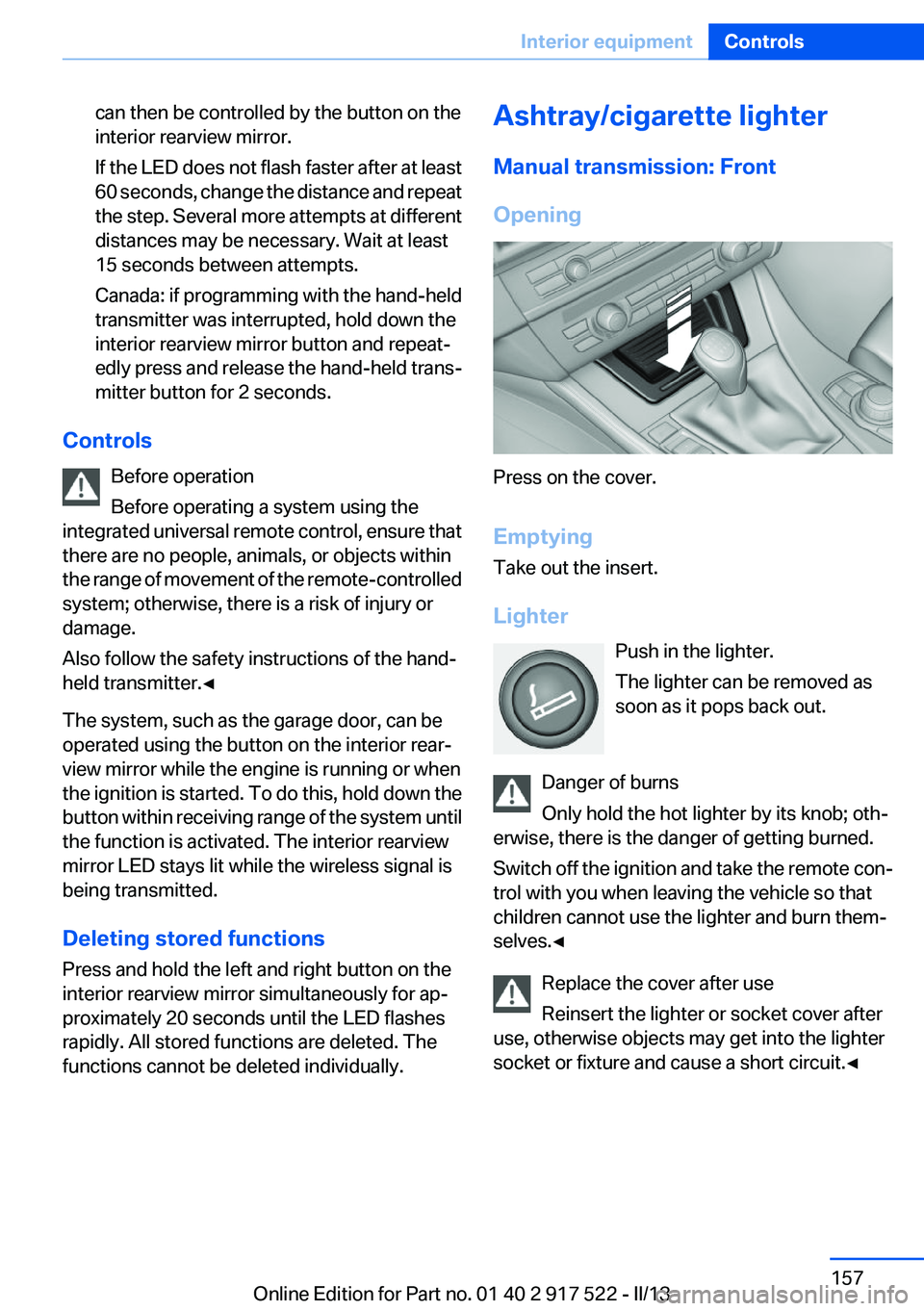
Ashtray/cigarette lighter
Manual transmission: Front
Opening
Press on the cover.
Emptying
Take out the insert.
Lighter Push in the lighter.
The lighter can be removed as
soon as it pops back out.
Danger of burns
Only hold the hot lighter by its knob; oth‐
erwise, there is the danger of getting burned.
Switch off the ignition and take the remote con‐
trol with you when leaving the vehicle so that
children cannot use the lighter and burn them‐
selves.◀
Replace the cover after use
Reinsert the lighter or socket cover after
use, otherwise objects may get into the lighter
socket or fixture and cause a short circuit.◀
Seite 157Interior equipmentControls157
Online Edition for Part no. 01 40 2 917 522 - II/13
Page 238 of 246
Corrosion on brake discs 174
Cruise control 132
Cruise control, active with Stop & Go 126
Cruising range 85
Cupholder 166
Current fuel consumption 85
D
Damage, tires 200
Damping control, dy‐ namic 122
Data, technical 232
Date 85
Daytime running lights 95
Defrosting, refer to Windows, defrosting 149
Dehumidifying, air 150
Destination distance 89
Digital clock 84
Dimensions 232
Dimmable exterior mirrors 56
Dimmable interior rearview mirror 56
Direction indicator, refer to Turn signals 69
Display, electronic, instrument cluster 77
Display in windshield 146
Display lighting, refer to Instru‐ ment lighting 98
Displays 75, 78
Displays, cleaning 229
Disposal, coolant 209
Disposal, vehicle battery 219
Distance control, refer to PDC 134
Distance, selecting for ACC 128
Distance to destination 89
Divided screen view, split screen 20
Door lock, refer to Remote control 30 Doors, Automatic Soft Clos‐
ing 37
Downhill control 121
Drive-off assistant 119
Drive-off assistant, refer to DSC 119
Driving 0
Driving Dynamics Control 123
Driving instructions, breaking in 172
Driving mode 123
Driving notes, general 172
Driving stability control sys‐ tems 119
Driving tips 172
DSC Dynamic Stability Con‐ trol 119
DTC driving dynamics 120
DTC Dynamic Traction Con‐ trol 120
Dynamic Damping Con‐ trol 122
Dynamic Drive 122
Dynamic Stability Control DSC 119
Dynamic Traction Control DTC 120
E
ECO PRO 179
ECO PRO, bonus range 180
ECO PRO display 179
ECO PRO driving mode 179
ECO PRO mode 179
ECO PRO Tip - driving instruc‐ tion 181
EfficientDynamics 181
Electronic displays, instru‐ ment cluster 77
Electronic Stability Program ESP, refer to DSC 119
Emergency detection, remote control 31
Emergency release, door lock 37 Emergency release, fuel filler
flap 186
Emergency Request 220
Emergency service, refer to Roadside Assistance 221
Emergency start function, en‐ gine start 31
Emergency unlocking, trunk lid 40
Energy Control 85
Energy recovery 85
Engine, automatic Start/Stop function 64
Engine, automatic switch- off 64
Engine compartment 204
Engine compartment, working in 204
Engine coolant 209
Engine oil 206
Engine oil, adding 207
Engine oil additives 207
Engine oil change 207
Engine oil filler neck 207
Engine oil temperature 84
Engine oil types, alterna‐ tive 207
Engine oil types, ap‐ proved 207
Engine start during malfunc‐ tion 31
Engine start, jump-start‐ ing 221
Engine start, refer to Starting the engine 63
Engine stop 63
Engine temperature 84
Entering a car wash 226
Equipment, interior 155
ESP Electronic Stability Pro‐ gram, refer to DSC 119
Exchanging wheels/tires 201
Exhaust system 173
Exterior mirror, automatic dim‐ ming feature 56
Exterior mirrors 55 Seite 238ReferenceEverything from A to Z238
Online Edition for Part no. 01 40 2 917 522 - II/13
Page 240 of 246
Individual settings, refer toPersonal Profile 31
Inflation pressure, tires 189
Inflation pressure warning FTM, tires 105
Info display, refer to Com‐ puter 88
Initialization, Integral Active Steering 123
Initialize, Tire Pressure Moni‐ tor TPM 103
Initializing, Flat Tire Monitor FTM 106
Instrument cluster 75
Instrument cluster, electronic displays 77
Instrument display, multifunc‐ tional 78
Instrument lighting 98
Integral Active Steering 122
Integrated key 30
Integrated universal remote control 155
Intensity, AUTO program 149
Interior equipment 155
Interior lamps 98
Interior lamps via remote con‐ trol 35
Interior motion sensor 43
Interior rearview mirror 56
Interior rearview mirror, auto‐ matic dimming feature 56
Internet page 6
Interval display, service re‐ quirements 85
J
Jacking points for the vehicle jack 218
Jack, refer to Vehicle jack 218
Joystick, automatic transmis‐ sion 73
Jump-starting 221 K
Key/remote control 30
Keyless Go, refer to Comfort Access 40
Key Memory, refer to Personal Profile 31
Kickdown, automatic trans‐ mission 72
Knee airbag 99
L
Lamp replacement 212
Lamp replacement, front 213
Lamp replacement, rear 216
Lamps 94
Lamps and bulbs 212
Lane departure warning 114
Lane margin, warning 114
Language on Control Dis‐ play 92
Lashing eyes, securing cargo 176
LATCH child restraint fixing system 59
Leather, care 227
LEDs, light-emitting di‐ odes 213
Length, vehicle 233
Letters and numbers, enter‐ ing 21
License plate lamp, bulb re‐ placement 217
Light-alloy wheels, care 228
Light control 96
Light-emitting diodes, LEDs 213
Lighter, front 157, 158
Lighter, rear 158
Lighting 94
Lighting, speaker 98
Lighting via remote control 35
Light switch 94
Load 175
Loading 175 Lock, door 36
Locking/unlocking from in‐ side 37
Locking/unlocking via door lock 36
Locking/unlocking with re‐ mote control 34
Locking, automatic 37
Locking, central 33
Locking via trunk lid 38
Lock, power window 44
Locks, doors, and win‐ dows 61
Low beams 94
Low beams, automatic, refer to High-beam Assistant 96
Lower back support 49
Luggage rack, refer to Roof- mounted luggage rack 176
Lumbar support 49
M
Maintenance 210
Maintenance require‐ ments 210
Maintenance, service require‐ ments 85
Maintenance system, BMW 210
Malfunction displays, refer to Check Control 81
Manual air distribution 149
Manual air flow 149
Manual brake, refer to Parking brake 66
Manual mode, transmis‐ sion 73
Manual operation, backup camera 137
Manual operation, door lock 37
Manual operation, exterior mir‐ rors 56
Manual operation, fuel filler flap 186 Seite 240ReferenceEverything from A to Z240
Online Edition for Part no. 01 40 2 917 522 - II/13
Page 241 of 246
Manual operation, Park Dis‐tance Control PDC 135
Manual operation, Side View 141
Manual operation, Top View 140
Manual transmission 72
Marking on approved tires 201
Marking, run-flat tires 202
Massage seat, front 49
Master key, refer to Remote control 30
Maximum cooling 149
Maximum speed, display 86
Maximum speed, winter tires 202
Measure, units of 92
Medical kit 221
Memory for seat, mirrors, steering wheel 54
Menu, EfficientDynamics 181
Menu in instrument cluster 88
Menus, operating, iDrive 16
Menus, refer to iDrive operat‐ ing concept 17
Messages, refer to Check Control 81
Microfilter 151
Minimum tread, tires 200
Mirror 55
Mirror memory 54
Mobile communication devi‐ ces in the vehicle 173
Modifications, technical, refer to Safety 7
Moisture in headlamp 213
Monitor, refer to Control Dis‐ play 16
Mounting of child restraint fix‐ ing systems 58
Multifunctional instrument display 78
Multifunction steering wheel, buttons 12 N
Navigation, see user's manual for Navigation, Entertain‐
ment and Communication
Neck restraints, front, refer to Head restraints 52
Neck restraints, rear, refer to Head restraints 53
New wheels and tires 201
Night Vision with pedestrian detection 111
No Passing Information 86
Nylon rope for tow-starting/ towing 224
O
OBD Onboard Diagnos‐ tics 211
Obstacle marking, backup camera 138
Octane rating, refer to Gaso‐ line quality 188
Odometer 84
Office, see user's manual for Navigation, Entertainment
and Communication
Oil 206
Oil, adding 207
Oil additives 207
Oil change 207
Oil change interval, service re‐ quirements 85
Oil filler neck 207
Oil types, alternative 207
Oil types, approved 207
Old batteries, disposal 219
Onboard Diagnostics OBD 211
Onboard monitor, refer to Control Display 16
Onboard vehicle tool kit 212
Opening/closing from in‐ side 37 Opening/closing via door
lock 36
Opening/closing with remote control 34
Opening the trunk lid with no- touch activation 41
Operating concept, iDrive 16
Optional equipment, standard equipment 6
Outside air, refer to Automatic recirculated-air control 150
Overheating of engine, refer to Coolant temperature 84
Overtaking prohibitions 86
P
Paint, vehicle 227
Parallel parking assistant 142
Park Distance Control PDC 134
Parked-car ventilation 153
Parked vehicle, condensa‐ tion 174
Parking aid, refer to PDC 134
Parking assistant 142
Parking brake 66
Parking lamps 94
Parking with Auto Hold 67
Passenger side mirror, tilting downward 56
Pathway lines, backup cam‐ era 138
PDC Park Distance Con‐ trol 134
Pedestrian detection, refer to Night Vision 111
People detection, refer to Night Vision 111
Personal Profile 31
Pinch protection system, glass sunroof 46
Pinch protection system, win‐ dows 44
Plastic, care 228
Power failure 219 Seite 241Everything from A to ZReference241
Online Edition for Part no. 01 40 2 917 522 - II/13
Page 242 of 246
Power sunroof, glass 45
Power windows 43
Pressure, tire air pres‐ sure 189
Pressure warning FTM, tires 105
Profile, refer to Personal Pro‐ file 31
Programmable memory but‐ tons, iDrive 20
Protective function, glass sun‐ roof 46
Protective function, win‐ dows 44
Push-and-turn switch, refer to Controller 16
R
Radiator fluid 209
Radio-operated key, refer to Remote control 30
Radio ready state 63
Radio, see user's manual for Navigation, Entertainment
and Communication
Rain sensor 70
Rear automatic climate con‐ trol 152
Rear axle steering 122
Rear lamps 216
Rear socket 159
Rearview mirror 55
Rear window defroster 150
Recirculated-air mode 150
Recommended tire brands 201
Refueling 186
Remaining range 85
Remote control/key 30
Remote control, malfunc‐ tion 36
Remote control, universal 155
Replacement fuse 219
Replacing parts 212
Replacing wheels/tires 201 Reporting safety defects 9
RES button 128
Reserve warning, refer to Range 85
Reset, Tire Pressure Monitor TPM 103
Residual heat, automatic cli‐ mate control 150
Retaining straps, securing cargo 176
Retreaded tires 201
Reversing lamp, bulb replace‐ ment 217
Roadside parking lamps 95
Roller sunblinds 44
Roll stabilization, refer to Adaptive Drive 122
Roll stabilization, refer to Dy‐ namic Drive 122
RON gasoline quality 188
Roof load capacity 233
Roof-mounted luggage rack 176
Rope for tow-starting/tow‐ ing 224
RSC Run Flat System Compo‐ nent, refer to Run-flat
tires 202
Rubber components, care 228
Run-flat tires 202
S
Safe braking 173
Safety 7
Safety belt reminder for driv‐ er's seat and front passenger
seat 52
Safety belts 51
Safety belts, care 228
Safety Package, refer to Active Protection 117
Safety switch, windows 44
Safety systems, airbags 99
Saving fuel 178 Screen, refer to Control Dis‐
play 16
Screwdriver 212
Screw thread for tow fit‐ ting 224
Seat belts, refer to Safety belts 51
Seat heating, front 50
Seat heating, rear 50
Seating position for chil‐ dren 58
Seat, mirror, and steering wheel memory 54
Seats 47
Seat ventilation, front 50
Selection list in instrument cluster 88
Selector lever, automatic transmission 73
Sensors, care 229
Service and warranty 7
Service requirements, Condi‐ tion Based Service CBS 210
Service requirements, dis‐ play 85
Service, Roadside Assis‐ tance 221
Settings on Control Dis‐ play 91
Settings, storing for seat, mir‐ rors, steering wheel 54
Shifting, automatic transmis‐ sion 72
Shifting, manual transmis‐ sion 72
Shift paddles on steering wheel 74
Shoulder support 49
Side airbags 99
Side View 141
Signaling, horn 12
Signals when unlocking 35
Sitting safely 47
Size 232
Ski bag 162
Slide/tilt glass roof 45 Seite 242ReferenceEverything from A to Z242
Online Edition for Part no. 01 40 2 917 522 - II/13