lighting BMW 535I 2013 Owners Manual
[x] Cancel search | Manufacturer: BMW, Model Year: 2013, Model line: 535I, Model: BMW 535I 2013Pages: 246, PDF Size: 5.39 MB
Page 13 of 246
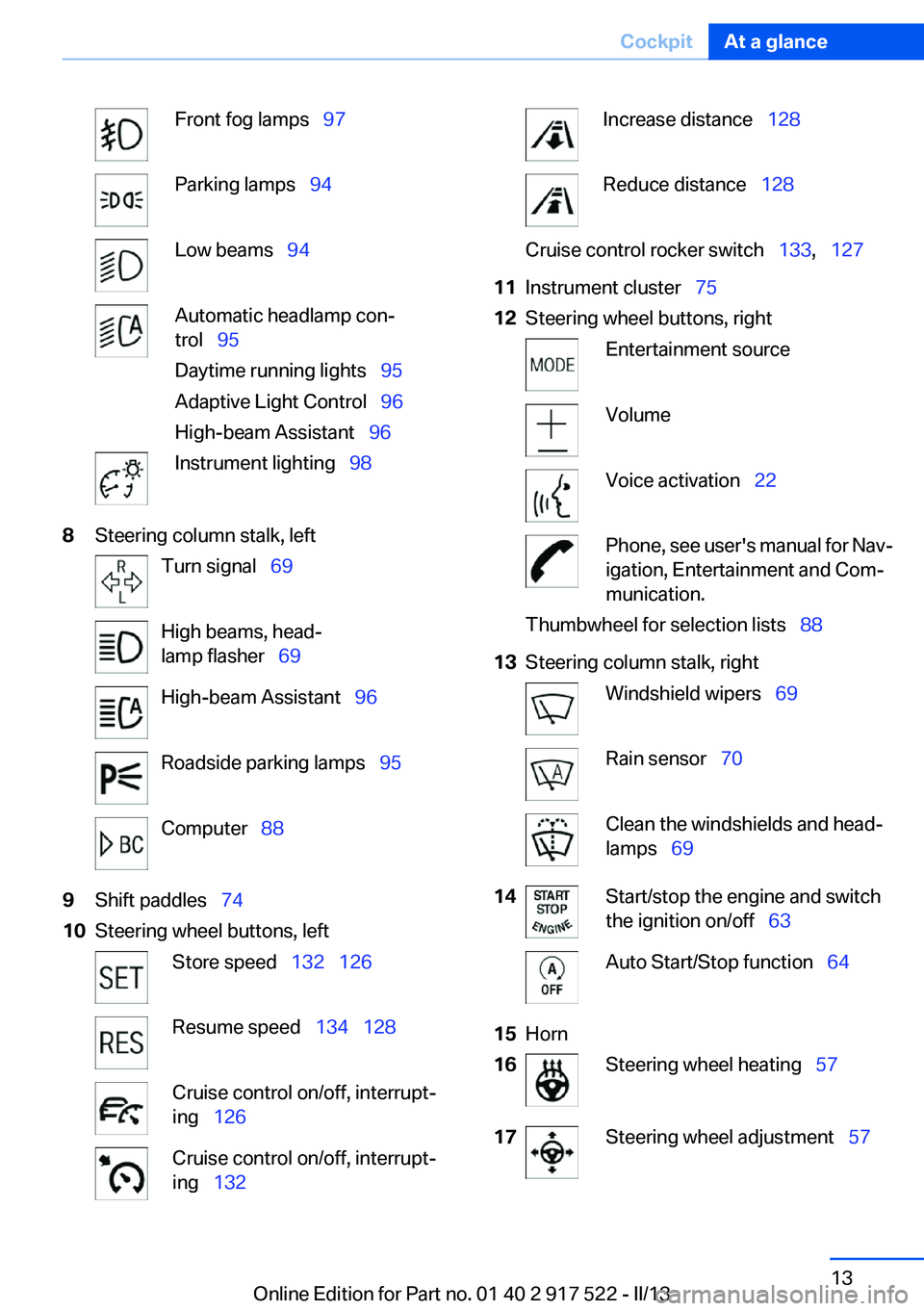
Front fog lamps 97Parking lamps 94Low beams 94Automatic headlamp con‐
trol 95
Daytime running lights 95
Adaptive Light Control 96
High-beam Assistant 96Instrument lighting 988Steering column stalk, leftTurn signal 69High beams, head‐
lamp flasher 69High-beam Assistant 96Roadside parking lamps 95Computer 889Shift paddles 7410Steering wheel buttons, leftStore speed 132 126Resume speed 134 128Cruise control on/off, interrupt‐
ing 126Cruise control on/off, interrupt‐
ing 132Increase distance 128Reduce distance 128Cruise control rocker switch 133, 12711Instrument cluster 7512Steering wheel buttons, rightEntertainment sourceVolumeVoice activation 22Phone, see user's manual for Nav‐
igation, Entertainment and Com‐
munication.Thumbwheel for selection lists 8813Steering column stalk, rightWindshield wipers 69Rain sensor 70Clean the windshields and head‐
lamps 6914Start/stop the engine and switch
the ignition on/off 63Auto Start/Stop function 6415Horn16Steering wheel heating 5717Steering wheel adjustment 57Seite 13CockpitAt a glance13
Online Edition for Part no. 01 40 2 917 522 - II/13
Page 69 of 246
Turn signal, high beams,
headlamp flasher
Turn signal
Using turn signals
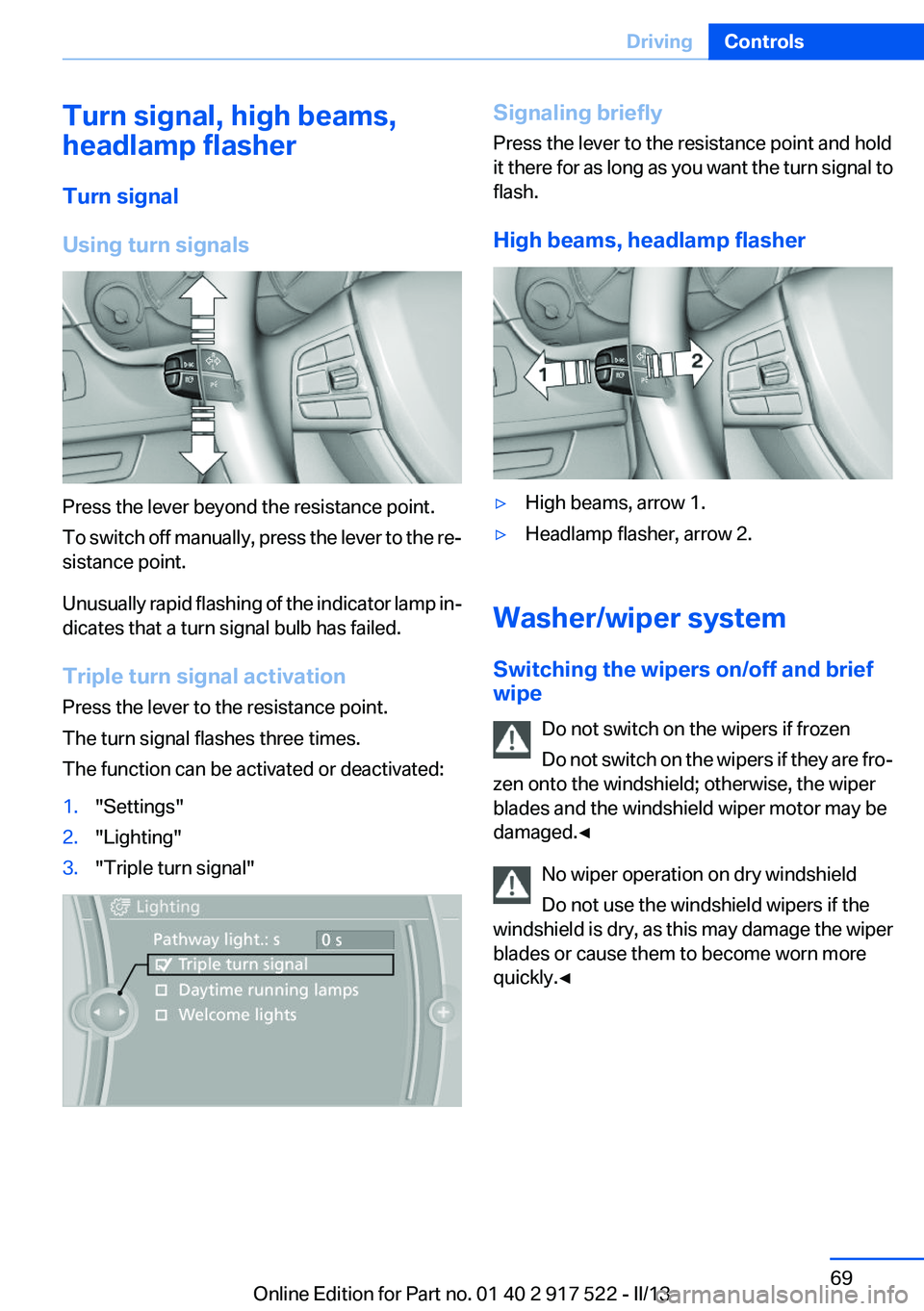
Press the lever beyond the resistance point.
To switch off manually, press the lever to the re‐
sistance point.
Unusually rapid flashing of the indicator lamp in‐
dicates that a turn signal bulb has failed.
Triple turn signal activation
Press the lever to the resistance point.
The turn signal flashes three times.
The function can be activated or deactivated:
1."Settings"2."Lighting"3."Triple turn signal"Signaling briefly
Press the lever to the resistance point and hold
it there for as long as you want the turn signal to
flash.
High beams, headlamp flasher▷High beams, arrow 1.▷Headlamp flasher, arrow 2.
Washer/wiper system
Switching the wipers on/off and brief
wipe
Do not switch on the wipers if frozen
Do not switch on the wipers if they are fro‐
zen onto the windshield; otherwise, the wiper
blades and the windshield wiper motor may be
damaged.◀
No wiper operation on dry windshield
Do not use the windshield wipers if the
windshield is dry, as this may damage the wiper
blades or cause them to become worn more
quickly.◀
Seite 69DrivingControls69
Online Edition for Part no. 01 40 2 917 522 - II/13
Page 94 of 246
LampsVehicle equipment
All standard, country-specific and optional
equipment that is offered in the model series is
described in this chapter. Therefore, equipment
is also described that is not available in a vehicle,
e. g., because of the selected optional equip‐
ment or country variant. This also applies for
safety-related functions and systems.
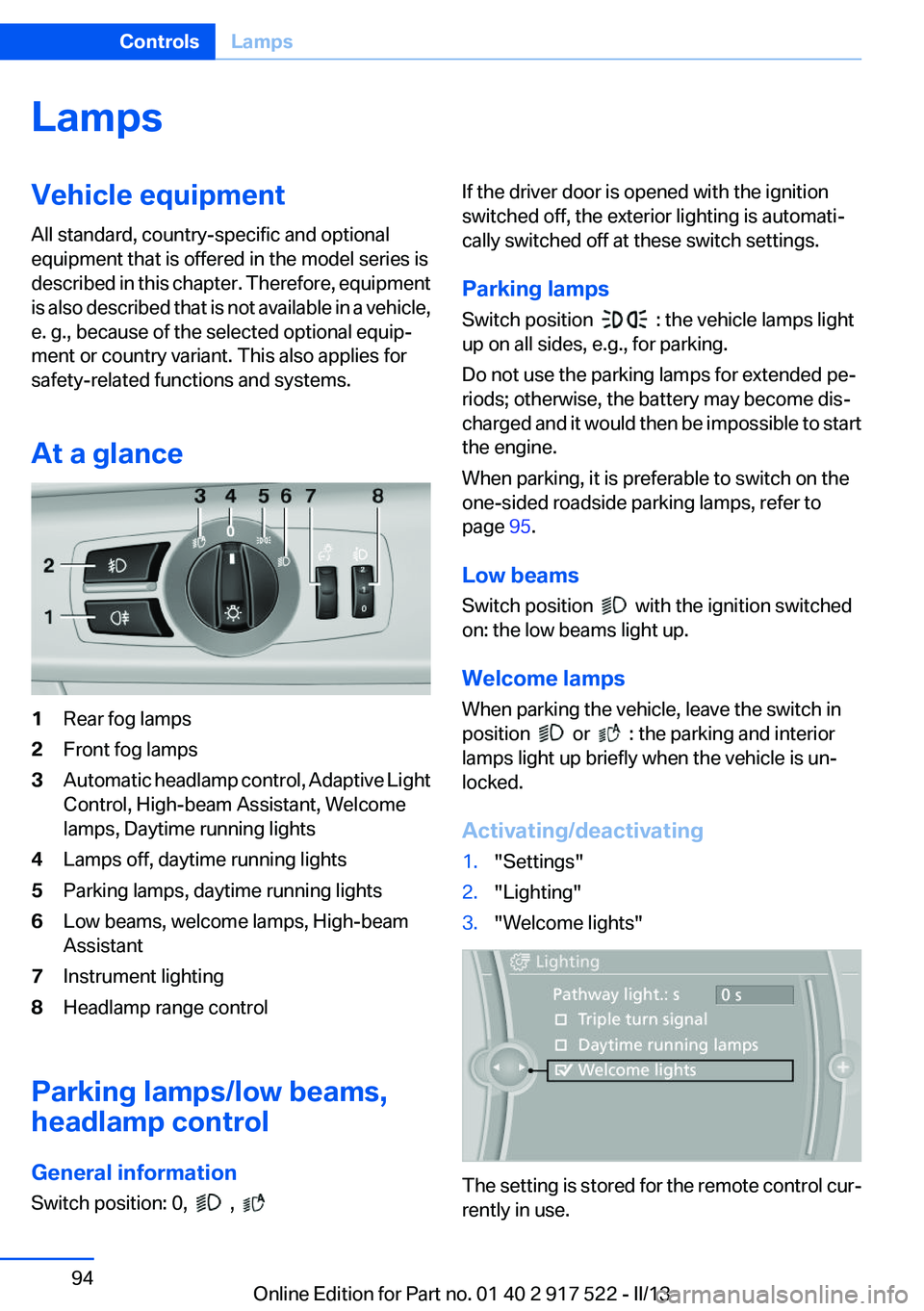
At a glance1Rear fog lamps2Front fog lamps3Automatic headlamp control, Adaptive Light
Control, High-beam Assistant, Welcome
lamps, Daytime running lights4Lamps off, daytime running lights5Parking lamps, daytime running lights6Low beams, welcome lamps, High-beam
Assistant7Instrument lighting8Headlamp range control
Parking lamps/low beams,
headlamp control
General information
Switch position: 0,
,
If the driver door is opened with the ignition
switched off, the exterior lighting is automati‐
cally switched off at these switch settings.
Parking lamps
Switch position
: the vehicle lamps light
up on all sides, e.g., for parking.
Do not use the parking lamps for extended pe‐
riods; otherwise, the battery may become dis‐
charged and it would then be impossible to start
the engine.
When parking, it is preferable to switch on the
one-sided roadside parking lamps, refer to
page 95.
Low beams
Switch position
with the ignition switched
on: the low beams light up.
Welcome lamps
When parking the vehicle, leave the switch in
position
or : the parking and interior
lamps light up briefly when the vehicle is un‐
locked.
Activating/deactivating
1."Settings"2."Lighting"3."Welcome lights"
The setting is stored for the remote control cur‐
rently in use.
Seite 94ControlsLamps94
Online Edition for Part no. 01 40 2 917 522 - II/13
Page 95 of 246
Headlamp courtesy delay feature
The low beams stay lit for a short while after the
ignition is switched off, if the lamps are switched
off and the headlamp flasher is switched on.
Setting the duration1."Settings"2."Lighting"3."Pathway light.: s"4.Set the duration.
The setting is stored for the remote control cur‐
rently in use.
Automatic headlamp control
Switch position
: the low beams are switched
on and off automatically, e.g., in tunnels, in twi‐
light or if there is precipitation. The indicator
lamp in the instrument cluster lights up.
A blue sky with the sun low on the horizon can
cause the lights to be switched on.
The low beams always stay on when the fog
lamps are switched on.
Personal responsibility
The automatic headlamp control cannot
serve as a substitute for your personal judgment
in determining when the lamps should be
switched on in response to ambient lighting
conditions.
For example, the sensors are unable to detect
fog or hazy weather. To avoid safety risks, you
should always switch on the lamps manually un‐
der these conditions.◀
Daytime running lights
With the ignition switched on, the daytime run‐
ning lights light up in position 0,
or .
After the ignition is switched off, the parking
lamps light up in position
.
Activating/deactivating
In some countries, daytime running lights are
compulsory, so it may not be possible to deac‐
tivate the daytime running lights.
1."Settings"2."Lighting"3."Daytime running lamps"
The setting is stored for the remote control cur‐
rently in use.
Roadside parking lamps
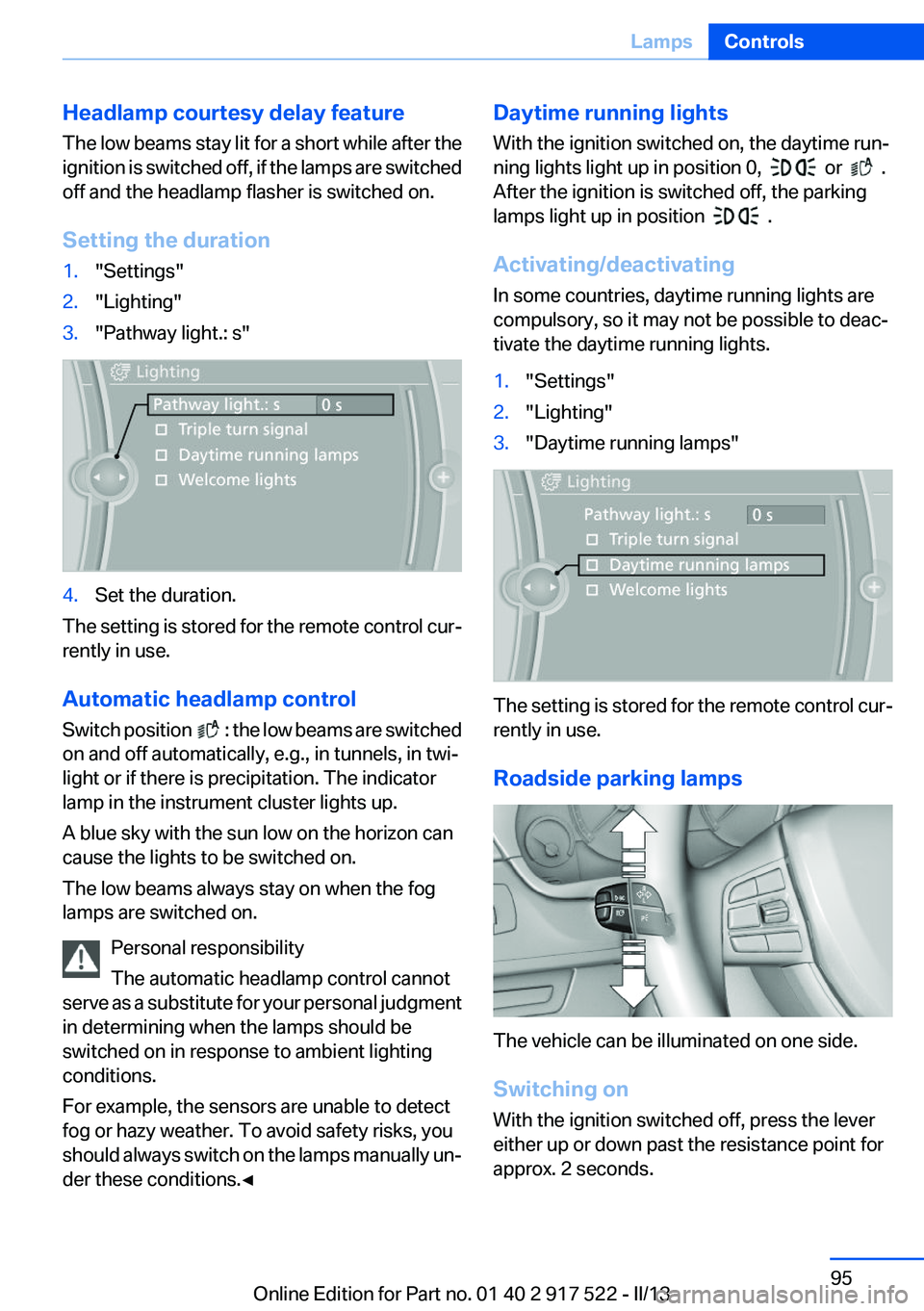
The vehicle can be illuminated on one side.
Switching on
With the ignition switched off, press the lever
either up or down past the resistance point for
approx. 2 seconds.
Seite 95LampsControls95
Online Edition for Part no. 01 40 2 917 522 - II/13
Page 98 of 246
on automatically when you switch on the front
fog lamps.
Instrument lighting
Adjusting The parking lamps or low beams
must be switched on to adjust the
brightness.
Adjust the brightness using the
thumbwheel.
Interior lamps
General information
The interior lamps, footwell lamps, entry lamps
and courtesy lamps are controlled automati‐
cally.
The brightness of some of these lamps is influ‐
enced by the thumbwheel for the instrument
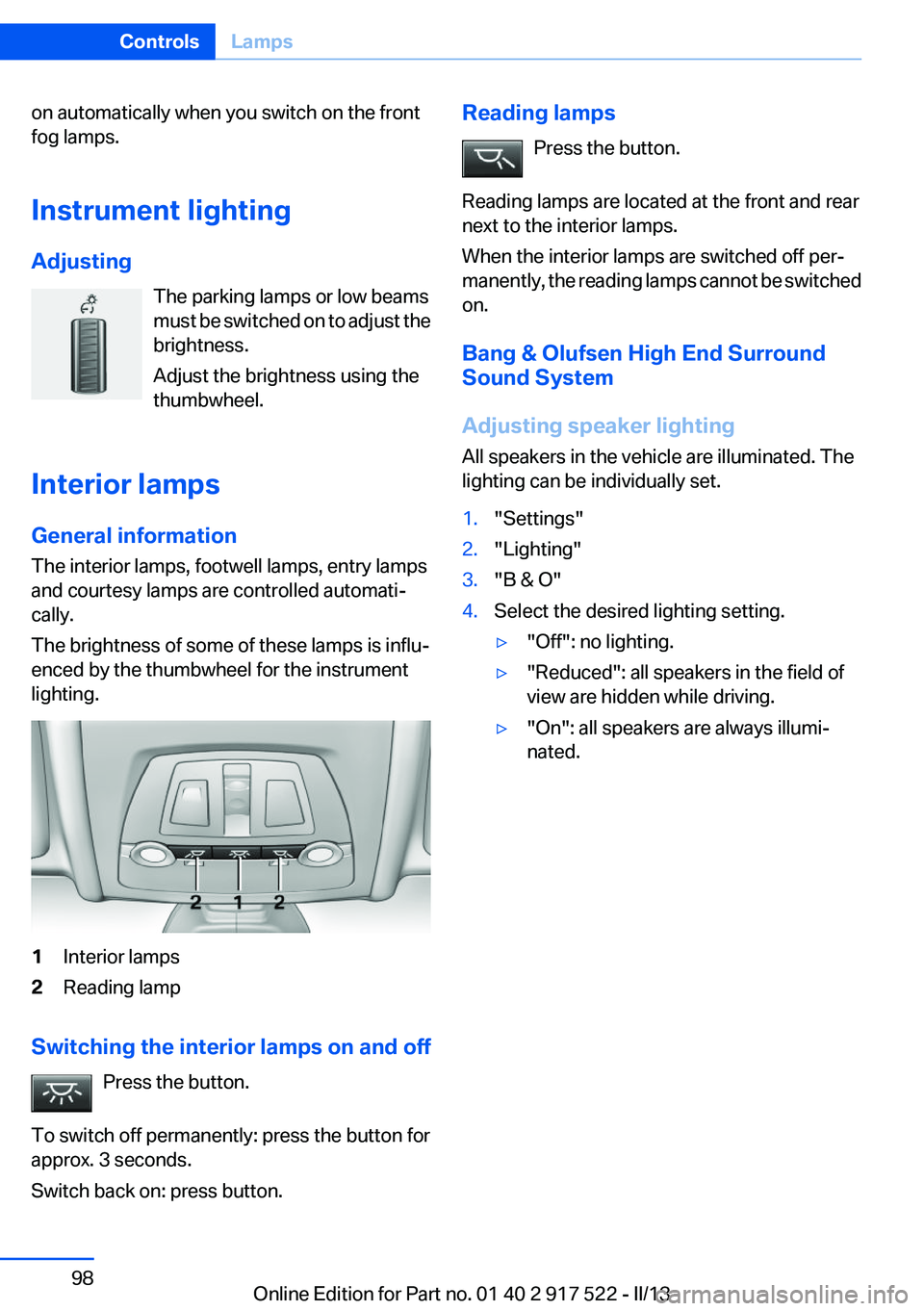
lighting.1Interior lamps2Reading lamp
Switching the interior lamps on and off
Press the button.
To switch off permanently: press the button for
approx. 3 seconds.
Switch back on: press button.
Reading lamps
Press the button.
Reading lamps are located at the front and rear
next to the interior lamps.
When the interior lamps are switched off per‐
manently, the reading lamps cannot be switched
on.
Bang & Olufsen High End Surround
Sound System
Adjusting speaker lighting
All speakers in the vehicle are illuminated. The
lighting can be individually set.1."Settings"2."Lighting"3."B & O"4.Select the desired lighting setting.▷"Off": no lighting.▷"Reduced": all speakers in the field of
view are hidden while driving.▷"On": all speakers are always illumi‐
nated.Seite 98ControlsLamps98
Online Edition for Part no. 01 40 2 917 522 - II/13
Page 147 of 246
Selecting displays in the Head-up
Display1."Settings"2."Head-Up Display"3."Displayed information"4.Select the desired displays in the Head-up
Display.
The settings are stored for the remote control
currently in use.
Setting the brightness
The brightness is automatically adjusted to the
ambient light.
The basic setting can be adjusted manually.
1."Settings"2."Head-Up Display"3."Brightness"4.Turn the controller.
When the low beams are switched on, the
brightness of the Head-up Display can be addi‐
tionally influenced using the instrument lighting.
The setting is stored for the remote control cur‐
rently in use.
Adjusting the height
1."Settings"2."Head-Up Display"3."Height"4.Turn the controller.
The setting is stored for the remote control cur‐
rently in use.
Setting the rotation
1."Settings"2."Head-Up Display"3."Rotation"4.Turn the controller.
The setting is stored for the remote control cur‐
rently in use.
Special windshield
The windshield is part of the system.
The shape of the windshield makes it possible
to display a precise image.
A film in the windshield prevents double images
from being displayed.
Therefore, have the special windshield replaced
by a service center only.Seite 147Driving comfortControls147
Online Edition for Part no. 01 40 2 917 522 - II/13
Page 155 of 246
Interior equipmentVehicle equipment
All standard, country-specific and optional
equipment that is offered in the model series is
described in this chapter. Therefore, equipment
is also described that is not available in a vehicle,
e. g., because of the selected optional equip‐
ment or country variant. This also applies for
safety-related functions and systems.
Integrated universal remote
control
The concept
The integrated universal remote control can op‐
erate up to 3 functions of remote-controlled sys‐
tems such as garage door drives or lighting sys‐
tems. The integrated universal remote control
replaces up to 3 different hand-held transmit‐
ters. To operate the remote control, the buttons
on the interior rearview mirror must be program‐
med with the desired functions. The hand-held
transmitter for the particular system is required
in order to program the remote control.
During programming
During programming and before activat‐
ing a device using the integrated universal re‐
mote control, ensure that there are no people,
animals, or objects in the range of movement of
the remote-controlled device; otherwise, there
is a risk of injury or damage.
Also follow the safety instructions of the hand-
held transmitter.◀
Before selling the vehicle, delete the stored
functions for the sake of security.
Compatibility If this symbol is printed on the packaging
or in the instructions of the system to be
controlled, the system is generally com‐patible with the integrated universal remote
control.
If you have any questions, please contact:▷Your service center.▷www.homelink.com on the Internet.
HomeLink is a registered trademark of Johnson
Controls, Inc.
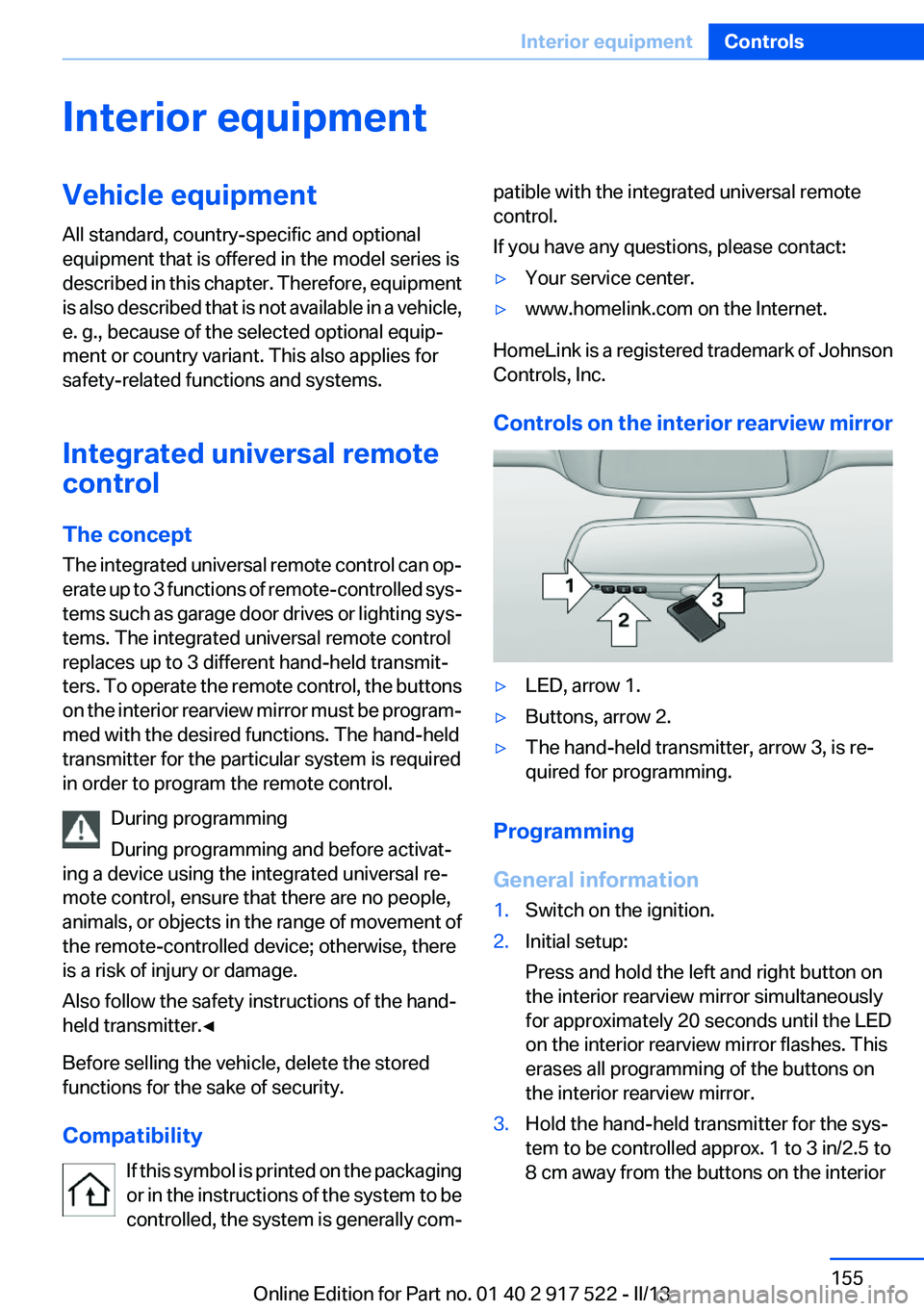
Controls on the interior rearview mirror
▷LED, arrow 1.▷Buttons, arrow 2.▷The hand-held transmitter, arrow 3, is re‐
quired for programming.
Programming
General information
1.Switch on the ignition.2.Initial setup:
Press and hold the left and right button on
the interior rearview mirror simultaneously
for approximately 20 seconds until the LED
on the interior rearview mirror flashes. This
erases all programming of the buttons on
the interior rearview mirror.3.Hold the hand-held transmitter for the sys‐
tem to be controlled approx. 1 to 3 in/2.5 to
8 cm away from the buttons on the interiorSeite 155Interior equipmentControls155
Online Edition for Part no. 01 40 2 917 522 - II/13
Page 213 of 246
the service center if you are unfamiliar with them
or they are not described here.
You can obtain a selection of replacement bulbs
at the service center.
Danger of burns
Only change bulbs when they are cool;
otherwise, there is the danger of getting
burned.◀
Working on the lighting system
When working on the lighting system, you
should always switch off the lights affected to
prevent short circuits.
To avoid possible injury or equipment damage
when replacing bulbs, observe any instructions
provided by the bulb manufacturer.◀
Do not perform work/bulb replacement on
xenon headlamps
Have any work on the xenon lighting system, in‐
cluding bulb replacement, performed only by a
service center. Due to the high voltage present
in the system, there is the danger of fatal injuries
if work is carried out improperly.◀
Do not touch the bulbs
Do not touch the glass of new bulbs with
your bare hands, as even minute amounts of
contamination will burn into the bulb's surface
and reduce its service life.
Use a clean tissue, cloth or something similar, or
hold the bulb by its base.◀
Light-emitting diodes (LEDs)
Light-emitting diodes installed behind a cover
serve as the light source for controls, display el‐
ements and other equipment.
These light-emitting diodes, which are related
to conventional lasers, are officially designated
as Class 1 light-emitting diodes.Do not remove the covers
Do not remove the covers, and never stare
into the unfiltered light for several hours; other‐
wise, irritation of the retina could result.◀
Headlamp glass
Condensation can form on the inside of the ex‐
ternal lamps in cool or humid weather. When
driving with the light switched on, the conden‐
sation evaporates after a short time. The head‐
lamp glasses do not need to be changed.
If the headlamps do not dim despite driving with
the light switched on, increasing humidity forms,
e. g. water droplets in the light, have the service
center check this.
Front lamps, bulb replacement
At a glance
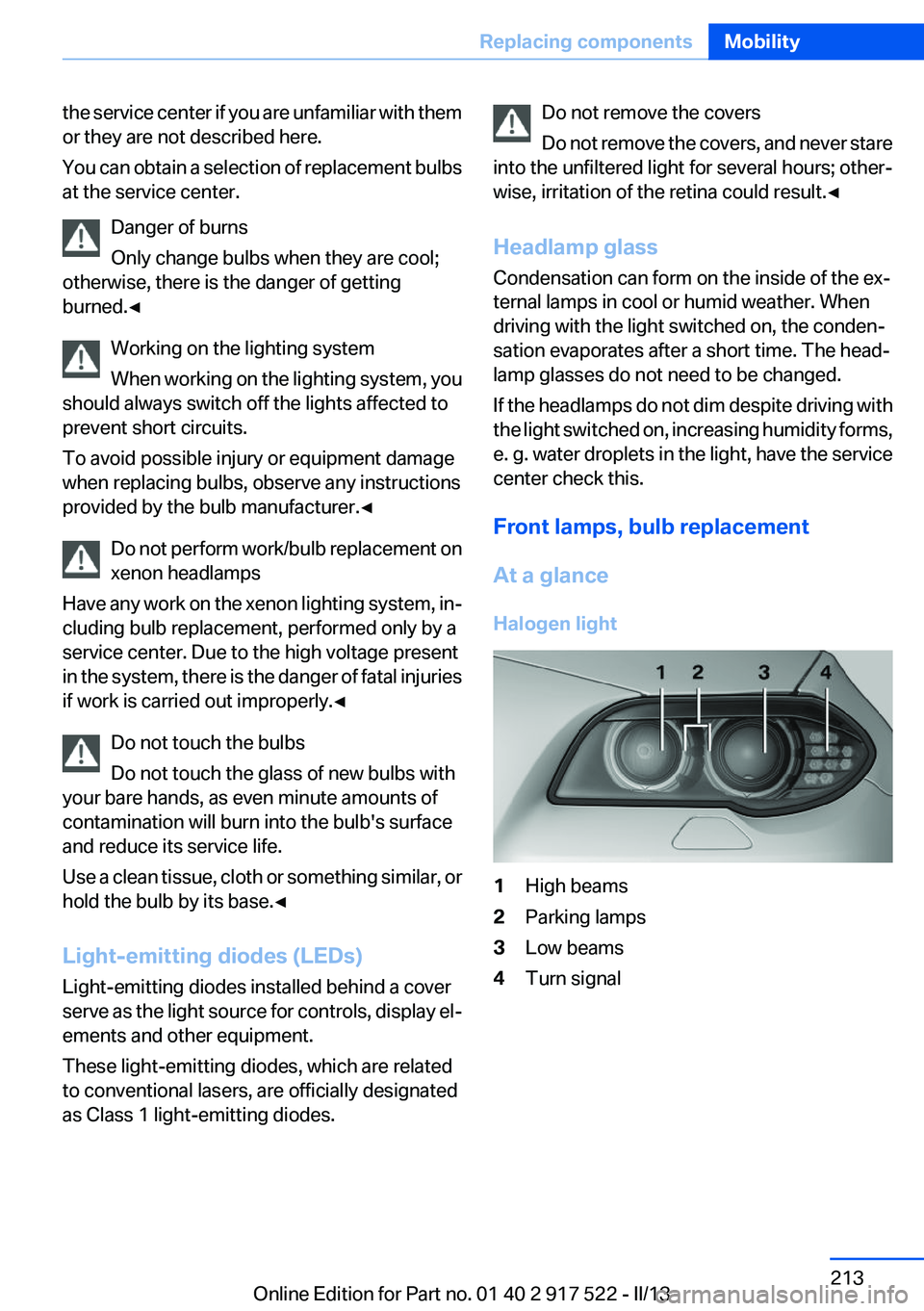
Halogen light1High beams2Parking lamps3Low beams4Turn signalSeite 213Replacing componentsMobility213
Online Edition for Part no. 01 40 2 917 522 - II/13
Page 215 of 246
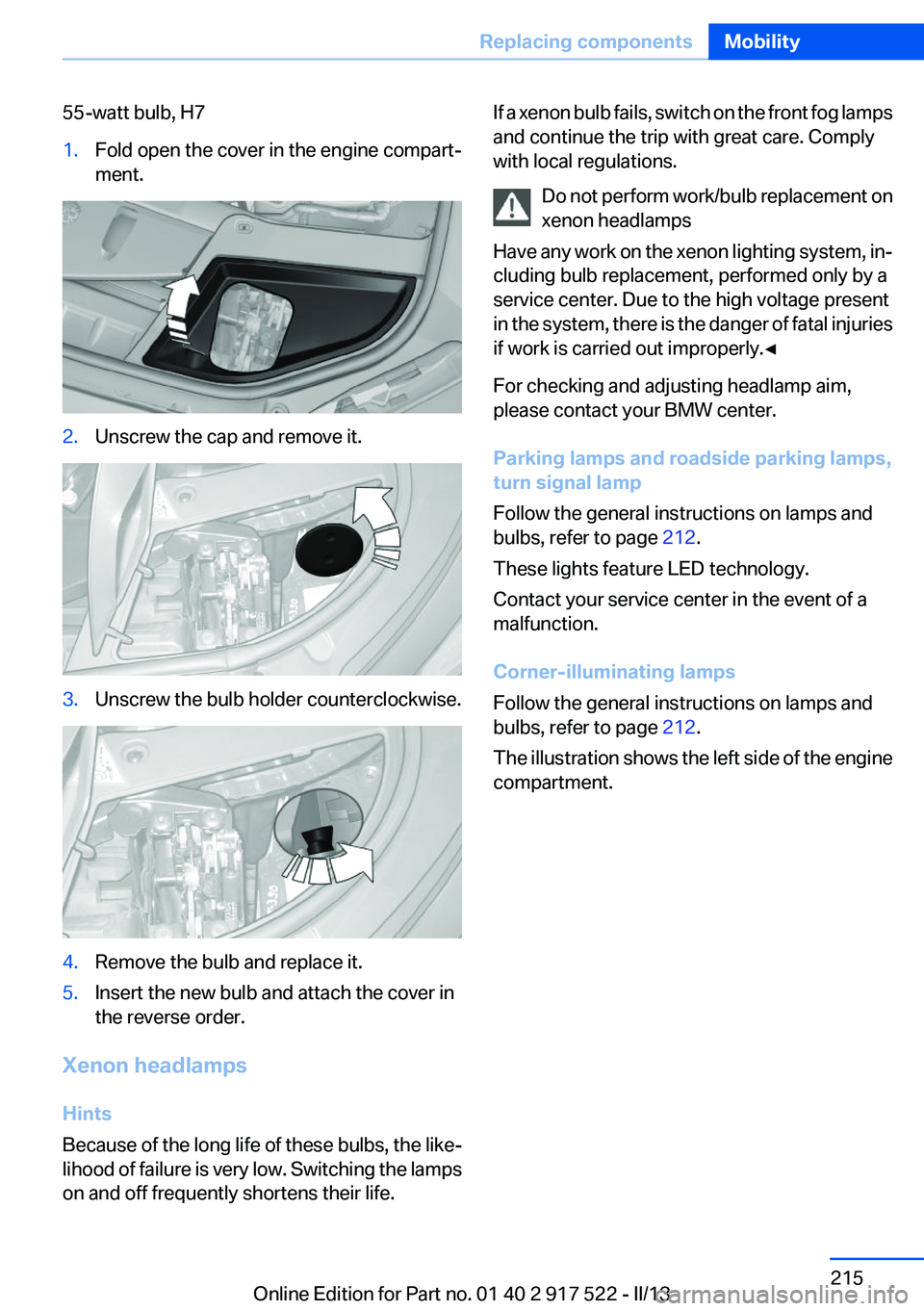
55-watt bulb, H71.Fold open the cover in the engine compart‐
ment.2.Unscrew the cap and remove it.3.Unscrew the bulb holder counterclockwise.4.Remove the bulb and replace it.5.Insert the new bulb and attach the cover in
the reverse order.
Xenon headlamps
Hints
Because of the long life of these bulbs, the like‐
lihood of failure is very low. Switching the lamps
on and off frequently shortens their life.
If a xenon bulb fails, switch on the front fog lamps
and continue the trip with great care. Comply
with local regulations.
Do not perform work/bulb replacement on
xenon headlamps
Have any work on the xenon lighting system, in‐
cluding bulb replacement, performed only by a
service center. Due to the high voltage present
in the system, there is the danger of fatal injuries
if work is carried out improperly.◀
For checking and adjusting headlamp aim,
please contact your BMW center.
Parking lamps and roadside parking lamps,
turn signal lamp
Follow the general instructions on lamps and
bulbs, refer to page 212.
These lights feature LED technology.
Contact your service center in the event of a
malfunction.
Corner-illuminating lamps
Follow the general instructions on lamps and
bulbs, refer to page 212.
The illustration shows the left side of the engine
compartment.Seite 215Replacing componentsMobility215
Online Edition for Part no. 01 40 2 917 522 - II/13
Page 238 of 246
Corrosion on brake discs 174
Cruise control 132
Cruise control, active with Stop & Go 126
Cruising range 85
Cupholder 166
Current fuel consumption 85
D
Damage, tires 200
Damping control, dy‐ namic 122
Data, technical 232
Date 85
Daytime running lights 95
Defrosting, refer to Windows, defrosting 149
Dehumidifying, air 150
Destination distance 89
Digital clock 84
Dimensions 232
Dimmable exterior mirrors 56
Dimmable interior rearview mirror 56
Direction indicator, refer to Turn signals 69
Display, electronic, instrument cluster 77
Display in windshield 146
Display lighting, refer to Instru‐ ment lighting 98
Displays 75, 78
Displays, cleaning 229
Disposal, coolant 209
Disposal, vehicle battery 219
Distance control, refer to PDC 134
Distance, selecting for ACC 128
Distance to destination 89
Divided screen view, split screen 20
Door lock, refer to Remote control 30 Doors, Automatic Soft Clos‐
ing 37
Downhill control 121
Drive-off assistant 119
Drive-off assistant, refer to DSC 119
Driving 0
Driving Dynamics Control 123
Driving instructions, breaking in 172
Driving mode 123
Driving notes, general 172
Driving stability control sys‐ tems 119
Driving tips 172
DSC Dynamic Stability Con‐ trol 119
DTC driving dynamics 120
DTC Dynamic Traction Con‐ trol 120
Dynamic Damping Con‐ trol 122
Dynamic Drive 122
Dynamic Stability Control DSC 119
Dynamic Traction Control DTC 120
E
ECO PRO 179
ECO PRO, bonus range 180
ECO PRO display 179
ECO PRO driving mode 179
ECO PRO mode 179
ECO PRO Tip - driving instruc‐ tion 181
EfficientDynamics 181
Electronic displays, instru‐ ment cluster 77
Electronic Stability Program ESP, refer to DSC 119
Emergency detection, remote control 31
Emergency release, door lock 37 Emergency release, fuel filler
flap 186
Emergency Request 220
Emergency service, refer to Roadside Assistance 221
Emergency start function, en‐ gine start 31
Emergency unlocking, trunk lid 40
Energy Control 85
Energy recovery 85
Engine, automatic Start/Stop function 64
Engine, automatic switch- off 64
Engine compartment 204
Engine compartment, working in 204
Engine coolant 209
Engine oil 206
Engine oil, adding 207
Engine oil additives 207
Engine oil change 207
Engine oil filler neck 207
Engine oil temperature 84
Engine oil types, alterna‐ tive 207
Engine oil types, ap‐ proved 207
Engine start during malfunc‐ tion 31
Engine start, jump-start‐ ing 221
Engine start, refer to Starting the engine 63
Engine stop 63
Engine temperature 84
Entering a car wash 226
Equipment, interior 155
ESP Electronic Stability Pro‐ gram, refer to DSC 119
Exchanging wheels/tires 201
Exhaust system 173
Exterior mirror, automatic dim‐ ming feature 56
Exterior mirrors 55 Seite 238ReferenceEverything from A to Z238
Online Edition for Part no. 01 40 2 917 522 - II/13