bulb BMW 535I GRAN TURISMO 2014 Owners Manual
[x] Cancel search | Manufacturer: BMW, Model Year: 2014, Model line: 535I GRAN TURISMO, Model: BMW 535I GRAN TURISMO 2014Pages: 251, PDF Size: 7.64 MB
Page 75 of 251
To switch off manually, press the lever to the
resistance point.
Unusually rapid flashing of the indicator lamp
indicates that a turn signal bulb has failed.
Triple turn signal activation Press the lever to the resistance point.
The turn signal flashes three times.
The function can be activated or deactivated:1."Settings"2."Lighting"3."Triple turn signal"
Signaling briefly
Press the lever to the resistance point and hold
it there for as long as you want the turn signal
to flash.
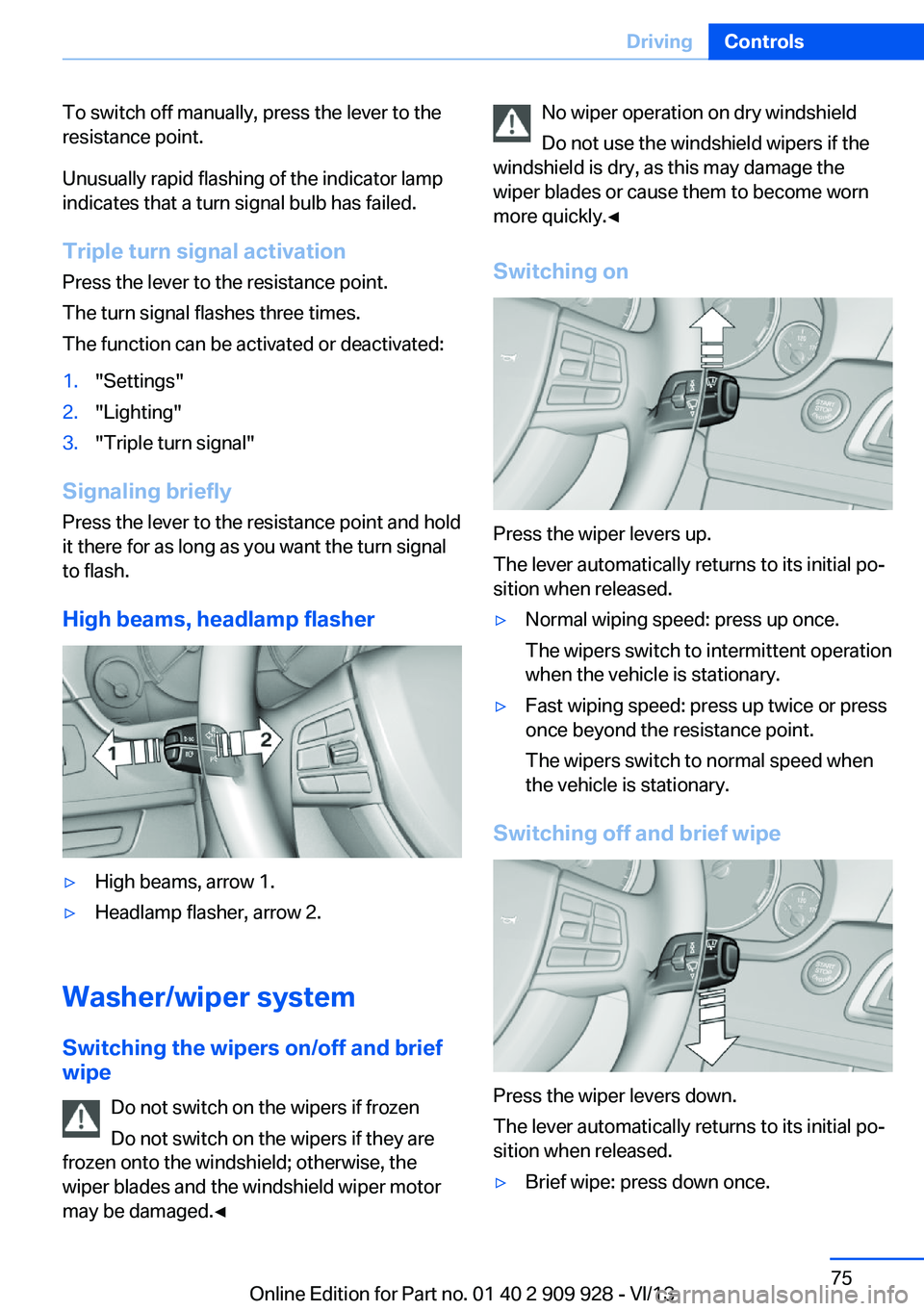
High beams, headlamp flasher
▷High beams, arrow 1.▷Headlamp flasher, arrow 2.
Washer/wiper system Switching the wipers on/off and brief
wipe
Do not switch on the wipers if frozen
Do not switch on the wipers if they are
frozen onto the windshield; otherwise, the wiper blades and the windshield wiper motor
may be damaged.◀
No wiper operation on dry windshield
Do not use the windshield wipers if the
windshield is dry, as this may damage the
wiper blades or cause them to become worn
more quickly.◀
Switching on
Press the wiper levers up.
The lever automatically returns to its initial po‐
sition when released.
▷Normal wiping speed: press up once.
The wipers switch to intermittent operation
when the vehicle is stationary.▷Fast wiping speed: press up twice or press
once beyond the resistance point.
The wipers switch to normal speed when
the vehicle is stationary.
Switching off and brief wipe
Press the wiper levers down.
The lever automatically returns to its initial po‐
sition when released.
▷Brief wipe: press down once.Seite 75DrivingControls75
Online Edition for Part no. 01 40 2 909 928 - VI/13
Page 218 of 251
Replacing componentsVehicle equipmentAll standard, country-specific and optional
equipment that is offered in the model series is
described in this chapter. Therefore, equip‐
ment is also described that is not available in a
vehicle, e. g., because of the selected optional
equipment or country variant. This also applies
for safety-related functions and systems.
Onboard vehicle tool kit
The onboard vehicle tool kit is located in the
rear compartment in the cargo area, refer to
page 180.
Wiper blade replacement General information Do not fold down the wipers without
wiper blades
Do not fold down the wipers if wiper blades
have not been installed; this may damage the
windshield.◀
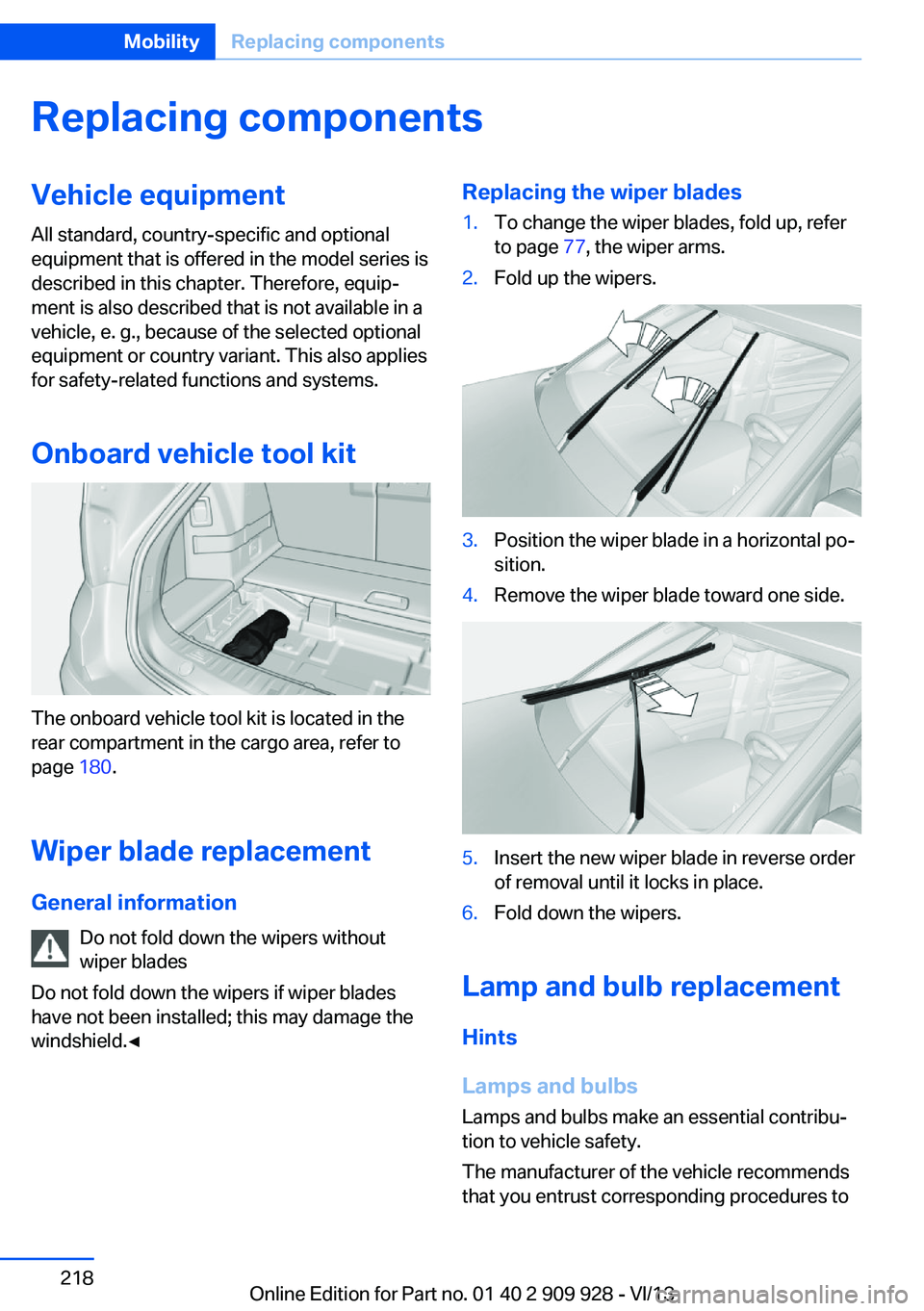
Replacing the wiper blades1.To change the wiper blades, fold up, refer
to page 77, the wiper arms.2.Fold up the wipers.3.Position the wiper blade in a horizontal po‐
sition.4.Remove the wiper blade toward one side.5.Insert the new wiper blade in reverse order
of removal until it locks in place.6.Fold down the wipers.
Lamp and bulb replacement
Hints
Lamps and bulbs
Lamps and bulbs make an essential contribu‐
tion to vehicle safety.
The manufacturer of the vehicle recommends
that you entrust corresponding procedures to
Seite 218MobilityReplacing components218
Online Edition for Part no. 01 40 2 909 928 - VI/13
Page 219 of 251
the service center if you are unfamiliar with
them or they are not described here.
You can obtain a selection of replacement
bulbs at the service center.
Danger of burns
Only change bulbs when they are cool;
otherwise, there is the danger of getting
burned.◀
Working on the lighting system
When working on the lighting system,
you should always switch off the lights af‐
fected to prevent short circuits.
To avoid possible injury or equipment damage
when replacing bulbs, observe any instructions
provided by the bulb manufacturer.◀
Do not perform work/bulb replacement
on xenon headlamps
Have any work on the xenon lighting system,
including bulb replacement, performed only by
a service center. Due to the high voltage
present in the system, there is the danger of
fatal injuries if work is carried out improperly.◀
Do not touch the bulbs
Do not touch the glass of new bulbs with
your bare hands, as even minute amounts of
contamination will burn into the bulb's surface
and reduce its service life.
Use a clean tissue, cloth or something similar,
or hold the bulb by its base.◀
Light-emitting diodes (LEDs)
Light-emitting diodes installed behind a cover
serve as the light source for controls, display
elements and other equipment.
These light-emitting diodes, which are related
to conventional lasers, are officially designated as Class 1 light-emitting diodes.Do not remove the covers
Do not remove the covers, and never
stare into the unfiltered light for several hours;
otherwise, irritation of the retina could result.◀
Headlamp glass
Condensation can form on the inside of the ex‐
ternal lamps in cool or humid weather. When
driving with the light switched on, the conden‐
sation evaporates after a short time. The head‐
lamp glasses do not need to be changed.
If the headlamps do not dim despite driving
with the light switched on, increasing humidity
forms, e. g. water droplets in the light, have the
service center check this.
Headlamp setting
The headlamp adjustments can be affected by
changing lamps and bulbs. Therefore after a
change, have the headlamp setting checked
and corrected by Service.
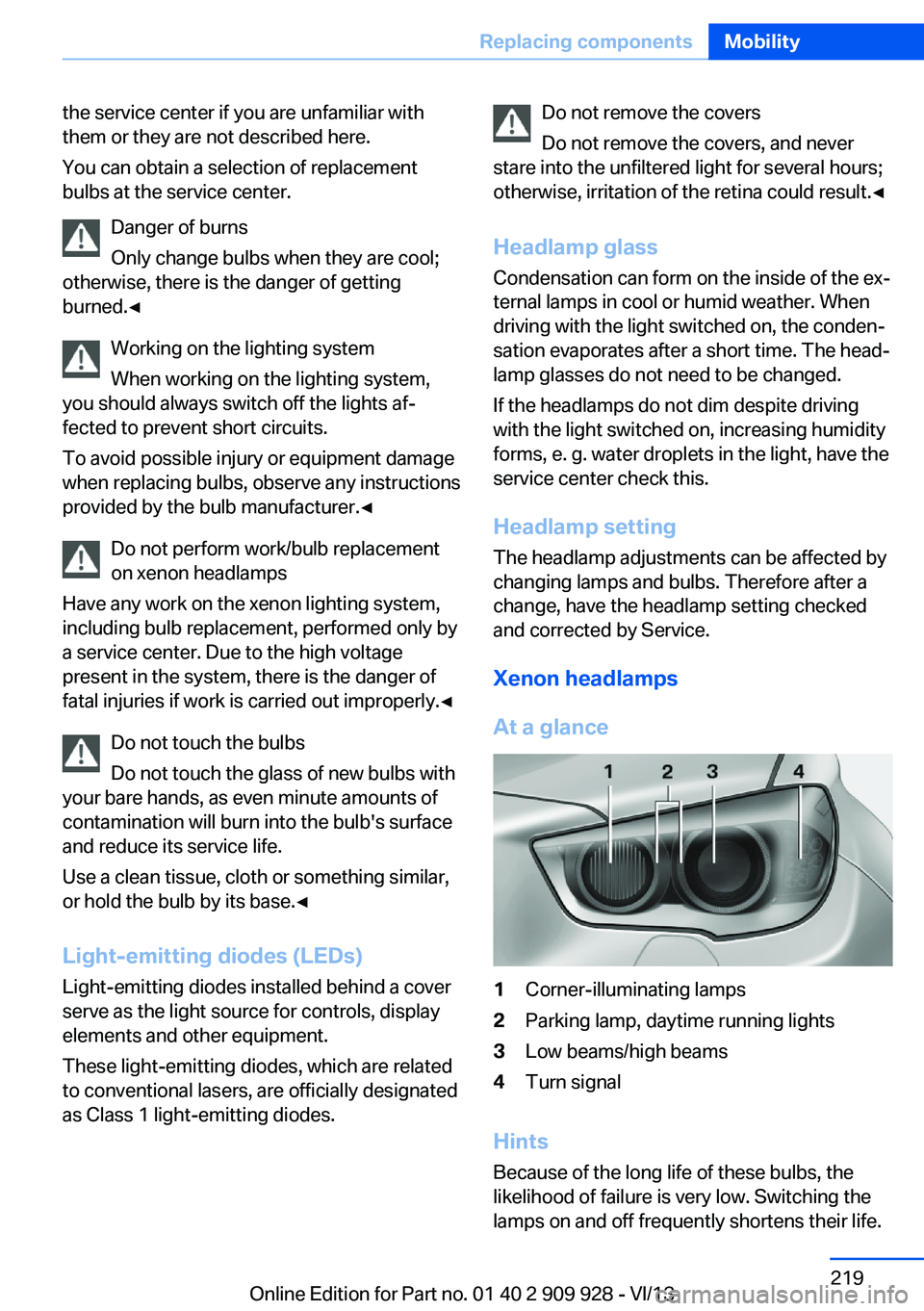
Xenon headlamps
At a glance1Corner-illuminating lamps2Parking lamp, daytime running lights3Low beams/high beams4Turn signal
Hints
Because of the long life of these bulbs, the
likelihood of failure is very low. Switching the
lamps on and off frequently shortens their life.
Seite 219Replacing componentsMobility219
Online Edition for Part no. 01 40 2 909 928 - VI/13
Page 220 of 251
If a bulb fails, switch on the front fog lamps and
continue the trip with great care. Comply with
local regulations.
Do not perform work/bulb replacement
on xenon headlamps
Have any work on the xenon lighting system,
including bulb replacement, performed only by
a service center. Due to the high voltage
present in the system, there is the danger of
fatal injuries if work is carried out improperly.◀
For checking and adjusting headlamp aim,
please contact your BMW center.
Parking lamps and roadside parkinglamps, turn signal lamp
Follow the general instructions on Lamps and
bulbs, refer to page 218.
These lights feature LED technology.
Contact your service center in the event of a
malfunction.
Corner-illuminating lamps
Follow the general instructions on lamps and
bulbs, refer to page 218.
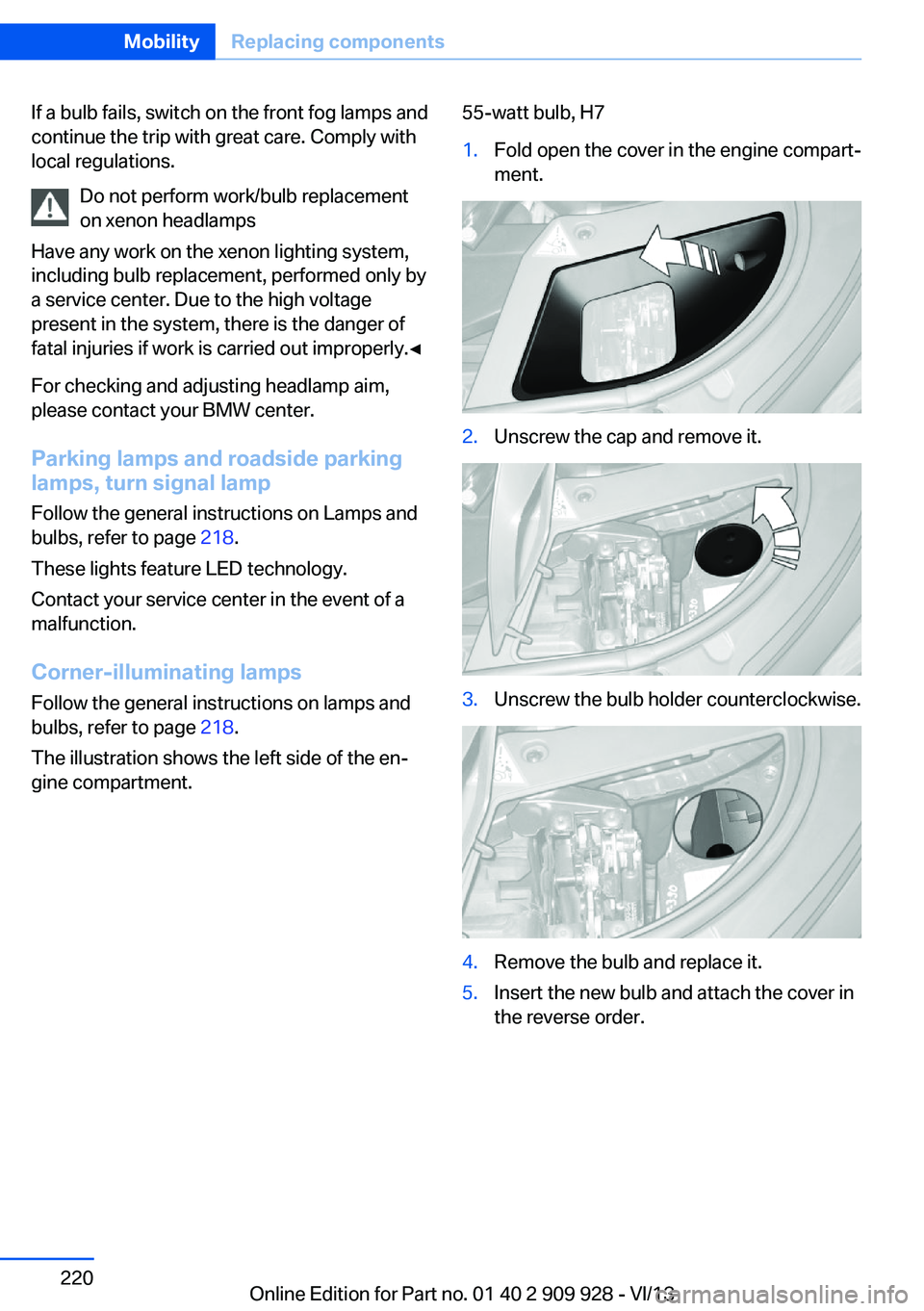
The illustration shows the left side of the en‐
gine compartment.55-watt bulb, H71.Fold open the cover in the engine compart‐
ment.2.Unscrew the cap and remove it.3.Unscrew the bulb holder counterclockwise.4.Remove the bulb and replace it.5.Insert the new bulb and attach the cover in
the reverse order.Seite 220MobilityReplacing components220
Online Edition for Part no. 01 40 2 909 928 - VI/13
Page 221 of 251
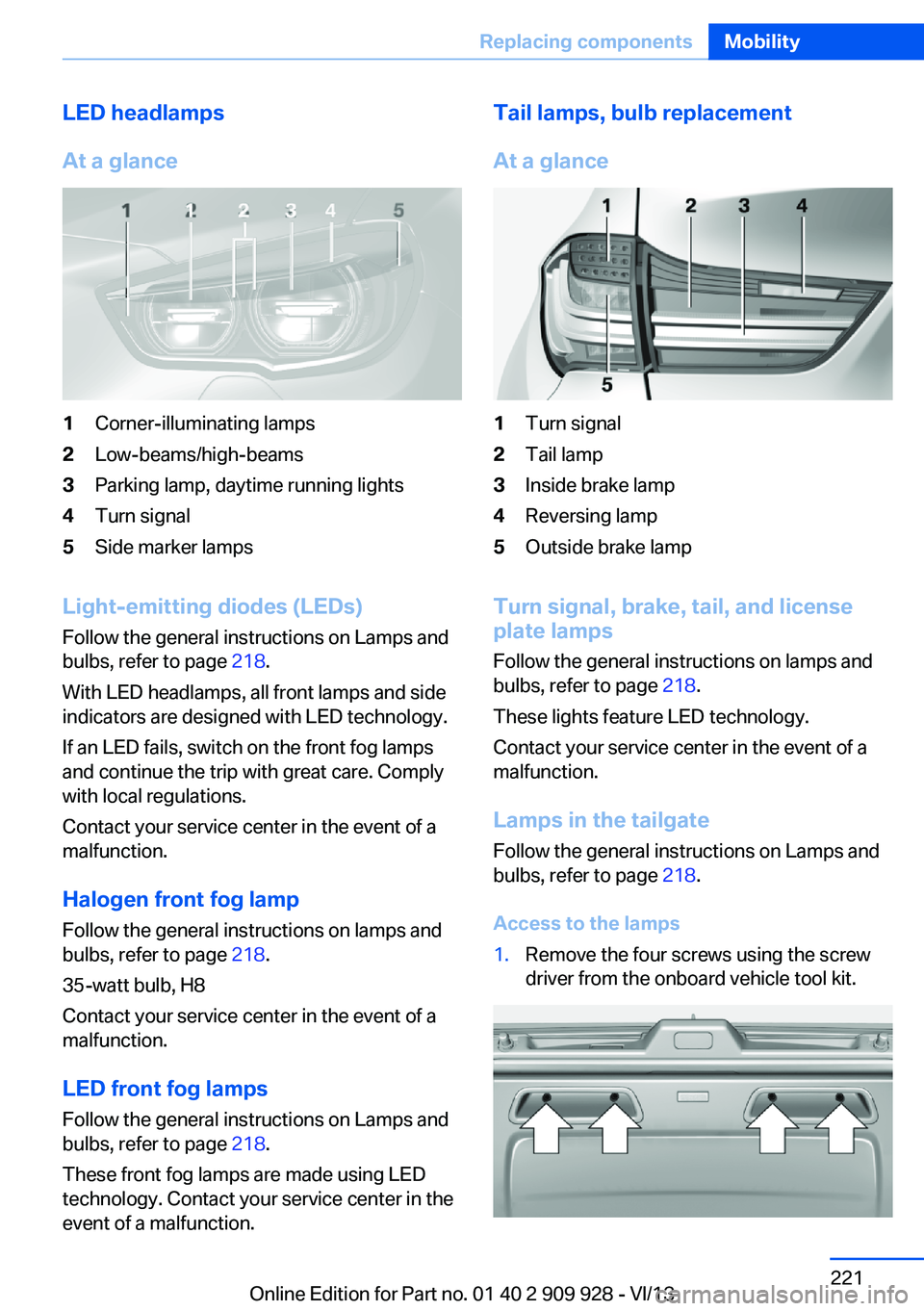
LED headlamps
At a glance1Corner-illuminating lamps2Low-beams/high-beams3Parking lamp, daytime running lights4Turn signal5Side marker lamps
Light-emitting diodes (LEDs)
Follow the general instructions on Lamps and
bulbs, refer to page 218.
With LED headlamps, all front lamps and side
indicators are designed with LED technology.
If an LED fails, switch on the front fog lamps
and continue the trip with great care. Comply
with local regulations.
Contact your service center in the event of a
malfunction.
Halogen front fog lamp Follow the general instructions on lamps and
bulbs, refer to page 218.
35-watt bulb, H8
Contact your service center in the event of a
malfunction.
LED front fog lamps
Follow the general instructions on Lamps and
bulbs, refer to page 218.
These front fog lamps are made using LED
technology. Contact your service center in the
event of a malfunction.
Tail lamps, bulb replacement
At a glance1Turn signal2Tail lamp3Inside brake lamp4Reversing lamp5Outside brake lamp
Turn signal, brake, tail, and license
plate lamps
Follow the general instructions on lamps and
bulbs, refer to page 218.
These lights feature LED technology.
Contact your service center in the event of a
malfunction.
Lamps in the tailgate
Follow the general instructions on Lamps and
bulbs, refer to page 218.
Access to the lamps
1.Remove the four screws using the screw
driver from the onboard vehicle tool kit.Seite 221Replacing componentsMobility221
Online Edition for Part no. 01 40 2 909 928 - VI/13
Page 222 of 251
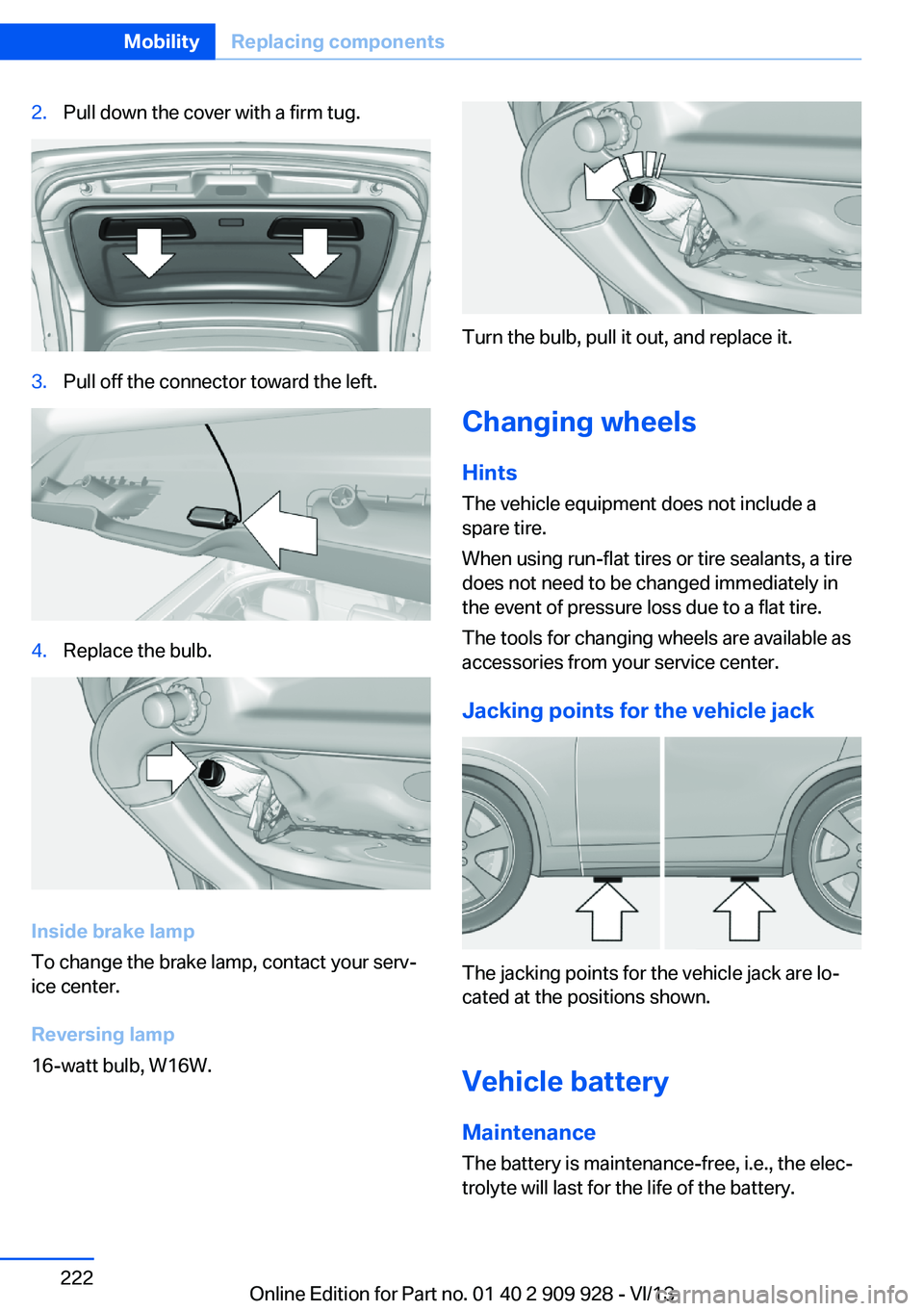
2.Pull down the cover with a firm tug.3.Pull off the connector toward the left.4.Replace the bulb.
Inside brake lamp
To change the brake lamp, contact your serv‐
ice center.
Reversing lamp
16-watt bulb, W16W.
Turn the bulb, pull it out, and replace it.
Changing wheels
Hints
The vehicle equipment does not include a
spare tire.
When using run-flat tires or tire sealants, a tire
does not need to be changed immediately in
the event of pressure loss due to a flat tire.
The tools for changing wheels are available as
accessories from your service center.
Jacking points for the vehicle jack
The jacking points for the vehicle jack are lo‐
cated at the positions shown.
Vehicle battery Maintenance
The battery is maintenance-free, i.e., the elec‐
trolyte will last for the life of the battery.
Seite 222MobilityReplacing components222
Online Edition for Part no. 01 40 2 909 928 - VI/13
Page 241 of 251
BMW Assist, see user'smanual for Navigation, En‐
tertainment and Communi‐
cation
BMW Homepage 6
BMW Internet page 6
BMW maintenance sys‐ tem 216
Bonus range, ECO PRO 192
Bottle holder, refer to Cu‐ pholder 179
Brake assistant 127
Brake assistant, adaptive 127
Brake discs, breaking in 184
Brake force display 124
Brake lamps, brake force dis‐ play 124
Brake lamps, bulb replace‐ ment 221
Brake lights, adaptive 124
Brake pads, breaking in 184
Braking, hints 185
Breakdown assis‐ tance 225, 226
Breaking in 184
Brightness of Control Dis‐ play 96
Bulb replacement, rear 221
Bulb replacement, see lamp and bulb replacement 218
Button assignment for remote control 30
Button, RES 138
Button, Start/Stop 67
Bypassing, refer to Jump- starting 227
C
California Proposition 65 Warning 7
Calling up mirror adjust‐ ment 43
Calling up seat adjust‐ ment 43 Calling up steering wheel ad‐
justment 43
Camera, backup camera 149
Camera, care 233
Camera, Side View 152
Camera, Top View 153
Can holder, refer to Cu‐ pholder 179
Car battery 222
Car care products 231
Care, displays 233
Care, vehicle 231
Cargo 187
Cargo area 174
Cargo area, enlarging 174
Cargo area lid 37
Cargo area, storage compart‐ ments 180
Cargo cover 174
Cargo partition 175
Cargo, securing 188
Cargo straps, securing cargo 188
Car key, refer to Remote con‐ trol 30
Carpet, care 233
Car wash 230
Catalytic converter, refer to Hot exhaust system 184
CBS Condition Based Serv‐ ice 216
CD/Multimedia, see user's manual for Navigation, En‐
tertainment and Communi‐
cation
Center armrest 178
Center console 14
Center-Lock, see button for central locking 34
Central locking system 33
Central screen, refer to Con‐ trol Display 16
Changes, technical, refer to Safety 7
Changing parts 218
Changing wheels 222 Changing wheels/tires 207
Check Control 85
Checking the oil level elec‐ tronically 213
Children, seating position 61
Children, transporting safely 61
Child restraint fixing sys‐ tem 61
Child restraint fixing system LATCH 62
Child restraint fixing systems, mounting 61
Child safety locks 66
Child seat, mounting 61
Child seats 61
Chrome parts, care 232
Cigarette lighter 171
Cleaning, displays 233
Climate control 162
Climate control laminated tinted safety glass 185
Climate control wind‐ shield 185
Clock 88
Closing/opening from in‐ side 36
Closing/opening via door lock 35
Closing/opening with remote control 34
Clothes hooks 180
Coasting 194
Coasting with engine decou‐ pled, coasting 194
Coasting with idling en‐ gine 194
Collision warning with braking function 113
Collision warning with City Braking function 111
Combination switch, refer to Turn signals 74
Combination switch, refer to Wiper system 75 Seite 241Everything from A to ZReference241
Online Edition for Part no. 01 40 2 909 928 - VI/13
Page 243 of 251
Engine, automatic Start/Stopfunction 69
Engine, automatic switch- off 69
Engine compartment 211
Engine compartment, work‐ ing in 211
Engine coolant 215
Engine idling when driving, coasting 194
Engine oil 213
Engine oil, adding 214
Engine oil additives 214
Engine oil change 214
Engine oil filler neck 214
Engine oil temperature 87
Engine oil types, alterna‐ tive 214
Engine oil types, ap‐ proved 214
Engine start during malfunc‐ tion 31
Engine start, jump-start‐ ing 227
Engine start, refer to Starting the engine 68
Engine stop 68
Engine temperature 87
Entering a car wash 230
Equipment, interior 169
ESP Electronic Stability Pro‐ gram, refer to DSC 127
Exchanging wheels/tires 207
Exhaust system 184
Exterior mirror, automatic dimming feature 58
Exterior mirrors 57
External start 227
External temperature dis‐ play 88
External temperature warn‐ ing 88
Eyes for securing cargo 188 F
Failure message, refer to Check Control 85
False alarm, refer to Uninten‐ tional alarm 44
Fan, refer to Air flow 163
Fault displays, refer to Check Control 85
Filler neck for engine oil 214
Fine wood, care 232
First aid kit 226
Fitting for towing, refer to Tow fitting 229
Flat tire, changing wheels 222
Flat Tire Monitor FTM 105
Flat tire, Tire Pressure Moni‐ tor TPM 107
Flat tire, warning lamp 106, 108
Flooding 185
Floor carpet, care 233
Floor mats, care 233
Fold-out position, windshield wipers 77
Foot brake 185
Front airbags 102
Front fog lamps 100
Front fog lamps, bulb replace‐ ment 221
Front fog lamps, front, bulb replacement 221
Front passenger airbags, au‐ tomatic deactivation 104
Front passenger airbags, indi‐ cator lamp 104
FTM Flat Tire Monitor 105
Fuel 200
Fuel cap 198
Fuel consumption, current 89
Fuel consumption, refer to Average fuel consump‐
tion 93
Fuel filler flap 198
Fuel gauge 87 Fuel quality 200
Fuel recommendation 200
Fuel, tank capacity 239
Fuse 223
G
Garage door opener, refer to Integrated universal remote
control 169
Gasoline 200
Gasoline quality 200
Gear change, automatic transmission 78
Gear shift indicator 90
General driving notes 184
Glass sunroof, refer to Panor‐ amic glass sunroof 47
Glove compartment 177
Gross vehicle weight, ap‐ proved 237
Gross weight, permissible for trailer towing 237
H
Handbrake, refer to Parking brake 71
Hand-held transmitter, alter‐ nating code 170
Hazard warning flashers 225
HDC Hill Descent Con‐ trol 129
Head airbags 102
Headlamp control, auto‐ matic 98
Headlamp courtesy delay fea‐ ture 97
Headlamp courtesy delay fea‐ ture via remote control 34
Headlamp flasher 75
Headlamp glass 219
Headlamps, care 231
Headlamp washer system 75
Headliner 15
Head restraints 49 Seite 243Everything from A to ZReference243
Online Edition for Part no. 01 40 2 909 928 - VI/13
Page 244 of 251
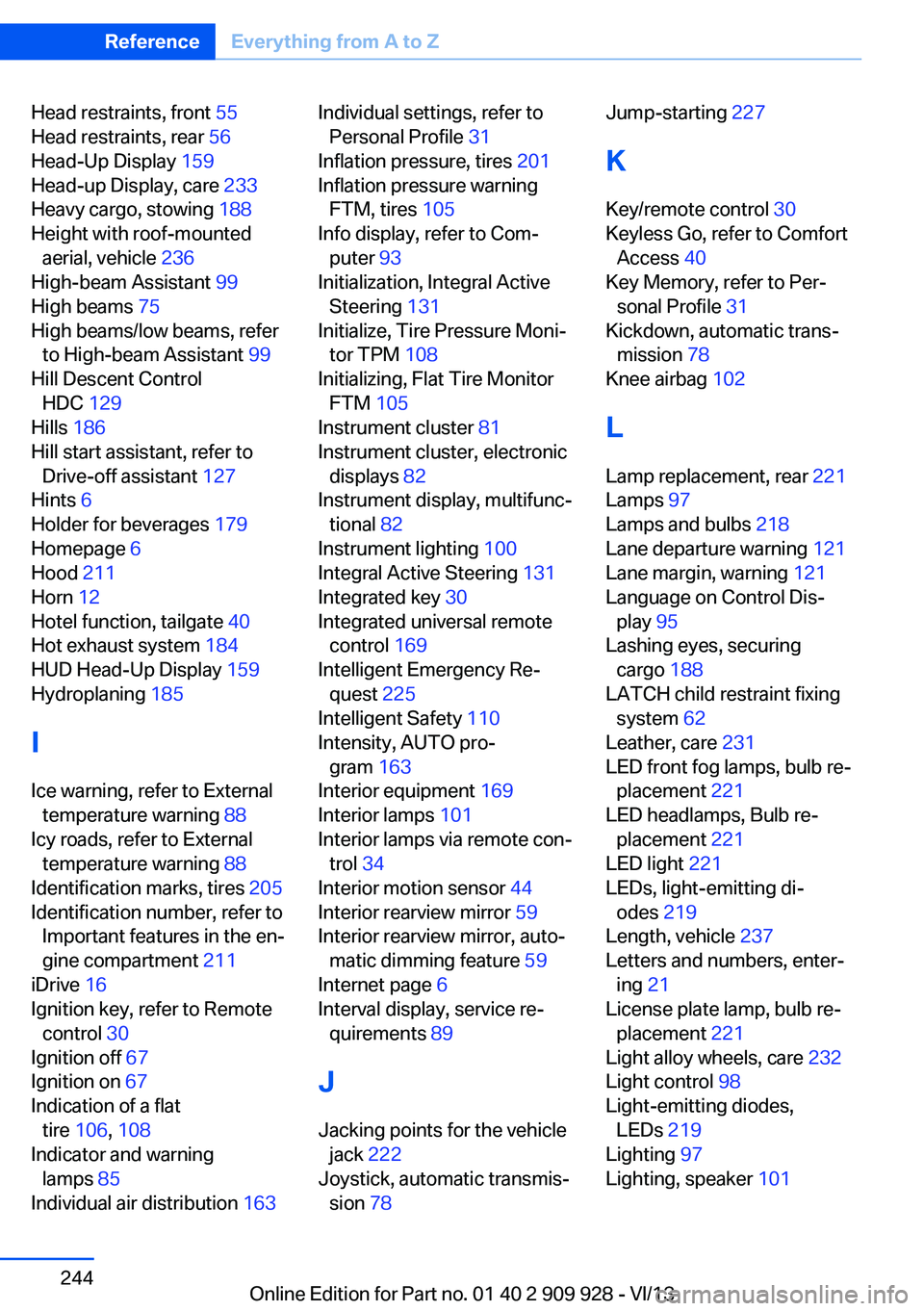
Head restraints, front 55
Head restraints, rear 56
Head-Up Display 159
Head-up Display, care 233
Heavy cargo, stowing 188
Height with roof-mounted aerial, vehicle 236
High-beam Assistant 99
High beams 75
High beams/low beams, refer to High-beam Assistant 99
Hill Descent Control HDC 129
Hills 186
Hill start assistant, refer to Drive-off assistant 127
Hints 6
Holder for beverages 179
Homepage 6
Hood 211
Horn 12
Hotel function, tailgate 40
Hot exhaust system 184
HUD Head-Up Display 159
Hydroplaning 185
I Ice warning, refer to External temperature warning 88
Icy roads, refer to External temperature warning 88
Identification marks, tires 205
Identification number, refer to Important features in the en‐
gine compartment 211
iDrive 16
Ignition key, refer to Remote control 30
Ignition off 67
Ignition on 67
Indication of a flat tire 106 , 108
Indicator and warning lamps 85
Individual air distribution 163 Individual settings, refer to
Personal Profile 31
Inflation pressure, tires 201
Inflation pressure warning FTM, tires 105
Info display, refer to Com‐ puter 93
Initialization, Integral Active Steering 131
Initialize, Tire Pressure Moni‐ tor TPM 108
Initializing, Flat Tire Monitor FTM 105
Instrument cluster 81
Instrument cluster, electronic displays 82
Instrument display, multifunc‐ tional 82
Instrument lighting 100
Integral Active Steering 131
Integrated key 30
Integrated universal remote control 169
Intelligent Emergency Re‐ quest 225
Intelligent Safety 110
Intensity, AUTO pro‐ gram 163
Interior equipment 169
Interior lamps 101
Interior lamps via remote con‐ trol 34
Interior motion sensor 44
Interior rearview mirror 59
Interior rearview mirror, auto‐ matic dimming feature 59
Internet page 6
Interval display, service re‐ quirements 89
J Jacking points for the vehicle jack 222
Joystick, automatic transmis‐ sion 78 Jump-starting 227
K
Key/remote control 30
Keyless Go, refer to Comfort Access 40
Key Memory, refer to Per‐ sonal Profile 31
Kickdown, automatic trans‐ mission 78
Knee airbag 102
L Lamp replacement, rear 221
Lamps 97
Lamps and bulbs 218
Lane departure warning 121
Lane margin, warning 121
Language on Control Dis‐ play 95
Lashing eyes, securing cargo 188
LATCH child restraint fixing system 62
Leather, care 231
LED front fog lamps, bulb re‐ placement 221
LED headlamps, Bulb re‐ placement 221
LED light 221
LEDs, light-emitting di‐ odes 219
Length, vehicle 237
Letters and numbers, enter‐ ing 21
License plate lamp, bulb re‐ placement 221
Light alloy wheels, care 232
Light control 98
Light-emitting diodes, LEDs 219
Lighting 97
Lighting, speaker 101 Seite 244ReferenceEverything from A to Z244
Online Edition for Part no. 01 40 2 909 928 - VI/13
Page 246 of 251
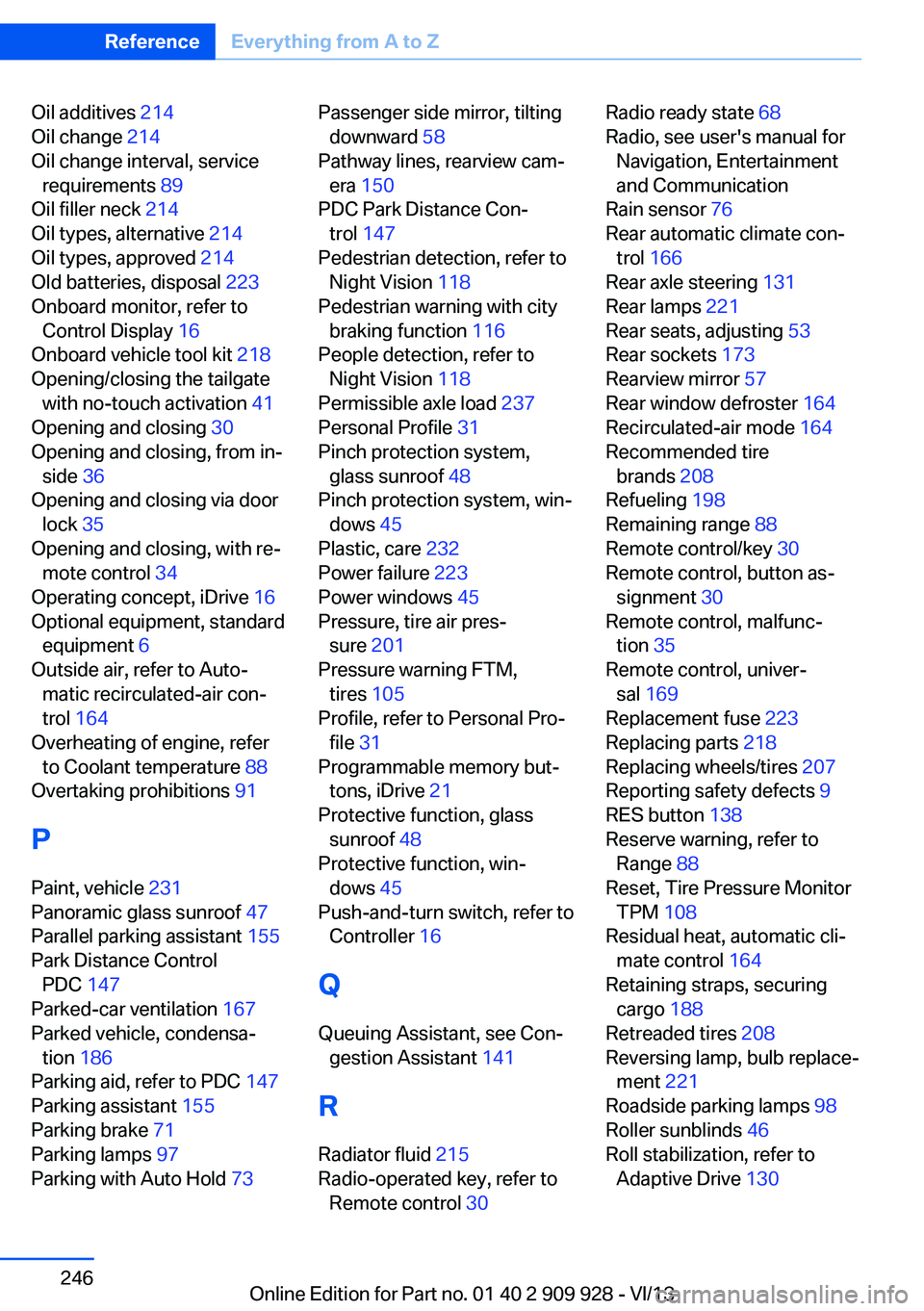
Oil additives 214
Oil change 214
Oil change interval, service requirements 89
Oil filler neck 214
Oil types, alternative 214
Oil types, approved 214
Old batteries, disposal 223
Onboard monitor, refer to Control Display 16
Onboard vehicle tool kit 218
Opening/closing the tailgate with no-touch activation 41
Opening and closing 30
Opening and closing, from in‐ side 36
Opening and closing via door lock 35
Opening and closing, with re‐ mote control 34
Operating concept, iDrive 16
Optional equipment, standard equipment 6
Outside air, refer to Auto‐ matic recirculated-air con‐
trol 164
Overheating of engine, refer to Coolant temperature 88
Overtaking prohibitions 91
P Paint, vehicle 231
Panoramic glass sunroof 47
Parallel parking assistant 155
Park Distance Control PDC 147
Parked-car ventilation 167
Parked vehicle, condensa‐ tion 186
Parking aid, refer to PDC 147
Parking assistant 155
Parking brake 71
Parking lamps 97
Parking with Auto Hold 73 Passenger side mirror, tilting
downward 58
Pathway lines, rearview cam‐ era 150
PDC Park Distance Con‐ trol 147
Pedestrian detection, refer to Night Vision 118
Pedestrian warning with city braking function 116
People detection, refer to Night Vision 118
Permissible axle load 237
Personal Profile 31
Pinch protection system, glass sunroof 48
Pinch protection system, win‐ dows 45
Plastic, care 232
Power failure 223
Power windows 45
Pressure, tire air pres‐ sure 201
Pressure warning FTM, tires 105
Profile, refer to Personal Pro‐ file 31
Programmable memory but‐ tons, iDrive 21
Protective function, glass sunroof 48
Protective function, win‐ dows 45
Push-and-turn switch, refer to Controller 16
Q Queuing Assistant, see Con‐ gestion Assistant 141
R Radiator fluid 215
Radio-operated key, refer to Remote control 30 Radio ready state 68
Radio, see user's manual for Navigation, Entertainment
and Communication
Rain sensor 76
Rear automatic climate con‐ trol 166
Rear axle steering 131
Rear lamps 221
Rear seats, adjusting 53
Rear sockets 173
Rearview mirror 57
Rear window defroster 164
Recirculated-air mode 164
Recommended tire brands 208
Refueling 198
Remaining range 88
Remote control/key 30
Remote control, button as‐ signment 30
Remote control, malfunc‐ tion 35
Remote control, univer‐ sal 169
Replacement fuse 223
Replacing parts 218
Replacing wheels/tires 207
Reporting safety defects 9
RES button 138
Reserve warning, refer to Range 88
Reset, Tire Pressure Monitor TPM 108
Residual heat, automatic cli‐ mate control 164
Retaining straps, securing cargo 188
Retreaded tires 208
Reversing lamp, bulb replace‐ ment 221
Roadside parking lamps 98
Roller sunblinds 46
Roll stabilization, refer to Adaptive Drive 130 Seite 246ReferenceEverything from A to Z246
Online Edition for Part no. 01 40 2 909 928 - VI/13