filter BMW 535I SEDAN 2008 E60 Owner's Manual
[x] Cancel search | Manufacturer: BMW, Model Year: 2008, Model line: 535I SEDAN, Model: BMW 535I SEDAN 2008 E60Pages: 288, PDF Size: 7.03 MB
Page 105 of 288
Controls
103Reference
At a glance
Driving tips
Communications
Navigation
Entertainment
Mobility
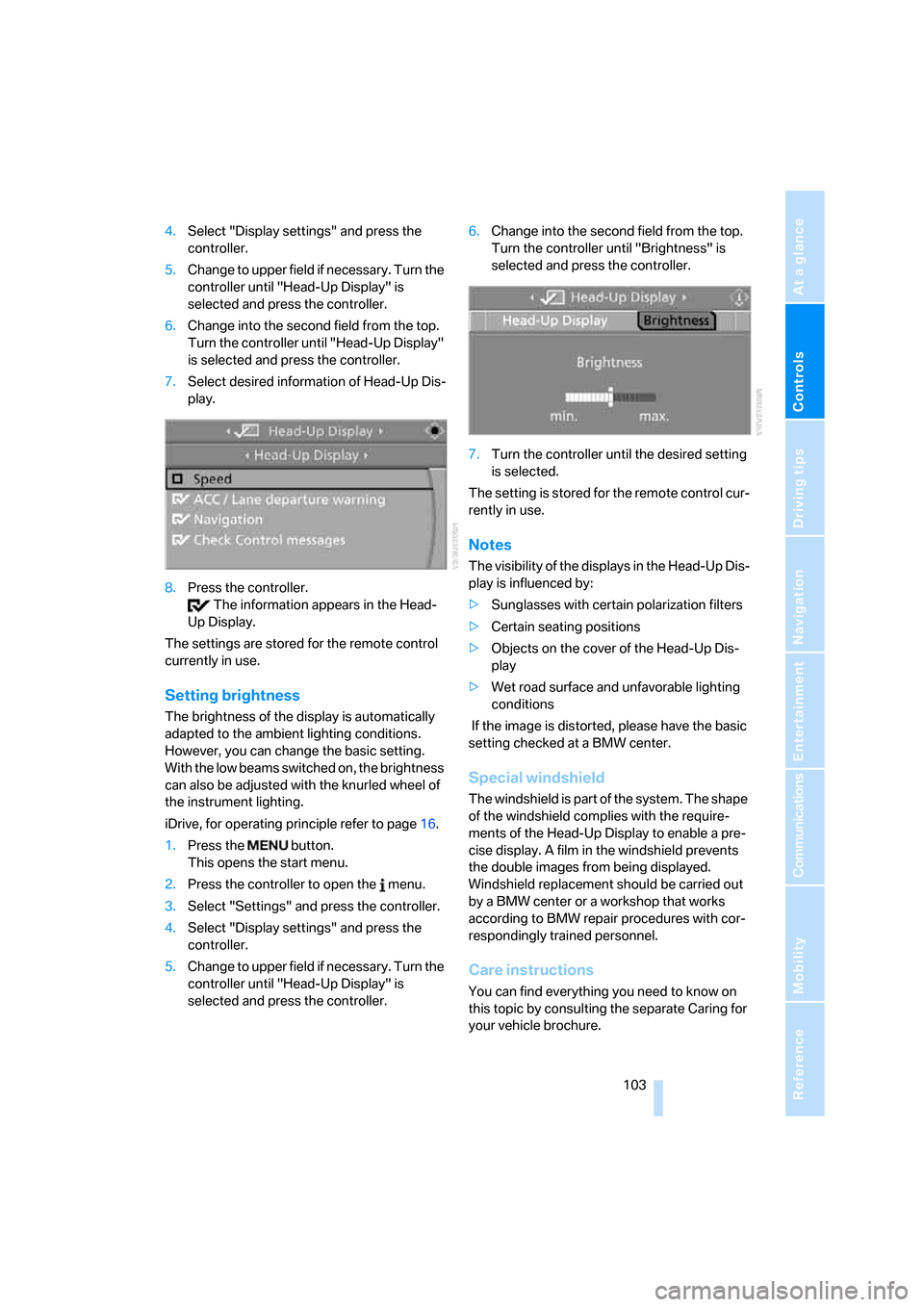
4.Select "Display settings" and press the
controller.
5.Change to upper field if necessary. Turn the
controller until "Head-Up Display" is
selected and press the controller.
6.Change into the second field from the top.
Turn the controller until "Head-Up Display"
is selected and press the controller.
7.Select desired information of Head-Up Dis-
play.
8.Press the controller.
The information appears in the Head-
Up Display.
The settings are stored for the remote control
currently in use.
Setting brightness
The brightness of the display is automatically
adapted to the ambient lighting conditions.
However, you can change the basic setting.
With the low beams switched on, the brightness
can also be adjusted with the knurled wheel of
the instrument lighting.
iDrive, for operating principle refer to page16.
1.Press the button.
This opens the start menu.
2.Press the controller to open the menu.
3.Select "Settings" and press the controller.
4.Select "Display settings" and press the
controller.
5.Change to upper field if necessary. Turn the
controller until "Head-Up Display" is
selected and press the controller.6.Change into the second field from the top.
Turn the controller until "Brightness" is
selected and press the controller.
7.Turn the controller until the desired setting
is selected.
The setting is stored for the remote control cur-
rently in use.
Notes
The visibility of the displays in the Head-Up Dis-
play is influenced by:
>Sunglasses with certain polarization filters
>Certain seating positions
>Objects on the cover of the Head-Up Dis-
play
>Wet road surface and unfavorable lighting
conditions
If the image is distorted, please have the basic
setting checked at a BMW center.
Special windshield
The windshield is part of the system. The shape
of the windshield complies with the require-
ments of the Head-Up Display to enable a pre-
cise display. A film in the windshield prevents
the double images from being displayed.
Windshield replacement should be carried out
by a BMW center or a workshop that works
according to BMW repair procedures with cor-
respondingly trained personnel.
Care instructions
You can find everything you need to know on
this topic by consulting the separate Caring for
your vehicle brochure.
Page 120 of 288
Climate
118 >with sufficient battery voltage
>at an outside temperature below 777/
256
From radio readiness the interior temperature,
the air volume and the air distribution can be
set.
Switching automatic climate control
on and off
1.Turn to the left to minimum air volume.
2.After approx. 1 second, turn to the left
again.
You switch on the system again by pressing any
button of the automatic climate control.
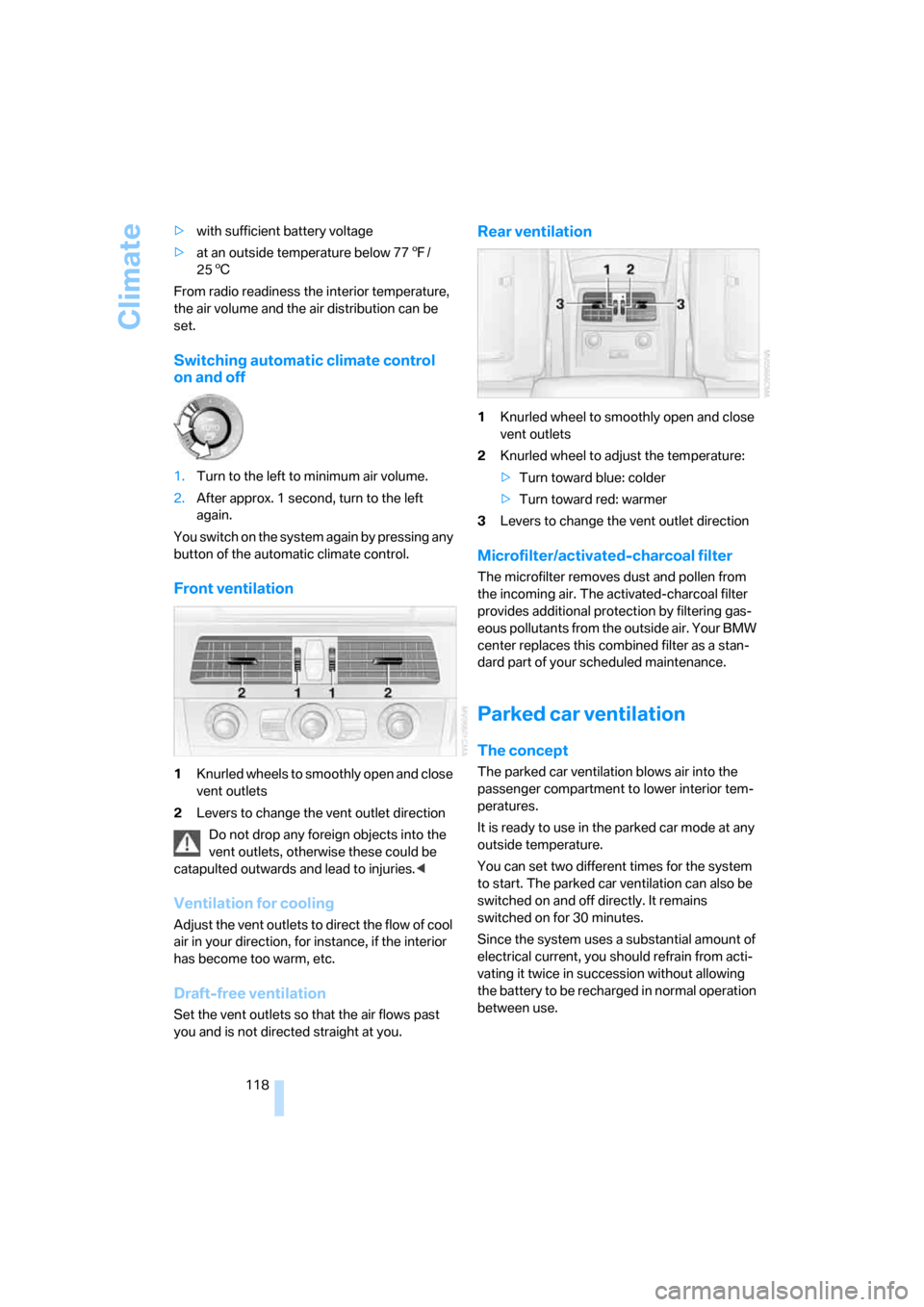
Front ventilation
1Knurled wheels to smoothly open and close
vent outlets
2Levers to change the vent outlet direction
Do not drop any foreign objects into the
vent outlets, otherwise these could be
catapulted outwards and lead to injuries.<
Ventilation for cooling
Adjust the vent outlets to direct the flow of cool
air in your direction, for instance, if the interior
has become too warm, etc.
Draft-free ventilation
Set the vent outlets so that the air flows past
you and is not directed straight at you.
Rear ventilation
1Knurled wheel to smoothly open and close
vent outlets
2Knurled wheel to adjust the temperature:
>Turn toward blue: colder
>Turn toward red: warmer
3Levers to change the vent outlet direction
Microfilter/activated-charcoal filter
The microfilter removes dust and pollen from
the incoming air. The activated-charcoal filter
provides additional protection by filtering gas-
eous pollutants from the outside air. Your BMW
center replaces this combined filter as a stan-
dard part of your scheduled maintenance.
Parked car ventilation
The concept
The parked car ventilation blows air into the
passenger compartment to lower interior tem-
peratures.
It is ready to use in the parked car mode at any
outside temperature.
You can set two different times for the system
to start. The parked car ventilation can also be
switched on and off directly. It remains
switched on for 30 minutes.
Since the system uses a substantial amount of
electrical current, you should refrain from acti-
vating it twice in succession without allowing
the battery to be recharged in normal operation
between use.
Page 240 of 288
Replacing components
238
Lamps and bulbs
Lamps and bulbs make an essential contribu-
tion to vehicle safety. You must be duly diligent
in replacing them. BMW recommends having
your BMW center perform any work that you do
not feel competent to perform yourself or that is
not described here.
Never touch the glass of new bulbs with
your bare fingers, as even minute
amounts of contamination will burn into the
bulb's surface and reduce its service life. Use a
clean cloth, napkin, etc., or hold the bulb by its
metal socket.<
A selection of replacement bulbs is available at
your BMW center.
Only replace bulbs when cool, as other-
wise you may be burned.<
Whenever you perform any work on the
electrical system, turn off the systems/
consumers involved to prevent short circuits
from occurring. To avoid possible injury or
equipment damage when replacing bulbs,
observe any instructions provided by the bulb
manufacturer.<
For care and maintenance of the headlamps,
please follow the instructions in the separate
Caring for your vehicle brochure.
For bulbs for which changing is not
described, and for checking and adjusting
headlamp aim, please contact your BMW cen-
ter.<
Light-emitting diodes LEDs
Light-emitting diodes installed behind translu-
cent lenses serve as the light source for many of
the controls and displays in your vehicle. These
light-emitting diodes, which operate using a
concept similar to that applied in conventional
lasers, are officially designated as Class 1 light-
emitting diodes.
Do not remove the covers, and never
stare into the unfiltered light for several
hours, as irritation of the retina could result.<
Halogen headlamps
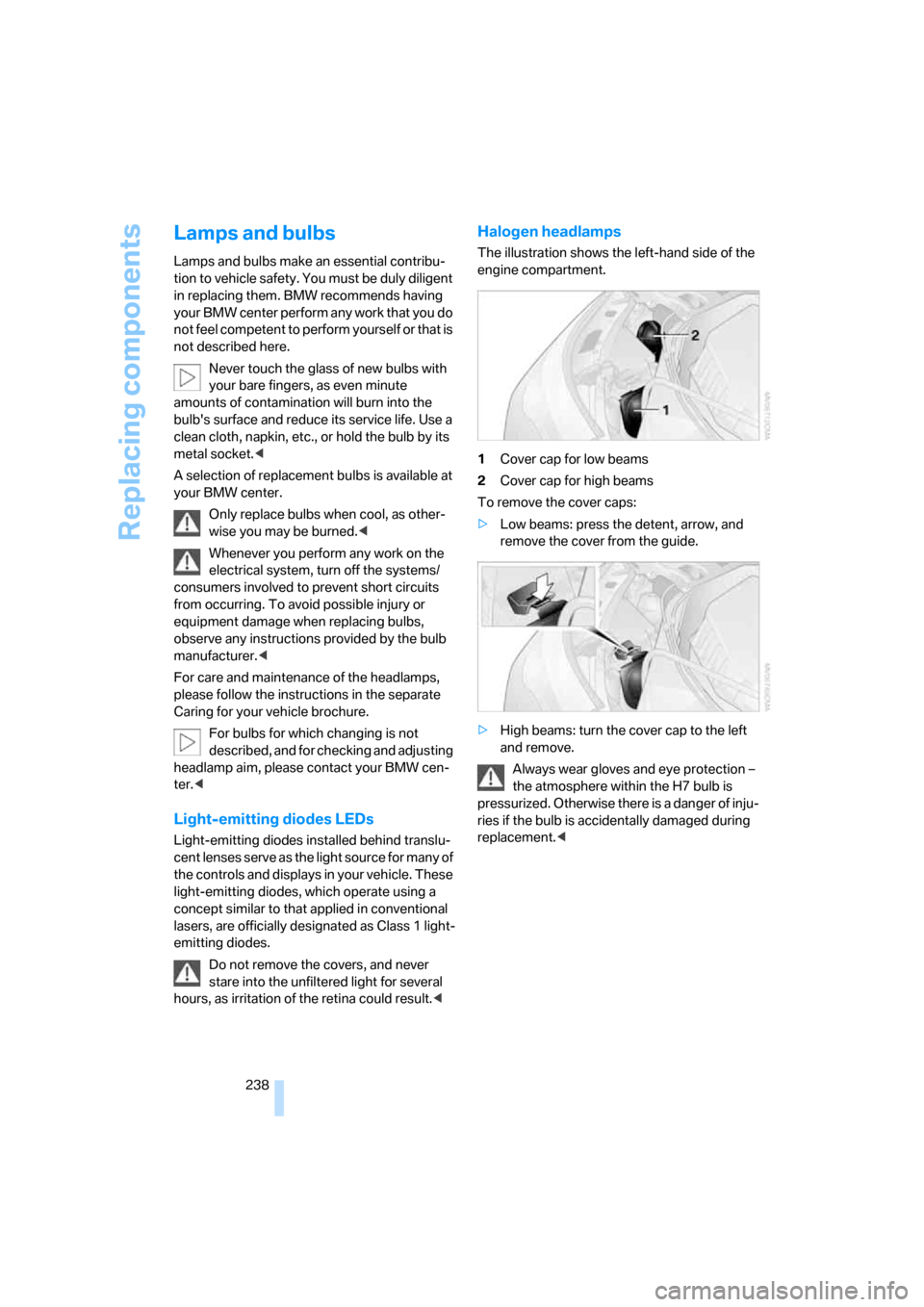
The illustration shows the left-hand side of the
engine compartment.
1Cover cap for low beams
2Cover cap for high beams
To remove the cover caps:
>Low beams: press the detent, arrow, and
remove the cover from the guide.
>High beams: turn the cover cap to the left
and remove.
Always wear gloves and eye protection –
the atmosphere within the H7 bulb is
pressurized. Otherwise there is a danger of inju-
ries if the bulb is accidentally damaged during
replacement.<
Page 266 of 288
Everything from A to Z
264
Everything from A to Z
Index
"..." Identifies Control Display
texts used to select
individual functions, and
indicates where to find them
in the text.
A
ABS Antilock Brake
System91
– indicator lamp94
ACC, refer to Active cruise
control70
Accepted calls202
Accessories6
Accident, refer to Emergency
request247
Acoustic signal, refer to Check
Control83
Activated-charcoal filter for
automatic climate
control118
"Activation time" for parked-
car ventilation119
Active cruise control70
– indicator lamp74
– radar sensors74
– selecting distance72
– warning lamps74
Active front head restraints49
Active seat52
Active seat ventilation52
Active steering99
– warning lamp100
Adapter for spare key28
Adaptive brake assistant92
Adaptive brake lamps, refer to
Brake force display100
Adaptive Head Light110
"Add digits" for mobile
phone202Additives
– coolant233
– engine oil, refer to Approved
engine oils233
"Address book" for navigation
system151
Address for navigation
– deleting153
– entering144,147
– selecting152
– storing151
– storing current position152
"Add to address book"151
"Add to destination
list"147,148
Adjusting active backrest
width47
Adjusting interior
temperature115
Adjusting the tone during
audio operation, refer to
Tone control169
Adjusting thigh support46
"After door opened"48
"After unlocking"48
Airbags100
– indicator/warning lamp102
– indicator lamp for front
passenger airbags101
– sitting safely45
Air distribution
– automatic115
– manual116
Airing, refer to Ventilation118
Air recirculation
– AUC Automatic
recirculated-air control117
– recirculated-air mode117
"Air recirculation on / off"55
Air supply, automatic climate
control114
Air volume116AKI, refer to Fuel quality219
Alarm system37
– avoiding unintentional
alarms38
– interior motion sensor38
– switching off alarm37
– switching off tilt alarm
sensor and interior motion
sensor38
– tilt alarm sensor38
"All channels"180
"All doors"30
All-season tires, refer to
Winter tires228
"All stations", calling up with
radio172,176
All-wheel drive, refer to
xDrive93
Alterations, technical, refer to
For your own safety5
Altering stretch of road160
"AM", reception
range169,172
Antenna, refer to Caring for
your vehicle brochure
Antenna for mobile phone194
Antifreeze
– coolant233
– washer fluid69
Antilock Brake System
ABS91
Anti-theft alarm system, refer
to Alarm system37
Anti-theft system, refer to
Central locking system29
Approved axle loads, refer to
Weights257
Approved engine oils233
Approved gross vehicle
weight, refer to Weights257
Armrest, refer to Center
armrest, rear127
Page 272 of 288
Everything from A to Z
270 Electric steering wheel
adjustment54
Electronic brake-force
distribution91
Electronic oil level check232
Emergency operation, refer to
Manual operation
– door lock32
– driver's door32
– fuel filler door218
– luggage compartment lid34
– tailgate35
– transmission lock, automatic
transmission65
Emergency operation, refer to
Moving manually
– glass sunroof42
– panorama glass sunroof44
Emergency release for
luggage compartment lid in
cargo bay34
Emergency request247
Emergency services, refer to
Roadside Assistance248
"Enabled services"215
"Enable services"215
"End call"202
Energy-conscious driving,
refer to Energy Control79
Energy Control79
Engine
– breaking-in134
– data254
– overheated, refer to Coolant
temperature78
– speed254
– starting62
– starting, with comfort
access38
– switching off62
Engine compartment231
Engine coolant233Engine oil
– adding233
– additives, refer to Approved
engine oils233
– approved engine oil233
– checking oil level232
– electronic oil level check232
– interval between changes,
refer to Service
requirements81
– oil change233
– oil grades, refer to Approved
engine oils233
"Engine oil level"232
Engine output, refer to Engine
data254
Engine overheating, refer to
Coolant temperature78
Engine speed, refer to Engine
data
254
Engine starting, refer to
Starting engine62
"Enter address"144,151
Entering destination via town/
city name145
Entering intersection,
navigation146
Entering the
address144,147
Entering town/city for
navigation145
Entering zip code for
navigation145
"Entertainment"168
Entertainment sound output
on/off169
Entry map for destination148
Environmentally friendly
driving, refer to Energy
Control79
"Equalizer", refer to Tone
control171
Equalizer, refer to Tone
control171
"ESN"179ESP Electronic Stability
Program, refer to DSC
Dynamic Stability
Control92
Event Data Recorders236
Exhaust system, refer to Hot
exhaust system135
Exterior mirrors53
– adjusting53
– automatic dimming
feature54
– automatic heating53
– folding in and out53
– tilting down passenger-side
exterior mirror53
External audio device124
Eye for tow-starting and
towing, refer to Tow
fitting249
F
"Fader", refer to Tone
control170
Fader, refer to Tone
control170
Failure messages, refer to
Check Control83
False alarm
– refer to Avoiding
unintentional alarms38
– refer to Switching off
alarm37
Fastening safety belts, refer to
Safety belts50
– warning lamp50
Fastest route for
navigation154
"Fast route" for
navigation154
"Favorites", calling up with
radio176
Filler neck for washer fluid69
Filter, refer to Microfilter/
activated-charcoal filter118
Fine wood, refer to Caring for
your vehicle brochure
Page 276 of 288
Everything from A to Z
274 Locking and unlocking doors
– confirmation signals31
– from inside32
– from outside30
Low beams108
– automatic108
– replacing bulbs239
Lower back support, refer to
Lumbar support47
Lug bolts244
– tightening torque, refer to
After mounting244
– wrench243
Luggage compartment, refer
to Cargo bay
Luggage compartment lid33
– emergency operation, refer
to Manual operation34
– emergency release34
– locking separately34
– opening from inside33
– opening from outside33
– unlocking and locking from
inside32
– unlocking manually34
Luggage compartment lid/
tailgate, comfort access39
Luggage net, refer to Partition
net129
Luggage rack, refer to Roof-
mounted luggage rack139
Lumbar support47
LW, waveband172
M
M+S tires, refer to Winter
tires228
Maintenance235
– refer to Service and
Warranty Information
Booklet for US models235
– refer to Service
requirements81
– refer to Warranty and
Service Guide Booklet for
Canadian models235Maintenance system235
Malfunction warnings, refer to
Check Control83
Manual air distribution116
"Manual" on the radio173
Manual operation
– door lock32
– driver's door32
– fuel filler door218
– glass sunroof42
– luggage compartment lid34
– panorama glass sunroof44
– transmission lock, automatic
transmission65
Manual transmission63
"Map direction of travel"158
Map display158
"Map facing north"158
Map for navigation
– changing scale158
– destination entry148
Map view facing north158
Master key, refer to Keys/
remote control28
Maximum cooling117
Maximum speed
– with compact wheel245
– with winter tires228
Measurements, refer to
Dimensions255
Memory, refer to Seat, mirror
and steering wheel
memory47
MENU, button refer to Start
menu17
Menus, refer to iDrive16
Message list for traffic
information161
Microfilter118
Microphone
– for mobile phone14
– for voice command
system14
Mirror dimming feature54Mirrors53
– automatic curb monitor53
– folding in and out53
– heating53
– memory, refer to Seat, mirror
and steering wheel
memory47
"Missed calls"
202
Missed calls203
Mobile phone
– accepted calls203
– adjusting volume200
– calling201
– ending call201
– installation location, refer to
Center armrest123
– missed calls203
– operation by voice205
– operation via iDrive200
– redialing203
– refer to separate operating
instructions
– Top 8203
– touch tone dialing, refer to
Tone dialing method204
Mobile phone battery208
Monitor, refer to iDrive16
Monitoring pressure of tires,
refer to Flat Tire Monitor95
"Monitor on / off"55
Most recent mobile phone
numbers203
MP3
– compressed audio files182
– USB/audio interface189
Multi-function steering wheel,
refer to Buttons on steering
wheel11
Multifunction switch
– refer to Turn signals/
headlamp flasher67
– refer to Wiper system68
Music tracks
– finding184
– random play sequence185
– sampling, scan184
"Mute on / off"55
"M View"103
MW, waveband172
Page 278 of 288
Everything from A to Z
276
P
Panic mode31
Panorama glass sunroof43
– moving manually44
Park Distance Control PDC90
"Parked car operation"119
"Parked car ventilation"119
Parked car ventilation118
– activating activation
time119
– LED114
– preselecting activation
times119
– switching on and off
directly119
Parking, vehicle62
Parking aid, refer to PDC Park
Distance Control90
Parking assistant, refer to
PDC Park Distance
Control90
Parking brake, refer to
Handbrake63
Parking lamps108
– replacing bulbs239
Partition net, Sports
Wagon129
Parts and accessories6
Passenger-side exterior
mirror, tilting down53
"Pathway lighting"109
Pathway lighting109
"PDC"91
"PDC display on"91
PDC Park Distance Control90
Personal Profile29
"Perspective"158
"Phone"196,198,201
Phone book200
– changing entry202
– creating and editing voice
phone book206
– deleting all entries203
– deleting entry203
– dialing phone number202Phone numbers
– deleting from phone
book203
– dialing201
– most recent numbers203
– selecting in phone book203
– Top 8203
Pinch protection system
– glass sunroof, electric42
– panorama glass sunroof43
– power windows41
Plasters, refer to First-aid
kit248
"Play" on the radio180
Plug-in unit for remote
control, refer to Ignition
lock61
Pollen, refer to Microfilter/
activated charcoal filter118
Position
– refer to Displaying current
position163
– refer to Storing current
position152
Power failure245
Power windows, refer to
Windows40
Preselecting activation times
of the parked car
ventilation119
"Presets" on the
radio172,180
Pressure, tires220
Pressure monitoring of tires,
refer to TPM Tire Pressure
Monitor97
"Profile"215
Programmable buttons on
steering wheel54
Programmable memory
buttons21
Protective function, refer to
Pinch protection system
– glass sunroof, electric42
– panorama glass sunroof43
– windows41
R
Radio
– autostore174
– controls168
– High Definition Radio176
– sampling stations173
– satellite radio179
– selecting frequency
manually173
– selecting
waveband168,172
– station search173
– station selection172
– station with the best
reception174
– storing stations174
– switching on/off168
– tone control169
– volume169
– Weather Band, refer to
Weather news flashes176
Radio key, refer to Keys/
remote control28
Radio readiness61
– switched off62
– switched on61
– with comfort access39
Radio stations, storing174
Rain sensor68
"Random", random play
sequence185
"Random all" in audio
mode186
"Random directory" in audio
mode186
"RDS"175
Reading lamps113
Rear armrest, refer to Center
armrest, rear127
Rear lamps, refer to Tail
lamps240
– replacing bulbs240
Rear seats
– adjusting head restraints50
– folding over backrest127
– heating52
– removing head restraints50