lights BMW 535I SEDAN 2013 Workshop Manual
[x] Cancel search | Manufacturer: BMW, Model Year: 2013, Model line: 535I SEDAN, Model: BMW 535I SEDAN 2013Pages: 273, PDF Size: 6.63 MB
Page 158 of 273
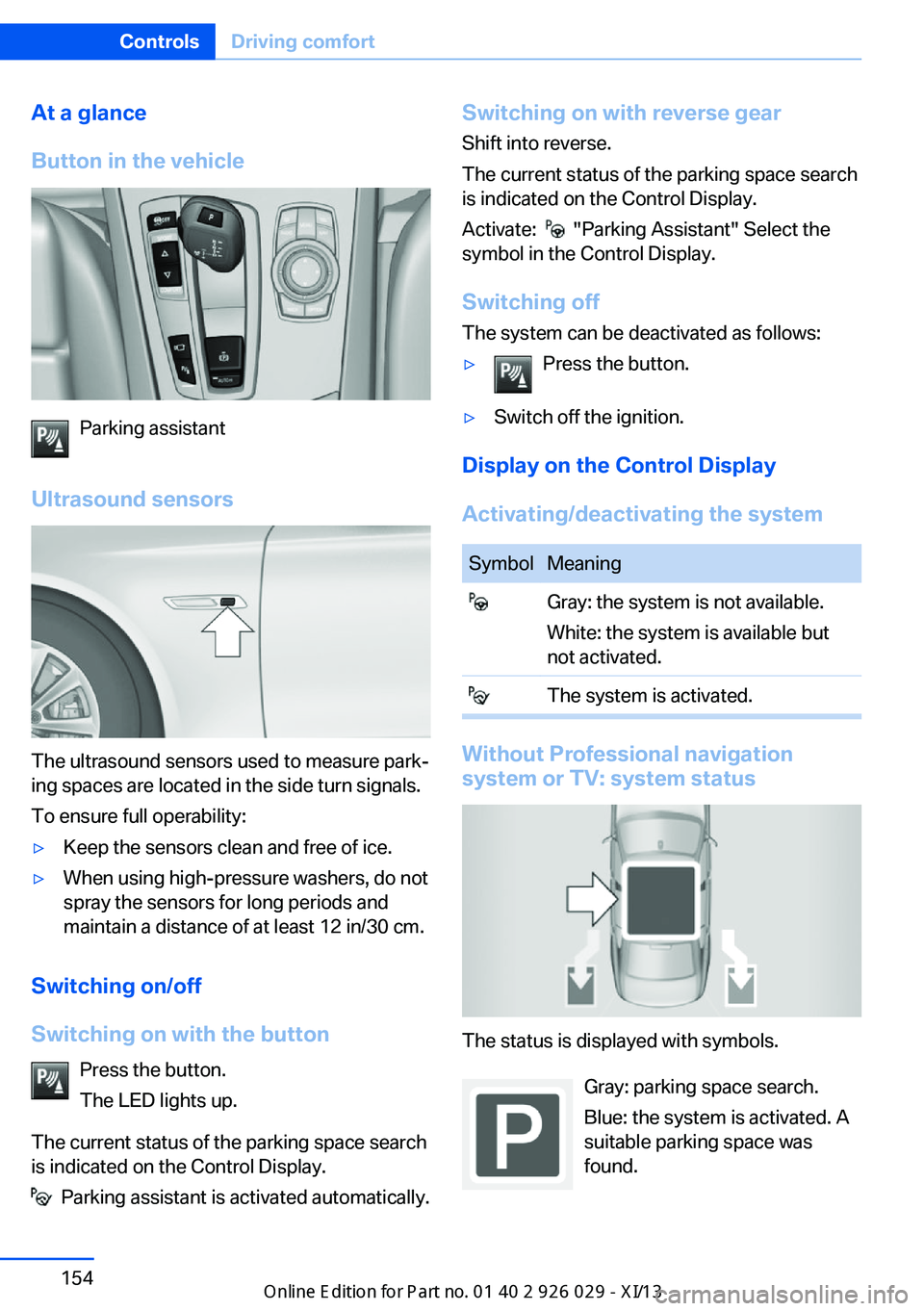
At a glance
Button in the vehicle
Parking assistant
Ultrasound sensors
The ultrasound sensors used to measure park‐
ing spaces are located in the side turn signals.
To ensure full operability:
▷Keep the sensors clean and free of ice.▷When using high-pressure washers, do not
spray the sensors for long periods and
maintain a distance of at least 12 in/30 cm.
Switching on/off
Switching on with the button Press the button.
The LED lights up.
The current status of the parking space search
is indicated on the Control Display.
Parking assistant is activated automatically.
Switching on with reverse gear
Shift into reverse.
The current status of the parking space search
is indicated on the Control Display.
Activate:
"Parking Assistant" Select the
symbol in the Control Display.
Switching off The system can be deactivated as follows:
▷Press the button.▷Switch off the ignition.
Display on the Control Display
Activating/deactivating the system
SymbolMeaning Gray: the system is not available.
White: the system is available but
not activated. The system is activated.
Without Professional navigation
system or TV: system status
The status is displayed with symbols.
Gray: parking space search.
Blue: the system is activated. A
suitable parking space was
found.
Seite 154ControlsDriving comfort154
Online Edition for Part no. 01 40 2 911 177 - VI/13
Page 170 of 273
The system can be switched on and off di‐
rectly or by using two preset switch-on times.
It remains switched on for 30 minutes.
The system can be switched on and off di‐
rectly or by using two preset departure times.
Operation can be performed via iDrive.
Functional requirements
Parked-car ventilation▷Using the preset departure time or when
operated directly: any external tempera‐
ture.
Open the vents to allow air to flow out.
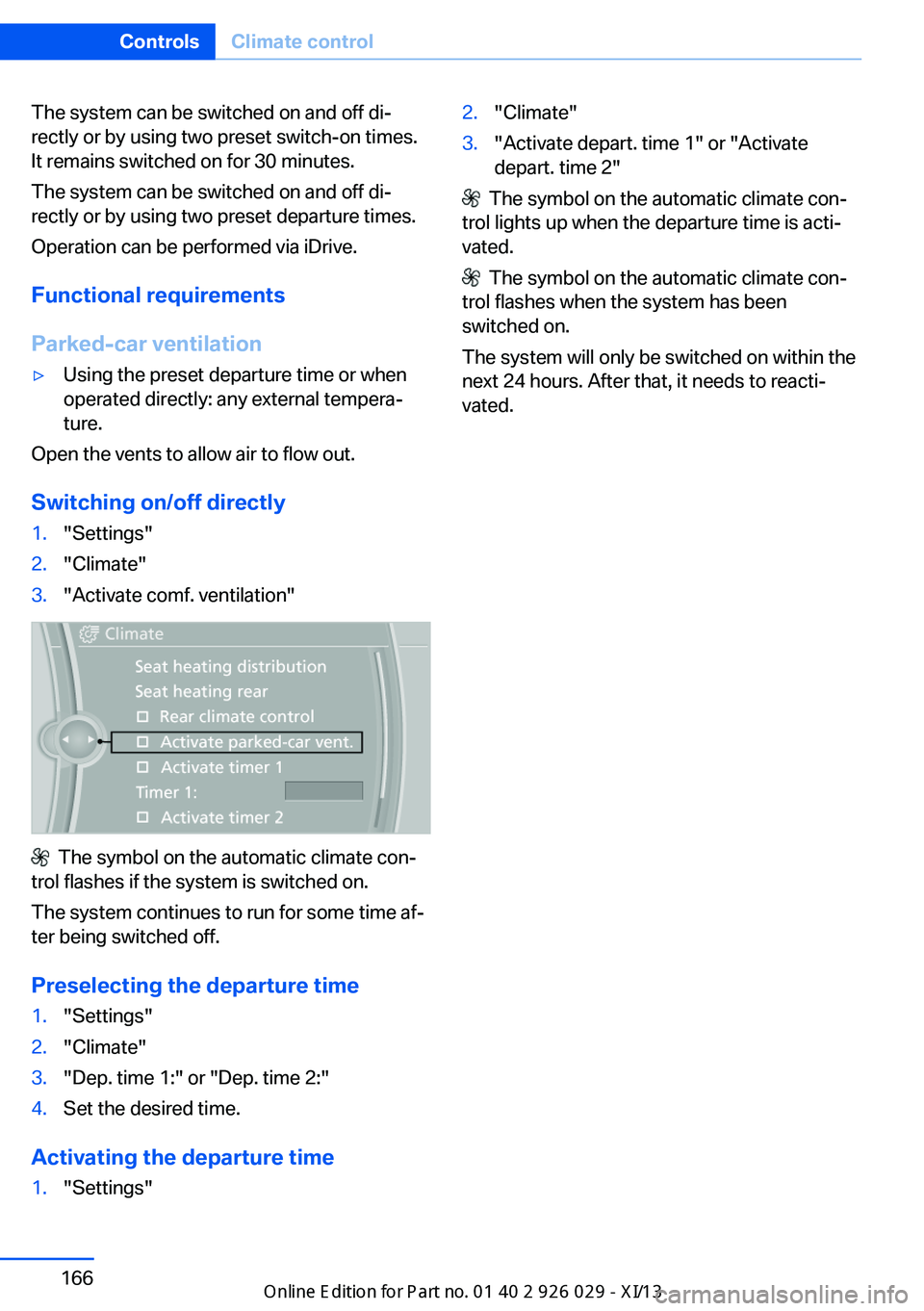
Switching on/off directly
1."Settings"2."Climate"3."Activate comf. ventilation"
The symbol on the automatic climate con‐
trol flashes if the system is switched on.
The system continues to run for some time af‐
ter being switched off.
Preselecting the departure time
1."Settings"2."Climate"3."Dep. time 1:" or "Dep. time 2:"4.Set the desired time.
Activating the departure time
1."Settings"2."Climate"3."Activate depart. time 1" or "Activate
depart. time 2"
The symbol on the automatic climate con‐
trol lights up when the departure time is acti‐
vated.
The symbol on the automatic climate con‐
trol flashes when the system has been
switched on.
The system will only be switched on within the
next 24 hours. After that, it needs to reacti‐
vated.
Seite 166ControlsClimate control166
Online Edition for Part no. 01 40 2 911 177 - VI/13
Page 196 of 273
Avoid high engine speeds
Use 1st gear to get the vehicle in motion. Be‐
ginning with 2nd gear, accelerate rapidly.
When accelerating, shift up before reaching
high engine speeds.
When you reach the desired speed, shift into
the highest applicable gear and drive with the
engine speed as low as possible and at a con‐
stant speed.
As a rule: driving at low engine speeds lowers
fuel consumption and reduces wear.
The gear shift indicator of your vehicle indi‐
cates the most fuel efficient gear.
Use coasting conditions When approaching a red light, take your foot
off the accelerator and let the vehicle coast to
a halt.
On a downhill gradient, take your foot off the
accelerator and let the vehicle roll.
The flow of fuel is interrupted while coasting.
Switch off the engine during
longer stops
Switch off the engine during longer stops, e.g.,
at traffic lights, railroad crossings or in traffic
congestion.
Automatic Engine Start/Stop Function
The Auto Start/Stop function of your vehicle
automatically switches off the engine during a
stop.
If the engine is switched off and then restarted
rather than leaving the engine running con‐
stantly, fuel consumption and emissions are
reduced. Savings can begin within a few sec‐
onds of switching off the engine.
Using this system can cause certain compo‐
nents of the vehicle to become worn prema‐
turely.In addition, fuel consumption is also deter‐
mined by other factors, such as driving style,
road conditions, maintenance or environmental
factors.
Switch off any functions that
are not currently needed
Functions such as seat heating and the rear
window defroster require a lot of energy and
consume additional fuel, especially in city and
stop-and-go traffic.
Therefore, switch off these functions if they
are not actually needed.
Have maintenance carried
out
Have vehicles maintained regularly to achieve
optimal vehicle economy and operating life.
Have the maintenance carried out by your
service center.
Please also note the BMW Maintenance Sys‐
tem, refer to page 231.
ECO PRO
The concept ECO PRO supports a driving style that saves
on fuel consumption. For this purpose, the en‐
gine control and comfort functions, e. g. the
climate control output, are adjusted.
In addition, context-sensitive instructions can
be displayed that assist in driving in a manner
that optimizes fuel consumption.
The extension of the range that is achieved as
a result can be displayed in the instrument
cluster.
At a glance
The system includes the following
EfficientDynamics functions and displays:Seite 192Driving tipsSaving fuel192
Online Edition for Part no. 01 40 2 911 177 - VI/13
Page 236 of 273

Socket for OBD Onboard
Diagnosis
Position
There is an OBD socket on the driver's side for
checking the primary components in the vehi‐
cle emissions.
Emissions
▷The warning lamp lights up:
Emissions are deteriorating. Have
the vehicle checked as soon as
possible.
Canadian model: warning light indi‐
cates the engine symbol.▷The warning lamp flashes under certain
circumstances:
This indicates that there is excessive mis‐
firing in the engine.
Reduce the vehicle speed and have the
system checked immediately; otherwise,
serious engine misfiring within a brief pe‐
riod can seriously damage emission con‐
trol components, in particular the catalytic
converter.
Fuel cap
The indicator lamp lights up.
If the fuel cap is not properly tightened,
the OBD system may conclude that
fuel vapor is escaping. If the cap is then tight‐
ened, the display should go out in a short time.
Seite 232MobilityMaintenance232
Online Edition for Part no. 01 40 2 911 177 - VI/13
Page 238 of 273
the service center if you are unfamiliar with
them or they are not described here.
You can obtain a selection of replacement
bulbs at the service center.
Danger of burns
Only change bulbs when they are cool;
otherwise, there is the danger of getting
burned.◀
Working on the lighting system
When working on the lighting system,
you should always switch off the lights af‐
fected to prevent short circuits.
To avoid possible injury or equipment damage
when replacing bulbs, observe any instructions
provided by the bulb manufacturer.◀
Do not perform work/bulb replacement
on xenon headlamps
Have any work on the xenon lighting system,
including bulb replacement, performed only by
a service center. Due to the high voltage
present in the system, there is the danger of
fatal injuries if work is carried out improperly.◀
Do not touch the bulbs
Do not touch the glass of new bulbs with
your bare hands, as even minute amounts of
contamination will burn into the bulb's surface
and reduce its service life.
Use a clean tissue, cloth or something similar,
or hold the bulb by its base.◀
Light-emitting diodes (LEDs)
Light-emitting diodes installed behind a cover
serve as the light source for controls, display
elements and other equipment.
These light-emitting diodes, which are related
to conventional lasers, are officially designated as Class 1 light-emitting diodes.Do not remove the covers
Do not remove the covers, and never
stare into the unfiltered light for several hours;
otherwise, irritation of the retina could result.◀
Headlamp glass
Condensation can form on the inside of the ex‐
ternal lamps in cool or humid weather. When
driving with the light switched on, the conden‐
sation evaporates after a short time. The head‐
lamp glasses do not need to be changed.
If the headlamps do not dim despite driving
with the light switched on, increasing humidity
forms, e. g. water droplets in the light, have the
service center check this.
Headlamp setting
The headlamp adjustments can be affected by
changing lamps and bulbs. Therefore after a
change, have the headlamp setting checked
and corrected by Service.
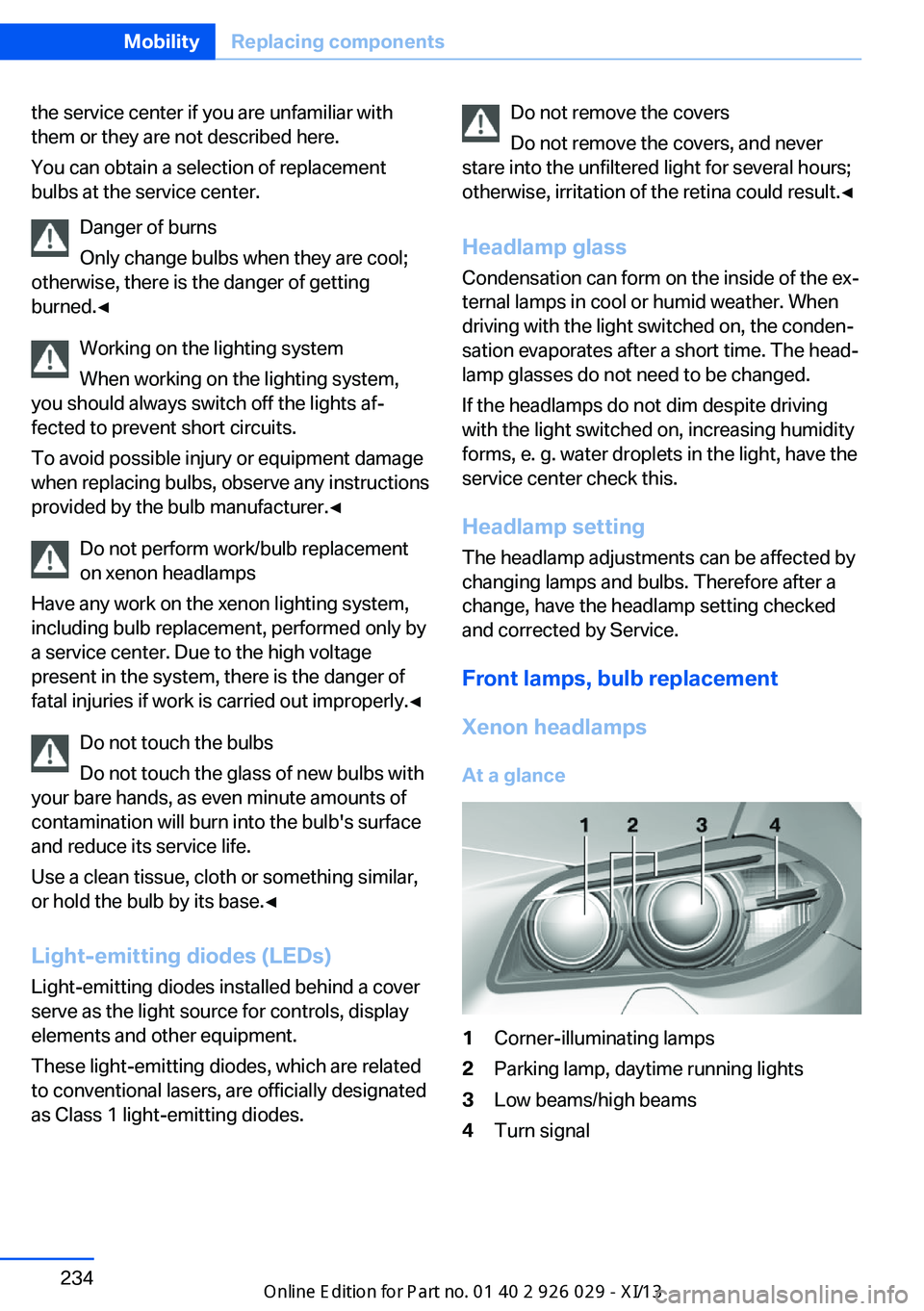
Front lamps, bulb replacement
Xenon headlamps
At a glance1Corner-illuminating lamps2Parking lamp, daytime running lights3Low beams/high beams4Turn signalSeite 234MobilityReplacing components234
Online Edition for Part no. 01 40 2 911 177 - VI/13
Page 239 of 273
Hints
Because of the long life of these bulbs, the
likelihood of failure is very low. Switching the
lamps on and off frequently shortens their life.
If a bulb fails, switch on the front fog lamps and
continue the trip with great care. Comply with
local regulations.
Do not perform work/bulb replacement
on xenon headlamps
Have any work on the xenon lighting system,
including bulb replacement, performed only by
a service center. Due to the high voltage
present in the system, there is the danger of
fatal injuries if work is carried out improperly.◀
For checking and adjusting headlamp aim,
please contact your BMW center.
Parking lamps and roadside parking lamps,
turn signal lamp
Follow the general instructions on Lamps and
bulbs, refer to page 233.
These lights feature LED technology.
Contact your service center in the event of a
malfunction.
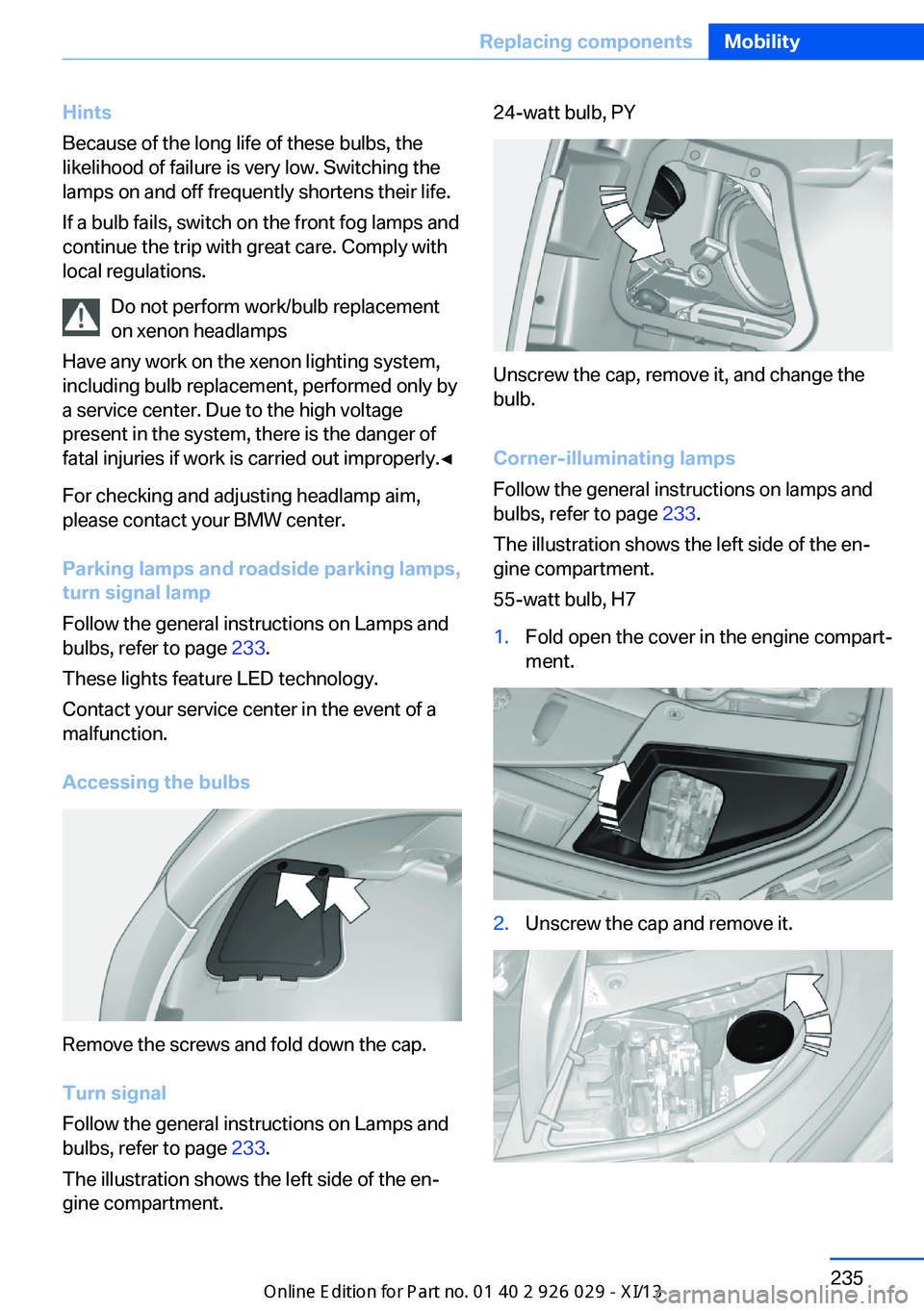
Accessing the bulbs
Remove the screws and fold down the cap.
Turn signal
Follow the general instructions on Lamps and
bulbs, refer to page 233.
The illustration shows the left side of the en‐
gine compartment.
24-watt bulb, PY
Unscrew the cap, remove it, and change the
bulb.
Corner-illuminating lamps
Follow the general instructions on lamps and
bulbs, refer to page 233.
The illustration shows the left side of the en‐
gine compartment.
55-watt bulb, H7
1.Fold open the cover in the engine compart‐
ment.2.Unscrew the cap and remove it.Seite 235Replacing componentsMobility235
Online Edition for Part no. 01 40 2 911 177 - VI/13
Page 240 of 273
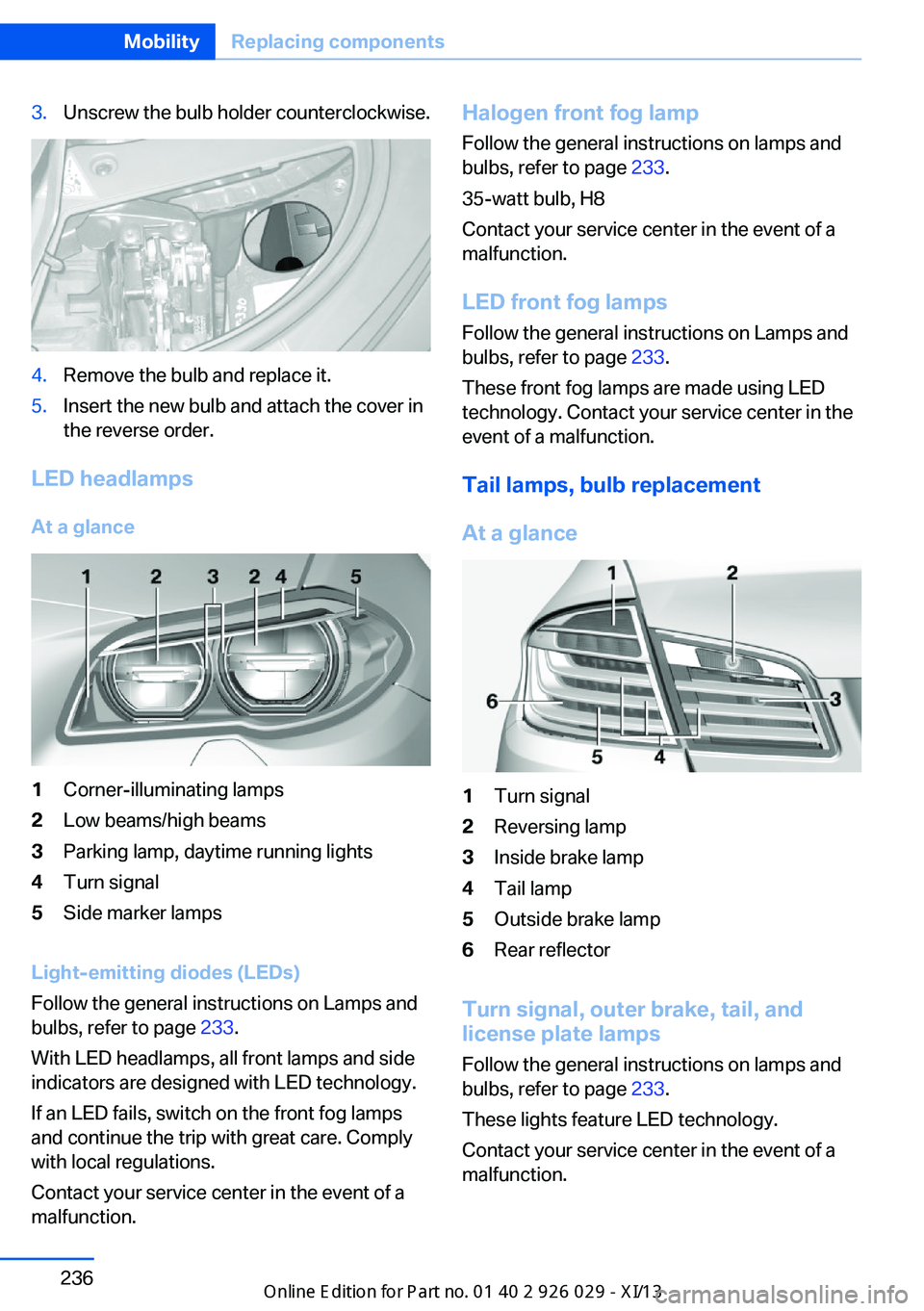
3.Unscrew the bulb holder counterclockwise.4.Remove the bulb and replace it.5.Insert the new bulb and attach the cover in
the reverse order.
LED headlamps
At a glance
1Corner-illuminating lamps2Low beams/high beams3Parking lamp, daytime running lights4Turn signal5Side marker lamps
Light-emitting diodes (LEDs)
Follow the general instructions on Lamps and
bulbs, refer to page 233.
With LED headlamps, all front lamps and side
indicators are designed with LED technology.
If an LED fails, switch on the front fog lamps
and continue the trip with great care. Comply
with local regulations.
Contact your service center in the event of a
malfunction.
Halogen front fog lamp
Follow the general instructions on lamps and
bulbs, refer to page 233.
35-watt bulb, H8
Contact your service center in the event of a
malfunction.
LED front fog lamps Follow the general instructions on Lamps and
bulbs, refer to page 233.
These front fog lamps are made using LED
technology. Contact your service center in the
event of a malfunction.
Tail lamps, bulb replacement
At a glance1Turn signal2Reversing lamp3Inside brake lamp4Tail lamp5Outside brake lamp6Rear reflector
Turn signal, outer brake, tail, and
license plate lamps
Follow the general instructions on lamps and
bulbs, refer to page 233.
These lights feature LED technology.
Contact your service center in the event of a
malfunction.
Seite 236MobilityReplacing components236
Online Edition for Part no. 01 40 2 911 177 - VI/13
Page 244 of 273
Breakdown assistanceVehicle equipment
All standard, country-specific and optional
equipment that is offered in the model series is
described in this chapter. Therefore, equip‐
ment is also described that is not available in a
vehicle, e. g., because of the selected optional
equipment or country variant. This also applies
for safety-related functions and systems.
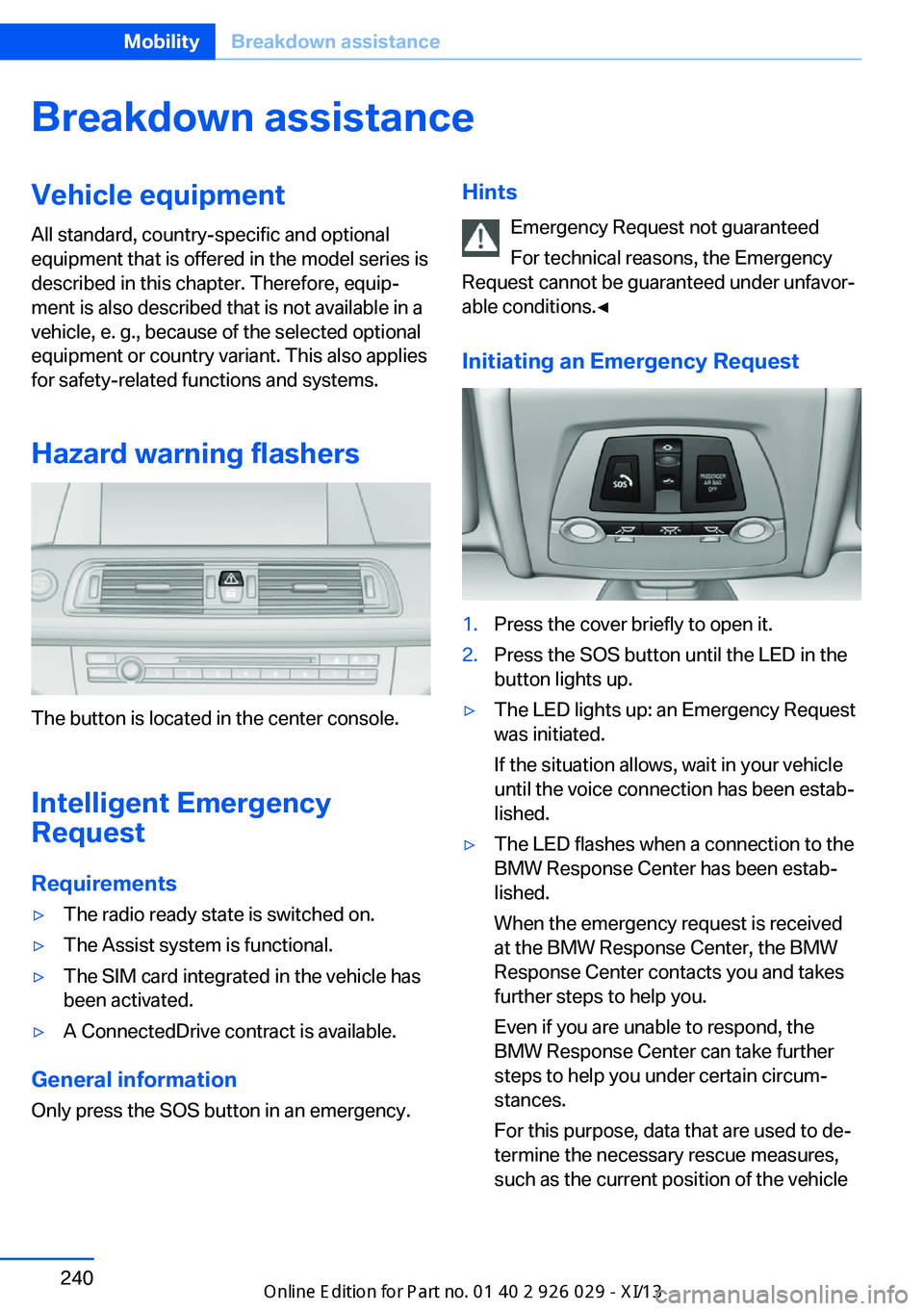
Hazard warning flashers
The button is located in the center console.
Intelligent Emergency
Request
Requirements
▷The radio ready state is switched on.▷The Assist system is functional.▷The SIM card integrated in the vehicle has
been activated.▷A ConnectedDrive contract is available.
General information
Only press the SOS button in an emergency.
Hints
Emergency Request not guaranteed
For technical reasons, the Emergency
Request cannot be guaranteed under unfavor‐
able conditions.◀
Initiating an Emergency Request1.Press the cover briefly to open it.2.Press the SOS button until the LED in the
button lights up.▷The LED lights up: an Emergency Request
was initiated.
If the situation allows, wait in your vehicle
until the voice connection has been estab‐
lished.▷The LED flashes when a connection to the
BMW Response Center has been estab‐
lished.
When the emergency request is received
at the BMW Response Center, the BMW
Response Center contacts you and takes
further steps to help you.
Even if you are unable to respond, the
BMW Response Center can take further
steps to help you under certain circum‐
stances.
For this purpose, data that are used to de‐
termine the necessary rescue measures,
such as the current position of the vehicleSeite 240MobilityBreakdown assistance240
Online Edition for Part no. 01 40 2 911 177 - VI/13
Page 262 of 273
Everything from A to Z
IndexA ABS, Antilock Brake Sys‐ tem 126
ACC, Active Cruise Control with Stop & Go 133
Acceleration Assistant, refer to Launch Control 76
Activated-charcoal filter 163
Active Blind Spot Detec‐ tion 122
Active Cruise Control with Stop & Go, ACC 133
Active Protection 123
Active roll stabilization, see Dynamic Drive 129
Active seat, front 50
Active seat ventilation, front 51
Active Steering, integral 130
Adaptive brake assistant 126
Adaptive brake lights, refer to Brake force display 123
Adaptive drive 129
Adaptive light control 97
Additives, oil 227
Adjustments, seats/head re‐ straints 48
After washing vehicle 247
Airbags 101
Airbags, indicator/warning light 102
Air circulation, refer to Recir‐ culated-air mode 162
Air distribution, manual 161
Air drying, refer to Cooling function 162
Air flow, automatic climate control 161
Air pressure, tires 207 Air vents, refer to Ventila‐
tion 163
Alarm system 42
Alarm, unintentional 43
All around the center con‐ sole 14
All around the headliner 15
All around the steering wheel 12
All-season tires, refer to Win‐ ter tires 221
All-wheel-drive 128
Alternating-code hand-held transmitter 168
Alternative oil types 227
Ambient light 100
Antifreeze, washer fluid 72
Antilock Brake System, ABS 126
Anti-slip control, refer to DSC 126
Approved engine oils 227
Armrest, refer to Center arm‐ rest 177
Arrival time 93
Ashtray 169
Ashtray, front 169, 170
Ashtray, rear 170
Assistance, Roadside Assis‐ tance 241
Assistance when driving off 126
Attentiveness assistant 124
AUTO H button, refer to Au‐ tomatic Hold 68
AUTO intensity 161
Automatic car wash 246
Automatic climate con‐ trol 160
Automatic Cruise Control with Stop & Go 133 Automatic Curb Monitor 57
Automatic deactivation, front passenger airbags 103
Automatic headlamp con‐ trol 97
Automatic Hold 68
Automatic locking 41
Automatic recirculated-air control 162
Automatic Soft Closing, doors 36
Automatic tailgate 37
Automatic transmission with Steptronic 73
AUTO program, automatic cli‐ mate control 161
AUTO program, intensity 161
Auto Start/Stop function 65
Average fuel consumption 92
Average speed 92
Axle loads, weights 253
B Backrest curvature, refer to Lumbar support 50
Backrest, width 50
Backup camera 147
Band-aids, refer to First aid kit 241
Bar for tow-starting/ towing 244
Battery replacement, vehicle battery 238
Battery replacement, vehicle remote control 30
Battery, vehicle 238
Belts, safety belts 52
Beverage holder, cu‐ pholder 178
Blinds, sun protection 45 Seite 258ReferenceEverything from A to Z258
Online Edition for Part no. 01 40 2 911 177 - VI/13
Page 263 of 273
BMW Advanced Diesel 203
BMW Assist, see user's manual for Navigation, En‐
tertainment and Communi‐
cation
BMW Homepage 6
BMW Internet page 6
BMW maintenance sys‐ tem 231
Bonus range, ECO PRO 193
Bottle holder, refer to Cu‐ pholder 178
Brake assistant 126
Brake assistant, adaptive 126
Brake discs, breaking in 184
Brake force display 123
Brake lamps, brake force dis‐ play 123
Brake lamps, bulb replace‐ ment 236
Brake lights, adaptive 123
Brake pads, breaking in 184
Braking, hints 186
Breakdown assis‐ tance 240, 241
Breaking in 184
Brightness of Control Dis‐ play 95
Bulb replacement 233
Bulb replacement, front 234
Bulb replacement, rear 236
Bulbs and lamps 233
Button, RES 136
Button, Start/Stop 63
Bypassing, refer to Jump- starting 241
C
California Proposition 65 Warning 7
Calling up mirror adjust‐ ment 41
Calling up seat adjust‐ ment 41 Calling up steering wheel ad‐
justment 41
Camera, backup camera 147
Camera, care 249
Camera, Side View 152
Camera, Top View 150
Can holder, refer to Cu‐ pholder 178
Car battery 238
Car care products 247
Care, displays 249
Care, vehicle 247
Cargo 188
Cargo area, enlarging 173
Cargo area lid 36
Cargo area, storage compart‐ ments 179
Cargo, securing 189
Cargo straps, securing cargo 189
Car key, refer to Remote con‐ trol 30
Carpet, care 249
Car wash 246
Catalytic converter, refer to Hot exhaust system 185
CBS Condition Based Serv‐ ice 231
CD/Multimedia, see user's manual for Navigation, En‐
tertainment and Communi‐
cation
Center armrest 177
Center console 14
Center-Lock, see button for central locking 33
Central locking system 33
Central screen, refer to Con‐ trol Display 16
Changes, technical, refer to Safety 7
Changing parts 233
Changing wheels 238
Changing wheels/tires 220
Check Control 84 Checking the oil level elec‐
tronically 226
Children, seating position 59
Children, transporting safely 59
Child restraint fixing sys‐ tem 59
Child restraint fixing system LATCH 60
Child restraint fixing systems, mounting 59
Child safety locks 62
Child seat, mounting 59
Child seats 59
Chrome parts, care 248
Cigarette lighter 169
Cleaning, displays 249
Climate control 160
Climate control laminated tinted safety glass 185
Climate control wind‐ shield 185
Clock 87
Closing/opening from in‐ side 36
Closing/opening via door lock 35
Closing/opening with remote control 34
Clothes hooks 179
Coasting 195
Coasting with engine decou‐ pled, coasting 195
Coasting with idling en‐ gine 195
Cold starting, refer to Starting the engine 64
Collision warning with braking function 112
Collision warning with City Braking function 110
Combination switch, refer to Turn signals 70
Combination switch, refer to Wiper system 71 Seite 259Everything from A to ZReference259
Online Edition for Part no. 01 40 2 911 177 - VI/13