tire pressure BMW 535XI SEDAN 2008 E60 Owner's Guide
[x] Cancel search | Manufacturer: BMW, Model Year: 2008, Model line: 535XI SEDAN, Model: BMW 535XI SEDAN 2008 E60Pages: 288, PDF Size: 7.03 MB
Page 246 of 288
Replacing components
244
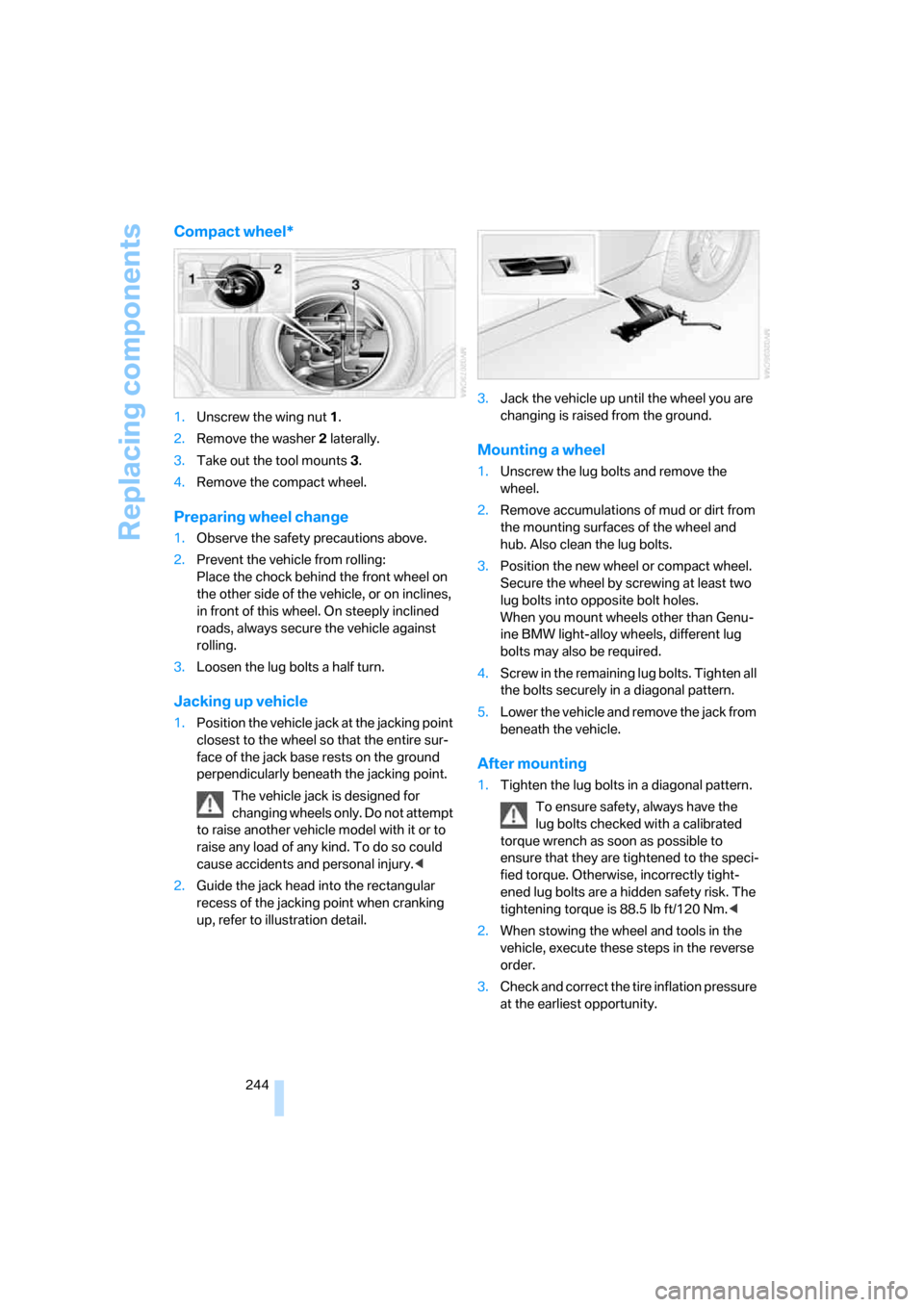
Compact wheel*
1.Unscrew the wing nut 1.
2.Remove the washer 2 laterally.
3.Take out the tool mounts 3.
4.Remove the compact wheel.
Preparing wheel change
1.Observe the safety precautions above.
2.Prevent the vehicle from rolling:
Place the chock behind the front wheel on
the other side of the vehicle, or on inclines,
in front of this wheel. On steeply inclined
roads, always secure the vehicle against
rolling.
3.Loosen the lug bolts a half turn.
Jacking up vehicle
1.Position the vehicle jack at the jacking point
closest to the wheel so that the entire sur-
face of the jack base rests on the ground
perpendicularly beneath the jacking point.
The vehicle jack is designed for
changing wheels only. Do not attempt
to raise another vehicle model with it or to
raise any load of any kind. To do so could
cause accidents and personal injury.<
2.Guide the jack head into the rectangular
recess of the jacking point when cranking
up, refer to illustration detail.3.Jack the vehicle up until the wheel you are
changing is raised from the ground.
Mounting a wheel
1.Unscrew the lug bolts and remove the
wheel.
2.Remove accumulations of mud or dirt from
the mounting surfaces of the wheel and
hub. Also clean the lug bolts.
3.Position the new wheel or compact wheel.
Secure the wheel by screwing at least two
lug bolts into opposite bolt holes.
When you mount wheels other than Genu-
ine BMW light-alloy wheels, different lug
bolts may also be required.
4.Screw in the remaining lug bolts. Tighten all
the bolts securely in a diagonal pattern.
5.Lower the vehicle and remove the jack from
beneath the vehicle.
After mounting
1.Tighten the lug bolts in a diagonal pattern.
To ensure safety, always have the
lug bolts checked with a calibrated
torque wrench as soon as possible to
ensure that they are tightened to the speci-
fied torque. Otherwise, incorrectly tight-
ened lug bolts are a hidden safety risk. The
tightening torque is 88.5 lb ft/120 Nm.<
2.When stowing the wheel and tools in the
vehicle, execute these steps in the reverse
order.
3.Check and correct the tire inflation pressure
at the earliest opportunity.
Page 247 of 288
Mobility
245Reference
At a glance
Controls
Driving tips
Communications
Navigation
Entertainment
Protect valve stems with valve stem
seal caps against dirt and contamina-
tion. Dirt in valve stems is a frequent source
of gradual air loss.<
4.Initialize the Flat Tire Monitor, refer to
page95, or reset the Tire Pressure Monitor,
refer to page97.
5.Replace the damaged tire as soon as possi-
ble and have the new wheel/tire balanced.
Driving with compact wheel
Drive reservedly and do not exceed a speed of
50 mph/80 km/h.
The driving characteristics change, for example
reduced track stability on braking, extended
braking distance, and altered self-steering
characteristics in the limit range. In conjunction
with winter tires, these characteristics are more
pronounced.
Only one compact wheel may be
mounted. Restore the wheels and tires to
their original size as quickly as possible. Failure
to do so is a safety risk.<
Vehicle battery
Battery care
The battery is 100 % maintenance-free, i.e., the
electrolyte will last for the life of the battery
when the vehicle is operated in a temperate cli-
mate. Your BMW center will be glad to advise in
all matters concerning the battery.
Charging battery
Only charge the battery in the vehicle via the
terminals in the engine compartment with the
engine switched off. Connections, refer to
Jump starting on page248.
Disposal
Have old batteries disposed of by your
BMW center or hand them in to a recy-
cling center. Maintain the battery in an upright
position for transport and storage. Always
restrain the battery to prevent it from tipping
over during transport.<
Power failure
After a temporary power supply interruption,
some settings are lost. Take the following
steps:
>Seat, mirror and steering wheel memory
Store the positions again, refer to page48.
>Time and date
Reset, refer to text starting on page86.
>Radio
Store stations again, refer to page174.
>Navigation system
Wait until the system starts, refer to
page142.
Fuses
Never attempt to repair a blown fuse and
do not replace a defective fuse with a sub-
stitute of another color or amperage rating, as
this could lead to a circuit overload, ultimately
resulting in a fire in the vehicle.<
Sedan
Spare fuses, plastic tweezers and fuse alloca-
tion diagram are located in the compartment for
the onboard tool kit, refer to page237.
Sports Wagon
Spare fuses and a pair of plastic tweezers are
contained in the onboard tool kit, refer to
page237. A fuse allocation diagram is located
in the cargo bay behind the right-hand side
panel.
Page 269 of 288
Reference 267
At a glance
Controls
Driving tips
Communications
Navigation
Entertainment
Mobility
Cargo bay cover, refer to Roll-
up cover128
Caring for artificial leather,
refer to Caring for your
vehicle brochure
Caring for leather, refer to
Caring for your vehicle
brochure
Caring for light-alloy wheels,
refer to Caring for your
vehicle brochure
Caring for plastic, refer to the
Caring for your vehicle
brochure
Caring for the carpet, refer to
Caring for your vehicle
brochure
Caring for the vehicle finish,
refer to Caring for your
vehicle brochure
Car key, refer to Keys/remote
control28
Car phone194
– installation location, refer to
Center armrest123
– refer to Mobile phone194
– refer to separate operating
instructions
Car radio, refer to Radio172
Car wash62,137
– also refer to Caring for your
vehicle brochure
– with comfort access39
Catalytic converter, refer to
Hot exhaust system135
"Categories"180
CBC Cornering Brake
Control91
CBS Condition Based
Service235
"CD"169,182CD changer182
– controls168
– fast forward/reverse186
– installation location186
– random sequence185
– repeating a track185
– sampling tracks184
– selecting a CD183
– selecting a track183
– switching on/off168
– tone control169
– volume169
CD player182
– controls168
– fast forward/reverse186
– random sequence185
– repeating a track185
– sampling a track184
– selecting a track183
– switching on/off168
– tone control169
– volume
169
Center armrest
– front123
– rear127
Center brake lamp241
Center console14
"Central locking"30
Central locking
– from inside32
– from outside30
Central locking system29
– comfort access38
Changes, technical
– refer to For your own
safety5
– refer to Parts and
accessories6
Changing language on
Control Display88
Changing scale for
navigation158
Changing units of measure on
Control Display88
Changing wheels227,242
CHECK button84
Check Control83
"Check Control
messages"84Check Gas Cap219
Checking the air pressure,
refer to Tire inflation
pressure220
Child restraint fixing system
LATCH57
Child restraints56
Child restraint systems56
Child-safety lock59
Child seats, refer to
Transporting children
safely56
Chime, refer to Check
Control83
Chock243
Chrome parts, refer to Caring
for your vehicle brochure
Cigarette lighter125
Cigarette lighter socket, refer
to Connecting electrical
devices126
Cleaning, refer to Caring for
your vehicle brochure
"Climate"51,115
Clock78
– 12h/24h format87
– hour signal87
– setting time and date86
Closing
– from inside32
– from outside30
Closing fuel filler cap219
Clothes hooks124
Cockpit10
Cold start, refer to Starting
engine62
Comfort access38
– observe in car wash39
– replacing battery, remote
control40
Comfort area, refer to Around
the center console14
Comfort seat46
"Communication"200,210
Compact Disc
– refer to CD changer182
– refer to CD player182
Page 273 of 288
Reference 271
At a glance
Controls
Driving tips
Communications
Navigation
Entertainment
Mobility
First aid, refer to First-aid
kit248
First-aid kit248
Flashing
– during locking/unlocking,
refer to Setting confirmation
signals31
– triple turn signal
activation67
Flashlight, refer to
Rechargeable flashlight123
Flat tire
– changing wheels242
– compact wheel244
– Flat Tire Monitor95,96
– refer to Tire condition227
– run-flat tires96,98,227
– TPM Tire Pressure
Monitor97
– warning lamp96,98
Flat Tire Monitor95
– false alarms95
– initializing system95
– snow chains229
– system limits95
– warning lamp96
Floor mat, refer to Caring for
your vehicle brochure
Floor mats/carpets, refer to
Caring for your vehicle
brochure
Fluid reservoir, refer to Filler
neck for washer fluid69
"FM", reception
range169,172
FM, waveband172
Fog lamps112
– indicator lamp13,112
Folding rear backrest127
– Sports Wagon128
Fold-over rear backrest127
Footbrake, refer to Braking
safely136
Footwell lamps, refer to
Interior lamps112
Forward, fast
– CD changer186
– CD player186For your own safety5
4-wheel drive system, refer to
xDrive93
Freeway, refer to Route
criteria154
Front airbags100
Front armrest, refer to Center
armrest, front123
Front passenger airbags,
deactivating101
Front seat adjustment46
"FTM"96
FTM, refer to Flat Tire
Monitor95
Fuel219
– average consumption80
– display79
– high-quality brands219
– quality219
– specifications219
– tank contents, refer to
Capacities258
Fuel clock, refer to Fuel
gauge79
Fuel consumption display,
computer, average fuel
consumption80
Fuel display, refer to Fuel
gauge79
Fuel-efficient driving134
– refer to Energy Control79
Fuel filler door218
– releasing in the event of
electrical malfunction218
Full mobile phone preparation
package194
Full screen display, refer to
Switching assistance
window off21
"Full screen" with BMW Night
Vision106
Fuses245
G
Garage door opener, refer to
Integrated universal remote
control121
Gasoline, refer to Required
fuel219
Gasoline display, refer to Fuel
gauge79
Gearshift lever, manual
transmission63
General driving
notes134,135
Glass sunroof, electric41
– convenient operation from
outside32
– convenient operation with
comfort access39
– moving manually42
– remote control30
Glove compartment123
– lighting123
– rechargeable flashlight123
GPS navigation, refer to
Navigation system142
Grills, refer to Ventilation118
Gross vehicle weight, refer to
Weights257
H
Halogen lamps239
Handbrake63
– indicator lamp13,63
Hand lamp, refer to
Rechargeable flashlight123
Hands-free system, refer to
Microphone14
Hazard warning flashers15
"HDC"93
HDC Hill Descent Control93
"HDC on"93
"HDC on / off"55
"HD radio"176
HD radio, refer to High
Definition Radio176
Head airbags100
Page 274 of 288
Everything from A to Z
272 Headlamp control,
automatic108
Headlamp flasher67
Headlamps108
– care, refer to Caring for your
vehicle brochure
– cleaning, refer to Wiper
system68
– cleaning tank, refer to
Capacities258
– filler neck for washer
fluid231
– replacing bulbs239
Head Light, refer to Adaptive
Head Light110
Head restraints49
– active front head
restraints49
– removing50
– sitting safely45
"Head-Up Display"103
Head-Up Display102
Heated
– mirrors53
– rear window116
– seats51
– steering wheel54
Heating114
– exterior mirrors53
– interior114
– rear window116
– residual heat117
– seats51
– steering wheel54
Heating with engine switched
off, refer to Residual
heat117
Heavy cargo, refer to Securing
cargo138
Height, refer to
Dimensions255
Height adjustment
– seats46
– steering wheel54
"High-beam assistant"112
High-beam assistant110High beams110
– headlamp flasher110
– indicator lamp13
– replacing bulbs239
High Definition Radio176
High water, refer to Driving
through water136
Hill Descent Control HDC93
Hills136
Holder for cups125
"Home address" for
navigation system153
Homepage of BMW
4
Hood230
Hooks for shopping bags,
Sports Wagon130
Horn10
Hotel function, refer to
Locking separately34
Hot exhaust system135
"Hour memo"87
"House number" for
destination entry146
Hydraulic brake assistant,
refer to Brake assistant91
Hydroplaning135
I
IBOC, refer to High Definition
Radio176
Ice, refer to Outside
temperature warning78
ID3 tag, refer to Information on
track184
Identification mark
– recommended tire
brands228
– run-flat tires227
– tire coding225iDrive16
– assistance window20
– automatic climate control
with expanded scope115
– changing date and time86
– changing language88
– changing menu page19
– changing settings86
– changing units of measure
and display type88
– confirming selection or
entry19
– controller16
– controls16
– displays, menus17
– operating principle17
– selecting menu item19
– setting brightness88
– start menu17
– status information20
– symbols18
Ignition61
– switched off62
– switched on61
Ignition key, refer to Keys/
remote control28
Ignition key position 1, refer to
Radio readiness61
Ignition key position 2, refer to
Ignition on61
Ignition lock61
– starting engine with comfort
access39
i menu17
Imprint2
Indicator/warning lamps
– ABS Antilock Brake
System94
– active steering100
– airbags102
– brake system94
– DSC13,92
– DTC13,93
– Flat Tire Monitor96
– fog lamps
13
– safety belt warning50
– TPM Tire Pressure
Monitor98
Page 275 of 288
Reference 273
At a glance
Controls
Driving tips
Communications
Navigation
Entertainment
Mobility
Indicator and warning lamps,
overview13
Inflation pressure, refer to Tire
inflation pressure220
Inflation pressure monitoring
– refer to Flat Tire Monitor95
– refer to TPM Tire Pressure
Monitor97
Info menu17
Information
– on another location149
– on current position149
– on destination location149
"Information" for navigation
system149
Information menu, refer to
imenu17
"Information on
destination"151
"Info sources"81
Initializing
– Flat Tire Monitor95
– radio, refer to Storing
stations174
– refer to Power failure245
– refer to Setting time and
date86
– seat, mirror and steering
wheel memory47
"Input map"149
Installation location
– CD changer186
– drive for navigation DVD142
– mobile phone123
Instructions for navigation
system, refer to Voice
instructions159
Instrument cluster12
Instrument illumination, refer
to Instrument lighting112
Instrument lighting112
Instrument panel
– refer to Cockpit10
– refer to Instrument
cluster12
Integrated key28
Integrated universal remote
control121Interesting destination for
navigation149
"Interim time"86
Interior lamps112
– switching on with remote
control31
Interior motion sensor38
– switching off38
Interior rearview mirror53
– automatic dimming
feature54
Intermittent mode of the
wipers68
J
Jacking points244
Joystick, refer to iDrive16
Jumpering, refer to Jump
starting248
Jump starting248
K
Keyless-Go, refer to Comfort
access38
Keyless opening and closing,
refer to Comfort access38
Key Memory, refer to Personal
Profile29
"Keypad"204
Keys28
– key-related settings, refer to
Personal Profile29
– spare key28
Kick-down, Automatic
transmission with
Steptronic64
Knock control219
L
Lamps
– refer to High-beam
assistant110
– refer to Parking lamps/low
beams108
Lamps and bulbs238Lane limit lines, refer to
Leaving lane warning106
"Language / Units"88
– for navigation
system143,159
"Languages"88
– for navigation
system143,159
Lashing eyes, refer to
Securing cargo138
Last destinations, refer to
Destination list150
"Last seat pos."48
LATCH child restraint fixing
system57
Leaving lane warning106
LEDs light-emitting
diodes238
Length, refer to
Dimensions255
License plate lamp, replacing
bulbs242
Light-emitting diodes
LEDs238
Lighter125
"Lighting"67
Lighting
– instruments112
– lamps and bulbs238
– of the vehicle, refer to
Lamps108
Light switch108
"Limit"85
Loading
– securing cargo138
– stowing cargo138
– vehicle137
Load securing equipment,
refer to Securing cargo138
"Lock after driving"33
Lock buttons in the doors,
refer to Locking33
Locking30
– confirmation signals31
– from inside33
– from outside30
– without key, refer to Comfort
access38
Page 276 of 288
Everything from A to Z
274 Locking and unlocking doors
– confirmation signals31
– from inside32
– from outside30
Low beams108
– automatic108
– replacing bulbs239
Lower back support, refer to
Lumbar support47
Lug bolts244
– tightening torque, refer to
After mounting244
– wrench243
Luggage compartment, refer
to Cargo bay
Luggage compartment lid33
– emergency operation, refer
to Manual operation34
– emergency release34
– locking separately34
– opening from inside33
– opening from outside33
– unlocking and locking from
inside32
– unlocking manually34
Luggage compartment lid/
tailgate, comfort access39
Luggage net, refer to Partition
net129
Luggage rack, refer to Roof-
mounted luggage rack139
Lumbar support47
LW, waveband172
M
M+S tires, refer to Winter
tires228
Maintenance235
– refer to Service and
Warranty Information
Booklet for US models235
– refer to Service
requirements81
– refer to Warranty and
Service Guide Booklet for
Canadian models235Maintenance system235
Malfunction warnings, refer to
Check Control83
Manual air distribution116
"Manual" on the radio173
Manual operation
– door lock32
– driver's door32
– fuel filler door218
– glass sunroof42
– luggage compartment lid34
– panorama glass sunroof44
– transmission lock, automatic
transmission65
Manual transmission63
"Map direction of travel"158
Map display158
"Map facing north"158
Map for navigation
– changing scale158
– destination entry148
Map view facing north158
Master key, refer to Keys/
remote control28
Maximum cooling117
Maximum speed
– with compact wheel245
– with winter tires228
Measurements, refer to
Dimensions255
Memory, refer to Seat, mirror
and steering wheel
memory47
MENU, button refer to Start
menu17
Menus, refer to iDrive16
Message list for traffic
information161
Microfilter118
Microphone
– for mobile phone14
– for voice command
system14
Mirror dimming feature54Mirrors53
– automatic curb monitor53
– folding in and out53
– heating53
– memory, refer to Seat, mirror
and steering wheel
memory47
"Missed calls"
202
Missed calls203
Mobile phone
– accepted calls203
– adjusting volume200
– calling201
– ending call201
– installation location, refer to
Center armrest123
– missed calls203
– operation by voice205
– operation via iDrive200
– redialing203
– refer to separate operating
instructions
– Top 8203
– touch tone dialing, refer to
Tone dialing method204
Mobile phone battery208
Monitor, refer to iDrive16
Monitoring pressure of tires,
refer to Flat Tire Monitor95
"Monitor on / off"55
Most recent mobile phone
numbers203
MP3
– compressed audio files182
– USB/audio interface189
Multi-function steering wheel,
refer to Buttons on steering
wheel11
Multifunction switch
– refer to Turn signals/
headlamp flasher67
– refer to Wiper system68
Music tracks
– finding184
– random play sequence185
– sampling, scan184
"Mute on / off"55
"M View"103
MW, waveband172
Page 278 of 288
Everything from A to Z
276
P
Panic mode31
Panorama glass sunroof43
– moving manually44
Park Distance Control PDC90
"Parked car operation"119
"Parked car ventilation"119
Parked car ventilation118
– activating activation
time119
– LED114
– preselecting activation
times119
– switching on and off
directly119
Parking, vehicle62
Parking aid, refer to PDC Park
Distance Control90
Parking assistant, refer to
PDC Park Distance
Control90
Parking brake, refer to
Handbrake63
Parking lamps108
– replacing bulbs239
Partition net, Sports
Wagon129
Parts and accessories6
Passenger-side exterior
mirror, tilting down53
"Pathway lighting"109
Pathway lighting109
"PDC"91
"PDC display on"91
PDC Park Distance Control90
Personal Profile29
"Perspective"158
"Phone"196,198,201
Phone book200
– changing entry202
– creating and editing voice
phone book206
– deleting all entries203
– deleting entry203
– dialing phone number202Phone numbers
– deleting from phone
book203
– dialing201
– most recent numbers203
– selecting in phone book203
– Top 8203
Pinch protection system
– glass sunroof, electric42
– panorama glass sunroof43
– power windows41
Plasters, refer to First-aid
kit248
"Play" on the radio180
Plug-in unit for remote
control, refer to Ignition
lock61
Pollen, refer to Microfilter/
activated charcoal filter118
Position
– refer to Displaying current
position163
– refer to Storing current
position152
Power failure245
Power windows, refer to
Windows40
Preselecting activation times
of the parked car
ventilation119
"Presets" on the
radio172,180
Pressure, tires220
Pressure monitoring of tires,
refer to TPM Tire Pressure
Monitor97
"Profile"215
Programmable buttons on
steering wheel54
Programmable memory
buttons21
Protective function, refer to
Pinch protection system
– glass sunroof, electric42
– panorama glass sunroof43
– windows41
R
Radio
– autostore174
– controls168
– High Definition Radio176
– sampling stations173
– satellite radio179
– selecting frequency
manually173
– selecting
waveband168,172
– station search173
– station selection172
– station with the best
reception174
– storing stations174
– switching on/off168
– tone control169
– volume169
– Weather Band, refer to
Weather news flashes176
Radio key, refer to Keys/
remote control28
Radio readiness61
– switched off62
– switched on61
– with comfort access39
Radio stations, storing174
Rain sensor68
"Random", random play
sequence185
"Random all" in audio
mode186
"Random directory" in audio
mode186
"RDS"175
Reading lamps113
Rear armrest, refer to Center
armrest, rear127
Rear lamps, refer to Tail
lamps240
– replacing bulbs240
Rear seats
– adjusting head restraints50
– folding over backrest127
– heating52
– removing head restraints50
Page 280 of 288
Everything from A to Z
278 Run-flat tires227
– continuing driving with a
damaged tire96,98
– flat tire96,98
– Flat Tire Monitor95
– new wheels and tires227
– tire inflation
pressure96,98,220
– Tire Pressure Monitor97
– tire replacement227,228
– winter tires228
S
Safety5
Safety belts50
– damage51
– refer to Caring for your
vehicle brochure
– sitting safely45
– warning lamp50
Safety belt tensioners
– refer to Airbags100
– refer to Safety belts50
Safety systems
– ABS Antilock Brake
System91
– airbags100
– driving stability control
systems91
– safety belts50
Safety tires, refer to Run-flat
tires227
Satellite radio179
– enabling channel179
– selecting channel180
– storing channel180
"SAT" with radio169,179
"Save current
destination"153
"Scan"
– music tracks on CD184
– stations with radio173
Scan
– CD changer184
– CD player184
– radio173"Scan all" in audio mode184
"Scan directory" in audio
mode184
Screen, refer to iDrive16
Screw thread for tow
fitting250
SDARS, refer to Satellite
radio179
"Seat heater distribution"51
Seats46
– active backrest width
adjustment47
– adjusting the seats46
– comfort seat46
– easy entry/exit47
– heating51
– lumbar support47
– memory, refer to Seat, mirror
and steering wheel
memory47
– shoulder support46
– sitting safely45
– storing the setting47
– thigh support46
– ventilation, refer to Active
seat ventilation52
Securing load
– refer to Securing cargo138
– with ski bag, refer to
Securing cargo131
"Select as
destination"150,213
"Select current speed"85
Selecting audio sources, refer
to Operation via iDrive168
Selecting distance with active
cruise control72
Selecting frequency
manually173
Selecting menu items19
Selecting route154
Selection options with
navigation system154
Selector lever, automatic
transmission with
Steptronic64Selector lever lock, refer to
Selecting transmission
positions64
Self-leveling suspension95
Service, refer to Roadside
Assistance248
Service and Warranty
Information Booklet for
US models235
"Service Info"81,211,232
Service Interval Display
– refer to CBS Condition
Based Service235
– refer to Service
requirements81
"Service Request"204,211
"Service
requirements"82,211,232
Service requirements81
– refer to CBS Condition
Based Service235
"Set"
– in audio mode169
– on trip computer81
"Set date"87
"Set service date"82
"Set time"87
Setting button, refer to
Controls, controller16
"Settings"215
– for BMW Assist213
– for unlocking30
Settings
– BMW Night Vision105
– changing on Control
Display86
– clock, 12h/24h mode87
– configuring, refer to
Personal Profile29
– date87
– language88
– units of measure88
Settings menu, refer to
imenu17
Setting time, refer to
Preselecting activation
times119
Page 283 of 288
Reference 281
At a glance
Controls
Driving tips
Communications
Navigation
Entertainment
Mobility
Tilting down passenger-side
exterior mirror53
"Time"87
"Time format"87
Timer, refer to Preselecting
activation times119
"Timer 1" for parked-car
ventilation119
"Timer 2" for parked-car
ventilation119
Tire inflation pressures220
Tire pressure loss96,97
Tire Pressure Monitor
TPM97
Tire Quality Grading226
Tire replacement, new wheels
and tires227
Tires
– age226
– air loss96,98
– breaking-in134
– changing227
– condition227
– damage227
– flat tire, refer to Changing
wheels242
– inflation pressure220
– new wheels and tires227
– pressure monitoring, refer to
Flat Tire Monitor95
– pressure monitoring, refer to
TPM Tire Pressure
Monitor97
– replacing242
– retreaded tires228
– run-flat tires227
– size225
– tread227
– wear indicators227
– wheel/tire combination227
– winter tires228
Tire trouble
– changing wheels242
– compact wheel244
TMC station, refer to Traffic
information160"Tone"169
Tone dialing method204
Tone in audio mode
– adjusting169
– middle setting171
Tone on locking/unlocking31
Tools, refer to Onboard
toolkit237
"Top 8" for mobile phone202
Torque
– lug bolts, refer to After
mounting
244
– refer to Engine data254
Touch tone dialing, refer to
Tone dialing method204
Tow bar250
Tow fitting249
Towing249
– methods250
– tow fittings249
– with automatic and sport
automatic transmission250
– with manual
transmission250
"Town / City" for destination
entry145
Tow rope251
Tow-starting249
"TPM"97
TPM Tire Pressure
Monitor97
– resetting system97
– system limits97
– warning lamp98
Tracks
– random sequence185
– sampling on CD184
– selecting with CD183
Track width, refer to
Dimensions255
Traction-assist feature, refer
to DSC Dynamic Stability
Control92
Traction control, refer to DSC
Dynamic Stability
Control92Traffic information for
navigation160
– depiction in route map162
– displaying161
– during destination
guidance163
– symbols162
"Traffic Info settings"161
Traffic jam
– displaying traffic
information160
– refer to Bypassing route
sections160
Transmission
– automatic transmission with
Steptronic63
– manually unlocking and
locking transmission lock65
– manual transmission63
– sport automatic
transmission66
– starting assistant94
– towing250
Transporting children
safely56
Transport securing device,
refer to Securing cargo138
Tread depth, refer to Minimum
tire tread
227
Treble, refer to Tone
control169
"Treble", tone control170
"Trip computer"81
Trip computer80
Trip-distance counter
– refer to Trip computer80
– refer to Trip meter78
"Triple turn signal"67
Trip meter78
– also refer to Trip
computer80
Trunk, refer to Cargo bay
Trunk lid, refer to Tailgate35
Turning circle, refer to
Dimensions255