display BMW 540I SEDAN 2000 User Guide
[x] Cancel search | Manufacturer: BMW, Model Year: 2000, Model line: 540I SEDAN, Model: BMW 540I SEDAN 2000Pages: 217, PDF Size: 1.69 MB
Page 85 of 217
85n
RepairsIndexOverview Controls Car care Technology Data
Check ControlGraphic display
*
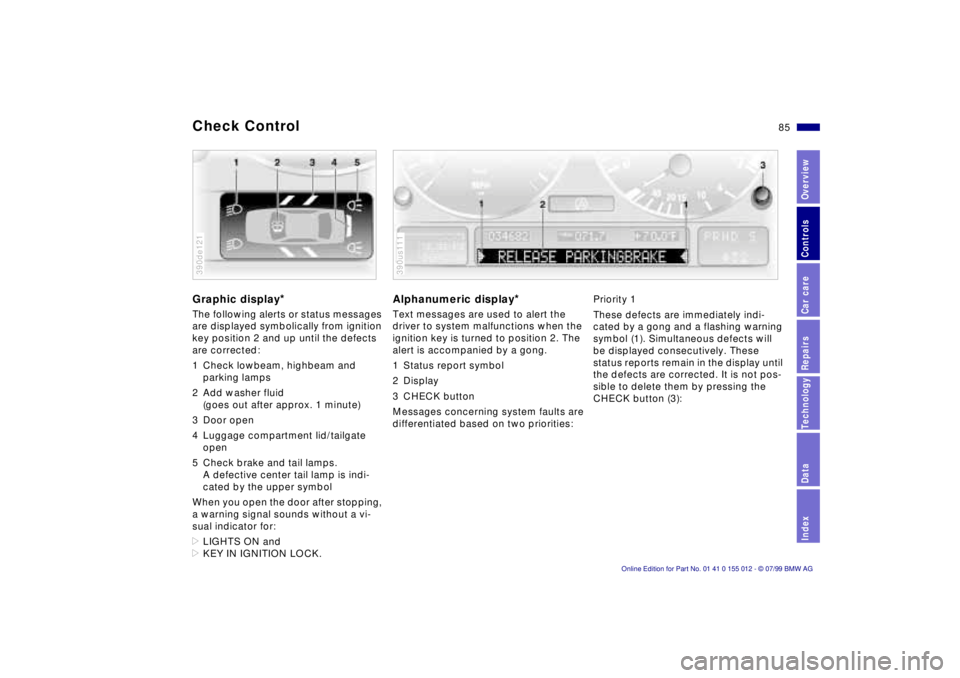
The following alerts or status messages
are displayed symbolically from ignition
key position 2 and up until the defects
are corrected:
1 Check lowbeam, highbeam and
parking lamps
2 Add washer fluid
(goes out after approx. 1 minute)
3 Door open
4 Luggage compartment lid/tailgate
open
5 Check brake and tail lamps.
A defective center tail lamp is indi-
cated by the upper symbol
When you open the door after stopping,
a warning signal sounds without a vi-
sual indicator for:
>LIGHTS ON and
>KEY IN IGNITION LOCK.390de121
Alphanumeric display
*
Text messages are used to alert the
driver to system malfunctions when the
ignition key is turned to position 2. The
alert is accompanied by a gong.
1 Status report symbol
2 Display
3 CHECK button
Messages concerning system faults are
differentiated based on two priorities:390us111
Priority 1
These defects are immediately indi-
cated by a gong and a flashing warning
symbol (1). Simultaneous defects will
be displayed consecutively. These
status reports remain in the display until
the defects are corrected. It is not pos-
sible to delete them by pressing the
CHECK button (3):
Page 86 of 217

86n
Check Control>RELEASE PARKINGBRAKE
>COOLANT TEMPERATURE
The coolant is overheated. Stop the
vehicle and switch off the engine im-
mediately. Refer to pages 84
and 15 1.
>STOP! ENGINE OILPRESS
The oil pressure is too low. Stop the
vehicle and switch off the engine im-
mediately. Refer to page 22.
>CHECK BRAKE FLUID
Indicates that brake fluid is down to
roughly minimum level. Top up the
brake fluid at the next opportunity.
Refer to page 152. Have the source
of the brake fluid loss diagnosed and
corrected by your BMW center.
>FLAT TIRE
*
Reduce vehicle speed immediately
and stop the vehicle. Avoid hard
brake applications. Do not oversteer.
Refer to page 93.
>LOAD LEVEL INACTIVE
Please consult the nearest authorized
BMW center. Refer to page 132.
>SPEED LIMIT
*
Display if the programmed speed
limit has been exceeded.Priority 2
These displays appear for 20 seconds
when the ignition key is turned to posi-
tion 2. The warning symbols remain
after the message disappears. You can
display the messages again by pressing
the CHECK button (3):
>TRUNKLID OPEN
Message appears only when the
vehicle is initially set in motion.
>DOOR OPEN
This message appears after a minimal
defined road speed has been ex-
ceeded.
>FASTEN SEAT BELTS
*
In addition to this message, a
warning lamp with the safety belt icon
appears and an acoustical signal
sounds.
>WASHER FLUID LOW
Too low; top up fluid at the next
opportunity. Refer to page 148.
>CHECK ENGINE OIL LEV
Add engine oil as soon as possible.
Refer to page 149.
>OUTSIDE TEMP. +207 (Ð56)
This display is only an example. The
current temperature is displayed at
outside temperatures of +37.57
(+36) and below. Refer also to
page 82.>TIRE PRESSURE SET
*
The RDC has imported the current in-
flation pressure in the tires as the tar-
get values which the system will
monitor.
Refer to page 92.
>CHECK TIRE PRESSURE
*
Check and correct the tire inflation
pressure to specifications at the earli-
est opportunity (next stop for fuel).
Refer to page 92.
>TIRE CHECK INACTIVE
*
A temporary interference of the RDC
or a system fault. Refer to page 93.
>CHECK BRAKE LAMPS
A lamp has failed or the electrical cir-
cuit has a fault. Refer to pages 169
and 170 or consult an authorized
BMW center.
>CHECK LOWBEAM LAMPS
CHECK SIDE LAMPS
CHECK REAR LAMPS
CHECK FRONT FOGLAMPS
CHECK LICPLATE LAMP
CHECK HIGHBEAM LAMP
CHECK BACK UP LAMPS
Defective bulb or circuit. Refer to
page 167 or consult an authorized
BMW center.
Page 87 of 217

87n
RepairsIndexOverview Controls Car care Technology Data
Check Control>TRANS. FAILSAFE PROG
Please consult the nearest authorized
BMW center. Refer to pages 73, 76.
>CHECK BRAKE LININGS
Have the brake pads inspected by
your BMW center. Refer to page 130.
>CHECK COOLANT LEVEL
Coolant too low, top up at the next
opportunity. Refer to page 151.
>ENGINE FAILSAFE PROG
Fault in the Electronic Engine Power
Control (EML). When braking, higher
brake application pressure may be
necessary and brake pedal travel may
be significantly longer.
Have the fault checked by your
authorized BMW center.
Displays after completion of tripAll of the malfunctions registered during
the trip appear consecutively when the
key is turned to Position 0.
One of the following displays may ap-
pear:
>LIGHTS ON
>KEY IN IGNITION LOCK
>CHECK ENGINE OIL LEV
Add engine oil at the next opportunity
(next stop for fuel). Refer to page 14 9.
Display appears when you open the
driver's door after parking the vehicle.
A supplementary gong is also heard.
Status reports remain available for a pe-
riod of approx. three minutes after the
display goes out and the key is re-
moved from the ignition. Press the
CHECK button. If there were multiple
reports, press the CHECK button re-
peatedly to view them all in sequence.
To check the Check ControlPress the CHECK button (3) with the
ignition key in position 2:
CHECK CONTROL OK appears in the
display.
No malfunctions are present in the
monitored systems.Onboard computerYou will find a description of the on-
board computer in the "Radio and Infor-
mation Systems" Owner's Manual.
You can have the Check Control
and onboard computer messages
displayed in a different language.<
Page 88 of 217
88n
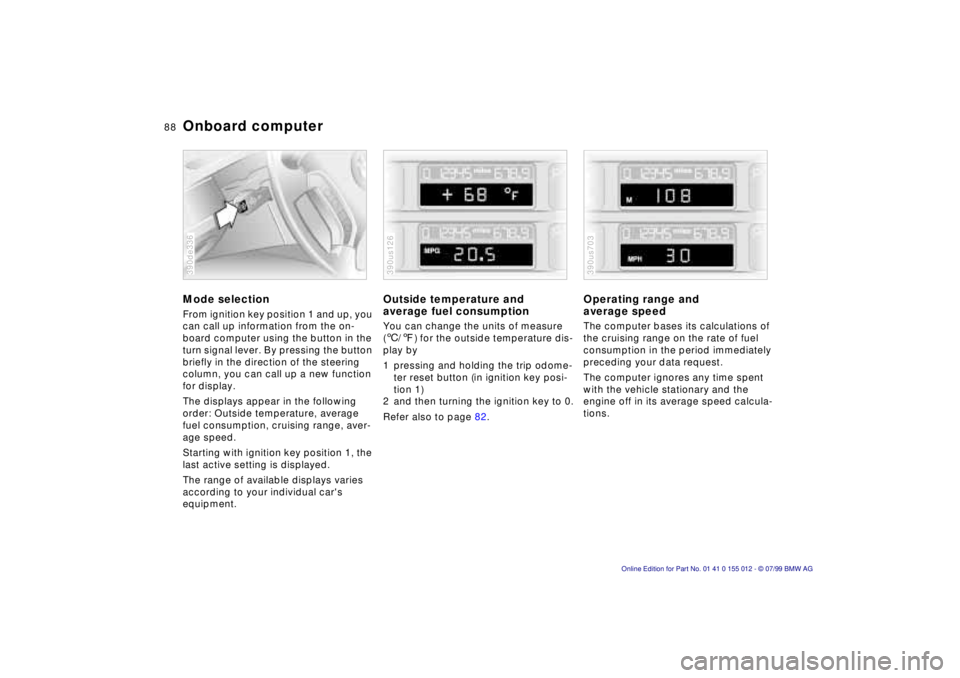
Onboard computerMode selectionFrom ignition key position 1 and up, you
can call up information from the on-
board computer using the button in the
turn signal lever. By pressing the button
briefly in the direction of the steering
column, you can call up a new function
for display.
The displays appear in the following
order: Outside temperature, average
fuel consumption, cruising range, aver-
age speed.
Starting with ignition key position 1, the
last active setting is displayed.
The range of available displays varies
according to your individual car's
equipment.390de336
Outside temperature and
average fuel consumptionYou can change the units of measure
(6/7) for the outside temperature dis-
play by
1 pressing and holding the trip odome-
ter reset button (in ignition key posi-
tion 1)
2 and then turning the ignition key to 0.
Refer also to page 82.390us126
Operating range and
average speed The computer bases its calculations of
the cruising range on the rate of fuel
consumption in the period immediately
preceding your data request.
The computer ignores any time spent
with the vehicle stationary and the
engine off in its average speed calcula-
tions.390us703
Page 89 of 217

89n
RepairsIndexOverview Controls Car care Technology Data
Onboard computerCancel displayIf the button in the turn-signal lever is
pressed briefly while the average speed
is displayed, the onboard computer dis-
play can be masked out.To restart calculationsIf you continue to press the button in
the turn signal lever, the average values
which were just displayed for fuel con-
sumption and speed will be recalcu-
lated from that point (the engine must
be running for this).
Onboard computer with
alphanumeric display
*
If your vehicle has Check Control with
alphanumeric display, the system's on-
board computer is described in the
"Radio and information systems"
Owner's Manual.
Page 99 of 217

99n
RepairsIndexOverview Controls Car care Technology Data
Automatic climate control1 Air flow directed toward the
windshield and side windows
2 Air flow for the upper body
The side rotary dials provide
infinitely-variable regulation of
the air supply, while the levers
change the airflow direction.
The center rotary dial controls the
temperature of the air as it
flows out102
3 Front footwell ventilation
4 Rear footwell ventilation
5 Air flow for the upper body in the
rear seat102
6 Automatic air distribution100
7 Individual air distribution100
8 Temperature control Ð
left-hand side100
9 Display for temperature and
air supply100, 10110 Temperature control Ð
right-hand side100
11 To defrost windshield and door
windows101
12 Air conditioner101
13 Automatic recirculated air control
AUC101
14 Rear window defroster79, 102
15 Air supply101
16 Residual heat mode102
17 Air grill for interior temperature
sensor Ð please keep clear and
unobstructed
Page 100 of 217
100n
Automatic climate controlTips for pleasant drivingUse the automatic system, that is, press
AUTO button 4. Select an interior tem-
perature that is comfortable for you Ð
we recommend 727 (226). When the
outside temperature is above 417
(56), you can also use the air condi-
tioning system (12). This will dry the air
and prevent the window from fogging
(for example if people are wearing
damp clothes in the vehicle). Set the
outlets 2 so that the air flows past you
and is not directed straight at you. Set
the rotary dial between the outlets 2 for
the upper body to a central position.
This will provide cooler air, and help to
prevent fatigue during the journey.
Detailed setting options are described
for you in the following section.
You can make the settings of your
vehicle in such a manner that,
when you unlock the car with your indi-
vidualized remote control, your own
personalized setting for the automatic
climate control is initiated.<
Automatic air distribution
The AUTO program assumes
the adjustment of the air dis-
tribution and the air supply for you and
also adapts the temperature to external
influences (summer, winter) to meet
preferences you can specify. This pro-
gram maintains a comfortable in-car cli-
mate regardless of the season. Select
an interior temperature that is pleasant
for you Ð we recommend 727 (226).
The selected temperature and AUTO for
the air flow appear in the display 7. Re-
fer to the overview on page 98. Open
the ventilation outlets for the upper
body. Switch on the air conditioner in
warm weather. The maximum cooling
capacity is achieved when you set the
rotary dial 3 (refer to page 102) to cold.
Individual air distribution
You can cancel the AUTO pro-
gram by selecting specific dis-
tribution patterns to suit your
own individual requirements.
You can direct air to flow onto the win-
dows , toward the upper body ,
and into the footwell .
Temperature
You can make individual tem-
perature settings on the
driver's side or the front pas-
senger side. Your settings will be
shown in the display 9. The displayed
temperatures are reference values for
the interior temperature. We recom-
mend 727 (226) as a comfortable
setting, whether the air conditioner is
operating or not.When you start the ve-
hicle, the system ensures that the se-
lected temperature is achieved as
quickly as possible. It then maintains
this temperature, regardless of the sea-
son.
Set the rotary dial 3 (refer to "Draft-free
ventilation" on page 102) to a medium
position to provide somewhat cooler
air. This helps to promote driving with-
out fatigue. Make use of this means of
mixing air especially for making minor
adjustments for personal comfort.
You can set uncontrolled heater
output at up to 907 (326). Full
cooling output is available from the air
conditioner down to 607 (166).<
Page 101 of 217
101n
RepairsIndexOverview Controls Car care Technology Data
Automatic climate controlAir supply
In the "AUTO" program, the air
flow is controlled automati-
cally. AUTO will appear in the display
(refer to the overview on page 98). Use
"+" and "-" to vary the air flow. When
your setting is displayed by bars, the
automatic air flow is switched off. Auto-
matic air distribution maintains its set-
ting. You can reactivate the automatic
air flow by pressing the "AUTO" button.
When you press "Ð " during operation at
minimum blower speed all displays are
canceled: The fan, heating and air con-
ditioner are switched off. The outside
air supply is closed. By pressing any
button of the automatic climate control
(except the "REST" button 16), you can
switch the system back on.
To defrost windshield and door
windows
This program quickly removes
ice and condensation from the
windshield and the side windows.
Air conditioner
The air is cooled and dehu-
midified and Ð depending on
the temperature setting Ð warmed again
when the air conditioner system is
switched on. Depending on the
weather, the windshield may fog over
briefly when the engine is started.
Use the button to switch off the air con-
ditioner at outside temperatures below
approx. +417 (+56). This will help to
prevent the windows from fogging up.
If the windows fog over after switching
the air conditioner off, switch it back on.
Condensation forms in the air con-
ditioner system during operation,
which then exits under the vehicle.
Traces of condensed water of this kind
are thus normal.<
Automatic recirculated-air
control (AUC)
You can respond to unpleas-
ant external odors by tempo-
rarily stopping the flow of outside air.
The system then recirculates the air
currently within the vehicle. Press the
button repeatedly to run through the
following control sequence:
>Indicator lamps off: Outside air flow
operational.
>Left-hand indicator lamp on Ð AUC
mode: The system recognizes pollut-
ants in the outside air and blocks the
flow of air when necessary. The sys-
tem then recirculates the air currently
within the vehicle.
Depending on the air quality, the au-
tomatic system then switches back
and forth between outside air supply
and recirculation of the air within the
vehicle.
>Right-hand indicator lamp on: The
flow of external air into the vehicle is
permanently blocked. The system
then recirculates the air currently
within the vehicle.
If you have a multifunction steering
wheel with the recirculated-air button
(refer to page 25), you can also use it to
switch between "Off" and the recircu-
lated-air mode or AUC and the recircu-
lated-air mode.
Page 139 of 217
139n
RepairsIndexOverview Controls Car care Technology Data
Winter tires Snow chains
*
Do not exceed specified
maximum speeds
Never exceed the maximum
speed for which the tires are
rated.
Unprofessional attempts by laymen to
service tires can lead to damage and
accidents.
Have this work performed by skilled
professionals only. Any BMW center
has the required technical knowledge
and the proper equipment and will be
happy to assist you.<
Tire condition, tire pressureWinter tires display a perceptible loss in
their ability to cope with winter driving
conditions once the tread wears to be-
low 0.16 inches (4 mm), and should
thus be replaced.
Comply with the specified tire inflation
pressures Ð and be sure to have the
wheel and tire assemblies balanced
every time you change the tires.
StorageStore tires in a cool, dry place, away
from light whenever possible. Protect
the tires against contact with oil, grease
and fuel.Use narrow-link BMW snow chains
on
summer or winter tires only in pairs and
only on the rear wheels. Comply with all
manufacturer's safety precautions when
mounting the chains.
It is not possible to mount snow
chains on tires with 17-inch
wheels.<
Page 154 of 217
154n
The BMW Maintenance System has
been designed as a reliable means of
providing maximum driving and operat-
ing safety Ð and as cost-effectively as
possible for you.
Please keep in mind that regular main-
tenance is not only necessary for the
safety of your vehicle, but also plays a
significant role in maintaining the resale
value of the vehicle.
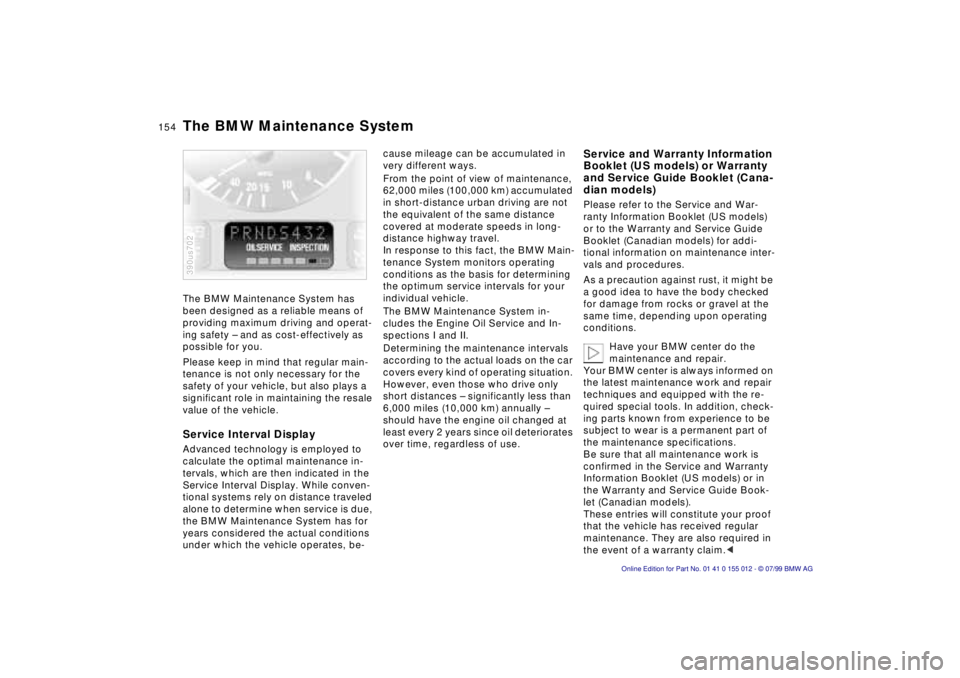
Service Interval DisplayAdvanced technology is employed to
calculate the optimal maintenance in-
tervals, which are then indicated in the
Service Interval Display. While conven-
tional systems rely on distance traveled
alone to determine when service is due,
the BMW Maintenance System has for
years considered the actual conditions
under which the vehicle operates, be-390us702
cause mileage can be accumulated in
very different ways.
From the point of view of maintenance,
62,000 miles (100,000 km) accumulated
in short-distance urban driving are not
the equivalent of the same distance
covered at moderate speeds in long-
distance highway travel.
In response to this fact, the BMW Main-
tenance System monitors operating
conditions as the basis for determining
the optimum service intervals for your
individual vehicle.
The BMW Maintenance System in-
cludes the Engine Oil Service and In-
spections I and II.
Determining the maintenance intervals
according to the actual loads on the car
covers every kind of operating situation.
However, even those who drive only
short distances Ð significantly less than
6,000 miles (10,000 km) annually Ð
should have the engine oil changed at
least every 2 years since oil deteriorates
over time, regardless of use.
Service and Warranty Information
Booklet (US models) or Warranty
and Service Guide Booklet (Cana-
dian models)Please refer to the Service and War-
ranty Information Booklet (US models)
or to the Warranty and Service Guide
Booklet (Canadian models) for addi-
tional information on maintenance inter-
vals and procedures.
As a precaution against rust, it might be
a good idea to have the body checked
for damage from rocks or gravel at the
same time, depending upon operating
conditions.
Have your BMW center do the
maintenance and repair.
Your BMW center is always informed on
the latest maintenance work and repair
techniques and equipped with the re-
quired special tools. In addition, check-
ing parts known from experience to be
subject to wear is a permanent part of
the maintenance specifications.
Be sure that all maintenance work is
confirmed in the Service and Warranty
Information Booklet (US models) or in
the Warranty and Service Guide Book-
let (Canadian models).
These entries will constitute your proof
that the vehicle has received regular
maintenance. They are also required in
the event of a warranty claim.<
The BMW Maintenance System