radio controls BMW 540I SEDAN 2000 Owners Manual
[x] Cancel search | Manufacturer: BMW, Model Year: 2000, Model line: 540I SEDAN, Model: BMW 540I SEDAN 2000Pages: 217, PDF Size: 1.69 MB
Page 11 of 217

11n
Controls and features
Operation, care and maintenance
Lamps:
Parking lamps/Low beams94
Instrument lighting94
High beams/Parking lamps95
Fog lamps95
Interior lamps96
Reading lamps96
Controlling the climate
for pleasant driving:
Automatic climate control98
Seat heating 103
Steering wheel heating 103
Roller sun blind 104
Independent ventilation
system 104
Cabin convenience:
BMW Universal Transmitter 105
Glove compartment108
Storage facilities108
Cellular phone 109
Beverage holder 109
Ashtray, front110
Cigarette lighter 110
Ashtray, rear111
Loading and transporting cargo:
Through-loading system 112
Ski bag 113
sport wagon:
Luggage compartment 116
Roll-up cover 116
Separation net 116
Storage areas in the luggage
compartment 118
Cargo loading120
Roof-mounted luggage rack121
Special operating instructions:
Break-in procedure124
Driving notes125
Catalytic converter126
Antilock Brake System
(ABS)127
Disc brakes128
Brake system130
Winter operation130
Power steering132
Level control system 132
Cellular phone 133
Radio reception133
Wheels and tires:
Tire inflation pressure134
Tire condition134
Tire replacement135
Tire rotation136
Wheel and tire
combinations137
Winter tires138
Snow chains 139
Approved wheel and tire
specifications 140
Page 25 of 217
25n
RepairsIndexOverview Controls Car care Technology Data
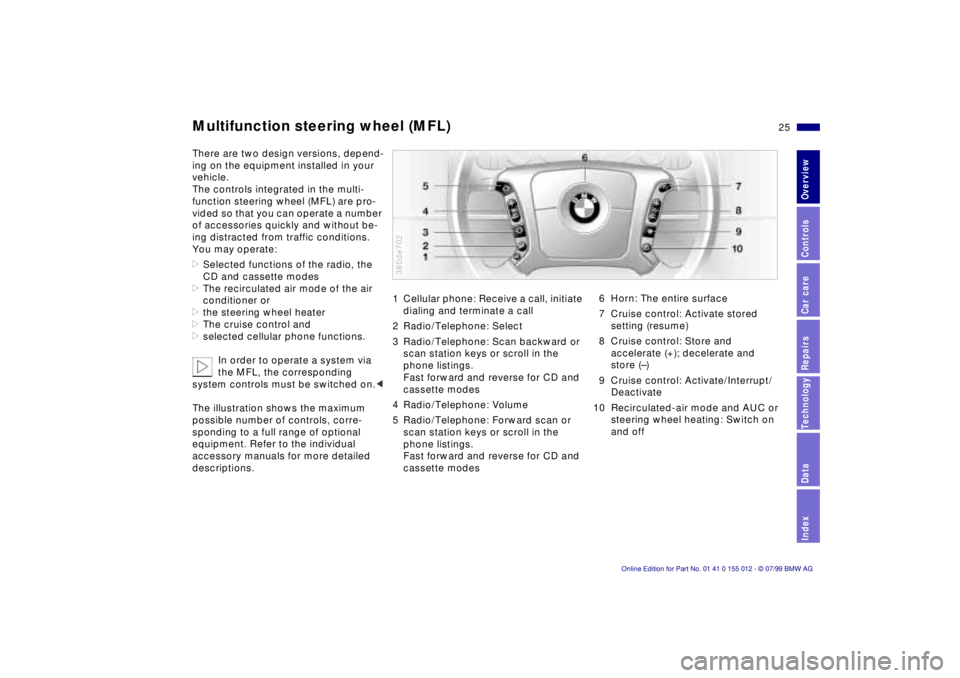
Multifunction steering wheel (MFL)There are two design versions, depend-
ing on the equipment installed in your
vehicle.
The controls integrated in the multi-
function steering wheel (MFL) are pro-
vided so that you can operate a number
of accessories quickly and without be-
ing distracted from traffic conditions.
You may operate:
>Selected functions of the radio, the
CD and cassette modes
>The recirculated air mode of the air
conditioner or
>the steering wheel heater
>The cruise control and
>selected cellular phone functions.
In order to operate a system via
the MFL, the corresponding
system controls must be switched on.<
The illustration shows the maximum
possible number of controls, corre-
sponding to a full range of optional
equipment. Refer to the individual
accessory manuals for more detailed
descriptions.
1 Cellular phone: Receive a call, initiate
dialing and terminate a call
2 Radio/Telephone: Select
3 Radio/Telephone: Scan backward or
scan station keys or scroll in the
phone listings.
Fast forward and reverse for CD and
cassette modes
4 Radio/Telephone: Volume
5 Radio/Telephone: Forward scan or
scan station keys or scroll in the
phone listings.
Fast forward and reverse for CD and
cassette modes380de702
6 Horn: The entire surface
7 Cruise control: Activate stored
setting (resume)
8 Cruise control: Store and
accelerate (+); decelerate and
store (Ð)
9 Cruise control: Activate/Interrupt/
Deactivate
10 Recirculated-air mode and AUC or
steering wheel heating: Switch on
and off
Page 26 of 217
26n
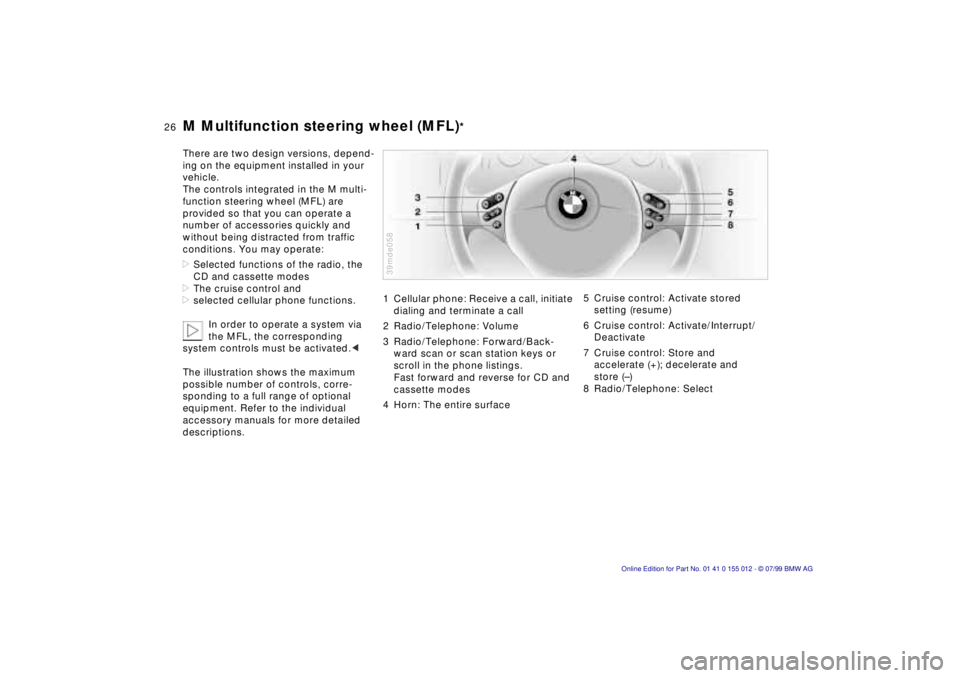
M Multifunction steering wheel (MFL)
*
There are two design versions, depend-
ing on the equipment installed in your
vehicle.
The controls integrated in the M multi-
function steering wheel (MFL) are
provided so that you can operate a
number of accessories quickly and
without being distracted from traffic
conditions. You may operate:
>Selected functions of the radio, the
CD and cassette modes
>The cruise control and
>selected cellular phone functions.
In order to operate a system via
the MFL, the corresponding
system controls must be activated.<
The illustration shows the maximum
possible number of controls, corre-
sponding to a full range of optional
equipment. Refer to the individual
accessory manuals for more detailed
descriptions.
1 Cellular phone: Receive a call, initiate
dialing and terminate a call
2 Radio/Telephone: Volume
3 Radio/Telephone: Forward/Back-
ward scan or scan station keys or
scroll in the phone listings.
Fast forward and reverse for CD and
cassette modes
4 Horn: The entire surface39mde058
5 Cruise control: Activate stored
setting (resume)
6 Cruise control: Activate/Interrupt/
Deactivate
7 Cruise control: Store and
accelerate (+); decelerate and
store (Ð)
8 Radio/Telephone: Select
Page 87 of 217
87n
RepairsIndexOverview Controls Car care Technology Data
Check Control>TRANS. FAILSAFE PROG
Please consult the nearest authorized
BMW center. Refer to pages 73, 76.
>CHECK BRAKE LININGS
Have the brake pads inspected by
your BMW center. Refer to page 130.
>CHECK COOLANT LEVEL
Coolant too low, top up at the next
opportunity. Refer to page 151.
>ENGINE FAILSAFE PROG
Fault in the Electronic Engine Power
Control (EML). When braking, higher
brake application pressure may be
necessary and brake pedal travel may
be significantly longer.
Have the fault checked by your
authorized BMW center.
Displays after completion of tripAll of the malfunctions registered during
the trip appear consecutively when the
key is turned to Position 0.
One of the following displays may ap-
pear:
>LIGHTS ON
>KEY IN IGNITION LOCK
>CHECK ENGINE OIL LEV
Add engine oil at the next opportunity
(next stop for fuel). Refer to page 14 9.
Display appears when you open the
driver's door after parking the vehicle.
A supplementary gong is also heard.
Status reports remain available for a pe-
riod of approx. three minutes after the
display goes out and the key is re-
moved from the ignition. Press the
CHECK button. If there were multiple
reports, press the CHECK button re-
peatedly to view them all in sequence.
To check the Check ControlPress the CHECK button (3) with the
ignition key in position 2:
CHECK CONTROL OK appears in the
display.
No malfunctions are present in the
monitored systems.Onboard computerYou will find a description of the on-
board computer in the "Radio and Infor-
mation Systems" Owner's Manual.
You can have the Check Control
and onboard computer messages
displayed in a different language.<
Page 89 of 217
89n
RepairsIndexOverview Controls Car care Technology Data
Onboard computerCancel displayIf the button in the turn-signal lever is
pressed briefly while the average speed
is displayed, the onboard computer dis-
play can be masked out.To restart calculationsIf you continue to press the button in
the turn signal lever, the average values
which were just displayed for fuel con-
sumption and speed will be recalcu-
lated from that point (the engine must
be running for this).
Onboard computer with
alphanumeric display
*
If your vehicle has Check Control with
alphanumeric display, the system's on-
board computer is described in the
"Radio and information systems"
Owner's Manual.
Page 123 of 217
Overview
Controls and features
Operation, care
and maintenance
Owner service procedures
Technical data
Index Advanced technology
123n
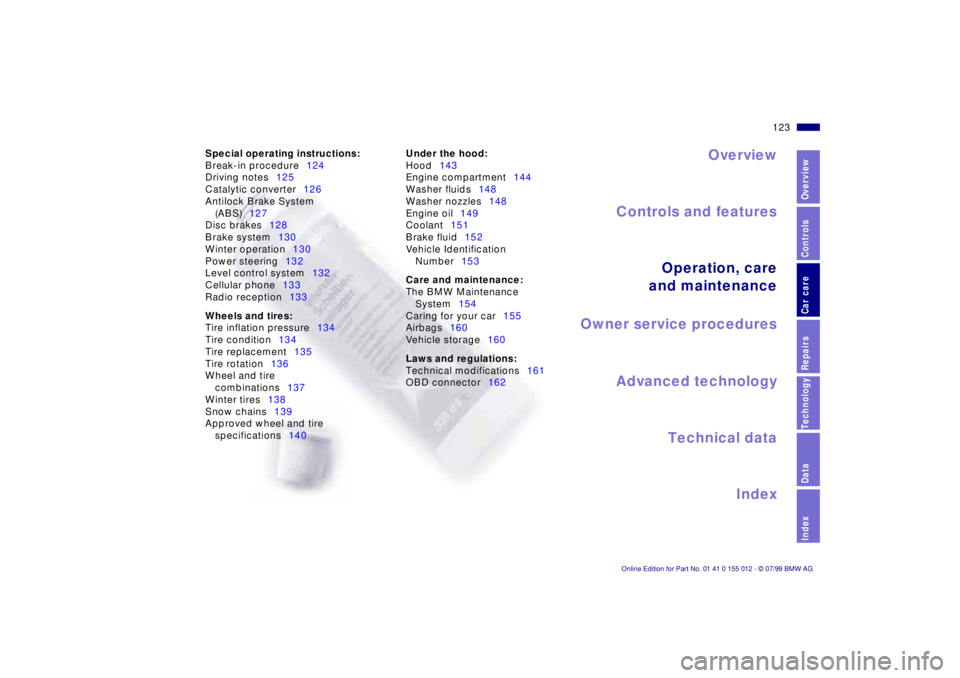
RepairsIndexOverview Controls Car care Technology Data
Under the hood:
Hood143
Engine compartment144
Washer fluids148
Washer nozzles148
Engine oil149
Coolant151
Brake fluid152
Vehicle Identification
Number153
Care and maintenance:
The BMW Maintenance
System154
Caring for your car155
Airbags160
Vehicle storage160
Laws and regulations:
Technical modifications161
OBD connector162 Special operating instructions:
Break-in procedure124
Driving notes125
Catalytic converter126
Antilock Brake System
(ABS)127
Disc brakes128
Brake system130
Winter operation130
Power steering132
Level control system132
Cellular phone133
Radio reception133
Wheels and tires:
Tire inflation pressure134
Tire condition134
Tire replacement135
Tire rotation136
Wheel and tire
combinations137
Winter tires138
Snow chains139
Approved wheel and tire
specifications140
Page 133 of 217
133n
RepairsIndexOverview Controls Car care Technology Data
Cellular phone
*
Radio reception
Mobile communications systems (cellu-
lar phone, radio, etc.) are permitted with
an output up to 10 watts only. Even
these systems may trigger malfunctions
in the operation of your vehicle if they
are not specifically designed for use
with the vehicle. BMW can neither test
nor assume responsibility for every
individual product being offered on the
market. We recommend that you con-
sult your BMW center before purchas-
ing any device of this kind.
To ensure that your BMW continues to
provide reliable and trouble-free opera-
tion, do not use a cellular phone or
other radio device with an antenna
located inside the passenger compart-
ment. The antenna should always be
mounted on the outside of the vehicle.
Before loading the vehicle on a
car-carrier train or driving it
through a car wash, remove the
antenna.<
The reception and sound quality
obtained from mobile radios varies
according to a variety of factors, includ-
ing the broadcast range of the transmit-
ter and the directional orientation of the
antenna. Interference factors such as
high-tension power lines, buildings and
natural obstructions can all lead to
unavoidable reception interference,
regardless of how well the vehicle
sound system is operating.
Climatic factors such as intense solar
radiation, fog, rain and snow can also
interfere with reception.
Cellular phones without official BMW
approval can also generate interfer-
ence. This phenomenon assumes the
form of a low-pitched hum emanating
from the speaker system.
Please refer to the (Supplementary)
Owner's Manual provided with your
sound system for detailed information
on its use.
Page 187 of 217
Overview
Controls and features
Operation, care
and maintenance
Owner service procedures
Technical data
Index Advanced technology
187n
RepairsIndexOverview Controls Car care Technology Data
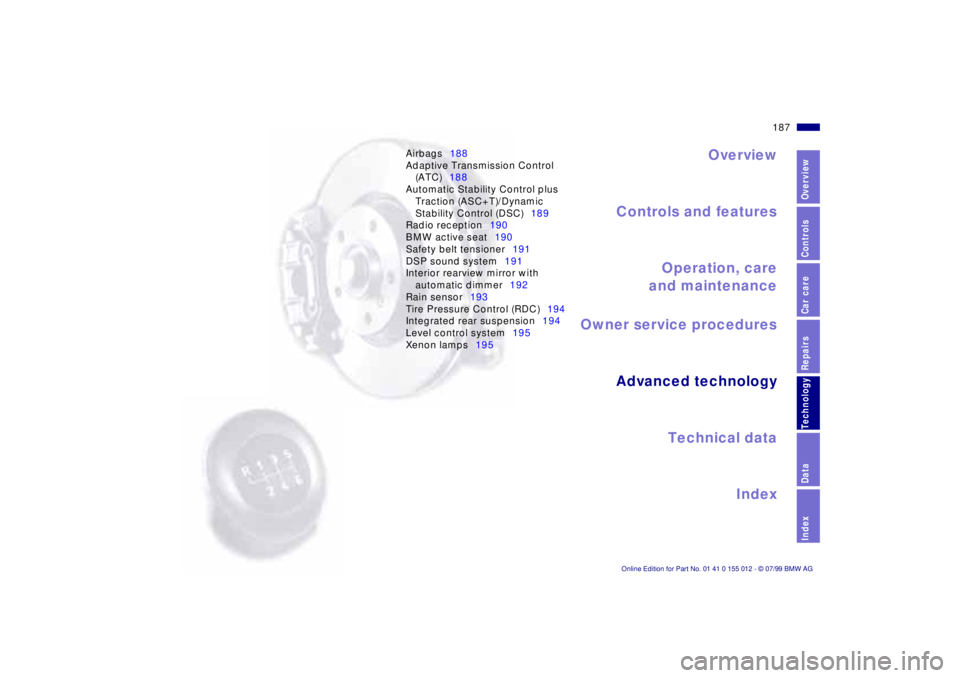
Airbags188
Adaptive Transmission Control
(ATC)188
Automatic Stability Control plus
Traction (ASC+T)/Dynamic
Stability Control (DSC)189
Radio reception190
BMW active seat190
Safety belt tensioner191
DSP sound system191
Interior rearview mirror with
automatic dimmer192
Rain sensor193
Tire Pressure Control (RDC)194
Integrated rear suspension194
Level control system195
Xenon lamps195
Page 209 of 217
209n
RepairsIndexOverview Controls Car care Technology Data
Everything from A to Z
Clock, refer to the Radio
Owner's Manual
Cockpit16
Cold start68
Comfort seat51
Compartments108
Compression ratio198
Computer, refer to Onboard
computer88
Consumption display83
Convenience operating
mode of windows and
sliding/tilt sunroof36
Coolant130, 151
Antifreeze130
Capacity203
Temperature gauge84
Cover, sun blinds104
Cruise control80
Cruising range88
Cup holder109
Curb weight201
D
Dashboard16
Data link connector for
Onboard Diagnostics162
Daytime-driving lamp94
DBC (Dynamic Brake
Control)24, 129
Deep water125Defrost windshields101
Digital sound processor192
Dimensions199
Dipstick, engine oil149
Disc brakes124, 128
Disconnect the battery178
Displacement198
Display lighting94
Displays18
Distance warning90
Diversity Antenna
system190
Divided rear-seat
backrest112
Door keys35
Door locks, care130
Doors
Emergency release36
Manual operation36
Unlocking and locking36
Drive belts204
Driving notes125
Driving through water125
DSC (Dynamic Stability
Control)24, 91, 189
Dynamic Brake Control
(DBC)24, 129
Dynamic Stability Control
(DSC)24, 91, 189
E
Electric power seat50
Electric power windows47
Electrical defect
Fuel filler door180
Sliding/Tilt sunroof180
Tailgate181
Electrical heating exterior
mirror55
Electrical steering wheel
adjustment54
Elements of operation16
Emergency operation
Doors36
Fuel filler door180
Luggage compartment lid/
Tailgate41, 181
Sliding/Tilt sunroof180
Energy Control83
Engine
Compartment144
Coolant151
Specifications198
Engine oil
Capacity203
Consumption149
Grades150
Level23
Pressure23
Error indicators85
Exterior finish156
Exterior mirror54
Electrical heating55
F
Failure of an electrical
accessorry180
Failure warnings85
Filler cap cover28
Filling capacities203
First-aid kit27
Fittings, tow-starting and
towing183
Flashlight108
Flat tire134
Footbrake
Footwell lamps96
Forward/Back adjustment,
seat50, 52
Front fog lamps95, 169
bulb replacement169
Front seat adjustment50
Frost protection,
radiator151
Fuel29
Capacity203
Consumption indicator83
Gauge83
Quality29
Reserve203
Fuel filler door release after
electrical fault180
Fuel tank, capacity203
Fuses178
Page 211 of 217
211n
RepairsIndexOverview Controls Car care Technology Data
Everything from A to Z
Manual operation
Doors36
Fuel filler door180
Luggage compartment lid/
Tailgate41, 181
Sliding/Tilt sunroof180
Manual transmission70
Manually controlled
recirculated-air101
Master key34
Mechanical seat52
Memory56
MFL (M Multifunction
steering wheel)26
MFL (Multifunction steering
wheel)25
Microfilter103
Mirror54
Mirror heating55
Mirror memory56
Mobile communications
systems, refer to the
separate Owner's Manual
Mobile phones133
Modifications,
technical6, 161
Multifunction steering wheel
(MFL)25
N
Navigation System, refer to
the separate Owner's
Manual
Nonsmoker equipment110
Nozzles98
O
OBD connector162
Odometer82
Oil
Additives149
Consumption149
Grades150
Oil change interval, see the
Service and Warranty
Information Booklet (US
models) or Warranty and
Service Guide Booklet
(Canadian models)
Oil dipstick149
Oil level, indicator lamp23
Oil quantity, engine203
OILSERVICE84
Old batteries177
Onboard computer88
Average fuel
consumption88
Average speed88
Cruising range88
Outside temperature88
Onboard tool kit166Open luggage compartment
lid/tailgate from
interior41
Opening and closing
From the inside38
From the outside36
Operating range88
Outside temperature88
Outside temperature
display82
P
Paint blemishes156
Paint, care156
Paintwork, minor
repairs157
Paintwork, waxing157
Park Distance Control
(PDC)90
Parking brake23, 69
Parking help90
Parking lamps95
Bulb replacement168
Parking, Winter132
PDC (Park Distance
Control)90
Playing cassettes
Refer to the Radio Owner's
Manual
Playing CDs
Refer to the Radio Owner's
Manual
Pocket light108Pollen filter103
Power output198
Power steering132
Power windows47
Safety switch48
Power-slip control
Refer to ASC+T/DSC91
Pressure, tire30, 134
Monitoring92, 194
R
Radio reception133, 190
Radio, refer to the separate
Owner's Manual
Radios133
Rain sensor155
RDC (Tire Pressure
Control)92, 194
Reading lamps96
Rear view mirror54
Rear window blind104
Rear window
defrosting79, 102
Rear window wiper79
Rear-seat backrest,
removable112
Recirculated-air control101
Reclining seat50
Refueling28
Remote control37
Removable rear-seat
backrest112