ad blue BMW 550I 2007 User Guide
[x] Cancel search | Manufacturer: BMW, Model Year: 2007, Model line: 550I, Model: BMW 550I 2007Pages: 273, PDF Size: 8.96 MB
Page 248 of 273
Short commands of voice command system
246
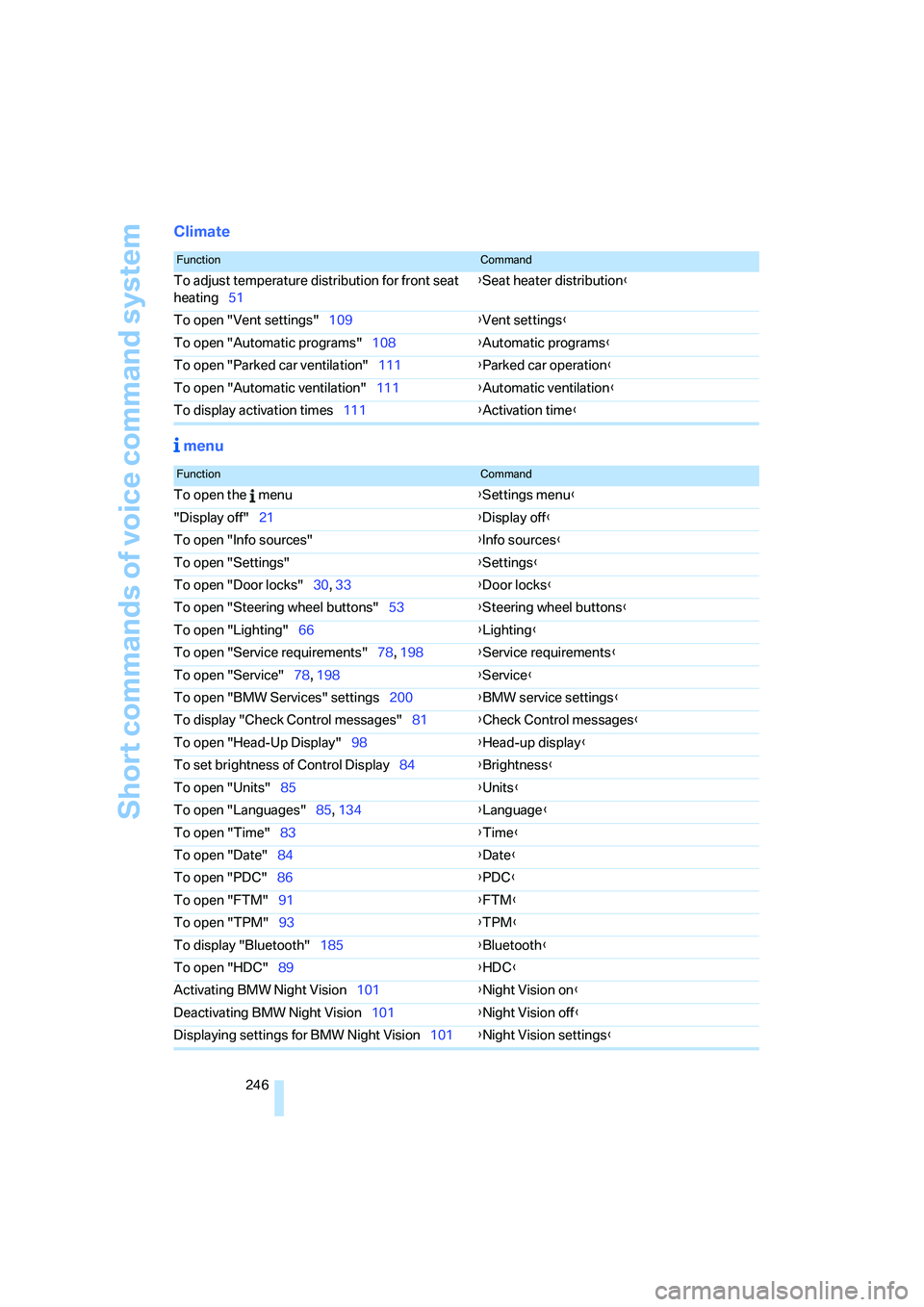
Climate
menu
FunctionCommand
To adjust temperature distribution for front seat
heating51{Seat heater distribution}
To open "Vent settings"109{Vent settings}
To open "Automatic programs"108{Automatic programs}
To open "Parked car ventilation"111{Parked car operation}
To open "Automatic ventilation"111{Automatic ventilation}
To display activation times111{Activation time}
FunctionCommand
To open the menu{Settings menu}
"Display off"21{Display off}
To open "Info sources"{Info sources}
To open "Settings"{Settings}
To open "Door locks"30, 33{Door locks}
To open "Steering wheel buttons"53{Steering wheel buttons}
To open "Lighting"66{Lighting}
To open "Service requirements"78, 198{Service requirements}
To open "Service"78, 198{Service}
To open "BMW Services" settings200{BMW service settings}
To display "Check Control messages"81{Check Control messages}
To open "Head-Up Display"98{Head-up display}
To set brightness of Control Display84{Brightness}
To open "Units"85{Units}
To open "Languages"85, 134{Language}
To open "Time"83{Time}
To open "Date"84{Date}
To open "PDC"86{PDC}
To open "FTM"91{FTM}
To open "TPM"
93{TPM}
To display "Bluetooth"185{Bluetooth}
To open "HDC"89{HDC}
Activating BMW Night Vision101{Night Vision on}
Deactivating BMW Night Vision101{Night Vision off}
Displaying settings for BMW Night Vision101{Night Vision settings}
Page 252 of 273
Everything from A to Z
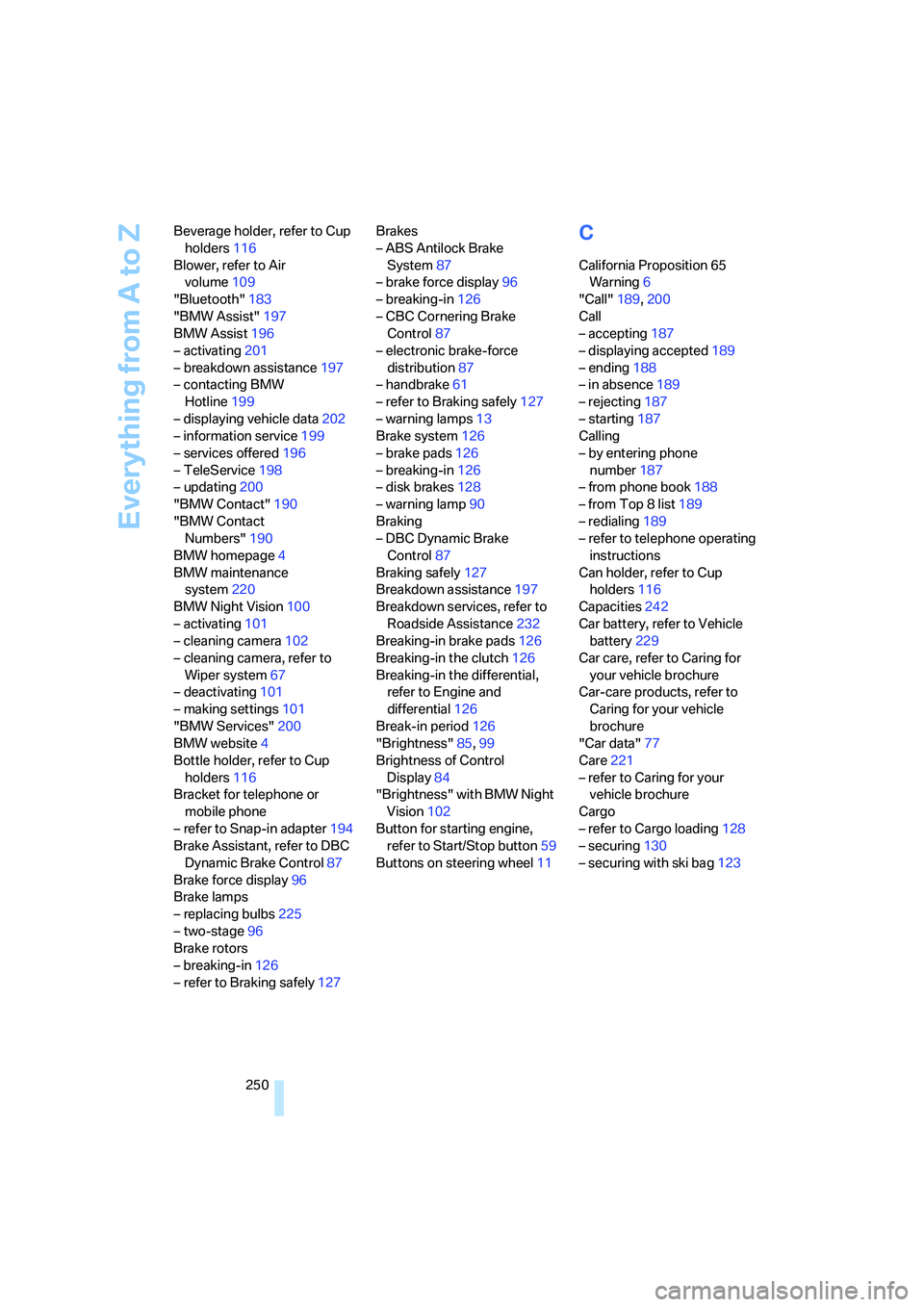
250 Beverage holder, refer to Cup
holders116
Blower, refer to Air
volume109
"Bluetooth"183
"BMW Assist"197
BMW Assist196
– activating201
– breakdown assistance197
– contacting BMW
Hotline199
– displaying vehicle data202
– information service199
– services offered196
– TeleService198
– updating200
"BMW Contact"190
"BMW Contact
Numbers"190
BMW homepage4
BMW maintenance
system220
BMW Night Vision100
– activating101
– cleaning camera102
– cleaning camera, refer to
Wiper system67
– deactivating101
– making settings101
"BMW Services"200
BMW website4
Bottle holder, refer to Cup
holders116
Bracket for telephone or
mobile phone
– refer to Snap-in adapter194
Brake Assistant, refer to DBC
Dynamic Brake Control87
Brake force display96
Brake lamps
– replacing bulbs225
– two-stage96
Brake rotors
– breaking-in126
– refer to Braking safely127Brakes
– ABS Antilock Brake
System87
– brake force display96
– breaking-in126
– CBC Cornering Brake
Control87
– electronic brake-force
distribution87
– handbrake61
– refer to Braking safely127
– warning lamps13
Brake system126
– brake pads126
– breaking-in126
– disk brakes128
– warning lamp90
Braking
– DBC Dynamic Brake
Control87
Braking safely127
Breakdown assistance197
Breakdown services, refer to
Roadside Assistance232
Breaking-in brake pads126
Breaking-in the clutch126
Breaking-in the differential,
refer to Engine and
differential126
Break-in period126
"Brightness"85,99
Brightness of Control
Display84
"Brightness" with BMW Night
Vision102
Button for starting engine,
refer to Start/Stop button59
Buttons on steering wheel11
C
California Proposition 65
Warning6
"Call"189,200
Call
– accepting187
– displaying accepted189
– ending188
– in absence189
– rejecting187
– starting187
Calling
– by entering phone
number187
– from phone book188
– from Top 8 list189
– redialing189
– refer to telephone operating
instructions
Can holder, refer to Cup
holders116
Capacities242
Car battery, refer to Vehicle
battery229
Car care, refer to Caring for
your vehicle brochure
Car-care products, refer to
Caring for your vehicle
brochure
"Car data"77
Care221
– refer to Caring for your
vehicle brochure
Cargo
– refer to Cargo loading128
– securing130
– securing with ski bag123