Jack BMW 550I 2008 Owners Manual
[x] Cancel search | Manufacturer: BMW, Model Year: 2008, Model line: 550I, Model: BMW 550I 2008Pages: 288, PDF Size: 7.03 MB
Page 40 of 288
Opening and closing
38
Tilt alarm sensor
The tilt of the vehicle is monitored. The alarm
system reacts, e.g. in case of an attempted
wheel theft or towing.
Interior motion sensor
In order for the interior motion sensor to func-
tion properly, the windows and glass sunroof
*
must be completely closed.
Avoiding unintentional alarms
The tilt alarm sensor and interior motion sensor
may be switched off at the same time. This pre-
vents unintentional alarms, e.g. in the following
situations:
>In two-level garages
>When transporting on car-carrying trains,
by sea or on a trailer
>When animals are to remain in the vehicle
Switching off tilt alarm sensor and
interior motion sensor
Press the button on the remote control
again as soon as the vehicle is locked.
The indicator lamp lights up briefly and then
flashes continuously. The tilt alarm sensor and
the interior motion sensor are switched off until
the next time the vehicle is unlocked and subse-
quently locked again.
Comfort access*
Comfort access allows you to access your vehi-
cle without having to hold the remote control in
your hand. It is sufficient to carry the remote
control with you, e.g. in your jacket pocket. The
vehicle automatically detects the associated
remote control in the immediate vicinity or in
the interior.
Comfort access supports the following func-
tions:
>Unlocking/locking vehicle
>Comfort closing
>Opening luggage compartment lid/tailgate
separately>Sports Wagon: opening rear window sepa-
rately
>Starting engine
Functional requirement
>The vehicle or the luggage compartment
lid/tailgate can only be locked if the vehicle
detects that the remote control you are car-
rying is outside the vehicle.
>The next unlocking and locking cycle is not
possible until after approx. 2 seconds.
>The engine can only be started if the vehicle
detects that the remote control is located in
the vehicle.
Comparison with ordinary remote
control
You can control the functions mentioned previ-
ously with the comfort access or by pressing
the buttons on the remote control. Therefore,
please familiarize yourself with the information
on opening and closing beginning on page28
beforehand.
The special features when using comfort
access are described in the following.
Should a short delay occur when opening
or closing the windows or the glass sun-
roof, the system is checking whether a remote
control is located in the vehicle. Please repeat
opening or closing if necessary.<
Unlocking
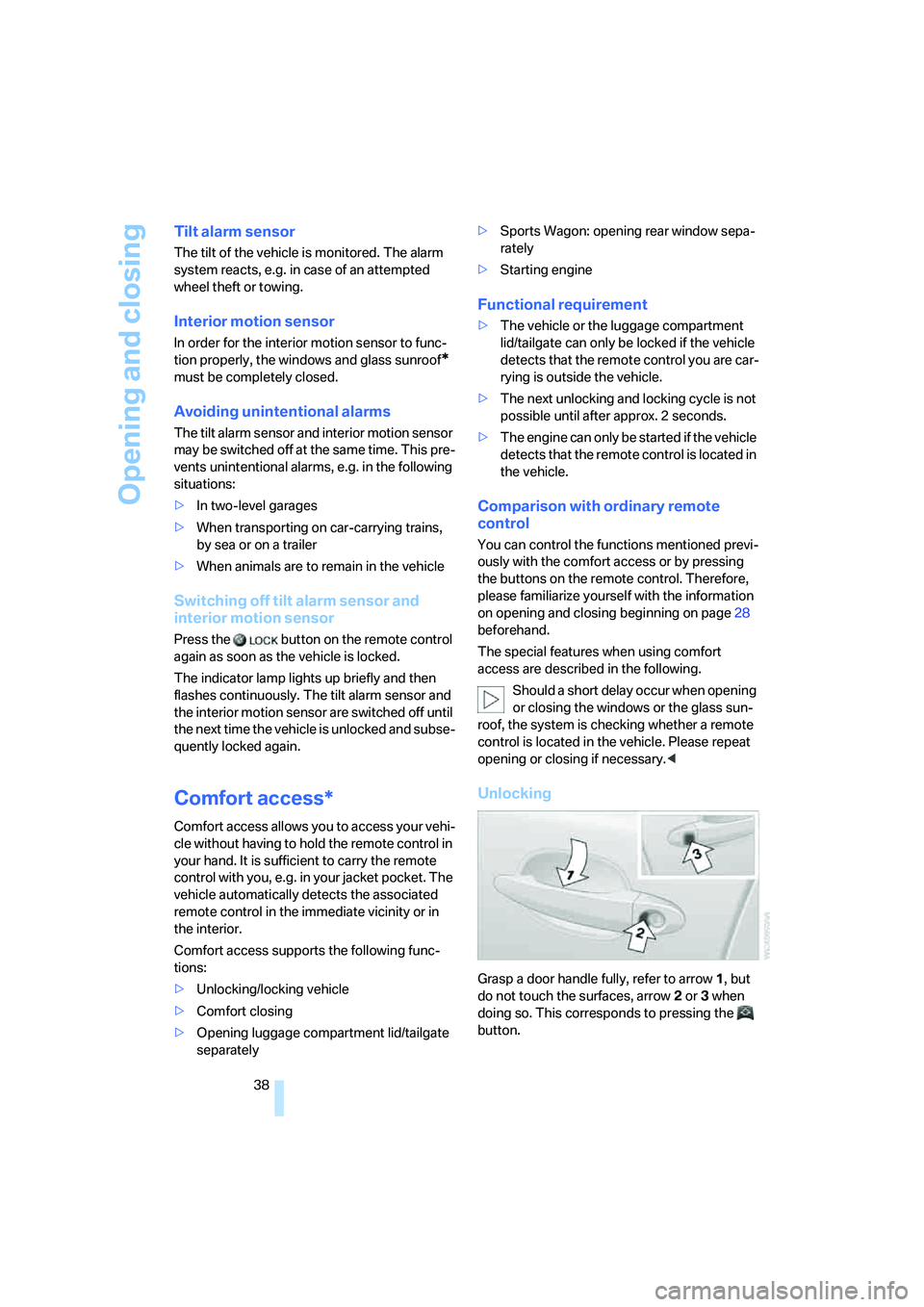
Grasp a door handle fully, refer to arrow1, but
do not touch the surfaces, arrow2 or 3 when
doing so. This corresponds to pressing the
button.
Page 190 of 288
AUX-In connection
188
AUX-In connection
You can connect an external audio device, e.g.
an MP3 player, and play the sound via the vehi-
cle loudspeakers. The sound can be adjusted
via iDrive.
Connecting
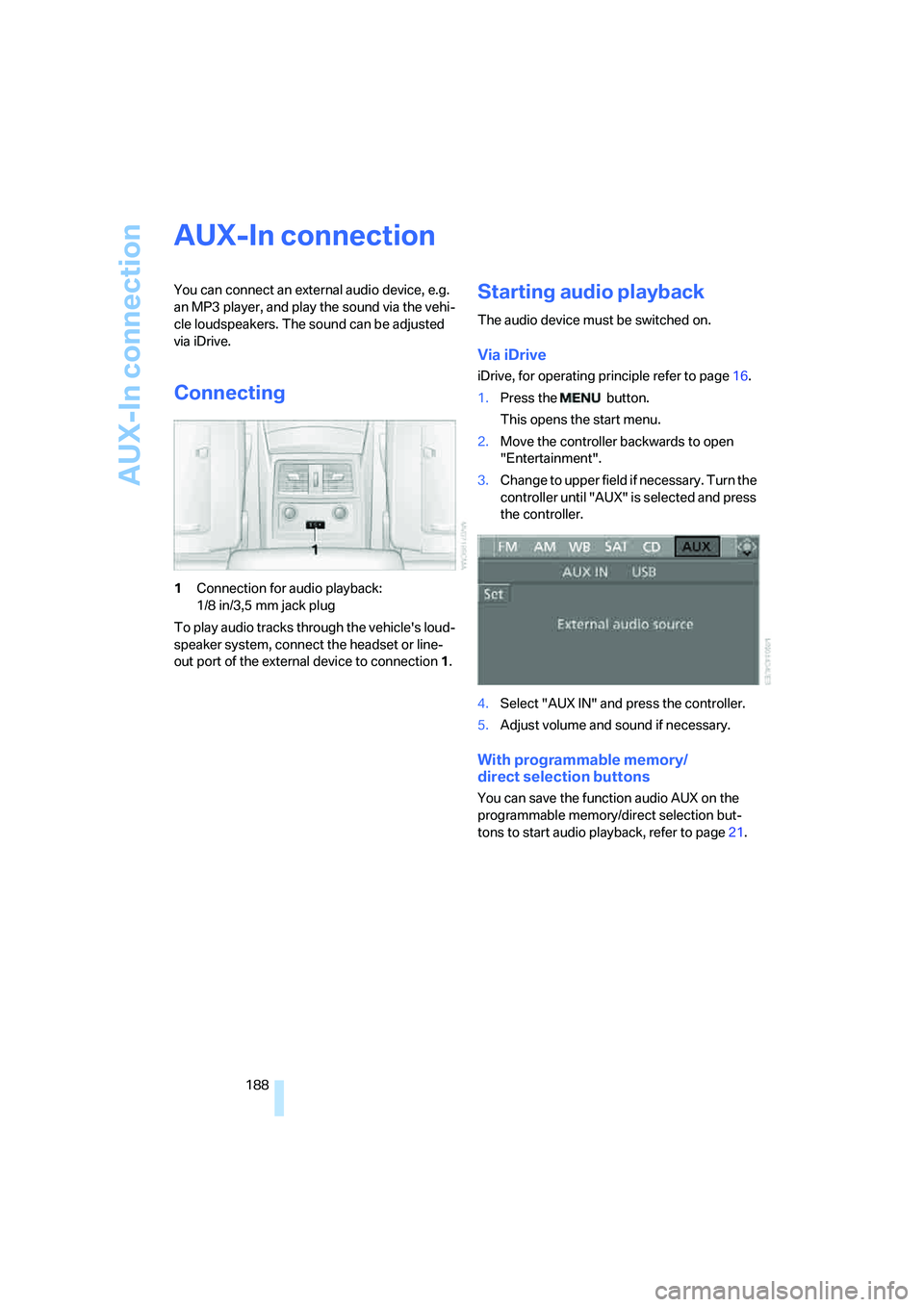
1Connection for audio playback:
1/8 in/3,5 mm jack plug
To play audio tracks through the vehicle's loud-
speaker system, connect the headset or line-
out port of the external device to connection 1.
Starting audio playback
The audio device must be switched on.
Via iDrive
iDrive, for operating principle refer to page16.
1.Press the button.
This opens the start menu.
2.Move the controller backwards to open
"Entertainment".
3.Change to upper field if necessary. Turn the
controller until "AUX" is selected and press
the controller.
4.Select "AUX IN" and press the controller.
5.Adjust volume and sound if necessary.
With programmable memory/
direct selection buttons
You can save the function audio AUX on the
programmable memory/direct selection but-
tons to start audio playback, refer to page21.
Page 191 of 288
Navigation
Entertainment
Driving tips
189Reference
At a glance
Controls
Communications
Mobility
USB/audio interface
You can connect audio devices to the USB/
audio interface, e.g. an iPod or a USB device
(MP3 player, USB memory stick). You can then
operate these via iDrive.
The system can play back common audio files,
e.g. MP3, WMA, WAV (PCM) and ACC, as well
as playback lists in the M3U format.
Due to the large number of audio devices avail-
able on the market, operation via the vehicle
cannot be ensured for every audio device.
Ask your BMW center which audio devices are
suitable.
Connecting
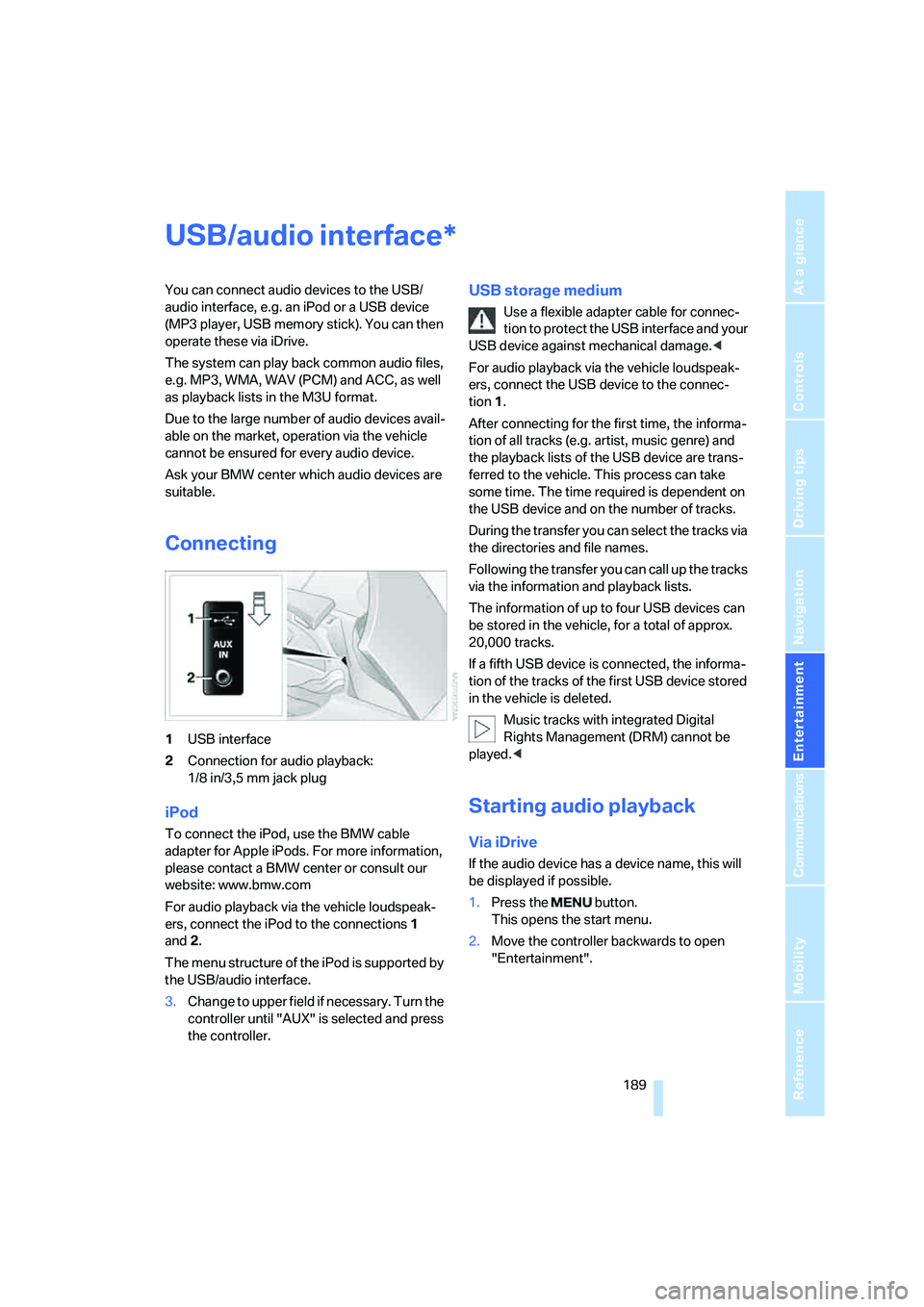
1USB interface
2Connection for audio playback:
1/8 in/3,5 mm jack plug
iPod
To connect the iPod, use the BMW cable
adapter for Apple iPods. For more information,
please contact a BMW center or consult our
website: www.bmw.com
For audio playback via the vehicle loudspeak-
ers, connect the iPod to the connections1
and2.
The menu structure of the iPod is supported by
the USB/audio interface.
USB storage medium
Use a flexible adapter cable for connec-
tion to protect the USB interface and your
USB device against mechanical damage.<
For audio playback via the vehicle loudspeak-
ers, connect the USB device to the connec-
tion 1.
After connecting for the first time, the informa-
tion of all tracks (e.g. artist, music genre) and
the playback lists of the USB device are trans-
ferred to the vehicle. This process can take
some time. The time required is dependent on
the USB device and on the number of tracks.
During the transfer you can select the tracks via
the directories and file names.
Following the transfer you can call up the tracks
via the information and playback lists.
The information of up to four USB devices can
be stored in the vehicle, for a total of approx.
20,000 tracks.
If a fifth USB device is connected, the informa-
tion of the tracks of the first USB device stored
in the vehicle is deleted.
Music tracks with integrated Digital
Rights Management (DRM) cannot be
played.<
Starting audio playback
Via iDrive
If the audio device has a device name, this will
be displayed if possible.
1.Press the button.
This opens the start menu.
2.Move the controller backwards to open
"Entertainment".
3.Change to upper field if necessary. Turn the
controller until "AUX" is selected and press
the controller.
*
Page 244 of 288
Replacing components
242
Lamps in luggage compartment lid
License plate lamp
5-watt bulb, C5W
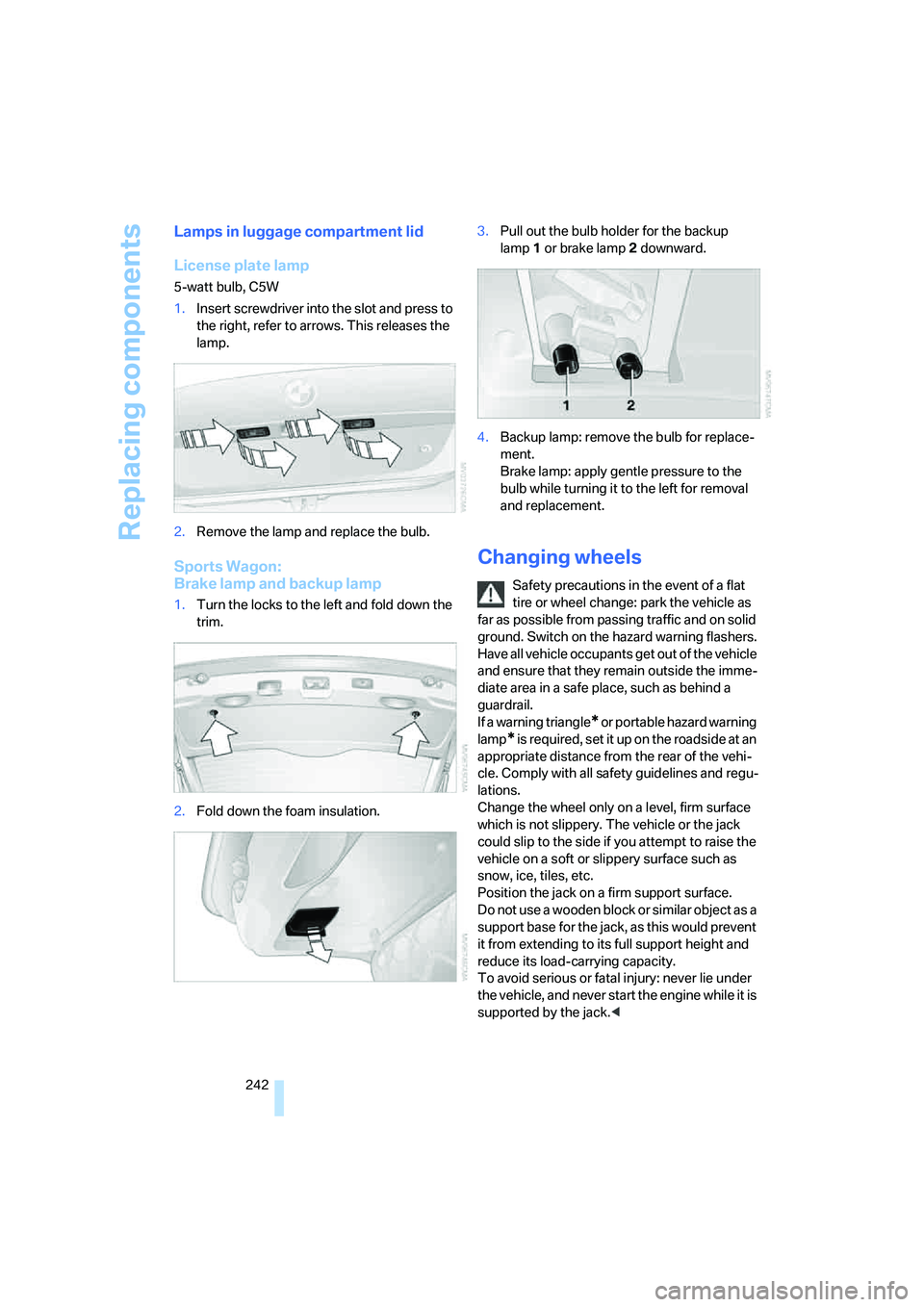
1.Insert screwdriver into the slot and press to
the right, refer to arrows. This releases the
lamp.
2.Remove the lamp and replace the bulb.
Sports Wagon:
Brake lamp and backup lamp
1.Turn the locks to the left and fold down the
trim.
2.Fold down the foam insulation.3.Pull out the bulb holder for the backup
lamp1 or brake lamp2 downward.
4.Backup lamp: remove the bulb for replace-
ment.
Brake lamp: apply gentle pressure to the
bulb while turning it to the left for removal
and replacement.
Changing wheels
Safety precautions in the event of a flat
tire or wheel change: park the vehicle as
far as possible from passing traffic and on solid
ground. Switch on the hazard warning flashers.
Have all vehicle occupants get out of the vehicle
and ensure that they remain outside the imme-
diate area in a safe place, such as behind a
guardrail.
If a warning triangle
* or portable hazard warning
lamp
* is r e q u ir e d, s et i t up o n t h e ro a d s i d e a t a n
appropriate distance from the rear of the vehi-
cle. Comply with all safety guidelines and regu-
lations.
Change the wheel only on a level, firm surface
which is not slippery. The vehicle or the jack
could slip to the side if you attempt to raise the
vehicle on a soft or slippery surface such as
snow, ice, tiles, etc.
Position the jack on a firm support surface.
Do not use a wooden block or similar object as a
support base for the jack, as this would prevent
it from extending to its full support height and
reduce its load-carrying capacity.
To avoid serious or fatal injury: never lie under
the vehicle, and never start the engine while it is
supported by the jack.<
Page 245 of 288
Mobility
243Reference
At a glance
Controls
Driving tips
Communications
Navigation
Entertainment
What you will need
To avoid rattling noises later on, note the posi-
tions of the tools before removing them, then
return them to their initial positions after com-
pleting work.
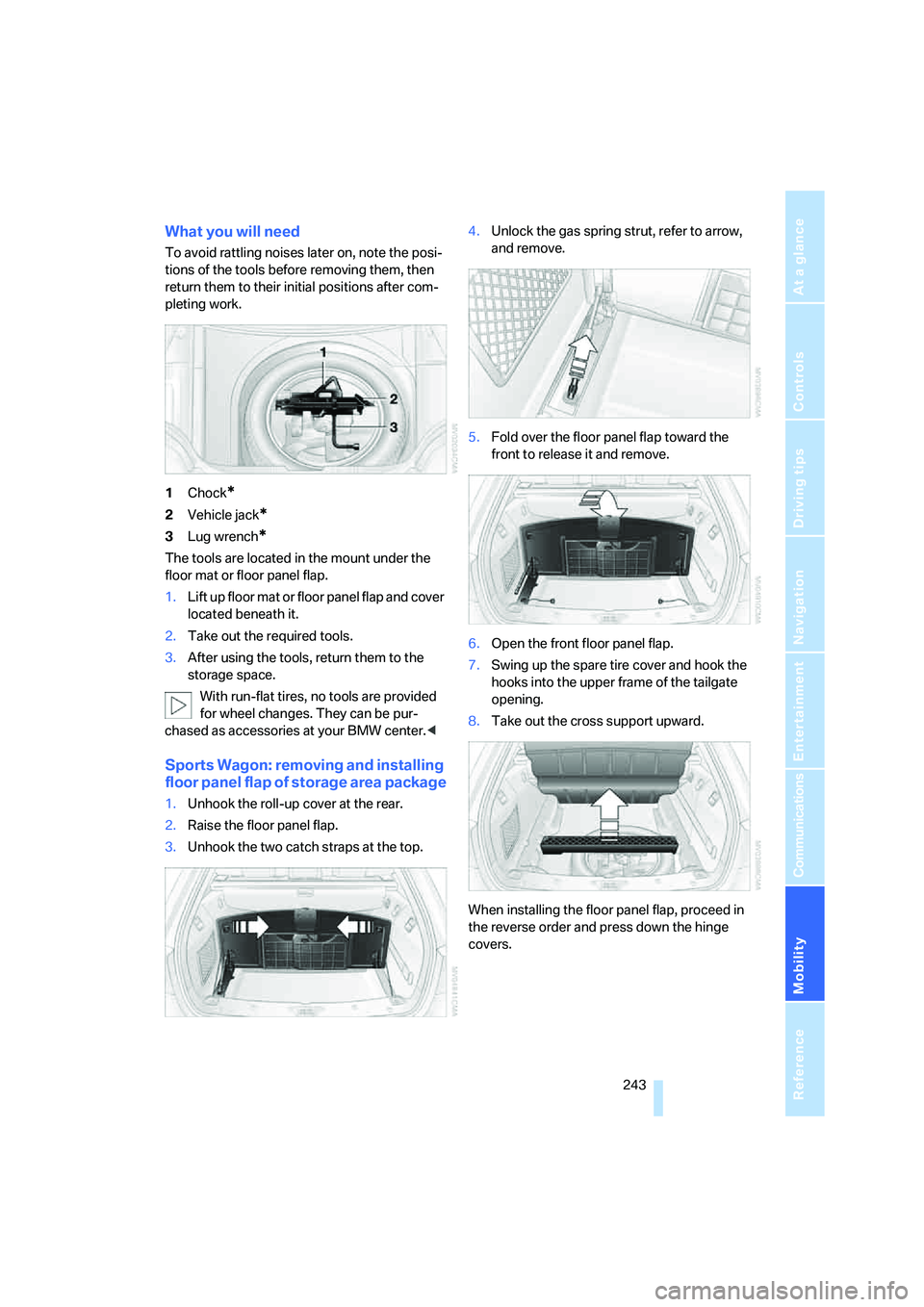
1Chock
*
2Vehicle jack*
3Lug wrench*
The tools are located in the mount under the
floor mat or floor panel flap.
1.Lift up floor mat or floor panel flap and cover
located beneath it.
2.Take out the required tools.
3.After using the tools, return them to the
storage space.
With run-flat tires, no tools are provided
for wheel changes. They can be pur-
chased as accessories at your BMW center.<
Sports Wagon: removing and installing
floor panel flap of storage area package
1.Unhook the roll-up cover at the rear.
2.Raise the floor panel flap.
3.Unhook the two catch straps at the top.4.Unlock the gas spring strut, refer to arrow,
and remove.
5.Fold over the floor panel flap toward the
front to release it and remove.
6.Open the front floor panel flap.
7.Swing up the spare tire cover and hook the
hooks into the upper frame of the tailgate
opening.
8.Take out the cross support upward.
When installing the floor panel flap, proceed in
the reverse order and press down the hinge
covers.
Page 246 of 288
Replacing components
244
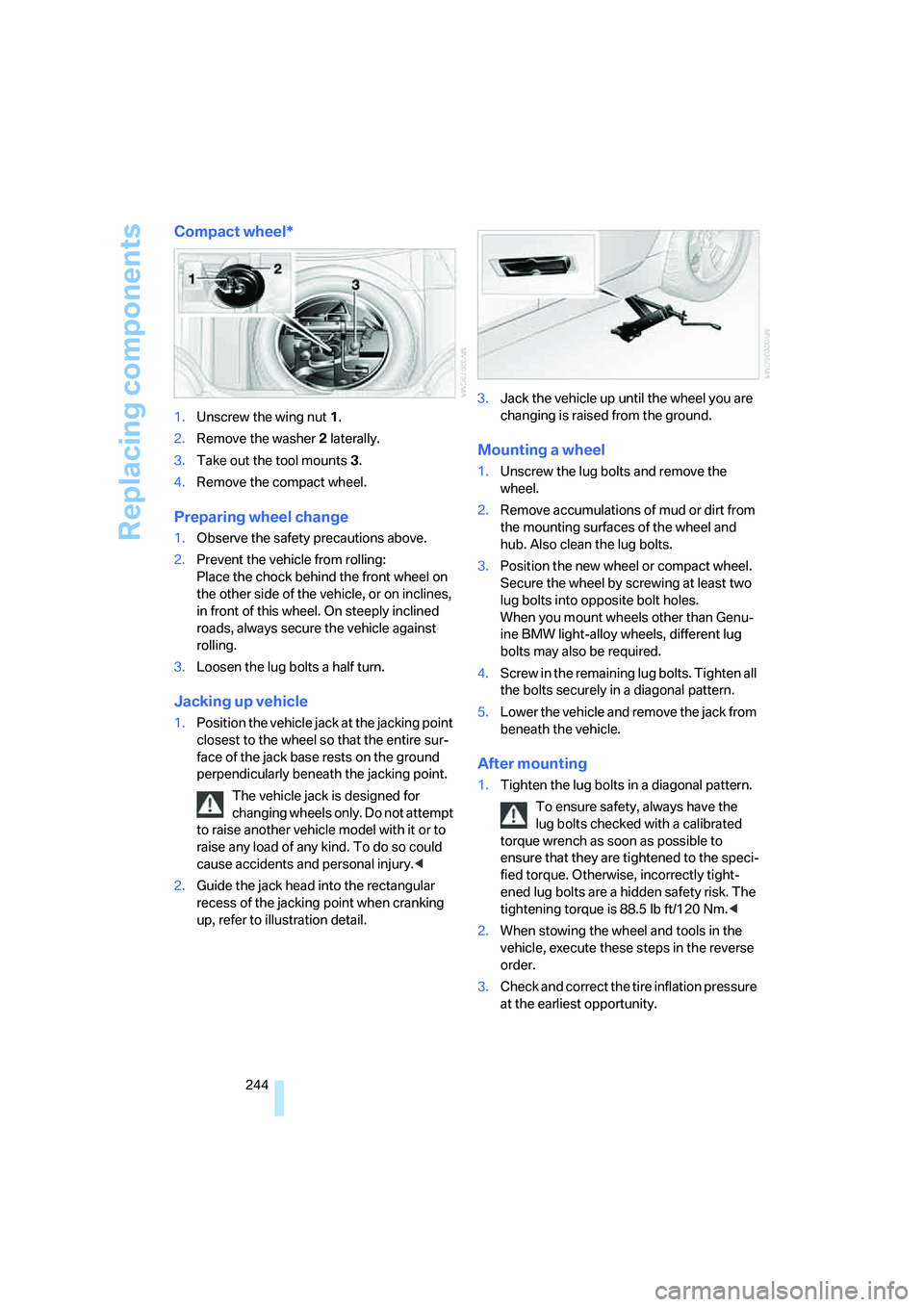
Compact wheel*
1.Unscrew the wing nut 1.
2.Remove the washer 2 laterally.
3.Take out the tool mounts 3.
4.Remove the compact wheel.
Preparing wheel change
1.Observe the safety precautions above.
2.Prevent the vehicle from rolling:
Place the chock behind the front wheel on
the other side of the vehicle, or on inclines,
in front of this wheel. On steeply inclined
roads, always secure the vehicle against
rolling.
3.Loosen the lug bolts a half turn.
Jacking up vehicle
1.Position the vehicle jack at the jacking point
closest to the wheel so that the entire sur-
face of the jack base rests on the ground
perpendicularly beneath the jacking point.
The vehicle jack is designed for
changing wheels only. Do not attempt
to raise another vehicle model with it or to
raise any load of any kind. To do so could
cause accidents and personal injury.<
2.Guide the jack head into the rectangular
recess of the jacking point when cranking
up, refer to illustration detail.3.Jack the vehicle up until the wheel you are
changing is raised from the ground.
Mounting a wheel
1.Unscrew the lug bolts and remove the
wheel.
2.Remove accumulations of mud or dirt from
the mounting surfaces of the wheel and
hub. Also clean the lug bolts.
3.Position the new wheel or compact wheel.
Secure the wheel by screwing at least two
lug bolts into opposite bolt holes.
When you mount wheels other than Genu-
ine BMW light-alloy wheels, different lug
bolts may also be required.
4.Screw in the remaining lug bolts. Tighten all
the bolts securely in a diagonal pattern.
5.Lower the vehicle and remove the jack from
beneath the vehicle.
After mounting
1.Tighten the lug bolts in a diagonal pattern.
To ensure safety, always have the
lug bolts checked with a calibrated
torque wrench as soon as possible to
ensure that they are tightened to the speci-
fied torque. Otherwise, incorrectly tight-
ened lug bolts are a hidden safety risk. The
tightening torque is 88.5 lb ft/120 Nm.<
2.When stowing the wheel and tools in the
vehicle, execute these steps in the reverse
order.
3.Check and correct the tire inflation pressure
at the earliest opportunity.
Page 275 of 288
Reference 273
At a glance
Controls
Driving tips
Communications
Navigation
Entertainment
Mobility
Indicator and warning lamps,
overview13
Inflation pressure, refer to Tire
inflation pressure220
Inflation pressure monitoring
– refer to Flat Tire Monitor95
– refer to TPM Tire Pressure
Monitor97
Info menu17
Information
– on another location149
– on current position149
– on destination location149
"Information" for navigation
system149
Information menu, refer to
imenu17
"Information on
destination"151
"Info sources"81
Initializing
– Flat Tire Monitor95
– radio, refer to Storing
stations174
– refer to Power failure245
– refer to Setting time and
date86
– seat, mirror and steering
wheel memory47
"Input map"149
Installation location
– CD changer186
– drive for navigation DVD142
– mobile phone123
Instructions for navigation
system, refer to Voice
instructions159
Instrument cluster12
Instrument illumination, refer
to Instrument lighting112
Instrument lighting112
Instrument panel
– refer to Cockpit10
– refer to Instrument
cluster12
Integrated key28
Integrated universal remote
control121Interesting destination for
navigation149
"Interim time"86
Interior lamps112
– switching on with remote
control31
Interior motion sensor38
– switching off38
Interior rearview mirror53
– automatic dimming
feature54
Intermittent mode of the
wipers68
J
Jacking points244
Joystick, refer to iDrive16
Jumpering, refer to Jump
starting248
Jump starting248
K
Keyless-Go, refer to Comfort
access38
Keyless opening and closing,
refer to Comfort access38
Key Memory, refer to Personal
Profile29
"Keypad"204
Keys28
– key-related settings, refer to
Personal Profile29
– spare key28
Kick-down, Automatic
transmission with
Steptronic64
Knock control219
L
Lamps
– refer to High-beam
assistant110
– refer to Parking lamps/low
beams108
Lamps and bulbs238Lane limit lines, refer to
Leaving lane warning106
"Language / Units"88
– for navigation
system143,159
"Languages"88
– for navigation
system143,159
Lashing eyes, refer to
Securing cargo138
Last destinations, refer to
Destination list150
"Last seat pos."48
LATCH child restraint fixing
system57
Leaving lane warning106
LEDs light-emitting
diodes238
Length, refer to
Dimensions255
License plate lamp, replacing
bulbs242
Light-emitting diodes
LEDs238
Lighter125
"Lighting"67
Lighting
– instruments112
– lamps and bulbs238
– of the vehicle, refer to
Lamps108
Light switch108
"Limit"85
Loading
– securing cargo138
– stowing cargo138
– vehicle137
Load securing equipment,
refer to Securing cargo138
"Lock after driving"33
Lock buttons in the doors,
refer to Locking33
Locking30
– confirmation signals31
– from inside33
– from outside30
– without key, refer to Comfort
access38
Page 284 of 288
Everything from A to Z
282 Turning lamps110
– replacing bulbs240
Turn signals67
– indicator lamp12
– replacing bulbs240
U
Underbody protection, refer to
Caring for your vehicle
brochure
Uniform Tire Quality Grading/
UTQR226
"Units"88
Units
– average fuel
consumption88
– temperature88
Universal garage-door
opener, refer to Integrated
universal remote
control121
Universal remote control121
"Unlock button"30
Unlocking
– from inside33
– from outside30
– without key, refer to Comfort
access38
"Update services"213
USB/audio interface189
"USB" in audio mode190
"Use current location as
address"152,153
Used batteries
– refer to Disposal245
– refer to Replacing battery40
Using turn signals67
V
Valve screw caps, refer to
After mounting244
Vehicle
– battery245
– breaking-in134
– care236
– care, refer to Caring for your
vehicle brochure
– loading137
– measurements, refer to
Dimensions255
– parking62
– washing, refer to Caring for
your vehicle brochure
– weights257
"Vehicle / Tires" for
unlocking30
Vehicle jack243
– jacking points244
Vehicle position, refer to
Displaying current
position163
Ventilation118
– draft-free118
– in rear118
– while stationary118
Vent outlets114
– refer to Ventilation118
Vent outlets of automatic
climate control114
"Vent settings"116
Viscosity233
Voice, refer to Destination
guidance with voice
instructions159
Voice command system
– overview23
– short commands259
Voice instructions for
navigation system159
– muting55
– repeating55,160
– switching on/off55,159
– volume160
Voice phone book206Volume168
– audio sources168
– cargo bay257
– fuel tank, refer to
Capacities258
– mobile phone200
– setting speed-
dependent170
– voice instructions160
– windshield cleaning system,
refer to Capacities258
W
Warning lamps, refer to
Indicator and warning
lamps13
Warning messages, refer to
Check Control83
Warning on leaving lane, refer
to Leaving lane warning106
Warning triangle247
Warranty and Service Guide
Booklet for Canadian
models235
Washer fluid69
– capacity of the reservoir69
Washing the vehicle, also refer
to Caring for your vehicle
brochure
Waste container, refer to
Ashtray125
Water on roads, refer to
Driving through water136
Waveband for radio172
"WB"169,176
Wear indicators in tires, refer
to Minimum tread depth227
Weather news flashes176
Website BMW4
Weights257
Welcome lamps108
"Welcome light"109
Wheel/tire combination, refer
to New wheels and tires227
Wheel/tire damage227
Wheelbase, refer to
Dimensions255
Wheels and tires220