lights BMW 550I GRAN TURISMO 2011 Service Manual
[x] Cancel search | Manufacturer: BMW, Model Year: 2011, Model line: 550I GRAN TURISMO, Model: BMW 550I GRAN TURISMO 2011Pages: 297, PDF Size: 8.59 MB
Page 151 of 297
This is the fastest way for the cold engine to
reach its operating temperature.
Look well ahead when driving
Avoid unnecessary acceleration and braking.
By
maintaining a suitable distance to the vehicle
driving ahead of you.
Driving smoothly and looking ahead reduces
fuel consumption.
Use coasting conditions
When approaching a red light, take your foot off
the accelerator and let the vehicle coast to a halt.
On a downhill gradient, take your foot off the ac‐
celerator and let the vehicle roll.
The flow of fuel is interrupted while coasting.
Switch off the engine during longer
stops
Switch off the engine during longer stops, e.g.,
at traffic lights, railroad crossings or in traffic
congestion.
Fuel savings are achieved after the vehicle is
switched off for only approx. 4 seconds.
The Automatic Engine Start/Stop Function* of
your vehicle automatically switches off the en‐
gine during a stop.
Switch off any functions that are not
currently needed
Functions such as seat heating and the rear win‐
dow defroster require a lot of energy and con‐
sume additional fuel, especially in city and stop-
and-go traffic.
Therefore, switch off these functions if they are
not actually needed.
Have maintenance carried out
Have vehicles maintained regularly to achieve
optimal vehicle economy and operating life.
Have the maintenance carried out by your serv‐
ice center.
Please also note the BMW Maintenance Sys‐
tem.
Seite 151
151Online Edition for Part no. 01 40 2 606 445 - 03 11 490
Reference Mobility Communication Entertainment Navigation
Driving tips Controls At a glance
Page 253 of 297
Engine oil
General information
The
engine oil consumption is dependent on the
driving style and driving conditions.
Therefore, check the engine oil level after every
refueling using the electronic engine oil level
check.
Checking the oil level
The concept
The oil level is monitored electronically and dis‐
played on the Control Display.
Requirements
▷ The engine must be running and warm after
the vehicle has been driven for at least
6 miles/10 km.
▷ The vehicle is stopped or being driven on a
level roadway.
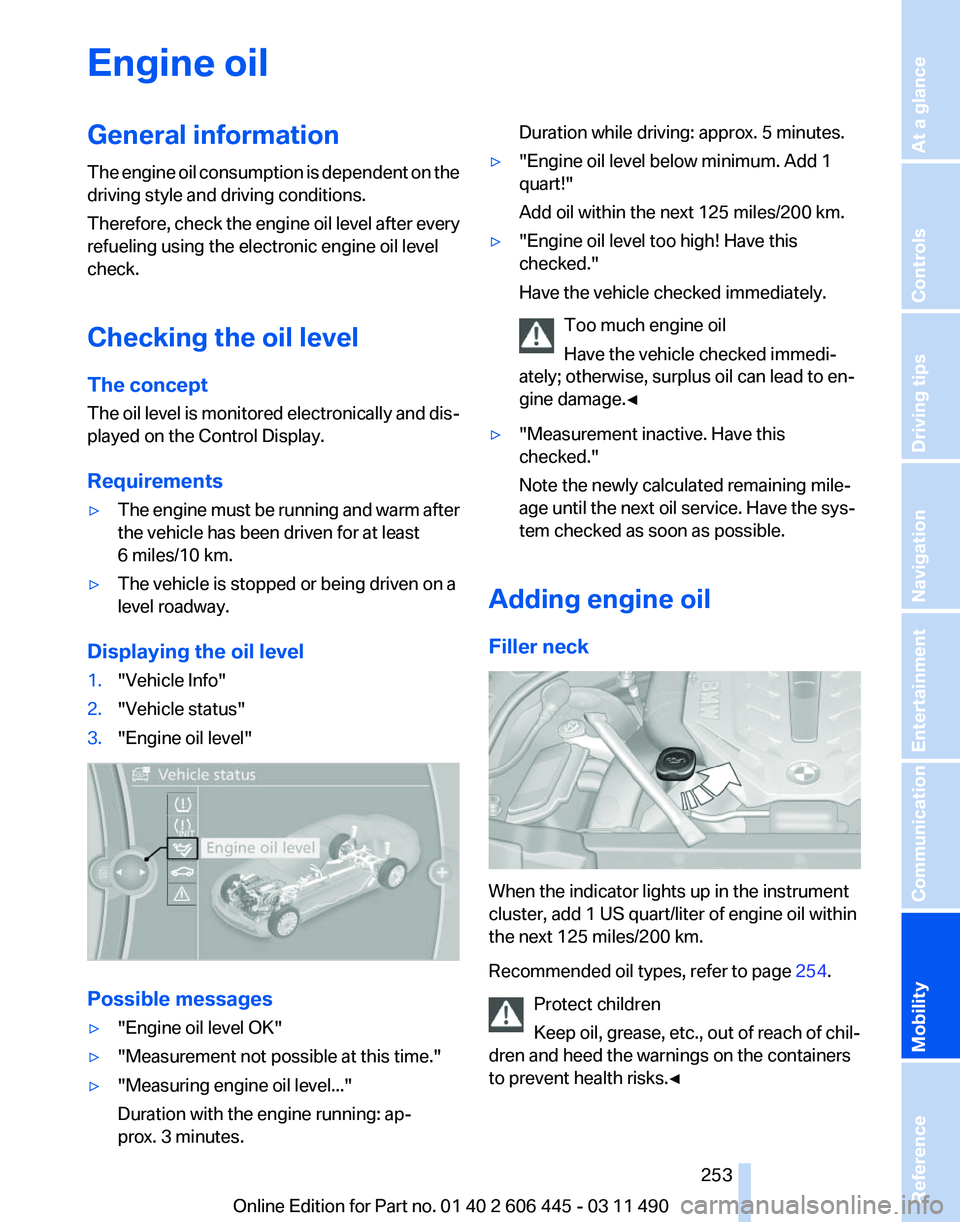
Displaying the oil level
1. "Vehicle Info"
2. "Vehicle status"
3. "Engine oil level" Possible messages
▷
"Engine oil level OK"
▷ "Measurement not possible at this time."
▷ "Measuring engine oil level..."
Duration with the engine running: ap‐
prox. 3 minutes. Duration while driving: approx. 5 minutes.
▷ "Engine oil level below minimum. Add 1
quart!"
Add oil within the next 125 miles/200 km.
▷ "Engine oil level too high! Have this
checked."
Have the vehicle checked immediately.
Too much engine oil
Have the vehicle checked immedi‐
ately; otherwise, surplus oil can lead to en‐
gine damage.
◀ ▷
"Measurement inactive. Have this
checked."
Note the newly calculated remaining mile‐
age until the next oil service. Have the sys‐
tem checked as soon as possible.
Adding engine oil
Filler neck When the indicator lights up in the instrument
cluster, add 1 US quart/liter of engine oil within
the next 125 miles/200 km.
Recommended oil types, refer to page
254.
Protect children
Keep oil, grease, etc., out of reach of chil‐
dren and heed the warnings on the containers
to prevent health risks.◀ Seite 253
253Online Edition for Part no. 01 40 2 606 445 - 03 11 490
Reference
Mobility Communication Entertainment Navigation Driving tips Controls At a glance
Page 256 of 297
Maintenance
BMW Maintenance System
The maintenance system directs you to re‐
quired
maintenance measures and thereby sup‐
ports you in maintaining road safety and the op‐
erational reliability of the vehicle.
Condition Based Service CBS
Sensors and special algorithms take into ac‐
count the driving conditions of your vehicle.
Based on this, Condition Based Service deter‐
mines the maintenance requirements.
The system makes it possible to adapt the
amount of maintenance you need to your user
profile.
Details on the service requirements, refer to
page 82, can be displayed on the Control Dis‐
play.
Service data in the remote control
Information on the required maintenance is con‐
tinuously stored in the remote control. Your
service center will read out this data and suggest
the right array of service procedures for your ve‐
hicle.
Therefore, hand your service specialist the re‐
mote control that you used most recently.
Storage periods
Storage periods during which the vehicle bat‐
tery was disconnected are not taken into ac‐
count.
If this occurs, have a service center update the
time-dependent maintenance procedures,
such as checking brake fluid and, if necessary,
changing the engine oil and the microfilter/acti‐
vated-charcoal filter. Service and Warranty
Information Booklet for US
models and Warranty and
Service Guide Booklet for
Canadian models
Please
consult your Service and Warranty Infor‐
mation Booklet for US models and Warranty and
Service Guide Booklet for Canadian models for
additional information on service requirements.
Maintenance and repair should be performed by
your service center. Make sure to have regular
maintenance procedures recorded in the vehi‐
cle's Service and Warranty Information Booklet
for US models, and in the Warranty and Service
Guide Booklet for Canadian models. These en‐
tries are proof of regular maintenance.
Socket for OBD Onboard
Diagnosis There is an OBD socket on the driver's side for
checking
the primary components in the vehicle
emissions.
Emissions
▷The warning lamp lights up:
Emissions are deteriorating. Have
the
vehicle checked as soon as pos‐
sible.
▷ The warning lamp flashes under cer‐
tain circumstances: Seite 256
256 Online Edition for Part no. 01 40 2 606 445 - 03 11 490
Maintenance
Page 257 of 297
This indicates that there is excessive
misfiring in the engine.
Reduce the vehicle speed and have
the system checked immediately;
otherwise, serious engine misfiring
within a brief period can seriously
damage emission control compo‐
nents,
in particular the catalytic con‐
verter.
Fuel cap The indicator lamp lights up.
If the fuel cap is not properly tightened,
the
OBD system may conclude that fuel
vapor is escaping. If the cap is then tightened,
the display should go out in a short time.
Data memory
Your vehicle records data relating to vehicle op‐
eration, faults and user settings. These data are
stored in the remote control and can be read out
with suitable devices, particularly when the ve‐
hicle is serviced. The data obtained in this way
provide valuable information for service proc‐
esses and repair or for optimizing and develop‐
ing vehicle functions further.
In addition, if you signed a service contract for
Assist, certain vehicle data can be sent directly
from the vehicle to facilitate the desired serv‐
ices. Seite 257
257Online Edition for Part no. 01 40 2 606 445 - 03 11 490
Reference
Mobility Communication Entertainment Navigation Driving tips Controls At a glance
Page 258 of 297
Replacing components
Tool kit
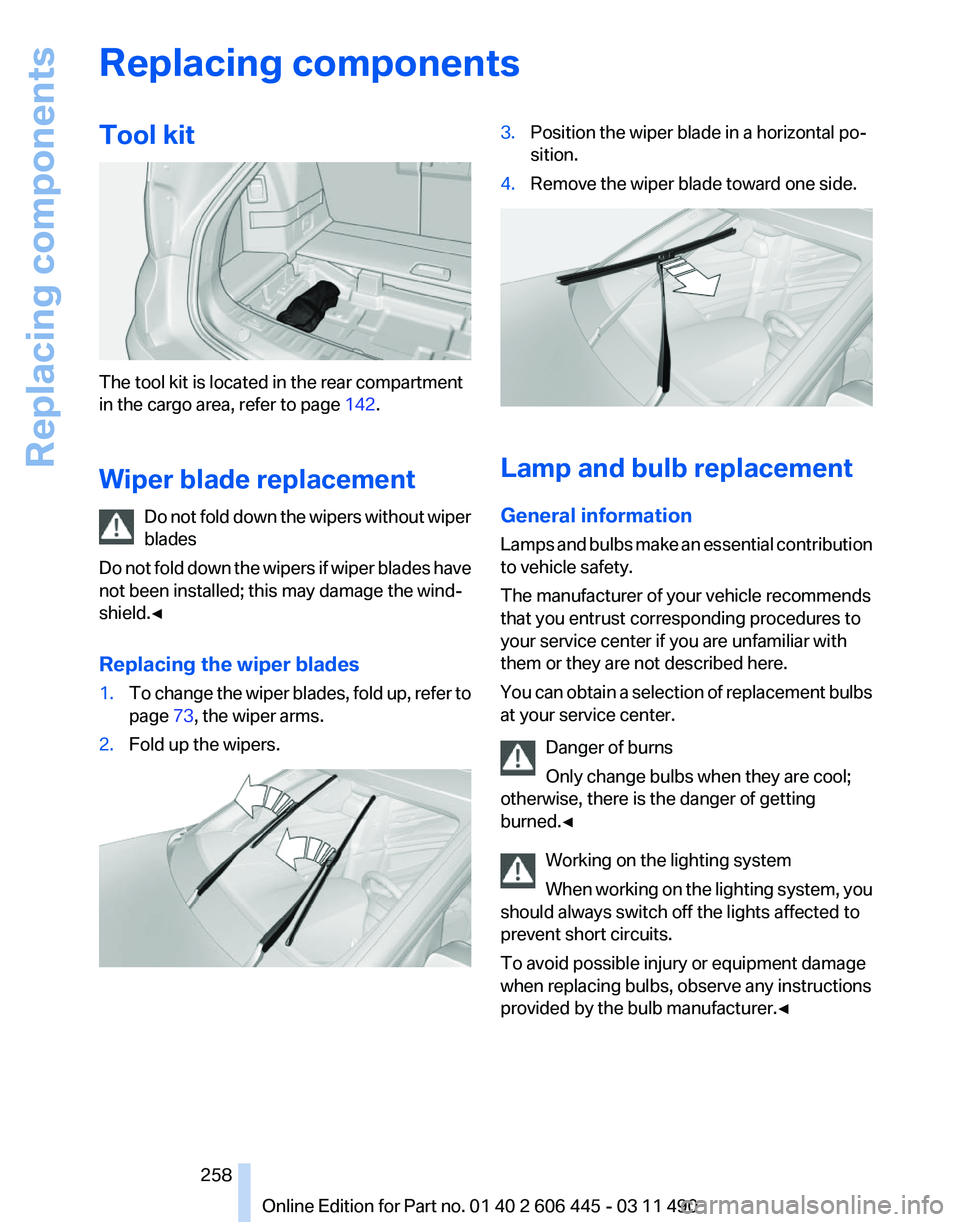
The tool kit is located in the rear compartment
in the cargo area, refer to page
142.
Wiper blade replacement Do
not fold down the wipers without wiper
blades
Do not fold down the wipers if wiper blades have
not been installed; this may damage the wind‐
shield.◀
Replacing the wiper blades
1. To change the wiper blades, fold up, refer to
page 73, the wiper arms.
2. Fold up the wipers. 3.
Position the wiper blade in a horizontal po‐
sition.
4. Remove the wiper blade toward one side. Lamp and bulb replacement
General information
Lamps
and bulbs make an essential contribution
to vehicle safety.
The manufacturer of your vehicle recommends
that you entrust corresponding procedures to
your service center if you are unfamiliar with
them or they are not described here.
You can obtain a selection of replacement bulbs
at your service center.
Danger of burns
Only change bulbs when they are cool;
otherwise, there is the danger of getting
burned.◀
Working on the lighting system
When working on the lighting system, you
should always switch off the lights affected to
prevent short circuits.
To avoid possible injury or equipment damage
when replacing bulbs, observe any instructions
provided by the bulb manufacturer.◀ Seite 258
258 Online Edition for Part no. 01 40 2 606 445 - 03 11 490Replacing components
Page 259 of 297
Do not touch the bulbs
Do not touch the glass of new bulbs with
your bare hands, as even minute amounts of
contamination will burn into the bulb's surface
and reduce its service life.
Use
a clean tissue, cloth or something similar, or
hold the bulb by its base.◀
Light-emitting diodes (LEDs)
Light-emitting diodes installed behind a cover
serve as the light source for controls, display el‐
ements and other equipment.
These light-emitting diodes, which are related
to conventional lasers, are officially designated
as Class 1 light-emitting diodes.
Do not remove the covers
Do not remove the covers, and never stare
into the unfiltered light for several hours; other‐
wise, irritation of the retina could result.◀
Headlamp glass
Condensation can form on the inside of the ex‐
ternal lamps in cool or humid weather. When the
light is switched on, the condensation evapo‐
rates after a short time. The headlamp glasses
do not need to be changed.
If there is a large amount of moisture, e.g., water
droplets form in the lamp, have it checked by
your service center.
Front lamps, bulb replacement
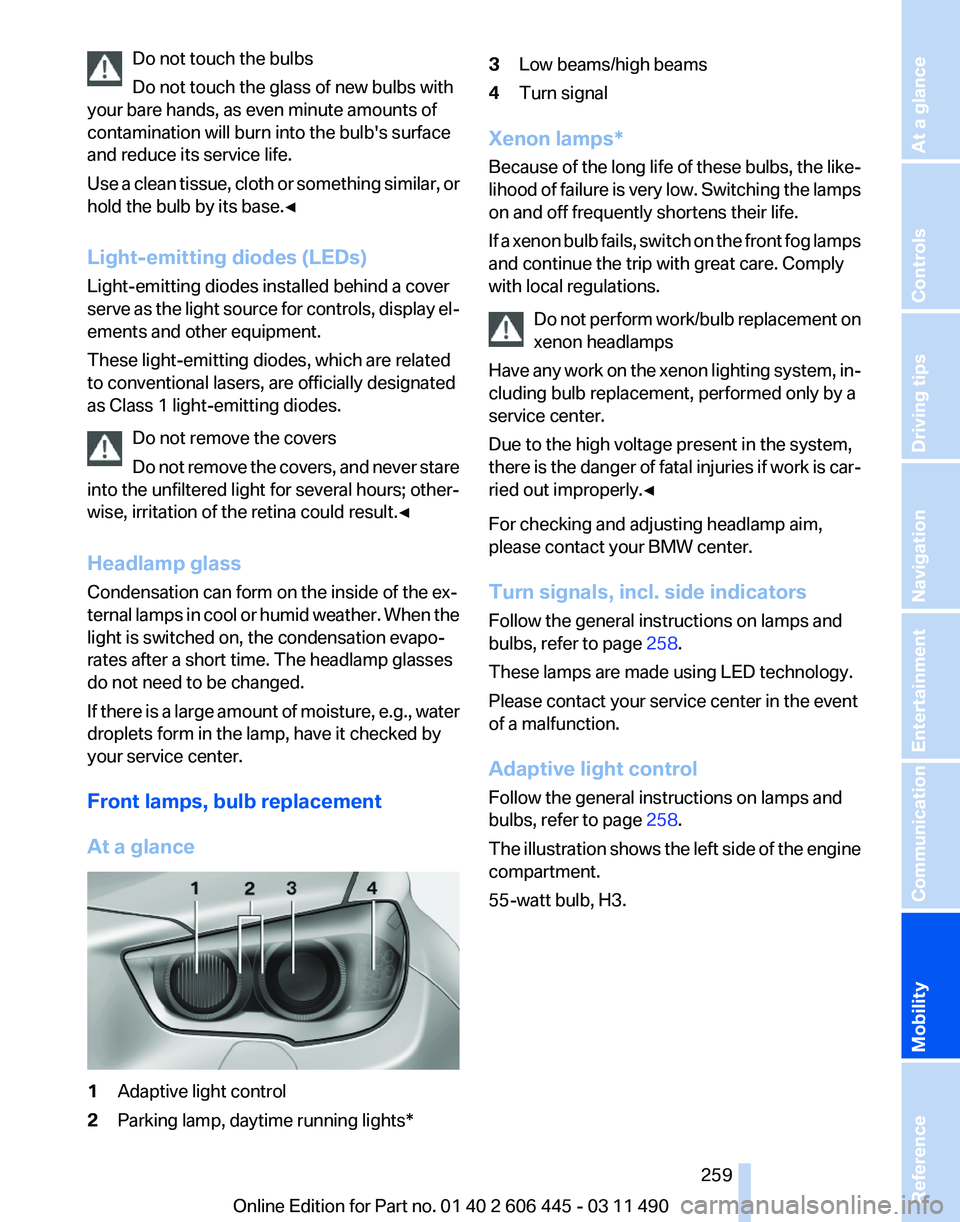
At a glance 1
Adaptive light control
2 Parking lamp, daytime running lights* 3
Low beams/high beams
4 Turn signal
Xenon lamps*
Because
of the long life of these bulbs, the like‐
lihood of failure is very low. Switching the lamps
on and off frequently shortens their life.
If a xenon bulb fails, switch on the front fog lamps
and continue the trip with great care. Comply
with local regulations.
Do not perform work/bulb replacement on
xenon headlamps
Have any work on the xenon lighting system, in‐
cluding bulb replacement, performed only by a
service center.
Due to the high voltage present in the system,
there is the danger of fatal injuries if work is car‐
ried out improperly.◀
For checking and adjusting headlamp aim,
please contact your BMW center.
Turn signals, incl. side indicators
Follow the general instructions on lamps and
bulbs, refer to page 258.
These lamps are made using LED technology.
Please contact your service center in the event
of a malfunction.
Adaptive light control
Follow the general instructions on lamps and
bulbs, refer to page 258.
The illustration shows the left side of the engine
compartment.
55-watt bulb, H3. Seite 259
259Online Edition for Part no. 01 40 2 606 445 - 03 11 490
Reference
Mobility Communication Entertainment Navigation Driving tips Controls At a glance
Page 261 of 297
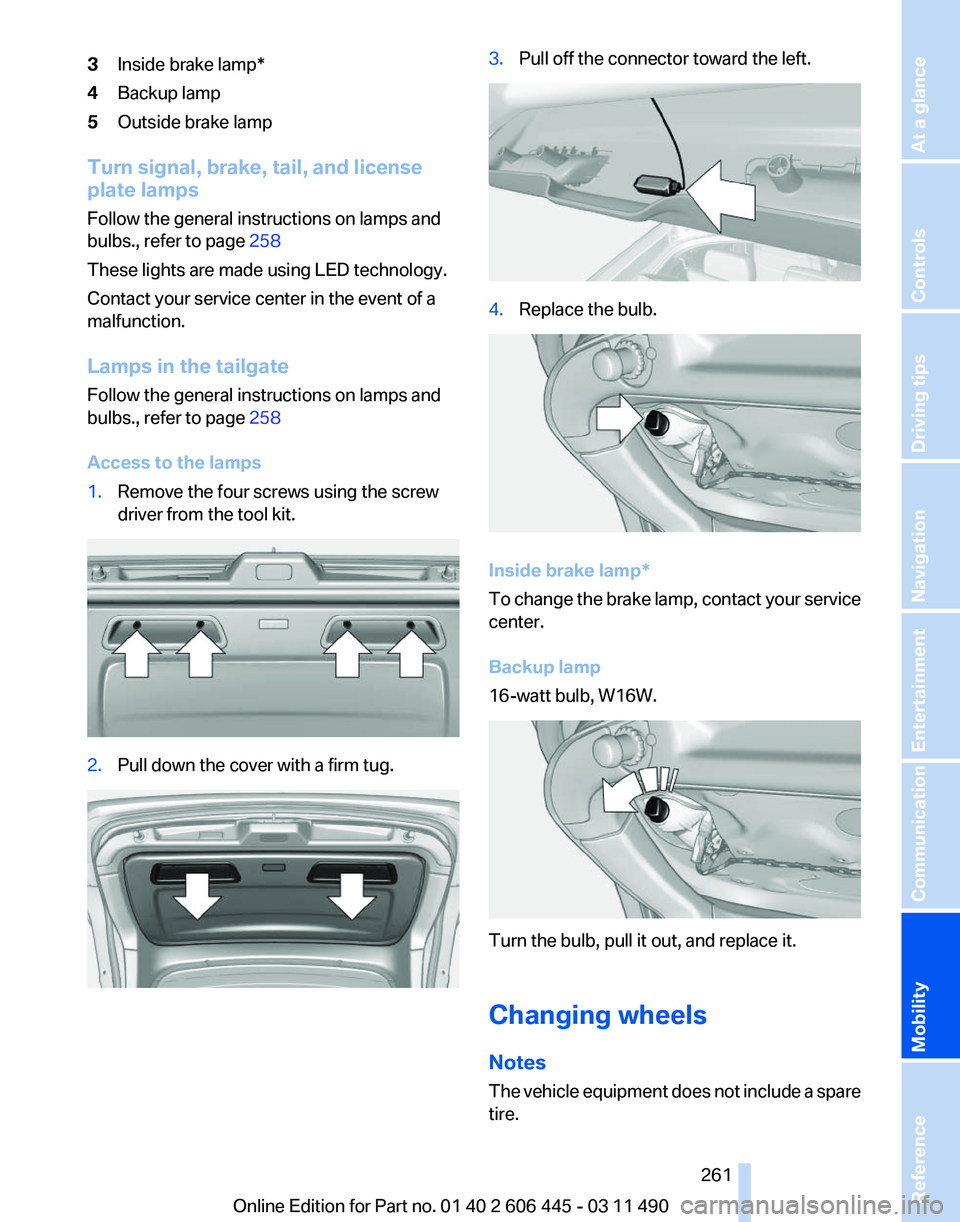
3
Inside brake lamp*
4 Backup lamp
5 Outside brake lamp
Turn signal, brake, tail, and license
plate lamps
Follow the general instructions on lamps and
bulbs., refer to page 258
These lights are made using LED technology.
Contact your service center in the event of a
malfunction.
Lamps in the tailgate
Follow the general instructions on lamps and
bulbs., refer to page 258
Access to the lamps
1. Remove the four screws using the screw
driver from the tool kit. 2.
Pull down the cover with a firm tug. 3.
Pull off the connector toward the left. 4.
Replace the bulb. Inside brake lamp*
To
change the brake lamp, contact your service
center.
Backup lamp
16-watt bulb, W16W. Turn the bulb, pull it out, and replace it.
Changing wheels
Notes
The
vehicle equipment does not include a spare
tire.
Seite 261
261Online Edition for Part no. 01 40 2 606 445 - 03 11 490
Reference
Mobility Communication Entertainment Navigation Driving tips Controls At a glance
Page 264 of 297
Breakdown assistance
Hazard warning flashers
The button is located in the center console.
Emergency Request
*
Requirements
▷ Equipment version with full preparation
package mobile phone.
An Emergency Request can be made, even
if no mobile phones are paired with the ve‐
hicle.
▷ BMW Assist is activated.
▷ The radio ready state is switched on.
▷ The BMW Assist system is logged in to a
wireless communications network sup‐
ported by BMW Assist.
▷ The Assist system is functional.
Only press the SOS button in an emergency.
Emergency Request not guaranteed
For
technical reasons, the Emergency Re‐
quest cannot be guaranteed under unfavorable
conditions.◀
Service contract
▷ After your contract with BMW Assist has ex‐
pired,
the BMW Assist system can be deac‐
tivated by the service center without you
having to visit a workshop.
After deactivation, an Emergency Request
is no longer possible. ▷
Under certain circumstances, the system
can be reactivated by a service center after
you sign a new contract.
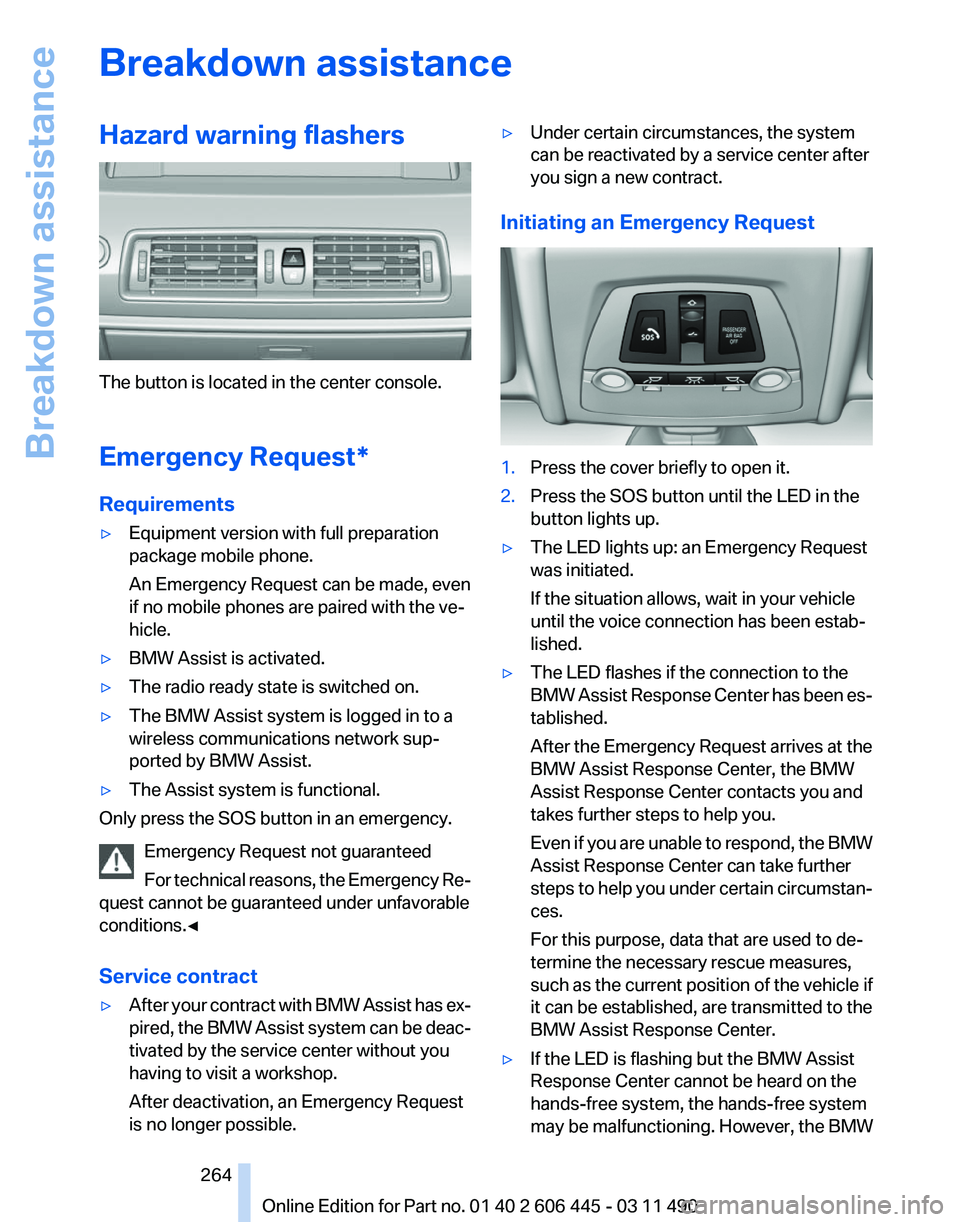
Initiating an Emergency Request 1.
Press the cover briefly to open it.
2. Press the SOS button until the LED in the
button lights up.
▷ The LED lights up: an Emergency Request
was initiated.
If the situation allows, wait in your vehicle
until the voice connection has been estab‐
lished.
▷ The LED flashes if the connection to the
BMW
Assist Response Center has been es‐
tablished.
After the Emergency Request arrives at the
BMW Assist Response Center, the BMW
Assist Response Center contacts you and
takes further steps to help you.
Even if you are unable to respond, the BMW
Assist Response Center can take further
steps to help you under certain circumstan‐
ces.
For this purpose, data that are used to de‐
termine the necessary rescue measures,
such as the current position of the vehicle if
it can be established, are transmitted to the
BMW Assist Response Center.
▷ If the LED is flashing but the BMW Assist
Response Center cannot be heard on the
hands-free system, the hands-free system
may be malfunctioning. However, the BMW
Seite 264
264 Online Edition for Part no. 01 40 2 606 445 - 03 11 490
Breakdown assistance
Page 286 of 297
Everything from A to Z
Index
A
ABS, Antilock Brake Sys‐
tem 99
ACC, Active Cruise Control with Stop & Go 106
Activated-charcoal filter 130
Active Blind Spot Detec‐ tion 96
Active Cruise Control with Stop & Go, ACC 106
Active seat, front 52
Active seat ventilation, front 52
Active seat ventilation, rear 55
Active Steering, integral 102
Adaptive brake assistant 99
Adaptive brake lights, refer to Brake force display 98
Adaptive drive 101
Adaptive light control 86
Adaptive
light control, bulb re‐
placement 259
Additional telephone 210
Additives, oil 254
Adjustments, seats/head re‐ straints 49
Airbags 89
Airbags, indicator/warning light 90
Air circulation, refer to Recir‐ culated-air mode 128
Air distribution, manual 127
Air drying, refer to Cooling function 129
Air pressure, tires 243
Air vents, refer to Ventila‐ tion 130
Air volume, automatic climate control 128
Alarm system 44
Alarm, unintentional 45 All around the center con‐
sole 17
All around the headliner 18
All around the steering wheel 12
ALL program, automatic cli‐ mate control 129
All-season tires, refer to Win‐ ter tires 249
All-wheel-drive 100
Alternating-code hand-held transmitter 134
Alternative oil types 254
AM/FM station 174
Announcement, navigation, refer to Spoken instruc‐
tions 163
Antifreeze, washer fluid 73
Antilock Brake System, ABS 99
Anti-slip control, refer to DSC 99
Appointments 226
Approved engine oils 254
Apps 236
Armrest, refer to Center arm‐ rest 140
Arrival time 80
Ashtray 135
Assist 232
Assistance, Roadside Assis‐ tance 265
Assistance when driving off 99
Audio playback 181
Audio playback, Blue‐ tooth 196
AUTO intensity 128
Automatic car wash 269
Automatic climate con‐ trol 127
Automatic Cruise Control with Stop & Go 106 Automatic Curb Monitor
60
Automatic deactivation, front passenger airbags 90
Automatic headlamp con‐ trol 86
Automatic Hold 69
Automatic locking 39
Automatic recirculated-air control 128
Automatic Soft Closing, doors 39
Automatic Soft Closing, tail‐ gate 40
Automatic transmission with Steptronic 73
Automatic trunk lid 40
AUTO program, automatic cli‐ mate control 128
AUTO program, intensity 128
AUX-IN port 192
Average fuel consumption 79
Average speed 79
Axle loads, weights 275
B
Backrest curvature, refer to Lumbar support 51
Backrest, seats 49
Backrest, width 51
Back seats, adjusting 53
Backup camera 119
Backup lamps, bulb replace‐ ment 261
Balance 172
Band-Aids, refer to First aid kit 265
Bar for tow-starting/tow‐ ing 267
Basic position, rear seats 54
Bass 172
Seite 286
286 Online Edition for Part no. 01 40 2 606 445 - 03 11 490
Everything from A to Z
Page 287 of 297
Battery replacement, remote
control, rear entertain‐
ment 202
Battery replacement, vehicle battery 262
Battery replacement, vehicle remote control 32
Battery, vehicle 262
Before entering the car wash 269
Belts, safety belts 55
Beverage holder, cu‐ pholder 141
Blinds, sun protection 46
Bluetooth audio 196
BMW Apps 236
BMW Apps, video play‐ back 195
BMW Assist 232
BMW EfficientDynamics, refer to Saving fuel 150
BMW homepage 6
BMW Internet page 6
BMW Maintenance Sys‐ tem 256
BMW Online 234
Bottle holder, refer to Cu‐ pholder 141
Brake assistant 99
Brake assistant, adaptive 99
Brake discs, breaking in 146
Brake force display 98
Brake lamps, brake force dis‐ play 98
Brake lamps, bulb replace‐ ment 261
Brake lights, adaptive 98
Brake pads, breaking in 146
Braking, notes 147
Breakdown assis‐ tance 264, 265
Breaking in 146
Brightness of Control Dis‐ play 82
Bulb replacement 258
Bulb replacement, front 259
Bulb replacement, rear 260
Bulbs and lamps 258 Button, RES 108
Button, Start/Stop 66
Bypassing, refer to starting
aid 265
C
Calendar 226
California Proposition 65 Warning 7
Camera, backup camera 121
Camera, care 271
Camera, Side View 122
Camera, Top View 119
Can holder, refer to Cu‐ pholder 141
Car battery 262
Car care products 270
Care, displays 271
Care, vehicle 270
Cargo 148
Cargo area 136
Cargo area, enlarging 136
Cargo area lid 39
Cargo area, storage compart‐ ments 142
Cargo partition 138
Cargo straps, securing cargo 149
Car key, refer to Remote con‐ trol 32
Carpet, care 271
Car wash 269
Catalytic converter, refer to Hot exhaust system 146
CBS Condition Based Serv‐ ice 256
CD/DVD 181
CD/DVD player, rear 201
CDs, storing 188
Cell phone 210
Center armrest 140
Center console 17
Central locking system 35
Central
screen, refer to Control
Display 19
Changes, technical, refer to Safety 7 Changing parts
258
Changing wheels/tires 248
Check Control 83
Children, seating position 62
Children, transporting safely 62
Child restraint fixing sys‐ tem 62
Child restraint fixing system LATCH 63
Child restraint fixing systems, mounting 62
Child-safety locks 65
Child seat, mounting 62
Child seats 62
Chrome parts, care 270
Cigarette lighter 135
Cleaning, displays 271
Climate control 127
Climate control wind‐ shield 147
Clock 78
Closing/opening from in‐ side 38
Closing/opening via door lock 38
Closing/opening with remote control 36
Clothes hooks 141
Collision warning 112
Combination instrument 14
Combination
instrument, elec‐
tronic displays 16
Combination switch, refer to Turn signals 71
Combination switch, refer to Wiper system 71
Comfort Access 42
COMFORT program, Dynamic Driving Control 104
Computer 78
Concierge service 233
Condensation on win‐ dows 128
Condensation under the vehi‐ cle 148
Condition Based Service CBS 256
Seite 287
287Online Edition for Part no. 01 40 2 606 445 - 03 11 490
Reference Mobility Communication Entertainment Navigation Driving tips Controls At a glance