wiper BMW 550I TOURING 2006 E61 Owner's Manual
[x] Cancel search | Manufacturer: BMW, Model Year: 2006, Model line: 550I TOURING, Model: BMW 550I TOURING 2006 E61Pages: 259, PDF Size: 8.9 MB
Page 13 of 259
At a glance
11Reference
Controls
Driving tips
Communications
Navigation
Entertainment
Mobility
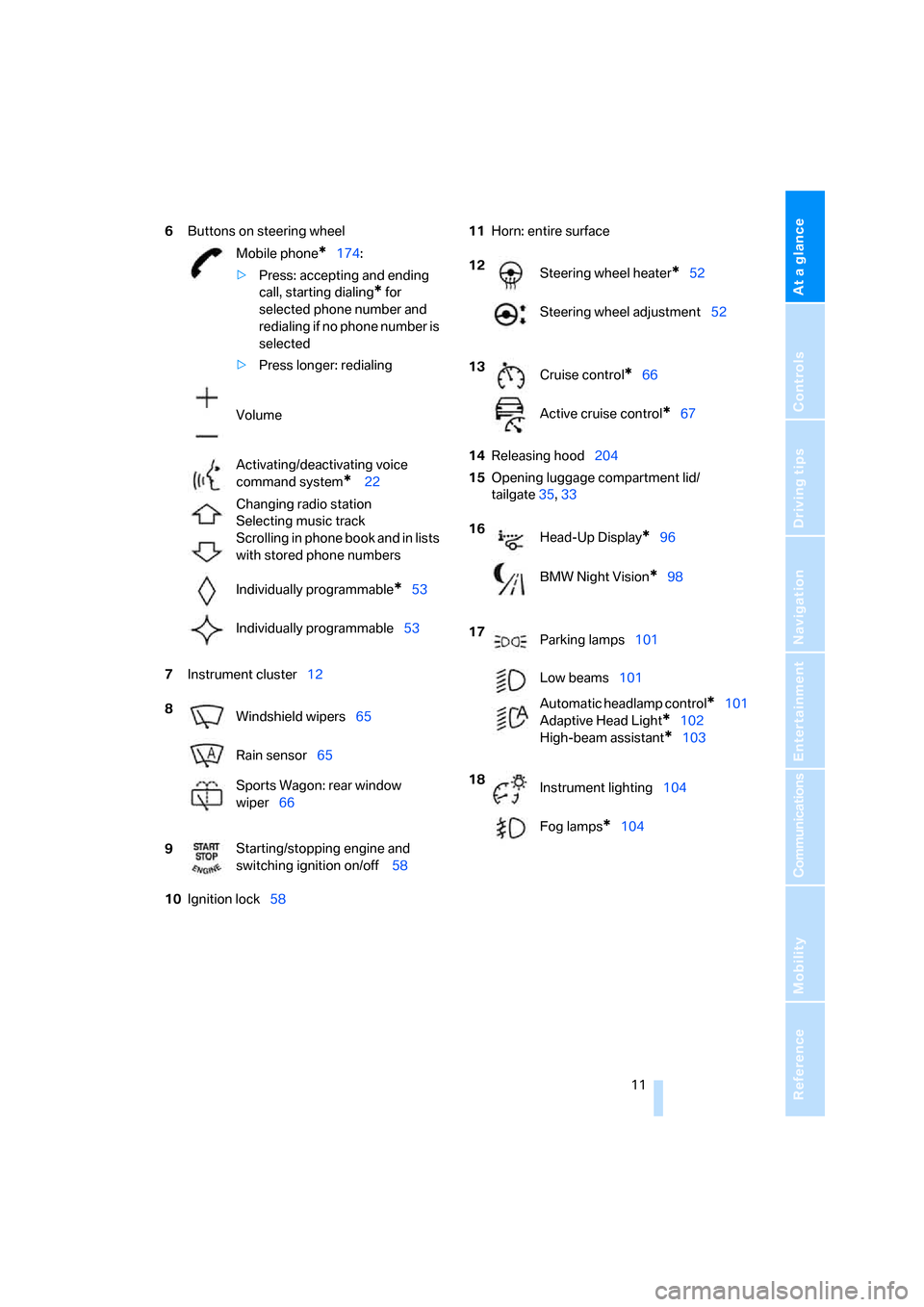
6Buttons on steering wheel
7Instrument cluster12
10Ignition lock5811Horn: entire surface
14Releasing hood204
15Opening luggage compartment lid/
tailgate35,33 Mobile phone
*174:
>Press: accepting and ending
call, starting dialing
* for
selected phone number and
redialing if no phone number is
selected
>Press longer: redialing
Volume
Activating/deactivating voice
command system
* 22
Changing radio station
Selecting music track
Scrolling in phone book and in lists
with stored phone numbers
Individually programmable
*53
Individually programmable53
8
Windshield wipers65
Rain sensor65
Sports Wagon: rear window
wiper66
9Starting/stopping engine and
switching ignition on/off 58
12
Steering wheel heater*52
Steering wheel adjustment52
13
Cruise control
*66
Active cruise control
*67
16
Head-Up Display
*96
BMW Night Vision
*98
17
Parking lamps101
Low beams101
Automatic headlamp control
*101
Adaptive Head Light
*102
High-beam assistant
*103
18
Instrument lighting104
Fog lamps
*104
Page 67 of 259
Controls
65Reference
At a glance
Driving tips
Communications
Navigation
Entertainment
Mobility
Triple turn signal activation
Press the lever to the resistance point; the turn
signal flashes three times.
You can activate or deactivate this function.
iDrive, for explanation of principle, refer to
page16.
1.Open the start menu.
2.Press the controller to open the menu.
3.Select "Vehicle settings" and press the
controller.
4.Select "Lighting" and press the controller.
5.Select "Triple turn signal activation" and
press the controller.
Triple turn signaling is activated.
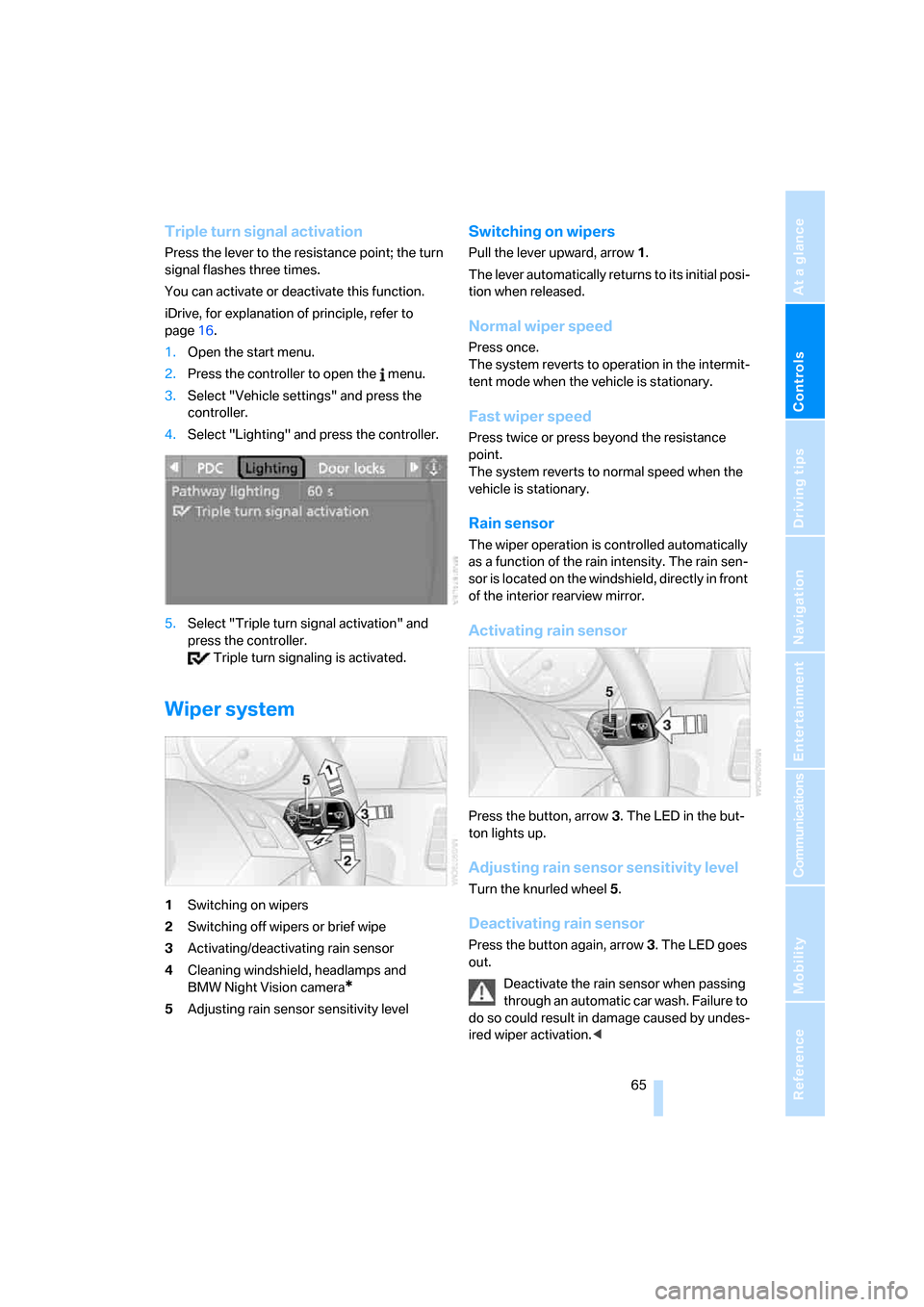
Wiper system
1Switching on wipers
2Switching off wipers or brief wipe
3Activating/deactivating rain sensor
4Cleaning windshield, headlamps and
BMW Night Vision camera
*
5Adjusting rain sensor sensitivity level
Switching on wipers
Pull the lever upward, arrow1.
The lever automatically returns to its initial posi-
tion when released.
Normal wiper speed
Press once.
The system reverts to operation in the intermit-
tent mode when the vehicle is stationary.
Fast wiper speed
Press twice or press beyond the resistance
point.
The system reverts to normal speed when the
vehicle is stationary.
Rain sensor
The wiper operation is controlled automatically
as a function of the rain intensity. The rain sen-
sor is located on the windshield, directly in front
of the interior rearview mirror.
Activating rain sensor
Press the button, arrow3. The LED in the but-
ton lights up.
Adjusting rain sensor sensitivity level
Turn the knurled wheel5.
Deactivating rain sensor
Press the button again, arrow3. The LED goes
out.
Deactivate the rain sensor when passing
through an automatic car wash. Failure to
do so could result in damage caused by undes-
ired wiper activation.<
Page 68 of 259
Driving
66
Cleaning windshield, headlamps* and
BMW Night Vision camera*
Pull the lever, arrow4.
The system sprays washer fluid against the
windshield and activates the wipers for a brief
period.
With the vehicle lighting switched on, the head-
lamps and the BMW Night Vision camera are
also cleaned simultaneously at suitable inter-
vals.
Do not use the washers if there is any
danger that the fluid will freeze on the
windshield. If you do so, your vision could be
obscured. To avoid freezing, use a washer fluid
antifreeze, refer to Washer fluid. Do not use
washing mechanisms when the washer fluid
reservoir is empty, otherwise you will damage
the washer pump.<
Windshield washer nozzles
Both windshield washer nozzles are automati-
cally heated with the engine running or the igni-
tion switched on.
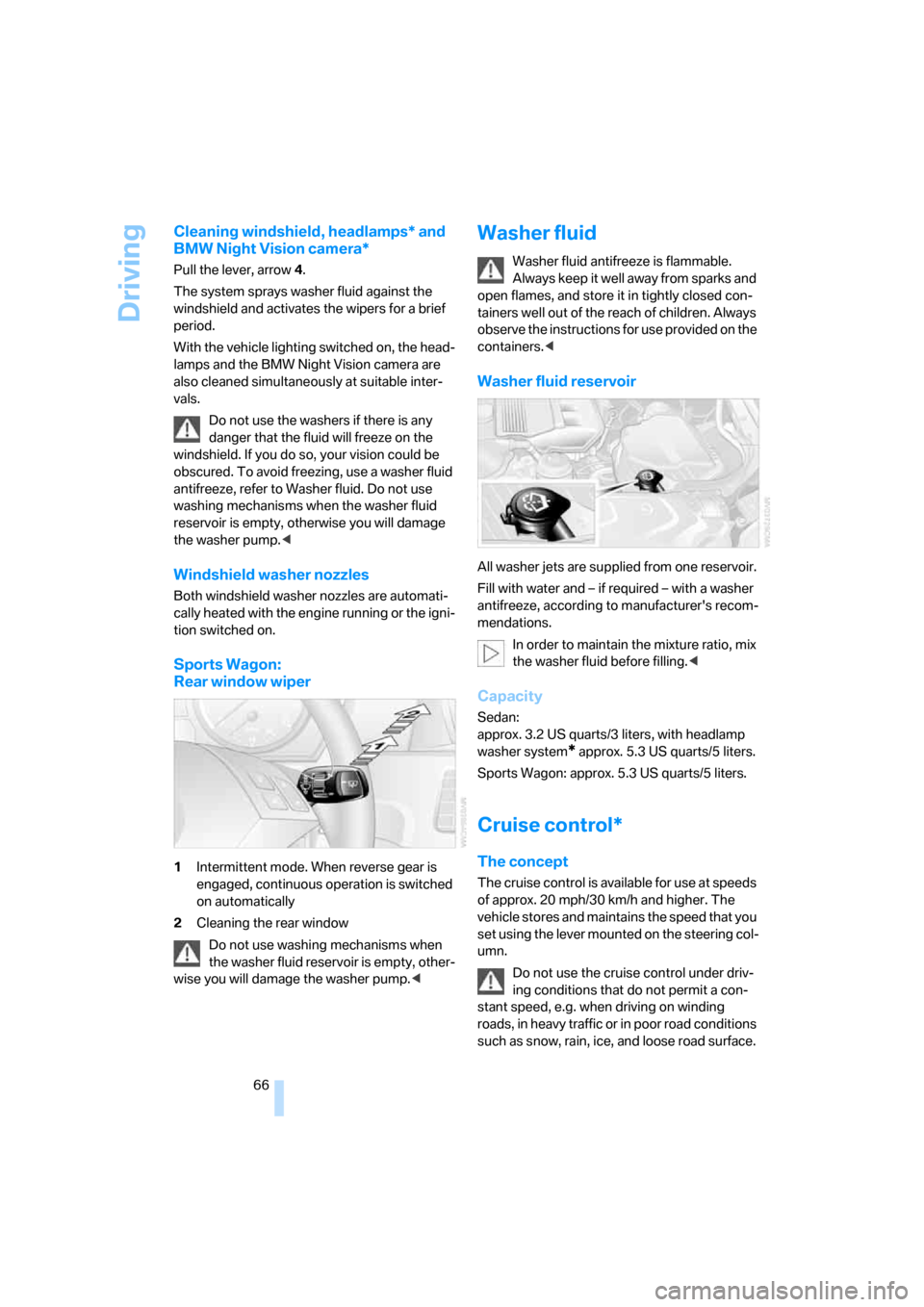
Sports Wagon:
Rear window wiper
1Intermittent mode. When reverse gear is
engaged, continuous operation is switched
on automatically
2Cleaning the rear window
Do not use washing mechanisms when
the washer fluid reservoir is empty, other-
wise you will damage the washer pump.<
Washer fluid
Washer fluid antifreeze is flammable.
Always keep it well away from sparks and
open flames, and store it in tightly closed con-
tainers well out of the reach of children. Always
observe the instructions for use provided on the
containers.<
Washer fluid reservoir
All washer jets are supplied from one reservoir.
Fill with water and – if required – with a washer
antifreeze, according to manufacturer's recom-
mendations.
In order to maintain the mixture ratio, mix
the washer fluid before filling.<
Capacity
Sedan:
approx. 3.2 US quarts/3 liters, with headlamp
washer system
* approx. 5.3USquarts/5liters.
Sports Wagon: approx. 5.3 US quarts/5 liters.
Cruise control*
The concept
The cruise control is available for use at speeds
of approx. 20 mph/30 km/h and higher. The
vehicle stores and maintains the speed that you
set using the lever mounted on the steering col-
umn.
Do not use the cruise control under driv-
ing conditions that do not permit a con-
stant speed, e.g. when driving on winding
roads , in heavy traffic or in poor roa d co nditions
such as snow, rain, ice, and loose road surface.
Page 128 of 259
Things to remember when driving
126 Do not drive with your foot resting on the
brake pedal. Even light but consistent
pedal pressure can lead to high temperatures,
brake wear and possibly even brake failure.<
Driving in wet conditions
When roads are wet or there is heavy rain,
briefly exert gentle pressure on the brake pedal
every few miles. Monitor traffic conditions to
ensure that this maneuver does not endanger
other road users. The heat generated in this
process helps dry the pads and rotors to ensure
that full braking efficiency will then be available
when you need it.
Hills
To prevent overheating and the resulting
reduced efficiency of the brake system,
drive long or steep downhill gradients in the
gear in which the least braking is required. Even
light but consistent pressure on the brake pedal
can lead to high temperatures, brake wear and
possibly even brake failure.<
The braking effect of the engine can be further
increased by downshifting, if necessary all the
way down into first gear. This strategy helps
you avoid placing excessive loads on the brake
system. For information on downshifting in the
manual mode of the automatic transmission,
refer to page64.
Do not drive with the clutch depressed, in
idle or with the engine switched off, other-
wise there will be no engine braking action or
support of the braking force and steering.
Never allow floor mats, carpets or any other
objects to protrude into the area of movement
of the pedals and impair their operation.<
Corrosion on brake rotors
When the vehicle is driven only occasionally,
during extended periods when the vehicle is not
used at all, and in operating conditions where
brake applications are less frequent, there is an
increased tendency for corrosion to form on
rotors, while contaminants accumulate on the
brake pads. This occurs because the minimum
pressure which must be exerted by the pads during brake applications to clean the rotors is
not reached.
Should corrosion form on the brake rotors, the
brakes will tend to respond with a pulsating
effect that even extended application will fail to
cure.
When vehicle is parked
Condensation forms in the air conditioner sys-
tem during operation, and then exits under the
vehicle. Traces of condensed water under the
vehicle are therefore normal.
Before driving into a car wash
To prevent the exterior mirrors on this vehicle
from being damaged, always fold them in by
hand before entering an automatic car wash.
General information on the care and mainte-
nance of your BMW is contained in the Caring
for your vehicle brochure.
Rear window wiper*
The rear window wiper can be damaged in car
washes. Take appropriate protective measures;
ask the car wash operator if necessary.
With comfort access and automatic
transmission
Insert the remote control into the ignition lock.
The engine can be switched off in the selector
lever position N. Also refer to page40.
Cargo loading
To avoid loading the tires beyond their
approved carrying capacity, never over-
load the vehicle. Overloading can lead to over-
heating and increases the rate at which damage
develops inside the tires. The ultimate result
can assume the form of a sudden blow-out.<
Page 213 of 259
Mobility
211Reference
At a glance
Controls
Driving tips
Communications
Navigation
Entertainment
Replacing components
Onboard toolkit
Sedan
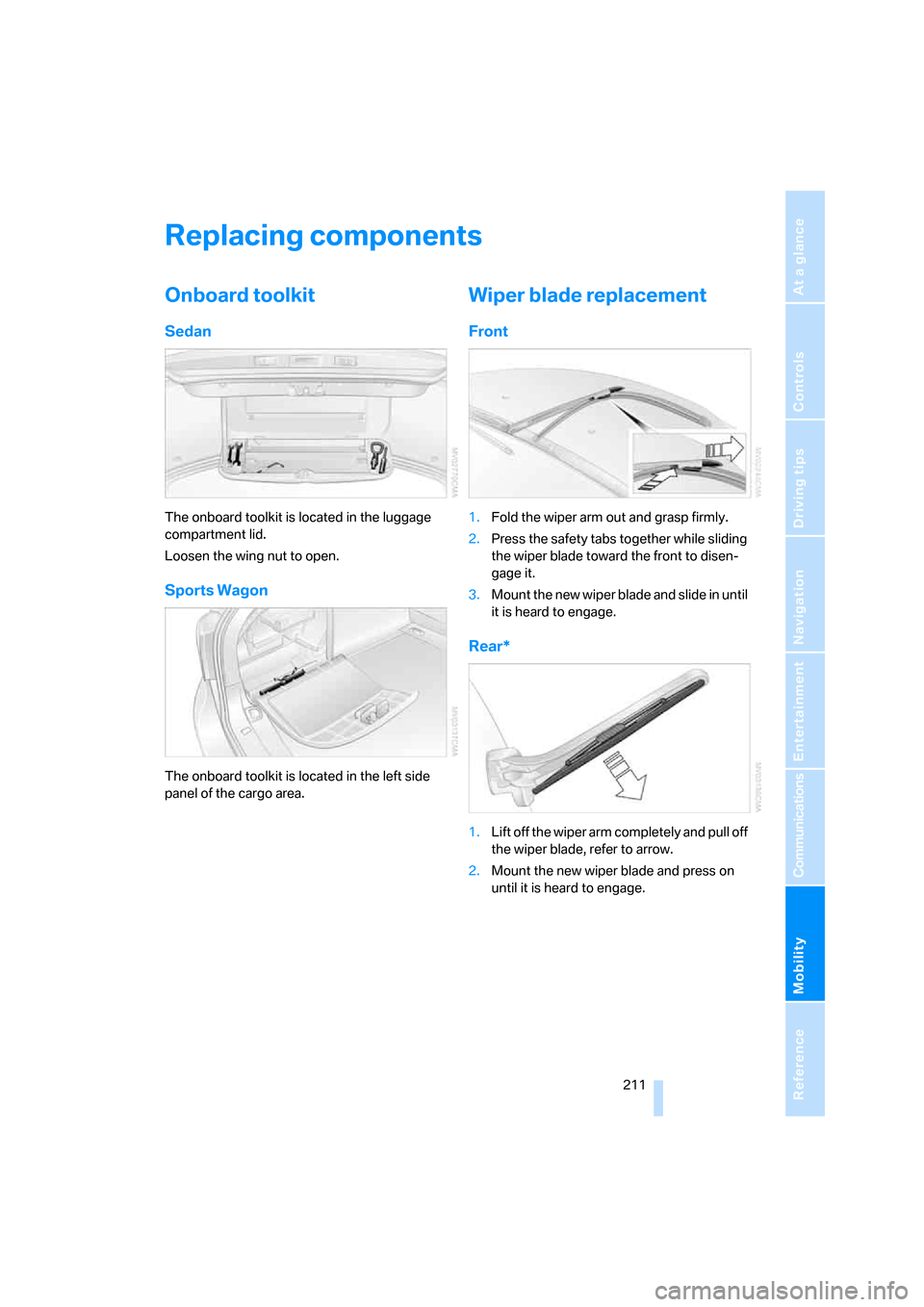
The onboard toolkit is located in the luggage
compartment lid.
Loosen the wing nut to open.
Sports Wagon
The onboard toolkit is located in the left side
panel of the cargo area.
Wiper blade replacement
Front
1.Fold the wiper arm out and grasp firmly.
2.Press the safety tabs together while sliding
the wiper blade toward the front to disen-
gage it.
3.Mount the new wiper blade and slide in until
it is heard to engage.
Rear*
1.Lift off the wiper arm completely and pull off
the wiper blade, refer to arrow.
2.Mount the new wiper blade and press on
until it is heard to engage.
Page 224 of 259
Giving and receiving assistance
222 Sedan:
It is located in the toolkit in the luggage com-
partment lid, refer to page211.
Sports Wagon:
It is located in the toolkit behind the left side
panel in the cargo area, refer to page211.
Use only the tow fitting provided with the
vehicle and screw it all the way in. Use the
tow fitting for towing only on roads. Avoid lateral
loading of the tow fitting, e.g. do not lift the vehi-
cle by the tow fitting. Otherwise damage to the
tow fitting and the vehicle can occur.<
Access to screw thread
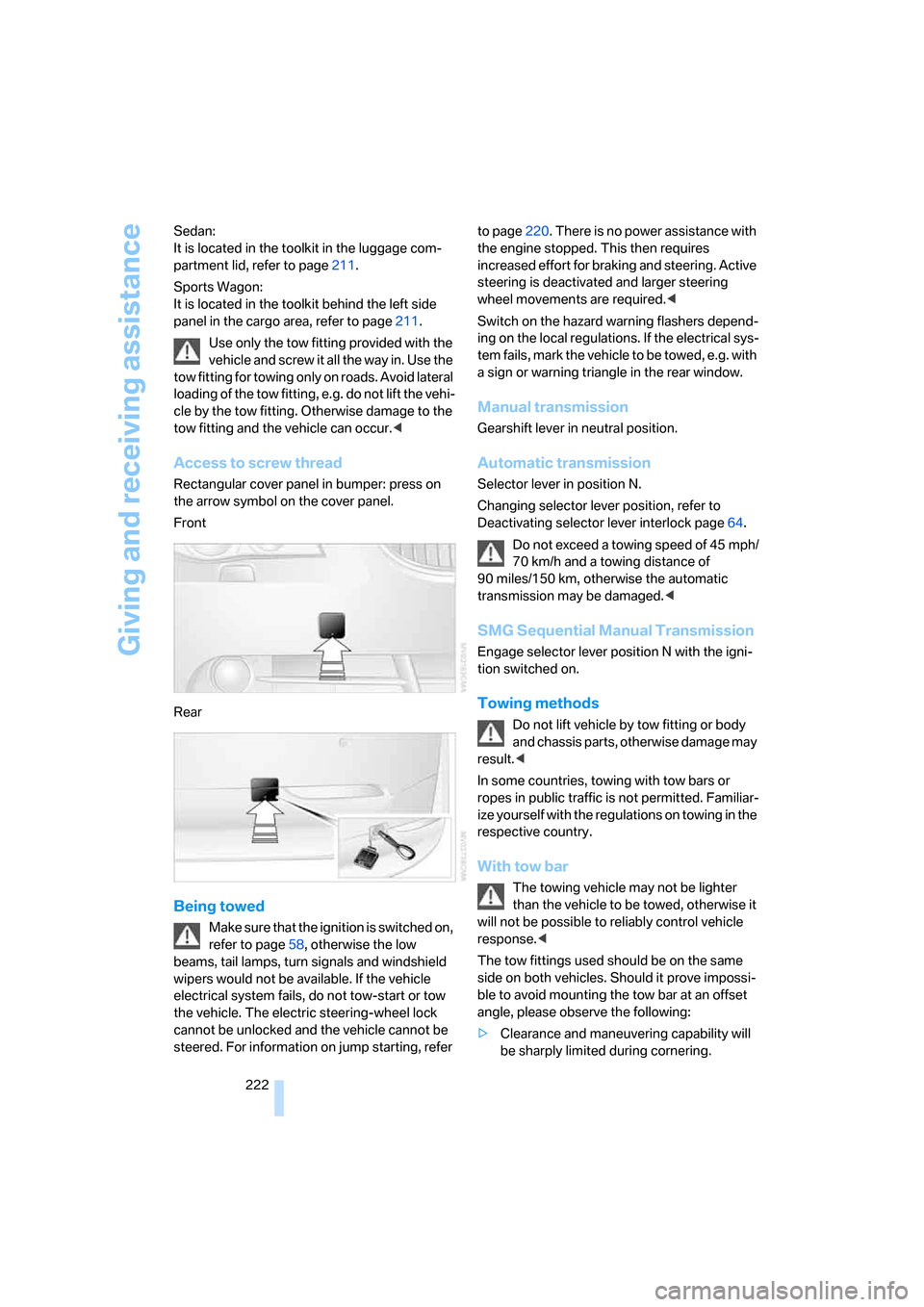
Rectangular cover panel in bumper: press on
the arrow symbol on the cover panel.
Front
Rear
Being towed
Make sure that the ignition is switched on,
refer to page58, otherwise the low
beams, tail lamps, turn signals and windshield
wipers would not be available. If the vehicle
electrical system fails, do not tow-start or tow
the vehicle. The electric steering-wheel lock
cannot be unlocked and the vehicle cannot be
steered. For information on jump starting, refer to page220. There is no power assistance with
the engine stopped. This then requires
increased effort for braking and steering. Active
steering is deactivated and larger steering
wheel movements are required.<
Switch on the hazard warning flashers depend-
ing on the local regulations. If the electrical sys-
tem fails, mark the vehicle to be towed, e.g. with
a sign or warning triangle in the rear window.
Manual transmission
Gearshift lever in neutral position.
Automatic transmission
Selector lever in position N.
Changing selector lever position, refer to
Deactivating selector lever interlock page64.
Do not exceed a towing speed of 45 mph/
70 km/h and a towing distance of
90 miles/150 km, otherwise the automatic
transmission may be damaged.<
SMG Sequential Manual Transmission
Engage selector lever position N with the igni-
tion switched on.
Towing methods
Do not lift vehicle by tow fitting or body
and chassis parts, otherwise damage may
result.<
In some countries, towing with tow bars or
ropes in public traffic is not permitted. Familiar-
ize yourself with the regulations on towing in the
respective country.
With tow bar
The towing vehicle may not be lighter
than the vehicle to be towed, otherwise it
will not be possible to reliably control vehicle
response.<
The tow fittings used should be on the same
side on both vehicles. Should it prove impossi-
ble to avoid mounting the tow bar at an offset
angle, please observe the following:
>Clearance and maneuvering capability will
be sharply limited during cornering.
Page 240 of 259
Everything from A to Z
238 BMW Assist187
– enabling187
– services offered188
"BMW Contact"182
"BMW Contact
Numbers"182
BMW homepage4
BMW maintenance
system209
BMW Night Vision98
– activating99
– cleaning camera100
– cleaning camera, refer to
Wiper system66
– deactivating99
– making settings99
"BMW Service"189
"BMW Service settings"188
BMW website4
Bottle holder, refer to Cup
holders114
Brake Assistant, refer to DBC
Dynamic Brake Control86
Brake fluid207
– warning lamp207
Brake force display94
Brake lamps
– brake force display94
– replacing bulbs213
Brake pads208
– breaking-in124
Brake rotors126
Brakes
– ABS Antilock Brake
System86
– brake fluid207
– brake force display94
– brake pads208
– breaking-in124
– handbrake60
– warning lamps13
Brake system124,207
– brake fluid level207
– brake pads124,208
– breaking-in124
– disk brakes126
– warning lamp207Braking
– CBC Cornering Brake
Control86
– DBC Dynamic Brake
Control86
– electronic brake-force
distribution86
– refer to Braking safely125
Braking safely125
Breakdown assistance189
Breakdown services, refer to
Roadside Assistance220
Breaking-in the clutch124
Breaking-in the
differential124
Break-in period124
"Brightness"83
– with BMW Night Vision100
Brightness of Control
Display83
Button for starting engine58
Buttons on steering wheel11
C
California Proposition 65
Warning6
"Call"180
Call
– accepting179
– displaying accepted180
– ending179
– in absence180
– starting179
Calling
– from phone book179
– from Top 8 list180
– redialing180
– refer to telephone operating
instructions
Can holder, refer to Cup
holders114
Capacities230
Capacity
– of cargo area229
– of luggage
compartment229
Car battery, refer to Vehicle
battery217Car care, refer to Caring for
your vehicle brochure
Car-care products, refer to
Caring for your vehicle
brochure
"Car Data"76
Care210
– refer to Caring for your
vehicle brochure
Cargo
– refer to Loading126
– securing128
– securing with ski bag120
Cargo area
– capacity229
– emergency operation, refer
to Opening manually36
– increasing117
– opening/closing, refer to
Tailgate35
– opening from inside35
– opening from outside35
– opening with remote
control31
Cargo area cover, refer to Roll-
up cover
Caring for artificial leather,
refer to Caring for your
vehicle brochure
Caring for leather, refer to
Caring for your vehicle
brochure
Caring for light-alloy wheels,
refer to Caring for your
vehicle brochure
Caring for the carpet, refer to
Caring for your vehicle
brochure
Caring for the vehicle finish,
refer to Caring for your
vehicle brochure
Car key, refer to Keys/remote
control28
Car phone174
– installation location, refer to
Center armrest113
– refer to Mobile phone174
– refer to separate operating
instructions
Page 245 of 259
Reference 243
At a glance
Controls
Driving tips
Communications
Navigation
Entertainment
Mobility
Gear changes
– automatic transmission with
Steptronic63
– SMG Sequential Manual
Transmission62
Gear display
– automatic transmission with
Steptronic63
– SMG Sequential Manual
Transmission61
Gearshift lever, manual
transmission60
Gearshift lever positions,
manual transmission60
General driving notes124
Glass sunroof, electric41
– auto-remote operation from
outside32
– comfort operation with
comfort access39
– moving manually42
– remote control31
Glove compartment113
– lighting113
– rechargeable flashlight113
GPS navigation, refer to
Navigation system132
Grills, refer to Ventilation108
Grills of the automatic climate
control105
Gross vehicle weight, refer to
Weights229
H
Halogen lamps212
Handbrake60
– indicator lamp13,60
Hand lamp, refer to
Rechargeable flashlight113
Hands-free system, refer to
Microphone14
Hazard warning flashers15
HD, refer to High Definition
Radio160
"HDC"88
HDC Hill Descent Control88
"HDC on"88
"HDC on / off"53Head airbags94
Headlamp control,
automatic101
Headlamp flasher64
Headlamps101
– care, refer to Caring for your
vehicle brochure
– cleaning, refer to Wiper
system66
– replacing bulbs212
Head Light, refer to Adaptive
Head Light102
Head restraints48
– front head restraints,
active49
– sitting safely45
"Head-Up Display"97
Head-Up Display96
Heated
– mirrors51
– rear window107
– seats50
– steering wheel52
Heating105
– exterior mirrors51
– interior105
– rear window107
– residual heat108
– seats50
– steering wheel52
Heating with engine switched
off, refer to Residual
heat108
Heavy cargo, refer to Securing
cargo128
Height, refer to
Dimensions227
Height adjustment
– seats46
– steering wheel52
High-beam assistant103
High beams102
– headlamp flasher102
– indicator lamp13
– replacing bulbs212
High Definition Radio160
High water, refer to Driving
through water125
Hill Descent Control HDC88Hills126
Holder for cups114
"Home address" for
navigation system142
Homepage4
Hood204
Horn10
Hot exhaust system124
"Hour memo"83
"House number" for desti-
nation entry136
Hydraulic brake assistant,
refer to DBC Dynamic Brake
Control86
Hydroplaning125
I
IBOC, refer to High Definition
Radio160
Ice, refer to Outside temper-
ature warning74
ID3 tag, refer to Information on
track167
iDrive16
– assistance window20
– automatic climate control
with expanded scope106
– changing date and time82
– changing language84
– changing menu page19
– changing settings82
– changing units of measure
and display type84
– confirming selection or
entry19
– controller16
– controls16
– displays, menus17
– selecting menu item19
– setting brightness83
– start menu17
– status information20
– symbols18
Ignition58
– switched off58
– switched on58
Ignition key, refer to Keys/
remote control28
Page 246 of 259
Everything from A to Z
244 Ignition key position 1, refer to
Radio readiness58
Ignition key position 2, refer to
Ignition on58
Ignition lock58
– starting engine with comfort
access40
Independent ventilation, refer
to Parked car ventilation109
Indicator/warning lamps
– active steering94
– airbags96
– brake fluid207
– brake pads208
– DSC13,87
– DTC13,87
– Flat Tire Monitor90
– fog lamps13
– safety belt warning49
– TPM Tire Pressure
Monitor92
Indicator and warning
lamps13
Individual air distribution107
Individually programmable
buttons on steering
wheel53
Individual settings, refer to
Personal Profile29
Inflation pressure, refer to Tire
inflation pressure196
Inflation pressure monitoring
– refer to Flat Tire Monitor89
– refer to TPM Tire Pressure
Monitor91
Information
– on another location138
– on current position138
– on destination location138
"Information" for navigation
system138
"Information on
destination"140
"Initializing..."90Initializing
– Flat Tire Monitor90
– radio, refer to Storing
stations158
– refer to Power failure218
– refer to Setting time and
date82
– seat, mirror and steering
wheel memory47
"Input map"138
Installation location
– CD changer169
– mobile phone113
– navigation drive132
Instructions for navigation
system, refer to Voice
instructions147
Instrument cluster12
Instrument illumination, refer
to Instrument lighting104
Instrument lighting104
Instrument panel
– refer to Cockpit10
– refer to Instrument
cluster12
Integrated key28
Integrated universal remote
control111
Interesting destination for
navigation138
"Interim time"82
Interior lamps104
– switching on with remote
control31
Interior motion sensor38
– switching off38
Interior rearview mirror52
– automatic dimming
feature125
Interlock on automatic
transmission63
Intermittent mode of the
wipers65
J
Jacking points216
Joystick, refer to iDrive16
Jumpering, refer to Jump
starting220
Jump starting220
K
Keyless-Go, refer to Comfort
access38
Keyless opening and closing,
refer to Comfort access38
Key Memory, refer to Personal
Profile29
"Keypad"182
Keys28
– key-related settings, refer to
Personal Profile29
Kick-down
– automatic transmission with
Steptronic64
– SMG Sequential Manual
Transmission62
Knock control195
L
Lamps, refer to Parking lamps/
low beams101
Lamps and bulbs212
"Languages"84
– for navigation system147
Lashing eyes, refer to
Securing cargo128
Last destinations, refer to
Destination list139
"Last seat pos."48
LATCH child-restraint fixing
system56
Length, refer to
Dimensions227
License plate lamp, replacing
bulbs215
Light-emitting diodes
LEDs212
Page 248 of 259
Everything from A to Z
246 "Missed calls"180
Missed calls180
Mobile communications
devices in vehicle125
Mobile phone
– accepted calls180
– adjusting volume178
– calling179
– ending call179
– installation location, refer to
Center armrest113
– missed calls180
– operation via iDrive178
– redialing180
– refer to separate operating
instructions
– Top 8180
– touch tone dialing, refer to
Tone dialing method182
Mobile phones, use in the
interior, refer to Mobile
communications
devices125
Monitor, refer to iDrive16
Monitoring pressure of tires,
refer to Flat Tire Monitor89
"Monitor on / off"53
Most recent numbers
for mobile phone180
MP3, refer to Compressed
audio files165
Multi-function steering wheel,
refer to Buttons on steering
wheel11
Multifunction switch
– refer to Turn signals/
headlamp flasher64
– refer to Wiper/washer
system65
Music track, finding167
"Mute on / off"53
MW, waveband156
N
"Navigation"76,133
Navigation destination
– home address142
– manual entry133
– selecting via map137
Navigation drive, installation
location132
Navigation DVD132
Navigation instructions, refer
to Switching voice instruc-
tions on/off147
Navigation system132
– address book140
– bypassing route
sections148
– destination entry133
– destination guidance in
assistance window132
– destination list139
– displaying current
position148
– entering a destination
manually133
– entering destination via
voice136
– last destinations139
– opening133
– route display145
– route list146
– searching for a special
destination138
– selecting destination using
information138
– selecting destination via
map137
– selecting route criteria142
– starting destination
guidance144
– switching off, refer to Termi-
nating/continuing desti-
nation guidance144
– terminating/continuing
destination guidance144
– voice instructions147
– volume adjustment147
"Navigation voice
instructions"53"Navigation voice instructions
on"147
Neck support, refer to Head
restraints48
"New address" for navigation
system140
"New destination"133,137
New remote control28
"New route"148
New wheels and tires201
"Next entertainment
source"53
Night Vision, refer to
BMW Night Vision98
Night vision device, refer to
BMW Night Vision98
"Night Vision on / off"53
"Normal", active backrest
width adjustment47
Nozzles, refer to Windshield
washer nozzles66
Nylon rope, refer to Tow-
starting and towing221
O
OBD socket210
Octane ratings, refer to Fuel
specifications195
Odometer74
Oil
– additives, refer to Approved
engine oils206
– approved engine oils206
– capacity230
– consumption, refer to
Checking engine oil
level205
– level205
– refilling, refer to Adding
engine oil206
Oil change intervals, refer to
Service requirements77
"On a new destination" for
navigation system139
Onboard computer, refer to
iDrive16
"Onboard info"76
Onboard toolkit211