audio BMW 550I XDRIVE 2011 F10 Owner's Guide
[x] Cancel search | Manufacturer: BMW, Model Year: 2011, Model line: 550I XDRIVE, Model: BMW 550I XDRIVE 2011 F10Pages: 304, PDF Size: 10.18 MB
Page 212 of 304
If the pairing was successful, the mobile phone
appears at the top of the list of mobile phones.
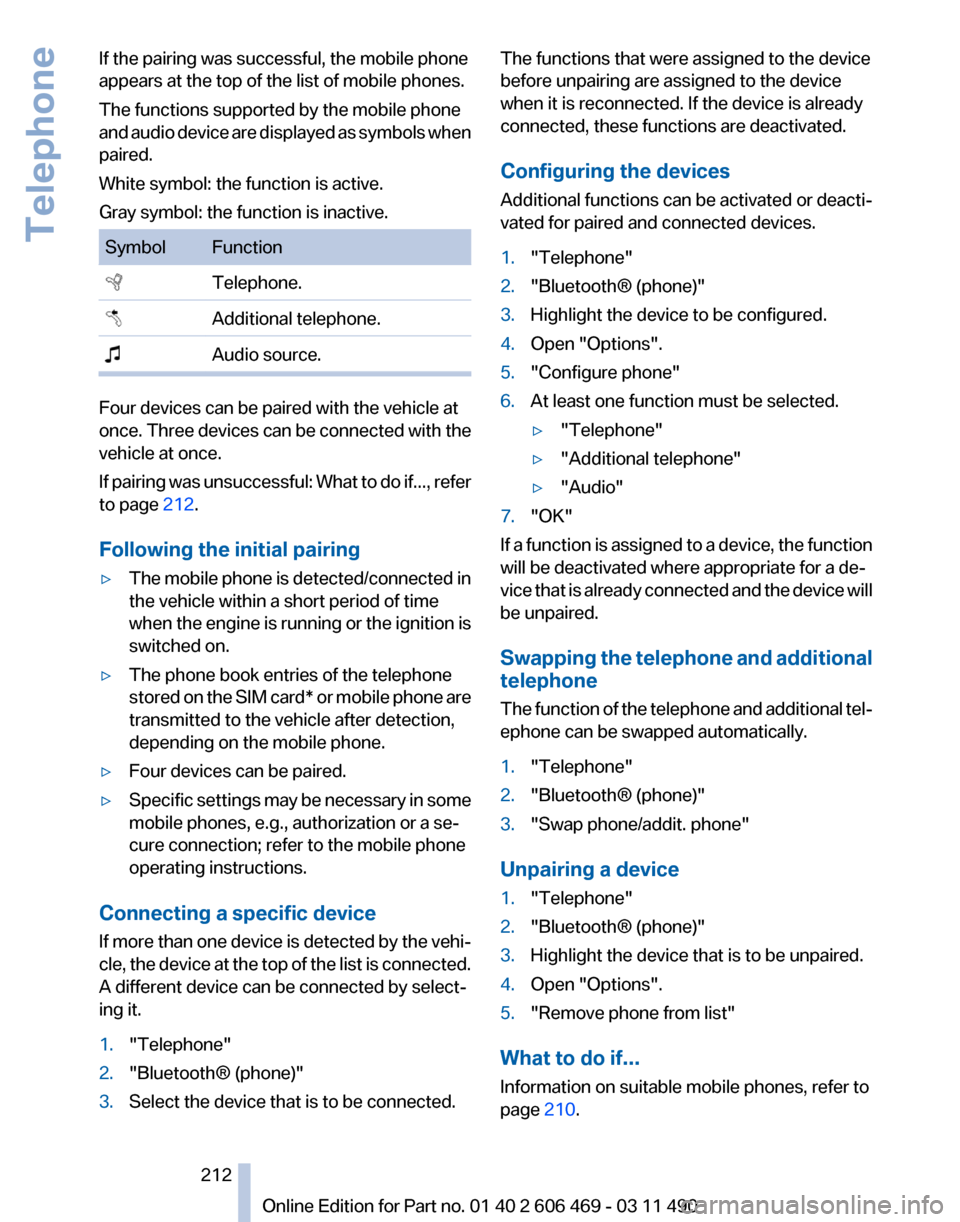
The functions supported by the mobile phone
and
audio device are displayed as symbols when
paired.
White symbol: the function is active.
Gray symbol: the function is inactive. Symbol Function
Telephone.
Additional telephone.
Audio source. Four devices can be paired with the vehicle at
once.
Three devices can be connected with the
vehicle at once.
If pairing was unsuccessful: What to do if..., refer
to page 212.
Following the initial pairing
▷ The mobile phone is detected/connected in
the vehicle within a short period of time
when
the engine is running or the ignition is
switched on.
▷ The phone book entries of the telephone
stored
on the SIM card* or mobile phone are
transmitted to the vehicle after detection,
depending on the mobile phone.
▷ Four devices can be paired.
▷ Specific settings may be necessary in some
mobile phones, e.g., authorization or a se‐
cure connection; refer to the mobile phone
operating instructions.
Connecting a specific device
If
more than one device is detected by the vehi‐
cle, the device at the top of the list is connected.
A different device can be connected by select‐
ing it.
1. "Telephone"
2. "Bluetooth® (phone)"
3. Select the device that is to be connected. The functions that were assigned to the device
before unpairing are assigned to the device
when it is reconnected. If the device is already
connected, these functions are deactivated.
Configuring the devices
Additional functions can be activated or deacti‐
vated for paired and connected devices.
1.
"Telephone"
2. "Bluetooth® (phone)"
3. Highlight the device to be configured.
4. Open "Options".
5. "Configure phone"
6. At least one function must be selected.
▷"Telephone"
▷ "Additional telephone"
▷ "Audio"
7. "OK"
If a function is assigned to a device, the function
will be deactivated where appropriate for a de‐
vice
that is already connected and the device will
be unpaired.
Swapping the telephone and additional
telephone
The function of the telephone and additional tel‐
ephone can be swapped automatically.
1. "Telephone"
2. "Bluetooth® (phone)"
3. "Swap phone/addit. phone"
Unpairing a device
1. "Telephone"
2. "Bluetooth® (phone)"
3. Highlight the device that is to be unpaired.
4. Open "Options".
5. "Remove phone from list"
What to do if...
Information on suitable mobile phones, refer to
page 210.
Seite 212
212 Online Edition for Part no. 01 40 2 606 469 - 03 11 490
Telephone
Page 213 of 304
The mobile phone could not be paired or con‐
nected.
▷
Is Bluetooth activated in the vehicle and on
the
mobile phone? Activate Bluetooth in the
vehicle and on the mobile phone.
▷ Do the Bluetooth passkeys on the mobile
phone and the vehicle match? Enter the
same passkey on the mobile phone and via
iDrive.
▷ Did it take longer than 30 seconds to enter
the
passkey? Repeat the pairing procedure.
▷ Are too many Bluetooth devices connected
to
the mobile phone or vehicle? Delete con‐
nections with other devices if necessary.
▷ Is the audio connection activated? Deacti‐
vate the audio connection.
▷ Is the mobile phone in power-save mode or
does
it have only a limited remaining battery
life? Charge the mobile phone in the snap-
in adapter* or via the charging cable.
▷ Depending on the mobile phone, it is possi‐
ble that only one device can be connected
to the vehicle. Unpair the connected device
from the vehicle and pair and connect only
one device.
▷ The mobile phone no longer reacts? Switch
the mobile phone off and on again. Repeat
the pairing procedure.
The telephone functions are not available.
▷ Is the mobile phone paired as an additional
telephone and is the additional telephone
function
deactivated? Activate the function.
▷ Is an outgoing call not possible? Connect
the mobile phone as a telephone.
No or not all phone book entries are displayed,
or they are incomplete.
▷ Transmission of the phone book entries is
not yet complete.
▷ It is possible that only the phone book en‐
tries of the mobile phone or the
SIM card*
are transmitted.
▷ It may not be possible to display phone book
entries with special characters. ▷
The number of phone book entries being
stored is too high.
▷ Is the data volume of the contact too large,
e.g., due to stored information such as
notes? Reduce the data volume of the con‐
tact.
▷ Is the mobile phone connected as an audio
source
or additional telephone? The mobile
phone must be connected as a telephone.
The phone connection quality is poor.
▷ The strength of the Bluetooth signal on the
mobile phone can be adjusted, depending
on the mobile phone.
▷ Insert the mobile phone into the snap-in
adapter* or place it in the area of the center
console.
▷ Adjust the volume of the microphone and
loudspeakers separately.
If all points in this list have been checked and the
required function is still not available, please
contact the hotline or service center.
Controls
Adjusting the volume
Turn the knob until the desired volume is se‐
lected.
The setting is stored for the remote con‐
trol currently in use.
The vehicle automatically adjusts the volume of
the microphone on the telephone and the vol‐
ume of the called party. Depending on the mo‐
bile phone, the volumes may need to be ad‐
justed. The settings can only be created during
a call and must be adjusted separately for each
telephone. The settings are deleted when the
telephone is unpaired.
1. "Settings"
2. "Tone"
3. "Volume settings"
4. Select the desired setting: "Microphone" or
"Loudspeak."
5. To adjust: turn the controller.
6. To store: press the controller.
Seite 213
213Online Edition for Part no. 01 40 2 606 469 - 03 11 490
Reference Mobility
Communication Entertainment Navigation Driving tips Controls At a glance
Page 219 of 304
Adjusting the volume
Turn the knob during an announcement.
▷
The volume remains constant even if the
volume of other audio sources is changed.
▷ The volume is stored for the remote control
currently in use.
Notes
Do not use the voice operation to initiate an
Emergency
Request. In stressful situations, the
voice and vocal pitch can change. This can un‐
necessarily delay the establishment of a tele‐
phone connection.
Instead, use the SOS button*, refer to
page 269, in the vicinity of the interior mirror.
Environmental conditions
▷ Say the commands, numbers, and letters
smoothly and with normal volume, empha‐
sis, and speed.
▷ Always say commands in the language of
the system. The language for the mobile
phone voice operation is preset and cannot
be changed in the Control Display.
▷ Keep the doors, windows, and glass sun‐
roof* closed to prevent noise interference.
▷ Avoid making other noise in the vehicle
while speaking.
Snap-in adapter*
Installation position
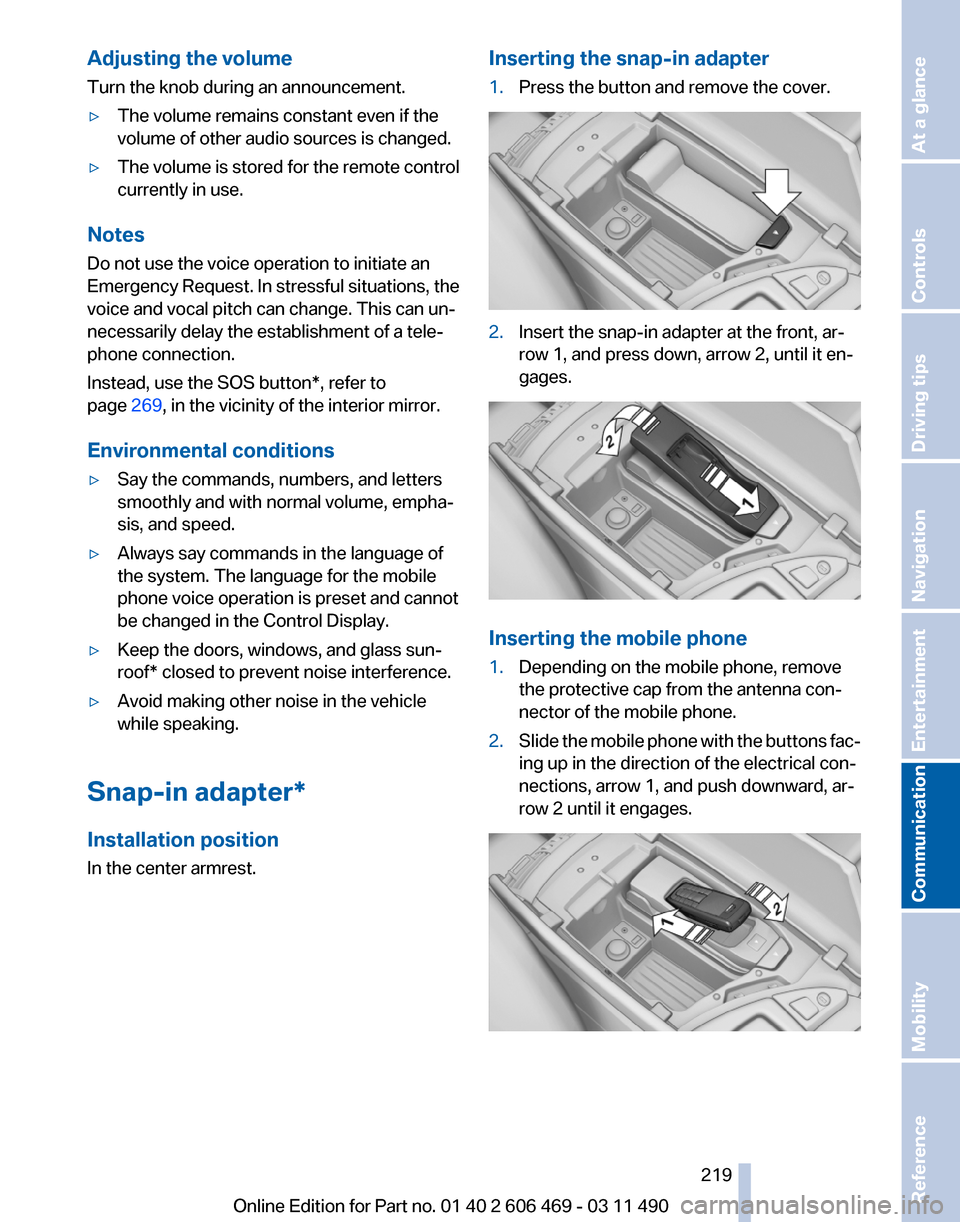
In the center armrest. Inserting the snap-in adapter
1.
Press the button and remove the cover. 2.
Insert the snap-in adapter at the front, ar‐
row 1, and press down, arrow 2, until it en‐
gages. Inserting the mobile phone
1.
Depending on the mobile phone, remove
the protective cap from the antenna con‐
nector of the mobile phone.
2. Slide the mobile phone with the buttons fac‐
ing up in the direction of the electrical con‐
nections, arrow 1, and push downward, ar‐
row 2 until it engages. Seite 219
219Online Edition for Part no. 01 40 2 606 469 - 03 11 490
Reference Mobility
Communication Entertainment Navigation Driving tips Controls At a glance
Page 237 of 304
▷
Use only BMW approved software applica‐
tions; otherwise, it may result in malfunc‐
tions.
Information about suitable cell phones, available
software applications and their installation can
be found at www.bmw.com/connectivity or at
the service center.
Create the entries.
Make entries only when traffic and road
conditions allow. Otherwise, the vehicle occu‐
pants
and other road users may be put in danger
because of the distraction from driving.
For reasons of safety, some software applica‐
tions are usable only while the vehicle is station‐
ary.◀
Operate Apps
1. Connect the cell phone via the snap-in
adapter or via the USB audio interface.
2. "ConnectedDrive"
3. Select the desired software application.
Displaying status
Information about the currently available soft‐
ware applications can be displayed.
1. "ConnectedDrive"
2. "BMW apps"
PlugIn*
Selected functions of the cell phone are dis‐
played on the Control Display. They can be op‐
erated via iDrive.
1. Connect cell phone via the snap-in adapter.
2. "ConnectedDrive"
3. "PlugIn"
4. "Activate PlugIn"
5. Navigate to the displayed functions via the
controller
and select, for example, a desired
category or track.
Press button to switch within the cell
phone functions to a higher level or back. Press button twice to switch back to the
main menu.
Notes
▷ The ranges of Apps that can be displayed on
the Control Display depend on the range of
installed software applications on the cell
phone.
▷ The data transmission of the software ap‐
plications
from the cell phone to the vehicle
can last some time. Some software applica‐
tions depend on the speed of the available
Internet connection of the cell phone.
▷ Some cell phones cannot simultaneously
use
Apps and the Bluetooth hands-free sys‐
tem.
If necessary, restart the software application
on the cell phone after a phone conversa‐
tion.
TeleService Report*
Transmits
technical data that is evaluated for the
ongoing development of BMW products from
your vehicle to BMW in regular intervals if nec‐
essary.
TeleService Report is activated in vehicles that
meet certain technical requirements and have a
valid Assist contract; this feature is free of
charge.
Neither personal data nor position data is trans‐
mitted.
Indicate when the last Teleservice Report was
transmitted:
1. "Vehicle Info"
2. "Vehicle status"
3. Open "Options".
4. "Last Teleservice Info" Seite 237
237Online Edition for Part no. 01 40 2 606 469 - 03 11 490
Reference Mobility
Communication Entertainment Navigation Driving tips Controls At a glance
Page 294 of 304
Everything from A to Z
Index
A
ABS, Antilock Brake Sys‐
tem 95
ACC, Active Cruise Control with Stop & Go 102
Activated-charcoal filter 129
Active Blind Spot Detec‐ tion 92
Active Cruise Control with Stop & Go, ACC 102
Active seat, front 46
Active seat ventilation, front 47
Active Steering, integral 98
Adaptive brake assistant 95
Adaptive brake lights, refer to Brake force display 94
Adaptive drive 97
Adaptive light control 81
Additional telephone 210
Additives, oil 258
Adjustments, seats/head re‐ straints 44
Airbags 85
Airbags, indicator/warning light 86
Air circulation, refer to Recir‐ culated-air mode 127
Air distribution, manual 126
Air drying, refer to Cooling function 128
Air pressure, tires 242
Air vents, refer to Ventila‐ tion 129
Air volume, automatic climate control 127
Alarm system 39
Alarm, unintentional 40
All around the center con‐ sole 14
All around the headliner 15 All around the steering
wheel 12
ALL program, automatic cli‐ mate control 128
All-season tires, refer to Win‐ ter tires 252
All-wheel-drive 96
Alternating-code hand-held transmitter 133
Alternative oil types 258
AM/FM station 174
Announcement, navigation, refer to Spoken instruc‐
tions 163
Antifreeze, washer fluid 64
Antilock Brake System, ABS 95
Anti-slip control, refer to DSC 95
Appointments 226
Approved engine oils 258
Apps 236
Armrest, refer to Center arm‐ rest 139
Arrival time 77
Ashtray 134
Ashtray, front 134
Ashtray, rear 135
Assist 232
Assistance, Roadside Assis‐ tance 270
Assistance when driving off 95
Audio playback 181
Audio playback, Blue‐ tooth 196
AUTO intensity 127
Automatic car wash 274
Automatic climate con‐ trol 126
Automatic Cruise Control with Stop & Go 102
Automatic Curb Monitor 52 Automatic deactivation, front
passenger airbags 86
Automatic headlamp con‐ trol 81
Automatic Hold 60
Automatic locking 35
Automatic recirculated-air control 127
Automatic Soft Closing, doors 35
Automatic transmission with Steptronic 65
Automatic trunk lid 36
AUTO program, automatic cli‐ mate control 127
AUTO program, intensity 127
AUX-IN port 192
Average fuel consumption 76
Average speed 76
Axle loads, weights 283
B
Backrest curvature, refer to Lumbar support 46
Backrest, seats 44
Backup camera 113
Backup lamps, bulb replace‐ ment 266
Balance 172
Band-Aids, refer to First aid kit 270
Bar for tow-starting/tow‐ ing 272
Bass 172
Battery replacement, remote control, rear entertain‐
ment 202
Battery replacement, vehicle battery 267
Battery replacement, vehicle remote control 28
Battery, vehicle 267
Seite 294
294 Online Edition for Part no. 01 40 2 606 469 - 03 11 490Everything from A to Z
Page 295 of 304
Before entering the car
wash 274
Belts, safety belts 48
Beverage holder, cu‐ pholder 140
Blinds, sun protection 41
Bluetooth audio 196
BMW Apps 236
BMW Apps, video play‐ back 195
BMW Assist 232
BMW EfficientDynamics, refer to Saving fuel 150
BMW homepage 6
BMW Internet page 6
BMW Maintenance Sys‐ tem 260
BMW Online 234
Bottle holder, refer to Cu‐ pholder 140
Brake assistant 95
Brake assistant, adaptive 95
Brake discs, breaking in 146
Brake force display 94
Brake lamps, brake force dis‐ play 94
Brake lamps, bulb replace‐ ment 266
Brake lights, adaptive 94
Brake pads, breaking in 146
Braking, notes 147
Breakdown assis‐ tance 269, 270
Breaking in 146
Brightness of Control Dis‐ play 79
Bulb replacement 262
Bulb replacement, front 263
Bulb replacement, rear 265
Bulbs and lamps 262
Button, RES 104
Button, Start/Stop 58
Bypassing, refer to starting aid 270
C
Calendar 226 California Proposition 65
Warning 7
Camera, backup camera 116
Camera, care 276
Camera, Side View 118
Camera, Top View 117
Can holder, refer to Cu‐ pholder 140
Car battery 267
Car care products 275
Care, displays 276
Care, vehicle 275
Cargo 148
Cargo area, enlarging 136
Cargo area lid 35
Cargo area, storage compart‐ ments 141
Cargo straps, securing cargo 149
Car key, refer to Remote con‐ trol 28
Carpet, care 276
Car wash 274
Catalytic converter, refer to Hot exhaust system 146
CBS Condition Based Serv‐ ice 260
CD/DVD 181
CD/DVD player, rear 201
CDs, storing 188
Cell phone 210
Center armrest 139
Center console 14
Central locking system 31
Central
screen, refer to Control
Display 16
Changes, technical, refer to Safety 7
Changing parts 262
Changing wheels/tires 251
Check Control 70
Children, seating position 54
Children, transporting safely 54
Child restraint fixing sys‐ tem 54
Child restraint fixing system LATCH 55 Child restraint fixing systems,
mounting 54
Child-safety locks 57
Child seat, mounting 54
Child seats 54
Chrome parts, care 275
Cigarette lighter 134
Cleaning, displays 276
Climate control 126
Climate control wind‐ shield 147
Clock 73
Closing/opening from in‐ side 35
Closing/opening via door lock 34
Closing/opening with remote control 32
Clothes hooks 141
Collision warning 108
Combination switch, refer to Turn signals 62
Combination switch, refer to Wiper system 62
Comfort Access 37
COMFORT
program, Dynamic
Driving Control 100
Computer 75
Concierge service 233
Condensation on win‐ dows 127
Condensation under the vehi‐ cle 148
Condition Based Service CBS 260
Confirmation signal 33
Contacts 221, 230
Control Display 16
Control Display, settings 78
Controller 16
Control systems, driving sta‐ bility 95
Convenient opening 32
Coolant 258
Coolant temperature 72
Cooling function 128
Cooling, maximum 127
Cooling system 258
Seite 295
295Online Edition for Part no. 01 40 2 606 469 - 03 11 490
Reference Mobility Communication Entertainment Navigation Driving tips Controls At a glance
Page 302 of 304
Traffic bulletins, naviga‐
tion 165
Traffic
situation/gray card 166
Transmission, automatic 65
Transmission, manual 64
Transporting children safely 54
Tread, tires 250
Treble, tone 172
Trip computer 77
Triple turn signal activa‐ tion 62
Trip odometer 73
Truck for tow-starting/tow‐ ing 272
Trunk lid 35
Trunk lid, automatic 36
Trunk lid, emergency unlock‐ ing 37
Trunk lid, hotel function 37
Trunk lid via remote con‐ trol 33
Turning circle 281
Turning circle lines, backup camera 114
Turn signals, operation 62
Turn signals, rear, bulb re‐ placement 266
U
Unintentional alarm 40
Units of measure 79
Universal remote control 132
Unlock button, automatic transmission 65
Unlocking/locking from in‐ side 35
Unlocking/locking via door lock 34
Unlocking/locking with remote control 32
Updates made after the edito‐ rial deadline 6
Updating software 199
Upholstery care 275
USB audio interface 193
USB interface 138 V
Variable steering, Integral Ac‐
tive Steering 98
Vehicle battery 267
Vehicle
battery, replacing 267
Vehicle, breaking in 146
Vehicle care 275
Vehicle identification number, refer to Identification number
in the engine compart‐
ment 255
Vehicle jack 267
Vehicle paint 275
Vehicle storage 276
Vehicle wash 274
Ventilation 129
Ventilation, refer to Parked-car ventilation 131
Version of the navigation data 168
Video playback 183
Video playback, iPhone 195
Video playback, snap-in adapter 195
Voice activation, mobile phone 217
Voice activation, short com‐ mands 285
Voice activation system 22
Volume, setting 172
W
Warning messages, refer to Check Control 70
Warning triangle 270
Washer fluid 64
Washer fluid reservoir, ca‐ pacity 284
Washer nozzles, wind‐ shield 64
Washer system 62
Washing, vehicle 274
Water on roads 147
Weather Band 176
Weights 283
Welcome lamps 80 Wheel base, vehicle 281
Wheel change 267
Wheels, changing 251
Wheels, everything on wheels
and tires 242
Wheels,
Tire Pressure Monitor
TPM 88
Width, vehicle 280
Window defroster, rear 128
Windows, powered 40
Windshield, climate con‐ trol 147
Windshield washer fluid 64
Windshield washer noz‐ zles 64
Windshield washer system 62
Windshield wiper 62
Windshield wipers, fold-out position 64
Winter storage, care 276
Winter tires, suitable tires 252
Winter tires, tread 250
Wiper blades, replacing 262
Wiper fluid 64
Wiper system 62
Wood, care 276
Word match concept, naviga‐ tion 21
Wrench 262
X
xDrive 96
Xenon headlamps, bulb re‐ placement 264
Y
Your individual vehicle 6
Seite 302
302 Online Edition for Part no. 01 40 2 606 469 - 03 11 490
Everything from A to Z