inflation pressure BMW 550I XDRIVE SEDAN 2015 User Guide
[x] Cancel search | Manufacturer: BMW, Model Year: 2015, Model line: 550I XDRIVE SEDAN, Model: BMW 550I XDRIVE SEDAN 2015Pages: 277, PDF Size: 5.63 MB
Page 215 of 277
Wheels and tiresVehicle features and options
This chapter describes all standard, country-
specific and optional features offered with the
series. It also describes features that are not
necessarily available in your car, e. g., due to
the selected options or country versions. This
also applies to safety-related functions and
systems. The respectively applicable country
provisions must be observed when using the
respective features and systems.
Tire inflation pressure Safety information
The tire characteristics and tire inflation pres‐
sure influence the following:▷The service life of the tires.▷Road safety.▷Driving comfort.
Checking the tire inflation pressure
Check the tire inflation pressure regularly
Regularly check the tire inflation pres‐
sure, and correct it as needed: at least twice a
month and before a long trip. If you fail to ob‐
serve this precaution, you may be driving on
tires with incorrect tire pressures, a condition
that may not only compromise your vehicle's
driving stability, but also lead to tire damage
and the risk of an accident.◀
Tires have a natural, consistent loss of tire in‐
flation pressure.
Tires heat up while driving, and the tire infla‐
tion pressure increases along with the tire's
temperature. The tire inflation pressure speci‐
fications relate to cold tires or tires with the
ambient temperature.
Only check the tire inflation pressure when the
tires are cold. This means after driving no more
than 1.25 miles/2 km or when the vehicle has
been parked for at least 2 hours.
The displays of inflation devices may under-
read by up to 1.45 psi/0.1 bar.
For Flat Tire Monitor: after correcting the tire
inflation pressure, reinitialize the Flat Tire
Monitor.
For Tire Pressure Monitor: after correcting the
tire inflation pressure, reset the Tire Pressure
Monitor.
Tire inflation pressure specifications
The tire inflation pressure table, refer to
page 212, contains all tire inflation pressure
specifications for the specified tire sizes at the
ambient temperature. Tire inflation pressure
specifications apply to approved tire sizes and
recommended tire brands. This information
can be obtained from your service center.
To identify the correct tire inflation pressure,
please note the following:▷Tire sizes of your vehicle.▷Maximum permitted driving speed.
Tire inflation pressures up to
100 mph/160 km/h
For speeds of up to 100 mph/160 km/h and for
optimum driving comfort, note the pressure
values in the tire inflation pressure table, refer
to page 212, and adjust as necessary.
Seite 211Wheels and tiresMobility211
Online Edition for Part no. 01 40 2 954 312 - II/15
Page 216 of 277
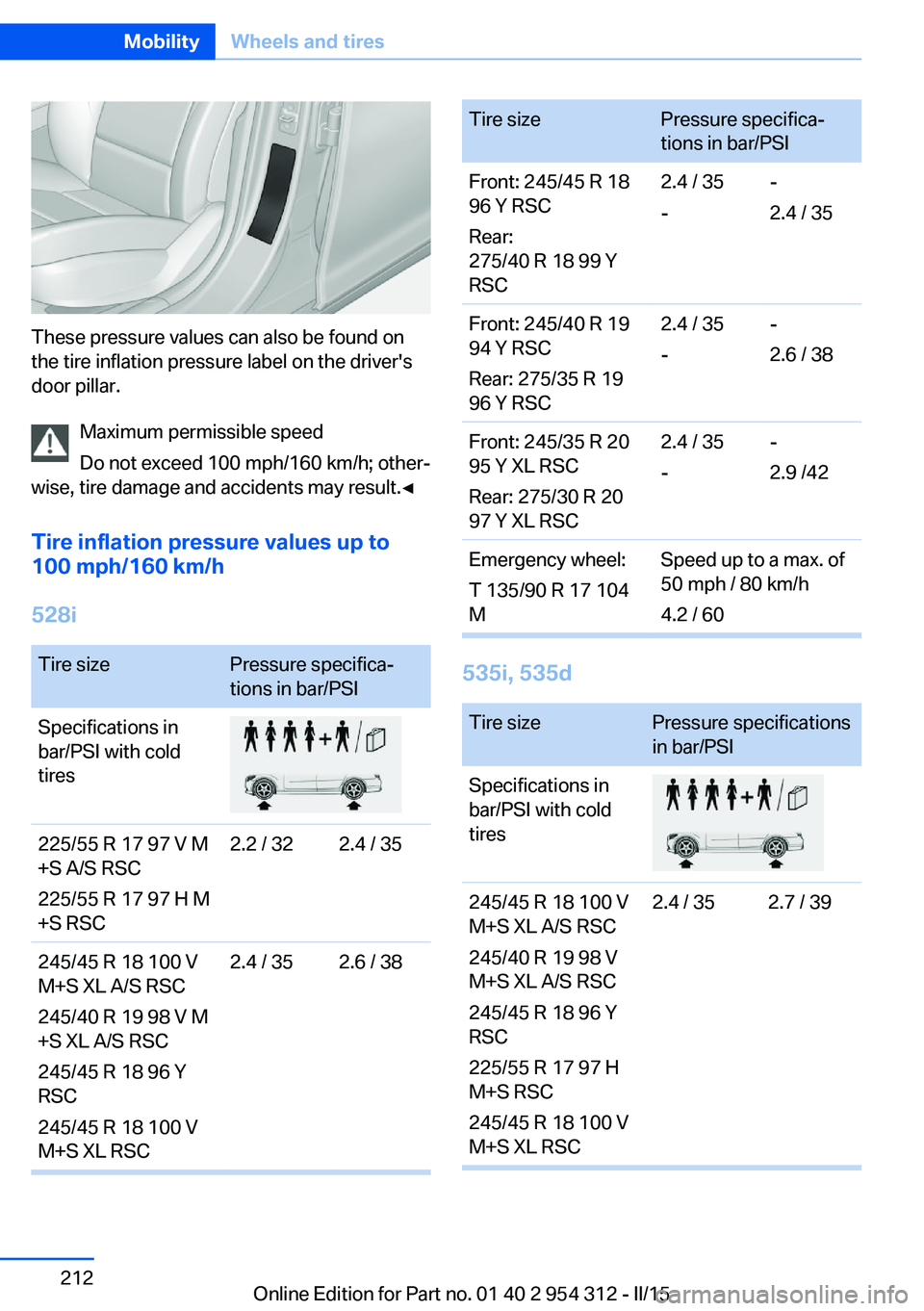
These pressure values can also be found on
the tire inflation pressure label on the driver's
door pillar.
Maximum permissible speed
Do not exceed 100 mph/160 km/h; other‐
wise, tire damage and accidents may result.◀
Tire inflation pressure values up to
100 mph/160 km/h
528i
Tire sizePressure specifica‐
tions in bar/PSISpecifications in
bar/PSI with cold
tires225/55 R 17 97 V M
+S A/S RSC
225/55 R 17 97 H M
+S RSC2.2 / 322.4 / 35245/45 R 18 100 V
M+S XL A/S RSC
245/40 R 19 98 V M
+S XL A/S RSC
245/45 R 18 96 Y
RSC
245/45 R 18 100 V
M+S XL RSC2.4 / 352.6 / 38Tire sizePressure specifica‐
tions in bar/PSIFront: 245/45 R 18
96 Y RSC
Rear:
275/40 R 18 99 Y
RSC2.4 / 35
--
2.4 / 35Front: 245/40 R 19
94 Y RSC
Rear: 275/35 R 19
96 Y RSC2.4 / 35
--
2.6 / 38Front: 245/35 R 20
95 Y XL RSC
Rear: 275/30 R 20
97 Y XL RSC2.4 / 35
--
2.9 /42Emergency wheel:
T 135/90 R 17 104
MSpeed up to a max. of
50 mph / 80 km/h
4.2 / 60
535i, 535d
Tire sizePressure specifications
in bar/PSISpecifications in
bar/PSI with cold
tires245/45 R 18 100 V
M+S XL A/S RSC
245/40 R 19 98 V
M+S XL A/S RSC
245/45 R 18 96 Y
RSC
225/55 R 17 97 H
M+S RSC
245/45 R 18 100 V
M+S XL RSC2.4 / 352.7 / 39Seite 212MobilityWheels and tires212
Online Edition for Part no. 01 40 2 954 312 - II/15
Page 219 of 277
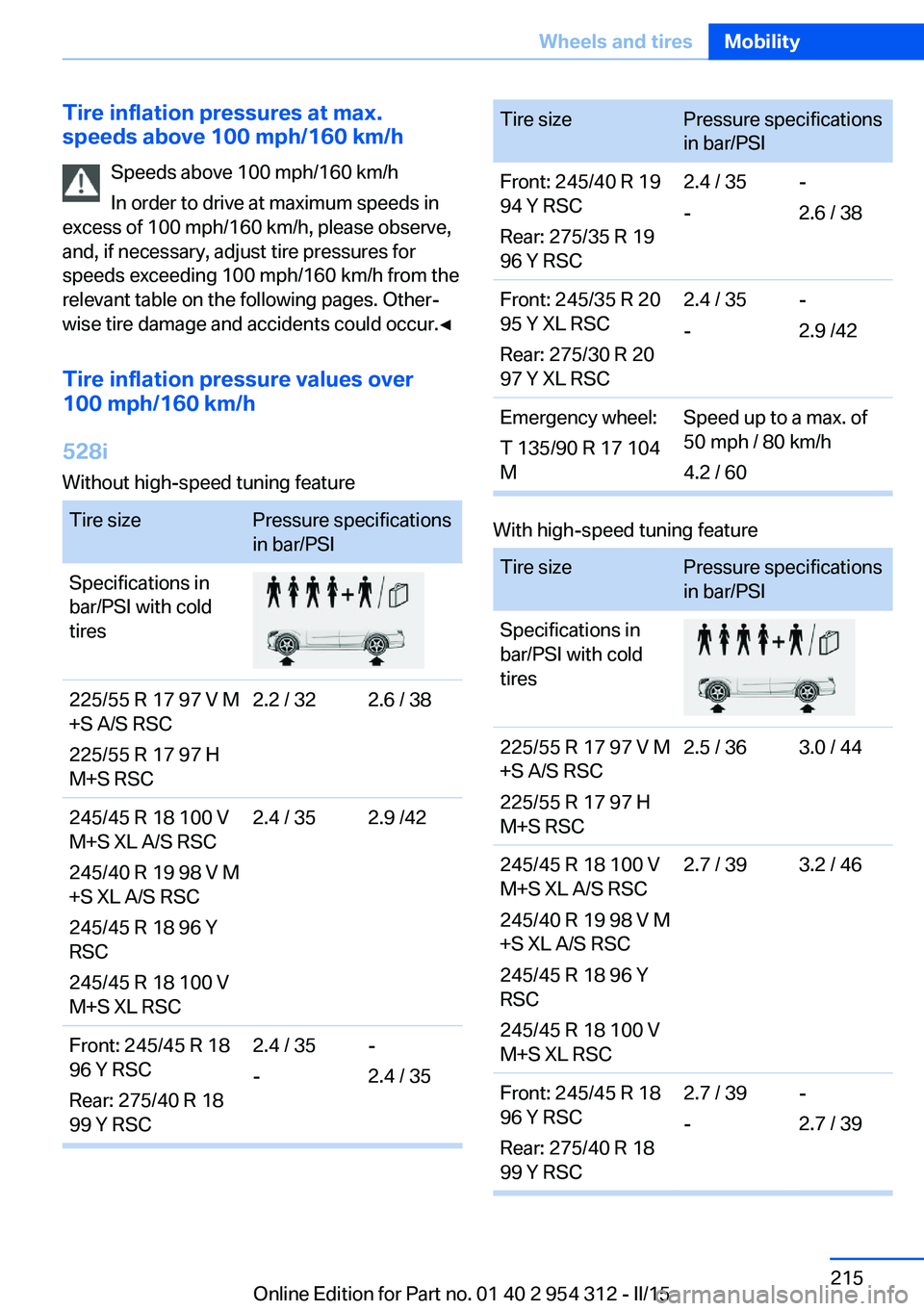
Tire inflation pressures at max.
speeds above 100 mph/160 km/h
Speeds above 100 mph/160 km/h
In order to drive at maximum speeds in
excess of 100 mph/160 km/h, please observe,
and, if necessary, adjust tire pressures for
speeds exceeding 100 mph/160 km/h from the
relevant table on the following pages. Other‐
wise tire damage and accidents could occur.◀
Tire inflation pressure values over
100 mph/160 km/h
528i
Without high-speed tuning featureTire sizePressure specifications
in bar/PSISpecifications in
bar/PSI with cold
tires225/55 R 17 97 V M
+S A/S RSC
225/55 R 17 97 H
M+S RSC2.2 / 322.6 / 38245/45 R 18 100 V
M+S XL A/S RSC
245/40 R 19 98 V M
+S XL A/S RSC
245/45 R 18 96 Y
RSC
245/45 R 18 100 V
M+S XL RSC2.4 / 352.9 /42Front: 245/45 R 18
96 Y RSC
Rear: 275/40 R 18
99 Y RSC2.4 / 35
--
2.4 / 35Tire sizePressure specifications
in bar/PSIFront: 245/40 R 19
94 Y RSC
Rear: 275/35 R 19
96 Y RSC2.4 / 35
--
2.6 / 38Front: 245/35 R 20
95 Y XL RSC
Rear: 275/30 R 20
97 Y XL RSC2.4 / 35
--
2.9 /42Emergency wheel:
T 135/90 R 17 104
MSpeed up to a max. of
50 mph / 80 km/h
4.2 / 60
With high-speed tuning feature
Tire sizePressure specifications
in bar/PSISpecifications in
bar/PSI with cold
tires225/55 R 17 97 V M
+S A/S RSC
225/55 R 17 97 H
M+S RSC2.5 / 363.0 / 44245/45 R 18 100 V
M+S XL A/S RSC
245/40 R 19 98 V M
+S XL A/S RSC
245/45 R 18 96 Y
RSC
245/45 R 18 100 V
M+S XL RSC2.7 / 393.2 / 46Front: 245/45 R 18
96 Y RSC
Rear: 275/40 R 18
99 Y RSC2.7 / 39
--
2.7 / 39Seite 215Wheels and tiresMobility215
Online Edition for Part no. 01 40 2 954 312 - II/15
Page 228 of 277
Retreaded tires
Possibly substantial variations in the de‐
sign and age of the tire casing structures can
limit service life and have a negative impact on
road safety.◀
Winter tires
Winter tires are recommended for operating on
winter roads.
Although so-called all-season M+S tires pro‐
vide better winter traction than summer tires, they do not provide the same level of perform‐
ance as winter tires.
Maximum speed of winter tires If the maximum speed of the vehicle is higher
than the permissible speed for the winter tires,
then a respective symbol is displayed in your
field of vision. You can obtain this sign from the
tire specialist or from your service center.
Maximum speed for winter tires
Do not exceed the maximum speed for
the respective winter tires; otherwise, tire dam‐
age and accidents can occur.◀
Run-flat tires If you are already using run-flat tires, for your
own safety you should replace them only with
the same kind. No spare tire is available in the
case of a flat tire. Your service center will be
glad to advise you.
Rotating wheels between axlesDifferent wear patterns can occur on the frontand rear axles depending on individual driving
conditions. The tires can be rotated between
the axles to achieve even wear. Your service
center will be glad to advise you. After rotating,
check the tire pressure and correct if needed.
Rotating the tires is not permissible on vehi‐
cles with different tire sizes or rim sizes on the
front and rear axles.Storage
Store wheels and tires in a cool, dry place with
as little exposure to light as possible.
Always protect tires against all contact with oil,
grease and fuels.
Do not exceed the maximum tire inflation pres‐
sure indicated on the side wall of the tire.
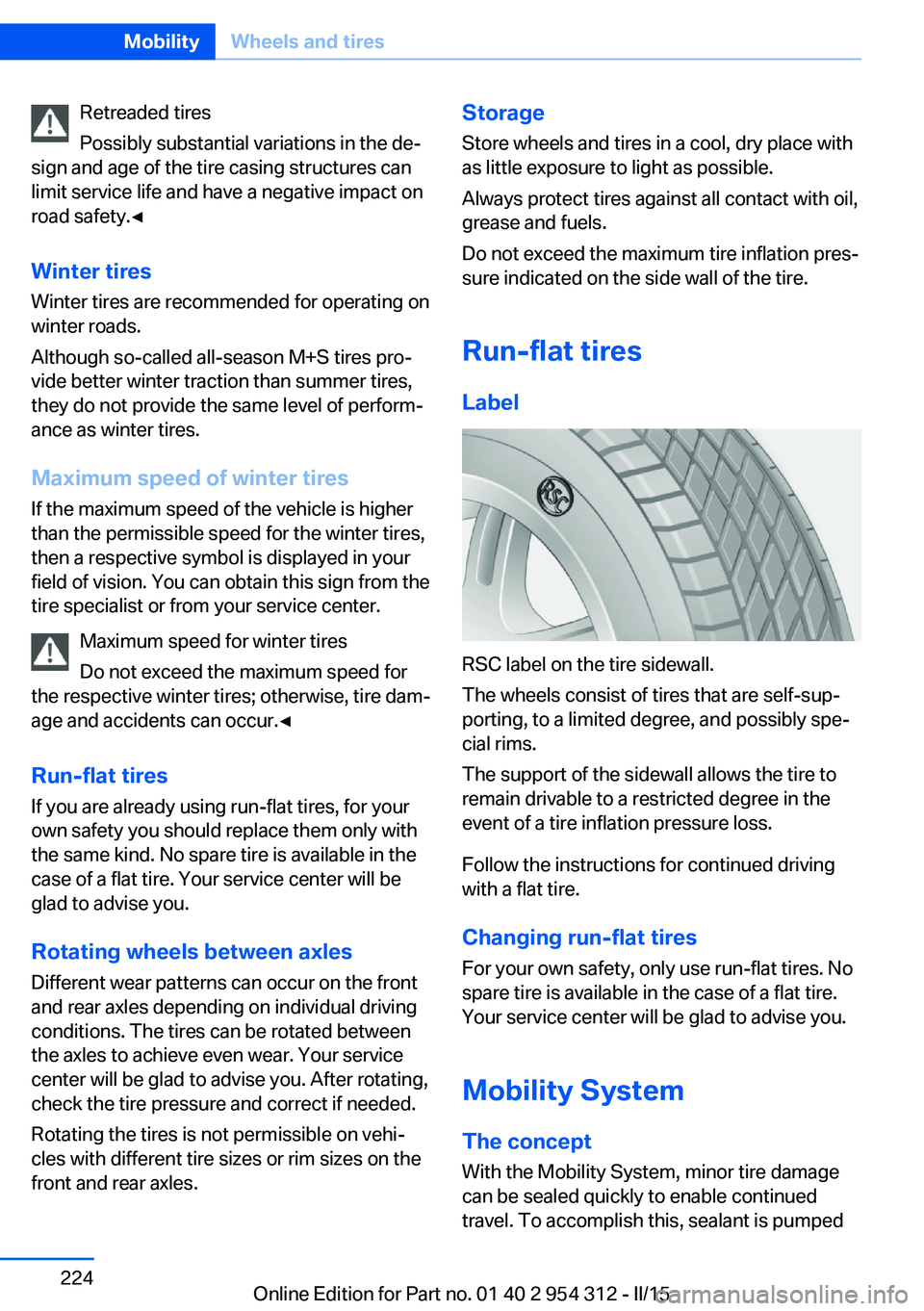
Run-flat tires Label
RSC label on the tire sidewall.
The wheels consist of tires that are self-sup‐
porting, to a limited degree, and possibly spe‐
cial rims.
The support of the sidewall allows the tire to
remain drivable to a restricted degree in the
event of a tire inflation pressure loss.
Follow the instructions for continued driving
with a flat tire.
Changing run-flat tires
For your own safety, only use run-flat tires. No
spare tire is available in the case of a flat tire.
Your service center will be glad to advise you.
Mobility System
The concept With the Mobility System, minor tire damagecan be sealed quickly to enable continued
travel. To accomplish this, sealant is pumped
Seite 224MobilityWheels and tires224
Online Edition for Part no. 01 40 2 954 312 - II/15
Page 229 of 277
into the tires, which seals the damage from the
inside.
The compressor can be used to check the tire
inflation pressure.
Hints▷Follow the instructions on using the Mobi‐
lity System found on the compressor and
sealant container.▷Use of the Mobility System may be ineffec‐
tive if the tire puncture measures approx.
1/8 in/4 mm or more.▷Contact the nearest service center if the
tire cannot be made drivable.▷If possible, do not remove foreign bodies
that have penetrated the tire.▷Pull the speed limit sticker off the sealant
container and apply it to the steering
wheel.▷The use of a sealant can damage the TPM
wheel electronics. In this case, have the
electronics checked at the next opportu‐
nity and have them replaced if needed.
Enclosed areas
Do not let the engine run in enclosed
areas, since breathing in exhaust fumes may
lead to loss of consciousness and death. The
exhaust gases contain carbon monoxide, an
odorless and colorless but highly toxic gas.◀
Storage The Mobility System is located under the
cargo floor panel.
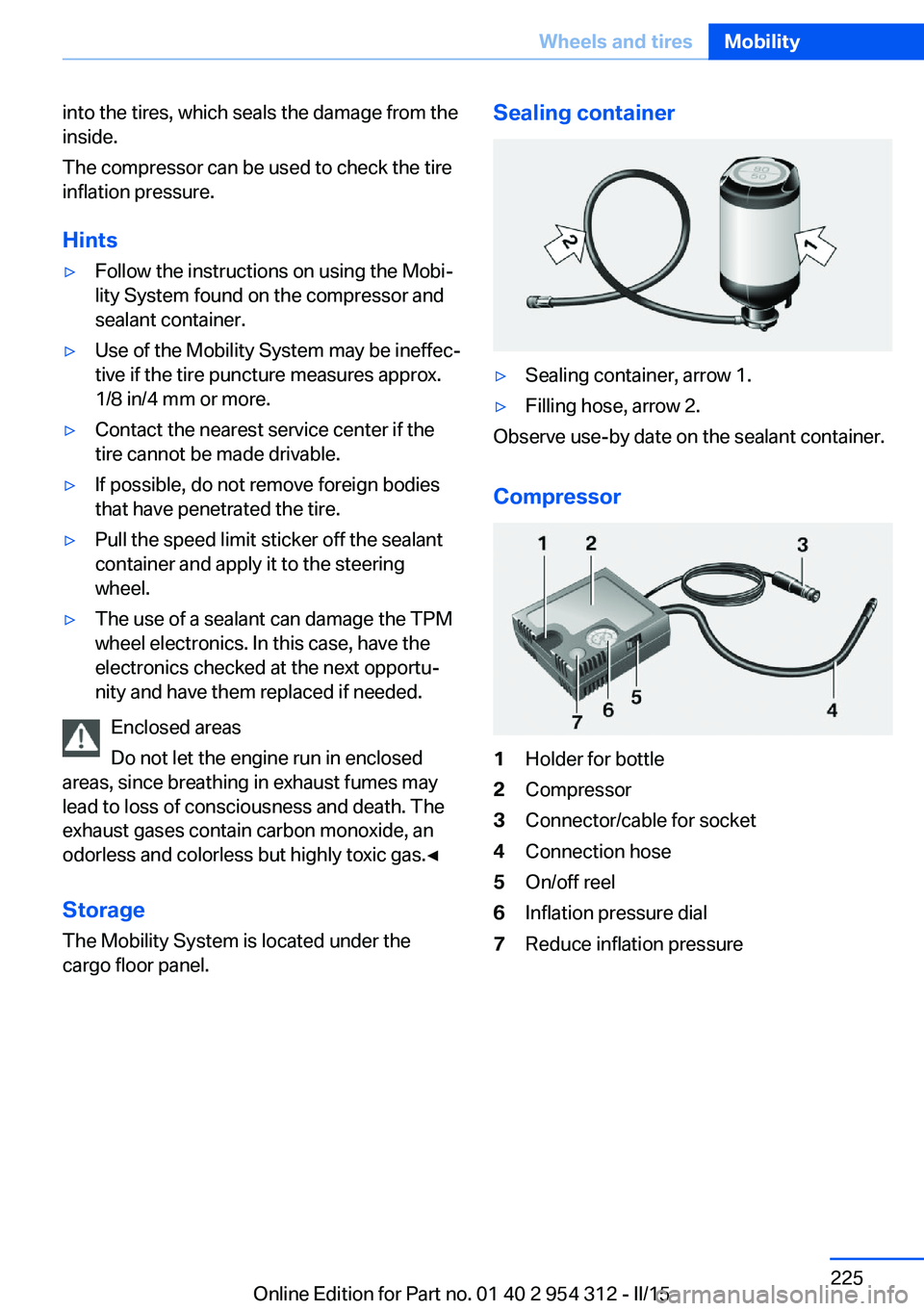
Sealing container▷Sealing container, arrow 1.▷Filling hose, arrow 2.
Observe use-by date on the sealant container.
Compressor
1Holder for bottle2Compressor3Connector/cable for socket4Connection hose5On/off reel6Inflation pressure dial7Reduce inflation pressureSeite 225Wheels and tiresMobility225
Online Edition for Part no. 01 40 2 954 312 - II/15
Page 231 of 277
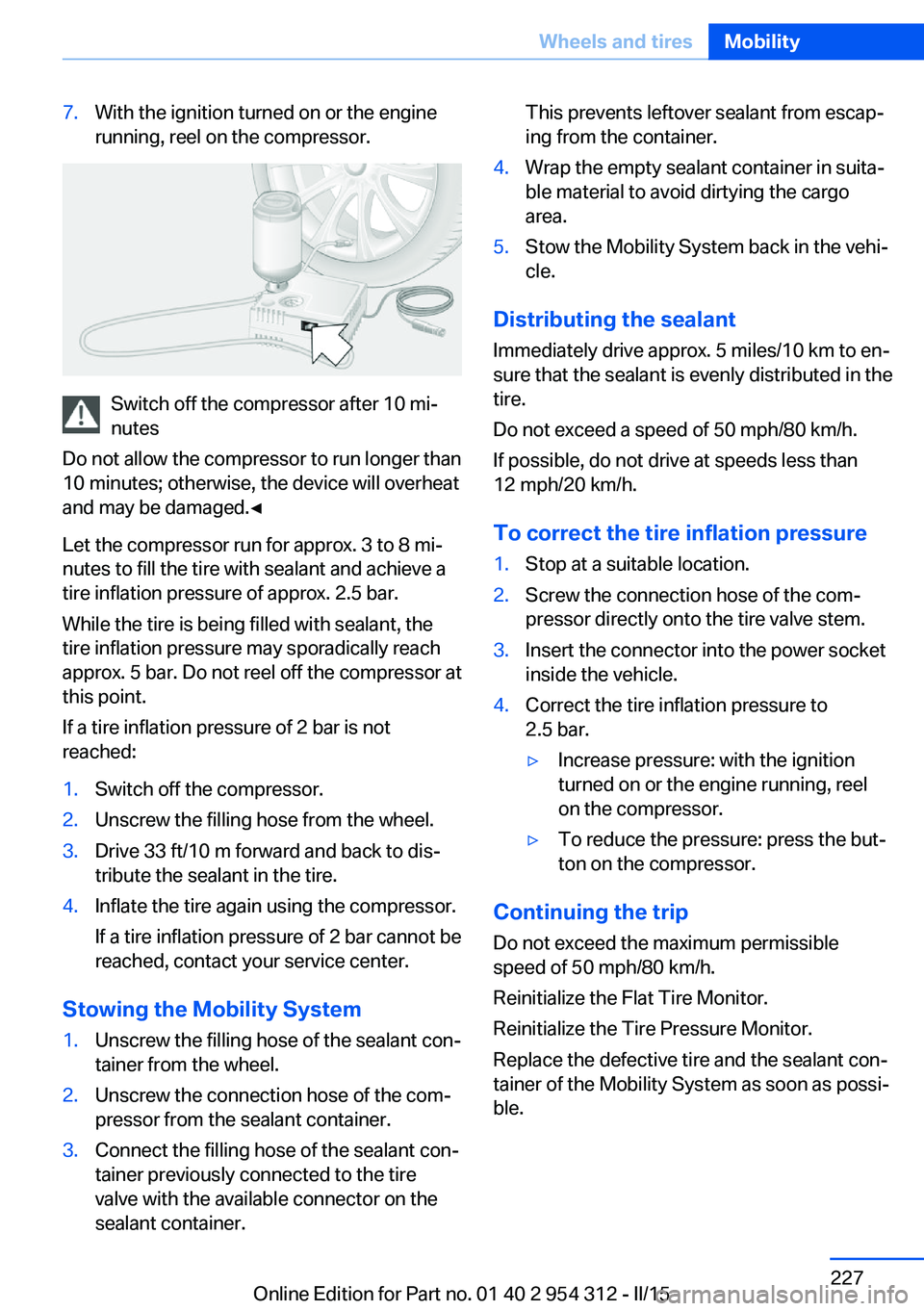
7.With the ignition turned on or the engine
running, reel on the compressor.
Switch off the compressor after 10 mi‐
nutes
Do not allow the compressor to run longer than
10 minutes; otherwise, the device will overheat
and may be damaged.◀
Let the compressor run for approx. 3 to 8 mi‐
nutes to fill the tire with sealant and achieve a
tire inflation pressure of approx. 2.5 bar.
While the tire is being filled with sealant, the
tire inflation pressure may sporadically reach
approx. 5 bar. Do not reel off the compressor at
this point.
If a tire inflation pressure of 2 bar is not
reached:
1.Switch off the compressor.2.Unscrew the filling hose from the wheel.3.Drive 33 ft/10 m forward and back to dis‐
tribute the sealant in the tire.4.Inflate the tire again using the compressor.
If a tire inflation pressure of 2 bar cannot be
reached, contact your service center.
Stowing the Mobility System
1.Unscrew the filling hose of the sealant con‐
tainer from the wheel.2.Unscrew the connection hose of the com‐
pressor from the sealant container.3.Connect the filling hose of the sealant con‐
tainer previously connected to the tire
valve with the available connector on the
sealant container.This prevents leftover sealant from escap‐
ing from the container.4.Wrap the empty sealant container in suita‐
ble material to avoid dirtying the cargo
area.5.Stow the Mobility System back in the vehi‐
cle.
Distributing the sealant
Immediately drive approx. 5 miles/10 km to en‐
sure that the sealant is evenly distributed in the
tire.
Do not exceed a speed of 50 mph/80 km/h.
If possible, do not drive at speeds less than
12 mph/20 km/h.
To correct the tire inflation pressure
1.Stop at a suitable location.2.Screw the connection hose of the com‐
pressor directly onto the tire valve stem.3.Insert the connector into the power socket
inside the vehicle.4.Correct the tire inflation pressure to
2.5 bar.▷Increase pressure: with the ignition
turned on or the engine running, reel
on the compressor.▷To reduce the pressure: press the but‐
ton on the compressor.
Continuing the trip
Do not exceed the maximum permissible
speed of 50 mph/80 km/h.
Reinitialize the Flat Tire Monitor.
Reinitialize the Tire Pressure Monitor.
Replace the defective tire and the sealant con‐
tainer of the Mobility System as soon as possi‐
ble.
Seite 227Wheels and tiresMobility227
Online Edition for Part no. 01 40 2 954 312 - II/15
Page 270 of 277
H
Handbrake, refer to Parking brake 73
Hand-held transmitter, alter‐ nating code 173
Hazard warning flashers 245
HDC Hill Descent Con‐ trol 137
Head airbags 108
Headlight control, auto‐ matic 104
Headlight courtesy delay fea‐ ture 104
Headlight courtesy delay fea‐ ture via remote control 38
Headlight flasher 76
Headlight glass 239
Headlights 239
Headlights, care 252
Headlight washer system 77
Head restraints 53
Head restraints, front 58
Head restraints, rear 60
Head-up Display 101
Head-up Display, care 254
Heavy cargo, stowing 193
Height, vehicle 258
High-beam Assistant 105
High beams 76
High beams/low beams, refer to High-beam Assistant 105
Hill Descent Control HDC 137
Hills 190
Hill start assistant, refer to Drive-off assistant 135
Hints 6
Holder for beverages 183
Homepage 6
Hood 229
Horn 14
Hotel function, trunk lid 42
Hot exhaust system 189
HUD Head-up Display 101
Hydroplaning 189 I
Ice warning, see External temperature warning 93
Icy roads, see External tem‐ perature warning 93
Identification marks, tires 220
Identification number, see ve‐ hicle identification num‐
ber 9
iDrive 18
Ignition key, refer to Remote control 34
Ignition off 69
Ignition on 69
Indication of a flat tire 112 , 115
Indicator and alarm lamps, see Check Control 88
Indicator lamp, see Check Control 88
Individual air distribution 166
Individual settings, refer to Personal Profile 35
Inflation pressure, tires 211
Inflation pressure warning FTM, tires 115
Info display, refer to On- Board computer 97
Initialization, Integral Active Steering 139
Initialize, Tire Pressure Moni‐ tor TPM 112
Initializing, Flat Tire Monitor FTM 115
Instrument cluster 84
Instrument cluster, electronic displays 84
Instrument display, multifunc‐ tional 85
Instrument lighting 106
Integral Active Steering 139
Integrated key 34
Integrated Owner's Manual in the vehicle 29 Intelligent Emergency Re‐
quest 245
Intelligent Safety 117
Intensity, AUTO pro‐ gram 166
Interior equipment 172
Interior lights 106
Interior lights during unlock‐ ing 37
Interior lights with the vehicle locked 38
Interior motion sensor 48
Interior rearview mirror, auto‐ matic dimming feature 63
Interior rearview mirror, man‐ ually dimmable 63
Internet page 6
Interval display, service re‐ quirements 94
Interval mode 77
J
Jacking points for the vehicle jack 243
Joystick, Steptronic transmis‐ sion 80
Jump-starting 246
K
Key/remote control 34
Keyless Go, refer to Comfort Access 43
Key Memory, refer to Per‐ sonal Profile 35
Kickdown, Steptronic trans‐ mission 80
Knee airbag 109
L Lamp replacement 238
Lamp replacement, front 239
Lamp replacement, rear 241
Lane departure warning 129 Seite 266ReferenceEverything from A to Z266
Online Edition for Part no. 01 40 2 954 312 - II/15
Page 274 of 277
Stability control systems 135
Start/stop, automatic func‐ tion 71
Start/Stop button 69
Start function during malfunc‐ tion 35
Starting the engine 70
Status control display, tires 112
Status information, iDrive 22
Status of Owner's Manual 7
Steering, Integral Active Steering 139
Steering wheel, adjusting 63
Steering wheel heating 64
Steering wheel memory 61
Steptronic Sport transmis‐ sion, refer to Steptronic
transmission 79
Steptronic transmission 79
Stopping the engine 71
Storage compartment, re‐ mote control 184
Storage compartments 181
Storage compartments, loca‐ tions 181
Storage, tires 224
Storing the vehicle 254
Suitable engine oils 233
Summer tires, tread 222
Sun visor 174
Supplementary text mes‐ sage 91
Surround View 154
Suspension settings 139
Switch for Dynamic Driving Control 139
Switch-on times, parked-car ventilation 171
Switch, refer to Cockpit 14
Symbols 6
Symbols in the status field 22
SYNC program, automatic cli‐ mate control 167 T
Tachometer 92
Tail and brake lights 241
Tail lights 241
Tail lights, bulb replace‐ ment 241
Technical changes, refer to Safety 7
Technical data 258
Telephone, see user's manual for Navigation, Entertain‐
ment and Communication
Temperature, automatic cli‐ mate control 166
Temperature display for ex‐ ternal temperature 93
Temperature, engine oil 92
Terminal, starting aid 247
Text message, supplemen‐ tary 91
Theft alarm system, refer to Alarm system 47
Thermal camera, see Night Vision 126
Thigh support 55
Through-loading system 177
Tilt alarm sensor 47
Time of arrival 98
Tire damage 222
Tire identification marks 220
Tire inflation pressure 211
Tire inflation pressure moni‐ tor, refer to FTM 115
Tire Pressure Monitor TPM 111
Tires, changing 223
Tire sealant 224
Tires, everything on wheels and tires 211
Tires, run-flat tires 224
Tire tread 222
Tone, see user's manual for Navigation, Entertainment
and Communication
Tool 238 Top View 158
Total vehicle weight 259
Touchpad 21
Tow fitting 249
Towing 248
Tow lug, see Tow fitting 249
Tow-starting 248
Tow truck 249
TPM Tire Pressure Moni‐ tor 111
Traction control 136
TRACTION, driving dynam‐ ics 136
Transmission lock, electronic unlocking 82
Transmission, manual trans‐ mission 79
Transmission, see Steptronic transmission 79
Transporting children safely 65
Tread, tires 222
Trip computer 98
Triple turn signal activa‐ tion 76
Trip odometer 92
Truck for tow-starting/ towing 249
Trunk lid, automatic 41
Trunk lid closing 41
Trunk lid, closing with no- touch activation 44
Trunk lid, emergency unlock‐ ing 43
Trunk lid, hotel function 42
Trunk lid opening 40
Trunk lid, opening with no- touch activation 44
Trunk lid via remote con‐ trol 38
Turning circle 258
Turning circle lines, rearview camera 156
Turn signals, operation 76
Turn signals, rear, bulb re‐ placement 241 Seite 270ReferenceEverything from A to Z270
Online Edition for Part no. 01 40 2 954 312 - II/15