navigation BMW 6 SERIES 2007 Owners Manual
[x] Cancel search | Manufacturer: BMW, Model Year: 2007, Model line: 6 SERIES, Model: BMW 6 SERIES 2007Pages: 254, PDF Size: 7.32 MB
Page 219 of 254
Mobility
217Reference
At a glance
Controls
Driving tips
Communications
Navigation
Entertainment
Giving and receiving assistance
Emergency call
Conditions for an emergency call:
>Full preparation package mobile phone.
With this equipment, an emergency call is
still possible when no mobile phone is
paired in the vehicle.
>BMW Assist is activated. Activating
BMW Assist, refer to page194.
>Radio readiness is activated.
>The BMW Assist system is logged on to a
mobile phone network.
>The emergency call system is operable.
Once your service contract for BMW Assist
expires, the BMW Assist system can be deacti-
vated by a BMW center without you having to
visit a workshop. Following deactivation of the
BMW Assist system, no emergency calls can be
made. The BMW Assist system can be reacti-
vated after concluding a new agreement at a
BMW center.
Initiating an emergency call
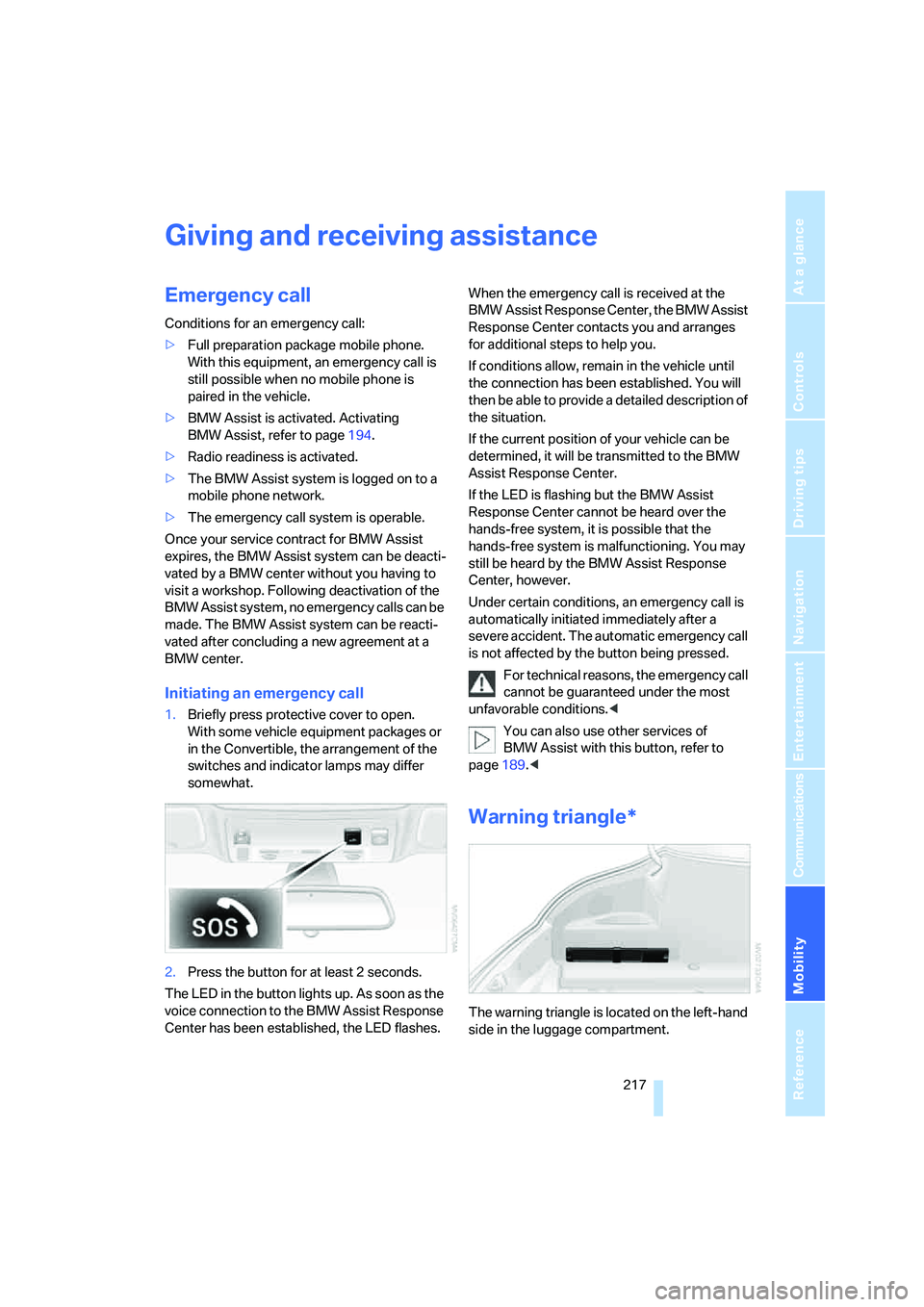
1.Briefly press protective cover to open.
With some vehicle equipment packages or
in the Convertible, the arrangement of the
switches and indicator lamps may differ
somewhat.
2.Press the button for at least 2 seconds.
The LED in the button lights up. As soon as the
voice connection to the BMW Assist Response
Center has been established, the LED flashes.When the emergency call is received at the
BMW Assist Response Center, the BMW Assist
Response Center contacts you and arranges
for additional steps to help you.
If conditions allow, remain in the vehicle until
the connection has been established. You will
then be able to provide a detailed description of
the situation.
If the current position of your vehicle can be
determined, it will be transmitted to the BMW
Assist Response Center.
If the LED is flashing but the BMW Assist
Response Center cannot be heard over the
hands-free system, it is possible that the
hands-free system is malfunctioning. You may
still be heard by the BMW Assist Response
Center, however.
Under certain conditions, an emergency call is
automatically initiated immediately after a
severe accident. The automatic emergency call
is not affected by the button being pressed.
For technical reasons, the emergency call
cannot be guaranteed under the most
unfavorable conditions.<
You can also use other services of
BMW Assist with this button, refer to
page189.<
Warning triangle*
The warning triangle is located on the left-hand
side in the luggage compartment.
Page 221 of 254
Mobility
219Reference
At a glance
Controls
Driving tips
Communications
Navigation
Entertainment
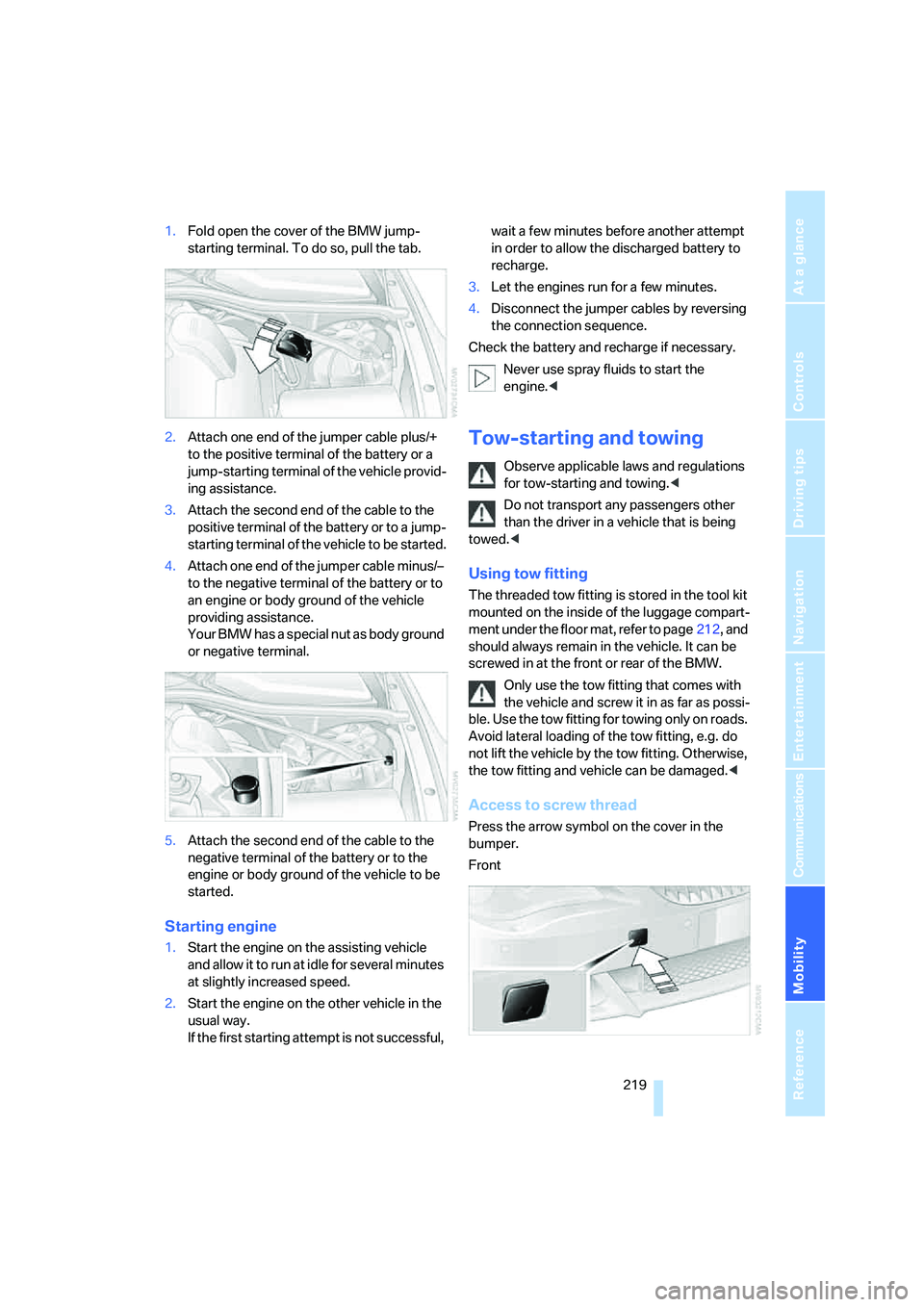
1.Fold open the cover of the BMW jump-
starting terminal. To do so, pull the tab.
2.Attach one end of the jumper cable plus/+
to the positive terminal of the battery or a
jump-starting terminal of the vehicle provid-
ing assistance.
3.Attach the second end of the cable to the
positive terminal of the battery or to a jump-
starting terminal of the vehicle to be started.
4.Attach one end of the jumper cable minus/–
to the negative terminal of the battery or to
an engine or body ground of the vehicle
providing assistance.
Your BMW has a special nut as body ground
or negative terminal.
5.Attach the second end of the cable to the
negative terminal of the battery or to the
engine or body ground of the vehicle to be
started.
Starting engine
1.Start the engine on the assisting vehicle
and allow it to run at idle for several minutes
at slightly increased speed.
2.Start the engine on the other vehicle in the
usual way.
If the first starting attempt is not successful, wait a few minutes before another attempt
in order to allow the discharged battery to
recharge.
3.Let the engines run for a few minutes.
4.Disconnect the jumper cables by reversing
the connection sequence.
Check the battery and recharge if necessary.
Never use spray fluids to start the
engine.<
Tow-starting and towing
Observe applicable laws and regulations
for tow-starting and towing.<
Do not transport any passengers other
than the driver in a vehicle that is being
towed.<
Using tow fitting
The threaded tow fitting is stored in the tool kit
mounted on the inside of the luggage compart-
ment under the floor mat, refer to page212, and
should always remain in the vehicle. It can be
screwed in at the front or rear of the BMW.
Only use the tow fitting that comes with
the vehicle and screw it in as far as possi-
ble. Use the tow fitting for towing only on roads.
Avoid lateral loading of the tow fitting, e.g. do
not lift the vehicle by the tow fitting. Otherwise,
the tow fitting and vehicle can be damaged.<
Access to screw thread
Press the arrow symbol on the cover in the
bumper.
Front
Page 223 of 254
Mobility
221Reference
At a glance
Controls
Driving tips
Communications
Navigation
Entertainment
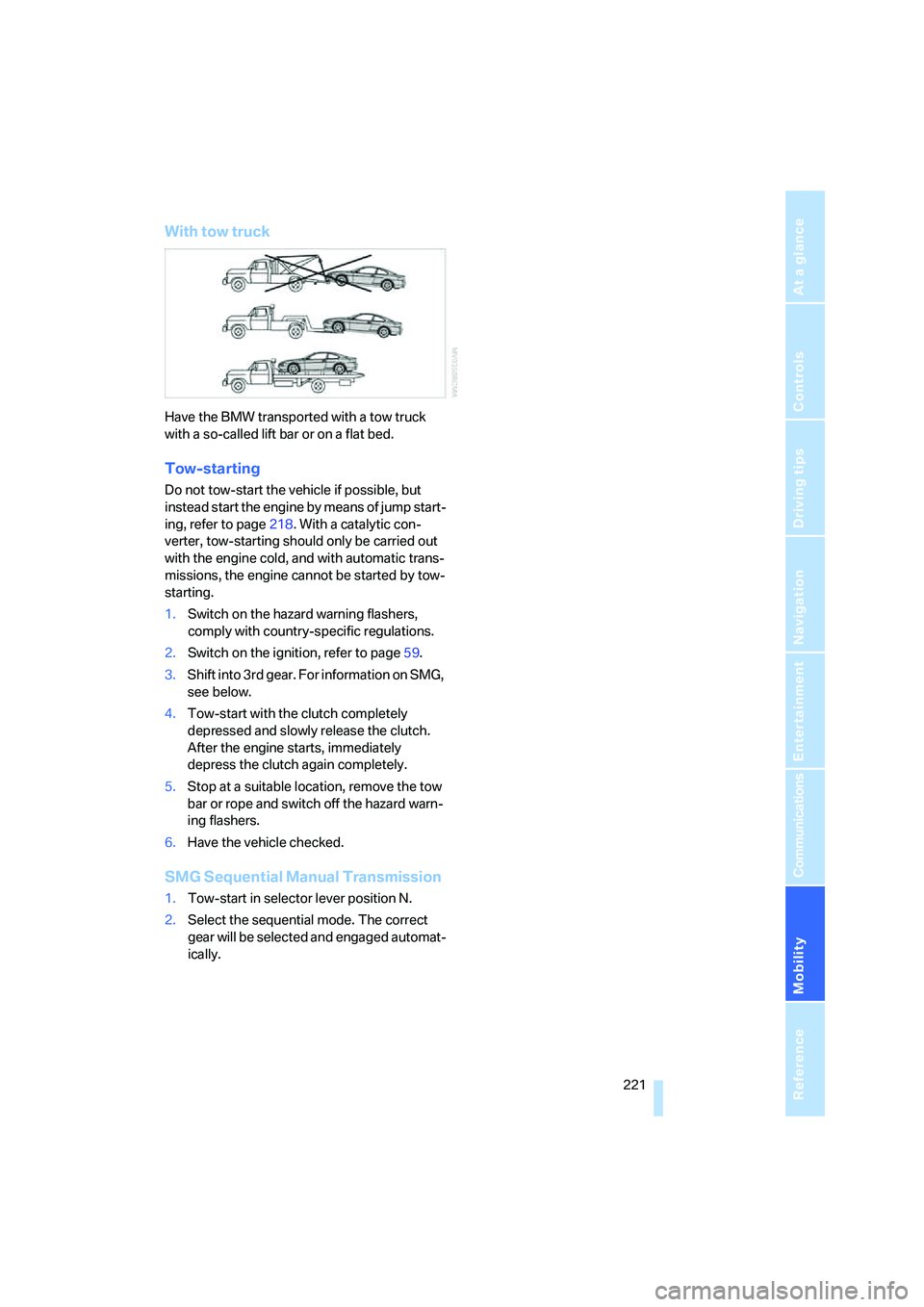
With tow truck
Have the BMW transported with a tow truck
with a so-called lift bar or on a flat bed.
Tow-starting
Do not tow-start the vehicle if possible, but
instead start the engine by means of jump start-
ing, refer to page218. With a catalytic con-
verter, tow-starting should only be carried out
with the engine cold, and with automatic trans-
missions, the engine cannot be started by tow-
starting.
1.Switch on the hazard warning flashers,
comply with country-specific regulations.
2.Switch on the ignition, refer to page59.
3.Shift into 3rd gear. For information on SMG,
see below.
4.Tow-start with the clutch completely
depressed and slowly release the clutch.
After the engine starts, immediately
depress the clutch again completely.
5.Stop at a suitable location, remove the tow
bar or rope and switch off the hazard warn-
ing flashers.
6.Have the vehicle checked.
SMG Sequential Manual Transmission
1.Tow-start in selector lever position N.
2.Select the sequential mode. The correct
gear will be selected and engaged automat-
ically.
Page 227 of 254
Reference 225
At a glance
Controls
Driving tips
Communications
Navigation
Entertainment
Mobility
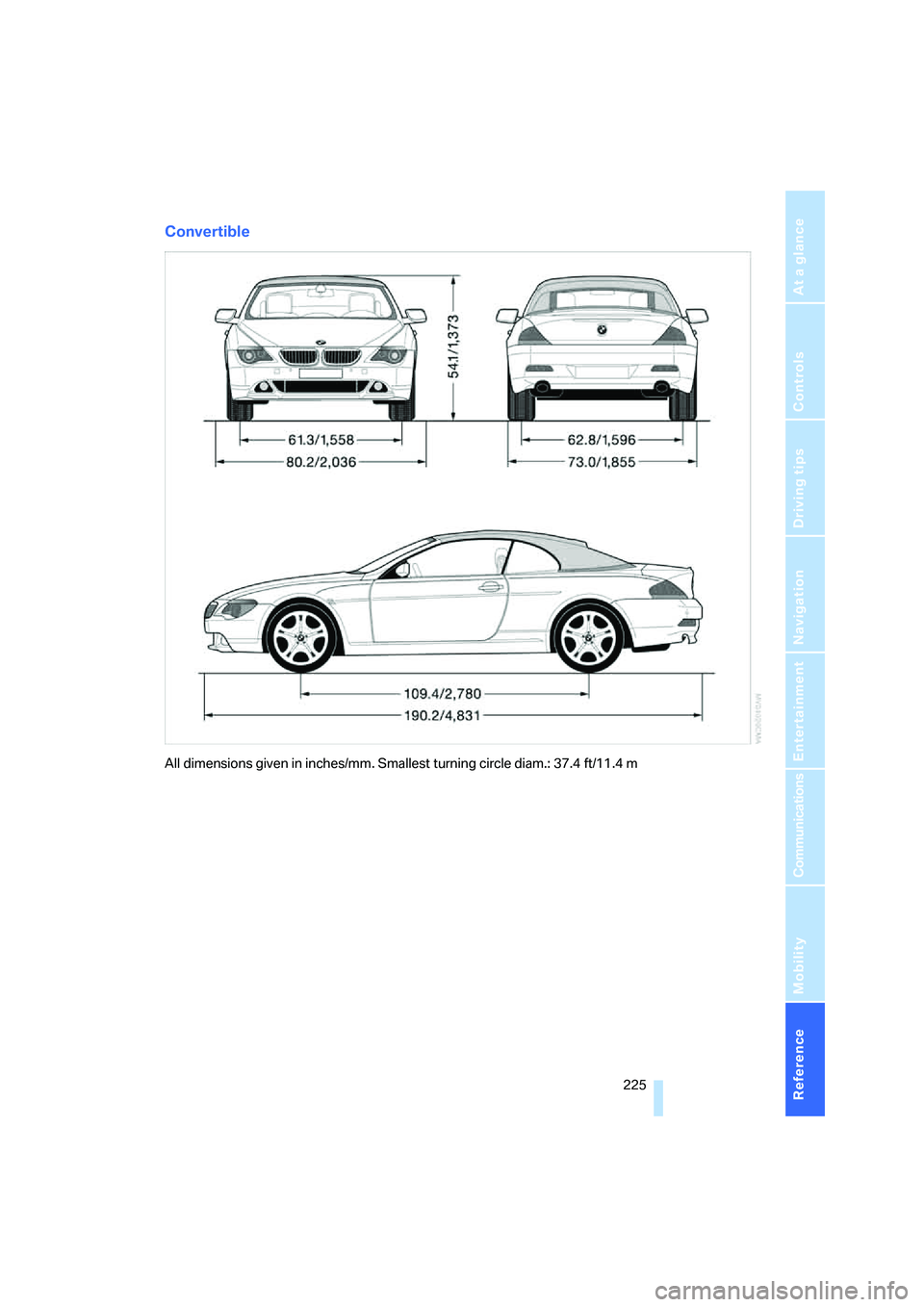
Convertible
All dimensions given in inches/mm. Smallest turning circle diam.: 37.4 ft/11.4 m
Page 229 of 254
Reference 227
At a glance
Controls
Driving tips
Communications
Navigation
Entertainment
Mobility
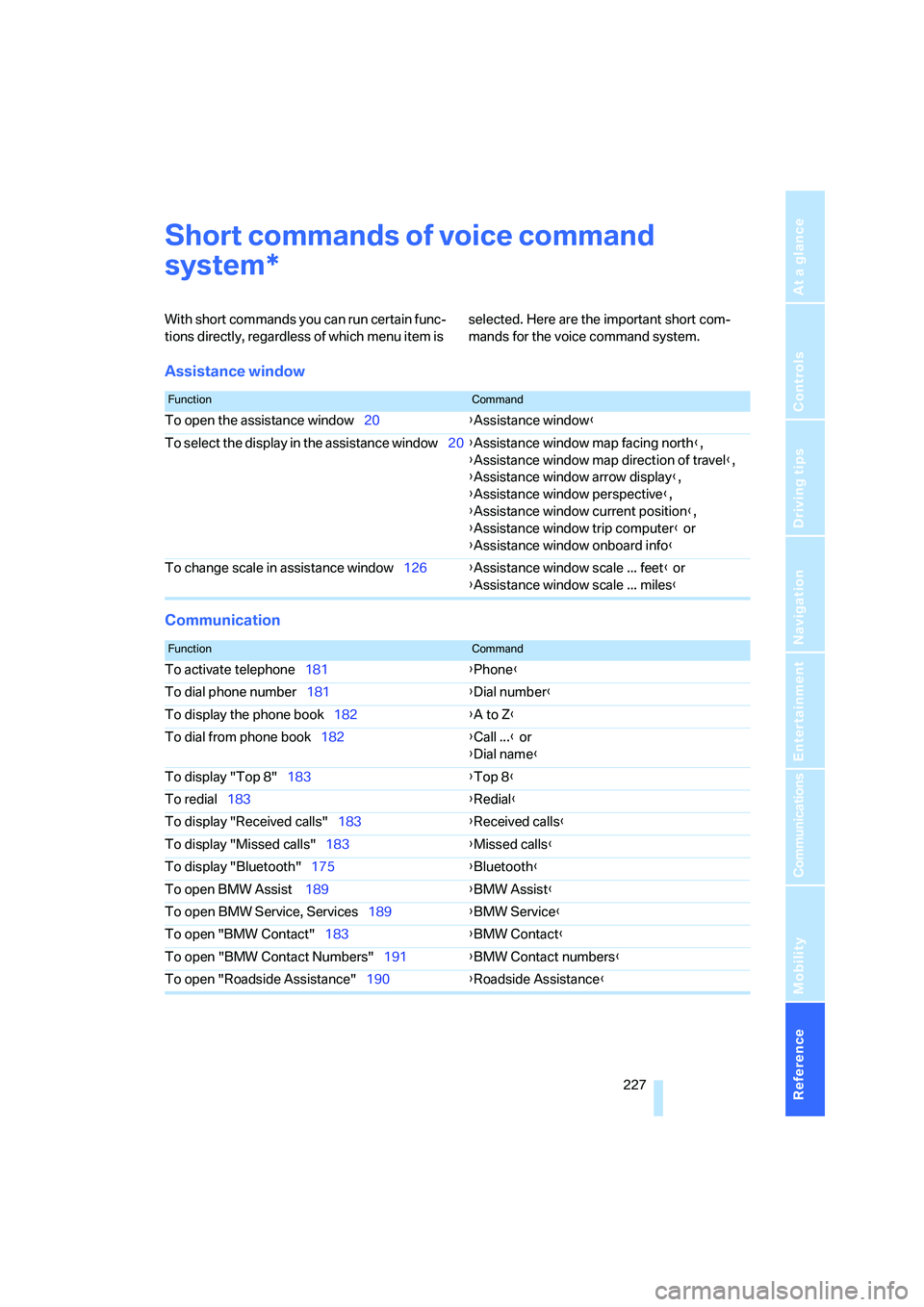
Short commands of voice command
system
With short commands you can run certain func-
tions directly, regardless of which menu item is selected. Here are the important short com-
mands for the voice command system.
Assistance window
Communication
*
FunctionCommand
To open the assistance window20{Assistance window}
To select the display in the assistance window20{Assistance window map facing north},
{Assistance window map direction of travel},
{Assistance window arrow display},
{Assistance window perspective},
{Assistance window current position},
{Assistance window trip computer} or
{Assistance window onboard info}
To change scale in assistance window126{Assistance window scale ... feet} or
{Assistance window scale ... miles}
FunctionCommand
To activate telephone181{Phone}
To dial phone number181{Dial number}
To display the phone book182{A to Z}
To dial from phone book182{Call ...} or
{Dial name}
To display "Top 8"183{Top 8}
To redial183{Redial}
To display "Received calls"183{Received calls}
To display "Missed calls"183{Missed calls}
To display "Bluetooth"175{Bluetooth}
To open BMW Assist 189{BMW Assist}
To open BMW Service, Services189{BMW Service}
To open "BMW Contact"183{BMW Contact}
To open "BMW Contact Numbers"191{BMW Contact numbers}
To open "Roadside Assistance"190{Roadside Assistance}
Page 230 of 254
Short commands of voice command system
228
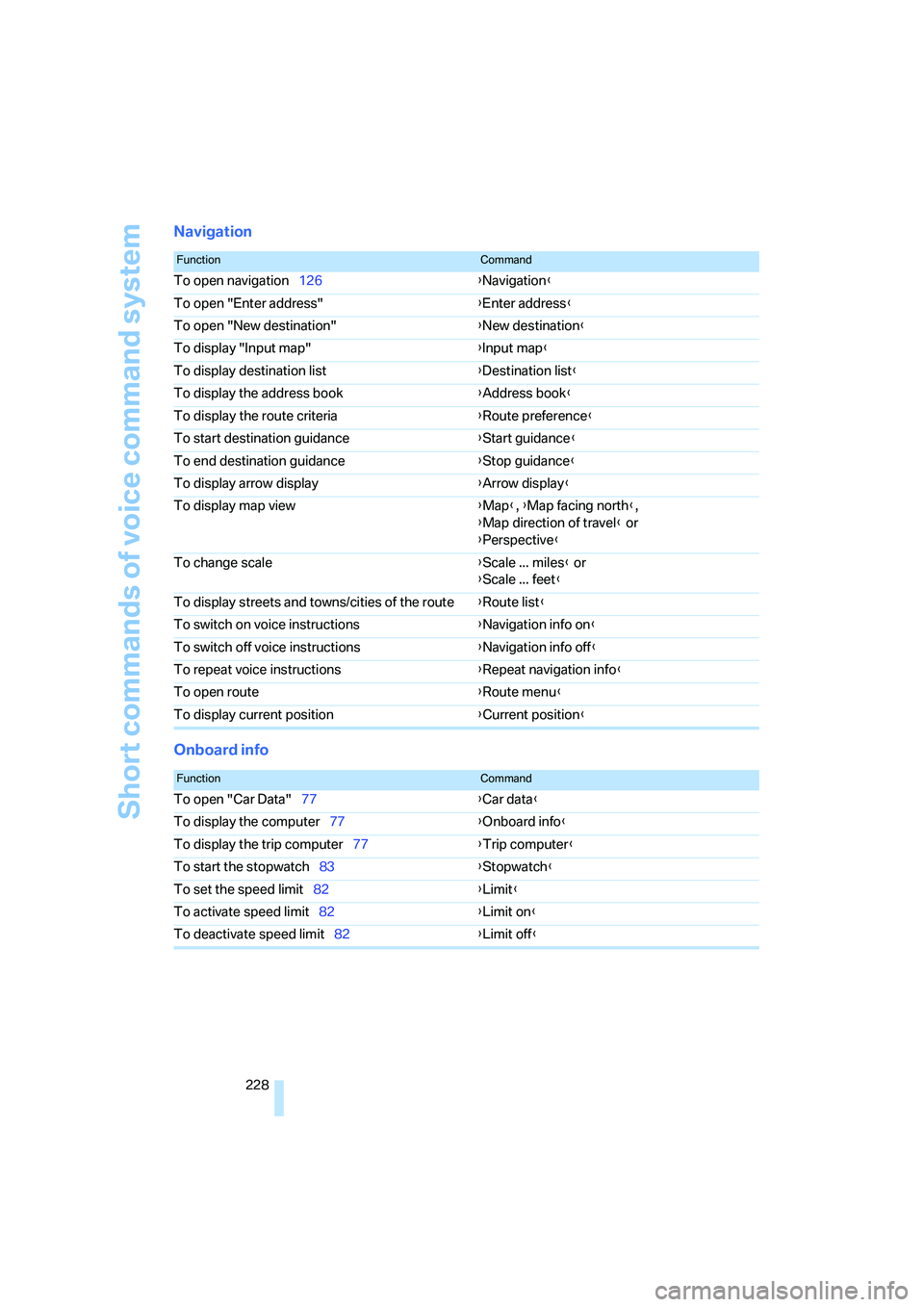
Navigation
Onboard info
FunctionCommand
To open navigation126{Navigation}
To open "Enter address"{Enter address}
To open "New destination"{New destination}
To display "Input map"{Input map}
To display destination list{Destination list}
To display the address book{Address book}
To display the route criteria{Route preference}
To start destination guidance{Start guidance}
To end destination guidance{Stop guidance}
To display arrow display{Arrow display}
To display map view{Map}, {Map facing north},
{Map direction of travel} or
{Perspective}
To change scale{Scale ... miles} or
{Scale ... feet}
To display streets and towns/cities of the route{Route list}
To switch on voice instructions{Navigation info on}
To switch off voice instructions{Navigation info off}
To repeat voice instructions{Repeat navigation info}
To open route{Route menu}
To display current position{Current position}
FunctionCommand
To open "Car Data"77{Car data}
To display the computer77{Onboard info}
To display the trip computer77{Trip computer}
To start the stopwatch83{Stopwatch}
To set the speed limit82{Limit}
To activate speed limit82{Limit on}
To deactivate speed limit82{Limit off}
Page 231 of 254
Reference 229
At a glance
Controls
Driving tips
Communications
Navigation
Entertainment
Mobility
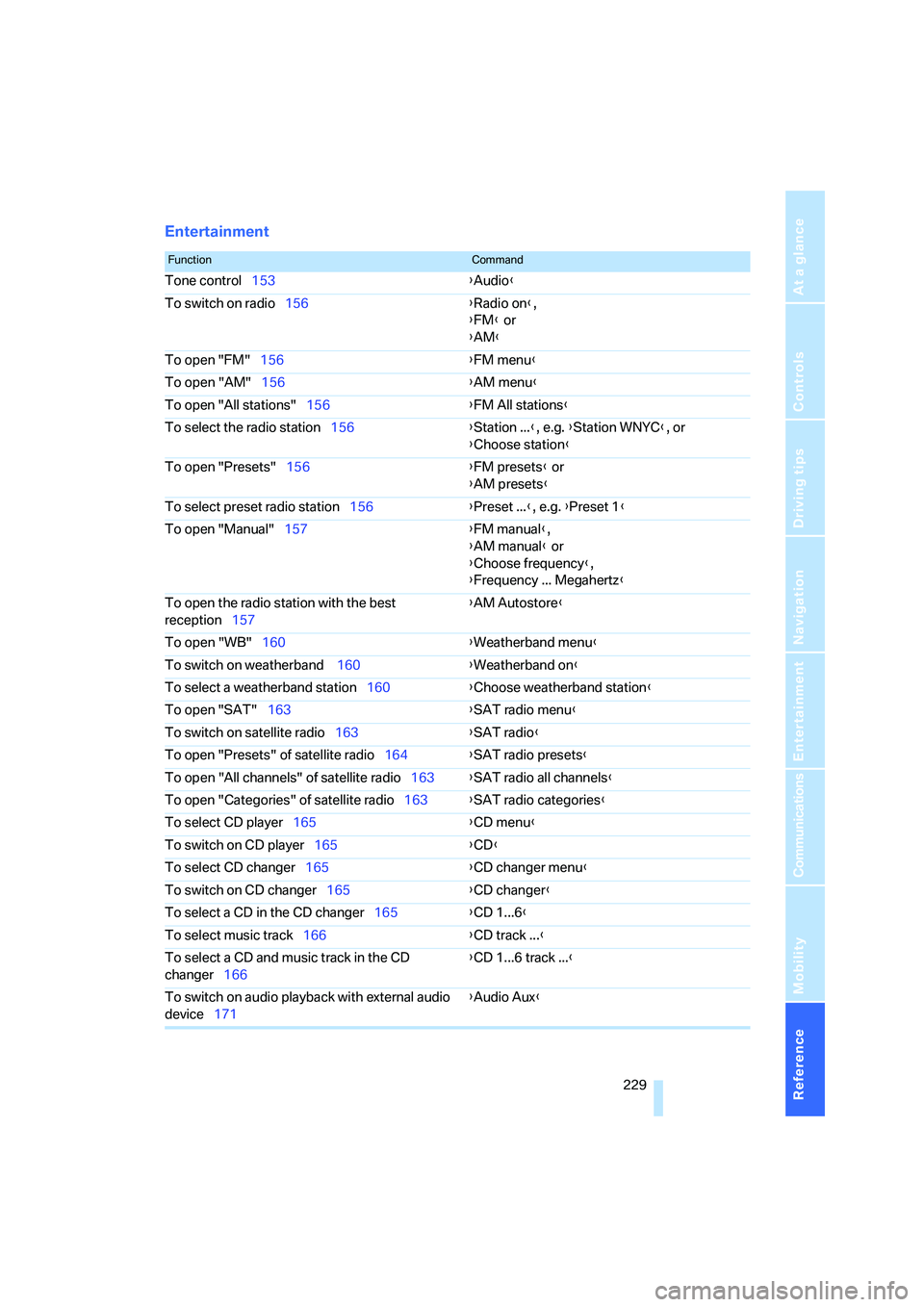
Entertainment
FunctionCommand
Tone control153{Audio}
To switch on radio156{Radio on},
{FM} or
{AM}
To open "FM"156{FM menu}
To open "AM"156{AM menu}
To open "All stations"156{FM All stations}
To select the radio station156{Station ...}, e.g. {Station WNYC}, or
{Choose station}
To open "Presets"156{FM presets} or
{AM presets}
To select preset radio station156{Preset ...}, e.g. {Preset 1}
To open "Manual"157{FM manual},
{AM manual} or
{Choose frequency},
{Frequency ... Megahertz}
To open the radio station with the best
reception157{AM Autostore}
To open "WB"160{Weatherband menu}
To switch on weatherband 160{Weatherband on}
To select a weatherband station160{Choose weatherband station
}
To open "SAT"163{SAT radio menu}
To switch on satellite radio163{SAT radio}
To open "Presets" of satellite radio164{SAT radio presets}
To open "All channels" of satellite radio163{SAT radio all channels}
To open "Categories" of satellite radio163{SAT radio categories}
To select CD player165{CD menu}
To switch on CD player165{CD}
To select CD changer165{CD changer menu}
To switch on CD changer165{CD changer}
To select a CD in the CD changer165{CD 1...6}
To select music track166{CD track ...}
To select a CD and music track in the CD
changer166{CD 1...6 track ...}
To switch on audio playback with external audio
device171{Audio Aux}
Page 233 of 254

Reference 231
At a glance
Controls
Driving tips
Communications
Navigation
Entertainment
Mobility
Page 234 of 254
Everything from A to Z
232
Everything from A to Z
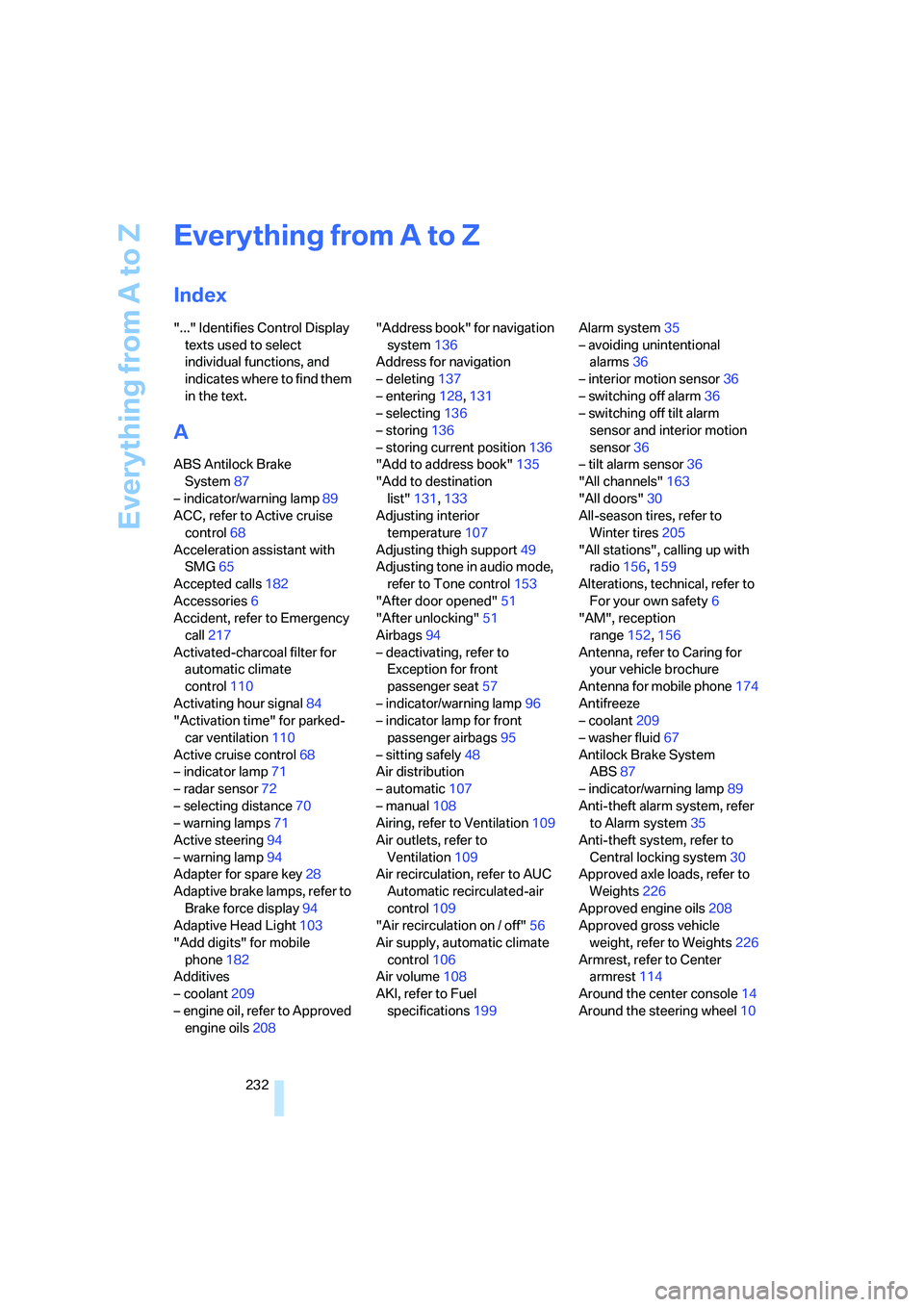
Index
"..." Identifies Control Display
texts used to select
individual functions, and
indicates where to find them
in the text.
A
ABS Antilock Brake
System87
– indicator/warning lamp89
ACC, refer to Active cruise
control68
Acceleration assistant with
SMG65
Accepted calls182
Accessories6
Accident, refer to Emergency
call217
Activated-charcoal filter for
automatic climate
control110
Activating hour signal84
"Activation time" for parked-
car ventilation110
Active cruise control68
– indicator lamp71
– radar sensor72
– selecting distance70
– warning lamps71
Active steering94
– warning lamp94
Adapter for spare key28
Adaptive brake lamps, refer to
Brake force display94
Adaptive Head Light103
"Add digits" for mobile
phone182
Additives
– coolant209
– engine oil, refer to Approved
engine oils208"Address book" for navigation
system136
Address for navigation
– deleting137
– entering128,131
– selecting136
– storing136
– storing current position136
"Add to address book"135
"Add to destination
list"131,133
Adjusting interior
temperature107
Adjusting thigh support49
Adjusting tone in audio mode,
refer to Tone control153
"After door opened"51
"After unlocking"51
Airbags94
– deactivating, refer to
Exception for front
passenger seat57
– indicator/warning lamp96
– indicator lamp for front
passenger airbags95
– sitting safely48
Air distribution
– automatic107
– manual108
Airing, refer to Ventilation109
Air outlets, refer to
Ventilation109
Air recirculation, refer to AUC
Automatic recirculated-air
control109
"Air recirculation on / off"56
Air supply, automatic climate
control106
Air volume108
AKI, refer to Fuel
specifications199Alarm system35
– avoiding unintentional
alarms36
– interior motion sensor36
– switching off alarm36
– switching off tilt alarm
sensor and interior motion
sensor36
– tilt alarm sensor36
"All channels"163
"All doors"30
All-season tires, refer to
Winter tires205
"All stations", calling up with
radio156,159
Alterations, technical, refer to
For your own safety6
"AM", reception
range152,156
Antenna, refer to Caring for
your vehicle brochure
Antenna for mobile phone174
Antifreeze
– coolant209
– washer fluid67
Antilock Brake System
ABS87
– indicator/warning lamp89
Anti-theft alarm system, refer
to Alarm system35
Anti-theft system, refer to
Central locking system30
Approved axle loads, refer to
Weights226
Approved engine oils208
Approved gross vehicle
weight, refer to Weights226
Armrest, refer to Center
armrest114
Around the center console14
Around the steering wheel10
Page 235 of 254
Reference 233
At a glance
Controls
Driving tips
Communications
Navigation
Entertainment
Mobility
Arrival time
– refer to Computer77
– refer to Starting destination
guidance140
"Arrow display" for navigation
system141
Artificial leather, refer to
Caring for your vehicle
brochure
Ashtray115
Assist, refer to
BMW Assist189
Assistance systems, refer to
Driving stability control
systems87
Assistance window20
"Assist. window off"21
AUC Automatic recirculated-
air control109
"Audio"153,155,160
Audio152
– controls152
– switching on/off152
– tone control153
– volume153
Audio device, external114
Automatic
– air distribution107
– air volume107
– cruise control67,68
– headlamp control102
– recirculated-air control
AUC109
– service notification191
– steering wheel
adjustment50
– storing stations157
Automatic car washes122
– also refer to Caring for your
vehicle brochure
– also refer to Comfort
access38
Automatic climate control106
– automatic air
distribution107
– convertible program107
– switching on and off109
– ventilation with vehicle
parked110Automatic closing of doors,
refer to Automatic soft
closing34
Automatic curb monitor54
Automatic lighting
– refer to Automatic headlamp
control102
– refer to Daytime running
lamps103
– refer to Interior lamps104
– refer to Pathway lighting102
"Automatic programs"107
Automatic soft closing34
Automatic station search157
Automatic transmission with
Steptronic63
– deactivating selector lever
interlock64
– Dynamic Driving Control64
– interlock63
– kick-down64
– selector lever lock,
interlock63
– shiftlock63
– towing220
– tow-starting221
– with comfort access38
"Automatic ventilation"110
AUTO program with
automatic climate
control107
"Autostore" on the
radio156,158
"AUX"152,171
AUX-In connection114,171
Average fuel consumption76
– setting units85
Average speed76
"Avoid ferries" for navigation
system139
"Avoid highways" for
navigation system138
Avoiding freeways for
navigation138
Avoiding unintentional
alarms36
"Avoid tollroads" for
navigation system139Axle loads, refer to
Weights226
"A - Z"182
B
Backrest contour, refer to
Lumbar support49
Backrests, refer to Seats49
Backup lamps, replacing
bulbs, refer to Tail
lamps214
"Balance", refer to Tone
control154
Band-aids, refer to First-aid
kit218
Bass, refer to Tone
control153
"Bass", tone control153
Battery
– jump starting218
– refer to Vehicle battery215
Battery replacement, remote
control for comfort
access38
BC button, refer to
Computer76
Being towed220
Belts, refer to Safety belts53
Beverage holder, refer to Cup
holders115
Blower, refer to Air
volume108
"Bluetooth"176
"BMW Assist"190
BMW Assist189
– activating194
– breakdown assistance190
– contacting BMW Customer
Relations192
– displaying vehicle data195
– information service192
– services offered189
– TeleService191
– updating193
"BMW Contact"184
"BMW Contact
Numbers"184