navigation system BMW 6 SERIES 2007 Repair Manual
[x] Cancel search | Manufacturer: BMW, Model Year: 2007, Model line: 6 SERIES, Model: BMW 6 SERIES 2007Pages: 254, PDF Size: 7.32 MB
Page 209 of 254
Mobility
207Reference
At a glance
Controls
Driving tips
Communications
Navigation
Entertainment
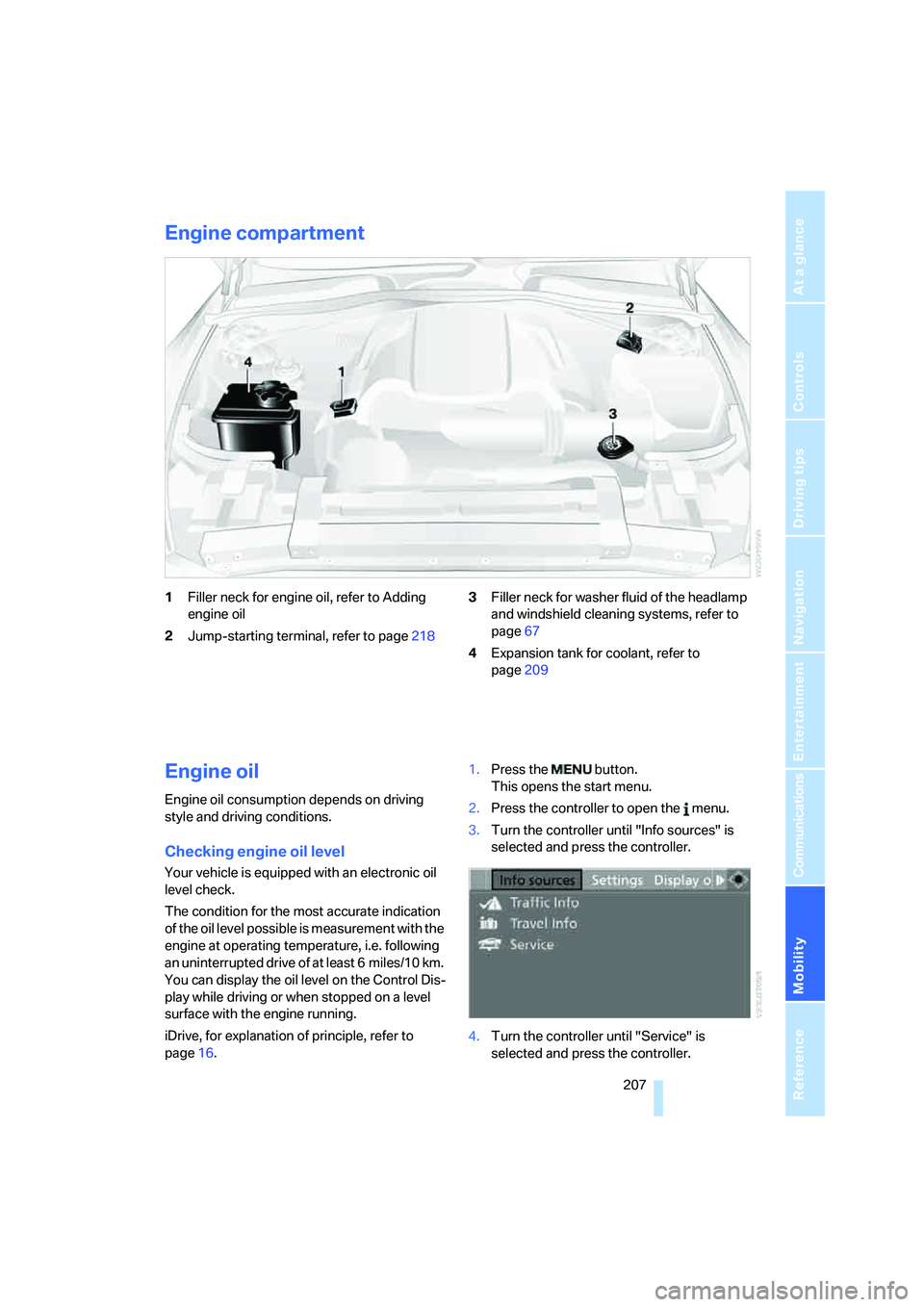
Engine compartment
1Filler neck for engine oil, refer to Adding
engine oil
2Jump-starting terminal, refer to page2183Filler neck for washer fluid of the headlamp
and windshield cleaning systems, refer to
page67
4Expansion tank for coolant, refer to
page209
Engine oil
Engine oil consumption depends on driving
style and driving conditions.
Checking engine oil level
Your vehicle is equipped with an electronic oil
level check.
The condition for the most accurate indication
of the oil level possible is measurement with the
engine at operating temperature, i.e. following
an uninterrupted drive of at least 6 miles/10 km.
You can display the oil level on the Control Dis-
play while driving or when stopped on a level
surface with the engine running.
iDrive, for explanation of principle, refer to
page16.1.Press the button.
This opens the start menu.
2.Press the controller to open the menu.
3.Turn the controller until "Info sources" is
selected and press the controller.
4.Turn the controller until "Service" is
selected and press the controller.
Page 211 of 254
Mobility
209Reference
At a glance
Controls
Driving tips
Communications
Navigation
Entertainment
You can also call BMW of North America at
1-800-831-1117 or visit the website at
www.bmwusa.com to obtain this information.
Do not use oil additives; under some cir-
cumstances, they can damage your
engine.<
Viscosity grades
The viscosity is a measure of the thickness of
the oil and is specified in SAE grades.
The choice of the right SAE grade is based on
the climatic conditions in the region in which
you normally drive your BMW.
Approved oils belong to the SAE grades
5W-40 and 5W-30.<
These oils can be used for driving at all outside
temperatures.
Coolant
Do not open the cooling system when the
engine is hot. Escaping coolant can cause
burns.<
Coolant consists of water and coolant additive.
Not all commercially available additives are suit-
able for your BMW. Ask your BMW center for
suitable additives.
Only use suitable additives, otherwise
engine damage may result. The additives
present a health hazard.<
Always observe all applicable environ-
mental laws and regulations when dis-
posing of used coolant additives.<
Checking coolant level
1.Allow the engine to cool.
2.Turn the cap of the expansion tank counter-
clockwise to allow any accumulated pres-
sure to escape, then continue turning to
open.
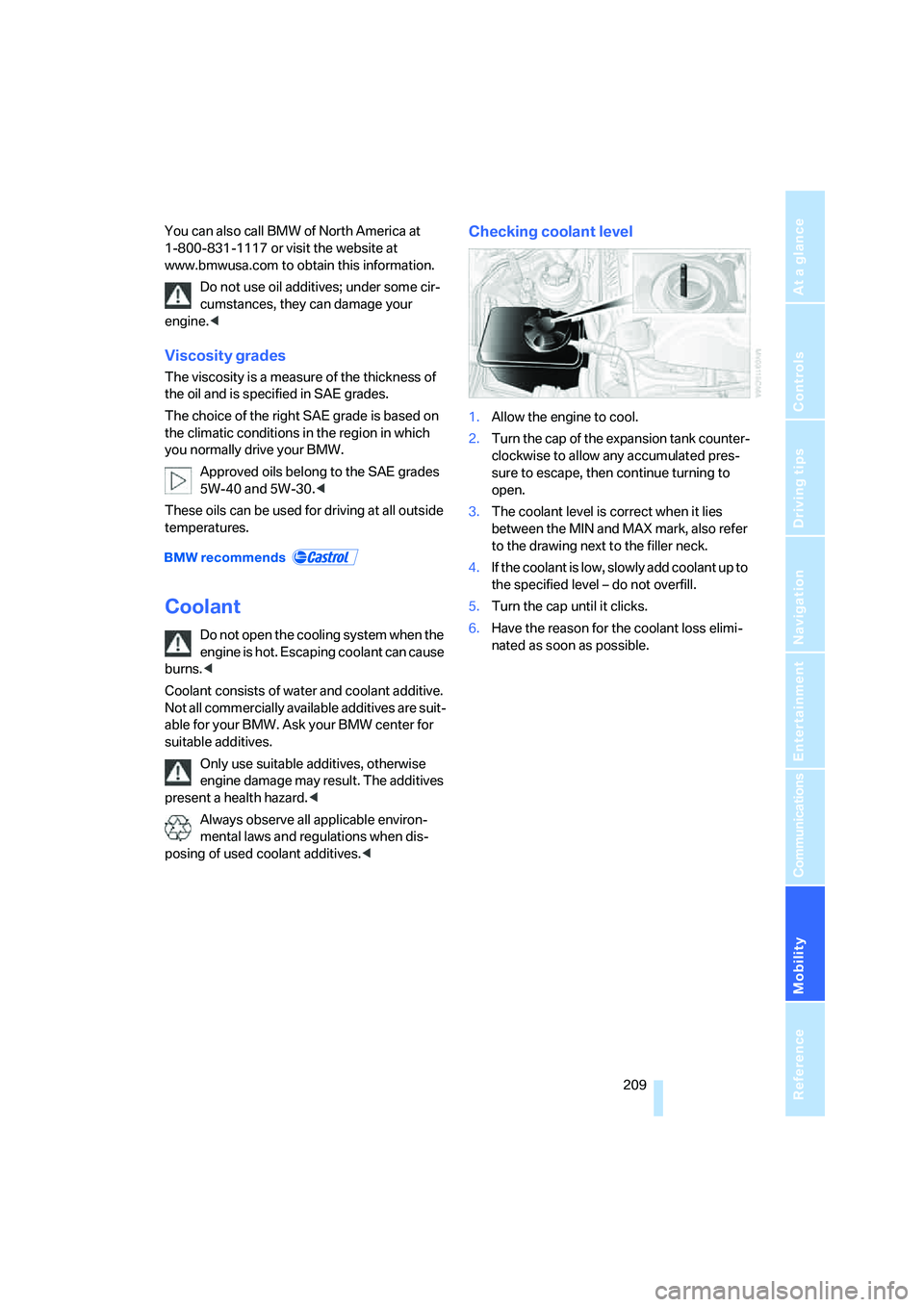
3.The coolant level is correct when it lies
between the MIN and MAX mark, also refer
to the drawing next to the filler neck.
4.If the coolant is low, slowly add coolant up to
the specified level – do not overfill.
5.Turn the cap until it clicks.
6.Have the reason for the coolant loss elimi-
nated as soon as possible.
Page 213 of 254
Mobility
211Reference
At a glance
Controls
Driving tips
Communications
Navigation
Entertainment
Socket for OBD Onboard
Diagnostics interface
Components which are decisive for the
exhaust-gas composition can be checked via
the OBD socket with a device.
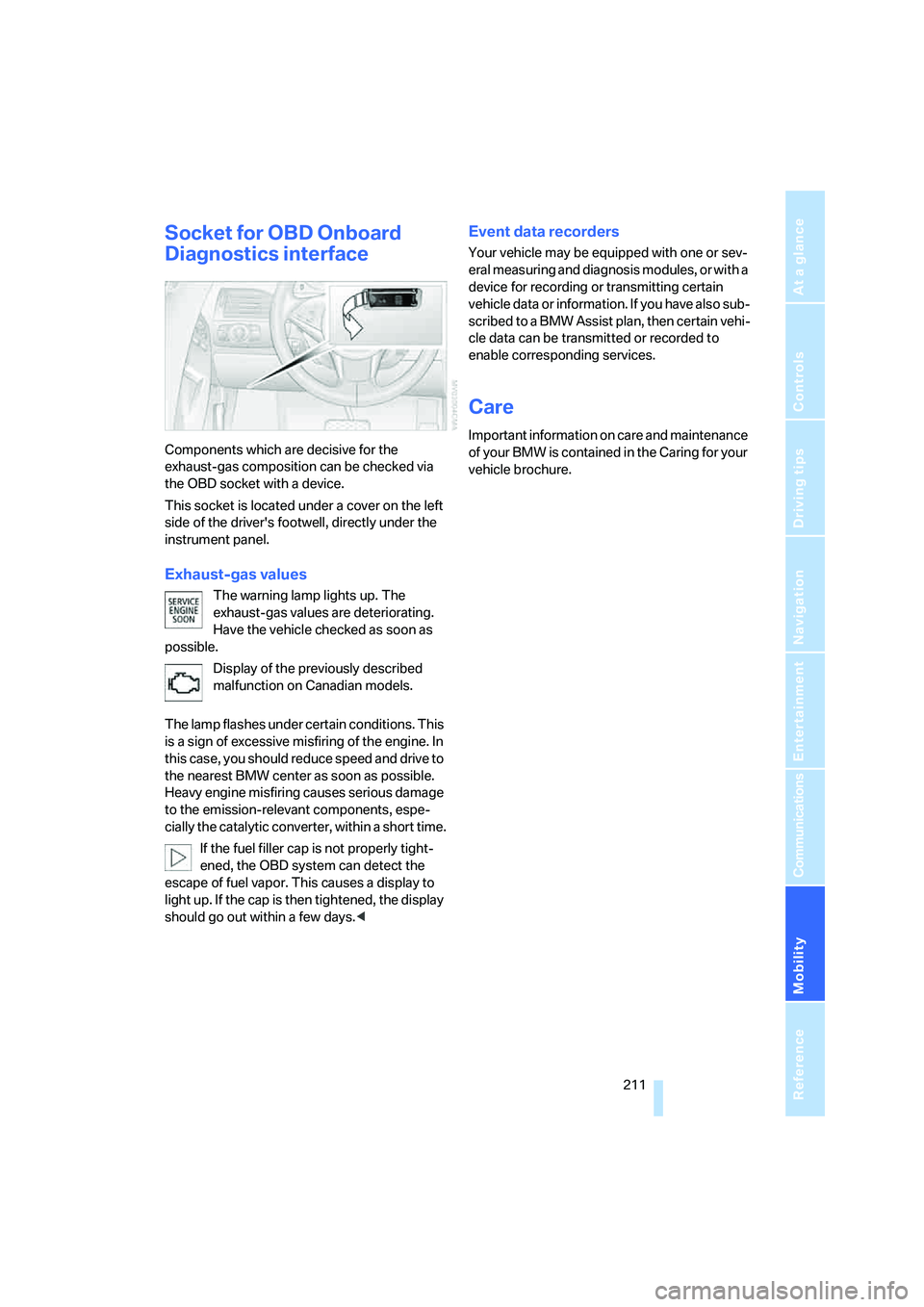
This socket is located under a cover on the left
side of the driver's footwell, directly under the
instrument panel.
Exhaust-gas values
The warning lamp lights up. The
exhaust-gas values are deteriorating.
Have the vehicle checked as soon as
possible.
Display of the previously described
malfunction on Canadian models.
The lamp flashes under certain conditions. This
is a sign of excessive misfiring of the engine. In
this case, you should reduce speed and drive to
the nearest BMW center as soon as possible.
Heavy engine misfiring causes serious damage
to the emission-relevant components, espe-
cially the catalytic converter, within a short time.
If the fuel filler cap is not properly tight-
ened, the OBD system can detect the
escape of fuel vapor. This causes a display to
light up. If the cap is then tightened, the display
should go out within a few days.<
Event data recorders
Your vehicle may be equipped with one or sev-
eral measuring and diagnosis modules, or with a
device for recording or transmitting certain
vehicle data or information. If you have also sub-
scribed to a BMW Assist plan, then certain vehi-
cle data can be transmitted or recorded to
enable corresponding services.
Care
Important information on care and maintenance
of your BMW is contained in the Caring for your
vehicle brochure.
Page 215 of 254
Mobility
213Reference
At a glance
Controls
Driving tips
Communications
Navigation
Entertainment
Have work on the xenon lighting system
performed only by your BMW center or a
workshop that works according to BMW repair
procedures with correspondingly trained per-
sonnel. Due to the high voltage involved, there
is a danger to life and limb when work is carried
out improperly.<
High beams, parking lamps
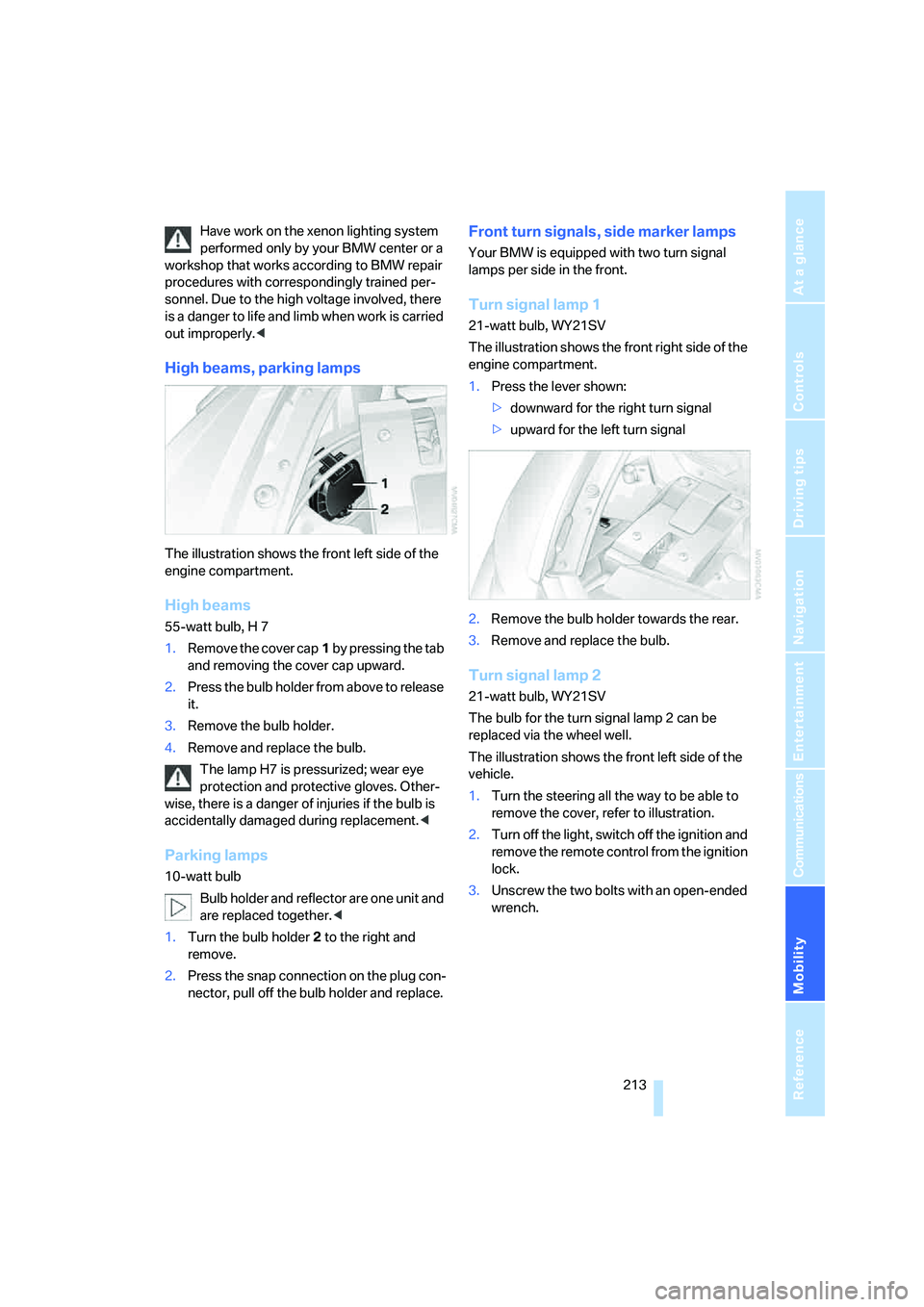
The illustration shows the front left side of the
engine compartment.
High beams
55-watt bulb, H 7
1.Remove the cover cap1 by pressing the tab
and removing the cover cap upward.
2.Press the bulb holder from above to release
it.
3.Remove the bulb holder.
4.Remove and replace the bulb.
The lamp H7 is pressurized; wear eye
protection and protective gloves. Other-
wise, there is a danger of injuries if the bulb is
accidentally damaged during replacement.<
Parking lamps
10-watt bulb
Bulb holder and reflector are one unit and
are replaced together.<
1.Turn the bulb holder2 to the right and
remove.
2.Press the snap connection on the plug con-
nector, pull off the bulb holder and replace.
Front turn signals, side marker lamps
Your BMW is equipped with two turn signal
lamps per side in the front.
Turn signal lamp 1
21-watt bulb, WY21SV
The illustration shows the front right side of the
engine compartment.
1.Press the lever shown:
>downward for the right turn signal
>upward for the left turn signal
2.Remove the bulb holder towards the rear.
3.Remove and replace the bulb.
Turn signal lamp 2
21-watt bulb, WY21SV
The bulb for the turn signal lamp 2 can be
replaced via the wheel well.
The illustration shows the front left side of the
vehicle.
1.Turn the steering all the way to be able to
remove the cover, refer to illustration.
2.Turn off the light, switch off the ignition and
remove the remote control from the ignition
lock.
3.Unscrew the two bolts with an open-ended
wrench.
Page 218 of 254
Replacing components
216 >Time and Date
The values must be updated, refer to
page83.
>Radio
Stations must be stored again if necessary,
refer to page158.
>Navigation system
Wait until the system starts, refer to
page126.
Fuses
Never attempt to repair a blown fuse, and
do not replace a defective fuse with a sub-
stitute of another color or amperage rating, as
this could lead to overloading of the wiring, ulti-
mately resulting in a fire in the vehicle.<
Spare fuses and a pair of plastic tweezers are
located in the compartment for the onboard tool
kit, refer to page212.
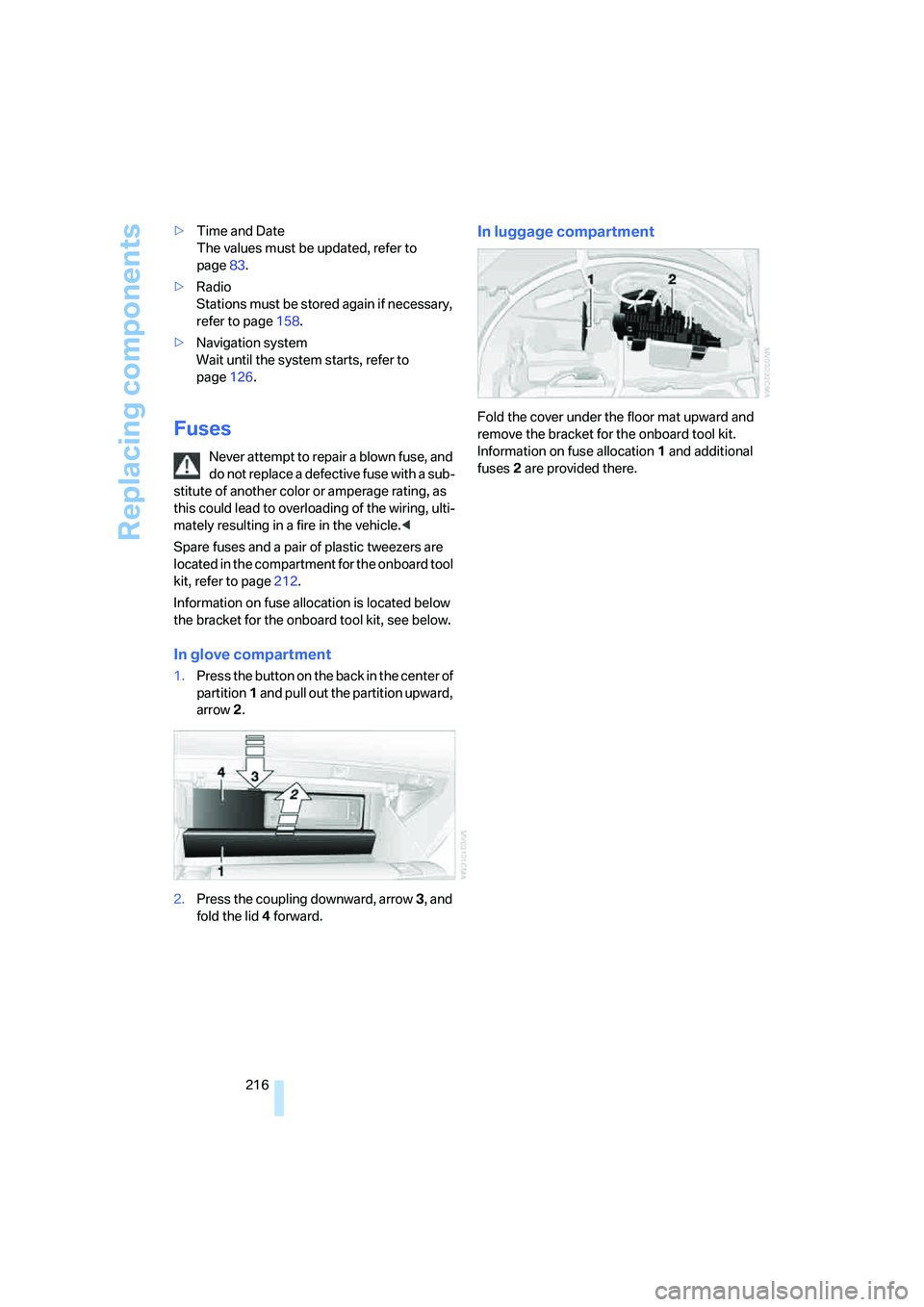
Information on fuse allocation is located below
the bracket for the onboard tool kit, see below.
In glove compartment
1.Press the button on the back in the center of
partition1 and pull out the partition upward,
arrow2.
2.Press the coupling downward, arrow3, and
fold the lid 4 forward.
In luggage compartment
Fold the cover under the floor mat upward and
remove the bracket for the onboard tool kit.
Information on fuse allocation1 and additional
fuses2 are provided there.
Page 219 of 254
Mobility
217Reference
At a glance
Controls
Driving tips
Communications
Navigation
Entertainment
Giving and receiving assistance
Emergency call
Conditions for an emergency call:
>Full preparation package mobile phone.
With this equipment, an emergency call is
still possible when no mobile phone is
paired in the vehicle.
>BMW Assist is activated. Activating
BMW Assist, refer to page194.
>Radio readiness is activated.
>The BMW Assist system is logged on to a
mobile phone network.
>The emergency call system is operable.
Once your service contract for BMW Assist
expires, the BMW Assist system can be deacti-
vated by a BMW center without you having to
visit a workshop. Following deactivation of the
BMW Assist system, no emergency calls can be
made. The BMW Assist system can be reacti-
vated after concluding a new agreement at a
BMW center.
Initiating an emergency call
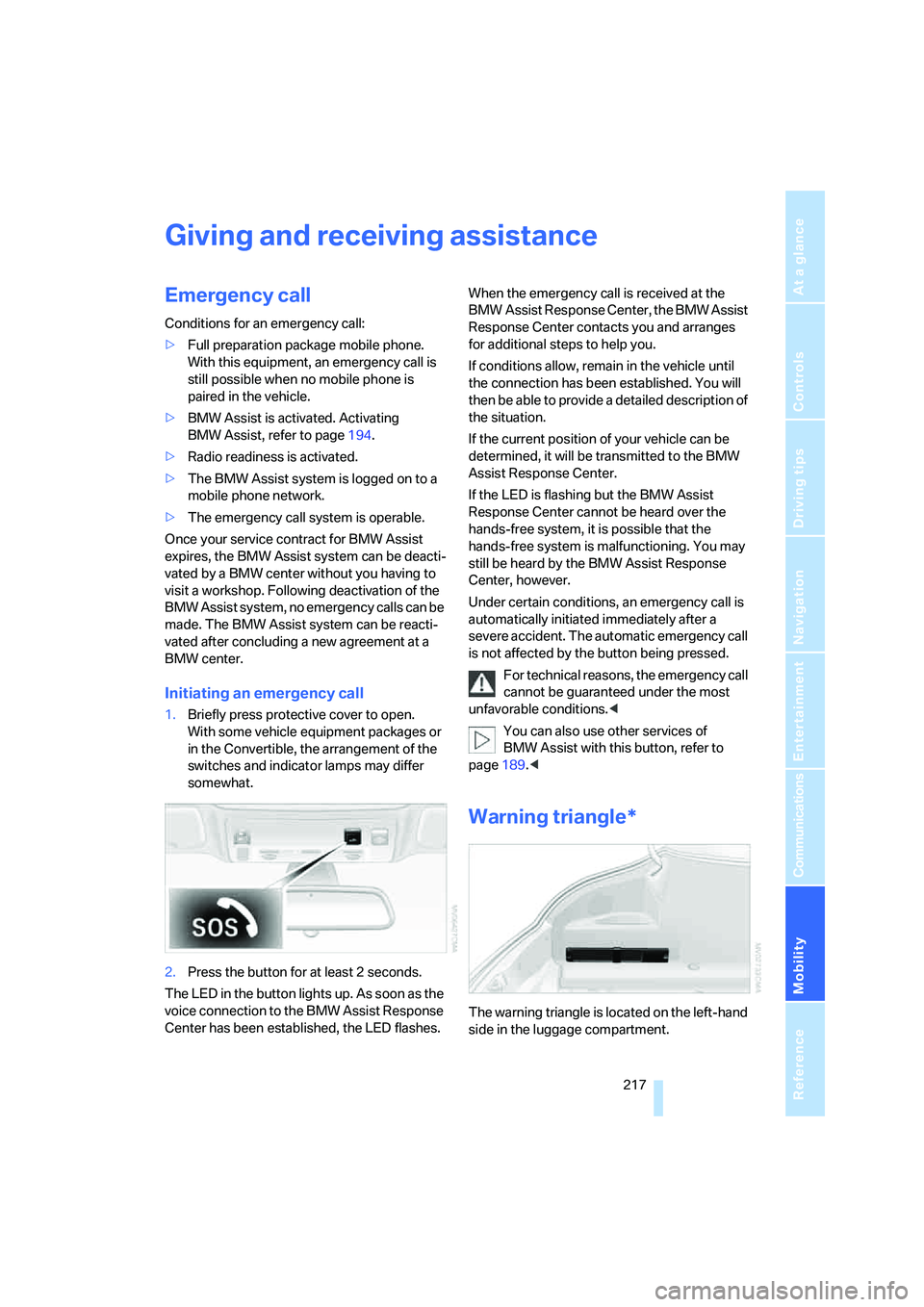
1.Briefly press protective cover to open.
With some vehicle equipment packages or
in the Convertible, the arrangement of the
switches and indicator lamps may differ
somewhat.
2.Press the button for at least 2 seconds.
The LED in the button lights up. As soon as the
voice connection to the BMW Assist Response
Center has been established, the LED flashes.When the emergency call is received at the
BMW Assist Response Center, the BMW Assist
Response Center contacts you and arranges
for additional steps to help you.
If conditions allow, remain in the vehicle until
the connection has been established. You will
then be able to provide a detailed description of
the situation.
If the current position of your vehicle can be
determined, it will be transmitted to the BMW
Assist Response Center.
If the LED is flashing but the BMW Assist
Response Center cannot be heard over the
hands-free system, it is possible that the
hands-free system is malfunctioning. You may
still be heard by the BMW Assist Response
Center, however.
Under certain conditions, an emergency call is
automatically initiated immediately after a
severe accident. The automatic emergency call
is not affected by the button being pressed.
For technical reasons, the emergency call
cannot be guaranteed under the most
unfavorable conditions.<
You can also use other services of
BMW Assist with this button, refer to
page189.<
Warning triangle*
The warning triangle is located on the left-hand
side in the luggage compartment.
Page 229 of 254
Reference 227
At a glance
Controls
Driving tips
Communications
Navigation
Entertainment
Mobility
Short commands of voice command
system
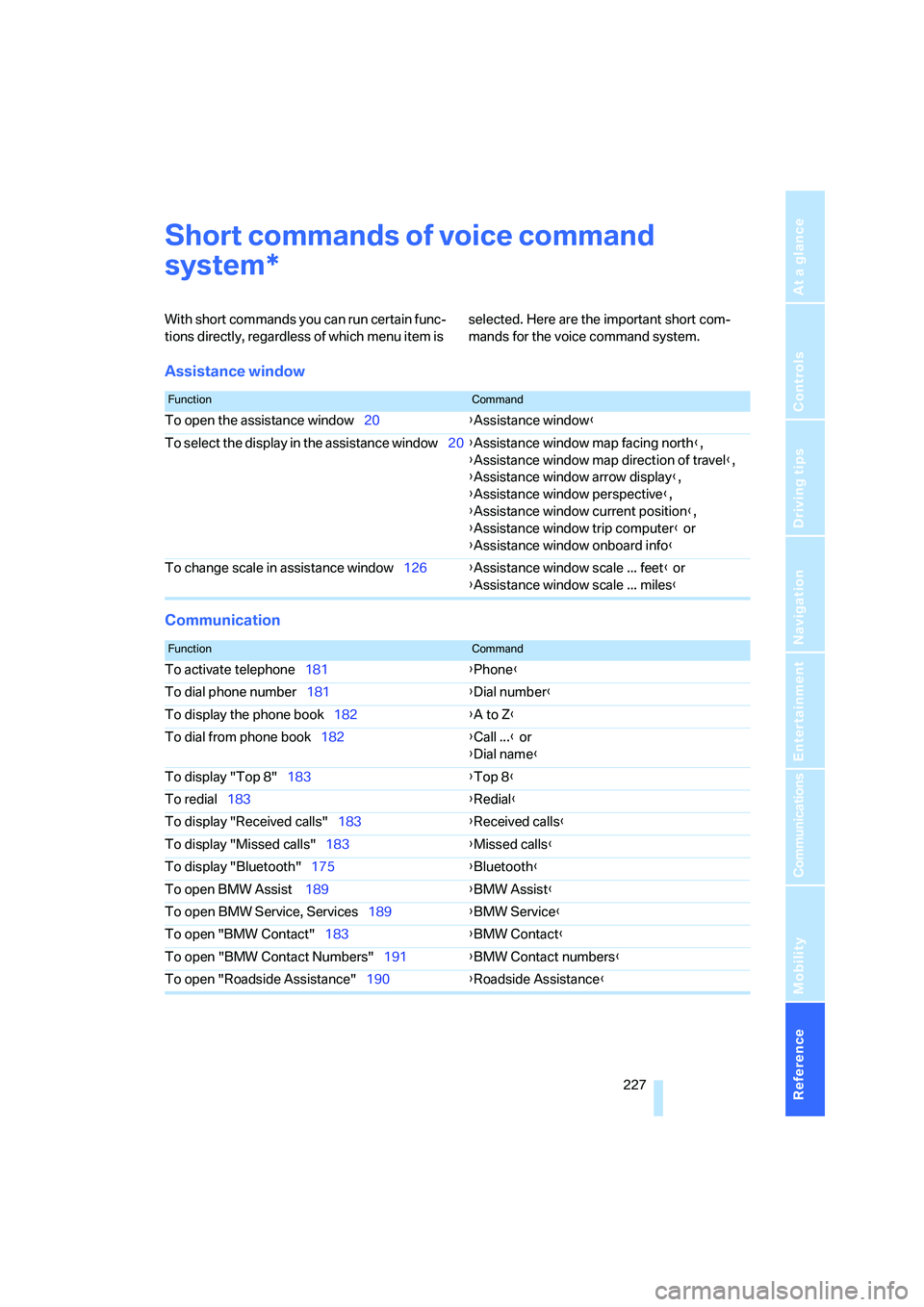
With short commands you can run certain func-
tions directly, regardless of which menu item is selected. Here are the important short com-
mands for the voice command system.
Assistance window
Communication
*
FunctionCommand
To open the assistance window20{Assistance window}
To select the display in the assistance window20{Assistance window map facing north},
{Assistance window map direction of travel},
{Assistance window arrow display},
{Assistance window perspective},
{Assistance window current position},
{Assistance window trip computer} or
{Assistance window onboard info}
To change scale in assistance window126{Assistance window scale ... feet} or
{Assistance window scale ... miles}
FunctionCommand
To activate telephone181{Phone}
To dial phone number181{Dial number}
To display the phone book182{A to Z}
To dial from phone book182{Call ...} or
{Dial name}
To display "Top 8"183{Top 8}
To redial183{Redial}
To display "Received calls"183{Received calls}
To display "Missed calls"183{Missed calls}
To display "Bluetooth"175{Bluetooth}
To open BMW Assist 189{BMW Assist}
To open BMW Service, Services189{BMW Service}
To open "BMW Contact"183{BMW Contact}
To open "BMW Contact Numbers"191{BMW Contact numbers}
To open "Roadside Assistance"190{Roadside Assistance}
Page 230 of 254
Short commands of voice command system
228
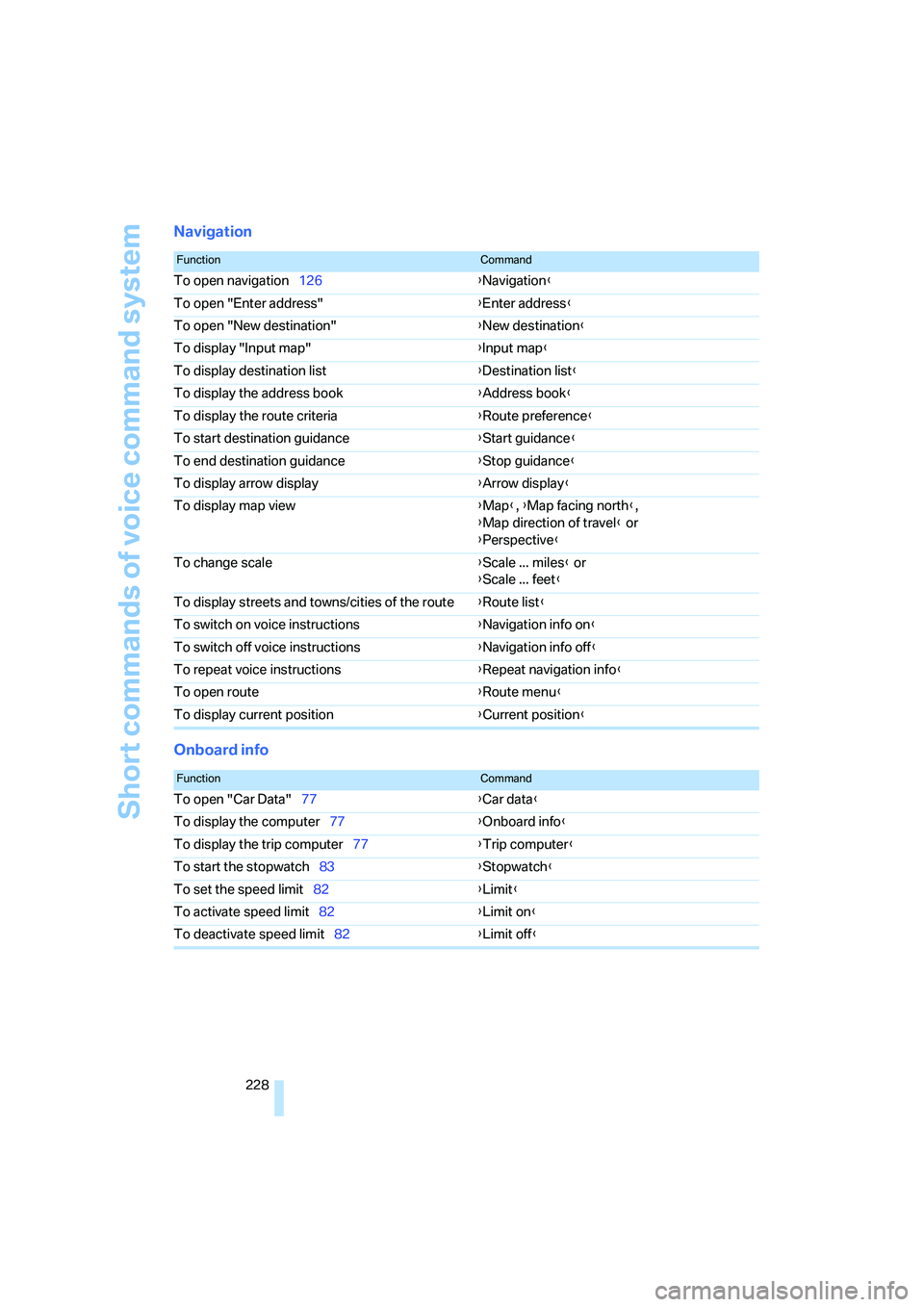
Navigation
Onboard info
FunctionCommand
To open navigation126{Navigation}
To open "Enter address"{Enter address}
To open "New destination"{New destination}
To display "Input map"{Input map}
To display destination list{Destination list}
To display the address book{Address book}
To display the route criteria{Route preference}
To start destination guidance{Start guidance}
To end destination guidance{Stop guidance}
To display arrow display{Arrow display}
To display map view{Map}, {Map facing north},
{Map direction of travel} or
{Perspective}
To change scale{Scale ... miles} or
{Scale ... feet}
To display streets and towns/cities of the route{Route list}
To switch on voice instructions{Navigation info on}
To switch off voice instructions{Navigation info off}
To repeat voice instructions{Repeat navigation info}
To open route{Route menu}
To display current position{Current position}
FunctionCommand
To open "Car Data"77{Car data}
To display the computer77{Onboard info}
To display the trip computer77{Trip computer}
To start the stopwatch83{Stopwatch}
To set the speed limit82{Limit}
To activate speed limit82{Limit on}
To deactivate speed limit82{Limit off}
Page 234 of 254
Everything from A to Z
232
Everything from A to Z
Index
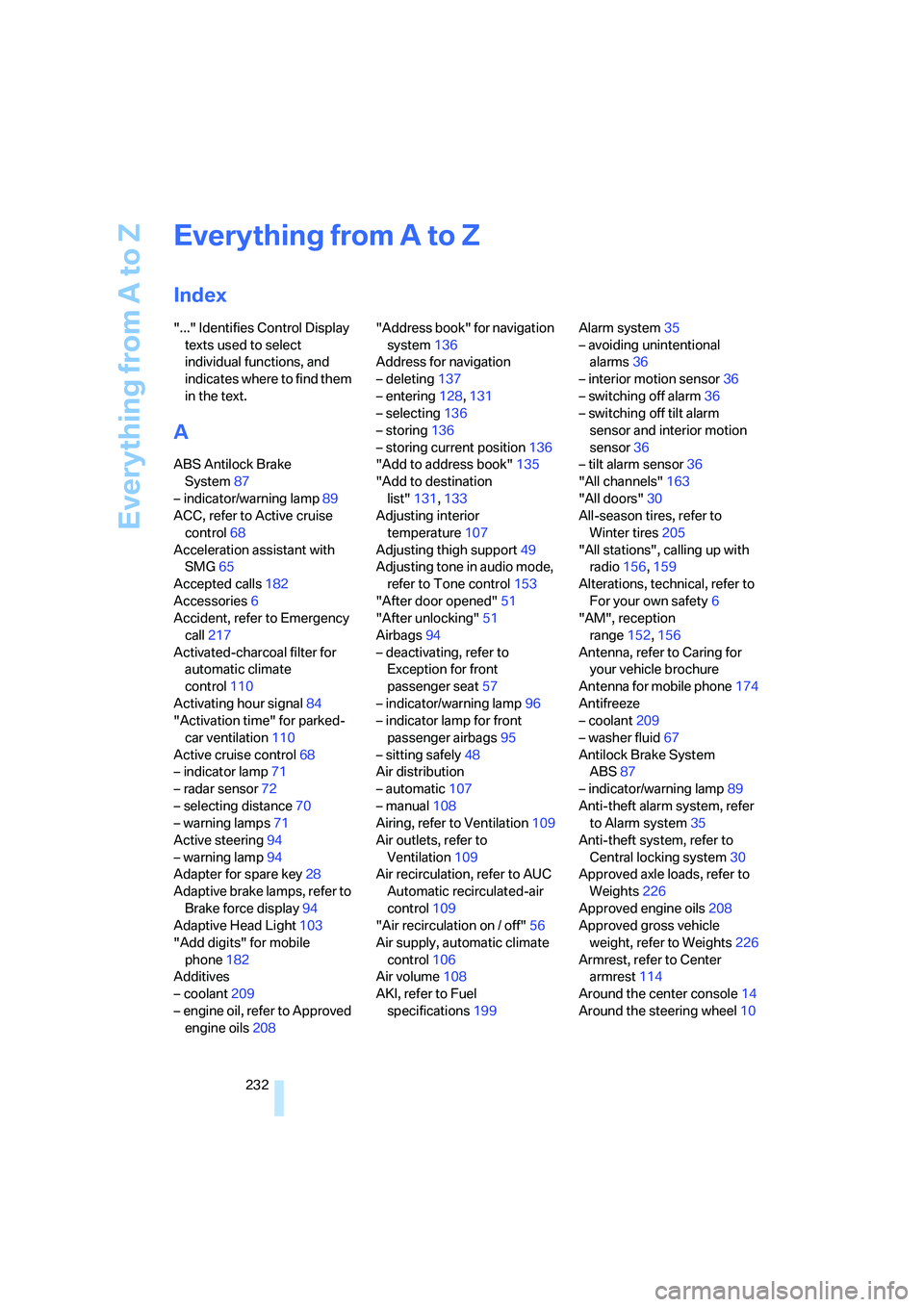
"..." Identifies Control Display
texts used to select
individual functions, and
indicates where to find them
in the text.
A
ABS Antilock Brake
System87
– indicator/warning lamp89
ACC, refer to Active cruise
control68
Acceleration assistant with
SMG65
Accepted calls182
Accessories6
Accident, refer to Emergency
call217
Activated-charcoal filter for
automatic climate
control110
Activating hour signal84
"Activation time" for parked-
car ventilation110
Active cruise control68
– indicator lamp71
– radar sensor72
– selecting distance70
– warning lamps71
Active steering94
– warning lamp94
Adapter for spare key28
Adaptive brake lamps, refer to
Brake force display94
Adaptive Head Light103
"Add digits" for mobile
phone182
Additives
– coolant209
– engine oil, refer to Approved
engine oils208"Address book" for navigation
system136
Address for navigation
– deleting137
– entering128,131
– selecting136
– storing136
– storing current position136
"Add to address book"135
"Add to destination
list"131,133
Adjusting interior
temperature107
Adjusting thigh support49
Adjusting tone in audio mode,
refer to Tone control153
"After door opened"51
"After unlocking"51
Airbags94
– deactivating, refer to
Exception for front
passenger seat57
– indicator/warning lamp96
– indicator lamp for front
passenger airbags95
– sitting safely48
Air distribution
– automatic107
– manual108
Airing, refer to Ventilation109
Air outlets, refer to
Ventilation109
Air recirculation, refer to AUC
Automatic recirculated-air
control109
"Air recirculation on / off"56
Air supply, automatic climate
control106
Air volume108
AKI, refer to Fuel
specifications199Alarm system35
– avoiding unintentional
alarms36
– interior motion sensor36
– switching off alarm36
– switching off tilt alarm
sensor and interior motion
sensor36
– tilt alarm sensor36
"All channels"163
"All doors"30
All-season tires, refer to
Winter tires205
"All stations", calling up with
radio156,159
Alterations, technical, refer to
For your own safety6
"AM", reception
range152,156
Antenna, refer to Caring for
your vehicle brochure
Antenna for mobile phone174
Antifreeze
– coolant209
– washer fluid67
Antilock Brake System
ABS87
– indicator/warning lamp89
Anti-theft alarm system, refer
to Alarm system35
Anti-theft system, refer to
Central locking system30
Approved axle loads, refer to
Weights226
Approved engine oils208
Approved gross vehicle
weight, refer to Weights226
Armrest, refer to Center
armrest114
Around the center console14
Around the steering wheel10
Page 235 of 254
Reference 233
At a glance
Controls
Driving tips
Communications
Navigation
Entertainment
Mobility
Arrival time
– refer to Computer77
– refer to Starting destination
guidance140
"Arrow display" for navigation
system141
Artificial leather, refer to
Caring for your vehicle
brochure
Ashtray115
Assist, refer to
BMW Assist189
Assistance systems, refer to
Driving stability control
systems87
Assistance window20
"Assist. window off"21
AUC Automatic recirculated-
air control109
"Audio"153,155,160
Audio152
– controls152
– switching on/off152
– tone control153
– volume153
Audio device, external114
Automatic
– air distribution107
– air volume107
– cruise control67,68
– headlamp control102
– recirculated-air control
AUC109
– service notification191
– steering wheel
adjustment50
– storing stations157
Automatic car washes122
– also refer to Caring for your
vehicle brochure
– also refer to Comfort
access38
Automatic climate control106
– automatic air
distribution107
– convertible program107
– switching on and off109
– ventilation with vehicle
parked110Automatic closing of doors,
refer to Automatic soft
closing34
Automatic curb monitor54
Automatic lighting
– refer to Automatic headlamp
control102
– refer to Daytime running
lamps103
– refer to Interior lamps104
– refer to Pathway lighting102
"Automatic programs"107
Automatic soft closing34
Automatic station search157
Automatic transmission with
Steptronic63
– deactivating selector lever
interlock64
– Dynamic Driving Control64
– interlock63
– kick-down64
– selector lever lock,
interlock63
– shiftlock63
– towing220
– tow-starting221
– with comfort access38
"Automatic ventilation"110
AUTO program with
automatic climate
control107
"Autostore" on the
radio156,158
"AUX"152,171
AUX-In connection114,171
Average fuel consumption76
– setting units85
Average speed76
"Avoid ferries" for navigation
system139
"Avoid highways" for
navigation system138
Avoiding freeways for
navigation138
Avoiding unintentional
alarms36
"Avoid tollroads" for
navigation system139Axle loads, refer to
Weights226
"A - Z"182
B
Backrest contour, refer to
Lumbar support49
Backrests, refer to Seats49
Backup lamps, replacing
bulbs, refer to Tail
lamps214
"Balance", refer to Tone
control154
Band-aids, refer to First-aid
kit218
Bass, refer to Tone
control153
"Bass", tone control153
Battery
– jump starting218
– refer to Vehicle battery215
Battery replacement, remote
control for comfort
access38
BC button, refer to
Computer76
Being towed220
Belts, refer to Safety belts53
Beverage holder, refer to Cup
holders115
Blower, refer to Air
volume108
"Bluetooth"176
"BMW Assist"190
BMW Assist189
– activating194
– breakdown assistance190
– contacting BMW Customer
Relations192
– displaying vehicle data195
– information service192
– services offered189
– TeleService191
– updating193
"BMW Contact"184
"BMW Contact
Numbers"184