fuel consumption BMW 6 SERIES 2007 Owners Manual
[x] Cancel search | Manufacturer: BMW, Model Year: 2007, Model line: 6 SERIES, Model: BMW 6 SERIES 2007Pages: 254, PDF Size: 7.32 MB
Page 19 of 254
At a glance
17Reference
Controls
Driving tips
Communications
Navigation
Entertainment
Mobility
Menu overview
Communication
>Telephone*
>BMW Assist* or TeleService*
Navigation or onboard information
>Navigation system*
>Onboard info, e.g. for displaying of the
average fuel consumption
Entertainment
>Radio
>CD player and CD changer
*
Climate
>Vent settings
>Automatic programs
>Parked car operation
menu
>Switching off the Control Display
>Tone and display settings
>Settings for your vehicle, e.g. for the central
locking system
>Display of maintenance intervals and dead-
lines for legally mandated inspections
>Settings for the telephone
Basic operation
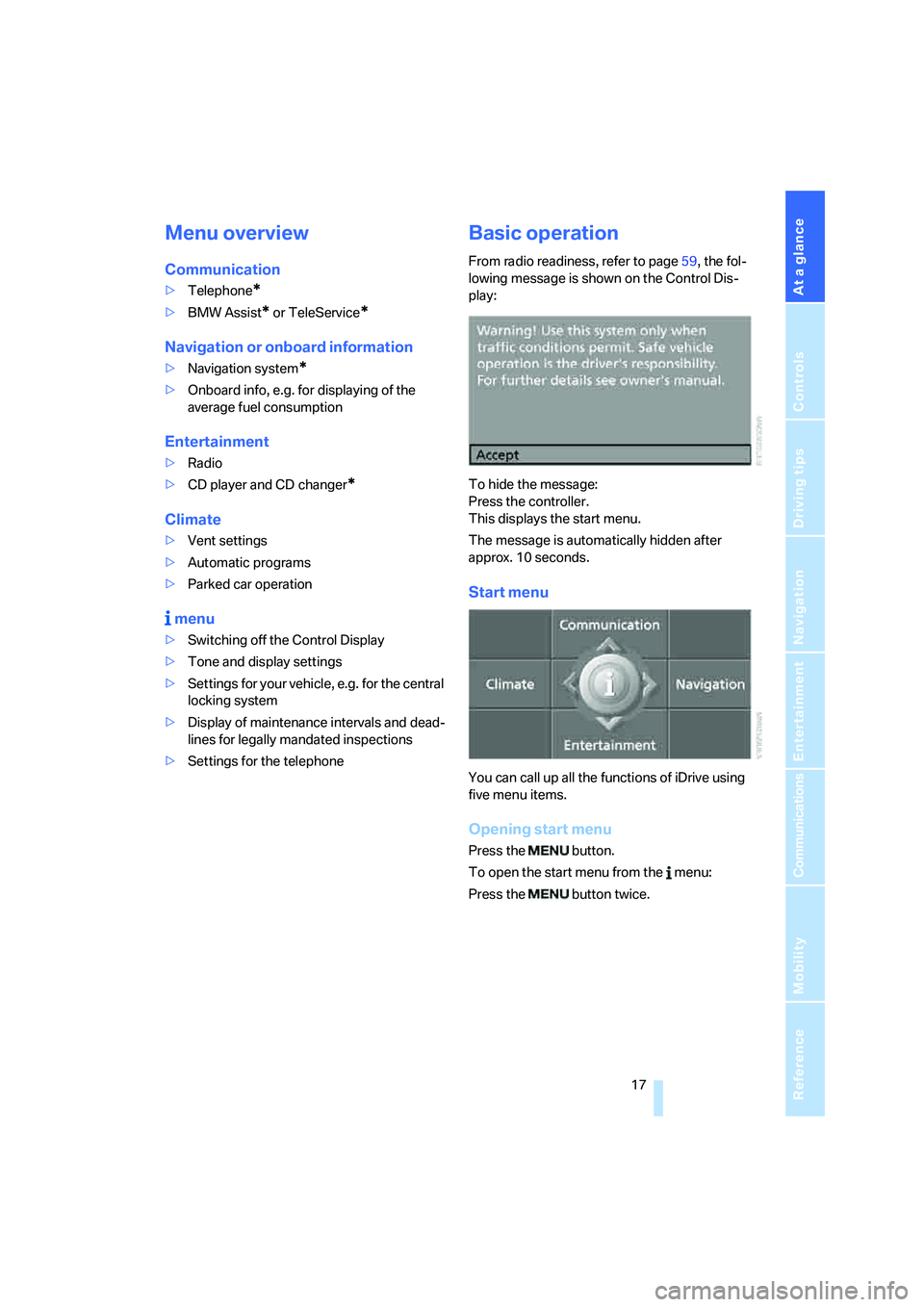
From radio readiness, refer to page59, the fol-
lowing message is shown on the Control Dis-
play:
To hide the message:
Press the controller.
This displays the start menu.
The message is automatically hidden after
approx. 10 seconds.
Start menu
You can call up all the functions of iDrive using
five menu items.
Opening start menu
Press the button.
To open the start menu from the menu:
Press the button twice.
Page 66 of 254
Driving
64
N Neutral
You can select N in car washes, for example.
The vehicle can roll.
D Drive, automatic position
Position for normal vehicle operation.
All forward gears are available.
Under normal operating conditions, the fuel
consumption is lowest when driving in posi-
tion D.
Kick-down
The kick-down mode provides maximum accel-
eration:
Press the accelerator pedal beyond the full-
throttle resistance point.
Sport program and manual mode M/S
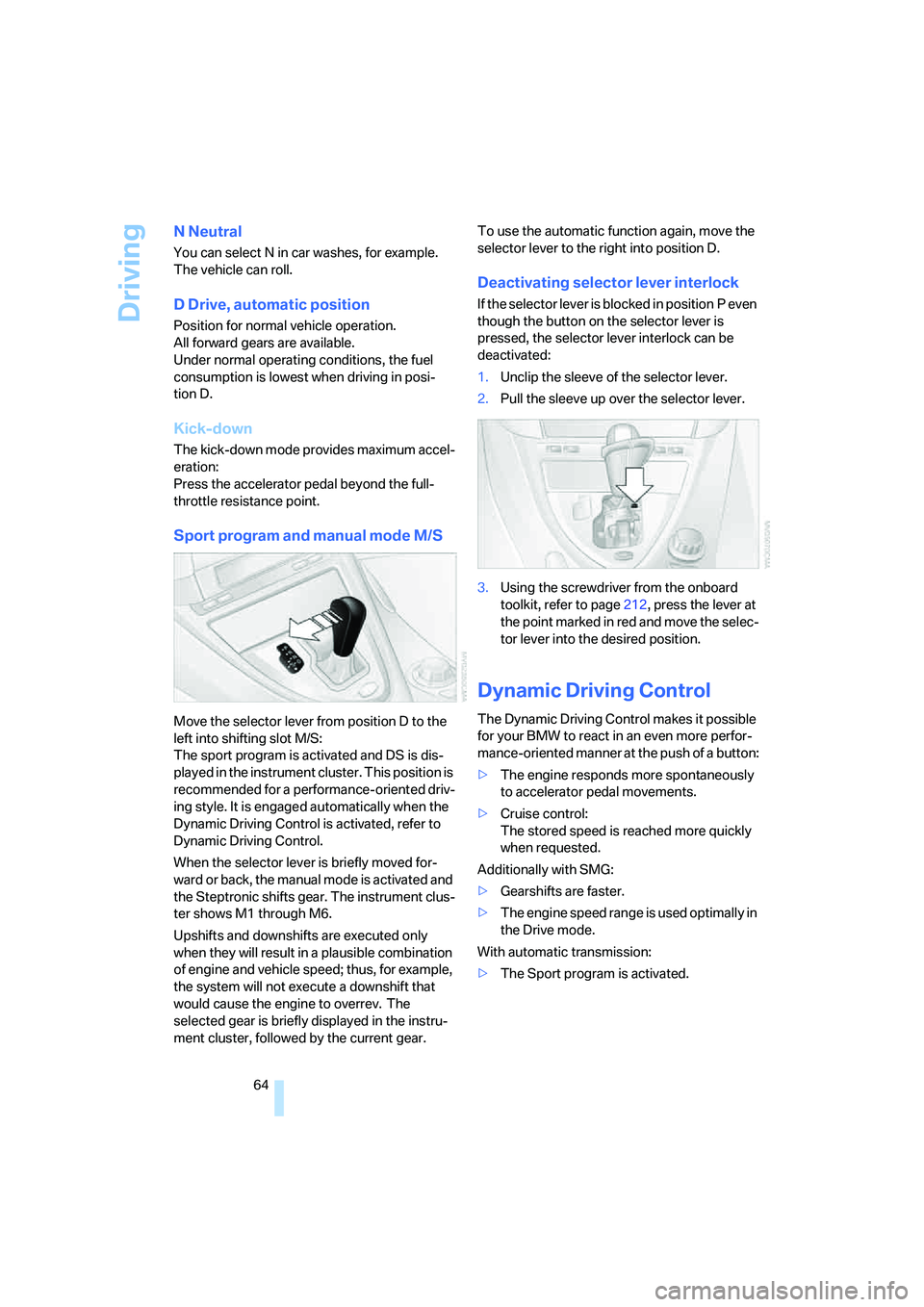
Move the selector lever from position D to the
left into shifting slot M/S:
The sport program is activated and DS is dis-
played in the instrument cluster. This position is
recommended for a performance-oriented driv-
ing style. It is engaged automatically when the
Dynamic Driving Control is activated, refer to
Dynamic Driving Control.
When the selector lever is briefly moved for-
ward or back, the manual mode is activated and
the Steptronic shifts gear. The instrument clus-
ter shows M1 through M6.
Upshifts and downshifts are executed only
when they will result in a plausible combination
of engine and vehicle speed; thus, for example,
the system will not execute a downshift that
would cause the engine to overrev. The
selected gear is briefly displayed in the instru-
ment cluster, followed by the current gear.To use the automatic function again, move the
selector lever to the right into position D.
Deactivating selector lever interlock
If the selector lever is blocked in position P even
though the button on the selector lever is
pressed, the selector lever interlock can be
deactivated:
1.Unclip the sleeve of the selector lever.
2.Pull the sleeve up over the selector lever.
3.Using the screwdriver from the onboard
toolkit, refer to page212, press the lever at
the point marked in red and move the selec-
tor lever into the desired position.
Dynamic Driving Control
The Dynamic Driving Control makes it possible
for your BMW to react in an even more perfor-
mance-oriented manner at the push of a button:
>The engine responds more spontaneously
to accelerator pedal movements.
>Cruise control:
The stored speed is reached more quickly
when requested.
Additionally with SMG:
>Gearshifts are faster.
>The engine speed range is used optimally in
the Drive mode.
With automatic transmission:
>The Sport program is activated.
Page 78 of 254
Everything under control
76
Engine oil temperature gauge
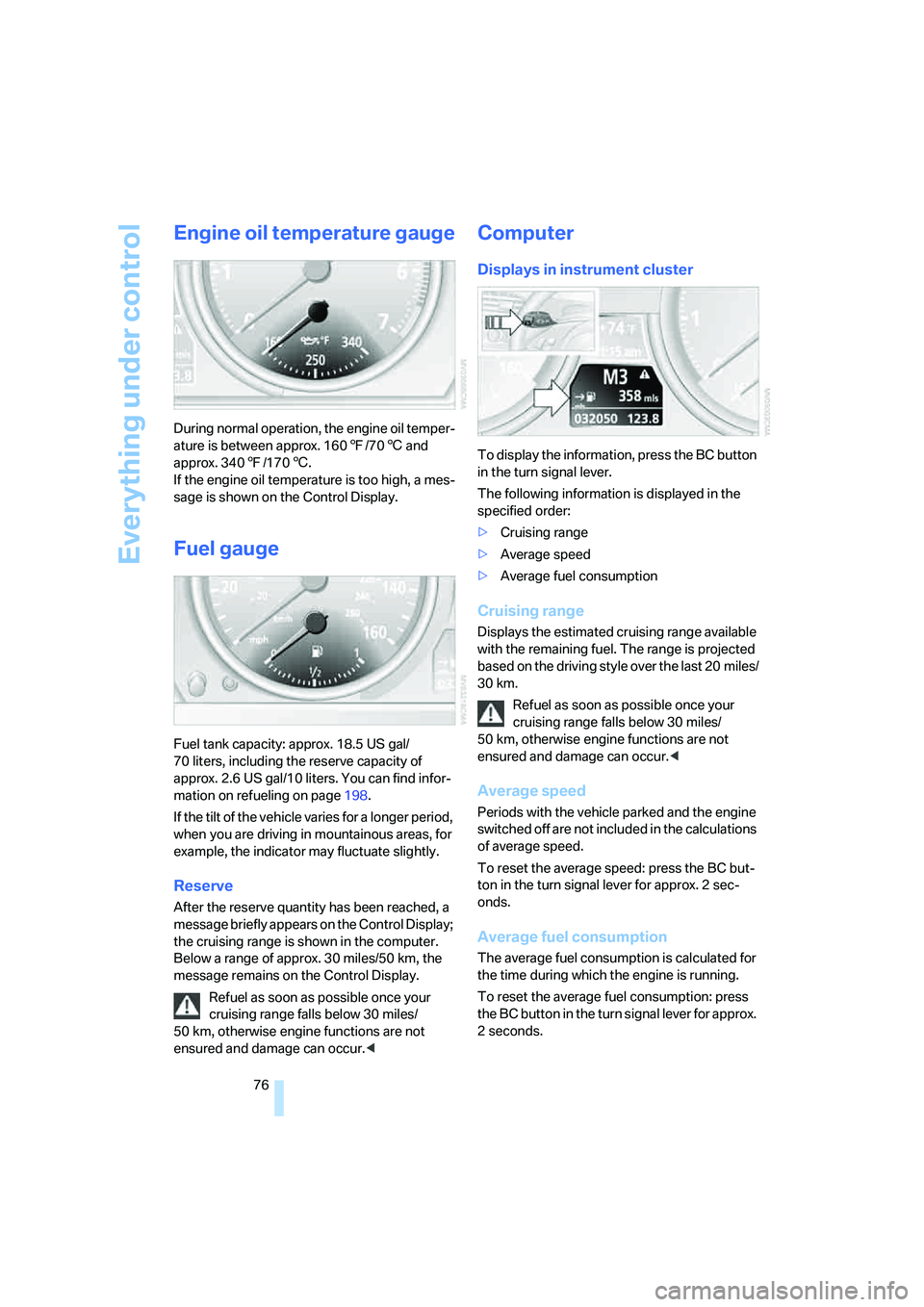
During normal operation, the engine oil temper-
ature is between approx. 1607/706 and
approx. 3407/1706.
If the engine oil temperature is too high, a mes-
sage is shown on the Control Display.
Fuel gauge
Fuel tank capacity: approx. 18.5 US gal/
70 liters, including the reserve capacity of
approx. 2.6 US gal/10 liters. You can find infor-
mation on refueling on page198.
If the tilt of the vehicle varies for a longer period,
when you are driving in mountainous areas, for
example, the indicator may fluctuate slightly.
Reserve
After the reserve quantity has been reached, a
message briefly appears on the Control Display;
the cruising range is shown in the computer.
Below a range of approx. 30 miles/50 km, the
message remains on the Control Display.
Refuel as soon as possible once your
cruising range falls below 30 miles/
50 km, otherwise engine functions are not
ensured and damage can occur.<
Computer
Displays in instrument cluster
To display the information, press the BC button
in the turn signal lever.
The following information is displayed in the
specified order:
>Cruising range
>Average speed
>Average fuel consumption
Cruising range
Displays the estimated cruising range available
with the remaining fuel. The range is projected
based on the driving style over the last 20 miles/
30 km.
Refuel as soon as possible once your
cruising range falls below 30 miles/
50 km, otherwise engine functions are not
ensured and damage can occur.<
Average speed
Periods with the vehicle parked and the engine
switched off are not included in the calculations
of average speed.
To reset the average speed: press the BC but-
ton in the turn signal lever for approx. 2 sec-
onds.
Average fuel consumption
The average fuel consumption is calculated for
the time during which the engine is running.
To reset the average fuel consumption: press
the BC button in the turn signal lever for approx.
2 seconds.
Page 79 of 254
Controls
77Reference
At a glance
Driving tips
Communications
Navigation
Entertainment
Mobility
For different routes
You can display the average speed and average
consumption for two different routes on the
Control Display, refer to the following and to
Trip computer.
Displays on Control Display
You can also call up the computer via iDrive, for
explanation of principle, refer to page16.
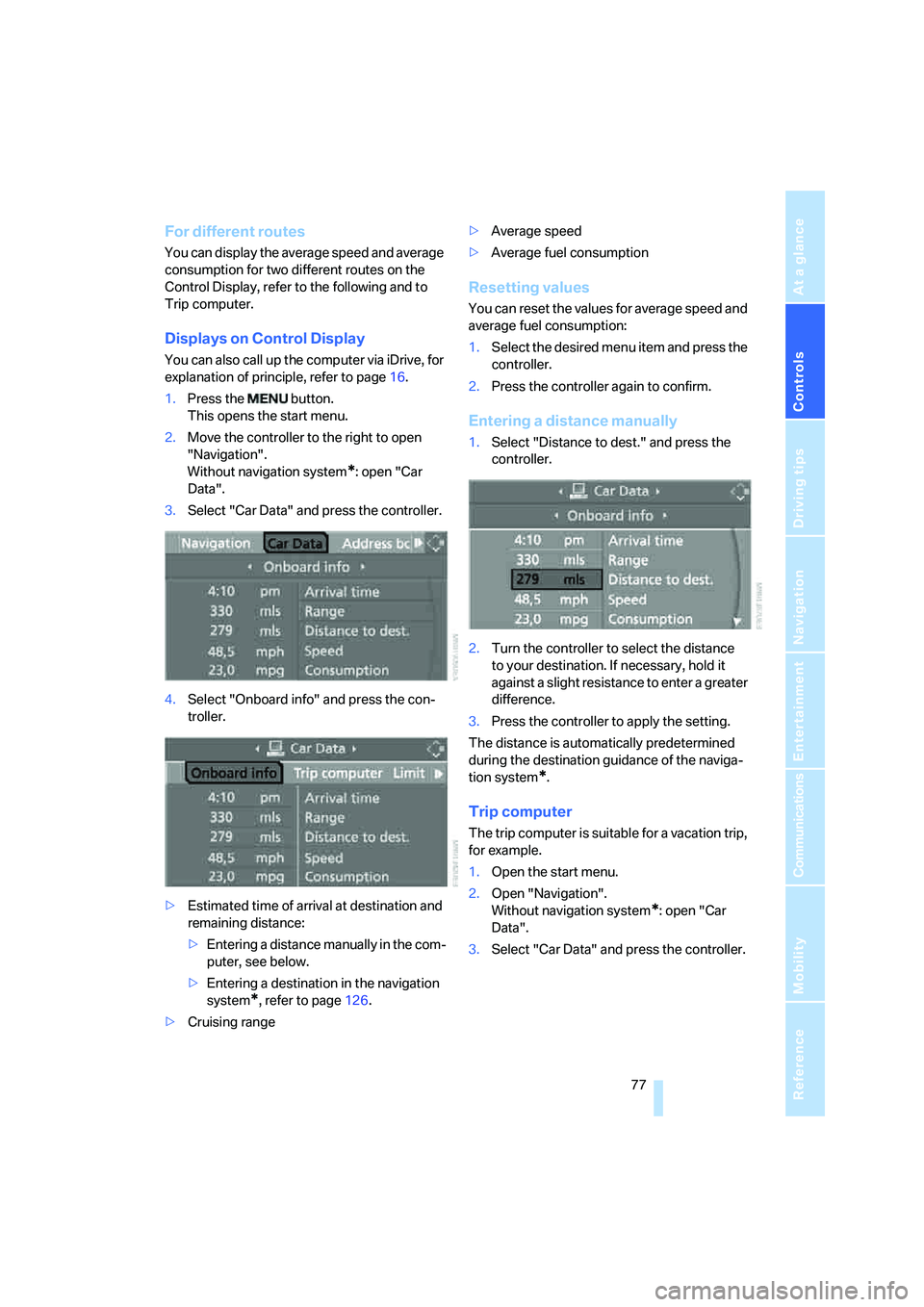
1.Press the button.
This opens the start menu.
2.Move the controller to the right to open
"Navigation".
Without navigation system
*: open "Car
Data".
3.Select "Car Data" and press the controller.
4.Select "Onboard info" and press the con-
troller.
>Estimated time of arrival at destination and
remaining distance:
>Entering a distance manually in the com-
puter, see below.
>Entering a destination in the navigation
system
*, refer to page126.
>Cruising range>Average speed
>Average fuel consumption
Resetting values
You can reset the values for average speed and
average fuel consumption:
1.Select the desired menu item and press the
controller.
2.Press the controller again to confirm.
Entering a distance manually
1.Select "Distance to dest." and press the
controller.
2.Turn the controller to select the distance
to your destination. If necessary, hold it
against a slight resistance to enter a greater
difference.
3.Press the controller to apply the setting.
The distance is automatically predetermined
during the destination guidance of the naviga-
tion system
*.
Trip computer
The trip computer is suitable for a vacation trip,
for example.
1.Open the start menu.
2.Open "Navigation".
Without navigation system
*: open "Car
Data".
3.Select "Car Data" and press the controller.
Page 80 of 254
Everything under control
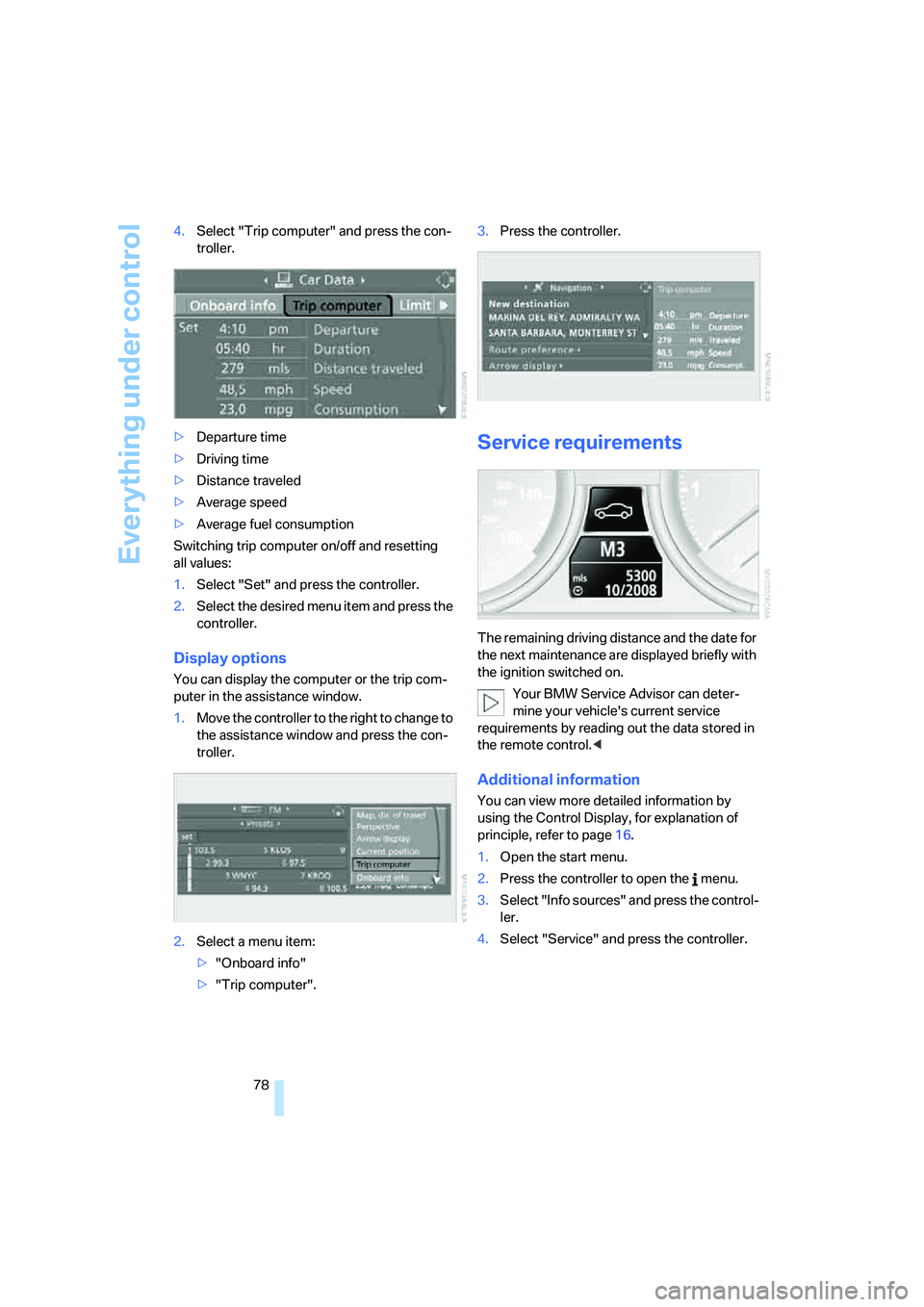
78 4.Select "Trip computer" and press the con-
troller.
>Departure time
>Driving time
>Distance traveled
>Average speed
>Average fuel consumption
Switching trip computer on/off and resetting
all values:
1.Select "Set" and press the controller.
2.Select the desired menu item and press the
controller.
Display options
You can display the computer or the trip com-
puter in the assistance window.
1.Move the controller to the right to change to
the assistance window and press the con-
troller.
2.Select a menu item:
>"Onboard info"
>"Trip computer".3.Press the controller.
Service requirements
The remaining driving distance and the date for
the next maintenance are displayed briefly with
the ignition switched on.
Your BMW Service Advisor can deter-
mine your vehicle's current service
requirements by reading out the data stored in
the remote control.<
Additional information
You can view more detailed information by
using the Control Display, for explanation of
principle, refer to page16.
1.Open the start menu.
2.Press the controller to open the menu.
3.Select "Info sources" and press the control-
ler.
4.Select "Service" and press the controller.
Page 87 of 254
Controls
85Reference
At a glance
Driving tips
Communications
Navigation
Entertainment
Mobility
iDrive, for explanation of principle, refer to
page16.
1.Press the button.
This opens the start menu.
2.Press the controller to open the menu.
3.Select "Settings" and press the controller.
4.Select "Display settings" and press the
controller.
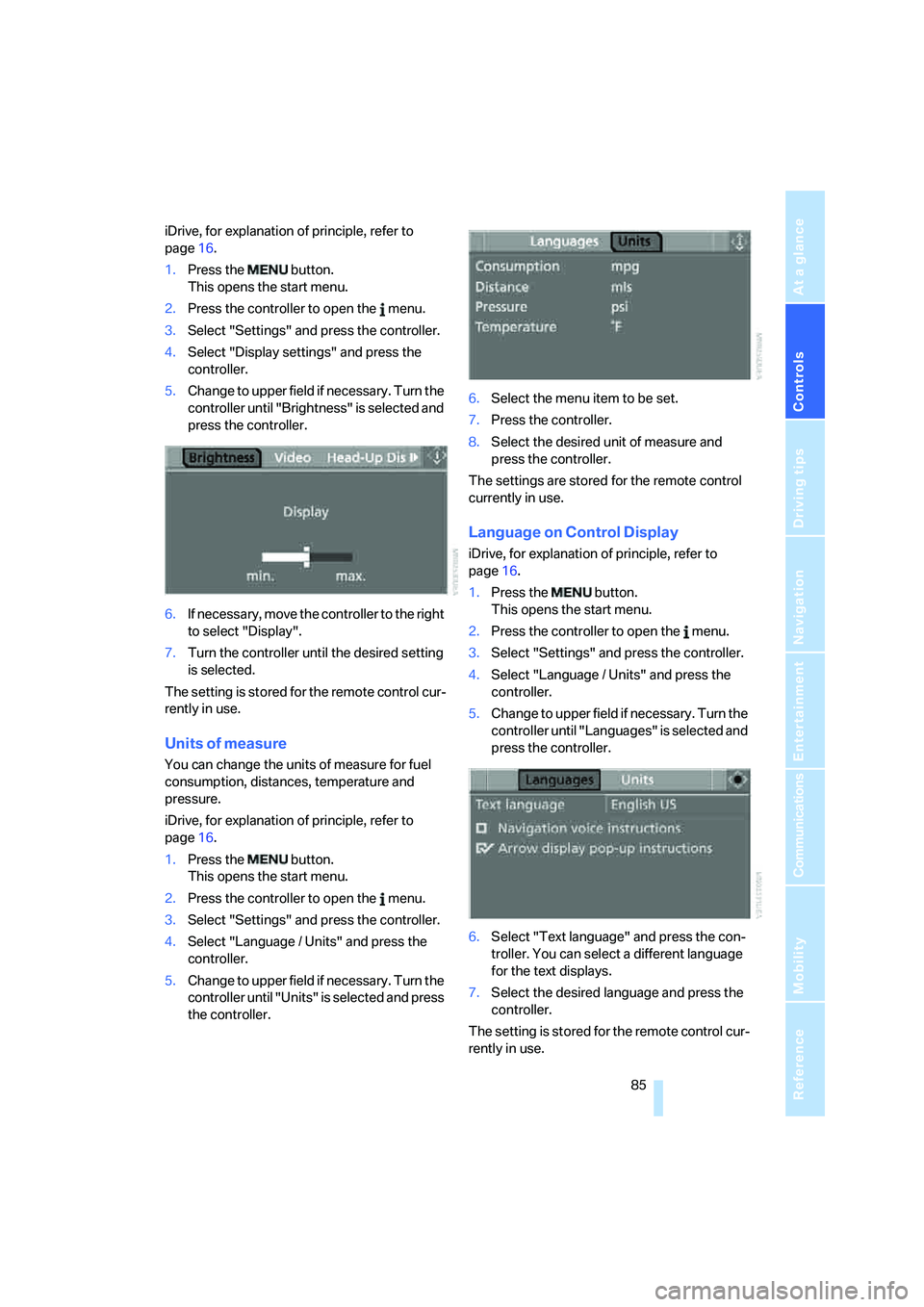
5.Change to upper field if necessary. Turn the
controller until "Brightness" is selected and
press the controller.
6.If necessary, move the controller to the right
to select "Display".
7.Turn the controller until the desired setting
is selected.
The setting is stored for the remote control cur-
rently in use.
Units of measure
You can change the units of measure for fuel
consumption, distances, temperature and
pressure.
iDrive, for explanation of principle, refer to
page16.
1.Press the button.
This opens the start menu.
2.Press the controller to open the menu.
3.Select "Settings" and press the controller.
4.Select "Language / Units" and press the
controller.
5.Change to upper field if necessary. Turn the
controller until "Units" is selected and press
the controller.6.Select the menu item to be set.
7.Press the controller.
8.Select the desired unit of measure and
press the controller.
The settings are stored for the remote control
currently in use.
Language on Control Display
iDrive, for explanation of principle, refer to
page16.
1.Press the button.
This opens the start menu.
2.Press the controller to open the menu.
3.Select "Settings" and press the controller.
4.Select "Language / Units" and press the
controller.
5.Change to upper field if necessary. Turn the
controller until "Languages" is selected and
press the controller.
6.Select "Text language" and press the con-
troller. You can select a different language
for the text displays.
7.Select the desired language and press the
controller.
The setting is stored for the remote control cur-
rently in use.
Page 235 of 254
Reference 233
At a glance
Controls
Driving tips
Communications
Navigation
Entertainment
Mobility
Arrival time
– refer to Computer77
– refer to Starting destination
guidance140
"Arrow display" for navigation
system141
Artificial leather, refer to
Caring for your vehicle
brochure
Ashtray115
Assist, refer to
BMW Assist189
Assistance systems, refer to
Driving stability control
systems87
Assistance window20
"Assist. window off"21
AUC Automatic recirculated-
air control109
"Audio"153,155,160
Audio152
– controls152
– switching on/off152
– tone control153
– volume153
Audio device, external114
Automatic
– air distribution107
– air volume107
– cruise control67,68
– headlamp control102
– recirculated-air control
AUC109
– service notification191
– steering wheel
adjustment50
– storing stations157
Automatic car washes122
– also refer to Caring for your
vehicle brochure
– also refer to Comfort
access38
Automatic climate control106
– automatic air
distribution107
– convertible program107
– switching on and off109
– ventilation with vehicle
parked110Automatic closing of doors,
refer to Automatic soft
closing34
Automatic curb monitor54
Automatic lighting
– refer to Automatic headlamp
control102
– refer to Daytime running
lamps103
– refer to Interior lamps104
– refer to Pathway lighting102
"Automatic programs"107
Automatic soft closing34
Automatic station search157
Automatic transmission with
Steptronic63
– deactivating selector lever
interlock64
– Dynamic Driving Control64
– interlock63
– kick-down64
– selector lever lock,
interlock63
– shiftlock63
– towing220
– tow-starting221
– with comfort access38
"Automatic ventilation"110
AUTO program with
automatic climate
control107
"Autostore" on the
radio156,158
"AUX"152,171
AUX-In connection114,171
Average fuel consumption76
– setting units85
Average speed76
"Avoid ferries" for navigation
system139
"Avoid highways" for
navigation system138
Avoiding freeways for
navigation138
Avoiding unintentional
alarms36
"Avoid tollroads" for
navigation system139Axle loads, refer to
Weights226
"A - Z"182
B
Backrest contour, refer to
Lumbar support49
Backrests, refer to Seats49
Backup lamps, replacing
bulbs, refer to Tail
lamps214
"Balance", refer to Tone
control154
Band-aids, refer to First-aid
kit218
Bass, refer to Tone
control153
"Bass", tone control153
Battery
– jump starting218
– refer to Vehicle battery215
Battery replacement, remote
control for comfort
access38
BC button, refer to
Computer76
Being towed220
Belts, refer to Safety belts53
Beverage holder, refer to Cup
holders115
Blower, refer to Air
volume108
"Bluetooth"176
"BMW Assist"190
BMW Assist189
– activating194
– breakdown assistance190
– contacting BMW Customer
Relations192
– displaying vehicle data195
– information service192
– services offered189
– TeleService191
– updating193
"BMW Contact"184
"BMW Contact
Numbers"184
Page 237 of 254
Reference 235
At a glance
Controls
Driving tips
Communications
Navigation
Entertainment
Mobility
CD changer165
– controls152
– fast forward/reverse168
– installation location168
– random sequence168
– repeating a track167
– sampling a track167
– selecting a CD165
– selecting a track166
– switching on/off152
– tone control153
– volume153
CD player165
– controls152
– fast forward/reverse168
– random sequence168
– repeating a track167
– sampling a track167
– selecting a track166
– switching on/off152
– tone control153
– volume153
Center armrest, adjusting
height114
Center console14
"Central locking"30
Central locking
– from inside32
– from outside30
Central locking system30
– comfort access37
– hotel function33
Changes, technical, refer to
For your own safety6
Changing a wheel215
Changing language on
Control Display85
Changing scale for navigation
system display142
Changing units of measure on
Control Display85
Changing wheels204
CHECK button81
Check Control80
"Check Control
messages"81
Check Gas Cap198
Checking air pressure, refer to
Tire inflation pressure200Child-restraint fixing system
LATCH58
Child restraint systems57
Child seats, refer to
Transporting children
safely57
Chrome parts, refer to Caring
for your vehicle brochure
Cigarette lighter
116
Cigarette lighter socket, refer
to Connecting electrical
devices116
Cleaning, refer to Caring for
your vehicle brochure
"Climate"107
Clock75
– 12h/24h mode84
– hour signal84
– setting time and date83
Closing
– from inside32
– from outside30
Closing fuel filler cap198
Clothes hooks, Coupe115
Cockpit10
Cold start, refer to Starting
engine60
Comfort access37
– observe in car wash38
– replacing battery, remote
control38
Comfort closing
– windows, with comfort
access with Coupe37
– with comfort access37
Comfort operation
– convertible top31,32
– glass sunroof31,32
– windows31,32
"Communication"180,190
Compact disc
– refer to CD changer165
– refer to CD player165
Compartment for remote
control, refer to Ignition
lock59
Compartments, refer to
Storage compartments114
Compressed audio files165Computer76
– displays on Control
Display77
– hour signal84
"Concert hall", refer to Tone
control155
"Concierge"192
Condensation, refer to When
vehicle is parked122
Condition Based Service
CBS210
"Confirmation"31
Confirmation signals for
locking and unlocking31
Connecting car vacuum
cleaner, refer to Connecting
electrical devices116
Consumption display, refer to
Average fuel
consumption
76
Consumption statistics, refer
to Average fuel
consumption76
"Continue guidance to
destination?"141
"Contrast" with BMW Night
Vision101
Control Center, refer to
iDrive16
Control Display, refer to
iDrive16
– setting brightness84
– switching off/on21
Controller, refer to iDrive16
Controls, refer to Cockpit10
Convertible
– convertible program for
automatic climate
control107
– opening and closing
windows39
– rollover protection
system96
– top42
– wind deflector46
– window and convertible top
operation with comfort
access37
Page 240 of 254
Everything from A to Z
238 "Engine oil level"208
Engine overheating, refer to
Coolant temperature75
Engine starting, refer to
Starting engine60
"Enter address"128,136
Entering address128,131
Entering intersection,
navigation130
Entering rear52
Entering town/city for
navigation129
Entering town/city of
destination name129
Entering zip code for
navigation129
"Entertainment"152
Entertainment sound output
on/off153
Entry map for destination133
Equalizer, refer to Tone
control155
"Equalizer", tone control155
"ESN"162
ESP Electronic Stability
Program, refer to DSC
Dynamic Stability
Control88
Event data recorders211
Exhaust system, refer to Hot
exhaust system120
Exterior mirrors54
– adjusting54
– automatic dimming
feature54
– automatic heating54
– folding in and out54
– tilting down passenger-side
mirror54
External audio device114
Eye for tow-starting and
towing, refer to Tow
fitting219
Eyes for lashing, refer to
Securing cargo123
F
"Fader", refer to Tone
control154
Fader, refer to Tone
control154
Failure messages, refer to
Check Control80
False alarm
– refer to Avoiding
unintentional alarms36
– refer to Switching off
alarm36
Fastening safety belts, refer to
Safety belts53
Fastest route for
navigation138
Fast forward
– CD changer168
– CD player168
"Fast route" for
navigation138
"Favorites", calling up with
radio159
Filler neck for washer fluid67
Filter, refer to Microfilter/
activated-charcoal filter110
Fine wood, refer to Caring for
your vehicle brochure
First aid, refer to First-aid
kit218
First-aid kit218
Flashing, when locking and
unlocking, refer to Setting
confirmation signals31
Flashlight, refer to
Rechargeable flashlight113
Flat tire
– Flat Tire Monitor89
– refer to Run-flat tires204
– run-flat tires90,92,204
– Tire Pressure Monitor91
– warning lamp90,92
Flat Tire Monitor89
– false alarms90
– initializing system90
– limits of system90
– snow chains205
– warning lamp90Floor mats, refer to Caring for
your vehicle brochure
Floor mats/carpets, refer to
Caring for your vehicle
brochure
Fluid reservoir, refer to Filler
neck for washer fluid67
"FM", reception
range152,156
FM, waveband156
Fog lamps104
– indicator lamp13,104
Folding into raised position
convertible top
compartment floor,
Convertible35
Footbrake, refer to Braking
safely121
Footwell lighting, refer to
Interior lamps104
For specified oil grades, refer
to Approved engine oils208
For your own safety6
Freeway, refer to Route
criteria138
Front airbags94
Front passenger airbags
– deactivating95
– deactivating, refer to
Exception for front
passenger seat57
"FTM"90
FTM, refer to Flat Tire
Monitor89
Fuel
– average consumption76
– display76
– fuel specifications199
– high-quality brands199
– quality199
– specifications199
– tank contents, refer to
Capacities226
Fuel display, refer to Fuel
gauge76
Fuel filler door198
– releasing in the event of
electrical malfunction198
Fuel gauge76
Page 241 of 254
Reference 239
At a glance
Controls
Driving tips
Communications
Navigation
Entertainment
Mobility
Full mobile phone preparation
package174
Full screen display, refer to
Switching assistance
window off20
"Full screen" with BMW Night
Vision101
Fuses216
G
Garage-door opener, refer to
Integrated universal remote
control112
Gasoline
– refer to Average fuel
consumption76
– refer to Fuel
specifications199
– refer to Required fuel199
Gasoline display, refer to Fuel
gauge76
Gear changes
– automatic transmission with
Steptronic63
– SMG Sequential Manual
Transmission63
Gear display
– automatic transmission with
Steptronic63
– SMG Sequential Manual
Transmission62
Gearshift lever
– automatic transmission with
Steptronic63
– manual transmission61
– SMG Sequential Manual
Transmission61
General driving notes120
Glass sunroof, electric with
raise function41
– comfort operation32
– comfort operation with
comfort access37
– moving manually41
– remote control31Glove compartment113
– rechargeable flashlight113
GPS navigation, refer to
Navigation system126
Grills, refer to Ventilation109
Gross vehicle weight, refer to
Weights226
H
Handbrake61
– indicator lamp13,61
Hands-free system, refer to
Microphone14
Hazard warning flashers15
"HD radio"160
HD radio, refer to High
Definition Radio160
Head airbags94
Headlamp control,
automatic102
Headlamp flasher65
Headlamps
– care, refer to Caring for your
vehicle brochure
– cleaning, refer to Wiper
system66
– cleaning tank, refer to
Capacities226
– filler neck for washer
fluid207
– replacing bulbs212
Head Light, refer to Adaptive
Head Light103
Head restraints
– front51
– removing51
– sitting safely48
"Head-Up Display"98
Head-Up Display97
Heated
– mirrors54
– rear window108
– seats53
– steering wheel55Heater107
Heating
– exterior mirrors54
– interior106
– rear window108
– residual heat utilization109
– seats53
– steering wheel55
Heating with engine switched
off, refer to Residual
heat109
Heavy cargo, refer to Securing
cargo123
Height, refer to
Dimensions224
Height adjustment
– seats49
– steering wheel55
High beams104
– headlamp flasher104
– indicator lamp13
– replacing bulbs213
High Definition Radio160
High water, refer to Driving
through water121
Hills121
Holder for cups115
"Home address" for
navigation system138
Homepage of BMW4
Hood206
Horn10
Hotel function33
– unlocking manually34
Hot exhaust system120
"Hour memo"84
"House number" for
destination entry131
Hydraulic brake assistant,
refer to Brake assistant88
Hydroplaning121
– also refer to Minimum tread
depth203