brake light BMW 6 SERIES 2008 User Guide
[x] Cancel search | Manufacturer: BMW, Model Year: 2008, Model line: 6 SERIES, Model: BMW 6 SERIES 2008Pages: 264, PDF Size: 7.97 MB
Page 90 of 264
Technology for comfort, convenience and safety
88 You may find it useful to briefly activate DTC
under the following special circumstances:
>When driving on snowy inclines, in slush, or
on unplowed, snow-covered road surfaces
>When rocking a stuck vehicle free or when
starting off in deep snow or on loose ground
>When driving with snow chains
*
Activating DTC
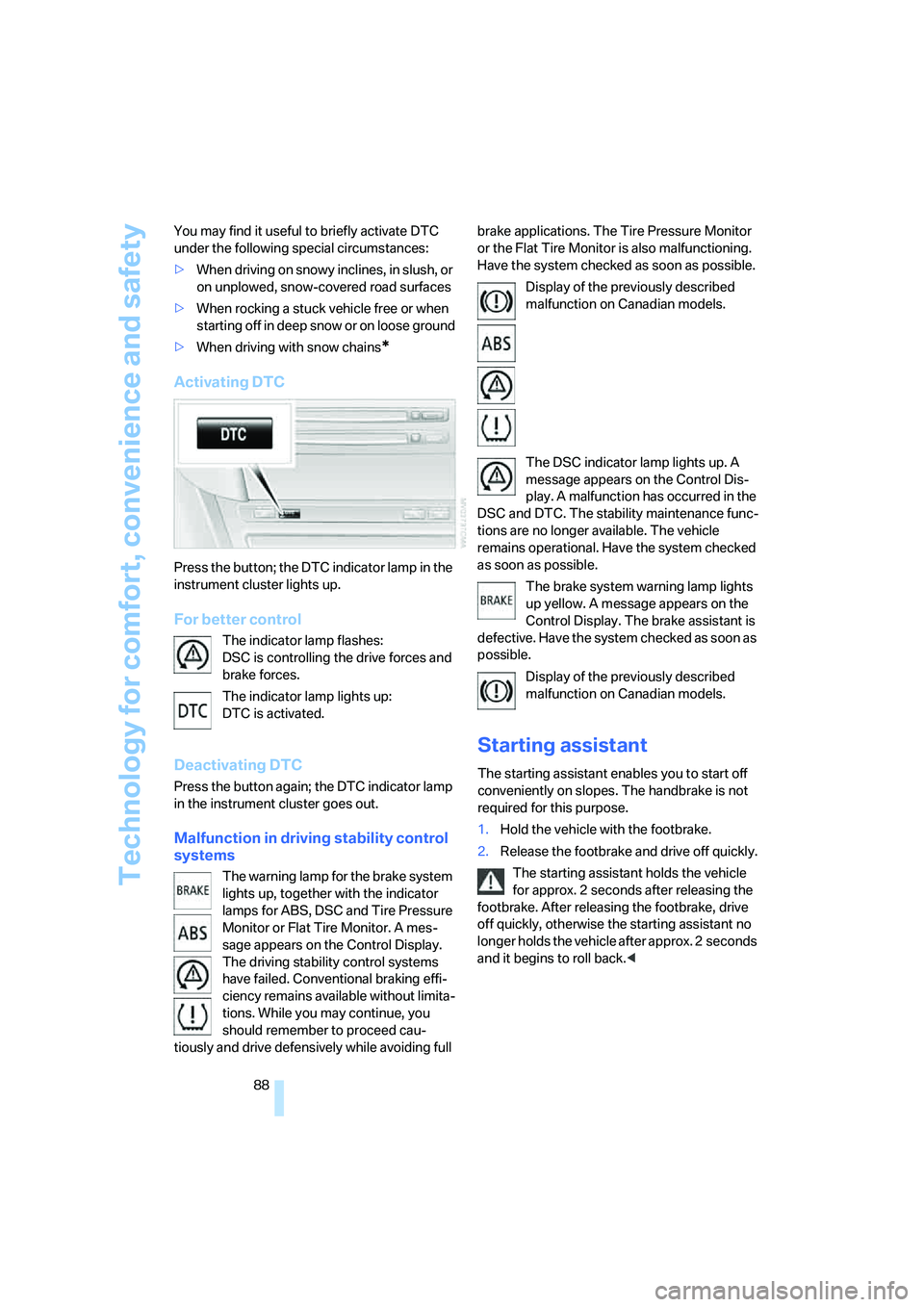
Press the button; the DTC indicator lamp in the
instrument cluster lights up.
For better control
The indicator lamp flashes:
DSC is controlling the drive forces and
brake forces.
The indicator lamp lights up:
DTC is activated.
Deactivating DTC
Press the button again; the DTC indicator lamp
in the instrument cluster goes out.
Malfunction in driving stability control
systems
The warning lamp for the brake system
lights up, together with the indicator
lamps for ABS, DSC and Tire Pressure
Monitor or Flat Tire Monitor. A mes-
sage appears on the Control Display.
The driving stability control systems
have failed. Conventional braking effi-
ciency remains available without limita-
tions. While you may continue, you
should remember to proceed cau-
tiously and drive defensively while avoiding full brake applications. The Tire Pressure Monitor
or the Flat Tire Monitor is also malfunctioning.
Have the system checked as soon as possible.
Display of the previously described
malfunction on Canadian models.
The DSC indicator lamp lights up. A
message appears on the Control Dis-
play. A malfunction has occurred in the
DSC and DTC. The stability maintenance func-
tions are no longer available. The vehicle
remains operational. Have the system checked
as soon as possible.
The brake system warning lamp lights
up yellow. A message appears on the
Control Display. The brake assistant is
defective. Have the system checked as soon as
possible.
Display of the previously described
malfunction on Canadian models.
Starting assistant
The starting assistant enables you to start off
conveniently on slopes. The handbrake is not
required for this purpose.
1.Hold the vehicle with the footbrake.
2.Release the footbrake and drive off quickly.
The starting assistant holds the vehicle
for approx. 2 seconds after releasing the
footbrake. After releasing the footbrake, drive
off quickly, otherwise the starting assistant no
longer holds the vehicle after approx. 2 seconds
and it begins to roll back.<
Page 95 of 264
Controls
93Reference
At a glance
Driving tips
Communications
Navigation
Entertainment
Mobility
proper tire maintenance, and it is the driver's
responsibility to maintain correct tire pressure,
even if underinflation has not reached the level
to trigger illumination of the TPMS low tire
pressure indicator.
The TPMS malfunction indicator is combined
with the low tire pressure indicator. When the
system detects a malfunction, the indicator will
flash for approximately one minute and then
remain continuously illuminated. This
sequence will continue upon subsequent vehi-
cle startups as long as the malfunction exists.
When the malfunction indicator is illuminated,
the system may not be able to detect or signal
low tire pressure as intended. TPMS malfunc-
tions may occur for a variety of reasons, includ-
ing the installation of replacement or alternate
tires or wheels on the vehicle that prevent the
TPMS from functioning properly. Always check
the TPMS malfunction indicator after replacing
one or more tires or wheels on your vehicle to
ensure that the replacement or alternate tires
and wheels allow the TPMS to continue to func-
tion properly.
Active steering*
The concept
The active steering is a system that actively var-
ies the steering angle of the front wheels in rela-
tion to the steering wheel movements.
When you are driving in the low road speed
range, e. g. in a town or when parking, the steer-
ing angle increases, i.e. the steering becomes
very direct. In the higher speed range, on the
other hand, the steering angle is reduced more
and more. This improves the handling capability
of your BMW over the entire speed range.
In critical situations, the system can make tar-
geted corrections to the steering angle pro-
vided by the driver and thus stabilize the vehicle
before the driver intervenes. This stability-pro-
moting intervention is deactivated when DSC is
switched off, refer to page87.
Malfunction
The warning lamp lights up yellow and
a message is shown on the Control
Display. The active steering is no
longer operational. At low speed, larger steering
wheel movements are required, while the vehi-
cle reacts more sensitively to steering wheel
movements in the higher road speed range.
The stability-promoting intervention can also
be deactivated. Proceed cautiously and drive
defensively. Have the system checked.
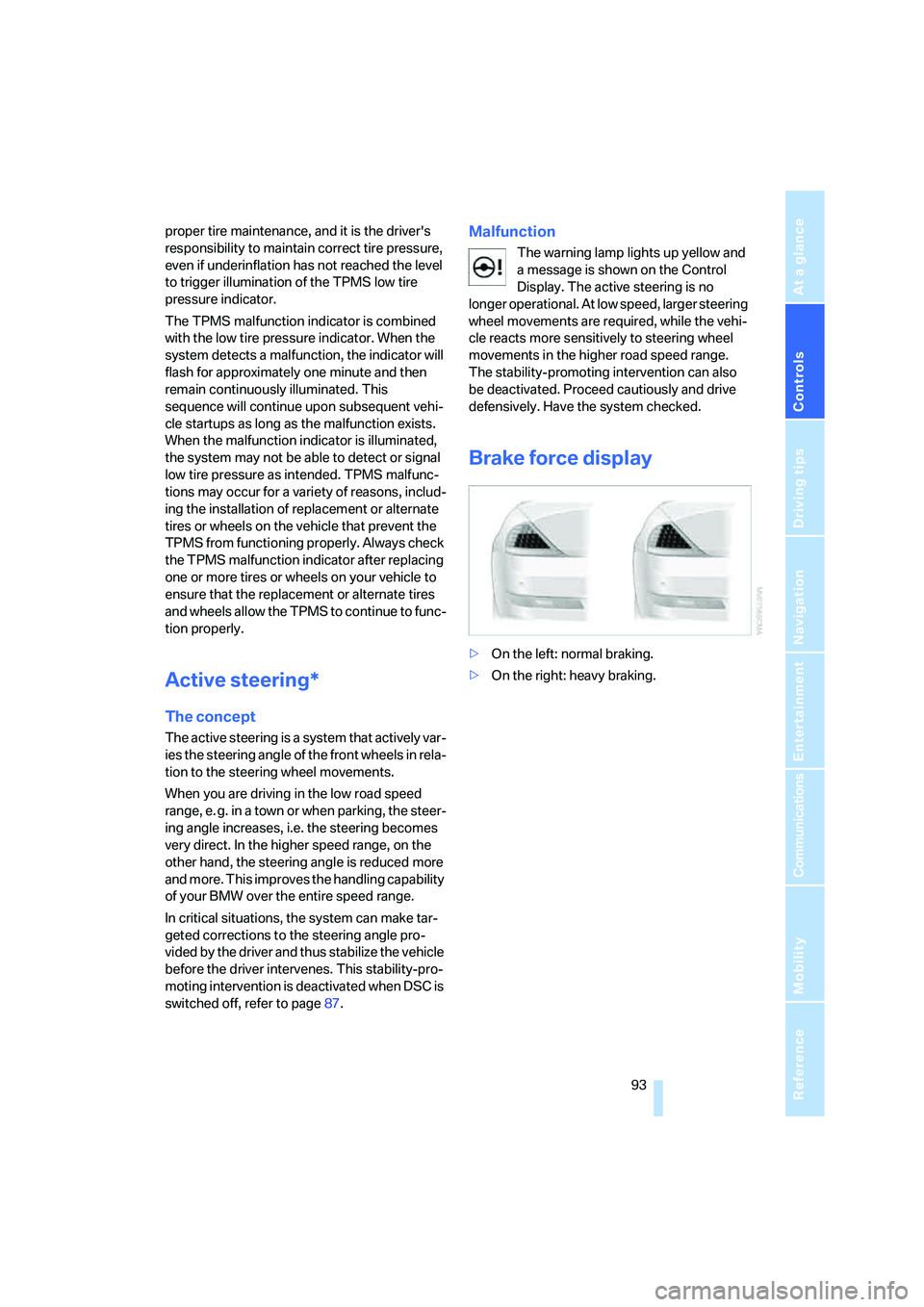
Brake force display
>On the left: normal braking.
>On the right: heavy braking.
Page 103 of 264
Controls
101Reference
At a glance
Driving tips
Communications
Navigation
Entertainment
Mobility
age to the lens, do not use sharp or abrasive
instruments to clean ice, snow, or dirt off the
lens.
When the windshield is cleaned with the head-
lamps on, the camera lens area is automatically
sprayed as well. Refer to page64.
Leaving lane warning*
The concept
This system warns you from a speed of approx.
40 mph/70 km/h when the vehicle is leaving the
lane you are currently in on roads with lane limit
lines. You feel this due to a slight vibration of the
steering wheel.
The system does not warn you if you signal
before leaving the lane.
It is best to use the system on well-developed
roads and freeways.
Switching on/off
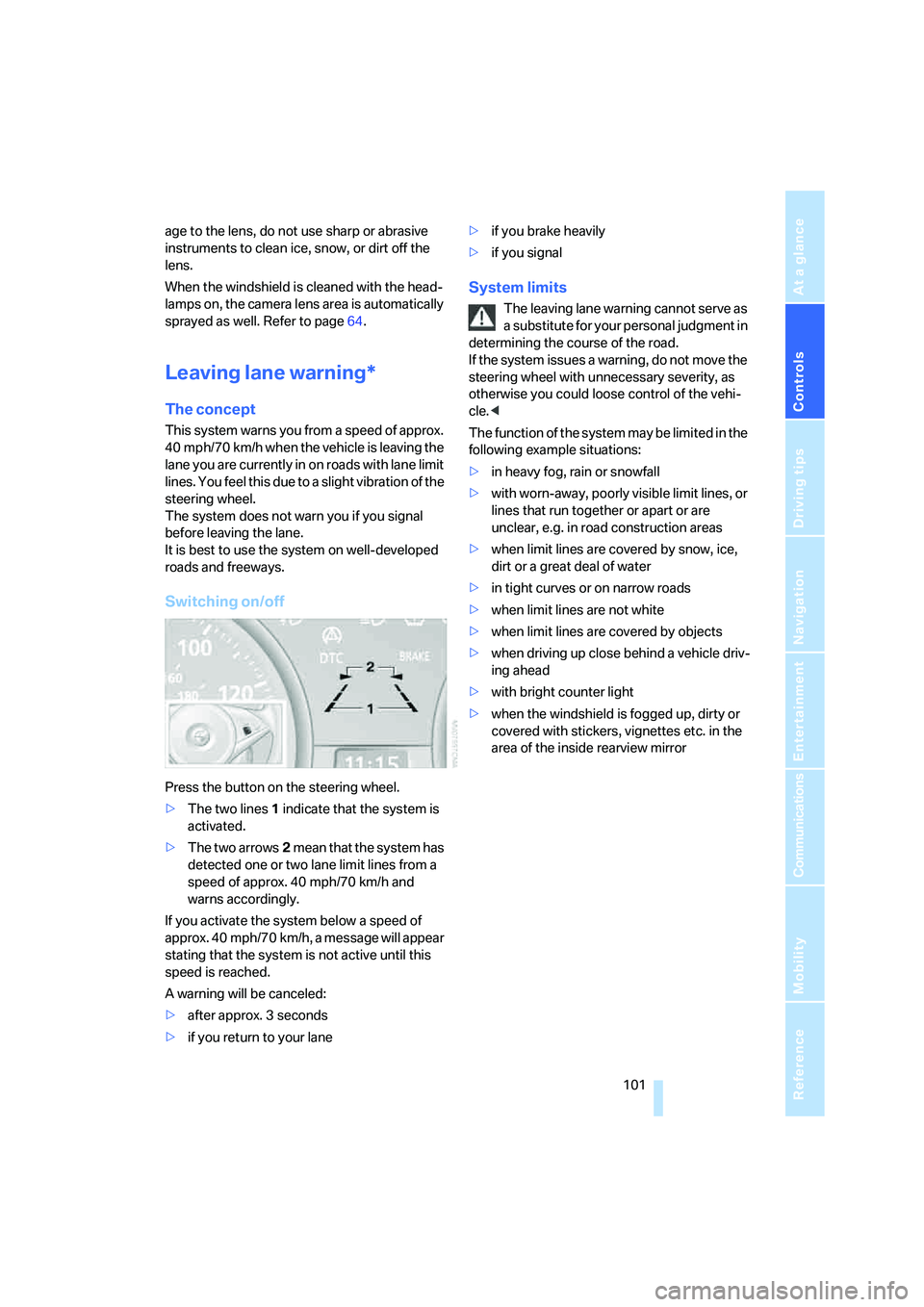
Press the button on the steering wheel.
>The two lines1 indicate that the system is
activated.
>The two arrows2 mean that the system has
detected one or two lane limit lines from a
speed of approx. 40 mph/70 km/h and
warns accordingly.
If you activate the system below a speed of
approx. 40 mph/70 km/h, a message will appear
stating that the system is not active until this
speed is reached.
A warning will be canceled:
>after approx. 3 seconds
>if you return to your lane>if you brake heavily
>if you signal
System limits
The leaving lane warning cannot serve as
a substitute for your personal judgment in
determining the course of the road.
If the system issues a warning, do not move the
steering wheel with unnecessary severity, as
otherwise you could loose control of the vehi-
cle.<
The function of the system may be limited in the
following example situations:
>in heavy fog, rain or snowfall
>with worn-away, poorly visible limit lines, or
lines that run together or apart or are
unclear, e.g. in road construction areas
>when limit lines are covered by snow, ice,
dirt or a great deal of water
>in tight curves or on narrow roads
>when limit lines are not white
>when limit lines are covered by objects
>when driving up close behind a vehicle driv-
ing ahead
>with bright counter light
>when the windshield is fogged up, dirty or
covered with stickers, vignettes etc. in the
area of the inside rearview mirror
Page 128 of 264
Things to remember when driving
126 the road surface, ultimately undermining your
ability to steer and brake the vehicle.<
The risk of hydroplaning increases as the tread
depth of the tires decreases, also refer to Mini-
mum tire tread on page213.
Driving through water
Do not drive through water on the road if it
is deeper than 1 ft/30 cm, and then only at
walking speed at the most. Otherwise, the vehi-
cle's engine, the electrical systems and the
transmission may be damaged.<
Using handbrake on inclines
On inclines, do not hold the vehicle in
place for a long time by riding the clutch;
use the handbrake. Otherwise, greater clutch
wear will result.<
Braking safely
Your BMW is equipped with ABS as a standard
feature. In situations that require it, it is best to
brake with full force. Since the vehicle maintains
steering responsiveness, you can still avoid
possible obstacles with a minimum of steering
effort.
Pulsation at the brake pedal combines with
sounds from the hydraulic circuits to indicate to
the driver that ABS is in its active mode.
Do not drive with your foot resting on the
brake pedal. Even light but consistent
pedal pressure can lead to high temperatures,
brake wear and possibly even brake failure.<
Driving in wet conditions
When driving on wet roads or in heavy rain, it is
a good idea to apply light pressure to the brake
pedal every few miles. Monitor traffic conditions
to ensure that this maneuver does not endan-
ger other road users. The heat generated in this
process helps dry the pads and rotors to ensure
that full braking efficiency will then be available
when you need it.
Hills
To prevent overheating and thus reduced
efficiency of the brake system, downshift
to a gear in which only minimal brake applica-
tions are needed when descending long or
steep downhill stretches. Even light but consis-
tent pressure on the brake pedal can lead to
high temperatures, brake wear and possibly
even brake failure.<
The braking effect of the engine can be further
increased by downshifting, if necessary all the
way down into first gear. This strategy helps
you avoid placing excessive loads on the brake
system. For information on downshifting in the
manual mode of the sport automatic transmis-
sion, refer to page61.
Do not drive with the clutch depressed, in
idle or with the engine switched off, other-
wise there will be no engine braking action or
support of the braking force and steering.
Never allow floor mats, carpets or any other
objects to protrude into the area of movement
of the pedals and impair their operation.<
Corrosion on brake rotors
When the vehicle is driven only occasionally,
during extended periods when the vehicle is not
used at all, and in operating conditions where
brake applications are less frequent, there is an
increased tendency for corrosion to form on
rotors, while contaminants accumulate on the
brake pads. This occurs because the minimum
pressure which must be exerted by the pads
during brake applications to clean the rotors is
not reached.
Should corrosion form on the brake rotors, the
brakes will tend to respond with a pulsating
effect that even extended application will fail to
cure.
When vehicle is parked
Condensation forms in the automatic climate
control during operation, and then exits under
the vehicle. Traces of condensed water under
the vehicle are therefore normal.
Page 226 of 264
Replacing components
224
Xenon lamps
The service life of these lamps is very long and
the probability of a failure is very low, provided
that they are not switched on and off an unusual
number of times. If one of these bulbs should
nevertheless fail, it is possible to continue driv-
ing with great caution using the fog lamps, pro-
vided traffic laws in your area do not prohibit
this.
Have work on the xenon lighting system
performed only by your BMW center or a
workshop that works according to BMW repair
procedures with correspondingly trained per-
sonnel. Due to the high voltage involved, there
is a danger to life and limb when work is carried
out improperly.<
Parking lamps, roadside parking
lamps, daytime running lamps
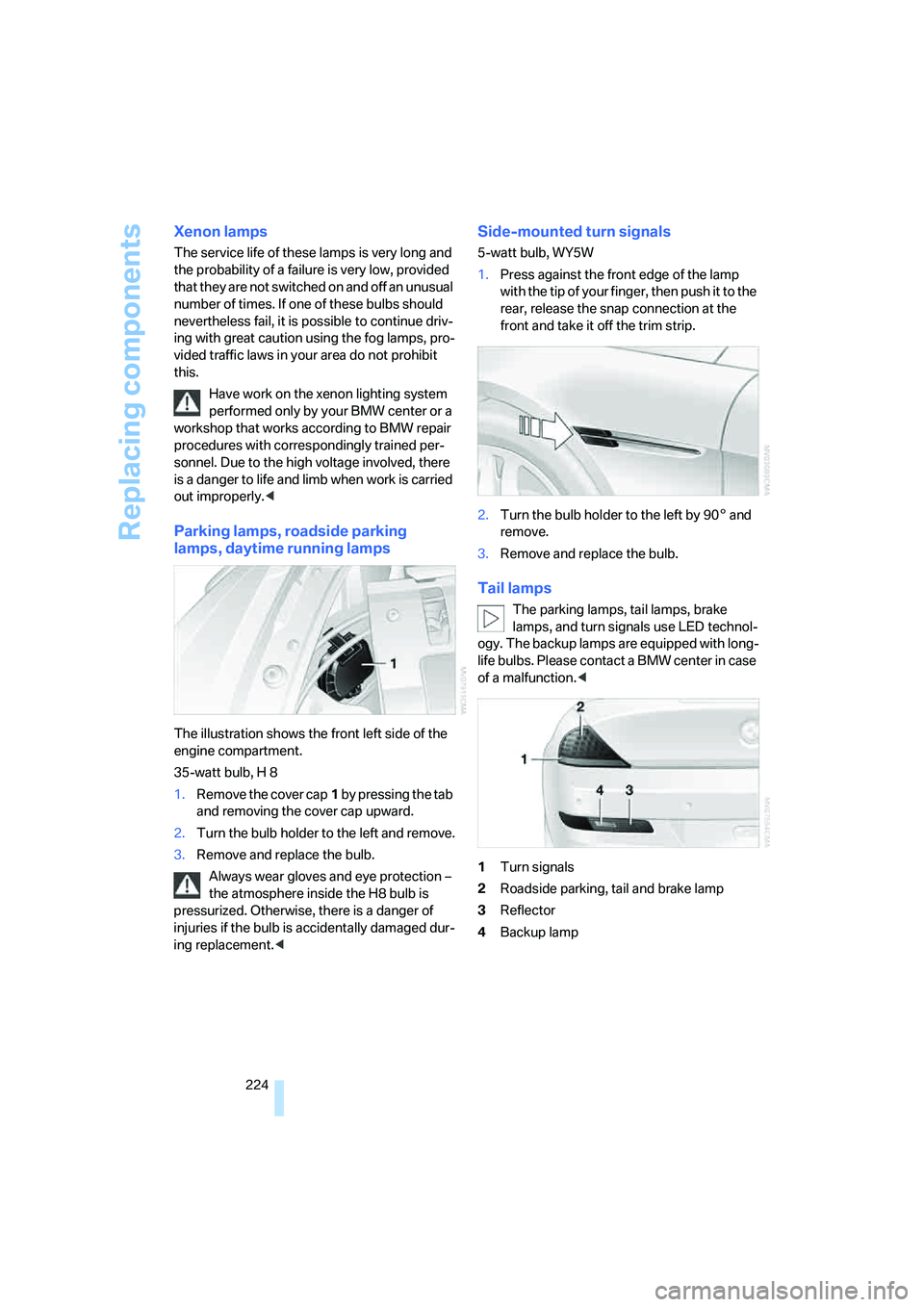
The illustration shows the front left side of the
engine compartment.
35-watt bulb, H 8
1.Remove the cover cap1 by pressing the tab
and removing the cover cap upward.
2.Turn the bulb holder to the left and remove.
3.Remove and replace the bulb.
Always wear gloves and eye protection –
the atmosphere inside the H8 bulb is
pressurized. Otherwise, there is a danger of
injuries if the bulb is accidentally damaged dur-
ing replacement.<
Side-mounted turn signals
5-watt bulb, WY5W
1.Press against the front edge of the lamp
with the tip of your finger, then push it to the
rear, release the snap connection at the
front and take it off the trim strip.
2.Turn the bulb holder to the left by 905 and
remove.
3.Remove and replace the bulb.
Tail lamps
The parking lamps, tail lamps, brake
lamps, and turn signals use LED technol-
ogy. The backup lamps are equipped with long-
life bulbs. Please contact a BMW center in case
of a malfunction.<
1Turn signals
2Roadside parking, tail and brake lamp
3Reflector
4Backup lamp
Page 244 of 264
Everything from A to Z
242
Everything from A to Z
Index
"..." Identifies Control Display
texts used to select
individual functions, and
indicates where to find them
in the text.
A
ABS Antilock Brake
System86
– indicator lamp88
ACC, refer to Active cruise
control66
Accepted calls192
Accessories6
Accident, refer to Emergency
request227
Activated-charcoal filter for
automatic climate
control112
Activating hour signal83
"Activation time" for parked-
car ventilation113
Active cruise control66
– indicator lamp70
– radar sensor71
– selecting distance69
– warning lamps70
Active front head restraints50
Active steering93
– warning lamp93
Adapter for spare key28
Adaptive brake assistant87
Adaptive brake lamps, refer to
Brake force display93
Adaptive Head Light104
"Add digits" for mobile
phone192
Additives
– coolant219
– engine oil, refer to Approved
engine oils219"Address book" for navigation
system142
Address for navigation
– deleting143
– entering134,137
– selecting142
– storing142
– storing current position142
"Add to address book"141
"Add to destination
list"137,139
Adjusting interior
temperature109
Adjusting thigh support48
Adjusting tone in audio mode,
refer to Tone control159
"After door opened"50
"After unlocking"50
Airbags94
– deactivating, refer to
Exception for front
passenger seat56
– indicator/warning lamp95
– indicator lamp for front
passenger airbags95
– sitting safely47
Air distribution
– automatic109
– manual110
Airing, refer to Ventilation112
Air outlets, refer to
Ventilation112
Air recirculation, refer to AUC
Automatic recirculated-air
control111
"Air recirculation on / off"55
Air supply, automatic climate
control108
Air volume110
AKI, refer to Fuel
specifications209Alarm system35
– avoiding unintentional
alarms36
– interior motion sensor36
– switching off alarm35
– switching off tilt alarm
sensor and interior motion
sensor36
– tilt alarm sensor36
"All channels"170
"All doors"30
All-season tires, refer to
Winter tires215
"All stations", calling up with
radio162,165
Alterations, technical, refer to
For your own safety6
"AM", reception
range158,162
Antenna, refer to Caring for
your vehicle brochure
Antenna for mobile phone184
Antifreeze
– coolant219
– washer fluid65
Antilock Brake System
ABS86
Anti-theft alarm system, refer
to Alarm system35
Anti-theft system, refer to
Central locking system30
Approved axle loads, refer to
Weights237
Approved engine oils219
Approved gross vehicle
weight, refer to Weights237
Armrest, refer to Center
armrest117
Around the center console14
Around the steering wheel10
Page 246 of 264
Everything from A to Z
244 BMW Night Vision98
– activating99
– cleaning camera100
– cleaning camera, refer to
Wiper system65
– deactivating100
– making settings100
"BMW Service settings"203
BMW website4
Bottle holder, refer to Cup
holders118
Bracket for telephone or
mobile phone, refer to Snap-
in adapter197
Brake assistant87
– adaptive87
Brake force display93
Brake lamps
– replacing bulbs, refer to Tail
lamps224
– two-stage93
Brake rotors
– breaking-in124
– refer to Braking safely126
Brakes
– ABS Antilock Brake
System86
– brake force display93
– breaking-in124
– CBC Cornering Brake
Control86
– electronic brake-force
distribution87
– handbrake60
– refer to Braking safely126
Brake system124
– brake pads124
– brake rotors126
– breaking-in124
– warning lamp13,88
Braking safely126
Breakdown services, refer to
Roadside Assistance228
Breaking-in124
Breaking-in brake pads124
Breaking-in the clutch124Breaking-in the differential,
refer to Engine and
differential124
"Brightness"84,98
– with BMW Night Vision100
Brightness of Control
Display83
Button for starting engine,
refer to Start/Stop button58
Buttons on steering wheel11
Bypassing route sections
150
C
California Proposition 65
Warning6
"Call"192,203
Call
– accepting190
– displaying accepted193
– ending191
– in absence193
– rejecting191
– starting191
Calling
– by entering phone
number191
– from phone book192
– from Top 8 list193
– redialing193
Can holder, refer to Cup
holders118
Capacities237
Car battery, refer to Vehicle
battery225
Car care, refer to Caring for
your vehicle brochure
Car-care products, refer to
Caring for your vehicle
brochure
"Car Data"76
Care222
– refer to Caring for your
vehicle brochure
Cargo loading
– securing cargo128
– stowing cargo128
– vehicle127Caring for artificial leather,
refer to Caring for your
vehicle brochure
Caring for leather, refer to
Caring for your vehicle
brochure
Caring for light-alloy wheels,
refer to Caring for your
vehicle brochure
Caring for plastic, refer to
Caring for your vehicle
brochure
Caring for the carpet, refer to
Caring for your vehicle
brochure
Caring for the vehicle finish,
refer to Caring for your
vehicle brochure
Car key, refer to Keys/remote
control28
Car phone184
– installation location, refer to
Center armrest117
– refer to Mobile phone184
– refer to separate operating
instructions
Car radio, refer to Radio162
Car wash59,127
– refer to Before driving into a
car wash127
– refer to Caring for your
vehicle brochure
– with comfort access38
Catalytic converter, refer to
Hot exhaust system125
"Categories"170
CBC Cornering Brake
Control86
CBS Condition Based
Service221
"CD"158,172
Page 249 of 264
Reference 247
At a glance
Controls
Driving tips
Communications
Navigation
Entertainment
Mobility
Direct selection buttons21
Displacement, refer to Engine
data234
"Display"84
Display, refer to iDrive
controls16
Display elements, refer to
Instrument cluster12
Displaying vehicle data205
Display lighting, refer to
Instrument lighting106
"Display off"21
Displays
– on Control Display, refer to
iDrive16
– refer to Instrument
cluster12
"Display settings"84,97
Displays on the windshield,
refer to Head-Up Display96
Disposal
– battery of remote control
with comfort access38
– coolant219
– vehicle battery225
Distance, refer to
Computer76
Distance control, refer to
Active cruise control66
"Distance to dest."76
Distance to destination, refer
to Computer76
Distance warning, refer to
PDC Park Distance
Control85
Door entry lighting, refer to
Interior lamps106
Door key, refer to Keys/
remote control28
Door lock32
"Door locks"30,78
Doors
– manual operation32
– remote control30,31
DOT Quality Grades212
Draft-free ventilation112
"Driver's door only"30Driving lamps, refer to Parking
lamps/low beams102
Driving route, refer to
Displaying route147
Driving stability control
systems86
Driving through water126
Driving tips, refer to General
driving notes124
Drying the air, refer to Cooling
function111
DSC Dynamic Stability
Control
87
– indicator lamp13,87
– malfunction88
DTC Dynamic Traction
Control87
– activating88
– indicator lamp13,88
DVD for navigation132
Dynamic Drive89
Dynamic Driving Control62
"Dynamic route" for
navigation145
Dynamic Stability Control
DSC87
Dynamic Traction Control
DTC87
E
Easy entry, refer to Entering
rear51
Easy entry/exit54
Eject button, refer to Buttons
on CD player158
Electrical malfunction
– convertible top43
– door lock32
– driver's door32
– fuel filler door208
– glass sunroof41
– luggage compartment lid34
– storage compartment, hotel
function33
Electric convertible top42Electric steering wheel
adjustment54
Electronic brake-force
distribution87
Electronic oil level check218
Emergency assistance, refer
to Roadside Assistance228
Emergency operation, refer to
Manual operation
– convertible top43
– door lock32
– driver's door32
– fuel filler door208
– glass sunroof41
– hotel function33
– luggage compartment lid34
– transmission lock, sport
automatic transmission62
Emergency release for
luggage compartment lid in
luggage compartment35
Emergency request227
Emergency services, refer to
Roadside Assistance228
"Enable services"205
"End call"192
Engine
– breaking-in124
– data234
– overheated, refer to Coolant
temperature74
– speed234
– starting59
– starting, comfort access36
– switching off59
– switching off when equipped
with Automatic
transmission, with comfort
access38
Engine compartment217
Engine coolant219
Page 250 of 264
Everything from A to Z
248 Engine oil
– adding219
– additives, refer to Approved
engine oils219
– approved oils219
– electronic oil level check218
– interval between changes,
refer to Service
requirements77
– oil change219
– oil grades, refer to Approved
engine oils219
– recommended oils219
– temperature75
– temperature gauge75
"Engine oil level"218
Engine output, refer to Engine
data234
Engine overheating, refer to
Coolant temperature74
Engine speed, refer to Engine
data234
Engine starting, refer to
Starting engine59
"Enter address"134,142
Entering address134,137
Entering intersection,
navigation136
Entering rear51
Entering town/city for
navigation135
Entering town/city of
destination name135
Entering zip code for
navigation135
"Entertainment"158
Entertainment sound output
on/off159
Entry map for destination139
Equalizer, refer to Tone
control161
"Equalizer", tone control161
"ESN"169
ESP Electronic Stability
Program, refer to DSC
Dynamic Stability
Control87
Event data recorders222Exhaust system, refer to Hot
exhaust system125
Exterior mirrors53
– adjusting53
– automatic dimming
feature54
– automatic heating53
– folding in and out53
– tilting down passenger-side
mirror54
External audio device117
Eye for tow-starting and
towing, refer to Tow
fitting229
Eyes for lashing, refer to
Securing cargo128
F
"Fader", refer to Tone
control160
Fader, refer to Tone
control160
Failure messages, refer to
Check Control79
False alarm
– refer to Avoiding
unintentional alarms36
– refer to Switching off
alarm35
Fastening safety belts, refer to
Safety belts52
Fastest route for
navigation144
Fast forward
– CD changer176
– CD player176
"Fast route" for
navigation144
"Favorites", calling up with
radio166
Filler neck for washer fluid65
Filter, refer to Microfilter/
activated-charcoal filter112
Fine wood, refer to Caring for
your vehicle brochure
First aid, refer to First-aid
kit228First-aid kit228
Flashing when locking and
unlocking, refer to Setting
confirmation signals31
Flashlight, refer to
Rechargeable flashlight117
Flat tire
– Flat Tire Monitor89
– run-flat tires90,92,214
– Tire Pressure Monitor90
– warning lamp90,92
Flat Tire Monitor89
– false alarms89
– initializing system89
– limits of system89
– snow chains215
– warning lamp90
Floor mats, refer to Caring for
your vehicle brochure
Floor mats/carpets, refer to
Caring for your vehicle
brochure
Fluid reservoir, refer to Filler
neck for washer fluid65
"FM", reception
range158,162
FM, waveband162
Fog lamps106
– indicator lamp13,106
Folding into raised position
convertible top
compartment floor,
Convertible35
Footbrake, refer to Braking
safely126
Footwell lighting, refer to
Interior lamps106
For specified oil grades, refer
to Approved engine oils219
For your own safety6
Freeway, refer to Route
criteria144
Front airbags94
Front passenger airbags,
deactivating94
"FTM"89
FTM, refer to Flat Tire
Monitor89
Page 251 of 264
Reference 249
At a glance
Controls
Driving tips
Communications
Navigation
Entertainment
Mobility
Fuel
– average consumption75
– display75
– fuel specifications209
– high-quality brands209
– quality209
– specifications209
– tank contents, refer to
Capacities237
Fuel display, refer to Fuel
gauge75
Fuel-efficient driving124
Fuel filler door208
– releasing in the event of
electrical malfunction208
Fuel gauge75
Full mobile phone preparation
package184
Full screen display, refer to
Switching assistance
window off20
"Full screen" with BMW Night
Vision100
Fuses226
G
Garage-door opener, refer to
Integrated universal remote
control115
Gasoline
– refer to Average fuel
consumption75
– refer to Fuel
specifications209
– refer to Required fuel209
Gasoline display, refer to Fuel
gauge75
Gearshift lever, manual
transmission60
General driving
notes124,125
Glass sunroof, electric with
raise function40
– convenient operation32
– convenient operation with
comfort access37
– moving manually41
– remote control31Glove compartment116
– rechargeable flashlight117
GPS navigation, refer to
Navigation system132
Grills, refer to Ventilation112
Gross vehicle weight, refer to
Weights237
H
Handbrake60
– indicator lamp13,60
Hands-free system, refer to
Microphone14
Hazard warning flashers15
"HD radio"166
HD radio, refer to High
Definition Radio166
Head airbags94
Headlamp control,
automatic102
Headlamp flasher63
Headlamps
– care, refer to Caring for your
vehicle brochure
– cleaning, refer to Wiper
system64
– cleaning tank, refer to
Capacities237
– filler neck for washer
fluid217
– replacing bulbs223
Head Light, refer to Adaptive
Head Light104
Head restraints
– active front head
restraints50
– front50
– sitting safely47
"Head-Up Display"97
Head-Up Display96
Heated
– mirrors53
– rear window110
– seats53
– steering wheel54
Heater109Heating
– exterior mirrors53
– interior108
– rear window110
– residual heat utilization112
– seats53
– steering wheel54
Heating with engine switched
off, refer to Residual
heat112
Heavy cargo, refer to Securing
cargo128
Height, refer to
Dimensions235
Height adjustment
– seats48
– steering wheel54
High-beam assistant104
High beams104
– headlamp flasher104
– indicator lamp13
High Definition Radio166
High water, refer to Driving
through water
126
Hills126
Holder for cups118
"Home address" for
navigation system144
Homepage of BMW4
Hood216
Horn10
Hotel function33
– unlocking manually33
Hot exhaust system125
"Hour memo"83
"House number" for
destination entry137
Hydraulic brake assistant,
refer to Brake assistant87
Hydroplaning125
– also refer to Minimum tread
depth213