flat tire BMW 6 SERIES 2008 User Guide
[x] Cancel search | Manufacturer: BMW, Model Year: 2008, Model line: 6 SERIES, Model: BMW 6 SERIES 2008Pages: 264, PDF Size: 7.97 MB
Page 216 of 264
Wheels and tires
214
Run-flat tires
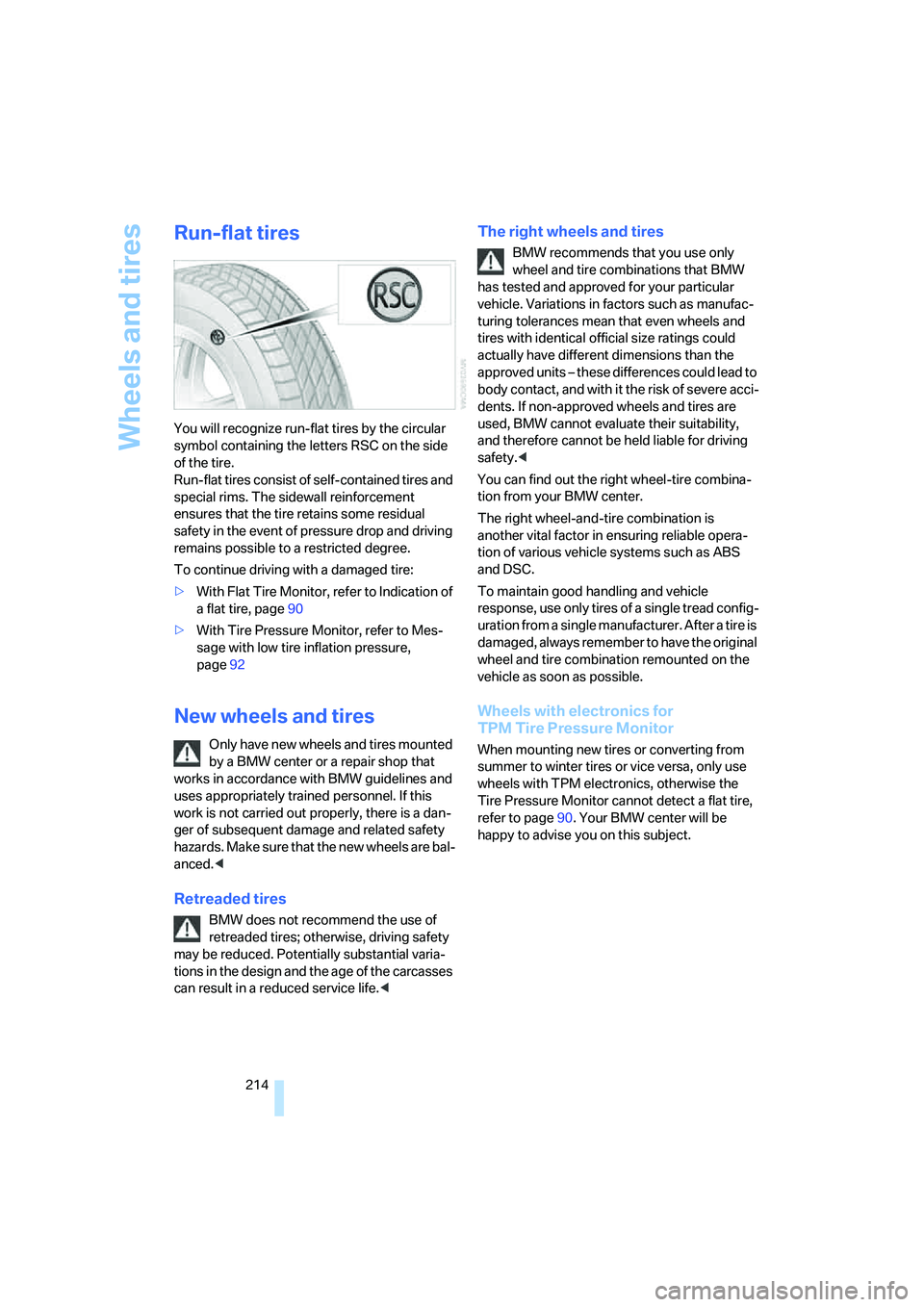
You will recognize run-flat tires by the circular
symbol containing the letters RSC on the side
of the tire.
Run-flat tires consist of self-contained tires and
special rims. The sidewall reinforcement
ensures that the tire retains some residual
safety in the event of pressure drop and driving
remains possible to a restricted degree.
To continue driving with a damaged tire:
>With Flat Tire Monitor, refer to Indication of
a flat tire, page90
>With Tire Pressure Monitor, refer to Mes-
sage with low tire inflation pressure,
page92
New wheels and tires
Only have new wheels and tires mounted
by a BMW center or a repair shop that
works in accordance with BMW guidelines and
uses appropriately trained personnel. If this
work is not carried out properly, there is a dan-
ger of subsequent damage and related safety
h a z a r d s . M a k e s u re t h a t t h e n e w w h ee l s a r e b a l-
anced.<
Retreaded tires
BMW does not recommend the use of
retreaded tires; otherwise, driving safety
may be reduced. Potentially substantial varia-
tions in the design and the age of the carcasses
can result in a reduced service life.<
The right wheels and tires
BMW recommends that you use only
wheel and tire combinations that BMW
has tested and approved for your particular
vehicle. Variations in factors such as manufac-
turing tolerances mean that even wheels and
tires with identical official size ratings could
actually have different dimensions than the
approved units – these differences could lead to
body contact, and with it the risk of severe acci-
dents. If non-approved wheels and tires are
used, BMW cannot evaluate their suitability,
and therefore cannot be held liable for driving
safety.<
You can find out the right wheel-tire combina-
tion from your BMW center.
The right wheel-and-tire combination is
another vital factor in ensuring reliable opera-
tion of various vehicle systems such as ABS
and DSC.
To maintain good handling and vehicle
response, use only tires of a single tread config-
uration from a single manufacturer. After a tire is
damaged, always remember to have the original
wheel and tire combination remounted on the
vehicle as soon as possible.
Wheels with electronics for
TPM Tire Pressure Monitor
When mounting new tires or converting from
summer to winter tires or vice versa, only use
wheels with TPM electronics, otherwise the
Tire Pressure Monitor cannot detect a flat tire,
refer to page90. Your BMW center will be
happy to advise you on this subject.
Page 217 of 264
Mobility
215Reference
At a glance
Controls
Driving tips
Communications
Navigation
Entertainment
Recommended tire brands
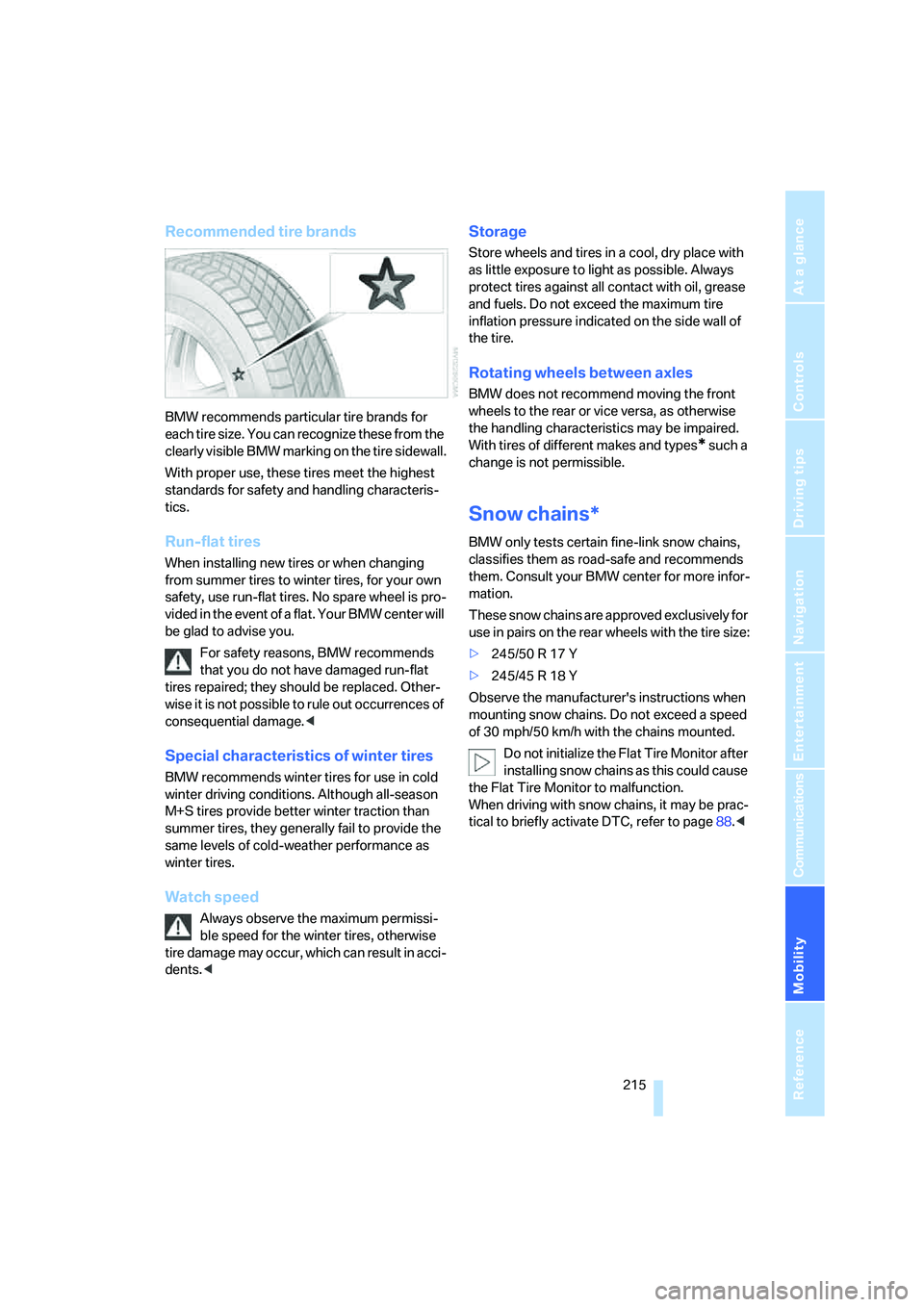
BMW recommends particular tire brands for
each tire size. You can recognize these from the
clearly visible BMW marking on the tire sidewall.
With proper use, these tires meet the highest
standards for safety and handling characteris-
tics.
Run-flat tires
When installing new tires or when changing
from summer tires to winter tires, for your own
safety, use run-flat tires. No spare wheel is pro-
vided in the event of a flat. Your BMW center will
be glad to advise you.
For safety reasons, BMW recommends
that you do not have damaged run-flat
tires repaired; they should be replaced. Other-
wise it is not possible to rule out occurrences of
consequential damage.<
Special characteristics of winter tires
BMW recommends winter tires for use in cold
winter driving conditions. Although all-season
M+S tires provide better winter traction than
summer tires, they generally fail to provide the
same levels of cold-weather performance as
winter tires.
Watch speed
Always observe the maximum permissi-
ble speed for the winter tires, otherwise
tire damage may occur, which can result in acci-
dents.<
Storage
Store wheels and tires in a cool, dry place with
as little exposure to light as possible. Always
protect tires against all contact with oil, grease
and fuels. Do not exceed the maximum tire
inflation pressure indicated on the side wall of
the tire.
Rotating wheels between axles
BMW does not recommend moving the front
wheels to the rear or vice versa, as otherwise
the handling characteristics may be impaired.
With tires of different makes and types
* such a
change is not permissible.
Snow chains*
BMW only tests certain fine-link snow chains,
classifies them as road-safe and recommends
them. Consult your BMW center for more infor-
mation.
These snow chains are approved exclusively for
use in pairs on the rear wheels with the tire size:
>245/50 R 17 Y
>245/45 R 18 Y
Observe the manufacturer's instructions when
mounting snow chains. Do not exceed a speed
of 30 mph/50 km/h with the chains mounted.
Do not initialize the Flat Tire Monitor after
installing snow chains as this could cause
the Flat Tire Monitor to malfunction.
When driving with snow chains, it may be prac-
tical to briefly activate DTC, refer to page88.<
Page 227 of 264
Mobility
225Reference
At a glance
Controls
Driving tips
Communications
Navigation
Entertainment
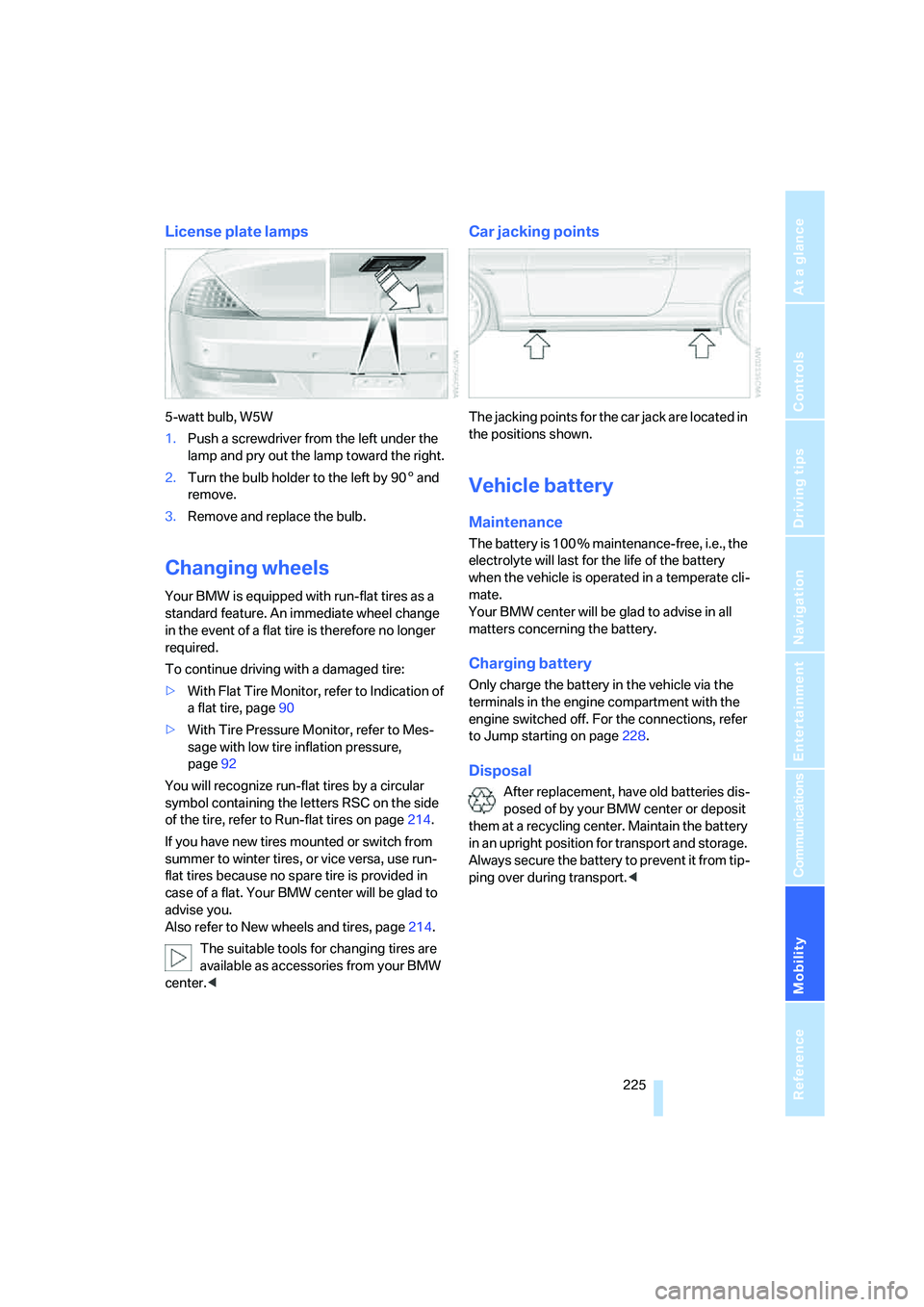
License plate lamps
5-watt bulb, W5W
1.Push a screwdriver from the left under the
lamp and pry out the lamp toward the right.
2.Turn the bulb holder to the left by 905 and
remove.
3.Remove and replace the bulb.
Changing wheels
Your BMW is equipped with run-flat tires as a
standard feature. An immediate wheel change
in the event of a flat tire is therefore no longer
required.
To continue driving with a damaged tire:
>With Flat Tire Monitor, refer to Indication of
a flat tire, page90
>With Tire Pressure Monitor, refer to Mes-
sage with low tire inflation pressure,
page92
You will recognize run-flat tires by a circular
symbol containing the letters RSC on the side
of the tire, refer to Run-flat tires on page214.
If you have new tires mounted or switch from
summer to winter tires, or vice versa, use run-
flat tires because no spare tire is provided in
case of a flat. Your BMW center will be glad to
advise you.
Also refer to New wheels and tires, page214.
The suitable tools for changing tires are
available as accessories from your BMW
center.<
Car jacking points
The jacking points for the car jack are located in
the positions shown.
Vehicle battery
Maintenance
The battery is 100 % maintenance-free, i.e., the
electrolyte will last for the life of the battery
when the vehicle is operated in a temperate cli-
mate.
Your BMW center will be glad to advise in all
matters concerning the battery.
Charging battery
Only charge the battery in the vehicle via the
terminals in the engine compartment with the
engine switched off. For the connections, refer
to Jump starting on page228.
Disposal
After replacement, have old batteries dis-
posed of by your BMW center or deposit
them at a recycling center. Maintain the battery
in an upright position for transport and storage.
Always secure the battery to prevent it from tip-
ping over during transport.<
Page 247 of 264
Reference 245
At a glance
Controls
Driving tips
Communications
Navigation
Entertainment
Mobility
CD changer172
– controls158
– fast forward/reverse176
– installation location176
– random sequence175
– repeating a track175
– sampling a track174
– selecting a CD173
– selecting a track173
– switching on/off158
– tone control159
– volume159
CD player172
– controls158
– fast forward/reverse176
– random sequence175
– repeating a track175
– sampling a track174
– selecting a track173
– switching on/off158
– tone control159
– volume159
Center armrest, adjusting
height117
Center console14
"Central locking"30
Central locking
– from inside32
– from outside30
Central locking system30
– comfort access36
– hotel function33
Changes, technical, refer to
For your own safety6
Changing a wheel225
Changing language on
Control Display84
Changing scale for navigation
system display148
Changing units of measure on
Control Display84
Changing wheels214
CHECK button80
Check Control79
"Check Control
messages"80
Check Gas Cap208
Checking air pressure, refer to
Tire inflation pressure210Child-restraint fixing system
LATCH56
Child restraint systems56
Child seats, refer to
Transporting children
safely56
Chrome parts, refer to Caring
for your vehicle brochure
Cigarette lighter
119
Cigarette lighter socket, refer
to Connecting electrical
devices119
Cleaning, refer to Caring for
your vehicle brochure
"Climate"109
Clock74
– 12h/24h format83
– hour signal83
– setting time and date82
Closing
– from inside32
– from outside30
Closing fuel filler cap208
Clothes hooks, Coupe118
Cockpit10
Cold start, refer to Starting
engine59
Comfort access36
– observe in car wash38
– replacing battery, remote
control38
Comfort closing
– windows, with comfort
access with Coupe37
– with comfort access37
"Communication"190,200
Compact disc
– refer to CD changer172
– refer to CD player172
Compartment for remote
control, refer to Ignition
lock58
Compartments, refer to
Storage compartments117
Compressed audio files172
Computer75
– displays on Control
Display76
– hour signal83"Concert hall", refer to Tone
control161
"Concierge"202
Concierge service202
Condensation, refer to When
vehicle is parked126
Condition Based Service
CBS221
"Confirmation"31
Confirmation signals for
locking and unlocking31
Connecting car vacuum
cleaner, refer to Connecting
electrical devices119
Consumption display, refer to
Average fuel
consumption75
Consumption statistics, refer
to Average fuel
consumption75
"Continue guidance to
destination?"147
"Contrast" with BMW Night
Vision100
Control Center, refer to
iDrive16
Control Display, refer to
iDrive16
– setting brightness83
– switching off/on21
Controller, refer to iDrive16
Controls, refer to Cockpit10
Convenient operation
– convertible top31,32
– glass sunroof31,32
– windows31,32
Convertible
– convertible program for
automatic climate
control109
– opening and closing
windows39
– rollover protection
system96
– top42
– wind deflector45
– window and convertible top
operation with comfort
access37
Page 248 of 264
Everything from A to Z
246 Convertible top
– care, refer to Caring for your
vehicle brochure
– closing manually43
– convenient operation32
– emergency closing43
– opening and closing43
Coolant219
– checking level220
– temperature74
Cooling, maximum111
Cooling function, automatic
climate control111
Cooling system, refer to
Coolant219
Copyright2
Cornering Brake Control
CBC86
Country of destination for
navigation135
Courtesy lamps, refer to
Interior lamps106
Cradle for telephone or mobile
phone117
Cruise control65
– active cruise control66
Cruising range75
Cup holders15,118
Curb weight, refer to
Weights237
"Current position"153
Current position
– displaying153
– entering142
– storing142
"Curve mode" with
BMW Night Vision100
"Customer
Relations"194,202
Cylinders, refer to Engine
data234
D
Dashboard, refer to
Cockpit10
Data, technical234
– capacities237
– dimensions235
– engine234
– measurements235
– weights237
"Date"83
Date74
– date format83
– setting83
"Date format"83
"Daytime running
lamps"103,106
Daytime running lamps103
– replacing bulbs224
DBC Dynamic Brake Control
– warning lamp88
"Deactivated"50
Decommissioning the vehicle,
refer to Caring for your
vehicle brochure
Defect, tires
– refer to Flat Tire Monitor89
– refer to Tire Pressure
Monitor90
Defrosting windows110
Defrosting windows and
removing condensation110
Defrosting windshield, refer to
Defrosting windows110
Defrost position, refer to
Defrosting windows110
"Delete address book" for
navigation system143
"Delete all numbers" for
mobile phone193
"Delete data" for navigation
system143
"Delete" for mobile
phone193
Destination address
– deleting143
– entering134,137Destination for navigation
– destination list141
– entering via voice137
– entry134
– home address144
– selecting from address
book142
– selecting using
information140
– storing142
Destination guidance146
– bypassing route
sections150
– canceling voice
instructions55
– changing specified
route144
– displaying route147
– distance and arrival146
– interrupting146
– starting146
– terminating/continuing146
– voice instructions149
– volume of voice
instructions150
Destination list for
navigation141
Destinations recently driven
to141
"Details" in audio
mode174,180
"Dial" for mobile phone191
"Dial number"191
"Diamond button"55
Digital clock74
Digital radio, refer to High
Definition Radio166
Dimensions
– Convertible236
– Coupe235
Directional indicators, refer to
Turn signals63
Direction instructions, refer to
Voice instructions149
Directory, refer to Phone
book192
Directory for navigation, refer
to Address book142
Page 250 of 264
Everything from A to Z
248 Engine oil
– adding219
– additives, refer to Approved
engine oils219
– approved oils219
– electronic oil level check218
– interval between changes,
refer to Service
requirements77
– oil change219
– oil grades, refer to Approved
engine oils219
– recommended oils219
– temperature75
– temperature gauge75
"Engine oil level"218
Engine output, refer to Engine
data234
Engine overheating, refer to
Coolant temperature74
Engine speed, refer to Engine
data234
Engine starting, refer to
Starting engine59
"Enter address"134,142
Entering address134,137
Entering intersection,
navigation136
Entering rear51
Entering town/city for
navigation135
Entering town/city of
destination name135
Entering zip code for
navigation135
"Entertainment"158
Entertainment sound output
on/off159
Entry map for destination139
Equalizer, refer to Tone
control161
"Equalizer", tone control161
"ESN"169
ESP Electronic Stability
Program, refer to DSC
Dynamic Stability
Control87
Event data recorders222Exhaust system, refer to Hot
exhaust system125
Exterior mirrors53
– adjusting53
– automatic dimming
feature54
– automatic heating53
– folding in and out53
– tilting down passenger-side
mirror54
External audio device117
Eye for tow-starting and
towing, refer to Tow
fitting229
Eyes for lashing, refer to
Securing cargo128
F
"Fader", refer to Tone
control160
Fader, refer to Tone
control160
Failure messages, refer to
Check Control79
False alarm
– refer to Avoiding
unintentional alarms36
– refer to Switching off
alarm35
Fastening safety belts, refer to
Safety belts52
Fastest route for
navigation144
Fast forward
– CD changer176
– CD player176
"Fast route" for
navigation144
"Favorites", calling up with
radio166
Filler neck for washer fluid65
Filter, refer to Microfilter/
activated-charcoal filter112
Fine wood, refer to Caring for
your vehicle brochure
First aid, refer to First-aid
kit228First-aid kit228
Flashing when locking and
unlocking, refer to Setting
confirmation signals31
Flashlight, refer to
Rechargeable flashlight117
Flat tire
– Flat Tire Monitor89
– run-flat tires90,92,214
– Tire Pressure Monitor90
– warning lamp90,92
Flat Tire Monitor89
– false alarms89
– initializing system89
– limits of system89
– snow chains215
– warning lamp90
Floor mats, refer to Caring for
your vehicle brochure
Floor mats/carpets, refer to
Caring for your vehicle
brochure
Fluid reservoir, refer to Filler
neck for washer fluid65
"FM", reception
range158,162
FM, waveband162
Fog lamps106
– indicator lamp13,106
Folding into raised position
convertible top
compartment floor,
Convertible35
Footbrake, refer to Braking
safely126
Footwell lighting, refer to
Interior lamps106
For specified oil grades, refer
to Approved engine oils219
For your own safety6
Freeway, refer to Route
criteria144
Front airbags94
Front passenger airbags,
deactivating94
"FTM"89
FTM, refer to Flat Tire
Monitor89
Page 252 of 264
Everything from A to Z
250
I
IBOC, refer to High Definition
Radio166
Ice, refer to Outside
temperature warning74
ID3-Tag, refer to Information
about track174
Identification mark
– recommended tire
brands215
– run-flat tires214
– tire coding212
iDrive16
– adjusting brightness83
– assistance window20
– changing date and time82
– changing language84
– changing menu page19
– changing settings82
– changing units of measure
and display form84
– controller16
– controls16
– displays, menus17
– operating principle17
– selecting menu item19
– selecting or confirming
entry19
– start menu17
– status information20
– symbols18
Ignition58
– switched off59
– switched on58
Ignition key, refer to Keys/
remote control28
Ignition key position 1, refer to
Radio readiness58
Ignition key position 2, refer to
Ignition on58
Ignition lock58
– starting engine with comfort
access38
i menu17
Imprint2Indicator/warning lamps
– ABS Antilock Brake
System88
– active steering93
– airbags95
– brake system88
– DSC13,87
– DTC13,88
– Flat Tire Monitor90
– fog lamps13,106
– handbrake13,60
– safety belt warning52
– TPM Tire Pressure
Monitor92
Indicator and warning lamps,
overview13
Inflation pressure, refer to Tire
inflation pressure210
Inflation pressure monitoring
– refer to Flat Tire Monitor89
– refer to Tire Pressure
Monitor90
Info menu17
Information
– on another location140
– on current position140
– on town/city of
destination140
"Information" for navigation
system140
Information menu, refer to
imenu17
"Information on
destination"141
"Info sources"77
Initializing
– Flat Tire Monitor89
– radio, refer to Storing
stations164
– refer to Power failure226
– seat, mirror and steering
wheel memory49
– time and date82
"Input map"139
Installation location
– CD changer176
– drive for navigation DVD132Instructions for navigation
system, refer to Voice
instructions149
Instrument cluster12
Instrument illumination, refer
to Instrument lighting106
Instrument lighting106
Instrument panel, refer to
Cockpit10
Instrument panel, refer to
Instrument cluster12
Integrated key28
Integrated universal remote
control115
Interesting destination for
navigation140
"Interim time"82
Interior lamps106
– switching on with remote
control31
Interior motion sensor36
– switching off36
Interior rearview mirror,
automatic dimming
feature54
Intermittent wiper mode64
J
Jacking points225
Joystick, refer to iDrive16
Jump starting228
K
Keyless-Go, refer to Comfort
access36
Keyless opening and closing,
refer to Comfort access36
Key Memory, refer to Personal
Profile29
"Keypad"194
Keys28
– key-related settings, refer to
Personal Profile29
– spare key28
Kick-down, Sport automatic
transmission61
Page 254 of 264
Everything from A to Z
252 Maximum speed with winter
tires215
Measurements, refer to
Dimensions
– Convertible236
– Coupe235
Memory, refer to Seat, mirror
and steering wheel
memory49
MENU, button refer to Start
menu17
Menus, refer to iDrive16
Message list for traffic
information151
Microfilter112
Microphone
– for mobile phone14
– for voice command
system14
Mirror dimming feature54
Mirrors53
– automatic curb monitor54
– folding in and out53
– heating53
– memory, refer to Seat, mirror
and steering wheel
memory49
"Missed calls"192
Missed calls193
Mobile phone
– accepted calls193
– adjusting volume190
– calling191
– ending call191
– installation location, refer to
Center armrest117
– missed calls193
– operation by voice195
– operation via iDrive190
– redialing193
– refer to separate operating
instructions
– Top 8193
– touch tone dialing, refer to
Tone dialing method194
Mobile phone battery198Mobile Service, refer to
Roadside Assistance228
Monitor, refer to iDrive16
Monitoring pressure of tires,
refer to Flat Tire Monitor89
"Monitor on / off"55
Most recent mobile phone
numbers193
MP3
– compressed audio files172
– USB/audio interface179
Multifunction steering wheel,
refer to Buttons on steering
wheel11
Multifunction switch
– refer to Turn signals/
headlamp flasher63
– refer to Wiper system64
Music tracks
– random play sequence175
– sampling, scan174
"Mute on / off"55
"M View"97
MW, waveband162
N
"Navigation"76,134
Navigation destination
– entering manually134
– selecting via map139
Navigation drive, installation
location132
Navigation DVD132
Navigation instructions, refer
to Switching voice
instructions on/off149Navigation system132
– address book142
– bypassing route
sections150
– destination entry134
– destination guidance in
assistance window132
– destination list141
– displaying current
position153
– displaying route147
– entering a destination
manually134
– entering destination via
voice137
– last destinations141
– looking for interesting
destination140
– navigation DVD132
– route list149
– selecting destination using
information140
– selecting destination via
map139
– selecting route criteria144
– starting destination
guidance146
– switching off, refer to
Terminating/continuing
destination guidance146
– terminating/continuing
destination guidance146
– voice instructions149
– volume adjustment150
"Navigation voice
instructions"55,149
Neck support, refer to Front
head restraints50
"New address" for navigation
system142
"New destination"134,139
New remote controls28
"New route"150
New wheels and tires214
"Next entertainment
source"55
Night Vision, refer to
BMW Night Vision98
Page 257 of 264
Reference 255
At a glance
Controls
Driving tips
Communications
Navigation
Entertainment
Mobility
Retreaded tires214
Reverse, fast
– CD changer176
– CD player176
Reverse gear
– manual transmission60
– Sport automatic
transmission61
Road map148
"Roadside
Assistance"194,200
Roadside Assistance228
Roadside assistance200
Roadside parking lamps104
– replacing bulbs, refer to
Parking lamps224
Rollover protection system on
Convertible96
– lowering96
Rope, refer to Tow-starting
and towing229
Rotary/pushbutton, refer to
iDrive16
Route144
– bypassing sections150
– changing150
– changing criteria144
– display147
– displaying arrow display147
– displaying map view148
– displaying streets or towns/
cities149
– selecting144
Route information, refer to
Destination guidance with
voice instructions149
Route map, refer to Displaying
map view148
"Route preference",
changing144
Route selection144
RSC Run-flat System
Component, refer to Run-
flat tires214
Rubber parts, refer to Caring
for your vehicle brochure
Run-flat System Component
RSC, refer to Run-flat
tires214Run-flat tires214
– continuing driving with a
damaged tire90,92
– flat tire90,92
– Flat Tire Monitor89
– tire inflation pressure210
– Tire Pressure Monitor90
– tire replacement214,215
– winter tires215
S
Safety belts52
– damage53
– indicator lamp52
– refer to Caring for your
vehicle brochure
– reminder52
– sitting safely47
Safety belt tensioners, refer to
Safety belts52
Safety systems
– ABS Antilock Brake
System86
– airbags94
– driving stability control
systems86
– rollover protection system,
Convertible96
– safety belts52
Safety tires, refer to Run-flat
tires214
Satellite radio169
– enabling channels169
– selecting channel170
– storing channel170
"SAT" with radio158,169
"Save current
destination"144
"Scan"
– music tracks on CD174
– stations with radio163
Scan
– CD changer174
– CD player174
– radio163
"Scan all" in audio mode174
"Scan directory" in audio
mode174Screw thread for tow
fitting230
SDARS, refer to Satellite
radio169
Seats48
– adjusting48
– heating53
– lumbar support48
– memory, refer to Seat, mirror
and steering wheel
memory49
– sitting safely47
– sports seat48
– storing the setting49
– thigh support48
Securing cargo128
– ski bag120
"Select as
destination"140,203
"Select current speed"81
Selecting audio sources, refer
to Operating via iDrive158
Selecting distance with active
cruise control69
Selecting frequency
manually163
Selecting menu items19
Selecting route144
Selection options with
navigation system144
Selector lever, manual
transmission60
"Service"77,201,218
Service, refer to Roadside
Assistance228
Service and Warranty
Information Booklet for
US models221
Service Interval Display
– refer to CBS Condition
Based Service221
– refer to Service
requirements77
"Service notification"201
"Service Request"194,201
"Service
requirements"78,201,218
Page 259 of 264
Reference 257
At a glance
Controls
Driving tips
Communications
Navigation
Entertainment
Mobility
"Stop" for stopwatch82
"Stopwatch"82
Stopwatch82
Storage compartments117
"Store in address book" for
navigation system142
"Store" on the radio164,171
Storing current position142
Storing sitting position, refer
to Seat, mirror and steering
wheel memory49
Storing tires215
"Street" for destination
entry136
Summer tires, refer to Wheels
and tires210
"Surround Settings", refer to
Tone control160
SW, waveband162
Switches, refer to Cockpit10
Switching automatically
between high beams and
low beams, refer to High-
beam assistant104
Switching on
– audio158
– CD changer158
– CD player158
– radio158
Swiveling headlamps, refer to
Adaptive Head Light104
Symbols4
– indicator and warning
lamps13
– navigation system152
– status information20
– traffic information with
navigation system150
T
Tachometer74
Tail lamps224
– replacing bulbs224
Tank capacity
– also refer to Capacities237
– fuel tank capacity208
Target cursor for
navigation139Technical alterations, refer to
For your own safety6
Technical data234
Telematics, refer to
BMW Assist199
Telephone
– installation location, refer to
Center armrest117
– refer to Mobile phone184
– refer to separate operating
instructions
"Telephone list"55
TeleService201
Temperature
– adjusting in upper body
region110
– adjusting with automatic
climate control109
– changing units of
measure84
– refer to Coolant
temperature74
Temperature display
– changing units of
measure84
– outside temperature74
– outside temperature
warning74
Temperature gauge, engine
oil75
Tempomat, refer to Cruise
control65
"Terminate services"204
"Text language"84
"Theater", refer to Tone
control161
The individual vehicle5
Tie-down points, refer to
Securing cargo128
Tilt alarm sensor36
– switching off36
Tilting down passenger-side
exterior mirror54
"Time"83
"Time / Date"82
"Time format"83
Timer, refer to Preselecting
activation time113"Timer 1" for parked-car
ventilation113
"Timer 2" for parked-car
ventilation113
Tire inflation pressure210
Tire pressure loss90,91
Tire Pressure Monitor
TPM90
Tire Quality Grading212
Tire replacement, new wheels
and tires214
Tires
– age212
– air loss90,92
– breaking-in124
– condition213
– damage213
– inflation pressure210
– minimum tread depth213
– monitoring inflation
pressure, refer to Flat Tire
Monitor89
– new wheels and tires214
– pressure monitoring, refer to
Tire Pressure Monitor90
– replacing214
– retreaded tires214
– run-flat tires214
– size211
– size, refer to The right
wheels and tires214
– wear indicators213
– wheel/tire combination214
– winter tires215
– with run-flat properties, refer
to Run-flat tires214
TMC station, refer to Traffic
information150
"Tone"159
Tone dialing method194
Tone in audio mode
– adjusting159
– middle setting161
Tone on locking/unlocking31
Tools, refer to Onboard tool
kit223
Top42
"Top 8" for mobile phone192