radio controls BMW 6 SERIES 2009 Owner's Manual
[x] Cancel search | Manufacturer: BMW, Model Year: 2009, Model line: 6 SERIES, Model: BMW 6 SERIES 2009Pages: 272, PDF Size: 9.16 MB
Page 173 of 272
Navigation
Entertainment
Driving tips
171Reference
At a glance
Controls
Communications
Mobility
Satellite radio
You can receive over 100 different channels
with high sound quality.
The channels are offered to you in predefined
packages. To receive the channels of your
choice, you must have this package enabled.
With this new technology the signal may
fail, causing interruptions in reception.<
Enabling or disabling
channels
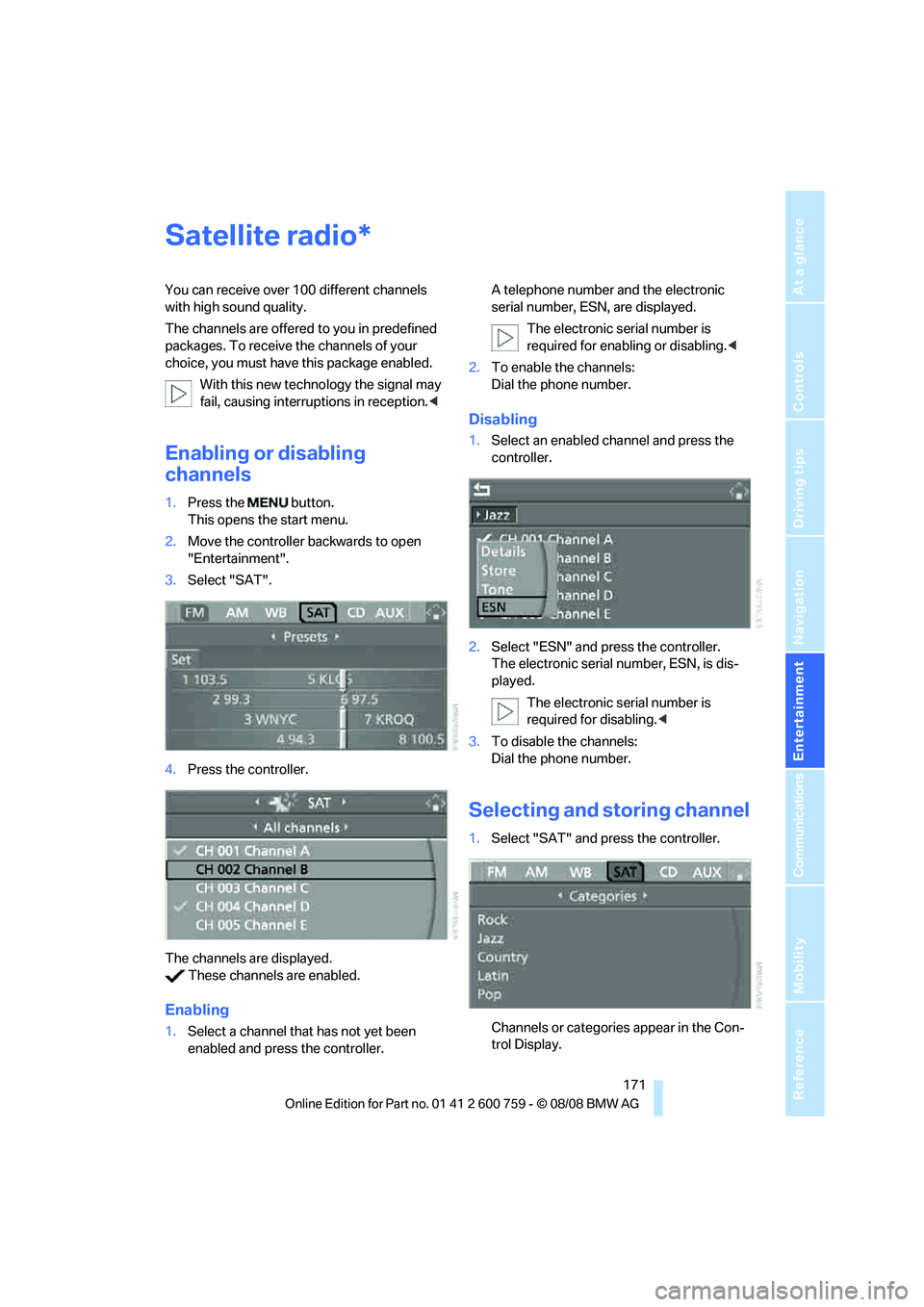
1.Press the button.
This opens the start menu.
2.Move the controller backwards to open
"Entertainment".
3.Select "SAT".
4.Press the controller.
The channels are displayed.
These channels are enabled.
Enabling
1.Select a channel that has not yet been
enabled and press the controller.A telephone number and the electronic
serial number, ESN, are displayed.
The electronic serial number is
required for enabling or disabling.<
2.To enable the channels:
Dial the phone number.
Disabling
1.Select an enabled channel and press the
controller.
2.Select "ESN" and press the controller.
The electronic serial number, ESN, is dis-
played.
The electronic serial number is
required for disabling.<
3.To disable the channels:
Dial the phone number.
Selecting and storing channel
1.Select "SAT" and press the controller.
Channels or categories appear in the Con-
trol Display.
*
Page 175 of 272
Navigation
Entertainment
Driving tips
173Reference
At a glance
Controls
Communications
Mobility
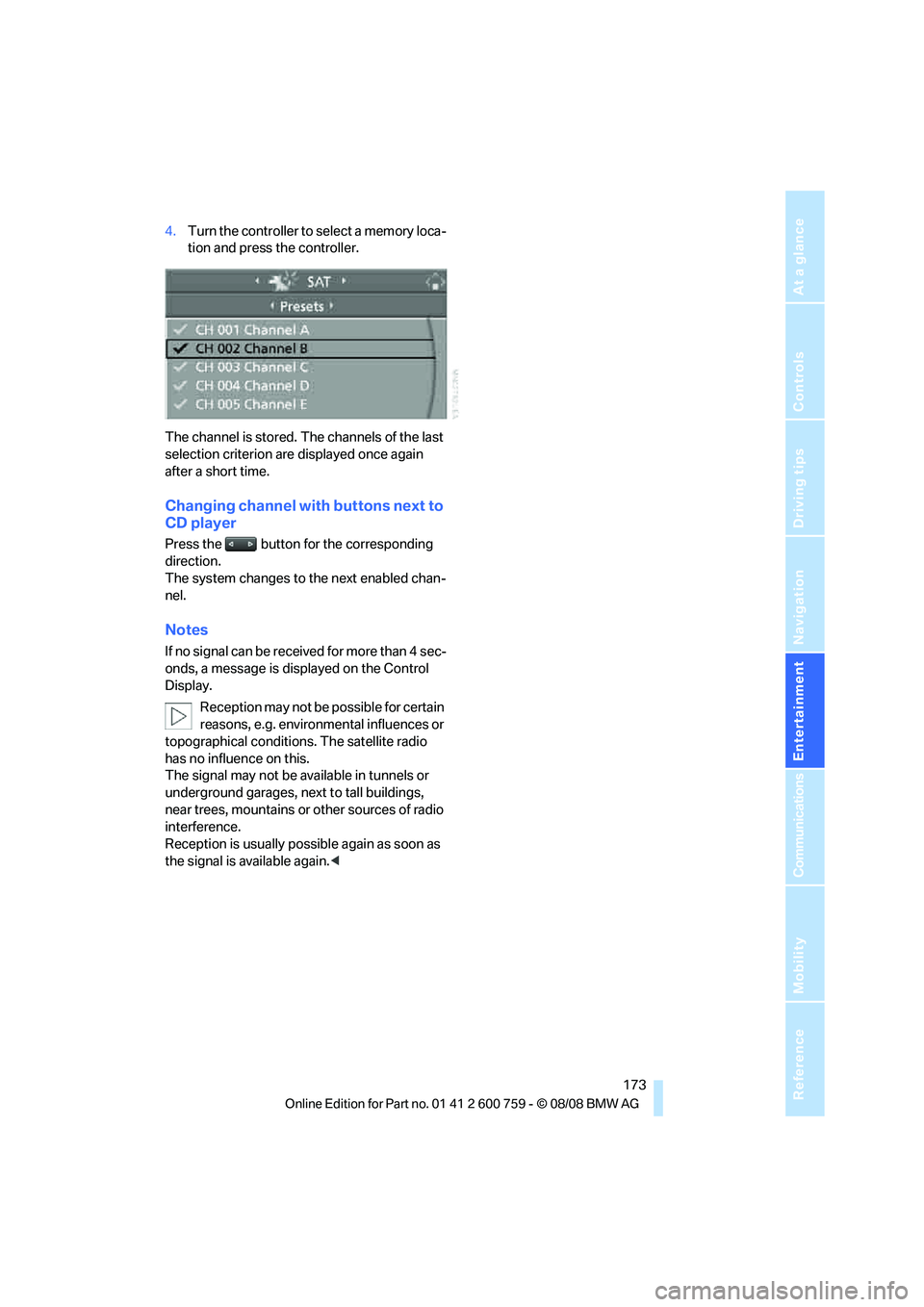
4.Turn the controller to select a memory loca-
tion and press the controller.
The channel is stored. The channels of the last
selection criterion are displayed once again
after a short time.
Changing channel with buttons next to
CD player
Press the button for the corresponding
direction.
The system changes to the next enabled chan-
nel.
Notes
If no signal can be received for more than 4 sec-
onds, a message is displayed on the Control
Display.
Reception may not be possible for certain
reasons, e.g. environmental influences or
topographical conditions. The satellite radio
has no influence on this.
The signal may not be available in tunnels or
underground garages, next to tall buildings,
near trees, mountains or other sources of radio
interference.
Reception is usually possible again as soon as
the signal is available again.<
Page 237 of 272
Mobility
235Reference
At a glance
Controls
Driving tips
Communications
Navigation
Entertainment
Giving and receiving assistance
Emergency request
Conditions for an emergency request:
>Full preparation package mobile phone.
With this equipment, an emergency request
is still possible when no mobile phone is
paired with the vehicle.
>BMW Assist is activated.
Activating BMW Assist, refer to page206.
>Radio readiness is activated.
>The BMW Assist system is logged on to a
mobile phone network.
>The emergency request system is opera-
ble.
Once your BMW Assist subscription expires,
the BMW Assist system can be deactivated by
a BMW center without you having to visit a
workshop. Once the BMW Assist system has
been deactivated, emergency requests are not
possible. The BMW Assist system can be reac-
tivated by a BMW center after signing a new
contract.
Initiating an emergency request
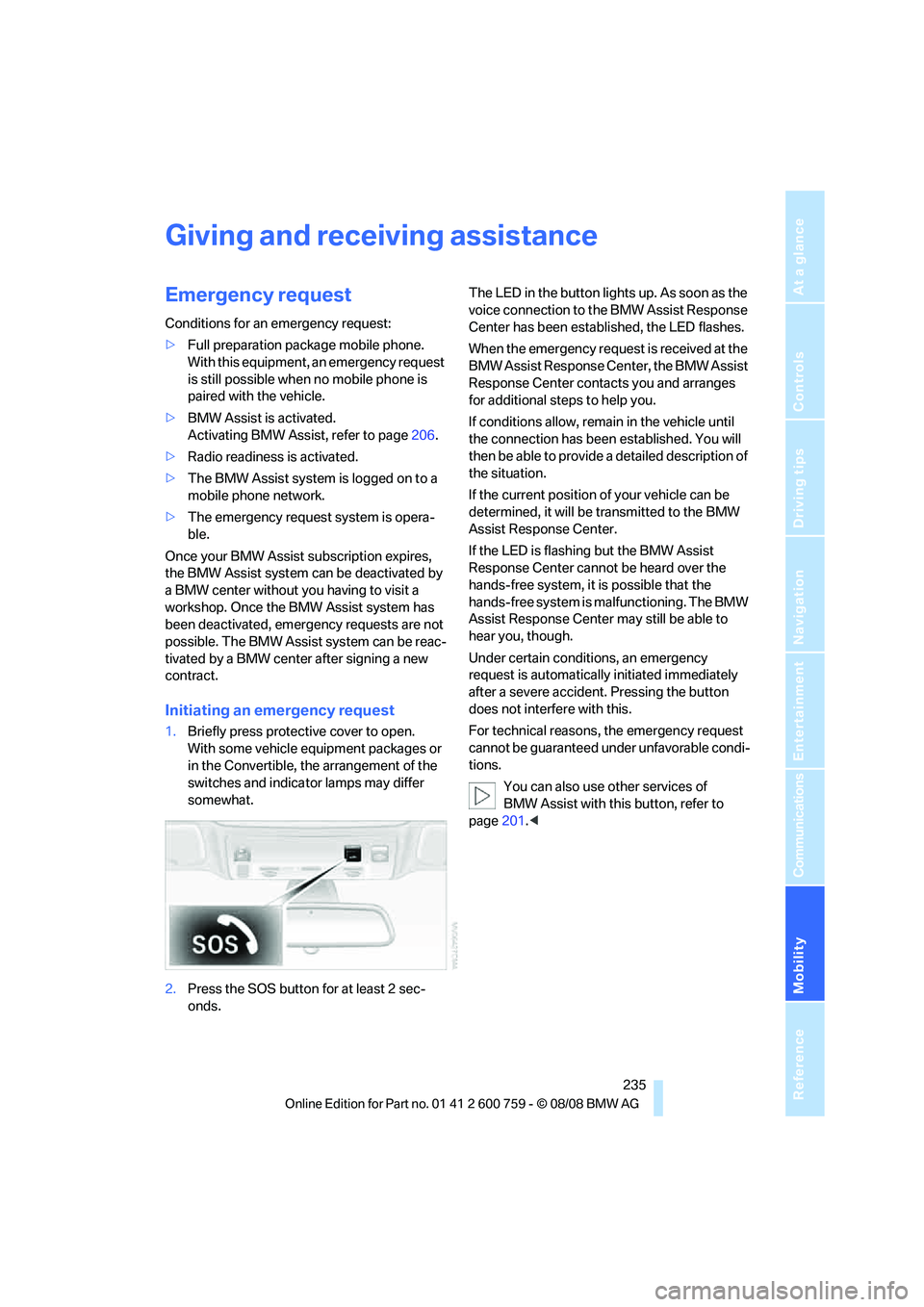
1.Briefly press protective cover to open.
With some vehicle equipment packages or
in the Convertible, the arrangement of the
switches and indicator lamps may differ
somewhat.
2.Press the SOS button for at least 2 sec-
onds.The LED in the button lights up. As soon as the
voice connection to the BMW Assist Response
Center has been established, the LED flashes.
When the emergency request is received at the
BMW Assist Response Center, the BMW Assist
Response Center contacts you and arranges
for additional steps to help you.
If conditions allow, remain in the vehicle until
the connection has been established. You will
then be able to provide a detailed description of
the situation.
If the current position of your vehicle can be
determined, it will be transmitted to the BMW
Assist Response Center.
If the LED is flashing but the BMW Assist
Response Center cannot be heard over the
hands-free system, it is possible that the
hands-free system is malfunctioning. The BMW
Assist Response Center may still be able to
hear you, though.
Under certain conditions, an emergency
request is automatically initiated immediately
after a severe accident. Pressing the button
does not interfere with this.
For technical reasons, the emergency request
cannot be guaranteed under unfavorable condi-
tions.
You can also use other services of
BMW Assist with this button, refer to
page201.<
Page 249 of 272
Reference 247
At a glance
Controls
Driving tips
Communications
Navigation
Entertainment
Mobility
Onboard info
Entertainment
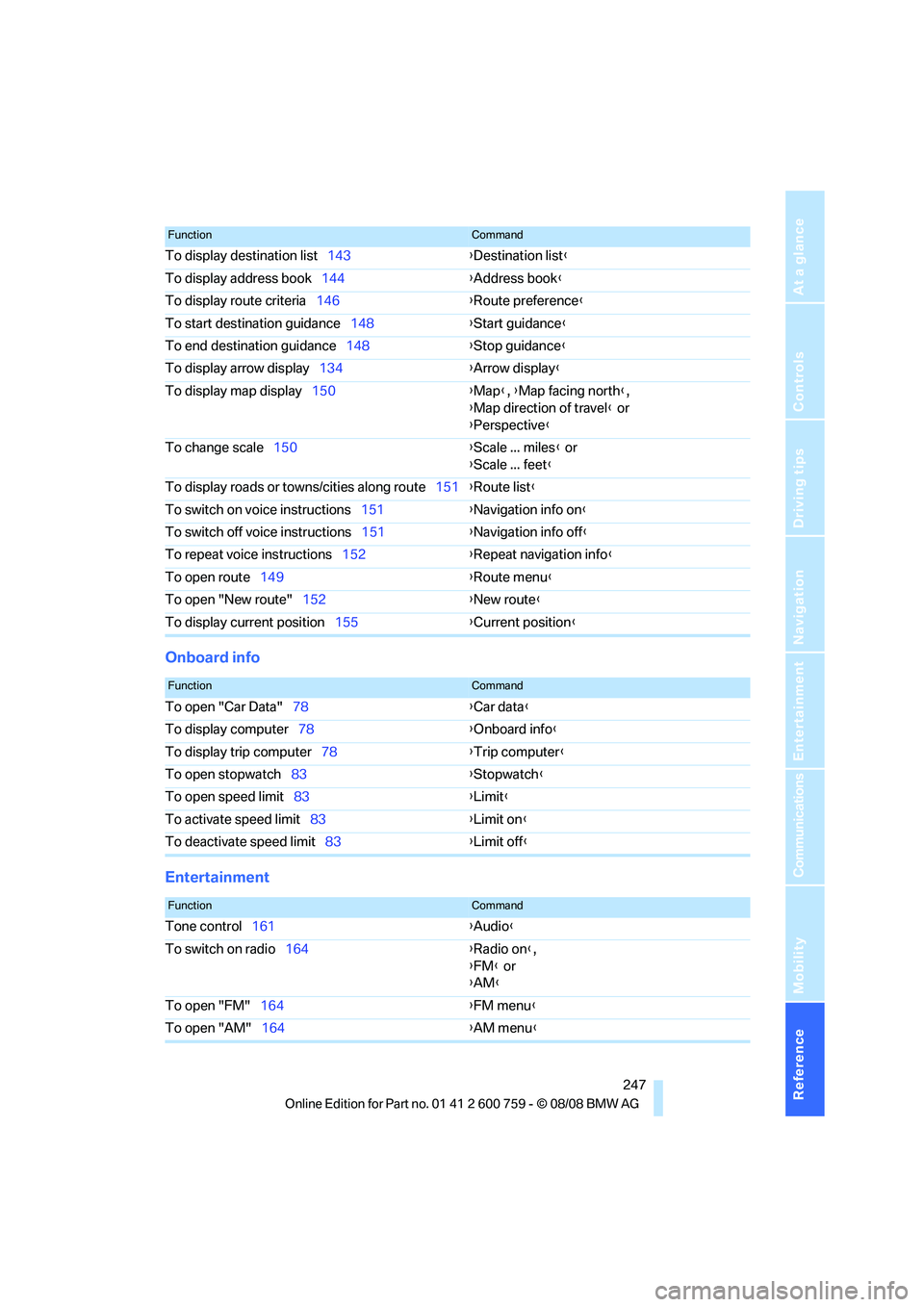
To display destination list143{Destination list}
To display address book144{Address book}
To display route criteria146{Route preference}
To start destination guidance148{Start guidance}
To end destination guidance148{Stop guidance}
To display arrow display134{Arrow display}
To display map display150{Map}, {Map facing north},
{Map direction of travel} or
{Perspective}
To change scale150{Scale ... miles} or
{Scale ... feet}
To display roads or towns/cities along route151{Route list}
To switch on voice instructions151{Navigation info on}
To switch off voice instructions151{Navigation info off}
To repeat voice instructions152{Repeat navigation info}
To open route149{Route menu}
To open "New route"152{New route}
To display current position155{Current position}
FunctionCommand
FunctionCommand
To open "Car Data"78{Car data}
To display computer78{Onboard info}
To display trip computer78{Trip computer}
To open stopwatch83{Stopwatch}
To open speed limit83{Limit}
To activate speed limit83{Limit on}
To deactivate speed limit83{Limit off}
FunctionCommand
Tone control161{Audio}
To switch on radio164{Radio on},
{FM} or
{AM}
To open "FM"164{FM menu}
To open "AM"164{AM menu}
Page 253 of 272
Reference 251
At a glance
Controls
Driving tips
Communications
Navigation
Entertainment
Mobility
"Arrow display" in
navigation149
"Arrow display pop-up
instructions"135
Ashtray121
Assist, refer to
BMW Assist201
Assistance systems, refer to
Driving stability control
systems88
Assistance window21
"Assist. window off"22
AUC
– Automatic recirculated-air
control113
AUC Automatic recirculated-
air control113
"Audio"161,163,168
Audio160
– controls160
– switching on/off160
– tone control161
– volume161
Audio device, external119
Automatic
– air distribution111
– air volume111
– cruise control67,68
– headlamp control104
– service notification203
– steering wheel
adjustment51
– storing stations166
Automatic car washes128
– also refer to Comfort
access40
Automatic climate control110
– automatic air
distribution111
– convertible program111
– switching on and off114
– ventilation with vehicle
parked114
Automatic closing of doors,
refer to Automatic soft
closing35
Automatic curb monitor56Automatic lighting
– refer to Automatic headlamp
control104
– refer to Daytime running
lamps105
– refer to High-beam
assistant106
– refer to Interior lamps108
– refer to Pathway lighting105
– refer to Welcome lamps104
"Automatic programs"
111
Automatic soft closing35
Automatic station search165
"Automatic ventilation"115
AUTO program for automatic
climate control111
"Auto Request"203
"Autostore" on the
radio164,166
"AUX"160,180,182
AUX-IN connection119,180
"AUX IN" in audio mode180
Average fuel consumption77
– setting units86
Average speed77
"Avoid ferries" in
navigation147
"Avoid highways" in
navigation147
Avoiding freeways for
navigation146
Avoiding unintentional
alarms38
"Avoid tollroads" in
navigation147
Axle loads, refer to
Weights245
"A - Z"194
B
Backrest contour, refer to
Lumbar support50
Backrests, refer to Seats49
Backup lamps, replacing
bulbs, refer to Tail
lamps232
"Balance", tone control162Band-aids, refer to First-aid
kit236
Bass, refer to Tone
control161
"Bass", tone control161
Battery
– jump starting236
– refer to Vehicle battery233
Battery replacement, remote
control for comfort
access40
BC button, refer to
Computer77
Being towed238
Belts, refer to Safety belts54
Beverage holder, refer to Cup
holders120
Blower, refer to Air
volume112
"Bluetooth"187
BMW
– Car Shampoo230
"BMW Assist"202,203
BMW Assist201
– activating206
– BMW TeleServices203
– concierge service204
– contacting BMW Customer
Relations204
– displaying vehicle data207
– offered services201
– roadside assistance202
– updating205
"BMW Contact"196
"BMW Contact
Numbers"196
BMW homepage4
BMW maintenance
system225
BMW Night Vision100
– activating101
– cleaning camera102
– cleaning camera, refer to
Wiper system67
– deactivating101
– making settings102
"BMW Service settings"206
BMW TeleServices203
Page 259 of 272
Reference 257
At a glance
Controls
Driving tips
Communications
Navigation
Entertainment
Mobility
FTM, refer to Flat Tire
Monitor90
Fuel
– average consumption77
– display77
– fuel specifications213
– high-quality brands213
– quality213
– refer to Average fuel
consumption77
– specifications213
– tank contents, refer to
Capacities245
Fuel clock, refer to Fuel
gauge77
Fuel display, refer to Fuel
gauge77
Fuel-efficient driving
– refer to Saving fuel126
Fuel filler door212
– releasing in the event of
electrical malfunction212
Full mobile phone preparation
package186
Full screen display, refer to
Switching assistance
window off21
"Full screen" with BMW Night
Vision102
Fuses234
G
Garage door opener, refer to
Integrated universal remote
control117
Gasoline, refer to Fuel
specifications213
Gasoline, refer to Required
fuel213
Gasoline display, refer to Fuel
gauge77
Gearshift lever
– manual transmission62
General driving
notes126,127Glass sunroof, electric with
raise function42
– convenient operation34
– convenient operation with
comfort access39
– moving manually43
– remote control32
Glove compartment118
GPS navigation, refer to
Navigation system134
Grills, refer to Ventilation114
Gross vehicle weight, refer to
Weights245
H
Handbrake62
– indicator lamp13,62
Hands-free system, refer to
Microphone14
Hand washing228
Hazard warning flashers15
"HD radio"168
HD radio, refer to High
Definition Radio168
Head airbags95
Headlamp
– cleaning tank, refer to
Capacities245
Headlamp control,
automatic104
Headlamp flasher65
Headlamps
– cleaning, refer to Wiper
system66
– filler neck for washer
fluid221
– replacing bulbs231
Head Light, refer to Adaptive
Head Light106
Head restraints
– active front head
restraints52
– front52
– sitting safely49
Head-Up Display98,99Heated
– mirrors55
– rear window112
– seats55
– steering wheel56
Heating111
– exterior mirrors55
– interior110
– rear window112
– residual heat114
– seats55
– steering wheel56
Heating with engine switched
off, refer to Residual
heat114
Heavy cargo, refer to Securing
cargo130
Height, refer to
Dimensions243
Height adjustment
– seats50
– steering wheel56
High-beam assistant106
High beams106
– headlamp flasher106
– indicator lamp13
High Definition Radio168
High-pressure cleaning
jets
227,228
High water, refer to Driving
through water128
Hills128
Holder for cups120
"Home address" in
navigation146
Homepage of BMW4
Hood220
Horn10
Hotel function35
– unlocking manually35
Hot exhaust system127
"Hour memo"85
"House number" in
destination entry139
Hydraulic brake assist, refer to
Brake assist88
Hydroplaning127
– also refer to Minimum tread
depth217
Page 260 of 272
Everything from A to Z
258
I
IBOC, refer to High Definition
Radio168
Ice on roads, refer to Outside
temperature warning76
ID3 tag, refer to Information on
track176
Identification mark
– recommended tire
brands219
– run-flat tires218
– tire coding216
iDrive16
– assistance window21
– changing date and time84
– changing language86
– changing menu page20
– changing settings84
– changing units of measure
and display type86
– confirming selection or
entry20
– controller16
– controls16
– displays, menus18
– operating principle18
– selecting menu item20
– setting brightness85
– start menu18
– status information21
– symbols19
Ignition60
– switched off61
– switched on60
Ignition key, refer to Keys/
remote control30
Ignition key position 1, refer to
Radio readiness60
Ignition key position 2, refer to
Ignition on60
Ignition lock60
– starting engine with comfort
access39
i menu18
Imprint2Indicator/warning lamps
– ABS Antilock Brake
System90
– active steering95
– airbags97
– brake system90
– DSC13,89
– DTC13,90
– Flat Tire Monitor92
– fog lamps13,108
– handbrake13,62
– safety belt warning54
– TPM Tire Pressure
Monitor93
Indicator and warning lamps
– overview13
Indicator lighting, refer to
Instrument lighting108
Inflation pressure, refer to Tire
inflation pressure214
Inflation pressure monitoring,
refer to Flat Tire Monitor90
Inflation pressure monitoring,
refer to Tire Pressure
Monitor92
Info menu18
Information
– on another location142
– on current position142
– on destination location142
"Information" in
navigation142
Information menu, refer to
imenu18
"Information on
destination"144
"Info sources"79
Initializing
– Flat Tire Monitor91
– radio, refer to Storing
stations166
– refer to Power failure233
– seat, mirror and steering
wheel memory51
– time and date84
"Input map"141
Installation location
– CD changer178
– drive for navigation DVD134Instructions for navigation
system, refer to Voice
instructions151
Instrument cluster12
Instrument lighting108
Instrument panel, refer to
Cockpit10
Integrated key30
Integrated universal remote
control117
Interesting destination for
navigation142
"Interim time"84
Interior lamps108
– switching on with remote
control33
Interior motion sensor38
– switching off38
Interior rearview mirror,
automatic dimming
feature56
Intermittent mode of the
wipers66
J
Jacking points233
Joystick, refer to iDrive16
Jumpering, refer to Jump
starting236
Jump starting236
K
Keyless-Go, refer to Comfort
access38
Keyless opening and closing,
refer to Comfort access38
Key Memory, refer to Personal
Profile30
"Keypad"196
Keys30
– key-related settings, refer to
Personal Profile30
– spare key30
Kick-down, Sport automatic
transmission63
Knee airbags95
Knock control213
Page 261 of 272
Reference 259
At a glance
Controls
Driving tips
Communications
Navigation
Entertainment
Mobility
L
Lamps
– refer to High-beam
assistant106
– refer to Parking lamps/low
beams104
Lamps and bulbs231
Lane limit lines, refer to
Leaving lane warning102
"Language / Units"86
"Language / Units" in
navigation135,151
"Languages"86
"Languages" in
navigation135,151
Lashing eyes, refer to
Securing cargo130
Last destinations, refer to
Destination list143
"Last seat pos."52
LATCH child restraint fixing
system58
Leather care229
Leaving lane warning102
LEDs light-emitting
diodes231
Length, refer to
Dimensions243
License plate lamp, replacing
bulbs233
Light-emitting diodes
LEDs231
Lighter121
"Lighting"66,105
Lighting
– instruments108
– lamps and bulbs231
– of the vehicle, refer to
Lamps104
Light switch104
"Limit"83
Loading
– securing cargo130
– stowing cargo129
– vehicle129
Loading, refer to Cargo
loading129Load securing equipment,
refer to Securing cargo130
"Lock after driving"35
Lock buttons in the doors,
refer to Lokking35
Locking33
– confirmation signals33
– from inside35
– from outside33
– without key, refer to Comfort
access38
Locking and unlocking doors
– confirmation signals
33
– from inside34
– from outside32
Low beams104
– automatic104
– replacing bulbs232
Lower back support, refer to
Lumbar support50
Luggage compartment
– hotel function35
– increasing capacity,
Convertible37
Luggage compartment lid35
– emergency operation36
– emergency release37
– opening from inside36
– opening from outside36
– opening with remote
control33,36
– unlocking manually36
Luggage compartment lid/
tailgate
– comfort access39
Lumbar support50
LW, waveband164
M
M+S tires, refer to Winter
tires219Maintenance225
– refer to Service and
Warranty Information
Booklet for US models225
– refer to Service
requirements79
– refer to Warranty and
Service Guide Booklet for
Canadian models225
Maintenance system225
Malfunction
– convertible top45
– driver's door34
– fuel filler door212
– hotel function35
Malfunction warnings, refer to
Check Control81
Manual air distribution112
"Manual" in radio mode165
Manual operation
– convertible top45
– door lock34
– driver's door34
– fuel filler door212
– glass sunroof43
– hotel function35
– luggage compartment lid36
– transmission lock, sport
automatic transmission64
Manual transmission62
"Map direction of travel"150
Map display150
"Map facing north"150
Map for navigation
– changing scale150
– destination entry141
Map view facing north150
Master key, refer to Keys/
remote control30
Maximum cooling113
Maximum speed with winter
tires219
Measurements, refer to
Dimensions
– Convertible244
– Coupe243
Memory, refer to Seat, mirror
and steering wheel
memory51
Page 263 of 272
Reference 261
At a glance
Controls
Driving tips
Communications
Navigation
Entertainment
Mobility
"Night Vision on / off"57
Nozzles, refer to Windshield
washer nozzles67
Nylon rope, refer to Tow-
starting and towing237
O
OBD socket, refer to Socket
for Onboard Diagnostics
interface226
Octane ratings, refer to Fuel
specifications213
Odometer76
Oil, refer to Engine oil222
Oil change intervals
– refer to Service and
Warranty Information
Booklet for US models or
Warranty and Service Guide
Booklet for Canadian
models
– refer to Service
requirements79
"On a new destination" in
navigation142
Onboard computer, refer to
iDrive16
"Onboard info"78
Onboard toolkit231
"On destination"142
"On location"142
Opening and closing
– comfort access38
– from inside34
– from outside32
– using remote control32
– using the door lock34
Operating principle, iDrive18Operation by voice for mobile
phone197
– adjusting volume198
– canceling197
– commands197
– correcting phone
number198
– dialing phone number198
– placing a call198
– redialing199
– voice phone book198
"Options"205,206
Orientation menu, refer to
Start menu18
Output, refer to Engine
data242
Outside air, refer to AUC
Automatic recirculated-air
control113
Outside temperature
display76
– changing unit of measure86
Overheated engine, refer to
Coolant temperature76
Overview
– operating principle18
– radio control160
– screen display21
P
Panic mode33
Park Distance Control PDC87
"Parked car operation"115
"Parked car ventilation"115
Parked car ventilation
– activating activation
time115
– preselecting activation
times115
– switching on and off
directly115
Parked car ventilation system
– LED110
Parking
– vehicle61
Parking aid, refer to PDC Park
Distance Control87Parking assistant, refer to
PDC Park Distance
Control87
Parking brake, refer to
Handbrake62
Parking lamps104
– replacing bulbs232
Parts and accessories6
Passenger-side exterior
mirror, tilting down56
"Pathway lighting"105
Pathway lighting105
"PDC"88
"PDC display on"88
PDC Park Distance Control87
Personal Profile30
"Perspective"150
"Phone"188,190,193
Phone book192
– changing entry194
– creating and editing voice
phone book198
– deleting all entries195
– deleting entry195
– dialing phone number194
Phone numbers
– deleting from phone
book195
– dialing193
– most recent numbers195
– selecting in phone book195
– Top 8195
Pinch protection system
– glass sunroof43
– power windows42
Plasters, refer to First-aid
kit236
Plug-in unit for remote
control, refer to Ignition
lock60
Polish230
Pollen, refer to Microfilter/
activated charcoal filter114
Position, refer to Displaying
current position155
Position, refer to Storing
current position144
Power failure233
Page 264 of 272
Everything from A to Z
262 Power windows, refer to
Windows40
Preselecting activation times
of the parked car
ventilation115
"Presets" in radio
mode164,172
Pressure, tires214
Pressure monitoring of tires,
refer to TPM Tire Pressure
Monitor92
"Profile"208
Programmable buttons on
steering wheel57
Programmable memory
buttons22
Protective function, refer to
Pinch protection system
– glass sunroof43
– windows42
R
Radio
– autostore166
– controls160
– High Definition Radio168
– sampling stations165
– satellite radio171
– selecting frequency
manually165
– selecting
waveband160,164
– station search165
– station selection164
– station with the best
reception166
– storing stations166
– switching on/off160
– tone control161
– volume161
– weatherband, refer to
Weather news flashes168
Radio key, refer to Keys/
remote control30
Radio position, refer to Radio
readiness60Radio readiness60
– switched off61
– switched on60
– with comfort access39
Radio stations
– storing166
Rain sensor, windshield wiper
system66
"Random", random play
sequence177
"Random all" in audio
mode178
"Random directory" in audio
mode178
"RDS"167
Reading lamps109
Rear lamps, refer to Tail
lamps232
Rearview mirrors, refer to
Mirrors55
Rear window
– heating112
– opening and closing41
"Received calls"194
Reception
– quality167
– radio stations167
– regional stations166
Reception level of mobile
phone, refer to Status
information21
Recirculated-air mode, refer
to AUC Automatic
recirculated-air control113
Recirculation of air, refer to
AUC Automatic
recirculated-air control113
Reclining seat, refer to
Seats49
Recording times, refer to
Stopwatch83
Redialing with mobile
phone199
"Redial" in mobile phone
mode194
Reflectors, refer to Tail
lamps232
Refueling212Releasing
– hood220
Releasing the locks, refer to
Unlocking39
"Relock door if not
opened"35
Remaining distance, refer to
Cruising range77
Remaining distance to
destination, refer to
Computer78
Remote control30
– comfort access38
– garage door opener117
– luggage compartment lid33
– malfunction33,40
– replacing battery40
Removing condensation on
the windows112
"Repeat directory" in audio
mode177
"Repeat" in audio mode177
"Repeat track" in audio
mode177
Replacement fuses234
Replacement of tires
– refer to Changing
wheels233
Replacement remote control,
refer to New remote
controls30
Replacing bulbs, refer to
Lamps and bulbs231
Replacing wheels/tires, refer
to New wheels and tires218
Reporting safety defects7
Required fuel213
Reserve
– warning, refer to Fuel
gauge77
"Reset"91,93
Reset, refer to Resetting tone
settings163
"Reset" for stopwatch84
"Reset" tone settings163
Residual heat114
Restraint systems
– for children58
– refer to Safety belts54