key BMW 6 SERIES GRAN COUPE 2014 F06 Owner's Manual
[x] Cancel search | Manufacturer: BMW, Model Year: 2014, Model line: 6 SERIES GRAN COUPE, Model: BMW 6 SERIES GRAN COUPE 2014 F06Pages: 253, PDF Size: 5.47 MB
Page 27 of 253
Additional symbolsSymbolMeaning Spoken instructions are turned off.
Split screen
General information Additional information can be displayed on the
right side of the split screen, e.g., information
from the computer.
In the divided screen view, the so-called split
screen, this information remains visible even when you change to another menu.
Switching the split screen on and off
1. Press button.2."Split screen"
Selecting the display
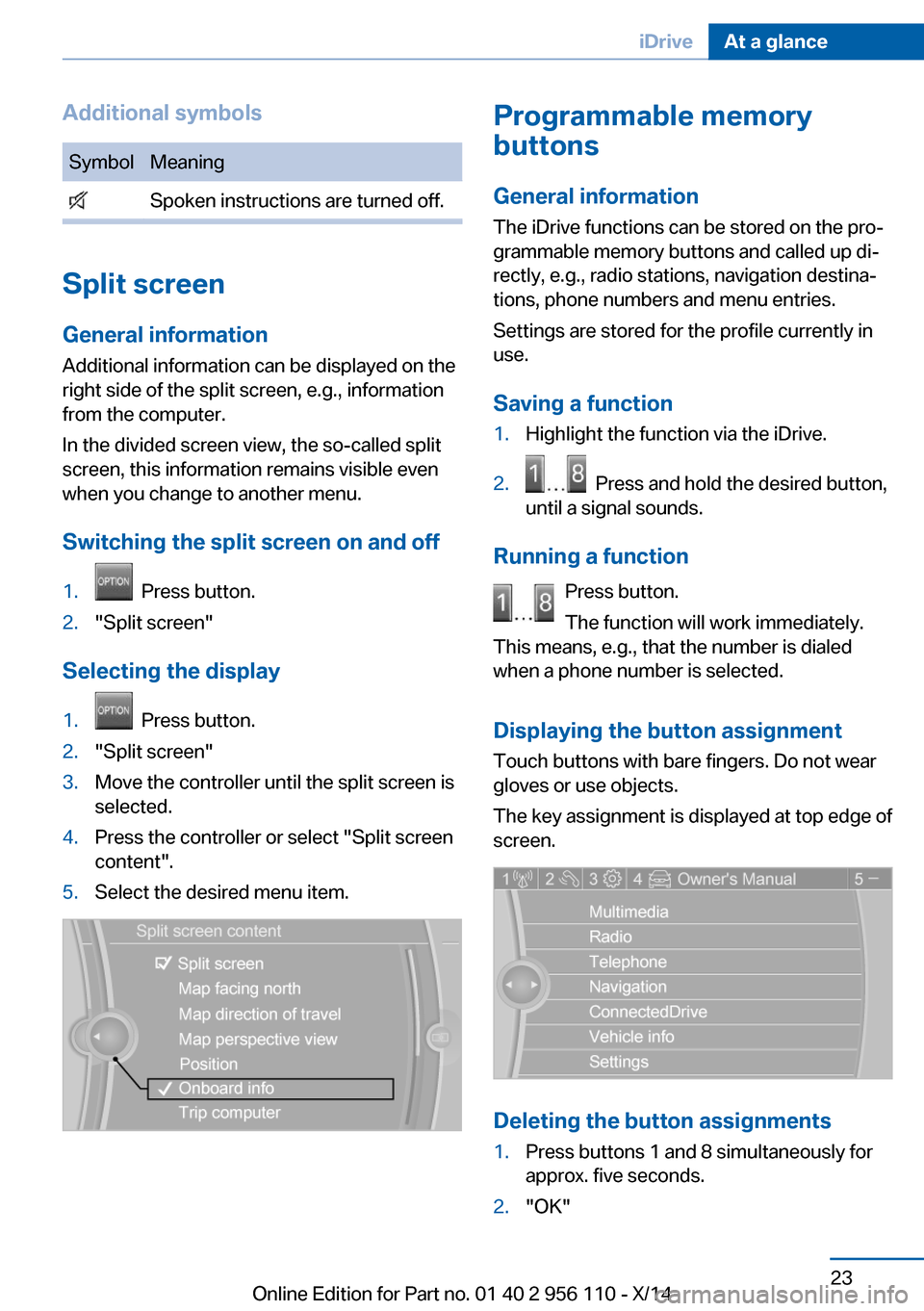
1. Press button.2."Split screen"3.Move the controller until the split screen is
selected.4.Press the controller or select "Split screen
content".5.Select the desired menu item.Programmable memory
buttons
General information
The iDrive functions can be stored on the pro‐
grammable memory buttons and called up di‐
rectly, e.g., radio stations, navigation destina‐
tions, phone numbers and menu entries.
Settings are stored for the profile currently in
use.
Saving a function1.Highlight the function via the iDrive.2. Press and hold the desired button,
until a signal sounds.
Running a function
Press button.
The function will work immediately.
This means, e.g., that the number is dialed
when a phone number is selected.
Displaying the button assignment Touch buttons with bare fingers. Do not wear
gloves or use objects.
The key assignment is displayed at top edge of
screen.
Deleting the button assignments
1.Press buttons 1 and 8 simultaneously for
approx. five seconds.2."OK"Seite 23iDriveAt a glance23
Online Edition for Part no. 01 40 2 956 110 - X/14
Page 38 of 253
Opening and closingVehicle features and options
This chapter describes all standard, country-
specific and optional features offered with the
series. It also describes features that are not
necessarily available in your car, e. g., due to
the selected options or country versions. This
also applies to safety-related functions and
systems.
Remote control/key
General information The vehicle is supplied with two remote con‐
trols with integrated key.
Every remote control holds a replaceable bat‐
tery.
You may set the key functions depending on
the optional features and country-specific ver‐
sion. For Settings, refer to page 42.
The vehicle stores personal settings for every
remote control. Personal Profile, refer to
page 35.
The remote controls hold information on re‐
quired maintenance. Service data in the re‐
mote control, refer to page 215.
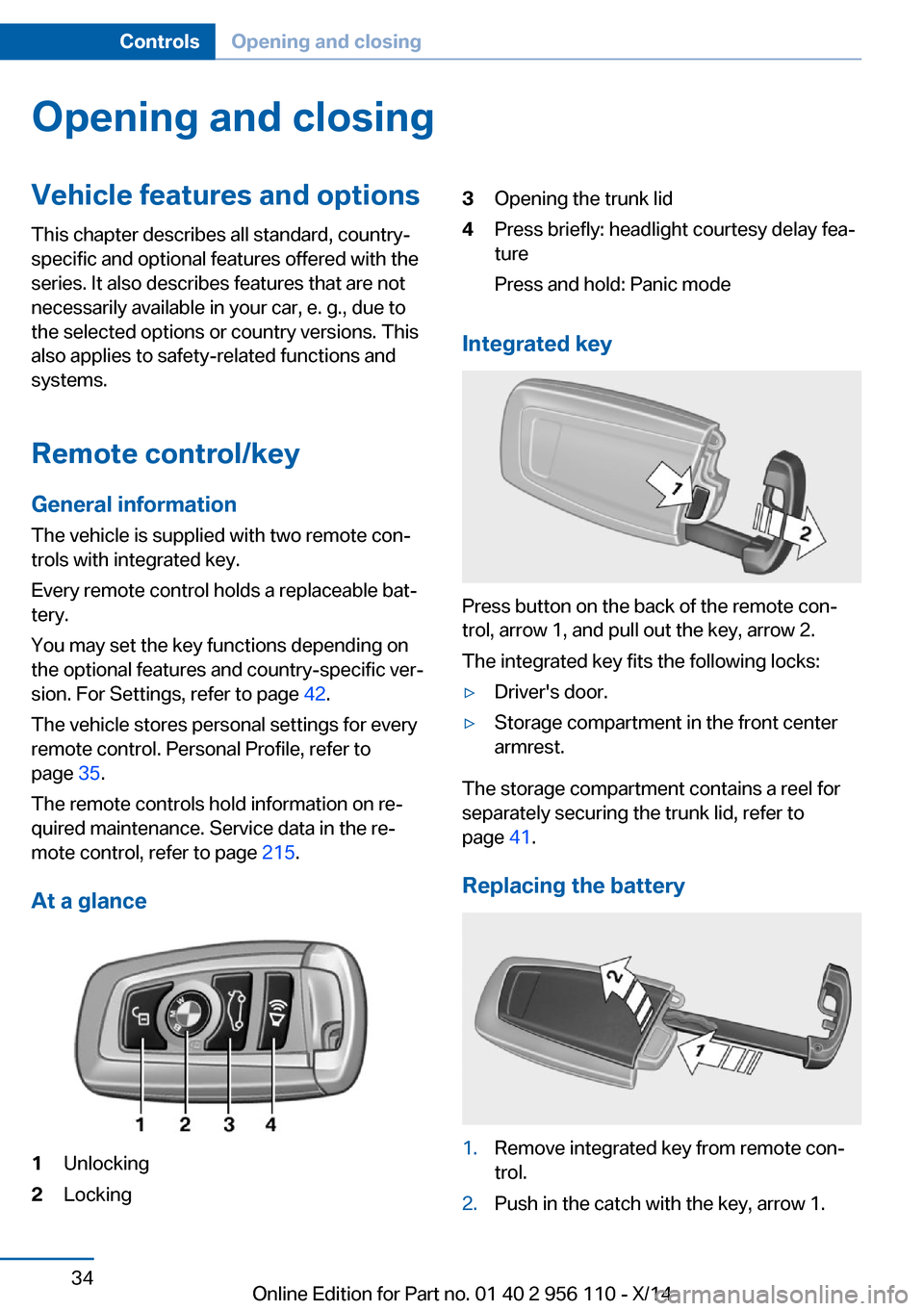
At a glance1Unlocking2Locking3Opening the trunk lid4Press briefly: headlight courtesy delay fea‐
ture
Press and hold: Panic mode
Integrated key
Press button on the back of the remote con‐
trol, arrow 1, and pull out the key, arrow 2.
The integrated key fits the following locks:
▷Driver's door.▷Storage compartment in the front center
armrest.
The storage compartment contains a reel for
separately securing the trunk lid, refer to
page 41.
Replacing the battery
1.Remove integrated key from remote con‐
trol.2.Push in the catch with the key, arrow 1.Seite 34ControlsOpening and closing34
Online Edition for Part no. 01 40 2 956 110 - X/14
Page 43 of 253
▷this device must accept any interference
received, including interference that may
cause undesired operation.
Any unauthorized modifications or changes to
these devices could void the user's authority to
operate this equipment.
Without remote control
From the outside Locking from the outside
Do not lock the vehicle from the outside
with people inside the car, as the vehicle can‐
not be unlocked from inside without special
knowledge.◀
Remove the key before pulling the door
handle
Before pulling the outside door handle, remove
the key to avoid damaging the paintwork and
the key.◀
Unlock or lock the driver's door via the door
lock using the integrated key, refer to page 34.
In some vehicle equipment versions, only the
driver's door can be unlocked or locked via the
door lock. In this case, the other doors must be
unlocked or locked from the inside.
Alarm system
With some country versions, the alarm system
is not armed if the vehicle is locked with the
integrated key.
In some country-specific versions, the alarm
system is triggered when the vehicle is un‐
locked via the door lock.
In order to terminate this alarm, unlock vehicle
with the remote control or reel on the ignition,
if needed, through emergency detection of the
remote control, refer to page 35.
From the inside
Unlocking and locking
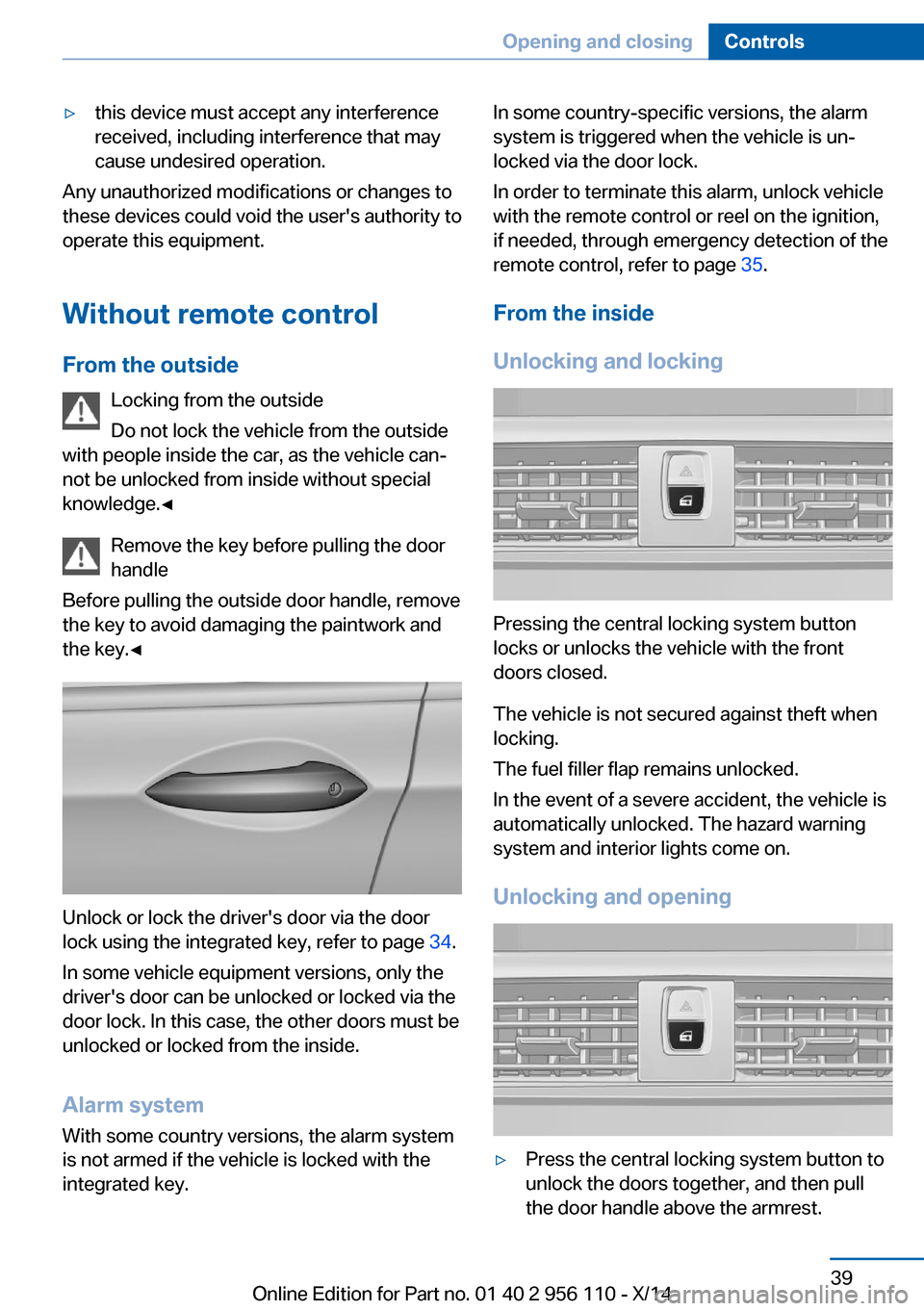
Pressing the central locking system button
locks or unlocks the vehicle with the front
doors closed.
The vehicle is not secured against theft when
locking.
The fuel filler flap remains unlocked.
In the event of a severe accident, the vehicle is
automatically unlocked. The hazard warning
system and interior lights come on.
Unlocking and opening
▷Press the central locking system button to
unlock the doors together, and then pull
the door handle above the armrest.Seite 39Opening and closingControls39
Online Edition for Part no. 01 40 2 956 110 - X/14
Page 45 of 253
Closing
Recessed grips in the interior trim of the trunk
lid make it easier to pull down the lid.
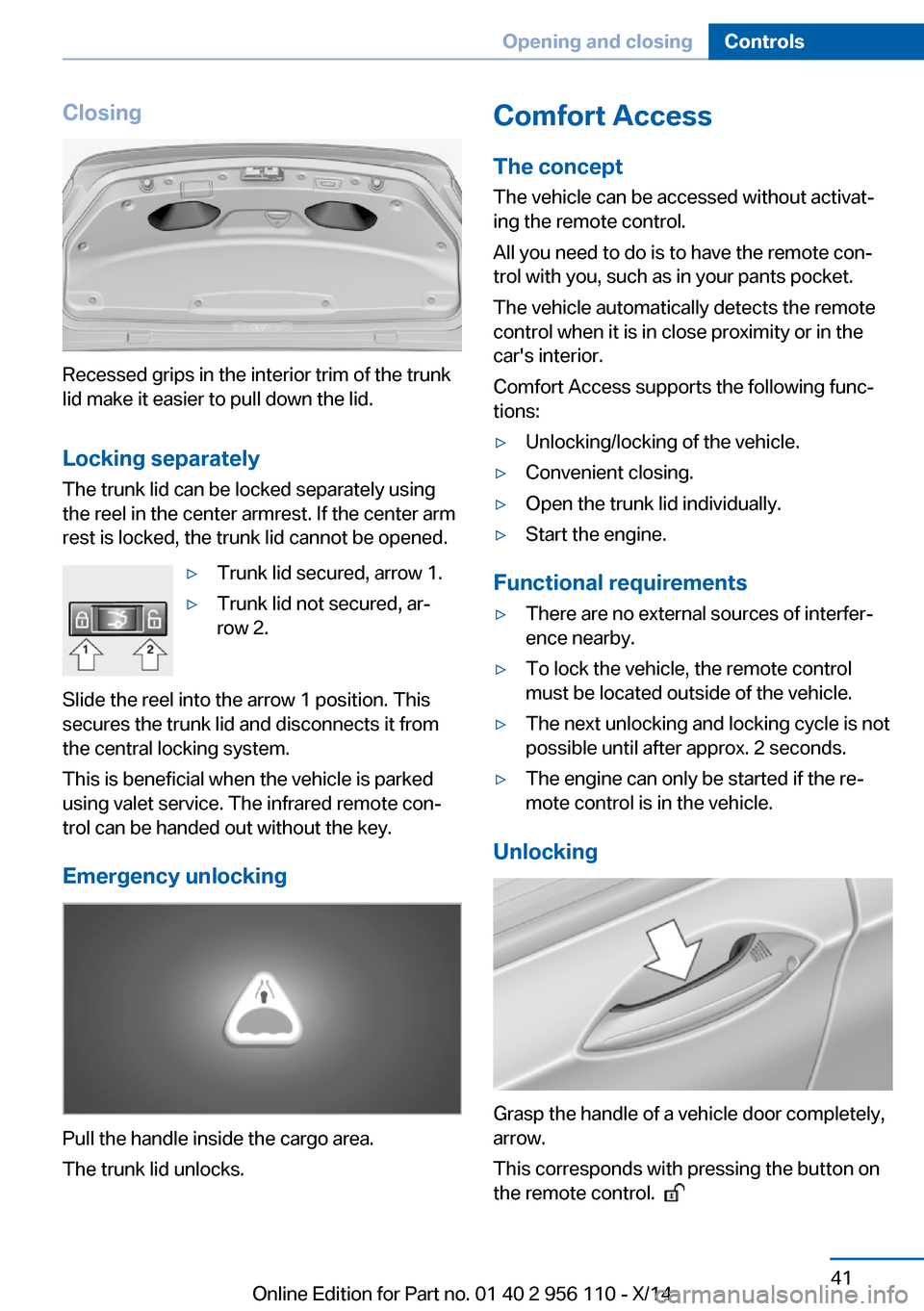
Locking separately The trunk lid can be locked separately using
the reel in the center armrest. If the center arm
rest is locked, the trunk lid cannot be opened.
▷Trunk lid secured, arrow 1.▷Trunk lid not secured, ar‐
row 2.
Slide the reel into the arrow 1 position. This
secures the trunk lid and disconnects it from
the central locking system.
This is beneficial when the vehicle is parked
using valet service. The infrared remote con‐
trol can be handed out without the key.
Emergency unlocking
Pull the handle inside the cargo area.
The trunk lid unlocks.
Comfort Access
The concept
The vehicle can be accessed without activat‐
ing the remote control.
All you need to do is to have the remote con‐
trol with you, such as in your pants pocket.
The vehicle automatically detects the remote
control when it is in close proximity or in the
car's interior.
Comfort Access supports the following func‐
tions:▷Unlocking/locking of the vehicle.▷Convenient closing.▷Open the trunk lid individually.▷Start the engine.
Functional requirements
▷There are no external sources of interfer‐
ence nearby.▷To lock the vehicle, the remote control
must be located outside of the vehicle.▷The next unlocking and locking cycle is not
possible until after approx. 2 seconds.▷The engine can only be started if the re‐
mote control is in the vehicle.
Unlocking
Grasp the handle of a vehicle door completely,
arrow.
This corresponds with pressing the button on
the remote control.
Seite 41Opening and closingControls41
Online Edition for Part no. 01 40 2 956 110 - X/14
Page 46 of 253
Locking
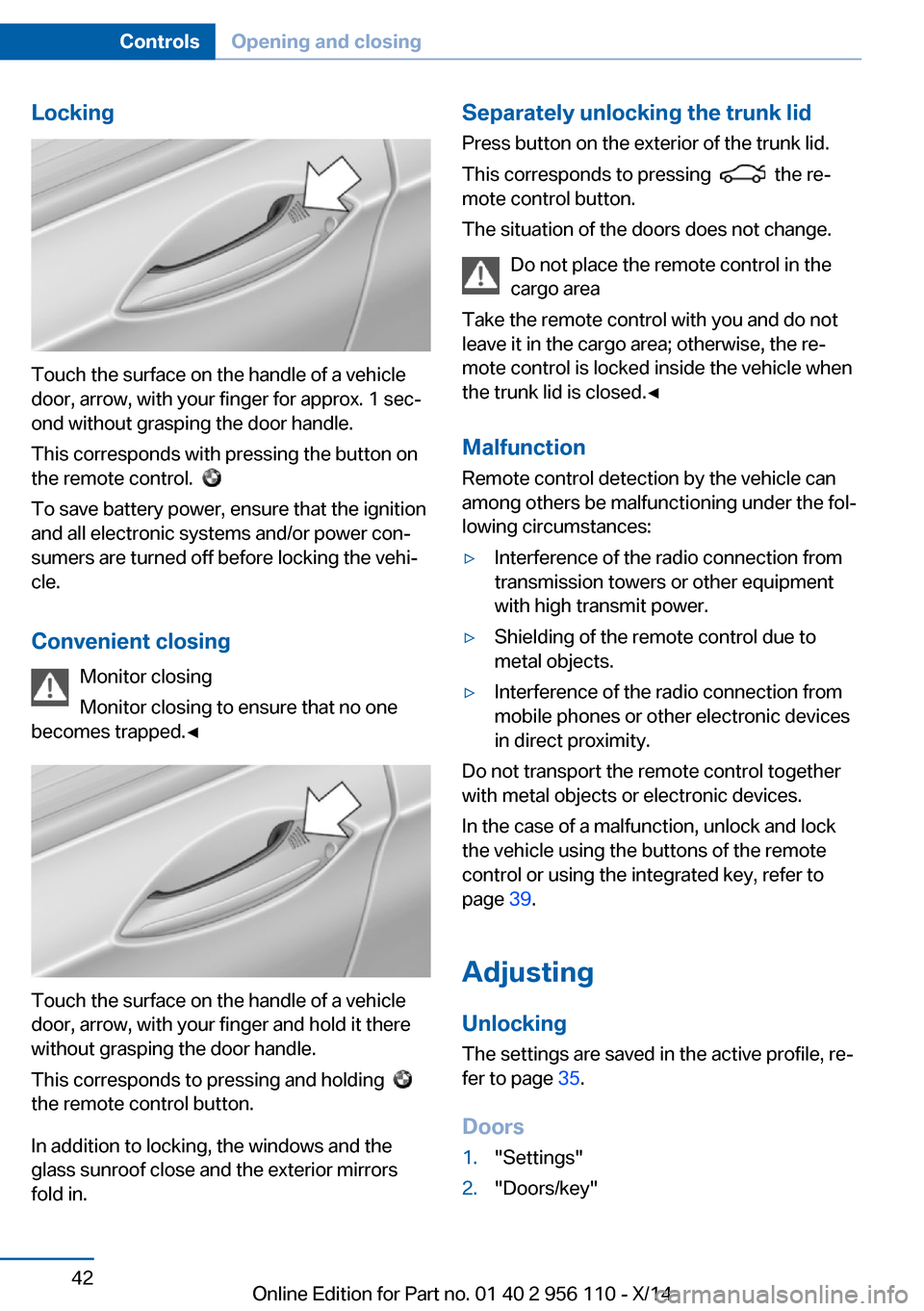
Touch the surface on the handle of a vehicle
door, arrow, with your finger for approx. 1 sec‐
ond without grasping the door handle.
This corresponds with pressing the button on
the remote control.
To save battery power, ensure that the ignition
and all electronic systems and/or power con‐
sumers are turned off before locking the vehi‐
cle.
Convenient closing Monitor closing
Monitor closing to ensure that no one
becomes trapped.◀
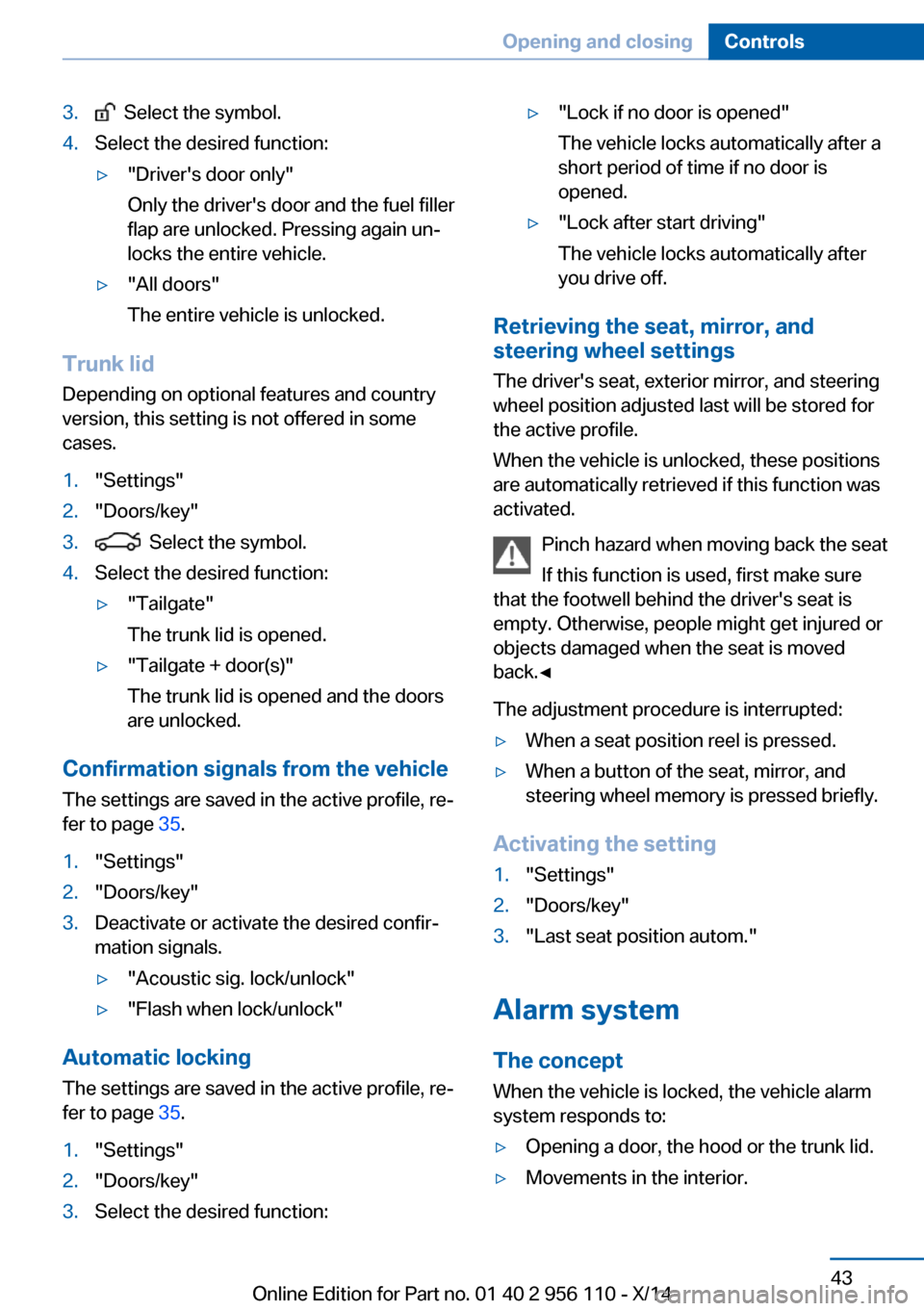
Touch the surface on the handle of a vehicle
door, arrow, with your finger and hold it there
without grasping the door handle.
This corresponds to pressing and holding
the remote control button.
In addition to locking, the windows and the
glass sunroof close and the exterior mirrors
fold in.
Separately unlocking the trunk lid
Press button on the exterior of the trunk lid.
This corresponds to pressing
the re‐
mote control button.
The situation of the doors does not change.
Do not place the remote control in the
cargo area
Take the remote control with you and do not
leave it in the cargo area; otherwise, the re‐
mote control is locked inside the vehicle when
the trunk lid is closed.◀
Malfunction
Remote control detection by the vehicle can
among others be malfunctioning under the fol‐
lowing circumstances:
▷Interference of the radio connection from
transmission towers or other equipment
with high transmit power.▷Shielding of the remote control due to
metal objects.▷Interference of the radio connection from
mobile phones or other electronic devices
in direct proximity.
Do not transport the remote control together
with metal objects or electronic devices.
In the case of a malfunction, unlock and lock
the vehicle using the buttons of the remote
control or using the integrated key, refer to
page 39.
Adjusting
Unlocking The settings are saved in the active profile, re‐
fer to page 35.
Doors
1."Settings"2."Doors/key"Seite 42ControlsOpening and closing42
Online Edition for Part no. 01 40 2 956 110 - X/14
Page 47 of 253
3. Select the symbol.4.Select the desired function:▷"Driver's door only"
Only the driver's door and the fuel filler
flap are unlocked. Pressing again un‐
locks the entire vehicle.▷"All doors"
The entire vehicle is unlocked.
Trunk lid
Depending on optional features and country
version, this setting is not offered in some
cases.
1."Settings"2."Doors/key"3. Select the symbol.4.Select the desired function:▷"Tailgate"
The trunk lid is opened.▷"Tailgate + door(s)"
The trunk lid is opened and the doors
are unlocked.
Confirmation signals from the vehicle
The settings are saved in the active profile, re‐
fer to page 35.
1."Settings"2."Doors/key"3.Deactivate or activate the desired confir‐
mation signals.▷"Acoustic sig. lock/unlock"▷"Flash when lock/unlock"
Automatic locking
The settings are saved in the active profile, re‐fer to page 35.
1."Settings"2."Doors/key"3.Select the desired function:▷"Lock if no door is opened"
The vehicle locks automatically after a
short period of time if no door is
opened.▷"Lock after start driving"
The vehicle locks automatically after
you drive off.
Retrieving the seat, mirror, and
steering wheel settings
The driver's seat, exterior mirror, and steering
wheel position adjusted last will be stored for
the active profile.
When the vehicle is unlocked, these positions
are automatically retrieved if this function was
activated.
Pinch hazard when moving back the seat
If this function is used, first make sure
that the footwell behind the driver's seat is
empty. Otherwise, people might get injured or
objects damaged when the seat is moved
back.◀
The adjustment procedure is interrupted:
▷When a seat position reel is pressed.▷When a button of the seat, mirror, and
steering wheel memory is pressed briefly.
Activating the setting
1."Settings"2."Doors/key"3."Last seat position autom."
Alarm system
The conceptWhen the vehicle is locked, the vehicle alarm
system responds to:
▷Opening a door, the hood or the trunk lid.▷Movements in the interior.Seite 43Opening and closingControls43
Online Edition for Part no. 01 40 2 956 110 - X/14
Page 177 of 253
▷Do not use force when plugging the con‐
nector into the USB interface.▷Do not connect devices such as fans or
lights to the USB interface.▷Do not connect USB hard drives.▷Do not use the USB interface for recharg‐
ing external devices.
With navigation system Professional
or TV: at a glance
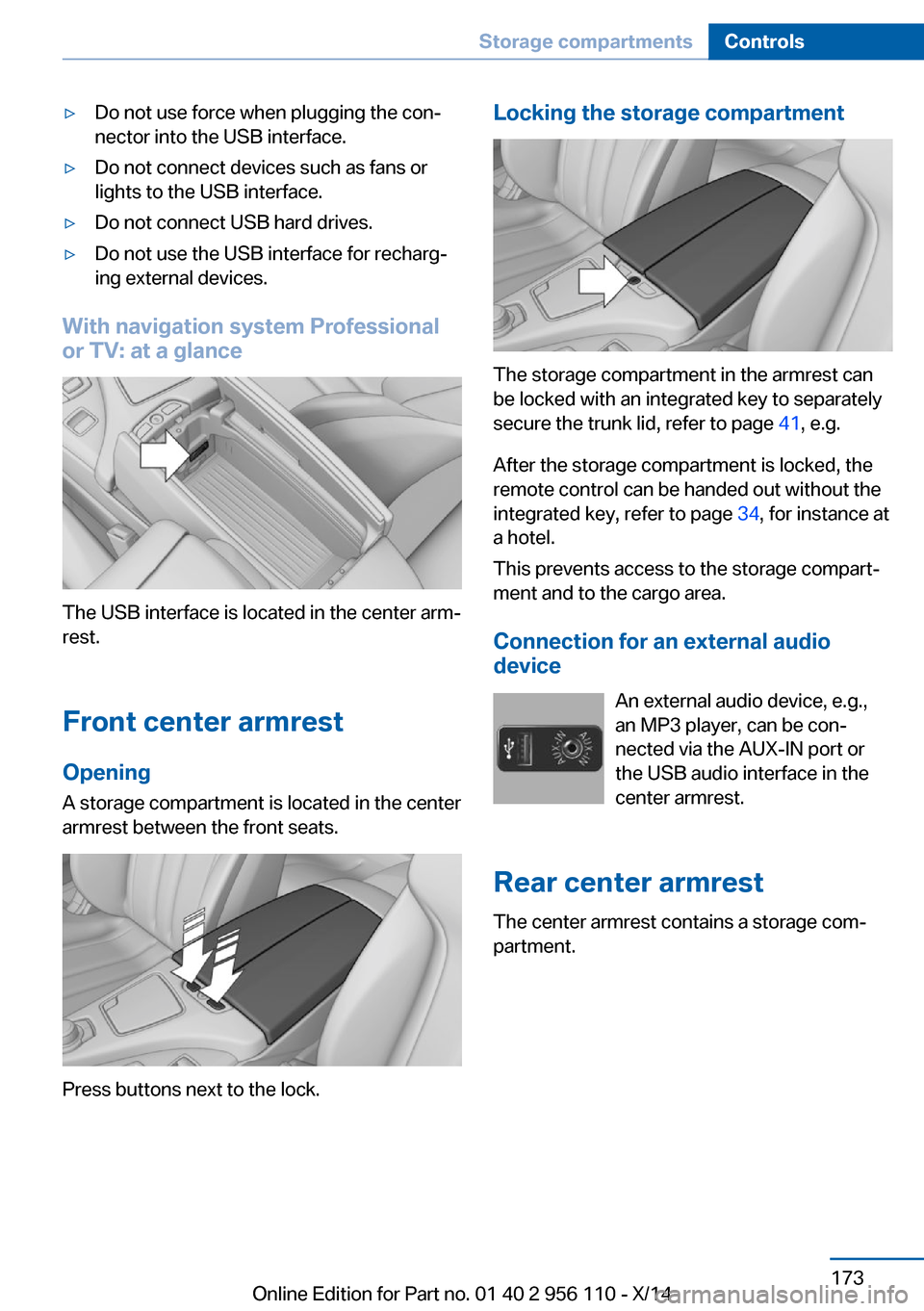
The USB interface is located in the center arm‐
rest.
Front center armrest Opening
A storage compartment is located in the center
armrest between the front seats.
Press buttons next to the lock.
Locking the storage compartment
The storage compartment in the armrest can
be locked with an integrated key to separately
secure the trunk lid, refer to page 41, e.g.
After the storage compartment is locked, the
remote control can be handed out without the
integrated key, refer to page 34, for instance at
a hotel.
This prevents access to the storage compart‐
ment and to the cargo area.
Connection for an external audio
device
An external audio device, e.g.,
an MP3 player, can be con‐
nected via the AUX-IN port or
the USB audio interface in the center armrest.
Rear center armrest The center armrest contains a storage com‐
partment.
Seite 173Storage compartmentsControls173
Online Edition for Part no. 01 40 2 956 110 - X/14
Page 243 of 253
Belts, safety belts 52
Beverage holder, cu‐ pholder 174
Blinds, sun protection 46
BMW Assist, see user's manual for Navigation, En‐
tertainment and Communi‐
cation
BMW maintenance sys‐ tem 215
Bonus range, ECO PRO 185
Bottle holder, refer to Cu‐ pholder 174
Brake assistant 128
Brake assistant, adaptive 128
Brake discs, break-in 178
Brake force display 125
Brake lights, adaptive 125
Brake lights, brake force dis‐ play 125
Brake lights, bulb replace‐ ment 219
Brake pads, break-in 178
Braking, hints 179
Breakdown assis‐ tance 223, 224
Break-in 178
Brightness of Control Dis‐ play 93
Bulb replacement, front 217
Bulb replacement, rear 219
Button, RES 139
Button, Start/Stop 63
Bypassing, refer to Jump- starting 224
C
California Proposition 65 Warning 7
Calling up mirror adjust‐ ment 43
Calling up seat adjust‐ ment 43
Calling up steering wheel ad‐ justment 43 Camera, care 231
Camera, rearview cam‐ era 148
Camera, Side View 150
Camera, Top View 152
Can holder, refer to Cu‐ pholder 174
Car battery 221
Car care products 229
Care, displays 231
Care, vehicle 229
Cargo 181
Cargo area, enlarging 169
Cargo area, storage compart‐ ments 175
Cargo, securing 182
Cargo straps, securing cargo 182
Car key, refer to Remote con‐ trol 34
Carpet, care 231
Car wash 228
Catalytic converter, refer to Hot exhaust system 178
CBS Condition Based Serv‐ ice 215
CD/Multimedia, see user's manual for Navigation, En‐
tertainment and Communi‐
cation
Center console 16
Central locking system 39
Central screen, refer to Con‐ trol Display 18
Changes, technical, refer to Safety 7
Changing parts 217
Changing wheels 220
Changing wheels/tires 204
Chassis number, see vehicle identification number 9
Check Control 81
Checking the engine oil level electronically 210
Checking the oil level elec‐ tronically 210 Children, seating position 59
Children, transporting safely 59
Child restraint fixing sys‐ tem 59
Child restraint fixing system LATCH 60
Child restraint fixing systems, mounting 59
Child safety locks 62
Child seat, mounting 59
Child seats 59
Chrome parts, care 230
Cigarette lighter 167
Cleaning displays 231
Climate control 157
Climate control laminated tinted safety glass 179
Climate control wind‐ shield 179
Clock 86
Closing/opening via door lock 39
Closing/opening with remote control 37
Clothes hooks 174
Coasting 187
Coasting with engine decou‐ pled, coasting 187
Coasting with idling en‐ gine 187
Combination reel, refer to Turn signals 69
Combination reel, refer to Wiper system 70
COMFORT+ program, Driving Dynamics Control 134
Comfort Access 41
COMFORT program, Driving Dynamics Control 134
Computer 90
Condensation on win‐ dows 158
Condensation under the vehi‐ cle 180 Seite 239Everything from A to ZReference239
Online Edition for Part no. 01 40 2 956 110 - X/14
Page 246 of 253
Headlight courtesy delay fea‐ture 96
Headlight courtesy delay fea‐ ture via remote control 38
Headlight flasher 69
Headlight glass 218
Headlights 217
Headlights, care 229
Headlight washer system 70
Head restraints 49
Head restraints, front 54
Head-up Display 93
Head-up Display, care 231
Heating, refer to Parked-car heating 162
Heavy cargo, stowing 182
Height, seats 49
Height, vehicle 234
High-beam Assistant 98
High beams 69
High beams/low beams, refer to High-beam Assistant 98
Hill Descent Control HDC 130
Hills 180
Hill start assistant, refer to Drive-off assistant 128
Hints 6
Holder for beverages 174
Hood 208
Horn 14
Hotel function, trunk lid 41
Hot exhaust system 178
HUD Head-up Display 93
Hydroplaning 179
I Ice warning, see External temperature warning 85
Icy roads, see External tem‐ perature warning 85
Identification marks, tires 202
Identification number, see ve‐ hicle identification num‐
ber 9 iDrive 18
Ignition key, refer to Remote control 34
Ignition off 63
Ignition on 63
Indication of a flat tire 105 , 108
Indicator and alarm lamps, see Check Control 81
Indicator lamp, see Check Control 81
Individual air distribution 157
Individual settings, refer to Personal Profile 35
Inflation pressure, tires 196
Inflation pressure warning FTM, tires 108
Info display, refer to Com‐ puter 90
Initialization, Integral Active Steering 132
Initialize, Tire Pressure Moni‐ tor TPM 105
Initializing, Flat Tire Monitor FTM 108
Instrument cluster 77
Instrument cluster, electronic displays 77
Instrument display, multifunc‐ tional 78
Instrument lighting 99
Integral Active Steering 132
Integrated key 34
Integrated Owner's Manual in the vehicle 29
Intelligent Emergency Re‐ quest 223
Intelligent Safety 109
Intensity, AUTO pro‐ gram 157
Interior equipment 165
Interior lights 99
Interior lights via remote con‐ trol 38
Interior motion sensor 44 Interior rearview mirror, auto‐
matic dimming feature 57
Interval display, service re‐ quirements 87
J Jacking points for the vehicle jack 220
Joystick, Steptronic transmis‐ sion 73
Jump-starting 224
K
Key/remote control 34
Keyless Go, refer to Comfort Access 41
Key Memory, refer to Per‐ sonal Profile 35
Kickdown, Steptronic trans‐ mission 73
Knee airbag 101
L Lamp replacement, front 217
Lamp replacement, rear 219
Lane departure warning 122
Lane margin, warning 122
Language on Control Dis‐ play 93
Lashing eyes, securing cargo 182
LATCH child restraint sys‐ tem 60
Launch Control 75
Leather, care 229
LED headlights, Bulb replace‐ ment 219
LED light 219
LEDs, light-emitting di‐ odes 218
Length, vehicle 234
Letters and numbers, enter‐ ing 24 Seite 242ReferenceEverything from A to Z242
Online Edition for Part no. 01 40 2 956 110 - X/14
Page 247 of 253
License plate lamp, bulb re‐placement 219
Light alloy wheels, care 230
Light control 97
Light-emitting diodes, LEDs 218
Lighting 96
Lighting, speaker 100
Lighting via remote con‐ trol 38
Light reel 96
Lights 96
Lights and bulbs 217
Load 182
Loading 181
Lock, door 39
Locking/unlocking via door lock 39
Locking/unlocking with re‐ mote control 37
Locking, automatic 43
Locking, settings 42
Locking via trunk lid 40
Lock, power window 46
Locks, doors, and win‐ dows 62
Low beams 96
Low beams, automatic, refer to High-beam Assistant 98
Lower back support 50
Lumbar support 50
M
Maintenance 215
Maintenance require‐ ments 215
Maintenance, service require‐ ments 87
Maintenance system, BMW 215
Make-up mirror 167
Malfunction displays, see Check Control 81
Manual air distribution 157
Manual air flow 158 Manual brake, refer to Parking
brake 66
Manual mode, Steptronic transmission 73
Manual operation, door lock 39
Manual operation, exterior mirrors 56
Manual operation, fuel filler flap 192
Manual operation, Park Dis‐ tance Control PDC 146
Manual operation, rearview camera 148
Manual operation, Side View 150
Manual operation, Top View 152
Marking on approved tires 204
Marking, run-flat tires 205
Massage seat, front 51
Master key, refer to Remote control 34
Maximum cooling 158
Maximum speed, display 88
Maximum speed, winter tires 205
Measure, units of 93
Medical kit 224
Memory for seat, mirrors, steering wheel 55
Menu, EfficientDynamics 186
Menu in instrument clus‐ ter 89
Menus, operating, iDrive 18
Menus, refer to iDrive operat‐ ing concept 19
Messages, see Check Con‐ trol 81
Microfilter 159
Minimum tread, tires 203
Mirror 56
Mirror memory 55
Mobile communication devi‐ ces in the vehicle 179 Modifications, technical, refer
to Safety 7
Moisture in headlight 218
Monitor, refer to Control Dis‐ play 18
Mounting of child restraint systems 59
Multifunctional instrument display 78
Multifunction steering wheel, buttons 14
N
Navigation, see user's manual for Navigation, Entertain‐
ment and Communication
Neck restraints, front, refer to Head restraints 54
Neutral cleaner, see wheel cleaner 230
New wheels and tires 204
Night Vision 118
Night Vision device, see Night Vision 118
Nylon rope for tow-starting/ towing 226
O OBD Onboard Diagnosis 215
OBD, see OBD Onboard Di‐ agnosis 215
Object detection, see Night Vision 118
Obstacle marking, rearview camera 149
Octane rating, refer to Rec‐ ommended fuel grade 194
Odometer 85
Office, see user's manual for Navigation, Entertainment
and Communication
Oil 210
Oil, adding 211
Oil additives 211 Seite 243Everything from A to ZReference243
Online Edition for Part no. 01 40 2 956 110 - X/14