heating BMW 640I CONVERTIBLE 2014 User Guide
[x] Cancel search | Manufacturer: BMW, Model Year: 2014, Model line: 640I CONVERTIBLE, Model: BMW 640I CONVERTIBLE 2014Pages: 243, PDF Size: 7.83 MB
Page 161 of 243
▷Thumbwheels for opening and closing the
vents continuously, arrows 3.
Adjusting the ventilation
▷Ventilation for cooling:
Adjust the vent to direct the air in your di‐
rection, e.g., if the vehicle interior is hot
from the sun.▷Draft-free ventilation:
Adjust the vent to let the air flow past you.
Parked-car ventilation/
heating
The concept The parked-car ventilation ventilates the vehi‐
cle interior and lowers its temperature, if nec‐
essary.
The parked-car heating warms the vehicle in‐
terior, making snow and ice easier to remove.
With the ignition switched off, the air is auto‐
matically routed to the windshield, to the side
windows, and into the footwell.
The systems can be switched on and off di‐
rectly or by using two preset departure times.
The switch-on time is automatically deter‐
mined based on the temperature. The systems
promptly switch on before the selected depar‐
ture time.
Operation takes place on the iDrive or the re‐ mote control.
Note Parked-car heating in enclosed areas
Do not operate the parked-car heating in
enclosed areas, as breathing of the harmful ex‐
haust fumes may lead to loss of consciousness
and death. The exhaust gases contain carbon
monoxide, an odorless and colorless but highly
toxic gas. Switch off the parked-car heating
when refueling.◀
At external temperatures below 32 ℉/0 ℃, wa‐
ter vapor occurs that emerges from below the
vehicle.
Functional requirements
Parked-car ventilation▷With remote control or when the departure
time is preselected: depends on internal,
external and set temperature.▷Direct operation via iDrive: any external
temperature.▷In direct mode via remote control: external
temperature above approx. 59 ℉/15 ℃.
Open the vents to allow air to flow out.
Parked-car heating
▷With remote control or when the departure
time is preselected: depends on internal,
external and set temperature.▷Direct operation via iDrive: any external
temperature.▷In direct mode via remote control: external
temperature below approx. 59 ℉/15 ℃.▷The battery is sufficiently charged.▷The fuel tank is filled to above the reserve
range.
If the parked-car heating has not been used for
several months, it may be necessary to switch
the system on again after several minutes.
Switching on/off directly
1."Settings"2."Climate"3."Activate ind. heating" or
"Activate comf. ventilation"
The symbol on the automatic climate con‐
trol flashes if the system is switched on.
The system continues to run for some time af‐
ter being switched off.
Seite 161Climate controlControls161
Online Edition for Part no. 01 40 2 910 721 - VI/13
Page 162 of 243
Preselecting the departure time1."Settings"2."Climate"3."Dep. time 1:" or "Dep. time 2:"4.Set the desired time.
Activating the departure time
1."Settings"2."Climate"3."Activate depart. time 1" or "Activate
depart. time 2"
The symbol on the automatic climate con‐
trol lights up when the departure time is acti‐
vated.
The symbol on the automatic climate con‐
trol flashes when the system has been
switched on.
The system will only be switched on within the
next 24 hours. After that, it needs to reacti‐
vated.
Remote control
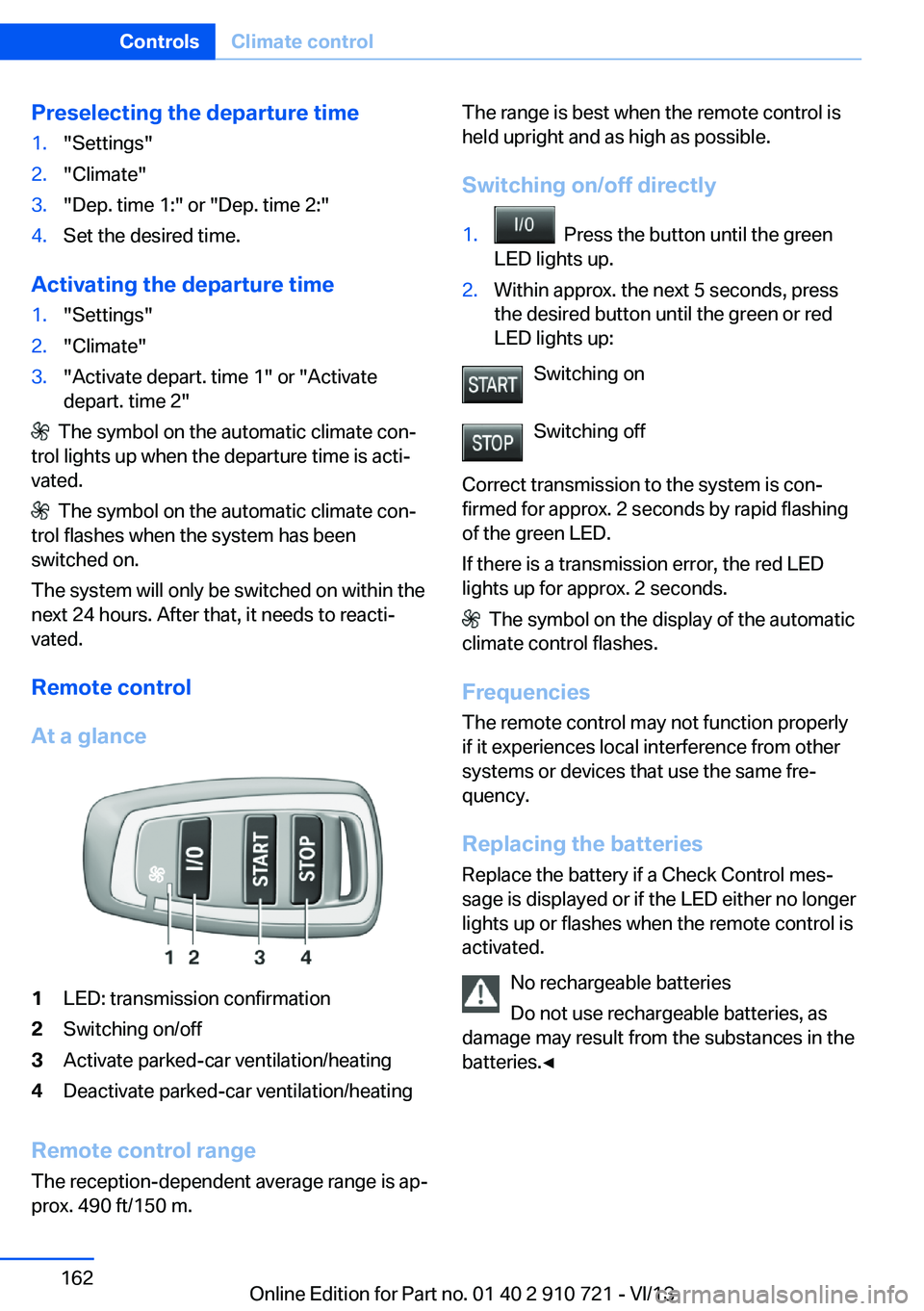
At a glance
1LED: transmission confirmation2Switching on/off3Activate parked-car ventilation/heating4Deactivate parked-car ventilation/heating
Remote control range The reception-dependent average range is ap‐
prox. 490 ft/150 m.
The range is best when the remote control is
held upright and as high as possible.
Switching on/off directly1. Press the button until the green
LED lights up.2.Within approx. the next 5 seconds, press
the desired button until the green or red
LED lights up:
Switching on
Switching off
Correct transmission to the system is con‐
firmed for approx. 2 seconds by rapid flashing
of the green LED.
If there is a transmission error, the red LED
lights up for approx. 2 seconds.
The symbol on the display of the automatic
climate control flashes.
Frequencies The remote control may not function properly
if it experiences local interference from other
systems or devices that use the same fre‐
quency.
Replacing the batteries Replace the battery if a Check Control mes‐
sage is displayed or if the LED either no longer
lights up or flashes when the remote control is
activated.
No rechargeable batteries
Do not use rechargeable batteries, as
damage may result from the substances in the
batteries.◀
Seite 162ControlsClimate control162
Online Edition for Part no. 01 40 2 910 721 - VI/13
Page 177 of 243
LoadingVehicle equipment
All standard, country-specific and optional
equipment that is offered in the model series is
described in this chapter. Therefore, equip‐
ment is also described that is not available in a
vehicle, e. g., because of the selected optional
equipment or country variant. This also applies
for safety-related functions and systems.
Hints Overloading the vehicle
To avoid exceeding the approved carry‐
ing capacity of the tires, never overload the ve‐
hicle. Overloading can lead to overheating and
increases the rate at which damage develops
inside the tires. This could result in a sudden
loss of tire inflation pressure.◀
No fluids in the trunk
Make sure that fluids do not leak into the
trunk; otherwise, the vehicle may be dam‐
aged.◀
Determining the load limit1.Locate the following statement on your ve‐
hicle’s placard:▷The combined weight of occupants
and cargo should never exceed XXX kg
or YYY lbs. Otherwise, damage to thevehicle and unstable driving situations
may result.2.Determine the combined weight of the
driver and passengers that will be riding in
your vehicle.3.Subtract the combined weight of the driver
and passengers from XXX kilograms or
YYY pounds.4.The resulting figure equals the available
amount of cargo and luggage load ca‐
pacity.
For example, if the YYY amount equals
1,000 lbs and there will be four 150 lbs
passengers in your vehicle, the amount of
available cargo and luggage load capacity
is 400 lbs: 1,000 lbs minus 600 lbs =
400 lbs.5.Determine the combined weight of lug‐
gage and cargo being loaded on the vehi‐
cle. That weight may not safely exceed the
available cargo and luggage load capacity
calculated in Step 4.
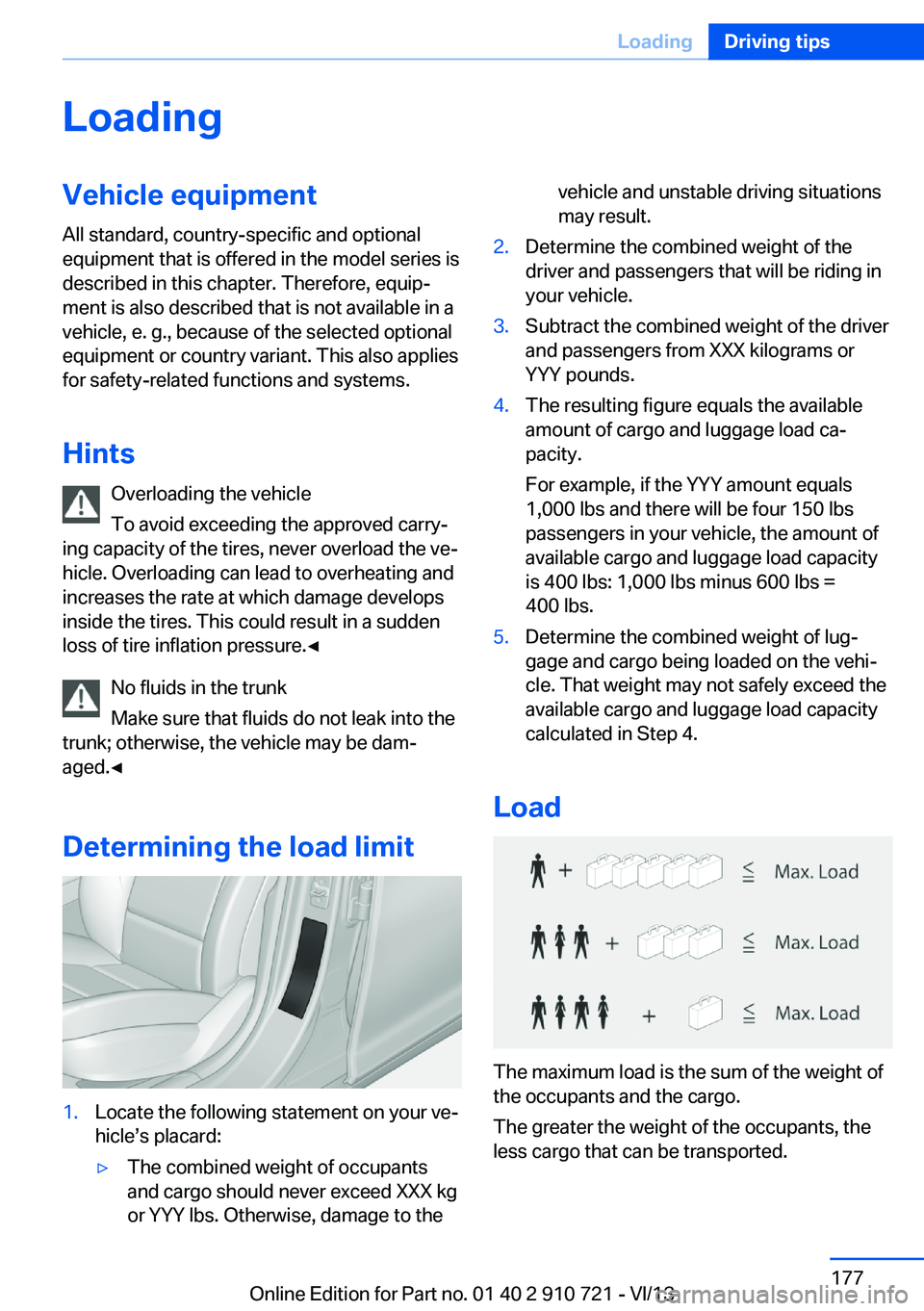
Load
The maximum load is the sum of the weight of
the occupants and the cargo.
The greater the weight of the occupants, the
less cargo that can be transported.
Seite 177LoadingDriving tips177
Online Edition for Part no. 01 40 2 910 721 - VI/13
Page 180 of 243
On a downhill gradient, take your foot off the
accelerator and let the vehicle roll.
The flow of fuel is interrupted while coasting.
Switch off the engine during
longer stops
Switch off the engine during longer stops, e.g.,
at traffic lights, railroad crossings or in traffic
congestion.
Automatic Engine Start/Stop Function
The Auto Start/Stop function of your vehicle
automatically switches off the engine during a
stop.
If the engine is switched off and then restarted
rather than leaving the engine running con‐
stantly, fuel consumption and emissions are
reduced. Savings can begin within a few sec‐
onds of switching off the engine.
Using this system can cause certain compo‐
nents of the vehicle to become worn prema‐
turely.
In addition, fuel consumption is also deter‐
mined by other factors, such as driving style,
road conditions, maintenance or environmental
factors.
Switch off any functions that
are not currently needed
Functions such as seat heating and the rear
window defroster require a lot of energy and
consume additional fuel, especially in city and
stop-and-go traffic.
Therefore, switch off these functions if they
are not actually needed.Have maintenance carried
out
Have vehicles maintained regularly to achieve
optimal vehicle economy and operating life.
Have the maintenance carried out by your
service center.
Please also note the BMW Maintenance Sys‐
tem, refer to page 208.
ECO PRO
The concept ECO PRO supports a driving style that saves
on fuel consumption. For this purpose, the en‐
gine control and comfort functions, e. g. the
climate control output, are adjusted.
In addition, context-sensitive instructions can
be displayed that assist in driving in a manner
that optimizes fuel consumption.
The extension of the range that is achieved as
a result can be displayed in the instrument
cluster.
At a glance
The system includes the following
EfficientDynamics functions and displays:▷ECO PRO bonus range, refer to page 181.▷ECO PRO tips driving instruction, refer to
page 182▷ECO PRO climate control, refer to
page 181.
Activating ECO PRO
Press button repeatedly until ECO
PRO is displayed in the instrument
cluster.
Configuring ECO PRO
Via the Driving Dynamics Control
1.Activate ECO PRO.Seite 180Driving tipsSaving fuel180
Online Edition for Part no. 01 40 2 910 721 - VI/13
Page 181 of 243
2."Configure ECO PRO"3.Configure the program.
Via the iDrive
1."Settings"2."ECO PRO mode"
Or
1."Settings"2."Driving mode"3."Configure ECO PRO"
Configure the program.
ECO PRO Tip
▷"Tip at:":
Set ECO Pro speed at which an ECO PRO
Tip is to be displayed.▷"ECO PRO speed warning":
A reminder is displayed if the set ECO PRO
speed is exceeded.
ECO PRO climate control
"ECO PRO climate control"
The climate control is adjusted to be fuel-effi‐
cient.
By making a slight change to the set tempera‐
ture, or slowly adjusting the rate of heating or
cooling of the passenger compartment, fuel
consumption can be economized.
The outputs of the seat heater and the exterior
mirror heating are also reduced.
The exterior mirror heating is made available
when outside temperatures are very cold.
ECO PRO potentialThe percentage of potential savings that can
be achieved with the current configuration is
displayed.
Display in the instrument cluster
Display in the instrument display
When ECO PRO mode is activated, the display
switches to a special configuration.
Some of the displays may differ from the dis‐
play in the instrument cluster.
ECO PRO bonus range An extension of the range can
be achieved by an adjusted driv‐
ing style.
This may be displayed as the
bonus range in the instrument
cluster.
The bonus range is shown in the range display.
The bonus range is automatically reset every
time the vehicle is refueled.
Driving style
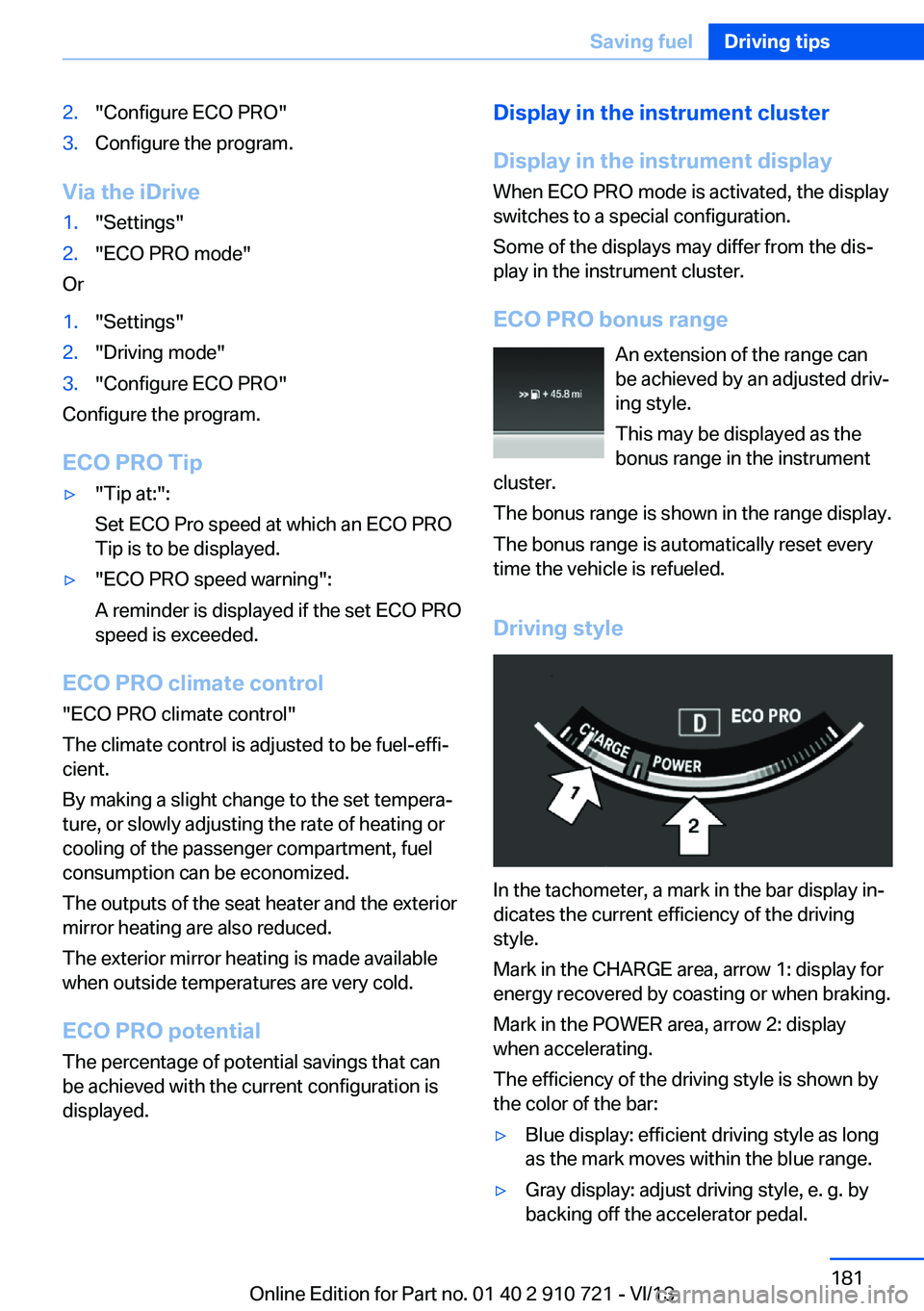
In the tachometer, a mark in the bar display in‐
dicates the current efficiency of the driving
style.
Mark in the CHARGE area, arrow 1: display for
energy recovered by coasting or when braking.
Mark in the POWER area, arrow 2: display
when accelerating.
The efficiency of the driving style is shown by
the color of the bar:
▷Blue display: efficient driving style as long
as the mark moves within the blue range.▷Gray display: adjust driving style, e. g. by
backing off the accelerator pedal.Seite 181Saving fuelDriving tips181
Online Edition for Part no. 01 40 2 910 721 - VI/13
Page 234 of 243
Congestion Assistant 136
ConnectedDrive, see user's manual for Navigation, En‐
tertainment and Communi‐
cation
ConnectedDrive Services
Control Display 16
Control Display, settings 89
Controller 16
Control systems, driving sta‐ bility 122
Convenient closing 34
Convenient opening 34
Convertible, convertible top 43
Convertible mode, automatic climate control 158
Convertible program, auto‐ matic climate control 158
Convertible top 43
Convertible top, care 222
Convertible top, cargo area partition 45
Convertible top, emergency operation 45
Convertible top, rollover pro‐ tection system 99
Convertible top tool 45
Coolant 207
Coolant temperature 83
Cooling function 159
Cooling, maximum 159
Cooling system 207
Corrosion on brake discs 176
Cruise control 139
Cruise control, active with Stop & Go 130
Cruising range 83
Cupholder 171
Current fuel consumption 84
D
Damage, tires 199
Damping Control, dy‐ namic 125 Data, technical 228
Date 83
Daytime running lights 92
Defrosting, refer to Windows, defrosting 159
Departure time, parked-car heating 162
Departure time, parked-car ventilation 162
Destination distance 88
Digital clock 83
Dimensions 228
Dimmable exterior mirrors 58
Dimmable interior rearview mirror 58
Direction indicator, refer to Turn signals 69
Display in windshield 154
Display lighting, refer to In‐ strument lighting 94
Displays 76, 77
Displays, cleaning 225
Disposal, coolant 207
Disposal, vehicle battery 214
Distance control, refer to PDC 142
Distance information 155
Distance to destination 88
Divided screen view, split screen 20
Door lock, refer to Remote control 30
Doors, Automatic Soft Clos‐ ing 36
Downhill control 124
Drive-off assistant 122
Drive-off assistant, refer to DSC 122
Driver assistance, see Intelli‐ gent Safety 105
Driving Assistant, see Intelli‐ gent Safety 105
Driving Dynamics Con‐ trol 126
Driving instructions, breaking in 174 Driving mode 126
Driving notes, general 174
Driving stability control sys‐ tems 122
Driving tips 174
DSC Dynamic Stability Con‐ trol 122
DTC driving dynamics 123
DTC Dynamic Traction Con‐ trol 123
Dynamic Damping Con‐ trol 125
Dynamic Drive 125
Dynamic Stability Control DSC 122
Dynamic Traction Control DTC 123
E
ECO PRO 180
ECO PRO, bonus range 181
ECO PRO display 180
ECO PRO displays 79
ECO PRO driving mode 180
ECO PRO mode 180
ECO PRO Tip - driving in‐ struction 182
EfficientDynamics 182
Electronic displays, instru‐ ment cluster 77
Electronic Stability Program ESP, refer to DSC 122
Emergency detection, remote control 31
Emergency operation, convertible top 45
Emergency release, door lock 36
Emergency release, fuel filler flap 188
Emergency Request 216
Emergency service, refer to Roadside Assistance 217
Emergency start function, en‐ gine start 31 Seite 234ReferenceEverything from A to Z234
Online Edition for Part no. 01 40 2 910 721 - VI/13
Page 236 of 243
Headlamps, care 222
Headlamp washer system 70
Head restraints 51
Head restraints, front 55
Head-Up Display 154
Head-up Display, care 225
Heating, refer to Parked-car heating 161
Heavy cargo, stowing 178
Height, seats 51
Height, vehicle 228
High-beam Assistant 93
High beams 70
High beams/low beams, refer to High-beam Assistant 93
Hill Descent Control HDC 124
Hills 176
Hill start assistant, refer to Drive-off assistant 122
Hints 6
Holder for beverages 171
Homepage 6
Hood 203
Horn 12
Hotel function, trunk lid 37
Hot exhaust system 174
HUD Head-Up Display 154
Hydroplaning 175
I Ice warning, refer to External temperature warning 83
Icy roads, refer to External temperature warning 83
Identification marks, tires 197
Identification number, refer to Important features in the en‐
gine compartment 203
iDrive 16
Ignition key, refer to Remote control 30
Ignition off 63
Ignition on 63 Indication of a flat
tire 101 , 104
Indicator and warning lamps 80
Individual air distribution 158
Individual settings, refer to Personal Profile 31
Inflation pressure, tires 191
Inflation pressure warning FTM, tires 103
Info display, refer to Com‐ puter 87
Initialization, Integral Active Steering 126
Initialize, Tire Pressure Moni‐ tor TPM 101
Initializing, Flat Tire Monitor FTM 103
Instrument cluster 76
Instrument cluster, electronic displays 77
Instrument display, multifunc‐ tional 77
Instrument lighting 94
Integral Active Steering 125
Integrated key 30
Integrated universal remote control 164
Intelligent Emergency Re‐ quest 216
Intelligent Safety 105
Intensity, AUTO pro‐ gram 158
Interior equipment 164
Interior lamps 94
Interior lamps via remote con‐ trol 34
Interior motion sensor 41
Interior rearview mirror, auto‐ matic dimming feature 58
Internet page 6
Interval display, service re‐ quirements 84 J
Jacking points for the vehicle jack 213
Joystick, automatic transmis‐ sion 73
Jump-starting 218
K
Key/remote control 30
Keyless Go, refer to Comfort Access 38
Key Memory, refer to Per‐ sonal Profile 31
Kickdown, automatic trans‐ mission 73
Knee airbag 96
L Lamp replacement, front 210
Lamp replacement, rear 212
Lamps 91
Lamps and bulbs 210
Lane departure warning 116
Lane margin, warning 116
Language on Control Dis‐ play 90
Lashing eyes, securing cargo 178
LATCH child restraint fixing system 61
Leather, care 223
LED headlamps, Bulb re‐ placement 212
LED light 212
LEDs, light-emitting di‐ odes 211
Length, vehicle 229
Letters and numbers, enter‐ ing 21
License plate lamp, bulb re‐ placement 212
Light alloy wheels, care 224
Light control 92 Seite 236ReferenceEverything from A to Z236
Online Edition for Part no. 01 40 2 910 721 - VI/13
Page 238 of 243
Onboard monitor, refer toControl Display 16
Onboard vehicle tool kit 210
Opening and closing 30
Opening and closing, from in‐ side 36
Opening and closing via door lock 35
Opening and closing, with re‐ mote control 34
Operating concept, iDrive 16
Optional equipment, standard equipment 6
Outside air, refer to Auto‐ matic recirculated-air con‐
trol 159
Overheating of engine, refer to Coolant temperature 83
Overtaking prohibitions 85
P Paint, vehicle 222
Parallel parking assistant 150
Park Distance Control PDC 142
Parked-car heating 161
Parked-car ventilation 161
Parked vehicle, condensa‐ tion 176
Parking aid, refer to PDC 142
Parking assistant 150
Parking brake 67
Parking lamps 91
Parking lamps and roadside parking lamps, refer to
Light-emitting diodes,
LEDs 212
Parking with Auto Hold 68
Passenger side mirror, tilting downward 58
Pathway lines, rearview cam‐ era 145
PDC Park Distance Con‐ trol 142 Pedestrian detection, refer to
Night Vision 112
Pedestrian warning with city braking function 110
People detection, refer to Night Vision 112
Permissible axle load 229
Personal Profile 31
Pinch protection system, win‐ dows 42
Plastic, care 224
Power failure 214
Power windows 41
Pressure, tire air pres‐ sure 191
Pressure warning FTM, tires 103
Profile, refer to Personal Pro‐ file 31
Programmable memory but‐ tons, iDrive 20
Protective function, win‐ dows 42
Push-and-turn switch, refer to Controller 16
Q Queuing Assistant, see Con‐ gestion Assistant 136
R Radiator fluid 207
Radio-operated key, refer to Remote control 30
Radio ready state 64
Radio, see user's manual for Navigation, Entertainment
and Communication
Rain sensor 71
Rear axle steering 125
Rear lamps 212
Rearview mirror 57
Rear window defroster 159
Recirculated-air mode 159 Recommended tire
brands 200
Refueling 188
Remaining range 83
Remote control/key 30
Remote control, malfunc‐ tion 35
Remote control, parked-car heating/ventilation 162
Remote control, univer‐ sal 164
Replacement fuse 214
Replacing bulbs, see Lamp replacement 210
Replacing parts 210
Replacing wheels/tires 199
Reporting safety defects 9
RES button 133
Reserve warning, refer to Range 83
Reset, Tire Pressure Monitor TPM 101
Residual heat, automatic cli‐ mate control 160
Retaining straps, securing cargo 178
Retreaded tires 200
Reversing lamp, bulb replace‐ ment 213
Roadside parking lamps 92
Rollover protection sys‐ tem 99
Roll stabilization, refer to Adaptive Drive 125
Roll stabilization, see Dy‐ namic Drive 125
RON gasoline quality 190
Rope for tow-starting/ towing 220
RSC Run Flat System Com‐ ponent, refer to Run-flat
tires 201
Rubber components, care 224
Run-flat tires 201 Seite 238ReferenceEverything from A to Z238
Online Edition for Part no. 01 40 2 910 721 - VI/13
Page 239 of 243
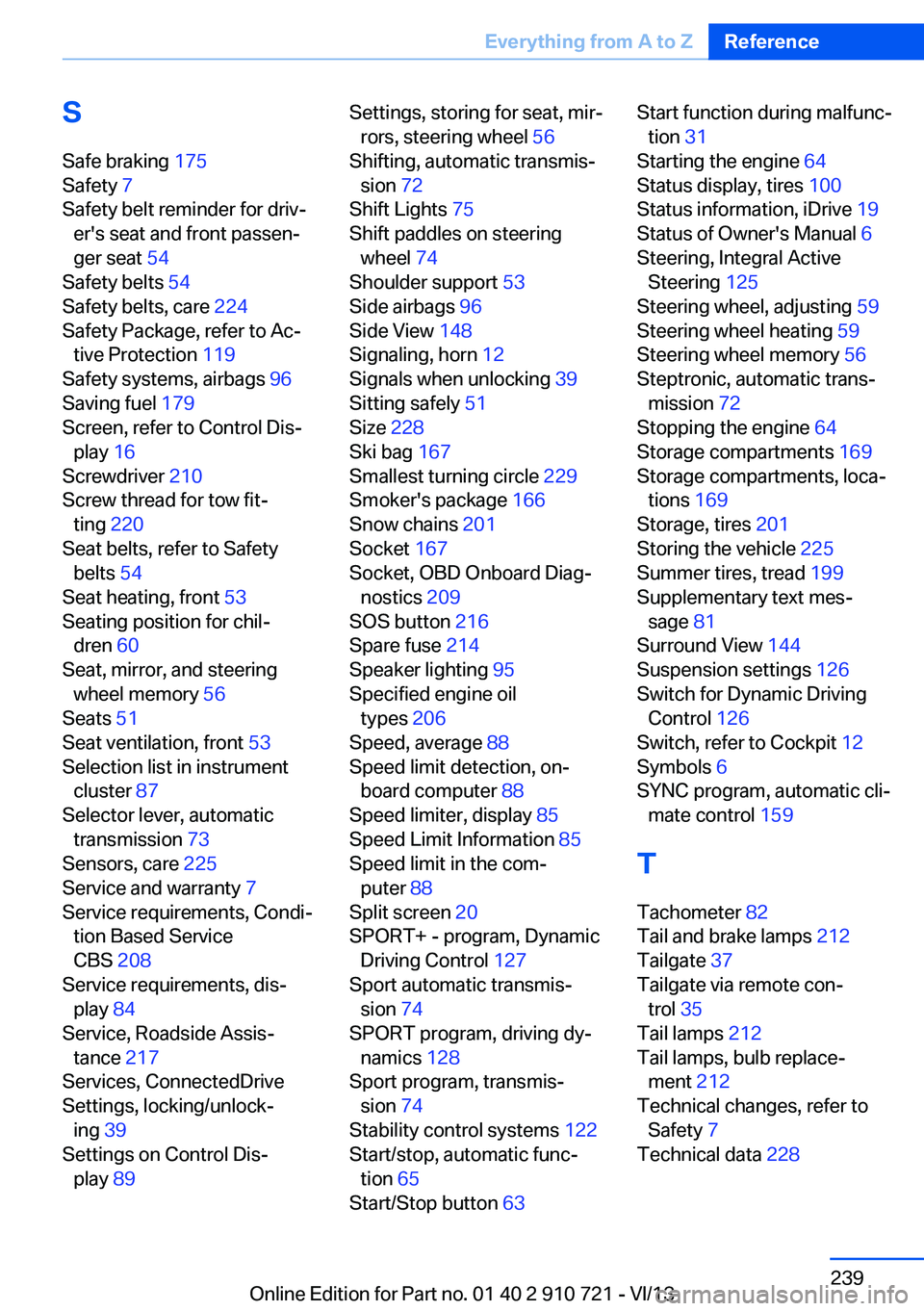
SSafe braking 175
Safety 7
Safety belt reminder for driv‐ er's seat and front passen‐
ger seat 54
Safety belts 54
Safety belts, care 224
Safety Package, refer to Ac‐ tive Protection 119
Safety systems, airbags 96
Saving fuel 179
Screen, refer to Control Dis‐ play 16
Screwdriver 210
Screw thread for tow fit‐ ting 220
Seat belts, refer to Safety belts 54
Seat heating, front 53
Seating position for chil‐ dren 60
Seat, mirror, and steering wheel memory 56
Seats 51
Seat ventilation, front 53
Selection list in instrument cluster 87
Selector lever, automatic transmission 73
Sensors, care 225
Service and warranty 7
Service requirements, Condi‐ tion Based Service
CBS 208
Service requirements, dis‐ play 84
Service, Roadside Assis‐ tance 217
Services, ConnectedDrive
Settings, locking/unlock‐ ing 39
Settings on Control Dis‐ play 89 Settings, storing for seat, mir‐
rors, steering wheel 56
Shifting, automatic transmis‐ sion 72
Shift Lights 75
Shift paddles on steering wheel 74
Shoulder support 53
Side airbags 96
Side View 148
Signaling, horn 12
Signals when unlocking 39
Sitting safely 51
Size 228
Ski bag 167
Smallest turning circle 229
Smoker's package 166
Snow chains 201
Socket 167
Socket, OBD Onboard Diag‐ nostics 209
SOS button 216
Spare fuse 214
Speaker lighting 95
Specified engine oil types 206
Speed, average 88
Speed limit detection, on‐ board computer 88
Speed limiter, display 85
Speed Limit Information 85
Speed limit in the com‐ puter 88
Split screen 20
SPORT+ - program, Dynamic Driving Control 127
Sport automatic transmis‐ sion 74
SPORT program, driving dy‐ namics 128
Sport program, transmis‐ sion 74
Stability control systems 122
Start/stop, automatic func‐ tion 65
Start/Stop button 63 Start function during malfunc‐
tion 31
Starting the engine 64
Status display, tires 100
Status information, iDrive 19
Status of Owner's Manual 6
Steering, Integral Active Steering 125
Steering wheel, adjusting 59
Steering wheel heating 59
Steering wheel memory 56
Steptronic, automatic trans‐ mission 72
Stopping the engine 64
Storage compartments 169
Storage compartments, loca‐ tions 169
Storage, tires 201
Storing the vehicle 225
Summer tires, tread 199
Supplementary text mes‐ sage 81
Surround View 144
Suspension settings 126
Switch for Dynamic Driving Control 126
Switch, refer to Cockpit 12
Symbols 6
SYNC program, automatic cli‐ mate control 159
T Tachometer 82
Tail and brake lamps 212
Tailgate 37
Tailgate via remote con‐ trol 35
Tail lamps 212
Tail lamps, bulb replace‐ ment 212
Technical changes, refer to Safety 7
Technical data 228 Seite 239Everything from A to ZReference239
Online Edition for Part no. 01 40 2 910 721 - VI/13