display BMW 640I GRAN COUPE 2013 Owners Manual
[x] Cancel search | Manufacturer: BMW, Model Year: 2013, Model line: 640I GRAN COUPE, Model: BMW 640I GRAN COUPE 2013Pages: 305, PDF Size: 11.87 MB
Page 278 of 305
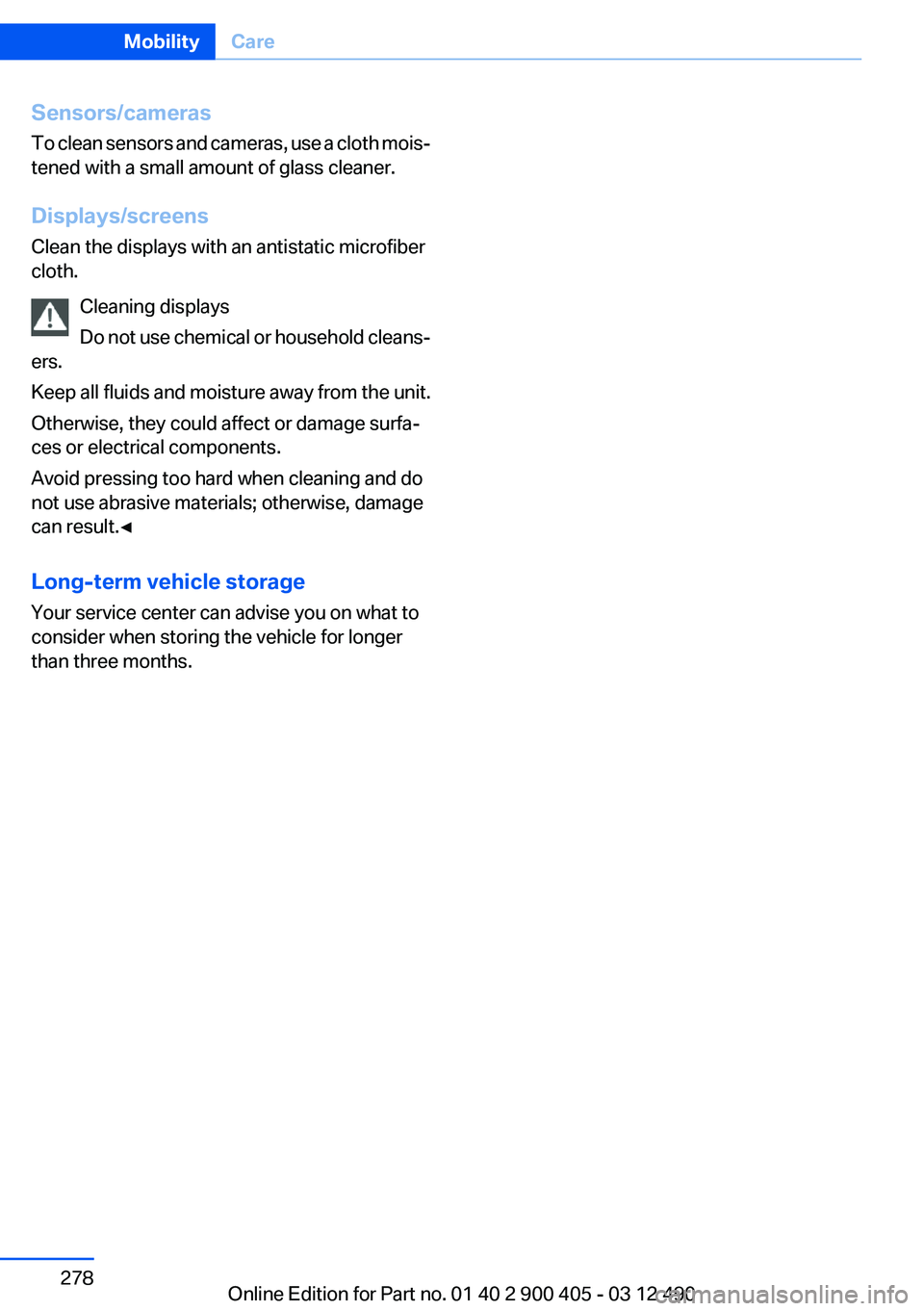
Sensors/cameras
To clean sensors and cameras, use a cloth mois‐
tened with a small amount of glass cleaner.
Displays/screens
Clean the displays with an antistatic microfiber
cloth.
Cleaning displays
Do not use chemical or household cleans‐
ers.
Keep all fluids and moisture away from the unit.
Otherwise, they could affect or damage surfa‐
ces or electrical components.
Avoid pressing too hard when cleaning and do
not use abrasive materials; otherwise, damage
can result.◀
Long-term vehicle storage
Your service center can advise you on what to
consider when storing the vehicle for longer
than three months.Seite 278MobilityCare278
Online Edition for Part no. 01 40 2 900 405 - 03 12 490
Page 285 of 305
Short commands of the voice activation
systemVehicle equipment
All standard, country-specific and optional
equipment that is offered in the model series is
described in this chapter. Therefore, equipment
is also described that is not available in a vehicle,
e. g., because of the selected optional equip‐
ment or country variant. This also applies for
safety-related functions and systems.
General information
Instructions for voice activation system, refer to
page 22.To have the available spoken instructions read
out loud: ›Voice commands‹
The following short commands are valid for ve‐
hicles with voice activation system. They do not
work in equipment packages with which only the
mobile phone can be operated by voice activa‐
tion.
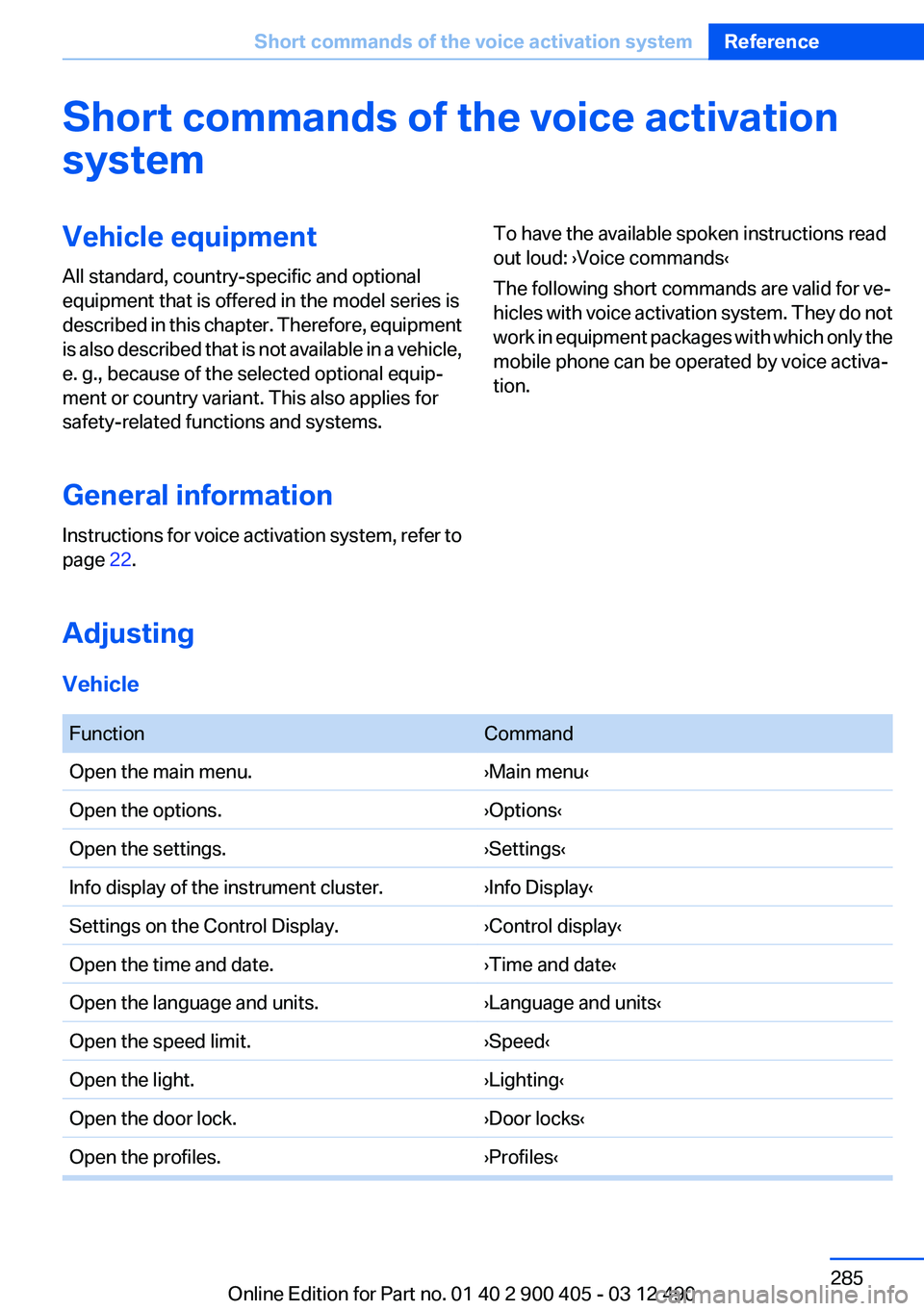
Adjusting
Vehicle
FunctionCommandOpen the main menu.›Main menu‹Open the options.›Options‹Open the settings.›Settings‹Info display of the instrument cluster.›Info Display‹Settings on the Control Display.›Control display‹Open the time and date.›Time and date‹Open the language and units.›Language and units‹Open the speed limit.›Speed‹Open the light.›Lighting‹Open the door lock.›Door locks‹Open the profiles.›Profiles‹Seite 285Short commands of the voice activation systemReference285
Online Edition for Part no. 01 40 2 900 405 - 03 12 490
Page 286 of 305
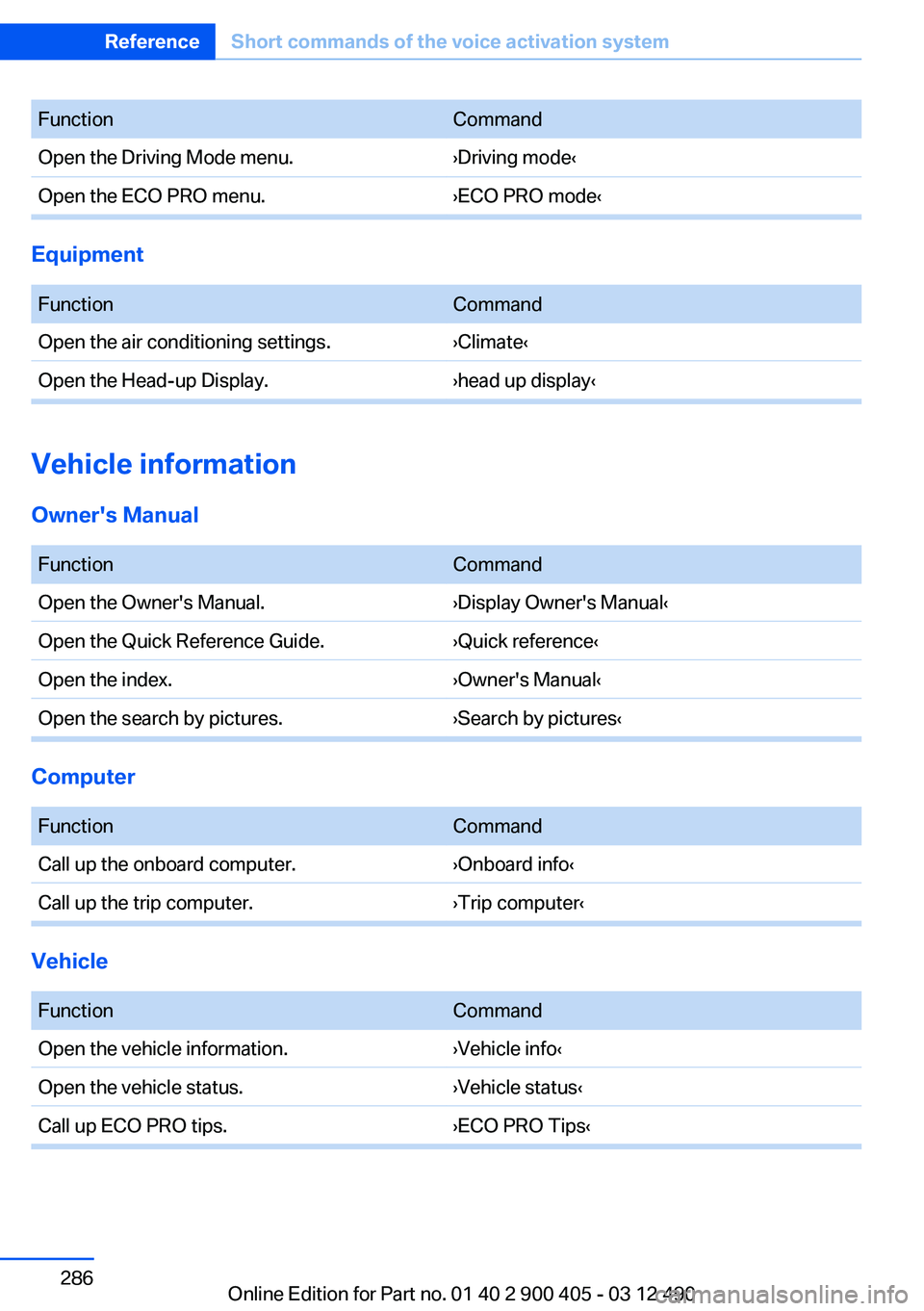
FunctionCommandOpen the Driving Mode menu.›Driving mode‹Open the ECO PRO menu.›ECO PRO mode‹
Equipment
FunctionCommandOpen the air conditioning settings.›Climate‹Open the Head-up Display.›head up display‹
Vehicle information
Owner's Manual
FunctionCommandOpen the Owner's Manual.›Display Owner's Manual‹Open the Quick Reference Guide.›Quick reference‹Open the index.›Owner's Manual‹Open the search by pictures.›Search by pictures‹
Computer
FunctionCommandCall up the onboard computer.›Onboard info‹Call up the trip computer.›Trip computer‹
Vehicle
FunctionCommandOpen the vehicle information.›Vehicle info‹Open the vehicle status.›Vehicle status‹Call up ECO PRO tips.›ECO PRO Tips‹Seite 286ReferenceShort commands of the voice activation system286
Online Edition for Part no. 01 40 2 900 405 - 03 12 490
Page 287 of 305
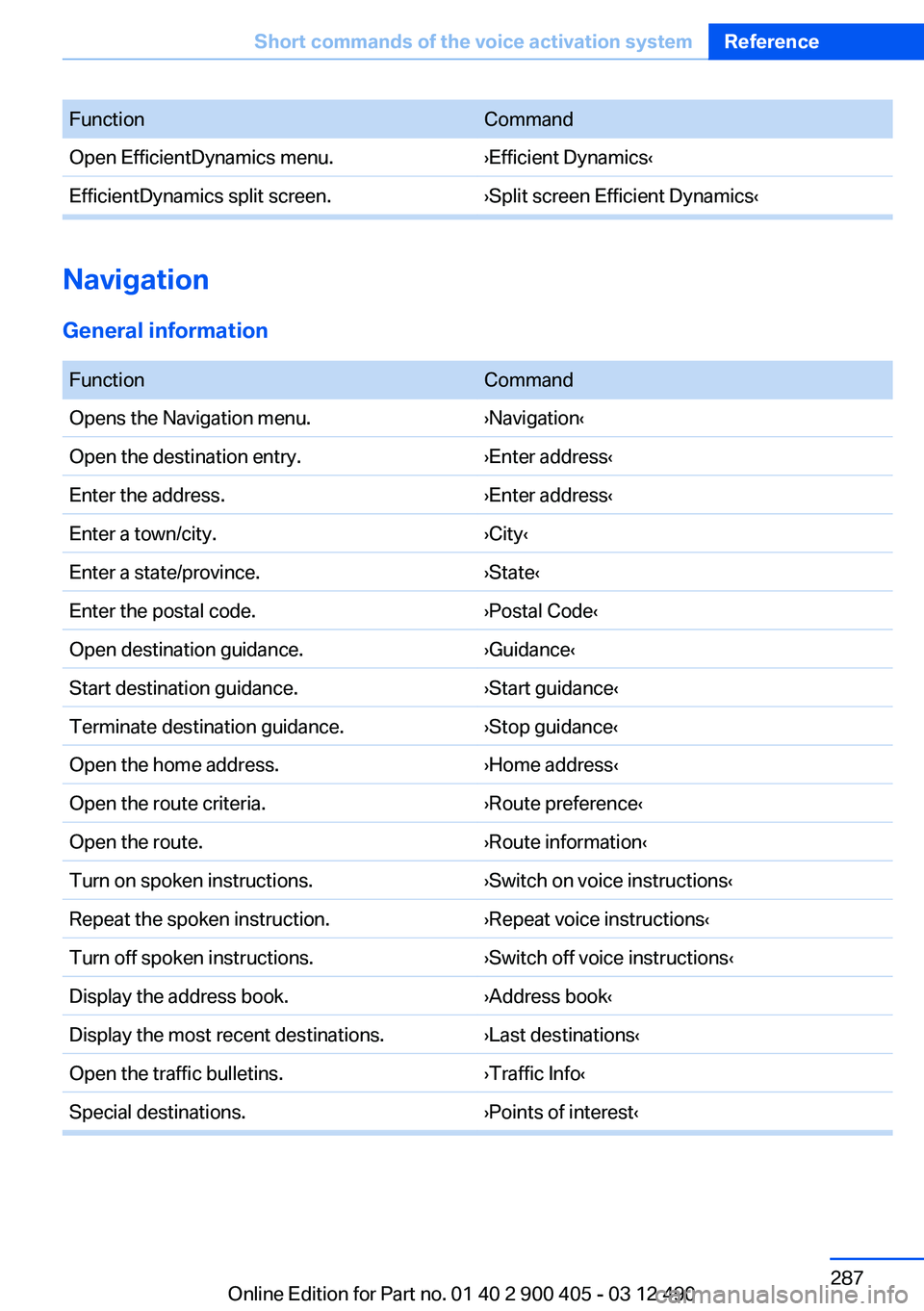
FunctionCommandOpen EfficientDynamics menu.›Efficient Dynamics‹EfficientDynamics split screen.›Split screen Efficient Dynamics‹
Navigation
General information
FunctionCommandOpens the Navigation menu.›Navigation‹Open the destination entry.›Enter address‹Enter the address.›Enter address‹Enter a town/city.›City‹Enter a state/province.›State‹Enter the postal code.›Postal Code‹Open destination guidance.›Guidance‹Start destination guidance.›Start guidance‹Terminate destination guidance.›Stop guidance‹Open the home address.›Home address‹Open the route criteria.›Route preference‹Open the route.›Route information‹Turn on spoken instructions.›Switch on voice instructions‹Repeat the spoken instruction.›Repeat voice instructions‹Turn off spoken instructions.›Switch off voice instructions‹Display the address book.›Address book‹Display the most recent destinations.›Last destinations‹Open the traffic bulletins.›Traffic Info‹Special destinations.›Points of interest‹Seite 287Short commands of the voice activation systemReference287
Online Edition for Part no. 01 40 2 900 405 - 03 12 490
Page 288 of 305
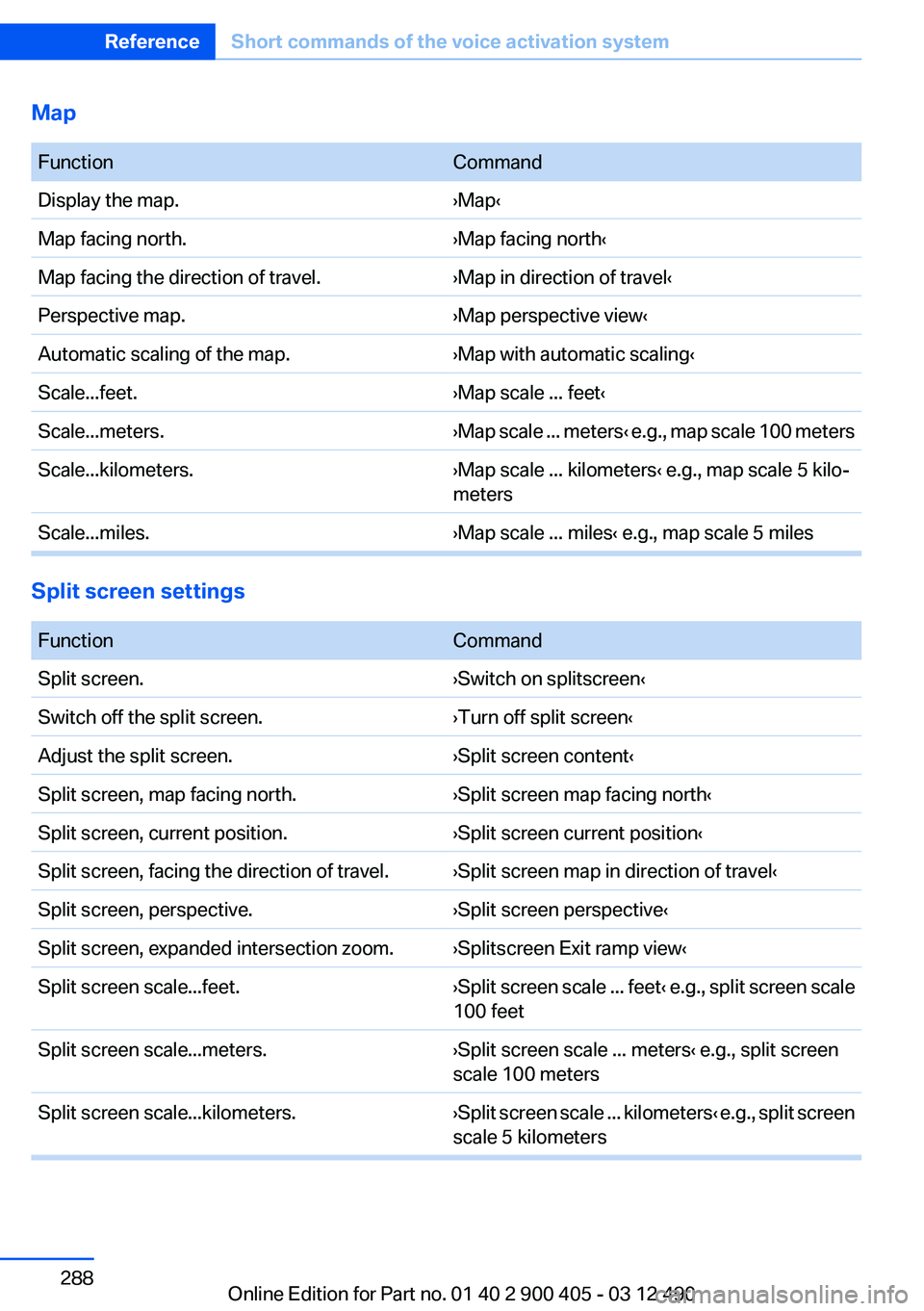
Map
FunctionCommandDisplay the map.›Map‹Map facing north.›Map facing north‹Map facing the direction of travel.›Map in direction of travel‹Perspective map.›Map perspective view‹Automatic scaling of the map.›Map with automatic scaling‹Scale...feet.›Map scale ... feet‹Scale...meters.› Map scale ... meters ‹ e.g., map scale 100 metersScale...kilometers.›Map scale ... kilometers‹ e.g., map scale 5 kilo‐
metersScale...miles.›Map scale ... miles‹ e.g., map scale 5 miles
Split screen settings
FunctionCommandSplit screen.›Switch on splitscreen‹Switch off the split screen.›Turn off split screen‹Adjust the split screen.›Split screen content‹Split screen, map facing north.›Split screen map facing north‹Split screen, current position.›Split screen current position‹Split screen, facing the direction of travel.›Split screen map in direction of travel‹Split screen, perspective.›Split screen perspective‹Split screen, expanded intersection zoom.›Splitscreen Exit ramp view‹Split screen scale...feet.› Split screen scale ... feet ‹ e.g., split screen scale
100 feetSplit screen scale...meters.›Split screen scale ... meters‹ e.g., split screen
scale 100 metersSplit screen scale...kilometers.› Split screen scale ... kilometers ‹ e.g., split screen
scale 5 kilometersSeite 288ReferenceShort commands of the voice activation system288
Online Edition for Part no. 01 40 2 900 405 - 03 12 490
Page 291 of 305
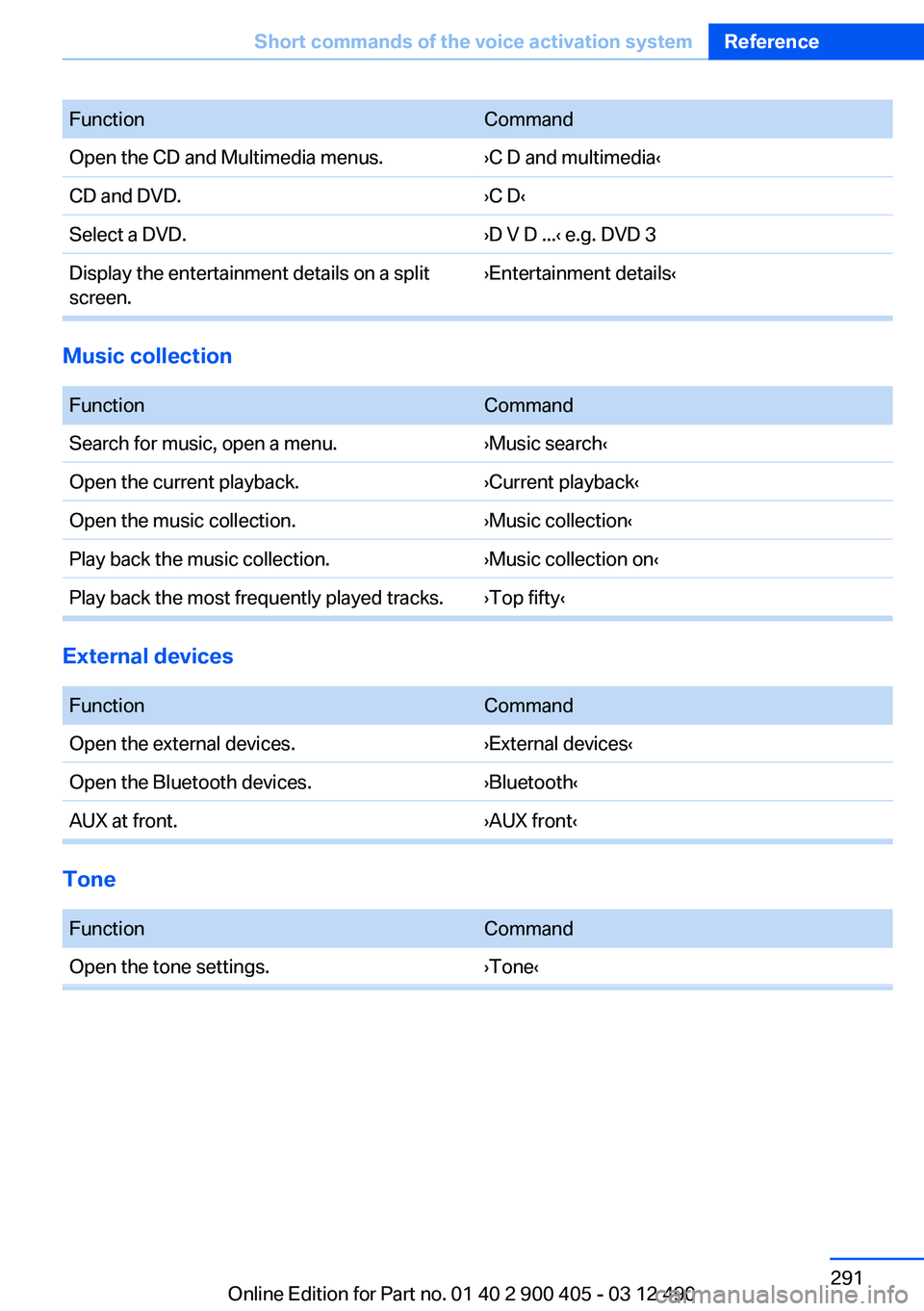
FunctionCommandOpen the CD and Multimedia menus.›C D and multimedia‹CD and DVD.›C D‹Select a DVD.›D V D ...‹ e.g. DVD 3Display the entertainment details on a split
screen.›Entertainment details‹
Music collection
FunctionCommandSearch for music, open a menu.›Music search‹Open the current playback.›Current playback‹Open the music collection.›Music collection‹Play back the music collection.›Music collection on‹Play back the most frequently played tracks.›Top fifty‹
External devices
FunctionCommandOpen the external devices.›External devices‹Open the Bluetooth devices.›Bluetooth‹AUX at front.›AUX front‹
Tone
FunctionCommandOpen the tone settings.›Tone‹Seite 291Short commands of the voice activation systemReference291
Online Edition for Part no. 01 40 2 900 405 - 03 12 490
Page 292 of 305
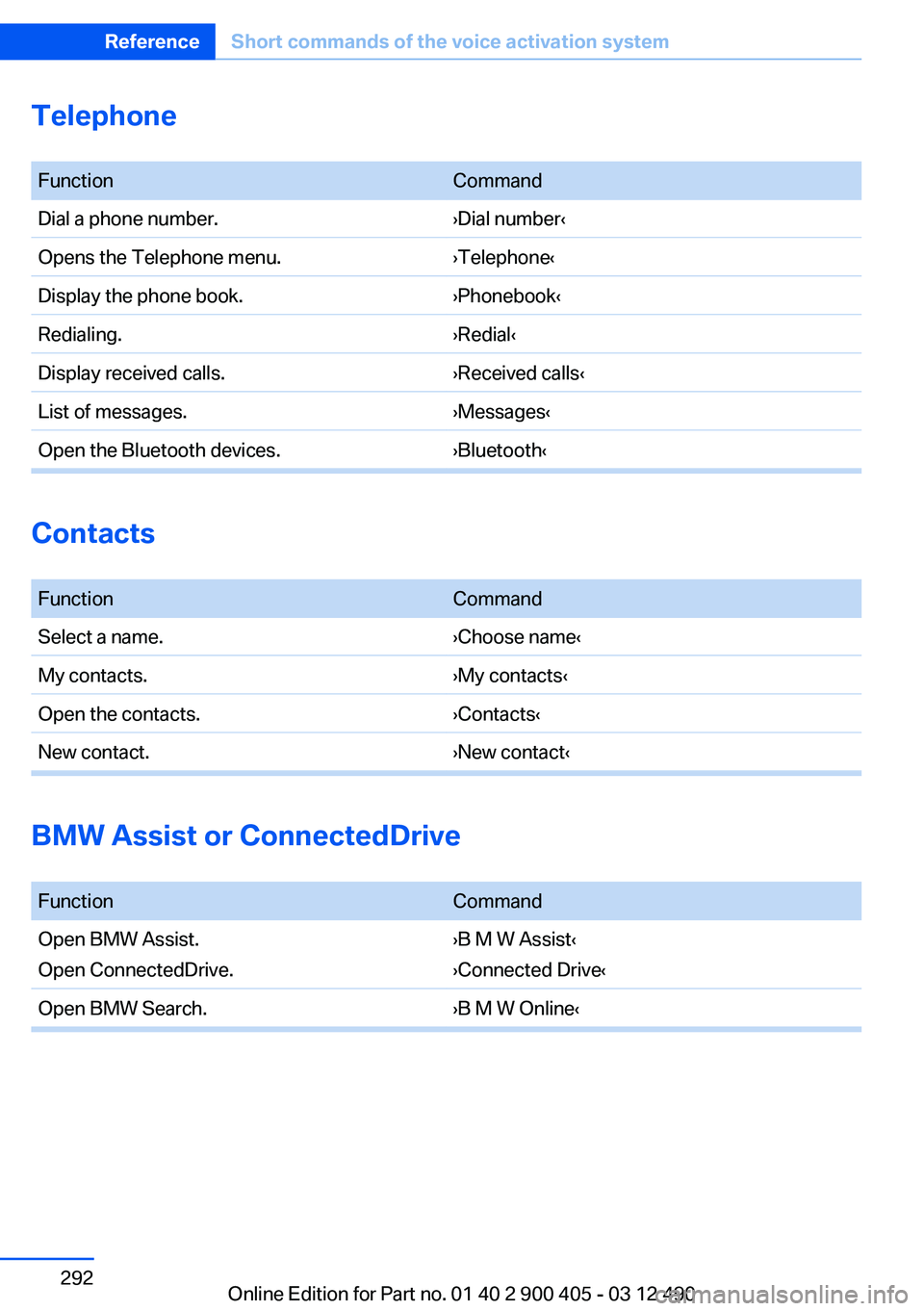
Telephone
FunctionCommandDial a phone number.›Dial number‹Opens the Telephone menu.›Telephone‹Display the phone book.›Phonebook‹Redialing.›Redial‹Display received calls.›Received calls‹List of messages.›Messages‹Open the Bluetooth devices.›Bluetooth‹
Contacts
FunctionCommandSelect a name.›Choose name‹My contacts.›My contacts‹Open the contacts.›Contacts‹New contact.›New contact‹
BMW Assist or ConnectedDrive
FunctionCommandOpen BMW Assist.
Open ConnectedDrive.›B M W Assist‹
›Connected Drive‹Open BMW Search.›B M W Online‹Seite 292ReferenceShort commands of the voice activation system292
Online Edition for Part no. 01 40 2 900 405 - 03 12 490
Page 294 of 305
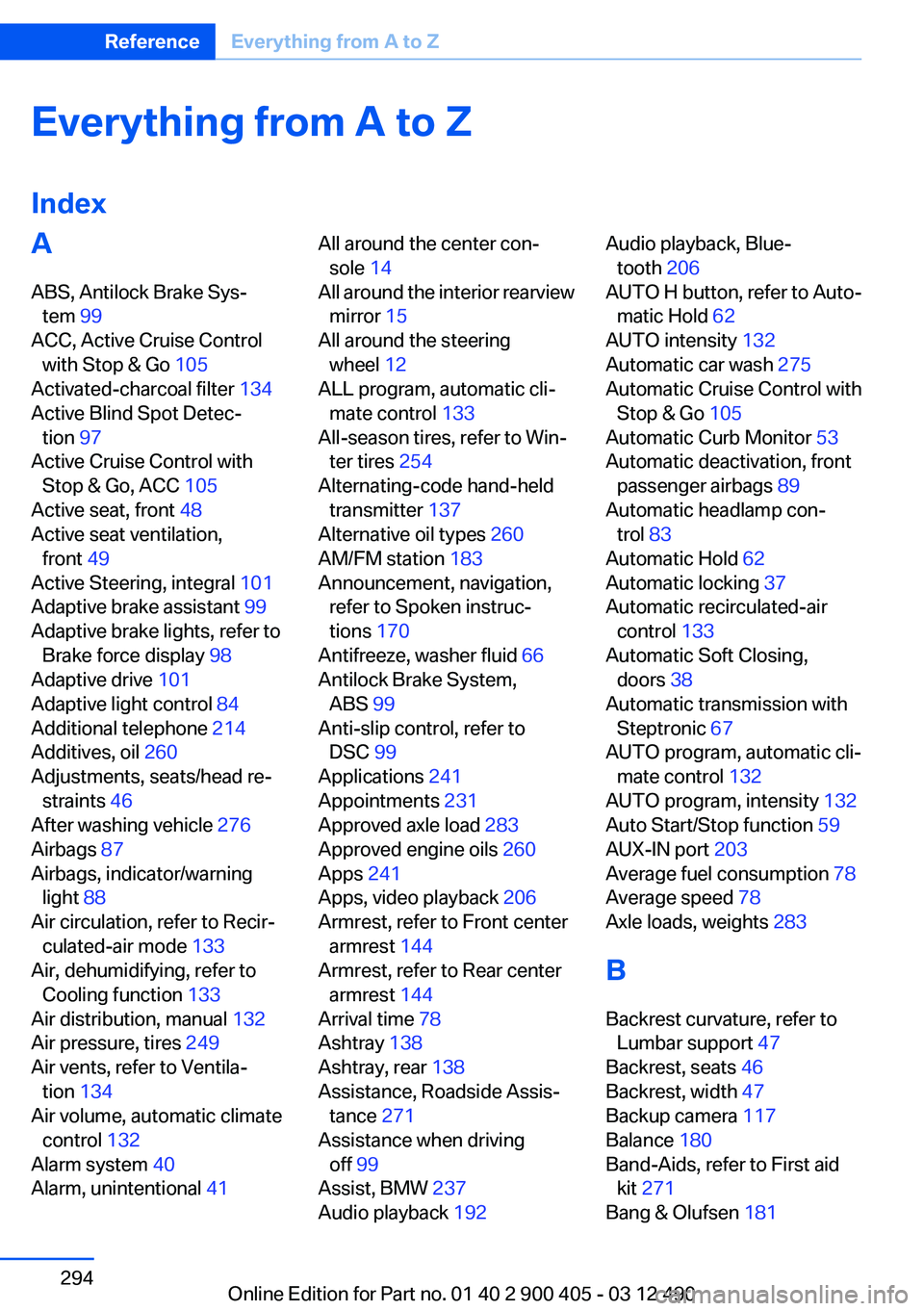
Everything from A to Z
IndexA
ABS, Antilock Brake Sys‐ tem 99
ACC, Active Cruise Control with Stop & Go 105
Activated-charcoal filter 134
Active Blind Spot Detec‐ tion 97
Active Cruise Control with Stop & Go, ACC 105
Active seat, front 48
Active seat ventilation, front 49
Active Steering, integral 101
Adaptive brake assistant 99
Adaptive brake lights, refer to Brake force display 98
Adaptive drive 101
Adaptive light control 84
Additional telephone 214
Additives, oil 260
Adjustments, seats/head re‐ straints 46
After washing vehicle 276
Airbags 87
Airbags, indicator/warning light 88
Air circulation, refer to Recir‐ culated-air mode 133
Air, dehumidifying, refer to Cooling function 133
Air distribution, manual 132
Air pressure, tires 249
Air vents, refer to Ventila‐ tion 134
Air volume, automatic climate control 132
Alarm system 40
Alarm, unintentional 41 All around the center con‐
sole 14
All around the interior rearview mirror 15
All around the steering wheel 12
ALL program, automatic cli‐ mate control 133
All-season tires, refer to Win‐ ter tires 254
Alternating-code hand-held transmitter 137
Alternative oil types 260
AM/FM station 183
Announcement, navigation, refer to Spoken instruc‐
tions 170
Antifreeze, washer fluid 66
Antilock Brake System, ABS 99
Anti-slip control, refer to DSC 99
Applications 241
Appointments 231
Approved axle load 283
Approved engine oils 260
Apps 241
Apps, video playback 206
Armrest, refer to Front center armrest 144
Armrest, refer to Rear center armrest 144
Arrival time 78
Ashtray 138
Ashtray, rear 138
Assistance, Roadside Assis‐ tance 271
Assistance when driving off 99
Assist, BMW 237
Audio playback 192 Audio playback, Blue‐
tooth 206
AUTO H button, refer to Auto‐ matic Hold 62
AUTO intensity 132
Automatic car wash 275
Automatic Cruise Control with Stop & Go 105
Automatic Curb Monitor 53
Automatic deactivation, front passenger airbags 89
Automatic headlamp con‐ trol 83
Automatic Hold 62
Automatic locking 37
Automatic recirculated-air control 133
Automatic Soft Closing, doors 38
Automatic transmission with Steptronic 67
AUTO program, automatic cli‐ mate control 132
AUTO program, intensity 132
Auto Start/Stop function 59
AUX-IN port 203
Average fuel consumption 78
Average speed 78
Axle loads, weights 283
B
Backrest curvature, refer to Lumbar support 47
Backrest, seats 46
Backrest, width 47
Backup camera 117
Balance 180
Band-Aids, refer to First aid kit 271
Bang & Olufsen 181 Seite 294ReferenceEverything from A to Z294
Online Edition for Part no. 01 40 2 900 405 - 03 12 490
Page 295 of 305
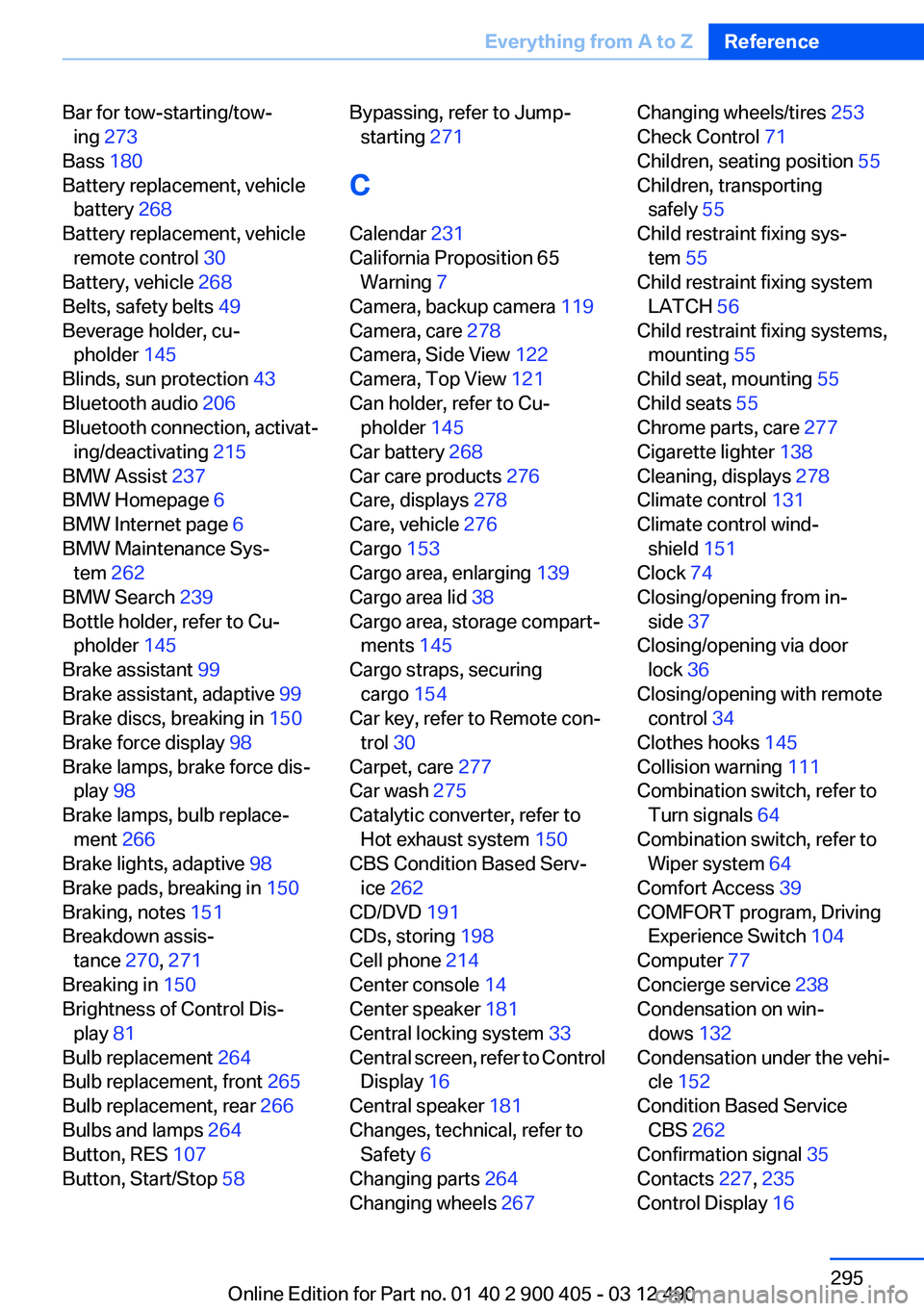
Bar for tow-starting/tow‐ing 273
Bass 180
Battery replacement, vehicle battery 268
Battery replacement, vehicle remote control 30
Battery, vehicle 268
Belts, safety belts 49
Beverage holder, cu‐ pholder 145
Blinds, sun protection 43
Bluetooth audio 206
Bluetooth connection, activat‐ ing/deactivating 215
BMW Assist 237
BMW Homepage 6
BMW Internet page 6
BMW Maintenance Sys‐ tem 262
BMW Search 239
Bottle holder, refer to Cu‐ pholder 145
Brake assistant 99
Brake assistant, adaptive 99
Brake discs, breaking in 150
Brake force display 98
Brake lamps, brake force dis‐ play 98
Brake lamps, bulb replace‐ ment 266
Brake lights, adaptive 98
Brake pads, breaking in 150
Braking, notes 151
Breakdown assis‐ tance 270, 271
Breaking in 150
Brightness of Control Dis‐ play 81
Bulb replacement 264
Bulb replacement, front 265
Bulb replacement, rear 266
Bulbs and lamps 264
Button, RES 107
Button, Start/Stop 58 Bypassing, refer to Jump-
starting 271
C
Calendar 231
California Proposition 65 Warning 7
Camera, backup camera 119
Camera, care 278
Camera, Side View 122
Camera, Top View 121
Can holder, refer to Cu‐ pholder 145
Car battery 268
Car care products 276
Care, displays 278
Care, vehicle 276
Cargo 153
Cargo area, enlarging 139
Cargo area lid 38
Cargo area, storage compart‐ ments 145
Cargo straps, securing cargo 154
Car key, refer to Remote con‐ trol 30
Carpet, care 277
Car wash 275
Catalytic converter, refer to Hot exhaust system 150
CBS Condition Based Serv‐ ice 262
CD/DVD 191
CDs, storing 198
Cell phone 214
Center console 14
Center speaker 181
Central locking system 33
Central screen, refer to Control Display 16
Central speaker 181
Changes, technical, refer to Safety 6
Changing parts 264
Changing wheels 267 Changing wheels/tires 253
Check Control 71
Children, seating position 55
Children, transporting safely 55
Child restraint fixing sys‐ tem 55
Child restraint fixing system LATCH 56
Child restraint fixing systems, mounting 55
Child seat, mounting 55
Child seats 55
Chrome parts, care 277
Cigarette lighter 138
Cleaning, displays 278
Climate control 131
Climate control wind‐ shield 151
Clock 74
Closing/opening from in‐ side 37
Closing/opening via door lock 36
Closing/opening with remote control 34
Clothes hooks 145
Collision warning 111
Combination switch, refer to Turn signals 64
Combination switch, refer to Wiper system 64
Comfort Access 39
COMFORT program, Driving Experience Switch 104
Computer 77
Concierge service 238
Condensation on win‐ dows 132
Condensation under the vehi‐ cle 152
Condition Based Service CBS 262
Confirmation signal 35
Contacts 227, 235
Control Display 16 Seite 295Everything from A to ZReference295
Online Edition for Part no. 01 40 2 900 405 - 03 12 490
Page 296 of 305
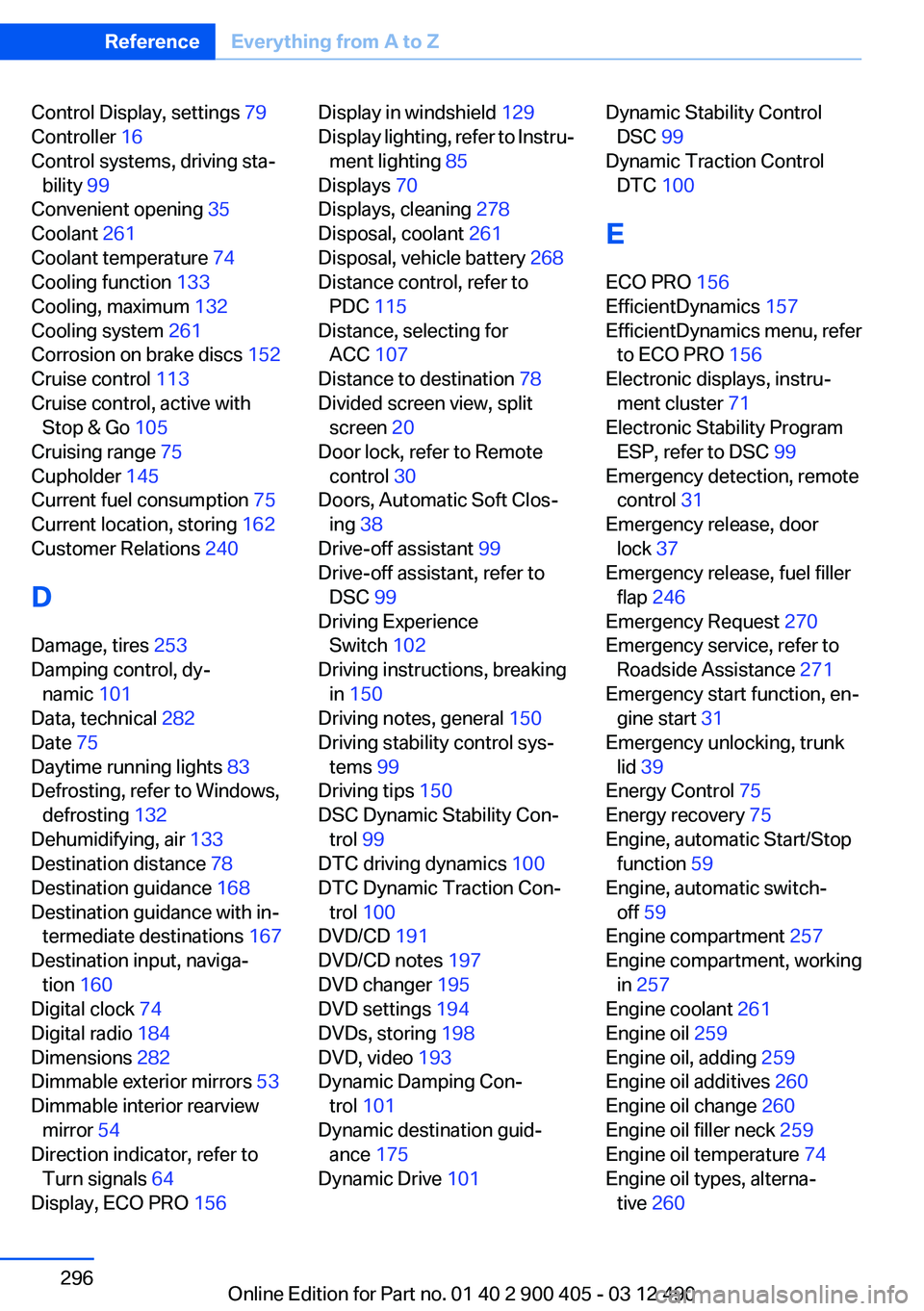
Control Display, settings 79
Controller 16
Control systems, driving sta‐ bility 99
Convenient opening 35
Coolant 261
Coolant temperature 74
Cooling function 133
Cooling, maximum 132
Cooling system 261
Corrosion on brake discs 152
Cruise control 113
Cruise control, active with Stop & Go 105
Cruising range 75
Cupholder 145
Current fuel consumption 75
Current location, storing 162
Customer Relations 240
D
Damage, tires 253
Damping control, dy‐ namic 101
Data, technical 282
Date 75
Daytime running lights 83
Defrosting, refer to Windows, defrosting 132
Dehumidifying, air 133
Destination distance 78
Destination guidance 168
Destination guidance with in‐ termediate destinations 167
Destination input, naviga‐ tion 160
Digital clock 74
Digital radio 184
Dimensions 282
Dimmable exterior mirrors 53
Dimmable interior rearview mirror 54
Direction indicator, refer to Turn signals 64
Display, ECO PRO 156 Display in windshield 129
Display lighting, refer to Instru‐ ment lighting 85
Displays 70
Displays, cleaning 278
Disposal, coolant 261
Disposal, vehicle battery 268
Distance control, refer to PDC 115
Distance, selecting for ACC 107
Distance to destination 78
Divided screen view, split screen 20
Door lock, refer to Remote control 30
Doors, Automatic Soft Clos‐ ing 38
Drive-off assistant 99
Drive-off assistant, refer to DSC 99
Driving Experience Switch 102
Driving instructions, breaking in 150
Driving notes, general 150
Driving stability control sys‐ tems 99
Driving tips 150
DSC Dynamic Stability Con‐ trol 99
DTC driving dynamics 100
DTC Dynamic Traction Con‐ trol 100
DVD/CD 191
DVD/CD notes 197
DVD changer 195
DVD settings 194
DVDs, storing 198
DVD, video 193
Dynamic Damping Con‐ trol 101
Dynamic destination guid‐ ance 175
Dynamic Drive 101 Dynamic Stability Control
DSC 99
Dynamic Traction Control DTC 100
E
ECO PRO 156
EfficientDynamics 157
EfficientDynamics menu, refer to ECO PRO 156
Electronic displays, instru‐ ment cluster 71
Electronic Stability Program ESP, refer to DSC 99
Emergency detection, remote control 31
Emergency release, door lock 37
Emergency release, fuel filler flap 246
Emergency Request 270
Emergency service, refer to Roadside Assistance 271
Emergency start function, en‐ gine start 31
Emergency unlocking, trunk lid 39
Energy Control 75
Energy recovery 75
Engine, automatic Start/Stop function 59
Engine, automatic switch- off 59
Engine compartment 257
Engine compartment, working in 257
Engine coolant 261
Engine oil 259
Engine oil, adding 259
Engine oil additives 260
Engine oil change 260
Engine oil filler neck 259
Engine oil temperature 74
Engine oil types, alterna‐ tive 260 Seite 296ReferenceEverything from A to Z296
Online Edition for Part no. 01 40 2 900 405 - 03 12 490