park assist BMW 640I GRAN COUPE 2016 User Guide
[x] Cancel search | Manufacturer: BMW, Model Year: 2016, Model line: 640I GRAN COUPE, Model: BMW 640I GRAN COUPE 2016Pages: 255, PDF Size: 6.01 MB
Page 155 of 255
Switch the system back on if needed.
Display
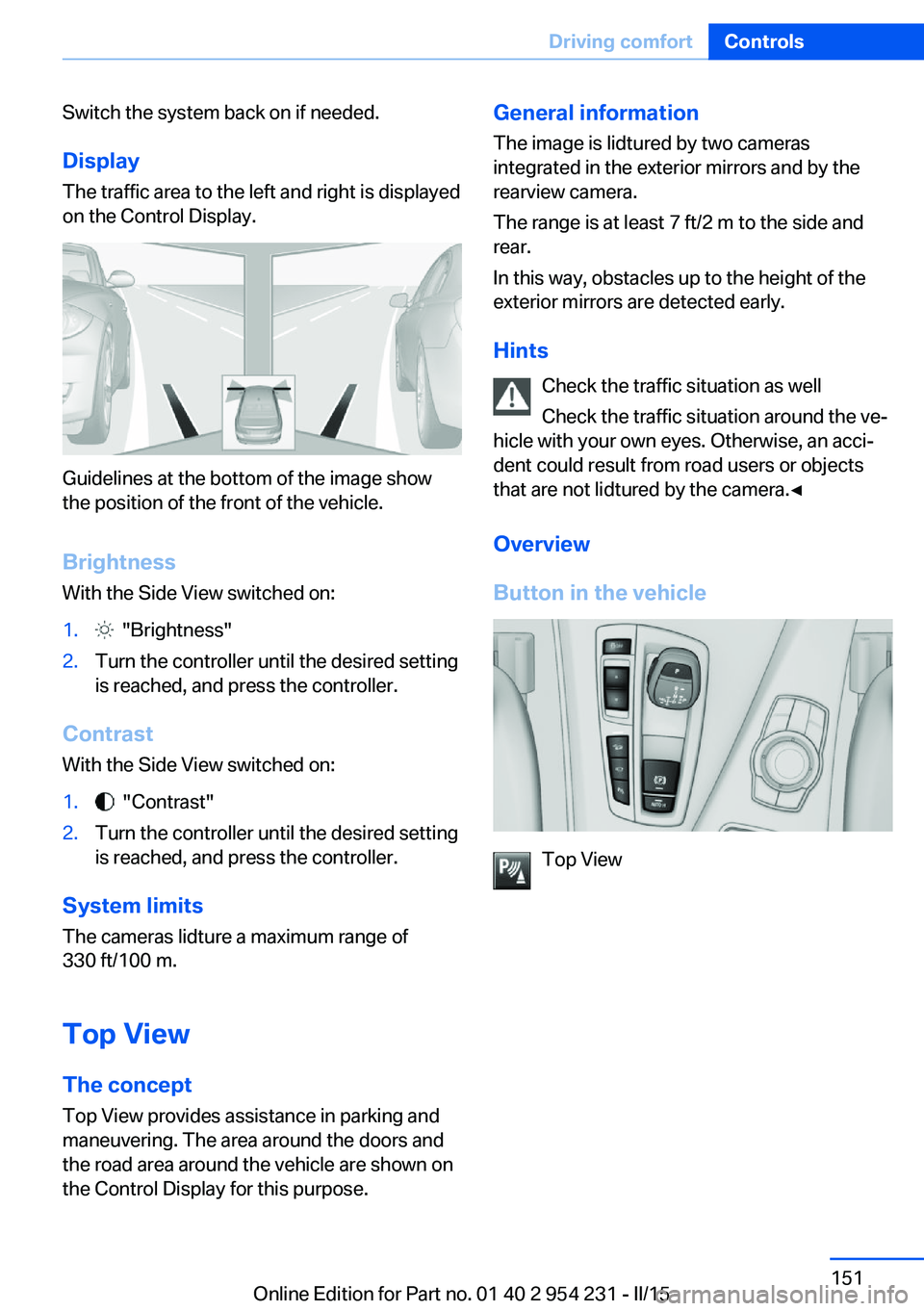
The traffic area to the left and right is displayed
on the Control Display.
Guidelines at the bottom of the image show
the position of the front of the vehicle.
Brightness With the Side View switched on:
1. "Brightness"2.Turn the controller until the desired setting
is reached, and press the controller.
Contrast
With the Side View switched on:
1. "Contrast"2.Turn the controller until the desired setting
is reached, and press the controller.
System limits
The cameras lidture a maximum range of
330 ft/100 m.
Top View
The concept Top View provides assistance in parking and
maneuvering. The area around the doors and
the road area around the vehicle are shown on
the Control Display for this purpose.
General information
The image is lidtured by two cameras
integrated in the exterior mirrors and by the
rearview camera.
The range is at least 7 ft/2 m to the side and
rear.
In this way, obstacles up to the height of the
exterior mirrors are detected early.
Hints Check the traffic situation as well
Check the traffic situation around the ve‐
hicle with your own eyes. Otherwise, an acci‐
dent could result from road users or objects
that are not lidtured by the camera.◀
Overview
Button in the vehicle
Top View
Seite 151Driving comfortControls151
Online Edition for Part no. 01 40 2 954 231 - II/15
Page 157 of 255
track line is continuously adjusted for the
steering wheel movement.
"Parking aid lines"
Turning circle and pathway lines are displayed.
System limits
Top View cannot be used in the following sit‐
uations:
▷With a door open.▷With the trunk lid open.▷With an exterior mirror folded in.▷In poor light.
A Check Control message is displayed in some
of these situations.
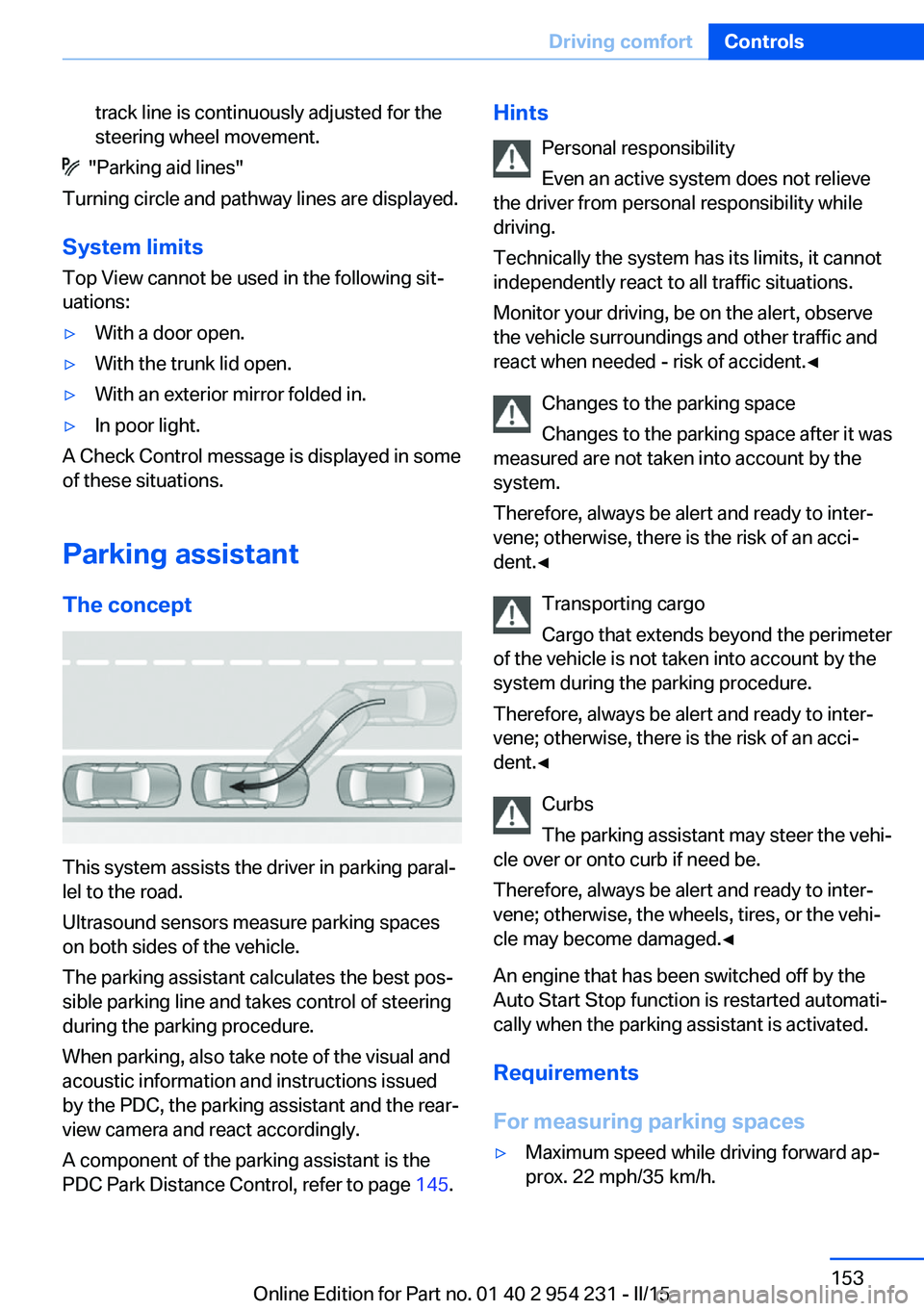
Parking assistant The concept
This system assists the driver in parking paral‐
lel to the road.
Ultrasound sensors measure parking spaces
on both sides of the vehicle.
The parking assistant calculates the best pos‐
sible parking line and takes control of steering
during the parking procedure.
When parking, also take note of the visual and
acoustic information and instructions issued
by the PDC, the parking assistant and the rear‐
view camera and react accordingly.
A component of the parking assistant is the
PDC Park Distance Control, refer to page 145.
Hints
Personal responsibility
Even an active system does not relieve
the driver from personal responsibility while
driving.
Technically the system has its limits, it cannot
independently react to all traffic situations.
Monitor your driving, be on the alert, observe
the vehicle surroundings and other traffic and
react when needed - risk of accident.◀
Changes to the parking space
Changes to the parking space after it was
measured are not taken into account by the system.
Therefore, always be alert and ready to inter‐
vene; otherwise, there is the risk of an acci‐
dent.◀
Transporting cargo
Cargo that extends beyond the perimeter
of the vehicle is not taken into account by the
system during the parking procedure.
Therefore, always be alert and ready to inter‐
vene; otherwise, there is the risk of an acci‐
dent.◀
Curbs
The parking assistant may steer the vehi‐
cle over or onto curb if need be.
Therefore, always be alert and ready to inter‐
vene; otherwise, the wheels, tires, or the vehi‐
cle may become damaged.◀
An engine that has been switched off by the
Auto Start Stop function is restarted automati‐
cally when the parking assistant is activated.
Requirements
For measuring parking spaces▷Maximum speed while driving forward ap‐
prox. 22 mph/35 km/h.Seite 153Driving comfortControls153
Online Edition for Part no. 01 40 2 954 231 - II/15
Page 158 of 255
▷Maximum distance to row of parked vehi‐
cles: 5 ft/1.5 m.
Suitable parking space
▷Gap between two objects with a minimum
length of approx. 5 ft/1.5 m.▷Min. length of gap between two objects:
your vehicle's length plus approx.
4 ft/1.2 m.▷Minimum depth: approx. 5 ft/1.5 m.
Regarding the parking procedure
▷Doors and trunk lid closed.▷Parking brake released.▷When parking in parking spaces on the
driver's side, the corresponding turn signal
must be set where applicable.
Overview
Button in the vehicle
Parking assistant
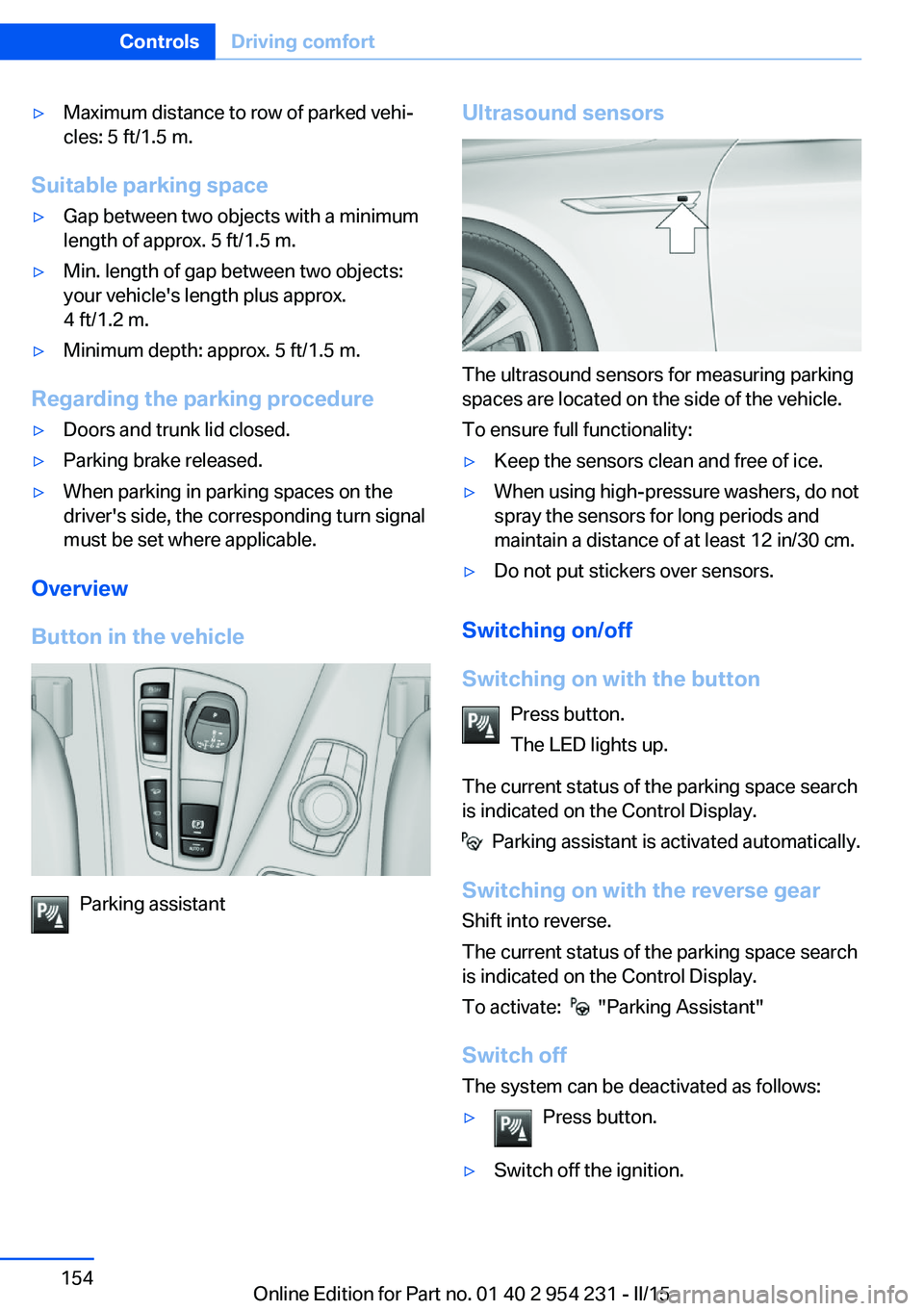
Ultrasound sensors
The ultrasound sensors for measuring parking
spaces are located on the side of the vehicle.
To ensure full functionality:
▷Keep the sensors clean and free of ice.▷When using high-pressure washers, do not
spray the sensors for long periods and
maintain a distance of at least 12 in/30 cm.▷Do not put stickers over sensors.
Switching on/off
Switching on with the button Press button.
The LED lights up.
The current status of the parking space search
is indicated on the Control Display.
Parking assistant is activated automatically.
Switching on with the reverse gear
Shift into reverse.
The current status of the parking space search
is indicated on the Control Display.
To activate:
"Parking Assistant"
Switch off
The system can be deactivated as follows:
▷Press button.▷Switch off the ignition.Seite 154ControlsDriving comfort154
Online Edition for Part no. 01 40 2 954 231 - II/15
Page 159 of 255
Display on the Control Display
System activated/deactivatedSymbolMeaning Gray: the system is not available.
White: the system is available but
not activated. The system is activated.
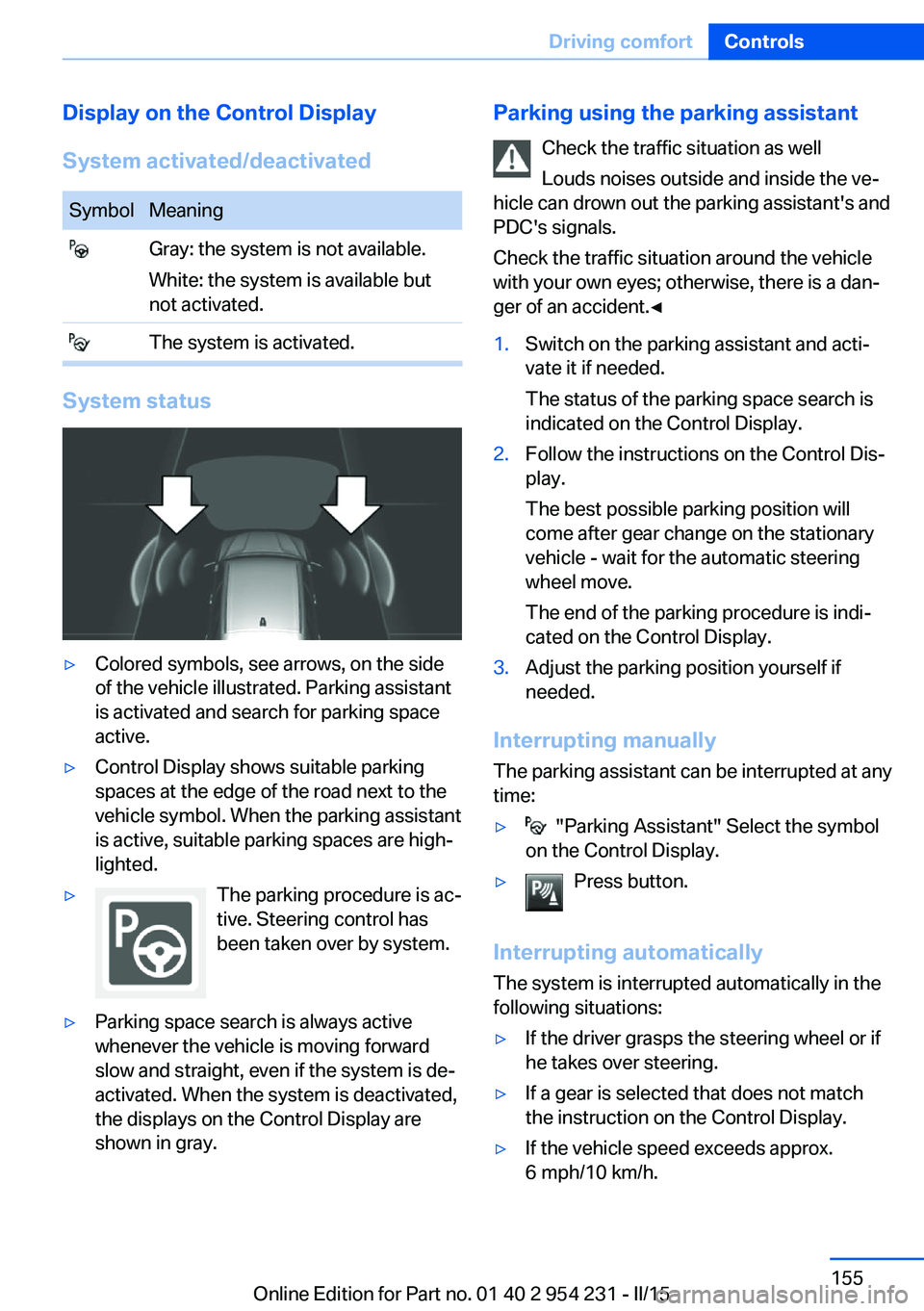
System status
▷Colored symbols, see arrows, on the side
of the vehicle illustrated. Parking assistant
is activated and search for parking space
active.▷Control Display shows suitable parking
spaces at the edge of the road next to the
vehicle symbol. When the parking assistant
is active, suitable parking spaces are high‐
lighted.▷The parking procedure is ac‐
tive. Steering control has
been taken over by system.▷Parking space search is always active
whenever the vehicle is moving forward
slow and straight, even if the system is de‐
activated. When the system is deactivated,
the displays on the Control Display are
shown in gray.Parking using the parking assistant
Check the traffic situation as well
Louds noises outside and inside the ve‐
hicle can drown out the parking assistant's and
PDC's signals.
Check the traffic situation around the vehicle
with your own eyes; otherwise, there is a dan‐
ger of an accident.◀1.Switch on the parking assistant and acti‐
vate it if needed.
The status of the parking space search is
indicated on the Control Display.2.Follow the instructions on the Control Dis‐
play.
The best possible parking position will
come after gear change on the stationary
vehicle - wait for the automatic steering
wheel move.
The end of the parking procedure is indi‐
cated on the Control Display.3.Adjust the parking position yourself if
needed.
Interrupting manually
The parking assistant can be interrupted at any
time:
▷ "Parking Assistant" Select the symbol
on the Control Display.▷Press button.
Interrupting automatically
The system is interrupted automatically in the
following situations:
▷If the driver grasps the steering wheel or if
he takes over steering.▷If a gear is selected that does not match
the instruction on the Control Display.▷If the vehicle speed exceeds approx.
6 mph/10 km/h.Seite 155Driving comfortControls155
Online Edition for Part no. 01 40 2 954 231 - II/15
Page 160 of 255
▷Possible on snow-covered or slippery road
surfaces.▷When there are obstacles that are hard to
overcome, such as curbs.▷When there are obstacles that suddenly
arise.▷If the Park Distance Control PDC displays
clearances that are too small.▷If a maximum number of parking attempts
or the time taken for parking is exceeded.▷If a turn signal has been actuated contrary
to the desired side for parking.▷When switching to another function on the
Control Display.
A Check Control message is displayed.
Resume An interrupted parking procedure can be con‐
tinued if needed.
Follow the instructions on the Control Display
to do this.
System limits
No parking assistance
The parking assistant does not offer assis‐
tance in the following situations:
▷In tight curves.
Functional limitations
The system may not be fully functional in the
following situations:
▷On bumpy road surfaces such as gravel
roads.▷On slippery ground.▷On steep uphill or downhill grades.▷With accumulations of leaves/snow in the
parking space.
Limits of ultrasonic measurement
Ultrasonic measuring might not function under
the following circumstances:
▷For small children and animals.▷For persons with certain clothing, e.g.
coats.▷With external interference of the ultra‐
sound, e.g. from passing vehicles or loud
machines.▷When sensors are dirty, iced over, dam‐
aged or out of position.▷Under certain weather conditions such as
high relative humidity, rain, snowfall, ex‐
treme heat or strong wind.▷With tow bars and trailer couplings of other
vehicles.▷With thin or wedge-shaped objects.▷With moving objects.▷With elevated, protruding objects such as
ledges or cargo.▷With objects with corners and sharp edges.▷With objects with a fine surface structure
such as fences.▷For objects with porous surfaces.
Low objects already displayed, e.g., curbs, can
move into the blind area of the sensors before
or after a continuous tone sounds.
The parking assistant may identify parking
spaces that are not suitable for parking.
Malfunction
A Check Control message is displayed.
The parking assistant failed. Have the system
checked.
Seite 156ControlsDriving comfort156
Online Edition for Part no. 01 40 2 954 231 - II/15
Page 184 of 255
Objects within the range of movement
of the pedals
No objects in the area around the pedals
Keep floor mats, carpets, and any other
objects out of the pedal area; otherwise, the
function of the pedals could be impeded while
driving and create the risk of an accident.
Do not place additional floor mats over existing
mats or other objects.
Only use floor mats that have been approved
for the vehicle and can be properly attached to
floor.
Ensure that the floor mats are securely fas‐
tened again after they were removed for clean‐
ing, e.g.◀
Driving in wet conditions When roads are wet, salted, or in heavy rain,
press brake pedal ever so gently every few
miles.
Ensure that this action does not endanger other traffic.
The heat generated in this process helps dry
the brake discs and pads.
In this way braking efficiency will be available
when you need it.
Hills Avoid stressing the brakes
Avoid placing excessive stress on the
brake system. Light but consistent brake pres‐
sure can lead to high temperatures, brakes
wearing out and possibly even brake failure.◀
Do not drive in neutral
Do not drive in neutral or with the engine
stopped, as doing so disables engine braking.
In addition, steering and brake assist are un‐
available with the engine stopped.◀
Drive long or steep downhill gradients in the
gear that requires least braking efforts. Other‐wise the brakes may overheat and reduce
brake efficiency.
You can increase the engine's braking effect
by shifting down, going all the way to first gear,
if needed.
Brake disc corrosion
Brake disc corrosion and contamination of the
brake pads are favored by:▷Low mileage.▷Extended periods when the vehicle is not
used at all.▷Infrequent use of the brakes.
Corrosion will built up when the maximum
pressure applied to the brake pads during
braking is not reached - thus discs don't get
cleaned.
Corrosion buildup on the brake discs will cause
a pulsating effect on the brakes in their re‐
sponse - generally that cannot be corrected.
Condensation under the parked
vehicle
When using the automatic climate control,
condensation water develops collecting under‐
neath the vehicle.
These traces of water under the vehicle are
normal.
Seite 180Driving tipsThings to remember when driving180
Online Edition for Part no. 01 40 2 954 231 - II/15
Page 244 of 255
Everything from A to Z
IndexA ABS, Antilock Brake Sys‐ tem 128
ACC, Active Cruise Control with Stop & Go 136
Acceleration Assistant, refer to Launch Control 76
Accessories and parts 7
Activated-charcoal filter 160
Active Blind Spot Detec‐ tion 124
Active Cruise Control with Stop & Go, ACC 136
Active Protection 125
Active seat, front 52
Active seat ventilation, front 53
Active Steering, integral 132
Adaptive brake assistant 128
Adaptive brake lights, refer to Brake force display 125
Adaptive drive 131
Adaptive Light Control 97
Additives, oil 213
Adjusting, steering wheel 59
Adjustments, seats/head re‐ straints 50
After washing vehicle 230
Airbags 101
Airbags, indicator/warning light 102
Air circulation, refer to Recir‐ culated-air mode 159
Air, dehumidifying, refer to Cooling function 159
Air distribution, manual 158
Air flow, automatic climate control 158
Air outlets, see ventila‐ tion 162 Air pressure, tires 196
Alarm system 44
Alarm, unintentional 45
All around the center con‐ sole 16
All around the interior rear‐ view mirror 17
All around the steering wheel 14
All-season tires, refer to Win‐ ter tires 205
All-wheel-drive 130
Alternating-code hand-held transmitter 166
Alternative oil types 214
Animal detection, see Night Vision 119
Antifreeze, washer fluid 72
Antilock Brake System, ABS 128
Anti-slip control, refer to DSC 128
Approved axle load 237
Approved engine oils, see Suitable engine oil
types 214
Armrest, refer to Front center armrest 173
Armrest, refer to Rear center armrest 173
Arrival time 91
Ashtray 167
Ashtray, rear 168
Assistance when driving off 128
Attentiveness assistant 126
AUTO H button 68
AUTO H button, refer to Au‐ tomatic Hold 68
AUTO intensity 158
Automatic car wash 229 Automatic Cruise Control
with Stop & Go 136
Automatic Curb Monitor 57
Automatic deactivation, front- seat passenger airbags 103
Automatic headlight con‐ trol 97
Automatic Hold 68
Automatic locking 44
Automatic recirculated-air control 159
Automatic Soft Closing, doors 40
Automatic transmission, see Steptronic transmission 73
AUTO program, automatic cli‐ mate control 158
AUTO program, intensity 158
Auto Start/Stop function 66
Average fuel consumption 90
Average speed 90
Axle loads, weights 237
B Backrest curvature, refer to Lumbar support 51
Backrest, seats 50
Backrest, width 52
Band-aids, refer to First aid kit 225
Bar for tow-starting/ towing 227
Battery replacement, remote control for parked-car heat‐
ing/ventilation 164
Battery replacement, vehicle battery 222
Battery replacement, vehicle remote control 35
Battery, vehicle 222 Seite 240ReferenceEverything from A to Z240
Online Edition for Part no. 01 40 2 954 231 - II/15
Page 248 of 255
Hand-held transmitter, alter‐nating code 166
Hazard warning flashers 224
HDC Hill Descent Con‐ trol 130
Head airbags 101
Headlight control, auto‐ matic 97
Headlight courtesy delay fea‐ ture 97
Headlight courtesy delay fea‐ ture via remote control 38
Headlight flasher 70
Headlight glass 220
Headlights 219
Headlights, care 230
Headlight washer system 71
Head restraints 50
Head restraints, front 55
Head-up Display 93
Head-up Display, care 232
Heating, refer to Parked-car heating 162
Heavy cargo, stowing 182
Height, seats 50
Height, vehicle 236
High-beam Assistant 98
High beams 70
High beams/low beams, refer to High-beam Assistant 98
Hill Descent Control HDC 130
Hills 180
Hill start assistant, refer to Drive-off assistant 128
Hints 6
Holder for beverages 174
Homepage 6
Hood 210
Horn 14
Hotel function, trunk lid 41
Hot exhaust system 178
HUD Head-up Display 93
Hydroplaning 179 I
Ice warning, see External temperature warning 85
Icy roads, see External tem‐ perature warning 85
Identification marks, tires 202
Identification number, see ve‐ hicle identification num‐
ber 9
iDrive 18
Ignition key, refer to Remote control 34
Ignition off 64
Ignition on 64
Indication of a flat tire 105 , 108
Indicator and alarm lamps, see Check Control 81
Indicator lamp, see Check Control 81
Individual air distribution 158
Individual settings, refer to Personal Profile 35
Inflation pressure, tires 196
Inflation pressure warning FTM, tires 108
Info display, refer to On- Board computer 90
Initialization, Integral Active Steering 132
Initialize, Tire Pressure Moni‐ tor TPM 105
Initializing, Flat Tire Monitor FTM 108
Instrument cluster 77
Instrument cluster, electronic displays 77
Instrument display, multifunc‐ tional 78
Instrument lighting 99
Integral Active Steering 132
Integrated key 34
Integrated Owner's Manual in the vehicle 29 Intelligent Emergency Re‐
quest 224
Intelligent Safety 110
Intensity, AUTO pro‐ gram 158
Interior equipment 165
Interior lights 99
Interior lights during unlock‐ ing 37
Interior lights with the vehicle locked 38
Interior motion sensor 45
Interior rearview mirror, auto‐ matic dimming feature 58
Internet page 6
Interval display, service re‐ quirements 87
Interval mode 71
J
Jacking points for the vehicle jack 222
Joystick, Steptronic transmis‐ sion 74
Jump-starting 225
K
Key/remote control 34
Keyless Go, refer to Comfort Access 41
Key Memory, refer to Per‐ sonal Profile 35
Kickdown, Steptronic trans‐ mission 74
Knee airbag 102
L Lamp replacement, front 219
Lamp replacement, rear 221
Lane departure warning 122
Lane margin, warning 122
Language on Control Dis‐ play 93 Seite 244ReferenceEverything from A to Z244
Online Edition for Part no. 01 40 2 954 231 - II/15
Page 249 of 255
Lashing eyes, securingcargo 182
LATCH child restraint sys‐ tem 62
Launch Control 76
Leather, care 231
LED front fog lights, bulb re‐ placement 221
LED headlights, bulb replace‐ ment 220
LED light 220
LEDs, light-emitting di‐ odes 220
Length, vehicle 236
Letters and numbers, enter‐ ing 24
License plate lamp, bulb re‐ placement 221
Light alloy wheels, care 231
Light control 97
Light-emitting diodes, LEDs 220
Lighting 96
Lighting, speaker 100
Lights 96
Lights and bulbs 219
Light switch 96
Load 182
Loading 181
Lock, door 39
Locking/unlocking via door lock 39
Locking/unlocking with re‐ mote control 37
Locking, automatic 44
Locking, settings 43
Locking via trunk lid 41
Lock, power window 46
Locks, doors, and win‐ dows 63
Low beams 96
Low beams, automatic, refer to High-beam Assistant 98
Lower back support 51
Lumbar support 51 M
Maintenance 217
Maintenance require‐ ments 217
Maintenance, service require‐ ments 87
Maintenance system, BMW 217
Make-up mirror 167
Malfunction displays, see Check Control 81
Manual air distribution 158
Manual air flow 158
Manual brake, refer to Parking brake 67
Manual mode, Steptronic transmission 74
Manual operation, door lock 39
Manual operation, exterior mirrors 57
Manual operation, fuel filler flap 192
Manual operation, Park Dis‐ tance Control PDC 146
Manual operation, rearview camera 148
Manual operation, Side View 150
Manual operation, Top View 152
Marking on approved tires 204
Marking, run-flat tires 205
Massage seat, front 52
Master key, refer to Remote control 34
Maximum cooling 159
Maximum speed, display 88
Maximum speed, winter tires 205
Measure, units of 93
Medical kit 225
Memory for seat, mirrors, steering wheel 56 Menu, EfficientDynamics 186
Menu in instrument clus‐ ter 89
Menus, operating, iDrive 18
Menus, refer to iDrive operat‐ ing concept 19
Messages, see Check Con‐ trol 81
Microfilter 160
Minimum tread, tires 203
Mirror 57
Mirror memory 56
Mobile communication devi‐ ces in the vehicle 179
Mobility System 206
Modifications, technical, refer to Safety 7
Moisture in headlight 220
Monitor, refer to Control Dis‐ play 18
Mounting of child restraint systems 60
Multifunctional instrument display 78
Multifunction steering wheel, buttons 14
N Navigation, see user's manual for Navigation, Entertain‐
ment and Communication
Neck restraints, front, refer to Head restraints 55
Neutral cleaner, see wheel cleaner 231
New wheels and tires 204
Night Vision 119
Night Vision device, see Night Vision 119
Nylon rope for tow-starting/ towing 227
O OBD Onboard Diagnosis 218 Seite 245Everything from A to ZReference245
Online Edition for Part no. 01 40 2 954 231 - II/15
Page 250 of 255
OBD, see OBD Onboard Di‐agnosis 218
Object detection, see Night Vision 119
Obstacle marking, rearview camera 149
Octane rating, refer to Rec‐ ommended fuel grade 194
Odometer 85
Office, see user's manual for Navigation, Entertainment
and Communication
Oil 212
Oil, adding 213
Oil additives 213
Oil change 214
Oil change interval, service requirements 87
Oil filler neck 213
Oil types, alternative 214
Oil types, approved 214
Old batteries, disposal 223
On-board computer 90
Onboard monitor, refer to Control Display 18
Onboard vehicle tool kit 219
Opening/closing via door lock 39
Opening and closing 34
Opening and closing, without remote control 39
Opening and closing, with re‐ mote control 37
Operating concept, iDrive 18
Optional equipment, standard equipment 6
Outside air, refer to Auto‐ matic recirculated-air con‐
trol 159
Overheating of engine, refer to Coolant temperature 85
P Paint, vehicle 230
Parallel parking assistant 153 Park Distance Control
PDC 145
Parked vehicle, condensa‐ tion 180
Parking aid, refer to PDC 145
Parking assistant 153
Parking brake 67
Parking lights 96
Parking with Automatic Hold 68
Parts and accessories 7
Passenger side mirror, tilting downward 57
Pathway lines, rearview cam‐ era 148
PDC Park Distance Con‐ trol 145
Pedestrian detection, see Night Vision 119
Pedestrian warning with city braking function 116
Personal Profile 35
Personal Profile, exporting profiles 36
Pinch protection system, glass sunroof 48
Pinch protection system, win‐ dows 46
Plastic, care 231
Power failure 223
Power sunroof, glass 48
Power windows 45
Pressure, tire air pres‐ sure 196
Pressure warning FTM, tires 108
Profile, refer to Personal Pro‐ file 35
Programmable memory but‐ tons, iDrive 23
Protective function, glass sunroof 48
Protective function, win‐ dows 46
Push-and-turn switch, refer to Controller 18 R
Radiator fluid 215
Radio-operated key, refer to Remote control 34
Radio ready state 64
Radio, see user's manual for Navigation, Entertainment
and Communication
Rain sensor 71
Rear automatic climate con‐ trol 160
Rear axle steering 132
Rear center armrest 173
Rear lights 221
Rearview camera 147
Rearview mirror 57
Rear window defroster 159
Recirculated-air mode 159
Recommended fuel grade 194
Recommended tire brands 204
Refueling 192
Remaining range 86
Remote control/key 34
Remote control, malfunc‐ tion 38
Remote control, parked-car heating/ventilation 164
Remote control, univer‐ sal 165
Replacement fuse 223
Replacing bulbs, see Lamp replacement 219
Replacing parts 219
Replacing wheels/tires 204
Reporting safety defects 9
RES button 139
RES button, see Active Cruise Control, ACC 136
RES button, see Cruise con‐ trol 143
Reserve warning, refer to Range 86 Seite 246ReferenceEverything from A to Z246
Online Edition for Part no. 01 40 2 954 231 - II/15