remote control BMW 645CI CONVERTIBLE 2005 Owner's Manual
[x] Cancel search | Manufacturer: BMW, Model Year: 2005, Model line: 645CI CONVERTIBLE, Model: BMW 645CI CONVERTIBLE 2005Pages: 217, PDF Size: 7.92 MB
Page 102 of 217

Controls
101Reference
At a glance
Driving tips
Communications
Navigation
Entertainment
Mobility
You can operate the system when the ignition
key is in position 2.
If the device cannot be used after
repeated programming, check whether
the original hand-held transmitter uses an alter-
nating-code system. To do so, either read the
instructions for the original hand-held transmit-
ter or press the programmed memory button1
of the integrated universal remote control
longer. If the LED 2 on the integrated universal
remote control flashes rapidly for a short time
then lights up for approx. 2 seconds, this indi-
cates that the original hand-held transmitter
uses an alternating-code system. In the case of
an alternating-code system, program the mem-
ory buttons1 as described at Alternating-code
hand-held transmitters.<
Alternating-code hand-held
transmitters
To program the integrated universal remote
control, consult the operating instructions for
the equipment to be set. You will find informa-
tion there on the possibilities for synchroniza-
tion.
When programming hand-held transmitters
that employ an alternating code, please observe
the following supplementary instructions:
P r o g ra m m in g w i ll b e ea s i er w it h t h e a i d o f
a second person.<
1.Park your vehicle within the range of the
remote-controlled equipment.
2.Program the integrated universal remote
control as described above at Fixed-code
hand-held transmitters.
3.Locate the button at the receiver of the
equipment to be set, e.g. on the drive.
4.Press the button on the receiver of the
equipment to be set. After step 4, you have
approx. 30 seconds for step 5.
5.Press the programmed memory button1 of
the integrated universal remote control
three times.
The corresponding memory button1 is now
programmed with the signal of the original
hand-held transmitter.
Clearing memory buttons
Press both outer buttons 1 for approx. 20 sec-
onds, maintaining pressure until the LED 2
starts to flash: All of the memory buttons are
cleared.
The memory of individual memory buttons1
cannot be cleared.
Glove compartment
Opening
Press the button. The glove compartment
opens automatically and the lamps come on.
Closing
Fold the cover up.
To prevent injury in the event of an acci-
dent while the vehicle is being driven,
close the glove compartment immediately after
use.<
Rechargeable flashlight*
The flashlight is located on the left side of the
glove compartment.
The flashlight can remain there continuously.
Be sure that the flashlight is switched off
when it is inserted into its holder. Failure
to comply with this precaution could lead to
overcharging and damage.<
Page 127 of 217
Destination guidance
126
Destination guidance
through voice instructions
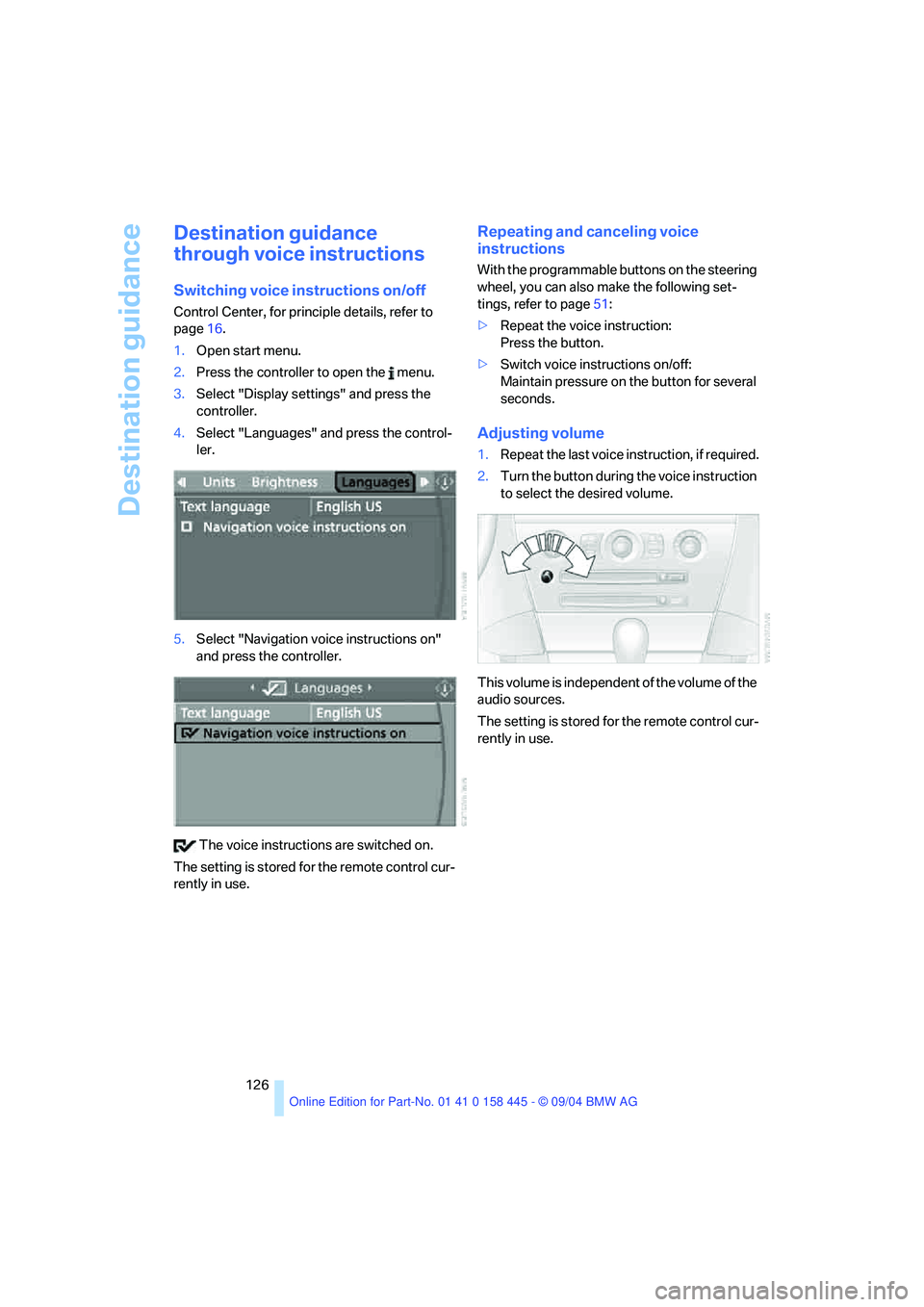
Switching voice instructions on/off
Control Center, for principle details, refer to
page16.
1.Open start menu.
2.Press the controller to open the menu.
3.Select "Display settings" and press the
controller.
4.Select "Languages" and press the control-
ler.
5.Select "Navigation voice instructions on"
and press the controller.
The voice instructions are switched on.
The setting is stored for the remote control cur-
rently in use.
Repeating and canceling voice
instructions
With the programmable buttons on the steering
wheel, you can also make the following set-
tings, refer to page51:
>Repeat the voice instruction:
Press the button.
>Switch voice instructions on/off:
Maintain pressure on the button for several
seconds.
Adjusting volume
1.Repeat the last voice instruction, if required.
2.Turn the button during the voice instruction
to select the desired volume.
This volume is independent of the volume of the
audio sources.
The setting is stored for the remote control cur-
rently in use.
Page 134 of 217
Navigation
Entertainment
Driving tips
133Reference
At a glance
Controls
Communications
Mobility
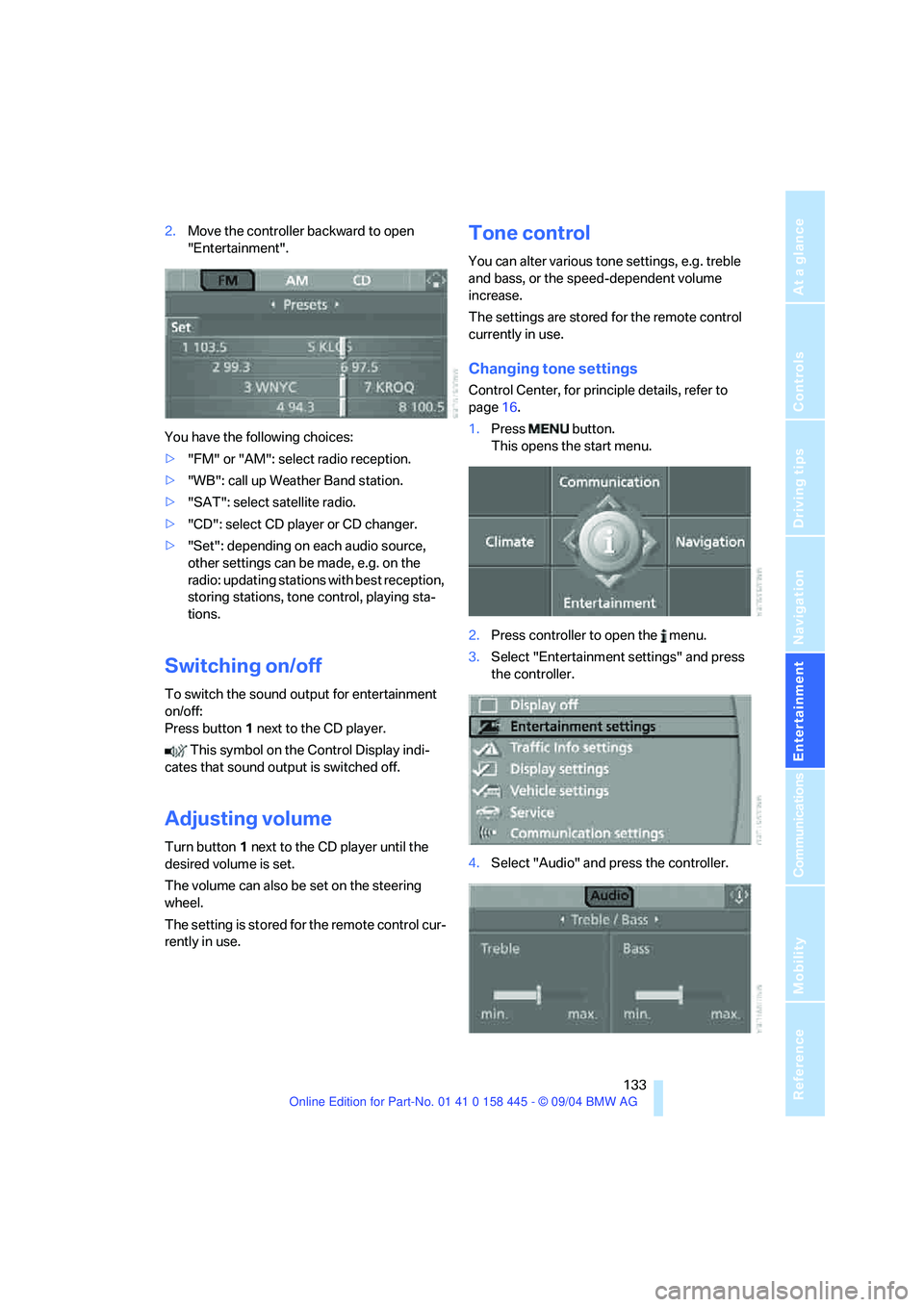
2.Move the controller backward to open
"Entertainment".
You have the following choices:
>"FM" or "AM": select radio reception.
>"WB": call up Weather Band station.
>"SAT": select satellite radio.
>"CD": select CD player or CD changer.
>"Set": depending on each audio source,
other settings can be made, e.g. on the
radio: updating stations with best reception,
storing stations, tone control, playing sta-
tions.
Switching on/off
To switch the sound output for entertainment
on/off:
Press button1 next to the CD player.
This symbol on the Control Display indi-
cates that sound output is switched off.
Adjusting volume
Turn button1 next to the CD player until the
desired volume is set.
The volume can also be set on the steering
wheel.
The setting is stored for the remote control cur-
rently in use.
Tone control
You can alter various tone settings, e.g. treble
and bass, or the speed-dependent volume
increase.
The settings are stored for the remote control
currently in use.
Changing tone settings
Control Center, for principle details, refer to
page16.
1.Press button.
This opens the start menu.
2.Press controller to open the menu.
3.Select "Entertainment settings" and press
the controller.
4.Select "Audio" and press the controller.
Page 140 of 217
Navigation
Entertainment
Driving tips
139Reference
At a glance
Controls
Communications
Mobility
The stations of the last selection criterion are
displayed again after a short time.
The stations are stored for the remote control
currently in use.
Changing a memory location
Control Center, for principle details, refer to
page16.
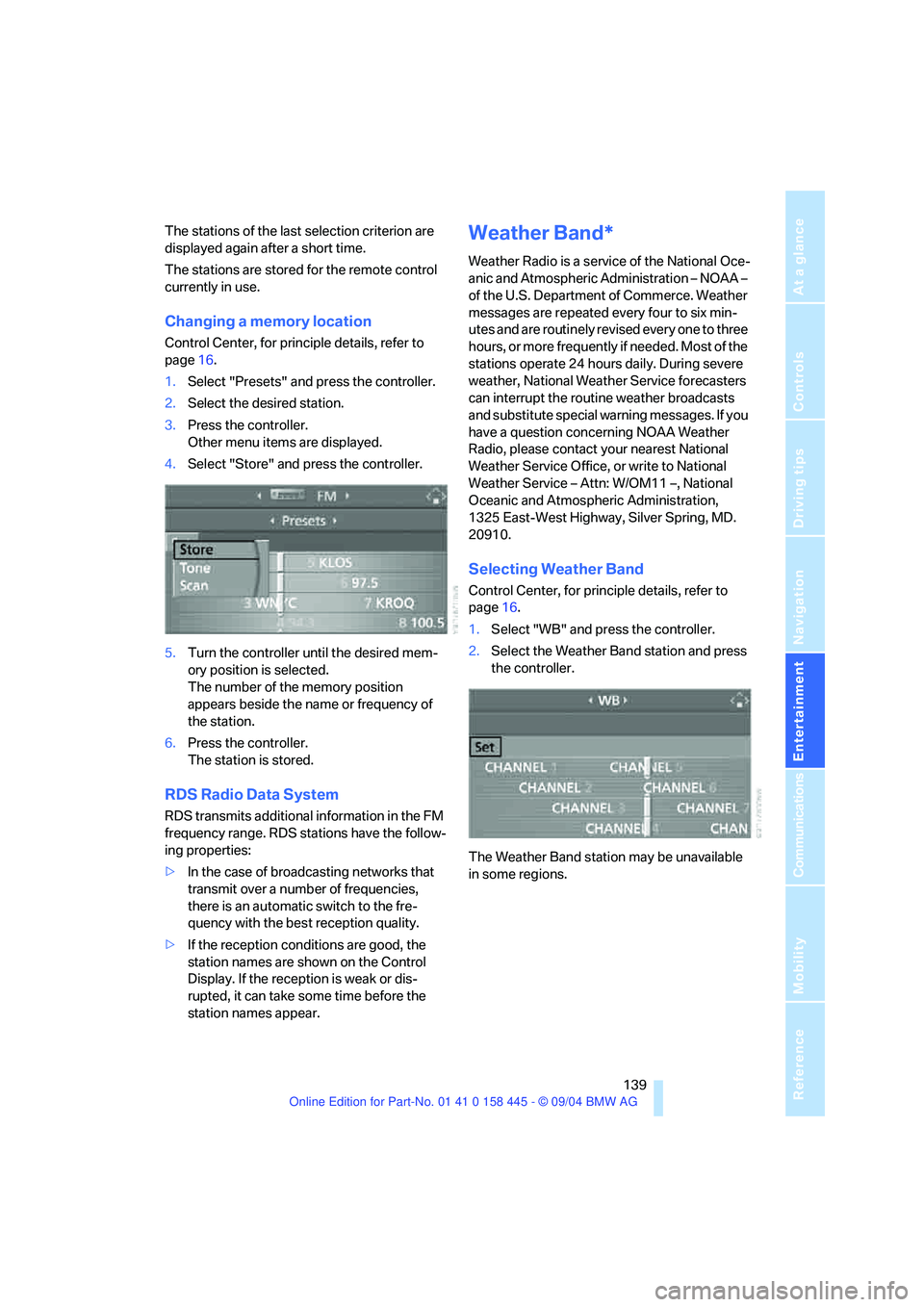
1.Select "Presets" and press the controller.
2.Select the desired station.
3.Press the controller.
Other menu items are displayed.
4.Select "Store" and press the controller.
5.Turn the controller until the desired mem-
ory position is selected.
The number of the memory position
appears beside the name or frequency of
the station.
6.Press the controller.
The station is stored.
RDS Radio Data System
RDS transmits additional information in the FM
frequency range. RDS stations have the follow-
ing properties:
>In the case of broadcasting networks that
transmit over a number of frequencies,
there is an automatic switch to the fre-
quency with the best reception quality.
>If the reception conditions are good, the
station names are shown on the Control
Display. If the reception is weak or dis-
rupted, it can take some time before the
station names appear.
Weather Band*
Weather Radio is a service of the National Oce-
anic and Atmospheric Administration – NOAA –
of the U.S. Department of Commerce. Weather
messages are repeated every four to six min-
utes and are routinely revised every one to three
hours, or more frequently if needed. Most of the
stations operate 24 hours daily. During severe
weather, National Weather Service forecasters
can interrupt the routine weather broadcasts
and substitute special warning messages. If you
have a question concerning NOAA Weather
Radio, please contact your nearest National
Weather Service Office, or write to National
Weather Service – Attn: W/OM11 –, National
Oceanic and Atmospheric Administration,
1325 East-West Highway, Silver Spring, MD.
20910.
Selecting Weather Band
Control Center, for principle details, refer to
page16.
1.Select "WB" and press the controller.
2.Select the Weather Band station and press
the controller.
The Weather Band station may be unavailable
in some regions.
Page 152 of 217
151
Entertainment
Reference
At a glance
Controls
Driving tips Communications
Navigation
Mobility
your portable phone.
To avoid possible short circuits, after removing
a battery you should never allow it to come into
contact with metallic surfaces of any kind.<
Disposing of used batteries
Return used batteries to a recycling col-
lection point or to your BMW center.<
Care instructions
You can find what you need to know about car-
ing for your portable phone in the Caring for
your vehicle brochure and in the separate porta-
ble phone Owner's Manual.
Operating options
You can operate the portable phone* with:
>The steering wheel, refer to page11
>The Control Center, refer to page152
>Voice commands, refer to page156
Information on operating the portable phone is
contained in the separate Owner's Manual on
the Full Preparation Package Cellphone.
Telephoning with car phone:
BMW Assist calls
You can use the car phone via the hands-free
system for BMW Assist calls.
When the status information "Car Phone" is
displayed in "Communication", only BMW
Assist calls are possible.
Hands-free system
The microphone is located:
>In the Coupe near the interior rearview mir-
ror, refer to page14
>In the Convertible on the steering columnThe hands-free system is activated whenever
you establish or receive a call using:
>The button on the steering wheel
>The Control Center
>Voice commands
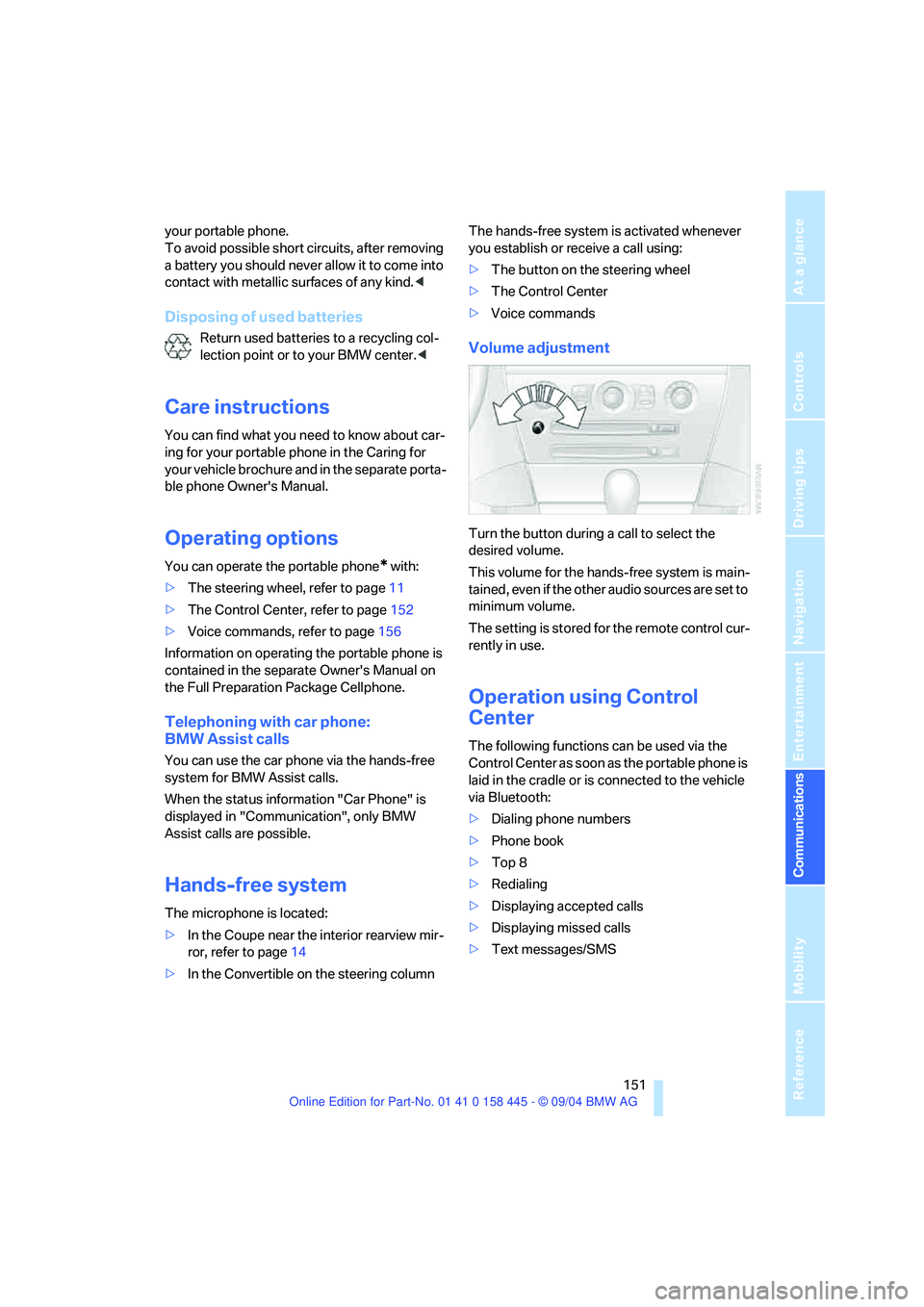
Volume adjustment
Turn the button during a call to select the
desired volume.
This volume for the hands-free system is main-
tained, even if the other audio sources are set to
minimum volume.
The setting is stored for the remote control cur-
rently in use.
Operation using Control
Center
The following functions can be used via the
Control Center as soon as the portable phone is
laid in the cradle or is connected to the vehicle
via Bluetooth:
>Dialing phone numbers
>Phone book
>Top 8
>Redialing
>Displaying accepted calls
>Displaying missed calls
>Text messages/SMS
Page 156 of 217
155
Entertainment
Reference
At a glance
Controls
Driving tips Communications
Navigation
Mobility
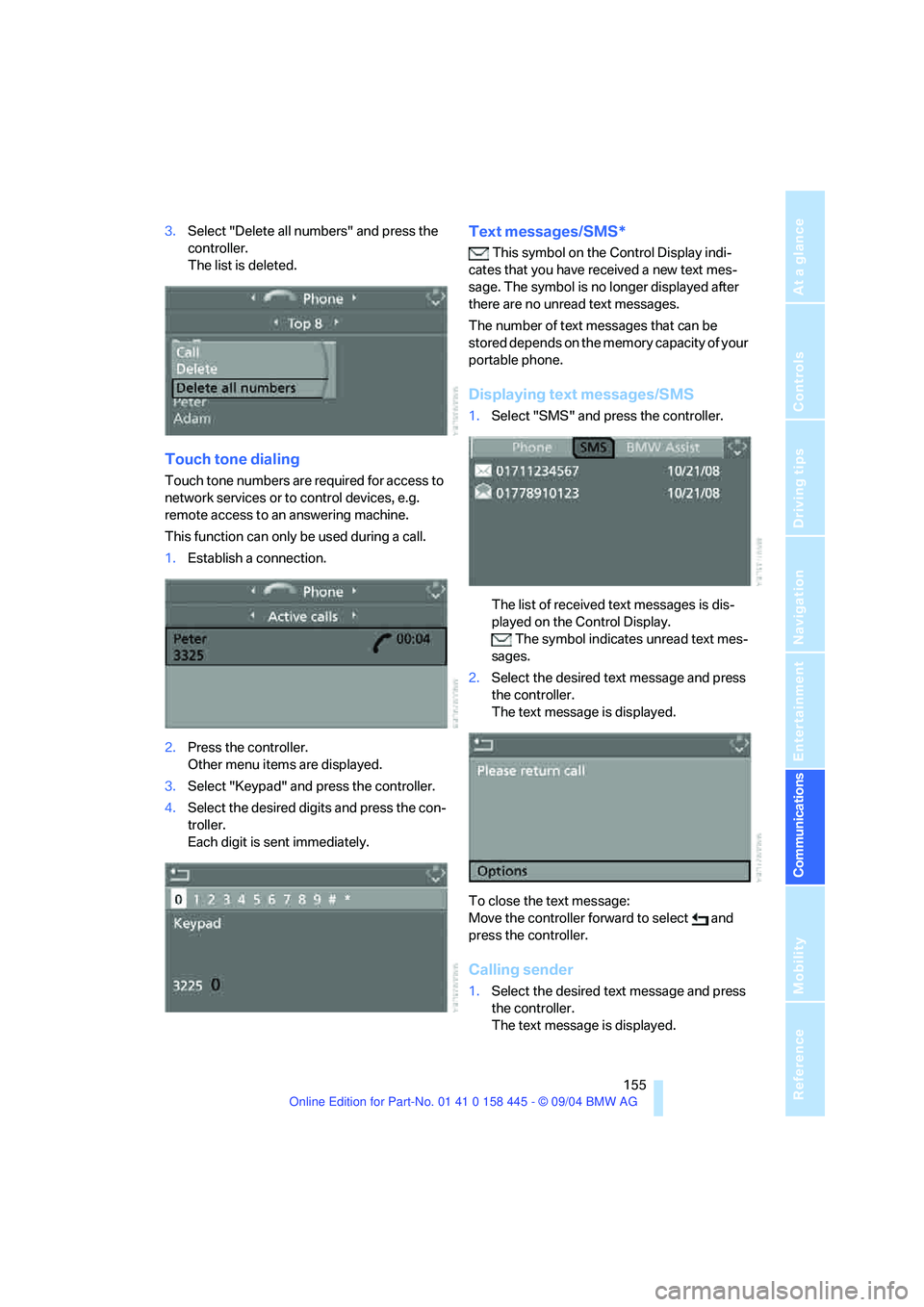
3.Select "Delete all numbers" and press the
controller.
The list is deleted.
Touch tone dialing
Touch tone numbers are required for access to
network services or to control devices, e.g.
remote access to an answering machine.
This function can only be used during a call.
1.Establish a connection.
2.Press the controller.
Other menu items are displayed.
3.Select "Keypad" and press the controller.
4.Select the desired digits and press the con-
troller.
Each digit is sent immediately.
Text messages/SMS*
This symbol on the Control Display indi-
cates that you have received a new text mes-
sage. The symbol is no longer displayed after
there are no unread text messages.
The number of text messages that can be
stored depends on the memory capacity of your
portable phone.
Displaying text messages/SMS
1.Select "SMS" and press the controller.
The list of received text messages is dis-
played on the Control Display.
The symbol indicates unread text mes-
sages.
2.Select the desired text message and press
the controller.
The text message is displayed.
To close the text message:
Move the controller forward to select and
press the controller.
Calling sender
1.Select the desired text message and press
the controller.
The text message is displayed.
Page 158 of 217
157
Entertainment
Reference
At a glance
Controls
Driving tips Communications
Navigation
Mobility
Volume adjustment
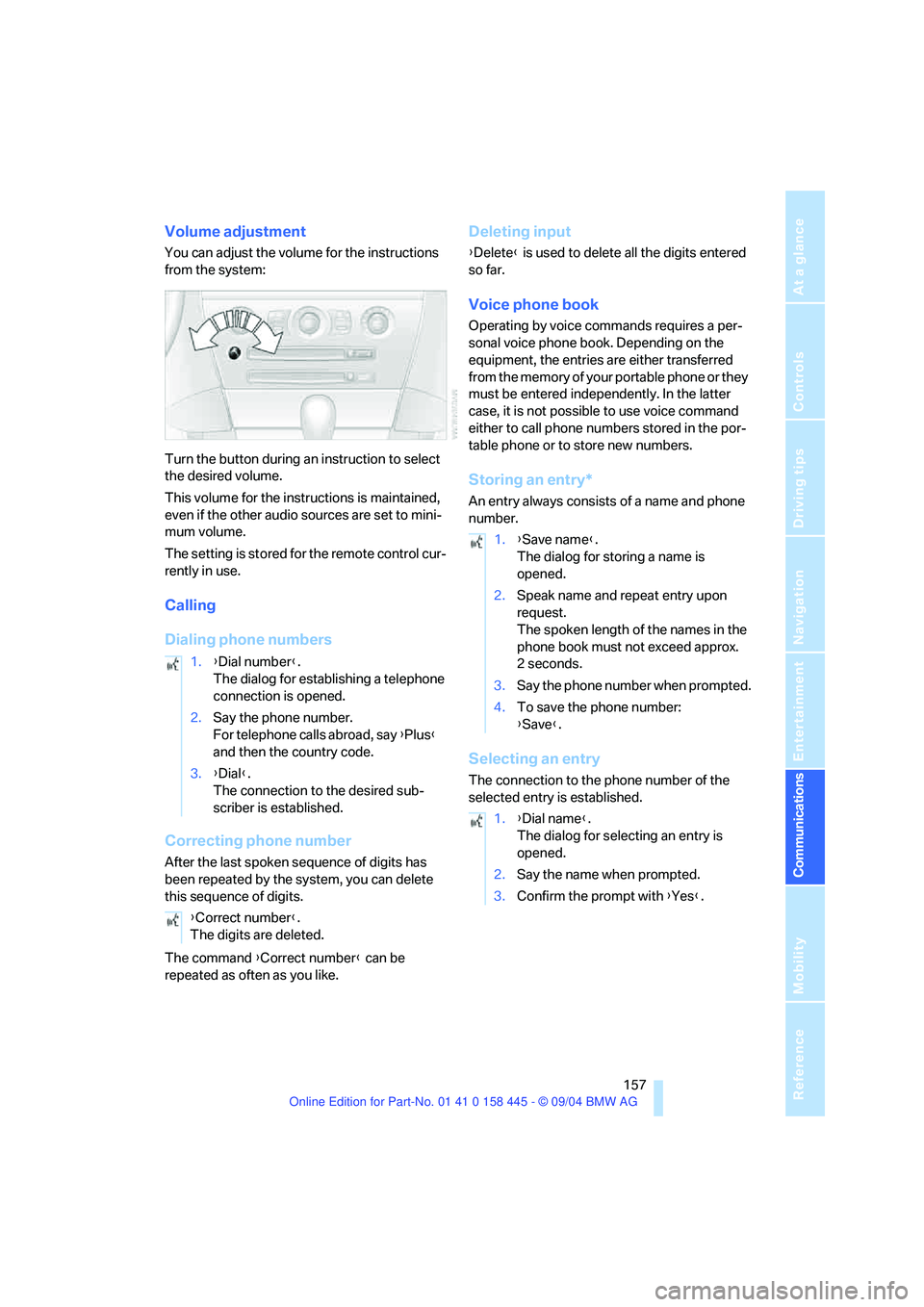
You can adjust the volume for the instructions
from the system:
Turn the button during an instruction to select
the desired volume.
This volume for the instructions is maintained,
even if the other audio sources are set to mini-
mum volume.
The setting is stored for the remote control cur-
rently in use.
Calling
Dialing phone numbers
Correcting phone number
After the last spoken sequence of digits has
been repeated by the system, you can delete
this sequence of digits.
The command {Correct number} can be
repeated as often as you like.
Deleting input
{Delete} is used to delete all the digits entered
so far.
Voice phone book
Operating by voice commands requires a per-
sonal voice phone book. Depending on the
equipment, the entries are either transferred
from the memory of your portable phone or they
must be entered independently. In the latter
case, it is not possible to use voice command
either to call phone numbers stored in the por-
table phone or to store new numbers.
Storing an entry*
An entry always consists of a name and phone
number.
Selecting an entry
The connection to the phone number of the
selected entry is established. 1.{Dial number}.
The dialog for establishing a telephone
connection is opened.
2.Say the phone number.
For telephone calls abroad, say {Plus}
and then the country code.
3.{Dial}.
The connection to the desired sub-
scriber is established.
{Correct number}.
The digits are deleted.
1.{Save name}.
The dialog for storing a name is
opened.
2.Speak name and repeat entry upon
request.
The spoken length of the names in the
phone book must not exceed approx.
2seconds.
3.Say the phone number when prompted.
4.To save the phone number:
{Save}.
1.{Dial name}.
The dialog for selecting an entry is
opened.
2.Say the name when prompted.
3.Confirm the prompt with {Yes}.
Page 204 of 217
Reference 203
At a glance
Controls
Driving tips
Communications
Navigation
Entertainment
Mobility
Destination for navigation
– destination list119
– entry115
– home address122
– selecting from address
book120
– selecting using
information118
– storing120
Destination guidance124
– bypassing route
sections128
– canceling voice
instructions51
– changing specified
route122
– displaying route127
– distance and arrival124
– interrupting125
– starting124
– terminating/continuing125
– voice instructions126
– volume of voice
instructions126
Destination list119
Destinations recently driven
to119
"Dial" for portable phone152
"Dial number"152
"Diamond button"51
Digital clock69
Dimensions
– Convertible194
– Coupe193
Dipstick for engine oil175
Directional indicators, refer to
Turn signals60
Direction announcements,
refer to Voice
instructions126
Direction instructions, refer to
Voice instructions126
Directory, refer to Phone
book153
Directory for navigation, refer
to Address book120
Disc brakes109Displacement, refer to Engine
data192
Display, refer to Control
Center16
"Display off"21
Displays, refer to Instrument
cluster12
"Display settings"77
Displays on the windshield,
refer to Head-Up Display88
Disposal, vehicle battery183
Distance, refer to
Computer75
Distance control, refer to
Active cruise control62
"Distance to dest."75
Distance to destination, refer
to Computer75
Distance warning, refer to
PDC Park Distance
Control80
Door entry lighting93
Door keys28
Door lock31
"Door locks"29
Doors
– manual operation31
– remote control30
DOT Quality Grades170
Draft-free ventilation97
"Driver's door only"29
Driving lamps, refer to Parking
lamps/low beams91
Driving notes108
Driving route, refer to
Displaying the route127
Driving stability control
systems82
Driving through water109
Driving tips, refer to Driving
notes108
Drying the air, refer to Cooling
function95
DSC Dynamic Stability
Control82
– indicator lamp13,83
– malfunction83DTC Dynamic Traction
Control82
– activating82
– indicator lamp13,82
DVD for navigation114
Dynamic Brake Control
DBC81
Dynamic Driving Control59
"Dynamic route" for
navigation122
Dynamic Stability Control
DSC82
– indicator lamp13,83
Dynamic Traction Control
DTC82
– indicator lamp13
E
Easy entry, refer to Entry to
the rear48
Easy entry/exit50
EBV, refer to Electronic brake-
force distribution81
"Edit address" for
navigation121
Eject button, refer to Buttons
on CD player132
Electrical malfunction
– convertible top41
– door lock31
– driver's door31
– fuel filler door166
– glass sunroof38
– luggage compartment lid33
– storage compartment, hotel
function32
Electric steering wheel
adjustment50
Electronic brake-force
distribution81
Emergency Assistance, refer
to Roadside Assistance186
Emergency call185
Page 206 of 217
Reference 205
At a glance
Controls
Driving tips
Communications
Navigation
Entertainment
Mobility
G
Garage-door opener, refer to
Integrated universal remote
control100
Gasoline
– refer to Fuel
specifications167
– refer to Required fuel167
Gasoline display, refer to Fuel
gage70
Gear changes
– SMG Sequential manual
transmission57
Gear display
– automatic transmission with
Steptronic58
– SMG Sequential manual
transmission57
Gearshift lever
– automatic transmission with
Steptronic58
– manual transmission56
– SMG Sequential manual
transmission56
General driving notes108
Glass sunroof, electric with
raise function37
– convenience operation31
– moving manually38
– remote control30
Glove compartment101
– rechargeable flashlight101
GPS navigation, refer to
Navigation system114
Grills, refer to Ventilation94
Gross vehicle weight, refer to
Weights192
H
Handbrake55
– indicator lamp13,55
Hands-free system14,151
Hazard warning flashers15
Head airbags86
Headlamp control,
automatic91Headlamp flasher60
Headlamps
– care, refer to the Caring for
your vehicle brochure
– cleaning, refer to Wiper
system61
– replacing bulbs180
Head Light, refer to Adaptive
Head Light92
Head-Up Display88
Heated mirrors50
Heated rear window94
Heated seats49
Heated steering wheel51
Heater95
Heating
– exterior mirrors50
– interior94
– rear window94
– residual heat mode96
– seats49
– steering wheel51
Heating with engine switched
off, refer to Residual heat
mode96
Heavy cargo, refer to Securing
load111
Height, refer to
Dimensions193
Height adjustment
– seats45
– steering wheel50
High beams92
– headlamp flasher92
– indicator lamp13
– replacing bulbs180
Hills109
Holder for cups103
"Home address"122
Hood174
Horn10
Hotel function32
Hot exhaust system108
"Hour memo"78
"House number" for desti-
nation entry117Hydraulic Brake Assistant,
refer to DBC Dynamic Brake
Control81
Hydroplaning109
– also refer to Minimum tread
depth171
I
Ice warning69
iDrive, refer to Control
Center16
Ignition key28
Ignition key positions, refer to
Ignition lock54
Ignition lock54
Increasing luggage
compartment capacity,
Convertible34
Independent ventilation
– activating an activation
time98
– setting activation time98
– switching on and off
directly98
Indicator/warning lamps
– ABS Antilock Brake
System83
– active steering85
– airbags87
– brake system13,83
– DSC Dynamic Stability
Control13,83
– DTC Dynamic Traction
Control13,82
– fastening safety belts49
– Flat Tire Monitor85
– fog lamps13,92
– handbrake55
Indicator and warning lamps,
overview13
Individually assignable
buttons on steering wheel,
refer to Programmable
buttons on steering
wheel51
Individual settings, refer to
Key Memory28
Page 207 of 217
Everything from A to Z
206 Inflation pressure, refer to Tire
inflation pressure168
Inflation pressure monitoring,
refer to Flat Tire Monitor84
Information
– on another location118
– on current position118
– on destination location118
"Information" for
navigation118
"Information on
destination"119
Initializing, refer to Power
failure184
"Input map"118
Inside rearview mirror,
automatically dimming, refer
to Automatic functions50
Installation location
– CD changer145
– navigation drive114
Instructions for navigation
system, refer to Voice
instructions126
Instrument cluster12
Instrument illumination, refer
to Instrument lighting93
Instrument lighting93
Instrument panel, refer to
Instrument cluster12
Integrated universal remote
control100
Interesting destination118
"Interim time"77
Interior lamps93
– remote control30
Interlock, refer to Steering
locked54
Interlock on automatic
transmission54
Intermittent mode of the
wipers60
J
Jacking points183
Joystick, refer to Control
Center16
Jumpering, refer to Jump
starting186
Jumping, refer to Jump
starting186
Jump starting186
K
Key Memory28
"Keypad"155
Keys28
Kick-down
– automatic transmission with
Steptronic58
– SMG Sequential manual
transmission57
Knock control167
L
Lamps, refer to Parking lamps/
low beams91
Lamps and bulbs180
"Languages"78
"Languages" for
navigation126
Lashing eyes, refer to
Securing load111
Last destinations, refer to
Destination list119
"Last seat pos."46
LATCH child-restraint fixing
system53
LEDs Light-emitting
diodes183
Length, refer to
Dimensions193
Letter symbol with portable
phone155
License plate lamps, replacing
bulbs182
"Light"60,91
Light-emitting diodes
LEDs183Lighter103
Lighter socket103
Lighting
– instruments93
– of the vehicle, refer to
Lamps91
Lights on warning91
Light switch91
"Limit"76
"Lock after driving"32
Lock buttons in the doors,
refer to Locking32
Locking
– from inside32
– from outside30
Locking and unlocking doors
– from inside31
– from outside29
"LOGIC7", refer to Tone
control134
Low beams91
– automatic91
– replacing bulbs180
Lower back support, refer to
Lumbar support45
Luggage compartment
– capacity192
– emergency release33
– hotel function32
– increasing capacity,
Convertible34
– opening/closing, refer to
Luggage compartment
lid33
– opening from inside33
– opening from outside33
– opening with remote
control30
Luggage compartment lid32
– emergency operation33
– emergency release33
– opening from inside33
– opening from outside33
– opening with remote
control30
– unlocking manually33
Lumbar support45
LW, waveband136