window BMW 645CI CONVERTIBLE 2005 Owner's Manual
[x] Cancel search | Manufacturer: BMW, Model Year: 2005, Model line: 645CI CONVERTIBLE, Model: BMW 645CI CONVERTIBLE 2005Pages: 217, PDF Size: 7.92 MB
Page 109 of 217
Things to remember when driving
108
Things to remember when driving
Breaking-in
Moving parts need time to adjust to one
another. To ensure that your vehicle continues
to provide optimized economy of operation
throughout an extended service life, we request
that you devote careful attention to the follow-
ing section.
Engine and differential
Up to 1,200 miles/2,000 km:
You should attempt to vary both vehicle and
engine speeds. Until the break-in period has
been completed, you should also refrain from
exceeding an engine speed of 4,500 rpm or a
driving speed of 100 mph/160 km/h.
Always obey all official speed limits.
Avoid full-throttle operation and use of the
transmission's kick-down mode during these
initial miles.
Once you have driven 1,200 miles/2,000 km,
the engine and vehicle speeds can be gradually
increased.
SMG Sequential manual transmission
Do not use the acceleration assistant during the
break-in period, refer to page59.
Tires
Due to technical factors associated with their
manufacture, tires do not achieve their full trac-
tion potential until after an initial break-in
period. Therefore, drive reservedly during the
first 200 miles/300 km.
Brake system
Brakes require an initial break-in period of
approx. 300 miles/500 km to achieve optimized
contact and wear patterns between brake pads
and rotors.
Clutch
The function of the clutch is only at its opti-
mized level after a distance driven of approx.
300 miles/500 km. During this break-in period,
engage the clutch gently.
After component replacement
You should also comply with these break-in
procedures should the components mentioned
above need to be replaced at a later point.
General driving notes
Close the luggage compartment lid
Operate the vehicle only when the lug-
gage compartment lid is completely
closed. Otherwise, exhaust fumes could pene-
trate to the interior of the vehicle.<
If special circumstances should make it abso-
lutely necessary to operate the vehicle with the
luggage compartment lid open:
1.Coupe: close both windows and the glass
sunroof.
Convertible: with closed top, close all win-
dows.
2.Adjust the automatic climate control to sup-
ply a high air volume, refer to page95.
Hot exhaust system
As in all vehicles equipped with a catalytic
converter, extremely high temperatures
are generated in this vehicle. Do not remove the
heat shields installed adjacent to various sec-
tions of the exhaust system, and never apply
undercoating to them. When driving, standing
at idle and while parking, take care to avoid pos-
sible contact between the hot exhaust system
and any highly flammable materials such as hay,
leaves, grass, etc. Such contact could lead to a
fire, and with it the risk of serious property dam-
age as well as personal injury.<
Page 115 of 217
Starting navigation system
114
Starting navigation system
Your navigation system can use satellites to
ascertain the precise position of your vehicle
and guide you reliably to any destination you
enter.
Navigation DVD
Special navigation DVDs are required for each
navigation system. You can obtain the latest
version at your BMW center.
Inserting navigation DVD
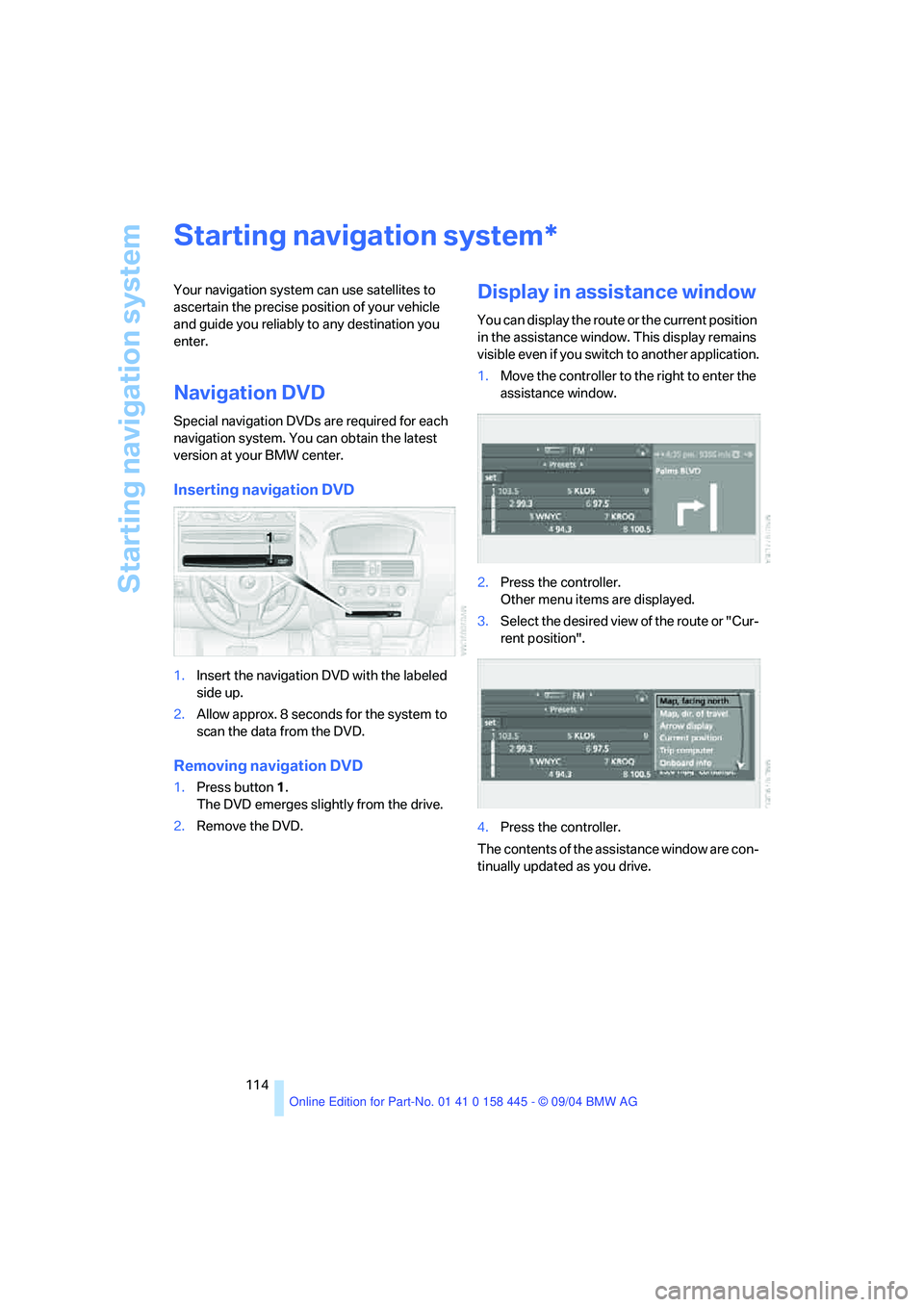
1.Insert the navigation DVD with the labeled
side up.
2.Allow approx. 8 seconds for the system to
scan the data from the DVD.
Removing navigation DVD
1.Press button 1.
The DVD emerges slightly from the drive.
2.Remove the DVD.
Display in assistance window
You can display the route or the current position
in the assistance window. This display remains
visible even if you switch to another application.
1.Move the controller to the right to enter the
assistance window.
2.Press the controller.
Other menu items are displayed.
3.Select the desired view of the route or "Cur-
rent position".
4.Press the controller.
The contents of the assistance window are con-
tinually updated as you drive.
*
Page 159 of 217
Telephoning
158
Having entries read aloud* and
selecting
You can have all the entries of your voice phone
book read aloud in the order of input and select
a certain entry to establish a connection:
Redialing
The {Redial} command requests "Redial".
Deleting an entry
You can delete any entry from the voice phone
book.
Deleting all entries*
{Delete phone book} deletes all entries in the
phone book.
Notes
The voice commands in English were
available as of this printing. Other lan-
guages are currently not available.
To operate the portable phone via the voice
command system, refer to page22.<
Important for voice commands
For voice commands, bear the following in
mind:
>Issue the commands fluently and at normal
volume, avoiding excessive emphasis and
pauses.
>Keep the doors, windows and glass sunroof
closed to prevent interference from ambi-
ent noise.
>Avoid other sources of noise in the vehicle
while speaking, and ask other vehicle occu-
pants to refrain from talking while you are
using the system. 1.{Read phone book}.
The dialog for reading the phone book
aloud is opened.
2.{Dial number} when the desired entry is
read out.
1.{Delete name}.
The dialog for deleting an entry is
opened.
2.Say the name when prompted.
3.Confirm the prompt with {Yes}.
1.{Delete phone book}.
The dialog for deleting the phone book
is opened.
2.Confirm the prompt with {Yes}.
3.Confirm the repeated prompt with
{Yes}.
Page 189 of 217
Giving and receiving assistance
188
Towing and tow-starting
Always observe all applicable towing laws
and regulations.<
Never allow passengers to ride in a towed
vehicle for any reason.<
Use tow fitting
The threaded tow fitting is stored in the tool kit
mounted on the inside of the luggage compart-
ment under the floor mat, refer to page180, and
should always remain in the vehicle. It can be
screwed in at the front or rear of the BMW.
To avoid damage to the tow fitting and the
vehicle, observe the following: only use
the tow fitting that comes with the vehicle and
screw it in as far as possible. Use the tow fitting
for towing only on roads. Avoid lateral strains on
the tow fitting, e.g. do not the lift vehicle by the
tow fitting.<
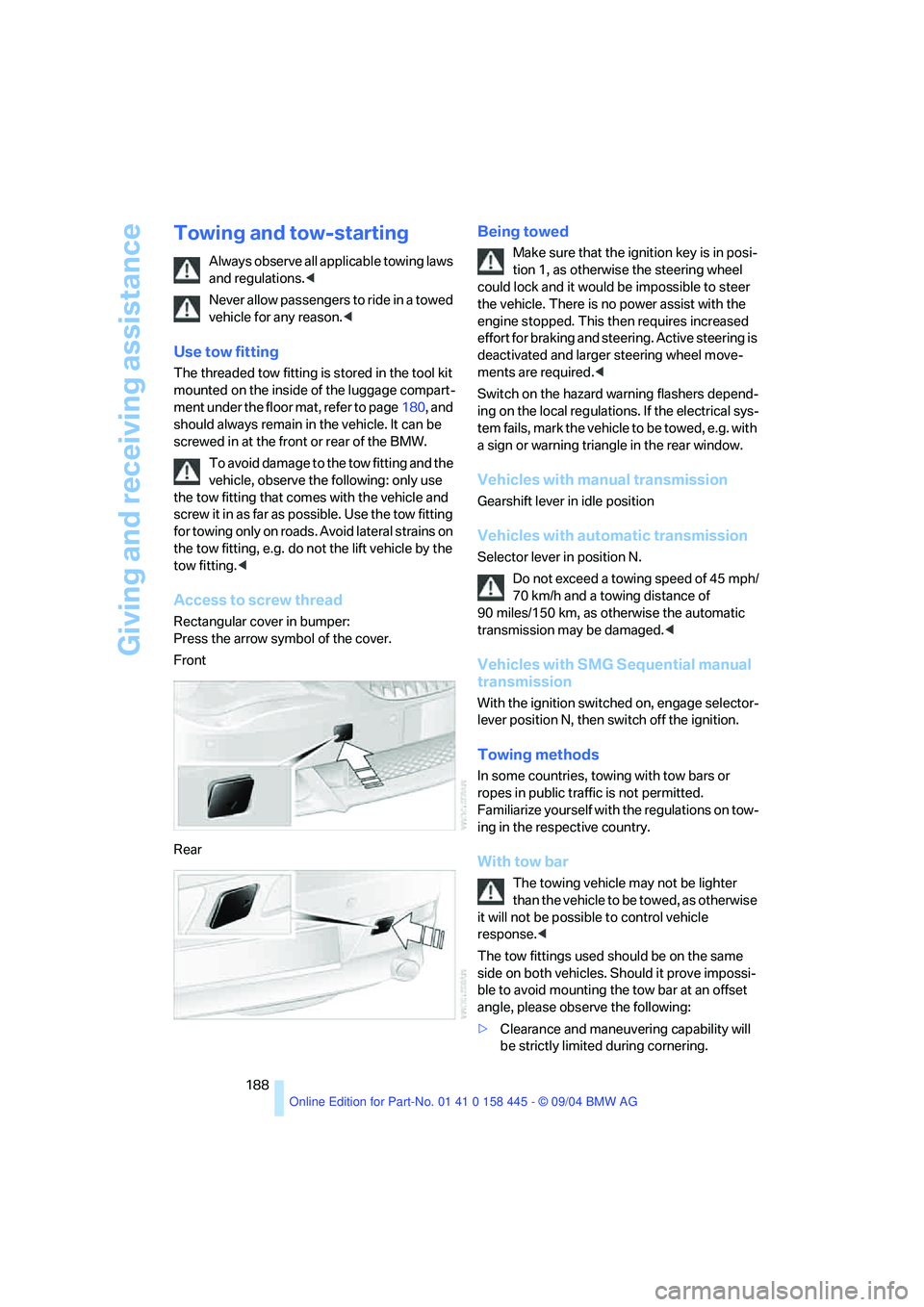
Access to screw thread
Rectangular cover in bumper:
Press the arrow symbol of the cover.
Front
Rear
Being towed
Make sure that the ignition key is in posi-
tion 1, as otherwise the steering wheel
could lock and it would be impossible to steer
the vehicle. There is no power assist with the
engine stopped. This then requires increased
effort for braking and steering. Active steering is
deactivated and larger steering wheel move-
ments are required.<
Switch on the hazard warning flashers depend-
ing on the local regulations. If the electrical sys-
tem fails, mark the vehicle to be towed, e.g. with
a sign or warning triangle in the rear window.
Vehicles with manual transmission
Gearshift lever in idle position
Vehicles with automatic transmission
Selector lever in position N.
Do not exceed a towing speed of 45 mph/
70 km/h and a towing distance of
90 miles/150 km, as otherwise the automatic
transmission may be damaged.<
Vehicles with SMG Sequential manual
transmission
With the ignition switched on, engage selector-
lever position N, then switch off the ignition.
Towing methods
In some countries, towing with tow bars or
ropes in public traffic is not permitted.
Familiarize yourself with the regulations on tow-
ing in the respective country.
With tow bar
The towing vehicle may not be lighter
than the vehicle to be towed, as otherwise
it will not be possible to control vehicle
response.<
The tow fittings used should be on the same
side on both vehicles. Should it prove impossi-
ble to avoid mounting the tow bar at an offset
angle, please observe the following:
>Clearance and maneuvering capability will
be strictly limited during cornering.
Page 196 of 217
Reference 195
At a glance
Controls
Driving tips
Communications
Navigation
Entertainment
Mobility
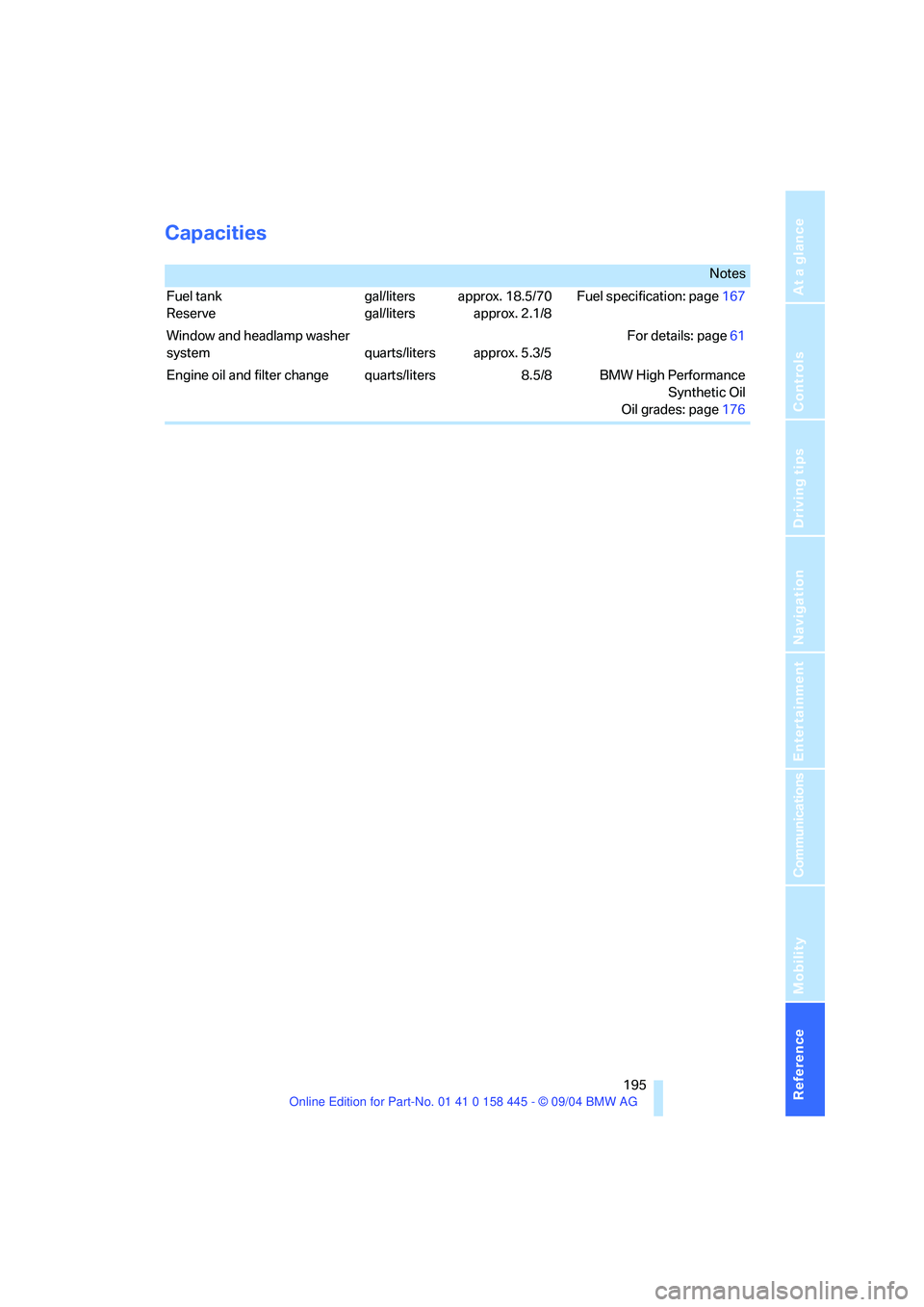
Capacities
Notes
Fuel tank
Reservegal/liters
gal/litersapprox. 18.5/70
approx. 2.1/8Fuel specification: page167
Window and headlamp washer
system quarts/liters approx. 5.3/5For details: page61
Engine oil and filter change quarts/liters 8.5/8 BMW High Performance
Synthetic Oil
Oil grades: page176
Page 200 of 217
199Reference
At a glance
Controls
Driving tips
Communications
Navigation
Entertainment
Mobility
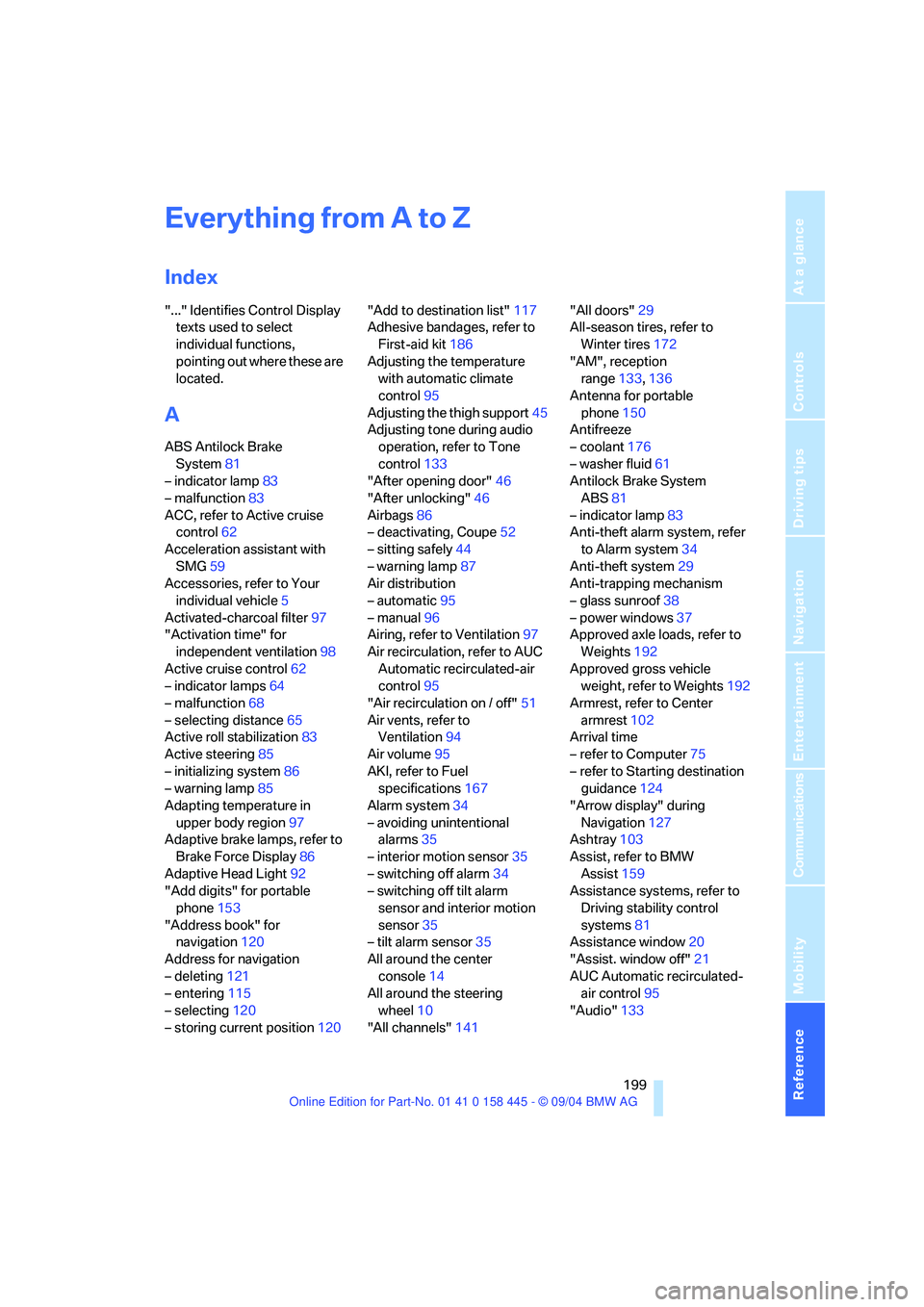
Everything from A to Z
Index
"..." Identifies Control Display
texts used to select
individual functions,
pointing out where these are
located.
A
ABS Antilock Brake
System81
– indicator lamp83
– malfunction83
ACC, refer to Active cruise
control62
Acceleration assistant with
SMG59
Accessories, refer to Your
individual vehicle5
Activated-charcoal filter97
"Activation time" for
independent ventilation98
Active cruise control62
– indicator lamps64
– malfunction68
– selecting distance65
Active roll stabilization83
Active steering85
– initializing system86
– warning lamp85
Adapting temperature in
upper body region97
Adaptive brake lamps, refer to
Brake Force Display86
Adaptive Head Light92
"Add digits" for portable
phone153
"Address book" for
navigation120
Address for navigation
– deleting121
– entering115
– selecting120
– storing current position120"Add to destination list"117
Adhesive bandages, refer to
First-aid kit186
Adjusting the temperature
with automatic climate
control95
Adjusting the thigh support45
Adjusting tone during audio
operation, refer to Tone
control133
"After opening door"46
"After unlocking"46
Airbags86
– deactivating, Coupe52
– sitting safely44
– warning lamp87
Air distribution
– automatic95
– manual96
Airing, refer to Ventilation97
Air recirculation, refer to AUC
Automatic recirculated-air
control95
"Air recirculation on / off"51
Air vents, refer to
Ventilation94
Air volume95
AKI, refer to Fuel
specifications167
Alarm system34
– avoiding unintentional
alarms35
– interior motion sensor35
– switching off alarm34
– switching off tilt alarm
sensor and interior motion
sensor35
– tilt alarm sensor35
All around the center
console14
All around the steering
wheel10
"All channels"141"All doors"29
All-season tires, refer to
Winter tires172
"AM", reception
range133,136
Antenna for portable
phone150
Antifreeze
– coolant176
– washer fluid61
Antilock Brake System
ABS81
– indicator lamp83
Anti-theft alarm system, refer
to Alarm system34
Anti-theft system29
Anti-trapping mechanism
– glass sunroof38
– power windows37
Approved axle loads, refer to
Weights192
Approved gross vehicle
weight, refer to Weights192
Armrest, refer to Center
armrest102
Arrival time
– refer to Computer75
– refer to Starting destination
guidance124
"Arrow display" during
Navigation127
Ashtray103
Assist, refer to BMW
Assist159
Assistance systems, refer to
Driving stability control
systems81
Assistance window20
"Assist. window off"21
AUC Automatic recirculated-
air control95
"Audio"133
Page 203 of 217
Everything from A to Z
202 Cold start, refer to Starting
engine54
"Communication"152
"Communication
settings"159
Compact disc
– refer to CD changer143
– refer to CD player143
Computer74
– clock, 12h/24h clock
mode78
– displays on Control
Display74
– hour signal78
"Concert hall"135
Condition Based Service
CBS178
"Confirmation"30
Confirmation signals for
locking and unlocking30
Connecting a vacuum cleaner,
refer to Socket103
Consumption display, refer to
Average fuel
consumption74
"Continue guidance to
destination?"125
Control Center16
– adjusting brightness77
– assistance window20
– automatic climate control96
– changing settings19,77
– changing the menu page19
– changing time and date78
– confirming selection or
entry19
– controller16
– display, menus16
– language selection78
– menu item selection19
– menu navigation17
– operating elements16
– selecting units of
measurement and display
format77
– start menu17
– status information20
– symbols17
Control Display16Controller, refer to Control
Center16
Controls, refer to Cockpit10
Convenience operation
– convertible top30,31
– glass sunroof30,31
– windows30,31
Convenience start, refer to
Starting engine54,55
Convertible
– convertible program for
automatic climate control97
– opening and closing
windows36
– rollover protection
system87
– top39
– wind deflector42
Convertible top
– care, refer to the Caring for
your vehicle brochure
– convenience operation31
– emergency closing41
– manual closing in the event
of an electrical
malfunction41
– opening and closing40
Coolant176
– level176
Cooling, maximum95
Cornering Brake Control
CBC81
Country of destination for
navigation116
Courtesy lighting93
Cruise control61
– active cruise control62
Cruising range74
Cup holders103
Curb weight, refer to
Weights192
"Current position"125
Current position
– displaying125
– entering120
– storing120
"Customer Relations"162
Cylinders, refer to Engine
data192
D
Dashboard, refer to
Cockpit10
Dashboard lighting, refer to
Instrument lighting93
Data192
– capacities195
– dimensions193
– engine192
– weights192
"Date"79
Date69
– setting78
"Date format"79
Daytime driving lamps91
DBC Dynamic Brake
Control81
– malfunction83
– warning lamp83
"Deactivated"47
Deactivating front passenger
airbag, Coupe52
Decommissioning the vehicle,
refer to the Caring for your
vehicle brochure
Deep water, refer to Driving
through water109
Defrosting windows95
Defrosting windows and
removing condensation95
Defrosting windshield, refer to
Defrosting windows95
Defrost position, refer to
Defrosting windows95
"Delete address book" for
navigation121
"Delete all numbers" on the
portable phone155
"Delete data" for
navigation121
"Delete" for portable
phone154
Destination address
– deleting121
– entering115
Page 206 of 217
Reference 205
At a glance
Controls
Driving tips
Communications
Navigation
Entertainment
Mobility
G
Garage-door opener, refer to
Integrated universal remote
control100
Gasoline
– refer to Fuel
specifications167
– refer to Required fuel167
Gasoline display, refer to Fuel
gage70
Gear changes
– SMG Sequential manual
transmission57
Gear display
– automatic transmission with
Steptronic58
– SMG Sequential manual
transmission57
Gearshift lever
– automatic transmission with
Steptronic58
– manual transmission56
– SMG Sequential manual
transmission56
General driving notes108
Glass sunroof, electric with
raise function37
– convenience operation31
– moving manually38
– remote control30
Glove compartment101
– rechargeable flashlight101
GPS navigation, refer to
Navigation system114
Grills, refer to Ventilation94
Gross vehicle weight, refer to
Weights192
H
Handbrake55
– indicator lamp13,55
Hands-free system14,151
Hazard warning flashers15
Head airbags86
Headlamp control,
automatic91Headlamp flasher60
Headlamps
– care, refer to the Caring for
your vehicle brochure
– cleaning, refer to Wiper
system61
– replacing bulbs180
Head Light, refer to Adaptive
Head Light92
Head-Up Display88
Heated mirrors50
Heated rear window94
Heated seats49
Heated steering wheel51
Heater95
Heating
– exterior mirrors50
– interior94
– rear window94
– residual heat mode96
– seats49
– steering wheel51
Heating with engine switched
off, refer to Residual heat
mode96
Heavy cargo, refer to Securing
load111
Height, refer to
Dimensions193
Height adjustment
– seats45
– steering wheel50
High beams92
– headlamp flasher92
– indicator lamp13
– replacing bulbs180
Hills109
Holder for cups103
"Home address"122
Hood174
Horn10
Hotel function32
Hot exhaust system108
"Hour memo"78
"House number" for desti-
nation entry117Hydraulic Brake Assistant,
refer to DBC Dynamic Brake
Control81
Hydroplaning109
– also refer to Minimum tread
depth171
I
Ice warning69
iDrive, refer to Control
Center16
Ignition key28
Ignition key positions, refer to
Ignition lock54
Ignition lock54
Increasing luggage
compartment capacity,
Convertible34
Independent ventilation
– activating an activation
time98
– setting activation time98
– switching on and off
directly98
Indicator/warning lamps
– ABS Antilock Brake
System83
– active steering85
– airbags87
– brake system13,83
– DSC Dynamic Stability
Control13,83
– DTC Dynamic Traction
Control13,82
– fastening safety belts49
– Flat Tire Monitor85
– fog lamps13,92
– handbrake55
Indicator and warning lamps,
overview13
Individually assignable
buttons on steering wheel,
refer to Programmable
buttons on steering
wheel51
Individual settings, refer to
Key Memory28
Page 208 of 217
Reference 207
At a glance
Controls
Driving tips
Communications
Navigation
Entertainment
Mobility
M
M+S tires, refer to Winter
tires172
Maintenance, refer to the
Service and Warranty Infor-
mation Booklet for US
models or to the Warranty
and Service Guide Booklet
for Canadian models178
Maintenance system178
Malfunction
– convertible top41
– door lock31
– fuel filler door166
– glass sunroof38
– luggage compartment
lid32,33
Malfunction warnings, refer to
Check Control71
Manual air distribution96
Manual mode with automatic
transmission with
Steptronic58
"Manual" on the radio137
Manual operation
– convertible top41
– door lock31
– driver's door31
– fuel filler door166
– glass sunroof38
– luggage compartment
lid32,33
Manual transmission56
Map
– changing scale127
– destination entry117
"Map, direction of travel"127
"Map, facing north"127
Map facing north127
Master key with remote
control28
Maximum cooling95
Maximum speed with winter
tires173Memory
– refer to Key Memory28
– refer to Seat, mirror and
steering wheel memory46
Menus, refer to Control
Center16
Microfilter97
Microphone
– for hands-free system151
– for portable phone14
– for voice command
system14
Mirror dimming feature50
Mirrors49
– automatic curb monitor47
– heating50
– memory, refer to Seat, mirror
and steering wheel
memory46
"Missed calls"154
Missed calls153
Mobile communication
devices in vehicle109
Mobile Service, refer to
Roadside Assistance186
Monitor, refer to Control
Center16
"Monitor display on"81
"Monitor on / off"51
Most recent portable phone
numbers153
Multi-function steering wheel,
refer to Buttons on the
steering wheel11
Multifunction switch
– refer to Turn signals/
headlamp flasher60
– refer to Wiper/washer
system60
Music track, finding145
"Mute on / off"51
MW, waveband136
N
"Navigation"115
Navigation destination
– manual entry115
– selecting via map117
Navigation drive, installation
location114
Navigation DVD114
Navigation system114
– address book120
– bypassing route
sections128
– destination entry115
– destination guidance in
assistance window114
– destination list119
– displaying current
position125
– entering a destination
manually115
– looking for interesting
destination118
– navigation DVD114
– route display127
– route list127
– selecting destination using
information118
– selecting destination via
map117
– selecting route criteria122
– starting115
– starting destination
guidance124
– switching off, refer to Termi-
nating/continuing desti-
nation guidance125
– terminating/continuing
destination guidance125
– voice instructions126
– volume adjustment126
"Navigation voice instructions
on"126
Neck support, refer to Front
head restraints47
"New address" for
navigation120
"New destination"115,117
Page 209 of 217
Everything from A to Z
208 New keys28
"New route"128
New wheels and tires172
"Next entertainment
source"51
Nozzles
– refer to Ventilation94
– refer to Windshield washer
nozzles61
Nylon rope, refer to Towing
and tow-starting188
O
OBD Socket179
Octane ratings, refer to Fuel
specifications167
Odometer69
Oil
– additives176
– capacity195
– dipstick175
– specified engine oils176
Oil change intervals
– refer to Service
requirements70
– refer to the Service and
Warranty Information
Booklet for US models or to
the Warranty and Service
Guide Booklet for Canadian
models178
Oil consumption175
Oil level175
Old batteries, refer to
Disposal183
"On a new destination" for
navigation119
Onboard computer, refer to
Control Center16
"Onboard information"75
Onboard tool kit180
"On destination"119
"On location"119
Opening and closing
– from inside31
– from outside29
– using door lock31
– using the remote control29Opening and closing rear
window37
Operation by voice
commands for portable
phone156
– adjusting volume157
– canceling156
– correcting phone
number157
– dialing a phone number157
– making a call157
– redialing158
– voice commands156
– voice phone book157
"Options"162
"Options" for portable
phone156
Orientation menu, refer to
Start menu17
Output, refer to Engine
data192
Outside air, refer to AUC
Automatic recirculated-air
control95
Outside mirror
– tilting the passenger-side
mirror47
Outside temperature
display69
– changing unit of
measurement77
P
Panic mode30
Park Distance Control PDC80
"Parked car operation"98
Parking aid, refer to PDC Park
Distance Control80
Parking brake, refer to
Handbrake55
Parking lamps/low beams91
– replacing bulbs180
Parking vehicle55
Parts and accessories, refer to
Your individual vehicle5
Passenger-side mirror tilt
function47"Pathway lighting"91
Pathway lighting91
"PDC"81
PDC Park Distance Control80
Phone book151
Phone numbers
– deleting in the phone
book154
– dialing152
– most recent numbers153
– selecting in the phone
book153
– Top 8153
"Play" on the radio141
Pollen, refer to Microfilter/
activated-charcoal filter97
Portable phone
– accepted calls153
– adjusting volume151
– calling152
– call termination152
– hands-free system151,157
– missed calls153
– operation using Control
Center151
– phone book153
– redialing153
– refer also to separate
Owner's Manual
– SMS155
– Top 8153
– touch tone dialing155
Portable phone battery150
Portable phones, use in
vehicle, refer to Mobile
communication devices in
vehicle109
Position
– displaying125
– storing120
Power failure184
Power windows, refer to
Windows36
"Presets" on the
radio136,141
Presetting independent venti-
lation activation times98
Pressure, tires168