page 40 BMW 645CI CONVERTIBLE 2005 Owners Manual
[x] Cancel search | Manufacturer: BMW, Model Year: 2005, Model line: 645CI CONVERTIBLE, Model: BMW 645CI CONVERTIBLE 2005Pages: 217, PDF Size: 7.92 MB
Page 4 of 217
Reference
At a glance
Controls
Driving tips
Communications
Navigation
Entertainment
Mobility
Contents
The fastest way to find specific topics is to use
the index, refer to page199.
Using this Owner's Manual
4Notes
Reporting safety defects 7
At a glance
10Cockpit
16Control Center
22Voice command system
Controls
28Opening and closing
44Adjustments
52Transporting children safely
54Driving
69Everything under control
80Technology for comfort, convenience
and safety
91Lamps
94A congenial climate
100Practical interior accessories
Driving tips
108Things to remember when driving
Navigation
114Starting navigation system
115Destination entry
124Destination guidance
129What to do if …
Entertainment
132On/off and tone
136Radio
143CD player and CD changer
Communications
150Telephoning
159TeleService, BMW Assist
Mobility
166Refueling
168Wheels and tires
174Under the hood
178Maintenance
180Replacing components
185Giving and receiving assistance
Reference
192Technical data
196Short commands of the voice command
system
199Everything from A to Z
Page 14 of 217
At a glance
13Reference
Controls
Driving tips
Communications
Navigation
Entertainment
Mobility
Indicator and warning lamps
The concept
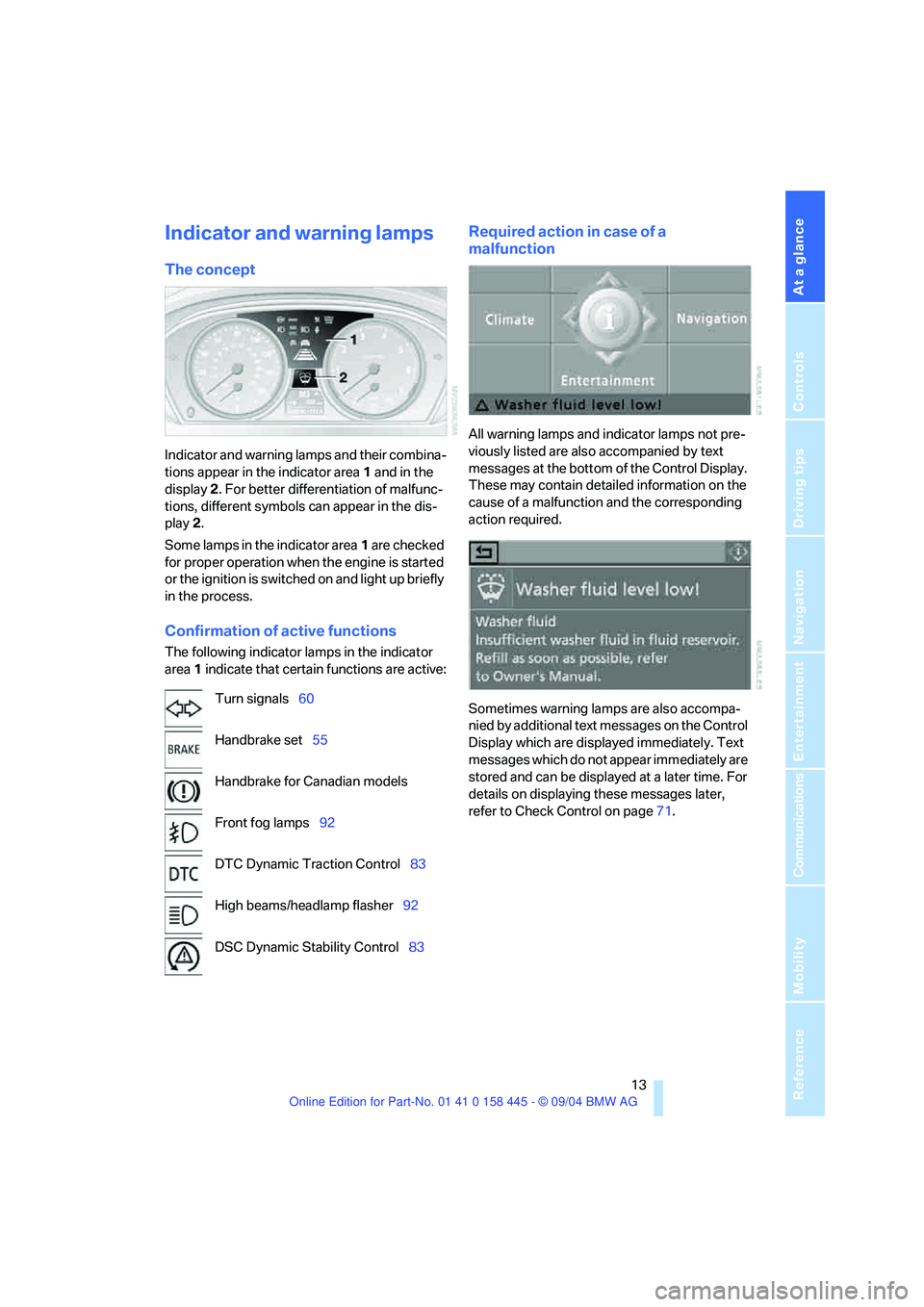
Indicator and warning lamps and their combina-
tions appear in the indicator area1 and in the
display2. For better differentiation of malfunc-
tions, different symbols can appear in the dis-
play 2.
Some lamps in the indicator area1 are checked
for proper operation when the engine is started
or the ignition is switched on and light up briefly
in the process.
Confirmation of active functions
The following indicator lamps in the indicator
area1 indicate that certain functions are active:
Required action in case of a
malfunction
All warning lamps and indicator lamps not pre-
viously listed are also accompanied by text
messages at the bottom of the Control Display.
These may contain detailed information on the
cause of a malfunction and the corresponding
action required.
Sometimes warning lamps are also accompa-
nied by additional text messages on the Control
Display which are displayed immediately. Text
messages which do not appear immediately are
stored and can be displayed at a later time. For
details on displaying these messages later,
refer to Check Control on page71. Turn signals60
Handbrake set55
Handbrake for Canadian models
Front fog lamps92
DTC Dynamic Traction Control83
High beams/headlamp flasher92
DSC Dynamic Stability Control83
Page 23 of 217
Voice command system
22
Voice command system
The concept
The voice command system allows you to con-
trol operation of various vehicle systems with-
out ever removing your hands from the steering
wheel.
Individual menu items on the Control Display
can be spoken as commands. This frees you of
having to use the controller.
The voice command system transforms your
oral commands into control signals for the
selected systems and provides support in the
form of instructions or questions.
The voice command system includes a special
microphone.
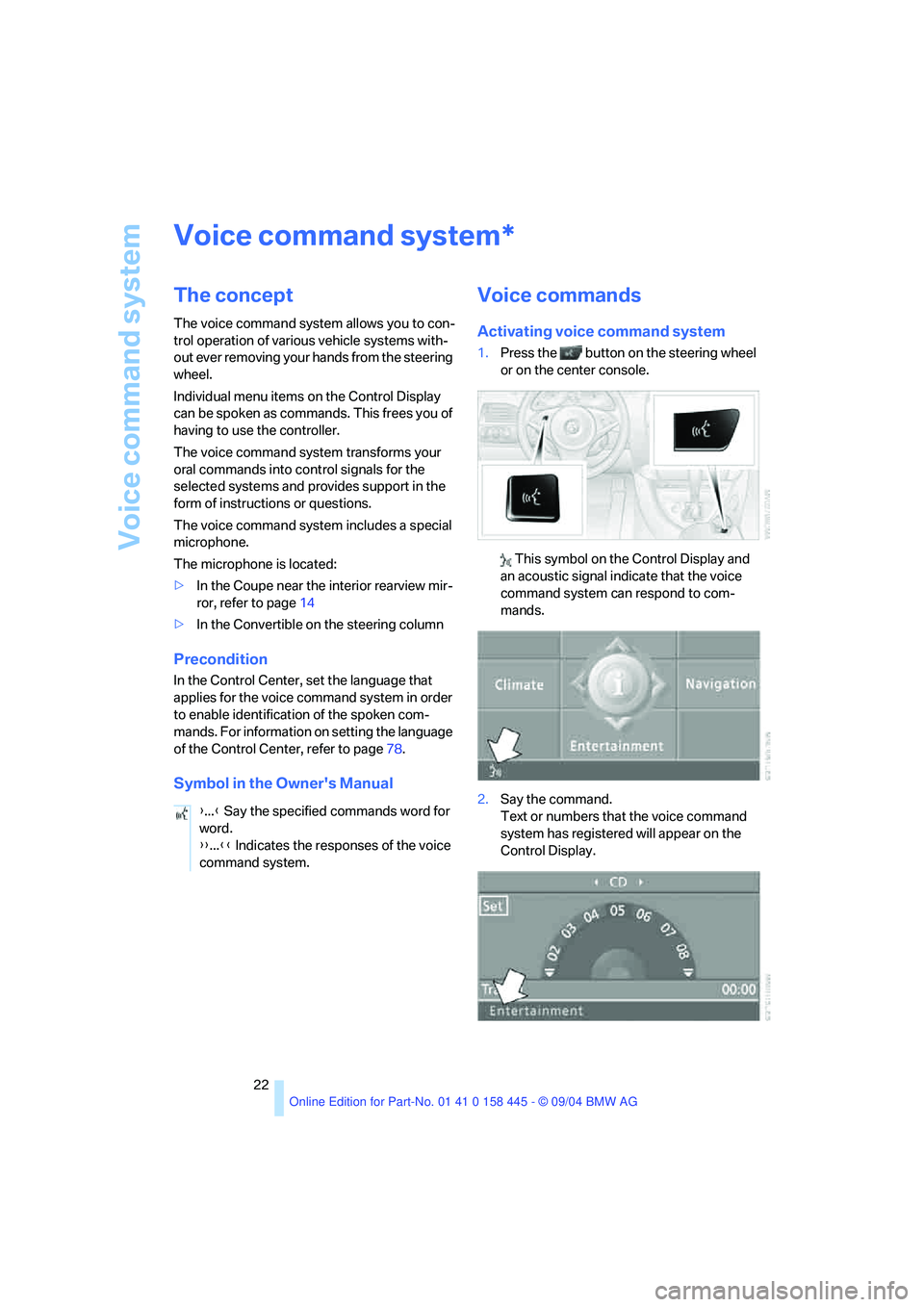
The microphone is located:
>In the Coupe near the interior rearview mir-
ror, refer to page14
>In the Convertible on the steering column
Precondition
In the Control Center, set the language that
applies for the voice command system in order
to enable identification of the spoken com-
mands. For information on setting the language
of the Control Center, refer to page78.
Symbol in the Owner's Manual
Voice commands
Activating voice command system
1.Press the button on the steering wheel
or on the center console.
This symbol on the Control Display and
an acoustic signal indicate that the voice
command system can respond to com-
mands.
2.Say the command.
Text or numbers that the voice command
system has registered will appear on the
Control Display.
*
{...} Say the specified commands word for
word.
{{...}} Indicates the responses of the voice
command system.
Page 24 of 217
At a glance
23Reference
Controls
Driving tips
Communications
Navigation
Entertainment
Mobility
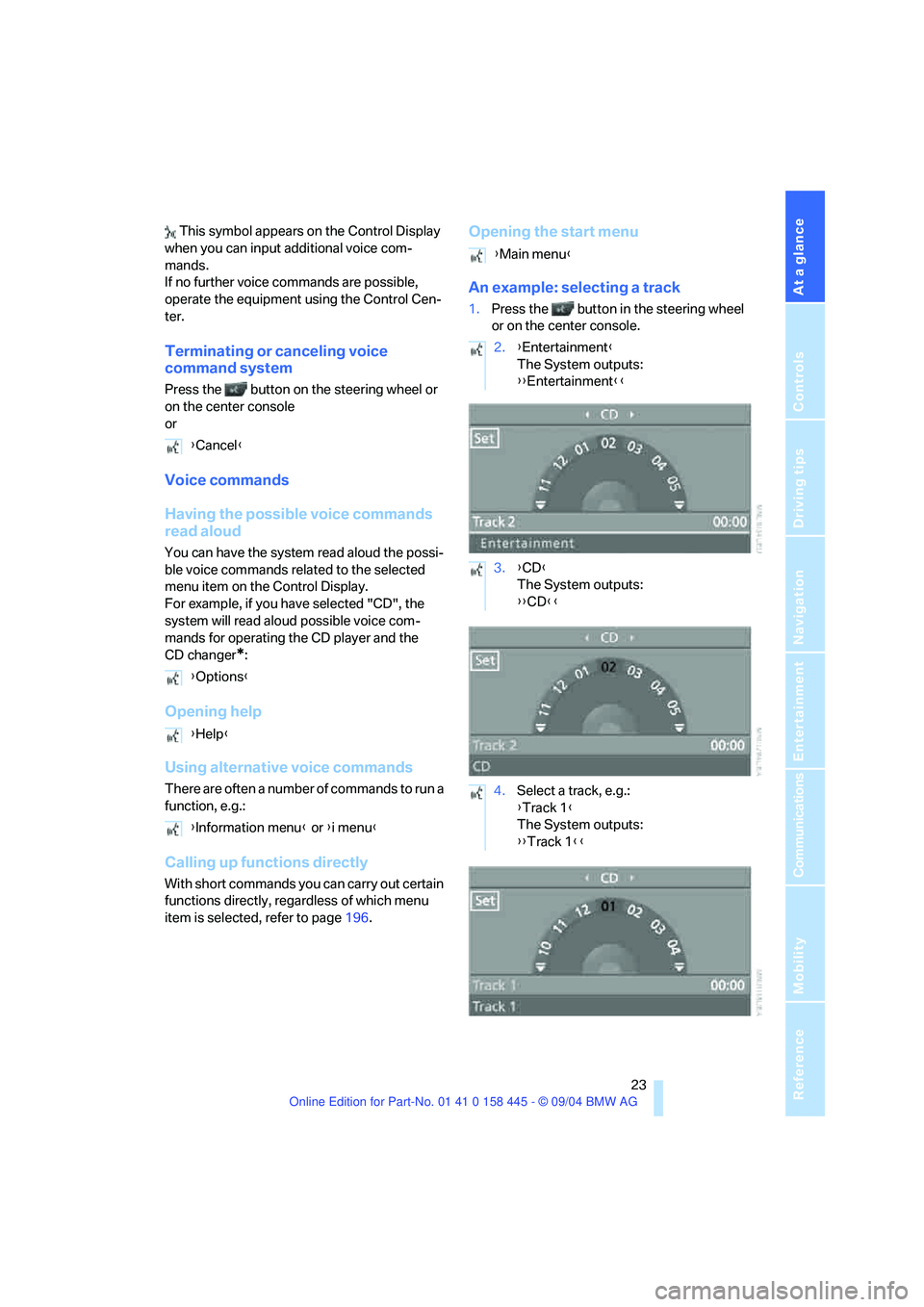
This symbol appears on the Control Display
when you can input additional voice com-
mands.
If no further voice commands are possible,
operate the equipment using the Control Cen-
ter.
Terminating or canceling voice
command system
Press the button on the steering wheel or
on the center console
or
Voice commands
Having the possible voice commands
read aloud
You can have the system read aloud the possi-
ble voice commands related to the selected
menu item on the Control Display.
For example, if you have selected "CD", the
system will read aloud possible voice com-
mands for operating the CD player and the
CD changer
*:
Opening help
Using alternative voice commands
There are often a number of commands to run a
function, e.g.:
Calling up functions directly
With short commands you can carry out certain
functions directly, regardless of which menu
item is selected, refer to page196.
Opening the start menu
An example: selecting a track
1.Press the button in the steering wheel
or on the center console.
{Cancel}
{Options}
{Help}
{Information menu} or {i menu}
{Main menu}
2.{Entertainment}
The System outputs:
{{Entertainment}}
3.{CD}
The System outputs:
{{CD}}
4.Select a track, e.g.:
{Track 1}
The System outputs:
{{Track 1}}
Page 25 of 217
Voice command system
24
Notes
The portable phone can also be operated
by voice commands, refer to page156.<
For voice commands, bear the following in
mind:
>Issue the commands fluently and at normal
volume, avoiding excessive emphasis and
pauses.
>Speak the names of radio stations in the
language of the voice command system or
use the pronunciation commonly used by
the station.
>For entries in the voice-activated phone
book, only use names in the language of the
voice command system and no abbrevia-
tions.
>Keep the doors, windows and glass sun-
roof
* or convertible top closed to prevent
interference from ambient noise.
>Avoid background noises in the vehicle
while speaking.
Page 29 of 217
Opening and closing
28
Opening and closing
The key set
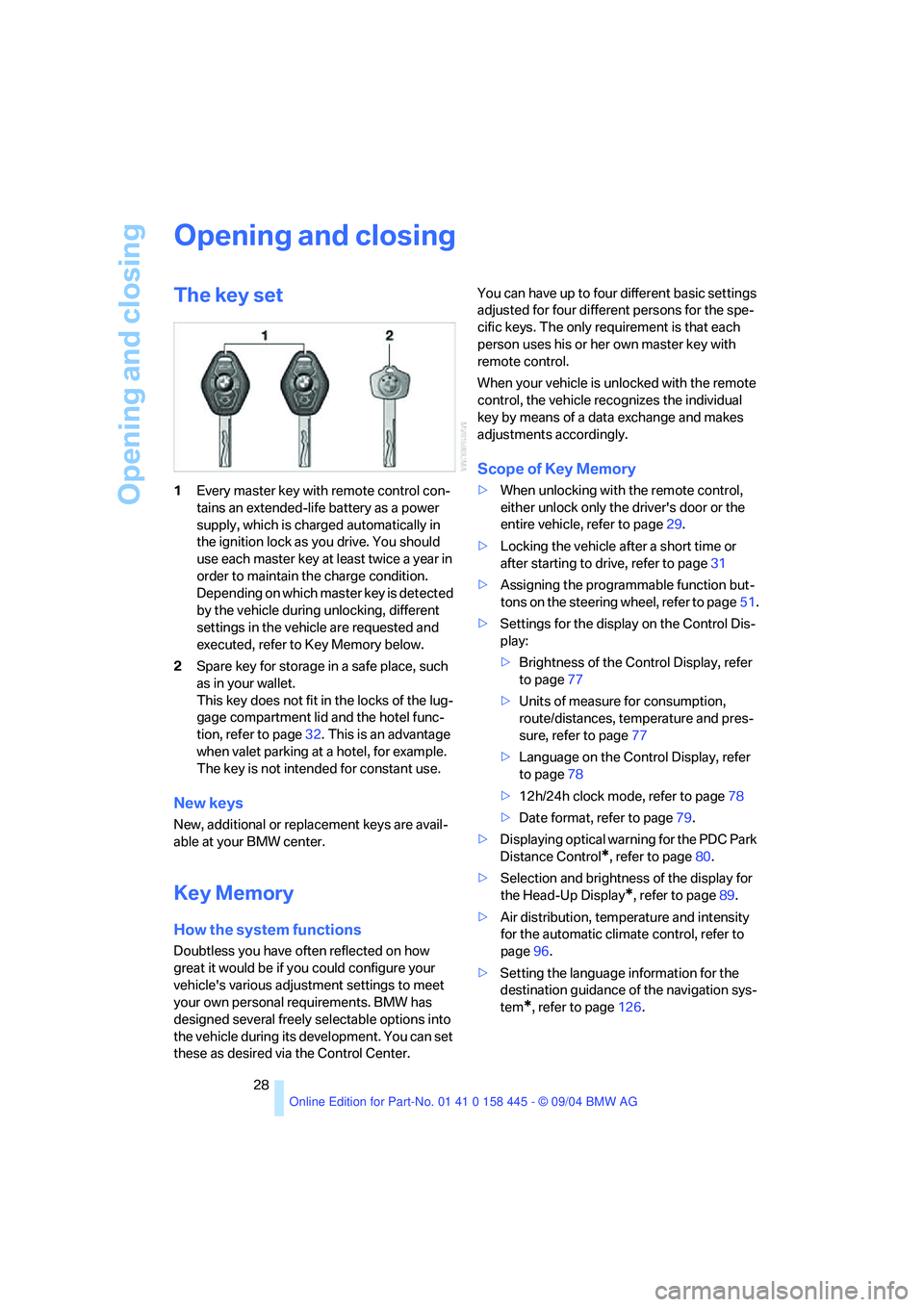
1Every master key with remote control con-
tains an extended-life battery as a power
supply, which is charged automatically in
the ignition lock as you drive. You should
use each master key at least twice a year in
order to maintain the charge condition.
Depending on which master key is detected
by the vehicle during unlocking, different
settings in the vehicle are requested and
executed, refer to Key Memory below.
2Spare key for storage in a safe place, such
as in your wallet.
This key does not fit in the locks of the lug-
gage compartment lid and the hotel func-
tion, refer to page32. This is an advantage
when valet parking at a hotel, for example.
The key is not intended for constant use.
New keys
New, additional or replacement keys are avail-
able at your BMW center.
Key Memory
How the system functions
Doubtless you have often reflected on how
great it would be if you could configure your
vehicle's various adjustment settings to meet
your own personal requirements. BMW has
designed several freely selectable options into
the vehicle during its development. You can set
these as desired via the Control Center.You can have up to four different basic settings
adjusted for four different persons for the spe-
cific keys. The only requirement is that each
person uses his or her own master key with
remote control.
When your vehicle is unlocked with the remote
control, the vehicle recognizes the individual
key by means of a data exchange and makes
adjustments accordingly.
Scope of Key Memory
>When unlocking with the remote control,
either unlock only the driver's door or the
entire vehicle, refer to page29.
>Locking the vehicle after a short time or
after starting to drive, refer to page31
>Assigning the programmable function but-
tons on the steering wheel, refer to page51.
>Settings for the display on the Control Dis-
play:
>Brightness of the Control Display, refer
to page77
>Units of measure for consumption,
route/distances, temperature and pres-
sure, refer to page77
>Language on the Control Display, refer
to page78
>12h/24h clock mode, refer to page78
>Date format, refer to page79.
>Displaying optical warning for the PDC Park
Distance Control
*, refer to page80.
>Selection and brightness of the display for
the Head-Up Display
*, refer to page89.
>Air distribution, temperature and intensity
for the automatic climate control, refer to
page96.
>Setting the language information for the
destination guidance of the navigation sys-
tem
*, refer to page126.
Page 30 of 217
Controls
29Reference
At a glance
Driving tips
Communications
Navigation
Entertainment
Mobility
The following settings mentioned last are also
called up during unlocking:
>Driver's seat, exterior-mirror and steering-
wheel position, refer to page46
>The volume and tone settings for audio and
video sources, refer to page133
>The volume setting for the telephone, refer
to page151
>The display of the stored stations for the
radio, refer to page138
Central locking system
The concept
The central locking system is ready for opera-
tion whenever the driver's door is closed. This
simultaneously engages and releases the locks
on the following:
>Doors
>Compartment in the front center console
>Luggage compartment lid
>Fuel filler door
The central locking system can be operated
from the outside
>via the remote control
>via the door lock
and from inside via the button for the central
locking system.
If operated from the inside, the fuel filler door
and the compartment in the front center con-
sole are not locked, refer to page31.
The anti-theft system is automatically activated
whenever you activate the central locking sys-
tem from outside the vehicle. It prevents the
doors from being unlocked using the lock but-
tons or door handles. The alarm system is
armed/disarmed at the same time. The dome
light is also switched on and off with the remote
control.
You can find more detailed information on the
alarm system on page34.In the event of a serious accident, the central
locking system unlocks automatically. The haz-
ard warning flashers and interior lamps also
switch on.
Opening and closing: from
outside
Using the remote control
Protect the remote control against unau-
thorized use by handing over only the
spare key, for example when using hotel valet
parking.<
Because any persons or animals left unat-
tended in a parked vehicle could lock the
doors from the inside, you should always keep
the remote control with you; this precaution
ensures that you will remain able to unlock the
vehicle from the outside at all times.<
Unlocking
Use the button to unlock the vehicle
depending on the setting.
Control Center, for principle details, refer to
page16.
1.Open the menu.
2.Select "Vehicle settings" and press the
controller.
3.Select "Door locks" and press the control-
ler.
4.Select "Central locking" and press the con-
troller.
5.Select "Unlock button" and press the con-
troller.
6.Select a menu item:
>"All doors"
Press the button once to unlock the
entire vehicle.
>"Driver's door only"
Press the button once to unlock only
the driver's door and the fuel filler door.
Page 31 of 217
Opening and closing
30 Press the button twice to unlock the
entire vehicle.
7.Press the controller.
The setting is stored for the remote control cur-
rently in use.
Convenience opening mode
Hold the button down:
>Coupe: the windows are opened, the glass
sunroof
* is raised, and the sliding panel
moves back approx. 2 in/5 cm.
>Convertible: the windows and the convert-
ible top are opened.
Watch the convertible top during the
opening process to be sure that no
one is injured. Releasing the button stops
the operation.<
Locking the doors
Press the button.
Switching on the interior lamps
Press the button if the vehicle is locked.
You can also use this function to locate your
vehicle in parking garages etc.
Panic mode*
By pressing and holding the button for more
than approx. 2 seconds, you can trigger the
alarm system in response to any impending
danger.
To switch off the alarm: press any of the but-
tons.
Opening luggage compartment lid
Press the button.
The luggage compartment lid opens, regard-
less of whether it was previously locked or
unlocked.
A previously locked luggage compart-
ment lid is also locked after closing.
Coupe: the luggage compartment lid swings to
the rear and upward when opened. Make sure
there is sufficient free space.<
Setting confirmation signals
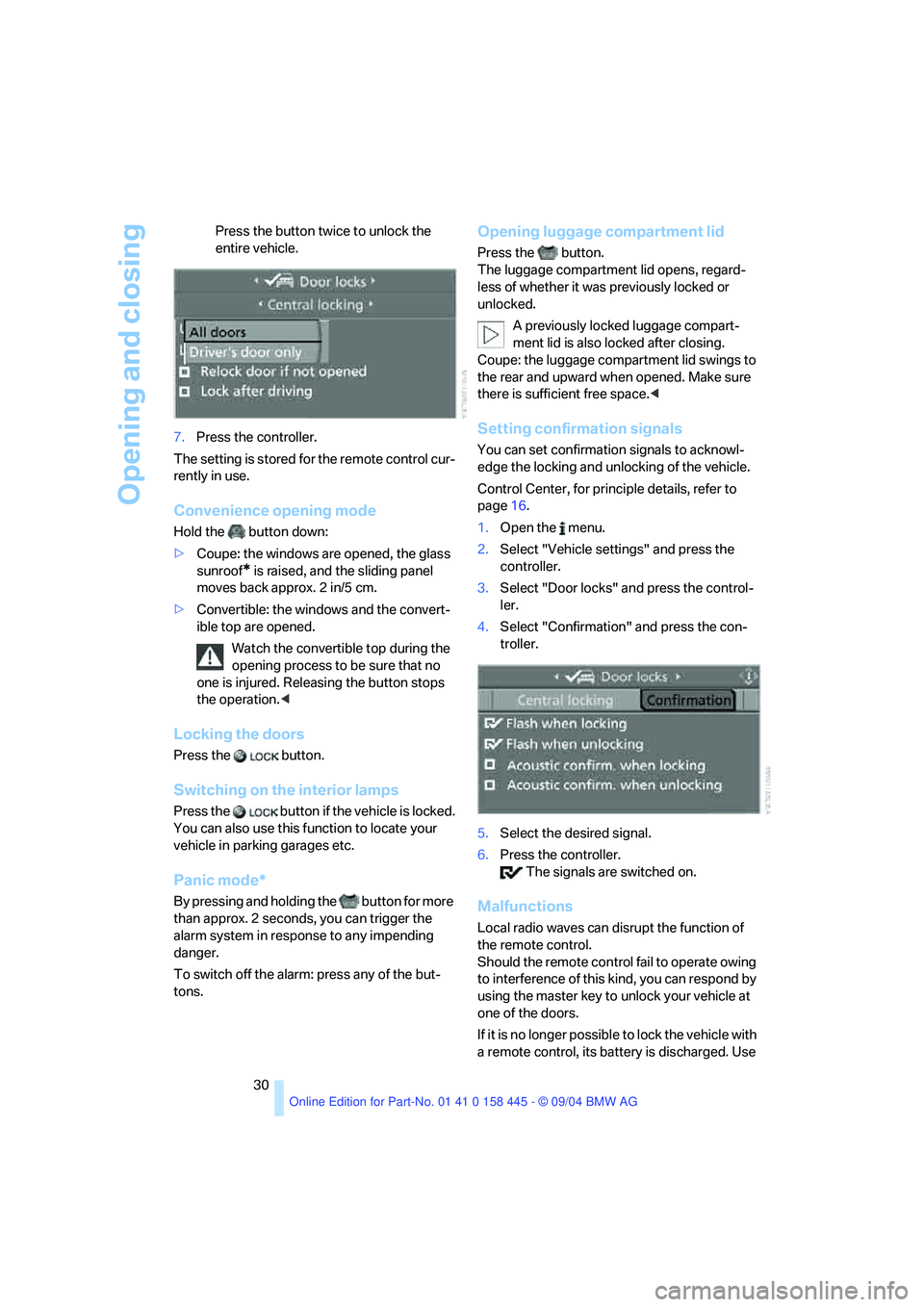
You can set confirmation signals to acknowl-
edge the locking and unlocking of the vehicle.
Control Center, for principle details, refer to
page16.
1.Open the menu.
2.Select "Vehicle settings" and press the
controller.
3.Select "Door locks" and press the control-
ler.
4.Select "Confirmation" and press the con-
troller.
5.Select the desired signal.
6.Press the controller.
The signals are switched on.
Malfunctions
Local radio waves can disrupt the function of
the remote control.
Should the remote control fail to operate owing
to interference of this kind, you can respond by
using the master key to unlock your vehicle at
one of the doors.
If it is no longer poss ible to lock the vehicle with
a remote control, its battery is discharged. Use
Page 32 of 217
Controls
31Reference
At a glance
Driving tips
Communications
Navigation
Entertainment
Mobility
this remote control during an extended drive;
this will recharge the battery, refer to page28.
For US owners only
The transmitter and receiver units comply with
part 15 of the FCC/Federal Communication
Commission regulations. Operation is gov-
erned by the following:
FCC ID:
LX8766S
LX8766E
LX8CAS
Compliance statement:
This device complies with part 15 of the FCC
Rules. Operation is subject to the following two
conditions:
>This device may not cause harmful interfer-
ence, and
>this device must accept any interference
received, including interference that may
cause undesired operation.
Any unauthorized modifications or
changes to these devices could void the
user's authority to operate this equipment.<
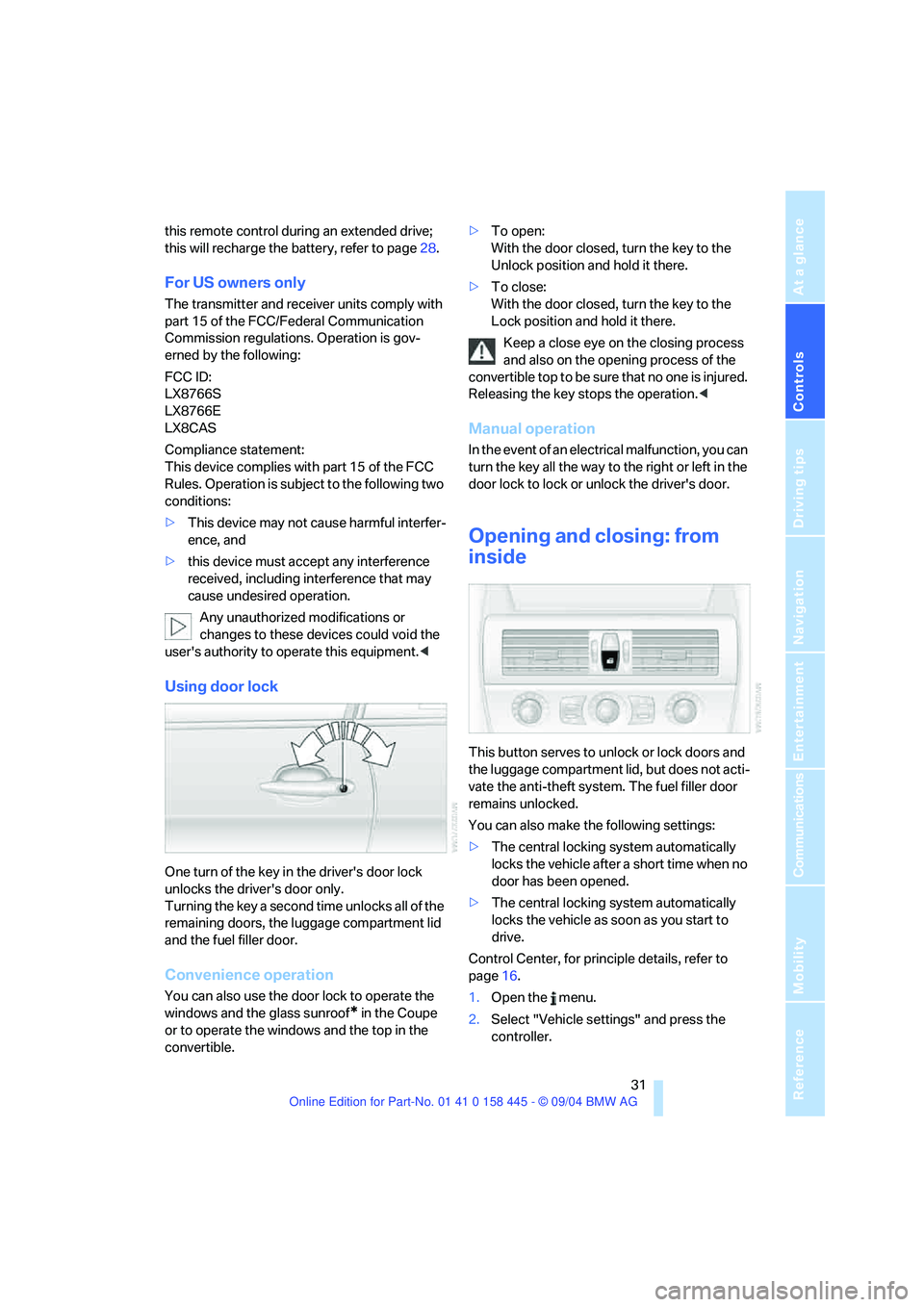
Using door lock
One turn of the key in the driver's door lock
unlocks the driver's door only.
Turning the key a second time unlocks all of the
remaining doors, the luggage compartment lid
and the fuel filler door.
Convenience operation
You can also use the door lock to operate the
windows and the glass sunroof
* in the Coupe
or to operate the windows and the top in the
convertible.>To open:
With the door closed, turn the key to the
Unlock position and hold it there.
>To close:
With the door closed, turn the key to the
Lock position and hold it there.
Keep a close eye on the closing process
and also on the opening process of the
convertible top to be sure that no one is injured.
Releasing the key stops the operation.<
Manual operation
In the event of an electrical malfunction, you can
turn the key all the way to the right or left in the
door lock to lock or unlock the driver's door.
Opening and closing: from
inside
This button serves to unlock or lock doors and
the luggage compartment lid, but does not acti-
vate the anti-theft system. The fuel filler door
remains unlocked.
You can also make the following settings:
>The central locking system automatically
locks the vehicle after a short time when no
door has been opened.
>The central locking system automatically
locks the vehicle as soon as you start to
drive.
Control Center, for principle details, refer to
page16.
1.Open the menu.
2.Select "Vehicle settings" and press the
controller.
Page 33 of 217
Opening and closing
32 3.Select "Door locks" and press the control-
ler.
4.Select "Central locking" and press the con-
troller.
5.Select "Relock door if not opened"
or
"Lock after driving".
6.Press the controller.
The setting is selected.
The setting is stored for the remote control cur-
rently in use.
Unlocking and opening the doors
>Either unlock both doors at the same time
with the button for the central locking sys-
tem and then pull the door handle above the
armrest or
>p u l l t h e d o o r h a n d l e f o r ea c h d o o r t w ic e : t h e
first pull unlocks the door, and the second
one opens it.
Locking the doors
>Use the central locking button to lock both
of the doors simultaneously, or
>press down the lock button of the desired
door. To prevent you from being locked out,
the open driver's door cannot be locked
using the lock button.
Because any persons or animals left unat-
tended in a parked vehicle could lock the
doors from the inside, you should always keep
the master key with remote control with you;
this precaution ensures that you will remain
able to unlock the vehicle from the outside at all
times.<
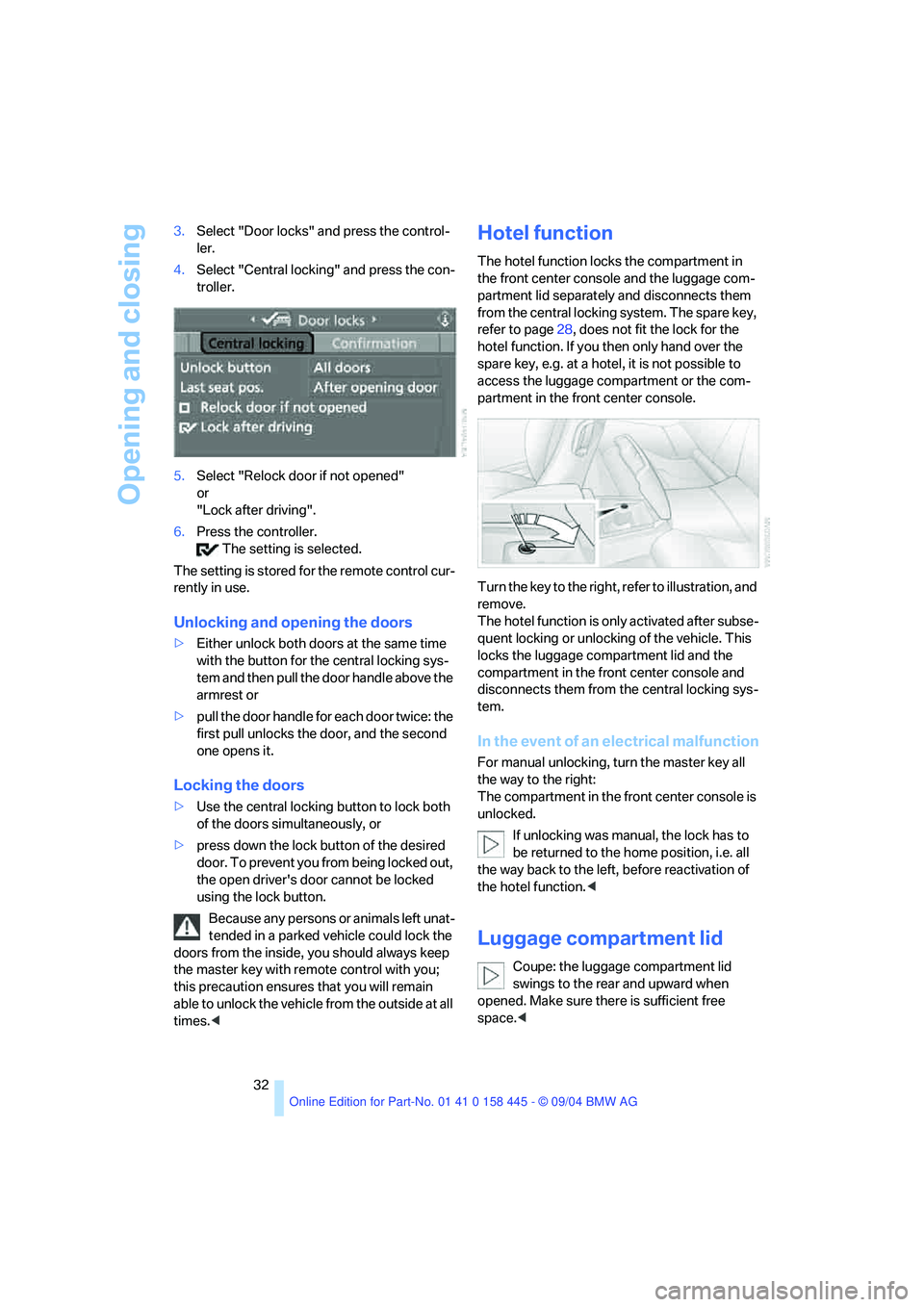
Hotel function
The hotel function locks the compartment in
the front center console and the luggage com-
partment lid separately and disconnects them
from the central locking system. The spare key,
refer to page28, does not fit the lock for the
hotel function. If you then only hand over the
spare key, e.g. at a hotel, it is not possible to
access the luggage compartment or the com-
partment in the front center console.
Turn the key to the right, refer to illustration, and
remove.
The hotel function is only activated after subse-
quent locking or unlocking of the vehicle. This
locks the luggage compartment lid and the
compartment in the front center console and
disconnects them from the central locking sys-
tem.
In the event of an electrical malfunction
For manual unlocking, turn the master key all
the way to the right:
The compartment in the front center console is
unlocked.
If unlocking was manual, the lock has to
be returned to the home position, i.e. all
the way back to the left, before reactivation of
the hotel function.<
Luggage compartment lid
Coupe: the luggage compartment lid
swings to the rear and upward when
opened. Make sure there is sufficient free
space.<