sat nav BMW 645CI CONVERTIBLE 2005 Owners Manual
[x] Cancel search | Manufacturer: BMW, Model Year: 2005, Model line: 645CI CONVERTIBLE, Model: BMW 645CI CONVERTIBLE 2005Pages: 217, PDF Size: 7.92 MB
Page 16 of 217
At a glance
15Reference
Controls
Driving tips
Communications
Navigation
Entertainment
Mobility
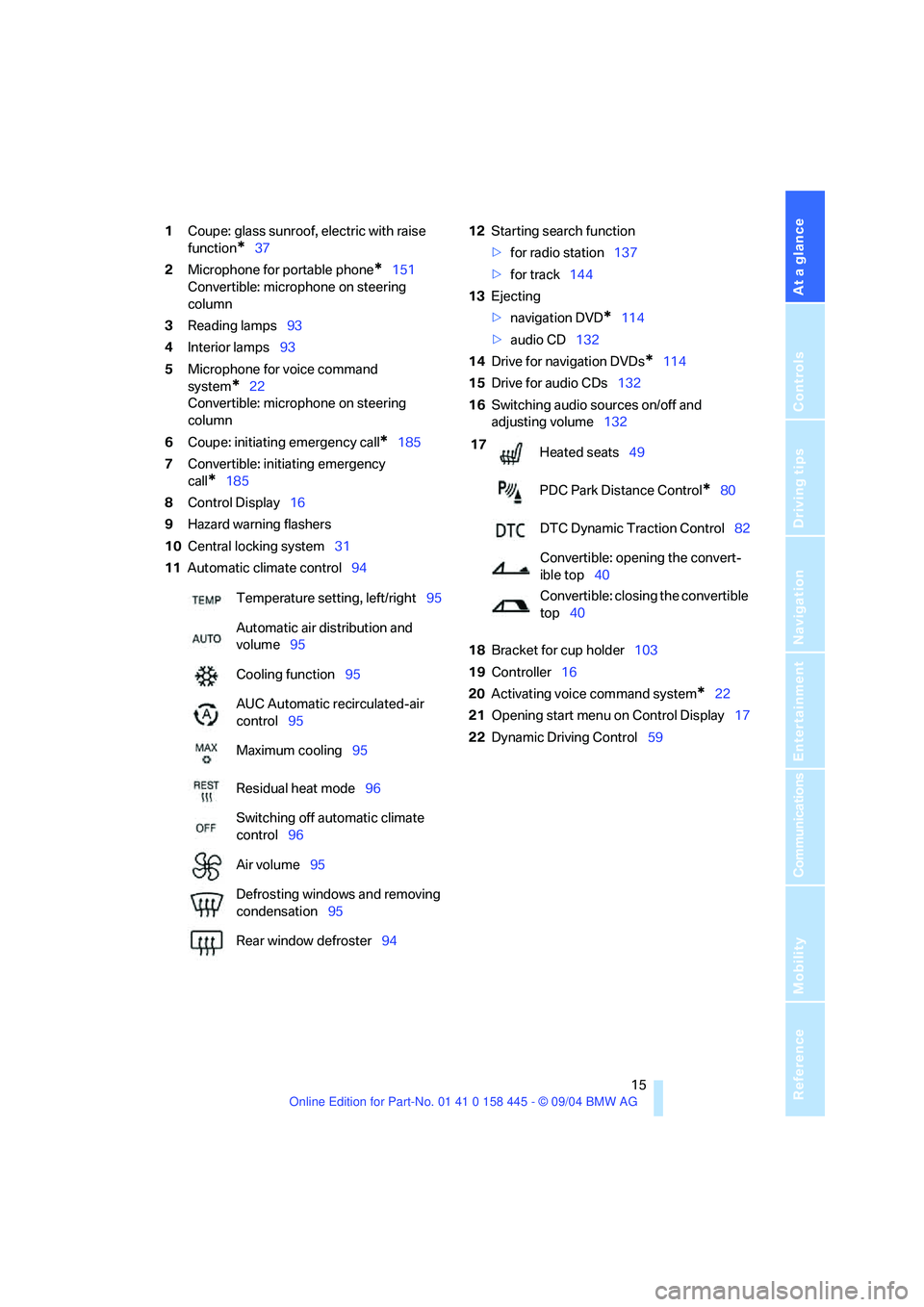
1Coupe: glass sunroof, electric with raise
function
*37
2Microphone for portable phone
*151
Convertible: microphone on steering
column
3Reading lamps93
4Interior lamps93
5Microphone for voice command
system
*22
Convertible: microphone on steering
column
6Coupe: initiating emergency call
*185
7Convertible: initiating emergency
call
*185
8Control Display16
9Hazard warning flashers
10Central locking system31
11Automatic climate control9412Starting search function
>for radio station137
>for track144
13Ejecting
>navigation DVD
*114
>audio CD132
14Drive for navigation DVDs
*114
15Drive for audio CDs132
16Switching audio sources on/off and
adjusting volume132
18Bracket for cup holder103
19Controller16
20Activating voice command system
*22
21Opening start menu on Control Display17
22Dynamic Driving Control59 Temperature setting, left/right95
Automatic air distribution and
volume95
Cooling function95
AUC Automatic recirculated-air
control95
Maximum cooling95
Residual heat mode96
Switching off automatic climate
control96
Air volume95
Defrosting windows and removing
condensation95
Rear window defroster94
17
Heated seats49
PDC Park Distance Control
*80
DTC Dynamic Traction Control82
Convertible: opening the convert-
ible top40
Convertible: closing the convertible
top40
Page 64 of 217
Controls
63Reference
At a glance
Driving tips
Communications
Navigation
Entertainment
Mobility
cially on longer trips, the system can reduce
fatigue and tension, while increasing your
enjoyment of driving. Please use it safely and
responsibly.
In addition to holding a steady cruising speed, if
you encounter slower vehicles ahead, active
cruise control will, within the scope of given
possibilities, adjust your vehicle's speed auto-
matically so that one can flow with the traffic
without having to make constant adjustments.
If, for example, while cruising at the selected
speed, you begin to approach a slower vehicle
ahead of you in the same lane, the system will
reduce your vehicle's speed to the same as that
of the vehicle ahead to maintain your selected
distance setting between your vehicle and the
vehicle ahead. There are four settings for dis-
tance, which are additionally speed-dependent.
Based on your selected distance setting, the
system automatically decreases the throttle
setting and lightly applies the brakes if neces-
sary. The vehicle brake lamps will automatically
illuminate to signal a following driver to take
action. In addition, it may be necessary for the
vehicle or the driver to downshift, depending on
the kind of transmission your vehicle is
equipped with, to maintain the distance setting
selected. If the vehicle ahead speeds up or
when the lane ahead becomes clear, your vehi-
cle will accelerate to the speed you have
selected by increasing the throttle setting and
shifting gears automatically or by the driver as
needed.
Active cruise control is not and must not
be used as a collision avoidance/warning
system.<
Since this active cruise control system is
a new technology and operates differ-
ently from conventional cruise control systems
which you may be accustomed to, you are
strongly urged to read all of the pages relating
to this system before use. Pay special attention
to the information contained in the Things to
know about active cruise control section in this
manual beginning on page66.
within a normal engine speed range and also
change gears. Continuous operation at very
high or very low engine speeds is not possible.
In this case the driver is asked to shift or the
system deactivates itself.
Vehicles with SMG
Continuous operation at very high engine
speeds is not possible in the Sequential mode.
In this case the driver is asked to shift or the
system deactivates itself.
In the Drive mode the SMG acts similarly to the
automatic transmission in the D position.
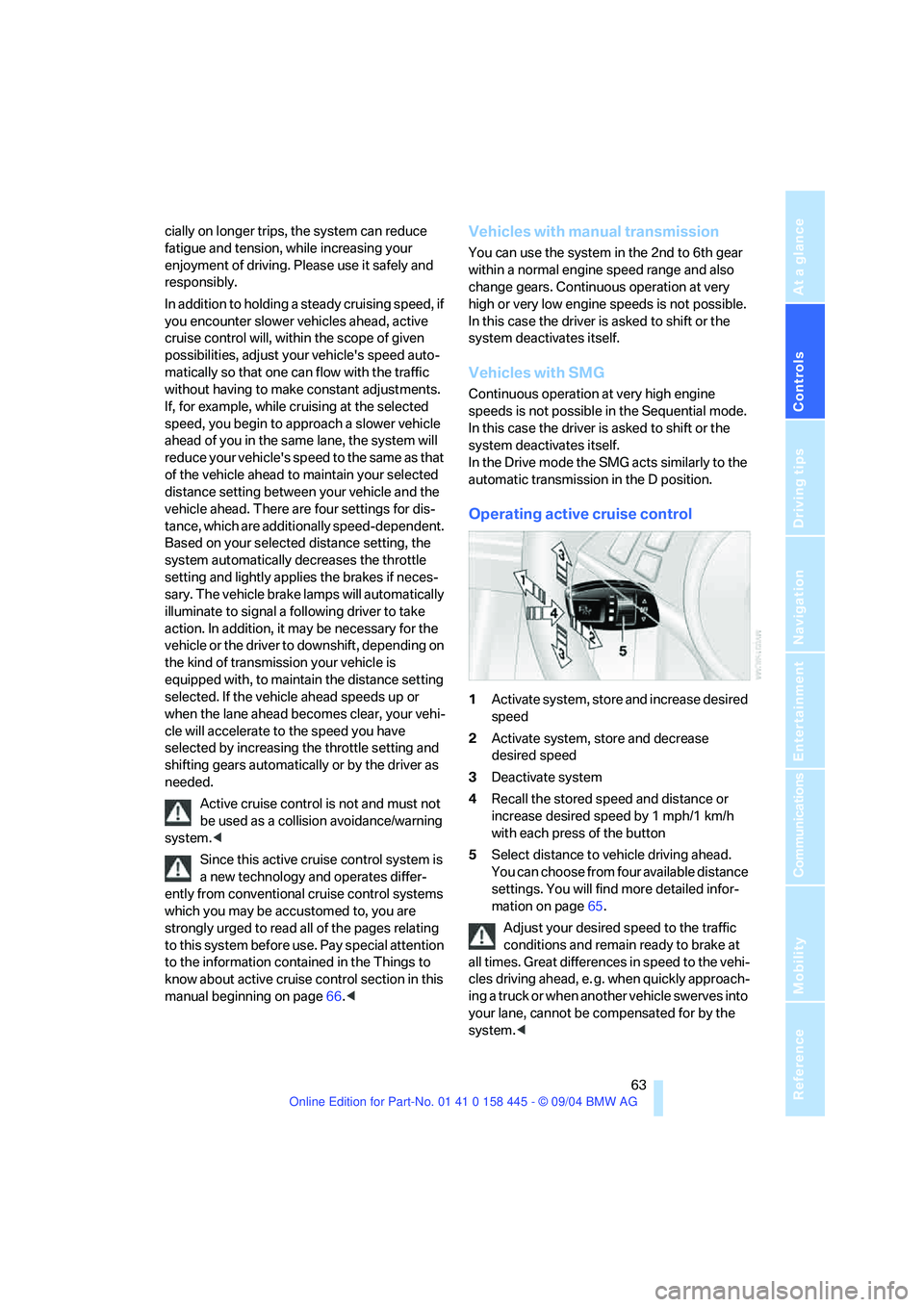
Operating active cruise control
1Activate system, store and increase desired
speed
2Activate system, store and decrease
desired speed
3Deactivate system
4Recall the stored speed and distance or
increase desired speed by 1 mph/1 km/h
with each press of the button
5Select distance to vehicle driving ahead.
You can choose from four available distance
settings. You will find more detailed infor-
mation on page65.
Adjust your desired speed to the traffic
conditions and remain ready to brake at
all times. Great differences in speed to the vehi-
cles driving ahead, e. g. when quickly approach-
ing a truck or when another vehicle swerves into
your lane, cannot be compensated for by the
system.<
Page 96 of 217
Controls
95Reference
At a glance
Driving tips
Communications
Navigation
Entertainment
Mobility
The current setting for air distribution is dis-
played on the Control Display.
A congenial climate
For almost all conditions, the AUTO program
offers the optimal air distribution and air vol-
ume. Select an interior temperature you find
pleasant.
The following section contains more detailed
information on the available setting options.
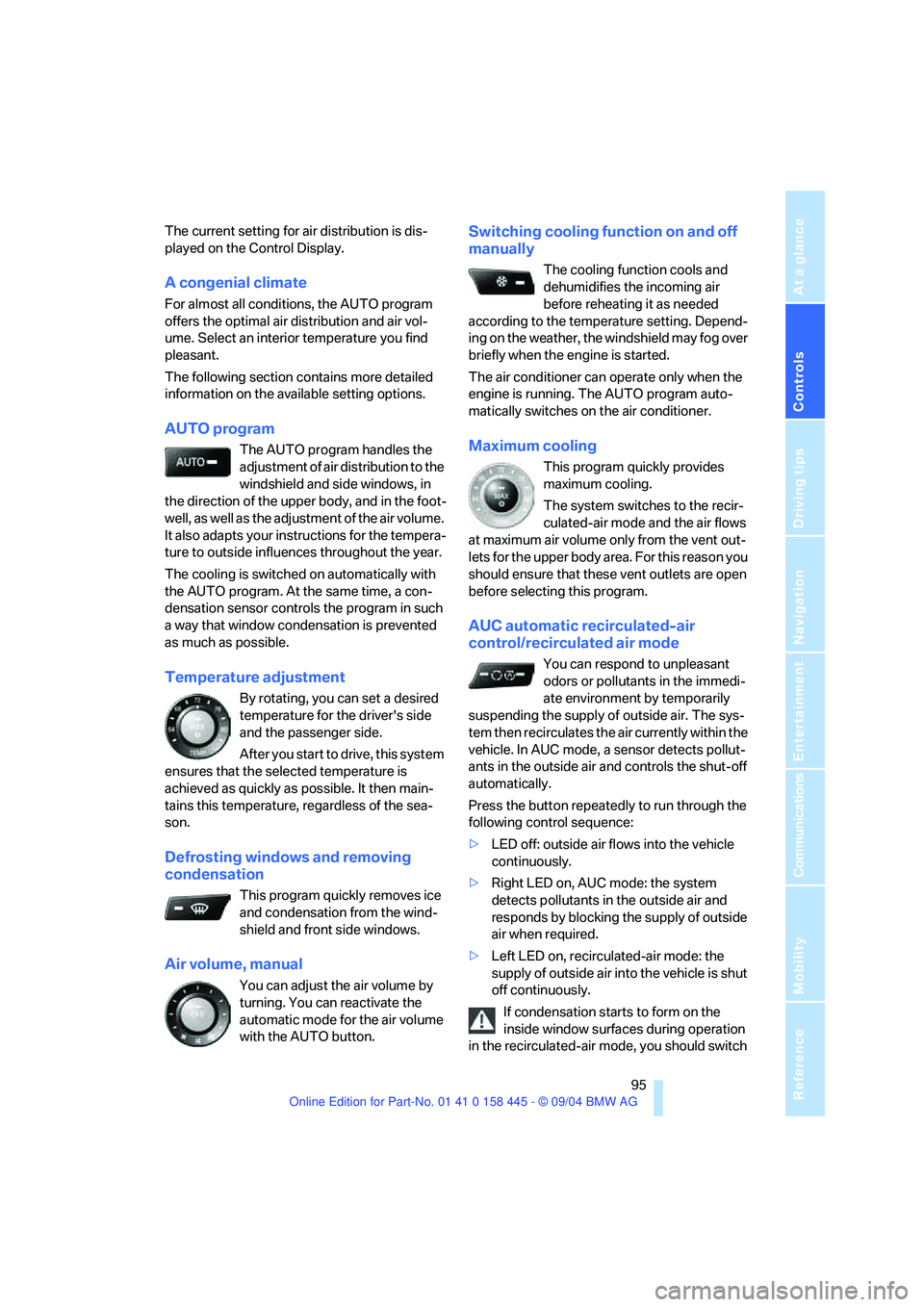
AUTO program
The AUTO program handles the
adjustment of air distribution to the
windshield and side windows, in
the direction of the upper body, and in the foot-
well, as well as the adjustment of the air volume.
It also adapts your instructions for the tempera-
ture to outside influences throughout the year.
The cooling is switched on automatically with
the AUTO program. At the same time, a con-
densation sensor controls the program in such
a way that window condensation is prevented
as much as possible.
Temperature adjustment
By rotating, you can set a desired
temperature for the driver's side
and the passenger side.
After you start to drive, this system
ensures that the selected temperature is
achieved as quickly as possible. It then main-
tains this temperature, regardless of the sea-
son.
Defrosting windows and removing
condensation
This program quickly removes ice
and condensation from the wind-
shield and front side windows.
Air volume, manual
You can adjust the air volume by
turning. You can reactivate the
automatic mode for the air volume
with the AUTO button.
Switching cooling function on and off
manually
The cooling function cools and
dehumidifies the incoming air
before reheating it as needed
according to the temperature setting. Depend-
ing on the weather, the windshield may fog over
briefly when the engine is started.
The air conditioner can operate only when the
engine is running. The AUTO program auto-
matically switches on the air conditioner.
Maximum cooling
This program quickly provides
maximum cooling.
The system switches to the recir-
culated-air mode and the air flows
at maximum air volume only from the vent out-
lets for the upper body area. For this reason you
should ensure that these vent outlets are open
before selecting this program.
AUC automatic recirculated-air
control/recirculated air mode
You can respond to unpleasant
odors or pollutants in the immedi-
ate environment by temporarily
suspending the supply of outside air. The sys-
tem then recirculates the air currently within the
vehicle. In AUC mode, a sensor detects pollut-
ants in the outside air and controls the shut-off
automatically.
Press the button repeatedly to run through the
following control sequence:
>LED off: outside air flows into the vehicle
continuously.
>Right LED on, AUC mode: the system
detects pollutants in the outside air and
responds by blocking the supply of outside
air when required.
>Left LED on, recirculated-air mode: the
supply of outside air into the vehicle is shut
off continuously.
If condensation starts to form on the
inside window surfaces during operation
in the recirculated-air mode, you should switch
Page 110 of 217
Driving tips
109Reference
At a glance
Controls
Communications
Navigation
Entertainment
Mobility
Mobile communication devices in
vehicle
BMW advises against using mobile com-
munication devices, e.g. portable phones,
inside the vehicle without a direct connection to
an external antenna. Otherwise, the vehicle
electronics and mobile communication device
can influence one another. In addition, there is
no assurance that the radiation emitted during
transmission will be conveyed out of the vehicle
interior.<
Hydroplaning
When driving on wet or slushy roads,
reduce road speed. If you do not, a wedge
of water can form between tires and road sur-
face. This phenomenon is referred to as hydro-
planing, and is characterized by a partial or
complete loss of contact between the tires and
the road surface, ultimately undermining your
ability to steer and brake the vehicle.<
The risk of hydroplaning increases as the tread
depth of the tires decreases, also refer to Mini-
mum tire tread on page171.
Driving through water
Do not drive through water on the road if it
is deeper than 1 ft/30 cm, and then only at
walking speed at the most. Otherwise, the vehi-
cle's engine, the electrical systems and the
transmission may be damaged.<
Using handbrake on inclines.
On inclines, do not hold the vehicle with
the clutch; use the handbrake. Otherwise
greater clutch wear will result.<
SMG Sequential manual transmission
Start off quickly on slopes. Do not hold
the vehicle on a hill by applying the throt-
tle, but engage the handbrake instead. Other-
wise overheating can occur in the transmission
region.<
Braking safely
Your BMW is equipped with ABS as standard. In
situations that require it, it is best to brake with
full force. Since the vehicle maintains steering
responsiveness, you can still avoid possible
obstacles with a minimum of steering effort.
Pulsation at the brake pedal combines with
sounds from the hydraulic circuits to indicate to
the driver that ABS is in its active mode.
Do not drive with your foot resting on the
brake pedal. Even light but consistent
pedal pressure can lead to high temperatures,
brake wear and possibly even brake failure.<
Driving in wet conditions
When driving on wet roads or in heavy rain,
briefly brake with light pedal pressure at inter-
vals of a few miles. Monitor traffic conditions to
ensure that this maneuver does not endanger
other road users. The heat generated in this
process helps dry the pads and rotors to ensure
that full braking efficiency will then be available
when you need it.
Hills
To prevent overheating and thus reduced
efficiency of the brake system, downshift
to a gear in which only minimal brake applica-
tions are needed when descending long or
steep downhill stretches. Even light but consis-
tent pedal pressure can lead to high tempera-
tures, brake wear and possibly even brake fail-
ure.<
You can further enhance the engine's braking
effect by selecting a lower gear in the automatic
transmission's manual mode, downshifting as
far as first gear on extremely steep stretches,
refer to page58. This strategy helps you avoid
placing excessive loads on the brake system.
Never drive with the clutch pressed
or allow the vehicle to coast with the
transmission in Neutral – or with the engine
switched off – there is no engine braking when
the transmission is in Neutral, and no power
assist for brakes and steering when the engine
is not running.
Page 115 of 217
Starting navigation system
114
Starting navigation system
Your navigation system can use satellites to
ascertain the precise position of your vehicle
and guide you reliably to any destination you
enter.
Navigation DVD
Special navigation DVDs are required for each
navigation system. You can obtain the latest
version at your BMW center.
Inserting navigation DVD
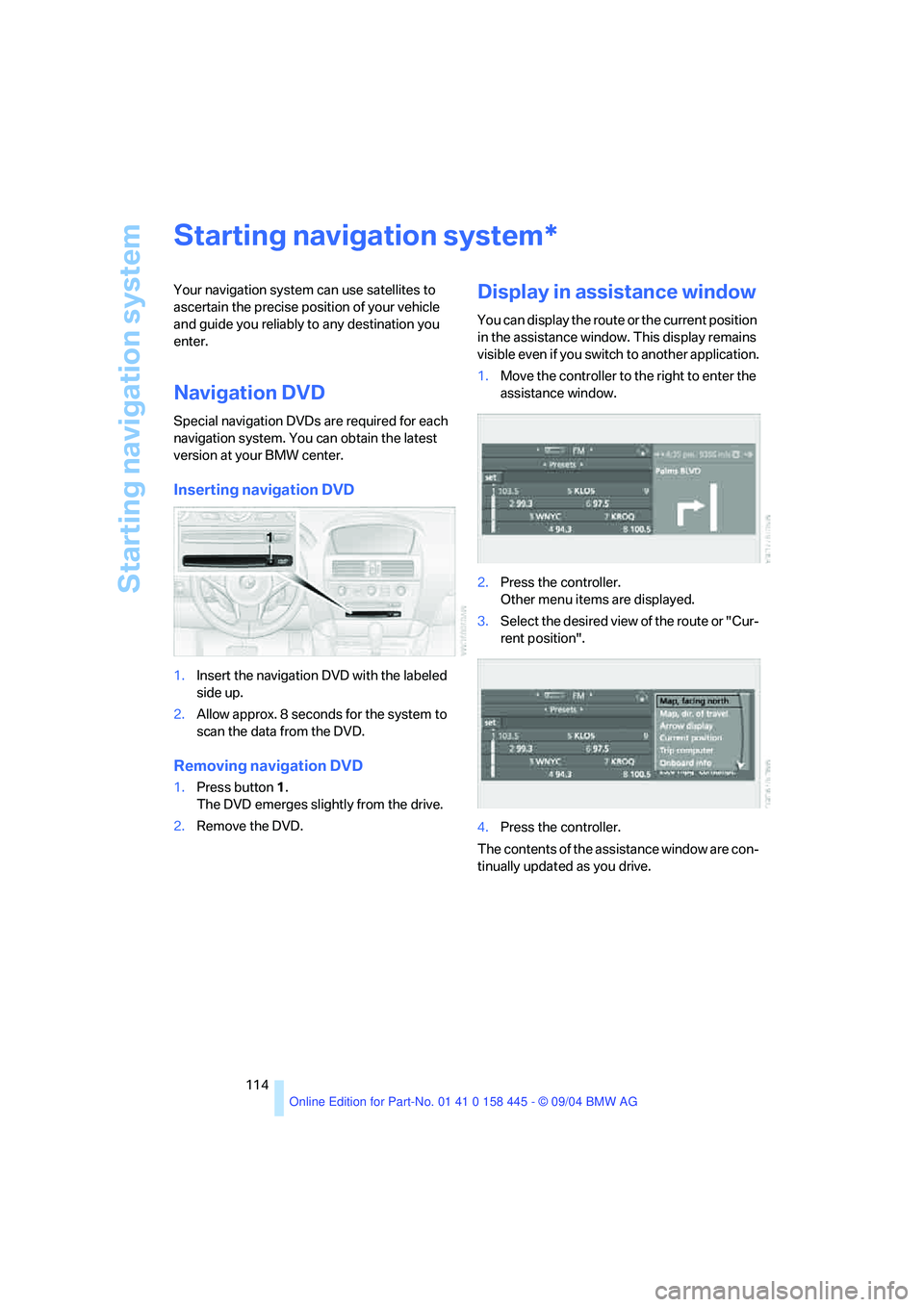
1.Insert the navigation DVD with the labeled
side up.
2.Allow approx. 8 seconds for the system to
scan the data from the DVD.
Removing navigation DVD
1.Press button 1.
The DVD emerges slightly from the drive.
2.Remove the DVD.
Display in assistance window
You can display the route or the current position
in the assistance window. This display remains
visible even if you switch to another application.
1.Move the controller to the right to enter the
assistance window.
2.Press the controller.
Other menu items are displayed.
3.Select the desired view of the route or "Cur-
rent position".
4.Press the controller.
The contents of the assistance window are con-
tinually updated as you drive.
*
Page 134 of 217
Navigation
Entertainment
Driving tips
133Reference
At a glance
Controls
Communications
Mobility
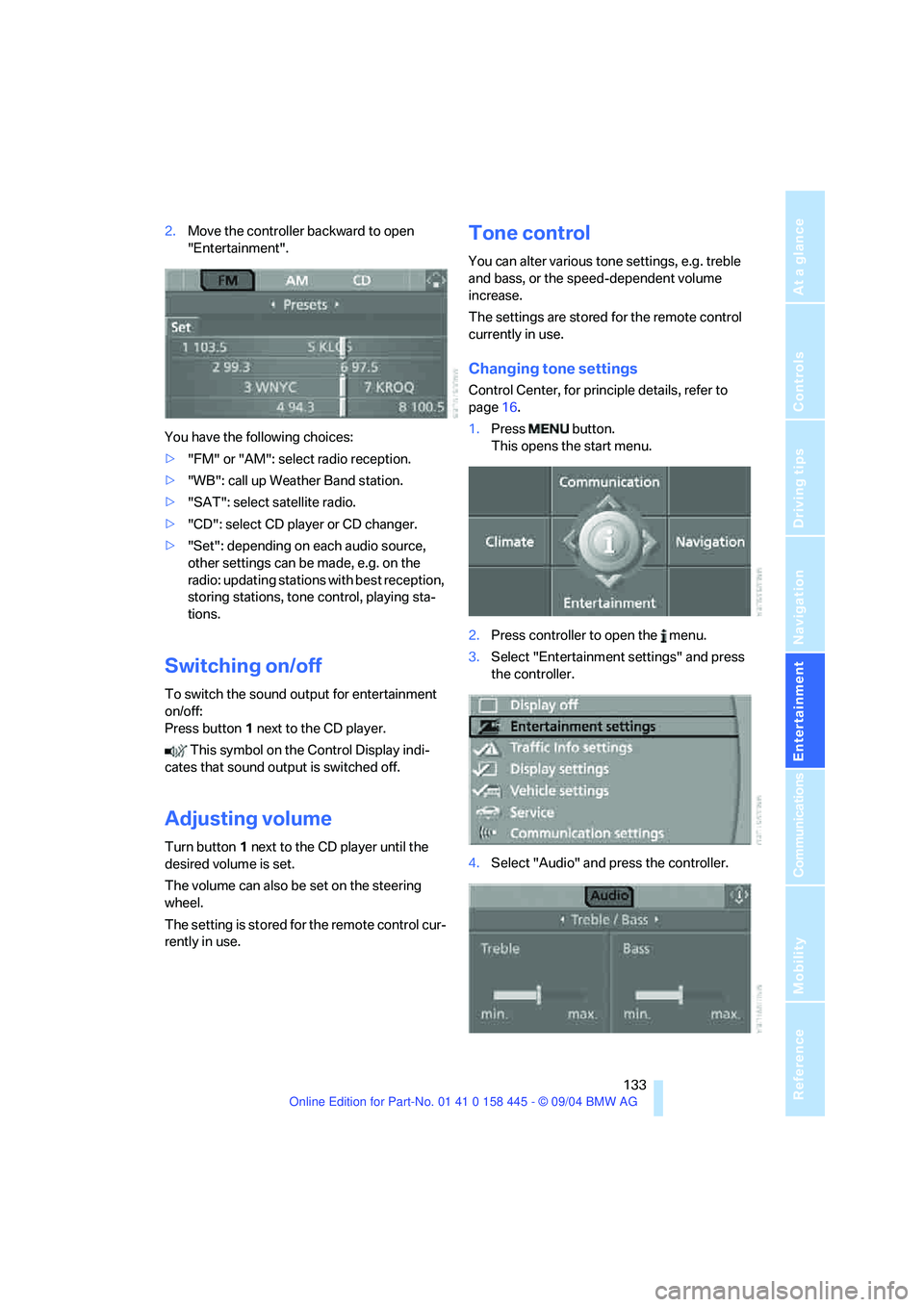
2.Move the controller backward to open
"Entertainment".
You have the following choices:
>"FM" or "AM": select radio reception.
>"WB": call up Weather Band station.
>"SAT": select satellite radio.
>"CD": select CD player or CD changer.
>"Set": depending on each audio source,
other settings can be made, e.g. on the
radio: updating stations with best reception,
storing stations, tone control, playing sta-
tions.
Switching on/off
To switch the sound output for entertainment
on/off:
Press button1 next to the CD player.
This symbol on the Control Display indi-
cates that sound output is switched off.
Adjusting volume
Turn button1 next to the CD player until the
desired volume is set.
The volume can also be set on the steering
wheel.
The setting is stored for the remote control cur-
rently in use.
Tone control
You can alter various tone settings, e.g. treble
and bass, or the speed-dependent volume
increase.
The settings are stored for the remote control
currently in use.
Changing tone settings
Control Center, for principle details, refer to
page16.
1.Press button.
This opens the start menu.
2.Press controller to open the menu.
3.Select "Entertainment settings" and press
the controller.
4.Select "Audio" and press the controller.
Page 142 of 217
Navigation
Entertainment
Driving tips
141Reference
At a glance
Controls
Communications
Mobility
Selecting and storing channel
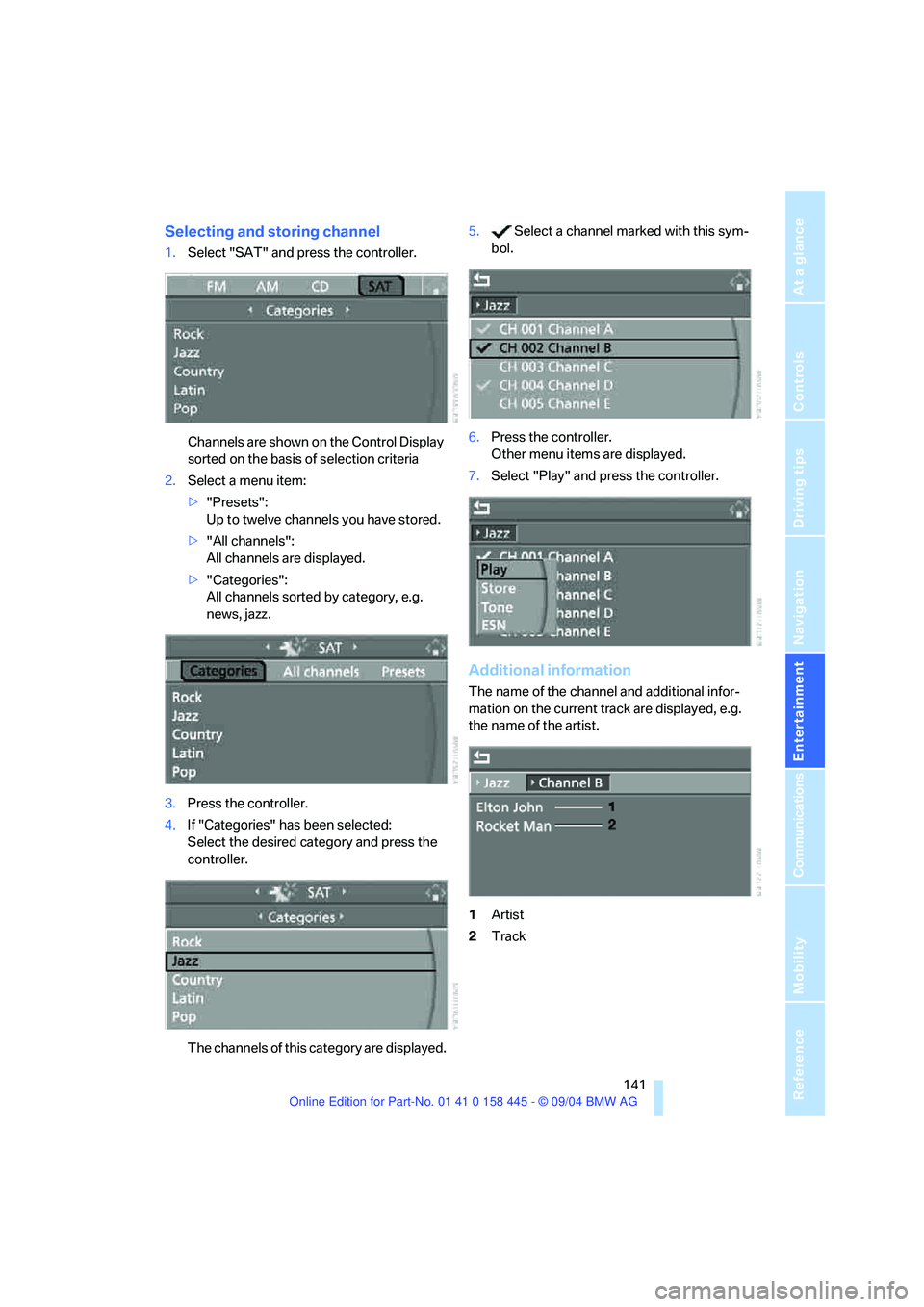
1.Select "SAT" and press the controller.
Channels are shown on the Control Display
sorted on the basis of selection criteria
2.Select a menu item:
>"Presets":
Up to twelve channels you have stored.
>"All channels":
All channels are displayed.
>"Categories":
All channels sorted by category, e.g.
news, jazz.
3.Press the controller.
4.If "Categories" has been selected:
Select the desired category and press the
controller.
The channels of this category are displayed.5. Select a channel marked with this sym-
bol.
6.Press the controller.
Other menu items are displayed.
7.Select "Play" and press the controller.
Additional information
The name of the channel and additional infor-
mation on the current track are displayed, e.g.
the name of the artist.
1Artist
2Track
Page 143 of 217
Radio
142
Storing channel
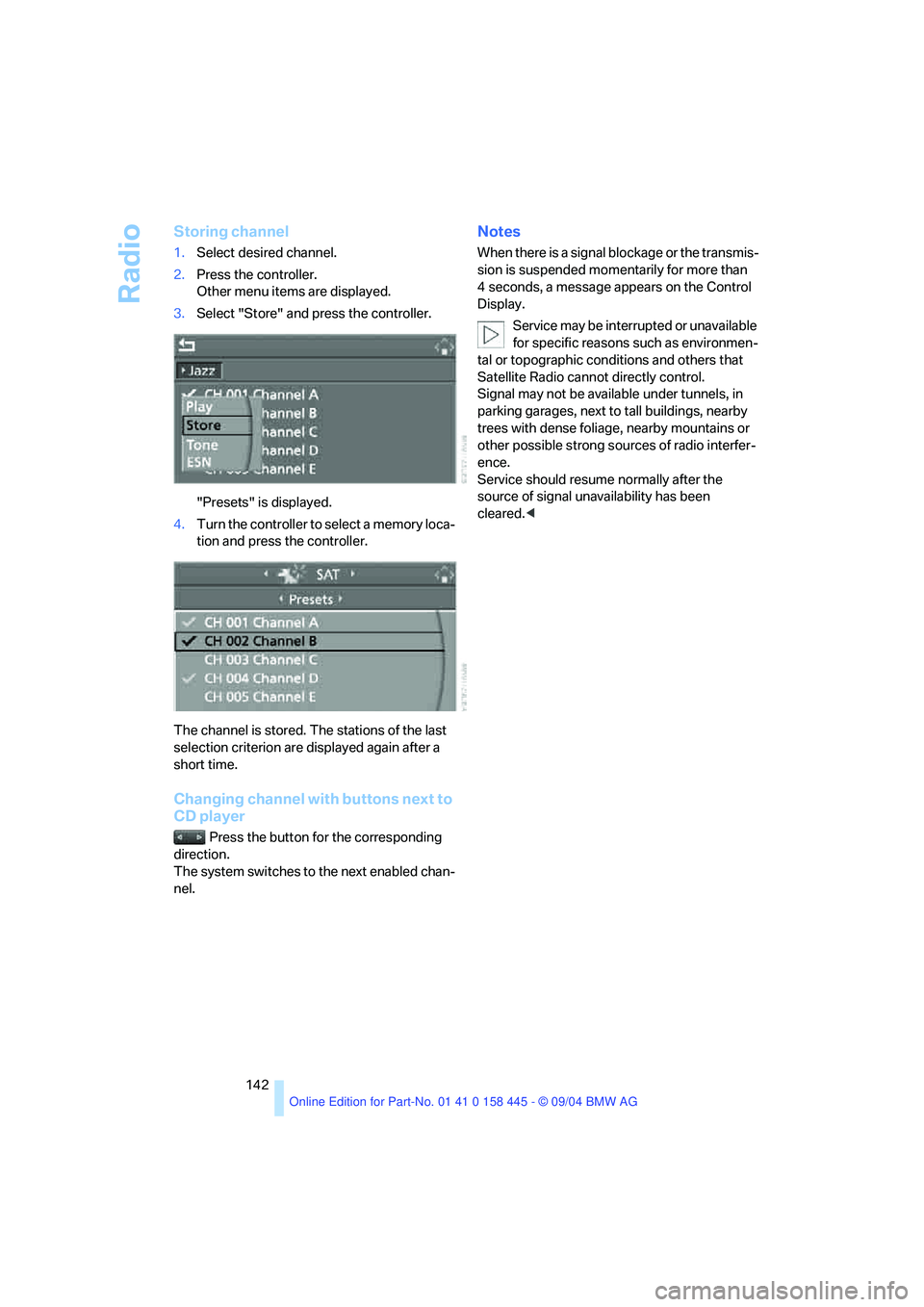
1.Select desired channel.
2.Press the controller.
Other menu items are displayed.
3.Select "Store" and press the controller.
"Presets" is displayed.
4.Turn the controller to select a memory loca-
tion and press the controller.
The channel is stored. The stations of the last
selection criterion are displayed again after a
short time.
Changing channel with buttons next to
CD player
Press the button for the corresponding
direction.
The system switches to the next enabled chan-
nel.
Notes
When there is a signal blockage or the transmis-
sion is suspended momentarily for more than
4 seconds, a message appears on the Control
Display.
Service may be interrupted or unavailable
for specific reasons such as environmen-
tal or topographic conditions and others that
Satellite Radio cannot directly control.
Signal may not be available under tunnels, in
parking garages, next to tall buildings, nearby
trees with dense foliage, nearby mountains or
other possible strong sources of radio interfer-
ence.
Service should resume normally after the
source of signal unavailability has been
cleared.<
Page 203 of 217
Everything from A to Z
202 Cold start, refer to Starting
engine54
"Communication"152
"Communication
settings"159
Compact disc
– refer to CD changer143
– refer to CD player143
Computer74
– clock, 12h/24h clock
mode78
– displays on Control
Display74
– hour signal78
"Concert hall"135
Condition Based Service
CBS178
"Confirmation"30
Confirmation signals for
locking and unlocking30
Connecting a vacuum cleaner,
refer to Socket103
Consumption display, refer to
Average fuel
consumption74
"Continue guidance to
destination?"125
Control Center16
– adjusting brightness77
– assistance window20
– automatic climate control96
– changing settings19,77
– changing the menu page19
– changing time and date78
– confirming selection or
entry19
– controller16
– display, menus16
– language selection78
– menu item selection19
– menu navigation17
– operating elements16
– selecting units of
measurement and display
format77
– start menu17
– status information20
– symbols17
Control Display16Controller, refer to Control
Center16
Controls, refer to Cockpit10
Convenience operation
– convertible top30,31
– glass sunroof30,31
– windows30,31
Convenience start, refer to
Starting engine54,55
Convertible
– convertible program for
automatic climate control97
– opening and closing
windows36
– rollover protection
system87
– top39
– wind deflector42
Convertible top
– care, refer to the Caring for
your vehicle brochure
– convenience operation31
– emergency closing41
– manual closing in the event
of an electrical
malfunction41
– opening and closing40
Coolant176
– level176
Cooling, maximum95
Cornering Brake Control
CBC81
Country of destination for
navigation116
Courtesy lighting93
Cruise control61
– active cruise control62
Cruising range74
Cup holders103
Curb weight, refer to
Weights192
"Current position"125
Current position
– displaying125
– entering120
– storing120
"Customer Relations"162
Cylinders, refer to Engine
data192
D
Dashboard, refer to
Cockpit10
Dashboard lighting, refer to
Instrument lighting93
Data192
– capacities195
– dimensions193
– engine192
– weights192
"Date"79
Date69
– setting78
"Date format"79
Daytime driving lamps91
DBC Dynamic Brake
Control81
– malfunction83
– warning lamp83
"Deactivated"47
Deactivating front passenger
airbag, Coupe52
Decommissioning the vehicle,
refer to the Caring for your
vehicle brochure
Deep water, refer to Driving
through water109
Defrosting windows95
Defrosting windows and
removing condensation95
Defrosting windshield, refer to
Defrosting windows95
Defrost position, refer to
Defrosting windows95
"Delete address book" for
navigation121
"Delete all numbers" on the
portable phone155
"Delete data" for
navigation121
"Delete" for portable
phone154
Destination address
– deleting121
– entering115
Page 210 of 217
Reference 209
At a glance
Controls
Driving tips
Communications
Navigation
Entertainment
Mobility
Pressure monitoring of tires,
refer to Flat Tire Monitor84
Programmable buttons on
steering wheel51
Protective function, refer to
Anti-trapping mechanism
– glass sunroof38
– windows37
R
Radio
– Autostore138
– controls132
– playing stations137
– satellite radio140
– selecting frequency
manually137
– selecting
waveband132,136
– station search137
– station selection136
– station with best
reception138
– storing stations138
– switching on/off132
– tone control133
– volume133
– Weather Band139
Radio-control key, refer to
Master key with remote
control28
Rain sensor of the windshield
washer system61
"Random", random play
sequence145
Random play sequence
– CD changer145
– CD player145
Reading lamps93
Rear lamps, refer to Tail
lamps182
Rearview mirror49
Rear window defroster94
"Received calls"154
Receiving level of portable
phone, refer to Status
information20Reception
– quality139
– radio stations139
– regional station138
Rechargeable flashlight101
Recirculated-air mode, refer
to AUC Automatic recircu-
lated-air control95
Recirculation of air, refer to
AUC Automatic recircu-
lated-air control95
Reclining seat, refer to
Backrest45
Recording times, refer to
Stopwatch77
"Redial" for portable
phone154
Redialing with portable
phone153
Refueling166
Releasing hood174
"Relock door if not
opened"32
Remaining distance
– refer to Computer75
– refer to Cruising range74
Remote control28
– garage-door opener100
– luggage compartment lid30
– malfunction30
Removing condensation from
windows95
"Repeat" in audio mode145
Replacement fuses184
Replacement key, refer to
New keys28
Replacing bulbs, refer to
Lamps and bulbs180
Replacing tires
– changing a wheel183
– new wheels and tires172
Reporting an accident, refer to
Initiating emergency
call185
Reporting safety defects7
Reserve warning, refer to Fuel
gage70
"Reset" for stopwatch77
"Reset" in audio mode135Residual heat mode96
Restraint systems
– for children52
– refer to Safety belts48
Retreaded tires172
Reverse, fast
– CD changer145
– CD player145
Reverse gear
– automatic transmission with
Steptronic58
– manual transmission56
– SMG Sequential manual
transmission57
Road map127
"Roadside Assistance"161
Roadside Assistance186
Roadside parking lamps92
– replacing bulbs182
Rollover protection system on
convertible87
– lowering87
Rope, refer to Towing and
tow-starting188
Rotary pushbutton, refer to
Control Center16
Route122
– bypassing sections128
– changing122,128
– display127
– displaying arrow view127
– displaying map127
– displaying towns/cities and
streets127
– list127
– selecting122
– selecting criteria122
"Route list" for navigation127
Route map127
"Route preference",
changing122
Route selection122
Run-flat tires172
– continuing driving with a
damaged tire85
– flat tire85
– tire inflation pressure168
– tire replacement172
– winter tires173