Lock unlock BMW 645CI COUPE 2004 E63 User Guide
[x] Cancel search | Manufacturer: BMW, Model Year: 2004, Model line: 645CI COUPE, Model: BMW 645CI COUPE 2004 E63Pages: 216, PDF Size: 3.46 MB
Page 54 of 216
Transporting children safely
52
Child seat security
All of the rear belt retractors and the front
passenger's safety belt can be locked for
mounting and securing child-restraint sys-
tems.
Information regarding this is located near
the buckle latch of each safety belt.
To lock safety belt
Pull the entire length of the belt from the
belt retractor. Allow the reel to retract the
belt somewhat and engage the buckle,
then tighten the belt against the child-
restraint system. The retraction mechanism
is now locked.
To unlock safety belt
Release the buckle, remove the child-
restraint system and allow the belt retractor
to reel the belt completely in.
Coupe: child-restraint system with
tether strap
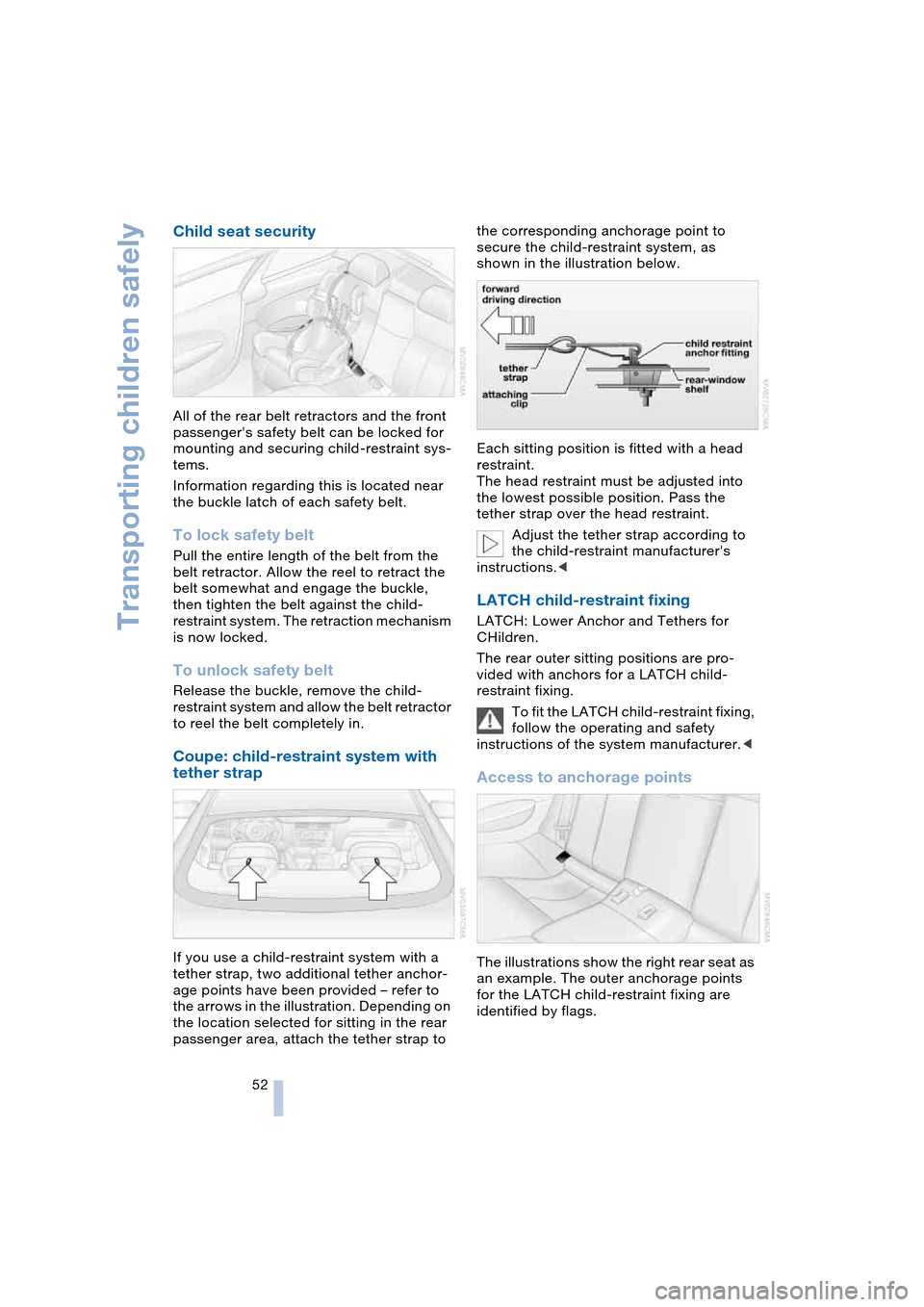
If you use a child-restraint system with a
tether strap, two additional tether anchor-
age points have been provided – refer to
the arrows in the illustration. Depending on
the location selected for sitting in the rear
passenger area, attach the tether strap to the corresponding anchorage point to
secure the child-restraint system, as
shown in the illustration below.
Each sitting position is fitted with a head
restraint.
The head restraint must be adjusted into
the lowest possible position. Pass the
tether strap over the head restraint.
Adjust the tether strap according to
the child-restraint manufacturer's
instructions.<
LATCH child-restraint fixing
LATCH: Lower Anchor and Tethers for
CHildren.
The rear outer sitting positions are pro-
vided with anchors for a LATCH child-
restraint fixing.
To fit the LATCH child-restraint fixing,
follow the operating and safety
instructions of the system manufacturer.<
Access to anchorage points
The illustrations show the right rear seat as
an example. The outer anchorage points
for the LATCH child-restraint fixing are
identified by flags.
Page 56 of 216
Driving
54
Driving
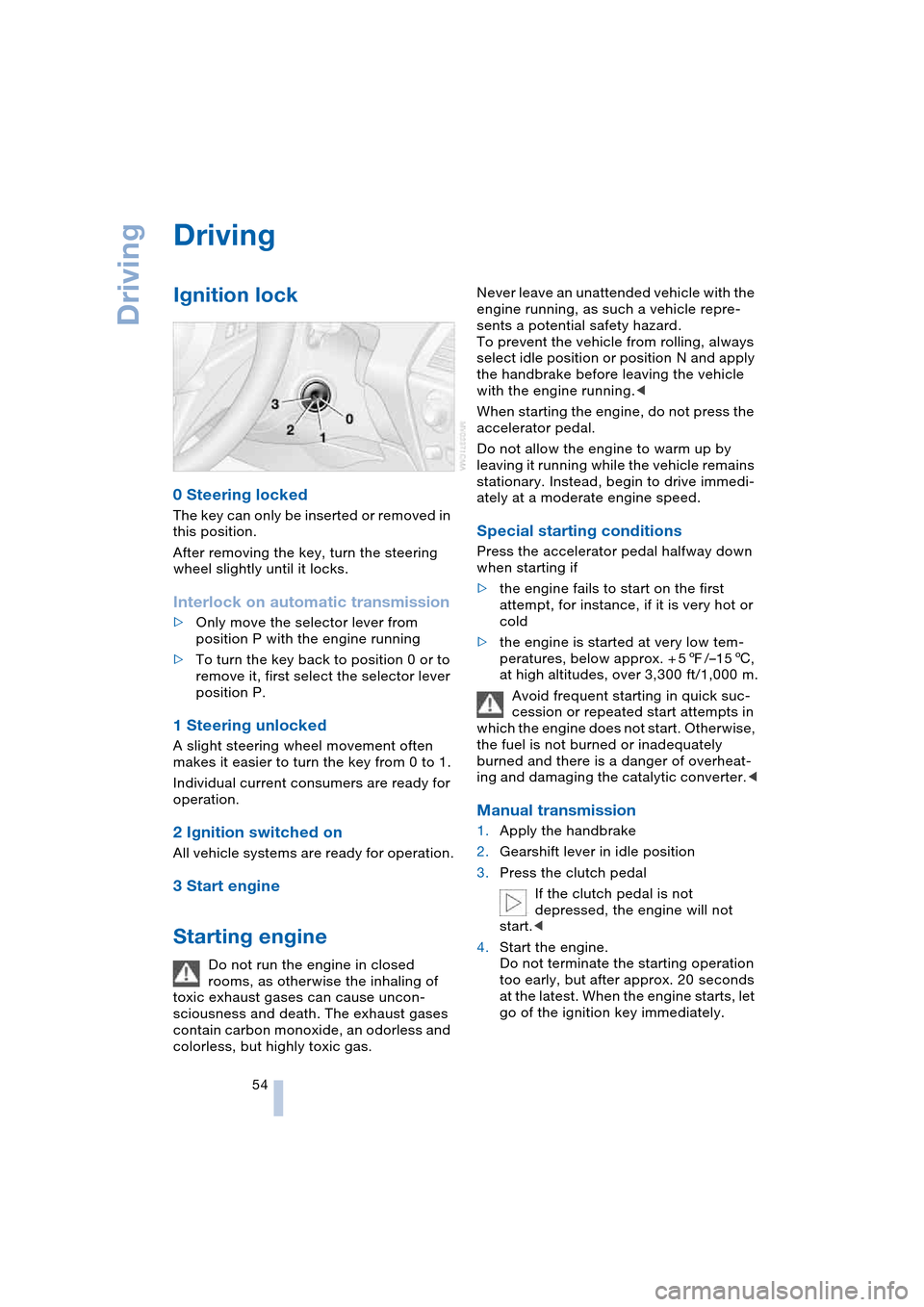
Ignition lock
0 Steering locked
The key can only be inserted or removed in
this position.
After removing the key, turn the steering
wheel slightly until it locks.
Interlock on automatic transmission
>Only move the selector lever from
position P with the engine running
>To turn the key back to position 0 or to
remove it, first select the selector lever
position P.
1 Steering unlocked
A slight steering wheel movement often
makes it easier to turn the key from 0 to 1.
Individual current consumers are ready for
operation.
2 Ignition switched on
All vehicle systems are ready for operation.
3 Start engine
Starting engine
Do not run the engine in closed
rooms, as otherwise the inhaling of
toxic exhaust gases can cause uncon-
sciousness and death. The exhaust gases
contain carbon monoxide, an odorless and
colorless, but highly toxic gas.Never leave an unattended vehicle with the
engine running, as such a vehicle repre-
sents a potential safety hazard.
To prevent the vehicle from rolling, always
select idle position or position N and apply
the handbrake before leaving the vehicle
with the engine running.<
When starting the engine, do not press the
accelerator pedal.
Do not allow the engine to warm up by
leaving it running while the vehicle remains
stationary. Instead, begin to drive immedi-
ately at a moderate engine speed.
Special starting conditions
Press the accelerator pedal halfway down
when starting if
>the engine fails to start on the first
attempt, for instance, if it is very hot or
cold
>the engine is started at very low tem-
peratures, below approx. + 57/–156,
at high altitudes, over 3,300 ft/1,000 m.
Avoid frequent starting in quick suc-
cession or repeated start attempts in
which the engine does not start. Otherwise,
the fuel is not burned or inadequately
burned and there is a danger of overheat-
ing and damaging the catalytic converter.<
Manual transmission
1.Apply the handbrake
2.Gearshift lever in idle position
3.Press the clutch pedal
If the clutch pedal is not
depressed, the engine will not
start.<
4.Start the engine.
Do not terminate the starting operation
too early, but after approx. 20 seconds
at the latest. When the engine starts, let
go of the ignition key immediately.
Page 148 of 216
Telephoning
146
Hands-free system
Coupe:
Convertible:
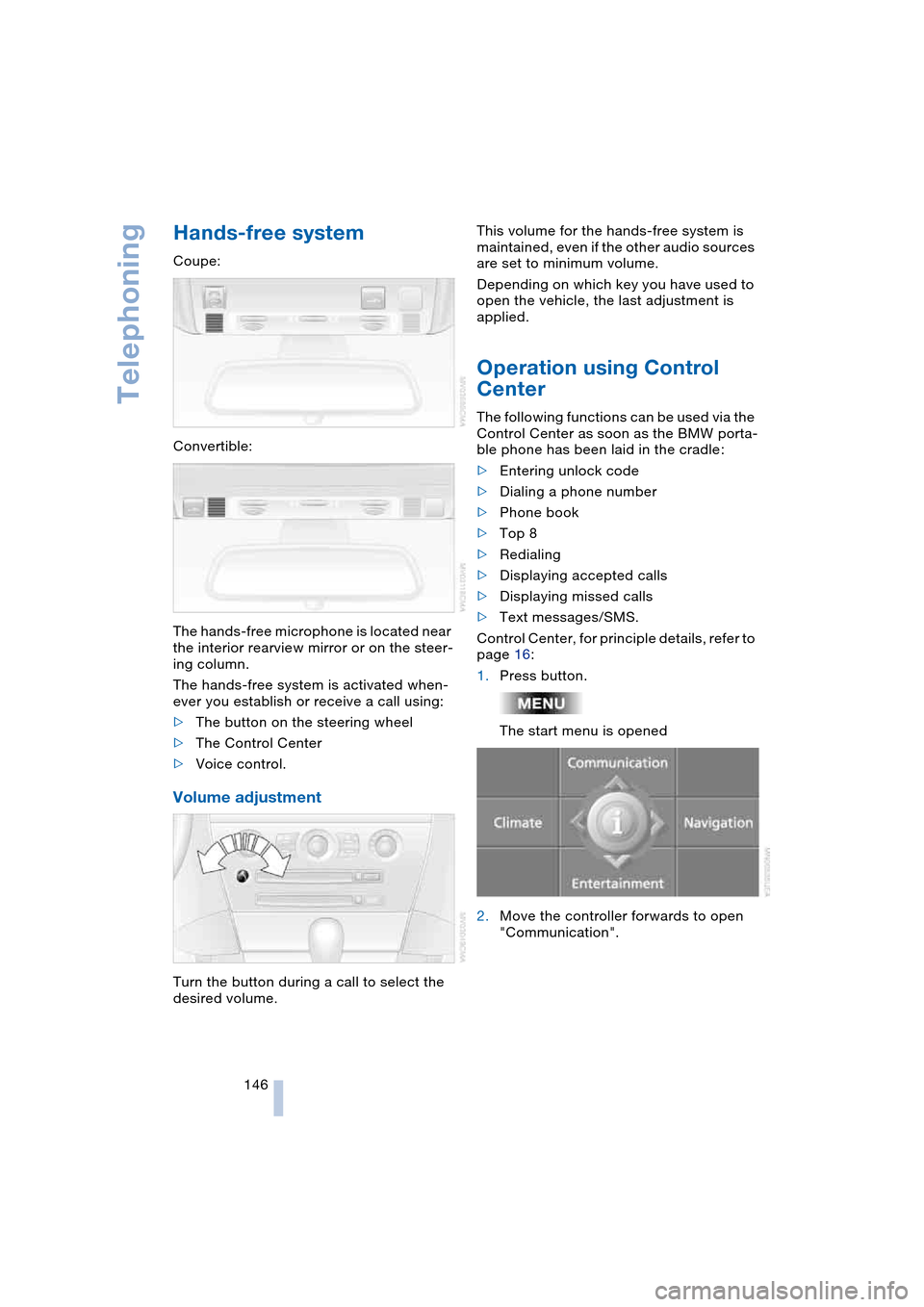
The hands-free microphone is located near
the interior rearview mirror or on the steer-
ing column.
The hands-free system is activated when-
ever you establish or receive a call using:
>The button on the steering wheel
>The Control Center
>Voice control.
Volume adjustment
Turn the button during a call to select the
desired volume.This volume for the hands-free system is
maintained, even if the other audio sources
are set to minimum volume.
Depending on which key you have used to
open the vehicle, the last adjustment is
applied.
Operation using Control
Center
The following functions can be used via the
Control Center as soon as the BMW porta-
ble phone has been laid in the cradle:
>Entering unlock code
>Dialing a phone number
>Phone book
>Top 8
>Redialing
>Displaying accepted calls
>Displaying missed calls
>Text messages/SMS.
Control Center, for principle details, refer to
page 16:
1.Press button.
The start menu is opened
2.Move the controller forwards to open
"Communication".
Page 149 of 216
147
Entertainment
Reference
At a glance
Controls
Driving tips Communications
Navigation
Mobility
Entering unlock code
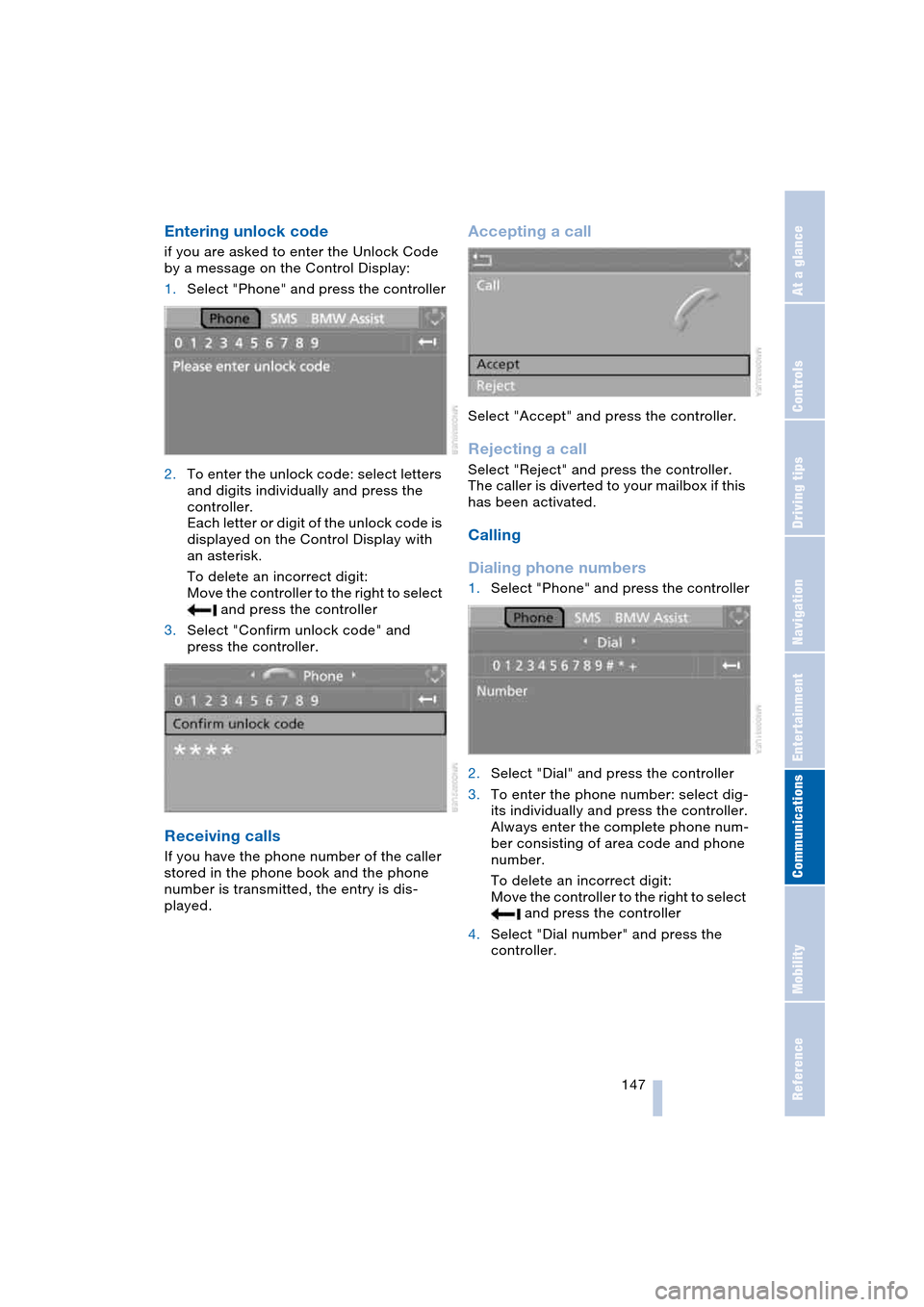
if you are asked to enter the Unlock Code
by a message on the Control Display:
1.Select "Phone" and press the controller
2.To enter the unlock code: select letters
and digits individually and press the
controller.
Each letter or digit of the unlock code is
displayed on the Control Display with
an asterisk.
To delete an incorrect digit:
Move the controller to the right to select
and press the controller
3.Select "Confirm unlock code" and
press the controller.
Receiving calls
If you have the phone number of the caller
stored in the phone book and the phone
number is transmitted, the entry is dis-
played.
Accepting a call
Select "Accept" and press the controller.
Rejecting a call
Select "Reject" and press the controller.
The caller is diverted to your mailbox if this
has been activated.
Calling
Dialing phone numbers
1.Select "Phone" and press the controller
2.Select "Dial" and press the controller
3.To enter the phone number: select dig-
its individually and press the controller.
Always enter the complete phone num-
ber consisting of area code and phone
number.
To delete an incorrect digit:
Move the controller to the right to select
and press the controller
4.Select "Dial number" and press the
controller.
Page 154 of 216
Telephoning
152
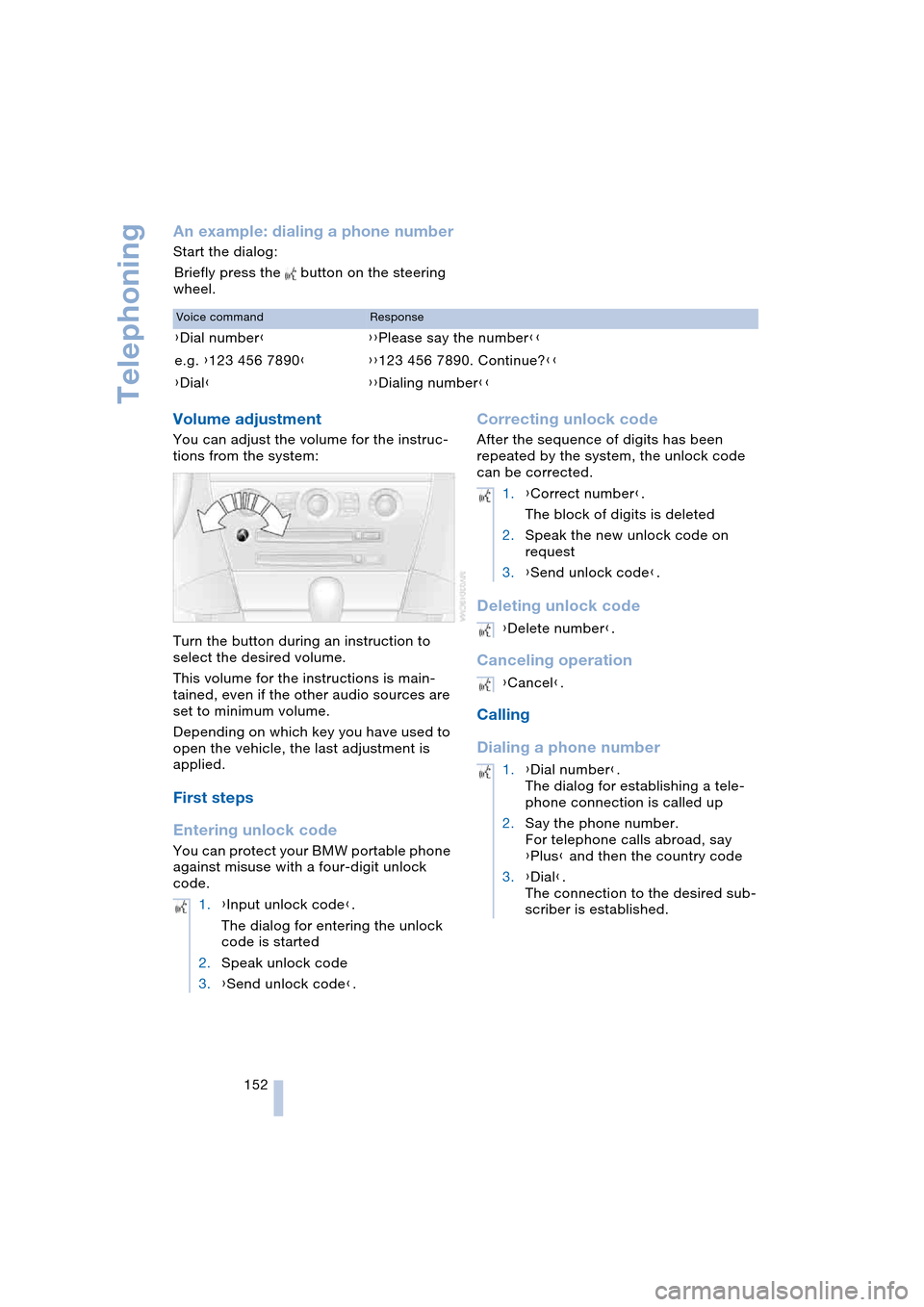
An example: dialing a phone number
Start the dialog:
Briefly press the button on the steering
wheel.
Volume adjustment
You can adjust the volume for the instruc-
tions from the system:
Turn the button during an instruction to
select the desired volume.
This volume for the instructions is main-
tained, even if the other audio sources are
set to minimum volume.
Depending on which key you have used to
open the vehicle, the last adjustment is
applied.
First steps
Entering unlock code
You can protect your BMW portable phone
against misuse with a four-digit unlock
code.
Correcting unlock code
After the sequence of digits has been
repeated by the system, the unlock code
can be corrected.
Deleting unlock code
Canceling operation
Calling
Dialing a phone number
Voice commandResponse
{Dial number}{{Please say the number}}
e.g. {123 456 7890}{{123 456 7890. Continue?}}
{Dial}{{Dialing number}}
1.{Input unlock code}.
The dialog for entering the unlock
code is started
2.Speak unlock code
3.{Send unlock code}.
1.{Correct number}.
The block of digits is deleted
2.Speak the new unlock code on
request
3.{Send unlock code}.
{Delete number}.
{Cancel}.
1.{Dial number}.
The dialog for establishing a tele-
phone connection is called up
2.Say the phone number.
For telephone calls abroad, say
{Plus} and then the country code
3.{Dial}.
The connection to the desired sub-
scriber is established.
Page 199 of 216
197Reference
At a glance
Controls
Driving tips
Communications
Navigation
Entertainment
Mobility
Everything from A to Z
Index
"..." Indicates texts on the
Control Display for the
selection of functions,
pointing out where these
are located.
A
ABS Antilock Brake
System 76
– malfunction 78
– warning lamp 13, 78
Acceleration assistant with
SMG 60
Accessories, refer to
Your individual vehicle 5
Activated-charcoal filter 92
"Activation time" for
independent
ventilation 93
Activation times 93
– entering 93
Active roll stabilization 78
Active steering 80
– initializing the system 80
– warning lamp 13, 80
Adapting the temperature
in the upper body
region 91
Adaptive brake lamps, refer
to Brake Force Display 80
Adaptive Head Light 86
"Add digits" for portable
phone 149
"Address book" for
navigation 114
Address for navigation
– deleting 115
– entering 110
– selecting 115
– storing current
location 114
"Add to destination
list" 111Adjusting the temperature
with automatic climate
control 89
Adjusting the thigh
support 43
"After opening door" 44
"After unlocking" 44
Airbags 81
– deactivating, Coupe 51
– indicator lamp 82
– sitting safely 42
Air distribution
– automatic 89
– manual 90
Airing, refer to
Ventilation 92
Air recirculation, refer to
Automatic recirculated-
air control 89
"Air recirculation on /
off" 49
Air vents, refer to
Ventilation 88
Air volume 89
AKI, refer to Fuel
specifications 163
Alarm system 32
– avoiding unintentional
alarms 33
– interior motion sensor 33
– switching off alarm 32
– switching off tilt alarm
sensor and interior
motion sensor 33
– tilt alarm sensor 33
All around the center
console 14
All around the steering
wheel 10
"All channels" 135
"All doors" 27
All-season tires, refer to
Winter tires 169
Altering stretch of road 120"AM", reception
range 127, 130
Antenna for portable
phone 144
Antifreeze
– coolant 172
– washer fluid 62
Antilock Brake System,
ABS 76
Anti-theft alarm system,
refer to Alarm system 32
Anti-theft system 27
Anti-trapping mechanism
– glass roof 36
– power windows 35
Approved axle loads, refer
to Weights 190
Approved gross vehicle
weight, refer to
Weights 190
Armrest, refer to
Center armrest 96
Arrival time, refer to
Computer 70
Arrival time, refer to
Starting destination
guidance 118
"Arrow display" 119
Ashtray 97
Assistance systems, refer
to Driving stability control
systems 76
Assistance window 19
AUC Automatic recircu-
lated-air control 89
"Audio" 128
Audio 126
– adjusting the tone 127
– controls 126
– switching on/off 126
– volume 127
Page 202 of 216
Everything from A to Z
200 "Communication
interface" 155
Compact disc
– refer to CD changer 137
– refer to CD player 137
Computer 69
– clock, 12/24 hour
mode 73
– displays on Control
Display 69
– hour signal 73
"Concert hall" 128
Condition Based Service,
CBS 174
"Confirmation" 28
Confirmation signals for
locking and unlocking 28
"Confirm unlock code" 147
Connecting a vacuum
cleaner
– refer to Lighter socket 97
– refer to Power socket 97
Consumption display, refer
to Average fuel
consumption 69
"Continue guidance to
dest.?" 119
Control Center 16
– adjusting the
brightness 72
– assistance window 19
– automatic climate
control 90
– changing settings 18, 72
– changing the menu
page 18
– confirming selection or
entry 18
– controller 16
– display, menus 16
– language selection 73
– menu guidance 17
– menu item selection 18
– operating elements 16
– selecting units of
measurement and display
format 72
– setting time and date 73
– start menu 17
– status information 19
– symbols 17Control Display 16
Controller, refer to
Control Center 16
Controls, refer to
Cockpit 10
Convenience operation
– convertible top 27, 29
– glass roof 27, 29
– windows 27, 29
Convenience start, refer to
Starting engine 54, 55
Convertible program for
automatic climate
control 91
Convertible top 37
– care, refer to the Caring
for your vehicle brochure
– convenience operation 29
– emergency closing 39
– manual closing in the
event of an electrical
malfunction 39
– opening and closing 38
Coolant 172
– level 172
Cooling, maximum 89
Cornering Brake Control,
CBC 76
Country of destination for
navigation 110
Courtesy lamps 87
Cruise control 62
Cruising range 69
Cup holders 97
Curb weight, refer to
Weights 190
"Current position" 109
Current position
– displaying 109
– entering 114
– storing 114
"Customer Relations" 157
Cylinders, refer to
Engine data 190
D
Dashboard, refer to
Cockpit 10
Data 190
– capacities 193
– dimensions 191
– engine 190
– weights 190
"Date" 74
Date 64
– setting 74
"Date format" 74
Daytime driving lamps 85
DBC Dynamic Brake
Control 78
Deactivating front
passenger airbag,
Coupe 51
Decommissioning the
vehicle, refer to the
Caring for your vehicle
brochure
Defect
– convertible top 39
– door lock 29
– fuel filler door 162
– glass roof 36
– luggage compartment
lid 30, 31
– SMG Sequential manual
transmission 58
Defrosting windows 89
Defrosting windows and
removing
condensation 89
Defrosting windshield, refer
to Defrosting windows 89
Defrost position, refer to
Defrosting windows 89
"Delete address book" for
navigation 116
"Delete address" for
navigation 115
"Delete all numbers" for
portable phone 150
"Delete data" for
navigation 116
"Delete" for portable
phone 149
Page 204 of 216
Everything from A to Z
202 Emergency services, refer
to Roadside
Assistance 184
"Emission inspect." 66
"Enable services" 156
"End call" 148
Engine
– break-in procedure 102
– data 190
– speed 190
– starting 54
– starting difficulties 54
– switching off 55
Engine compartment 171
Engine coolant 172
Engine hood 170
Engine oil
– checking the oil level 171
– specified engine oils 172
– temperature 65
– temperature gauge 65
– topping up 172
Engine output, refer to
Engine data 190
Engine speed, refer to
Engine specifications 190
Engine starting, refer to
Starting engine 54
"Enter address" for
navigation 110
Entering activation times of
independent ventilation/
heating 93
Entering destination 111
Entering the address 110
Entering the
intersection 111
Entering the town/city for
navigation 111
Entering zip code for
navigation 111
"Entertainment" 127
"Entertainment
settings" 127
Entry map for
destination 112
Entry to the rear 46
"Equalizer", refer to
Adjusting the tone 129
"ESN" 134ESP Electronic Stability
Program, refer to DSC
Dynamic Stability
Control 77
Exhaust system 102
Exterior mirrors 48
– automatic dimming
feature 48
– automatic heating 48
Eye for towing, refer to
Tow fitting 186
F
Fader, refer to
Adjusting the tone 128
Failure messages, refer to
Check Control 66
False alarms, refer to
Avoiding unintentional
alarms 33
False alarms with Flat Tire
Monitor 79
Fastening safety belts, refer
to Safety belts 47
Fastest route for
navigation 116
"Fast route" for
navigation 116
First aid, refer to
First-aid kit 184
First-aid kit 184
First-aid pouch, refer to
First-aid kit 184
Flashing on locking/
unlocking 28
Flashlight, refer to
Rechargeable
flashlight 95
Flat tire
– Flat Tire Monitor 79
– run-flat tires 80, 168
Flat Tire Monitor 79
– false alarms 79
– initializing the system 79
– limits of system 79
– malfunction 80
– warning lamp 80
Flooding, refer to
Water on roads 103"FM", reception
range 127, 130
FM, waveband 130
Fog lamps 86
– indicator lamp 86
Folding up the convertible
top compartment floor,
convertible 32
Footwell lamps 87
Forward, fast
– CD changer 140
– CD player 140
For your own safety 6
Front airbags 81
Front head restraints 45
Front seat adjustment 43
"FTM" 79
Fuel
– average consumption 69
– display 65
– fuel specifications 163
– high-quality brands 163
– quality 163
– tank capacity 162
Fuel display, refer to
Fuel gauge 65
Fuel filler door 162
– releasing in the event of
an electrical
malfunction 162
Fuel gauge 65
Fuel specifications 163
Fuses 182
G
Garage-door opener, refer
to Integrated universal
remote control 94
Gasoline
– refer to Fuel
specifications 163
– refer to Required fuel 163
Gasoline display, refer to
Fuel gauge 65
Gear changes
– automatic transmission
with Steptronic 58
– SMG Sequential manual
transmission 57
Page 206 of 216
Everything from A to Z
204 Instructions for navigation
system, refer to
Voice instructions 119
Instrument cluster 12
Instrument illumination,
refer to Instrument
lighting 87
Instrument lighting 87
Instrument panel, refer to
Instrument cluster 12
Instrument panel lighting,
refer to Instrument
lighting 87
Integrated universal remote
control 94
Interesting destination 113
"Interim time" 72
Interior lamps 87
– remote control 28
Interior mirror, automatic
dimming feature 48
Interior rearview mirror 48
Interlock, refer to
Steering locked 54
Interlock on automatic
transmission 54
Intermittent mode of the
wipers 61
J
Jacking points 181
Joystick, refer to
Control Center 16
Jump-starting 184
K
Key Memory 26
"Keypad" 150
Keys 26
Kickdown
– automatic transmission
with Steptronic 59
– SMG Sequential manual
transmission 57
Knock control 163
L
Lamps, refer to Parking
lamps/low beams 85
Lamps and bulbs 178
"Languages" 73
– for navigation 119
Lashing down loads, refer
to Securing the load 105
Lashing eyes, refer to
Securing the load 105
Last destinations, refer to
Destination list 113
"Last seat pos." 44
LATCH child-restraint
fixing 52
LEDs light-emitting
diodes 181
Length, refer to
Dimensions 191
Letter symbol with portable
phone 150
License plate lamps,
replacing bulbs 180
Light-emitting diodes
LEDs 181
Lighter 97
Lighter socket 97
"Lighting" 60, 85
Lighting
– instruments 87
– vehicle, refer to Lamps 85
Lights on warning 85
Light switch 85
"Limit" 71
Loading
– securing the load 105
– stowing cargo 105
– vehicle 104
Location, navigation
drive 108
"Lock after driving" 29
Lock buttons in the doors,
refer to Locking 30
Locking
– from inside 30
– from outside 28
Locking and unlocking
doors
– from inside 29
– from outside 27"LOGIC7", refer to
Adjusting the tone 128
Low beams 85
– automatic 85
– replacing the bulbs 178
Lower back support, refer
to Lumbar support 43
Luggage compartment
– capacity 190
– emergency release 31
– hotel function 30
– increasing the capacity,
Convertible 32
– opening/closing, refer to
Luggage compartment
lid 31
– opening from inside 31
– opening from outside 31
– opening with remote
control 28
Luggage compartment
lid 30
– emergency operation 31
– emergency release 31
– opening from inside 31
– opening from outside 31
– opening with remote
control 28
– unlocking manually 31
Lumbar support 43
LW, waveband 130
M
M+S tires, refer to
Winter tires 169
Maintenance, refer to the
Service and Warranty
Information Booklet for
US models or to the
Warranty and Service
Guide Booklet for
Canadian models 174
Maintenance system 174
Malfunction warnings, refer
to Check Control 66
Manual air distribution 90
Manual mode with
automatic transmission
with Steptronic 59
"Manual" on the radio 131
Page 208 of 216
Everything from A to Z
206 Opening and closing
– from inside 29
– from outside 27
– rear window 35
– using door lock 29
– using the remote
control 27
Operation via voice control
for portable phone 151
– adjusting volume 152
– canceling 151
– correcting phone
number 153
– correcting unlock
code 152
– dialing a phone
number 152
– entering unlock code 152
– making a call 152
– redialing 153
– voice commands 151
– voice phone book 153
"Options" for portable
phone 151
Orientation menu, refer to
Start menu 17
Output, refer to
Engine data 190
Outside air, refer to AUC
Automatic recirculated-
air control 89
Outside temperature
display 64
– changing unit of
measurement 72
– in the computer 72
P
Panic mode 28
Park Distance Control,
PDC 75
Parking, vehicle 55
Parking aid, refer to PDC
Park Distance Control 75
Parking brake, refer to
Handbrake 55
Parking lamps/
low beams 85
– replacing the
bulbs 178, 180Parts and accessories,
refer to Your individual
vehicle 5
Passenger-side mirror tilt
function 45
"Pathway lighting" 85
Pathway lighting 85
"PDC" 76
PDC Park Distance
Control 75
"Phone" 147
Phone book 146
Phone numbers
– deleting in the phone
book 149
– dialing 147
– most recent numbers 149
– selecting in the phone
book 149
– Top 8 149
Plasters, refer to
First-aid kit 184
"play" in audio mode 138
Please fasten safety belt
warning lamp 47
Pollen, refer to Microfilter/
activated-charcoal
filter 92
Portable phone
– accepted calls 149
– adjusting volume 146
– battery 145
– calling 147
– call termination 148
– codes 147
– entering unlock code 147
– hands-free system 146
– installation position 96
– missed calls 149
– operation using
Control Center 146
– phone book 148
– redialing 149
– refer also to separate
Owner's Manual
– SMS 150
– Top 8 149
– touch tone dialing 150
– use in vehicle, refer to
Mobile communication
devices in vehicle 104Position
– displaying 109
– storing 114
Power cut 181
Power failure, refer to
Power cut 181
Power windows, refer to
Windows 34
"Presets" on the
radio 130, 135
Pressure, tires 164
Pressure monitoring of
tires, refer to
Flat Tire Monitor 79
"Profile" 158
Protective function, refer to
Anti-trapping mechanism
– glass roof 36
– windows 35
R
Radio
– adjusting tone 127
– Autostore 132
– controls 126
– playing stations 131
– satellite radio 133
– selecting frequency
manually 131
– selecting
waveband 126, 130
– station search 131
– station selection 130
– station with best
reception 132
– storing stations 132
– switching on/off 126
– volume 127
– Weather Band 133
Radio-control key, refer to
Master key with remote
control 26
Rain sensor, refer to
Wiper system 61
"Random", random
sequence generator 140
"random directory" in audio
mode 140