fuel BMW 645CI COUPE 2004 E63 User Guide
[x] Cancel search | Manufacturer: BMW, Model Year: 2004, Model line: 645CI COUPE, Model: BMW 645CI COUPE 2004 E63Pages: 216, PDF Size: 3.46 MB
Page 71 of 216
Controls
69Reference
At a glance
Driving tips
Communications
Navigation
Entertainment
Mobility
Computer
Mode selection
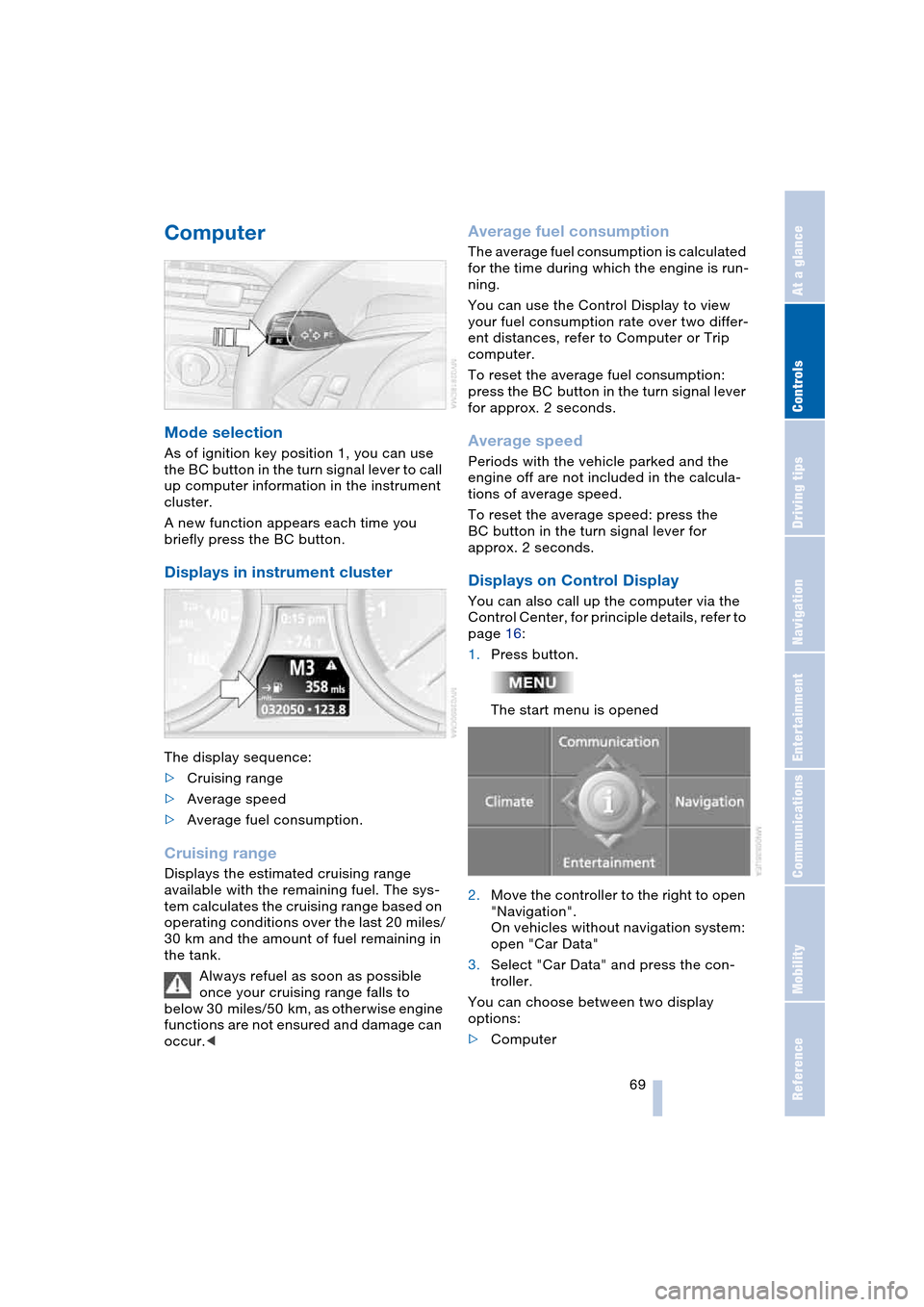
As of ignition key position 1, you can use
the BC button in the turn signal lever to call
up computer information in the instrument
cluster.
A new function appears each time you
briefly press the BC button.
Displays in instrument cluster
The display sequence:
>Cruising range
>Average speed
>Average fuel consumption.
Cruising range
Displays the estimated cruising range
available with the remaining fuel. The sys-
tem calculates the cruising range based on
operating conditions over the last 20 miles/
30 km and the amount of fuel remaining in
the tank.
Always refuel as soon as possible
once your cruising range falls to
below 30 miles/50 km, as otherwise engine
functions are not ensured and damage can
occur.<
Average fuel consumption
The average fuel consumption is calculated
for the time during which the engine is run-
ning.
You can use the Control Display to view
your fuel consumption rate over two differ-
ent distances, refer to Computer or Trip
computer.
To reset the average fuel consumption:
press the BC button in the turn signal lever
for approx. 2 seconds.
Average speed
Periods with the vehicle parked and the
engine off are not included in the calcula-
tions of average speed.
To reset the average speed: press the
BC button in the turn signal lever for
approx. 2 seconds.
Displays on Control Display
You can also call up the computer via the
Control Center, for principle details, refer to
page 16:
1.Press button.
The start menu is opened
2.Move the controller to the right to open
"Navigation".
On vehicles without navigation system:
open "Car Data"
3.Select "Car Data" and press the con-
troller.
You can choose between two display
options:
>Computer
Page 72 of 216
Everything under control
70 >Trip computer,
suitable e.g. for a vacation trip.
Computer
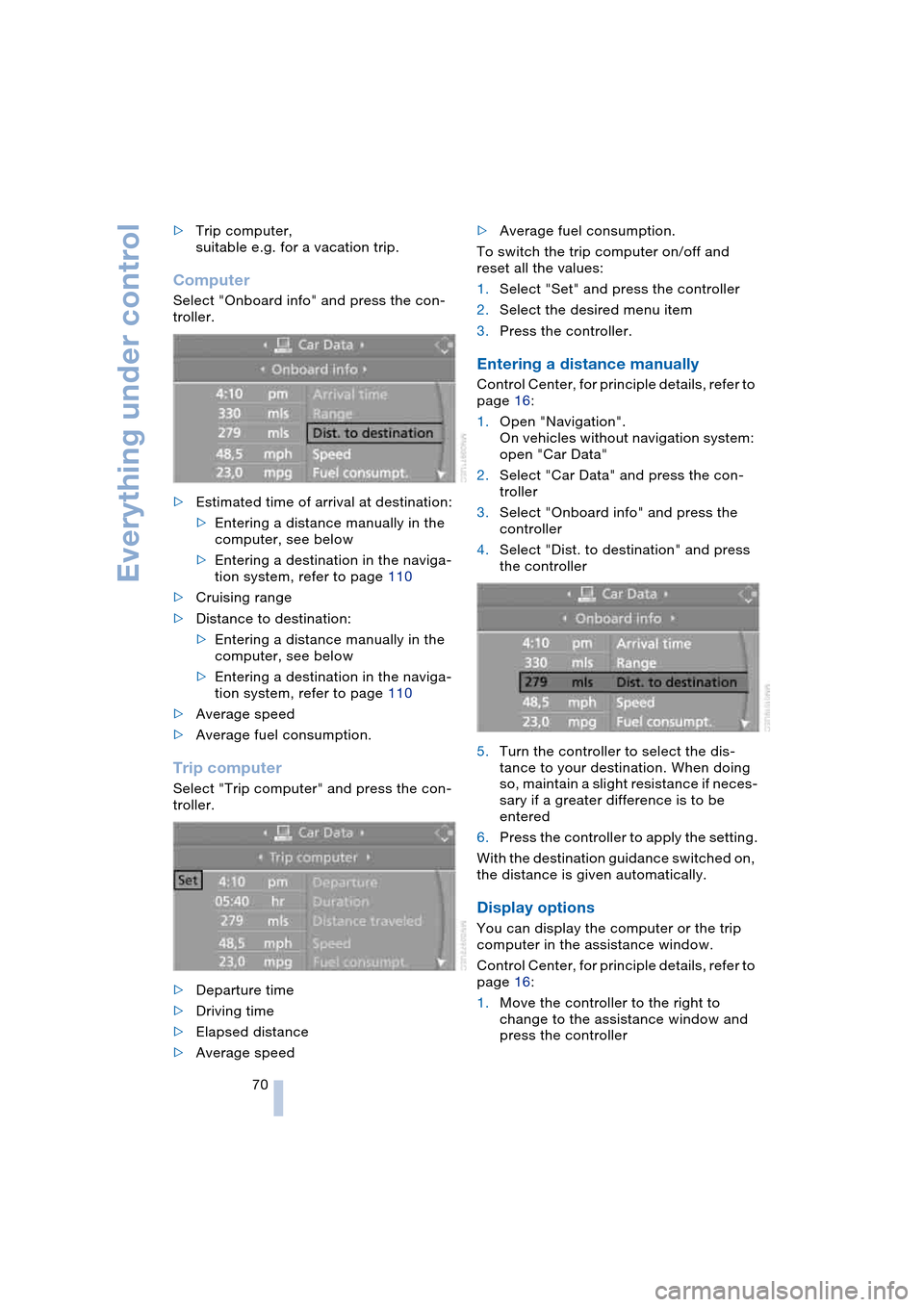
Select "Onboard info" and press the con-
troller.
>Estimated time of arrival at destination:
>Entering a distance manually in the
computer, see below
>Entering a destination in the naviga-
tion system, refer to page 110
>Cruising range
>Distance to destination:
>Entering a distance manually in the
computer, see below
>Entering a destination in the naviga-
tion system, refer to page 110
>Average speed
>Average fuel consumption.
Trip computer
Select "Trip computer" and press the con-
troller.
>Departure time
>Driving time
>Elapsed distance
>Average speed>Average fuel consumption.
To switch the trip computer on/off and
reset all the values:
1.Select "Set" and press the controller
2.Select the desired menu item
3.Press the controller.
Entering a distance manually
Control Center, for principle details, refer to
page 16:
1.Open "Navigation".
On vehicles without navigation system:
open "Car Data"
2.Select "Car Data" and press the con-
troller
3.Select "Onboard info" and press the
controller
4.Select "Dist. to destination" and press
the controller
5.Turn the controller to select the dis-
tance to your destination. When doing
so, maintain a slight resistance if neces-
sary if a greater difference is to be
entered
6.Press the controller to apply the setting.
With the destination guidance switched on,
the distance is given automatically.
Display options
You can display the computer or the trip
computer in the assistance window.
Control Center, for principle details, refer to
page 16:
1.Move the controller to the right to
change to the assistance window and
press the controller
Page 146 of 216
Telephoning
144
Telephoning
Safety notes
For your own safety
Your car phone makes life more convenient
in many ways, and can even save lives in an
emergency. While you should consult your
portable phone's separate Owner's Manual
for a detailed description of safety precau-
tions and information, we request that you
direct your particular attention to the fol-
lowing:
Adjustments
To avoid posing a danger to yourself
and other road users, never adjust the
system settings unless your vehicle is sta-
tionary.<
Using the phone in your vehicle
Using a portable phone while driving
is now illegal in many states and cit-
ies. Always use your hands-free system, or
stop your vehicle in an area where you will
not pose a safety hazard to other road
users.<
Vehicles and portable phones
Do not use your phone within a
garage, or near an open hood. The air
in these areas could contain fuel vapors,
and the portable phone might generate
sparks that could result in burns.
This same precaution applies to open lug-
gage compartment lids on vehicles
equipped for operation using natural gas or
hydrogen, and to all vehicles with luggage
compartment-mounted batteries.<
Antenna
When using the phone, ensure that all
persons in the area are at least 20 in/
50 cm from the antenna. Never use your
BMW portable phone if the antenna is dam-
aged. Contact between your skin and a damaged antenna can result in minor
burns.
If the antenna is damaged, have it replaced
immediately.<
Special environmental conditions
Always switch off your BMW portable
phone in areas where blasting work is
being conducted with explosives. The
phone signals could potentially act as a
high-frequency transmitter and set off
explosions.
Always switch off your BMW portable
phone in areas where an increased explo-
sion danger is present. This category
includes gas stations along with fuel and
chemical storage depots, etc., and all
areas in which the air can contain fuel,
chemicals or metal particles. Under these
conditions, your BMW portable phone
could conceivably generate sparks that
could lead to a fire or explosion. Always
observe all legal regulations governing the
use of portable phones in the vicinity of gas
stations, chemical factories and other
areas where an explosion potential exists.
Never use your BMW portable phone in air-
craft; do not use this portable phone in hos-
pitals, care centers or at other locations
where medical equipment may be in oper-
ation, such as accident sites, etc.
Your wireless service provider can furnish
you with more detailed information on legal
regulations governing the use of your
phone.<
Medical equipment
Portable phones can generate inter-
ference capable of preventing hearing
aids and cardiac pacemakers from operat-
ing correctly. If you or any occupant of the
vehicle use such equipment, consult a phy-
sician or the manufacturer of the equip-
ment to determine whether it is adequately
shielded against high-frequency energy.<
Page 163 of 216
Mobility
This section helps you maintain
your mobility by supplying important
information on vital topics including fuels
and lubricants, wheels and tires, service,
maintenance and how to deal with any
problems that may occur.
Page 164 of 216
Refueling
162
Refueling
Always switch off the engine before
refueling. If you do not, fuel cannot be
filled into the tank and a message on the
Control Display will appear.<
Always observe all applicable precau-
tions and regulations when handling
fuels. Never carry spare fuel containers in
your vehicle. Whether empty or full, these
containers can leak, cause an explosion,
and lead to fire in the event of a collision.<
Fuel filler door
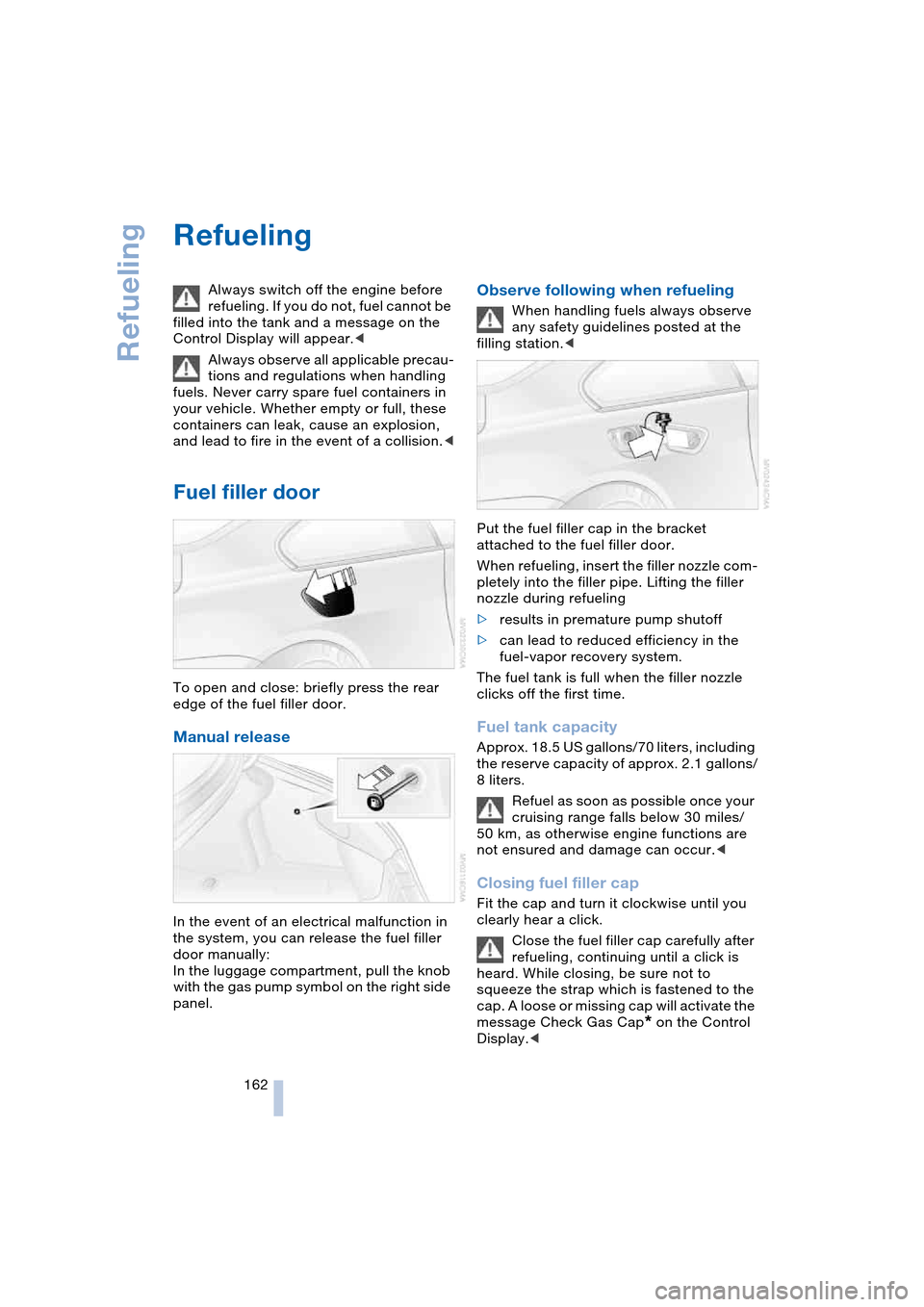
To open and close: briefly press the rear
edge of the fuel filler door.
Manual release
In the event of an electrical malfunction in
the system, you can release the fuel filler
door manually:
In the luggage compartment, pull the knob
with the gas pump symbol on the right side
panel.
Observe following when refueling
When handling fuels always observe
any safety guidelines posted at the
filling station.<
Put the fuel filler cap in the bracket
attached to the fuel filler door.
When refueling, insert the filler nozzle com-
pletely into the filler pipe. Lifting the filler
nozzle during refueling
>results in premature pump shutoff
>can lead to reduced efficiency in the
fuel-vapor recovery system.
The fuel tank is full when the filler nozzle
clicks off the first time.
Fuel tank capacity
Approx. 18.5 US gallons/70 liters, including
the reserve capacity of approx. 2.1 gallons/
8 liters.
Refuel as soon as possible once your
cruising range falls below 30 miles/
50 km, as otherwise engine functions are
not ensured and damage can occur.<
Closing fuel filler cap
Fit the cap and turn it clockwise until you
clearly hear a click.
Close the fuel filler cap carefully after
refueling, continuing until a click is
heard. While closing, be sure not to
squeeze the strap which is fastened to the
cap. A loose or missing cap will activate the
message Check Gas Cap
* on the Control
Display.<
Page 165 of 216
Mobility
163Reference
At a glance
Controls
Driving tips
Communications
Navigation
Entertainment
Warning lamp* lights up.
Fuel filler cap is not properly closed
or is missing. Check whether the
fuel filler cap is properly closed.
Fuel specifications
The engine uses lead-free gasoline only.
Required fuel
Premium Unleaded Gasoline,
Minimum Octane Rating: 91.
Minimum Octane Rating corresponds to
the Anti Knock Index AKI and is deter-
mined according to the so-called (R+M)/
2 method.
Do not use leaded gasoline, as other-
wise the lambda probe and catalytic
converter will be permanently damaged.<
Use high-quality brands
Field experience has indicated significant
differences in fuel quality: volatility, compo-
sition, additives, etc., among gasolines
offered for sale in the United States and
Canada. Fuels containing up to and includ-
ing 10 % ethanol or other oxygenates with
up to 2.8 % oxygen by weight, that is,
15 % MTBE or 3 % methanol plus an equiv-
alent amount of co-solvent, will not void
the applicable warranties with respect to
defects in materials or workmanship.
The use of poor-quality fuels may
result in drivability, starting and stall-
ing problems, especially under certain
environmental conditions such as high
ambient temperature and high altitude.
Should you encounter drivability problems
which you suspect could be related to the
fuel you are using, we recommend that you
respond by switching to a recognized high-
quality brand.
Failure to comply with these recommenda-
tions may also result in unscheduled main-
tenance.<
Page 171 of 216
Mobility
169Reference
At a glance
Controls
Driving tips
Communications
Navigation
Entertainment
Recommended tire sizes and makes
BMW tests certain tire brands for each tire
size, classifies them as road-safe and
approves them. You can find out about
these at specialized dealers or at your
BMW center. Observe any country-specific
regulations, e.g. on making a correspond-
ing entry in the vehicle documents.
The factory-mounted tires have been spe-
cially selected to provide optimized perfor-
mance when installed on your vehicle; if
properly cared for, they will provide a com-
bination of safety and excellent ride com-
fort.
Run-flat tires
In the event of replacement, use run-flat
tires, refer to page 168, as there is no spare
wheel available for flats.
For safety reasons, BMW recom-
mends that you do not have damaged
run-flat tires repaired; they should be
replaced.<
Special characteristics of winter
tires
BMW recommends winter tires for use in
cold winter driving conditions. Although all-
season M+S tires provide better winter
traction than summer tires, they generally
fail to provide the same levels of cold-
weather performance as winter tires.
Run-flat tires
If you switch from summer to winter tires,
or vice versa, use run-flat tires, refer to
page 168, as in the event of a flat tire there
is no spare tire available. Your BMW center
will be glad to advise you.
Observing speed ratings
Never exceed the maximum speed for
which the winter tires are rated.
Unprofessional attempts by laymen to ser-
vice tires can lead to damage and acci-
dents. Have this work performed by skilled
professionals only. The technicians at your
BMW center will be glad to assist you with the required professional knowledge and
specialized equipment.<
Storage
Always store wheels and tires in a cool, dry
place with as little exposure to light as pos-
sible. Always protect tires against all con-
tact with oil, grease and fuels. Do not
exceed the maximum tire inflation pressure
indicated on the side wall of the tire.
Snow chains*
BMW only tests certain snow chains, clas-
sifies them as road-safe and approves
them. Consult your BMW center for more
information. BMW recommends using
these approved, narrow-link snow chains.
These snow chains are approved exclu-
sively for use in pairs on the rear wheels
with the tire size 245/45 R 18.
Observe the manufacturer's instructions
when mounting snow chains.
Do not exceed a vehicle speed of 30 mph/
50 km/h with the chains mounted.
Do not initialize the Runflat Indicator
after mounting snow chains.
When you are driving with snow chains, it
can be beneficial to switch off DSC briefly,
refer to page 77.<
Page 179 of 216
Mobility
177Reference
At a glance
Controls
Driving tips
Communications
Navigation
Entertainment
When the fuel filler cap is not properly
tightened, the OBD system can
detect the vapor leak and the indicator
lamp will light up. If the filler cap is subse-
quently tightened, the indicator lamp
should go out within a few days.<
Page 195 of 216
Reference 193
At a glance
Controls
Driving tips
Communications
Navigation
Entertainment
Mobility
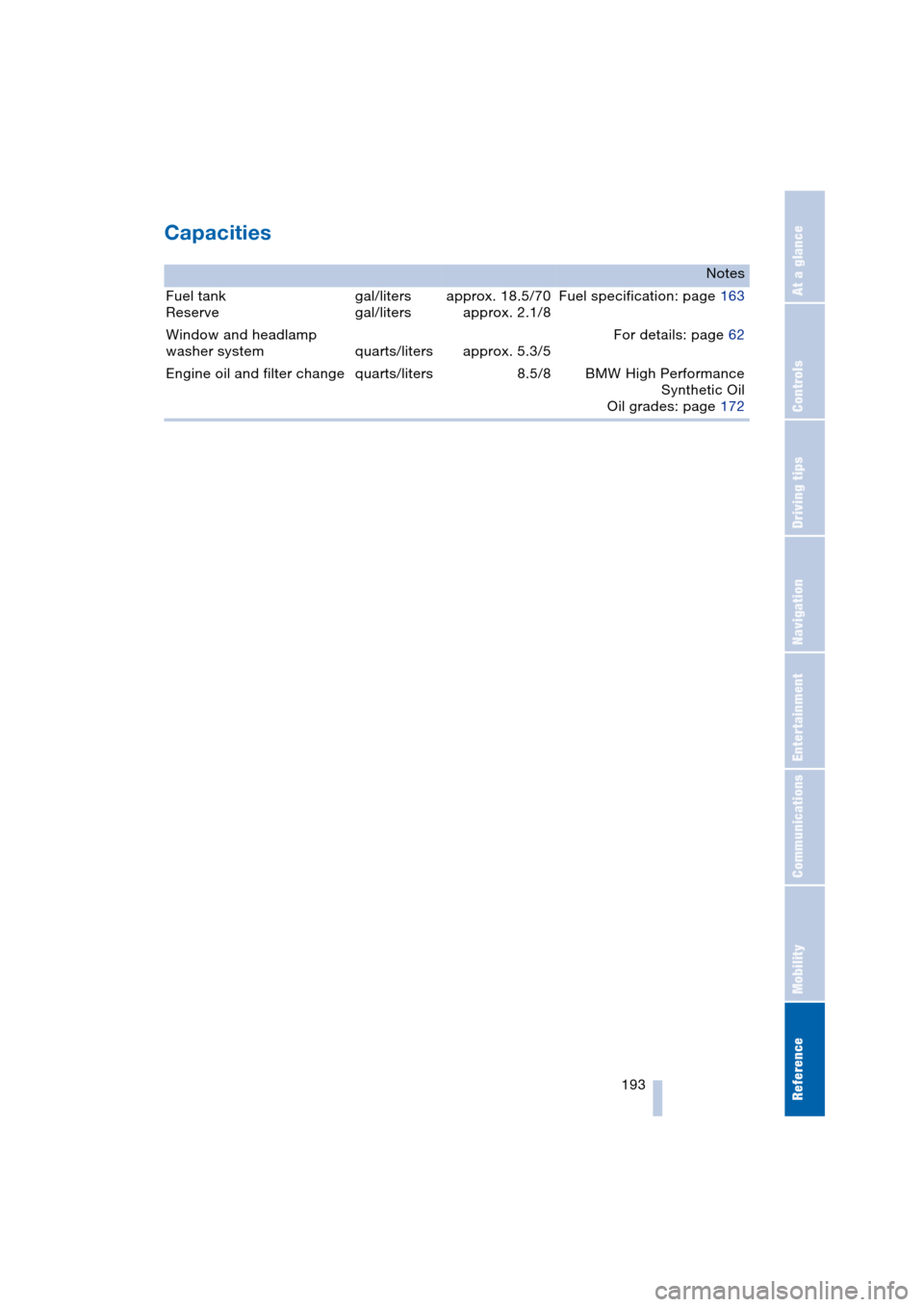
Capacities
Notes
Fuel tank
Reservegal/liters
gal/litersapprox. 18.5/70
approx. 2.1/8Fuel specification: page 163
Window and headlamp
washer system quarts/liters approx. 5.3/5For details: page 62
Engine oil and filter change quarts/liters 8.5/8 BMW High Performance
Synthetic Oil
Oil grades: page 172
Page 199 of 216
197Reference
At a glance
Controls
Driving tips
Communications
Navigation
Entertainment
Mobility
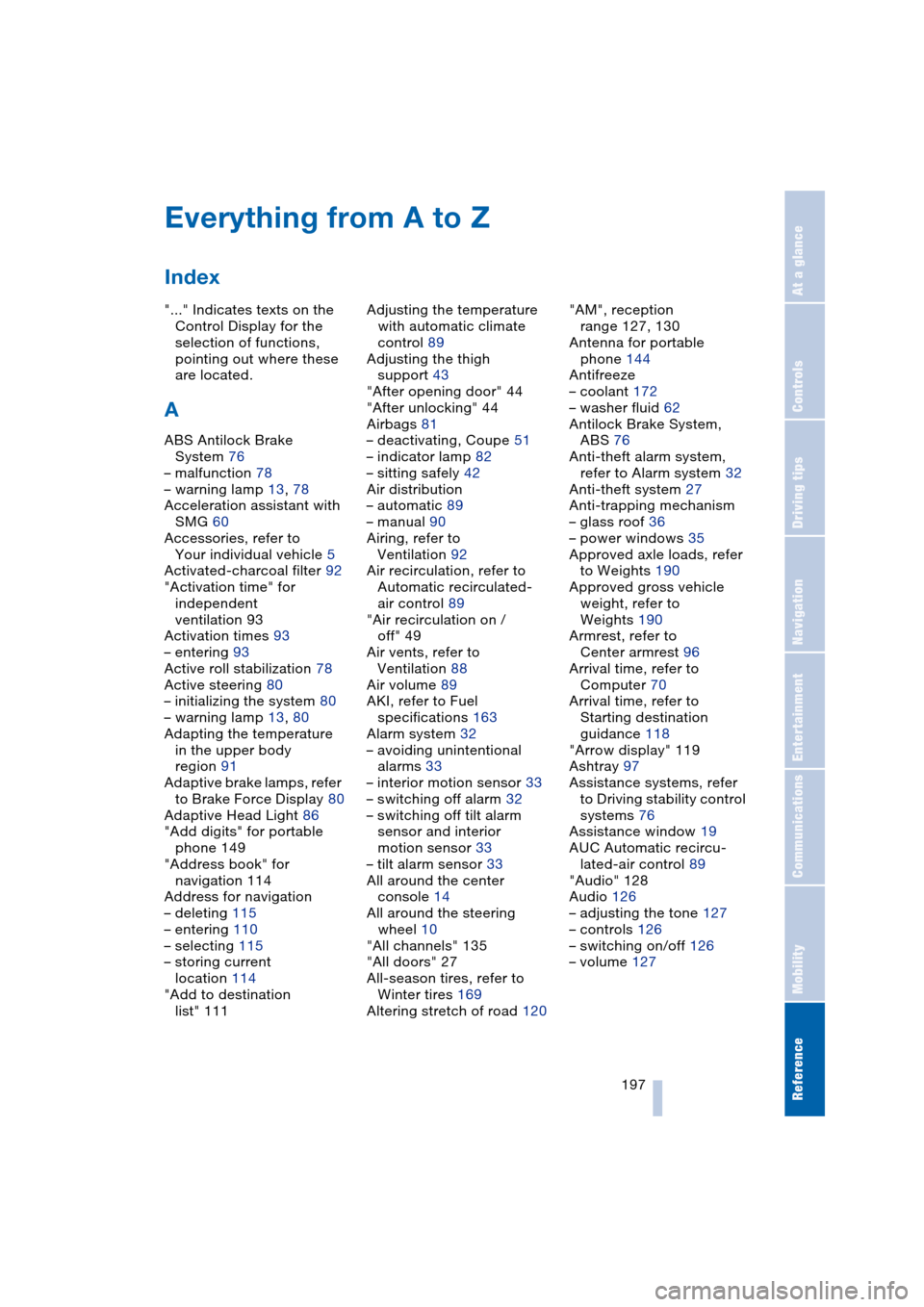
Everything from A to Z
Index
"..." Indicates texts on the
Control Display for the
selection of functions,
pointing out where these
are located.
A
ABS Antilock Brake
System 76
– malfunction 78
– warning lamp 13, 78
Acceleration assistant with
SMG 60
Accessories, refer to
Your individual vehicle 5
Activated-charcoal filter 92
"Activation time" for
independent
ventilation 93
Activation times 93
– entering 93
Active roll stabilization 78
Active steering 80
– initializing the system 80
– warning lamp 13, 80
Adapting the temperature
in the upper body
region 91
Adaptive brake lamps, refer
to Brake Force Display 80
Adaptive Head Light 86
"Add digits" for portable
phone 149
"Address book" for
navigation 114
Address for navigation
– deleting 115
– entering 110
– selecting 115
– storing current
location 114
"Add to destination
list" 111Adjusting the temperature
with automatic climate
control 89
Adjusting the thigh
support 43
"After opening door" 44
"After unlocking" 44
Airbags 81
– deactivating, Coupe 51
– indicator lamp 82
– sitting safely 42
Air distribution
– automatic 89
– manual 90
Airing, refer to
Ventilation 92
Air recirculation, refer to
Automatic recirculated-
air control 89
"Air recirculation on /
off" 49
Air vents, refer to
Ventilation 88
Air volume 89
AKI, refer to Fuel
specifications 163
Alarm system 32
– avoiding unintentional
alarms 33
– interior motion sensor 33
– switching off alarm 32
– switching off tilt alarm
sensor and interior
motion sensor 33
– tilt alarm sensor 33
All around the center
console 14
All around the steering
wheel 10
"All channels" 135
"All doors" 27
All-season tires, refer to
Winter tires 169
Altering stretch of road 120"AM", reception
range 127, 130
Antenna for portable
phone 144
Antifreeze
– coolant 172
– washer fluid 62
Antilock Brake System,
ABS 76
Anti-theft alarm system,
refer to Alarm system 32
Anti-theft system 27
Anti-trapping mechanism
– glass roof 36
– power windows 35
Approved axle loads, refer
to Weights 190
Approved gross vehicle
weight, refer to
Weights 190
Armrest, refer to
Center armrest 96
Arrival time, refer to
Computer 70
Arrival time, refer to
Starting destination
guidance 118
"Arrow display" 119
Ashtray 97
Assistance systems, refer
to Driving stability control
systems 76
Assistance window 19
AUC Automatic recircu-
lated-air control 89
"Audio" 128
Audio 126
– adjusting the tone 127
– controls 126
– switching on/off 126
– volume 127