transmission BMW 645CI COUPE 2004 E63 User Guide
[x] Cancel search | Manufacturer: BMW, Model Year: 2004, Model line: 645CI COUPE, Model: BMW 645CI COUPE 2004 E63Pages: 216, PDF Size: 3.46 MB
Page 105 of 216
Driving tips
103Reference
At a glance
Controls
Communications
Navigation
Entertainment
Mobility
road surface. This phenomenon is referred
to as hydroplaning, and is characterized
by a partial or complete loss of contact
between the tires and the road surface, ulti-
mately undermining your ability to steer
and brake the vehicle.<
The risk of hydroplaning increases as the
tread depth of the tires decreases, also
refer to Tire tread on page 167.
Driving through water
Do not drive through water on the
road if it is deeper than 1 ft/30 cm,
and then only at walking speed at the most.
Otherwise, the vehicle's engine, the electri-
cal systems and the transmission may be
damaged.<
Braking safely
Your BMW is equipped with ABS as stan-
dard. The best way to achieve optimized
braking response from the ABS is to apply
maximum pressure to the brake pedal in
situations where this is required: panic
stops. Since the vehicle maintains steering
responsiveness, you can nevertheless
avoid possible obstacles with a minimum
of steering effort.
Pulsation at the brake pedal combines with
sounds from the hydraulic circuits to indi-
cate to the driver that ABS is in its active
mode.
Do not drive with your foot resting on
the brake pedal. Even light but con-
sistent pedal pressure can lead to high
temperatures, brake wear and possibly
even brake failure.<
Driving in wet conditions
While driving in wet conditions and in
heavy rain, it is a good idea to apply light
pressure to the brake pedal every few
miles. Monitor traffic conditions to ensure
that this maneuver does not endanger
other road users. The heat generated in this
process helps dry the pads and rotors to
ensure that full braking efficiency will then
be available when you need it.
Hills
To prevent overheating and thus
reduced efficiency of the brake sys-
tem, downshift to a gear in which only min-
imal brake applications are needed when
descending long or steep downhill
stretches. Even light but consistent pedal
pressure can lead to high temperatures,
brake wear and possibly even brake fail-
ure.<
You can further enhance the engine's brak-
ing effect by selecting a lower gear in the
automatic transmission's manual mode,
downshifting as far as first gear on
extremely steep stretches, refer to
page 59. This strategy helps you avoid
placing excessive loads on the brake sys-
tem.
Never drive with the clutch pressed
or allow the vehicle to coast with the
transmission in Neutral – or with the engine
switched off – there is no engine braking
when the transmission is in Neutral, and no
power assist for brakes and steering when
the engine is not running.
Never allow floor mats, carpets or any other
objects to protrude into the area around the
accelerator and brake pedals and obstruct
their movement.<
Corrosion on brake rotors
When the vehicle is driven only occasion-
ally, during extended periods when the
vehicle is not used at all, and in operating
conditions where brake applications are
less frequent, there is an increased ten-
dency for corrosion to form on rotors, while
contaminants accumulate on the brake
pads. This occurs because the minimum
pressure which must be exerted by the
pads during brake applications to clean the
rotors is not reached.
Should corrosion form on the brake rotors,
the brakes will tend to respond with a pul-
sating effect that even extended applica-
tion will fail to cure.
Page 106 of 216
Things to remember when driving
104
Mobile communication devices in
vehicle
BMW advises against using mobile
communication devices, e.g. portable
phones, in the inside of the vehicle without
a direct connection to an external antenna.
Otherwise, the vehicle electronics and
mobile communication device can influ-
ence one another. It is not ensured that the
waves emitted during transmission are led
out of the vehicle interior.<
Cargo loading
To avoid loading the tires beyond
their approved carrying capacity,
never overload the vehicle. Overloading
can lead to overheating and increases the
rate at which damage develops inside the
tires. The ultimate result can assume the
form of a sudden air loss.<
Determining loading limit
1.Locate the following statement on your
vehicle's placard
*:
The combined weight of occu-
pants and cargo should never
exceed XXX lbs. or YYY kg, as other-
wise the vehicle may be damaged and
unstable driving conditions may
result.<
2.Determine the combined weight of the
driver and passengers that will be riding
in your vehicle
3.Subtract the combined weight of the
driver and passengers from XXX lbs. or
YYY kg4.The resulting figure equals the available
amount of cargo and luggage load
capacity.
For example, if the XXX amount equals
1400 lbs. and there will be five 150-lbs.
passengers in your vehicle, the amount
of available cargo and luggage load
capacity is 650 lbs.:
1400 lbs. minus 750 lbs. = 650 lbs.
5.Determine the combined weight of lug-
gage and cargo being loaded on the
vehicle. That weight may not safely
exceed the available cargo and luggage
load capacity calculated in step 4
6.If your vehicle will be towing a trailer,
part of the load from your trailer will be
transferred to your vehicle. Consult the
manual for transporting a trailer to
determine how this may reduce the
available cargo and luggage load
capacity of your vehicle.
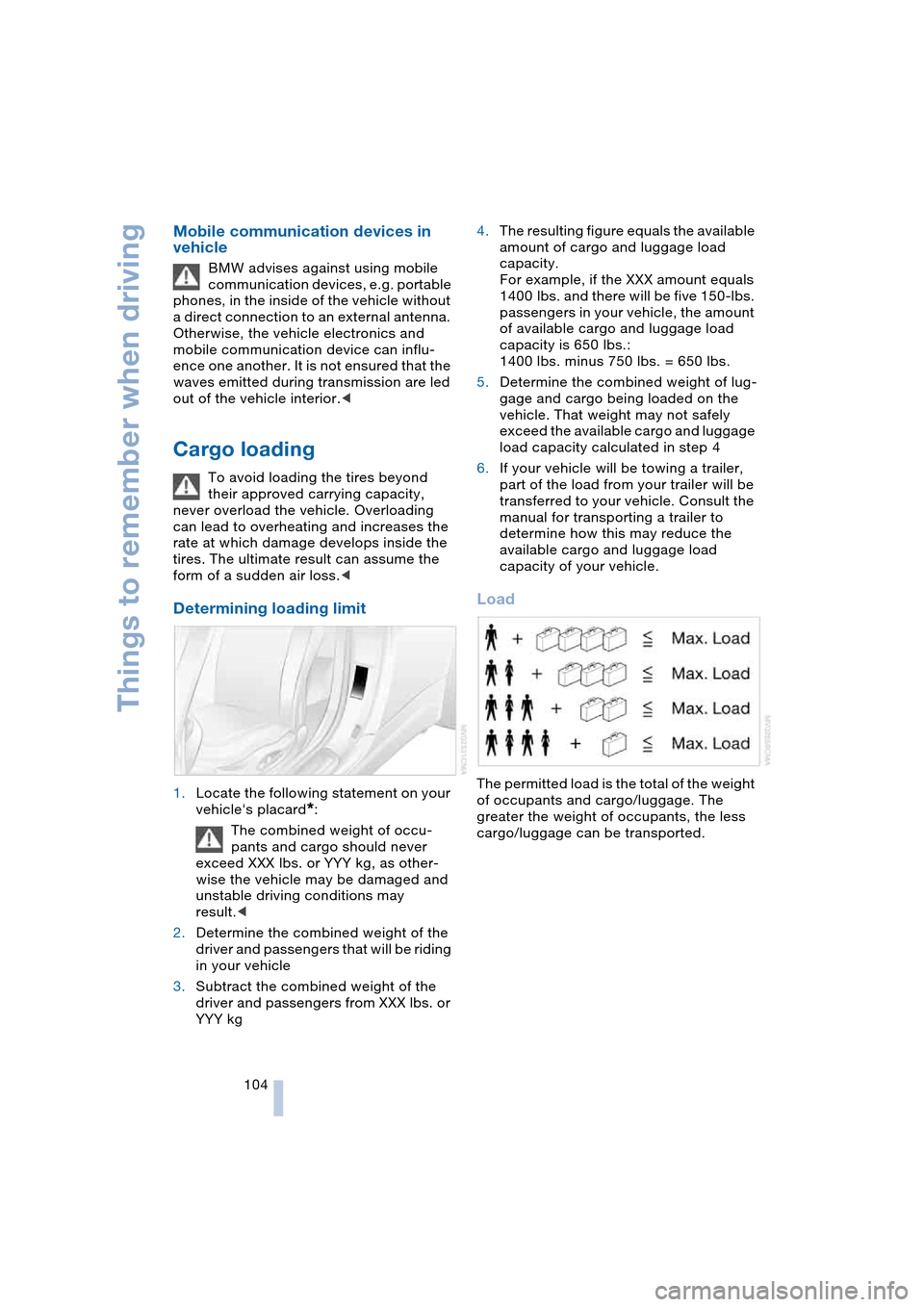
Load
The permitted load is the total of the weight
of occupants and cargo/luggage. The
greater the weight of occupants, the less
cargo/luggage can be transported.
Page 134 of 216
Radio
132 To stop the scan at the desired frequency
or station:
Press button.
Updating stations with best
reception
If you are on a longer journey and leave the
transmission range of the stations originally
set, you can update the list of stations with
the best reception.
Control Center, for principle details, refer to
page 16:
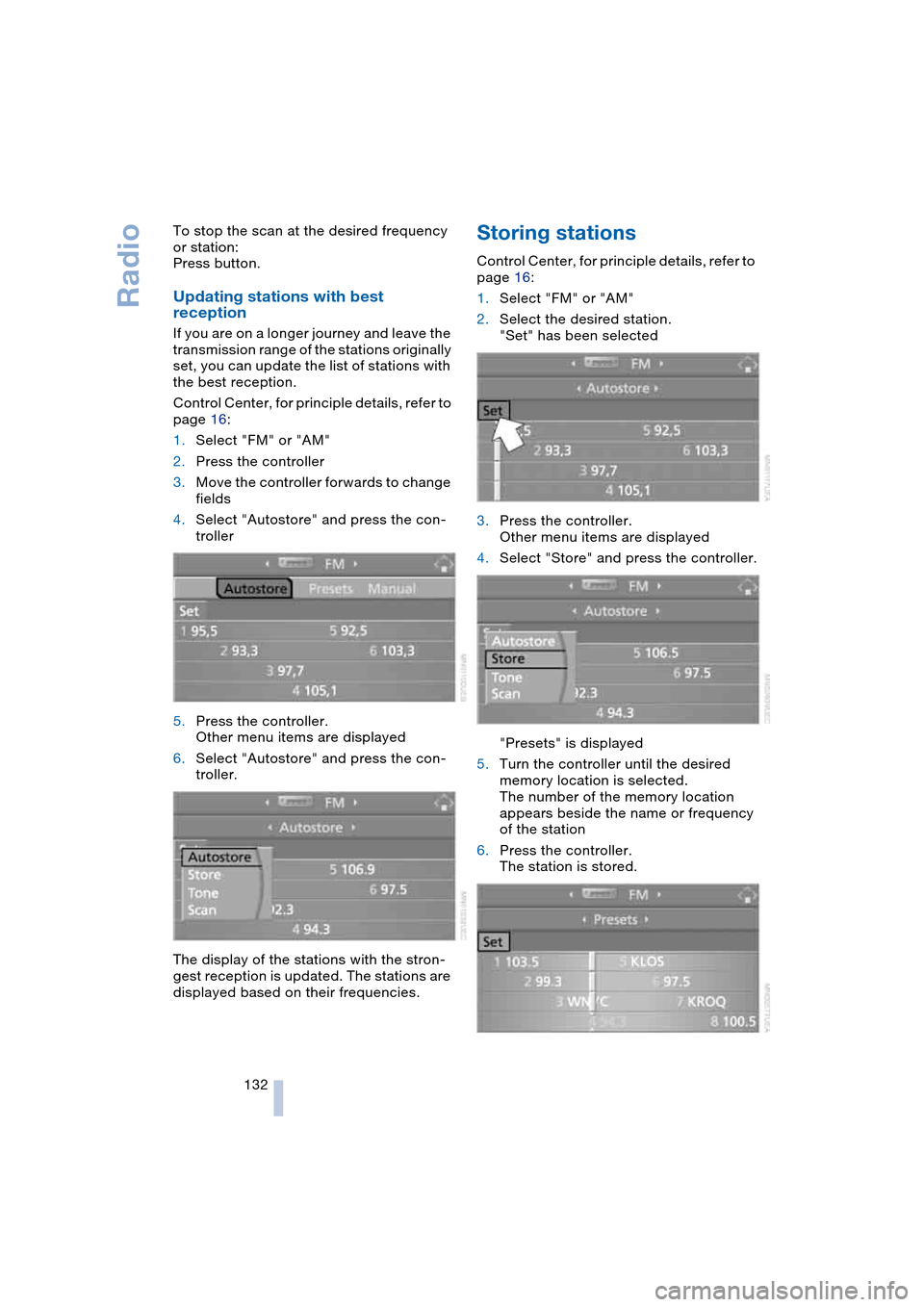
1.Select "FM" or "AM"
2.Press the controller
3.Move the controller forwards to change
fields
4.Select "Autostore" and press the con-
troller
5.Press the controller.
Other menu items are displayed
6.Select "Autostore" and press the con-
troller.
The display of the stations with the stron-
gest reception is updated. The stations are
displayed based on their frequencies.
Storing stations
Control Center, for principle details, refer to
page 16:
1.Select "FM" or "AM"
2.Select the desired station.
"Set" has been selected
3.Press the controller.
Other menu items are displayed
4.Select "Store" and press the controller.
"Presets" is displayed
5.Turn the controller until the desired
memory location is selected.
The number of the memory location
appears beside the name or frequency
of the station
6.Press the controller.
The station is stored.
Page 138 of 216
Radio
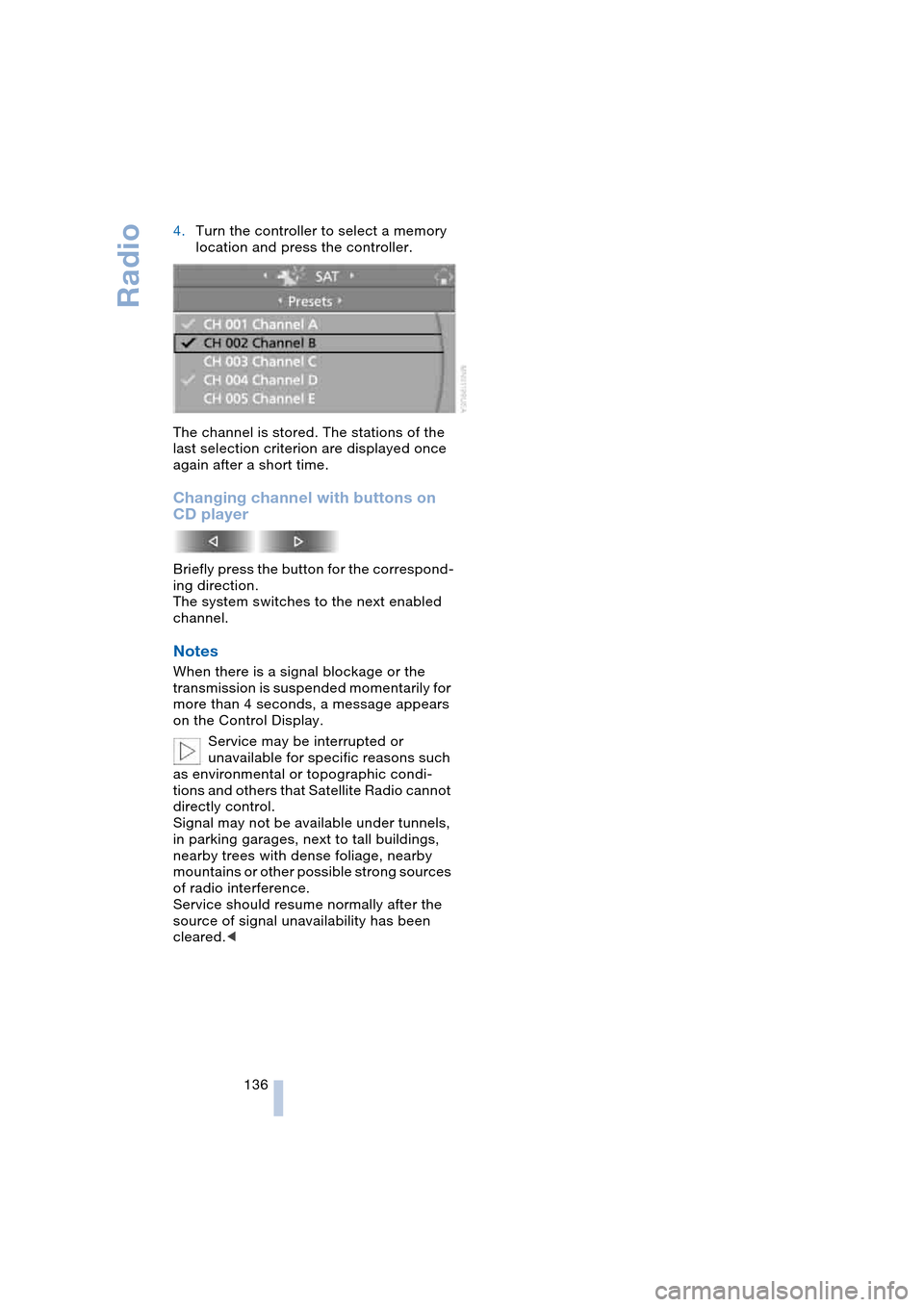
136 4.Turn the controller to select a memory
location and press the controller.
The channel is stored. The stations of the
last selection criterion are displayed once
again after a short time.
Changing channel with buttons on
CD player
Briefly press the button for the correspond-
ing direction.
The system switches to the next enabled
channel.
Notes
When there is a signal blockage or the
transmission is suspended momentarily for
more than 4 seconds, a message appears
on the Control Display.
Service may be interrupted or
unavailable for specific reasons such
as environmental or topographic condi-
tions and others that Satellite Radio cannot
directly control.
Signal may not be available under tunnels,
in parking garages, next to tall buildings,
nearby trees with dense foliage, nearby
mountains or other possible strong sources
of radio interference.
Service should resume normally after the
source of signal unavailability has been
cleared.<
Page 157 of 216
155
Entertainment
Reference
At a glance
Controls
Driving tips Communications
Navigation
Mobility
TeleService , BMW Assist
TeleService
TeleService supports you in communicat-
ing with your BMW center. The installed car
phone can be used to transmit data on the
service status of your vehicle or on legally
mandated inspections directly to your
BMW center. This is the same data that is
also stored for CBS Condition Based Ser-
vice in the ignition key. Your BMW center
can then contact you, and you can make an
appointment that suits you while you are
still on the road. Your advantage is that
your BMW center can prepare in advance
for the required maintenance work. The
functions of TeleService are country-spe-
cific: the data on the service status of your
vehicle or on legally mandated inspections
is transmitted on a country-specific basis
either automatically before they fall due or
simultaneously when you call your BMW
center. Your BMW center will be glad to
provide more detailed information.
BMW Assist
BMW Assist provides you – in addition to
TeleService – with other services, e.g. the
position data of your vehicle can be trans-
ferred to the BMW Assist emergency call
center if an emergency call is started.
Many functions of BMW Assist depend on
the individually agreed contract. The data
transmission, e.g. of CBS Condition Based
Service, is different in individual countries.
The subscriber agreement must be com-
pleted successfully before using the BMW
Assist services.
Requirements
The installed car phone is logged on to a
portable telephone network. This network
must be able to transmit the services.To transmit position data, the vehicle must
be able to determine the current position.
This is displayed on the Control Display. In
order to enable and update TeleService or
BMW Assist, a GPS signal must be present.
Enabling TeleService or BMW Assist
For you to be able to use the services of
TeleService or BMW Assist, these must be
enabled.
Leave the ignition key in position 1 during
the entire operation.
Control Center, for principle details, refer to
page 16:
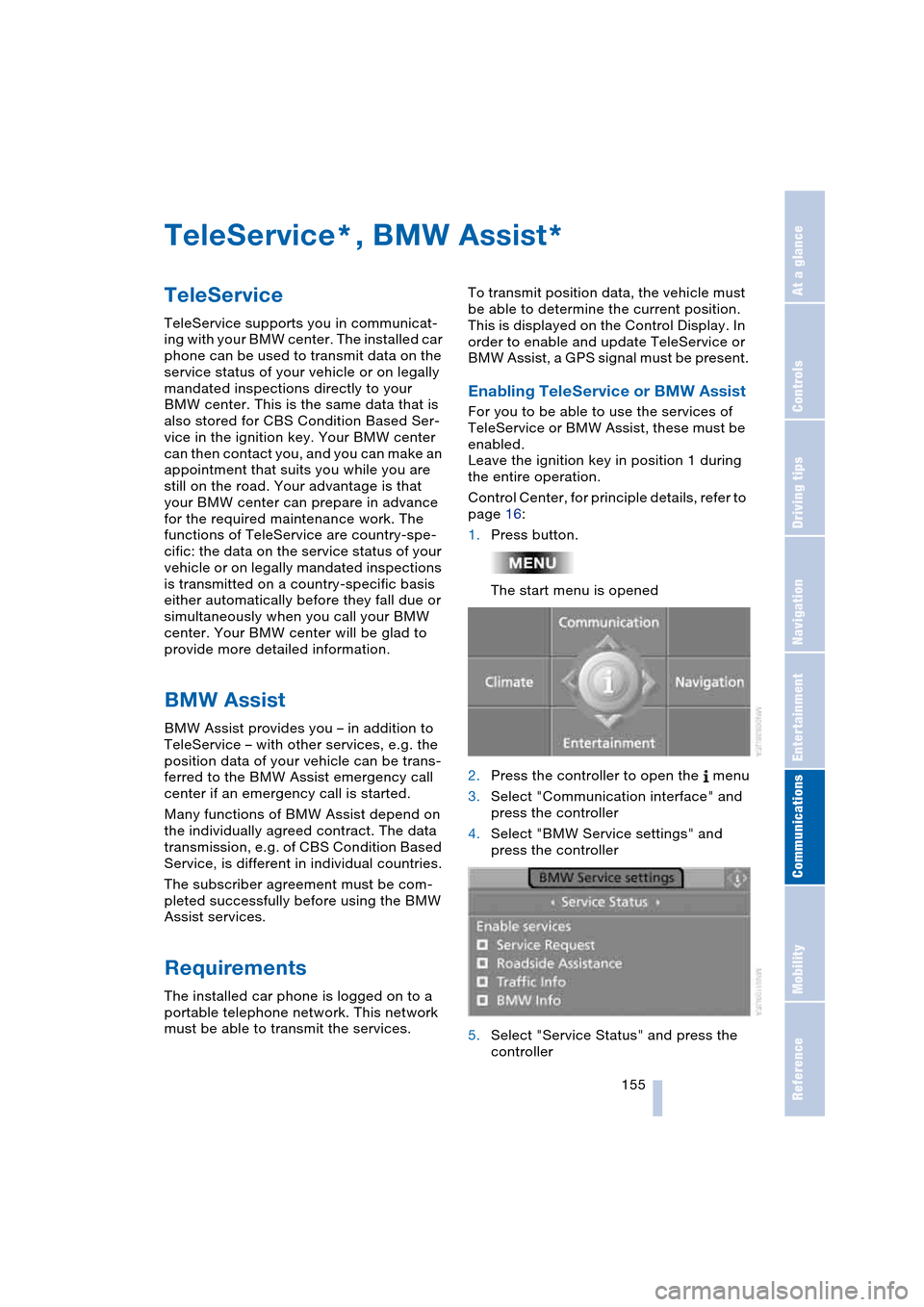
1.Press button.
The start menu is opened
2.Press the controller to open the menu
3.Select "Communication interface" and
press the controller
4.Select "BMW Service settings" and
press the controller
5.Select "Service Status" and press the
controller
**
Page 188 of 216
Giving and receiving assistance
186
Using tow fitting
The threaded tow fitting is stored in the tool
kit mounted on the inside of the luggage
compartment under the floor mat, refer to
page 178, and should always remain in the
vehicle. It can be screwed in at the front or
rear of the BMW.
To avoid damage to the tow fitting
and the vehicle, observe the follow-
ing: only use the tow fitting that comes with
the vehicle and screw it in as far as possi-
ble. Only use the tow fitting to tow on the
roadway. Avoid heavy lateral loading of the
tow fitting, e.g. do not lift the vehicle by the
tow fitting.<
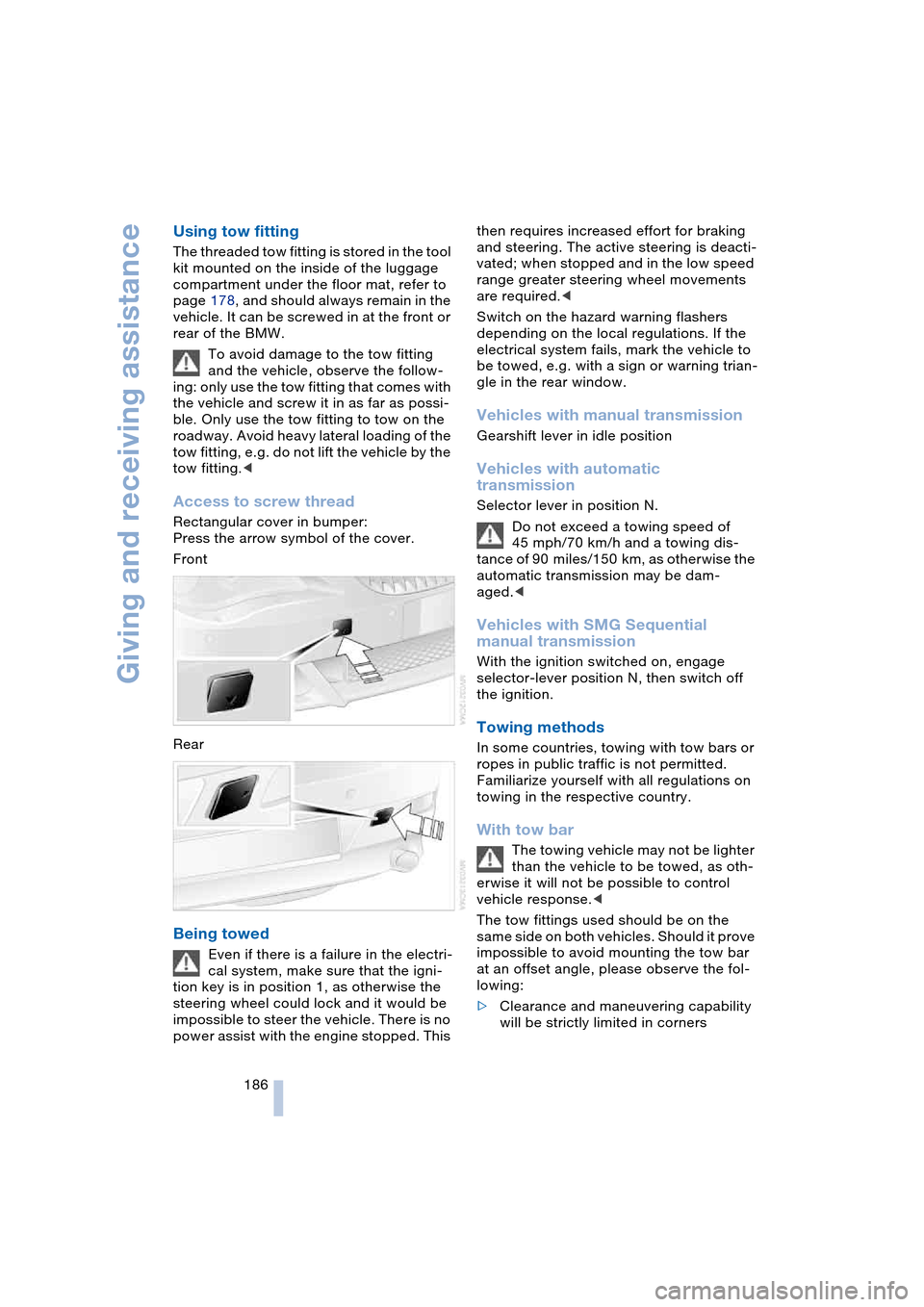
Access to screw thread
Rectangular cover in bumper:
Press the arrow symbol of the cover.
Front
Rear
Being towed
Even if there is a failure in the electri-
cal system, make sure that the igni-
tion key is in position 1, as otherwise the
steering wheel could lock and it would be
impossible to steer the vehicle. There is no
power assist with the engine stopped. This then requires increased effort for braking
and steering. The active steering is deacti-
vated; when stopped and in the low speed
range greater steering wheel movements
are required.<
Switch on the hazard warning flashers
depending on the local regulations. If the
electrical system fails, mark the vehicle to
be towed, e.g. with a sign or warning trian-
gle in the rear window.
Vehicles with manual transmission
Gearshift lever in idle position
Vehicles with automatic
transmission
Selector lever in position N.
Do not exceed a towing speed of
45 mph/70 km/h and a towing dis-
tance of 90 miles/150 km, as otherwise the
automatic transmission may be dam-
aged.<
Vehicles with SMG Sequential
manual transmission
With the ignition switched on, engage
selector-lever position N, then switch off
the ignition.
Towing methods
In some countries, towing with tow bars or
ropes in public traffic is not permitted.
Familiarize yourself with all regulations on
towing in the respective country.
With tow bar
The towing vehicle may not be lighter
than the vehicle to be towed, as oth-
erwise it will not be possible to control
vehicle response.<
The tow fittings used should be on the
same side on both vehicles. Should it prove
impossible to avoid mounting the tow bar
at an offset angle, please observe the fol-
lowing:
>Clearance and maneuvering capability
will be strictly limited in corners
Page 189 of 216
Mobility
187Reference
At a glance
Controls
Driving tips
Communications
Navigation
Entertainment
>When mounted at an angle, the tow bar
will exert lateral forces, tending to push
the vehicle sideways.
Secure the tow bar on the tow fitting
only. Otherwise damage could result
on other vehicle parts.<
With tow-rope
When starting off in the towing vehicle,
make sure that the tow-rope is taut.
To avoid jerking and the associated
stresses on vehicle components
when towing, always use nylon ropes or
nylon straps. Secure the tow rope on the
tow fitting only. Otherwise damage could
result on other vehicle parts.<
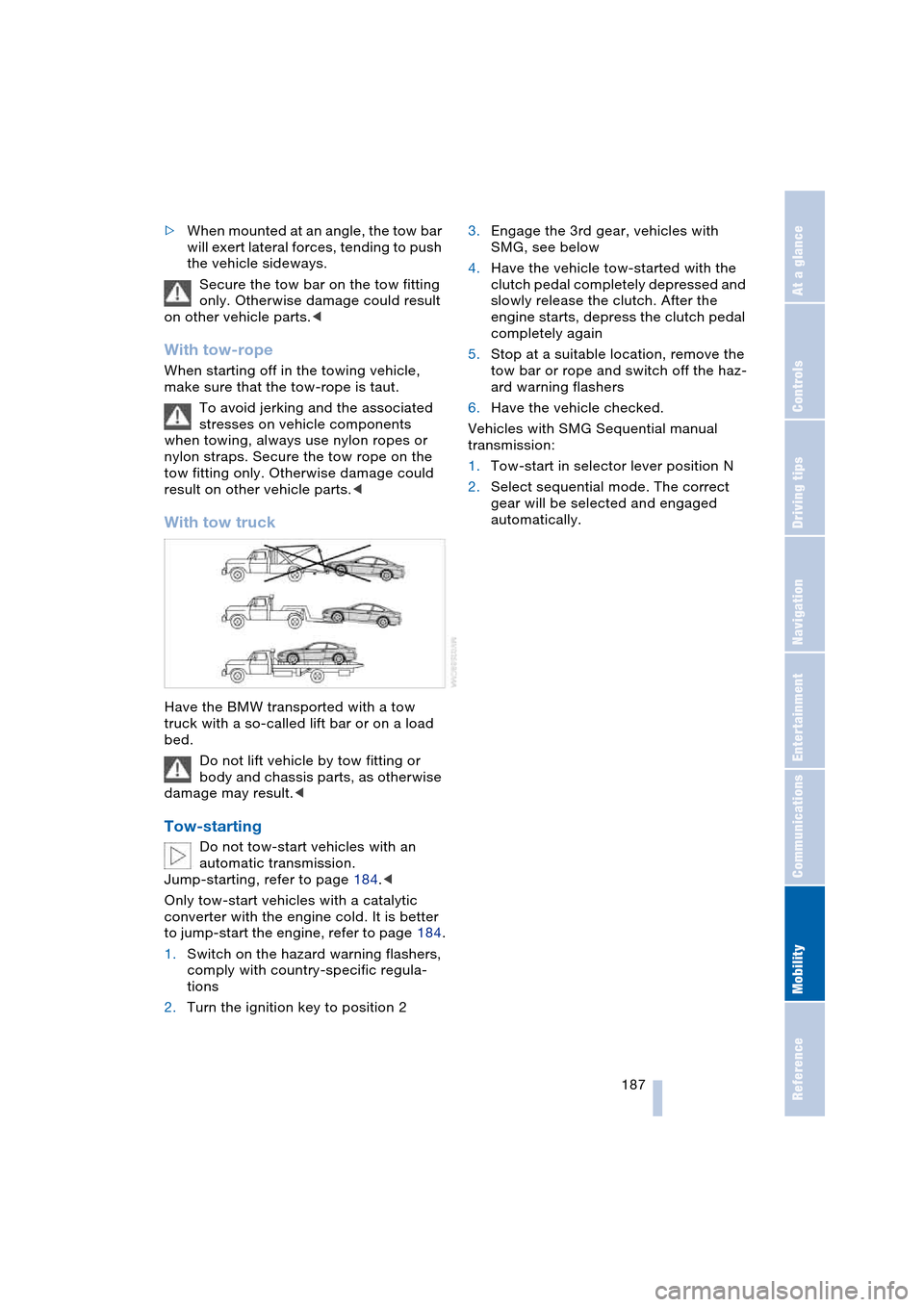
With tow truck
Have the BMW transported with a tow
truck with a so-called lift bar or on a load
bed.
Do not lift vehicle by tow fitting or
body and chassis parts, as otherwise
damage may result.<
Tow-starting
Do not tow-start vehicles with an
automatic transmission.
Jump-starting, refer to page 184.<
Only tow-start vehicles with a catalytic
converter with the engine cold. It is better
to jump-start the engine, refer to page 184.
1.Switch on the hazard warning flashers,
comply with country-specific regula-
tions
2.Turn the ignition key to position 23.Engage the 3rd gear, vehicles with
SMG, see below
4.Have the vehicle tow-started with the
clutch pedal completely depressed and
slowly release the clutch. After the
engine starts, depress the clutch pedal
completely again
5.Stop at a suitable location, remove the
tow bar or rope and switch off the haz-
ard warning flashers
6.Have the vehicle checked.
Vehicles with SMG Sequential manual
transmission:
1.Tow-start in selector lever position N
2.Select sequential mode. The correct
gear will be selected and engaged
automatically.
Page 192 of 216
Technical data
190
Technical data
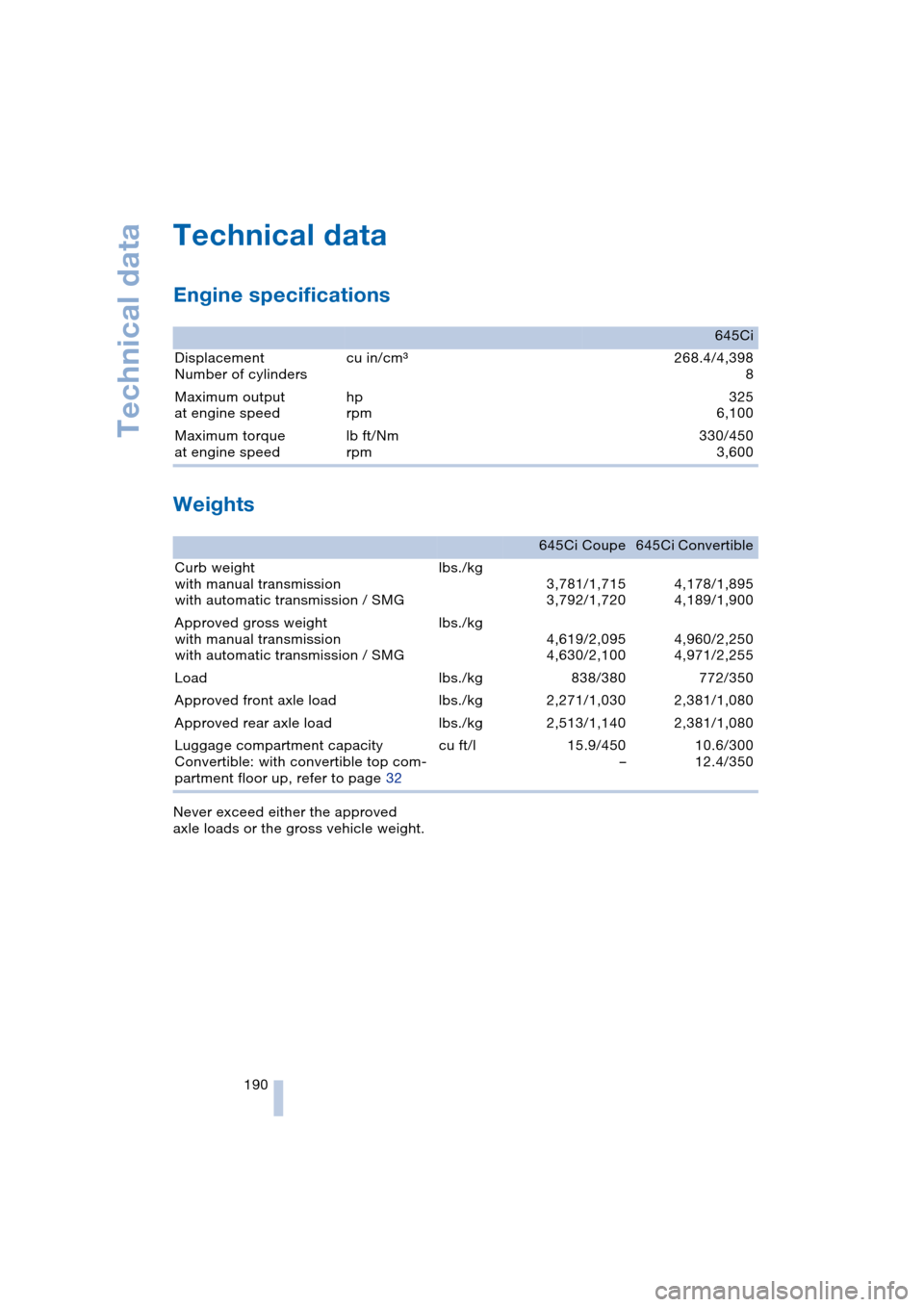
Engine specifications
Weights
Never exceed either the approved
axle loads or the gross vehicle weight.
645Ci
Displacement
Number of cylinderscu in/cmm268.4/4,398
8
Maximum output
at engine speedhp
rpm325
6,100
Maximum torque
at engine speedlb ft/Nm
rpm 330/450
3,600
645Ci Coupe 645Ci Convertible
Curb weight
with manual transmission
with automatic transmission / SMGlbs./kg
3,781/1,715
3,792/1,7204,178/1,895
4,189/1,900
Approved gross weight
with manual transmission
with automatic transmission / SMGlbs./kg
4,619/2,095
4,630/2,1004,960/2,250
4,971/2,255
Load lbs./kg 838/380 772/350
Approved front axle load lbs./kg 2,271/1,030 2,381/1,080
Approved rear axle load lbs./kg 2,513/1,140 2,381/1,080
Luggage compartment capacity
Convertible: with convertible top com-
partment floor up, refer to page 32cu ft/l 15.9/450
–10.6/300
12.4/350
Page 200 of 216
Everything from A to Z
198 Automatic
– air distribution 89
– air volume 89
– cruise control 62
– curb monitor 45
– headlamp control 85
– service notification 156
– station search 131
– steering wheel
adjustment 49
– storing stations 132
Automatic car wash 102
– also refer to the Caring for
your vehicle brochure
Automatic climate
control 88
– automatic air
distribution 89
– convertible program 91
– settings using Control
Center 90
– switching off 90
"Automatic programs" 91
Automatic recirculated-air
control, AUC 89
Automatic transmission
with Steptronic 58
– convenience start 55
– Dynamic Driving
Control 59
– interlock 54
– kickdown 59
– selector lever interlock 58
– shiftlock 58
– starting engine 55
– towing 186
– tow-starting 187
– warning lamp 59
"Automatic ventilation" 92
AUTO program with
automatic climate
control 89
"Autostore" on the
radio 130, 132
"AUTO" with automatic
climate control 91
Average fuel
consumption 69
– setting units 72
Average speed 69"Avoid ferries" for
navigation 116
Avoid freeways for
navigation 116
"Avoid highways" for
navigation 116
Avoiding unintentional
alarms 33
"Avoid tollroads" for
navigation 116
Axle loads, refer to
Weights 190
"A - Z" 148
B
Backrests, refer to
Seats 43
Backup lamps, refer to
Reverse gear 56
– replacing the bulbs 180
Balance, refer to
Adjusting the tone 128
Balance adjustment in
audio mode
– right/left 128
Bass, refer to
Adjusting the tone 127
"Bass", refer to
Adjusting the tone 128
Battery 181
– in the remote control 26
– jump-starting 184
Being towed 186
Belts, refer to
Safety belts 47
Beverage holder, refer to
Cup holders 97
Black ice, refer to
Ice warning 64
Blower, refer to
Air volume 89
BMW Assist 155
– enabling 155
– services offered 156
BMW maintenance
system 174
"BMW Service" 157
"BMW Service
settings" 155Bore, refer to
Engine data 190
Bottle holder, refer to
Cup holders 97
Brake Assistant, refer to
DBC Dynamic Brake
Control 78
Brake fluid 173
– warning lamp 173
Brake Force Display 80
Brake hydraulic
system 173
Brake lamps
– replacing the bulbs 180
– two-stage brake lamps 80
Brake pads 173
– break-in procedure 102
Brake pedal, refer to
Brakes 103
Brake rotors 103
Brakes 103
– ABS Antilock Brake
System 76
– brake fluid 173
– Brake Force Display 80
– brake pads 102, 173
– break-in procedure 102
– handbrake 55
Brake system 102
– brake fluid level 173
– brake pads 173
– brake rotors 103
– break-in procedure 102
– warning lamp 13, 78, 173
Brake wear warning
– brake pads 173
– warning lamp 173
Breakdown assistance 156
Breakdown services, refer
to Roadside
Assistance 184
Breaking-in the clutch 102
Breaking-in the
differential 102
Break-in procedures 102
"Brightness" 72
Buttons on the steering
wheel 11
Page 202 of 216
Everything from A to Z
200 "Communication
interface" 155
Compact disc
– refer to CD changer 137
– refer to CD player 137
Computer 69
– clock, 12/24 hour
mode 73
– displays on Control
Display 69
– hour signal 73
"Concert hall" 128
Condition Based Service,
CBS 174
"Confirmation" 28
Confirmation signals for
locking and unlocking 28
"Confirm unlock code" 147
Connecting a vacuum
cleaner
– refer to Lighter socket 97
– refer to Power socket 97
Consumption display, refer
to Average fuel
consumption 69
"Continue guidance to
dest.?" 119
Control Center 16
– adjusting the
brightness 72
– assistance window 19
– automatic climate
control 90
– changing settings 18, 72
– changing the menu
page 18
– confirming selection or
entry 18
– controller 16
– display, menus 16
– language selection 73
– menu guidance 17
– menu item selection 18
– operating elements 16
– selecting units of
measurement and display
format 72
– setting time and date 73
– start menu 17
– status information 19
– symbols 17Control Display 16
Controller, refer to
Control Center 16
Controls, refer to
Cockpit 10
Convenience operation
– convertible top 27, 29
– glass roof 27, 29
– windows 27, 29
Convenience start, refer to
Starting engine 54, 55
Convertible program for
automatic climate
control 91
Convertible top 37
– care, refer to the Caring
for your vehicle brochure
– convenience operation 29
– emergency closing 39
– manual closing in the
event of an electrical
malfunction 39
– opening and closing 38
Coolant 172
– level 172
Cooling, maximum 89
Cornering Brake Control,
CBC 76
Country of destination for
navigation 110
Courtesy lamps 87
Cruise control 62
Cruising range 69
Cup holders 97
Curb weight, refer to
Weights 190
"Current position" 109
Current position
– displaying 109
– entering 114
– storing 114
"Customer Relations" 157
Cylinders, refer to
Engine data 190
D
Dashboard, refer to
Cockpit 10
Data 190
– capacities 193
– dimensions 191
– engine 190
– weights 190
"Date" 74
Date 64
– setting 74
"Date format" 74
Daytime driving lamps 85
DBC Dynamic Brake
Control 78
Deactivating front
passenger airbag,
Coupe 51
Decommissioning the
vehicle, refer to the
Caring for your vehicle
brochure
Defect
– convertible top 39
– door lock 29
– fuel filler door 162
– glass roof 36
– luggage compartment
lid 30, 31
– SMG Sequential manual
transmission 58
Defrosting windows 89
Defrosting windows and
removing
condensation 89
Defrosting windshield, refer
to Defrosting windows 89
Defrost position, refer to
Defrosting windows 89
"Delete address book" for
navigation 116
"Delete address" for
navigation 115
"Delete all numbers" for
portable phone 150
"Delete data" for
navigation 116
"Delete" for portable
phone 149