seats BMW 645CI COUPE 2004 E63 Owner's Manual
[x] Cancel search | Manufacturer: BMW, Model Year: 2004, Model line: 645CI COUPE, Model: BMW 645CI COUPE 2004 E63Pages: 216, PDF Size: 3.46 MB
Page 17 of 216
At a glance
15Reference
Controls
Driving tips
Communications
Navigation
Entertainment
Mobility
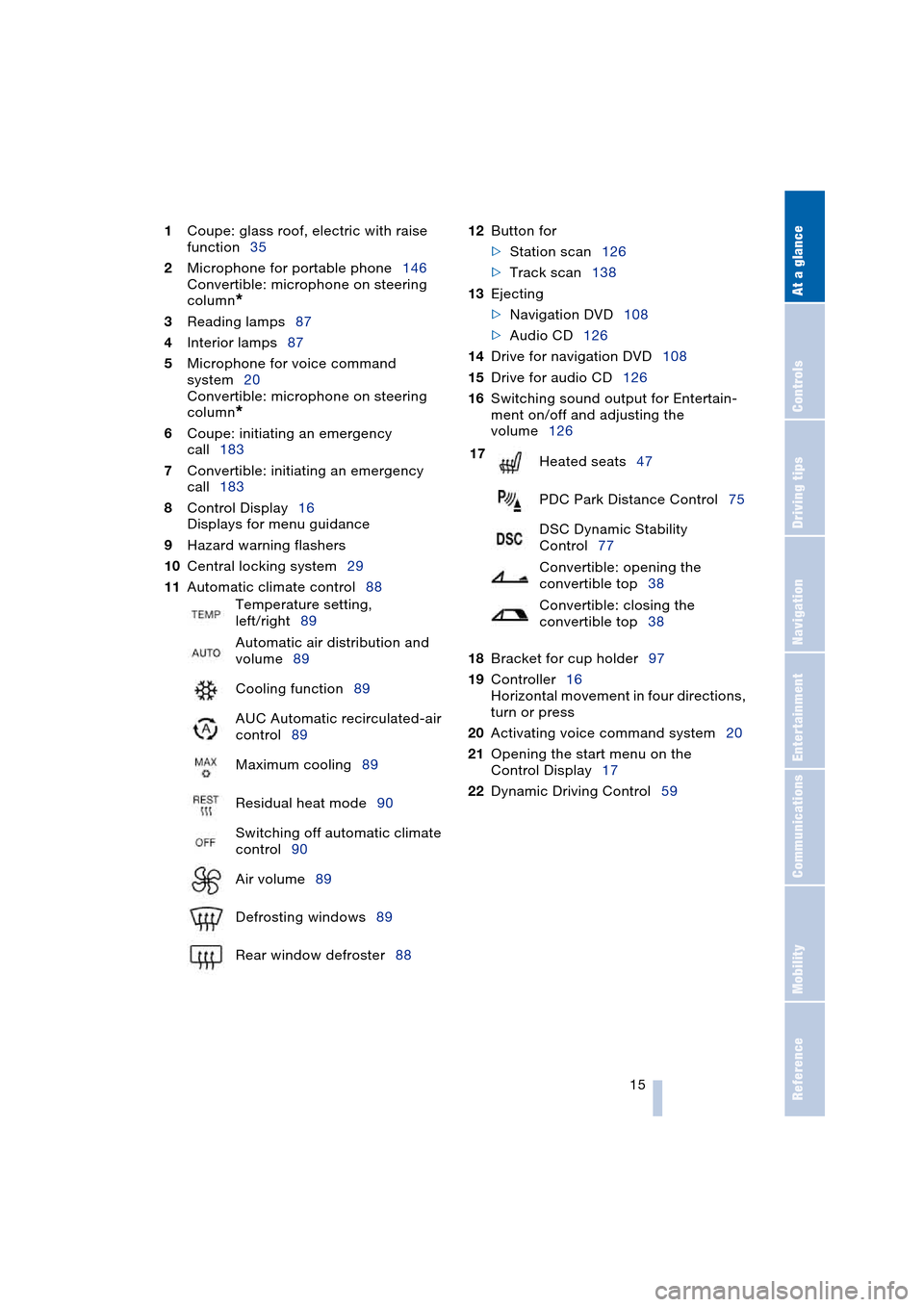
1Coupe: glass roof, electric with raise
function35
2Microphone for portable phone146
Convertible: microphone on steering
column
*
3Reading lamps87
4Interior lamps87
5Microphone for voice command
system20
Convertible: microphone on steering
column
*
6Coupe: initiating an emergency
call183
7Convertible: initiating an emergency
call183
8Control Display16
Displays for menu guidance
9Hazard warning flashers
10Central locking system29
11Automatic climate control8812Button for
>Station scan126
>Track scan138
13Ejecting
>Navigation DVD108
>Audio CD126
14Drive for navigation DVD108
15Drive for audio CD126
16Switching sound output for Entertain-
ment on/off and adjusting the
volume126
18Bracket for cup holder97
19Controller16
Horizontal movement in four directions,
turn or press
20Activating voice command system20
21Opening the start menu on the
Control Display17
22Dynamic Driving Control59 Temperature setting,
left/right89
Automatic air distribution and
volume89
Cooling function89
AUC Automatic recirculated-air
control89
Maximum cooling89
Residual heat mode90
Switching off automatic climate
control90
Air volume89
Defrosting windows89
Rear window defroster88
17
Heated seats47
PDC Park Distance Control75
DSC Dynamic Stability
Control77
Convertible: opening the
convertible top38
Convertible: closing the
convertible top38
Page 44 of 216
Adjustments
42
Adjustments
Sitting safely
The ideal sitting position can make a vital
contribution to relaxed, fatigue-free driving.
The sitting position also plays an important
role together with the safety belts and air-
bags in providing occupants with maximum
levels of passive safety in an accident. To
ensure that the safety systems operate with
optimal efficiency, we strongly urge you to
observe the instructions contained in the
following section.
For additional information on transporting
children safely, refer to page 51.
Sitting safely with airbags
Always maintain an adequate dis-
tance between yourself and the air-
bags. Always hold the steering wheel by
its rim with hands at the 9 o'clock and
3 o'clock positions, to minimize the risk of
injuries to your hands and arms in the event
of airbag deployment.
No one and nothing is to come between the
airbags and the seat occupant.
Do not use the cover of the front airbag on
the front passenger side as a storage area.
Make sure that the front passenger is sit-
ting correctly and does not rest feet or legs
on the instrument panel, otherwise leg inju-
ries can occur if the knee and front airbags
are triggered.
Never let an occupant's head rest near or
on a side airbag because the inflating air-
bag could cause a serious or fatal injury.<
Even if you adhere to all the instructions
injuries resulting from contact with airbags
cannot be fully excluded, depending on the
circumstances. The ignition and inflation
noise may provoke a mild – usually tempo-
rary – hearing loss in extremely sensitive
individuals.
For airbag locations and additional infor-
mation on airbags, refer to page 81.
Sitting safely with safety belts
Fasten your safety belt before starting any
trip. Airbags complement the safety belt as
an additional safety device, but they do not
represent a substitute.
Your vehicle has four seats that are all
equipped with a safety belt.
At all times, occupants should sit
upright and be properly restrained:
infants and small children in appropriate
child-restraint systems; larger children and
adults using the safety belts.
Never allow more than one person to wear
a single safety belt. Never allow infants or
small children to ride in a passenger's lap.
Expectant mothers should always wear
their safety belts, taking care to position
the lap belt against the lower hips, where it
will not exert pressure against the abdomi-
nal area.
Do not route the belt across your neck, or
run it across sharp edges. Be sure that the
belt does not become caught or jammed.
Avoid twisting the belt while routing it firmly
across the hips and shoulder. Do not allow
the belt to rest against hard or fragile
objects. Otherwise, in the event of a frontal
impact, a loose lap belt could slide over
your hips, leading to abdominal injury.
Avoid wearing clothing that prevents the
belt from fitting properly and pull the lap
belt periodically to readjust the tension
across your shoulder in order to avoid a
reduction in the retention effect of the
safety belt.<
For instructions on operating safety belts,
refer to page 47.
Page 45 of 216
Controls
43Reference
At a glance
Driving tips
Communications
Navigation
Entertainment
Mobility
Seats
Note before adjusting
Never attempt to adjust your seat
while operating the vehicle. The seat
could respond with unexpected move-
ment, and the ensuing loss of vehicle con-
trol could lead to an accident.
On the front passenger side as well, do not
tilt the backrest too far toward the rear
while driving. Failure to observe this pre-
caution can prevent the belt from providing
effective protection against injury, as the
passenger could slide under the belt in an
accident.
Make sure that the footwell behind the
driver's and front passenger's seat is empty
and unobstructed. If you fail to do so, any
persons or objects behind the seat could
be injured or damaged by a rearward
movement of the seat.<
Also observe the instructions regarding
damage to the safety belt on page 47.
Convertible: with the wind deflector
fitted, do not incline the front seat
backrests too far backwards if the seat is to
be moved back to the end position, as oth-
erwise the wind deflector will be dam-
aged.<
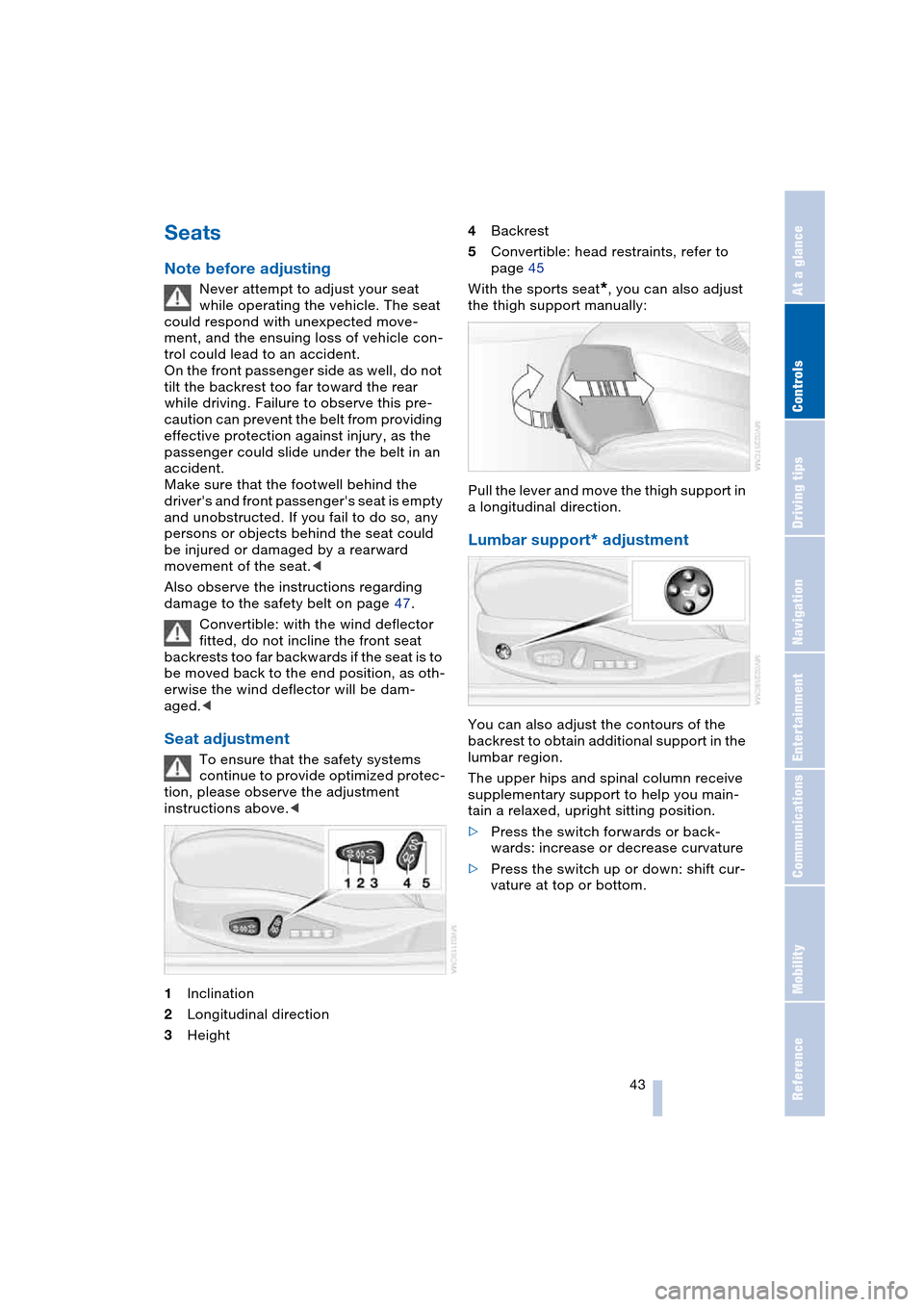
Seat adjustment
To ensure that the safety systems
continue to provide optimized protec-
tion, please observe the adjustment
instructions above.<
1Inclination
2Longitudinal direction
3Height4Backrest
5Convertible: head restraints, refer to
page 45
With the sports seat
*, you can also adjust
the thigh support manually:
Pull the lever and move the thigh support in
a longitudinal direction.
Lumbar support* adjustment
You can also adjust the contours of the
backrest to obtain additional support in the
lumbar region.
The upper hips and spinal column receive
supplementary support to help you main-
tain a relaxed, upright sitting position.
>Press the switch forwards or back-
wards: increase or decrease curvature
>Press the switch up or down: shift cur-
vature at top or bottom.
Page 49 of 216
Controls
47Reference
At a glance
Driving tips
Communications
Navigation
Entertainment
Mobility
Safety belts
Fasten your safety belt before starting any
trip. Airbags complement the safety belt as
an additional safety device, but they do not
represent a substitute.
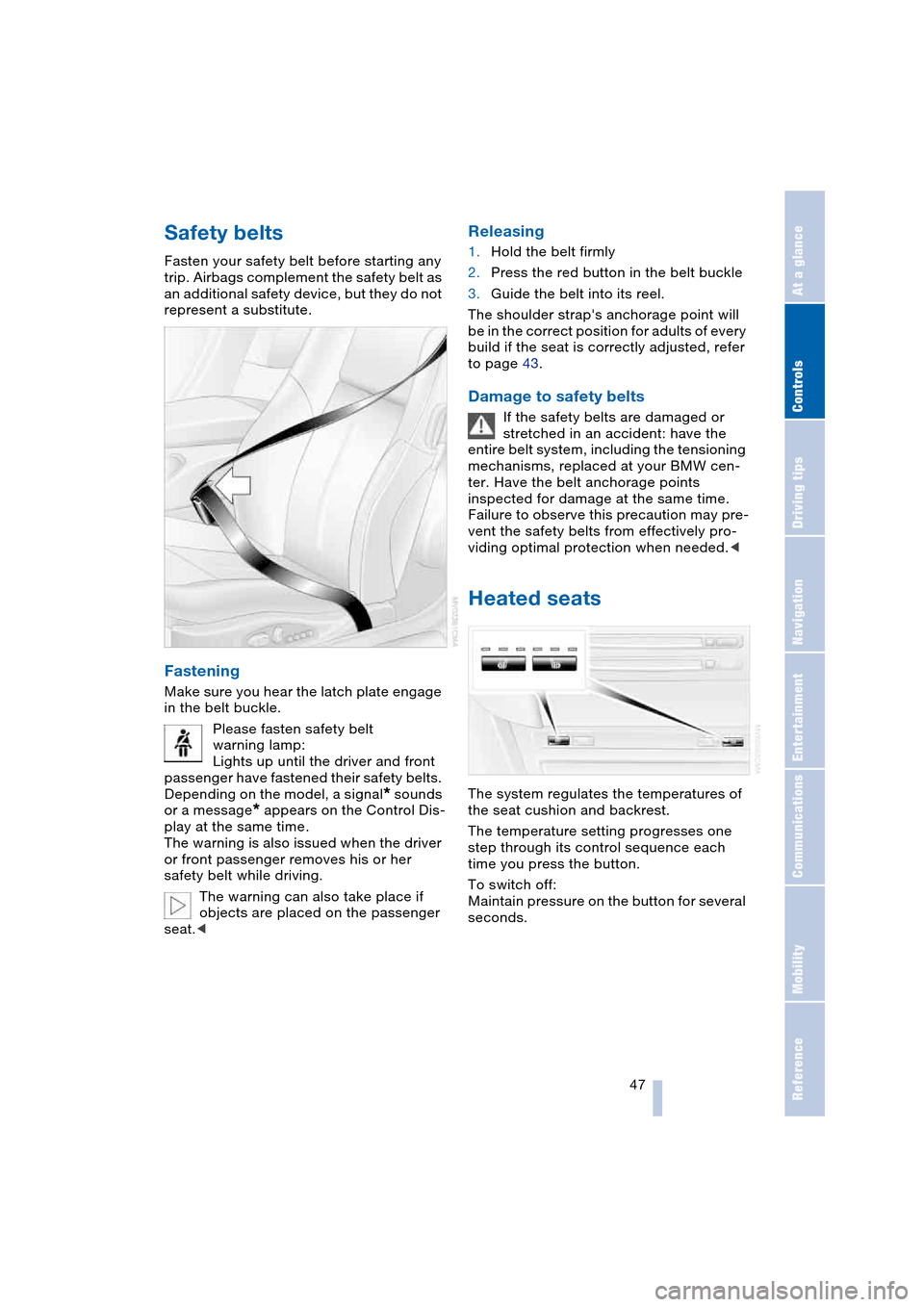
Fastening
Make sure you hear the latch plate engage
in the belt buckle.
Please fasten safety belt
warning lamp:
Lights up until the driver and front
passenger have fastened their safety belts.
Depending on the model, a signal
* sounds
or a message
* appears on the Control Dis-
play at the same time.
The warning is also issued when the driver
or front passenger removes his or her
safety belt while driving.
The warning can also take place if
objects are placed on the passenger
seat.<
Releasing
1.Hold the belt firmly
2.Press the red button in the belt buckle
3.Guide the belt into its reel.
The shoulder strap's anchorage point will
be in the correct position for adults of every
build if the seat is correctly adjusted, refer
to page 43.
Damage to safety belts
If the safety belts are damaged or
stretched in an accident: have the
entire belt system, including the tensioning
mechanisms, replaced at your BMW cen-
ter. Have the belt anchorage points
inspected for damage at the same time.
Failure to observe this precaution may pre-
vent the safety belts from effectively pro-
viding optimal protection when needed.<
Heated seats
The system regulates the temperatures of
the seat cushion and backrest.
The temperature setting progresses one
step through its control sequence each
time you press the button.
To switch off:
Maintain pressure on the button for several
seconds.
Page 55 of 216
Controls
53Reference
At a glance
Driving tips
Communications
Navigation
Entertainment
Mobility
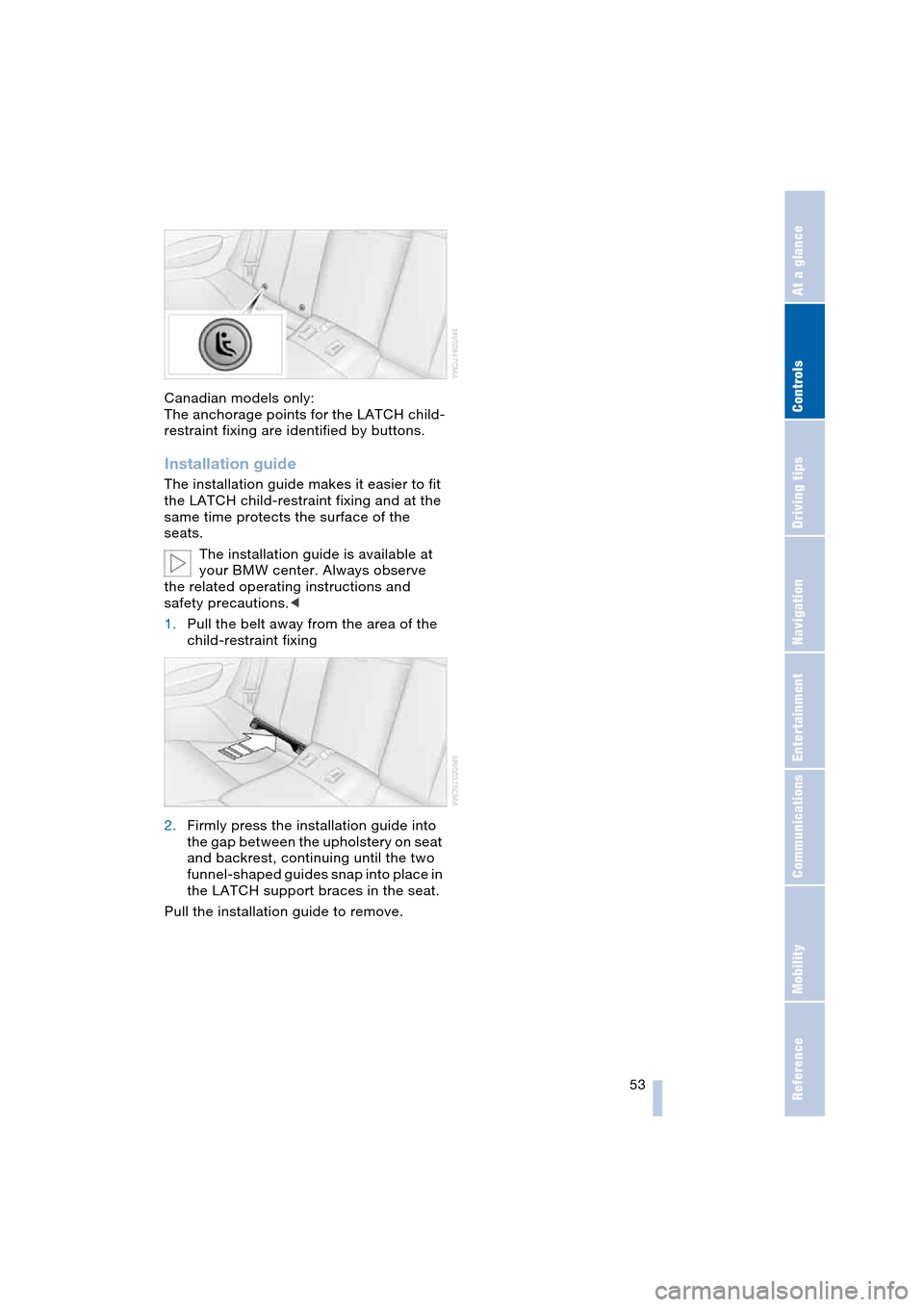
Canadian models only:
The anchorage points for the LATCH child-
restraint fixing are identified by buttons.
Installation guide
The installation guide makes it easier to fit
the LATCH child-restraint fixing and at the
same time protects the surface of the
seats.
The installation guide is available at
your BMW center. Always observe
the related operating instructions and
safety precautions.<
1.Pull the belt away from the area of the
child-restraint fixing
2.Firmly press the installation guide into
the gap between the upholstery on seat
and backrest, continuing until the two
funnel-shaped guides snap into place in
the LATCH support braces in the seat.
Pull the installation guide to remove.
Page 98 of 216
Practical interior accessories
96 Be sure that the flashlight is switched
off when it is inserted into its holder.
Failure to comply with this precaution
could lead to overcharging and damage.<
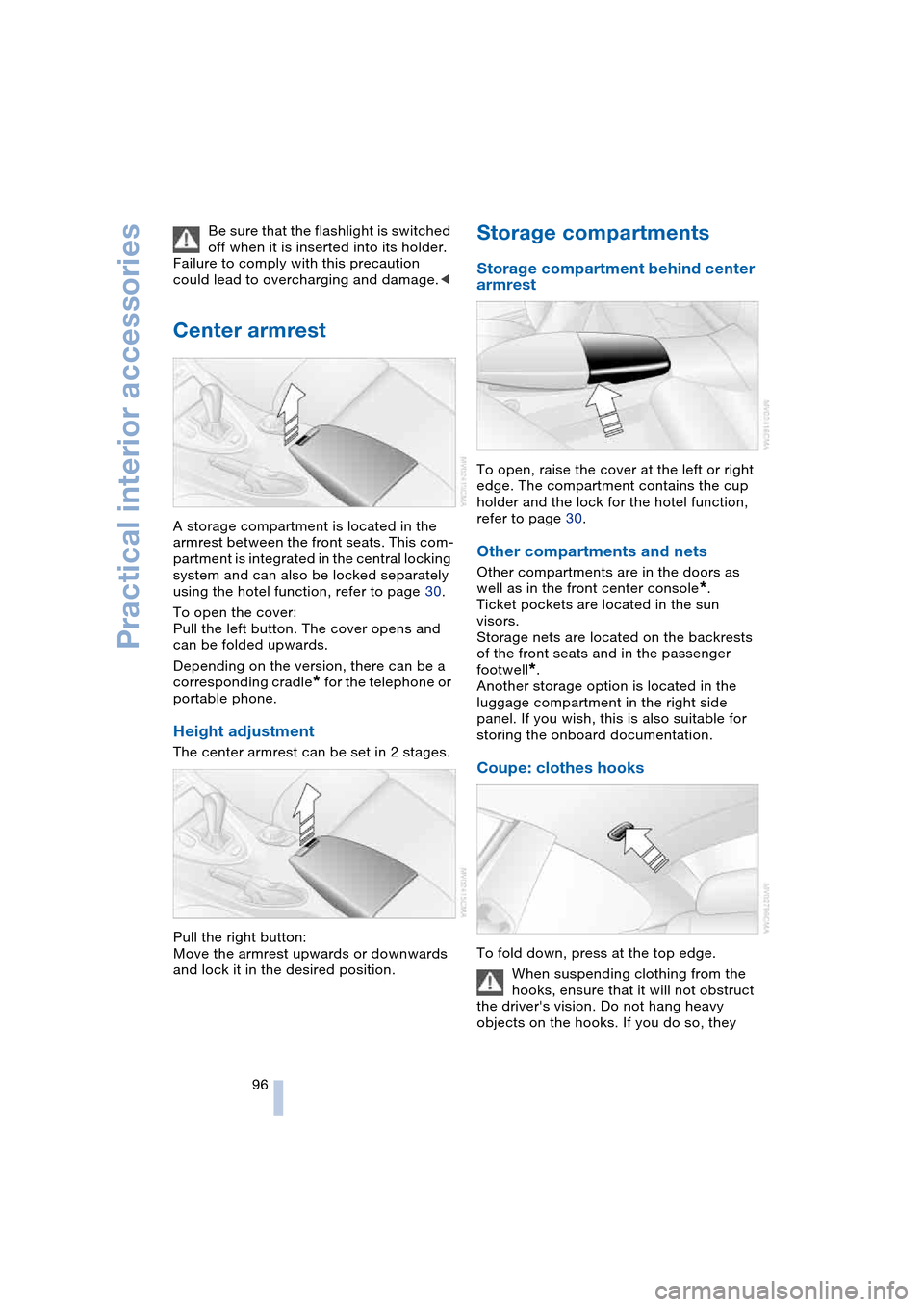
Center armrest
A storage compartment is located in the
armrest between the front seats. This com-
partment is integrated in the central locking
system and can also be locked separately
using the hotel function, refer to page 30.
To open the cover:
Pull the left button. The cover opens and
can be folded upwards.
Depending on the version, there can be a
corresponding cradle
* for the telephone or
portable phone.
Height adjustment
The center armrest can be set in 2 stages.
Pull the right button:
Move the armrest upwards or downwards
and lock it in the desired position.
Storage compartments
Storage compartment behind center
armrest
To open, raise the cover at the left or right
edge. The compartment contains the cup
holder and the lock for the hotel function,
refer to page 30.
Other compartments and nets
Other compartments are in the doors as
well as in the front center console
*.
Ticket pockets are located in the sun
visors.
Storage nets are located on the backrests
of the front seats and in the passenger
footwell
*.
Another storage option is located in the
luggage compartment in the right side
panel. If you wish, this is also suitable for
storing the onboard documentation.
Coupe: clothes hooks
To fold down, press at the top edge.
When suspending clothing from the
hooks, ensure that it will not obstruct
the driver's vision. Do not hang heavy
objects on the hooks. If you do so, they
Page 100 of 216
Practical interior accessories
98
Socket
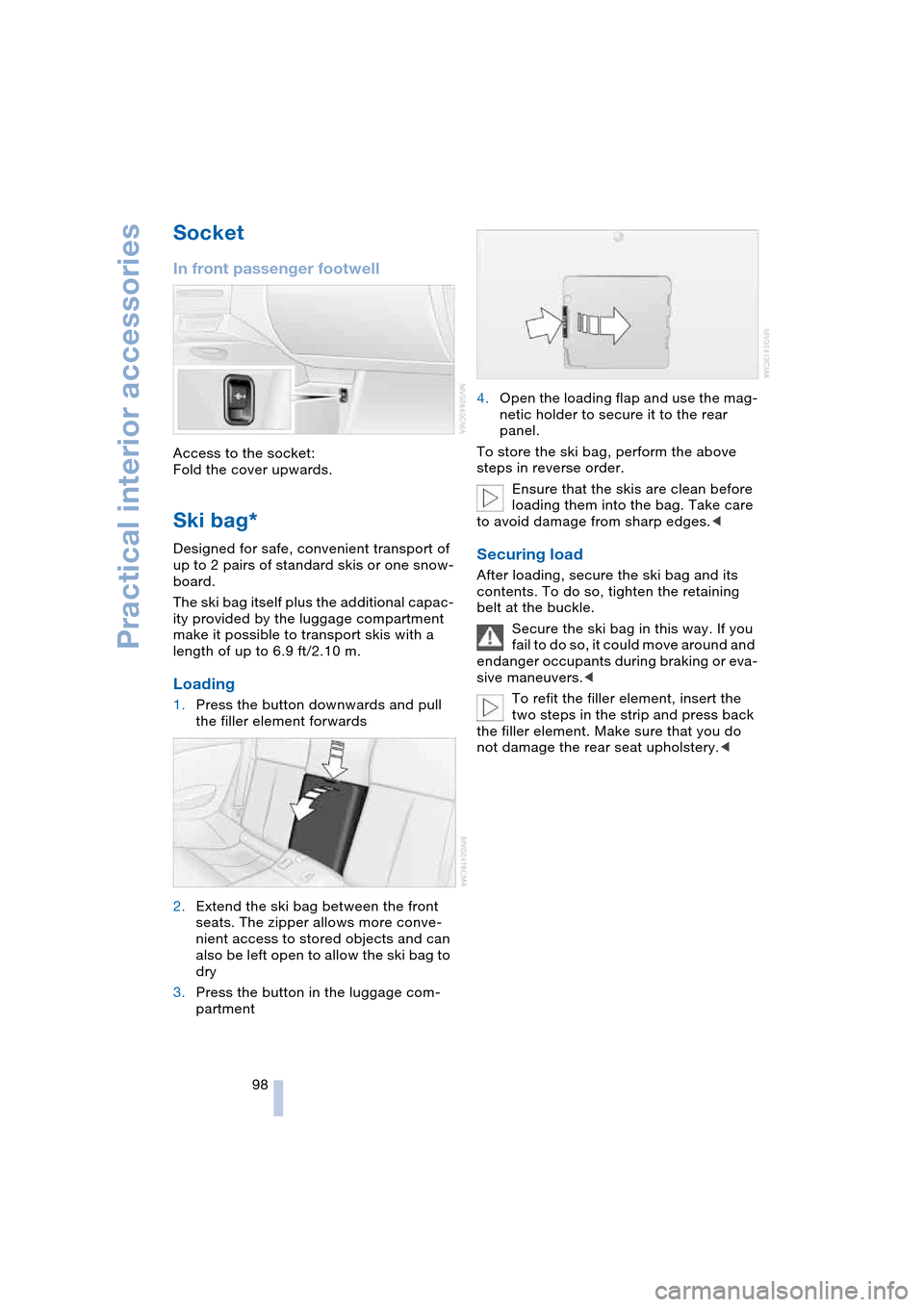
In front passenger footwell
Access to the socket:
Fold the cover upwards.
Ski bag*
Designed for safe, convenient transport of
up to 2 pairs of standard skis or one snow-
board.
The ski bag itself plus the additional capac-
ity provided by the luggage compartment
make it possible to transport skis with a
length of up to 6.9 ft/2.10 m.
Loading
1.Press the button downwards and pull
the filler element forwards
2.Extend the ski bag between the front
seats. The zipper allows more conve-
nient access to stored objects and can
also be left open to allow the ski bag to
dry
3.Press the button in the luggage com-
partment4.Open the loading flap and use the mag-
netic holder to secure it to the rear
panel.
To store the ski bag, perform the above
steps in reverse order.
Ensure that the skis are clean before
loading them into the bag. Take care
to avoid damage from sharp edges.<
Securing load
After loading, secure the ski bag and its
contents. To do so, tighten the retaining
belt at the buckle.
Secure the ski bag in this way. If you
fail to do so, it could move around and
endanger occupants during braking or eva-
sive maneuvers.<
To refit the filler element, insert the
two steps in the strip and press back
the filler element. Make sure that you do
not damage the rear seat upholstery.<
Page 107 of 216
Driving tips
105Reference
At a glance
Controls
Communications
Navigation
Entertainment
Mobility
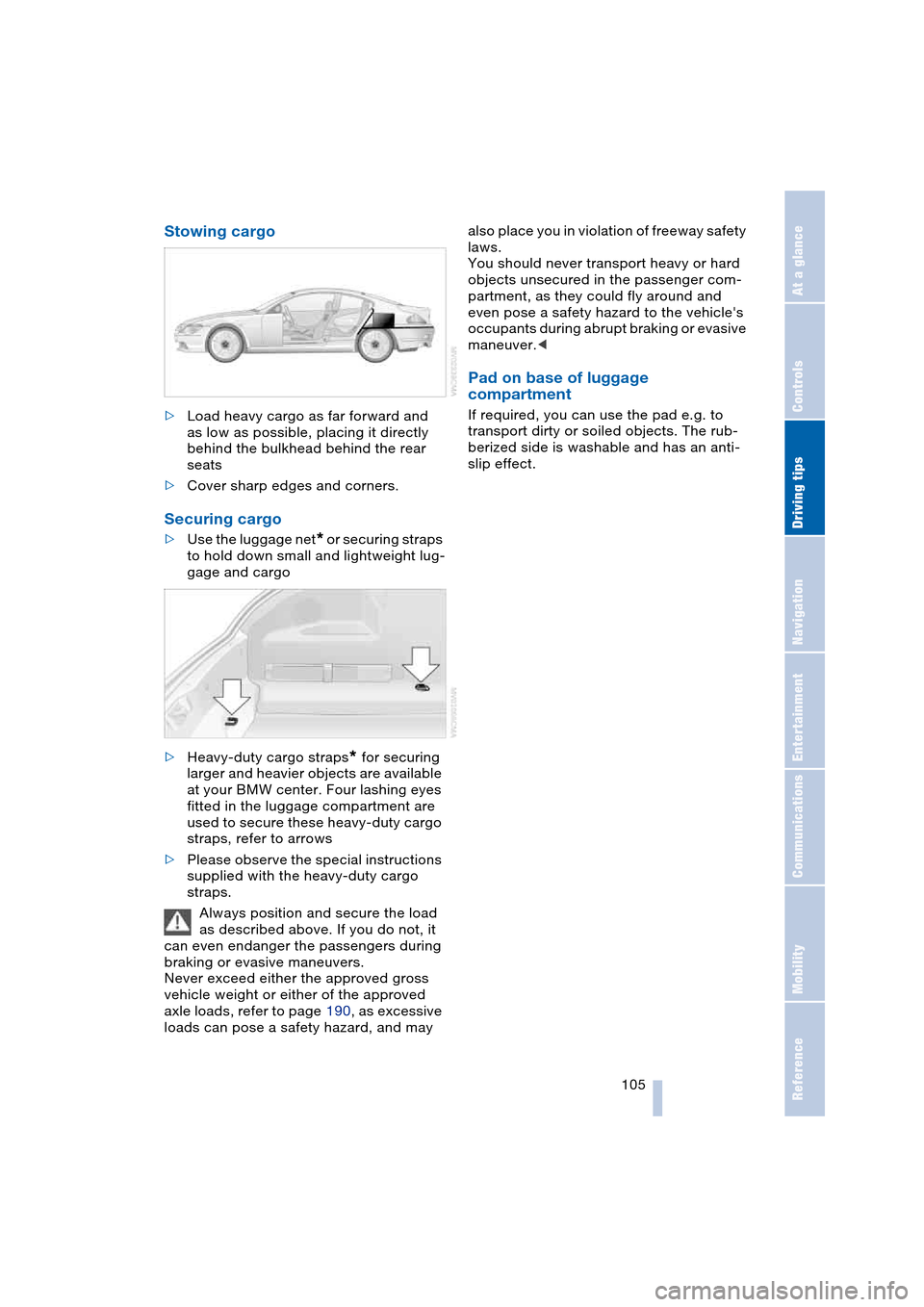
Stowing cargo
>Load heavy cargo as far forward and
as low as possible, placing it directly
behind the bulkhead behind the rear
seats
>Cover sharp edges and corners.
Securing cargo
>Use the luggage net* or securing straps
to hold down small and lightweight lug-
gage and cargo
>Heavy-duty cargo straps
* for securing
larger and heavier objects are available
at your BMW center. Four lashing eyes
fitted in the luggage compartment are
used to secure these heavy-duty cargo
straps, refer to arrows
>Please observe the special instructions
supplied with the heavy-duty cargo
straps.
Always position and secure the load
as described above. If you do not, it
can even endanger the passengers during
braking or evasive maneuvers.
Never exceed either the approved gross
vehicle weight or either of the approved
axle loads, refer to page 190, as excessive
loads can pose a safety hazard, and may also place you in violation of freeway safety
laws.
You should never transport heavy or hard
objects unsecured in the passenger com-
partment, as they could fly around and
even pose a safety hazard to the vehicle's
occupants during abrupt braking or evasive
maneuver.<
Pad on base of luggage
compartment
If required, you can use the pad e.g. to
transport dirty or soiled objects. The rub-
berized side is washable and has an anti-
slip effect.
Page 200 of 216
Everything from A to Z
198 Automatic
– air distribution 89
– air volume 89
– cruise control 62
– curb monitor 45
– headlamp control 85
– service notification 156
– station search 131
– steering wheel
adjustment 49
– storing stations 132
Automatic car wash 102
– also refer to the Caring for
your vehicle brochure
Automatic climate
control 88
– automatic air
distribution 89
– convertible program 91
– settings using Control
Center 90
– switching off 90
"Automatic programs" 91
Automatic recirculated-air
control, AUC 89
Automatic transmission
with Steptronic 58
– convenience start 55
– Dynamic Driving
Control 59
– interlock 54
– kickdown 59
– selector lever interlock 58
– shiftlock 58
– starting engine 55
– towing 186
– tow-starting 187
– warning lamp 59
"Automatic ventilation" 92
AUTO program with
automatic climate
control 89
"Autostore" on the
radio 130, 132
"AUTO" with automatic
climate control 91
Average fuel
consumption 69
– setting units 72
Average speed 69"Avoid ferries" for
navigation 116
Avoid freeways for
navigation 116
"Avoid highways" for
navigation 116
Avoiding unintentional
alarms 33
"Avoid tollroads" for
navigation 116
Axle loads, refer to
Weights 190
"A - Z" 148
B
Backrests, refer to
Seats 43
Backup lamps, refer to
Reverse gear 56
– replacing the bulbs 180
Balance, refer to
Adjusting the tone 128
Balance adjustment in
audio mode
– right/left 128
Bass, refer to
Adjusting the tone 127
"Bass", refer to
Adjusting the tone 128
Battery 181
– in the remote control 26
– jump-starting 184
Being towed 186
Belts, refer to
Safety belts 47
Beverage holder, refer to
Cup holders 97
Black ice, refer to
Ice warning 64
Blower, refer to
Air volume 89
BMW Assist 155
– enabling 155
– services offered 156
BMW maintenance
system 174
"BMW Service" 157
"BMW Service
settings" 155Bore, refer to
Engine data 190
Bottle holder, refer to
Cup holders 97
Brake Assistant, refer to
DBC Dynamic Brake
Control 78
Brake fluid 173
– warning lamp 173
Brake Force Display 80
Brake hydraulic
system 173
Brake lamps
– replacing the bulbs 180
– two-stage brake lamps 80
Brake pads 173
– break-in procedure 102
Brake pedal, refer to
Brakes 103
Brake rotors 103
Brakes 103
– ABS Antilock Brake
System 76
– brake fluid 173
– Brake Force Display 80
– brake pads 102, 173
– break-in procedure 102
– handbrake 55
Brake system 102
– brake fluid level 173
– brake pads 173
– brake rotors 103
– break-in procedure 102
– warning lamp 13, 78, 173
Brake wear warning
– brake pads 173
– warning lamp 173
Breakdown assistance 156
Breakdown services, refer
to Roadside
Assistance 184
Breaking-in the clutch 102
Breaking-in the
differential 102
Break-in procedures 102
"Brightness" 72
Buttons on the steering
wheel 11
Page 201 of 216
Reference 199
At a glance
Controls
Driving tips
Communications
Navigation
Entertainment
Mobility
C
California laws
– Event Data
Recorders 176
– Proposition 65
Warning 176
"Call" 148
Call
– accepting 147
– display accepted 149
– ending 148
– in absence 149
– starting 147
Calling
– from phone book 148
– from the Top 8 list 149
– redialing 149
– refer to telephone
Owner's Manual 96
"Call sender" 151
Can holder, refer to
Cup holders 97
Capacities 193
Car battery, refer to
Battery 181
Car care, refer to the Caring
for your vehicle brochure
Car-care products, refer to
the Caring for your
vehicle brochure
"Car data" 69
Care 175
Cargo, securing 105
Caring for artificial leather,
refer to the Caring for
your vehicle brochure
Caring for leather, refer to
the Caring for your
vehicle brochure
Caring for light-alloy
wheels, refer to the
Caring for your vehicle
brochure'
Caring for plastic, refer to
the Caring for your
vehicle brochure
Caring for the carpet, refer
to the Caring for your
vehicle brochureCaring for the vehicle finish,
refer to the Caring for
your vehicle brochure'
Car jacking points 181
Car keys, refer to
Key set 26
Car phone 145
– location, refer to
Center armrest 96
– refer to
Portable phone 144
– refer to separate
Owner's Manual
Car radio, refer to
Radio 130
Car wash 102
– also refer to the Caring for
your vehicle brochure
Catalytic converter, refer to
Exhaust system 102
"Categories" 135
CBC Cornering Brake
Control 76
CBS Condition Based
Service 174
"CD" 127, 137
CD changer 137
– adjusting the tone 127
– controls 126
– fast forward/reverse 140
– installation location 140
– playing a track 139
– random play
sequence 140
– repeating a track 139
– selecting a CD 137
– selecting a track 138
– switching on/off 126
– volume 127
CD player 137
– adjusting the tone 127
– controls 126
– fast forward/reverse 140
– playing a track 139
– random play
sequence 140
– repeating a track 139
– selecting a track 138
– switching on/off 126
– volume 127Center armrest
– adjusting the height 96
– front 96
Center console 14
"Central locking" 27
Central locking system 26
– from inside vehicle 29
Changes, technical, refer to
For your own safety 6
Changing a wheel 181
Changing the language on
Control Display 73
Changing the
measurement units on the
Control Display 72
Changing wheels 181
CHECK button 68
Check Control 66
"Check Control
messages" 68
Check Gas Cap 162
Checking the air pressure,
refer to Tire inflation
pressure 164
Child's seats, refer to
Child-restraint
systems 52
Child-restraint system 51
Chrome parts, care, refer
to the Caring for your
vehicle brochure
Cigarette lighter 97
Cleaning, refer to the
Caring for your vehicle
brochure
Cleaning windshield, refer
to Wiper system 61
"Climate" 90
"Climate control" 91
Clock 64
– 12/24 hour mode 73
– setting time and date 73
Closing
– from inside 29
– from outside 27
Clothes hooks, Coupe 96
Cockpit 10
Cold start, refer to
Starting the engine 54
"Communication" 146