ski BMW 645CI COUPE 2004 E63 Owner's Manual
[x] Cancel search | Manufacturer: BMW, Model Year: 2004, Model line: 645CI COUPE, Model: BMW 645CI COUPE 2004 E63Pages: 216, PDF Size: 3.46 MB
Page 100 of 216
Practical interior accessories
98
Socket
In front passenger footwell
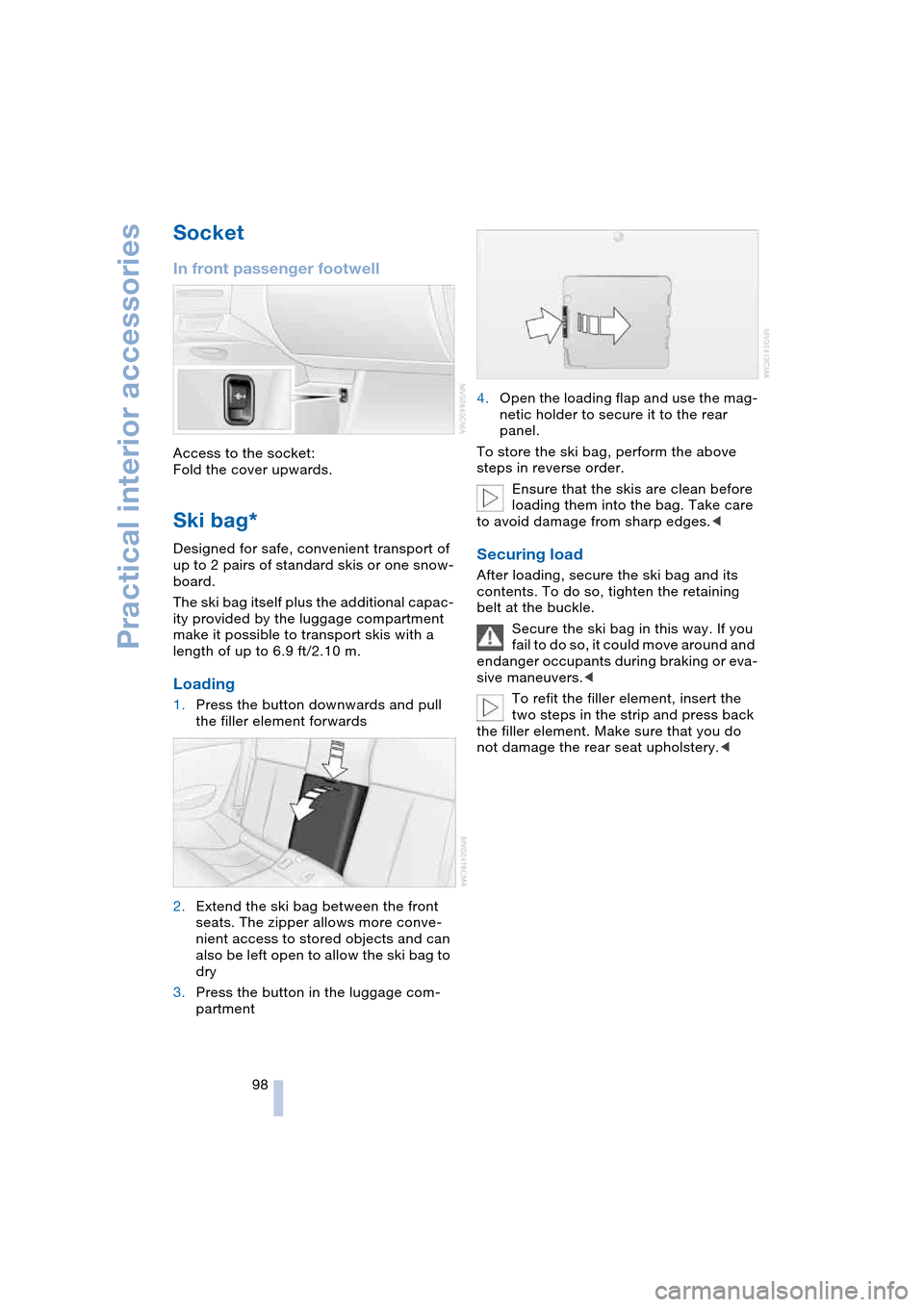
Access to the socket:
Fold the cover upwards.
Ski bag*
Designed for safe, convenient transport of
up to 2 pairs of standard skis or one snow-
board.
The ski bag itself plus the additional capac-
ity provided by the luggage compartment
make it possible to transport skis with a
length of up to 6.9 ft/2.10 m.
Loading
1.Press the button downwards and pull
the filler element forwards
2.Extend the ski bag between the front
seats. The zipper allows more conve-
nient access to stored objects and can
also be left open to allow the ski bag to
dry
3.Press the button in the luggage com-
partment4.Open the loading flap and use the mag-
netic holder to secure it to the rear
panel.
To store the ski bag, perform the above
steps in reverse order.
Ensure that the skis are clean before
loading them into the bag. Take care
to avoid damage from sharp edges.<
Securing load
After loading, secure the ski bag and its
contents. To do so, tighten the retaining
belt at the buckle.
Secure the ski bag in this way. If you
fail to do so, it could move around and
endanger occupants during braking or eva-
sive maneuvers.<
To refit the filler element, insert the
two steps in the strip and press back
the filler element. Make sure that you do
not damage the rear seat upholstery.<
Page 112 of 216
Destination entry
110
Destination entry
In entering your destination you can select
from among the following options:
>Entering a destination manually, see
below
>Selecting destination using information,
refer to page 113
>Selecting from among recent destina-
tions, refer to Destination list, page 113
>Selecting destination from address
book, refer to page 114.
After selecting your destination you can
proceed to start the destination guidance,
refer to page 118.
Entering a destination
manually
The system supports the wordmatch prin-
ciple to make it easier for you to enter the
names of streets or towns/cities. This
enables input of different spellings and
supplements your input automatically so
that stored names can be applied as desti-
nations as quickly as possible.
Control Center, for principle details, refer to
page 16:
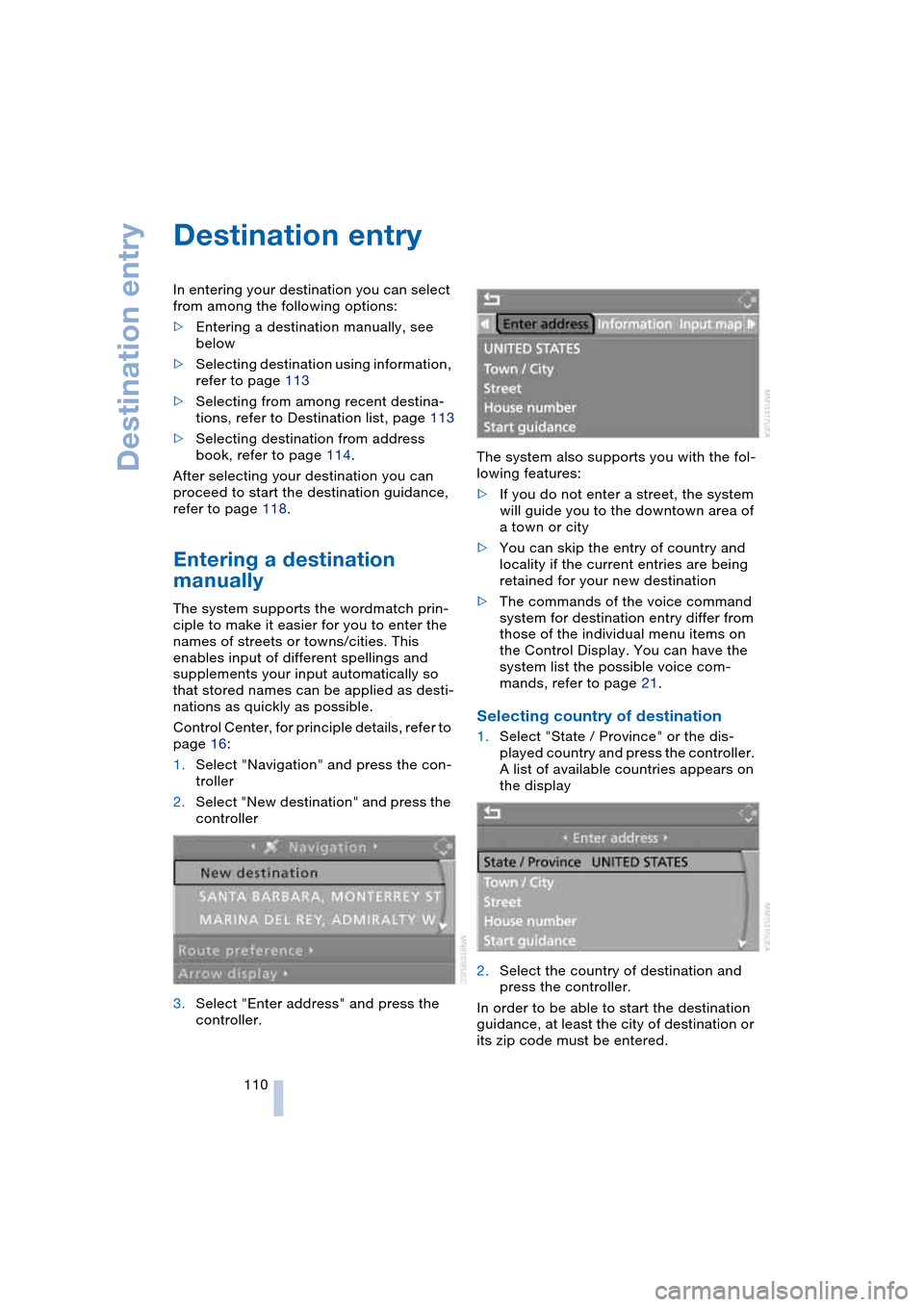
1.Select "Navigation" and press the con-
troller
2.Select "New destination" and press the
controller
3.Select "Enter address" and press the
controller.The system also supports you with the fol-
lowing features:
>If you do not enter a street, the system
will guide you to the downtown area of
a town or city
>You can skip the entry of country and
locality if the current entries are being
retained for your new destination
>The commands of the voice command
system for destination entry differ from
those of the individual menu items on
the Control Display. You can have the
system list the possible voice com-
mands, refer to page 21.
Selecting country of destination
1.Select "State / Province" or the dis-
played country and press the controller.
A list of available countries appears on
the display
2.Select the country of destination and
press the controller.
In order to be able to start the destination
guidance, at least the city of destination or
its zip code must be entered.
Page 143 of 216
Navigation
Entertainment
Driving tips
141Reference
At a glance
Controls
Communications
Mobility
Inserting CD magazine
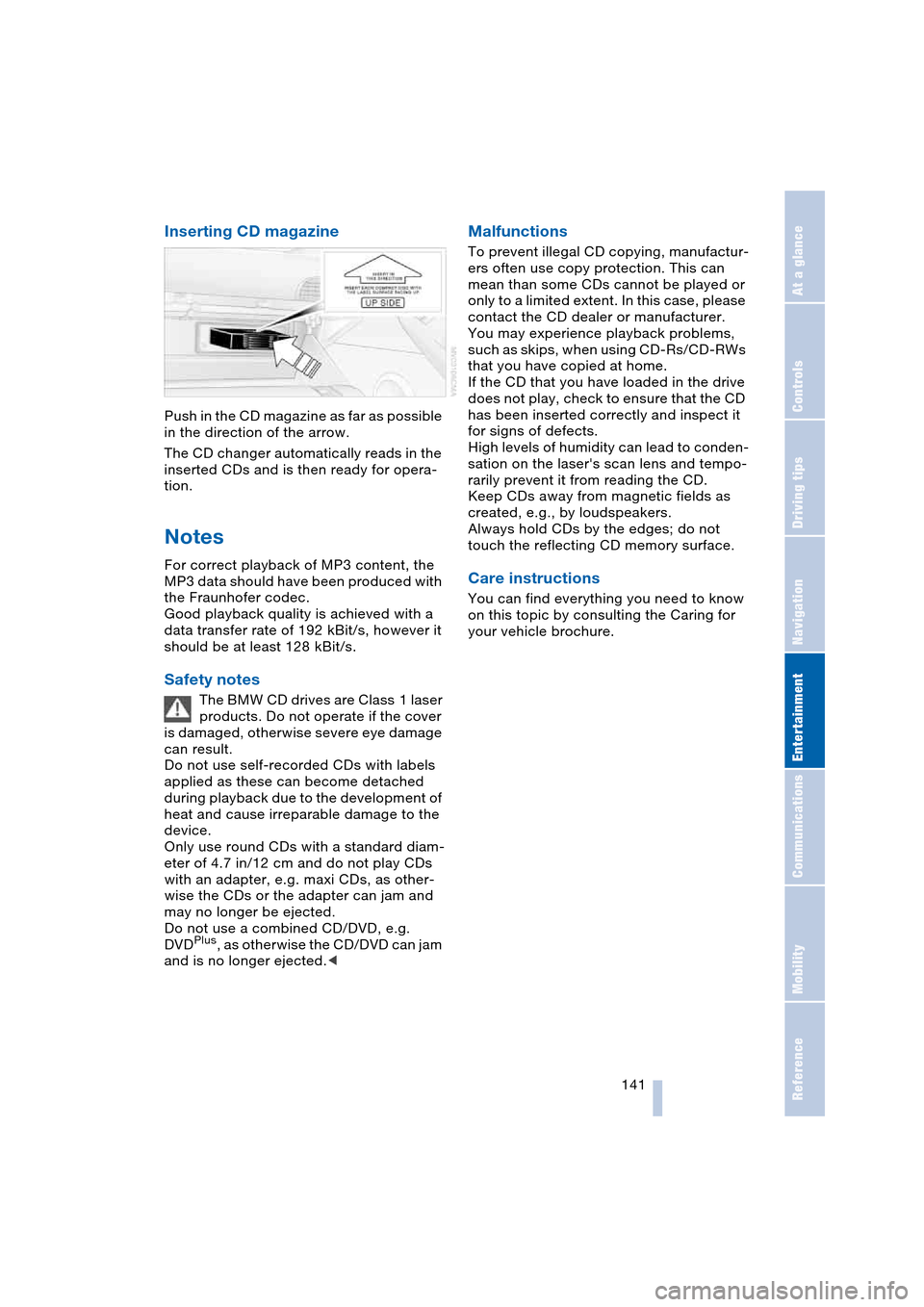
Push in the CD magazine as far as possible
in the direction of the arrow.
The CD changer automatically reads in the
inserted CDs and is then ready for opera-
tion.
Notes
For correct playback of MP3 content, the
MP3 data should have been produced with
the Fraunhofer codec.
Good playback quality is achieved with a
data transfer rate of 192 kBit/s, however it
should be at least 128 kBit/s.
Safety notes
The BMW CD drives are Class 1 laser
products. Do not operate if the cover
is damaged, otherwise severe eye damage
can result.
Do not use self-recorded CDs with labels
applied as these can become detached
during playback due to the development of
heat and cause irreparable damage to the
device.
Only use round CDs with a standard diam-
eter of 4.7 in/12 cm and do not play CDs
with an adapter, e.g. maxi CDs, as other-
wise the CDs or the adapter can jam and
may no longer be ejected.
Do not use a combined CD/DVD, e.g.
DVD
Plus, as otherwise the CD/DVD can jam
and is no longer ejected.<
Malfunctions
To prevent illegal CD copying, manufactur-
ers often use copy protection. This can
mean than some CDs cannot be played or
only to a limited extent. In this case, please
contact the CD dealer or manufacturer.
You may experience playback problems,
such as skips, when using CD-Rs/CD-RWs
that you have copied at home.
If the CD that you have loaded in the drive
does not play, check to ensure that the CD
has been inserted correctly and inspect it
for signs of defects.
High levels of humidity can lead to conden-
sation on the laser's scan lens and tempo-
rarily prevent it from reading the CD.
Keep CDs away from magnetic fields as
created, e.g., by loudspeakers.
Always hold CDs by the edges; do not
touch the reflecting CD memory surface.
Care instructions
You can find everything you need to know
on this topic by consulting the Caring for
your vehicle brochure.
Page 146 of 216
Telephoning
144
Telephoning
Safety notes
For your own safety
Your car phone makes life more convenient
in many ways, and can even save lives in an
emergency. While you should consult your
portable phone's separate Owner's Manual
for a detailed description of safety precau-
tions and information, we request that you
direct your particular attention to the fol-
lowing:
Adjustments
To avoid posing a danger to yourself
and other road users, never adjust the
system settings unless your vehicle is sta-
tionary.<
Using the phone in your vehicle
Using a portable phone while driving
is now illegal in many states and cit-
ies. Always use your hands-free system, or
stop your vehicle in an area where you will
not pose a safety hazard to other road
users.<
Vehicles and portable phones
Do not use your phone within a
garage, or near an open hood. The air
in these areas could contain fuel vapors,
and the portable phone might generate
sparks that could result in burns.
This same precaution applies to open lug-
gage compartment lids on vehicles
equipped for operation using natural gas or
hydrogen, and to all vehicles with luggage
compartment-mounted batteries.<
Antenna
When using the phone, ensure that all
persons in the area are at least 20 in/
50 cm from the antenna. Never use your
BMW portable phone if the antenna is dam-
aged. Contact between your skin and a damaged antenna can result in minor
burns.
If the antenna is damaged, have it replaced
immediately.<
Special environmental conditions
Always switch off your BMW portable
phone in areas where blasting work is
being conducted with explosives. The
phone signals could potentially act as a
high-frequency transmitter and set off
explosions.
Always switch off your BMW portable
phone in areas where an increased explo-
sion danger is present. This category
includes gas stations along with fuel and
chemical storage depots, etc., and all
areas in which the air can contain fuel,
chemicals or metal particles. Under these
conditions, your BMW portable phone
could conceivably generate sparks that
could lead to a fire or explosion. Always
observe all legal regulations governing the
use of portable phones in the vicinity of gas
stations, chemical factories and other
areas where an explosion potential exists.
Never use your BMW portable phone in air-
craft; do not use this portable phone in hos-
pitals, care centers or at other locations
where medical equipment may be in oper-
ation, such as accident sites, etc.
Your wireless service provider can furnish
you with more detailed information on legal
regulations governing the use of your
phone.<
Medical equipment
Portable phones can generate inter-
ference capable of preventing hearing
aids and cardiac pacemakers from operat-
ing correctly. If you or any occupant of the
vehicle use such equipment, consult a phy-
sician or the manufacturer of the equip-
ment to determine whether it is adequately
shielded against high-frequency energy.<
Page 171 of 216
Mobility
169Reference
At a glance
Controls
Driving tips
Communications
Navigation
Entertainment
Recommended tire sizes and makes
BMW tests certain tire brands for each tire
size, classifies them as road-safe and
approves them. You can find out about
these at specialized dealers or at your
BMW center. Observe any country-specific
regulations, e.g. on making a correspond-
ing entry in the vehicle documents.
The factory-mounted tires have been spe-
cially selected to provide optimized perfor-
mance when installed on your vehicle; if
properly cared for, they will provide a com-
bination of safety and excellent ride com-
fort.
Run-flat tires
In the event of replacement, use run-flat
tires, refer to page 168, as there is no spare
wheel available for flats.
For safety reasons, BMW recom-
mends that you do not have damaged
run-flat tires repaired; they should be
replaced.<
Special characteristics of winter
tires
BMW recommends winter tires for use in
cold winter driving conditions. Although all-
season M+S tires provide better winter
traction than summer tires, they generally
fail to provide the same levels of cold-
weather performance as winter tires.
Run-flat tires
If you switch from summer to winter tires,
or vice versa, use run-flat tires, refer to
page 168, as in the event of a flat tire there
is no spare tire available. Your BMW center
will be glad to advise you.
Observing speed ratings
Never exceed the maximum speed for
which the winter tires are rated.
Unprofessional attempts by laymen to ser-
vice tires can lead to damage and acci-
dents. Have this work performed by skilled
professionals only. The technicians at your
BMW center will be glad to assist you with the required professional knowledge and
specialized equipment.<
Storage
Always store wheels and tires in a cool, dry
place with as little exposure to light as pos-
sible. Always protect tires against all con-
tact with oil, grease and fuels. Do not
exceed the maximum tire inflation pressure
indicated on the side wall of the tire.
Snow chains*
BMW only tests certain snow chains, clas-
sifies them as road-safe and approves
them. Consult your BMW center for more
information. BMW recommends using
these approved, narrow-link snow chains.
These snow chains are approved exclu-
sively for use in pairs on the rear wheels
with the tire size 245/45 R 18.
Observe the manufacturer's instructions
when mounting snow chains.
Do not exceed a vehicle speed of 30 mph/
50 km/h with the chains mounted.
Do not initialize the Runflat Indicator
after mounting snow chains.
When you are driving with snow chains, it
can be beneficial to switch off DSC briefly,
refer to page 77.<
Page 178 of 216
Rules and regulations
176
Rules and regulations
California laws
Proposition 65 Warning
California laws require us to issue the fol-
lowing warning:
Engine exhaust and a wide variety of
automobile components and parts,
including components found in the interior
furnishings in a vehicle, contain or emit
chemicals known to the State of California
to cause cancer and birth defects and
reproductive harm. In addition, certain flu-
ids contained in vehicles and certain prod-
ucts of component wear contain or emit
chemicals known to the State of California
to cause cancer and birth defects or other
reproductive harm.
Battery posts, terminals and related acces-
sories contain lead and lead compounds.
Wash your hands after handling.
Used engine oil contains chemicals that
have caused cancer in laboratory animals.
Always protect your skin by washing thor-
oughly with soap and water.<
Event Data Recorders
Your vehicle may be equipped with one or
more sensing and diagnostic modules or a
recording device capable of recording or
transmitting certain vehicle data or infor-
mation. In addition, if you have a Subscrip-
tion Service Agreement for the BMW Assist
system, certain vehicle information may be
transmitted or recorded in order to provide
such services.
OBD connector
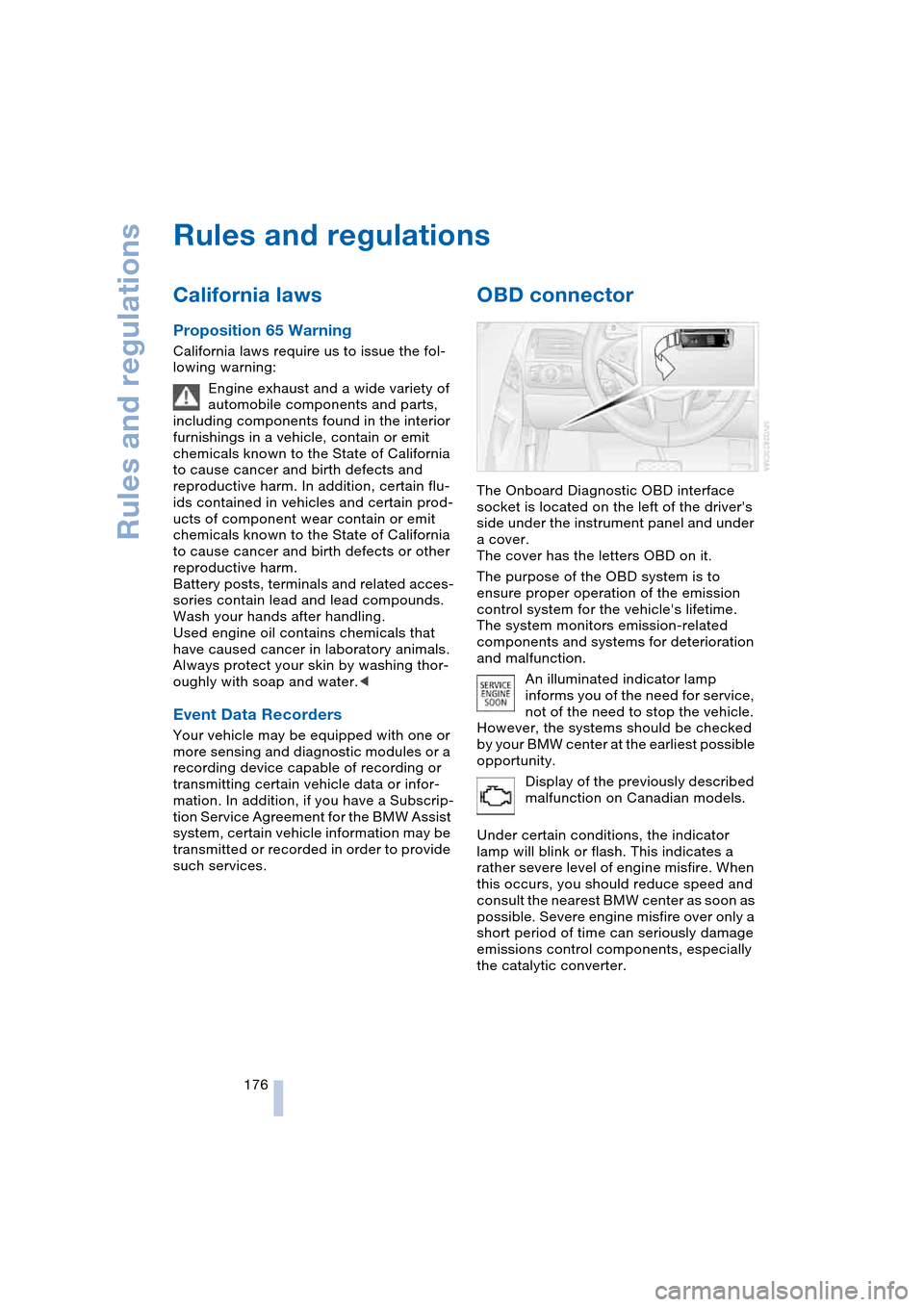
The Onboard Diagnostic OBD interface
socket is located on the left of the driver's
side under the instrument panel and under
a cover.
The cover has the letters OBD on it.
The purpose of the OBD system is to
ensure proper operation of the emission
control system for the vehicle's lifetime.
The system monitors emission-related
components and systems for deterioration
and malfunction.
An illuminated indicator lamp
informs you of the need for service,
not of the need to stop the vehicle.
However, the systems should be checked
by your BMW center at the earliest possible
opportunity.
Display of the previously described
malfunction on Canadian models.
Under certain conditions, the indicator
lamp will blink or flash. This indicates a
rather severe level of engine misfire. When
this occurs, you should reduce speed and
consult the nearest BMW center as soon as
possible. Severe engine misfire over only a
short period of time can seriously damage
emissions control components, especially
the catalytic converter.
Page 210 of 216
Everything from A to Z
208 Screw thread for tow
fitting 186
Seats 43
– adjusting 43
– heating 47
– memory, refer to Seat,
mirror and steering wheel
memory 44
– sitting safely 42
– sports seat 43
– storing the setting 44
– thigh support 43
Securing load 98
"Select as destination" 113
"Select current speed" 71
Selecting audio sources,
refer to Operation using
Control Center 126
Selecting frequency
manually 131
Selecting menu items 18
Selecting new scale for
navigation system
display 120
Selecting route 116
Selection options with
navigation system 116
Selector lever
– automatic transmission
with Steptronic 58
– manual transmission 56
– SMG Sequential manual
transmission 56
Selector lever interlock,
refer to Shiftlock
– automatic transmission
with Steptronic 58
– SMG Sequential manual
transmission 57
Sequential manual trans-
mission, SMG 56
"Service" 65, 156
Service, refer to
Roadside Assistance 184
Service and Warranty Infor-
mation Booklet for US
models 174
"Service notification" 156
"Service Request" 157Service requirement
display 65
– also refer to CBS
Condition Based
Service 174
"Service
requirements" 65, 156
"Service Status" 155
"Set date" 74
"Set" in audio mode 127
"Set service date" 66
"Set time" 73
Setting road-speed limit 71
Settings
– changing on the
Control Display 72
– configuring, refer to
Key Memory 26
Setting the time, refer to
Preselecting activation
time 93
"Set tire pressure" 79
Shifting gears with
automatic transmission
with Steptronic 58
Short commands of the
voice command
system 194
"Short cut / Telephone" 49
Shortest route for
navigation 116
"Short route" for
navigation 116
"Show current
position" 112
"Show destination
position" 112
Side airbags 81
Side marker lamps,
replacing the bulbs 180
Side turn signals, replacing
the bulbs 180
Sill panel lighting 87
Sitting safely 42
– with airbags 42
– with safety belts 42
Ski bag 98
Sliding/tilt roof, refer to
Glass roof, electric with
raise function 35SMG Sequential manual
transmission 56
– acceleration assistant 60
– convenience start 55
– Dynamic Driving
Control 59
– gear display 57
– kickdown 57
– overheating 58
– shiftlock 57
– towing 186
– tow-starting 187
– warning lamp 58
"SMS" 150
Snow chains 169
Socket
– for Onboard Diagnosis
interface 176
– in front passenger
footwell 98
– refer to Cigarette lighter
socket 97
SOS, refer to Initiating an
emergency call 183
Sound output for Enter-
tainment on/off 127
Spare fuses 182
Spare key 26
Special oils, refer to
Specified engine oils 172
Specified engine oils 172
Speed-dependent
volume 128
Speed limit warning, refer
to Speed limit 71
Speedometer 12
"Speed volume", refer to
Adjusting the tone 128
Speed with winter tires 169
Sport program
– automatic transmission
with Steptronic 59
– Dynamic Driving
Control 59
Stability control, refer to
Driving stability control
systems 76
"Start" for stopwatch 72
"Start guidance" 111, 118
Starting assistance, refer to
Jump-starting 184