ignition BMW 645CI COUPE&CONVERTIBLE 2004 Owner's Manual
[x] Cancel search | Manufacturer: BMW, Model Year: 2004, Model line: 645CI COUPE&CONVERTIBLE, Model: BMW 645CI COUPE&CONVERTIBLE 2004Pages: 216, PDF Size: 3.46 MB
Page 65 of 216
Controls
63Reference
At a glance
Driving tips
Communications
Navigation
Entertainment
Mobility
In addition, cruise control is interrupted
automatically
>when you apply pressure to the brake
pedal
>when you press down the clutch pedal
or engage position N of the automatic
transmission/SMG
>when DSC comes on.
4Recalling stored speed
Briefly press button 4: the vehicle acceler-
ates to and maintains the stored speed.
Deactivating system
When the ignition is switched off, the sys-
tem is deactivated and the stored speed is
deleted.
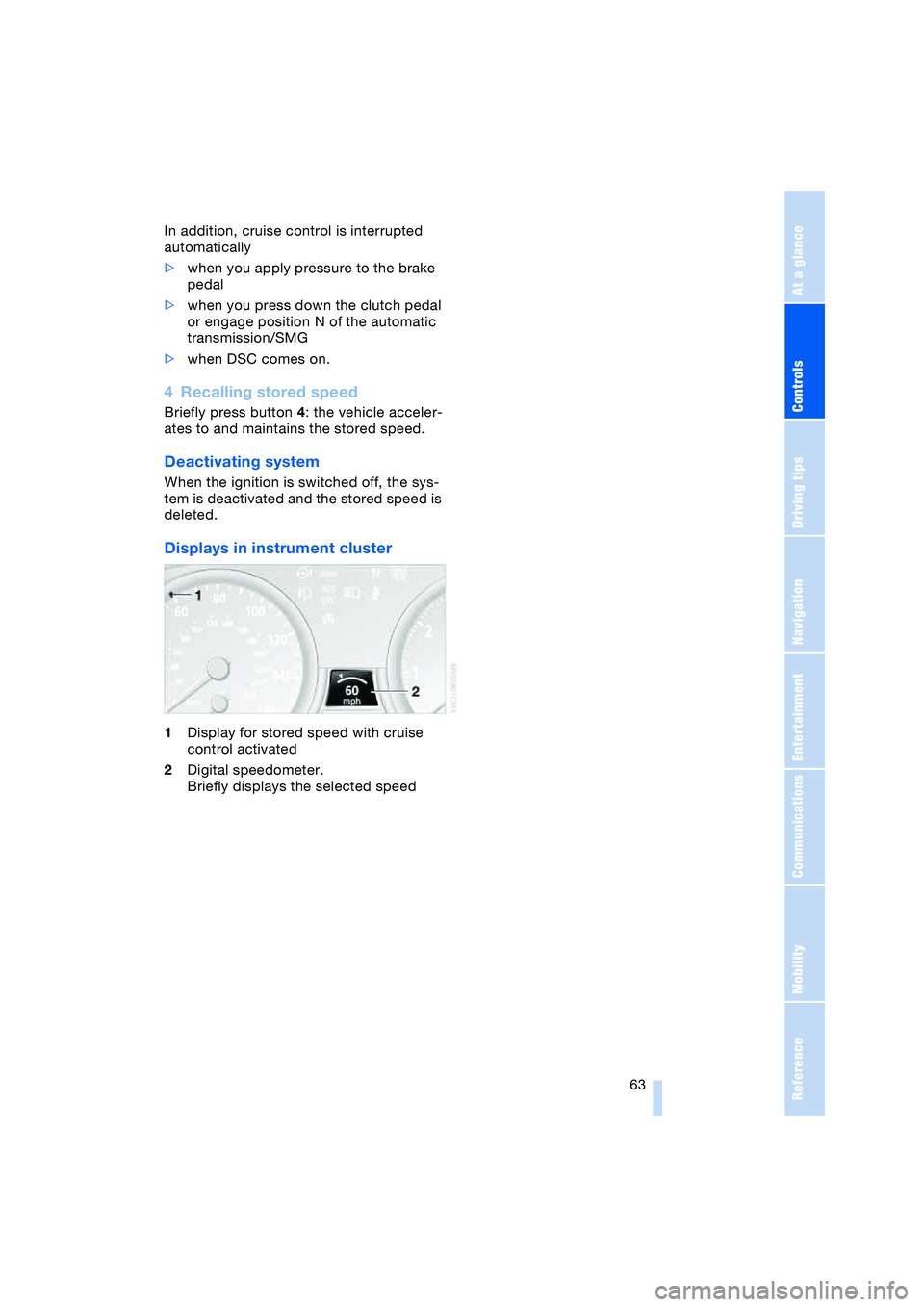
Displays in instrument cluster
1Display for stored speed with cruise
control activated
2Digital speedometer.
Briefly displays the selected speed
Page 66 of 216
Everything under control
64
Everything under control
Odometer, outside
temperature display, clock
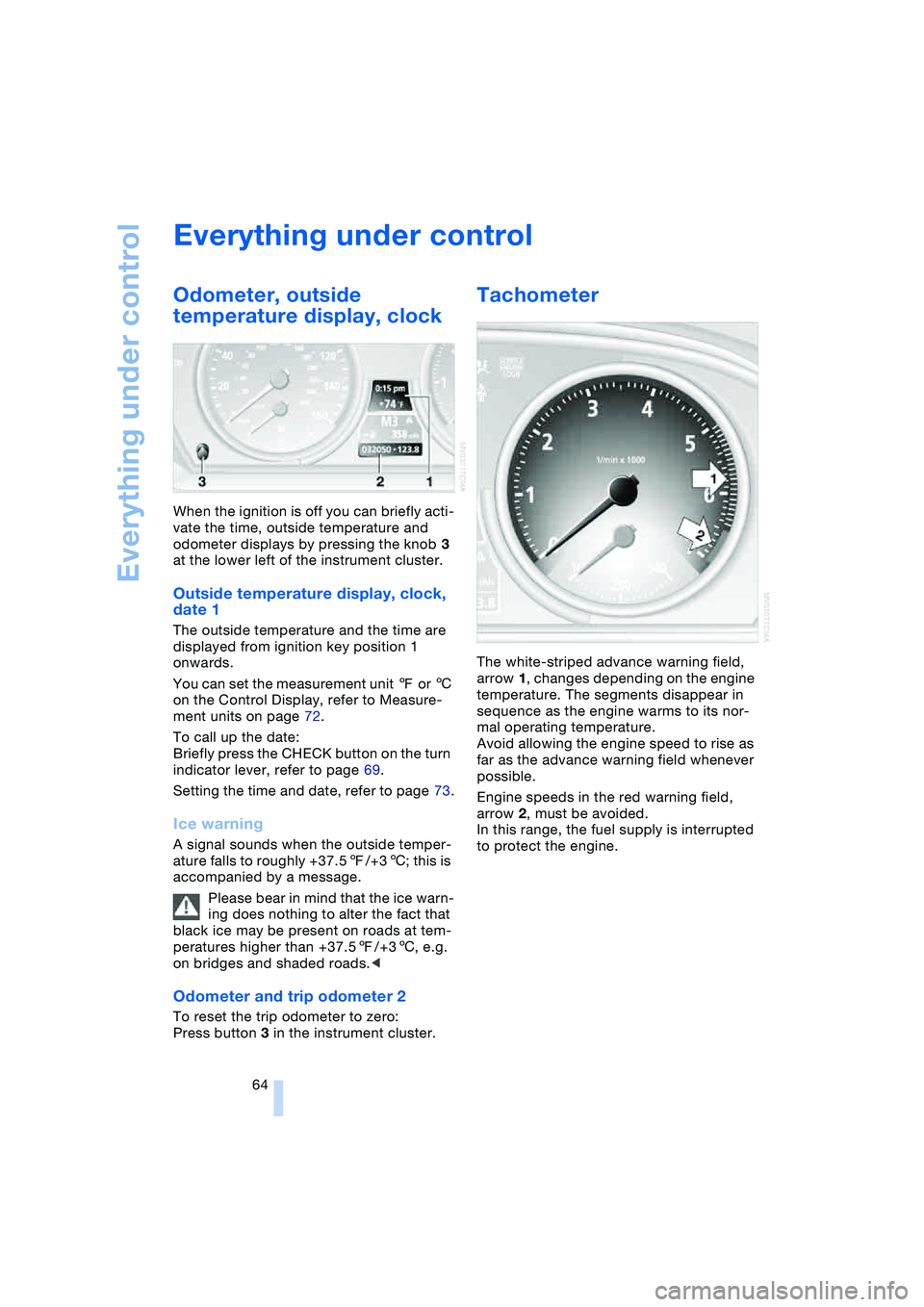
When the ignition is off you can briefly acti-
vate the time, outside temperature and
odometer displays by pressing the knob 3
at the lower left of the instrument cluster.
Outside temperature display, clock,
date 1
The outside temperature and the time are
displayed from ignition key position 1
onwards.
You can set the measurement unit 7 or 6
on the Control Display, refer to Measure-
ment units on page 72.
To call up the date:
Briefly press the CHECK button on the turn
indicator lever, refer to page 69.
Setting the time and date, refer to page 73.
Ice warning
A signal sounds when the outside temper-
ature falls to roughly +37.57/+36; this is
accompanied by a message.
Please bear in mind that the ice warn-
ing does nothing to alter the fact that
black ice may be present on roads at tem-
peratures higher than +37.57/+36, e.g.
on bridges and shaded roads.<
Odometer and trip odometer 2
To reset the trip odometer to zero:
Press button 3 in the instrument cluster.
Tachometer
The white-striped advance warning field,
arrow 1, changes depending on the engine
temperature. The segments disappear in
sequence as the engine warms to its nor-
mal operating temperature.
Avoid allowing the engine speed to rise as
far as the advance warning field whenever
possible.
Engine speeds in the red warning field,
arrow 2, must be avoided.
In this range, the fuel supply is interrupted
to protect the engine.
Page 67 of 216
Controls
65Reference
At a glance
Driving tips
Communications
Navigation
Entertainment
Mobility
Engine oil thermometer
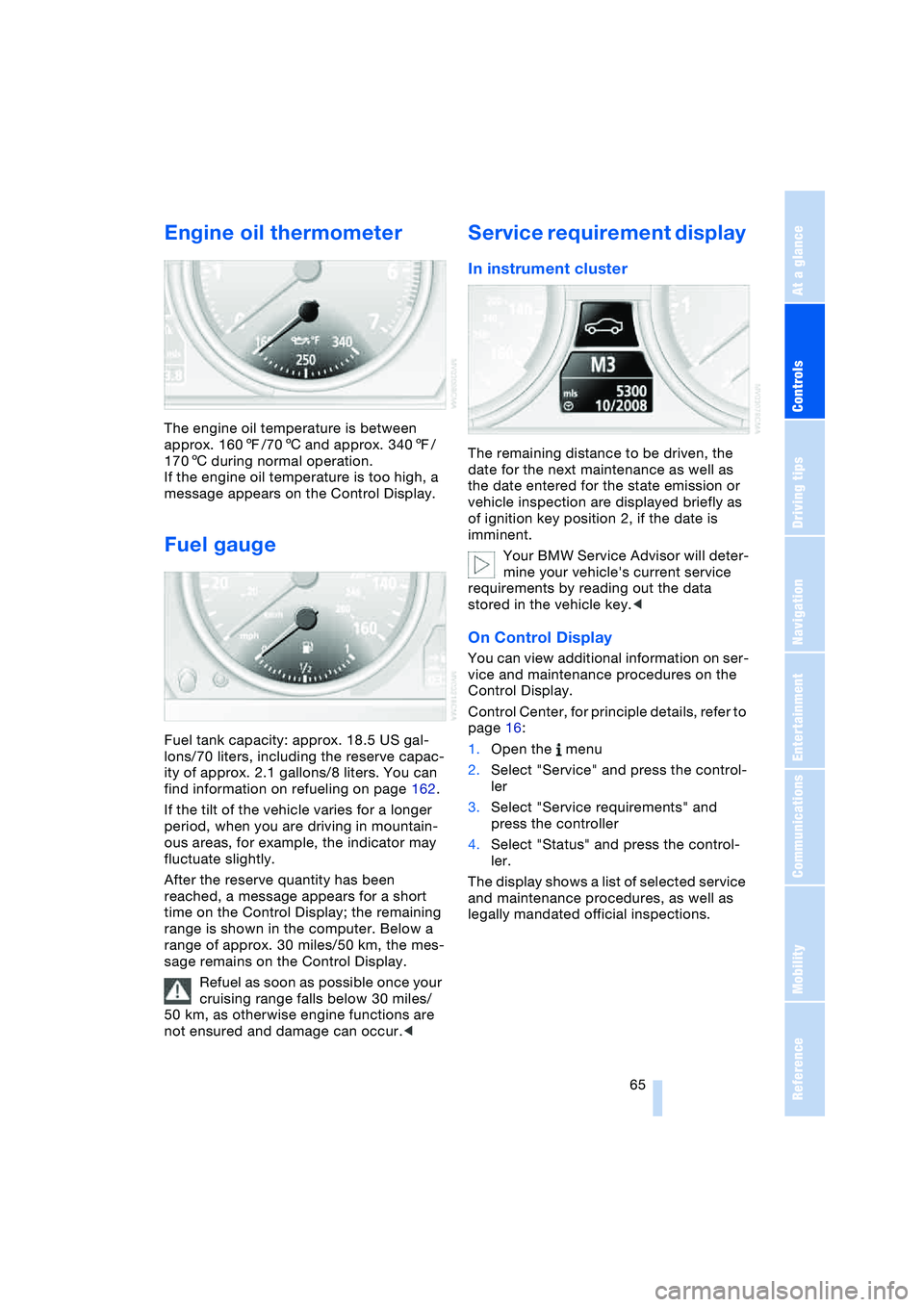
The engine oil temperature is between
approx. 1607/706 and approx. 3407/
1706 during normal operation.
If the engine oil temperature is too high, a
message appears on the Control Display.
Fuel gauge
Fuel tank capacity: approx. 18.5 US gal-
lons/70 liters, including the reserve capac-
ity of approx. 2.1 gallons/8 liters. You can
find information on refueling on page 162.
If the tilt of the vehicle varies for a longer
period, when you are driving in mountain-
ous areas, for example, the indicator may
fluctuate slightly.
After the reserve quantity has been
reached, a message appears for a short
time on the Control Display; the remaining
range is shown in the computer. Below a
range of approx. 30 miles/50 km, the mes-
sage remains on the Control Display.
Refuel as soon as possible once your
cruising range falls below 30 miles/
50 km, as otherwise engine functions are
not ensured and damage can occur.<
Service requirement display
In instrument cluster
The remaining distance to be driven, the
date for the next maintenance as well as
the date entered for the state emission or
vehicle inspection are displayed briefly as
of ignition key position 2, if the date is
imminent.
Your BMW Service Advisor will deter-
mine your vehicle's current service
requirements by reading out the data
stored in the vehicle key.<
On Control Display
You can view additional information on ser-
vice and maintenance procedures on the
Control Display.
Control Center, for principle details, refer to
page 16:
1.Open the menu
2.Select "Service" and press the control-
ler
3.Select "Service requirements" and
press the controller
4.Select "Status" and press the control-
ler.
The display shows a list of selected service
and maintenance procedures, as well as
legally mandated official inspections.
Page 70 of 216
Everything under control
68
Calling up stored messages on
Control Display
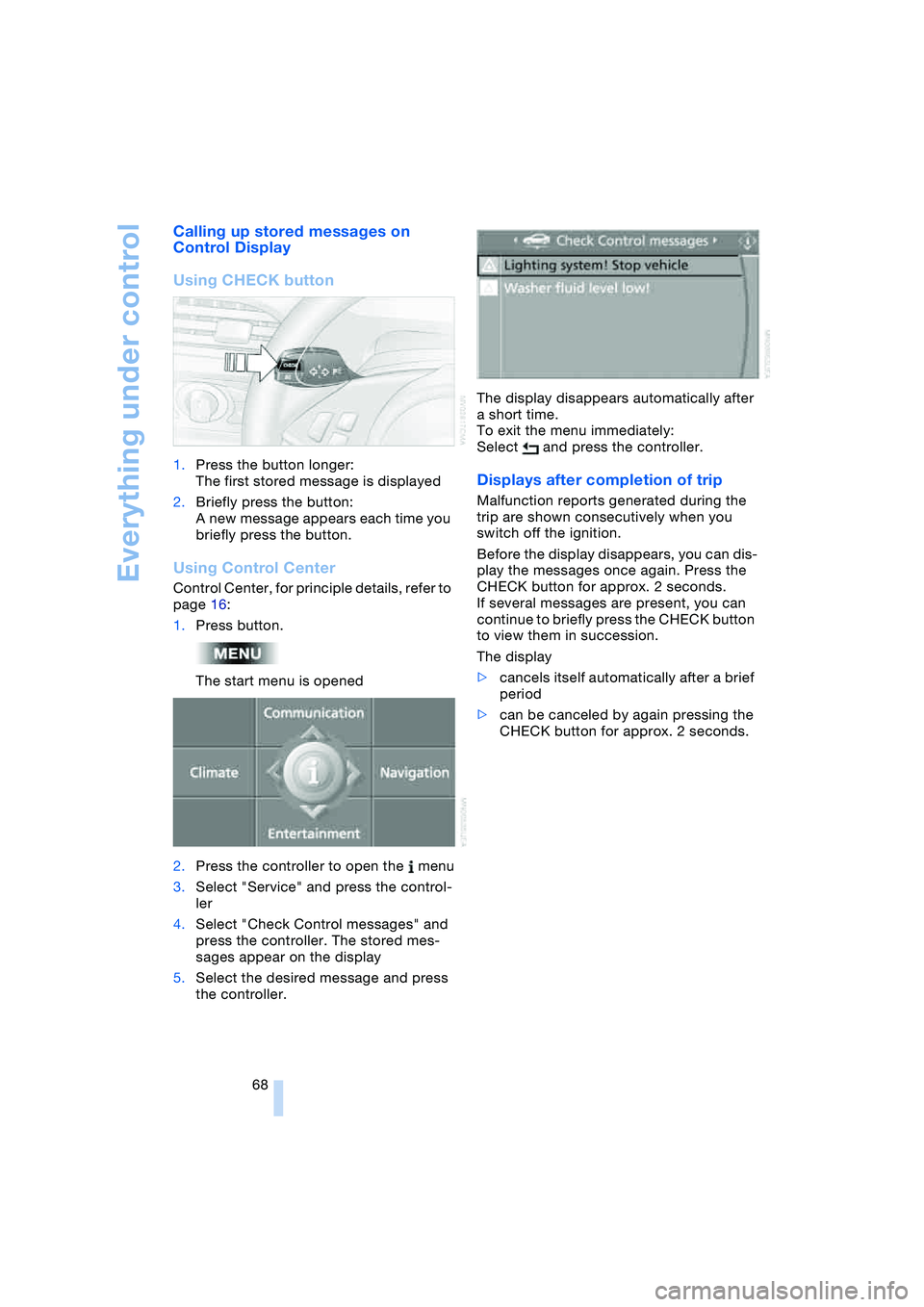
Using CHECK button
1.Press the button longer:
The first stored message is displayed
2.Briefly press the button:
A new message appears each time you
briefly press the button.
Using Control Center
Control Center, for principle details, refer to
page 16:
1.Press button.
The start menu is opened
2.Press the controller to open the menu
3.Select "Service" and press the control-
ler
4.Select "Check Control messages" and
press the controller. The stored mes-
sages appear on the display
5.Select the desired message and press
the controller.The display disappears automatically after
a short time.
To exit the menu immediately:
Select and press the controller.
Displays after completion of trip
Malfunction reports generated during the
trip are shown consecutively when you
switch off the ignition.
Before the display disappears, you can dis-
play the messages once again. Press the
CHECK button for approx. 2 seconds.
If several messages are present, you can
continue to briefly press the CHECK button
to view them in succession.
The display
>cancels itself automatically after a brief
period
>can be canceled by again pressing the
CHECK button for approx. 2 seconds.
Page 71 of 216
Controls
69Reference
At a glance
Driving tips
Communications
Navigation
Entertainment
Mobility
Computer
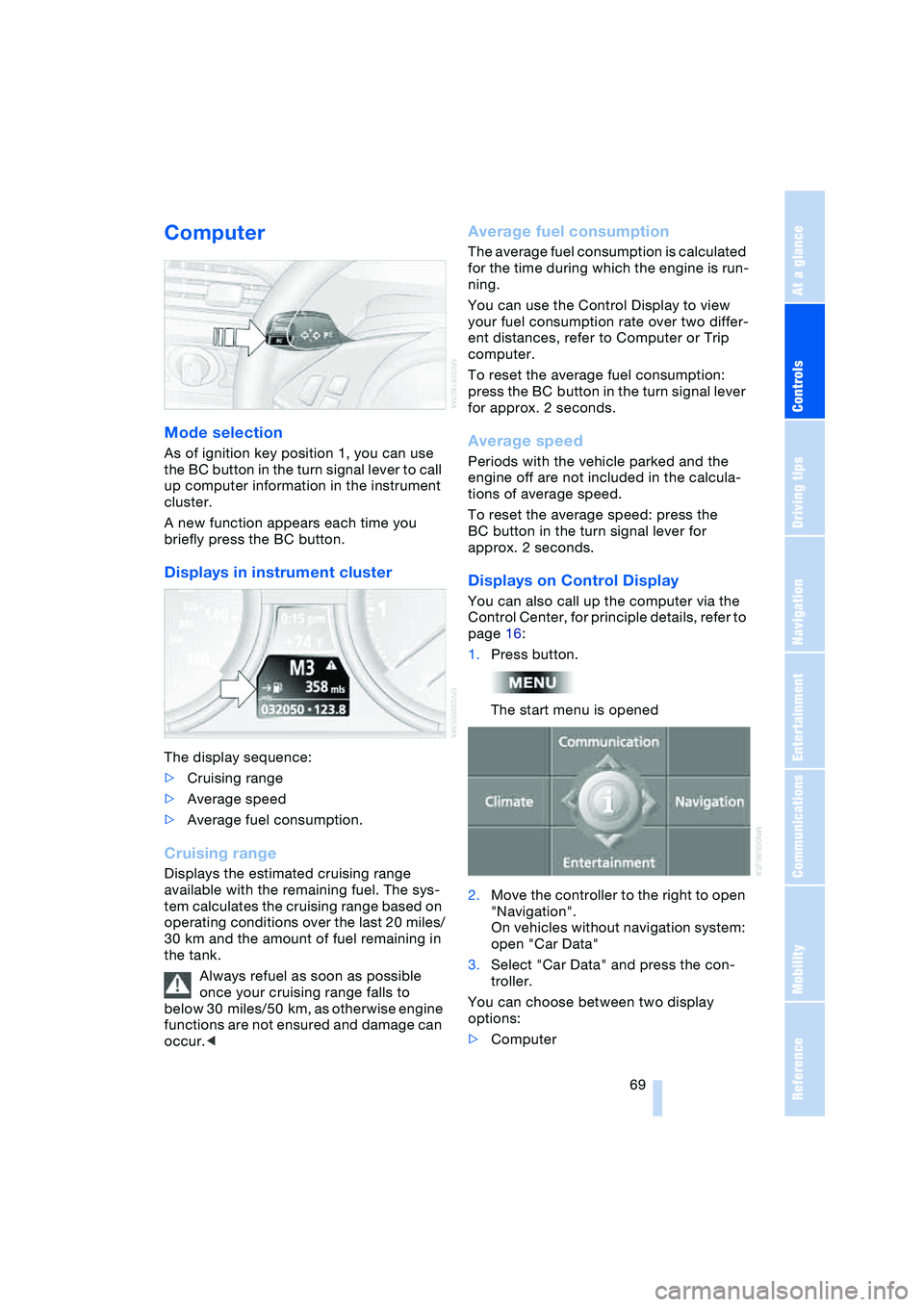
Mode selection
As of ignition key position 1, you can use
the BC button in the turn signal lever to call
up computer information in the instrument
cluster.
A new function appears each time you
briefly press the BC button.
Displays in instrument cluster
The display sequence:
>Cruising range
>Average speed
>Average fuel consumption.
Cruising range
Displays the estimated cruising range
available with the remaining fuel. The sys-
tem calculates the cruising range based on
operating conditions over the last 20 miles/
30 km and the amount of fuel remaining in
the tank.
Always refuel as soon as possible
once your cruising range falls to
below 30 miles/50 km, as otherwise engine
functions are not ensured and damage can
occur.<
Average fuel consumption
The average fuel consumption is calculated
for the time during which the engine is run-
ning.
You can use the Control Display to view
your fuel consumption rate over two differ-
ent distances, refer to Computer or Trip
computer.
To reset the average fuel consumption:
press the BC button in the turn signal lever
for approx. 2 seconds.
Average speed
Periods with the vehicle parked and the
engine off are not included in the calcula-
tions of average speed.
To reset the average speed: press the
BC button in the turn signal lever for
approx. 2 seconds.
Displays on Control Display
You can also call up the computer via the
Control Center, for principle details, refer to
page 16:
1.Press button.
The start menu is opened
2.Move the controller to the right to open
"Navigation".
On vehicles without navigation system:
open "Car Data"
3.Select "Car Data" and press the con-
troller.
You can choose between two display
options:
>Computer
Page 77 of 216
Controls
75Reference
At a glance
Driving tips
Communications
Navigation
Entertainment
Mobility
Technology for comfort, convenience
and safety
PDC Park Distance Control*
The concept
The PDC assists you when you are parking.
Signal tones and a visual display
* indicate
the current distance to an object behind or
in front of your vehicle. To measure the dis-
tance, there are four ultrasonic sensors in
each bumper. The sensors at the front and
at the two rear corners have a range of
approx. 20 in/50 cm; the rear middle sen-
sors have approx. 5 ft/1.50 m.
PDC is a parking aid that can indicate
objects when they are approached
slowly, as is usually the case when parking.
Avoid approaching an object at high speed,
as otherwise the physical circumstances
would mean that the system warning was
too late.<
Automatic mode
In ignition key position 2, the system auto-
matically assumes operational status after
a few seconds each time you engage
reverse gear or selector-lever position R.
Wait this short period before driving.<
The system is automatically deacti-
vated once the vehicle travels approx.
165 ft/50 m or exceeds a speed of roughly
20 mph/30 km/h; the indicator lamp goes
out. You can reactivate the system manu-
ally as needed.
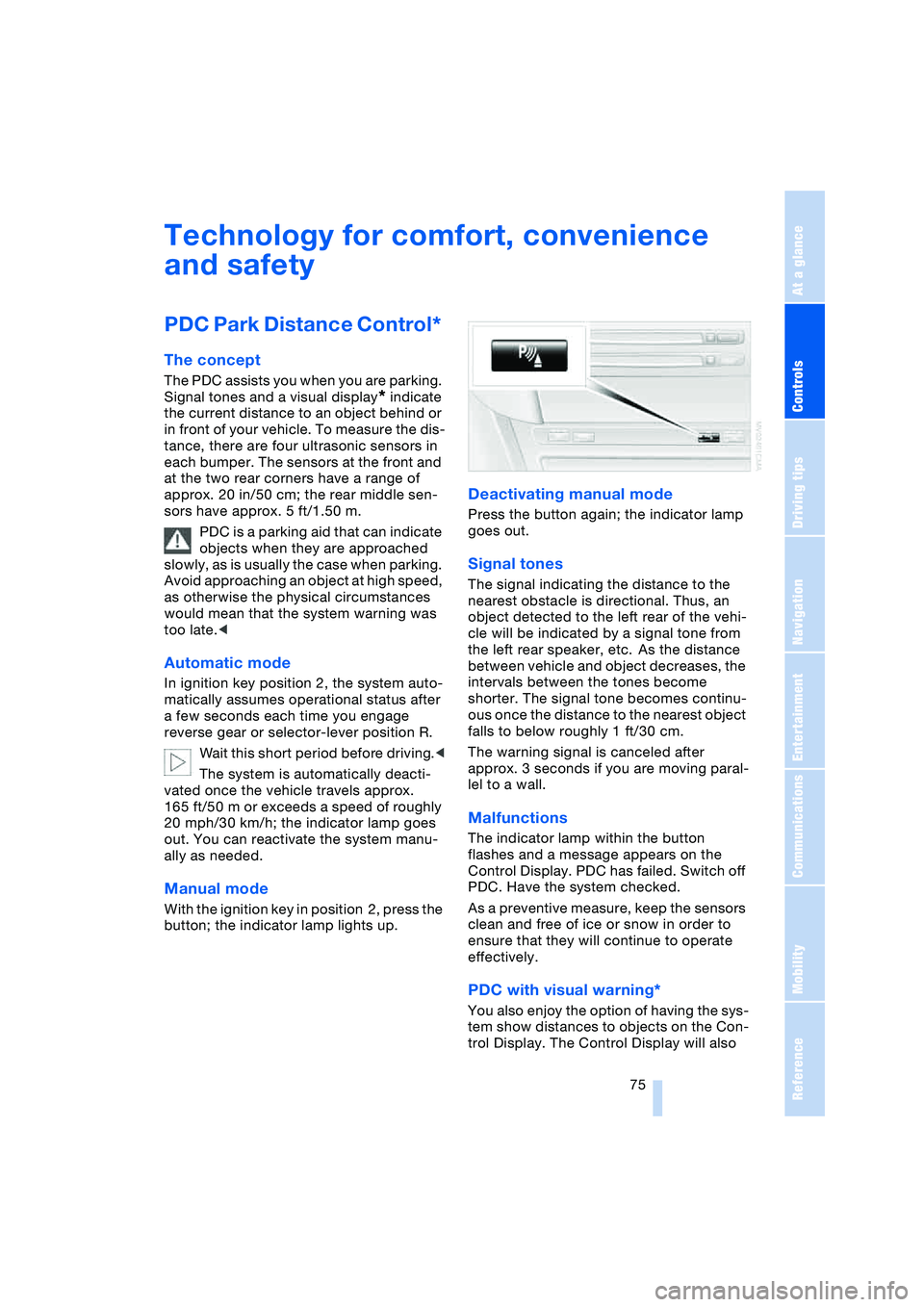
Manual mode
With the ignition key in position 2, press the
button; the indicator lamp lights up.
Deactivating manual mode
Press the button again; the indicator lamp
goes out.
Signal tones
The signal indicating the distance to the
nearest obstacle is directional. Thus, an
object detected to the left rear of the vehi-
cle will be indicated by a signal tone from
the left rear speaker, etc. As the distance
between vehicle and object decreases, the
intervals between the tones become
shorter. The signal tone becomes continu-
ous once the distance to the nearest object
falls to below roughly 1 ft/30 cm.
The warning signal is canceled after
approx. 3 seconds if you are moving paral-
lel to a wall.
Malfunctions
The indicator lamp within the button
flashes and a message appears on the
Control Display. PDC has failed. Switch off
PDC. Have the system checked.
As a preventive measure, keep the sensors
clean and free of ice or snow in order to
ensure that they will continue to operate
effectively.
PDC with visual warning*
You also enjoy the option of having the sys-
tem show distances to objects on the Con-
trol Display. The Control Display will also
Page 83 of 216
Controls
81Reference
At a glance
Driving tips
Communications
Navigation
Entertainment
Mobility
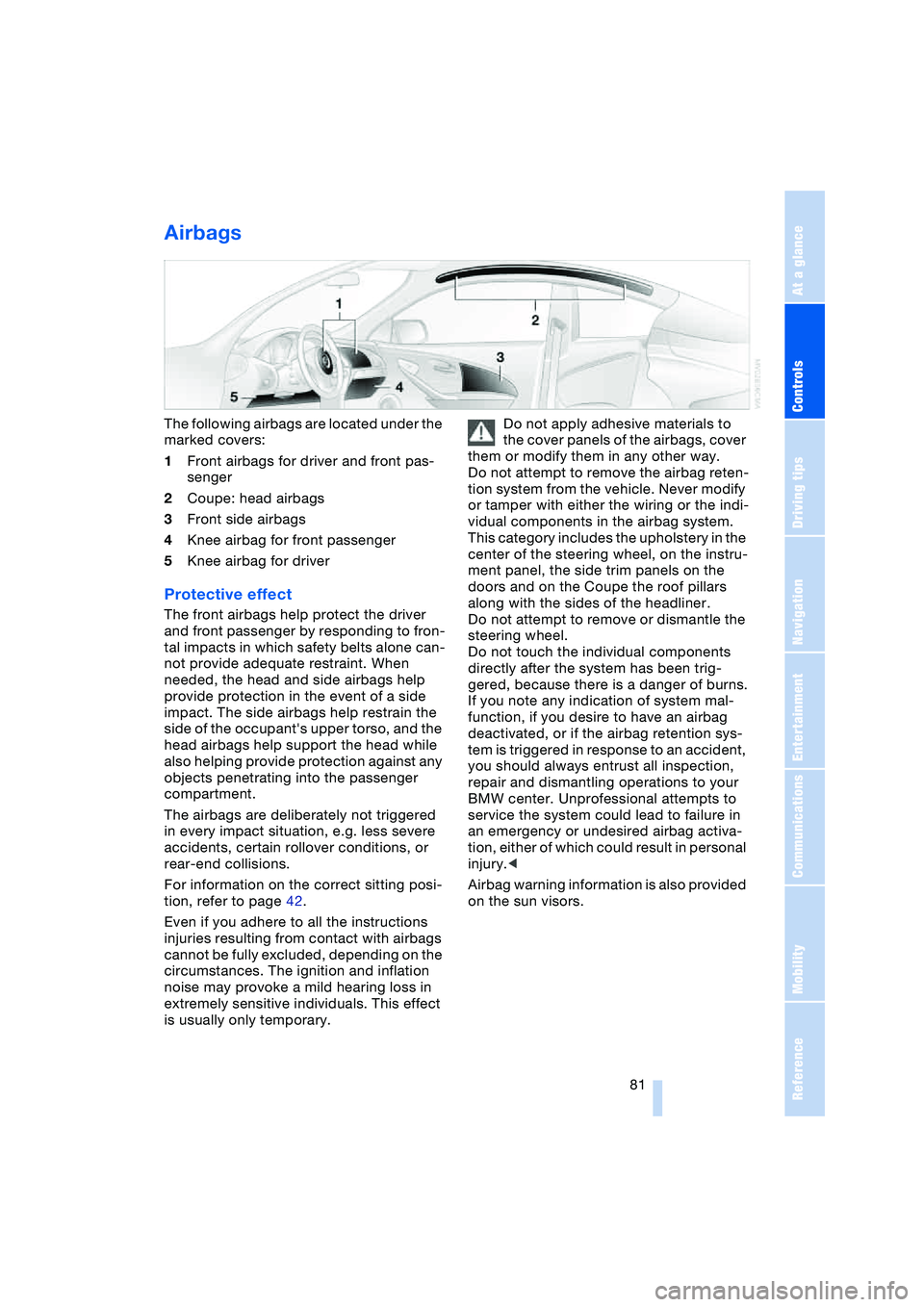
Airbags
The following airbags are located under the
marked covers:
1Front airbags for driver and front pas-
senger
2Coupe: head airbags
3Front side airbags
4Knee airbag for front passenger
5Knee airbag for driver
Protective effect
The front airbags help protect the driver
and front passenger by responding to fron-
tal impacts in which safety belts alone can-
not provide adequate restraint. When
needed, the head and side airbags help
provide protection in the event of a side
impact. The side airbags help restrain the
side of the occupant's upper torso, and the
head airbags help support the head while
also helping provide protection against any
objects penetrating into the passenger
compartment.
The airbags are deliberately not triggered
in every impact situation, e.g. less severe
accidents, certain rollover conditions, or
rear-end collisions.
For information on the correct sitting posi-
tion, refer to page 42.
Even if you adhere to all the instructions
injuries resulting from contact with airbags
cannot be fully excluded, depending on the
circumstances. The ignition and inflation
noise may provoke a mild hearing loss in
extremely sensitive individuals. This effect
is usually only temporary.Do not apply adhesive materials to
the cover panels of the airbags, cover
them or modify them in any other way.
Do not attempt to remove the airbag reten-
tion system from the vehicle. Never modify
or tamper with either the wiring or the indi-
vidual components in the airbag system.
This category includes the upholstery in the
center of the steering wheel, on the instru-
ment panel, the side trim panels on the
doors and on the Coupe the roof pillars
along with the sides of the headliner.
Do not attempt to remove or dismantle the
steering wheel.
Do not touch the individual components
directly after the system has been trig-
gered, because there is a danger of burns.
If you note any indication of system mal-
function, if you desire to have an airbag
deactivated, or if the airbag retention sys-
tem is triggered in response to an accident,
you should always entrust all inspection,
repair and dismantling operations to your
BMW center. Unprofessional attempts to
service the system could lead to failure in
an emergency or undesired airbag activa-
tion, either of which could result in personal
injury.<
Airbag warning information is also provided
on the sun visors.
Page 84 of 216
Technology for comfort, convenience and safety
82
Airbag system operational
The airbag warning lamp in the instrument
cluster indicates the operational readiness
of the entire airbag system and the safety
belt tensioners as of ignition key position 1.
The warning lamp goes out after a few sec-
onds.
Airbag system malfunction
Have the airbag system checked
immediately if a malfunction occurs,
as otherwise there is a danger of the sys-
tem not responding in the expected man-
ner to an impact occurring within its normal
response range.<
There is a malfunction in the airbag
system when:
>The warning lamp does not light up as
of ignition key position 1
>The warning lamp remains on continu-
ously
>The warning lamp lights up while the
vehicle is being driven.
Convertible:
Rollover protection system
The rollover protection system is automati-
cally activated in the event of an accident
or a critical driving situation, extreme incli-
nation on the longitudinal or transverse
axis, or loss of ground contact. The rollover
bars located behind the rear head
restraints move out within fractions of a
second.As a supplement to the rollover bar inte-
grated in the windshield frame, the rollover
protection system ensures that all vehicle
occupants have the necessary headroom.
Always keep the path of movement of
the rollover protection system clear.
In less severe accidents, you are protected
by the fastened safety belt and, depending
on the severity of the accident, the belt ten-
sioner and the multistage airbag restraint
system.<
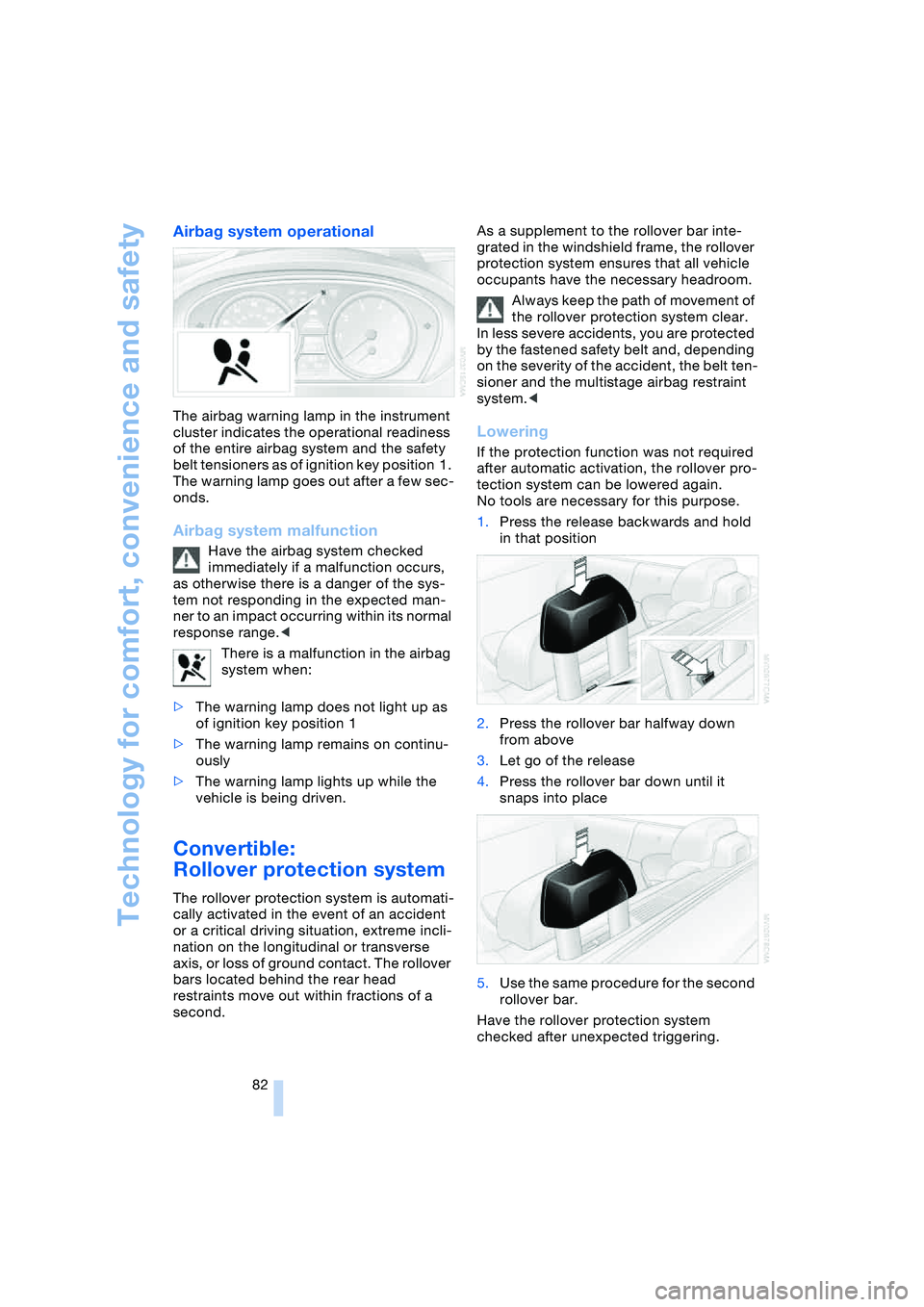
Lowering
If the protection function was not required
after automatic activation, the rollover pro-
tection system can be lowered again.
No tools are necessary for this purpose.
1.Press the release backwards and hold
in that position
2.Press the rollover bar halfway down
from above
3.Let go of the release
4.Press the rollover bar down until it
snaps into place
5.Use the same procedure for the second
rollover bar.
Have the rollover protection system
checked after unexpected triggering.
Page 85 of 216
Controls
83Reference
At a glance
Driving tips
Communications
Navigation
Entertainment
Mobility
Never move the convertible top when
the rollover protection system is
raised.
No changes of any nature may be made to
the individual components of the rollover
protection system and wiring.
Work on the rollover protection system may
only be performed at a BMW center.
Unprofessional attempts to service the sys-
tem can lead to failure or malfunction.
For a system check and to ensure long-
term functioning, you must comply with the
maintenance intervals of the service
requirement display.<
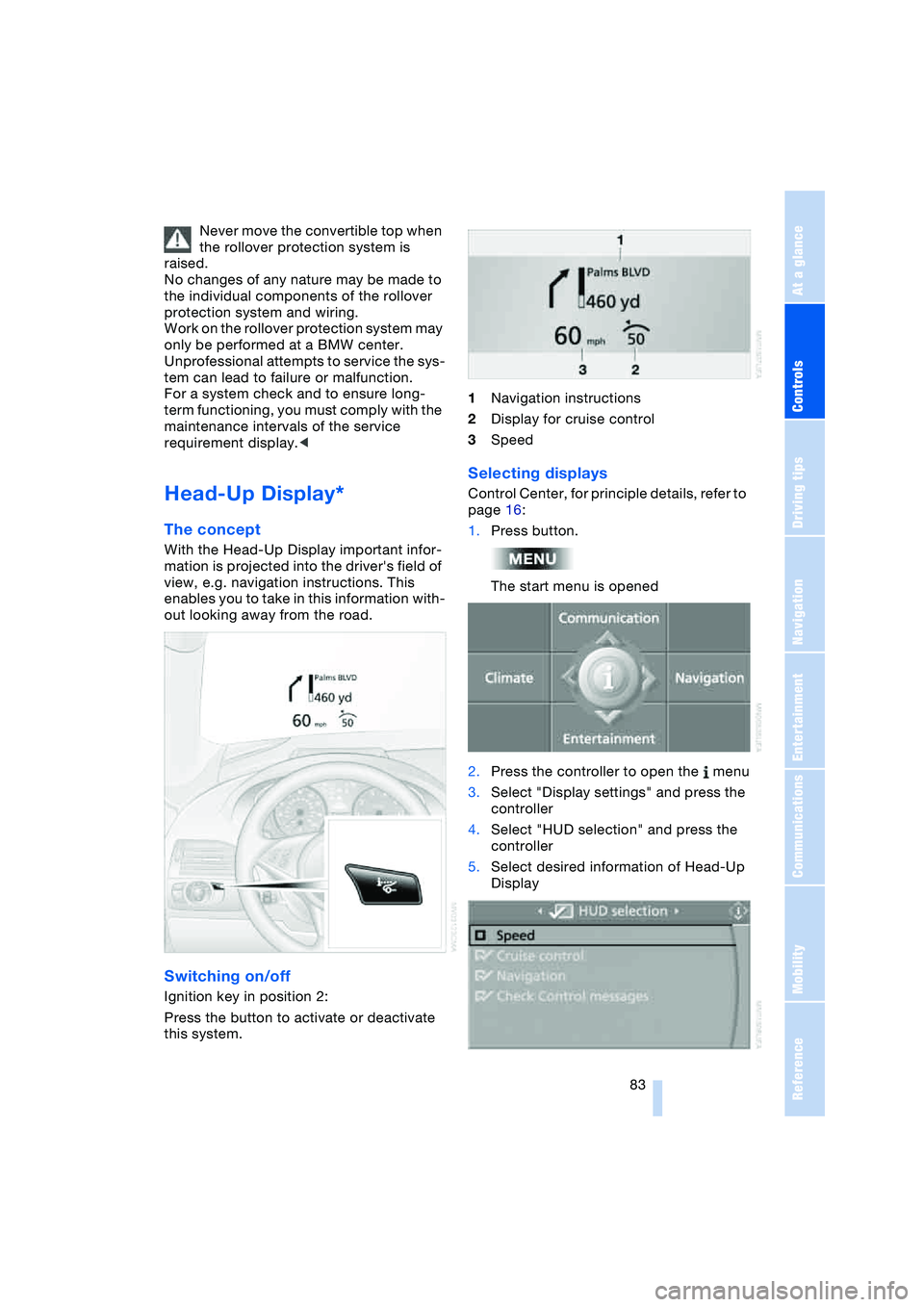
Head-Up Display*
The concept
With the Head-Up Display important infor-
mation is projected into the driver's field of
view, e.g. navigation instructions. This
enables you to take in this information with-
out looking away from the road.
Switching on/off
Ignition key in position 2:
Press the button to activate or deactivate
this system.1Navigation instructions
2Display for cruise control
3Speed
Selecting displays
Control Center, for principle details, refer to
page 16:
1.Press button.
The start menu is opened
2.Press the controller to open the menu
3.Select "Display settings" and press the
controller
4.Select "HUD selection" and press the
controller
5.Select desired information of Head-Up
Display
Page 87 of 216
Controls
85Reference
At a glance
Driving tips
Communications
Navigation
Entertainment
Mobility
Lamps
Parking lamps/low beams
Parking lamps
With the switch in this position, the
front, rear and side vehicle lighting
is switched on. You can use the
parking lamps for parking. For lighting on
one side for parking as an additional fea-
ture, refer to page 86.
Low beams
When you switch off the ignition
with the headlamps on, the head-
lamps go out, and only the parking
lamps remain on.
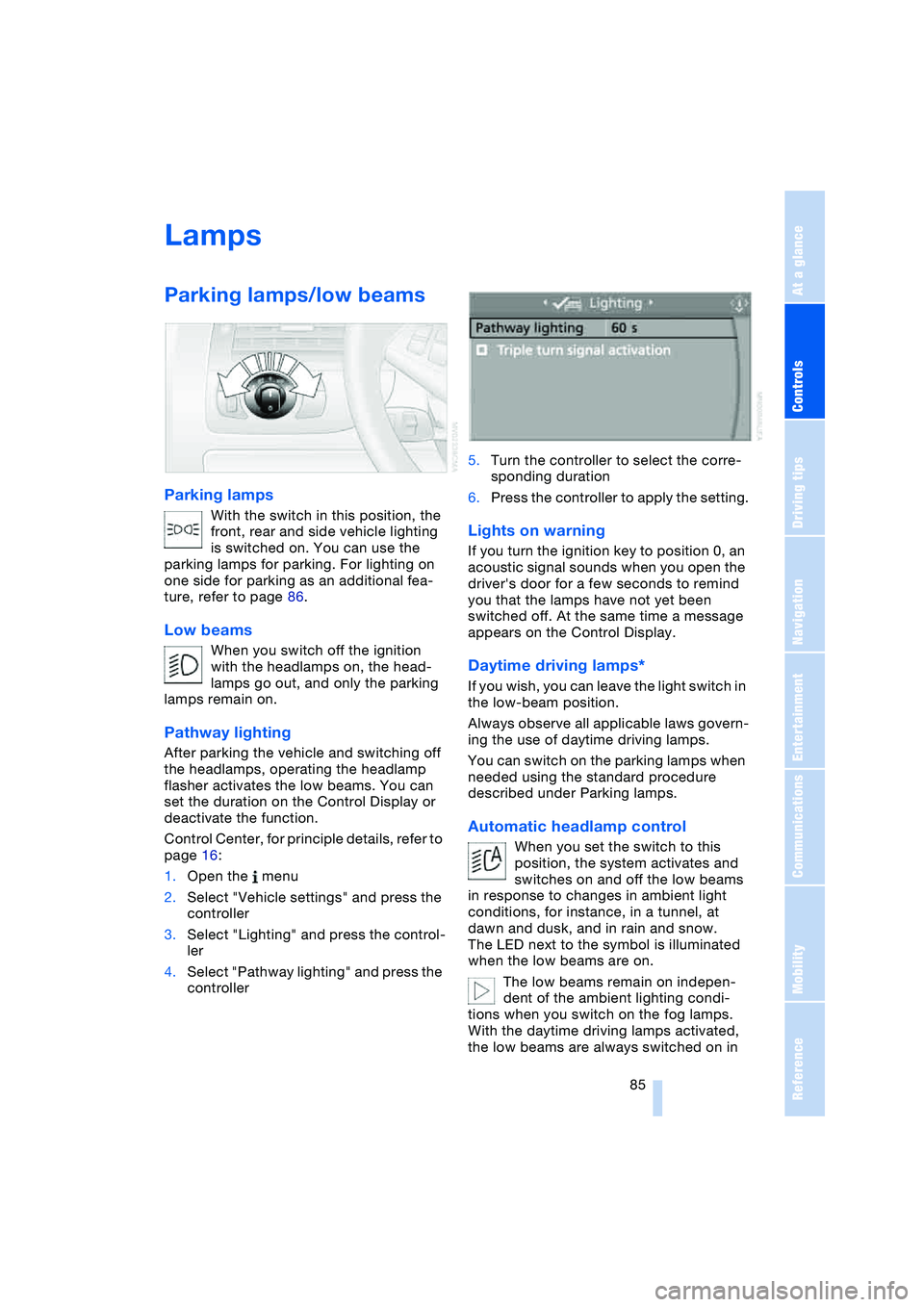
Pathway lighting
After parking the vehicle and switching off
the headlamps, operating the headlamp
flasher activates the low beams. You can
set the duration on the Control Display or
deactivate the function.
Control Center, for principle details, refer to
page 16:
1.Open the menu
2.Select "Vehicle settings" and press the
controller
3.Select "Lighting" and press the control-
ler
4.Select "Pathway lighting" and press the
controller5.Turn the controller to select the corre-
sponding duration
6.Press the controller to apply the setting.
Lights on warning
If you turn the ignition key to position 0, an
acoustic signal sounds when you open the
driver's door for a few seconds to remind
you that the lamps have not yet been
switched off. At the same time a message
appears on the Control Display.
Daytime driving lamps*
If you wish, you can leave the light switch in
the low-beam position.
Always observe all applicable laws govern-
ing the use of daytime driving lamps.
You can switch on the parking lamps when
needed using the standard procedure
described under Parking lamps.
Automatic headlamp control
When you set the switch to this
position, the system activates and
switches on and off the low beams
in response to changes in ambient light
conditions, for instance, in a tunnel, at
dawn and dusk, and in rain and snow.
The LED next to the symbol is illuminated
when the low beams are on.
The low beams remain on indepen-
dent of the ambient lighting condi-
tions when you switch on the fog lamps.
With the daytime driving lamps activated,
the low beams are always switched on in