navigation BMW 645CI COUPE&CONVERTIBLE 2004 Repair Manual
[x] Cancel search | Manufacturer: BMW, Model Year: 2004, Model line: 645CI COUPE&CONVERTIBLE, Model: BMW 645CI COUPE&CONVERTIBLE 2004Pages: 216, PDF Size: 3.46 MB
Page 115 of 216
Navigation
Driving tips
113Reference
At a glance
Controls
Communications
Entertainment
Mobility
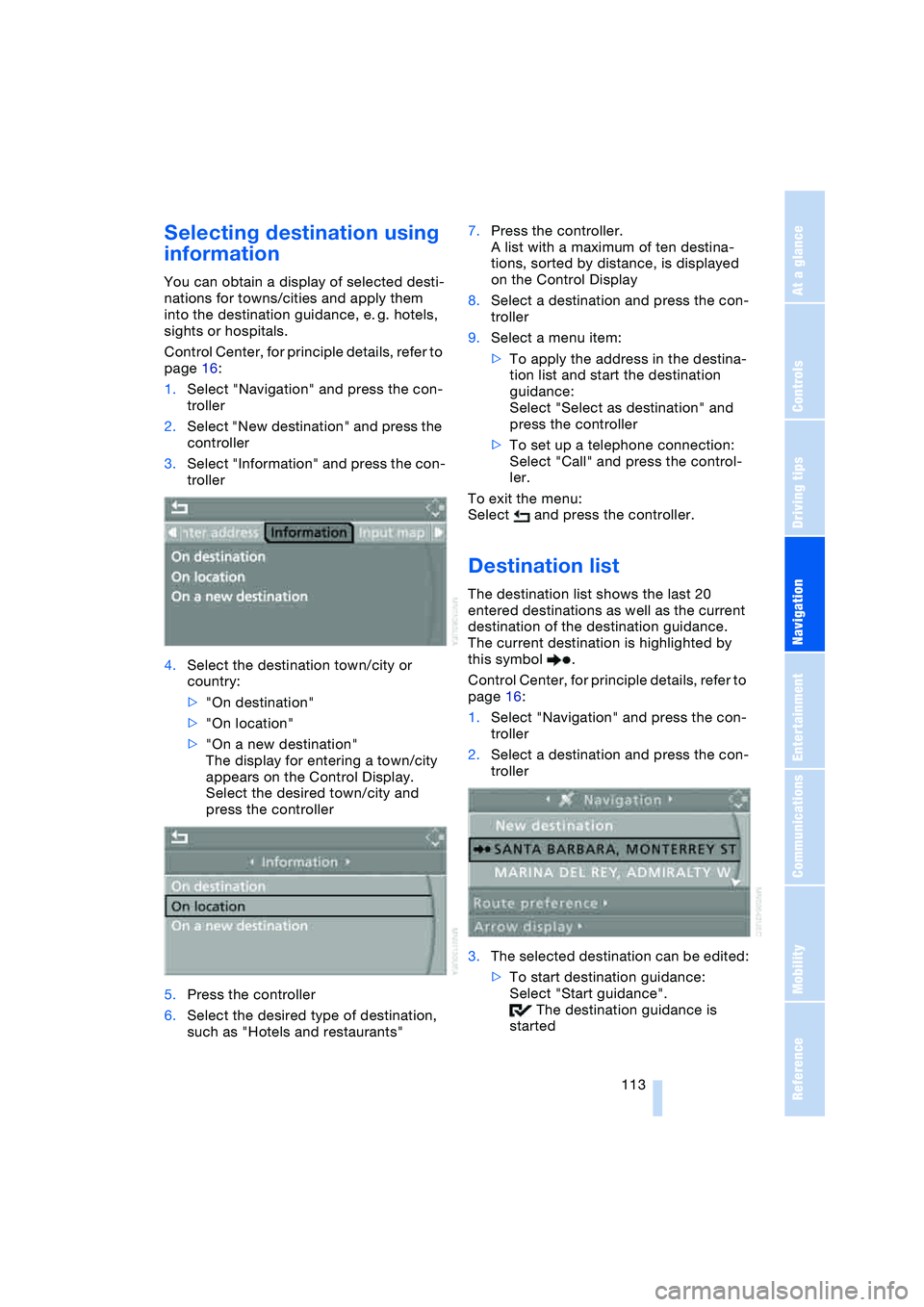
Selecting destination using
information
You can obtain a display of selected desti-
nations for towns/cities and apply them
into the destination guidance, e. g. hotels,
sights or hospitals.
Control Center, for principle details, refer to
page 16:
1.Select "Navigation" and press the con-
troller
2.Select "New destination" and press the
controller
3.Select "Information" and press the con-
troller
4.Select the destination town/city or
country:
>"On destination"
>"On location"
>"On a new destination"
The display for entering a town/city
appears on the Control Display.
Select the desired town/city and
press the controller
5.Press the controller
6.Select the desired type of destination,
such as "Hotels and restaurants"7.Press the controller.
A list with a maximum of ten destina-
tions, sorted by distance, is displayed
on the Control Display
8.Select a destination and press the con-
troller
9.Select a menu item:
>To apply the address in the destina-
tion list and start the destination
guidance:
Select "Select as destination" and
press the controller
>To set up a telephone connection:
Select "Call" and press the control-
ler.
To exit the menu:
Select and press the controller.
Destination list
The destination list shows the last 20
entered destinations as well as the current
destination of the destination guidance.
The current destination is highlighted by
this symbol .
Control Center, for principle details, refer to
page 16:
1.Select "Navigation" and press the con-
troller
2.Select a destination and press the con-
troller
3.The selected destination can be edited:
>To start destination guidance:
Select "Start guidance".
The destination guidance is
started
Page 117 of 216
Navigation
Driving tips
115Reference
At a glance
Controls
Communications
Entertainment
Mobility
3.Select "Apply location as address" and
press the controller.
The given name can be changed. For
operation, refer to Entering a destina-
tion manually, page 110
4.Select "Store in address book" and
press the controller.
You can also enter your current position in
the address book after leaving the sector
covered by the navigation DVD. In this
case, you must enter a name.
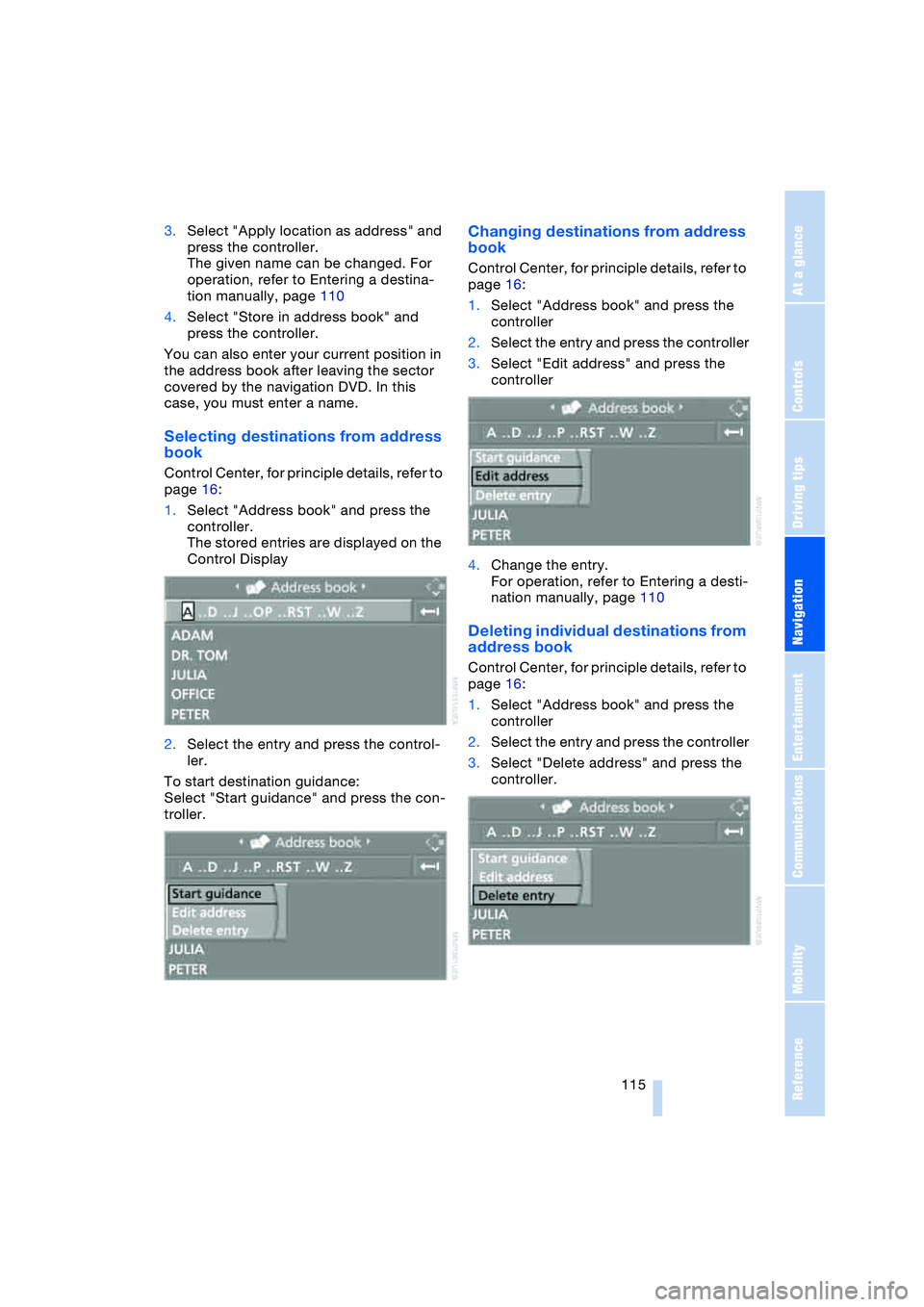
Selecting destinations from address
book
Control Center, for principle details, refer to
page 16:
1.Select "Address book" and press the
controller.
The stored entries are displayed on the
Control Display
2.Select the entry and press the control-
ler.
To start destination guidance:
Select "Start guidance" and press the con-
troller.
Changing destinations from address
book
Control Center, for principle details, refer to
page 16:
1.Select "Address book" and press the
controller
2.Select the entry and press the controller
3.Select "Edit address" and press the
controller
4.Change the entry.
For operation, refer to Entering a desti-
nation manually, page 110
Deleting individual destinations from
address book
Control Center, for principle details, refer to
page 16:
1.Select "Address book" and press the
controller
2.Select the entry and press the controller
3.Select "Delete address" and press the
controller.
Page 118 of 216
Destination entry
116
Deleting all destinations from
address book
Control Center, for principle details, refer to
page 16:
1.Open the start menu
2.Press the controller to open the menu
3.Select "Vehicle settings" and press the
controller
4.Select "Delete data" and press the con-
troller
5.Select "Delete address book" and press
the controller
6.Select "Yes" and press the controller.
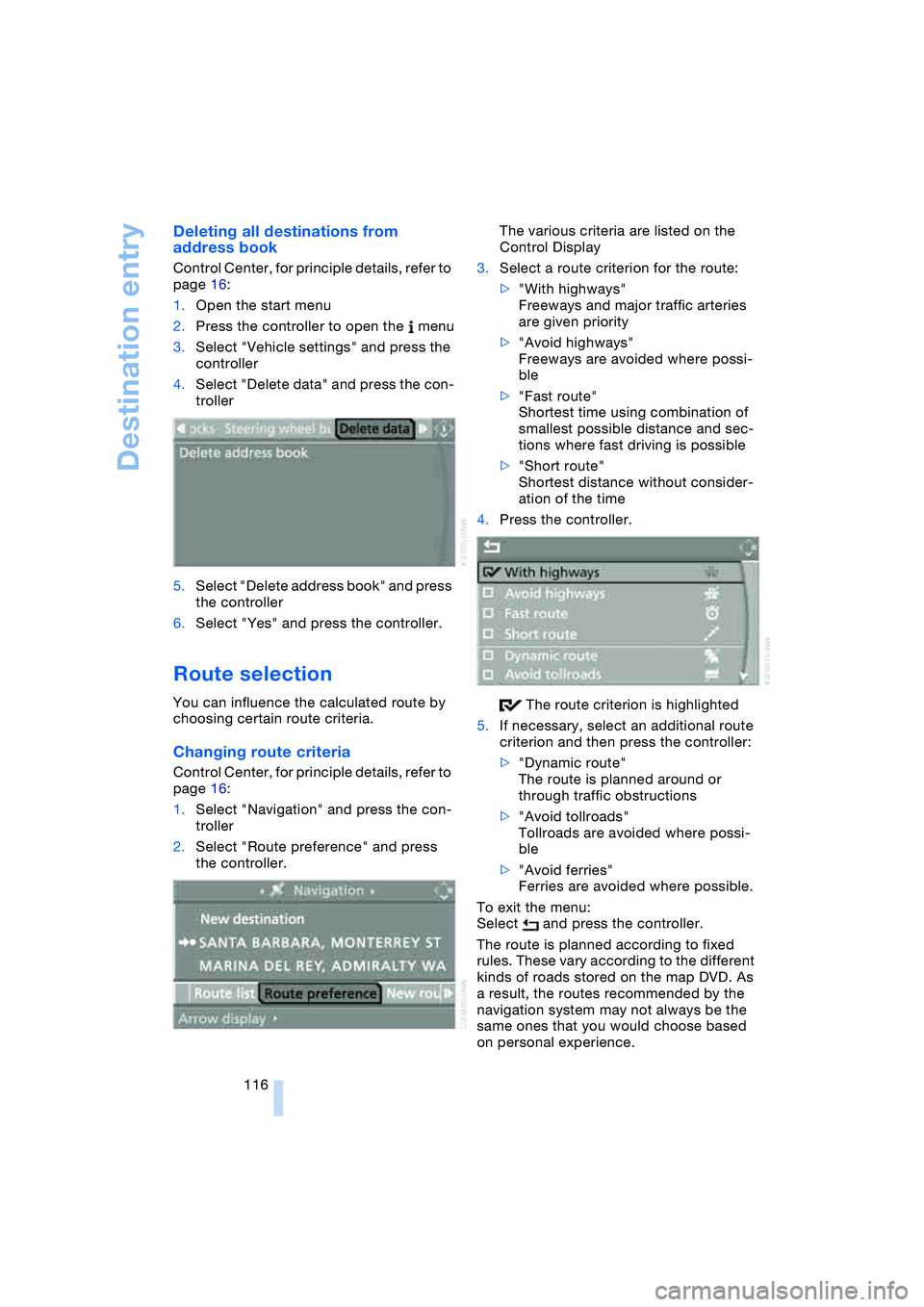
Route selection
You can influence the calculated route by
choosing certain route criteria.
Changing route criteria
Control Center, for principle details, refer to
page 16:
1.Select "Navigation" and press the con-
troller
2.Select "Route preference" and press
the controller.The various criteria are listed on the
Control Display
3.Select a route criterion for the route:
>"With highways"
Freeways and major traffic arteries
are given priority
>"Avoid highways"
Freeways are avoided where possi-
ble
>"Fast route"
Shortest time using combination of
smallest possible distance and sec-
tions where fast driving is possible
>"Short route"
Shortest distance without consider-
ation of the time
4.Press the controller.
The route criterion is highlighted
5.If necessary, select an additional route
criterion and then press the controller:
>"Dynamic route"
The route is planned around or
through traffic obstructions
>"Avoid tollroads"
Tollroads are avoided where possi-
ble
>"Avoid ferries"
Ferries are avoided where possible.
To exit the menu:
Select and press the controller.
The route is planned according to fixed
rules. These vary according to the different
kinds of roads stored on the map DVD. As
a result, the routes recommended by the
navigation system may not always be the
same ones that you would choose based
on personal experience.
Page 119 of 216
Navigation
Driving tips
117Reference
At a glance
Controls
Communications
Entertainment
Mobility
You can change the choice of route when-
ever the destination guidance is active.
Wordmatch principle
The system supports the wordmatch prin-
ciple to make it easier for you to enter the
names of streets or towns/cities. The sys-
tem runs ongoing checks, comparing your
destination entries with the data stored on
the navigation DVD as the basis for instant
response. The user benefits include:
>Names of specific locations can also
vary from the official versions provided
that the spelling of the entry corre-
sponds to a standard form used in
another country.
Example:
Instead of 'München', you can also
enter the English spelling 'Munich' or
the Italian spelling 'Monaco'
>When you are entering the names of
towns/cities and streets the system will
complete them automatically as soon
as enough letters are available to
ensure unambiguous identification
>The system only accepts name entries
beginning with letters that are stored on
the navigation DVD. The system will not
accept nonexistent names and
addresses.
Page 120 of 216
Destination guidance
118
Destination guidance
Starting destination
guidance
Control Center, for principle details, refer to
page 16:
1.Select "Navigation" and press the con-
troller
2.Select the destination from the destina-
tion list and press the controller or enter
a new destination, refer to page 110
3.Select "Start guidance" and press the
controller.
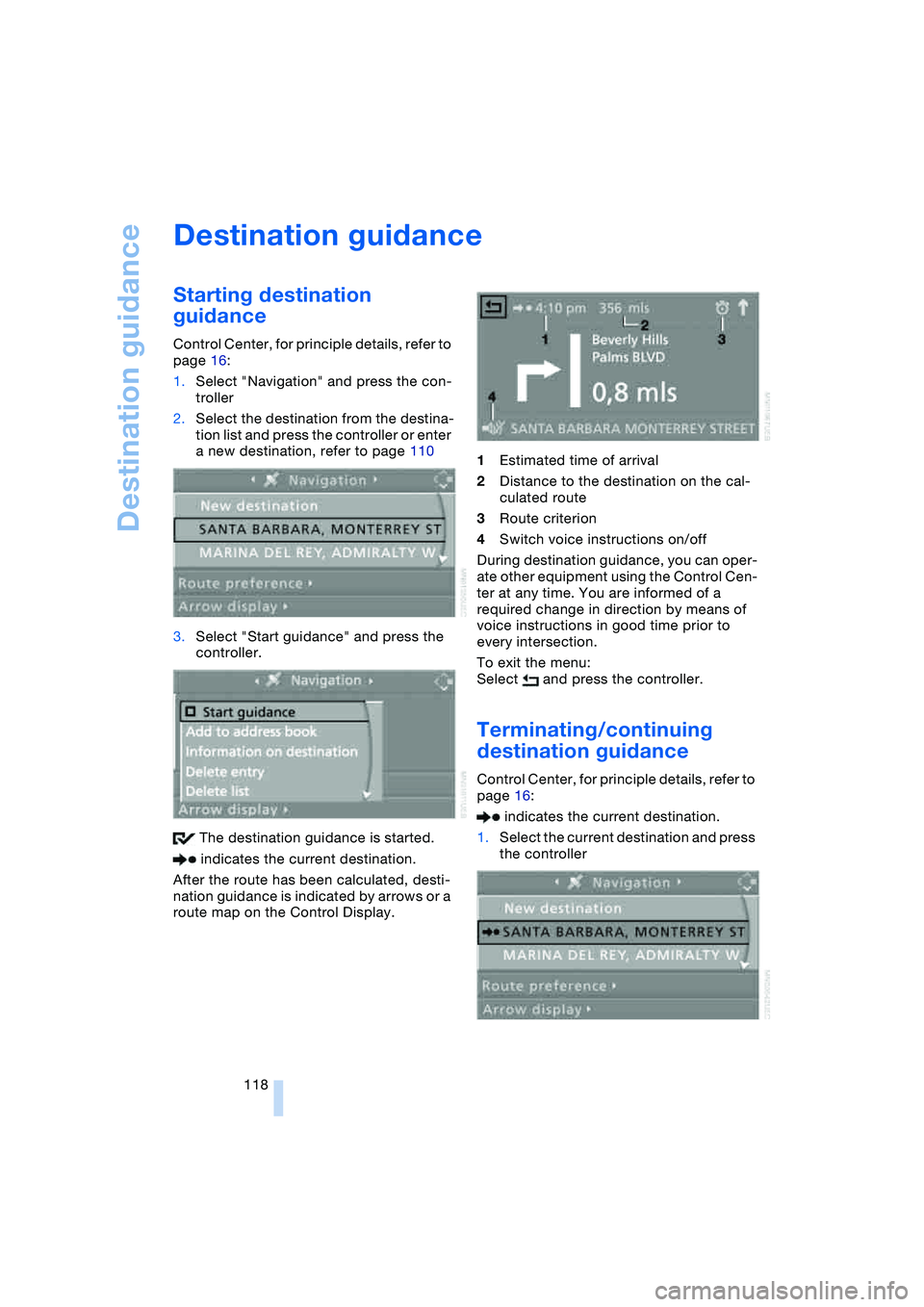
The destination guidance is started.
indicates the current destination.
After the route has been calculated, desti-
nation guidance is indicated by arrows or a
route map on the Control Display.1Estimated time of arrival
2Distance to the destination on the cal-
culated route
3Route criterion
4Switch voice instructions on/off
During destination guidance, you can oper-
ate other equipment using the Control Cen-
ter at any time. You are informed of a
required change in direction by means of
voice instructions in good time prior to
every intersection.
To exit the menu:
Select and press the controller.
Terminating/continuing
destination guidance
Control Center, for principle details, refer to
page 16:
indicates the current destination.
1.Select the current destination and press
the controller
Page 121 of 216
Navigation
Driving tips
119Reference
At a glance
Controls
Communications
Entertainment
Mobility
2.Select "Start guidance" and press the
controller.
The destination guidance is switched
off.
When you park the vehicle before reaching
the entered destination, upon restarting
you will see the question "Continue guid-
ance to dest.?".
To restart destination guidance:
Select "Yes" and press the controller.
Destination guidance
through voice instructions
Switching voice instructions on/off
Control Center, for principle details, refer to
page 16:
1.Open the start menu
2.Press the controller to open the menu
3.Select "Display settings" and press the
controller
4.Select "Languages" and press the con-
troller
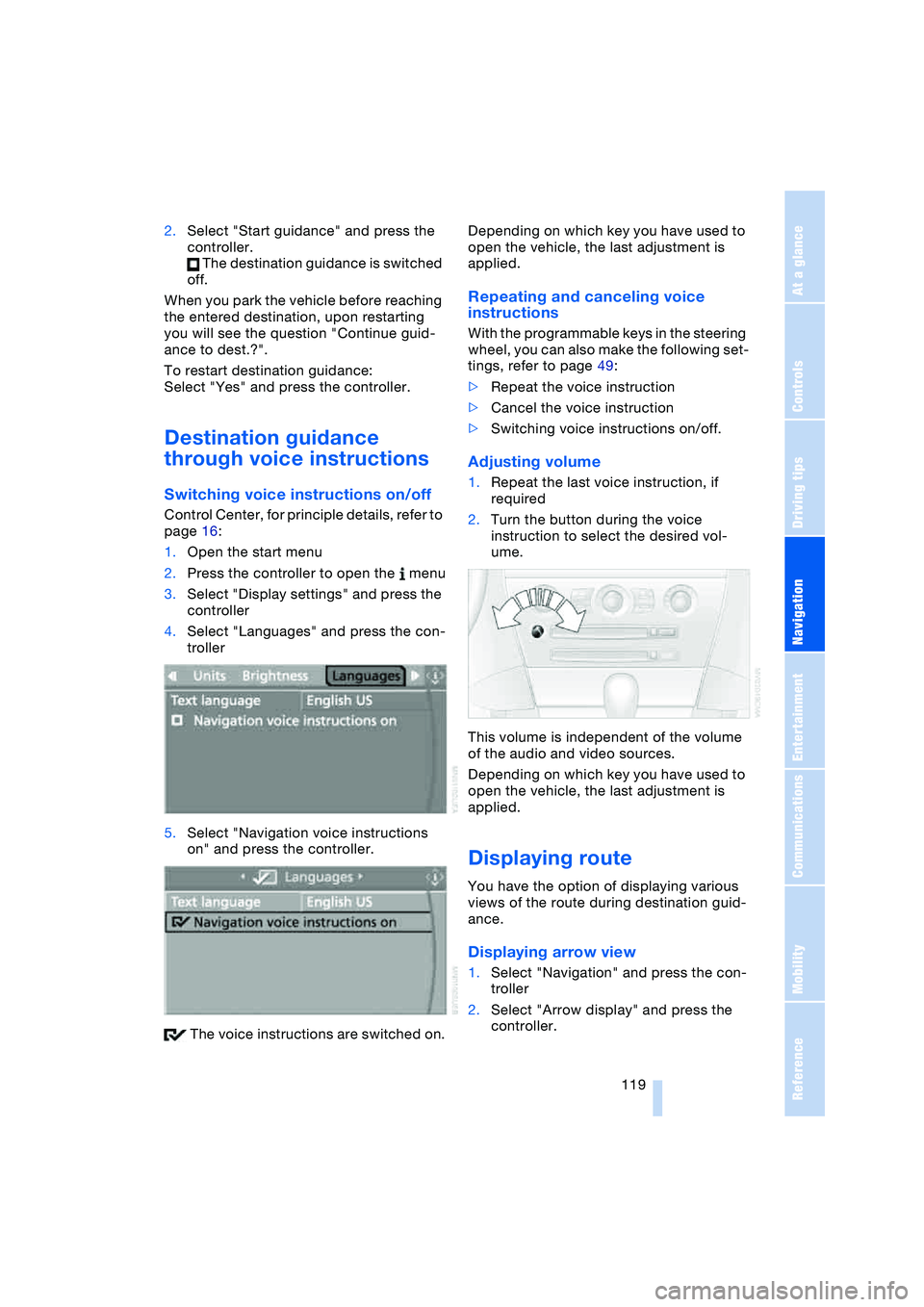
5.Select "Navigation voice instructions
on" and press the controller.
The voice instructions are switched on.Depending on which key you have used to
open the vehicle, the last adjustment is
applied.
Repeating and canceling voice
instructions
With the programmable keys in the steering
wheel, you can also make the following set-
tings, refer to page 49:
>Repeat the voice instruction
>Cancel the voice instruction
>Switching voice instructions on/off.
Adjusting volume
1.Repeat the last voice instruction, if
required
2.Turn the button during the voice
instruction to select the desired vol-
ume.
This volume is independent of the volume
of the audio and video sources.
Depending on which key you have used to
open the vehicle, the last adjustment is
applied.
Displaying route
You have the option of displaying various
views of the route during destination guid-
ance.
Displaying arrow view
1.Select "Navigation" and press the con-
troller
2.Select "Arrow display" and press the
controller.
Page 122 of 216
Destination guidance
120
Displaying route map
You can have your current position dis-
played on a map. After starting the destina-
tion guidance, the planned route is shown
on the map.
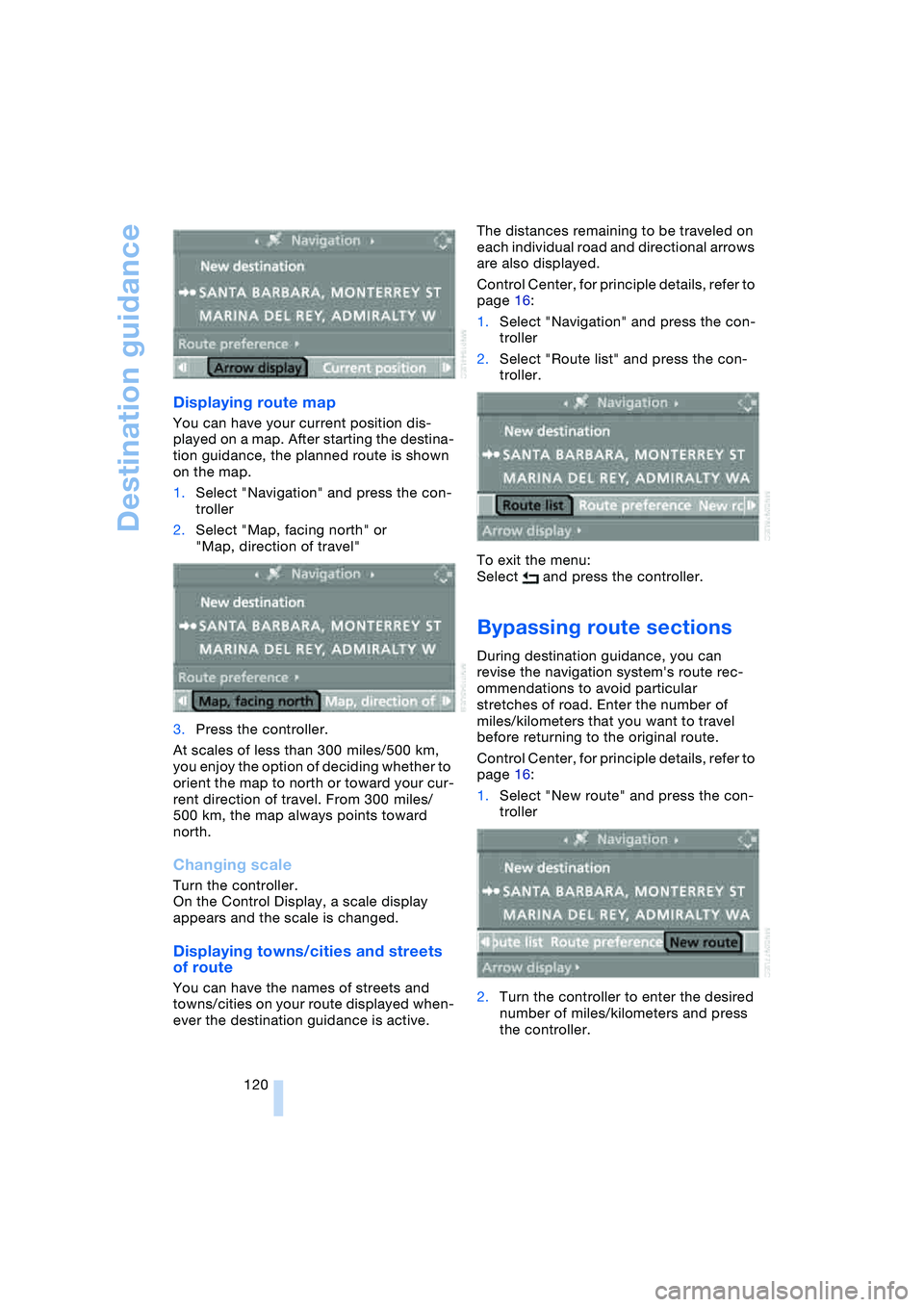
1.Select "Navigation" and press the con-
troller
2.Select "Map, facing north" or
"Map, direction of travel"
3.Press the controller.
At scales of less than 300 miles/500 km,
you enjoy the option of deciding whether to
orient the map to north or toward your cur-
rent direction of travel. From 300 miles/
500 km, the map always points toward
north.
Changing scale
Turn the controller.
On the Control Display, a scale display
appears and the scale is changed.
Displaying towns/cities and streets
of route
You can have the names of streets and
towns/cities on your route displayed when-
ever the destination guidance is active.The distances remaining to be traveled on
each individual road and directional arrows
are also displayed.
Control Center, for principle details, refer to
page 16:
1.Select "Navigation" and press the con-
troller
2.Select "Route list" and press the con-
troller.
To exit the menu:
Select and press the controller.
Bypassing route sections
During destination guidance, you can
revise the navigation system's route rec-
ommendations to avoid particular
stretches of road. Enter the number of
miles/kilometers that you want to travel
before returning to the original route.
Control Center, for principle details, refer to
page 16:
1.Select "New route" and press the con-
troller
2.Turn the controller to enter the desired
number of miles/kilometers and press
the controller.
Page 123 of 216
Navigation
Driving tips
121Reference
At a glance
Controls
Communications
Entertainment
Mobility
To exit from the menu without changing
the route:
Select and press the controller
3."Calculate" is used to recalculate the
route.
Page 124 of 216
What to do if …
122
What to do if …
What to do if …
>you request the current position of your
vehicle, but do not receive a precise
display?
The system is unable to receive enough
GPS signals at your current position
owing to obstructions, your current
position is not yet available on your nav-
igation DVD, or the system is in the pro-
cess of calculating your current posi-
tion. As a rule, reception is guaranteed
under a clear sky
>the destination guidance does not
apply a destination?
The data of the destination is not stored
on the navigation DVD that is loaded.
Select a destination that is as close as
possible to the original
>the destination guidance does not
apply an address without the street
name?
On the navigation DVD, no downtown
area can be determined for the city or
town entered. Enter any street, or a
destination such as the railway station
etc., then start the destination guidance>you want to enter a destination for the
destination guidance, but it is not pos-
sible to select the letters for your
desired entry?
The destination data is not recorded on
the navigation DVD that is loaded. In
this case, the system will not offer you
any letters to choose from. Select a
destination that is as close as possible
to the original
>the system stops furnishing directions
on which way to turn as you approach
intersections?
You are driving in an area that has not
yet been completely recorded on the
navigation DVD. Instead of an arrow
indicating a turn, you will see an arrow
which indicates the general direction of
your planned route. Or you have left the
recommended route and the system
requires a few seconds to calculate a
new recommended route
>the battery has been disconnected?
It will take approx. 10 minutes for the
system to resume operation.
Page 125 of 216
Navigation
Driving tips
123Reference
At a glance
Controls
Communications
Entertainment
Mobility