brake BMW 645CI COUPE&CONVERTIBLE 2005 Owner's Manual
[x] Cancel search | Manufacturer: BMW, Model Year: 2005, Model line: 645CI COUPE&CONVERTIBLE, Model: BMW 645CI COUPE&CONVERTIBLE 2005Pages: 217, PDF Size: 7.92 MB
Page 176 of 217
Mobility
175Reference
At a glance
Controls
Driving tips
Communications
Navigation
Entertainment
Engine compartment
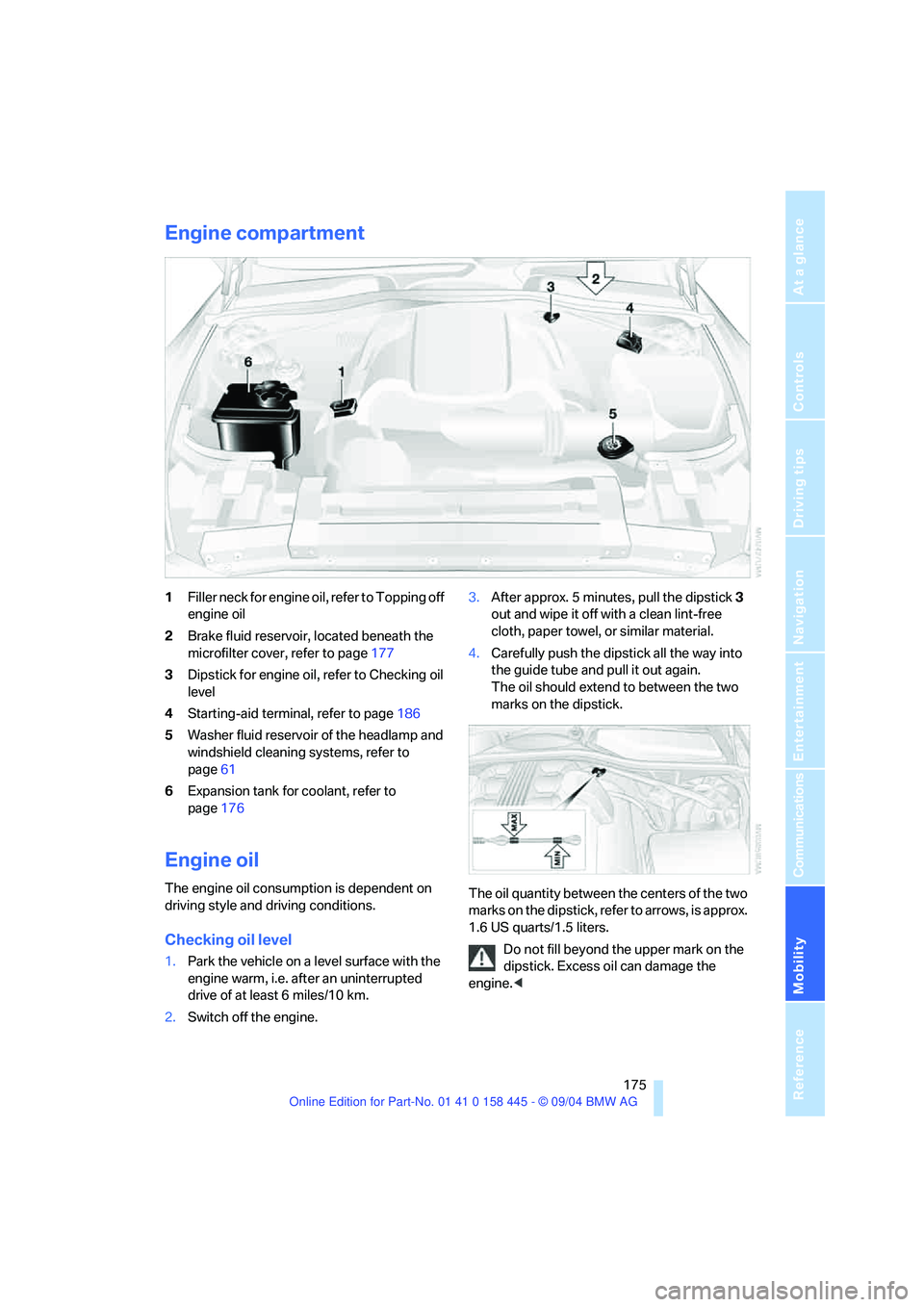
1Filler neck for engine oil, refer to Topping off
engine oil
2Brake fluid reservoir, located beneath the
microfilter cover, refer to page177
3Dipstick for engine oil, refer to Checking oil
level
4Starting-aid terminal, refer to page186
5Washer fluid reservoir of the headlamp and
windshield cleaning systems, refer to
page61
6Expansion tank for coolant, refer to
page176
Engine oil
The engine oil consumption is dependent on
driving style and driving conditions.
Checking oil level
1.Park the vehicle on a level surface with the
engine warm, i.e. after an uninterrupted
drive of at least 6 miles/10 km.
2.Switch off the engine.3.After approx. 5 minutes, pull the dipstick3
out and wipe it off with a clean lint-free
cloth, paper towel, or similar material.
4.Carefully push the dipstick all the way into
the guide tube and pull it out again.
The oil should extend to between the two
marks on the dipstick.
The oil quantity between the centers of the two
marks on the dipstick, refer to arrows, is approx.
1.6 US quarts/1.5 liters.
Do not fill beyond the upper mark on the
dipstick. Excess oil can damage the
engine.<
Page 178 of 217
Mobility
177Reference
At a glance
Controls
Driving tips
Communications
Navigation
Entertainment
2.Turn the cap of the expansion tank counter-
clockwise to allow any accumulated pres-
sure to escape, then continue turning to
open.
3.The coolant level is correct when it lies
between the Min and Max mark, also refer to
the drawing next the filler neck.
4.If the coolant is low, slowly add coolant up to
the specified level – do not overfill.
5.Turn the cap until it clicks.
6.Have the reason for the coolant loss elimi-
nated as soon as possible.
Brake system
Malfunction
Brake fluid
The warning lamp lights up in red
in spite of the handbrake being
released; a message appears on the
Control Display.
Stop the vehicle immediately.
The brake fluid in the reservoir has fallen to
below the minimum level. At the same time, a
significantly longer brake pedal path may be
noticeable. Have the system checked immedi-
ately by a BMW center.
Warning lamp for Canadian models.
When you continue driving, an increased
brake pedal path can be necessary, and
significantly longer braking distances might be
required. Please adapt your driving style
accordingly.<
Brake pads
The warning lamp lights up in red
in spite of the handbrake being
released; a message appears on the
Control Display. The brake pads have reached
their minimum pad thickness. Have the brake
pads replaced as soon as possible.Warning lamp for Canadian models.
For your own safety: use only brake pads
that BMW has approved for your particu-
lar vehicle model. As BMW cannot assess the
suitability of other brake pads for use on your
vehicle, BMW is unable to assume continued
responsibility for the vehicle's operating safety
if non-approved pads are installed.<
Page 179 of 217
Maintenance
178
Maintenance
The BMW Maintenance
System
The BMW maintenance system supports the
preservation of the traffic and operating safety
of your BMW. The service schedule also
includes operations related to the vehicle's
comfort and convenience features, such as
replacement of the filters for the inside air. The
ultimate objective is to ensure economical
maintenance by providing the ideal service for
your vehicle.
Should the day come when you decide to sell
your BMW, you will find that a complete dealer
service history is an asset of inestimable value.
CBS Condition Based Service
Sensors and special algorithms take the differ-
ent driving conditions of your BMW into
account. Condition Based Service uses this to
determine the current and future service
requirements. By letting you define a service
and maintenance regimen that reflects your
own individual requirements, the system builds
the basis for trouble-free driving.
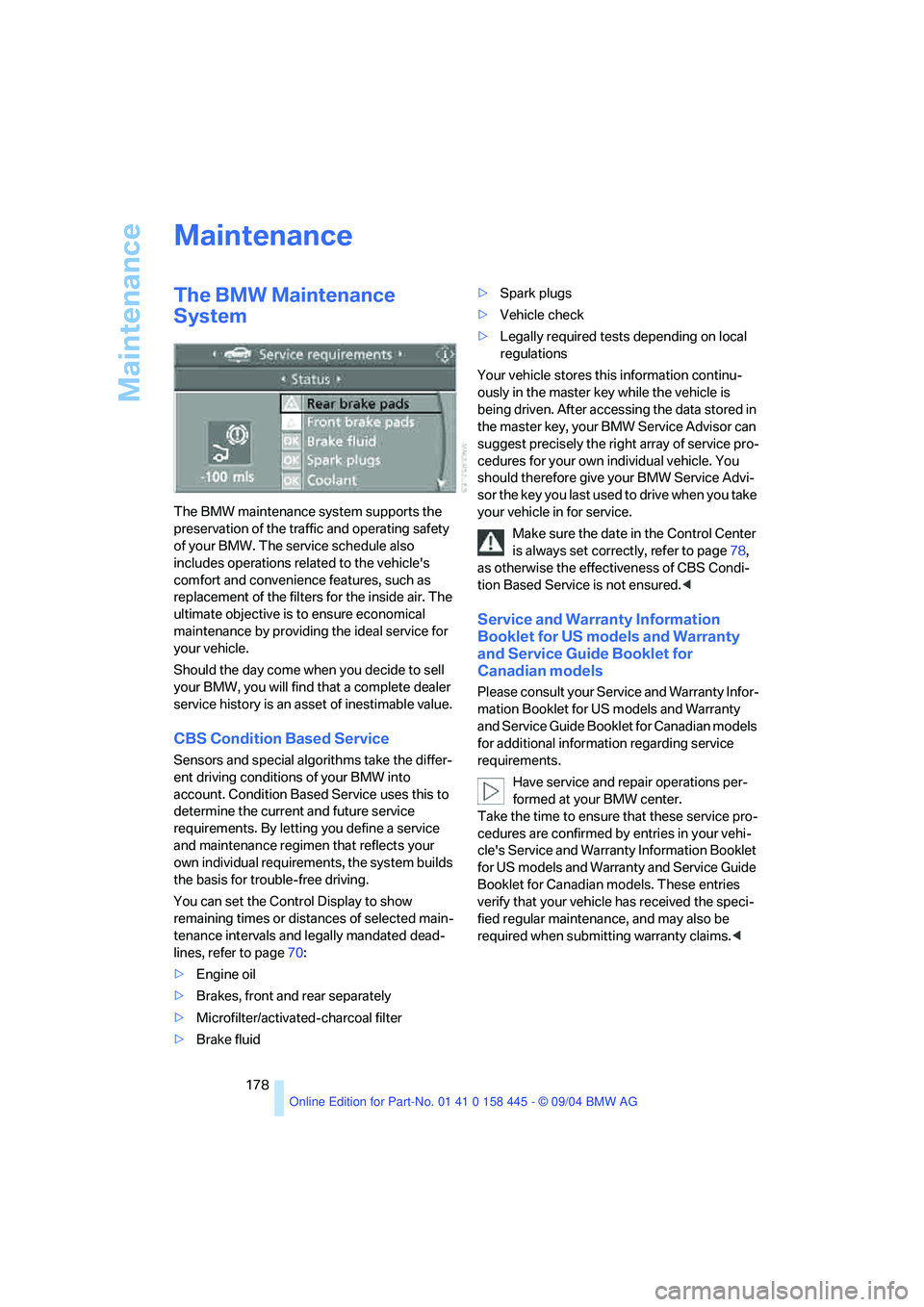
You can set the Control Display to show
remaining times or distances of selected main-
tenance intervals and legally mandated dead-
lines, refer to page70:
>Engine oil
>Brakes, front and rear separately
>Microfilter/activated-charcoal filter
>Brake fluid>Spark plugs
>Vehicle check
>Legally required tests depending on local
regulations
Your vehicle stores this information continu-
ously in the master key while the vehicle is
being driven. After accessing the data stored in
the master key, your BMW Service Advisor can
suggest precisely the right array of service pro-
cedures for your own individual vehicle. You
should therefore give your BMW Service Advi-
sor the key you last used to drive when you take
your vehicle in for service.
Make sure the date in the Control Center
is always set correctly, refer to page78,
as otherwise the effectiveness of CBS Condi-
tion Based Service is not ensured.<
Service and Warranty Information
Booklet for US models and Warranty
and Service Guide Booklet for
Canadian models
Please consult your Service and Warranty Infor-
mation Booklet for US models and Warranty
and Service Guide Booklet for Canadian models
for additional information regarding service
requirements.
Have service and repair operations per-
formed at your BMW center.
Take the time to ensure that these service pro-
cedures are confirmed by entries in your vehi-
cle's Service and Warranty Information Booklet
for US models and Warranty and Service Guide
Booklet for Canadian models. These entries
verify that your vehicle has received the speci-
fied regular maintenance, and may also be
required when submitting warranty claims.<
Page 183 of 217
Replacing components
182
Sidemarker
Bulb 5 watts, WY5W ST
The bulb can be replaced via a cover at the front
of the wheel well, refer to the description for
turn signal lamp 2.
1.The bulb holder of the sidemarker lamp is
located toward the outside of the vehicle
next to the bulb holder of turn signal lamp 2.
2.Turn the bulb holder to the left and remove.
3.Remove and replace the bulb.
Side turn signals
Bulb 5 watts, WY 5 W
1.Press against the front edge of the lamp
with the tip of your finger, then push it to the
rear, release the snap connection at the
front and take it off the trim strip.
2.Turn the bulb holder 905 to the left and
remove.
3.Remove and replace the bulb.
Tail lamps
The roadside parking, rear and brake
lamps are LEDs. The backup lamps are
fitted with longlife bulbs. Please contact a BMW
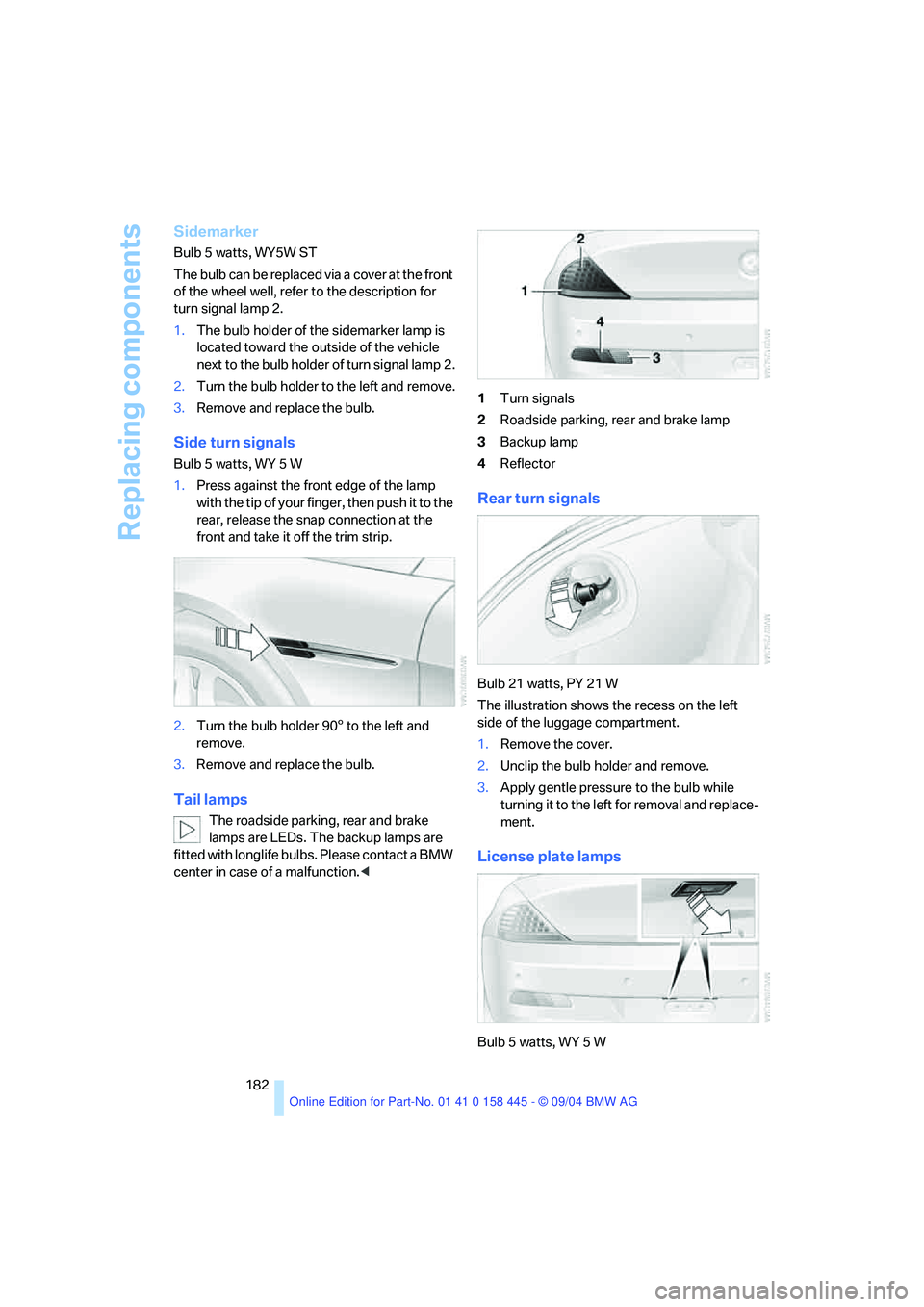
center in case of a malfunction.<1Turn signals
2Roadside parking, rear and brake lamp
3Backup lamp
4Reflector
Rear turn signals
Bulb 21 watts, PY 21 W
The illustration shows the recess on the left
side of the luggage compartment.
1.Remove the cover.
2.Unclip the bulb holder and remove.
3.Apply gentle pressure to the bulb while
turning it to the left for removal and replace-
ment.
License plate lamps
Bulb 5 watts, WY 5 W
Page 200 of 217
199Reference
At a glance
Controls
Driving tips
Communications
Navigation
Entertainment
Mobility
Everything from A to Z
Index
"..." Identifies Control Display
texts used to select
individual functions,
pointing out where these are
located.
A
ABS Antilock Brake
System81
– indicator lamp83
– malfunction83
ACC, refer to Active cruise
control62
Acceleration assistant with
SMG59
Accessories, refer to Your
individual vehicle5
Activated-charcoal filter97
"Activation time" for
independent ventilation98
Active cruise control62
– indicator lamps64
– malfunction68
– selecting distance65
Active roll stabilization83
Active steering85
– initializing system86
– warning lamp85
Adapting temperature in
upper body region97
Adaptive brake lamps, refer to
Brake Force Display86
Adaptive Head Light92
"Add digits" for portable
phone153
"Address book" for
navigation120
Address for navigation
– deleting121
– entering115
– selecting120
– storing current position120"Add to destination list"117
Adhesive bandages, refer to
First-aid kit186
Adjusting the temperature
with automatic climate
control95
Adjusting the thigh support45
Adjusting tone during audio
operation, refer to Tone
control133
"After opening door"46
"After unlocking"46
Airbags86
– deactivating, Coupe52
– sitting safely44
– warning lamp87
Air distribution
– automatic95
– manual96
Airing, refer to Ventilation97
Air recirculation, refer to AUC
Automatic recirculated-air
control95
"Air recirculation on / off"51
Air vents, refer to
Ventilation94
Air volume95
AKI, refer to Fuel
specifications167
Alarm system34
– avoiding unintentional
alarms35
– interior motion sensor35
– switching off alarm34
– switching off tilt alarm
sensor and interior motion
sensor35
– tilt alarm sensor35
All around the center
console14
All around the steering
wheel10
"All channels"141"All doors"29
All-season tires, refer to
Winter tires172
"AM", reception
range133,136
Antenna for portable
phone150
Antifreeze
– coolant176
– washer fluid61
Antilock Brake System
ABS81
– indicator lamp83
Anti-theft alarm system, refer
to Alarm system34
Anti-theft system29
Anti-trapping mechanism
– glass sunroof38
– power windows37
Approved axle loads, refer to
Weights192
Approved gross vehicle
weight, refer to Weights192
Armrest, refer to Center
armrest102
Arrival time
– refer to Computer75
– refer to Starting destination
guidance124
"Arrow display" during
Navigation127
Ashtray103
Assist, refer to BMW
Assist159
Assistance systems, refer to
Driving stability control
systems81
Assistance window20
"Assist. window off"21
AUC Automatic recirculated-
air control95
"Audio"133
Page 201 of 217
Everything from A to Z
200 Audio132
– controls132
– switching on/off132
– tone control133
– volume133
Automatic
– air distribution95
– air volume95
– cruise control61,62
– headlamp control91
– service notification160
– steering wheel adjustment,
refer to Easy entry/exit50
– storing stations138
Automatic car washes110
– also refer to the Caring for
your vehicle brochure
Automatic climate control94
– automatic air distribution95
– convertible program97
– settings using Control
Center96
– switching off96
Automatic curb monitor47
"Automatic programs"97
Automatic recirculated-air
control AUC95
Automatic station search137
Automatic transmission with
Steptronic58
– convenience start55
– Dynamic Driving Control59
– interlock54
– kick-down58
– selector lever interlock58
– shiftlock58
– starting engine55
– towing188
– tow-starting189
"Automatic ventilation"98
AUTO program with
automatic climate control95
"Autostore" on the
radio136,138
Average fuel consumption74
– setting units77
Average speed74"Avoid ferries" for
navigation123
Avoid freeways for
navigation122
"Avoid highways" for
navigation122
Avoiding unintentional
alarms35
"Avoid tollroads" for
navigation123
Axle loads, refer to
Weights192
"A - Z"153
B
Backrests, refer to Seats44
Backup lamps, refer to
Reverse gear56
Balance, refer to Tone
control134
Balance adjustment in audio
mode, right/left134
Bandages, refer to First-aid
kit186
"Bass", refer to Tone
control134
Bass, refer to Tone
control133
Battery
– jump starting186
– refer to Vehicle battery183
Being towed188
Belts, refer to Safety belts48
Beverage holder, refer to Cup
holders103
Black ice, refer to Ice
warning69
Blower, refer to Air volume95
BMW Assist159
– enabling159
– services offered160
BMW maintenance
system178
"BMW Service"161
"BMW Service settings"159
Bottle holder, refer to Cup
holders103Brake Assistant, refer to DBC
Dynamic Brake Control81
Brake fluid177
– warning lamp177
Brake Force Display86
Brake hydraulic system177
Brake lamps
– Brake Force Display86
– replacing bulbs182
Brake pads177
– breaking-in108
Brake rotors110
Brakes109
– ABS Antilock Brake
System81
– brake fluid177
– Brake Force Display86
– brake pads108,177
– breaking-in108
– CBC Cornering Brake
Control81
– handbrake55
Brake system108
– brake fluid level177
– brake pads108,177
– brake rotors110
– breaking-in108
– warning lamp13,83,177
Brake wear warning
– brake pads177
Braking
– electronic brake-force
distribution81
– refer to Braking safely109
Breakdown assistance161
Breakdown services, refer to
Roadside Assistance186
Breaking-in108
– clutch108
– differential108
Break wear warning
– warning lamp177
"Brightness"77
Buttons on steering wheel11
Bypassing route sections128
Page 202 of 217
Reference 201
At a glance
Controls
Driving tips
Communications
Navigation
Entertainment
Mobility
C
California law
– Event Data Recorders179
California Proposition 65
Warning6
"Call"153
Call
– accepting152
– display accepted153
– ending152
– in absence153
– starting152
Calling
– from phone book153
– from the Top 8 list153
– redialing153
"Call sender"156
Can holder, refer to Cup
holders103
Capacities195
Capacity of the luggage
compartment192
Car battery, refer to Vehicle
battery183
Car care, refer to the Caring
for your vehicle brochure
Car-care products, refer to the
Caring for your vehicle
brochure
"Car data"74
Care, refer to the Caring for
your vehicle brochure
Cargo loading
– securing cargo111
– stowing cargo111
– vehicle110
Caring for artificial leather,
refer to the Caring for your
vehicle brochure
Caring for leather, refer to the
Caring for your vehicle
brochure
Caring for light-alloy wheels,
refer to the Caring for your
vehicle brochure
Caring for plastic, refer to the
Caring for your vehicle
brochureCaring for the carpet, refer to
the Caring for your vehicle
brochure
Caring for the vehicle finish,
refer to the Caring for your
vehicle brochure
Car keys, refer to Key set28
Car phone151
– installation location, refer to
Center armrest102
– refer to Portable phone150
– refer to separate Owner's
Manual
Car radio, refer to Radio136
Car wash110
– also refer to the Caring for
your vehicle brochure
– refer to Before driving into a
car wash110
Catalytic converter, refer to
Hot exhaust system108
"Categories"141
CBC Cornering Brake
Control81
CBS Condition Based
Service178
"CD"133,143
CD changer143
– controls132
– fast forward/reverse145
– installation location145
– playing a track145
– random play sequence145
– repeating a track144
– selecting a CD144
– selecting a track144
– switching on/off132
– tone control133
– volume133
CD player143
– controls132
– fast forward/reverse145
– playing a track145
– random play sequence145
– repeating a track144
– selecting a track144
– switching on/off132
– tone control133
– volume133Center armrest
– adjusting the height102
– front102
Center console14
"Central locking"29
Central locking system29
– from inside vehicle31
Changes, technical, refer to
For your own safety6
Changing a wheel183
Changing gear
– automatic transmission with
Steptronic58
Changing language on
Control Display78
Changing measurement units
on Control Display77
Changing wheels183
CHECK button73
Check Control71
"Check Control
messages"73
Check Gas Cap166
Checking the air pressure,
refer to Tire inflation
pressure168
Child's seats, refer to Child-
restraint systems52
Child-restraint fixing system
LATCH53
Child restraints52
Child-restraint systems52
Chrome parts, care, refer to
the Caring for your vehicle
brochure
Cigarette lighter103
Cleaning, refer to the Caring
for your vehicle brochure
Cleaning the windshield, refer
to Wiper system61
"Climate"96
Clock69
– 12h/24h mode78
– setting time and date78
Closing
– from inside31
– from outside29
Clothes hooks, Coupe102
Cockpit10
Page 203 of 217
Everything from A to Z
202 Cold start, refer to Starting
engine54
"Communication"152
"Communication
settings"159
Compact disc
– refer to CD changer143
– refer to CD player143
Computer74
– clock, 12h/24h clock
mode78
– displays on Control
Display74
– hour signal78
"Concert hall"135
Condition Based Service
CBS178
"Confirmation"30
Confirmation signals for
locking and unlocking30
Connecting a vacuum cleaner,
refer to Socket103
Consumption display, refer to
Average fuel
consumption74
"Continue guidance to
destination?"125
Control Center16
– adjusting brightness77
– assistance window20
– automatic climate control96
– changing settings19,77
– changing the menu page19
– changing time and date78
– confirming selection or
entry19
– controller16
– display, menus16
– language selection78
– menu item selection19
– menu navigation17
– operating elements16
– selecting units of
measurement and display
format77
– start menu17
– status information20
– symbols17
Control Display16Controller, refer to Control
Center16
Controls, refer to Cockpit10
Convenience operation
– convertible top30,31
– glass sunroof30,31
– windows30,31
Convenience start, refer to
Starting engine54,55
Convertible
– convertible program for
automatic climate control97
– opening and closing
windows36
– rollover protection
system87
– top39
– wind deflector42
Convertible top
– care, refer to the Caring for
your vehicle brochure
– convenience operation31
– emergency closing41
– manual closing in the event
of an electrical
malfunction41
– opening and closing40
Coolant176
– level176
Cooling, maximum95
Cornering Brake Control
CBC81
Country of destination for
navigation116
Courtesy lighting93
Cruise control61
– active cruise control62
Cruising range74
Cup holders103
Curb weight, refer to
Weights192
"Current position"125
Current position
– displaying125
– entering120
– storing120
"Customer Relations"162
Cylinders, refer to Engine
data192
D
Dashboard, refer to
Cockpit10
Dashboard lighting, refer to
Instrument lighting93
Data192
– capacities195
– dimensions193
– engine192
– weights192
"Date"79
Date69
– setting78
"Date format"79
Daytime driving lamps91
DBC Dynamic Brake
Control81
– malfunction83
– warning lamp83
"Deactivated"47
Deactivating front passenger
airbag, Coupe52
Decommissioning the vehicle,
refer to the Caring for your
vehicle brochure
Deep water, refer to Driving
through water109
Defrosting windows95
Defrosting windows and
removing condensation95
Defrosting windshield, refer to
Defrosting windows95
Defrost position, refer to
Defrosting windows95
"Delete address book" for
navigation121
"Delete all numbers" on the
portable phone155
"Delete data" for
navigation121
"Delete" for portable
phone154
Destination address
– deleting121
– entering115
Page 204 of 217
Reference 203
At a glance
Controls
Driving tips
Communications
Navigation
Entertainment
Mobility
Destination for navigation
– destination list119
– entry115
– home address122
– selecting from address
book120
– selecting using
information118
– storing120
Destination guidance124
– bypassing route
sections128
– canceling voice
instructions51
– changing specified
route122
– displaying route127
– distance and arrival124
– interrupting125
– starting124
– terminating/continuing125
– voice instructions126
– volume of voice
instructions126
Destination list119
Destinations recently driven
to119
"Dial" for portable phone152
"Dial number"152
"Diamond button"51
Digital clock69
Dimensions
– Convertible194
– Coupe193
Dipstick for engine oil175
Directional indicators, refer to
Turn signals60
Direction announcements,
refer to Voice
instructions126
Direction instructions, refer to
Voice instructions126
Directory, refer to Phone
book153
Directory for navigation, refer
to Address book120
Disc brakes109Displacement, refer to Engine
data192
Display, refer to Control
Center16
"Display off"21
Displays, refer to Instrument
cluster12
"Display settings"77
Displays on the windshield,
refer to Head-Up Display88
Disposal, vehicle battery183
Distance, refer to
Computer75
Distance control, refer to
Active cruise control62
"Distance to dest."75
Distance to destination, refer
to Computer75
Distance warning, refer to
PDC Park Distance
Control80
Door entry lighting93
Door keys28
Door lock31
"Door locks"29
Doors
– manual operation31
– remote control30
DOT Quality Grades170
Draft-free ventilation97
"Driver's door only"29
Driving lamps, refer to Parking
lamps/low beams91
Driving notes108
Driving route, refer to
Displaying the route127
Driving stability control
systems82
Driving through water109
Driving tips, refer to Driving
notes108
Drying the air, refer to Cooling
function95
DSC Dynamic Stability
Control82
– indicator lamp13,83
– malfunction83DTC Dynamic Traction
Control82
– activating82
– indicator lamp13,82
DVD for navigation114
Dynamic Brake Control
DBC81
Dynamic Driving Control59
"Dynamic route" for
navigation122
Dynamic Stability Control
DSC82
– indicator lamp13,83
Dynamic Traction Control
DTC82
– indicator lamp13
E
Easy entry, refer to Entry to
the rear48
Easy entry/exit50
EBV, refer to Electronic brake-
force distribution81
"Edit address" for
navigation121
Eject button, refer to Buttons
on CD player132
Electrical malfunction
– convertible top41
– door lock31
– driver's door31
– fuel filler door166
– glass sunroof38
– luggage compartment lid33
– storage compartment, hotel
function32
Electric steering wheel
adjustment50
Electronic brake-force
distribution81
Emergency Assistance, refer
to Roadside Assistance186
Emergency call185
Page 205 of 217
Everything from A to Z
204 Emergency operation, refer to
Manual operation
– convertible top41
– door lock31
– driver's door31
– fuel filler door166
– glass sunroof38
– luggage compartment
lid32,33
Emergency release33
Emergency services, refer to
Roadside Assistance186
"Emission inspect."71
"Enable services"160
"End call"153
Engine
– breaking-in108
– data192
– speed192
– starting54
– starting difficulties54
– switching off55
Engine compartment175
Engine coolant176
Engine oil
– checking the oil level175
– dipstick175
– specified engine oils176
– temperature70
– temperature gage70
– topping off176
Engine output, refer to Engine
data192
Engine speed, refer to Engine
specifications192
Engine starting, refer to
Starting engine54
"Enter address" for
navigation116
Entering destination116
Entering the address115
Entering the intersection117
Entering the town/city for
navigation116
Entering zip code for
navigation116
"Entertainment"133"Entertainment settings"133
Entry map for destination117
Entry to the rear48
"Equalizer", refer to Tone
control135
"ESN"140
ESP Electronic Stability
Program, refer to DSC
Dynamic Stability
Control82
Exhaust system, refer to Hot
exhaust system108
Exterior mirrors49
– automatic dimming
feature50
– automatic heating50
Eye for towing, refer to Tow
fitting188
Eyes for lashing, refer to
Securing load111
F
Fader, refer to Tone
control134
Failure messages, refer to
Check Control71
False alarms, refer to Avoiding
unintentional alarms35
Fastening safety belts, refer to
Safety belts48
Fastest route for
navigation122
Fast forward
– CD changer145
– CD player145
"Fast route" for
navigation122
First aid, refer to First-aid
kit186
First-aid kit186
First-aid pouch, refer to First-
aid kit186
Flashing when locking and
unlocking, refer to Setting
acknowledgement
signals30Flashlight, refer to
Rechargeable flashlight101
Flat tire
– Flat Tire Monitor84
– run-flat tires85,172
Flat Tire Monitor84
– false alarms84
– initializing system84
– malfunction85
– snow chains173
– system limits84
– warning lamp85
"FM", reception
range133,136
FM, waveband136
Fog lamps92
– indicator lamp13,92
Folding up convertible top
compartment floor,
Convertible34
Footbrake, refer to Braking
safely109
Footwell lamps93
For your own safety6
Front airbags86
Front head restraints47
"FTM"84
Fuel
– average consumption74
– display70
– fuel specifications167
– high-quality brands167
– quality167
– tank capacity166
Fuel display, refer to Fuel
gage70
Fuel filler door166
– releasing in the event of
electrical malfunction166
Fuel gage70
Fuel specifications167
Fuses184