buttons BMW 645I CONVERTIBLE 2005 E63 User Guide
[x] Cancel search | Manufacturer: BMW, Model Year: 2005, Model line: 645I CONVERTIBLE, Model: BMW 645I CONVERTIBLE 2005 E63Pages: 217, PDF Size: 7.92 MB
Page 133 of 217
On/off and tone
132
On/off and tone
The following audio sources have shared
controls and setting options:
>Radio Business
>CD player
>CD changer
*
Controls
The audio sources can be operated using:
>Buttons near CD player
>Control Center
>Buttons on the steering wheel, refer to
page11
Buttons near CD player
The layout of the buttons can vary depending
on your vehicle's equipment.
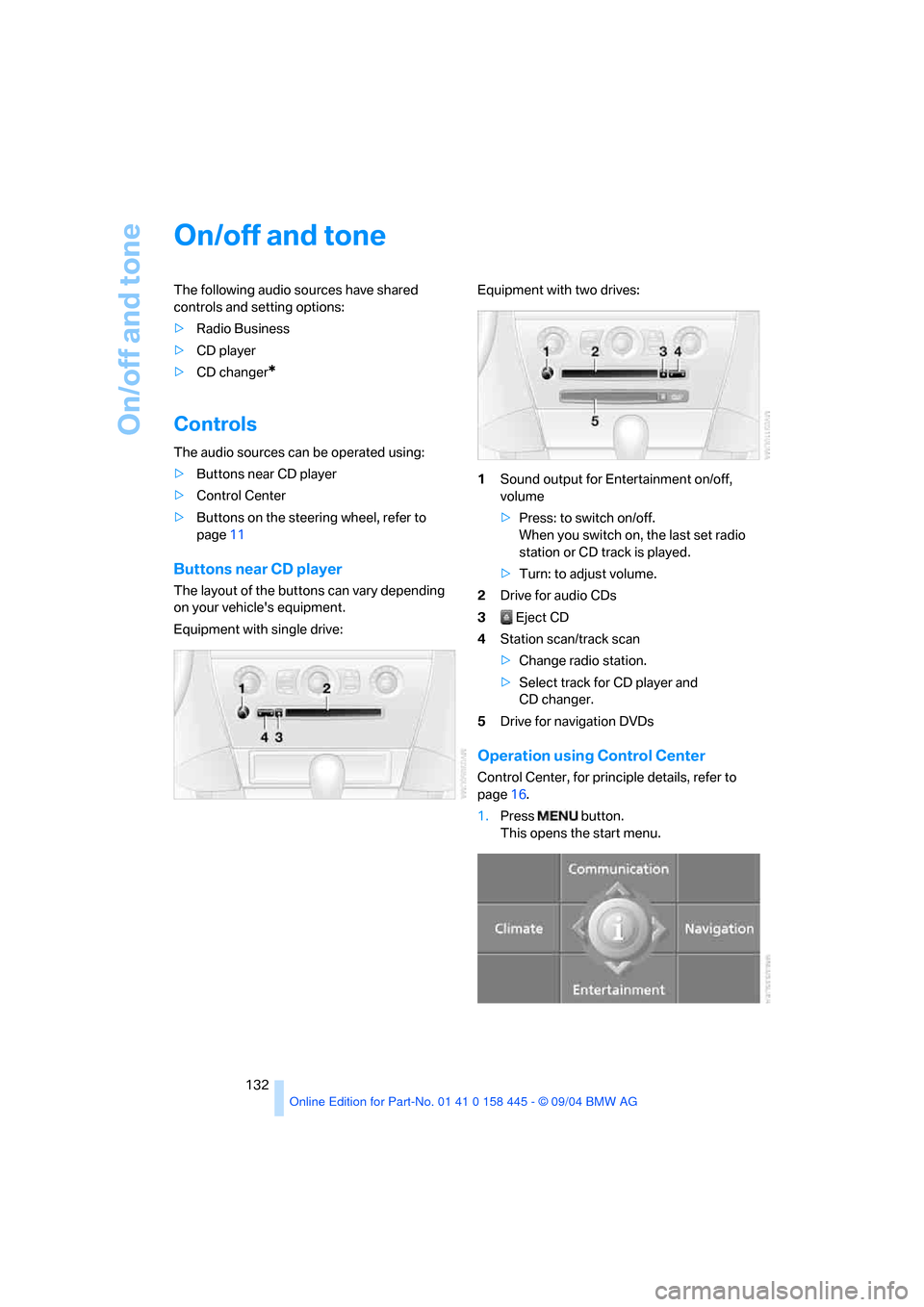
Equipment with single drive:Equipment with two drives:
1Sound output for Entertainment on/off,
volume
>Press: to switch on/off.
When you switch on, the last set radio
station or CD track is played.
>Turn: to adjust volume.
2Drive for audio CDs
3 Eject CD
4Station scan/track scan
>Change radio station.
>Select track for CD player and
CD changer.
5Drive for navigation DVDs
Operation using Control Center
Control Center, for principle details, refer to
page16.
1.Press button.
This opens the start menu.
Page 138 of 217
Navigation
Entertainment
Driving tips
137Reference
At a glance
Controls
Communications
Mobility
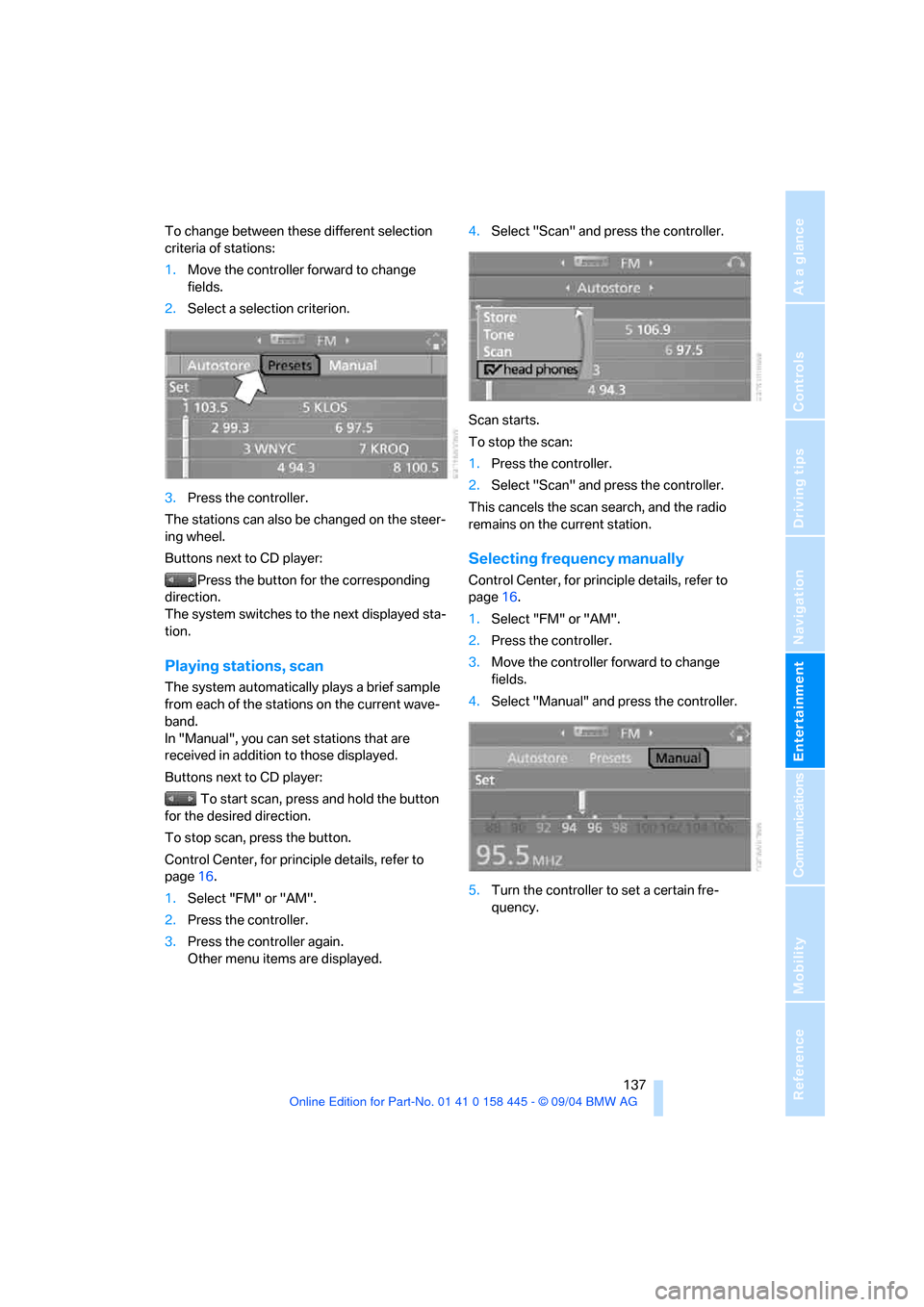
To change between these different selection
criteria of stations:
1.Move the controller forward to change
fields.
2.Select a selection criterion.
3.Press the controller.
The stations can also be changed on the steer-
ing wheel.
Buttons next to CD player:
Press the button for the corresponding
direction.
The system switches to the next displayed sta-
tion.
Playing stations, scan
The system automatically plays a brief sample
from each of the stations on the current wave-
band.
In "Manual", you can set stations that are
received in addition to those displayed.
Buttons next to CD player:
To start scan, press and hold the button
for the desired direction.
To stop scan, press the button.
Control Center, for principle details, refer to
page16.
1.Select "FM" or "AM".
2.Press the controller.
3.Press the controller again.
Other menu items are displayed.4.Select "Scan" and press the controller.
Scan starts.
To stop the scan:
1.Press the controller.
2.Select "Scan" and press the controller.
This cancels the scan search, and the radio
remains on the current station.
Selecting frequency manually
Control Center, for principle details, refer to
page16.
1.Select "FM" or "AM".
2.Press the controller.
3.Move the controller forward to change
fields.
4.Select "Manual" and press the controller.
5.Turn the controller to set a certain fre-
quency.
Page 143 of 217
Radio
142
Storing channel
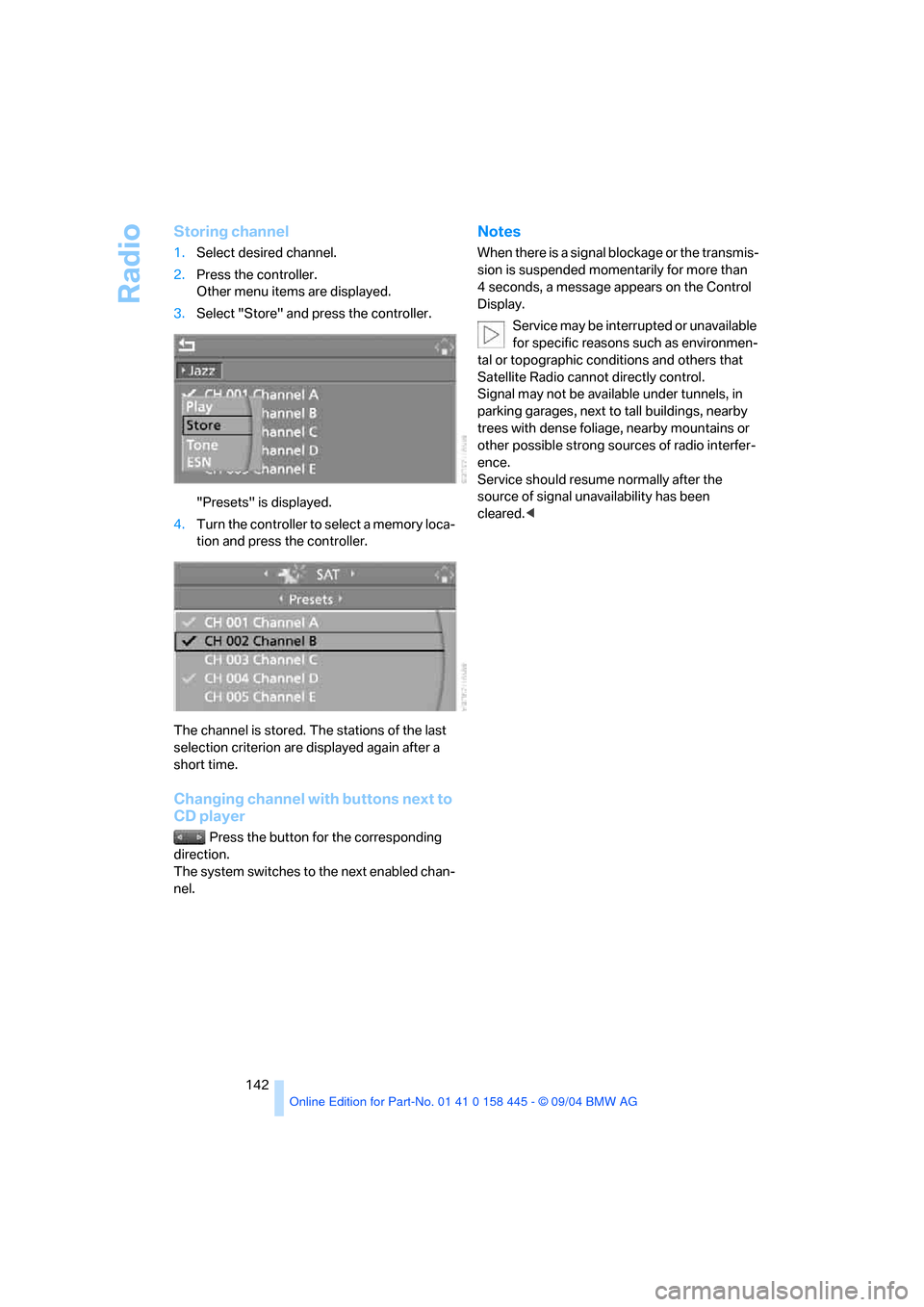
1.Select desired channel.
2.Press the controller.
Other menu items are displayed.
3.Select "Store" and press the controller.
"Presets" is displayed.
4.Turn the controller to select a memory loca-
tion and press the controller.
The channel is stored. The stations of the last
selection criterion are displayed again after a
short time.
Changing channel with buttons next to
CD player
Press the button for the corresponding
direction.
The system switches to the next enabled chan-
nel.
Notes
When there is a signal blockage or the transmis-
sion is suspended momentarily for more than
4 seconds, a message appears on the Control
Display.
Service may be interrupted or unavailable
for specific reasons such as environmen-
tal or topographic conditions and others that
Satellite Radio cannot directly control.
Signal may not be available under tunnels, in
parking garages, next to tall buildings, nearby
trees with dense foliage, nearby mountains or
other possible strong sources of radio interfer-
ence.
Service should resume normally after the
source of signal unavailability has been
cleared.<
Page 145 of 217
CD player and CD changer
144
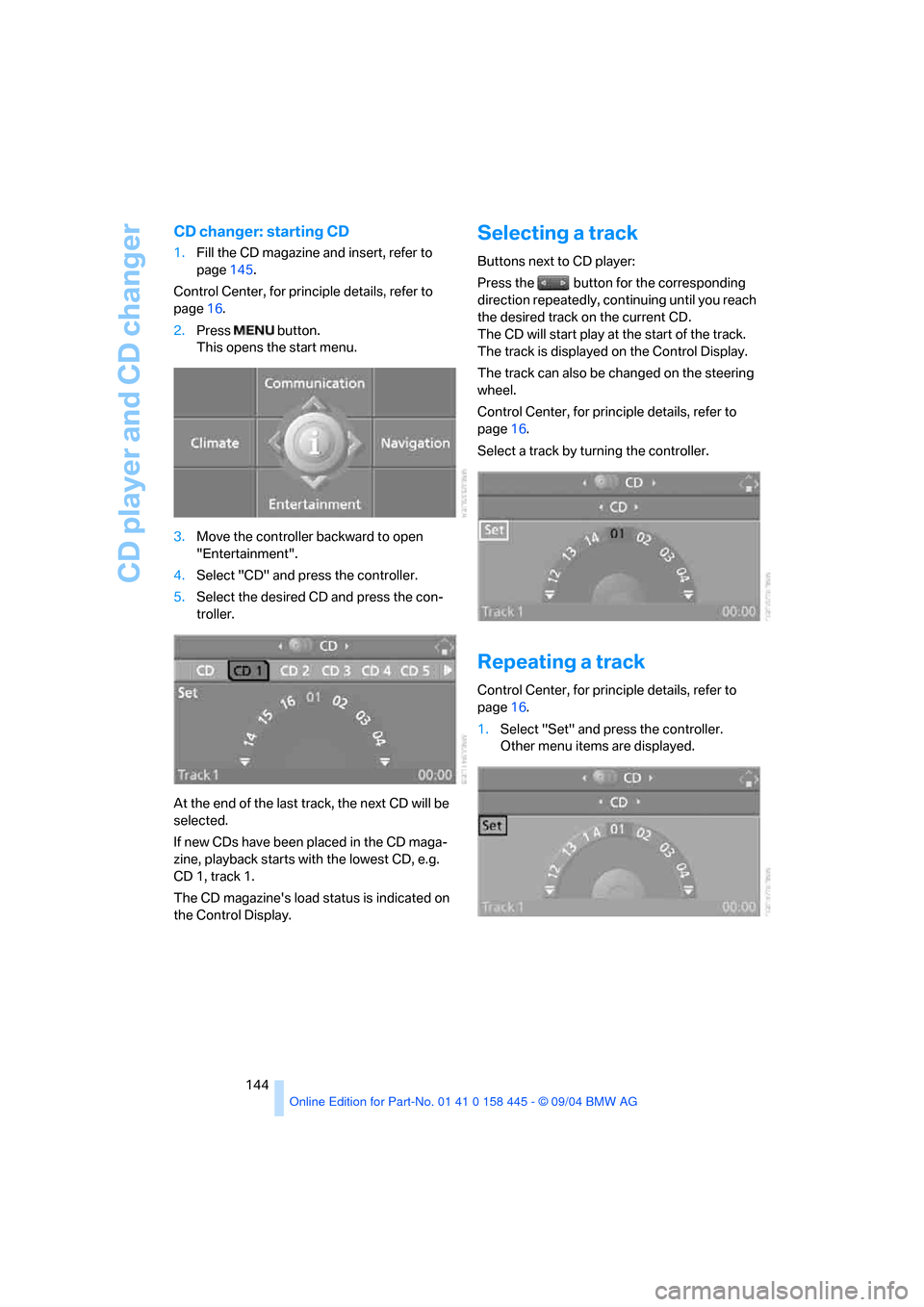
CD changer: starting CD
1.Fill the CD magazine and insert, refer to
page145.
Control Center, for principle details, refer to
page16.
2.Press button.
This opens the start menu.
3.Move the controller backward to open
"Entertainment".
4.Select "CD" and press the controller.
5.Select the desired CD and press the con-
troller.
At the end of the last track, the next CD will be
selected.
If new CDs have been placed in the CD maga-
zine, playback starts with the lowest CD, e.g.
CD 1, track 1.
The CD magazine's load status is indicated on
the Control Display.
Selecting a track
Buttons next to CD player:
Press the button for the corresponding
direction repeatedly, continuing until you reach
the desired track on the current CD.
The CD will start play at the start of the track.
The track is displayed on the Control Display.
The track can also be changed on the steering
wheel.
Control Center, for principle details, refer to
page16.
Select a track by turning the controller.
Repeating a track
Control Center, for principle details, refer to
page16.
1.Select "Set" and press the controller.
Other menu items are displayed.
Page 146 of 217
Navigation
Entertainment
Driving tips
145Reference
At a glance
Controls
Communications
Mobility
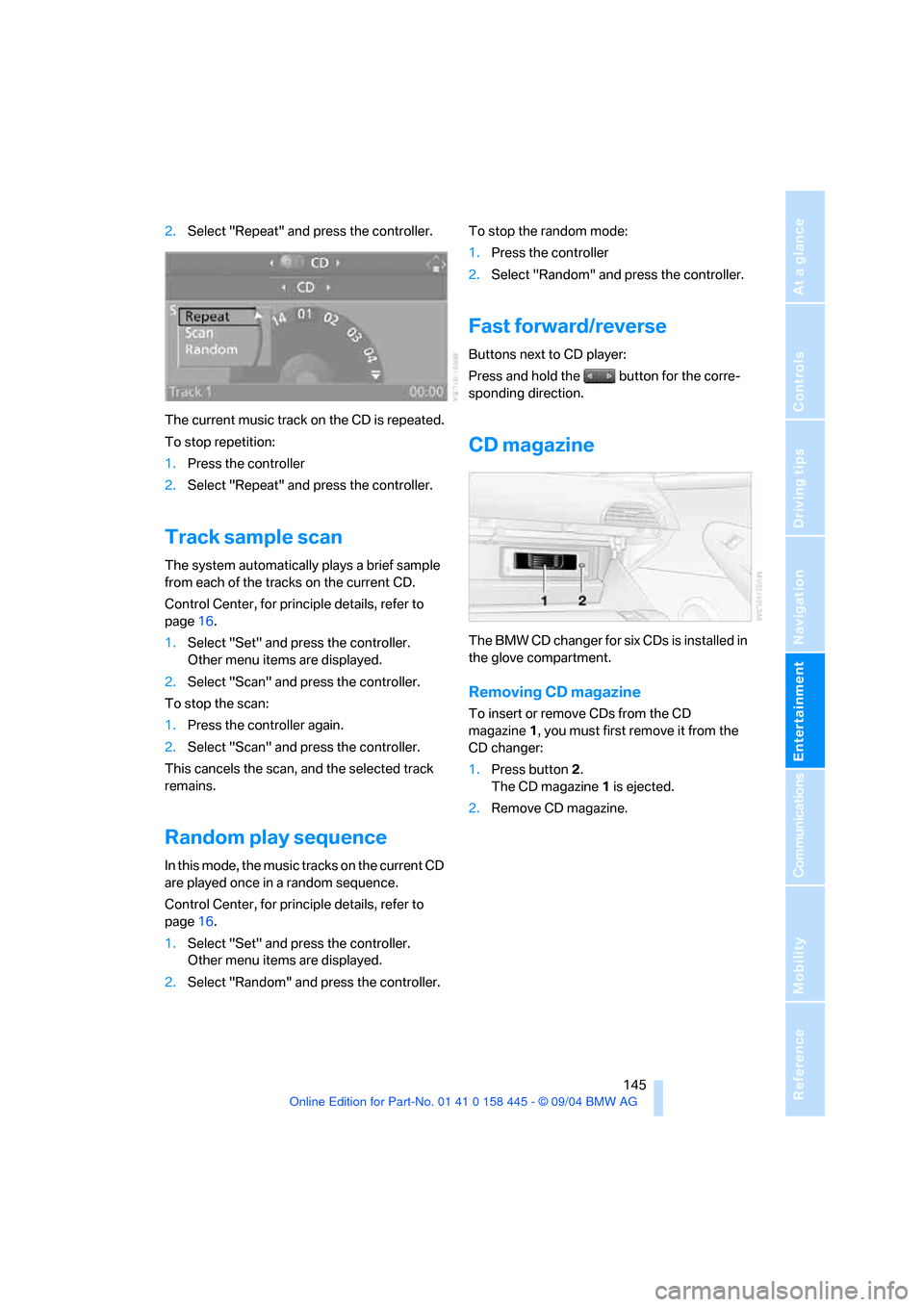
2.Select "Repeat" and press the controller.
The current music track on the CD is repeated.
To stop repetition:
1.Press the controller
2.Select "Repeat" and press the controller.
Track sample scan
The system automatically plays a brief sample
from each of the tracks on the current CD.
Control Center, for principle details, refer to
page16.
1.Select "Set" and press the controller.
Other menu items are displayed.
2.Select "Scan" and press the controller.
To stop the scan:
1.Press the controller again.
2.Select "Scan" and press the controller.
This cancels the scan, and the selected track
remains.
Random play sequence
In this mode, the music tracks on the current CD
are played once in a random sequence.
Control Center, for principle details, refer to
page16.
1.Select "Set" and press the controller.
Other menu items are displayed.
2.Select "Random" and press the controller.To stop the random mode:
1.Press the controller
2.Select "Random" and press the controller.
Fast forward/reverse
Buttons next to CD player:
Press and hold the button for the corre-
sponding direction.
CD magazine
The BMW CD changer for six CDs is installed in
the glove compartment.
Removing CD magazine
To insert or remove CDs from the CD
magazine1, you must first remove it from the
CD changer:
1.Press button 2.
The CD magazine 1 is ejected.
2.Remove CD magazine.
Page 199 of 217
Short commands of the voice command system
198
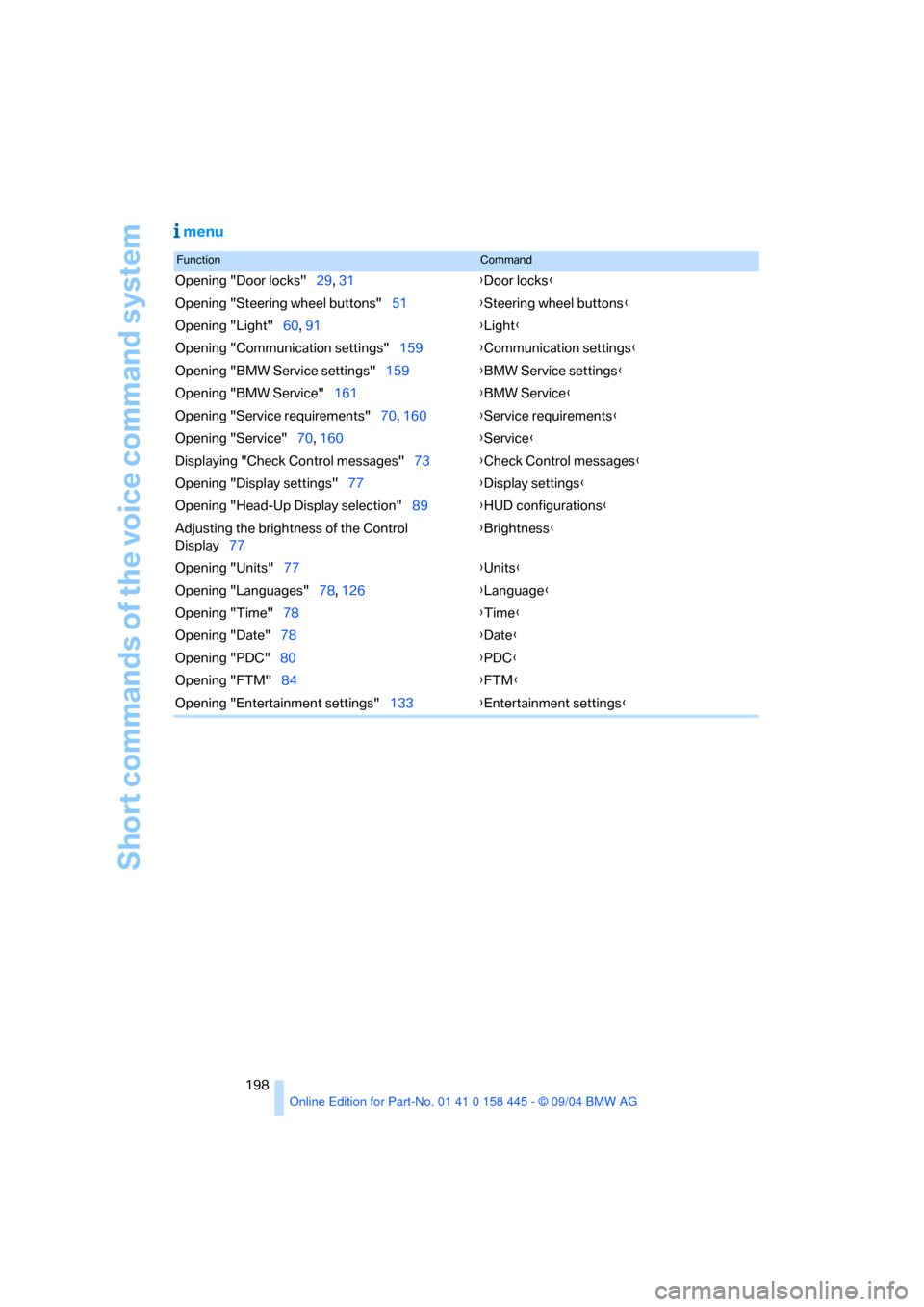
menu
FunctionCommand
Opening "Door locks"29, 31{Door locks}
Opening "Steering wheel buttons"51{Steering wheel buttons}
Opening "Light"60, 91{Light}
Opening "Communication settings"159{Communication settings}
Opening "BMW Service settings"159{BMW Service settings}
Opening "BMW Service"161{BMW Service}
Opening "Service requirements"70, 160{Service requirements}
Opening "Service"70, 160{Service}
Displaying "Check Control messages"73{Check Control messages}
Opening "Display settings"77{Display settings}
Opening "Head-Up Display selection"89{HUD configurations}
Adjusting the brightness of the Control
Display77{Brightness}
Opening "Units"77{Units}
Opening "Languages"78, 126{Language}
Opening "Time"78{Time}
Opening "Date"78{Date}
Opening "PDC"80{PDC}
Opening "FTM"84{FTM}
Opening "Entertainment settings"133{Entertainment settings}
Page 201 of 217
Everything from A to Z
200 Audio132
– controls132
– switching on/off132
– tone control133
– volume133
Automatic
– air distribution95
– air volume95
– cruise control61,62
– headlamp control91
– service notification160
– steering wheel adjustment,
refer to Easy entry/exit50
– storing stations138
Automatic car washes110
– also refer to the Caring for
your vehicle brochure
Automatic climate control94
– automatic air distribution95
– convertible program97
– settings using Control
Center96
– switching off96
Automatic curb monitor47
"Automatic programs"97
Automatic recirculated-air
control AUC95
Automatic station search137
Automatic transmission with
Steptronic58
– convenience start55
– Dynamic Driving Control59
– interlock54
– kick-down58
– selector lever interlock58
– shiftlock58
– starting engine55
– towing188
– tow-starting189
"Automatic ventilation"98
AUTO program with
automatic climate control95
"Autostore" on the
radio136,138
Average fuel consumption74
– setting units77
Average speed74"Avoid ferries" for
navigation123
Avoid freeways for
navigation122
"Avoid highways" for
navigation122
Avoiding unintentional
alarms35
"Avoid tollroads" for
navigation123
Axle loads, refer to
Weights192
"A - Z"153
B
Backrests, refer to Seats44
Backup lamps, refer to
Reverse gear56
Balance, refer to Tone
control134
Balance adjustment in audio
mode, right/left134
Bandages, refer to First-aid
kit186
"Bass", refer to Tone
control134
Bass, refer to Tone
control133
Battery
– jump starting186
– refer to Vehicle battery183
Being towed188
Belts, refer to Safety belts48
Beverage holder, refer to Cup
holders103
Black ice, refer to Ice
warning69
Blower, refer to Air volume95
BMW Assist159
– enabling159
– services offered160
BMW maintenance
system178
"BMW Service"161
"BMW Service settings"159
Bottle holder, refer to Cup
holders103Brake Assistant, refer to DBC
Dynamic Brake Control81
Brake fluid177
– warning lamp177
Brake Force Display86
Brake hydraulic system177
Brake lamps
– Brake Force Display86
– replacing bulbs182
Brake pads177
– breaking-in108
Brake rotors110
Brakes109
– ABS Antilock Brake
System81
– brake fluid177
– Brake Force Display86
– brake pads108,177
– breaking-in108
– CBC Cornering Brake
Control81
– handbrake55
Brake system108
– brake fluid level177
– brake pads108,177
– brake rotors110
– breaking-in108
– warning lamp13,83,177
Brake wear warning
– brake pads177
Braking
– electronic brake-force
distribution81
– refer to Braking safely109
Breakdown assistance161
Breakdown services, refer to
Roadside Assistance186
Breaking-in108
– clutch108
– differential108
Break wear warning
– warning lamp177
"Brightness"77
Buttons on steering wheel11
Bypassing route sections128
Page 204 of 217
Reference 203
At a glance
Controls
Driving tips
Communications
Navigation
Entertainment
Mobility
Destination for navigation
– destination list119
– entry115
– home address122
– selecting from address
book120
– selecting using
information118
– storing120
Destination guidance124
– bypassing route
sections128
– canceling voice
instructions51
– changing specified
route122
– displaying route127
– distance and arrival124
– interrupting125
– starting124
– terminating/continuing125
– voice instructions126
– volume of voice
instructions126
Destination list119
Destinations recently driven
to119
"Dial" for portable phone152
"Dial number"152
"Diamond button"51
Digital clock69
Dimensions
– Convertible194
– Coupe193
Dipstick for engine oil175
Directional indicators, refer to
Turn signals60
Direction announcements,
refer to Voice
instructions126
Direction instructions, refer to
Voice instructions126
Directory, refer to Phone
book153
Directory for navigation, refer
to Address book120
Disc brakes109Displacement, refer to Engine
data192
Display, refer to Control
Center16
"Display off"21
Displays, refer to Instrument
cluster12
"Display settings"77
Displays on the windshield,
refer to Head-Up Display88
Disposal, vehicle battery183
Distance, refer to
Computer75
Distance control, refer to
Active cruise control62
"Distance to dest."75
Distance to destination, refer
to Computer75
Distance warning, refer to
PDC Park Distance
Control80
Door entry lighting93
Door keys28
Door lock31
"Door locks"29
Doors
– manual operation31
– remote control30
DOT Quality Grades170
Draft-free ventilation97
"Driver's door only"29
Driving lamps, refer to Parking
lamps/low beams91
Driving notes108
Driving route, refer to
Displaying the route127
Driving stability control
systems82
Driving through water109
Driving tips, refer to Driving
notes108
Drying the air, refer to Cooling
function95
DSC Dynamic Stability
Control82
– indicator lamp13,83
– malfunction83DTC Dynamic Traction
Control82
– activating82
– indicator lamp13,82
DVD for navigation114
Dynamic Brake Control
DBC81
Dynamic Driving Control59
"Dynamic route" for
navigation122
Dynamic Stability Control
DSC82
– indicator lamp13,83
Dynamic Traction Control
DTC82
– indicator lamp13
E
Easy entry, refer to Entry to
the rear48
Easy entry/exit50
EBV, refer to Electronic brake-
force distribution81
"Edit address" for
navigation121
Eject button, refer to Buttons
on CD player132
Electrical malfunction
– convertible top41
– door lock31
– driver's door31
– fuel filler door166
– glass sunroof38
– luggage compartment lid33
– storage compartment, hotel
function32
Electric steering wheel
adjustment50
Electronic brake-force
distribution81
Emergency Assistance, refer
to Roadside Assistance186
Emergency call185
Page 206 of 217
Reference 205
At a glance
Controls
Driving tips
Communications
Navigation
Entertainment
Mobility
G
Garage-door opener, refer to
Integrated universal remote
control100
Gasoline
– refer to Fuel
specifications167
– refer to Required fuel167
Gasoline display, refer to Fuel
gage70
Gear changes
– SMG Sequential manual
transmission57
Gear display
– automatic transmission with
Steptronic58
– SMG Sequential manual
transmission57
Gearshift lever
– automatic transmission with
Steptronic58
– manual transmission56
– SMG Sequential manual
transmission56
General driving notes108
Glass sunroof, electric with
raise function37
– convenience operation31
– moving manually38
– remote control30
Glove compartment101
– rechargeable flashlight101
GPS navigation, refer to
Navigation system114
Grills, refer to Ventilation94
Gross vehicle weight, refer to
Weights192
H
Handbrake55
– indicator lamp13,55
Hands-free system14,151
Hazard warning flashers15
Head airbags86
Headlamp control,
automatic91Headlamp flasher60
Headlamps
– care, refer to the Caring for
your vehicle brochure
– cleaning, refer to Wiper
system61
– replacing bulbs180
Head Light, refer to Adaptive
Head Light92
Head-Up Display88
Heated mirrors50
Heated rear window94
Heated seats49
Heated steering wheel51
Heater95
Heating
– exterior mirrors50
– interior94
– rear window94
– residual heat mode96
– seats49
– steering wheel51
Heating with engine switched
off, refer to Residual heat
mode96
Heavy cargo, refer to Securing
load111
Height, refer to
Dimensions193
Height adjustment
– seats45
– steering wheel50
High beams92
– headlamp flasher92
– indicator lamp13
– replacing bulbs180
Hills109
Holder for cups103
"Home address"122
Hood174
Horn10
Hotel function32
Hot exhaust system108
"Hour memo"78
"House number" for desti-
nation entry117Hydraulic Brake Assistant,
refer to DBC Dynamic Brake
Control81
Hydroplaning109
– also refer to Minimum tread
depth171
I
Ice warning69
iDrive, refer to Control
Center16
Ignition key28
Ignition key positions, refer to
Ignition lock54
Ignition lock54
Increasing luggage
compartment capacity,
Convertible34
Independent ventilation
– activating an activation
time98
– setting activation time98
– switching on and off
directly98
Indicator/warning lamps
– ABS Antilock Brake
System83
– active steering85
– airbags87
– brake system13,83
– DSC Dynamic Stability
Control13,83
– DTC Dynamic Traction
Control13,82
– fastening safety belts49
– Flat Tire Monitor85
– fog lamps13,92
– handbrake55
Indicator and warning lamps,
overview13
Individually assignable
buttons on steering wheel,
refer to Programmable
buttons on steering
wheel51
Individual settings, refer to
Key Memory28
Page 207 of 217
Everything from A to Z
206 Inflation pressure, refer to Tire
inflation pressure168
Inflation pressure monitoring,
refer to Flat Tire Monitor84
Information
– on another location118
– on current position118
– on destination location118
"Information" for
navigation118
"Information on
destination"119
Initializing, refer to Power
failure184
"Input map"118
Inside rearview mirror,
automatically dimming, refer
to Automatic functions50
Installation location
– CD changer145
– navigation drive114
Instructions for navigation
system, refer to Voice
instructions126
Instrument cluster12
Instrument illumination, refer
to Instrument lighting93
Instrument lighting93
Instrument panel, refer to
Instrument cluster12
Integrated universal remote
control100
Interesting destination118
"Interim time"77
Interior lamps93
– remote control30
Interlock, refer to Steering
locked54
Interlock on automatic
transmission54
Intermittent mode of the
wipers60
J
Jacking points183
Joystick, refer to Control
Center16
Jumpering, refer to Jump
starting186
Jumping, refer to Jump
starting186
Jump starting186
K
Key Memory28
"Keypad"155
Keys28
Kick-down
– automatic transmission with
Steptronic58
– SMG Sequential manual
transmission57
Knock control167
L
Lamps, refer to Parking lamps/
low beams91
Lamps and bulbs180
"Languages"78
"Languages" for
navigation126
Lashing eyes, refer to
Securing load111
Last destinations, refer to
Destination list119
"Last seat pos."46
LATCH child-restraint fixing
system53
LEDs Light-emitting
diodes183
Length, refer to
Dimensions193
Letter symbol with portable
phone155
License plate lamps, replacing
bulbs182
"Light"60,91
Light-emitting diodes
LEDs183Lighter103
Lighter socket103
Lighting
– instruments93
– of the vehicle, refer to
Lamps91
Lights on warning91
Light switch91
"Limit"76
"Lock after driving"32
Lock buttons in the doors,
refer to Locking32
Locking
– from inside32
– from outside30
Locking and unlocking doors
– from inside31
– from outside29
"LOGIC7", refer to Tone
control134
Low beams91
– automatic91
– replacing bulbs180
Lower back support, refer to
Lumbar support45
Luggage compartment
– capacity192
– emergency release33
– hotel function32
– increasing capacity,
Convertible34
– opening/closing, refer to
Luggage compartment
lid33
– opening from inside33
– opening from outside33
– opening with remote
control30
Luggage compartment lid32
– emergency operation33
– emergency release33
– opening from inside33
– opening from outside33
– opening with remote
control30
– unlocking manually33
Lumbar support45
LW, waveband136