light BMW 645I COUPE 2005 E63 Workshop Manual
[x] Cancel search | Manufacturer: BMW, Model Year: 2005, Model line: 645I COUPE, Model: BMW 645I COUPE 2005 E63Pages: 217, PDF Size: 7.92 MB
Page 123 of 217
Destination entry
122
Storing home address
You can store your current position or the cur-
rent destination as a home address in the
address book. This entry is in the second posi-
tion in the address book.
Control Center, for principle details, refer to
page16.
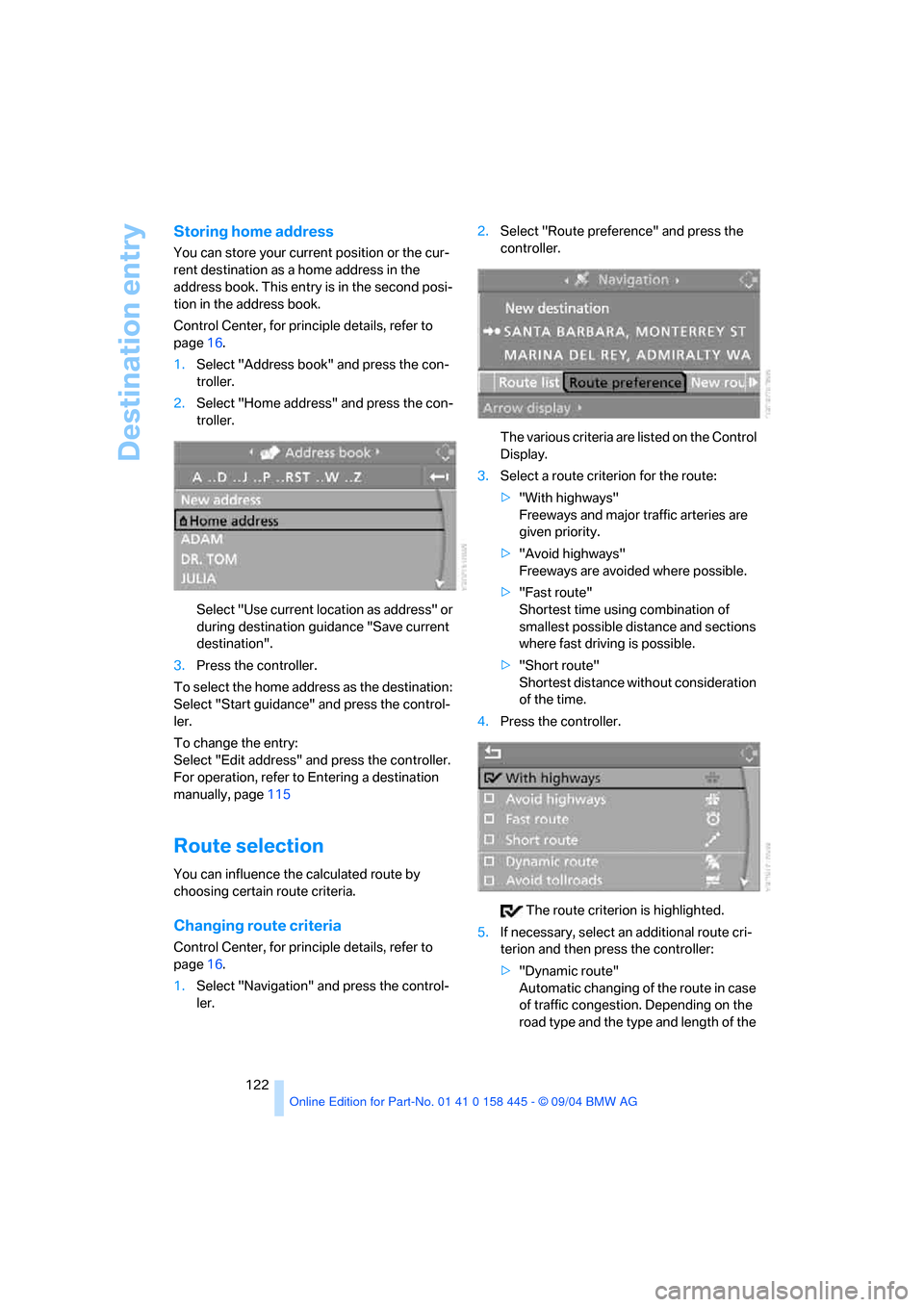
1.Select "Address book" and press the con-
troller.
2.Select "Home address" and press the con-
troller.
Select "Use current location as address" or
during destination guidance "Save current
destination".
3.Press the controller.
To select the home address as the destination:
Select "Start guidance" and press the control-
ler.
To change the entry:
Select "Edit address" and press the controller.
For operation, refer to Entering a destination
manually, page115
Route selection
You can influence the calculated route by
choosing certain route criteria.
Changing route criteria
Control Center, for principle details, refer to
page16.
1.Select "Navigation" and press the control-
ler.2.Select "Route preference" and press the
controller.
The various criteria are listed on the Control
Display.
3.Select a route criterion for the route:
>"With highways"
Freeways and major traffic arteries are
given priority.
>"Avoid highways"
Freeways are avoided where possible.
>"Fast route"
Shortest time using combination of
smallest possible distance and sections
where fast driving is possible.
>"Short route"
Shortest distance without consideration
of the time.
4.Press the controller.
The route criterion is highlighted.
5.If necessary, select an additional route cri-
terion and then press the controller:
>"Dynamic route"
Automatic changing of the route in case
of traffic congestion. Depending on the
road type and the type and length of the
Page 144 of 217
Navigation
Entertainment
Driving tips
143Reference
At a glance
Controls
Communications
Mobility
CD player and CD changer
Listening to CDs
CD player: starting CD
Equipment with two drives:
The upper drive is for audio CDs.
Insert the CD with the labeled side facing
upward.
Playback starts automatically if the sound out-
put is on.
To start playback when there is already a CD in
the drive:
Control Center, for principle details, refer to
page16.
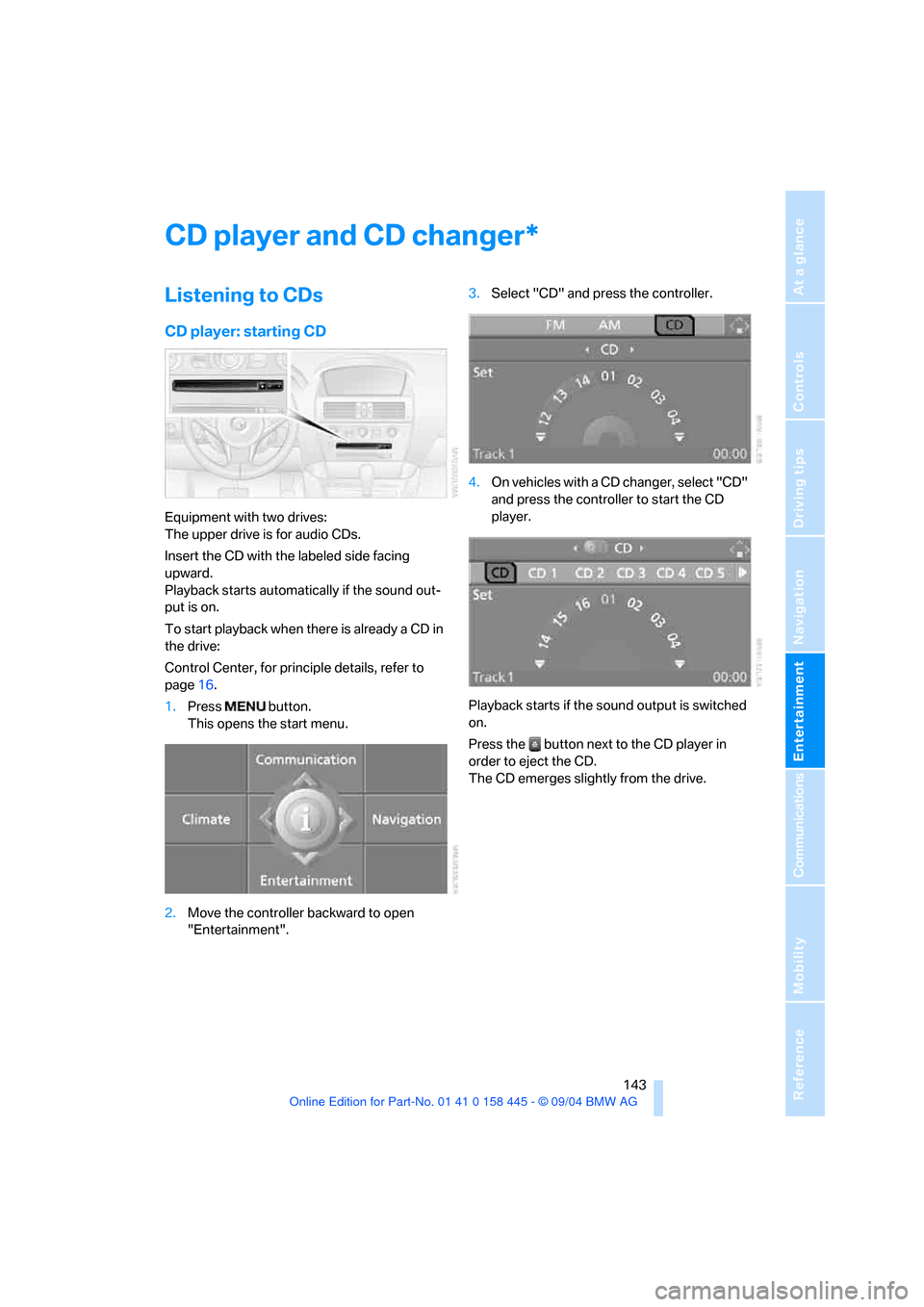
1.Press button.
This opens the start menu.
2.Move the controller backward to open
"Entertainment".3.Select "CD" and press the controller.
4.On vehicles with a CD changer, select "CD"
and press the controller to start the CD
player.
Playback starts if the sound output is switched
on.
Press the button next to the CD player in
order to eject the CD.
The CD emerges slightly from the drive.
*
Page 174 of 217
Mobility
173Reference
At a glance
Controls
Driving tips
Communications
Navigation
Entertainment
Run-flat tires
If you switch from summer to winter tires, or
vice versa, use run-flat tires, refer to page172,
as in the event of a flat tire there is no spare tire
available. Your BMW center will be glad to
advise you.
Watch speed
Observe the permissible maximum speed
for the respective winter tires, as other-
wise tire damage and occur and cause acci-
dents.<
Storage
Always store wheels and tires in a cool, dry
place with as little exposure to light as possible.
Always protect tires against all contact with oil,
grease and fuels. Do not exceed the maximum
tire inflation pressure indicated on the side wall
of the tire.
Snow chains*
BMW only tests certain fine-link snow chains,
classifies them as road-safe and approves
them. Consult your BMW center for more infor-
mation. BMW recommends using these
approved snow chains. These snow chains are
approved exclusively for use in pairs on the rear
wheels with the tire size:
>245/50 R 17 Y
>245/45 R 18 Y
Observe the chain manufacturer's instructions
when mounting snow chains. Do not exceed a
vehicle speed of 30 mph/50 km/h with the
chains mounted.
Do not initialize the Flat Tire Monitor after
mounting snow chains.
When you are driving with snow chains, it can
be beneficial to switch off DTC briefly, refer to
page82.<
Page 178 of 217
Mobility
177Reference
At a glance
Controls
Driving tips
Communications
Navigation
Entertainment
2.Turn the cap of the expansion tank counter-
clockwise to allow any accumulated pres-
sure to escape, then continue turning to
open.
3.The coolant level is correct when it lies
between the Min and Max mark, also refer to
the drawing next the filler neck.
4.If the coolant is low, slowly add coolant up to
the specified level – do not overfill.
5.Turn the cap until it clicks.
6.Have the reason for the coolant loss elimi-
nated as soon as possible.
Brake system
Malfunction
Brake fluid
The warning lamp lights up in red
in spite of the handbrake being
released; a message appears on the
Control Display.
Stop the vehicle immediately.
The brake fluid in the reservoir has fallen to
below the minimum level. At the same time, a
significantly longer brake pedal path may be
noticeable. Have the system checked immedi-
ately by a BMW center.
Warning lamp for Canadian models.
When you continue driving, an increased
brake pedal path can be necessary, and
significantly longer braking distances might be
required. Please adapt your driving style
accordingly.<
Brake pads
The warning lamp lights up in red
in spite of the handbrake being
released; a message appears on the
Control Display. The brake pads have reached
their minimum pad thickness. Have the brake
pads replaced as soon as possible.Warning lamp for Canadian models.
For your own safety: use only brake pads
that BMW has approved for your particu-
lar vehicle model. As BMW cannot assess the
suitability of other brake pads for use on your
vehicle, BMW is unable to assume continued
responsibility for the vehicle's operating safety
if non-approved pads are installed.<
Page 180 of 217
Mobility
179Reference
At a glance
Controls
Driving tips
Communications
Navigation
Entertainment
OBD Socket
The Onboard Diagnostics OBD interface
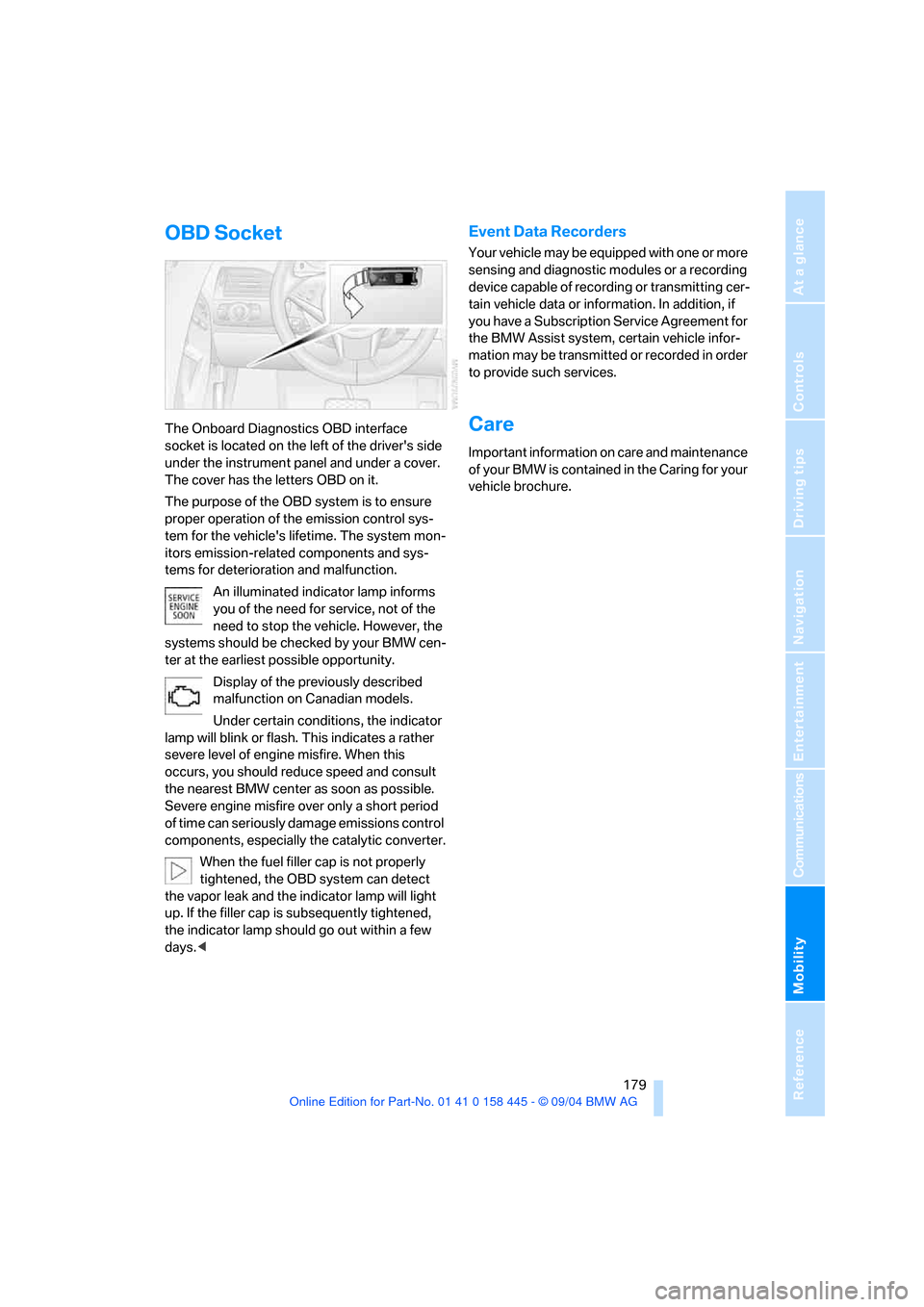
socket is located on the left of the driver's side
under the instrument panel and under a cover.
The cover has the letters OBD on it.
The purpose of the OBD system is to ensure
proper operation of the emission control sys-
tem for the vehicle's lifetime. The system mon-
itors emission-related components and sys-
tems for deterioration and malfunction.
An illuminated indicator lamp informs
you of the need for service, not of the
need to stop the vehicle. However, the
systems should be checked by your BMW cen-
ter at the earliest possible opportunity.
Display of the previously described
malfunction on Canadian models.
Under certain conditions, the indicator
lamp will blink or flash. This indicates a rather
severe level of engine misfire. When this
occurs, you should reduce speed and consult
the nearest BMW center as soon as possible.
Severe engine misfire over only a short period
of time can seriously damage emissions control
components, especially the catalytic converter.
When the fuel filler cap is not properly
tightened, the OBD system can detect
the vapor leak and the indicator lamp will light
up. If the filler cap is subsequently tightened,
the indicator lamp should go out within a few
days.<
Event Data Recorders
Your vehicle may be equipped with one or more
sensing and diagnostic modules or a recording
device capable of recording or transmitting cer-
tain vehicle data or information. In addition, if
you have a Subscription Service Agreement for
the BMW Assist system, certain vehicle infor-
mation may be transmitted or recorded in order
to provide such services.
Care
Important information on care and maintenance
of your BMW is contained in the Caring for your
vehicle brochure.
Page 181 of 217
Replacing components
180
Replacing components
Onboard tool kit
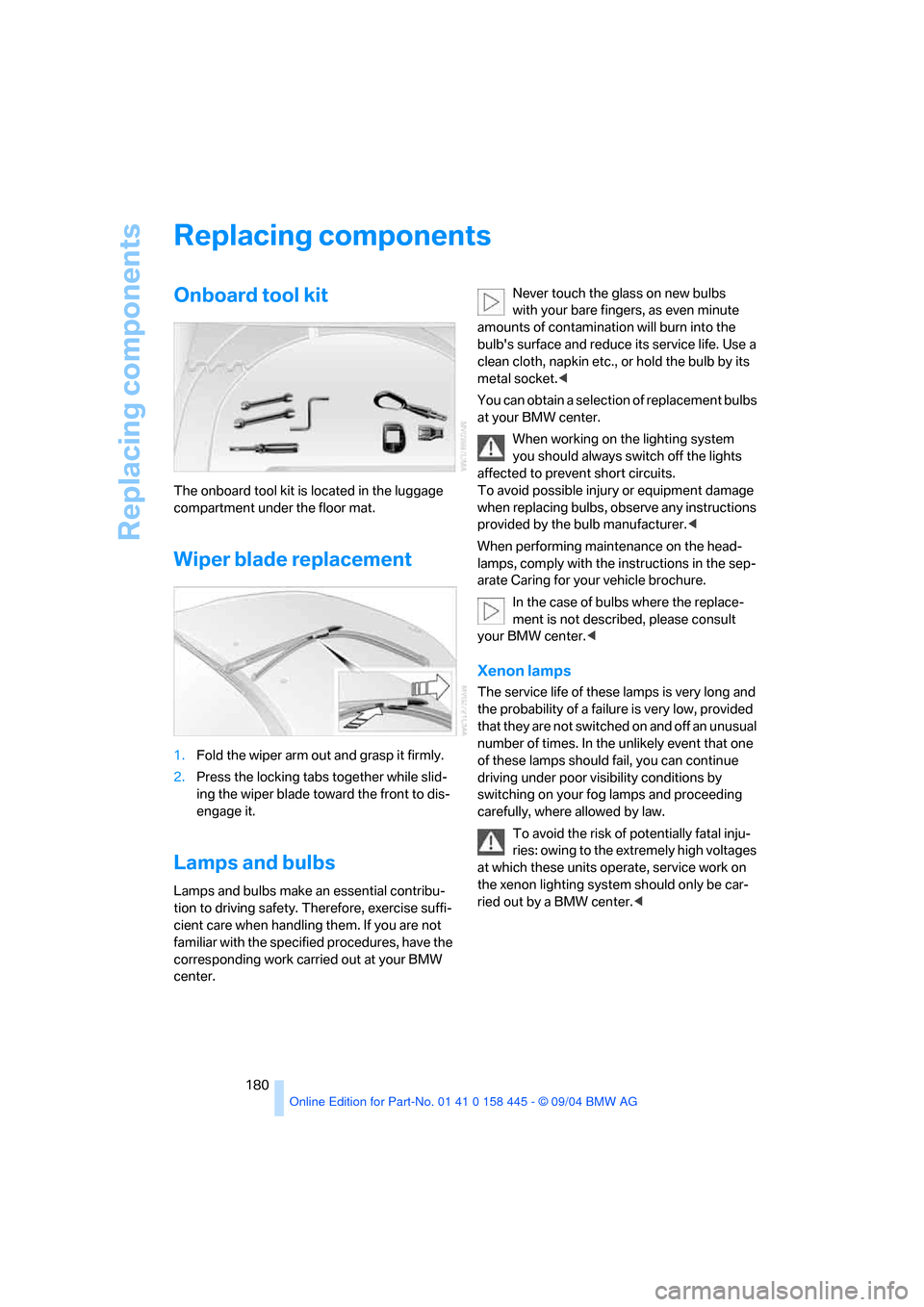
The onboard tool kit is located in the luggage
compartment under the floor mat.
Wiper blade replacement
1.Fold the wiper arm out and grasp it firmly.
2.Press the locking tabs together while slid-
ing the wiper blade toward the front to dis-
engage it.
Lamps and bulbs
Lamps and bulbs make an essential contribu-
tion to driving safety. Therefore, exercise suffi-
cient care when handling them. If you are not
familiar with the specified procedures, have the
corresponding work carried out at your BMW
center.Never touch the glass on new bulbs
with your bare fingers, as even minute
amounts of contamination will burn into the
bulb's surface and reduce its service life. Use a
clean cloth, napkin etc., or hold the bulb by its
metal socket.<
You can obtain a selection of replacement bulbs
at your BMW center.
When working on the lighting system
you should always switch off the lights
affected to prevent short circuits.
To avoid possible injury or equipment damage
when replacing bulbs, observe any instructions
provided by the bulb manufacturer.<
When performing maintenance on the head-
lamps, comply with the instructions in the sep-
arate Caring for your vehicle brochure.
In the case of bulbs where the replace-
ment is not described, please consult
your BMW center.<
Xenon lamps
The service life of these lamps is very long and
the probability of a failure is very low, provided
that they are not switched on and off an unusual
number of times. In the unlikely event that one
of these lamps should fail, you can continue
driving under poor visibility conditions by
switching on your fog lamps and proceeding
carefully, where allowed by law.
To avoid the risk of potentially fatal inju-
ries: owing to the extremely high voltages
at which these units operate, service work on
the xenon lighting system should only be car-
ried out by a BMW center.<
Page 184 of 217
Mobility
183Reference
At a glance
Controls
Driving tips
Communications
Navigation
Entertainment
1.Push a screwdriver from the left under the
lamp and lever up the lamp to the right.
2.Turn the bulb holder 905 to the left and
remove.
3.Remove and replace the bulb.
LEDs Light-emitting diodes
Light-emitting diodes installed behind translu-
cent lenses serve as the light source for many of
the controls and displays in your vehicle. These
light-emitting diodes, which operate using a
concept similar to that applied in conventional
lasers, are officially designated as Class 1 light-
emitting diodes.
Do not remove the covers, and never
stare into the unfiltered light several
hours, as irritation of the retina could result.<
Changing a wheel
Your BMW is equipped with run-flat tires as
standard. An immediate wheel change in the
event of a flat tire is therefore no longer
required.
You will recognize run-flat tires by a circular
symbol containing the letters RSC on the side
of the tire, refer to Run-flat tires on page171.
If you have new tires mounted or switch from
summer to winter tires, or vice versa, use run-
flat tires, as in the event of a flat tire there is no
spare tire available. Your BMW center will be
glad to advise you.
Also refer to New wheels and tires, page172.
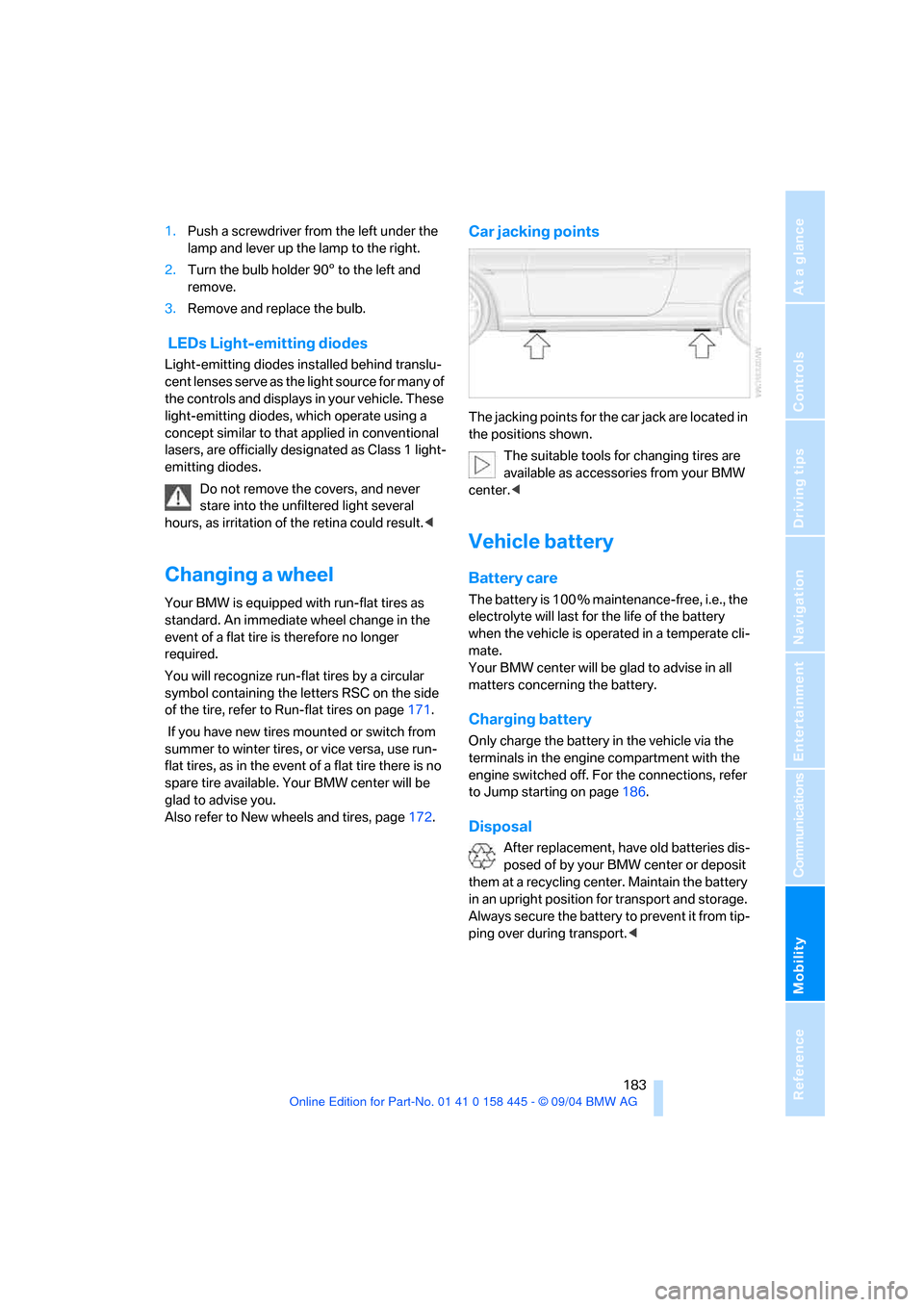
Car jacking points
The jacking points for the car jack are located in
the positions shown.
The suitable tools for changing tires are
available as accessories from your BMW
center.<
Vehicle battery
Battery care
The battery is 100 % maintenance-free, i.e., the
electrolyte will last for the life of the battery
when the vehicle is operated in a temperate cli-
mate.
Your BMW center will be glad to advise in all
matters concerning the battery.
Charging battery
Only charge the battery in the vehicle via the
terminals in the engine compartment with the
engine switched off. For the connections, refer
to Jump starting on page186.
Disposal
After replacement, have old batteries dis-
posed of by your BMW center or deposit
them at a recycling center. Maintain the battery
in an upright position for transport and storage.
Always secure the battery to prevent it from tip-
ping over during transport.<
Page 186 of 217
Mobility
185Reference
At a glance
Controls
Driving tips
Communications
Navigation
Entertainment
Giving and receiving assistance
Emergency call*
Conditions for an emergency call:
>Ignition key in position 1 or greater.
>The car phone is logged on to a portable
telephone network.
>The emergency call system is operable.
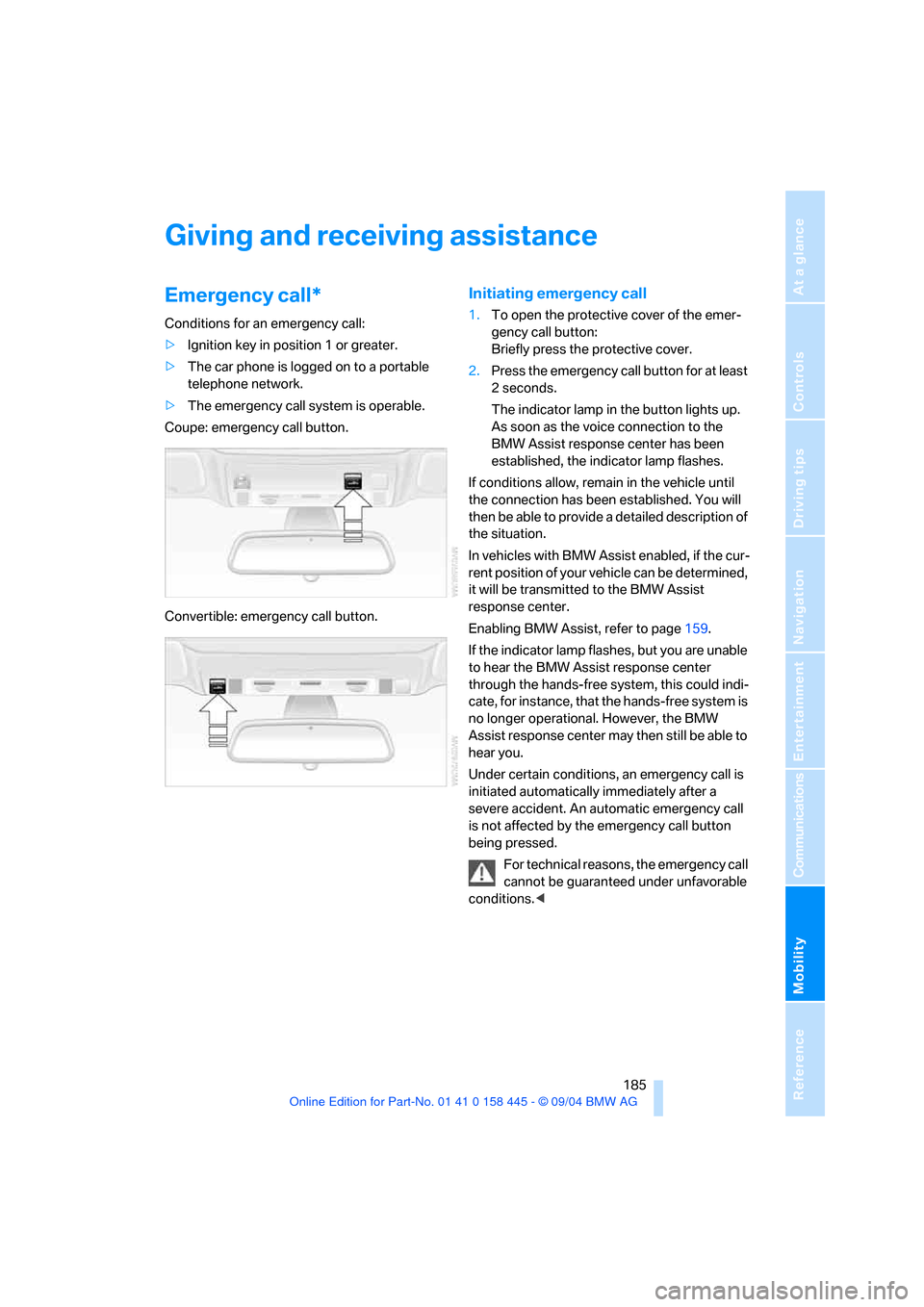
Coupe: emergency call button.
Convertible: emergency call button.
Initiating emergency call
1.To open the protective cover of the emer-
gency call button:
Briefly press the protective cover.
2.Press the emergency call button for at least
2seconds.
The indicator lamp in the button lights up.
As soon as the voice connection to the
BMW Assist response center has been
established, the indicator lamp flashes.
If conditions allow, remain in the vehicle until
the connection has been established. You will
then be able to provide a detailed description of
the situation.
In vehicles with BMW Assist enabled, if the cur-
r en t p o s it i o n o f y o u r v eh i c le c a n b e d et e r m in e d ,
it will be transmitted to the BMW Assist
response center.
Enabling BMW Assist, refer to page159.
If the indicator lamp flashes, but you are unable
to hear the BMW Assist response center
through the hands-free system, this could indi-
cate, for instance, that the hands-free system is
no longer operational. However, the BMW
Assist response center may then still be able to
hear you.
Under certain conditions, an emergency call is
initiated automatically immediately after a
severe accident. An automatic emergency call
is not affected by the emergency call button
being pressed.
For technical reasons, the emergency call
cannot be guaranteed under unfavorable
conditions.<
Page 189 of 217
Giving and receiving assistance
188
Towing and tow-starting
Always observe all applicable towing laws
and regulations.<
Never allow passengers to ride in a towed
vehicle for any reason.<
Use tow fitting
The threaded tow fitting is stored in the tool kit
mounted on the inside of the luggage compart-
ment under the floor mat, refer to page180, and
should always remain in the vehicle. It can be
screwed in at the front or rear of the BMW.
To avoid damage to the tow fitting and the
vehicle, observe the following: only use
the tow fitting that comes with the vehicle and
screw it in as far as possible. Use the tow fitting
for towing only on roads. Avoid lateral strains on
the tow fitting, e.g. do not the lift vehicle by the
tow fitting.<
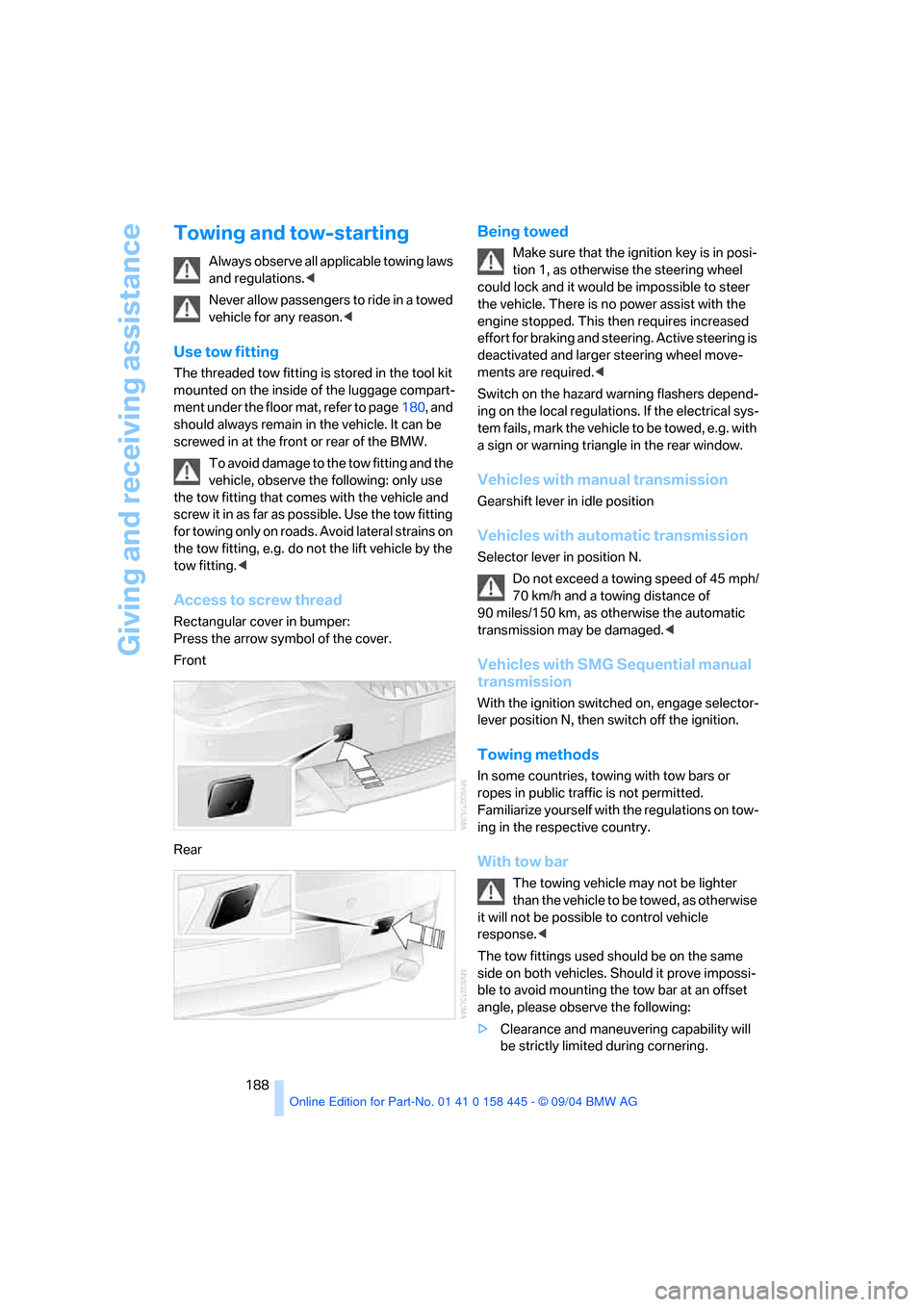
Access to screw thread
Rectangular cover in bumper:
Press the arrow symbol of the cover.
Front
Rear
Being towed
Make sure that the ignition key is in posi-
tion 1, as otherwise the steering wheel
could lock and it would be impossible to steer
the vehicle. There is no power assist with the
engine stopped. This then requires increased
effort for braking and steering. Active steering is
deactivated and larger steering wheel move-
ments are required.<
Switch on the hazard warning flashers depend-
ing on the local regulations. If the electrical sys-
tem fails, mark the vehicle to be towed, e.g. with
a sign or warning triangle in the rear window.
Vehicles with manual transmission
Gearshift lever in idle position
Vehicles with automatic transmission
Selector lever in position N.
Do not exceed a towing speed of 45 mph/
70 km/h and a towing distance of
90 miles/150 km, as otherwise the automatic
transmission may be damaged.<
Vehicles with SMG Sequential manual
transmission
With the ignition switched on, engage selector-
lever position N, then switch off the ignition.
Towing methods
In some countries, towing with tow bars or
ropes in public traffic is not permitted.
Familiarize yourself with the regulations on tow-
ing in the respective country.
With tow bar
The towing vehicle may not be lighter
than the vehicle to be towed, as otherwise
it will not be possible to control vehicle
response.<
The tow fittings used should be on the same
side on both vehicles. Should it prove impossi-
ble to avoid mounting the tow bar at an offset
angle, please observe the following:
>Clearance and maneuvering capability will
be strictly limited during cornering.
Page 199 of 217
Short commands of the voice command system
198
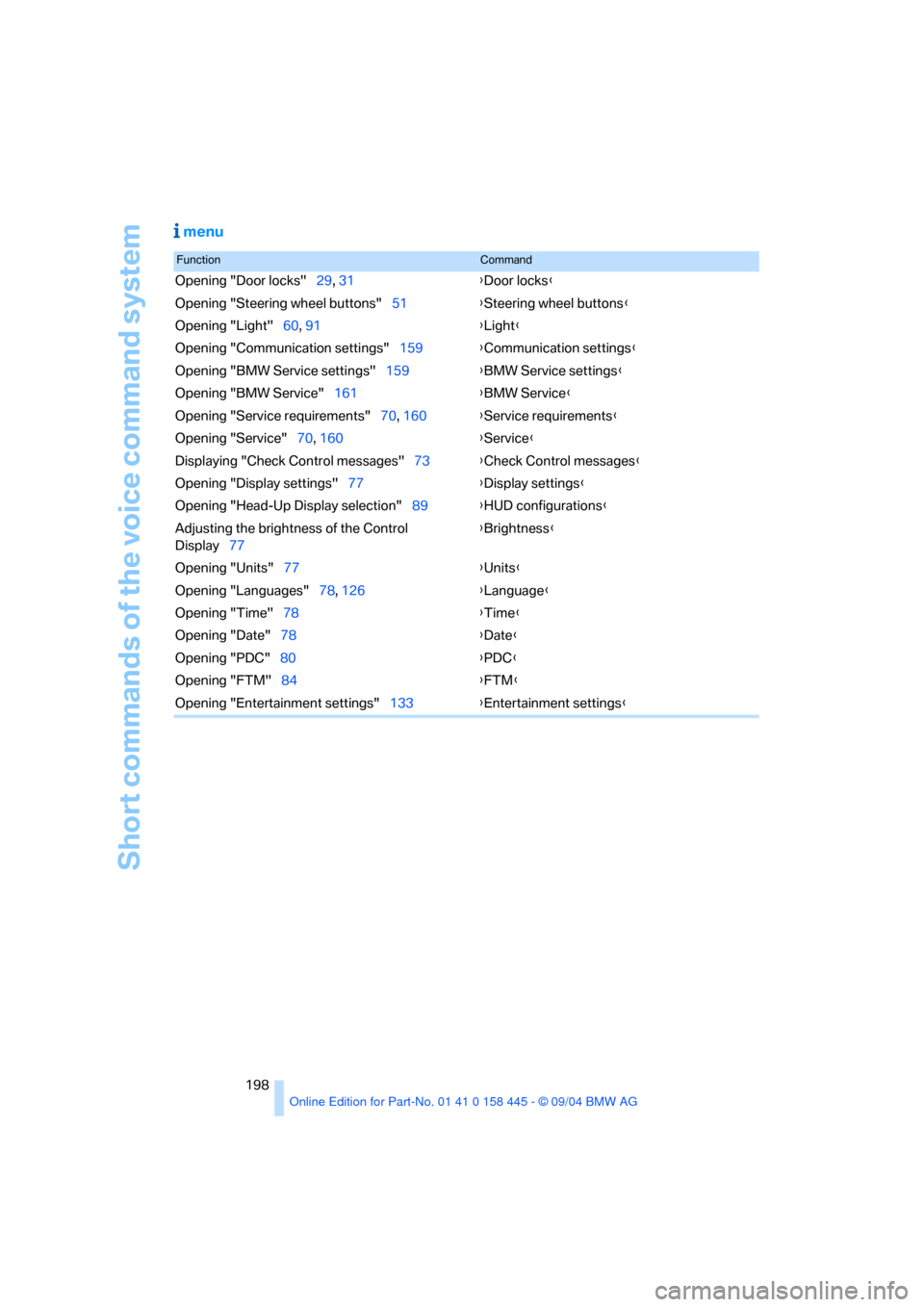
menu
FunctionCommand
Opening "Door locks"29, 31{Door locks}
Opening "Steering wheel buttons"51{Steering wheel buttons}
Opening "Light"60, 91{Light}
Opening "Communication settings"159{Communication settings}
Opening "BMW Service settings"159{BMW Service settings}
Opening "BMW Service"161{BMW Service}
Opening "Service requirements"70, 160{Service requirements}
Opening "Service"70, 160{Service}
Displaying "Check Control messages"73{Check Control messages}
Opening "Display settings"77{Display settings}
Opening "Head-Up Display selection"89{HUD configurations}
Adjusting the brightness of the Control
Display77{Brightness}
Opening "Units"77{Units}
Opening "Languages"78, 126{Language}
Opening "Time"78{Time}
Opening "Date"78{Date}
Opening "PDC"80{PDC}
Opening "FTM"84{FTM}
Opening "Entertainment settings"133{Entertainment settings}