Location BMW 650I CONVERTIBLE 2006 E64 User Guide
[x] Cancel search | Manufacturer: BMW, Model Year: 2006, Model line: 650I CONVERTIBLE, Model: BMW 650I CONVERTIBLE 2006 E64Pages: 236, PDF Size: 8.21 MB
Page 203 of 236
Giving and receiving assistance
202
Giving and receiving assistance
Emergency call
Conditions for an emergency call:
>Full mobile phone preparation package
>BMW Assist is activated.
Activating BMW Assist, refer to page174.
>Radio readiness is activated.
>The car phone is logged on to a cellular
telephone network.
>The emergency call system is operable.
When the contract for your BMW Assist plan
expires, a BMW center can deactivate the car
phone without your having to visit a workshop.
Following deactivation of the car phone, no
emergency calls can be made. The car phone
can be reactivated after signing a new contract
with a BMW center.
Initiating an emergency call
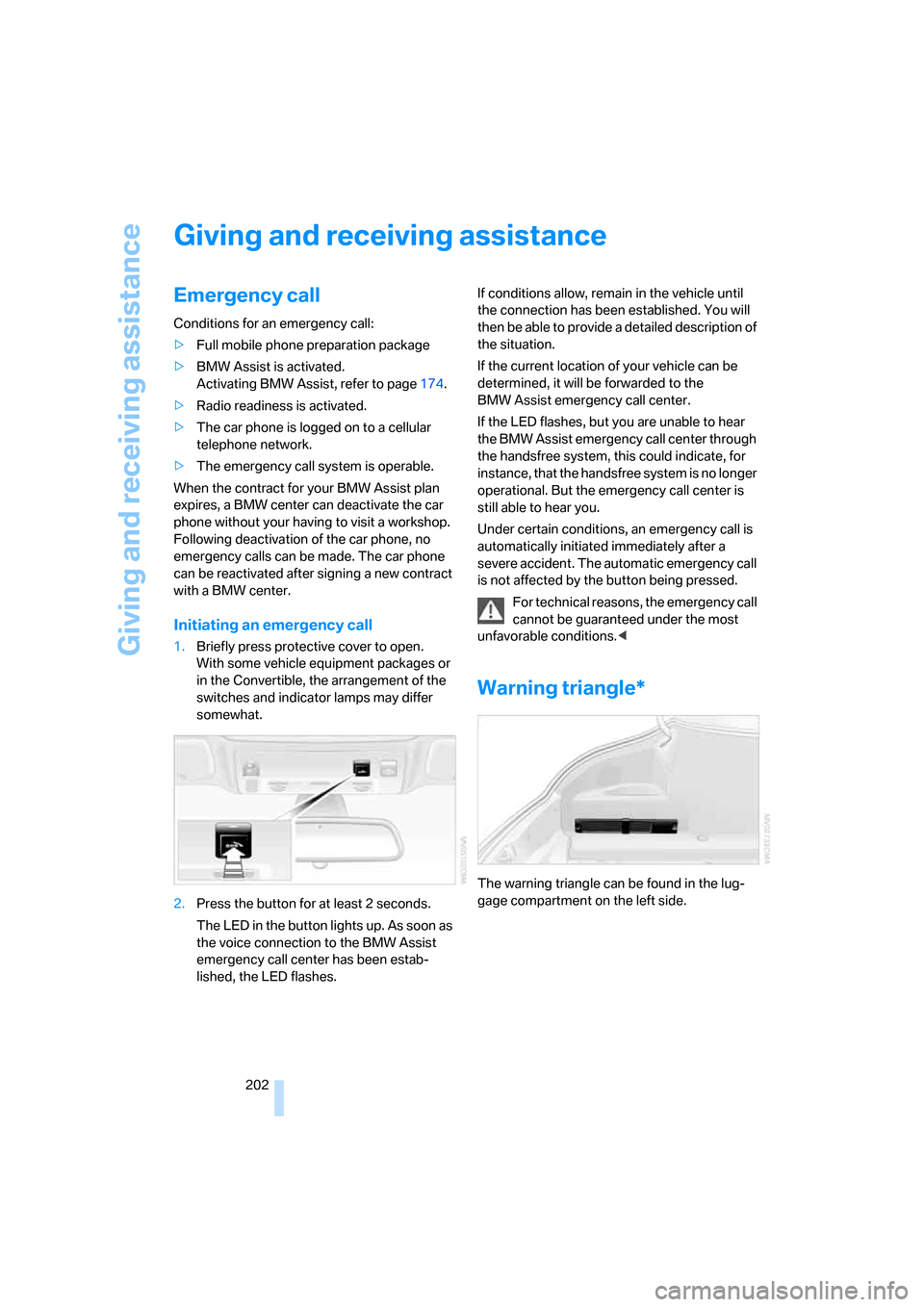
1.Briefly press protective cover to open.
With some vehicle equipment packages or
in the Convertible, the arrangement of the
switches and indicator lamps may differ
somewhat.
2.Press the button for at least 2 seconds.
The LED in the button lights up. As soon as
the voice connection to the BMW Assist
emergency call center has been estab-
lished, the LED flashes.If conditions allow, remain in the vehicle until
the connection has been established. You will
then be able to provide a detailed description of
the situation.
If the current location of your vehicle can be
determined, it will be forwarded to the
BMW Assist emergency call center.
If the LED flashes, but you are unable to hear
the BMW Assist emergency call center through
the handsfree system, this could indicate, for
instance, that the handsfree system is no longer
operational. But the emergency call center is
still able to hear you.
Under certain conditions, an emergency call is
automatically initiated immediately after a
severe accident. The automatic emergency call
is not affected by the button being pressed.
For technical reasons, the emergency call
cannot be guaranteed under the most
unfavorable conditions.<
Warning triangle*
The warning triangle can be found in the lug-
gage compartment on the left side.
Page 207 of 236
Giving and receiving assistance
206
With tow truck
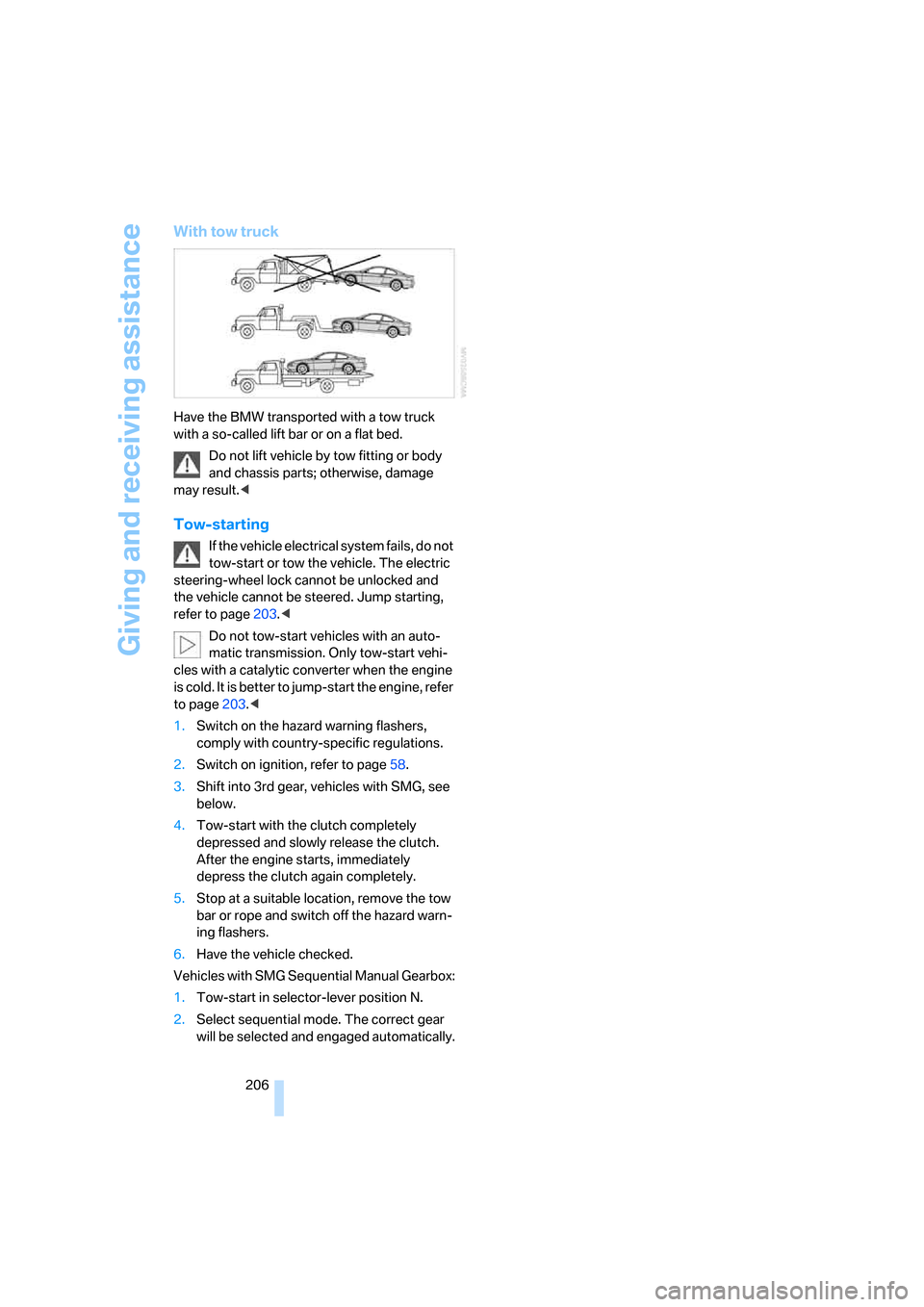
Have the BMW transported with a tow truck
with a so-called lift bar or on a flat bed.
Do not lift vehicle by tow fitting or body
and chassis parts; otherwise, damage
may result.<
Tow-starting
If the vehicle electrical system fails, do not
tow-start or tow the vehicle. The electric
steering-wheel lock cannot be unlocked and
the vehicle cannot be steered. Jump starting,
refer to page203.<
Do not tow-start vehicles with an auto-
matic transmission. Only tow-start vehi-
cles with a catalytic converter when the engine
is cold. It is better to jump-start the engine, refer
to page203.<
1.Switch on the hazard warning flashers,
comply with country-specific regulations.
2.Switch on ignition, refer to page58.
3.Shift into 3rd gear, vehicles with SMG, see
below.
4.Tow-start with the clutch completely
depressed and slowly release the clutch.
After the engine starts, immediately
depress the clutch again completely.
5.Stop at a suitable location, remove the tow
bar or rope and switch off the hazard warn-
ing flashers.
6.Have the vehicle checked.
Vehicles with SMG Sequential Manual Gearbox:
1.Tow-start in selector-lever position N.
2.Select sequential mode. The correct gear
will be selected and engaged automatically.
Page 220 of 236
Reference 219
At a glance
Controls
Driving tips
Communications
Navigation
Entertainment
Mobility
Brake pads194
– breaking-in114
Brakes
– ABS Antilock Brake
System86
– brake fluid193
– brake force display90
– brake pads194
– breaking-in114
– CBC Cornering Brake
Control86
– handbrake60
Brake system114
– brake fluid level193
– brake pads114,194
– brake rotors116
– breaking-in114
– warning lamp13,193
Brake wear warning
– brake pads194
– warning lamp194
Braking
– electronic brake-force
distribution86
– refer to Braking safely115
Braking safely115
Breakdown assistance176
Breakdown services, refer to
Roadside Assistance203
Breaking-in114
Breaking-in the clutch114
Breaking-in the
differential114
"Brightness"83,94
Brightness of Control
Display83
Button for starting engine58
Buttons on steering wheel11
Bypassing route sections136
C
California law
– Event Data Recorders196
California Proposition
65 Warning6
"Call"168Call
– accepting166
– displaying accepted168
– ending167
– in absence168
– starting167
Calling
– from phone book167
– from Top 8 list168
– redialing168
Can holder, refer to Cup
holders109
Capacity of luggage
compartment210
Car battery, refer to Vehicle
battery200
Car care, refer to the Caring
for your vehicle brochure
Car-care products, refer to the
Caring for your vehicle
brochure
"Car data"76
Care196
– refer to the Caring for your
vehicle brochure
Cargo loading
– securing cargo117
– stowing cargo117
– vehicle116
Caring for artificial leather,
refer to the Caring for your
vehicle brochure
Caring for leather, refer to the
Caring for your vehicle
brochure
Caring for light-alloy wheels,
refer to the Caring for your
vehicle brochure
Caring for plastic, refer to the
Caring for your vehicle
brochure
Caring for the carpet, refer to
the Caring for your vehicle
brochure
Caring for the vehicle finish,
refer to the Caring for your
vehicle brochureCar key, refer to Keys/remote
control28
Car phone162
– installation location, refer to
Center armrest108
– refer to Mobile phone162
– refer to separate Owner's
Manual
Car radio, refer to Radio144
Car wash116
– refer to Before driving into a
car wash116
– refer to the Caring for your
vehicle brochure
– with comfort access37
Catalytic converter, refer to
Hot exhaust system114
"Categories"151
CBC Cornering Brake
Control86
CBS Condition Based
Service195
"CD"140,153
CD changer153
– controls140
– fast forward/reverse157
– installation location157
– playing a track155
– random play sequence156
– repeating a track156
– selecting a CD153
– selecting a track154
– switching on/off140
– tone control141
– volume141
CD player153
– controls140
– fast forward/reverse157
– playing a track155
– random play sequence156
– repeating a track156
– selecting a track154
– switching on/off140
– tone control141
– volume141
Center armrest, adjusting
height108
Page 225 of 236
Everything from A to Z
224 Heated
– mirrors, refer to Automatic
functions53
– rear window102
– seats52
– steering wheel54
Heater101
Heating
– exterior mirrors53
– interior100
– rear window102
– residual heat103
– seats52
– steering wheel54
Heating with engine switched
off, refer to Residual
heat103
Heavy cargo, refer to Securing
cargo117
Height, refer to
Dimensions211
Height adjustment
– seats48
– steering wheel53
High-beam assistant97
High beams97
– headlamp flasher97
– indicator lamp13
– replacing bulbs198
High Definition Radio148
Highs, refer to Tone
control141
High water, refer to Driving
through water115
Hills115
Holder for cups109
"Home address" in
navigation130
Homepage4
Hood190
Horn10
Hotel function33
– unlocking manually33
Hot exhaust system114
"Hour memo"83
"House number" for desti-
nation entry124Hydraulic brake assistant,
refer to DBC Dynamic Brake
Control86
Hydroplaning115
– also refer to Minimum tread
depth187
I
IBOC, refer to High Definition
Radio148
Ice, refer to Outside temper-
ature warning74
ID3-Tag, refer to Information
about track155
iDrive16
– adjusting brightness83
– assistance window20
– changing date and time82
– changing language84
– changing menu page19
– changing settings82
– changing unit of measure
units and display form83
– controller16
– controls16
– displaying menus17
– selecting menu item19
– selecting or confirming
entry19
– start menu17
– status information20
– symbols18
Ignition58
– switched off58
– switched on58
Ignition key, refer to Keys/
remote control28
Ignition key position 1, refer to
Radio readiness58
Ignition key position 2, refer to
Ignition on58
Ignition lock58
– starting engine with comfort
access37Indicator/warning lamps
– active steering90
– airbags92
– DSC13,87
– DTC13,87
– Flat Tire Monitor89
– fog lamps13,98
– handbrake13,60
– overview13
– safety belt warning52
Individually programmable
buttons on steering
wheel54
Individual settings, refer to
Personal Profile29
Inflation pressure, refer to Tire
inflation pressure184
Inflation pressure monitoring,
refer to Flat Tire Monitor88
Information
– on another location126
– on country126
– on current position126
– on destination location126
"Information" for
navigation126
"Information on
destination"128
Initializing
– Flat Tire Monitor88
– radio, refer to Storing
stations146
– refer to Power failure201
– seat, mirror and steering
wheel memory49
– time and date82
"Input map"126
Installation location
– CD changer157
– navigation drive120
Instructions for navigation
system, refer to Voice
instructions135
Instrument cluster12
Instrument illumination, refer
to Instrument lighting99
Instrument lighting99
Page 227 of 236
Everything from A to Z
226 Malfunction
– convertible top43
– door lock32
– fuel filler door182
– glass sunroof41
– hotel function33
– luggage compartment lid34
Malfunction warnings, refer to
Check Control79
Manual air distribution102
Manual mode with automatic
transmission with
Steptronic63
"Manual" on the radio145
Manual operation
– convertible top43
– door lock32
– driver's door32
– fuel filler door182
– glass sunroof41
– hotel function33
– luggage compartment lid34
– selector lever interlock,
Automatic transmission63
Manual transmission60
"Map direction of travel"134
"Map facing north"134
Map for navigation
– changing scale134
– destination entry125
Map view133
Map view facing north133
Master key, refer to Keys/
remote control28
Maximum cooling103
Maximum speed with winter
tires189
Memory, refer to Seat, mirror
and steering wheel
memory49
Menus, refer to iDrive16
Microfilter104
Microphone
– for mobile phone14
– for voice command
system14
Mirror dimming feature53Mirrors52
– automatic curb monitor53
– heating53
– memory, refer to Seat, mirror
and steering wheel
memory49
"Missed calls"168
Missed calls168
Mobile communications
devices in vehicle115
Mobile phone
– accepted calls168
– adjusting volume
166
– calling167
– ending call167
– missed calls168
– operation via iDrive166
– redialing168
– refer to separate Owner's
Manual
– Top 8168
– touch tone dialing169
Mobile phones
– use in vehicle, refer to Mobile
communications devices in
vehicle115
Mobile Service, refer to
Roadside Assistance203
Monitor, refer to iDrive16
Monitoring pressure of tires,
refer to Flat Tire Monitor88
"Monitor on / off"54
Most recent mobile phone
numbers168
MP3, refer to Compressed
audio files153
Multi-function steering wheel,
refer to Buttons on steering
wheel11
Multifunction switch
– refer to Turn signals/
headlamp flasher64
– refer to Wiper/washer
system65
"Mute on / off"54
MW, waveband144
N
"Navigation"76,121
Navigation destination
– manual entry121,124
– selecting via map125
Navigation drive, installation
location120
Navigation DVD120
Navigation instructions, refer
to Switching voice instruc-
tions on/off135
Navigation system120
– address book128
– bypassing route
sections136
– destination entry121
– destination guidance in
assistance window120
– destination list127
– displaying current
position136
– entering a destination
manually121,124
– last destinations127
– looking for interesting
destination126
– route display133
– route list134
– selecting destination using
information126
– selecting destination via
map125
– selecting route criteria130
– starting121
– starting destination
guidance132
– switching off, refer to Termi-
nating/continuing desti-
nation guidance132
– terminating/continuing
destination guidance132
– voice instructions135
– volume adjustment135
"Navigation voice
instructions"54
"Navigation voice instructions
on"135
Page 228 of 236
Reference 227
At a glance
Controls
Driving tips
Communications
Navigation
Entertainment
Mobility
Neck support, refer to Front
head restraints50
"New address" for
navigation128
"New destination"121,125
New remote control28
"New route"136
New wheels and tires188
"Next entertainment
source"54
Nozzles
– refer to Ventilation103
– refer to Windshield washer
nozzles66
Nylon rope, refer to Tow-
starting and towing204
O
OBD Socket196
Octane ratings, refer to Fuel
specifications183
Odometer74
Oil
– additives192
– approved engine oils192
– capacity212
– consumption191
– consumption, refer to
Engine oil, checking191
– level191
– topping off192
Oil change intervals
– refer to Service
requirements77
– refer to the Service and
Warranty Information
Booklet for US models or to
the Warranty and Service
Guide Booklet for Canadian
models
"On a new destination" for
navigation127
"onboard info"76
Onboard monitor, refer to
iDrive16
Onboard tool kit197
"On destination"127"On location"127
Opening and closing
– comfort access36
– from inside32
– from outside30
– using door lock32
– using the remote control30
Operation by voice for mobile
phone170
– adjusting volume171
– canceling170
– commands170
– correcting phone
number171
– dialing phone number171
– placing a call171
– redialing172
– voice phone book171
"Options"177
Orientation menu, refer to
Start menu17
Output, refer to Engine
data210
Outside air, refer to AUC
Automatic recirculated-air
control103
Outside temperature
display74
– changing unit of measure83
P
Panic mode31
Park Distance Control PDC85
"Parked car operation"104
"Parked car ventilation"104
Parked car ventilation
– activating an activation
time105
– setting activation time104
– switching on and off
directly104
Parking, vehicle59
Parking aid, refer to PDC Park
Distance Control85
Parking assistant, refer to Park
Distance Control PDC85Parking brake, refer to
Handbrake60
Parking lamps/low beams96
– replacing bulbs198
Parts and accessories6
Passenger airbags, deacti-
vating, refer to Exception for
front passenger’s seat56
Passenger-side exterior
mirror, tilting down53
"Pathway lighting"96
Pathway lighting96
"PDC"86
"PDC display on"86
PDC Park Distance Control85
Personal Profile29
"Perspective"134
"Phone"167
Phone book166
Phone numbers
– deleting from phone
book169
– dialing167
– most recent numbers168
– selecting in phone book168
– Top 8168
Plasters, refer to First-aid
kit203
"Play" in audio mode154
"Play" on the radio,
selecting151
Plug-in unit for remote
control, refer to Ignition
lock58
Pollen, refer to Microfilter/
activated-charcoal filter104
Position
– displaying136
– storing128
Power failure201
Power windows, refer to
Windows38
"Presets" on the
radio144,150
Presetting parked car venti-
lation activation times104
Pressure, tires184
"Profile"177
Page 233 of 236
Everything from A to Z
232 Track width, refer to
Dimensions211
Traction-assist feature, refer
to DSC Dynamic Stability
Control86
Traction control, refer to DSC
Dynamic Stability
Control86
Traffic congestion, refer to
Bypassing route
sections136
Transmission
– automatic transmission with
Steptronic62
– deactivating selector lever
interlock on automatic
transmission with
Steptronic63
– manual transmission60
– SMG Sequential Manual
Gearbox61
– starting assistant115
Transporting children
safely56
Transport securing device,
refer to Securing cargo117
Tread depth, refer to Minimum
tread depth187
Treble, refer to Tone
control141
"Treble", tone control142
"Trip computer"77
Trip computer76
Trip-distance counter, refer to
Trip odometer74
"Triple turn signal
activation"65
Trip odometer74
Trunk, refer to Luggage
compartment35
Trunk lid, refer to Luggage
compartment lid34
Turning circle, refer to
Dimensions211
Turn signals64
– replacing bulbs198
U
Undercarriage protection,
refer to the Caring for your
vehicle brochure
Uniform Tire Quality Grading/
UTQR186
"Units"83
Units
– average fuel
consumption83
– temperature83
Universal garage-door
opener, refer to Integrated
universal remote
control106
Universal remote control, refer
to Integrated universal
remote control106
"Unlock button"30
Unlocking
– from inside33
– from outside30
– without key, refer to Comfort
access36
Unlocking and locking doors,
setting confirmation
signals31
Unlocking without key, refer to
Comfort access36
"Update services"177
"Use current location as
address"129,130
Used batteries
– refer to Disposal200
– refer to Replacing battery38
V
Vehicle
– battery200
– breaking-in114
– care, refer to the Caring for
your vehicle brochure
– cargo loading116
– dimensions211
– parking59
– washing, refer to the Caring
for your vehicle brochure
– weights210
Vehicle jack200
– jacking points200
Vehicle position, refer to
Displaying current
position136
"Vehicle settings" when
unlocking30
Ventilation103
– draft-free104
– for cooling104
– parked car ventilation104
Vent outlets of automatic
climate control100
"Vent settings"102
Voice, refer to Destination
guidance with voice
instructions135
Voice command system22
– short commands213
Voice instructions for
navigation system135
– muting55
– repeating55,135
– switching on/off55,135
– volume135
Voice phone book171
Volume140
– audio sources140
– mobile phone166
– setting speed-
dependent142
– voice instructions135
Volume adjustment in audio
mode, front-to-rear142