top operation BMW 650I CONVERTIBLE 2006 E64 User Guide
[x] Cancel search | Manufacturer: BMW, Model Year: 2006, Model line: 650I CONVERTIBLE, Model: BMW 650I CONVERTIBLE 2006 E64Pages: 236, PDF Size: 8.21 MB
Page 115 of 236
Things to remember when driving
114
Things to remember when driving
Breaking-in
Moving parts need time to adjust to one
another. To ensure that your vehicle continues
to provide optimized economy of operation
throughout an extended service life, we request
that you devote careful attention to the follow-
ing section.
Engine and differential
Always obey all official speed limits.
Up to 1,200 miles/2,000 km
Drive at changing engine and driving speeds,
however do not exceed 4,500 rpm or 100 mph/
160 km/h.
Avoid full-throttle operation and use of the
transmission's kick-down mode during these
initial miles.
From 1,200 miles/2,000 km
The engine and vehicle speed can gradually be
increased.
SMG Sequential Manual Gearbox
Do not use the acceleration assistant during the
break-in period, refer to page64.
Tires
Due to technical factors associated with their
manufacture, tires do not achieve their full
traction potential until after an initial break-in
period. It is therefore important to drive reserv-
edly during the first 200 miles/300 km.
Brake system
Brakes require an initial break-in period of
approx. 300 miles/500 km to achieve optimized
contact and wear patterns between brake pads
and rotors. Drive in a reserved manner during
this break-in period.
Clutch
The function of the clutch is only at its opti-
mized level after a distance driven of approx.
300 miles/500 km. During this break-in period,
engage the clutch gently.
Following part replacement
Observe the break-in instructions again if com-
ponents mentioned above must be replaced
after subsequent driving operation.
General driving notes
Closing luggage compartment lid
Only drive with the luggage compartment
lid completely closed, otherwise exhaust
can penetrate into the passenger compart-
ment.<
If special circumstances should make it abso-
lutely necessary to operate the vehicle with the
luggage compartment lid open:
1.Coupe: close both windows and the glass
sunroof.
Convertible: with closed top, close all win-
dows.
2.Increase the air volume of the automatic
climate control to a high level, refer to
page102.
Hot exhaust system
As in all vehicles, extremely high temper-
atures are generated in the exhaust sys-
tem. Do not remove the heat shields installed
adjacent to it, and never apply undercoating to
them. When driving, standing at idle and while
parking, take care to avoid possible contact
between the hot exhaust system and any highly
flammable materials such as hay, leaves, grass,
etc. Such contact could lead to a fire, and with it
the risk of serious property damage as well as
personal injury.<
Page 129 of 236
Destination entry
128
Editing the destination list
1.Select the desired destination from the des-
tination list and press the controller.
2.The selected destination can be edited:
>To store the entry:
Select "Add to address book".
>To display information on the destina-
tion:
Select "Information on destination".
>To delete the entry:
Select "Delete entry".
>To delete all entries:
Select "Delete list". Destination guid-
ance is switched off.
>To change the entry:
Select "Edit". For operation, refer to
Entering destination via town/city name,
page122.
3.Press the controller.
Address book
Opening address book
iDrive, for principle details, refer to page16.
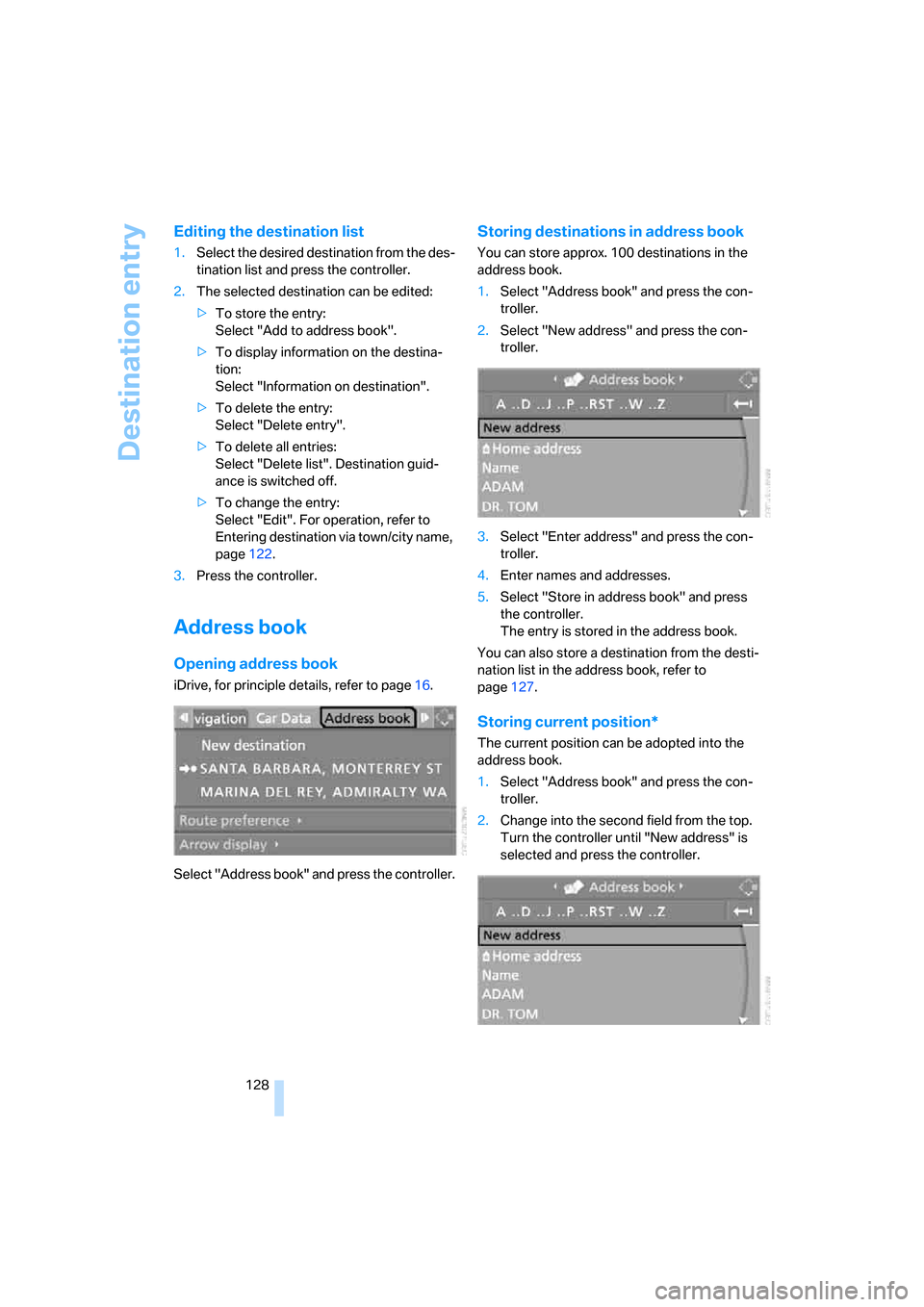
Select "Address book" and press the controller.
Storing destinations in address book
You can store approx. 100 destinations in the
address book.
1.Select "Address book" and press the con-
troller.
2.Select "New address" and press the con-
troller.
3.Select "Enter address" and press the con-
troller.
4.Enter names and addresses.
5.Select "Store in address book" and press
the controller.
The entry is stored in the address book.
You can also store a destination from the desti-
nation list in the address book, refer to
page127.
Storing current position*
The current position can be adopted into the
address book.
1.Select "Address book" and press the con-
troller.
2.Change into the second field from the top.
Turn the controller until "New address" is
selected and press the controller.
Page 131 of 236
Destination entry
130 4.Select "Delete data" and press the control-
ler.
5.Select "Delete address book" and press the
controller.
6.Select "Yes" and press the controller.
Storing home address
You can store your current position or the cur-
rent destination as a home address in the
address book. This entry is in the second posi-
tion in the address book.
1.Select "Address book" and press the con-
troller.
2.Change into the second field from the top.
Turn the controller until "Home address" is
selected and press the controller.
3.Select "Use current location as address", or
"Save current destination" during the desti-
nation guidance, and press the controller.
To select the home address as the destination:
1.Select "Home address" and press the con-
troller.
2.Select "Start guidance" and press the con-
troller.To change the entry:
1.Select "Home address" and press the con-
troller.
2.Select "Edit address" and press the con-
troller. For operation, refer to Entering a
destination manually, page121.
Selecting route
You can influence the calculated route by
choosing certain route criteria. You can change
the route criteria as often as you like when
entering the destination and whenever the des-
tination guidance is active.
The route is planned according to fixed rules,
taking the road type into account, e.g. whether
it involves freeways or winding roads. The road
types are stored on the navigation DVD. As a
result, the routes recommended by the naviga-
tion system may not always be the same ones
that you would choose based on personal expe-
rience.
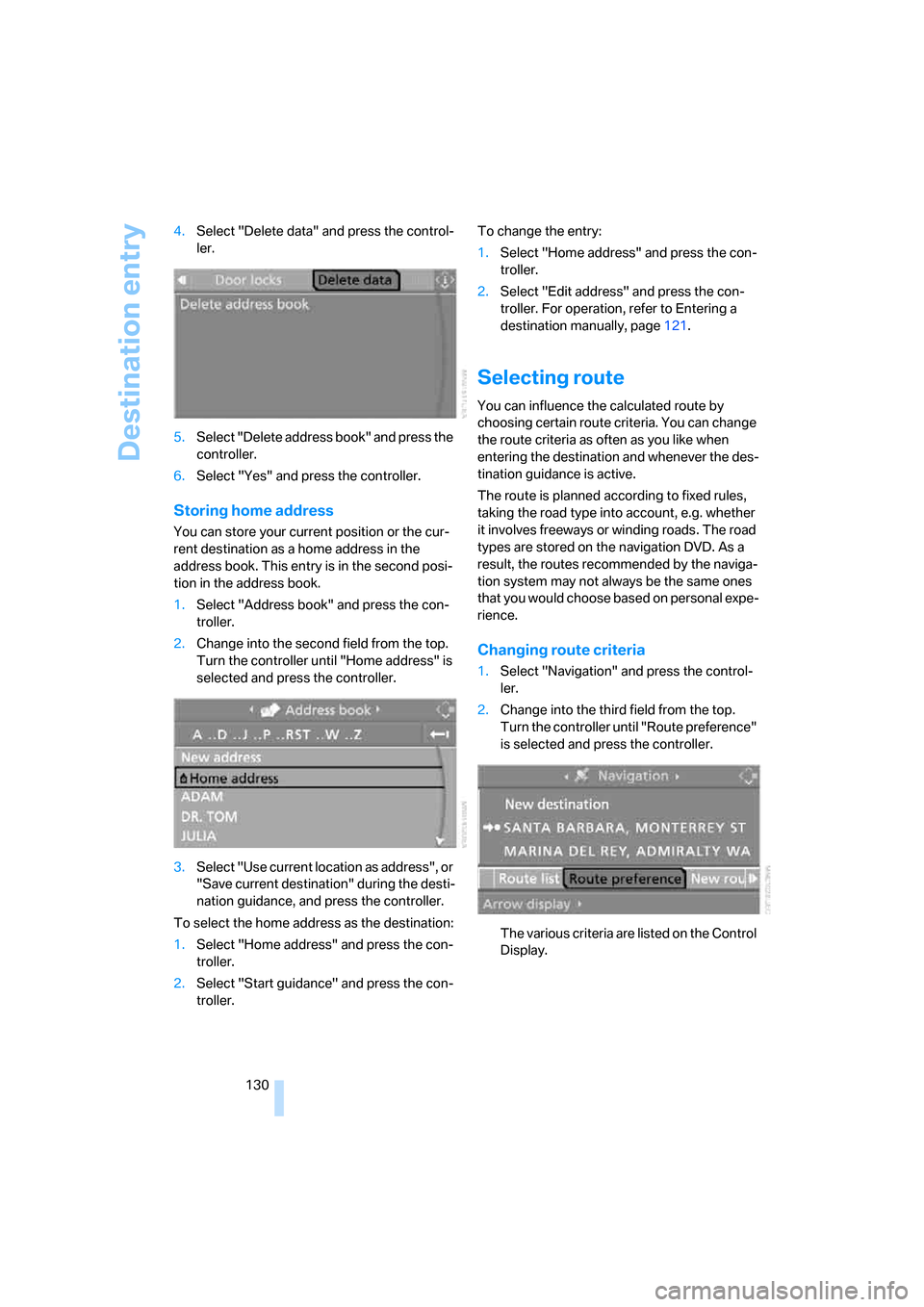
Changing route criteria
1.Select "Navigation" and press the control-
ler.
2.Change into the third field from the top.
Turn the controller until "Route preference"
is selected and press the controller.
The various criteria are listed on the Control
Display.
Page 138 of 236
Navigation
Driving tips
137Reference
At a glance
Controls
Communications
Entertainment
Mobility
What to do if …
What to do if …
>a navigation DVD is inserted, but the
request to insert the DVD is displayed on
the Control Display?
The navigation DVD may not be the right
DVD for the navigation system. The DVD is
labeled accordingly.
>you request the current position of your
vehicle, but do not receive a precise dis-
play?
The system is unable to receive enough
GPS signals at your current position due to
obstructions, your current position is not
yet available on your navigation DVD, or the
system is in the process of calculating your
current position. As a rule, reception is
guaranteed in the open air.
>the destination guidance does not accept a
destination?
The data of the destination is not stored on
the navigation DVD that is loaded. Select a
destination that is as close as possible to
the original.
>the destination guidance does not accept a
destination without the street name?
On the navigation DVD, no downtown area
can be determined for the city or town
entered. Enter any street, or a destination
such as the railway station etc., then start
the destination guidance.
>you want to enter a destination for the des-
tination guidance, but it is not possible to
select the letters for your desired entry?
The data of the destination is not stored on
the navigation DVD that is loaded. In this
case, the system will not offer you any let-
ters to choose from. Select a destination
that is as close as possible to the original.>the system stops furnishing directions on
which way to turn as you approach intersec-
tions?
You are driving in an area that has not yet
been completely recorded on the naviga-
tion DVD. Instead of an arrow indicating a
turn, you will see an arrow which indicates
the general direction of your planned route.
Or you have left the recommended route
and the system requires a few seconds to
calculate a new recommended route.
>the navigation system does not react to
entries?
If the battery has just been reconnected
after having been disconnected, it then
takes up to 10 minutes before the system is
once again operational.
Page 164 of 236
163
Entertainment
Reference
At a glance
Controls
Driving tips Communications
Navigation
Mobility
Making calls with car phone:
BMW Assist calls
You can use the car phone via the handsfree
system for BMW Assist calls.
When the status information "BMW Assist" or
"BMW Service" is displayed in "Communica-
tion", only BMW Assist calls are possible.
It may not be possible to establish a telephone
connection using the mobile phone while a con-
nection is being established to BMW Assist
or while a call to BMW Assist is already in
progress. If this happens, you must unpair the
mobile phone and the vehicle if you wish to
place a call with the mobile phone.
Initial operation
Logging on mobile phone on vehicle
The following prerequisites must be met:
>The mobile phone is ready to operate.
>The Bluetooth links of the vehicle, refer to
page165, and the mobile phone are active.
>Depending on the mobile phone, presets in
the mobile phone are required: e.g. acti-
vated via the menu item Bluetooth or the
menu item Connection not with confirma-
tion.
>To log on, specify any desired number as
the Bluetooth passkey, e.g. 1. This Blue-
tooth passkey is no longer required follow-
ing successful logon.
>The ignition is switched on.
Only log on the mobile phone with the
vehicle stopped; otherwise you may
become distracted and inadvertently endanger
your passengers and other road users.<
Switching on ignition
1.Insert the remote control as far as possible
into the ignition lock.
2.S w i t c h o n t h e s w i t c h o n i g n i t i o n b y p r e s s i n g
the Start/Stop button without depressing
the brake or clutch pedal.
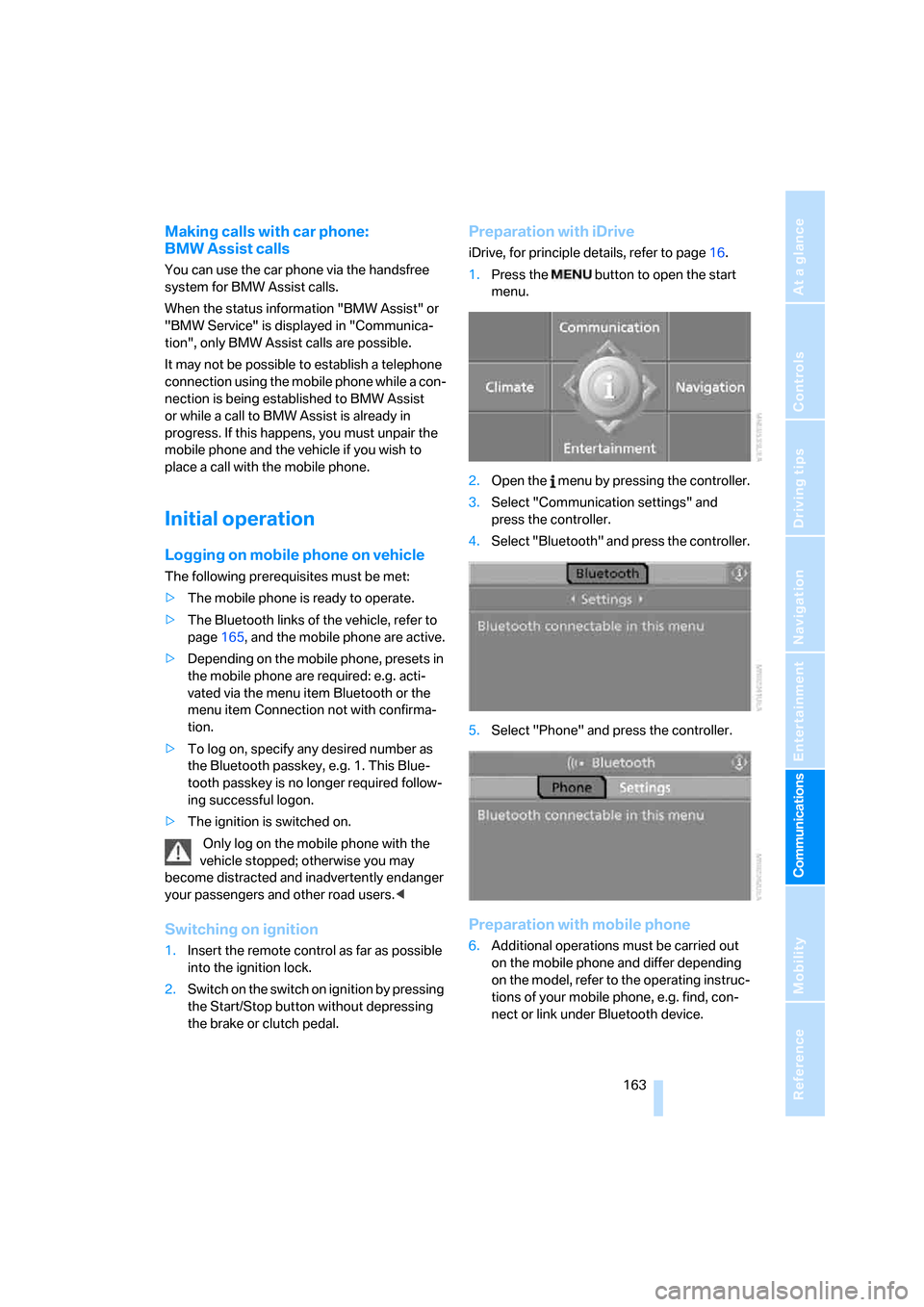
Preparation with iDrive
iDrive, for principle details, refer to page16.
1.Press the button to open the start
menu.
2.Open the menu by pressing the controller.
3.Select "Communication settings" and
press the controller.
4.Select "Bluetooth" and press the controller.
5.Select "Phone" and press the controller.
Preparation with mobile phone
6.Additional operations must be carried out
on the mobile phone and differ depending
on the model, refer to the operating instruc-
tions of your mobile phone, e.g. find, con-
nect or link under Bluetooth device.
Page 191 of 236
Under the hood
190
Under the hood
Never attempt to perform any service or
repair operations on your vehicle without
the required professional technical training. If
you are unfamiliar with the specifications to be
observed, only have work carried out on your
vehicle by a BMW center or a repair shop that
works in accordance with BMW guidelines and
uses appropriately trained personnel. Other-
wise there is a danger of damage and associ-
ated safety risks if this work is performed
improperly.<
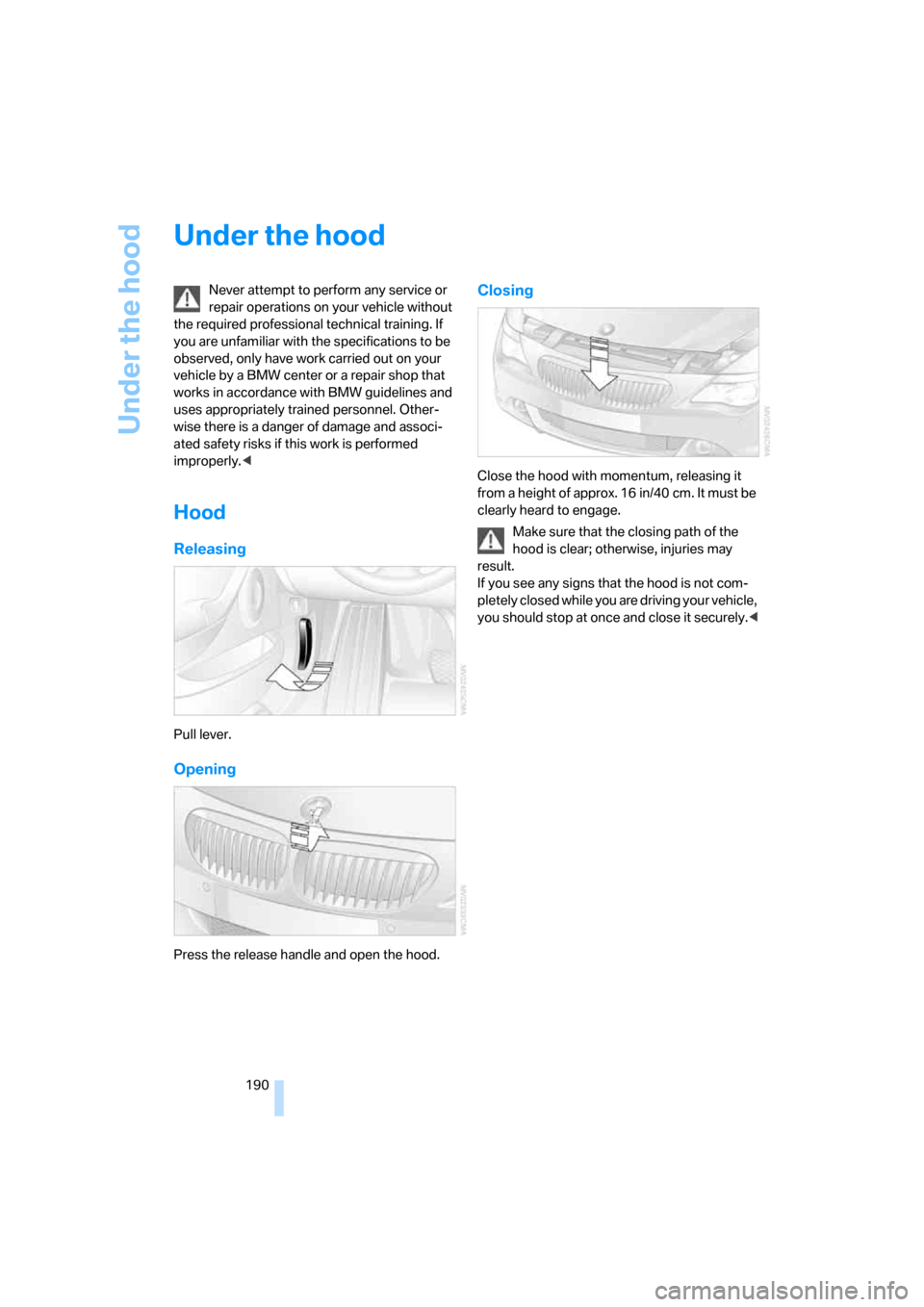
Hood
Releasing
Pull lever.
Opening
Press the release handle and open the hood.
Closing
Close the hood with momentum, releasing it
from a height of approx. 16 in/40 cm. It must be
clearly heard to engage.
Make sure that the closing path of the
hood is clear; otherwise, injuries may
result.
If you see any signs that the hood is not com-
pletely closed while you are driving your vehicle,
you should stop at once and close it securely.<
Page 193 of 236
Under the hood
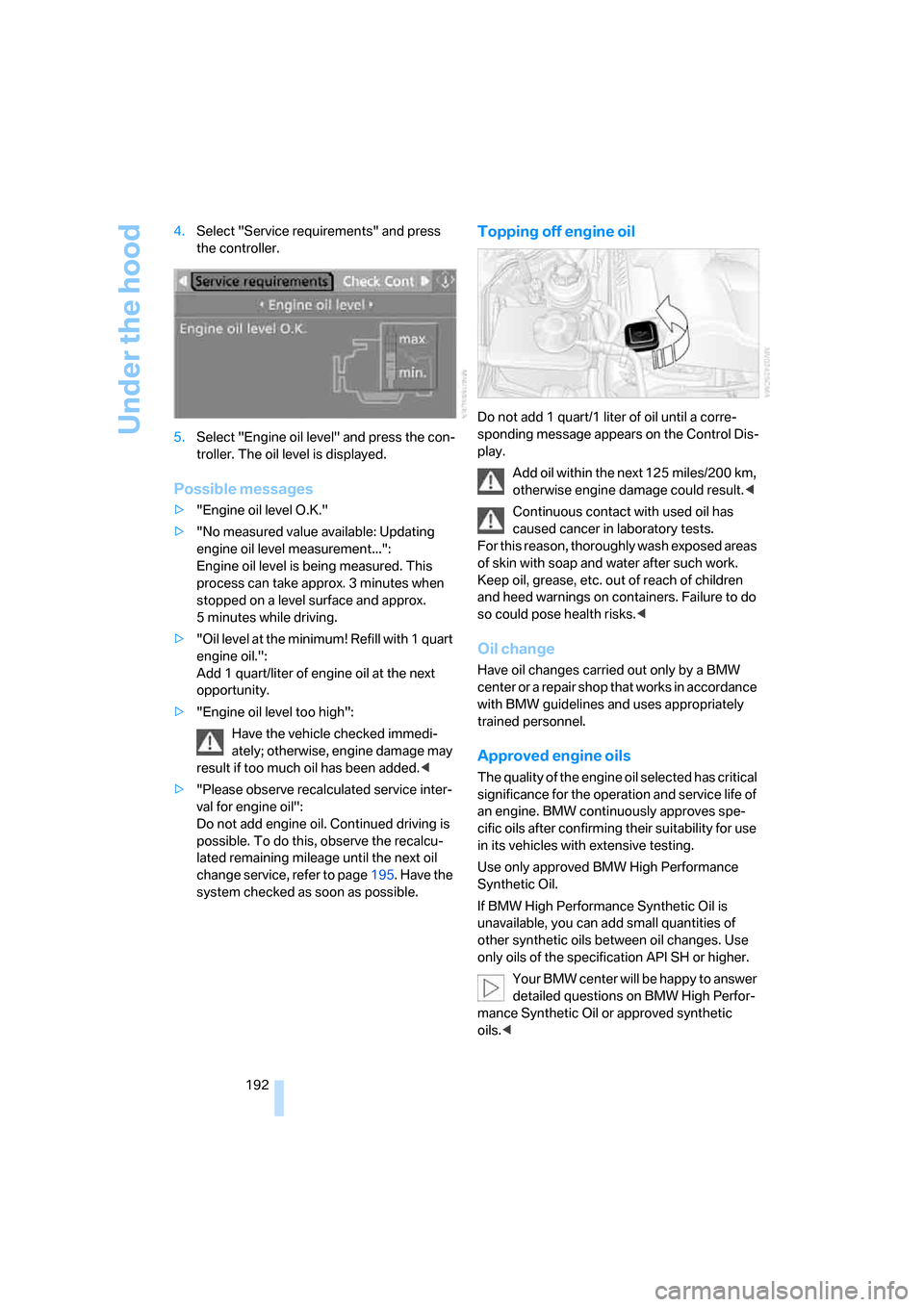
192 4.Select "Service requirements" and press
the controller.
5.Select "Engine oil level" and press the con-
troller. The oil level is displayed.
Possible messages
>"Engine oil level O.K."
>"No measured value available: Updating
engine oil level measurement...":
Engine oil level is being measured. This
process can take approx. 3 minutes when
stopped on a level surface and approx.
5 minutes while driving.
>"Oil level at the minimum! Refill with 1 quart
engine oil.":
Add 1 quart/liter of engine oil at the next
opportunity.
>"Engine oil level too high":
Have the vehicle checked immedi-
ately; otherwise, engine damage may
result if too much oil has been added.<
>"Please observe recalculated service inter-
val for engine oil":
Do not add engine oil. Continued driving is
possible. To do this, observe the recalcu-
lated remaining mileage until the next oil
change service, refer to page195. Have the
system checked as soon as possible.
Topping off engine oil
Do not add 1 quart/1 liter of oil until a corre-
sponding message appears on the Control Dis-
play.
Add oil within the next 125 miles/200 km,
otherwise engine damage could result.<
Continuous contact with used oil has
caused cancer in laboratory tests.
For this reason, thoroughly wash exposed areas
of skin with soap and water after such work.
Keep oil, grease, etc. out of reach of children
and heed warnings on containers. Failure to do
so could pose health risks.<
Oil change
Have oil changes carried out only by a BMW
center or a repair shop that works in accordance
with BMW guidelines and uses appropriately
trained personnel.
Approved engine oils
The quality of the engine oil selected has critical
significance for the operation and service life of
an engine. BMW continuously approves spe-
cific oils after confirming their suitability for use
in its vehicles with extensive testing.
Use only approved BMW High Performance
Synthetic Oil.
If BMW High Performance Synthetic Oil is
unavailable, you can add small quantities of
other synthetic oils between oil changes. Use
only oils of the specification API SH or higher.
Your BMW center will be happy to answer
detailed questions on BMW High Perfor-
mance Synthetic Oil or approved synthetic
oils.<
Page 221 of 236
Everything from A to Z
220 Center console14
"Central locking"30
Central locking system29
– comfort access36
– from inside vehicle32
Changes, technical, refer to
For your own safety6
Changing a wheel200
Changing language on
Control Display84
Changing units of measure on
Control Display83
Changing wheels188
CHECK button80
Check Control79
"Check Control
messages"80
Check Gas Cap182
Checking air pressure, refer to
Tire inflation pressure184
Children's seats, refer to
Child-restraint systems56
Child-restraint fixing system
LATCH57
Child-restraint systems56
Chrome parts, care, refer to
the Caring for your vehicle
brochure
Cigarette lighter110
Cigarette lighter socket, refer
to Connecting electrical
devices110
Cleaning, refer to the Caring
for your vehicle brochure
"Climate"101
Clock74
– 12h/24h mode83
– setting time and date82
Closing
– from inside32
– from outside30
Closing fuel filler cap182
Clothes hooks, Coupe109
Cockpit10
Cold start, refer to Starting
engine59Comfort access36
– observing in car wash37
– replacing battery38
Comfort operation
– windows with comfort
access37
– with comfort access37
"Communication"166,176
"Communication
settings"174
Compact disc
– refer to CD changer153
– refer to CD player153
Compartment for remote
control, refer to Ignition
lock58
Compartments, refer to
Storage compartments108
Compressed audio files153
Computer75
– displays on Control
Display76
– hour signal83
"Concert hall", refer to Tone
control142
Condition Based Service
CBS195
"Confirmation"31
Connecting car vacuum
cleaner, refer to Connecting
electrical devices110
Consumption display, refer to
Average fuel
consumption75
Consumption statistics, refer
to Average fuel
consumption75
"Continue guidance to
destination?"132
Control Center, refer to
iDrive16
Control Display, refer to
iDrive16
– setting brightness83
Controller, refer to iDrive16
Controls, refer to Cockpit10Convenience operation
– convertible top31,32
– glass sunroof30,32
– windows30,32
Convertible
– convertible program for
automatic climate
control101
– opening and closing
windows38
– rollover protection
system92
– top41
– wind deflector45
Convertible top
– care, refer to the Caring for
your vehicle brochure
– convenience operation32
– emergency closing43
– manual closing43
– opening and closing42
Coolant193
– checking level193
– temperature74
Cooling, maximum103
Cornering Brake Control
CBC86
Country of destination for
navigation
122
Courtesy lamps, refer to
Interior lamps99
Cruise control66,67
– active cruise control67
Cup holders109
Curb weight, refer to
Weights210
"Current position"136
Current position
– displaying136
– entering128
– storing128
"Customer
Relations"176,178
Cylinders, refer to Engine
data210
Page 223 of 236
Everything from A to Z
222 Dynamic Brake Control
DBC86
Dynamic Drive88
Dynamic Driving Control64
Dynamic Stability Control
DSC86
Dynamic Traction Control
DTC87
E
Easy entry, refer to Getting in
back51
Easy entry/exit53
EBV, refer to Electronic brake-
force distribution86
Eject button, refer to Buttons
on CD player140
Electrical malfunction
– convertible top43
– door lock32
– driver's door32
– fuel filler door182
– glass sunroof41
– luggage compartment lid34
– storage compartment, hotel
function33
Electric steering wheel
adjustment53
Electronic brake-force
distribution86
Electronic oil level check191
Emergency assistance, refer
to Roadside Assistance203
Emergency call202
Emergency operation, refer to
Manual operation
– convertible top43
– door lock32
– driver's door32
– fuel filler door182
– glass sunroof41
– hotel function33
– luggage compartment lid34
– selector lever interlock,
automatic transmission63Emergency release for
luggage compartment lid in
luggage compartment34
Emergency services, refer to
Roadside Assistance203
"Emission inspect."78
"Enable services"175
"End call"167
Engine
– breaking-in114
– data210
– overheated, refer to Coolant
temperature74
– speed210
– starting59
– starting, comfort access36
– starting difficulties59
– switching off59
– switching off when equipped
with Automatic transmission
with comfort access37
Engine compartment191
Engine coolant193
Engine oil
– additives192
– approved oils192
– electronic oil level check191
– recommended oils192
– temperature75
– temperature gauge75
– topping off192
"Engine oil level"192
Engine output, refer to Engine
data210
Engine overheating, refer to
Coolant temperature74
Engine speed, refer to Engine
specifications210
Engine starting, refer to
Starting engine59
"Enter address"122,128
Entering address121,124
Entering destination via town/
city name122
Entering intersection123
Entering town/city for
navigation122Entering zip code for
navigation123
"Entertainment"140
"Entertainment
settings"141,148
Entertainment sound output
on/off141
Entry map for destination125
Equalizer, refer to Tone
control143
"Equalizer", tone control143
"ESN"150
ESP Electronic Stability
Program, refer to DSC
Dynamic Stability
Control86
Event Data Recorders196
Exhaust system, refer to Hot
exhaust system114
Exterior mirrors52
– automatic dimming
feature53
– automatic heating53
– folding in and out52
– tilting down passenger-side
mirror53
Eye for tow-starting and
towing, refer to Tow
fitting204
Eyes for lashing, refer to
Securing cargo117
F
"Fader", refer to Tone
control142
Fader, refer to Tone
control142
Failure messages, refer to
Check Control79
False alarms, refer to Avoiding
unintentional alarms36
Fastening safety belts, refer to
Safety belts51
Fastest route for
navigation130
Page 224 of 236
Reference 223
At a glance
Controls
Driving tips
Communications
Navigation
Entertainment
Mobility
Fast forward
– CD changer157
– CD player157
"Fast route" for
navigation131
"Favorites" calling up with
radio147
Filling capacities212
First aid, refer to First-aid
kit203
First-aid kit203
Flashing when locking and
unlocking, refer to Setting
acknowledgment signals31
Flashlight, refer to
Rechargeable flashlight107
Flat tire
– Flat Tire Monitor88
– run-flat tires89,188
Flat Tire Monitor88
– false alarms88
– initializing system88
– limits of system88
– show chains189
– warning lamp89
"FM", reception
range140,144
FM, waveband144
Fog lamps98
– indicator lamp13,98
Folding into raised position
convertible top
compartment floor,
Convertible35
Footbrake, refer to Braking
safely115
Footwell lighting, refer to
Interior lamps99
For specified oil grades, refer
to Approved engine oils192
For your own safety6
Freeway, refer to Route
criteria130
Front airbags90
Front passenger airbags
deactivating91
"FTM"89FTM, refer to Flat Tire Monitor
FTM88
Fuel
– average consumption75
– display75
– fuel specifications183
– high-quality brands183
– quality183
– specifications183
– tank capacity182
Fuel display, refer to Fuel
gauge
75
Fuel filler door182
– releasing in the event of
electrical malfunction182
Fuel gauge75
Fuses201
G
Garage-door opener, refer to
Integrated universal remote
control106
Gas, refer to Average fuel
consumption75
Gasoline
– refer to Fuel
specifications183
– refer to Required fuel183
Gasoline display, refer to Fuel
gauge75
Gear changes
– automatic transmission with
Steptronic62
– SMG Sequential Manual
Gearbox62
Gear display
– automatic transmission with
Steptronic62
– SMG Sequential Manual
Gearbox61
Gearshift lever
– automatic transmission with
Steptronic62
– manual transmission60
– SMG Sequential Manual
Gearbox61General driving notes114
Getting in back51
Glass sunroof, electric,
comfort operation with
comfort access37
Glass sunroof, electric with
raise function40
– convenience operation32
– moving manually41
– remote control30
Glove compartment107
– rechargeable flashlight107
GPS navigation, refer to
Navigation system120
Grills, refer to Ventilation103
Gross vehicle weight, refer to
Weights210
H
Handbrake60
– indicator lamp13,60
Handsfree system
– refer to Microphone14
Hazard warning flashers15
HD, refer to High Definition
Radio148
Head airbags90
Headlamp control,
automatic96
Headlamp flasher64
Headlamps
– care, refer to the Caring for
your vehicle brochure
– cleaning, refer to Wiper
system66
– replacing bulbs197
Head Light, refer to Adaptive
Head Light97
Head restraints
– front50
– removing50
– sitting safely47
"Head-Up Display"94
Head-Up Display93