turn signal BMW 650I CONVERTIBLE 2006 E64 User Guide
[x] Cancel search | Manufacturer: BMW, Model Year: 2006, Model line: 650I CONVERTIBLE, Model: BMW 650I CONVERTIBLE 2006 E64Pages: 236, PDF Size: 8.21 MB
Page 98 of 236
Controls
97Reference
At a glance
Driving tips
Communications
Navigation
Entertainment
Mobility
cannot detect fog. To avoid safety risks, you
should always switch on the lamps manually
under these conditions.<
Adaptive Head Light*
The concept
Adaptive Head Light is a variable headlamp
control system that enables better illumination
of the road surface. Depending on the steering
angle and other parameters, the light from the
headlamp follows the course of the road.
Activating Adaptive Head Light
In switch position1, the Adaptive Head Light is
active and the automatic headlamp control is
switched on.
To avoid blinding oncoming traffic, the Adaptive
Head Light is not active when driving in reverse
and points toward the passenger side when the
vehicle is stopped.
Malfunction
The LED next to the symbol for automatic head-
lamp control flashes. The Adaptive Head Light
is malfunctioning or has failed. Have the system
checked as soon as possible.
High beams/
roadside parking lamps
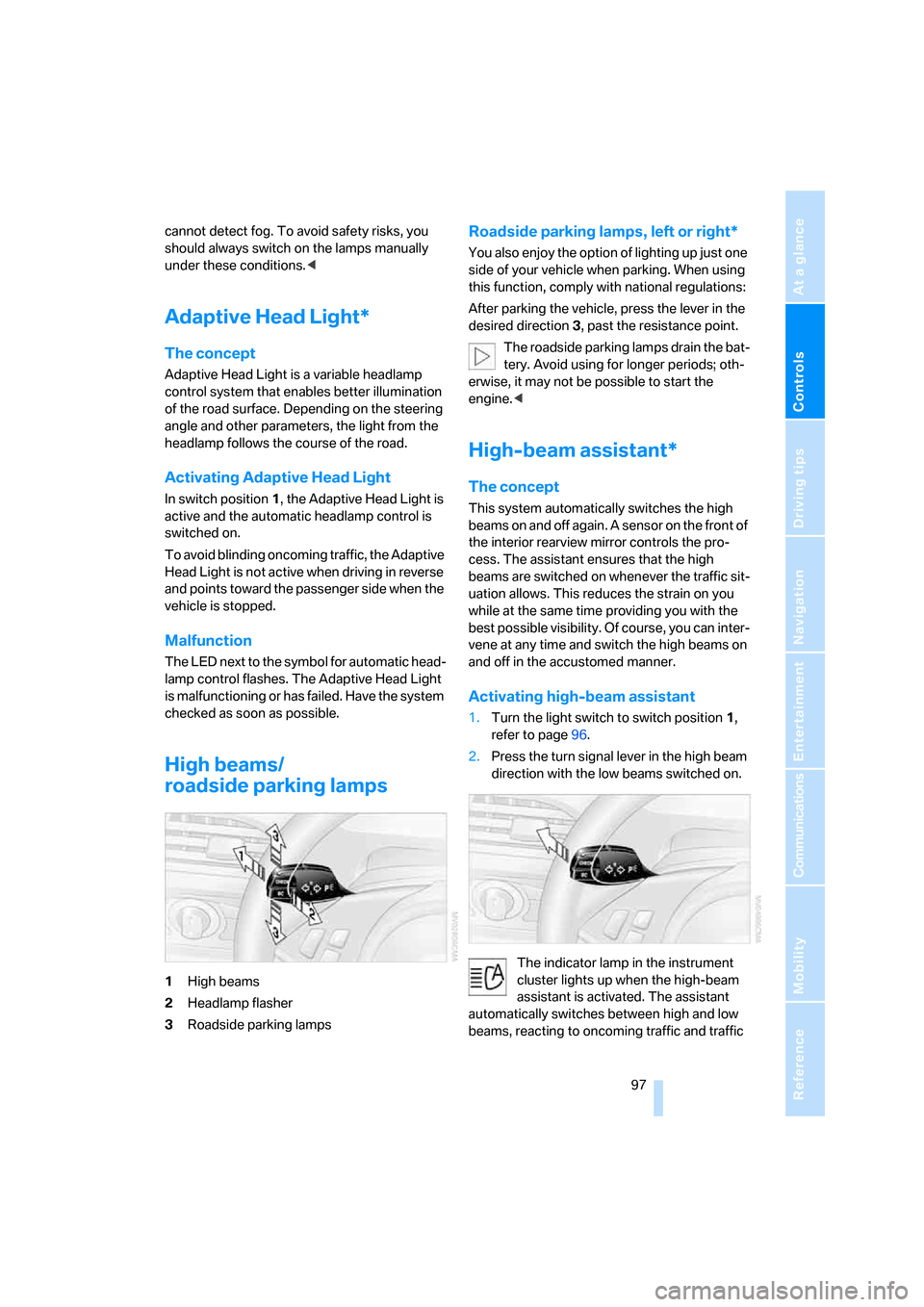
1High beams
2Headlamp flasher
3Roadside parking lamps
Roadside parking lamps, left or right*
You also enjoy the option of lighting up just one
side of your vehicle when parking. When using
this function, comply with national regulations:
After parking the vehicle, press the lever in the
desired direction3, past the resistance point.
The roadside parking lamps drain the bat-
tery. Avoid using for longer periods; oth-
erwise, it may not be possible to start the
engine.<
High-beam assistant*
The concept
This system automatically switches the high
beams on and off again. A sensor on the front of
the interior rearview mirror controls the pro-
cess. The assistant ensures that the high
beams are switched on whenever the traffic sit-
uation allows. This reduces the strain on you
while at the same time providing you with the
best possible visibility. Of course, you can inter-
vene at any time and switch the high beams on
and off in the accustomed manner.
Activating high-beam assistant
1.Turn the light switch to switch position1,
refer to page96.
2.Press the turn signal lever in the high beam
direction with the low beams switched on.
The indicator lamp in the instrument
cluster lights up when the high-beam
assistant is activated. The assistant
automatically switches between high and low
beams, reacting to oncoming traffic and traffic
Page 99 of 236
Lamps
98 ahead and to well-lit areas such as towns and
cities.
Manually switching between high and
low beams
You can intervene at any time if you wish or the
situation requires.
>If the high-beam assistant has switched on
the high beams, but you want to use the low
beams, simply switch to the low beams with
the turn signal lever. This also deactivates
the high-beam assistant.
To reactivate the system, briefly press the
turn signal lever in the high beam direction
again.
>If the high-beam assistant has switched on
the low beams, but you want to use the high
beams, switch to the high beams in the
accustomed manner. The system is deacti-
vated in the process and you must switch to
the low beams manually.
To reactivate the system, briefly press the
turn signal lever in the high beam direction
again.
>You use the headlamp flasher in the usual
way when the low beams are on.
System limits
The high-beam assistant cannot replace
personal decisions about the benefits of
using high beams. In situations that require
them, you should switch to the low beams man-
ually to avoid a safety risk.<
In the following sample situations, the system
either does not function or functions only in a
limited way and a personal reaction may be
required:
>Under extremely unfavorable weather con-
ditions, such as heavy fog or precipitation
>To make out poorly-lit road users such as
pedestrians, cyclists, people on horseback,
horse-drawn vehicles, train or ship traffic
close to the road and wild animals crossing
the road>In tight curves, on steep hilltops or in
depressions, with cross traffic or partially
concealed oncoming traffic on the freeway
>In poorly lit places and with highly reflective
signs
>In the low speed range
>When the windshield is fogged up, dirty or
covered with stickers, decals, etc. in the
area of the interior rearview mirror
>When the sensor is dirty. Clean the sensor
on the front side of the interior rearview mir-
ror with a cloth moistened with a small
amount of glass cleaner.
Front fog lamps
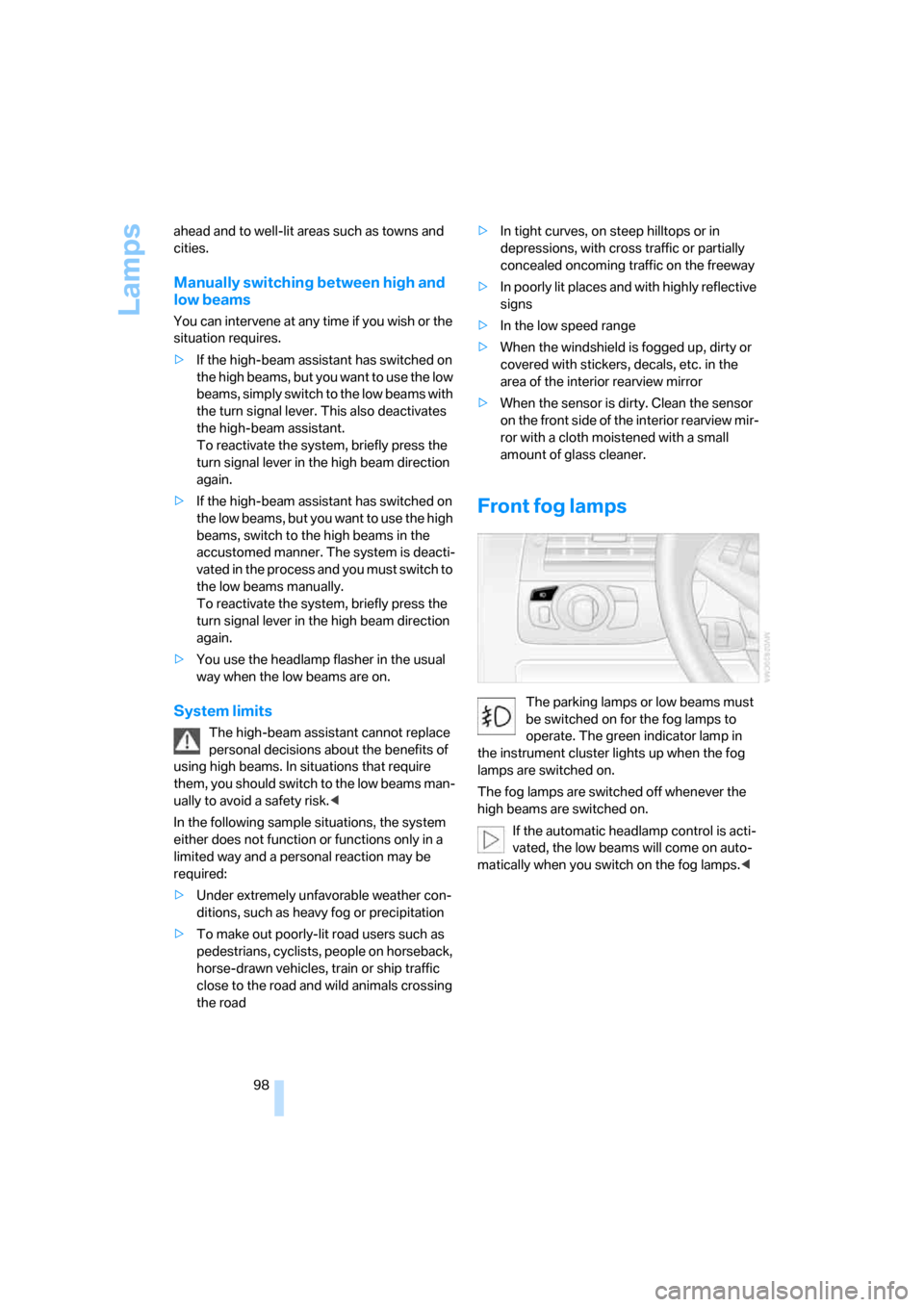
The parking lamps or low beams must
be switched on for the fog lamps to
operate. The green indicator lamp in
the instrument cluster lights up when the fog
lamps are switched on.
The fog lamps are switched off whenever the
high beams are switched on.
If the automatic headlamp control is acti-
vated, the low beams will come on auto-
matically when you switch on the fog lamps.<
Page 138 of 236
Navigation
Driving tips
137Reference
At a glance
Controls
Communications
Entertainment
Mobility
What to do if …
What to do if …
>a navigation DVD is inserted, but the
request to insert the DVD is displayed on
the Control Display?
The navigation DVD may not be the right
DVD for the navigation system. The DVD is
labeled accordingly.
>you request the current position of your
vehicle, but do not receive a precise dis-
play?
The system is unable to receive enough
GPS signals at your current position due to
obstructions, your current position is not
yet available on your navigation DVD, or the
system is in the process of calculating your
current position. As a rule, reception is
guaranteed in the open air.
>the destination guidance does not accept a
destination?
The data of the destination is not stored on
the navigation DVD that is loaded. Select a
destination that is as close as possible to
the original.
>the destination guidance does not accept a
destination without the street name?
On the navigation DVD, no downtown area
can be determined for the city or town
entered. Enter any street, or a destination
such as the railway station etc., then start
the destination guidance.
>you want to enter a destination for the des-
tination guidance, but it is not possible to
select the letters for your desired entry?
The data of the destination is not stored on
the navigation DVD that is loaded. In this
case, the system will not offer you any let-
ters to choose from. Select a destination
that is as close as possible to the original.>the system stops furnishing directions on
which way to turn as you approach intersec-
tions?
You are driving in an area that has not yet
been completely recorded on the naviga-
tion DVD. Instead of an arrow indicating a
turn, you will see an arrow which indicates
the general direction of your planned route.
Or you have left the recommended route
and the system requires a few seconds to
calculate a new recommended route.
>the navigation system does not react to
entries?
If the battery has just been reconnected
after having been disconnected, it then
takes up to 10 minutes before the system is
once again operational.
Page 145 of 236
Radio
144
Radio
Your radio provides reception of the FM and AM
wavebands.
Listening to radio
Press the button if the sound output is switched
off.
iDrive, for principle details, refer to page16.
1.Press the button.
This opens the start menu.
2.Move the controller backwards to open
"Entertainment".
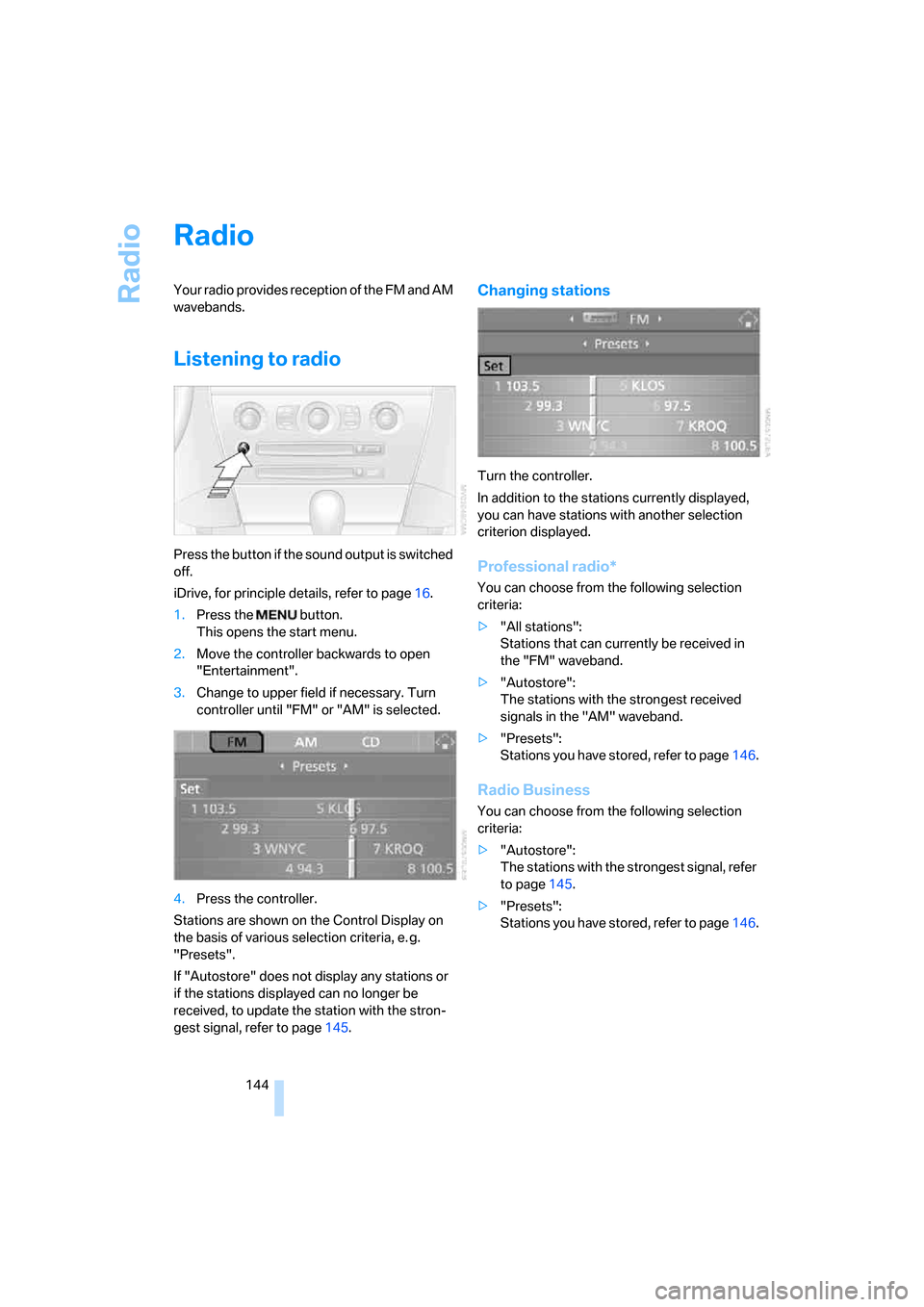
3.Change to upper field if necessary. Turn
controller until "FM" or "AM" is selected.
4.Press the controller.
Stations are shown on the Control Display on
the basis of various selection criteria, e. g.
"Presets".
If "Autostore" does not display any stations or
if the stations displayed can no longer be
received, to update the station with the stron-
gest signal, refer to page145.
Changing stations
Turn the controller.
In addition to the stations currently displayed,
you can have stations with another selection
criterion displayed.
Professional radio*
You can choose from the following selection
criteria:
>"All stations":
Stations that can currently be received in
the "FM" waveband.
>"Autostore":
The stations with the strongest received
signals in the "AM" waveband.
>"Presets":
Stations you have stored, refer to page146.
Radio Business
You can choose from the following selection
criteria:
>"Autostore":
The stations with the strongest signal, refer
to page145.
>"Presets":
Stations you have stored, refer to page146.
Page 153 of 236
Radio
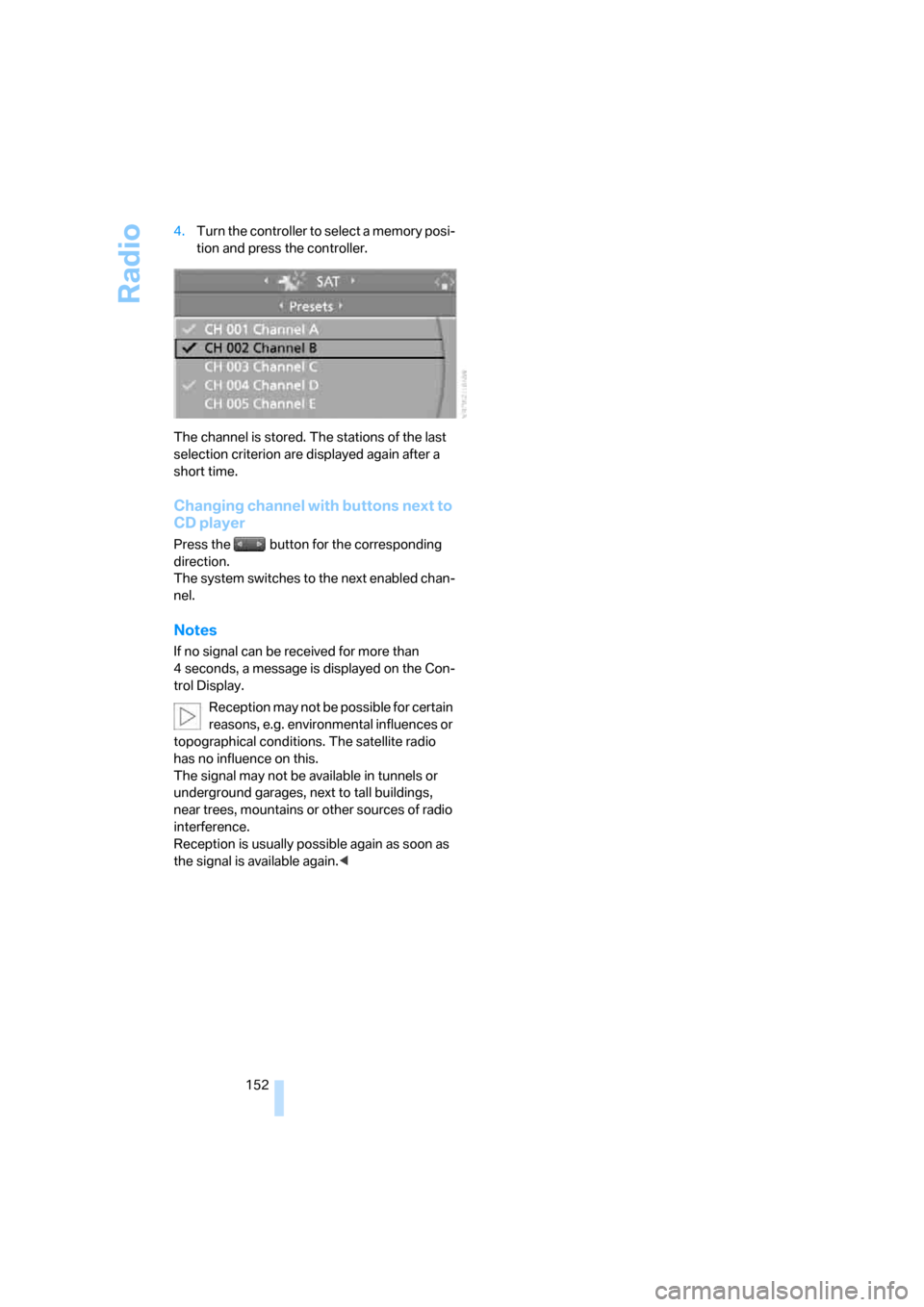
152 4.Turn the controller to select a memory posi-
tion and press the controller.
The channel is stored. The stations of the last
selection criterion are displayed again after a
short time.
Changing channel with buttons next to
CD player
Press the button for the corresponding
direction.
The system switches to the next enabled chan-
nel.
Notes
If no signal can be received for more than
4 seconds, a message is displayed on the Con-
trol Display.
Reception may not be possible for certain
reasons, e.g. environmental influences or
topographical conditions. The satellite radio
has no influence on this.
The signal may not be available in tunnels or
underground garages, next to tall buildings,
near trees, mountains or other sources of radio
interference.
Reception is usually possible again as soon as
the signal is available again.<
Page 199 of 236
Replacing components
198
High beams, parking lamps
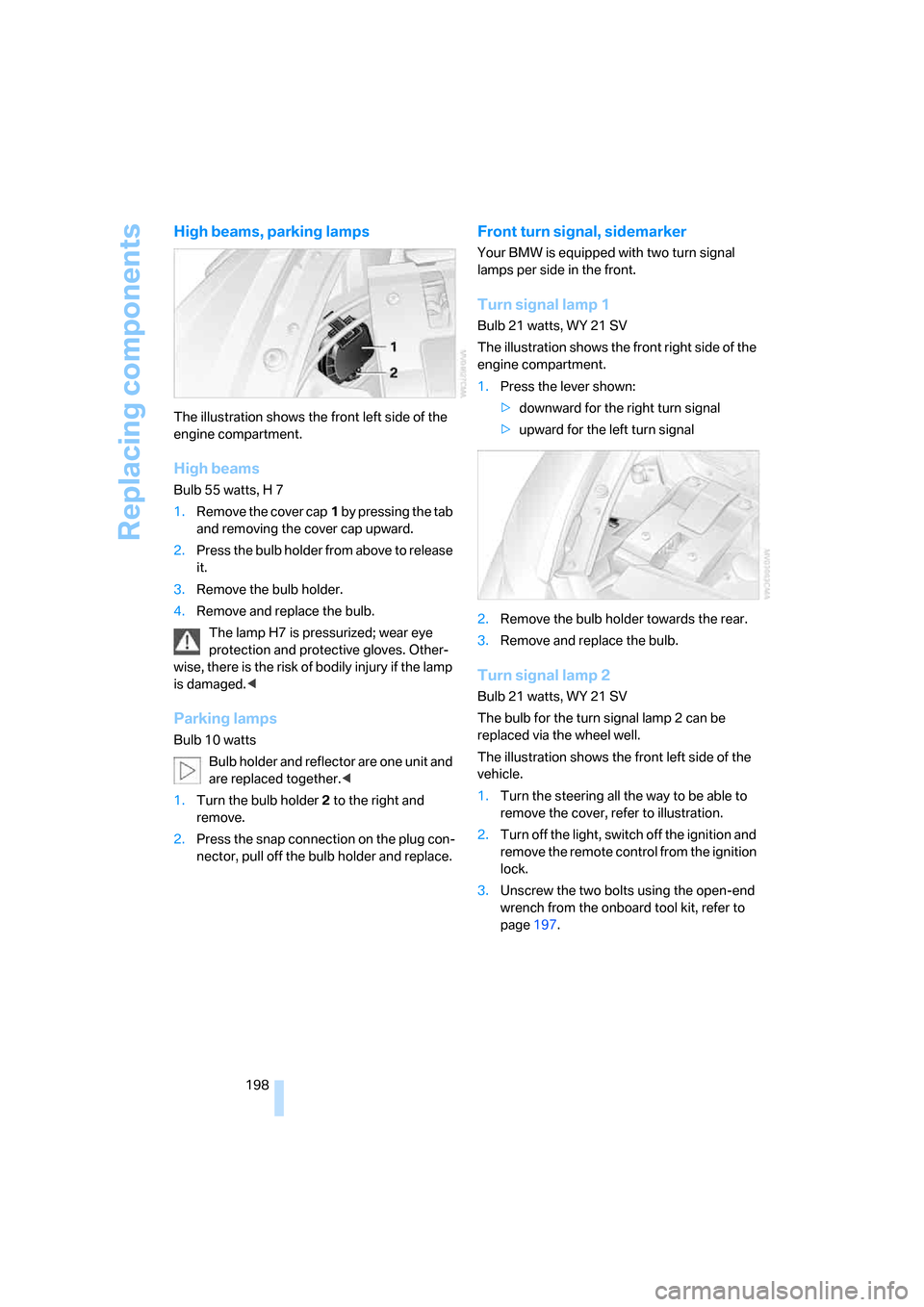
The illustration shows the front left side of the
engine compartment.
High beams
Bulb 55 watts, H 7
1.Remove the cover cap1 by pressing the tab
and removing the cover cap upward.
2.Press the bulb holder from above to release
it.
3.Remove the bulb holder.
4.Remove and replace the bulb.
The lamp H7 is pressurized; wear eye
protection and protective gloves. Other-
wise, there is the risk of bodily injury if the lamp
is damaged.<
Parking lamps
Bulb 10 watts
Bulb holder and reflector are one unit and
are replaced together.<
1.Turn the bulb holder2 to the right and
remove.
2.Press the snap connection on the plug con-
nector, pull off the bulb holder and replace.
Front turn signal, sidemarker
Your BMW is equipped with two turn signal
lamps per side in the front.
Turn signal lamp 1
Bulb 21 watts, WY 21 SV
The illustration shows the front right side of the
engine compartment.
1.Press the lever shown:
>downward for the right turn signal
>upward for the left turn signal
2.Remove the bulb holder towards the rear.
3.Remove and replace the bulb.
Turn signal lamp 2
Bulb 21 watts, WY 21 SV
The bulb for the turn signal lamp 2 can be
replaced via the wheel well.
The illustration shows the front left side of the
vehicle.
1.Turn the steering all the way to be able to
remove the cover, refer to illustration.
2.Turn off the light, switch off the ignition and
remove the remote control from the ignition
lock.
3.Unscrew the two bolts using the open-end
wrench from the onboard tool kit, refer to
page197.
Page 200 of 236
Mobility
199Reference
At a glance
Controls
Driving tips
Communications
Navigation
Entertainment
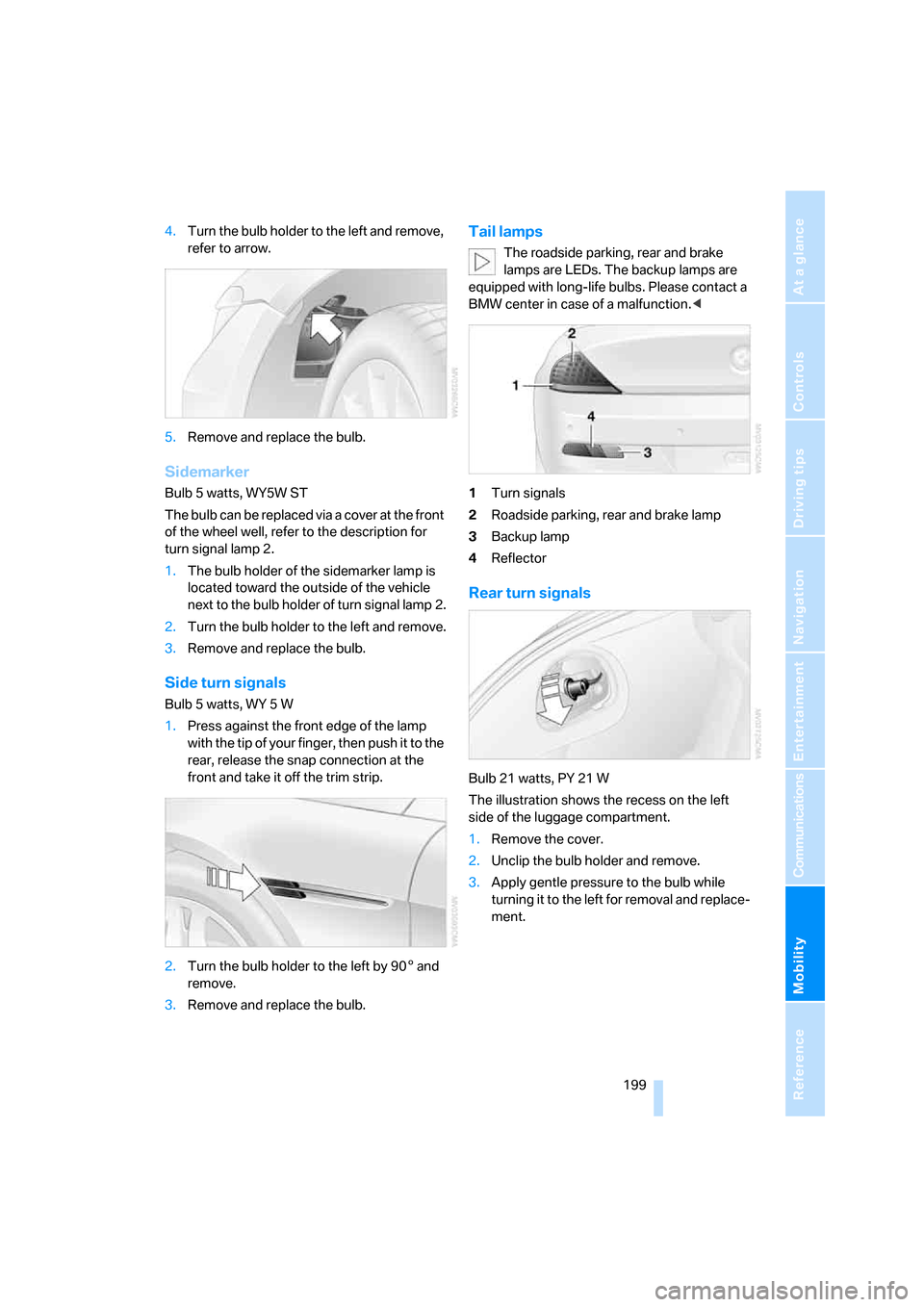
4.Turn the bulb holder to the left and remove,
refer to arrow.
5.Remove and replace the bulb.
Sidemarker
Bulb 5 watts, WY5W ST
The bulb can be replaced via a cover at the front
of the wheel well, refer to the description for
turn signal lamp 2.
1.The bulb holder of the sidemarker lamp is
located toward the outside of the vehicle
next to the bulb holder of turn signal lamp 2.
2.Turn the bulb holder to the left and remove.
3.Remove and replace the bulb.
Side turn signals
Bulb 5 watts, WY 5 W
1.Press against the front edge of the lamp
with the tip of your finger, then push it to the
rear, release the snap connection at the
front and take it off the trim strip.
2.Turn the bulb holder to the left by 905 and
remove.
3.Remove and replace the bulb.
Tail lamps
The roadside parking, rear and brake
lamps are LEDs. The backup lamps are
equipped with long-life bulbs. Please contact a
BMW center in case of a malfunction.<
1Turn signals
2Roadside parking, rear and brake lamp
3Backup lamp
4Reflector
Rear turn signals
Bulb 21 watts, PY 21 W
The illustration shows the recess on the left
side of the luggage compartment.
1.Remove the cover.
2.Unclip the bulb holder and remove.
3.Apply gentle pressure to the bulb while
turning it to the left for removal and replace-
ment.
Page 206 of 236
Mobility
205Reference
At a glance
Controls
Driving tips
Communications
Navigation
Entertainment
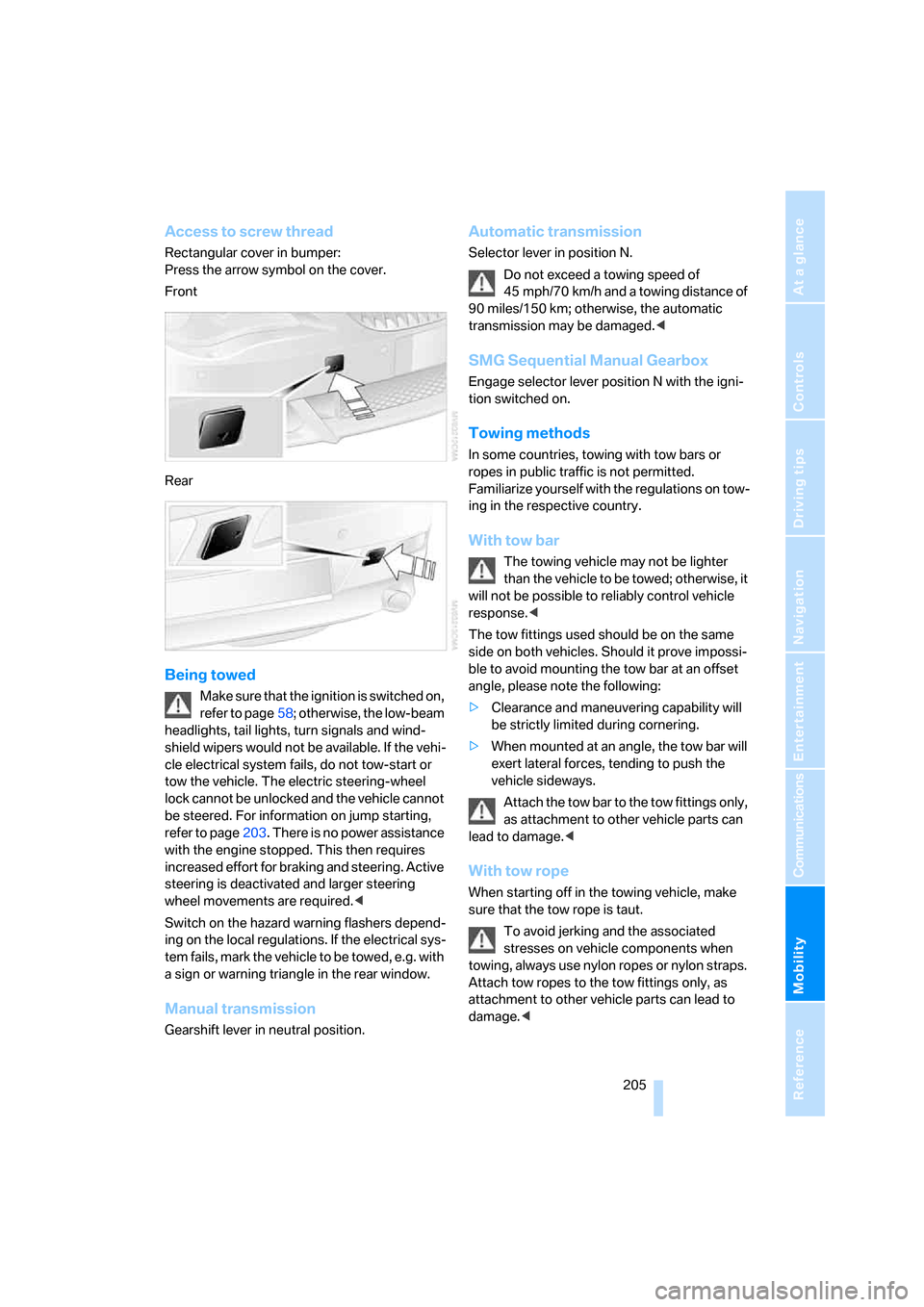
Access to screw thread
Rectangular cover in bumper:
Press the arrow symbol on the cover.
Front
Rear
Being towed
Make sure that the ignition is switched on,
refer to page58; otherwise, the low-beam
headlights, tail lights, turn signals and wind-
shield wipers would not be available. If the vehi-
cle electrical system fails, do not tow-start or
tow the vehicle. The electric steering-wheel
lock cannot be unlocked and the vehicle cannot
be steered. For information on jump starting,
refer to page203. There is no power assistance
with the engine stopped. This then requires
increased effort for braking and steering. Active
steering is deactivated and larger steering
wheel movements are required.<
Switch on the hazard warning flashers depend-
ing on the local regulations. If the electrical sys-
tem fails, mark the vehicle to be towed, e.g. with
a sign or warning triangle in the rear window.
Manual transmission
Gearshift lever in neutral position.
Automatic transmission
Selector lever in position N.
Do not exceed a towing speed of
45 mph/70 km/h and a towing distance of
90 miles/150 km; otherwise, the automatic
transmission may be damaged.<
SMG Sequential Manual Gearbox
Engage selector lever position N with the igni-
tion switched on.
Towing methods
In some countries, towing with tow bars or
ropes in public traffic is not permitted.
Familiarize yourself with the regulations on tow-
ing in the respective country.
With tow bar
The towing vehicle may not be lighter
than the vehicle to be towed; otherwise, it
will not be possible to reliably control vehicle
response.<
The tow fittings used should be on the same
side on both vehicles. Should it prove impossi-
ble to avoid mounting the tow bar at an offset
angle, please note the following:
>Clearance and maneuvering capability will
be strictly limited during cornering.
>When mounted at an angle, the tow bar will
exert lateral forces, tending to push the
vehicle sideways.
Attach the tow bar to the tow fittings only,
as attachment to other vehicle parts can
lead to damage.<
With tow rope
When starting off in the towing vehicle, make
sure that the tow rope is taut.
To avoid jerking and the associated
stresses on vehicle components when
towing, always use nylon ropes or nylon straps.
Attach tow ropes to the tow fittings only, as
attachment to other vehicle parts can lead to
damage.<
Page 222 of 236
Reference 221
At a glance
Controls
Driving tips
Communications
Navigation
Entertainment
Mobility
D
Dashboard, refer to
Cockpit10
Data
– capacities212
– dimensions211
– engine210
– technical data210
– weights210
"Date"83
Date74
– setting83
"Date format"83
Daytime driving lamps96
DBC Dynamic Brake
Control86
"Deactivated"50
Deactivating selector lever
interlock63
Decommissioning the vehicle,
refer to the Caring for your
vehicle brochure
Defrosting windows102
Defrosting windows and
removing condensation102
Defrost position, refer to
Defrosting windows102
"Delete address book" for
navigation130
"Delete all numbers" on the
mobile phone169
"Delete data" for
navigation130
"Delete" for mobile
phone169
Destination address
– deleting129
– entering121,124
Destination for navigation
– destination list127
– entry121
– home address130
– selecting from address
book129
– selecting using
information126
– storing128Destination guidance132
– bypassing route
sections136
– canceling voice
instructions55
– changing specified
route130
– displaying routes133
– distance and arrival132
– interrupting132
– starting132
– terminating/continuing132
– voice instructions135
– volume of voice
instructions
135
Destination list for
navigation127
Destinations recently driven
to127
"Details" in audio mode155
"Dial" for mobile phone167
"Dial number"167
"Diamond button"54
Digital clock74
Digital radio, refer to High
Definition Radio148
Dimensions
– Convertible212
– Coupe211
Directional indicators, refer to
Turn signals64
Direction announcements,
refer to Voice
instructions135
Direction instructions, refer to
Voice instructions135
Directory for navigation, refer
to Address book128
Displacement, refer to Engine
data210
"Display"83
Display, refer to iDrive16
Display lighting, refer to
Instrument lighting99
"Display off"21
Displays, refer to Instrument
cluster12
"Display settings"82Displays on the windshield,
refer to Head-Up Display93
Disposal
– battery of remote control
with comfort access38
– vehicle battery200
Distance, refer to
Computer76
Distance control, refer to
Active cruise control67
"Distance to dest."76
Distance to destination, refer
to Computer76
Distance warning, refer to
PDC Park Distance
Control85
Door entry lighting, refer to
Interior lamps99
Door key, refer to Keys/
remote control28
Door lock32
"Door locks"30
Doors
– manual operation32
– remote control30
DOT Quality Grades186
Draft-free ventilation104
"Driver's door only"30
Driving lamps, refer to Parking
lamps/low beams96
Driving notes114
Driving route, refer to
Displaying the route133
Driving stability control
systems86
Driving through water115
Driving tips, refer to Driving
notes114
Drying the air, refer to Cooling
function102
DSC Dynamic Stability
Control86
– indicator lamp13,87
DTC Dynamic Traction
Control87
– activating87
– indicator lamp13,87
DVD for navigation120
Page 227 of 236
Everything from A to Z
226 Malfunction
– convertible top43
– door lock32
– fuel filler door182
– glass sunroof41
– hotel function33
– luggage compartment lid34
Malfunction warnings, refer to
Check Control79
Manual air distribution102
Manual mode with automatic
transmission with
Steptronic63
"Manual" on the radio145
Manual operation
– convertible top43
– door lock32
– driver's door32
– fuel filler door182
– glass sunroof41
– hotel function33
– luggage compartment lid34
– selector lever interlock,
Automatic transmission63
Manual transmission60
"Map direction of travel"134
"Map facing north"134
Map for navigation
– changing scale134
– destination entry125
Map view133
Map view facing north133
Master key, refer to Keys/
remote control28
Maximum cooling103
Maximum speed with winter
tires189
Memory, refer to Seat, mirror
and steering wheel
memory49
Menus, refer to iDrive16
Microfilter104
Microphone
– for mobile phone14
– for voice command
system14
Mirror dimming feature53Mirrors52
– automatic curb monitor53
– heating53
– memory, refer to Seat, mirror
and steering wheel
memory49
"Missed calls"168
Missed calls168
Mobile communications
devices in vehicle115
Mobile phone
– accepted calls168
– adjusting volume
166
– calling167
– ending call167
– missed calls168
– operation via iDrive166
– redialing168
– refer to separate Owner's
Manual
– Top 8168
– touch tone dialing169
Mobile phones
– use in vehicle, refer to Mobile
communications devices in
vehicle115
Mobile Service, refer to
Roadside Assistance203
Monitor, refer to iDrive16
Monitoring pressure of tires,
refer to Flat Tire Monitor88
"Monitor on / off"54
Most recent mobile phone
numbers168
MP3, refer to Compressed
audio files153
Multi-function steering wheel,
refer to Buttons on steering
wheel11
Multifunction switch
– refer to Turn signals/
headlamp flasher64
– refer to Wiper/washer
system65
"Mute on / off"54
MW, waveband144
N
"Navigation"76,121
Navigation destination
– manual entry121,124
– selecting via map125
Navigation drive, installation
location120
Navigation DVD120
Navigation instructions, refer
to Switching voice instruc-
tions on/off135
Navigation system120
– address book128
– bypassing route
sections136
– destination entry121
– destination guidance in
assistance window120
– destination list127
– displaying current
position136
– entering a destination
manually121,124
– last destinations127
– looking for interesting
destination126
– route display133
– route list134
– selecting destination using
information126
– selecting destination via
map125
– selecting route criteria130
– starting121
– starting destination
guidance132
– switching off, refer to Termi-
nating/continuing desti-
nation guidance132
– terminating/continuing
destination guidance132
– voice instructions135
– volume adjustment135
"Navigation voice
instructions"54
"Navigation voice instructions
on"135