automatic transmission BMW 650I CONVERTIBLE 2007 E64 User Guide
[x] Cancel search | Manufacturer: BMW, Model Year: 2007, Model line: 650I CONVERTIBLE, Model: BMW 650I CONVERTIBLE 2007 E64Pages: 254, PDF Size: 7.93 MB
Page 122 of 254
Things to remember when driving
120
Things to remember when driving
Breaking-in
Moving parts need time to adjust to one
another. To ensure that your vehicle continues
to provide optimized economy of operation
throughout an extended service life, we request
that you devote careful attention to the follow-
ing section.
Engine and differential
Always obey all official speed limits.
Up to 1,200 miles/2,000 km
Drive at changing engine and driving speeds,
however do not exceed 4,500 rpm or 100 mph/
160 km/h.
Avoid full-throttle operation and use of the
transmission's kick-down mode during these
initial miles.
From 1,200 miles/2,000 km
The engine and vehicle speed can gradually be
increased.
SMG Sequential Manual Transmission
Do not use the acceleration assistant during the
break-in period, refer to page65.
Tires
Due to technical factors associated with their
manufacture, tires do not achieve their full trac-
tion potential until after an initial break-in
period. Therefore, drive reservedly during the
first 200 miles/300 km.
Brake system
Brakes require an initial break-in period of
approx. 300 miles/500 km to achieve optimized
contact and wear patterns between brake pads
and rotors. Drive in a reserved manner during
this break-in period.
Clutch
The function of the clutch is only at its opti-
mized level after a distance driven of approx.
300 miles/500 km. During this break-in period,
engage the clutch gently.
Following part replacement
Observe the break-in instructions again if com-
ponents mentioned above must be replaced
after subsequent driving operation.
General driving notes
Closing luggage compartment lid
Only drive with the luggage compartment
lid completely closed, otherwise exhaust
can penetrate into the passenger compart-
ment.<
If special circumstances should make it abso-
lutely necessary to operate the vehicle with the
luggage compartment lid open:
1.Coupe: close both windows and the glass
sunroof.
Convertible: with closed top, close all win-
dows.
2.Increase the air volume of the automatic cli-
mate control to a high level, refer to
page108.
Hot exhaust system
As in all vehicles, extremely high temper-
atures are generated in the exhaust sys-
tem. Do not remove the heat shields installed
adjacent to it, and never apply undercoating to
them. When driving, standing at idle and while
parking, take care to avoid possible contact
between the hot exhaust system and any highly
flammable materials such as hay, leaves, grass,
etc. Such contact could lead to a fire, and with it
the risk of serious property damage as well as
personal injury. Do not touch hot exhaust tail
pipes. Otherwise there is a risk of burns.<
Page 124 of 254
Things to remember when driving
122 tent pressure on the brake pedal can lead to
high temperatures, brake wear and possibly
even brake failure.<
The braking effect of the engine can be further
increased by downshifting, if necessary all the
way down into first gear. This strategy helps
you avoid placing excessive loads on the brake
system. For information on downshifting in the
manual mode of the automatic transmission,
refer to page64.
Do not drive with the clutch depressed, in
idle or with the engine switched off, other-
wise there will be no engine braking action or
support of the braking force and steering.
Never allow floor mats, carpets or any other
objects to protrude into the area of movement
of the pedals and impair their operation.<
Corrosion on brake rotors
When the vehicle is driven only occasionally,
during extended periods when the vehicle is not
used at all, and in operating conditions where
brake applications are less frequent, there is an
increased tendency for corrosion to form on
rotors, while contaminants accumulate on the
brake pads. This occurs because the minimum
pressure which must be exerted by the pads
during brake applications to clean the rotors is
not reached.
Should corrosion form on the brake rotors, the
brakes will tend to respond with a pulsating
effect that even extended application will fail to
cure.
When vehicle is parked
Condensation forms in the automatic climate
control during operation, and then exits under
the vehicle. Traces of condensed water under
the vehicle are therefore normal.
Before driving into a car wash
To prevent the exterior mirrors on this vehicle
from being damaged, always fold them in by
hand before entering an automatic car wash.
General information on the care and mainte-
nance of your BMW is contained in the Caring
for your vehicle brochure.
Automatic transmission
Insert the remote control into the ignition lock.
The engine can be switched off in selector lever
position N. Also refer to page38.
Cargo loading
To avoid loading the tires beyond their
approved carrying capacity, never over-
load the vehicle. Overloading can lead to over-
heating and increases the rate at which damage
develops inside the tires. The ultimate result
can assume the form of a sudden blow-out.<
Determining loading limit
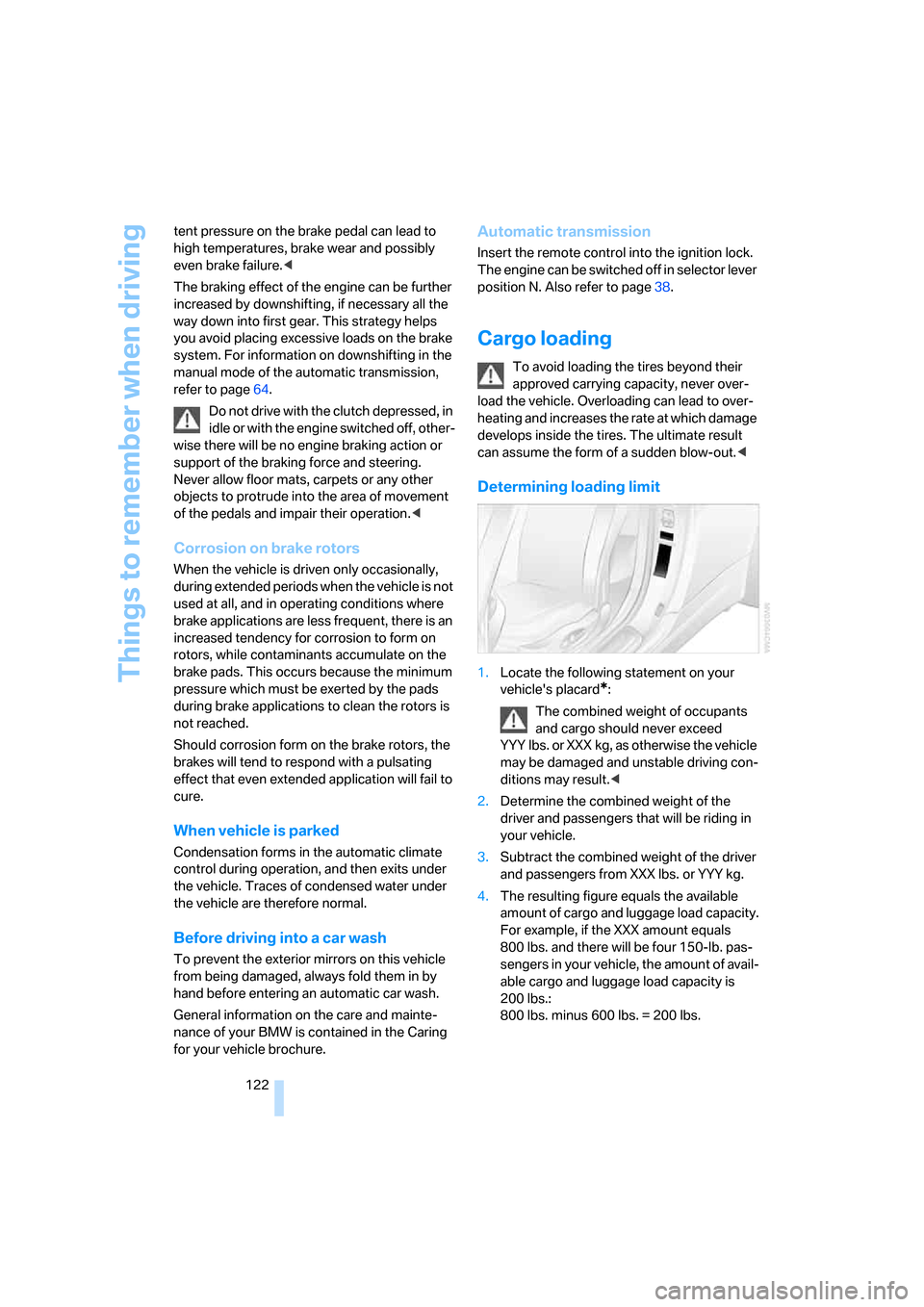
1.Locate the following statement on your
vehicle's placard
*:
The combined weight of occupants
and cargo should never exceed
YYY lbs. or XXX kg, as otherwise the vehicle
may be damaged and unstable driving con-
ditions may result.<
2.Determine the combined weight of the
driver and passengers that will be riding in
your vehicle.
3.Subtract the combined weight of the driver
and passengers from XXX lbs. or YYY kg.
4.The resulting figure equals the available
amount of cargo and luggage load capacity.
For example, if the XXX amount equals
800 lbs. and there will be four 150-lb. pas-
sengers in your vehicle, the amount of avail-
able cargo and luggage load capacity is
200 lbs.:
800 lbs. minus 600 lbs. = 200 lbs.
Page 159 of 254
Navigation
Entertainment
Driving tips
157Reference
At a glance
Controls
Communications
Mobility
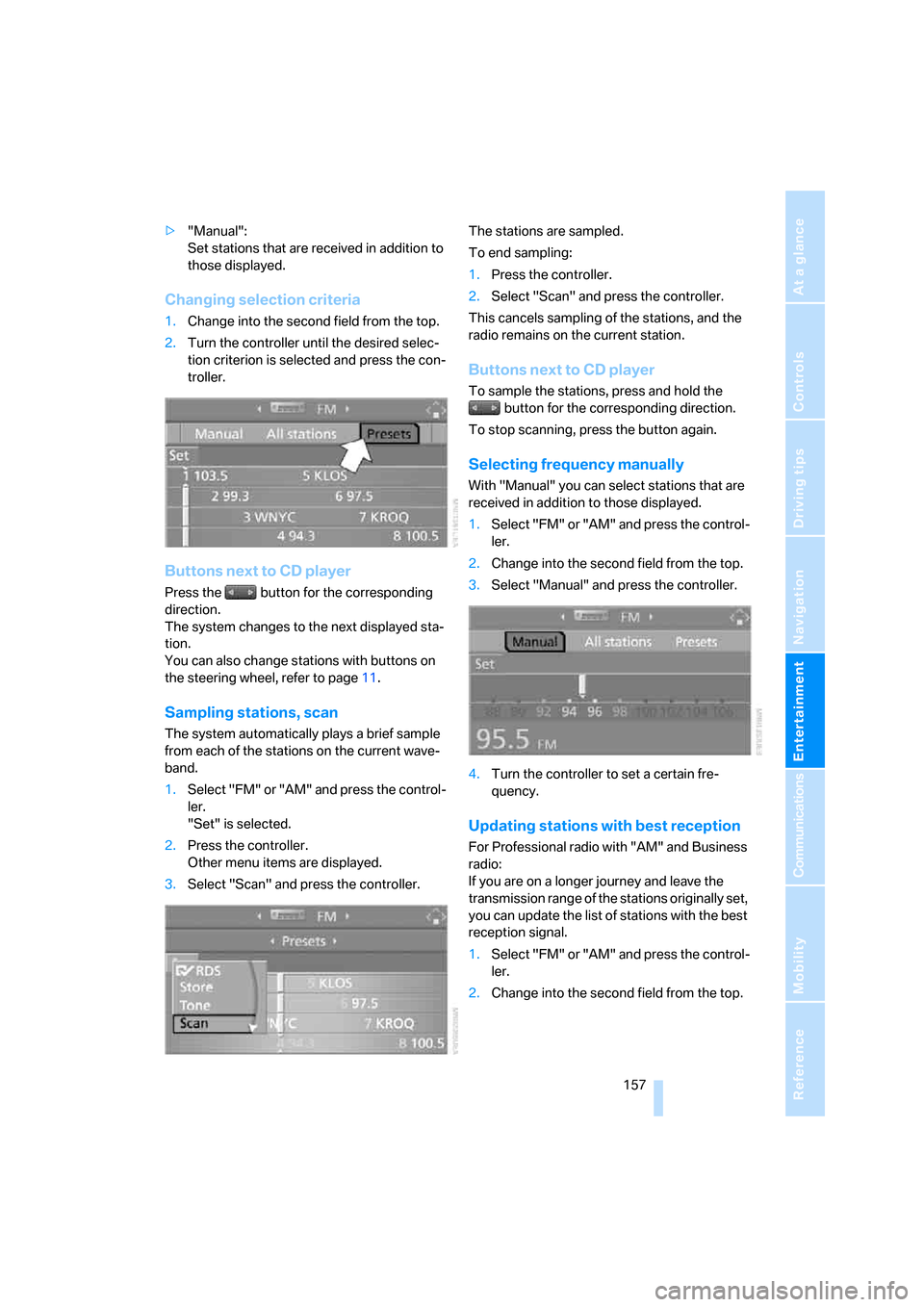
>"Manual":
Set stations that are received in addition to
those displayed.
Changing selection criteria
1.Change into the second field from the top.
2.Turn the controller until the desired selec-
tion criterion is selected and press the con-
troller.
Buttons next to CD player
Press the button for the corresponding
direction.
The system changes to the next displayed sta-
tion.
You can also change stations with buttons on
the steering wheel, refer to page11.
Sampling stations, scan
The system automatically plays a brief sample
from each of the stations on the current wave-
band.
1.Select "FM" or "AM" and press the control-
ler.
"Set" is selected.
2.Press the controller.
Other menu items are displayed.
3.Select "Scan" and press the controller.The stations are sampled.
To end sampling:
1.Press the controller.
2.Select "Scan" and press the controller.
This cancels sampling of the stations, and the
radio remains on the current station.
Buttons next to CD player
To sample the stations, press and hold the
button for the corresponding direction.
To stop scanning, press the button again.
Selecting frequency manually
With "Manual" you can select stations that are
received in addition to those displayed.
1.Select "FM" or "AM" and press the control-
ler.
2.Change into the second field from the top.
3.Select "Manual" and press the controller.
4.Turn the controller to set a certain fre-
quency.
Updating stations with best reception
For Professional radio with "AM" and Business
radio:
If you are on a longer journey and leave the
transmission range of the stations originally set,
you can update the list of stations with the best
reception signal.
1.Select "FM" or "AM" and press the control-
ler.
2.Change into the second field from the top.
Page 176 of 254
Telephoning
174
Telephoning
The concept
Your BMW is equipped with a full mobile phone
preparation package. After a suitable mobile
phone has been paired in the vehicle once, you
can operate the mobile phone via iDrive, with
the buttons on the steering wheel and by voice.
A mobile phone that has been paired once is
automatically detected again as soon as it is
brought back inside the vehicle, provided that
the engine is running or the ignition is switched
on. The pairing data of up to four mobile phones
can be stored simultaneously. If several mobile
phones are detected simultaneously, the most
recently paired mobile phone can be operated
via the vehicle.
Using a phone in your vehicle
Using snap-in adapter*
The so-called snap-in adapter, a mobile phone
cradle, enables the battery to be charged and
the mobile phone to be connected to the exter-
nal antenna of your vehicle. This ensures
improved network reception and a consistent
voice reproduction quality. Ask your BMW cen-
ter which mobile phones will fit in the snap-in
adapters they offer.
BMW discourages the use of mobile
phones or other mobile communications
devices inside the vehicle without a direct con-
nection to an outside antenna. Otherwise, the
vehicle electronics and mobile communication
device can interfere with each other. In addition,
there is no assurance that the radiation that
results from transmission will be dissipated
from the vehicle interior.<
For your safety
A car phone makes life more convenient in
many ways, and can even save lives in an emer-
gency. While you should consult your mobile
phone's separate operating instructions for a
detailed description of safety precautions and
information, we request that you direct your
particular attention to the following:
Only make entries when the traffic situa-
tion allows you to do so. Do not hold the
mobile phone in your hand while you are driving;
use the hands-free system instead. If you do
not observe this precaution, your being dis-
tracted can endanger vehicle occupants and
other road users.<
Suitable mobile phones
Ask your BMW center which mobile phones
with a Bluetooth interface are supported by the
mobile phone preparation package or which
mobile phones will fit in the snap-in adapters
they offer. These mobile phones support the
functions described in this Owner's Manual,
provided they are running a certain software
version. Malfunctions can occur with other
mobile phones.
Care instructions
You can find what you need to know about car-
ing for your mobile phone in the separate Caring
for your vehicle brochure and in the mobile
phone operating instructions.
*
Page 222 of 254
Giving and receiving assistance
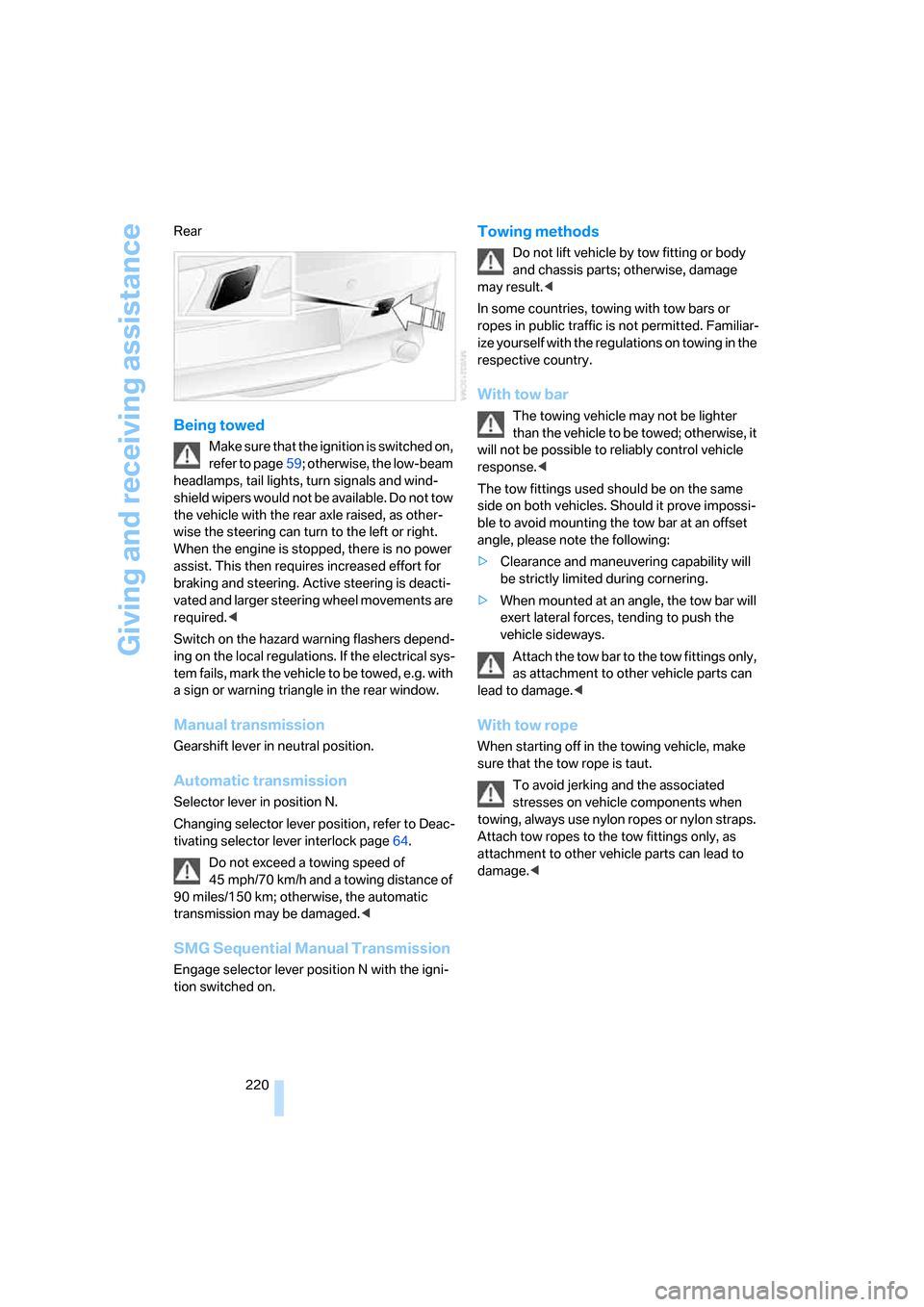
220 Rear
Being towed
Make sure that the ignition is switched on,
refer to page59; otherwise, the low-beam
headlamps, tail lights, turn signals and wind-
shield wipers would not be available. Do not tow
the vehicle with the rear axle raised, as other-
wise the steering can turn to the left or right.
When the engine is stopped, there is no power
assist. This then requires increased effort for
braking and steering. Active steering is deacti-
vated and larger steering wheel movements are
required.<
Switch on the hazard warning flashers depend-
ing on the local regulations. If the electrical sys-
tem fails, mark the vehicle to be towed, e.g. with
a sign or warning triangle in the rear window.
Manual transmission
Gearshift lever in neutral position.
Automatic transmission
Selector lever in position N.
Changing selector lever position, refer to Deac-
tivating selector lever interlock page64.
Do not exceed a towing speed of
45 mph/70 km/h and a towing distance of
90 miles/150 km; otherwise, the automatic
transmission may be damaged.<
SMG Sequential Manual Transmission
Engage selector lever position N with the igni-
tion switched on.
Towing methods
Do not lift vehicle by tow fitting or body
and chassis parts; otherwise, damage
may result.<
In some countries, towing with tow bars or
ropes in public traffic is not permitted. Familiar-
ize yourself with the regulations on towing in the
respective country.
With tow bar
The towing vehicle may not be lighter
than the vehicle to be towed; otherwise, it
will not be possible to reliably control vehicle
response.<
The tow fittings used should be on the same
side on both vehicles. Should it prove impossi-
ble to avoid mounting the tow bar at an offset
angle, please note the following:
>Clearance and maneuvering capability will
be strictly limited during cornering.
>When mounted at an angle, the tow bar will
exert lateral forces, tending to push the
vehicle sideways.
Attach the tow bar to the tow fittings only,
as attachment to other vehicle parts can
lead to damage.<
With tow rope
When starting off in the towing vehicle, make
sure that the tow rope is taut.
To avoid jerking and the associated
stresses on vehicle components when
towing, always use nylon ropes or nylon straps.
Attach tow ropes to the tow fittings only, as
attachment to other vehicle parts can lead to
damage.<
Page 223 of 254
Mobility
221Reference
At a glance
Controls
Driving tips
Communications
Navigation
Entertainment
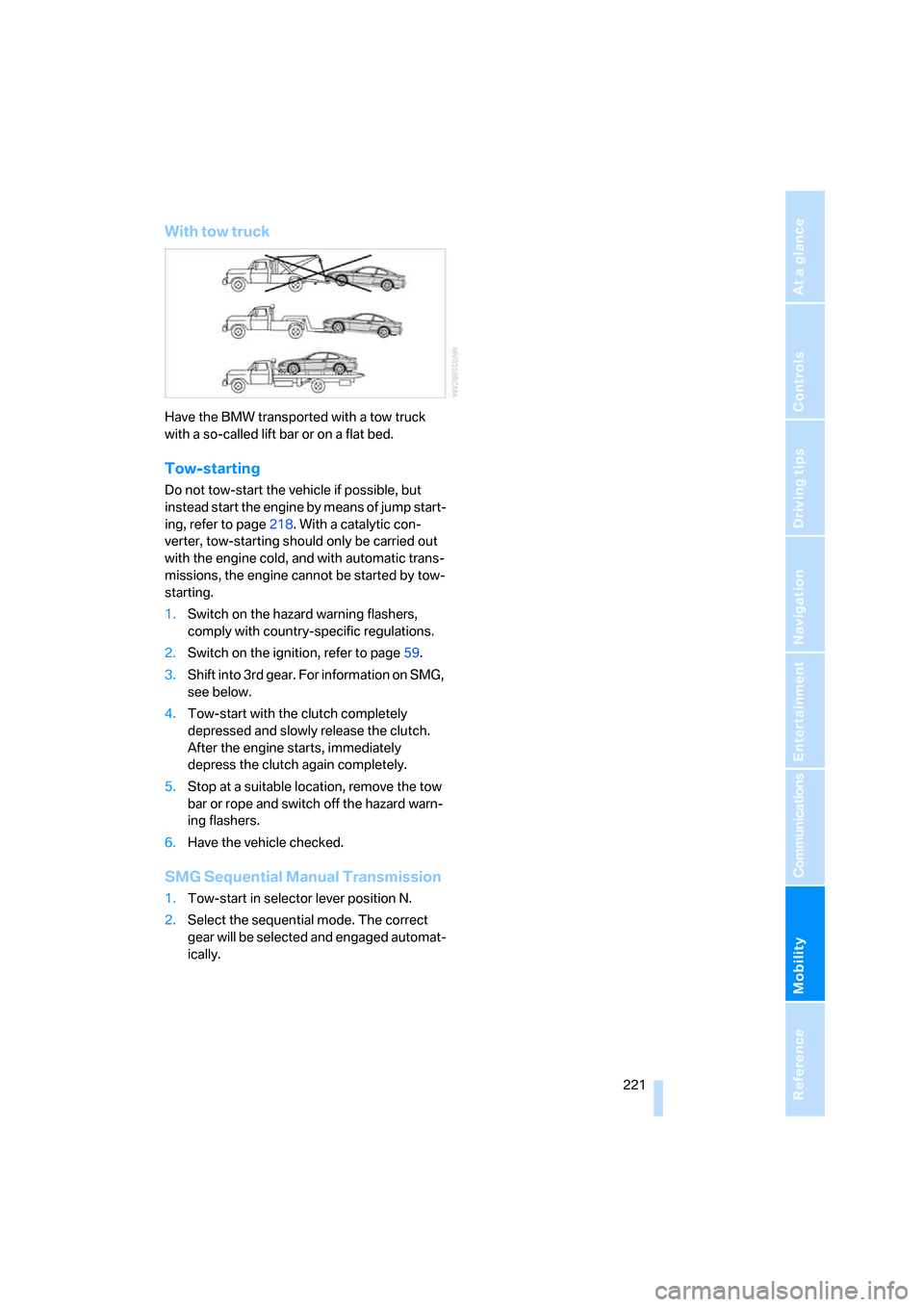
With tow truck
Have the BMW transported with a tow truck
with a so-called lift bar or on a flat bed.
Tow-starting
Do not tow-start the vehicle if possible, but
instead start the engine by means of jump start-
ing, refer to page218. With a catalytic con-
verter, tow-starting should only be carried out
with the engine cold, and with automatic trans-
missions, the engine cannot be started by tow-
starting.
1.Switch on the hazard warning flashers,
comply with country-specific regulations.
2.Switch on the ignition, refer to page59.
3.Shift into 3rd gear. For information on SMG,
see below.
4.Tow-start with the clutch completely
depressed and slowly release the clutch.
After the engine starts, immediately
depress the clutch again completely.
5.Stop at a suitable location, remove the tow
bar or rope and switch off the hazard warn-
ing flashers.
6.Have the vehicle checked.
SMG Sequential Manual Transmission
1.Tow-start in selector lever position N.
2.Select the sequential mode. The correct
gear will be selected and engaged automat-
ically.
Page 235 of 254
Reference 233
At a glance
Controls
Driving tips
Communications
Navigation
Entertainment
Mobility
Arrival time
– refer to Computer77
– refer to Starting destination
guidance140
"Arrow display" for navigation
system141
Artificial leather, refer to
Caring for your vehicle
brochure
Ashtray115
Assist, refer to
BMW Assist189
Assistance systems, refer to
Driving stability control
systems87
Assistance window20
"Assist. window off"21
AUC Automatic recirculated-
air control109
"Audio"153,155,160
Audio152
– controls152
– switching on/off152
– tone control153
– volume153
Audio device, external114
Automatic
– air distribution107
– air volume107
– cruise control67,68
– headlamp control102
– recirculated-air control
AUC109
– service notification191
– steering wheel
adjustment50
– storing stations157
Automatic car washes122
– also refer to Caring for your
vehicle brochure
– also refer to Comfort
access38
Automatic climate control106
– automatic air
distribution107
– convertible program107
– switching on and off109
– ventilation with vehicle
parked110Automatic closing of doors,
refer to Automatic soft
closing34
Automatic curb monitor54
Automatic lighting
– refer to Automatic headlamp
control102
– refer to Daytime running
lamps103
– refer to Interior lamps104
– refer to Pathway lighting102
"Automatic programs"107
Automatic soft closing34
Automatic station search157
Automatic transmission with
Steptronic63
– deactivating selector lever
interlock64
– Dynamic Driving Control64
– interlock63
– kick-down64
– selector lever lock,
interlock63
– shiftlock63
– towing220
– tow-starting221
– with comfort access38
"Automatic ventilation"110
AUTO program with
automatic climate
control107
"Autostore" on the
radio156,158
"AUX"152,171
AUX-In connection114,171
Average fuel consumption76
– setting units85
Average speed76
"Avoid ferries" for navigation
system139
"Avoid highways" for
navigation system138
Avoiding freeways for
navigation138
Avoiding unintentional
alarms36
"Avoid tollroads" for
navigation system139Axle loads, refer to
Weights226
"A - Z"182
B
Backrest contour, refer to
Lumbar support49
Backrests, refer to Seats49
Backup lamps, replacing
bulbs, refer to Tail
lamps214
"Balance", refer to Tone
control154
Band-aids, refer to First-aid
kit218
Bass, refer to Tone
control153
"Bass", tone control153
Battery
– jump starting218
– refer to Vehicle battery215
Battery replacement, remote
control for comfort
access38
BC button, refer to
Computer76
Being towed220
Belts, refer to Safety belts53
Beverage holder, refer to Cup
holders115
Blower, refer to Air
volume108
"Bluetooth"176
"BMW Assist"190
BMW Assist189
– activating194
– breakdown assistance190
– contacting BMW Customer
Relations192
– displaying vehicle data195
– information service192
– services offered189
– TeleService191
– updating193
"BMW Contact"184
"BMW Contact
Numbers"184
Page 239 of 254
Reference 237
At a glance
Controls
Driving tips
Communications
Navigation
Entertainment
Mobility
Display lighting, refer to
Instrument lighting104
"Display off"21
Displays
– on Control Display, refer to
iDrive16
– refer to Instrument
cluster12
"Display settings"85,98
Displays on the windshield,
refer to Head-Up Display97
Disposal
– battery of remote control
with comfort access38
– coolant209
– vehicle battery215
Distance, refer to
Computer77
Distance control, refer to
Active cruise control68
"Distance to dest."77
Distance to destination, refer
to Computer77
Distance warning, refer to
PDC Park Distance
Control86
Door entry lighting, refer to
Interior lamps104
Door key, refer to Keys/
remote control28
Door lock32
"Door locks"30,79
Doors
– manual operation32
– remote control31
DOT Quality Grades202
Draft-free ventilation110
"Driver's door only"30
Driving lamps, refer to Parking
lamps/low beams102
Driving route, refer to
Displaying route141
Driving stability control
systems87
Driving through water121
Driving tips, refer to General
driving notes120Drying the air, refer to Cooling
function108
DSC Dynamic Stability
Control88
– indicator lamp13,88
– malfunction89
DTC Dynamic Traction
Control88
– activating88
– indicator lamp13,89
DVD for navigation
126
Dynamic Drive89
Dynamic Driving Control64
"Dynamic route" for
navigation139
Dynamic Stability Control
DSC88
Dynamic Traction Control
DTC88
E
Easy entry, refer to Entering
rear52
Easy entry/exit55
Eject button, refer to Buttons
on CD player152
Electrical malfunction
– convertible top44
– door lock32
– driver's door32
– fuel filler door198
– glass sunroof41
– luggage compartment lid34
– storage compartment, hotel
function34
Electric convertible top42
Electric steering wheel
adjustment55
Electronic brake-force
distribution87
Electronic oil level check207
Emergency assistance, refer
to Roadside Assistance218
Emergency call217Emergency operation, refer to
Manual operation
– convertible top44
– door lock32
– driver's door32
– fuel filler door198
– glass sunroof41
– hotel function34
– luggage compartment lid34
– selector lever interlock,
automatic transmission64
Emergency release for
luggage compartment lid in
luggage compartment35
Emergency services, refer to
Roadside Assistance218
"Enable services"195
"End call"182
Engine
– breaking-in120
– overheated, refer to Coolant
temperature75
– starting60
– starting, comfort access37
– switching off60
– switching off when equipped
with Automatic
transmission, with comfort
access38
Engine compartment207
Engine coolant209
Engine oil
– adding208
– additives, refer to Approved
engine oils208
– approved oils208
– electronic oil level check207
– interval between changes,
refer to Service
requirements78
– oil change208
– oil grades, refer to Approved
engine oils208
– recommended oils208
– temperature76
– temperature gauge76
Page 241 of 254
Reference 239
At a glance
Controls
Driving tips
Communications
Navigation
Entertainment
Mobility
Full mobile phone preparation
package174
Full screen display, refer to
Switching assistance
window off20
"Full screen" with BMW Night
Vision101
Fuses216
G
Garage-door opener, refer to
Integrated universal remote
control112
Gasoline
– refer to Average fuel
consumption76
– refer to Fuel
specifications199
– refer to Required fuel199
Gasoline display, refer to Fuel
gauge76
Gear changes
– automatic transmission with
Steptronic63
– SMG Sequential Manual
Transmission63
Gear display
– automatic transmission with
Steptronic63
– SMG Sequential Manual
Transmission62
Gearshift lever
– automatic transmission with
Steptronic63
– manual transmission61
– SMG Sequential Manual
Transmission61
General driving notes120
Glass sunroof, electric with
raise function41
– comfort operation32
– comfort operation with
comfort access37
– moving manually41
– remote control31Glove compartment113
– rechargeable flashlight113
GPS navigation, refer to
Navigation system126
Grills, refer to Ventilation109
Gross vehicle weight, refer to
Weights226
H
Handbrake61
– indicator lamp13,61
Hands-free system, refer to
Microphone14
Hazard warning flashers15
"HD radio"160
HD radio, refer to High
Definition Radio160
Head airbags94
Headlamp control,
automatic102
Headlamp flasher65
Headlamps
– care, refer to Caring for your
vehicle brochure
– cleaning, refer to Wiper
system66
– cleaning tank, refer to
Capacities226
– filler neck for washer
fluid207
– replacing bulbs212
Head Light, refer to Adaptive
Head Light103
Head restraints
– front51
– removing51
– sitting safely48
"Head-Up Display"98
Head-Up Display97
Heated
– mirrors54
– rear window108
– seats53
– steering wheel55Heater107
Heating
– exterior mirrors54
– interior106
– rear window108
– residual heat utilization109
– seats53
– steering wheel55
Heating with engine switched
off, refer to Residual
heat109
Heavy cargo, refer to Securing
cargo123
Height, refer to
Dimensions224
Height adjustment
– seats49
– steering wheel55
High beams104
– headlamp flasher104
– indicator lamp13
– replacing bulbs213
High Definition Radio160
High water, refer to Driving
through water121
Hills121
Holder for cups115
"Home address" for
navigation system138
Homepage of BMW4
Hood206
Horn10
Hotel function33
– unlocking manually34
Hot exhaust system120
"Hour memo"84
"House number" for
destination entry131
Hydraulic brake assistant,
refer to Brake assistant88
Hydroplaning121
– also refer to Minimum tread
depth203
Page 242 of 254
Everything from A to Z
240
I
IBOC, refer to High Definition
Radio160
Ice, refer to Outside
temperature warning75
ID3-Tag, refer to Information
about track166
Identification mark
– recommended tire
brands204
– run-flat tires204
– tire coding202
iDrive16
– adjusting brightness84
– assistance window20
– changing date and time83
– changing language85
– changing menu page19
– changing settings83
– changing units of measure
and display form85
– controller16
– controls16
– displays, menus17
– operating principle17
– selecting menu item19
– selecting or confirming
entry19
– start menu17
– status information20
– symbols18
Ignition59
– switched off59
– switched on59
Ignition key, refer to Keys/
remote control28
Ignition key position 1, refer to
Radio readiness59
Ignition key position 2, refer to
Ignition on59
Ignition lock59
– starting engine with comfort
access38
i menu17
Imprint2Indicator/warning lamps
– ABS Antilock Brake
System89
– active steering94
– airbags96
– brake system89
– DSC13,88
– DTC13,89
– Flat Tire Monitor90
– fog lamps13,104
– handbrake13,61
– safety belt warning53
– TPM Tire Pressure
Monitor92
Indicator and warning lamps,
overview13
Inflation pressure, refer to Tire
inflation pressure200
Inflation pressure monitoring
– refer to Flat Tire Monitor89
– refer to Tire Pressure
Monitor91
Info menu17
Information
– on another location134
– on current position134
– on town/city of
destination134
"Information" for navigation
system134
Information menu, refer to
imenu17
"Information on
destination"135
Information service192
"Info sources"78
Initializing
– Flat Tire Monitor90
– radio, refer to Storing
stations158
– refer to Power failure215
– seat, mirror and steering
wheel memory50
– time and date83
"Input map"133
Installation location
– CD changer168
– drive for navigation DVD126Instructions for navigation
system, refer to Voice
instructions143
Instrument cluster12
Instrument illumination, refer
to Instrument lighting104
Instrument lighting104
Instrument panel
– refer to Cockpit10
– refer to Instrument
cluster12
Integrated key28
Integrated universal remote
control112
Interesting destination for
navigation134
"Interim time"83
Interior lamps104
– switching on with remote
control31
Interior motion sensor36
– switching off36
Interior rearview mirror,
automatic dimming
feature
54
Interlock on automatic
transmission63
Intermittent wiper mode66
J
Jacking points215
Joystick, refer to iDrive16
Jump starting218
K
Keyless-Go, refer to Comfort
access37
Keyless opening and closing,
refer to Comfort access37
Key Memory, refer to Personal
Profile29
"Keypad"184
Keys28
– key-related settings, refer to
Personal Profile29
– spare key28