stop start BMW 650I CONVERTIBLE 2009 E64 Owner's Guide
[x] Cancel search | Manufacturer: BMW, Model Year: 2009, Model line: 650I CONVERTIBLE, Model: BMW 650I CONVERTIBLE 2009 E64Pages: 272, PDF Size: 9.16 MB
Page 224 of 272
Under the hood
222
Engine oil
The engine oil consumption is dependent on
driving style and driving conditions.
Checking engine oil level
Your vehicle is equipped with an electronic oil
level check.
The condition for the most accurate indication
of the oil level possible is measurement with the
engine at operating temperature, i.e. following
an uninterrupted drive of at least 6 miles/10 km.
You can display the oil level on the Control Dis-
play while driving or when stopped on a level
surface with the engine running.
iDrive, for operating principle refer to page16.
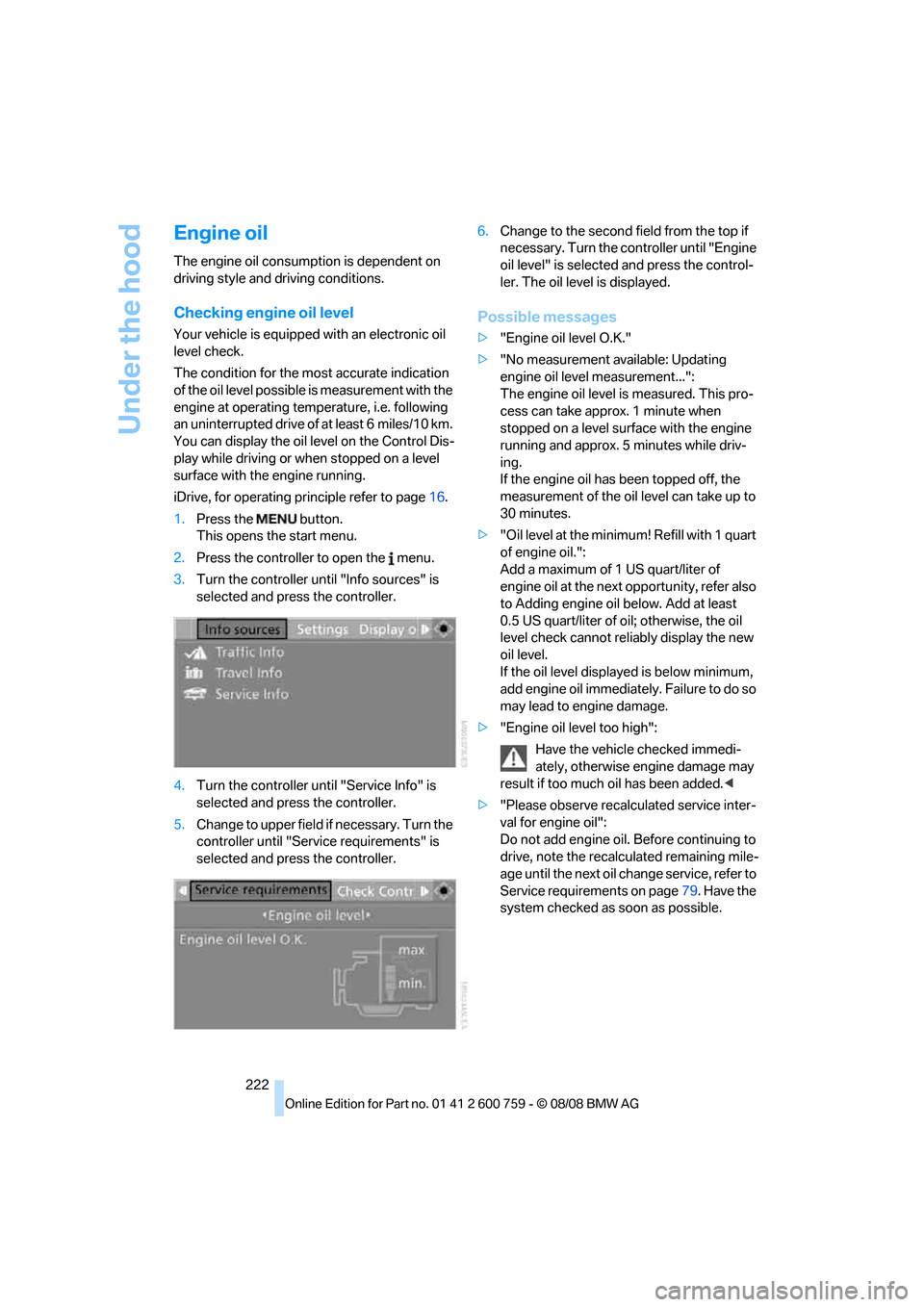
1.Press the button.
This opens the start menu.
2.Press the controller to open the menu.
3.Turn the controller until "Info sources" is
selected and press the controller.
4.Turn the controller until "Service Info" is
selected and press the controller.
5.Change to upper field if necessary. Turn the
controller until "Service requirements" is
selected and press the controller.6.Change to the second field from the top if
necessary. Turn the controller until "Engine
oil level" is selected and press the control-
ler. The oil level is displayed.
Possible messages
>"Engine oil level O.K."
>"No measurement available: Updating
engine oil level measurement...":
The engine oil level is measured. This pro-
cess can take approx. 1 minute when
stopped on a level surface with the engine
running and approx. 5 minutes while driv-
ing.
If the engine oil has been topped off, the
measurement of the oil level can take up to
30 minutes.
>"Oil level at the minimum! Refill with 1 quart
of engine oil.":
Add a maximum of 1 US quart/liter of
engine oil at the next opportunity, refer also
to Adding engine oil below. Add at least
0.5 US quart/liter of oil; otherwise, the oil
level check cannot reliably display the new
oil level.
If the oil level displayed is below minimum,
add engine oil immediately. Failure to do so
may lead to engine damage.
>"Engine oil level too high":
Have the vehicle checked immedi-
ately, otherwise engine damage may
result if too much oil has been added.<
>"Please observe recalculated service inter-
val for engine oil":
Do not add engine oil. Before continuing to
drive, note the recalculated remaining mile-
age until the next oil change service, refer to
Service requirements on page79. Have the
system checked as soon as possible.
Page 240 of 272
Giving and receiving assistance
238
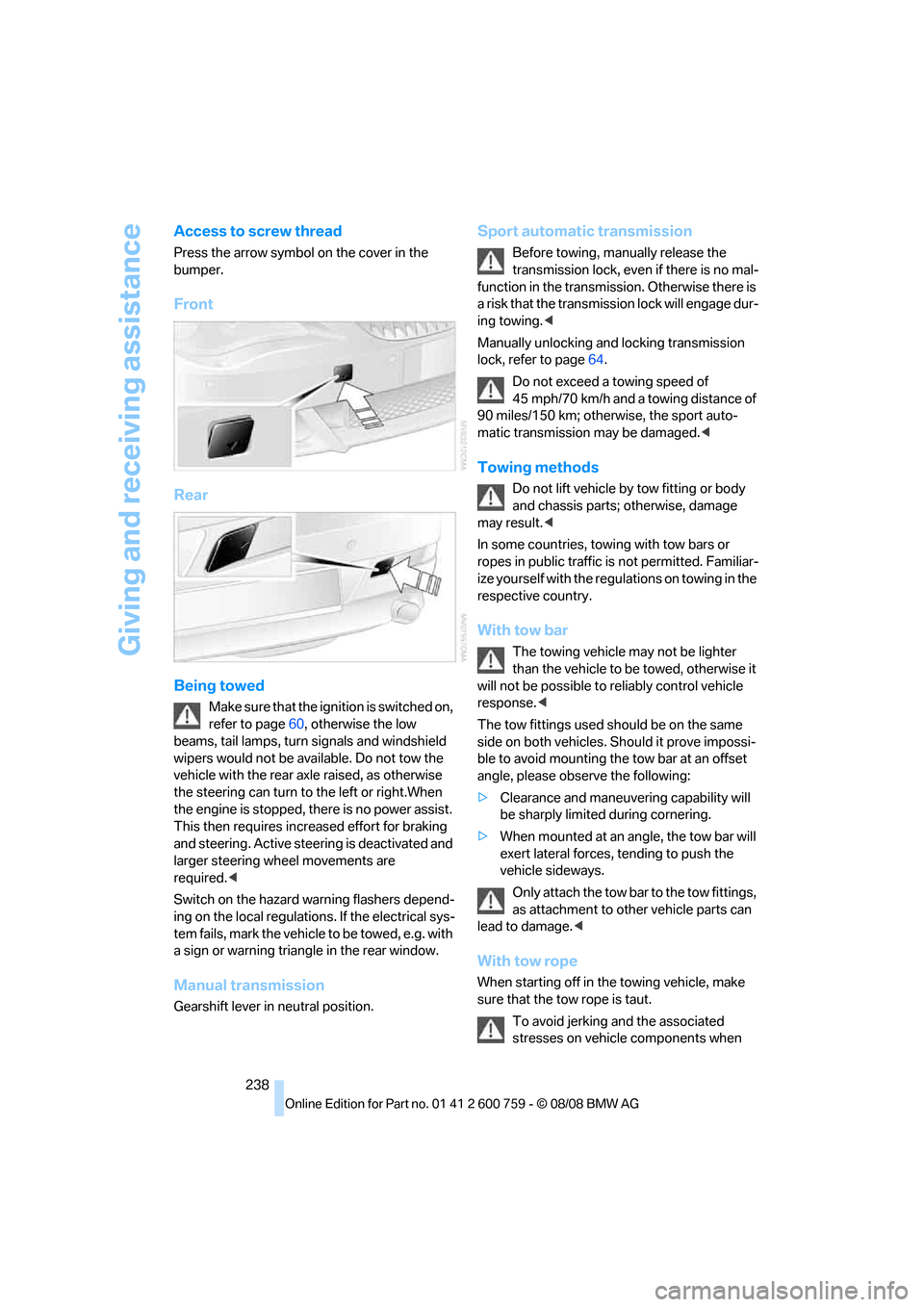
Access to screw thread
Press the arrow symbol on the cover in the
bumper.
Front
Rear
Being towed
Make sure that the ignition is switched on,
refer to page60, otherwise the low
beams, tail lamps, turn signals and windshield
wipers would not be available. Do not tow the
vehicle with the rear axle raised, as otherwise
the steering can turn to the left or right.When
the engine is stopped, there is no power assist.
This then requires increased effort for braking
and steering. Active steering is deactivated and
larger steering wheel movements are
required.<
Switch on the hazard warning flashers depend-
ing on the local regulations. If the electrical sys-
tem fails, mark the vehicle to be towed, e.g. with
a sign or warning triangle in the rear window.
Manual transmission
Gearshift lever in neutral position.
Sport automatic transmission
Before towing, manually release the
transmission lock, even if there is no mal-
function in the transmission. Otherwise there is
a risk that the transmission lock will engage dur-
ing towing.<
Manually unlocking and locking transmission
lock, refer to page64.
Do not exceed a towing speed of
45 mph/70 km/h and a towing distance of
90 miles/150 km; otherwise, the sport auto-
matic transmission may be damaged.<
Towing methods
Do not lift vehicle by tow fitting or body
and chassis parts; otherwise, damage
may result.<
In some countries, towing with tow bars or
ropes in public traffic is not permitted. Familiar-
ize yourself with the regulations on towing in the
respective country.
With tow bar
The towing vehicle may not be lighter
than the vehicle to be towed, otherwise it
will not be possible to reliably control vehicle
response.<
The tow fittings used should be on the same
side on both vehicles. Should it prove impossi-
ble to avoid mounting the tow bar at an offset
angle, please observe the following:
>Clearance and maneuvering capability will
be sharply limited during cornering.
>When mounted at an angle, the tow bar will
exert lateral forces, tending to push the
vehicle sideways.
Only attach the tow bar to the tow fittings,
as attachment to other vehicle parts can
lead to damage.<
With tow rope
When starting off in the towing vehicle, make
sure that the tow rope is taut.
To avoid jerking and the associated
stresses on vehicle components when
Page 241 of 272
Mobility
239Reference
At a glance
Controls
Driving tips
Communications
Navigation
Entertainment
towing, always use nylon ropes or nylon straps.
Only attach tow ropes to the tow fittings, as
attachment to other vehicle parts can lead to
damage.<
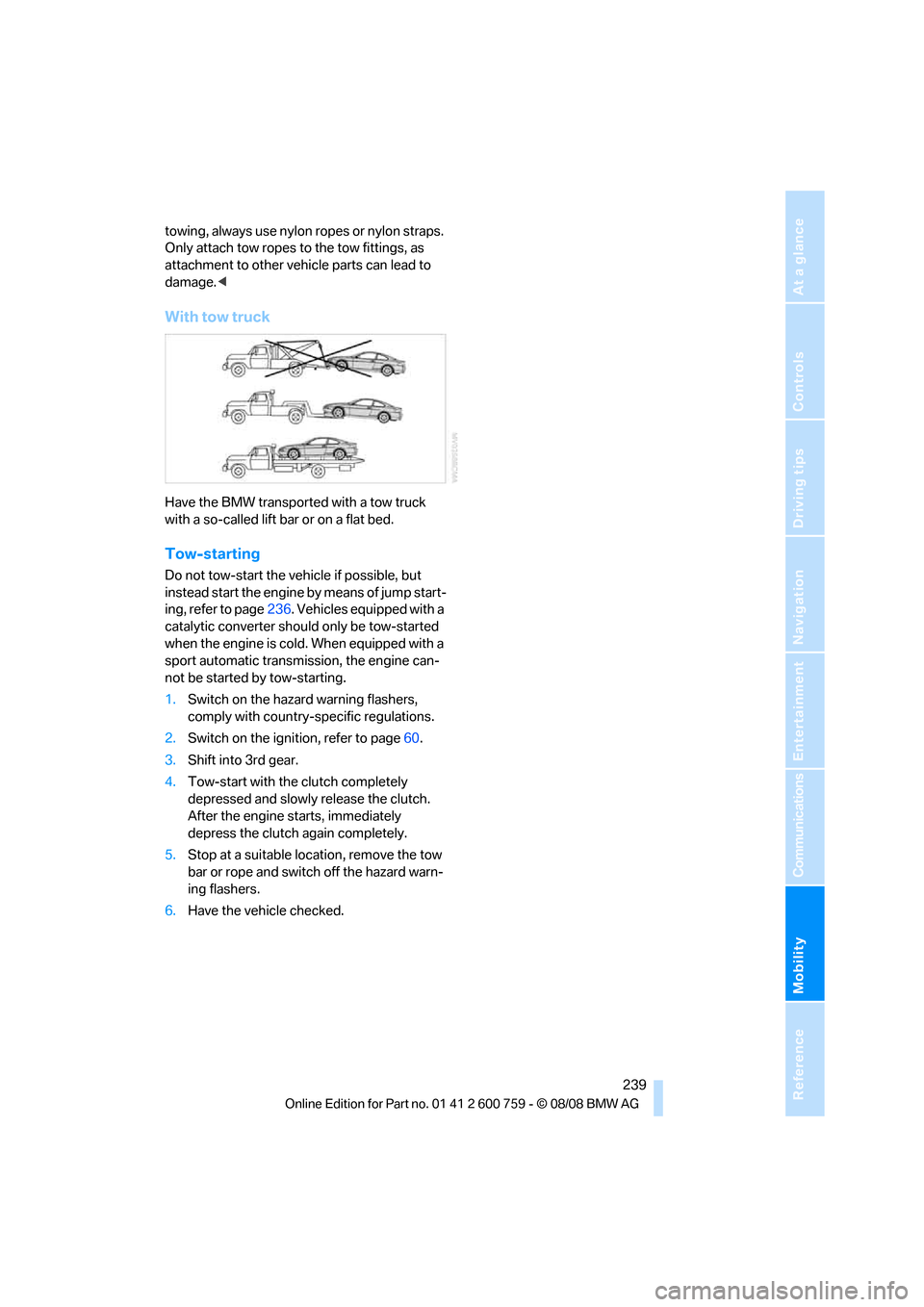
With tow truck
Have the BMW transported with a tow truck
with a so-called lift bar or on a flat bed.
Tow-starting
Do not tow-start the vehicle if possible, but
instead start the engine by means of jump start-
ing, refer to page236. Vehicles equipped with a
catalytic converter should only be tow-started
when the engine is cold. When equipped with a
sport automatic transmission, the engine can-
not be started by tow-starting.
1.Switch on the hazard warning flashers,
comply with country-specific regulations.
2.Switch on the ignition, refer to page60.
3.Shift into 3rd gear.
4.Tow-start with the clutch completely
depressed and slowly release the clutch.
After the engine starts, immediately
depress the clutch again completely.
5.Stop at a suitable location, remove the tow
bar or rope and switch off the hazard warn-
ing flashers.
6.Have the vehicle checked.
Page 249 of 272
Reference 247
At a glance
Controls
Driving tips
Communications
Navigation
Entertainment
Mobility
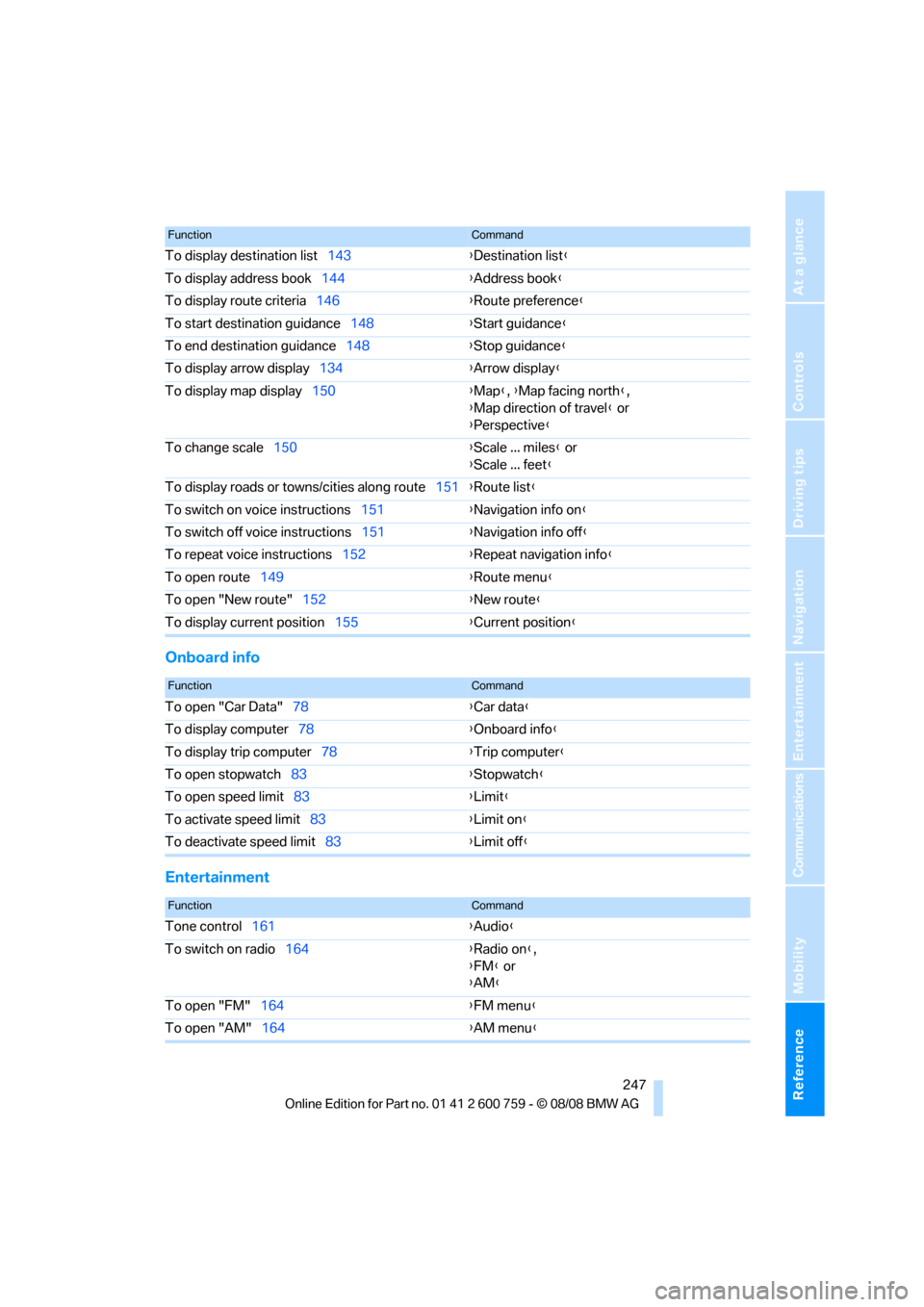
Onboard info
Entertainment
To display destination list143{Destination list}
To display address book144{Address book}
To display route criteria146{Route preference}
To start destination guidance148{Start guidance}
To end destination guidance148{Stop guidance}
To display arrow display134{Arrow display}
To display map display150{Map}, {Map facing north},
{Map direction of travel} or
{Perspective}
To change scale150{Scale ... miles} or
{Scale ... feet}
To display roads or towns/cities along route151{Route list}
To switch on voice instructions151{Navigation info on}
To switch off voice instructions151{Navigation info off}
To repeat voice instructions152{Repeat navigation info}
To open route149{Route menu}
To open "New route"152{New route}
To display current position155{Current position}
FunctionCommand
FunctionCommand
To open "Car Data"78{Car data}
To display computer78{Onboard info}
To display trip computer78{Trip computer}
To open stopwatch83{Stopwatch}
To open speed limit83{Limit}
To activate speed limit83{Limit on}
To deactivate speed limit83{Limit off}
FunctionCommand
Tone control161{Audio}
To switch on radio164{Radio on},
{FM} or
{AM}
To open "FM"164{FM menu}
To open "AM"164{AM menu}
Page 254 of 272
Everything from A to Z
252 BMW TeleServices services
– displaying204
– updating204
BMW website4
Bottle holder, refer to Cup
holders120
Bracket for telephone or
mobile phone
– refer to Snap-in adapter199
Brake assistant88
– adaptive89
Brake force display95
Brake lamps
– replacing bulbs, refer to Tail
lamps232
– two-stage95
Brake rotors
– breaking-in126
– refer to Braking safely128
Brakes
– ABS Antilock Brake
System88
– brake force display95
– breaking-in126
– CBC Cornering Brake
Control88
– handbrake62
– refer to Braking safely128
Brake system126
– brake pads126
– brake rotors128
– breaking-in126
– warning lamp13,90
Braking
– electronic brake-force
distribution88
Braking safely128
Breakdown services, refer to
Roadside Assistance236
Breaking-in brake pads126
Breaking-in the clutch126
Breaking-in the differential,
refer to Engine and
differential126
Break-in period126
"Brightness"86,99
Brightness of Control
Display85"Brightness" with BMW Night
Vision102
Button for starting engine,
refer to Start/Stop button60
Buttons on steering wheel11
C
California Proposition 65
Warning6
Call194,205
– accepting192
– displaying accepted195
– ending193
– in absence195
– rejecting193
– starting193
Calling
– by entering phone
number193
– from phone book194
– from Top 8 list195
– redialing195
Can holder, refer to Cup
holders120
Capacities245
Car battery, refer to Vehicle
battery233
"Car Data"78Care227
– car-care products227
– carpets229
– car washes227
– CD/DVD player230
– chrome components229
– convertible top228
– displays230
– exterior227
– fine wooden
components230
– hand washing228
– headlamps228
– high-pressure cleaning
jets227
– interior229
– leather229
– light-alloy wheels229
– paint228
– plastic components230
– rubber gaskets229
– safety belts230
– sensors and cameras230
– upholstery and cloth-
covered paneling229
– windows228
– wiper blades228
Cargo bay
– capacity245
– emergency release37
– opening/closing, refer to
Luggage compartment
lid36
– opening from inside36
– opening from outside
36
– opening with remote
control33
Caring for the vehicle
finish228
Car key, refer to Keys/remote
control30
Car phone186
– installation location, refer to
Center armrest119
– refer to Mobile phone186
– refer to separate operating
instructions
Car radio, refer to Radio164
Car Shampoo230
Page 266 of 272
Everything from A to Z
264 "Set" on trip computer79
"Set service date"80
"Set time"85
Setting button, refer to
Controls, controller16
Settings207
– BMW Night Vision102
– changing on Control
Display84
– clock, 12h/24h mode85
– configuring, refer to
Personal Profile30
– date85
– language86
– units of measure86
"Settings" in unlocking32
Settings menu, refer to
imenu18
"Settings" with BMW
Assist206
Setting time, refer to
Preselecting activation
time115
Shifting, Sport automatic
transmission63
Short commands of voice
command system246
"Short route" in
navigation147
Short route in navigation, refer
to Selecting route146
"Show current position"142
"Show destination
position"142
Shuffled, refer to Random
– CD changer177
– CD player177
Side airbags95
Side-mounted turn signals,
replacing bulbs232
Signal horn, refer to Horn10
Sill panel lighting, refer to
Interior lamps108
Sitting safely49
– with airbags49
– with head restraint49
– with safety belts49
Ski bag121Sliding/tilt roof, refer to Glass
sunroof, electric with raise
function42
Slope assistant, refer to
Starting assistant90
Snap-in adapter
– mounting/removing199
– using186
Snow chains219
Socket, refer to Connecting
electrical devices121
Socket for Onboard
Diagnostics interface
226
Socket for remote control,
refer to Ignition lock60
Soft closure aid, refer to
Automatic soft closing35
Song search on CD, refer to
Sampling tracks176
SOS, refer to Initiating an
emergency request235
Sound distribution in audio
mode
– front/rear fader162
– right/left balance162
Spare
– adapter for spare key30
– fuses234
– key30
Special oils, refer to Approved
engine oils223
Specified oil grades, refer to
Approved engine oils223
Speed-dependent
volume162
Speed dial, refer to
Speedometer12
Speed limit warning, refer to
Speed limit83
Speedometer12
"Speed volume", tone
control162
Speed with winter tires219Sport automatic
transmission62
– Dynamic Driving Control64
– kick-down63
– releasing transmission
lock64
– towing238,239
– with comfort access40
Sport program in the Sport
automatic transmission63
Stability control, refer to
Driving stability control
systems88
"Star button"57
Start/Stop button60
– starting the engine61
– switching off the engine61
"Start" for stopwatch84
"Start guidance"139,148
Starting, refer to Starting
engine61
Starting assistance, refer to
Jump starting236
Starting assistant90
Starting difficulties, refer to
Jump starting236
Starting off on slopes, refer to
Starting assistant90
Start menu, iDrive18
"Start route guidance"142
"Start service"202
"Start service" with BMW
Assist205
"State / Province" in
destination entry137
"State inspection"80
Station, refer to Radio164
"Status"80
Status information on Control
Display21
Status of this Owner's Manual
at time of printing5
Steam cleaners227,228