page 1 BMW 650I CONVERTIBLE 2009 E64 Owner's Manual
[x] Cancel search | Manufacturer: BMW, Model Year: 2009, Model line: 650I CONVERTIBLE, Model: BMW 650I CONVERTIBLE 2009 E64Pages: 272, PDF Size: 9.16 MB
Page 5 of 272
Reference
At a glance
Controls
Driving tips
Communications
Navigation
Entertainment
Mobility
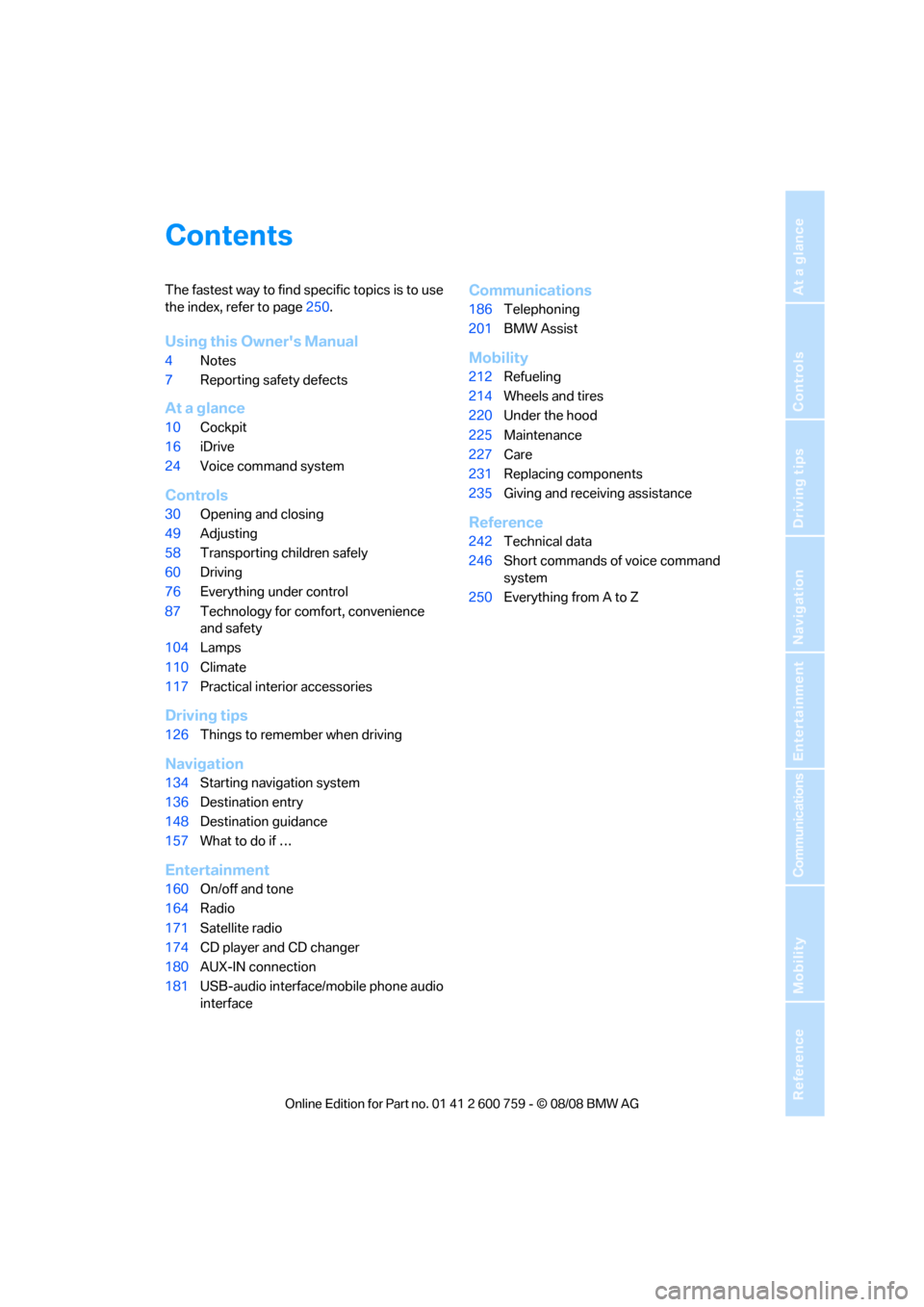
Contents
The fastest way to find specific topics is to use
the index, refer to page250.
Using this Owner's Manual
4Notes
7Reporting safety defects
At a glance
10Cockpit
16iDrive
24Voice command system
Controls
30Opening and closing
49Adjusting
58Transporting children safely
60Driving
76Everything under control
87Technology for comfort, convenience
and safety
104Lamps
110Climate
117Practical interior accessories
Driving tips
126Things to remember when driving
Navigation
134Starting navigation system
136Destination entry
148Destination guidance
157What to do if …
Entertainment
160On/off and tone
164Radio
171Satellite radio
174CD player and CD changer
180AUX-IN connection
181USB-audio interface/mobile phone audio
interface
Communications
186Telephoning
201BMW Assist
Mobility
212Refueling
214Wheels and tires
220Under the hood
225Maintenance
227Care
231Replacing components
235Giving and receiving assistance
Reference
242Technical data
246Short commands of voice command
system
250Everything from A to Z
Page 15 of 272
At a glance
13Reference
Controls
Driving tips
Communications
Navigation
Entertainment
Mobility
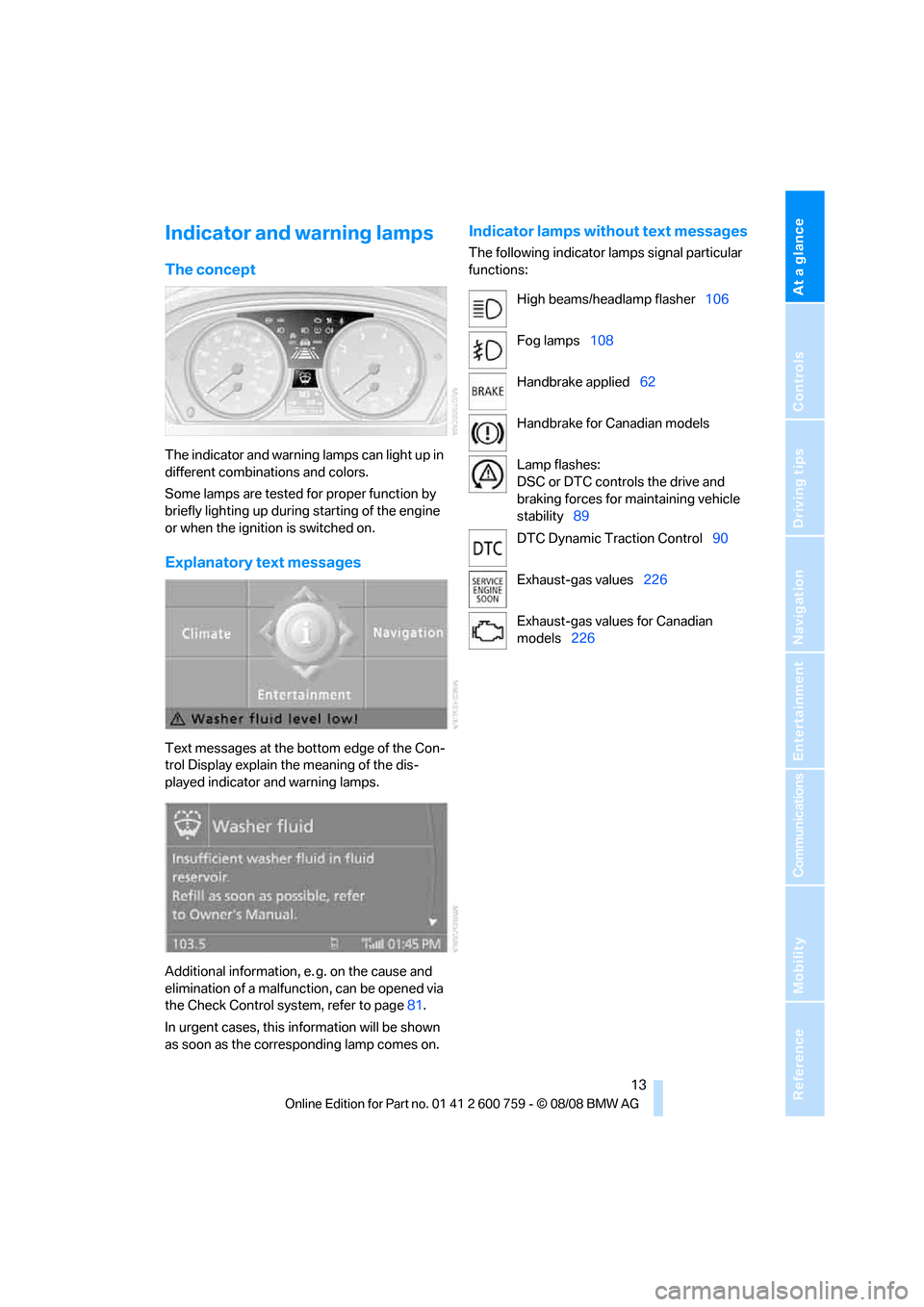
Indicator and warning lamps
The concept
The indicator and warning lamps can light up in
different combinations and colors.
Some lamps are tested for proper function by
briefly lighting up during starting of the engine
or when the ignition is switched on.
Explanatory text messages
Text messages at the bottom edge of the Con-
trol Display explain the meaning of the dis-
played indicator and warning lamps.
Additional information, e. g. on the cause and
elimination of a malfunction, can be opened via
the Check Control system, refer to page81.
In urgent cases, this information will be shown
as soon as the corresponding lamp comes on.
Indicator lamps without text messages
The following indicator lamps signal particular
functions:
High beams/headlamp flasher106
Fog lamps108
Handbrake applied62
Handbrake for Canadian models
Lamp flashes:
DSC or DTC controls the drive and
braking forces for maintaining vehicle
stability89
DTC Dynamic Traction Control90
Exhaust-gas values226
Exhaust-gas values for Canadian
models226
Page 20 of 272
iDrive
18
Menu overview
Communication
>Telephone*
>BMW Assist* or BMW TeleServices*
Navigation or onboard information
>Navigation system*
>Onboard information, e.g. for displaying
the average fuel consumption
Entertainment
>Radio
>CD player and CD changer
*
>USB-audio interface* for external audio
device
Climate
>Vent settings
>Automatic programs
>Parked car operation
menu
>Switching off Control Display
>Tone and display settings
>Settings for your vehicle, e.g. for the central
locking system
>Display of maintenance intervals and dead-
lines for legally mandated inspections
>Settings for telephone
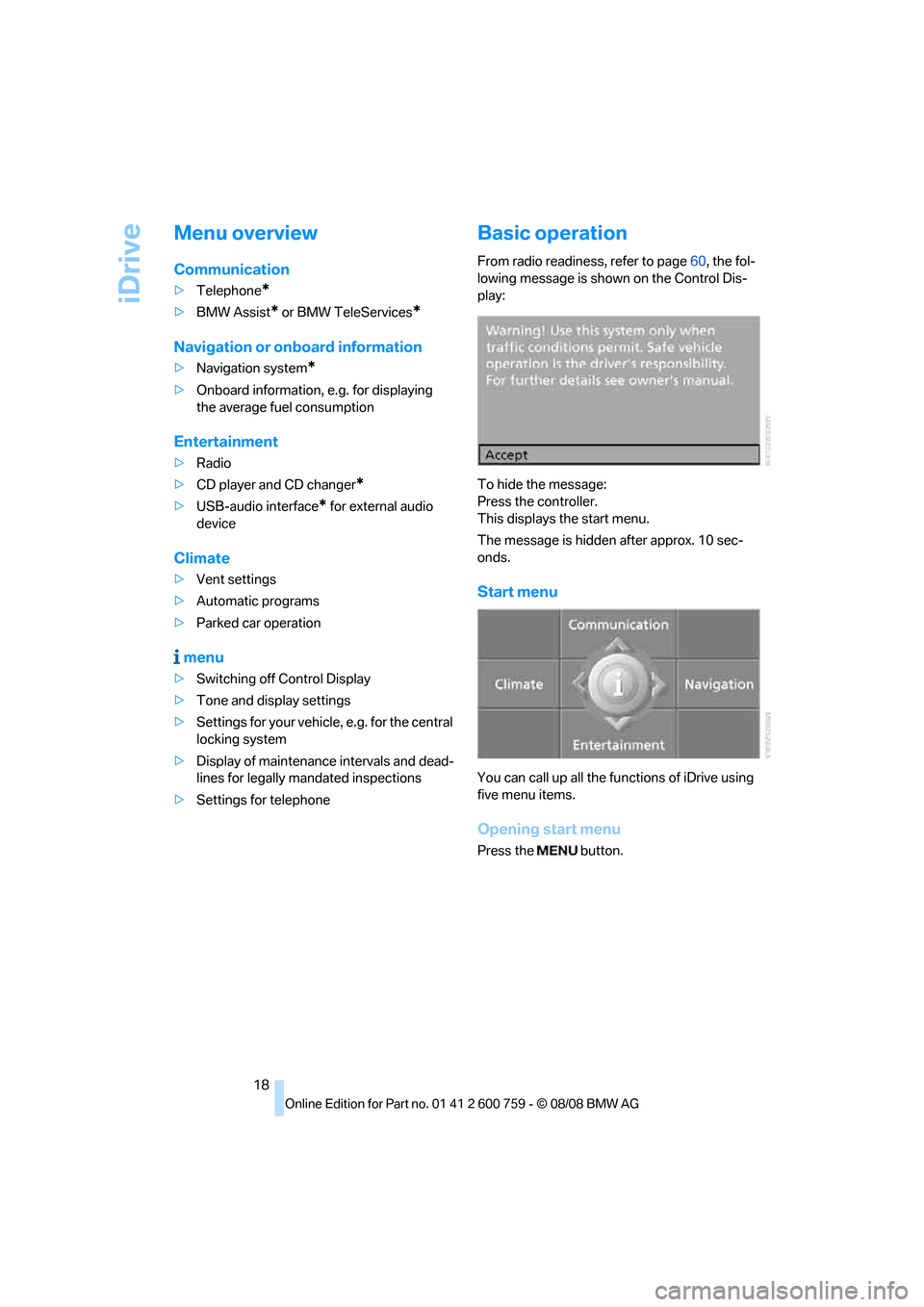
Basic operation
From radio readiness, refer to page60, the fol-
lowing message is shown on the Control Dis-
play:
To hide the message:
Press the controller.
This displays the start menu.
The message is hidden after approx. 10 sec-
onds.
Start menu
You can call up all the functions of iDrive using
five menu items.
Opening start menu
Press the button.
Page 22 of 272
iDrive
20
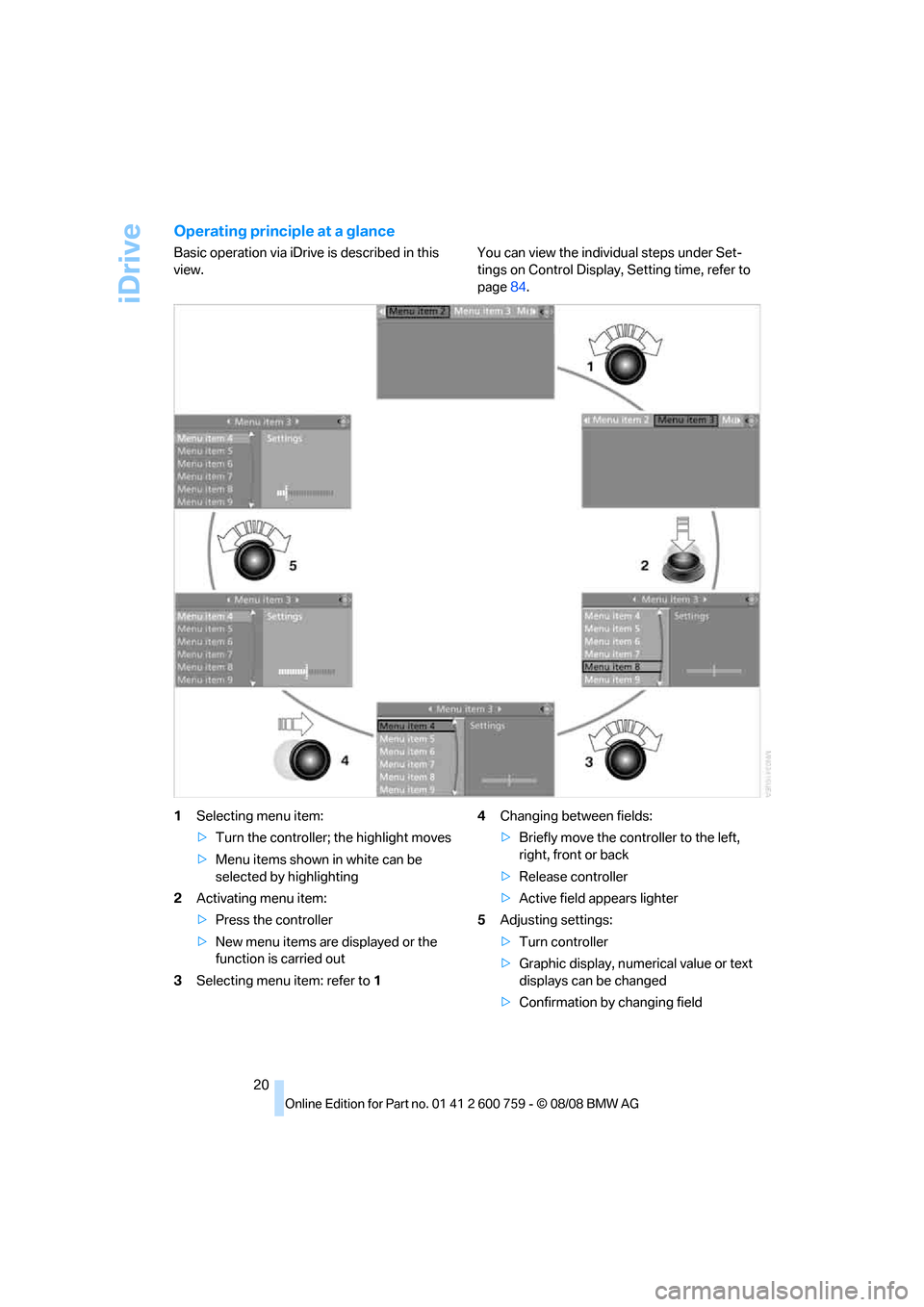
Operating principle at a glance
Basic operation via iDrive is described in this
view.You can view the individual steps under Set-
tings on Control Display, Setting time, refer to
page84.
1Selecting menu item:
>Turn the controller; the highlight moves
>Menu items shown in white can be
selected by highlighting
2Activating menu item:
>Press the controller
>New menu items are displayed or the
function is carried out
3Selecting menu item: refer to 14Changing between fields:
>Briefly move the controller to the left,
right, front or back
>Release controller
>Active field appears lighter
5Adjusting settings:
>Turn controller
>Graphic display, numerical value or text
displays can be changed
>Confirmation by changing field
Page 26 of 272
Voice command system
24
Voice command system
The concept
The voice command system allows you to con-
trol operation of various vehicle systems with-
out taking your hands off the steering wheel.
Individual menu items on the Control Display
can be spoken as commands. This frees you of
having to use the controller.
The voice command system transforms your
oral commands into control signals for the
selected systems and provides support in the
form of instructions or questions.
The voice command system includes a special
microphone.
The microphone is located:
>Near the interior rearview mirror in the
Coupe, refer to page14
>On the steering column in the Convertible
Precondition
Via iDrive, set the language that applies for the
voice command system in order to enable iden-
tification of the spoken commands. To set the
language of iDrive, refer to page86.
Symbols in Owner's Manual
Voice commands
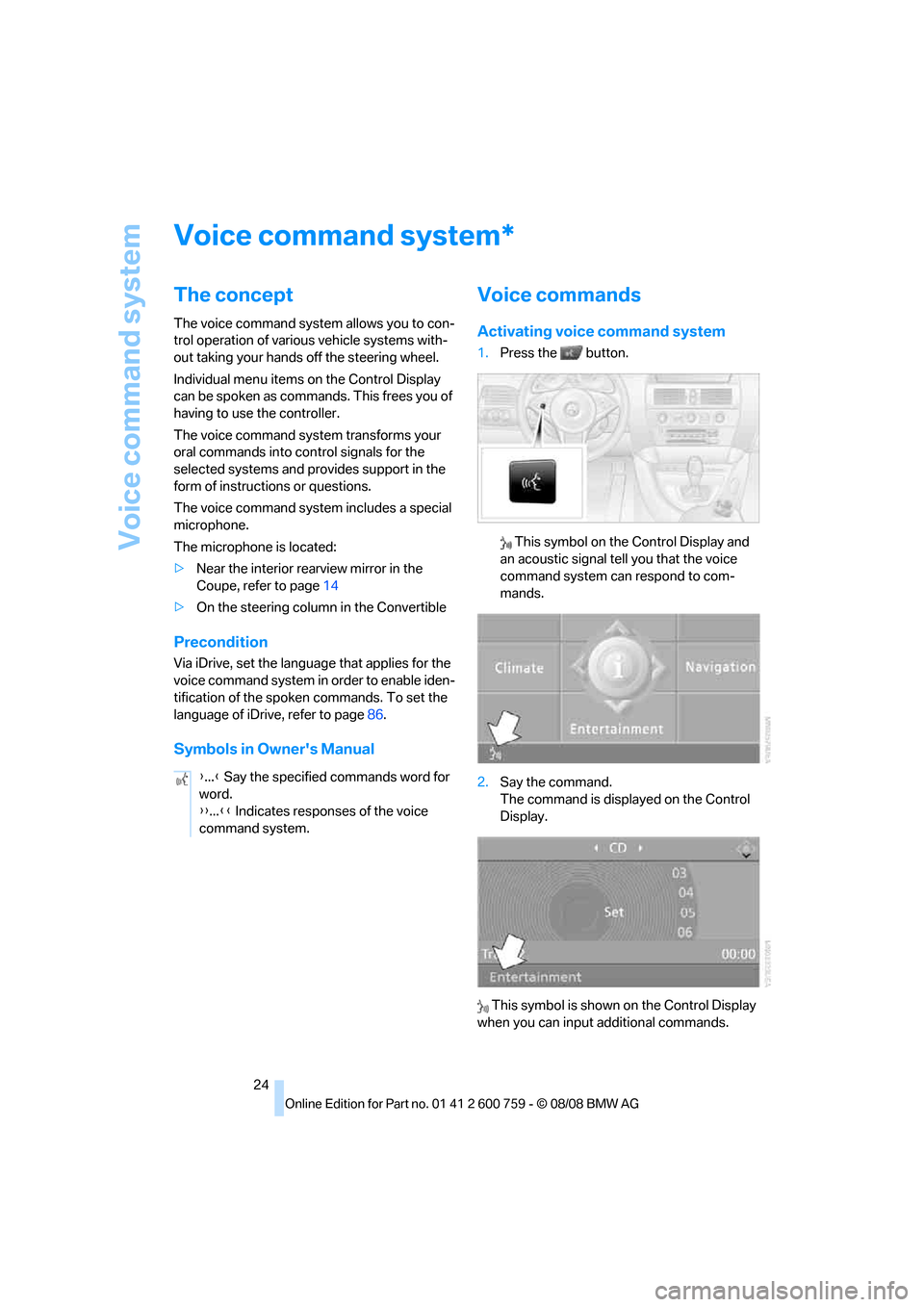
Activating voice command system
1.Press the button.
This symbol on the Control Display and
an acoustic signal tell you that the voice
command system can respond to com-
mands.
2.Say the command.
The command is displayed on the Control
Display.
This symbol is shown on the Control Display
when you can input additional commands.
*
{...} Say the specified commands word for
word.
{{...}} Indicates responses of the voice
command system.
Page 27 of 272
At a glance
25Reference
Controls
Driving tips
Communications
Navigation
Entertainment
Mobility
If no other commands are possible, then oper-
ate the equipment via iDrive.
Terminating or canceling voice
command
Press the button on the steering wheel
or
Commands
Having possible commands read aloud
You can have the system read aloud the possi-
ble commands related to the selected menu
item on the Control Display.
To have the system list the possible com-
mands:
For instance, if you have selected "CD", the
commands available for operating the CD
player and CD changer
* are read out.
Opening help
Using alternative commands
There are often a number of commands to run a
function, e.g.:
Running functions directly with short
commands
With short commands you can run certain func-
tions directly, regardless of which menu item is
selected, refer to page246.
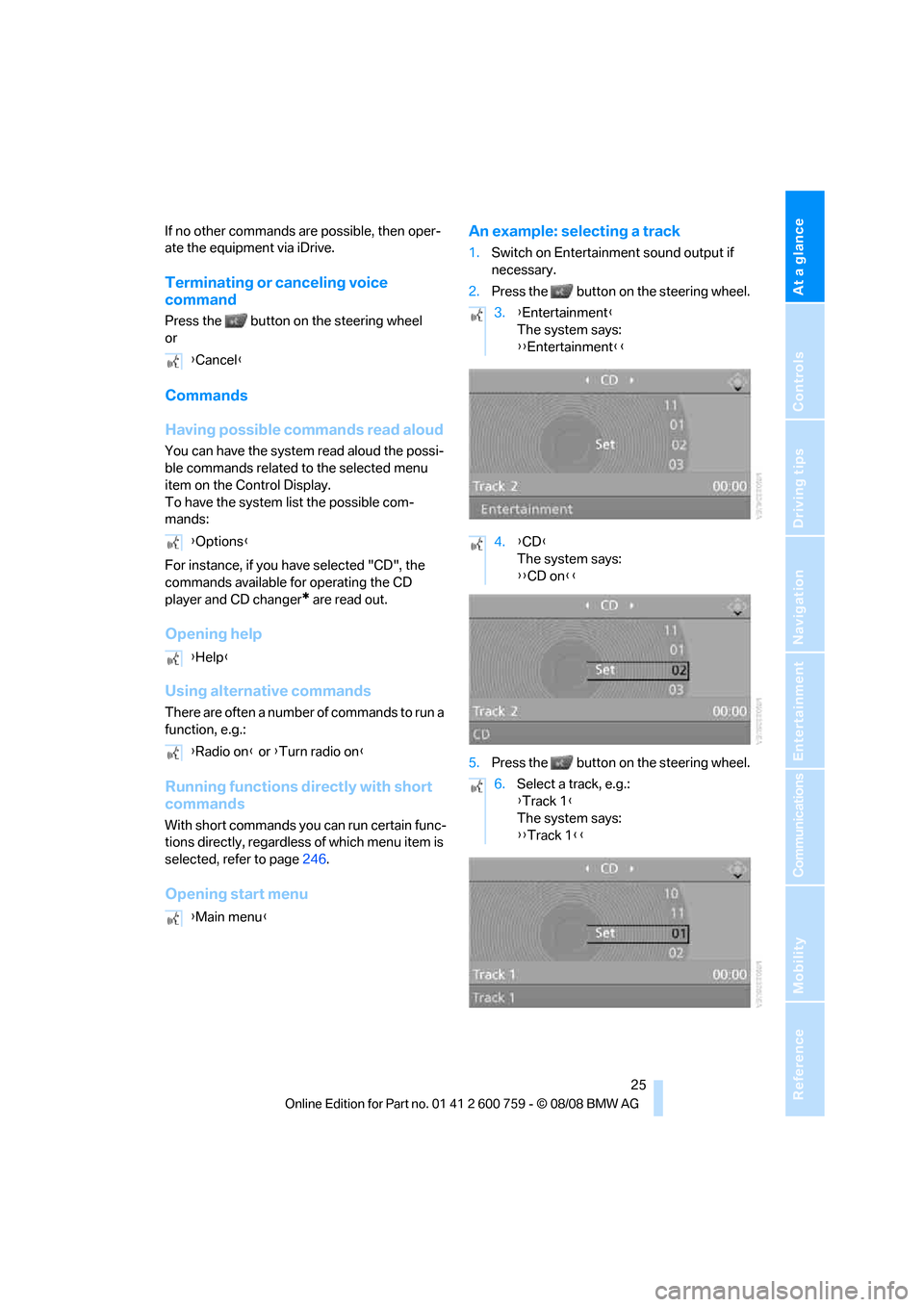
Opening start menuAn example: selecting a track
1.Switch on Entertainment sound output if
necessary.
2.Press the button on the steering wheel.
5.Press the button on the steering wheel. {Cancel}
{Options}
{Help}
{Radio on} or {Turn radio on}
{Main menu}
3.{Entertainment}
The system says:
{{Entertainment}}
4.{CD}
The system says:
{{CD on}}
6.Select a track, e.g.:
{Track 1}
The system says:
{{Track 1}}
Page 28 of 272
Voice command system
26
Notes
The mobile phone can also be operated
with voice commands, refer to
page197.<
For voice commands, bear the following in
mind:
>Say the commands and numbers smoothly
and at normal volume, avoiding excessive
emphasis and pauses. This also applies to
spelling when entering the destination.
>Always issue commands in the language of
the voice command system.
>When selecting a radio station, use the
common pronunciation of the station name.
>For entries in the voice-activated phone
book, only use names in the language of the
voice command system and do not use
abbreviations.
>Keep the doors, windows and glass sun-
roof
* or convertible top closed to prevent
interference from ambient noise.
>Avoid background noises in the vehicle
while speaking.
Page 32 of 272
Opening and closing
30
Opening and closing
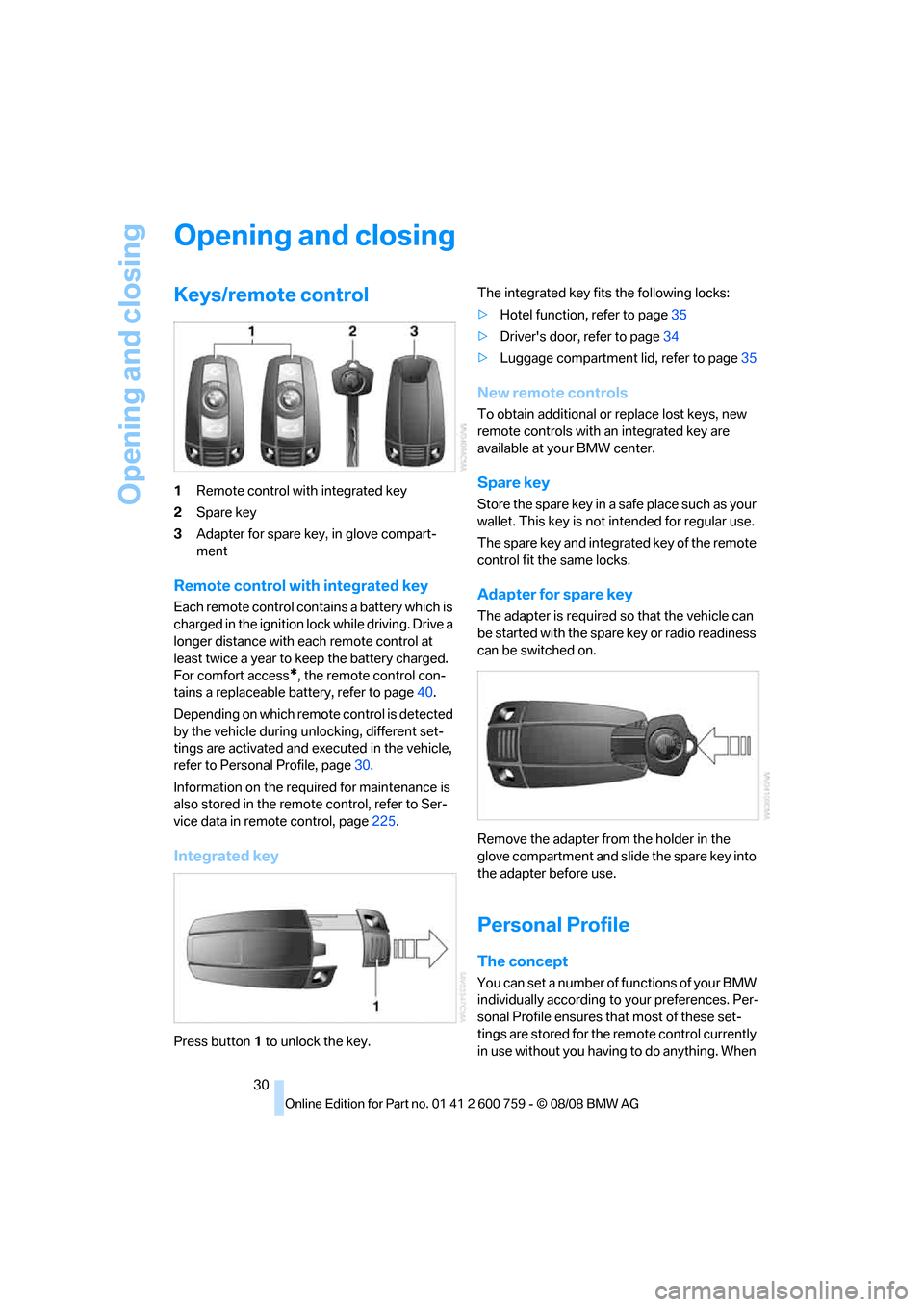
Keys/remote control
1Remote control with integrated key
2Spare key
3Adapter for spare key, in glove compart-
ment
Remote control with integrated key
Each remote control contains a battery which is
charged in the ignition lock while driving. Drive a
longer distance with each remote control at
least twice a year to keep the battery charged.
For comfort access
*, the remote control con-
tains a replaceable battery, refer to page40.
Depending on which remote control is detected
by the vehicle during unlocking, different set-
tings are activated and executed in the vehicle,
refer to Personal Profile, page30.
Information on the required for maintenance is
also stored in the remote control, refer to Ser-
vice data in remote control, page225.
Integrated key
Press button1 to unlock the key.The integrated key fits the following locks:
>Hotel function, refer to page35
>Driver's door, refer to page34
>Luggage compartment lid, refer to page35
New remote controls
To obtain additional or replace lost keys, new
remote controls with an integrated key are
available at your BMW center.
Spare key
Store the spare key in a safe place such as your
wallet. This key is not intended for regular use.
The spare key and integrated key of the remote
control fit the same locks.
Adapter for spare key
The adapter is required so that the vehicle can
be started with the spare key or radio readiness
can be switched on.
Remove the adapter from the holder in the
glove compartment and slide the spare key into
the adapter before use.
Personal Profile
The concept
You can set a number of functions of your BMW
individually according to your preferences. Per-
sonal Profile ensures that most of these set-
tings are stored for the remote control currently
in use without you having to do anything. When
Page 33 of 272
Controls
31Reference
At a glance
Driving tips
Communications
Navigation
Entertainment
Mobility
the vehicle is unlocked, the corresponding
remote control is detected and the settings
stored for it are called up and carried out.
This means that you will always find your BMW
set to your own personal settings even if
another person with his/her own remote control
and settings has used the vehicle since the last
time you drove it. The individual settings are
stored for a maximum of four remote controls,
for two with comfort access
*.
Personal Profile settings
Details on the settings are provided on the
specified pages.
>Behavior of the central locking system
when unlocking vehicle, refer to page32
>Automatic locking of the vehicle, refer to
page34
>Programming buttons on steering wheel,
refer to page57
>Displays on Control Display:
>12h/24h clock mode, refer to page85
>Date format, refer to page85
>Brightness of the Control Display, refer
to page85
>Units of measure for consumption,
route/distances, temperature and pres-
sure, refer to page86
>Language on the Control Display, refer
to page86
>Lighting settings:
>Triple turn signal activation, refer to
page66
>Welcome lamps, refer to page104
>Pathway lighting, refer to page105
>Daytime running lamps
*, refer to
page105
>High-beam assistant
*, refer to page106
>PDC Park Distance Control
*: optical warn-
ing, refer to page87
>Head-Up Display
*: selection and bright-
ness of display, refer to page98>BMW Night Vision
*: display settings, refer
to page102
>Automatic climate control: for AUTO pro-
gram and intensity, cooling function, and
automatic recirculated air control/recircu-
lated air mode, temperature, air distribution,
temperature in the upper body region, refer
to page111
>Navigation system
*: voice instructions for
destination guidance, refer to page151
In addition, the following, most recently
selected settings are recalled during unlocking:
>Programmable memory buttons: selecting
stored functions, refer to page22
>Driver's seat, exterior-mirror and steering-
wheel position, refer to page51
>Audio sources: volume and tone settings,
refer to page161
>Radio: display of stored stations, refer to
page164
>Phone: adjusting volume, refer to page192
Central locking system
The concept
The central locking system functions when the
driver's door is closed.
The system simultaneously engages and
releases the locks on the following:
>Doors
>Compartment in the front center console
>Luggage compartment lid
>Fuel filler door
Operating from outside
>Via the remote control
>Using door lock
>With comfort access
* via the door handles
These actions operate the anti-theft system
* at
the same time. It prevents the doors from being
unlocked using the lock buttons or door han-
dles. The interior lamps and the courtesy
lamps
* are also switched on and off with the
Page 34 of 272
Opening and closing
32 remote control. The alarm system
is armed/dis-
armed at the same time.
You can find more detailed information on the
alarm system
on page37.
Operating from inside
Via the central locking button, refer to page34.
The fuel filler door
and the compartment in the
front center console are not locked, refer to
page34.
In the event of a serious accident, the central
locking system unlocks automatically. In addi-
tion, the hazard warning flashers and interior
lamps come on.
Opening and closing:
Using remote control
Persons or animals left unattended in a
parked vehicle can lock the doors from
the inside. Always take along the remote control
when leaving the vehicle so that the vehicle can
then be opened from the outside.<
Unlocking
Press the button.
The interior lamps, the courtesy lamps
*, and
the welcome lamps are switched on.
Setting unlocking behavior
You can set whether the first press of the button
unlocks only the driver's door or the entire vehi-
cle.
iDrive, for operating principle refer to page16.
1.Press the button.
This opens the start menu.
2.Press the controller to open the menu.
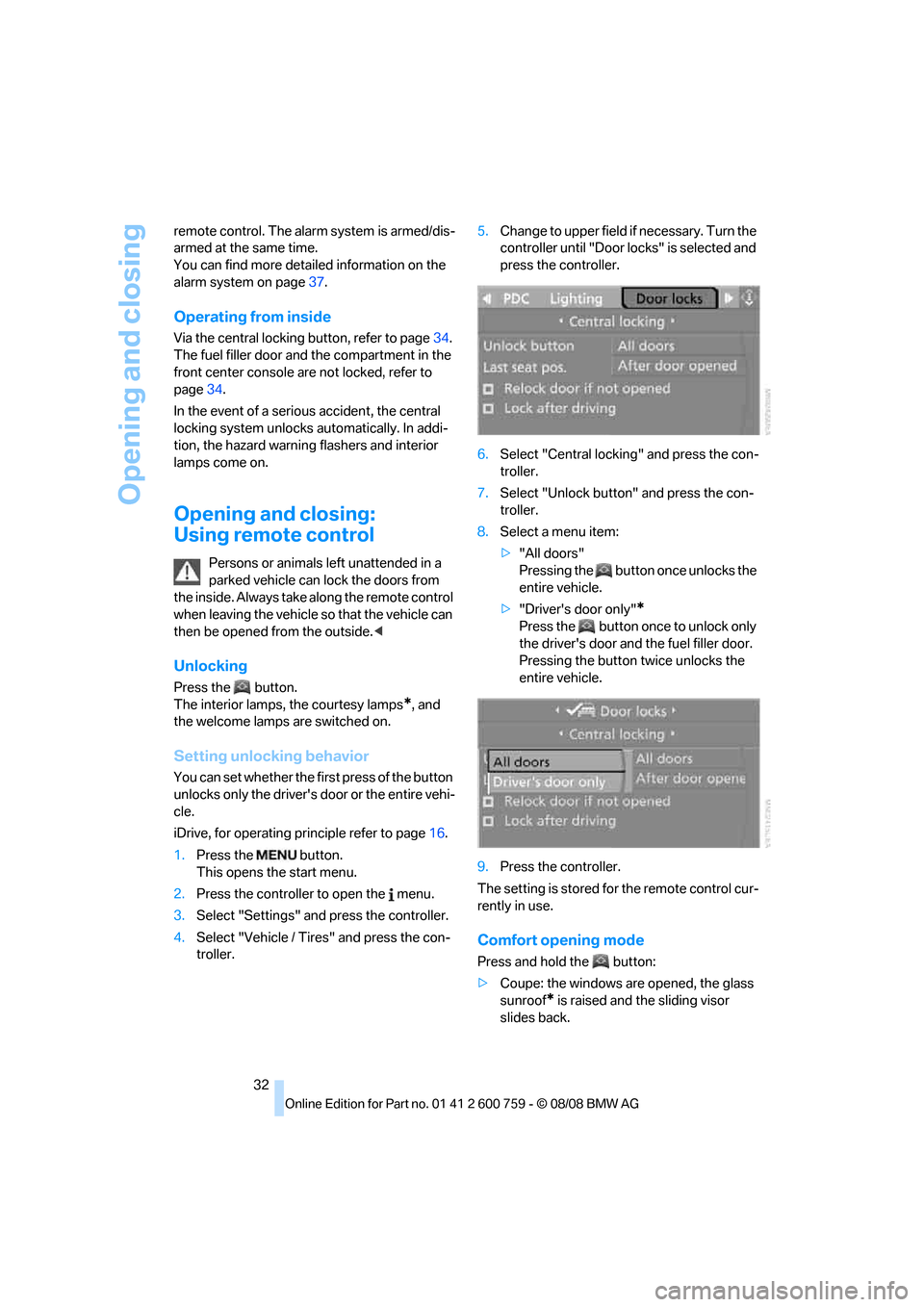
3.Select "Settings" and press the controller.
4.Select "Vehicle / Tires" and press the con-
troller.5.Change to upper field if necessary. Turn the
controller until "Door locks" is selected and
press the controller.
6.Select "Central locking" and press the con-
troller.
7.Select "Unlock button" and press the con-
troller.
8.Select a menu item:
>"All doors"
Pressing the button once unlocks the
entire vehicle.
>"Driver's door only"
*
Press the button once to unlock only
the driver's door and the fuel filler door.
Pressing the button twice unlocks the
entire vehicle.
9.Press the controller.
The setting is stored for the remote control cur-
rently in use.
Comfort opening mode
Press and hold the button:
>Coupe: the windows are opened, the glass
sunroof
* is raised and the sliding visor
slides back.