instrument cluster BMW 650I CONVERTIBLE 2010 E64 User Guide
[x] Cancel search | Manufacturer: BMW, Model Year: 2010, Model line: 650I CONVERTIBLE, Model: BMW 650I CONVERTIBLE 2010 E64Pages: 252, PDF Size: 8.4 MB
Page 75 of 252
Controls
73Reference
At a glance
Driving tips
Communications
Navigation
Entertainment
Mobility
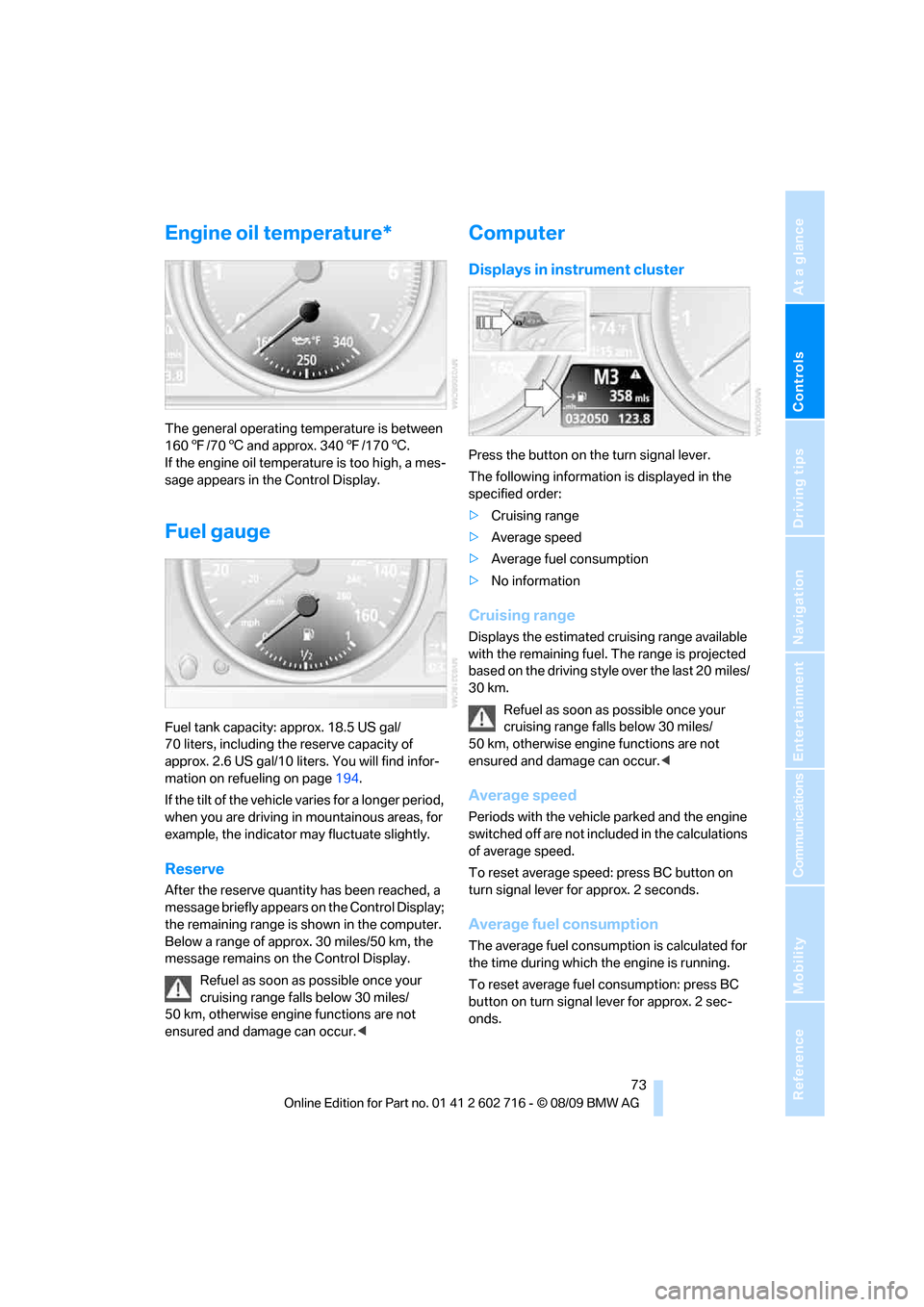
Engine oil temperature*
The general operating temperature is between
1607/706 and approx. 3407/1706.
If the engine oil temperature is too high, a mes-
sage appears in the Control Display.
Fuel gauge
Fuel tank capacity: approx. 18.5 US gal/
70 liters, including the reserve capacity of
approx. 2.6 US gal/10 liters. You will find infor-
mation on refueling on page194.
If the tilt of the vehicle varies for a longer period,
when you are driving in mountainous areas, for
example, the indicator may fluctuate slightly.
Reserve
After the reserve quantity has been reached, a
message briefly appears on the Control Display;
the remaining range is shown in the computer.
Below a range of approx. 30 miles/50 km, the
message remains on the Control Display.
Refuel as soon as possible once your
cruising range falls below 30 miles/
50 km, otherwise engine functions are not
ensured and damage can occur.<
Computer
Displays in instrument cluster
Press the button on the turn signal lever.
The following information is displayed in the
specified order:
>Cruising range
>Average speed
>Average fuel consumption
>No information
Cruising range
Displays the estimated cruising range available
with the remaining fuel. The range is projected
based on the driving style over the last 20 miles/
30 km.
Refuel as soon as possible once your
cruising range falls below 30 miles/
50 km, otherwise engine functions are not
ensured and damage can occur.<
Average speed
Periods with the vehicle parked and the engine
switched off are not included in the calculations
of average speed.
To reset average speed: press BC button on
turn signal lever for approx. 2 seconds.
Average fuel consumption
The average fuel consumption is calculated for
the time during which the engine is running.
To reset average fuel consumption: press BC
button on turn signal lever for approx. 2 sec-
onds.
Page 80 of 252

Controls Overview
78 and warning lamps in the instrument cluster,
and if necessary an acoustic signal and text
messages at the bottom of the Control Display.
Indicator and warning lamps
The indicator and warning lamps can light up in
different combinations and colors.
This symbol means that a Check Control
message has been generated. The symbol con-
tinues to be visible even when the Check Con-
trol message disappears after a short time. The
warning lamps and text messages are stored
and can be displayed later, also refer to
page79.
Explanatory text messages
For most Check Control messages, you can
view more information later, e.g. regarding the cause of a malfunction and how to respond;
refer to the information provided below.
In urgent cases, this information will be shown
as soon as the corresponding lamp lights up.
Exit the displayed information:
Move the controller to the left.
Hiding Check Control messages
Press the CHECK button in the turn signal lever.
Some Check Control messages are displayed
until the malfunctions have been rectified. They
cannot be hidden. If a number of malfunctions
occur simultaneously, they are displayed in
succession.
Other messages are hidden after approx.
20 seconds, but remain stored.
Page 85 of 252
Controls
83Reference
At a glance
Driving tips
Communications
Navigation
Entertainment
Mobility
System limits
Even with PDC, final responsibility for
estimating the distance between the
vehicle and any obstacles always remains with
the driver. Even when sensors are provided,
there is a blind spot in which objects can no
longer be detected. The system is also subject
to the physical limits that apply to all forms of
ultrasonic measurement, such as those
encountered with tow bars and trailer cou-
plings, or thin and wedge-shaped objects etc.
Low objects already displayed, e. g. curbs, can
also disappear from the detection area of the
sensors again before or after a continuous tone
already sounds. Higher, protruding objects, e.g.
ledges, cannot be detected. For this reason,
drive with care; otherwise, there is a danger of
personal injury or property damage.
Loud sources of sound, inside and outside the
vehicle, could drown out the PDC signal tone.<
Driving stability control
systems
Your BMW is equipped with an extended array
of systems designed to enhance and maintain
vehicle stability under extreme conditions.
Antilock Brake System ABS
ABS prevents locking of the wheels during
braking. Safe steering response is maintained
even during full braking. Active safety is thus
increased.
The ABS is operational every time you start the
engine. For information on safe braking, refer to
page120.
CBC Cornering Brake Control
When braking during curves or when braking
during a lane change, driving stability and steer-
ing response are improved further.
Electronic brake-force distribution
The system controls the brake pressure in the
rear wheels to ensure stable braking behavior.
Brake assistant
When you apply the brakes rapidly, this system
produces maximum braking force boosting and
thus helps to achieve the shortest possible
braking distance during full braking maneuvers.
This system exploits all of the benefits provided
by ABS.
Do not reduce the pressure on the brake pedal
for the duration of the full braking.
Adaptive brake assistant*
In conjunction with the active cruise control
with the stop-and-go function, the adaptive
brake assistant ensures that the brake
responds even more quickly during braking
with the brake assistant.
DSC Dynamic Stability Control
DSC prevents traction loss in the driving wheels
when starting off and accelerating. The system
also identifies unstable driving conditions, such
as a loss of traction at the rear of the vehicle or
sliding of the vehicle in its front wheels. In these
cases, DSC helps the vehicle maintain a safe
course within physical limits by reducing engine
output and through braking actions in the indi-
vidual wheels.
The laws of physics cannot be repealed,
even with DSC. An appropriate driving
style always remains the responsibility of the
driver. Therefore, do not restrict the additional
safety margin with a risky driving style, as other-
wise there is a risk of an accident.<
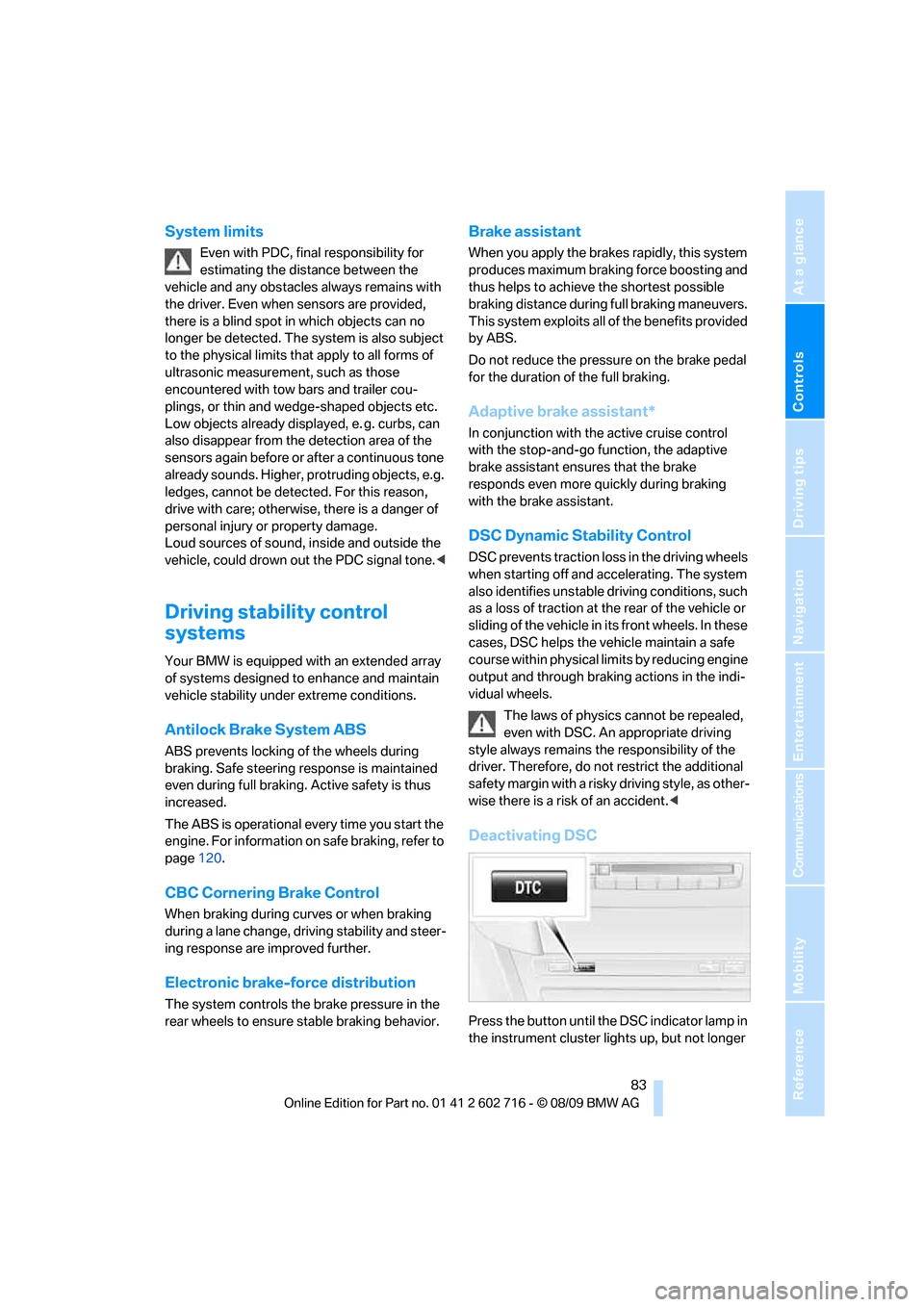
Deactivating DSC
Press the button until the DSC indicator lamp in
the instrument cluster lights up, but not longer
Page 86 of 252
Technology for comfort, convenience and safety
84 than approx. 10 seconds. DTC Dynamic Trac-
tion Control and DSC are deactivated together.
Stabilizing and drive output promoting actions
are no longer executed. The stability-promoting
intervention of the active steering
* is also deac-
tivated, refer to page89.
A message appears on the Control Display.
Please note any supplementary information
that appears there.
To increase vehicle stability, activate DSC again
as soon as possible.
Activating DSC
Press the button; the indicator lamp in the
instrument cluster goes out.
For better control
The indicator lamp flashes:
DSC controls the drive forces and
brake forces.
The indicator lamp lights up:
DSC is deactivated.
DTC Dynamic Traction Control
DTC is a version of DSC in which the drive out-
put is optimized for particular road conditions,
e.g. unplowed snow-covered roads. The sys-
tem assures the maximal drive output, but with
reduced driving stability. It is therefore neces-
sary to drive with appropriate caution.
You may find it useful to briefly activate DTC
under the following special circumstances:
>When driving on snowy inclines, in slush, or
on unplowed, snow-covered road surfaces
>When rocking a stuck vehicle free or start-
ing off in deep snow or on loose ground
>When driving with snow chains
*
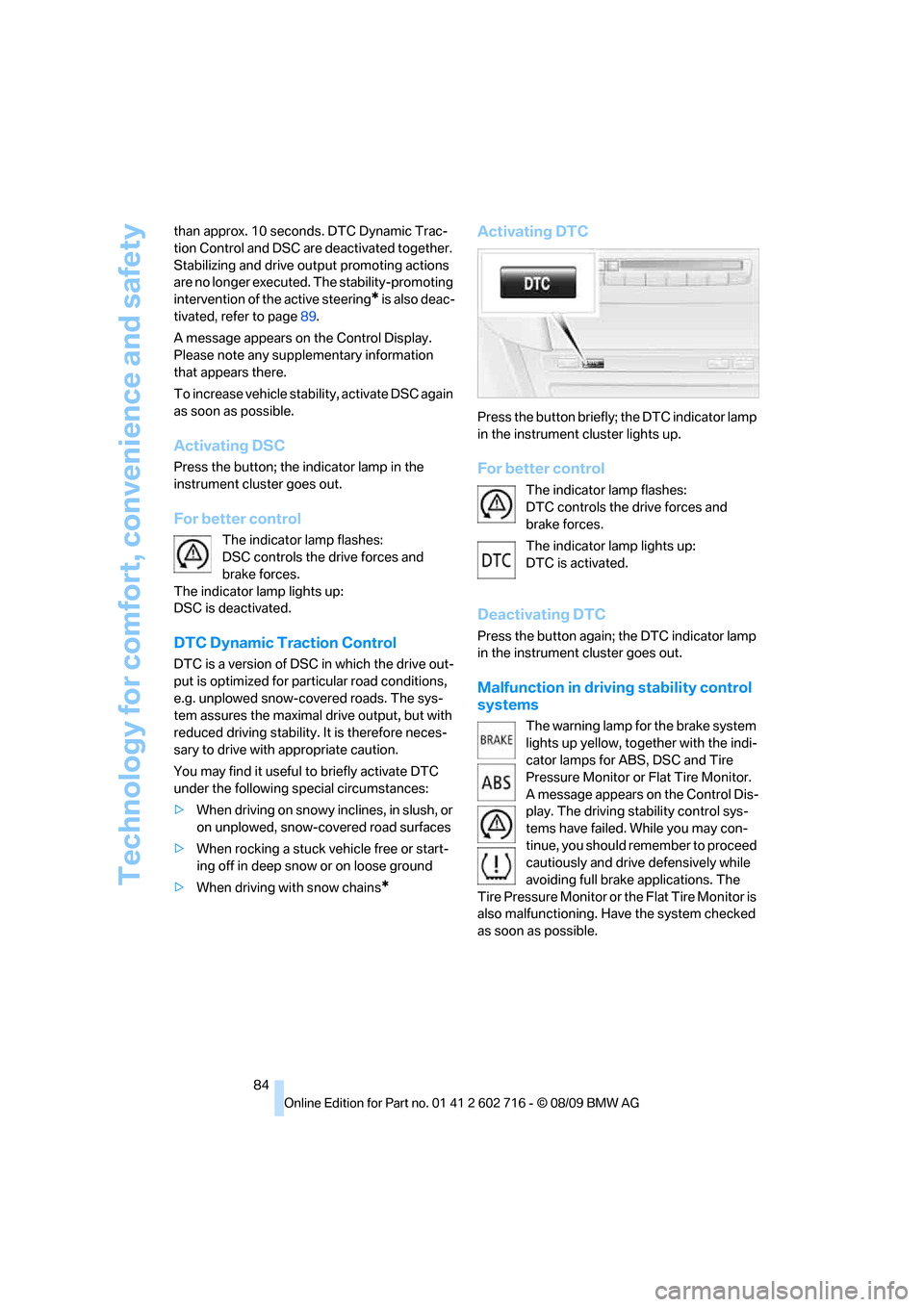
Activating DTC
Press the button briefly; the DTC indicator lamp
in the instrument cluster lights up.
For better control
The indicator lamp flashes:
DTC controls the drive forces and
brake forces.
The indicator lamp lights up:
DTC is activated.
Deactivating DTC
Press the button again; the DTC indicator lamp
in the instrument cluster goes out.
Malfunction in driving stability control
systems
The warning lamp for the brake system
lights up yellow, together with the indi-
cator lamps for ABS, DSC and Tire
Pressure Monitor or Flat Tire Monitor.
A message appears on the Control Dis-
play. The driving stability control sys-
tems have failed. While you may con-
tinue, you should remember to proceed
cautiously and drive defensively while
avoiding full brake applications. The
Tire Pressure Monitor or the Flat Tire Monitor is
also malfunctioning. Have the system checked
as soon as possible.
Page 102 of 252
Lamps
100
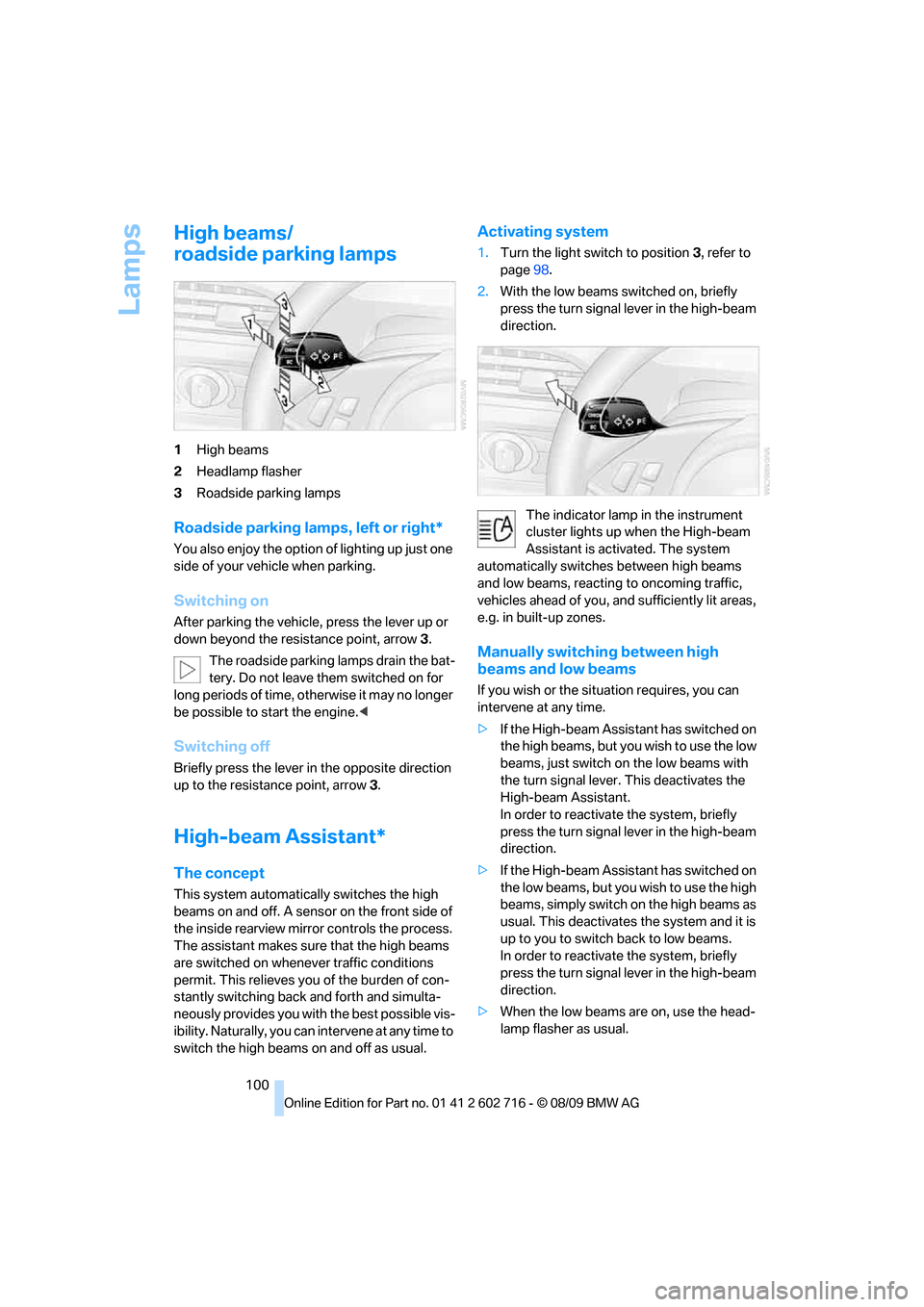
High beams/
roadside parking lamps
1High beams
2Headlamp flasher
3Roadside parking lamps
Roadside parking lamps, left or right*
You also enjoy the option of lighting up just one
side of your vehicle when parking.
Switching on
After parking the vehicle, press the lever up or
down beyond the resistance point, arrow 3.
The roadside parking lamps drain the bat-
tery. Do not leave them switched on for
long periods of time, otherwise it may no longer
be possible to start the engine.<
Switching off
Briefly press the lever in the opposite direction
up to the resistance point, arrow3.
High-beam Assistant*
The concept
This system automatically switches the high
beams on and off. A sensor on the front side of
the inside rearview mirror controls the process.
The assistant makes sure that the high beams
are switched on whenever traffic conditions
permit. This relieves you of the burden of con-
stantly switching back and forth and simulta-
neously provides you with the best possible vis-
ibility. Naturally, you can intervene at any time to
switch the high beams on and off as usual.
Activating system
1.Turn the light switch to position3, refer to
page98.
2.With the low beams switched on, briefly
press the turn signal lever in the high-beam
direction.
The indicator lamp in the instrument
cluster lights up when the High-beam
Assistant is activated. The system
automatically switches between high beams
and low beams, reacting to oncoming traffic,
vehicles ahead of you, and sufficiently lit areas,
e.g. in built-up zones.
Manually switching between high
beams and low beams
If you wish or the situation requires, you can
intervene at any time.
>If the High-beam Assistant has switched on
the high beams, but you wish to use the low
beams, just switch on the low beams with
the turn signal lever. This deactivates the
High-beam Assistant.
In order to reactivate the system, briefly
press the turn signal lever in the high-beam
direction.
>If the High-beam Assistant has switched on
the low beams, but you wish to use the high
beams, simply switch on the high beams as
usual. This deactivates the system and it is
up to you to switch back to low beams.
In order to reactivate the system, briefly
press the turn signal lever in the high-beam
direction.
>When the low beams are on, use the head-
lamp flasher as usual.
Page 104 of 252
Lamps
102
Fog lamps
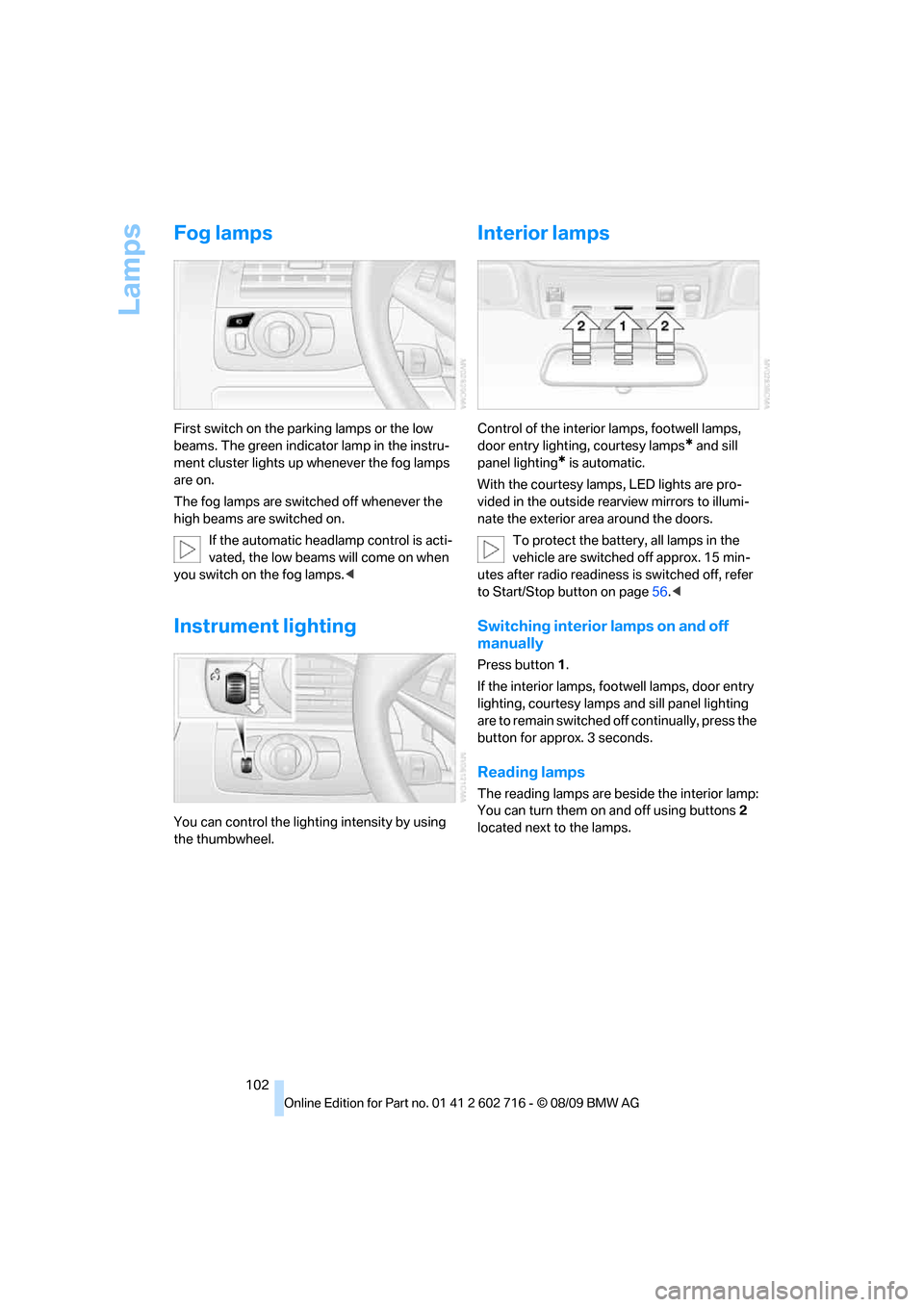
First switch on the parking lamps or the low
beams. The green indicator lamp in the instru-
ment cluster lights up whenever the fog lamps
are on.
The fog lamps are switched off whenever the
high beams are switched on.
If the automatic headlamp control is acti-
vated, the low beams will come on when
you switch on the fog lamps.<
Instrument lighting
You can control the lighting intensity by using
the thumbwheel.
Interior lamps
Control of the interior lamps, footwell lamps,
door entry lighting, courtesy lamps
* and sill
panel lighting
* is automatic.
With the courtesy lamps,
LED lights are pro-
vided in the outside rearview mirrors to illumi-
nate the exterior area around the doors.
To protect the battery, all lamps in the
vehicle are switched off approx. 15 min-
utes after radio readiness is switched off, refer
to Start/Stop button on page56.<
Switching interior lamps on and off
manually
Press button 1.
If the interior lamps, footwell lamps, door entry
lighting, courtesy lamps and sill panel lighting
are to remain switched off continually, press the
button for approx. 3 seconds.
Reading lamps
The reading lamps are beside the interior lamp:
You can turn them on and off using buttons2
located next to the lamps.
Page 240 of 252
Everything from A to Z
238 Displacement, refer to Engine
data224
Display, refer to iDrive
controls16
Display elements, refer to
Instrument cluster12
Display lighting, refer to
Instrument lighting102
Displays
– on Control Display, refer to
iDrive16
– refer to Instrument
cluster12
Displays on the windshield,
refer to Head-up Display93
Disposal
– battery of remote control
with Comfort Access36
– coolant205
– vehicle battery214
Distance, refer to
Computer74
Distance control, refer to
Active cruise control64
Distance to destination, refer
to Computer74
Distance warning, refer to
PDC Park Distance
Control82
Door entry lighting, refer to
Interior lamps102
Door key, refer to Keys/
remote control26
Door lock29
Doors
– manual operation30
– remote control28
DOT Quality Grades198
Draft-free ventilation106
Drinks holder, refer to
Cupholders112
Drive-off assistant85
Driving lamps, refer to Parking
lamps/low beams98
Driving stability control
systems83
Driving through water120
Driving tips, refer to General
driving notes118Dry air, refer to Cooling
function105
Drying the air, refer to Cooling
function105
DSC Dynamic Stability
Control83
– indicator lamp13,84
– malfunction84
DTC Dynamic Traction
Control84
– activating84
– indicator lamp13,84
DVD
– country codes156
– settings157
– video playback156
DVD menu157
DVD player, refer to CD
player154
DVD video156
Dynamic Brake Control DBC
– warning lamp85
Dynamic destination
guidance137
Dynamic Drive85
Dynamic Driving Control60
Dynamic Stability Control
DSC83
Dynamic Traction Control
DTC84
E
Easy entry, refer to Entering
rear49
Easy entry/exit52
Eject button, refer to Buttons
in area of the CD/DVD
player146
Electrical malfunction
– convertible top41
– door lock30
– driver's door30
– fuel filler flap194
– glass sunroof39
– luggage compartment lid32
– storage compartment, hotel
function31
Electric convertible top39Electric steering wheel
adjustment52
Electronic brake-force
distribution83
Electronic oil level check203
Emergency operation, refer to
Manual operation
– convertible top41
– door lock30
– driver's door30
– fuel filler flap194
– glass sunroof39
– hotel function31
– luggage compartment lid32
– transmission lock, sport
automatic transmission60
Emergency release for
luggage compartment lid in
cargo bay32
Emergency request216
Emergency services, refer to
Roadside Assistance217
Engine
– breaking-in118
– data224
– overheated, refer to Coolant
temperature72
– speed224
– starting57
– starting, Comfort Access34
– switching off57
– switching off when equipped
with Automatic
transmission, with Comfort
Access35
Engine compartment203
Engine coolant205
Page 243 of 252
Reference 241
At a glance
Controls
Driving tips
Communications
Navigation
Entertainment
Mobility
Indicator/warning lamps
– ABS Antilock Brake
System84
– active steering89
– airbags92
– brake system84
– DSC13,84
– DTC13,84
– Flat Tire Monitor86
– fog lamps13,102
– parking brake13,58
– safety belt warning50
– TPM Tire Pressure
Monitor88
Indicator and warning lamps
– overview13
Inflation pressure, refer to Tire
inflation pressure196
Inflation pressure monitoring,
refer to Flat Tire Monitor85
Inflation pressure monitoring,
refer to Tire Pressure
Monitor87
Initializing
– Flat Tire Monitor86
– radio, refer to Storing
stations150
– refer to Power failure214
– refer to Setting time and
date77
– seat, mirror and steering
wheel memory47
Instructions for navigation
system, refer to Voice
instructions137
Instrument cluster12
Instrument illumination, refer
to Instrument lighting102
Instrument lighting102
Instrument panel, refer to
Cockpit10
Instrument panel, refer to
Instrument cluster12
Integrated key26
Integrated universal remote
control109
Interactive map132Interior lamps102
– switching on with remote
control28
Interior motion sensor33
– switching off34
Interior rearview mirror,
automatic dimming
feature52
Intermittent mode of the
wipers62
Intersection, entering for
navigation128
iPod, connecting, refer to
AUX-IN port166
iPod, connecting, refer to USB
audio interface166
J
Jacking points214
Joystick, refer to iDrive16
Jumpering, refer to Jump
starting217
Jump starting217
K
Keyless-Go, refer to Comfort
Access34
Keyless opening and closing,
refer to Comfort Access34
Key Memory, refer to Personal
Profile26
Keys26
– key-related settings, refer to
Personal Profile26
– spare key26
Kickdown, Sport automatic
transmission59
Knee airbags90
Knock control195
L
Lamps
– refer to High-beam
Assistant100
– refer to Parking lamps/low
beams98Lamps and bulbs212
Lane demarcation lines, refer
to Lane Departure
Warning96
Lane Departure Warning96
Lashing eyes, refer to
Securing cargo122
Last destinations130
LATCH child restraint fixing
system54
Leather care210
LEDs light-emitting
diodes212
Length, refer to
Dimensions225
License plate lamp, replacing
bulbs214
Light Control, refer to
Adaptive Light Control99
Light-emitting diodes
LEDs212
Lighter113
Lighting
– instruments102
– lamps and bulbs212
– of the vehicle, refer to
Lamps98
Light switch98
Loading
– securing cargo122
– stowing cargo121
– vehicle120
Loading, refer to Cargo
loading120
Load securing equipment,
refer to Securing cargo122
Lock buttons in the doors,
refer to Locking30
Locking28
– confirmation signals29
– from inside30
– from outside28
– without key, refer to Comfort
Access34
– without key, refer to Comfort
access34