change time BMW 650I COUPE 2006 E63 User Guide
[x] Cancel search | Manufacturer: BMW, Model Year: 2006, Model line: 650I COUPE, Model: BMW 650I COUPE 2006 E63Pages: 236, PDF Size: 8.21 MB
Page 125 of 236
Destination entry
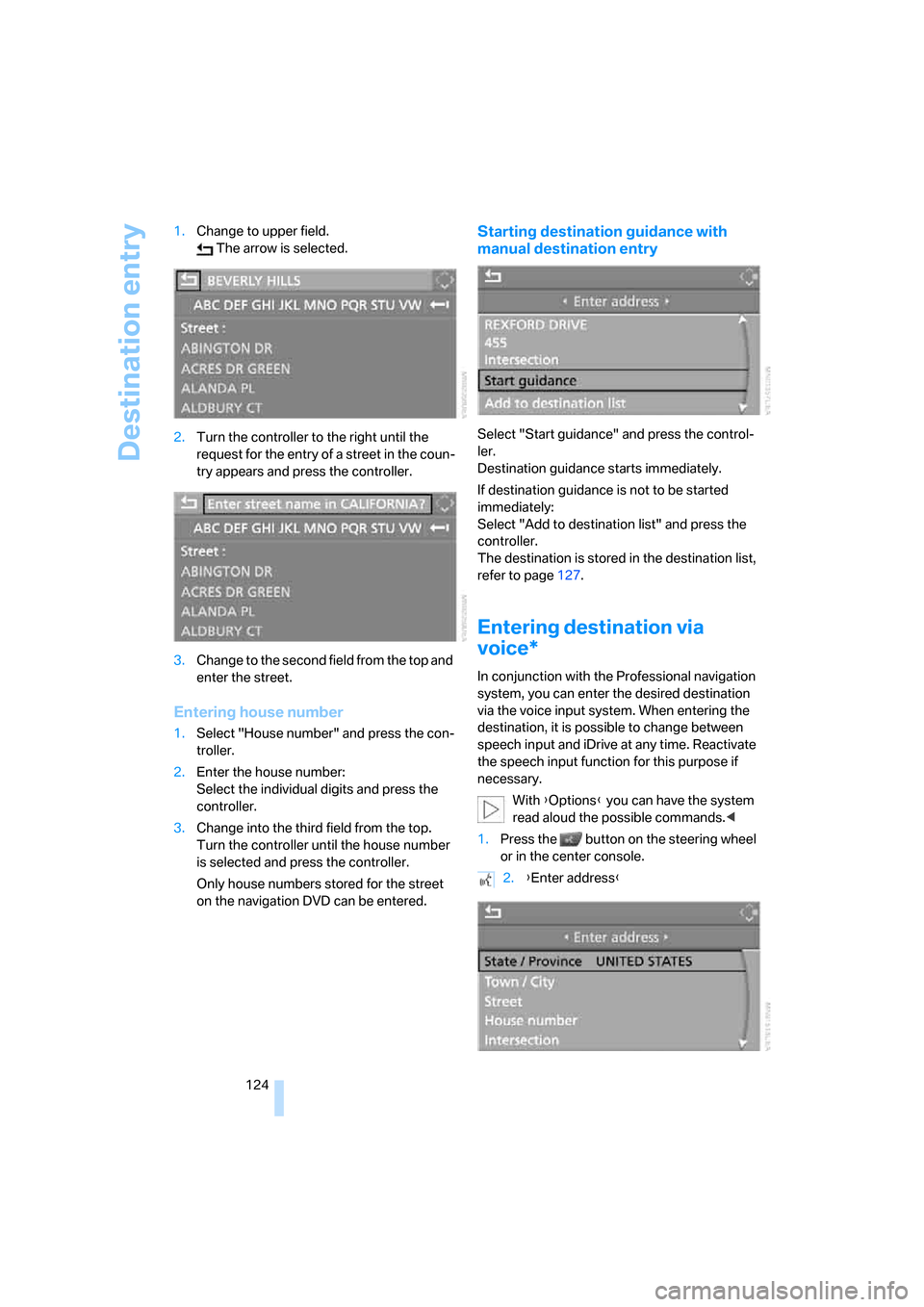
124 1.Change to upper field.
The arrow is selected.
2.Turn the controller to the right until the
request for the entry of a street in the coun-
try appears and press the controller.
3.Change to the second field from the top and
enter the street.
Entering house number
1.Select "House number" and press the con-
troller.
2.Enter the house number:
Select the individual digits and press the
controller.
3.Change into the third field from the top.
Turn the controller until the house number
is selected and press the controller.
Only house numbers stored for the street
on the navigation DVD can be entered.
Starting destination guidance with
manual destination entry
Select "Start guidance" and press the control-
ler.
Destination guidance starts immediately.
If destination guidance is not to be started
immediately:
Select "Add to destination list" and press the
controller.
The destination is stored in the destination list,
refer to page127.
Entering destination via
voice*
In conjunction with the Professional navigation
system, you can enter the desired destination
via the voice input system. When entering the
destination, it is possible to change between
speech input and iDrive at any time. Reactivate
the speech input function for this purpose if
necessary.
With {Options} you can have the system
read aloud the possible commands.<
1.Press the button on the steering wheel
or in the center console.
2.{Enter address}
Page 133 of 236
Destination guidance
132
Destination guidance
Starting destination
guidance
iDrive, for principle details, refer to page16.
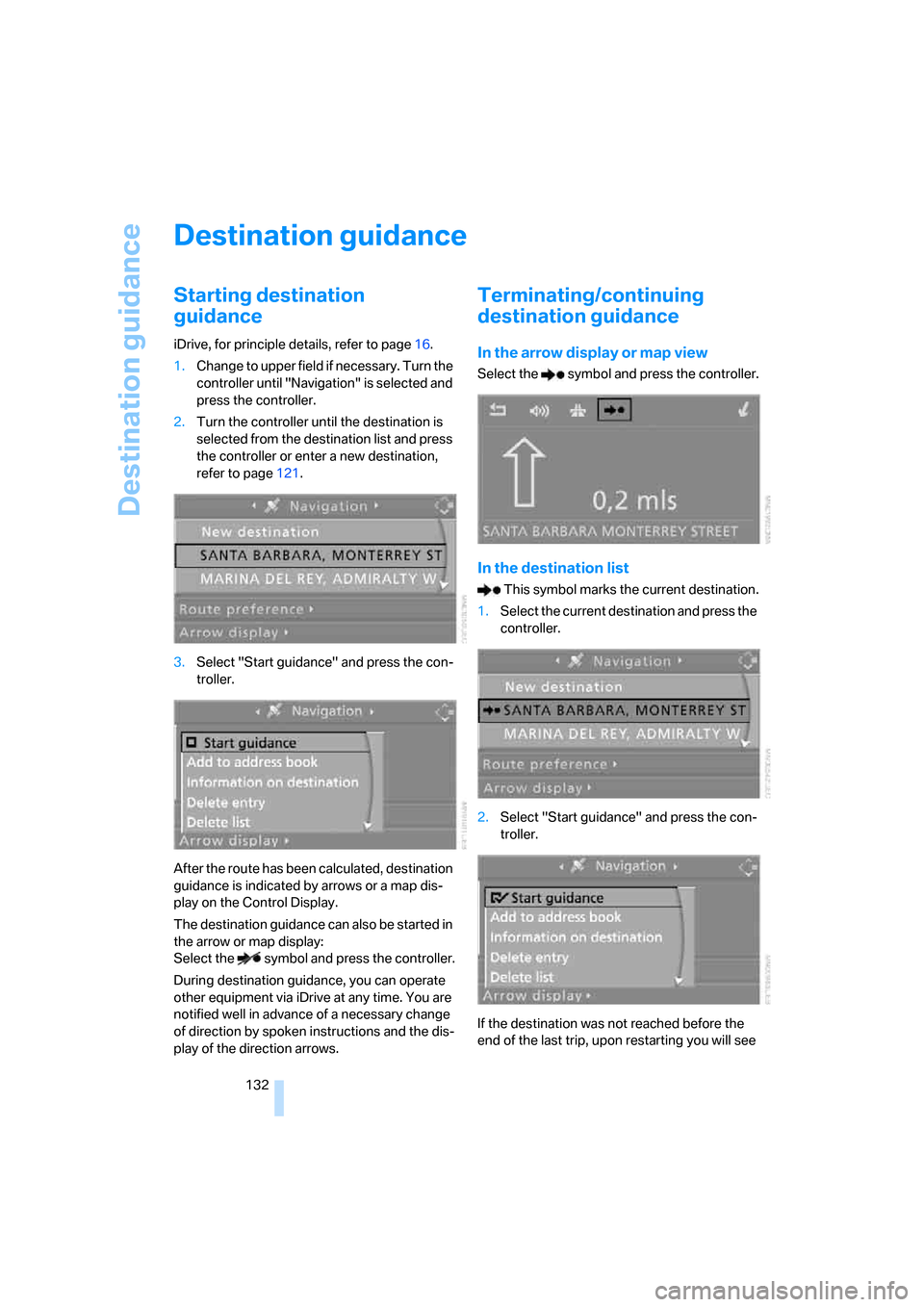
1.Change to upper field if necessary. Turn the
controller until "Navigation" is selected and
press the controller.
2.Turn the controller until the destination is
selected from the destination list and press
the controller or enter a new destination,
refer to page121.
3.Select "Start guidance" and press the con-
troller.
After the route has been calculated, destination
guidance is indicated by arrows or a map dis-
play on the Control Display.
The destination guidance can also be started in
the arrow or map display:
Select the symbol and press the controller.
During destination guidance, you can operate
other equipment via iDrive at any time. You are
notified well in advance of a necessary change
of direction by spoken instructions and the dis-
play of the direction arrows.
Terminating/continuing
destination guidance
In the arrow display or map view
Select the symbol and press the controller.
In the destination list
This symbol marks the current destination.
1.Select the current destination and press the
controller.
2.Select "Start guidance" and press the con-
troller.
If the destination was not reached before the
end of the last trip, upon restarting you will see
Page 134 of 236
Navigation
Driving tips
133Reference
At a glance
Controls
Communications
Entertainment
Mobility
the question:
"Continue guidance to destination?".
The destination guidance starts automatically
after a short time.
To start destination guidance immediately:
Select "Yes" and press the controller.
Route display
You have the option of displaying various views
of the route during destination guidance.
From another menu, you can switch
directly to the screen last displayed, refer
to Comfort opening of menu items on
page18.<
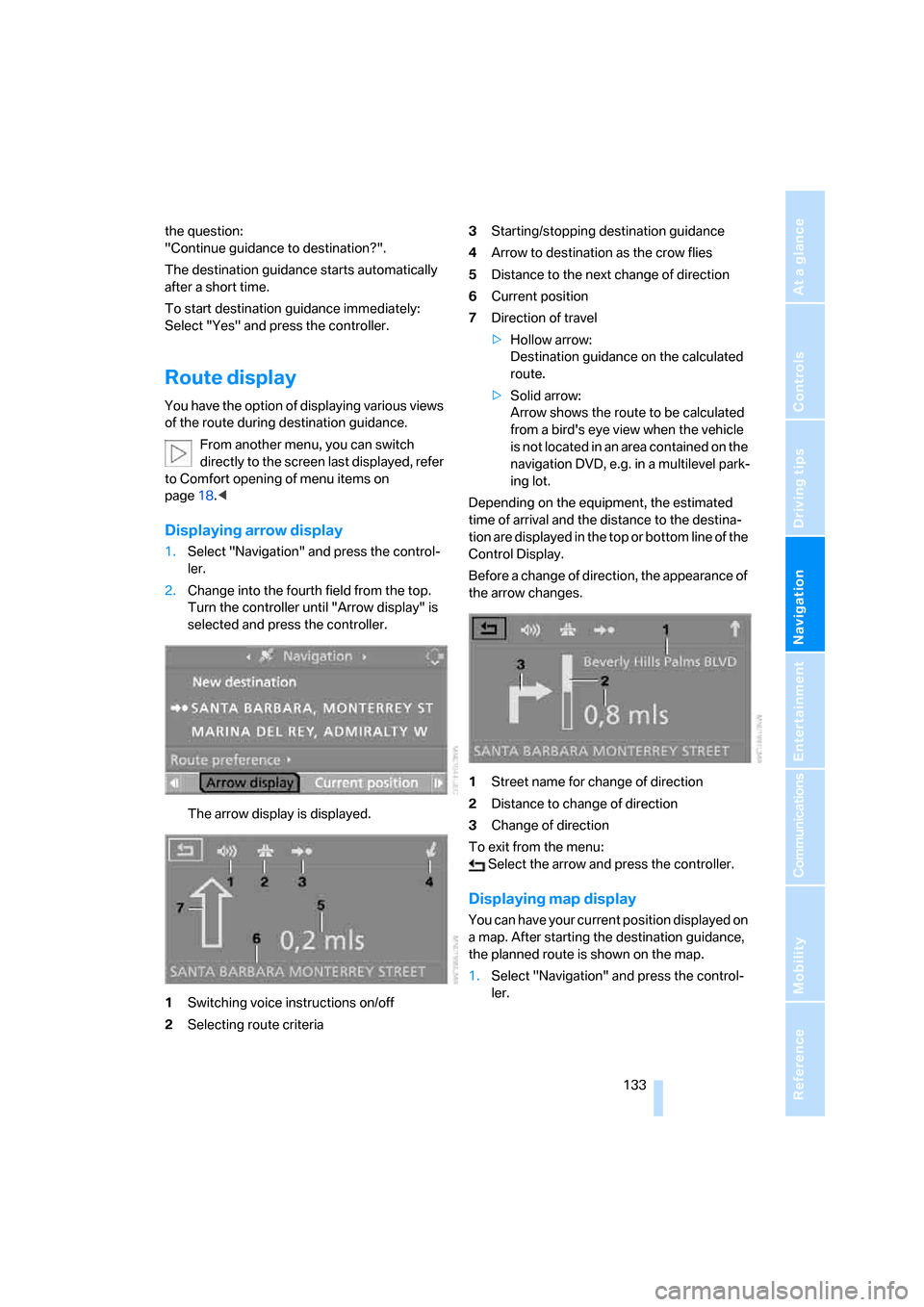
Displaying arrow display
1.Select "Navigation" and press the control-
ler.
2.Change into the fourth field from the top.
Turn the controller until "Arrow display" is
selected and press the controller.
The arrow display is displayed.
1Switching voice instructions on/off
2Selecting route criteria3Starting/stopping destination guidance
4Arrow to destination as the crow flies
5Distance to the next change of direction
6Current position
7Direction of travel
>Hollow arrow:
Destination guidance on the calculated
route.
>Solid arrow:
Arrow shows the route to be calculated
from a bird's eye view when the vehicle
is not located in an area contained on the
navigation DVD, e.g. in a multilevel park-
ing lot.
Depending on the equipment, the estimated
time of arrival and the distance to the destina-
tion are displayed in the top or bottom line of the
Control Display.
Before a change of direction, the appearance of
the arrow changes.
1Street name for change of direction
2Distance to change of direction
3Change of direction
To exit from the menu:
Select the arrow and press the controller.
Displaying map display
You can have your current position displayed on
a map. After starting the destination guidance,
the planned route is shown on the map.
1.Select "Navigation" and press the control-
ler.
Page 135 of 236
Destination guidance
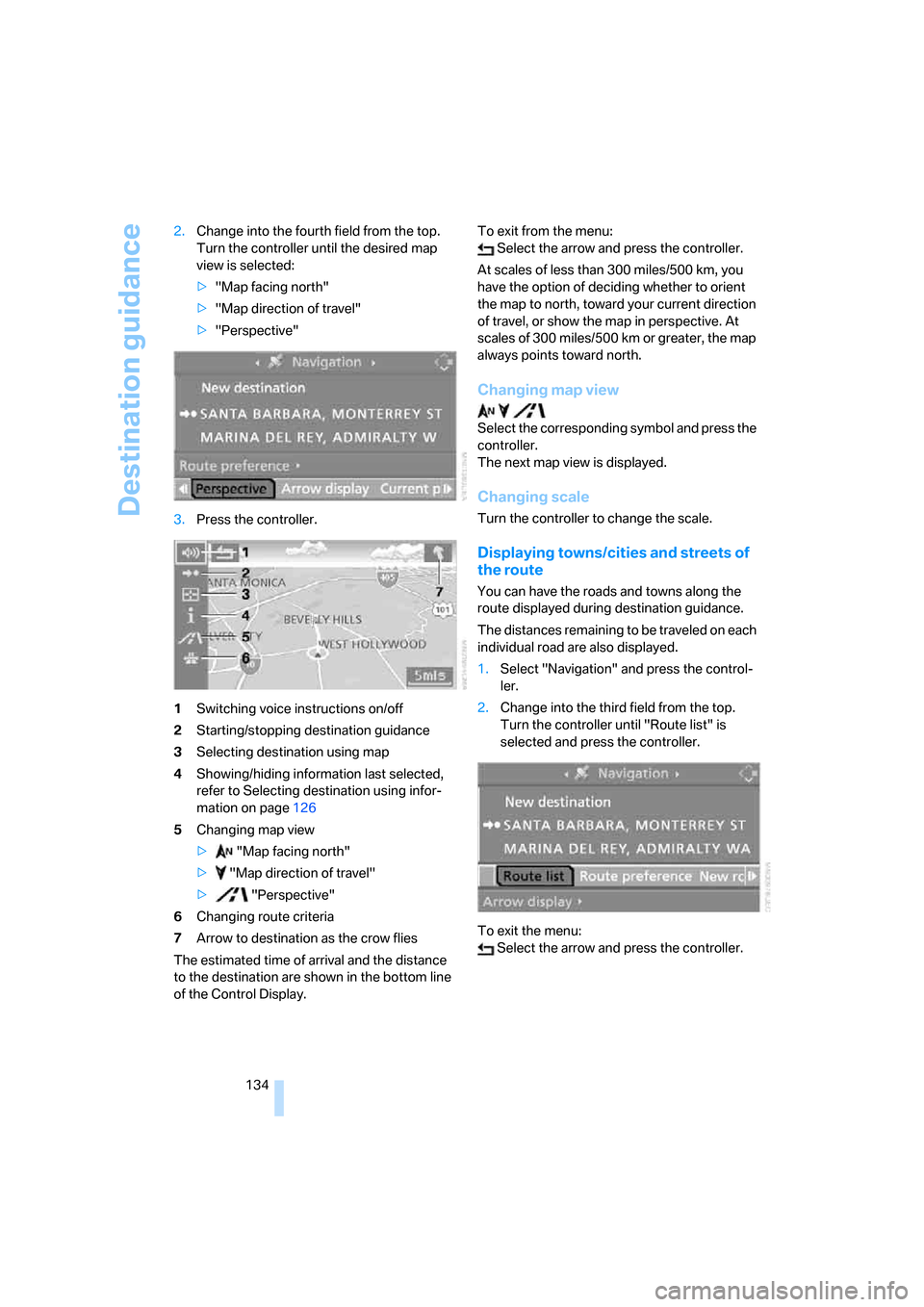
134 2.Change into the fourth field from the top.
Turn the controller until the desired map
view is selected:
>"Map facing north"
>"Map direction of travel"
>"Perspective"
3.Press the controller.
1Switching voice instructions on/off
2Starting/stopping destination guidance
3Selecting destination using map
4Showing/hiding information last selected,
refer to Selecting destination using infor-
mation on page126
5Changing map view
> "Map facing north"
> "Map direction of travel"
> "Perspective"
6Changing route criteria
7Arrow to destination as the crow flies
The estimated time of arrival and the distance
to the destination are shown in the bottom line
of the Control Display.To exit from the menu:
Select the arrow and press the controller.
At scales of less than 300 miles/500 km, you
have the option of deciding whether to orient
the map to north, toward your current direction
of travel, or show the map in perspective. At
scales of 300 miles/500 km or greater, the map
always points toward north.
Changing map view
Select the corresponding symbol and press the
controller.
The next map view is displayed.
Changing scale
Turn the controller to change the scale.
Displaying towns/cities and streets of
the route
You can have the roads and towns along the
route displayed during destination guidance.
The distances remaining to be traveled on each
individual road are also displayed.
1.Select "Navigation" and press the control-
ler.
2.Change into the third field from the top.
Turn the controller until "Route list" is
selected and press the controller.
To exit the menu:
Select the arrow and press the controller.
Page 136 of 236
Navigation
Driving tips
135Reference
At a glance
Controls
Communications
Entertainment
Mobility
Destination guidance
through voice instructions
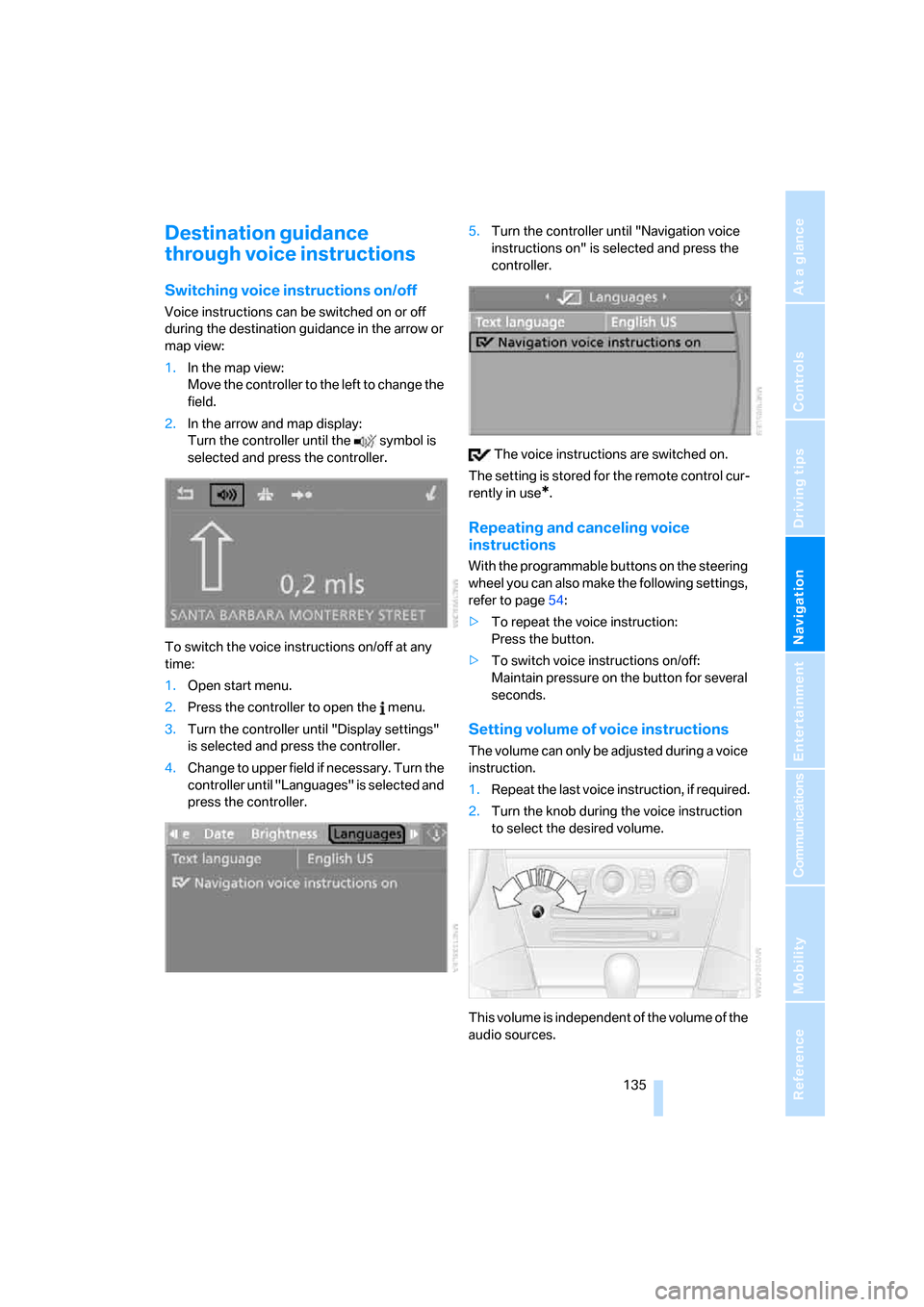
Switching voice instructions on/off
Voice instructions can be switched on or off
during the destination guidance in the arrow or
map view:
1.In the map view:
Move the controller to the left to change the
field.
2.In the arrow and map display:
Turn the controller until the symbol is
selected and press the controller.
To switch the voice instructions on/off at any
time:
1.Open start menu.
2.Press the controller to open the menu.
3.Turn the controller until "Display settings"
is selected and press the controller.
4.Change to upper field if necessary. Turn the
controller until "Languages" is selected and
press the controller.5.Turn the controller until "Navigation voice
instructions on" is selected and press the
controller.
The voice instructions are switched on.
The setting is stored for the remote control cur-
rently in use
*.
Repeating and canceling voice
instructions
With the programmable buttons on the steering
wheel you can also make the following settings,
refer to page54:
>To repeat the voice instruction:
Press the button.
>To switch voice instructions on/off:
Maintain pressure on the button for several
seconds.
Setting volume of voice instructions
The volume can only be adjusted during a voice
instruction.
1.Repeat the last voice instruction, if required.
2.Turn the knob during the voice instruction
to select the desired volume.
This volume is independent of the volume of the
audio sources.
Page 147 of 236
Radio
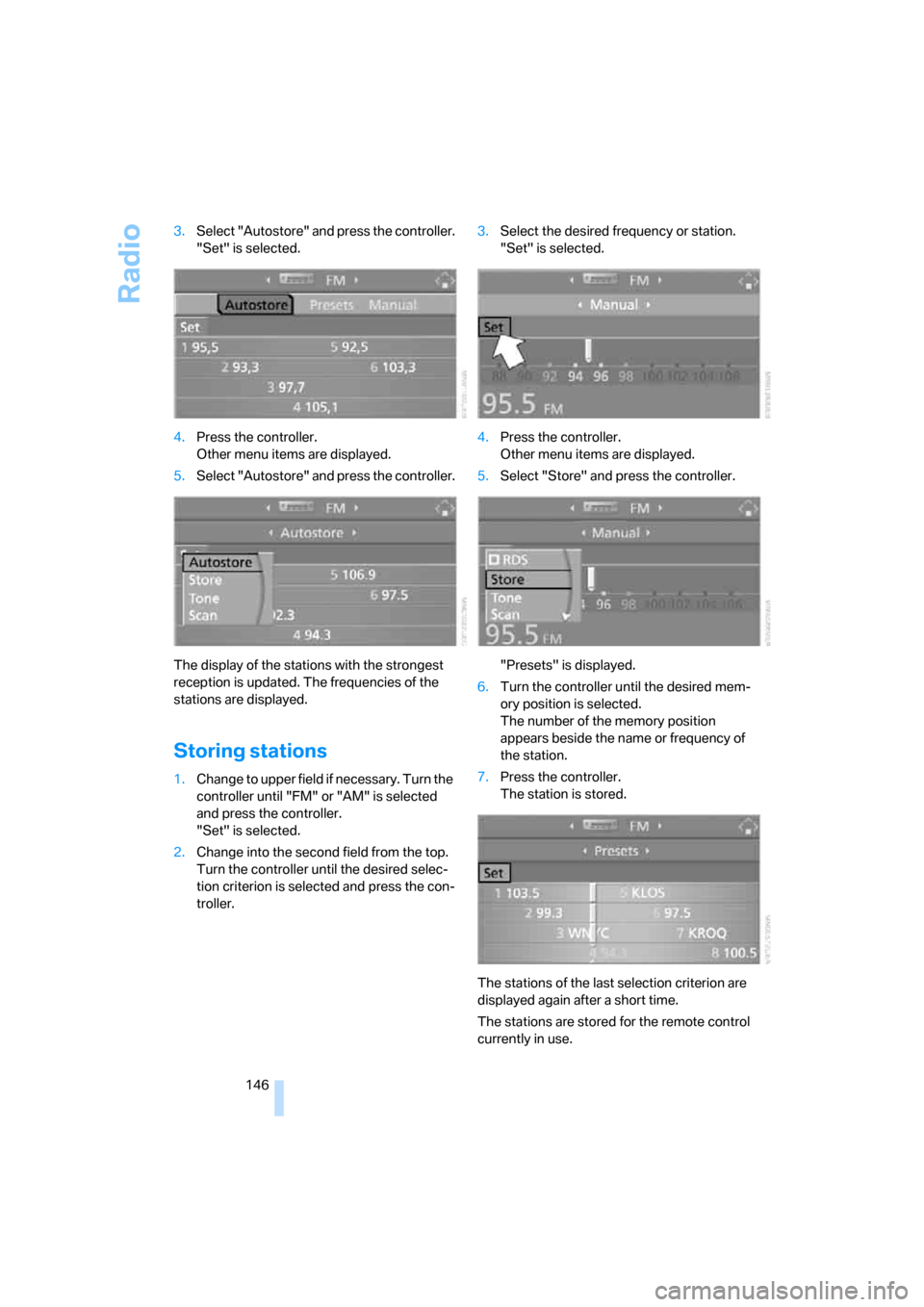
146 3.Select "Autostore" and press the controller.
"Set" is selected.
4.Press the controller.
Other menu items are displayed.
5.Select "Autostore" and press the controller.
The display of the stations with the strongest
reception is updated. The frequencies of the
stations are displayed.
Storing stations
1.Change to upper field if necessary. Turn the
controller until "FM" or "AM" is selected
and press the controller.
"Set" is selected.
2.Change into the second field from the top.
Turn the controller until the desired selec-
tion criterion is selected and press the con-
troller.3.Select the desired frequency or station.
"Set" is selected.
4.Press the controller.
Other menu items are displayed.
5.Select "Store" and press the controller.
"Presets" is displayed.
6.Turn the controller until the desired mem-
ory position is selected.
The number of the memory position
appears beside the name or frequency of
the station.
7.Press the controller.
The station is stored.
The stations of the last selection criterion are
displayed again after a short time.
The stations are stored for the remote control
currently in use.
Page 165 of 236
Telephoning
164
Logging on
Depending on your mobile phone, first, the dis-
play of your mobile phone and then the Control
Display will ask you to enter the Bluetooth pass-
key you specified.
Display on the Control Display if the Bluetooth
passkey can be entered with iDrive:
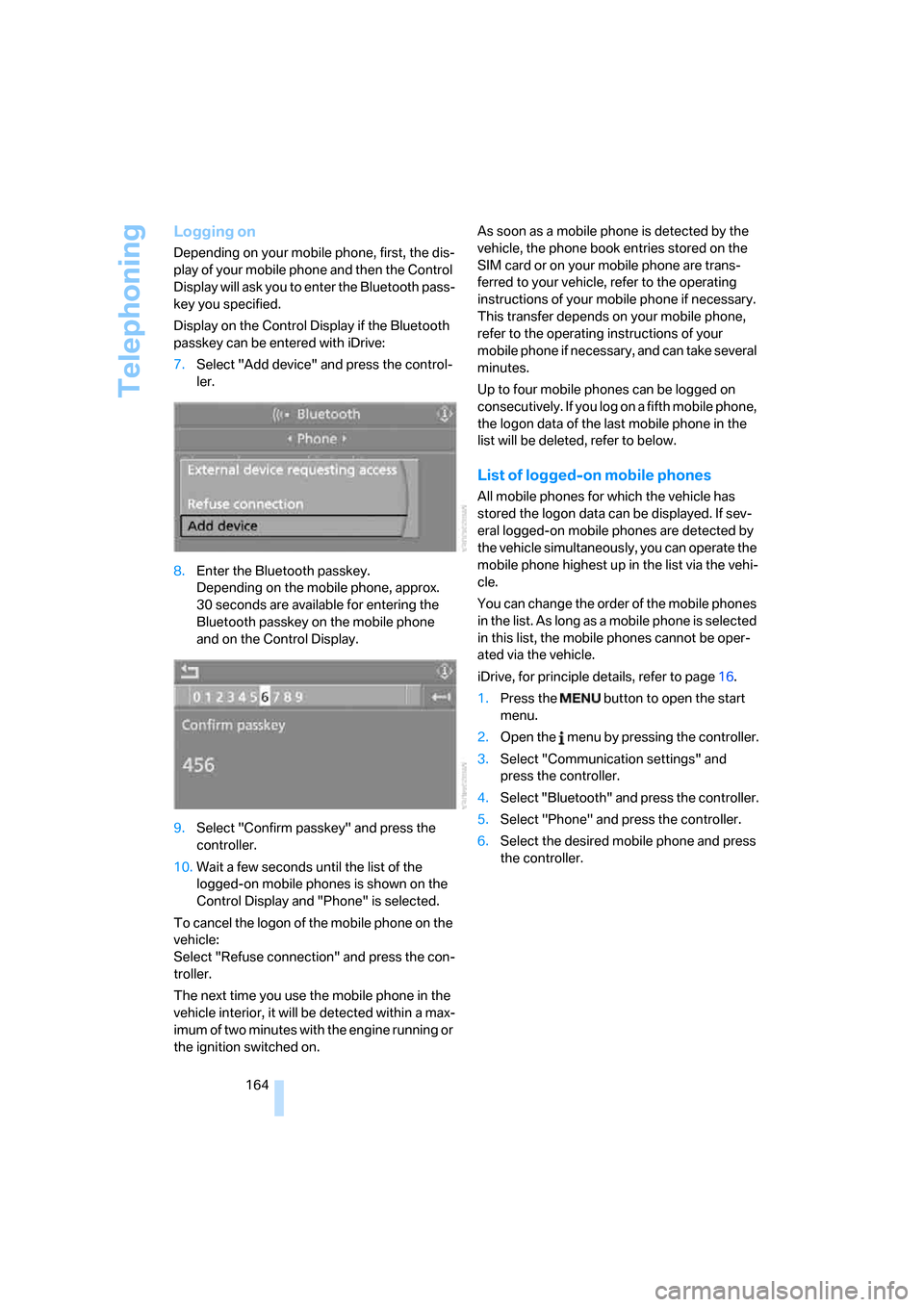
7.Select "Add device" and press the control-
ler.
8.Enter the Bluetooth passkey.
Depending on the mobile phone, approx.
30 seconds are available for entering the
Bluetooth passkey on the mobile phone
and on the Control Display.
9.Select "Confirm passkey" and press the
controller.
10.Wait a few seconds until the list of the
logged-on mobile phones is shown on the
Control Display and "Phone" is selected.
To cancel the logon of the mobile phone on the
vehicle:
Select "Refuse connection" and press the con-
troller.
The next time you use the mobile phone in the
vehicle interior, it will be detected within a max-
imum of two minutes with the engine running or
the ignition switched on.As soon as a mobile phone is detected by the
vehicle, the phone book entries stored on the
SIM card or on your mobile phone are trans-
ferred to your vehicle, refer to the operating
instructions of your mobile phone if necessary.
This transfer depends on your mobile phone,
refer to the operating instructions of your
mobile phone if necessary, and can take several
minutes.
Up to four mobile phones can be logged on
consecutively. If you log on a fifth mobile phone,
the logon data of the last mobile phone in the
list will be deleted, refer to below.
List of logged-on mobile phones
All mobile phones for which the vehicle has
stored the logon data can be displayed. If sev-
eral logged-on mobile phones are detected by
the vehicle simultaneously, you can operate the
mobile phone highest up in the list via the vehi-
cle.
You can change the order of the mobile phones
in the list. As long as a mobile phone is selected
in this list, the mobile phones cannot be oper-
ated via the vehicle.
iDrive, for principle details, refer to page16.
1.Press the button to open the start
menu.
2.Open the menu by pressing the controller.
3.Select "Communication settings" and
press the controller.
4.Select "Bluetooth" and press the controller.
5.Select "Phone" and press the controller.
6.Select the desired mobile phone and press
the controller.
Page 198 of 236
Mobility
197Reference
At a glance
Controls
Driving tips
Communications
Navigation
Entertainment
Replacing components
Onboard tool kit
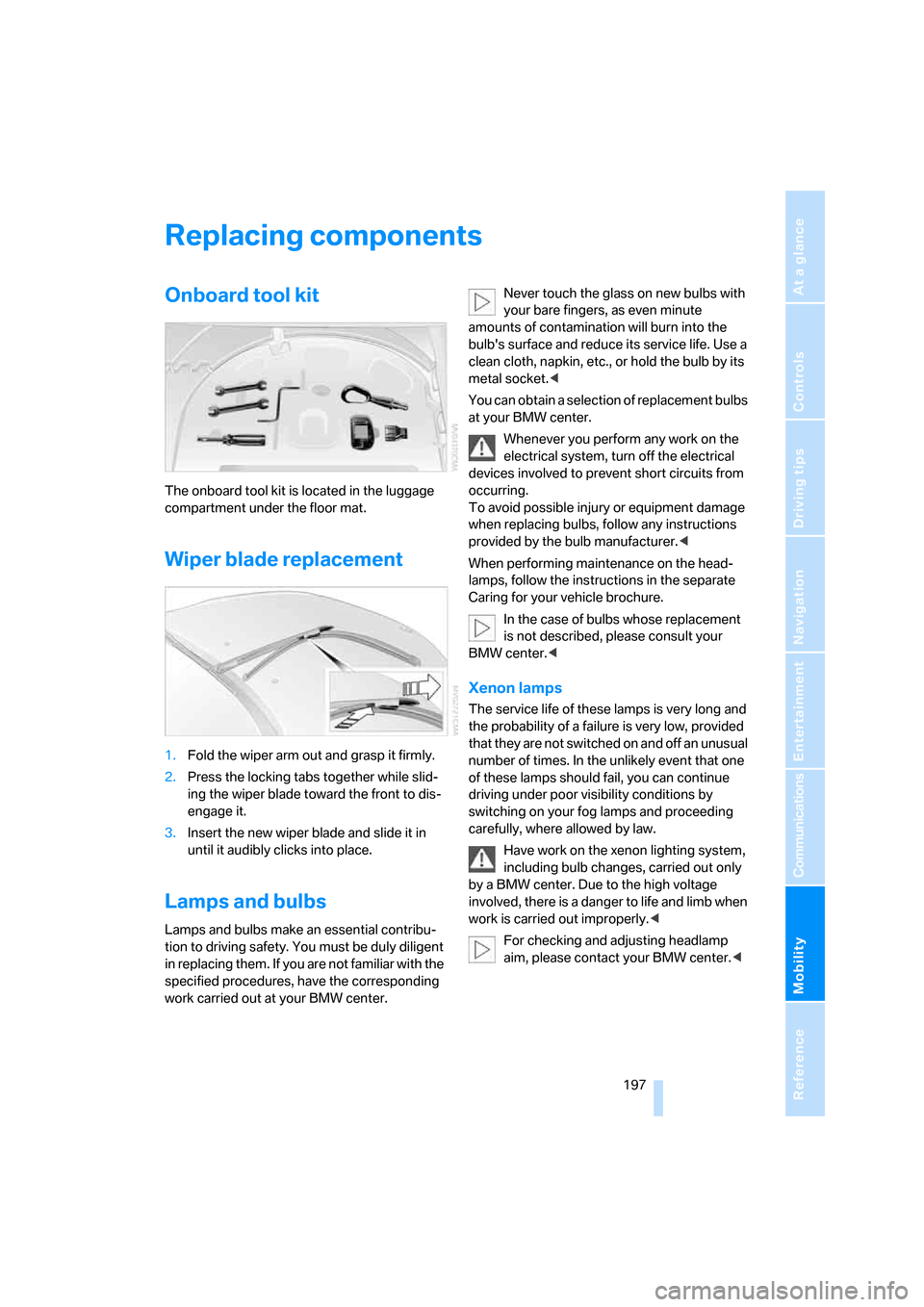
The onboard tool kit is located in the luggage
compartment under the floor mat.
Wiper blade replacement
1.Fold the wiper arm out and grasp it firmly.
2.Press the locking tabs together while slid-
ing the wiper blade toward the front to dis-
engage it.
3.Insert the new wiper blade and slide it in
until it audibly clicks into place.
Lamps and bulbs
Lamps and bulbs make an essential contribu-
tion to driving safety. You must be duly diligent
in replacing them. If you are not familiar with the
specified procedures, have the corresponding
work carried out at your BMW center.Never touch the glass on new bulbs with
your bare fingers, as even minute
amounts of contamination will burn into the
bulb's surface and reduce its service life. Use a
clean cloth, napkin, etc., or hold the bulb by its
metal socket.<
You can obtain a selection of replacement bulbs
at your BMW center.
Whenever you perform any work on the
electrical system, turn off the electrical
devices involved to prevent short circuits from
occurring.
To avoid possible injury or equipment damage
when replacing bulbs, follow any instructions
provided by the bulb manufacturer.<
When performing maintenance on the head-
lamps, follow the instructions in the separate
Caring for your vehicle brochure.
In the case of bulbs whose replacement
is not described, please consult your
BMW center.<
Xenon lamps
The service life of these lamps is very long and
the probability of a failure is very low, provided
that they are not switched on and off an unusual
number of times. In the unlikely event that one
of these lamps should fail, you can continue
driving under poor visibility conditions by
switching on your fog lamps and proceeding
carefully, where allowed by law.
Have work on the xenon lighting system,
including bulb changes, carried out only
by a BMW center. Due to the high voltage
involved, there is a danger to life and limb when
work is carried out improperly.<
For checking and adjusting headlamp
aim, please contact your BMW center.<
Page 219 of 236
Everything from A to Z
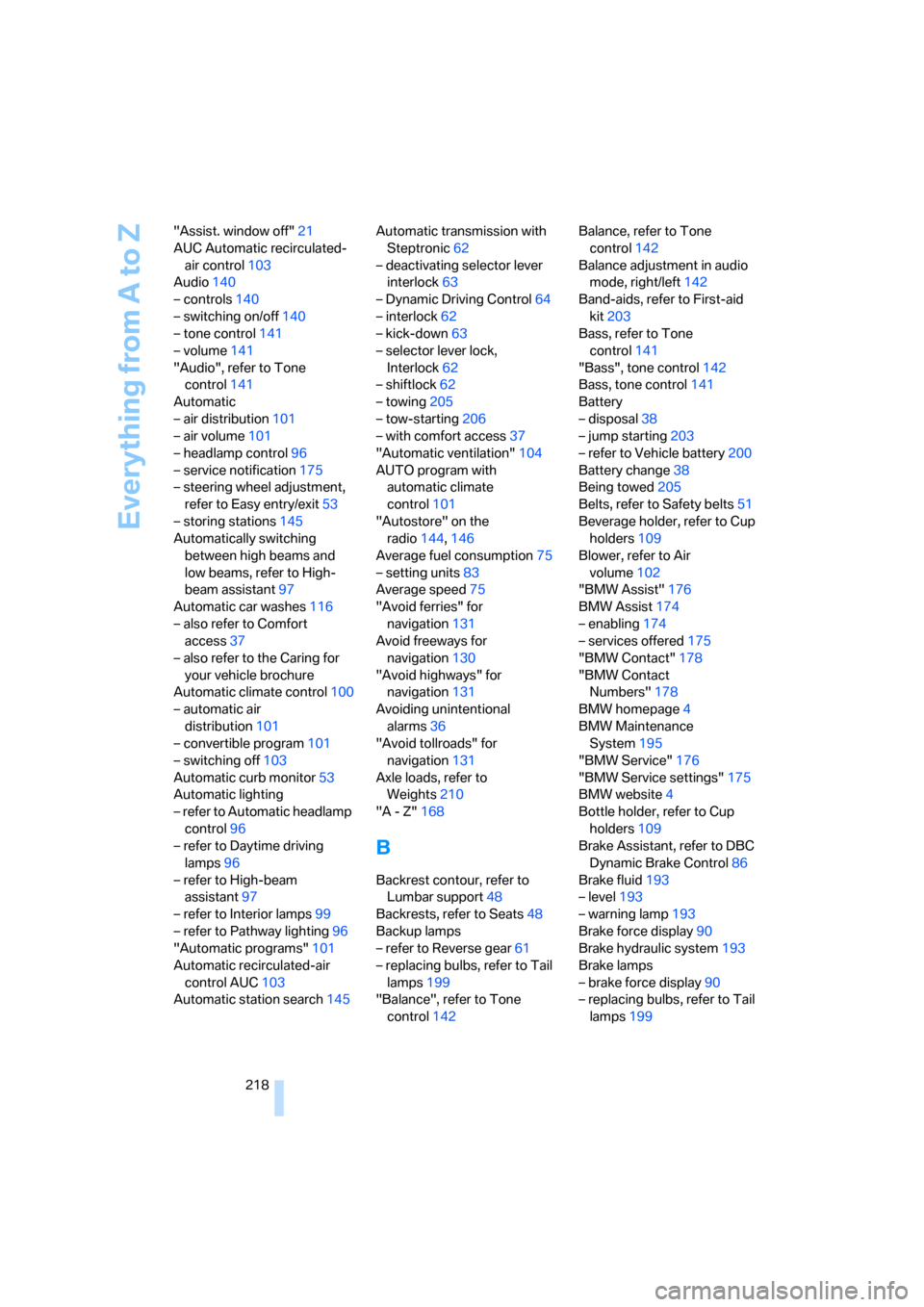
218 "Assist. window off"21
AUC Automatic recirculated-
air control103
Audio140
– controls140
– switching on/off140
– tone control141
– volume141
"Audio", refer to Tone
control141
Automatic
– air distribution101
– air volume101
– headlamp control96
– service notification175
– steering wheel adjustment,
refer to Easy entry/exit53
– storing stations145
Automatically switching
between high beams and
low beams, refer to High-
beam assistant97
Automatic car washes116
– also refer to Comfort
access37
– also refer to the Caring for
your vehicle brochure
Automatic climate control100
– automatic air
distribution101
– convertible program101
– switching off103
Automatic curb monitor53
Automatic lighting
– refer to Automatic headlamp
control96
– refer to Daytime driving
lamps96
– refer to High-beam
assistant97
– refer to Interior lamps99
– refer to Pathway lighting96
"Automatic programs"101
Automatic recirculated-air
control AUC103
Automatic station search145Automatic transmission with
Steptronic62
– deactivating selector lever
interlock63
– Dynamic Driving Control64
– interlock62
– kick-down63
– selector lever lock,
Interlock62
– shiftlock62
– towing205
– tow-starting206
– with comfort access37
"Automatic ventilation"104
AUTO program with
automatic climate
control101
"Autostore" on the
radio144,146
Average fuel consumption75
– setting units83
Average speed75
"Avoid ferries" for
navigation131
Avoid freeways for
navigation130
"Avoid highways" for
navigation131
Avoiding unintentional
alarms36
"Avoid tollroads" for
navigation131
Axle loads, refer to
Weights210
"A - Z"168
B
Backrest contour, refer to
Lumbar support48
Backrests, refer to Seats48
Backup lamps
– refer to Reverse gear61
– replacing bulbs, refer to Tail
lamps199
"Balance", refer to Tone
control142Balance, refer to Tone
control142
Balance adjustment in audio
mode, right/left142
Band-aids, refer to First-aid
kit203
Bass, refer to Tone
control141
"Bass", tone control142
Bass, tone control141
Battery
– disposal38
– jump starting203
– refer to Vehicle battery200
Battery change38
Being towed205
Belts, refer to Safety belts51
Beverage holder, refer to Cup
holders109
Blower, refer to Air
volume102
"BMW Assist"176
BMW Assist174
– enabling174
– services offered175
"BMW Contact"178
"BMW Contact
Numbers"178
BMW homepage4
BMW Maintenance
System195
"BMW Service"176
"BMW Service settings"175
BMW website4
Bottle holder, refer to Cup
holders109
Brake Assistant, refer to DBC
Dynamic Brake Control86
Brake fluid193
– level193
– warning lamp193
Brake force display90
Brake hydraulic system193
Brake lamps
– brake force display90
– replacing bulbs, refer to Tail
lamps199
Page 221 of 236
Everything from A to Z
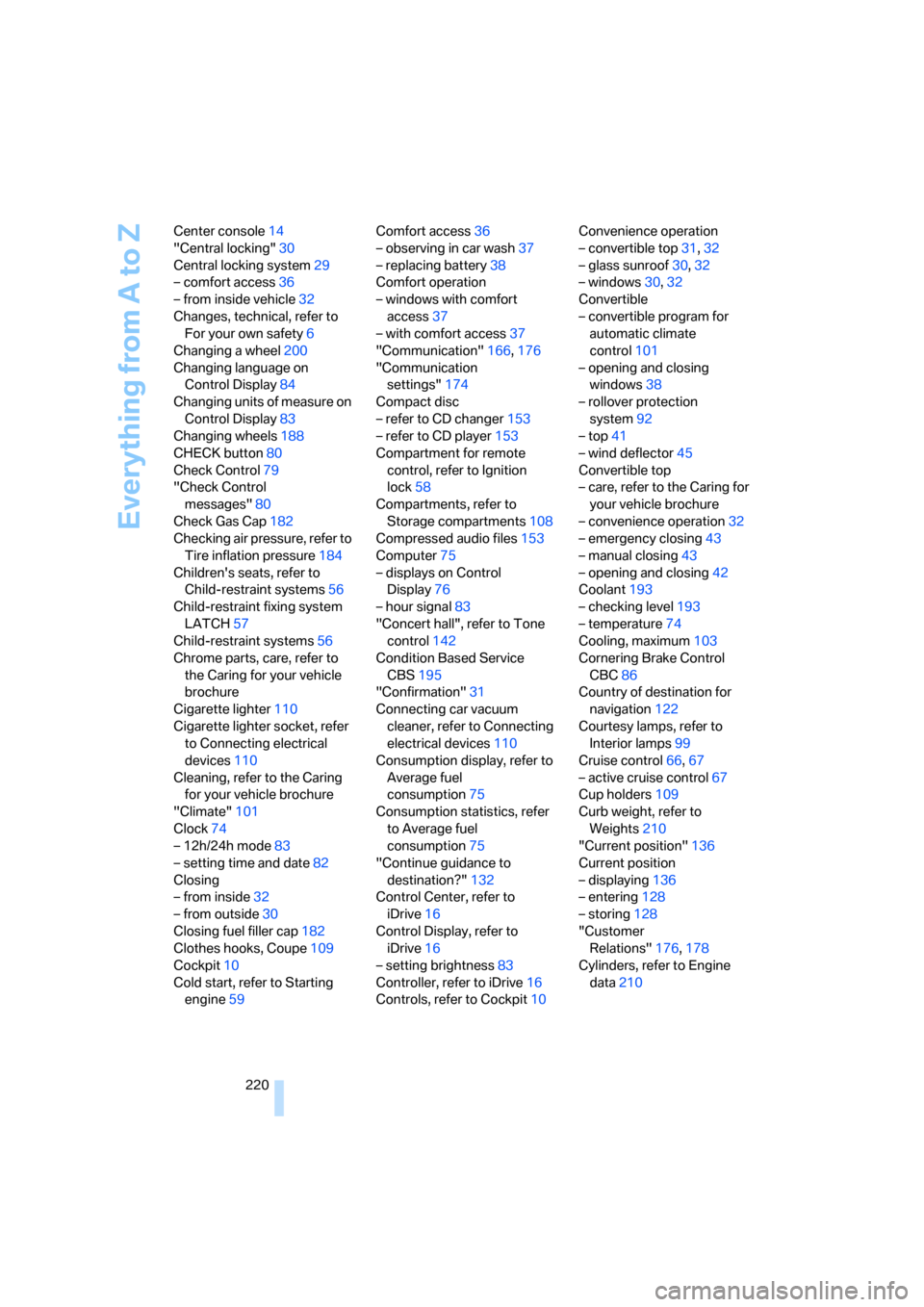
220 Center console14
"Central locking"30
Central locking system29
– comfort access36
– from inside vehicle32
Changes, technical, refer to
For your own safety6
Changing a wheel200
Changing language on
Control Display84
Changing units of measure on
Control Display83
Changing wheels188
CHECK button80
Check Control79
"Check Control
messages"80
Check Gas Cap182
Checking air pressure, refer to
Tire inflation pressure184
Children's seats, refer to
Child-restraint systems56
Child-restraint fixing system
LATCH57
Child-restraint systems56
Chrome parts, care, refer to
the Caring for your vehicle
brochure
Cigarette lighter110
Cigarette lighter socket, refer
to Connecting electrical
devices110
Cleaning, refer to the Caring
for your vehicle brochure
"Climate"101
Clock74
– 12h/24h mode83
– setting time and date82
Closing
– from inside32
– from outside30
Closing fuel filler cap182
Clothes hooks, Coupe109
Cockpit10
Cold start, refer to Starting
engine59Comfort access36
– observing in car wash37
– replacing battery38
Comfort operation
– windows with comfort
access37
– with comfort access37
"Communication"166,176
"Communication
settings"174
Compact disc
– refer to CD changer153
– refer to CD player153
Compartment for remote
control, refer to Ignition
lock58
Compartments, refer to
Storage compartments108
Compressed audio files153
Computer75
– displays on Control
Display76
– hour signal83
"Concert hall", refer to Tone
control142
Condition Based Service
CBS195
"Confirmation"31
Connecting car vacuum
cleaner, refer to Connecting
electrical devices110
Consumption display, refer to
Average fuel
consumption75
Consumption statistics, refer
to Average fuel
consumption75
"Continue guidance to
destination?"132
Control Center, refer to
iDrive16
Control Display, refer to
iDrive16
– setting brightness83
Controller, refer to iDrive16
Controls, refer to Cockpit10Convenience operation
– convertible top31,32
– glass sunroof30,32
– windows30,32
Convertible
– convertible program for
automatic climate
control101
– opening and closing
windows38
– rollover protection
system92
– top41
– wind deflector45
Convertible top
– care, refer to the Caring for
your vehicle brochure
– convenience operation32
– emergency closing43
– manual closing43
– opening and closing42
Coolant193
– checking level193
– temperature74
Cooling, maximum103
Cornering Brake Control
CBC86
Country of destination for
navigation
122
Courtesy lamps, refer to
Interior lamps99
Cruise control66,67
– active cruise control67
Cup holders109
Curb weight, refer to
Weights210
"Current position"136
Current position
– displaying136
– entering128
– storing128
"Customer
Relations"176,178
Cylinders, refer to Engine
data210