Tail lamps BMW 650I COUPE 2006 E63 Owner's Manual
[x] Cancel search | Manufacturer: BMW, Model Year: 2006, Model line: 650I COUPE, Model: BMW 650I COUPE 2006 E63Pages: 236, PDF Size: 8.21 MB
Page 31 of 236
Opening and closing
30
Operating from outside
>via the remote control
>via the door lock
>with comfort access
* via the door handles
These actions operate the anti-theft system at
the same time. It prevents the doors from being
unlocked using the lock buttons or door han-
dles. The alarm system
is likewise armed/dis-
armed. The interior lamps and the courtesy
lamps
* are also switched on and off with the
remote control.
You can find more detailed information on the
alarm system
on page35.
Operating from inside
Via the central locking button, refer to page32.
The fuel filler door
and the compartment in the
front center console are not locked, refer to
page32.
In the event of a serious accident, the central
locking system unlocks automatically. The haz-
ard warning flashers and interior lamps are also
switched on.
Opening and closing: from
outside
Using the remote control
Because any persons or animals left unat-
tended in a parked vehicle could lock the
doors from the inside, you should always keep
the remote control with you when you leave the
vehicle; this precaution ensures that you will
remain able to unlock the vehicle from the out-
side at all times.<
Unlocking
You can use the button to unlock the vehicle
depending on the current setting.
iDrive, for principle details, refer to page16.
1.Press the button.
This opens the start menu.
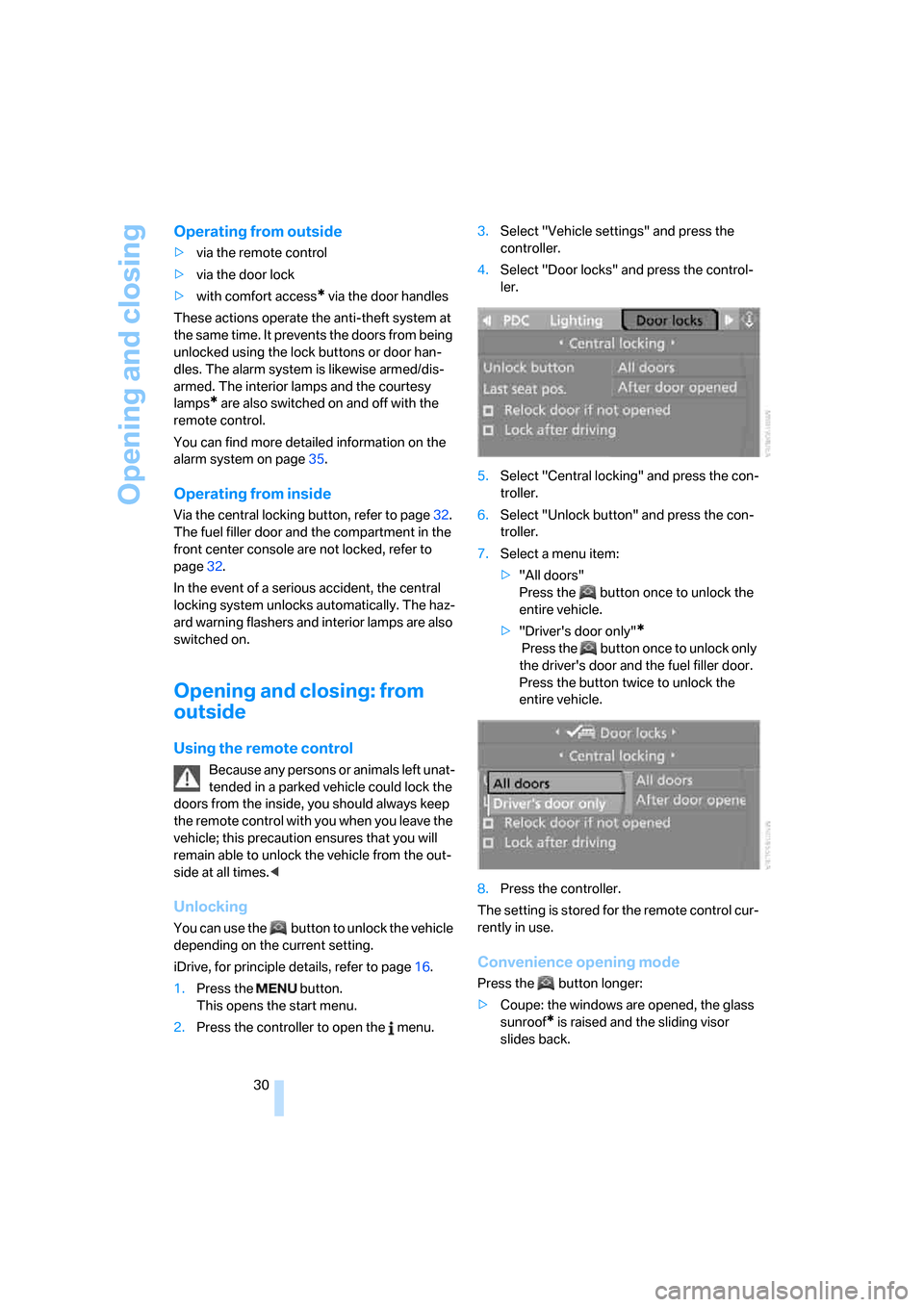
2.Press the controller to open the menu.3.Select "Vehicle settings" and press the
controller.
4.Select "Door locks" and press the control-
ler.
5.Select "Central locking" and press the con-
troller.
6.Select "Unlock button" and press the con-
troller.
7.Select a menu item:
>"All doors"
Press the button once to unlock the
entire vehicle.
>"Driver's door only"
*
Press the button once to unlock only
the driver's door and the fuel filler door.
Press the button twice to unlock the
entire vehicle.
8.Press the controller.
The setting is stored for the remote control cur-
rently in use.
Convenience opening mode
Press the button longer:
>Coupe: the windows are opened, the glass
sunroof
* is raised and the sliding visor
slides back.
Page 61 of 236
Driving
60
Manual transmission
1.Briefly press the Start/Stop button with the
vehicle stopped.
2.Shift into first gear or reverse.
3.Apply the handbrake.
SMG Sequential Manual Gearbox*
1.Apply the handbrake.
2.Move selector lever into a drive position.
3.Briefly press Start/Stop button.
If the transmission is in N when the engine is
switched off, you will be given an optical and
acoustic reminder.
Automatic transmission*
1.Move the selector lever into position P with
the vehicle stopped.
2.Briefly press Start/Stop button.
Handbrake
The handbrake is primarily intended to prevent
the vehicle from rolling while parked; it brakes
the rear wheels.
Indicator lamp
The indicator lamp lights up, and a sig-
nal also sounds when starting off. The
handbrake is engaged.
Indicator lamp for Canadian models.
Engaging
The lever engages automatically.
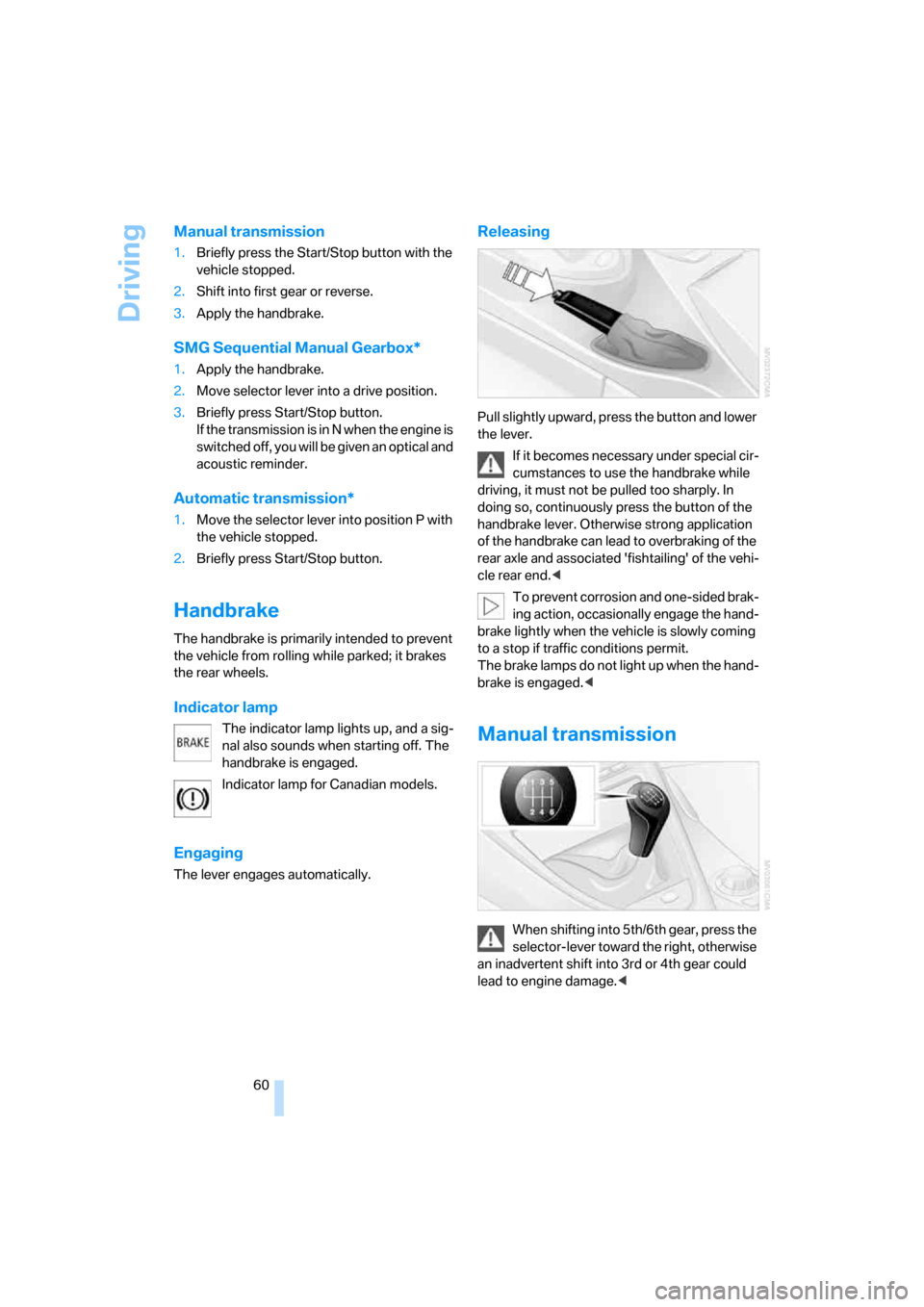
Releasing
Pull slightly upward, press the button and lower
the lever.
If it becomes necessary under special cir-
cumstances to use the handbrake while
driving, it must not be pulled too sharply. In
doing so, continuously press the button of the
handbrake lever. Otherwise strong application
of the handbrake can lead to overbraking of the
rear axle and associated 'fishtailing' of the vehi-
cle rear end.<
To prevent corrosion and one-sided brak-
ing action, occasionally engage the hand-
brake lightly when the vehicle is slowly coming
to a stop if traffic conditions permit.
The brake lamps do not light up when the hand-
brake is engaged.<
Manual transmission
When shifting into 5th/6th gear, press the
selector-lever toward the right, otherwise
an inadvertent shift into 3rd or 4th gear could
lead to engine damage.<
Page 66 of 236
Controls
65Reference
At a glance
Driving tips
Communications
Navigation
Entertainment
Mobility
Using turn signals
Move the lever beyond the resistance point.
To switch off manually, only press the lever as
far as the resistance point.
Atypically rapid flashing of the indicator
lamp indicates the failure of a turn signal
lamp.<
Brief signaling
Press the lever to the resistance point and hold
it there as long as you wish to signal.
Triple turn signal activation
Press the lever to the resistance point; the turn
signals flash three times.
You can activate or deactivate this function.
iDrive, for principle details, refer to page16.
1.Open the start menu.
2.Press the controller to open the menu.
3.Select "Vehicle settings" and press the
controller.
4.Select "Lighting" and press the controller.
5.Select "Triple turn signal activation" and
press the controller.
Triple turn signal is activated.
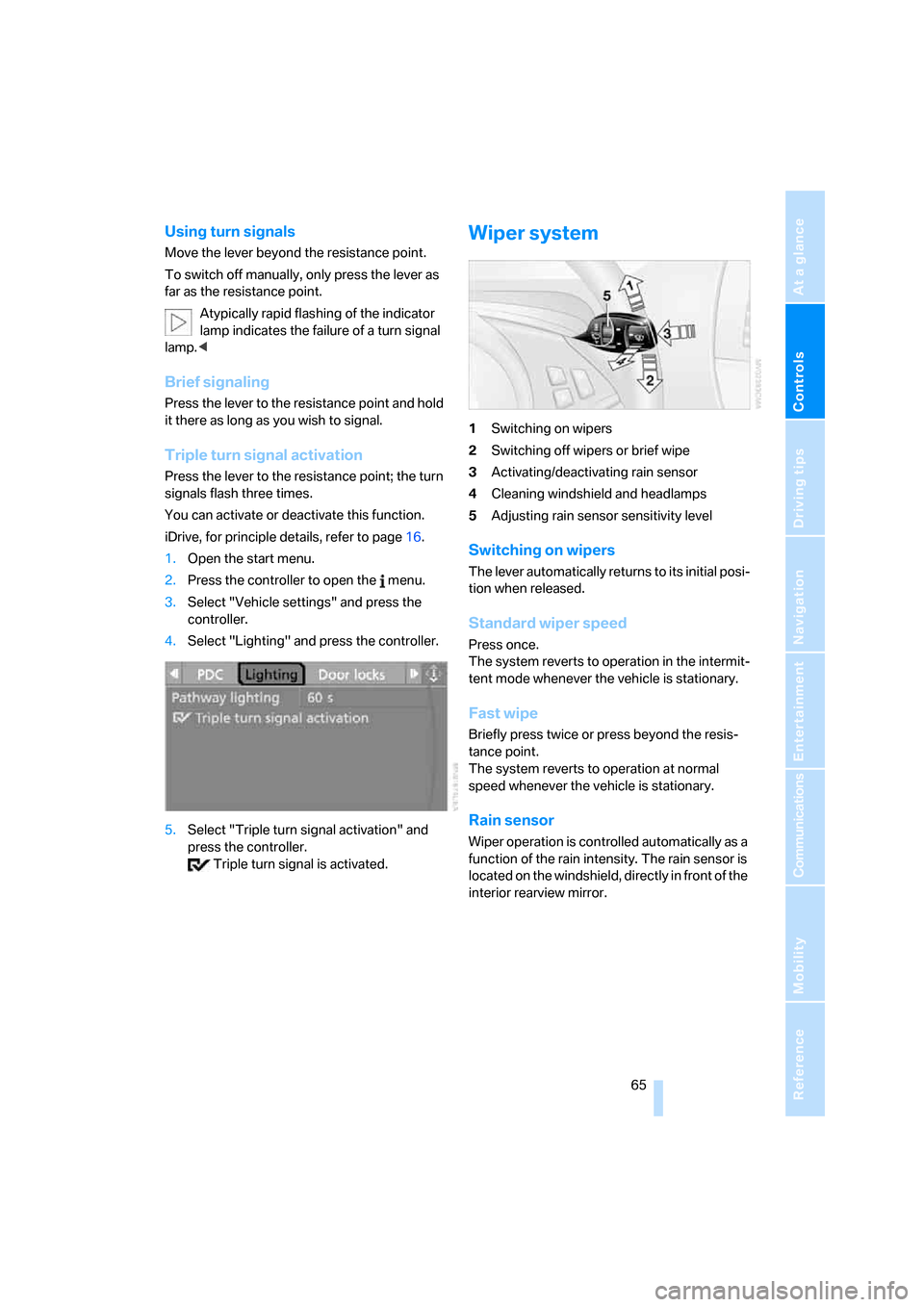
Wiper system
1Switching on wipers
2Switching off wipers or brief wipe
3Activating/deactivating rain sensor
4Cleaning windshield and headlamps
5Adjusting rain sensor sensitivity level
Switching on wipers
The lever automatically returns to its initial posi-
tion when released.
Standard wiper speed
Press once.
The system reverts to operation in the intermit-
tent mode whenever the vehicle is stationary.
Fast wipe
Briefly press twice or press beyond the resis-
tance point.
The system reverts to operation at normal
speed whenever the vehicle is stationary.
Rain sensor
Wiper operation is controlled automatically as a
function of the rain intensity. The rain sensor is
located on the windshield, directly in front of the
interior rearview mirror.
Page 97 of 236
Lamps
96
Lamps
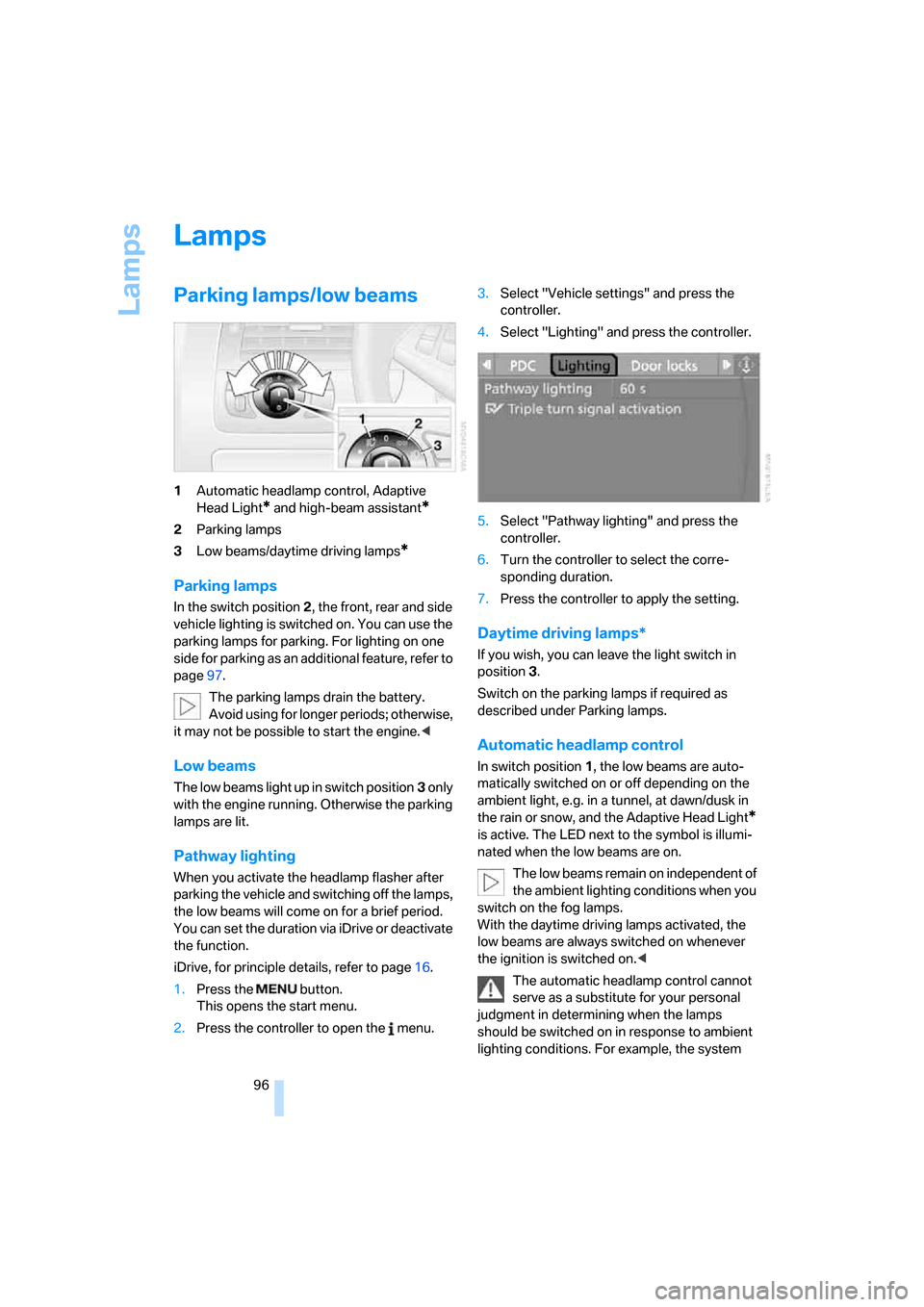
Parking lamps/low beams
1Automatic headlamp control, Adaptive
Head Light
* and high-beam assistant*
2Parking lamps
3Low beams/daytime driving lamps
*
Parking lamps
In the switch position2, the front, rear and side
vehicle lighting is switched on. You can use the
parking lamps for parking. For lighting on one
side for parking as an additional feature, refer to
page97.
The parking lamps drain the battery.
Avoid using for longer periods; otherwise,
it may not be possible to start the engine.<
Low beams
The low beams light up in switch position3 only
with the engine running. Otherwise the parking
lamps are lit.
Pathway lighting
When you activate the headlamp flasher after
parking the vehicle and switching off the lamps,
the low beams will come on for a brief period.
You can set the duration via iDrive or deactivate
the function.
iDrive, for principle details, refer to page16.
1.Press the button.
This opens the start menu.
2.Press the controller to open the menu.3.Select "Vehicle settings" and press the
controller.
4.Select "Lighting" and press the controller.
5.Select "Pathway lighting" and press the
controller.
6.Turn the controller to select the corre-
sponding duration.
7.Press the controller to apply the setting.
Daytime driving lamps*
If you wish, you can leave the light switch in
position3.
Switch on the parking lamps if required as
described under Parking lamps.
Automatic headlamp control
In switch position1, the low beams are auto-
matically switched on or off depending on the
ambient light, e.g. in a tunnel, at dawn/dusk in
the rain or snow, and the Adaptive Head Light
*
is active. The LED next to the symbol is illumi-
nated when the low beams are on.
The low beams remain on independent of
the ambient lighting conditions when you
switch on the fog lamps.
With the daytime driving lamps activated, the
low beams are always switched on whenever
the ignition is switched on.<
The automatic headlamp control cannot
serve as a substitute for your personal
judgment in determining when the lamps
should be switched on in response to ambient
lighting conditions. For example, the system
Page 200 of 236
Mobility
199Reference
At a glance
Controls
Driving tips
Communications
Navigation
Entertainment
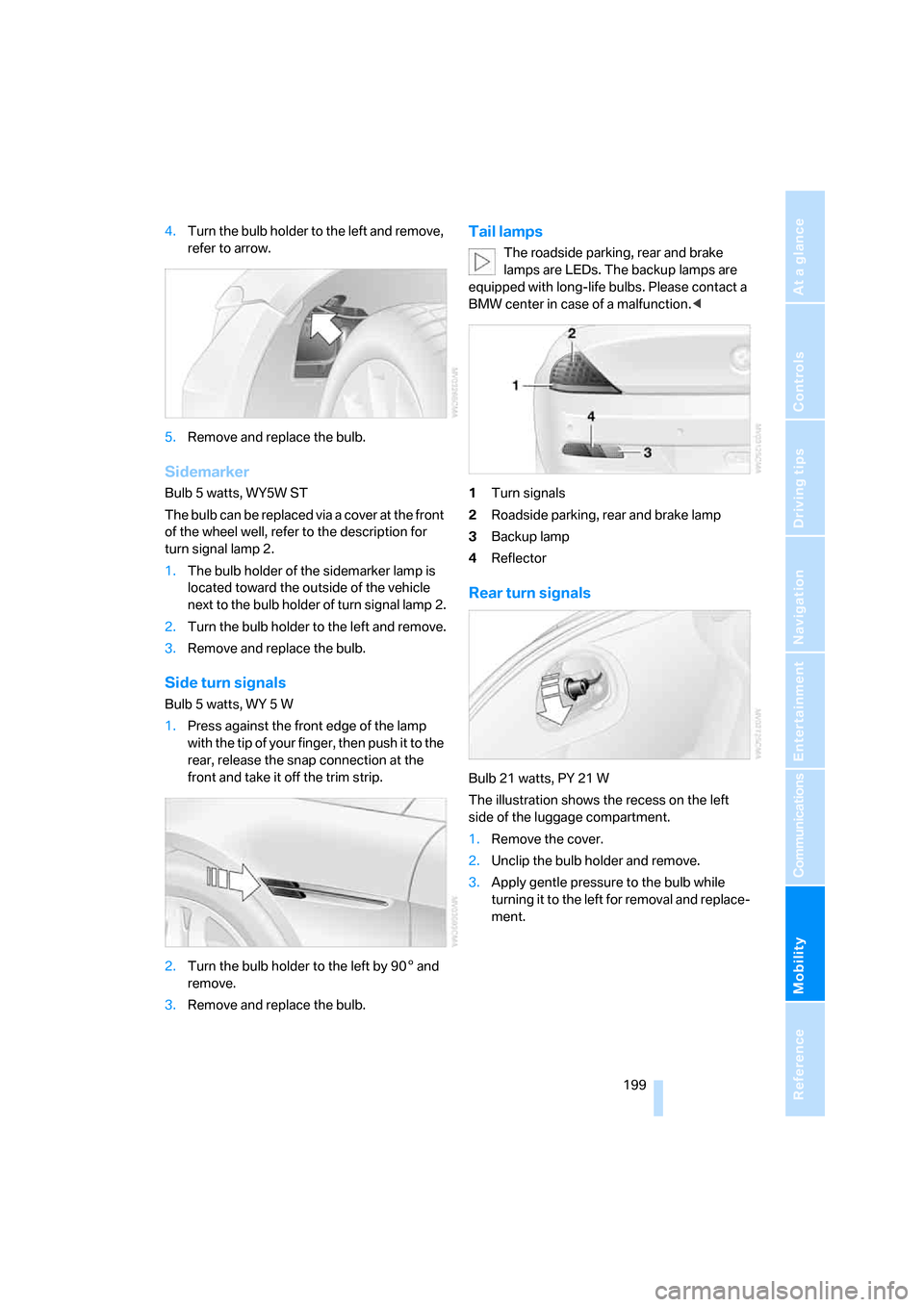
4.Turn the bulb holder to the left and remove,
refer to arrow.
5.Remove and replace the bulb.
Sidemarker
Bulb 5 watts, WY5W ST
The bulb can be replaced via a cover at the front
of the wheel well, refer to the description for
turn signal lamp 2.
1.The bulb holder of the sidemarker lamp is
located toward the outside of the vehicle
next to the bulb holder of turn signal lamp 2.
2.Turn the bulb holder to the left and remove.
3.Remove and replace the bulb.
Side turn signals
Bulb 5 watts, WY 5 W
1.Press against the front edge of the lamp
with the tip of your finger, then push it to the
rear, release the snap connection at the
front and take it off the trim strip.
2.Turn the bulb holder to the left by 905 and
remove.
3.Remove and replace the bulb.
Tail lamps
The roadside parking, rear and brake
lamps are LEDs. The backup lamps are
equipped with long-life bulbs. Please contact a
BMW center in case of a malfunction.<
1Turn signals
2Roadside parking, rear and brake lamp
3Backup lamp
4Reflector
Rear turn signals
Bulb 21 watts, PY 21 W
The illustration shows the recess on the left
side of the luggage compartment.
1.Remove the cover.
2.Unclip the bulb holder and remove.
3.Apply gentle pressure to the bulb while
turning it to the left for removal and replace-
ment.
Page 203 of 236
Giving and receiving assistance
202
Giving and receiving assistance
Emergency call
Conditions for an emergency call:
>Full mobile phone preparation package
>BMW Assist is activated.
Activating BMW Assist, refer to page174.
>Radio readiness is activated.
>The car phone is logged on to a cellular
telephone network.
>The emergency call system is operable.
When the contract for your BMW Assist plan
expires, a BMW center can deactivate the car
phone without your having to visit a workshop.
Following deactivation of the car phone, no
emergency calls can be made. The car phone
can be reactivated after signing a new contract
with a BMW center.
Initiating an emergency call
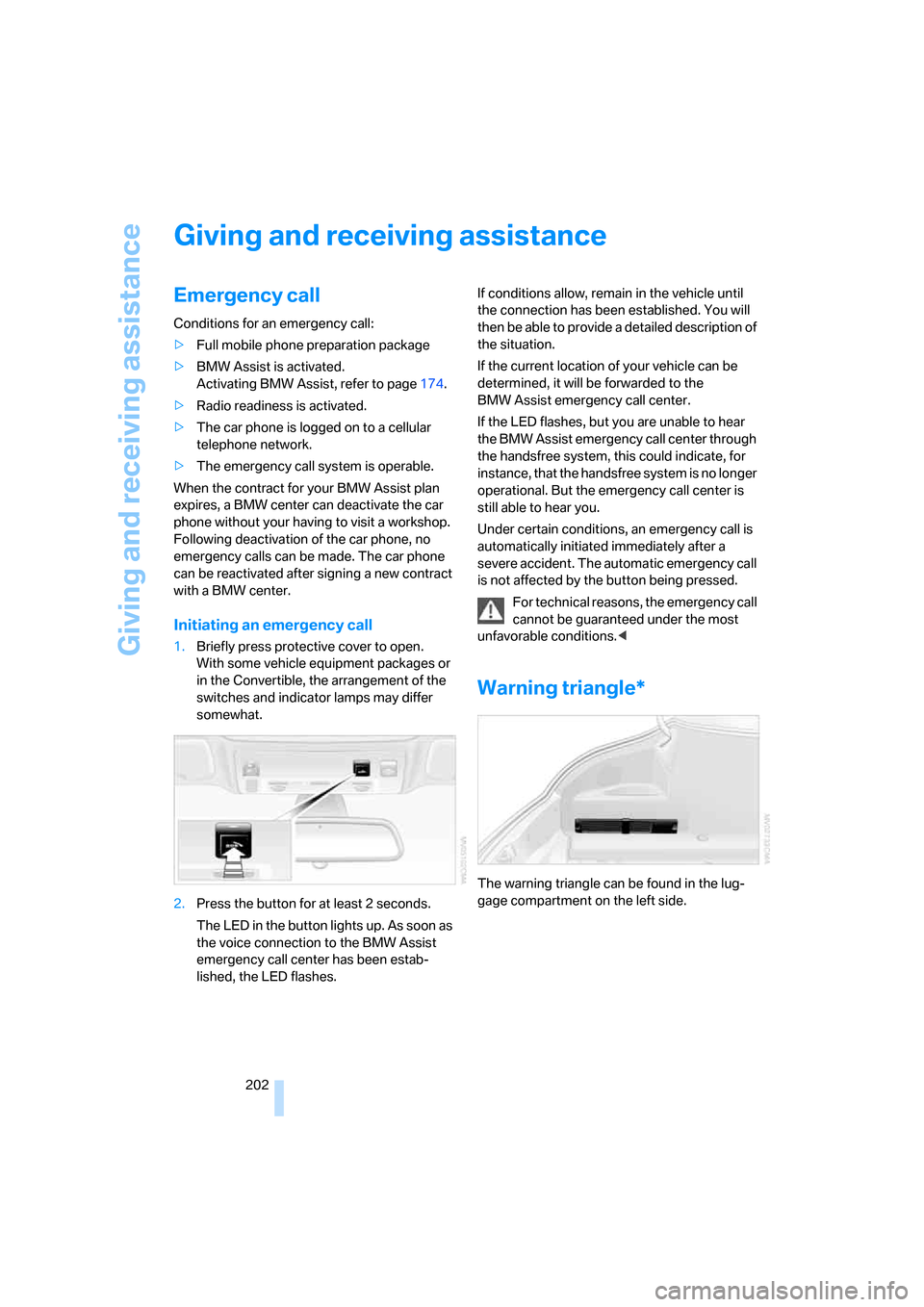
1.Briefly press protective cover to open.
With some vehicle equipment packages or
in the Convertible, the arrangement of the
switches and indicator lamps may differ
somewhat.
2.Press the button for at least 2 seconds.
The LED in the button lights up. As soon as
the voice connection to the BMW Assist
emergency call center has been estab-
lished, the LED flashes.If conditions allow, remain in the vehicle until
the connection has been established. You will
then be able to provide a detailed description of
the situation.
If the current location of your vehicle can be
determined, it will be forwarded to the
BMW Assist emergency call center.
If the LED flashes, but you are unable to hear
the BMW Assist emergency call center through
the handsfree system, this could indicate, for
instance, that the handsfree system is no longer
operational. But the emergency call center is
still able to hear you.
Under certain conditions, an emergency call is
automatically initiated immediately after a
severe accident. The automatic emergency call
is not affected by the button being pressed.
For technical reasons, the emergency call
cannot be guaranteed under the most
unfavorable conditions.<
Warning triangle*
The warning triangle can be found in the lug-
gage compartment on the left side.
Page 219 of 236
Everything from A to Z
218 "Assist. window off"21
AUC Automatic recirculated-
air control103
Audio140
– controls140
– switching on/off140
– tone control141
– volume141
"Audio", refer to Tone
control141
Automatic
– air distribution101
– air volume101
– headlamp control96
– service notification175
– steering wheel adjustment,
refer to Easy entry/exit53
– storing stations145
Automatically switching
between high beams and
low beams, refer to High-
beam assistant97
Automatic car washes116
– also refer to Comfort
access37
– also refer to the Caring for
your vehicle brochure
Automatic climate control100
– automatic air
distribution101
– convertible program101
– switching off103
Automatic curb monitor53
Automatic lighting
– refer to Automatic headlamp
control96
– refer to Daytime driving
lamps96
– refer to High-beam
assistant97
– refer to Interior lamps99
– refer to Pathway lighting96
"Automatic programs"101
Automatic recirculated-air
control AUC103
Automatic station search145Automatic transmission with
Steptronic62
– deactivating selector lever
interlock63
– Dynamic Driving Control64
– interlock62
– kick-down63
– selector lever lock,
Interlock62
– shiftlock62
– towing205
– tow-starting206
– with comfort access37
"Automatic ventilation"104
AUTO program with
automatic climate
control101
"Autostore" on the
radio144,146
Average fuel consumption75
– setting units83
Average speed75
"Avoid ferries" for
navigation131
Avoid freeways for
navigation130
"Avoid highways" for
navigation131
Avoiding unintentional
alarms36
"Avoid tollroads" for
navigation131
Axle loads, refer to
Weights210
"A - Z"168
B
Backrest contour, refer to
Lumbar support48
Backrests, refer to Seats48
Backup lamps
– refer to Reverse gear61
– replacing bulbs, refer to Tail
lamps199
"Balance", refer to Tone
control142Balance, refer to Tone
control142
Balance adjustment in audio
mode, right/left142
Band-aids, refer to First-aid
kit203
Bass, refer to Tone
control141
"Bass", tone control142
Bass, tone control141
Battery
– disposal38
– jump starting203
– refer to Vehicle battery200
Battery change38
Being towed205
Belts, refer to Safety belts51
Beverage holder, refer to Cup
holders109
Blower, refer to Air
volume102
"BMW Assist"176
BMW Assist174
– enabling174
– services offered175
"BMW Contact"178
"BMW Contact
Numbers"178
BMW homepage4
BMW Maintenance
System195
"BMW Service"176
"BMW Service settings"175
BMW website4
Bottle holder, refer to Cup
holders109
Brake Assistant, refer to DBC
Dynamic Brake Control86
Brake fluid193
– level193
– warning lamp193
Brake force display90
Brake hydraulic system193
Brake lamps
– brake force display90
– replacing bulbs, refer to Tail
lamps199
Page 222 of 236
Reference 221
At a glance
Controls
Driving tips
Communications
Navigation
Entertainment
Mobility
D
Dashboard, refer to
Cockpit10
Data
– capacities212
– dimensions211
– engine210
– technical data210
– weights210
"Date"83
Date74
– setting83
"Date format"83
Daytime driving lamps96
DBC Dynamic Brake
Control86
"Deactivated"50
Deactivating selector lever
interlock63
Decommissioning the vehicle,
refer to the Caring for your
vehicle brochure
Defrosting windows102
Defrosting windows and
removing condensation102
Defrost position, refer to
Defrosting windows102
"Delete address book" for
navigation130
"Delete all numbers" on the
mobile phone169
"Delete data" for
navigation130
"Delete" for mobile
phone169
Destination address
– deleting129
– entering121,124
Destination for navigation
– destination list127
– entry121
– home address130
– selecting from address
book129
– selecting using
information126
– storing128Destination guidance132
– bypassing route
sections136
– canceling voice
instructions55
– changing specified
route130
– displaying routes133
– distance and arrival132
– interrupting132
– starting132
– terminating/continuing132
– voice instructions135
– volume of voice
instructions
135
Destination list for
navigation127
Destinations recently driven
to127
"Details" in audio mode155
"Dial" for mobile phone167
"Dial number"167
"Diamond button"54
Digital clock74
Digital radio, refer to High
Definition Radio148
Dimensions
– Convertible212
– Coupe211
Directional indicators, refer to
Turn signals64
Direction announcements,
refer to Voice
instructions135
Direction instructions, refer to
Voice instructions135
Directory for navigation, refer
to Address book128
Displacement, refer to Engine
data210
"Display"83
Display, refer to iDrive16
Display lighting, refer to
Instrument lighting99
"Display off"21
Displays, refer to Instrument
cluster12
"Display settings"82Displays on the windshield,
refer to Head-Up Display93
Disposal
– battery of remote control
with comfort access38
– vehicle battery200
Distance, refer to
Computer76
Distance control, refer to
Active cruise control67
"Distance to dest."76
Distance to destination, refer
to Computer76
Distance warning, refer to
PDC Park Distance
Control85
Door entry lighting, refer to
Interior lamps99
Door key, refer to Keys/
remote control28
Door lock32
"Door locks"30
Doors
– manual operation32
– remote control30
DOT Quality Grades186
Draft-free ventilation104
"Driver's door only"30
Driving lamps, refer to Parking
lamps/low beams96
Driving notes114
Driving route, refer to
Displaying the route133
Driving stability control
systems86
Driving through water115
Driving tips, refer to Driving
notes114
Drying the air, refer to Cooling
function102
DSC Dynamic Stability
Control86
– indicator lamp13,87
DTC Dynamic Traction
Control87
– activating87
– indicator lamp13,87
DVD for navigation120
Page 229 of 236
Everything from A to Z
228 Programmable buttons on
steering wheel54
Protective function, refer to
Anti-trapping mechanism
– glass sunroof40
– windows39
R
Radio
– Autostore145
– controls140
– High Definition Radio148
– playing stations145
– satellite radio149
– selecting frequency
manually145
– selecting
waveband140,144
– station search145
– station selection144
– station with best
reception145
– storing stations146
– switching on/off140
– tone control141
– volume141
– Weather Band, refer to
Weather news flashes147
Radio key, refer to Keys/
remote control28
Radio position, refer to Radio
readiness58
Radio readiness58
– switched off58
– switched on58
– with comfort access37
Rain sensor, windshield
washer system65
"Random", random play
sequence, selecting156
"Random all" in audio
mode156
"Random directory" in audio
mode156
Random play sequence
– CD changer156
– CD player156"RDS"147
Reading lamps99
Rear lamps, refer to Tail
lamps199
Rearview mirrors, refer to
Mirrors52
Rear window
– heating102
– opening and closing39
"Received calls"168
Reception
– quality147
– radio stations147
– regional station145
Reception quality of mobile
phone, refer to Status
information20
Rechargeable flashlight107
Recirculated-air mode, refer
to AUC Automatic recircu-
lated-air control103
Recirculation of air, refer to
AUC Automatic recircu-
lated-air control103
Reclining seat, refer to
Backrest48
Recording times, refer to
Stopwatch81
"Redial" for mobile phone168
Reflectors, refer to Tail
lamps199
Refueling182
Releasing, hood190
"Relock door if not
opened"32
Remaining distance, refer to
Remaining range75
Remaining distance to desti-
nation, refer to Computer76
Remaining range75
Remote control28
– battery replacement38
– comfort access36
– garage-door opener106
– luggage compartment lid31
– malfunction31,37
Removing condensation from
windows102"Repeat directory" in audio
mode156
"Repeat" in audio mode156
"Repeat track" in audio
mode156
Replacement fuses201
Replacing bulbs, refer to
Lamps and bulbs197
Replacing tires
– changing a wheel200
– new wheels and tires188
Reporting an accident, refer to
Initiating emergency
call202
Reporting safety defects7
Required fuel183
Reserve warning, refer to Fuel
gauge75
Reset, refer to Resetting tone
settings143
"Reset" for stopwatch81
"Reset" tone settings143
Residual heat103
Restraint systems
– for children56
– refer to Safety belts51
Retreaded tires188
Reverse, fast
– CD changer157
– CD player157
Reverse gear
– automatic transmission with
Steptronic63
– manual transmission
61
– SMG Sequential Manual
Gearbox61
Road map133
"Roadside
Assistance"176,178
Roadside Assistance203
Roadside parking lamps97
– replacing bulbs, refer to
Parking lamps198
Rollover protection system on
Convertible92
– lowering93
Rope, refer to Tow-starting
and towing204
Page 232 of 236
Reference 231
At a glance
Controls
Driving tips
Communications
Navigation
Entertainment
Mobility
Switches, refer to Cockpit10
Switching between high
beams and low beams,
automatic, refer to High-
beam assistant97
Switching off engine59
Switching off the tilt alarm
sensor36
Switching on
– audio140
– CD changer140
– CD player140
– radio140
Switching the cooling function
on and off102
Swiveling headlamps, refer to
Adaptive Head Light97
Symbols4
– indicator and warning
lamps13
T
Tachometer74
Tail lamps199
– replacing bulbs199
Tank capacity
– also refer to Filling
capacities212
– fuel tank capacity182
Target cursor for
navigation126
Technical alterations, refer to
For your own safety6
Technical data210
Telematic, refer to
TeleService, BMW
Assist174
Telephone
– refer to Mobile phone162
– refer to separate Owner’s
Manual
"Telephone list"54
TeleService174
– enabling174
– services offered175Temperature
– adjusting in upper body
region102
– adjusting with automatic
climate control101
– of coolant, refer to Coolant
temperature74
Temperature display
– changing units of
measure83
– outside temperature74
– temperature warning74
Temperature gauge, engine
oil75
Temperature warning74
Tempomat, refer to Cruise
control66
"Terminate services"177
"Text language"84
"Theater", refer to Tone
control142
The individual vehicle5
Tie-down points, refer to
Securing cargo117
Tilting down passenger-side
exterior mirror53
"Time"82
"Time format"83
Timer, refer to Preselecting
activation time104
"Timer 1" for parked car
ventilation105
"Timer 2" for parked car
ventilation105
Tire Quality Grading186Tires
– age186
– air loss89
– breaking-in114
– condition187
– damage187
– inflation pressure184
– minimum tread depth187
– Monitoring inflation
pressure, refer to Flat Tire
Monitor88
– new wheels and tires188
– replacing188
– retreaded tires188
– run-flat tires188
– size185
– size, refer to The right
wheels and tires188
– wear indicators187
– wheel/tire combination188
– winter tires189
Tires with run-flat properties,
refer to Run-flat tires
– continuing to drive with a
damaged tire89
– flat tire89
– new wheels and tires188
"Tone"141
Tone in audio mode
– adjusting141
– middle setting143
Tools, refer to Onboard tool
kit197
top41
"Top 8" for mobile phone168
Torque, refer to Engine
specifications210
Touch tone dialing169
Tow fitting204
Towing204
– tow fitting204
"Town / City" for destination
entry122
Tow-starting204,206
Tracks
– finding155
– random play sequence156
– sample, Scan155