ECO mode BMW 650I COUPE 2008 E63 User Guide
[x] Cancel search | Manufacturer: BMW, Model Year: 2008, Model line: 650I COUPE, Model: BMW 650I COUPE 2008 E63Pages: 264, PDF Size: 9.07 MB
Page 187 of 264
185
Entertainment
Reference
At a glance
Controls
Driving tips Communications
Navigation
Mobility
It may not be possible to establish a telephone
connection using the mobile phone while a con-
nection is being established to BMW Assist
or while a call to BMW Assist is already in
progress. If this happens, you must unpair the
mobile phone and the vehicle if you wish to
place a call with the mobile phone.
Initial operation
Pairing mobile phone in vehicle
The following prerequisites must be met:
>Suitable mobile phone: the mobile phone is
supported by the full mobile phone prepara-
tion package. Information on this subject is
also provided on the Internet at:
www.bmw.com
>The mobile phone is ready to operate.
>The Bluetooth links of the vehicle, refer to
page189, and the mobile phone are active.
>Depending on the mobile phone, presets in
the mobile phone are required: e.g. via the
following menu items:
>Bluetooth activated
>Connection not with confirmation
>Reconnect
>Depending on the mobile phone model, the
setting energy saving mode can, for exam-
ple, result in vehicle failing to detect the
paired mobile phone.
>Specify any desired number as the Blue-
tooth passkey, e.g. 1, for pairing. This Blue-
tooth passkey is no longer required follow-
ing successful pairing.
>The ignition is switched on.
Only pair the mobile phone with the vehi-
cle stopped, otherwise the passengers
and other road users can be endangered due to
a lack of attentiveness on the part of the
driver.<
Switching on ignition
1.Insert the remote control as far as possible
into the ignition lock.
2.Switch on the ignition by pressing the Start/
Stop button without depressing the brake
or clutch pedal.
Preparation via iDrive
iDrive, for operating principle refer to page16.
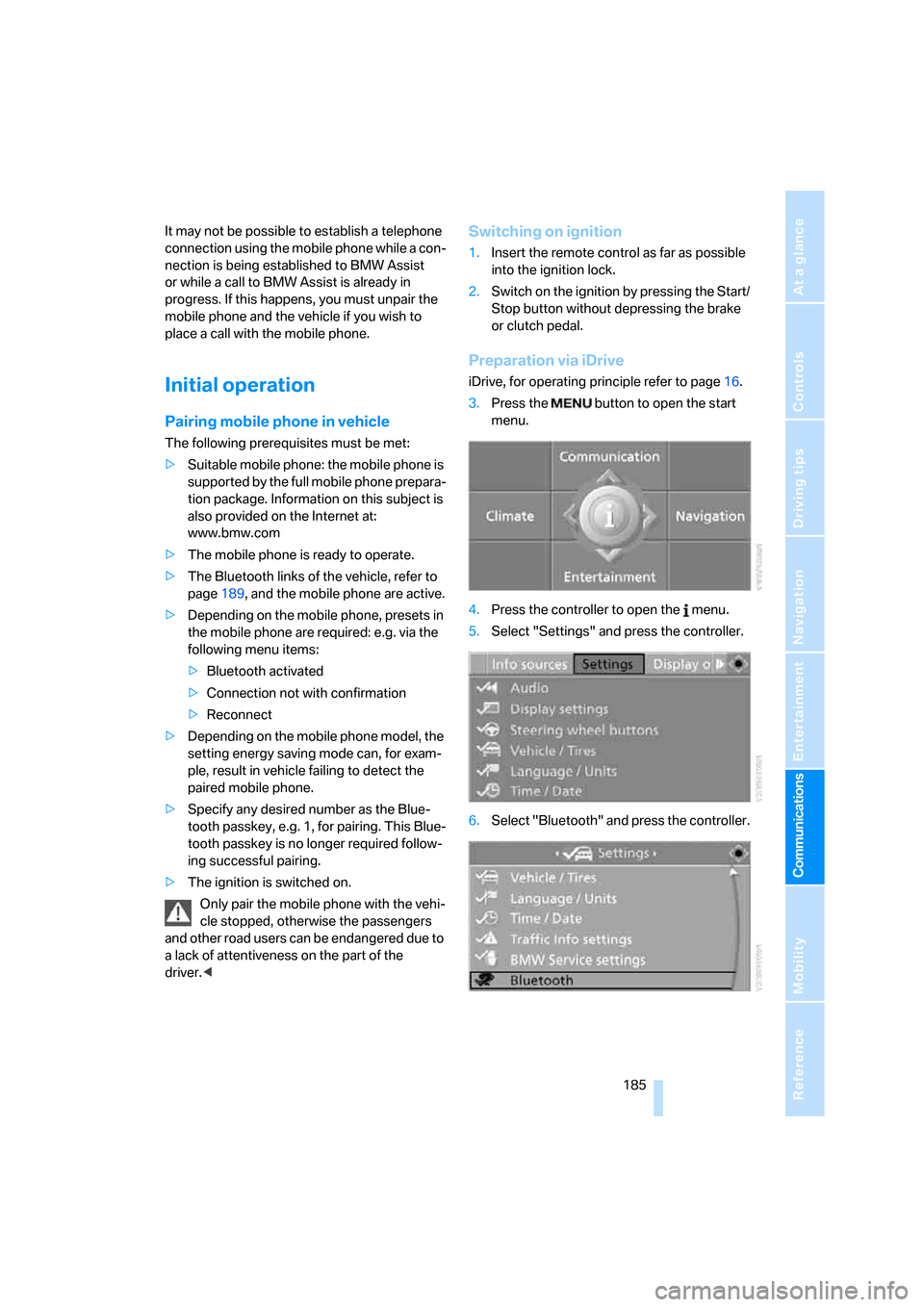
3.Press the button to open the start
menu.
4.Press the controller to open the menu.
5.Select "Settings" and press the controller.
6.Select "Bluetooth" and press the controller.
Page 188 of 264
Telephoning
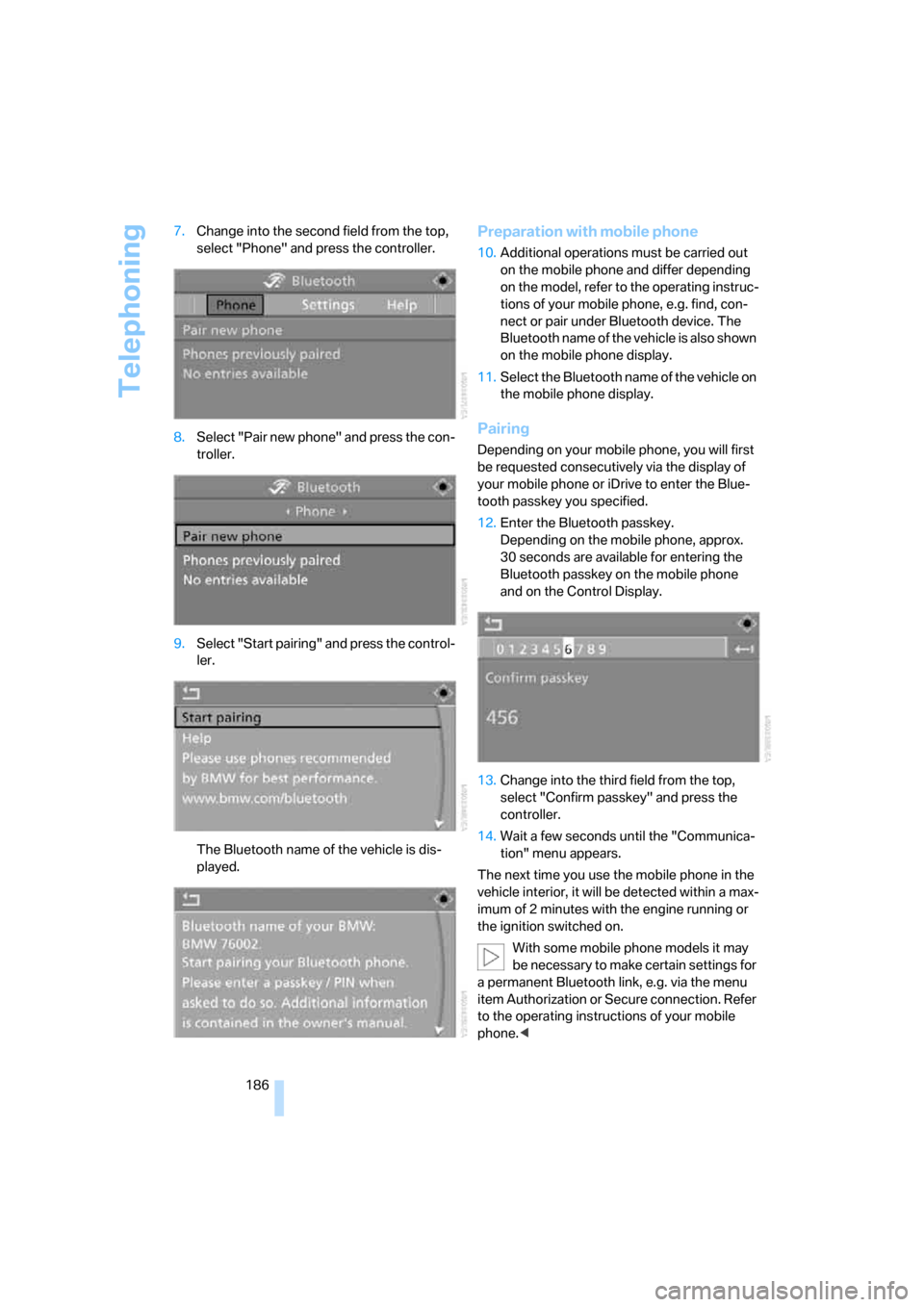
186 7.Change into the second field from the top,
select "Phone" and press the controller.
8.Select "Pair new phone" and press the con-
troller.
9.Select "Start pairing" and press the control-
ler.
The Bluetooth name of the vehicle is dis-
played.
Preparation with mobile phone
10.Additional operations must be carried out
on the mobile phone and differ depending
on the model, refer to the operating instruc-
tions of your mobile phone, e.g. find, con-
nect or pair under Bluetooth device. The
Bluetooth name of the vehicle is also shown
on the mobile phone display.
11.Select the Bluetooth name of the vehicle on
the mobile phone display.
Pairing
Depending on your mobile phone, you will first
be requested consecutively via the display of
your mobile phone or iDrive to enter the Blue-
tooth passkey you specified.
12.Enter the Bluetooth passkey.
Depending on the mobile phone, approx.
30 seconds are available for entering the
Bluetooth passkey on the mobile phone
and on the Control Display.
13.Change into the third field from the top,
select "Confirm passkey" and press the
controller.
14.Wait a few seconds until the "Communica-
tion" menu appears.
The next time you use the mobile phone in the
vehicle interior, it will be detected within a max-
imum of 2 minutes with the engine running or
the ignition switched on.
With some mobile phone models it may
be necessary to make certain settings for
a permanent Bluetooth link, e.g. via the menu
item Authorization or Secure connection. Refer
to the operating instructions of your mobile
phone.<
Page 197 of 264
195
Entertainment
Reference
At a glance
Controls
Driving tips Communications
Navigation
Mobility
Changing between mobile
phone and hands-free system
From mobile phone to hands-free
system*
You can continue calls begun outside the Blue-
tooth range of the vehicle via the hands-free
system when the engine is running or the igni-
tion is switched on. Depending on your mobile
phone, the system automatically switches over
to the hands-free mode.
For mobile phones that do not automatically
switch over to the hands-free mode:
>Depending on the mobile phone model
used, the conversation can be continued via
the hands-free system if necessary. Follow
the instructions displayed on the mobile
phone display, refer to the operating
instructions of your mobile phone.
>Press the button above the storage
compartment. Switching over may take
several seconds.
From hands-free system to mobile
phone
When you telephone via the hands-free system,
you can also continue the call via the mobile
phone if necessary, depending on the mobile
phone model. Act according to what is shown
on the mobile phone display, refer to the oper-
ating instructions of your mobile phone.
As an alternative, you can deactivate the Blue-
tooth link.
Depending on your mobile phone model, poor
reception of the wireless communications net-
work can result in the system switching from
the hands-free system to the mobile phone.
Operation by voice*
The concept
You can operate your mobile phone without
having to remove your hands from the steering
wheel. When making your entries, you will be
supported by announcements or questions in
many cases.
The same prerequisites as for operation via
iDrive apply, refer to page190.
Voice commands
Activating system
1.Briefly press the button on the steering
wheel.
An acoustic signal indicates that you can
say commands.
2.Say the command.
Ending/canceling operation by voice
Press the button on the steering wheel
or
In dialogs where text is spoken, not a command,
e.g. a name, canceling is only possible using the
button on the steering wheel.
Having possible commands read aloud
The system understands default commands
that must be spoken word for word.
You can have the possible commands spoken
by the system at any point:
Using alternative commands
There are often a number of commands to run a
function, e.g.:
The system recognizes digits from zero to nine.
You can say each digit individually or group
them into a sequence to accelerate the input.
{Cancel}.
{Help}.
{Dial name} or {Name}.
Page 223 of 264
Mobility
221Reference
At a glance
Controls
Driving tips
Communications
Navigation
Entertainment
Maintenance
BMW Maintenance System
The BMW Maintenance System supports the
preservation of the traffic and operating safety
of your BMW. The service schedule also
includes operations related to the vehicle's
comfort and convenience features, such as
replacement of the filters for the inside air.
The ultimate objective is to ensure economical
maintenance by providing the ideal service for
your vehicle.
Should the day come when you decide to sell
your BMW, you will find that a complete dealer
service history is an asset of inestimable value.
CBS Condition Based Service
Sensors and special algorithms take the differ-
ent driving conditions of your BMW into
account. Condition Based Service uses this to
determine the current and future service
requirements. By letting you define a service
and maintenance regimen that reflects your
own individual requirements, the system builds
the basis for trouble-free driving.
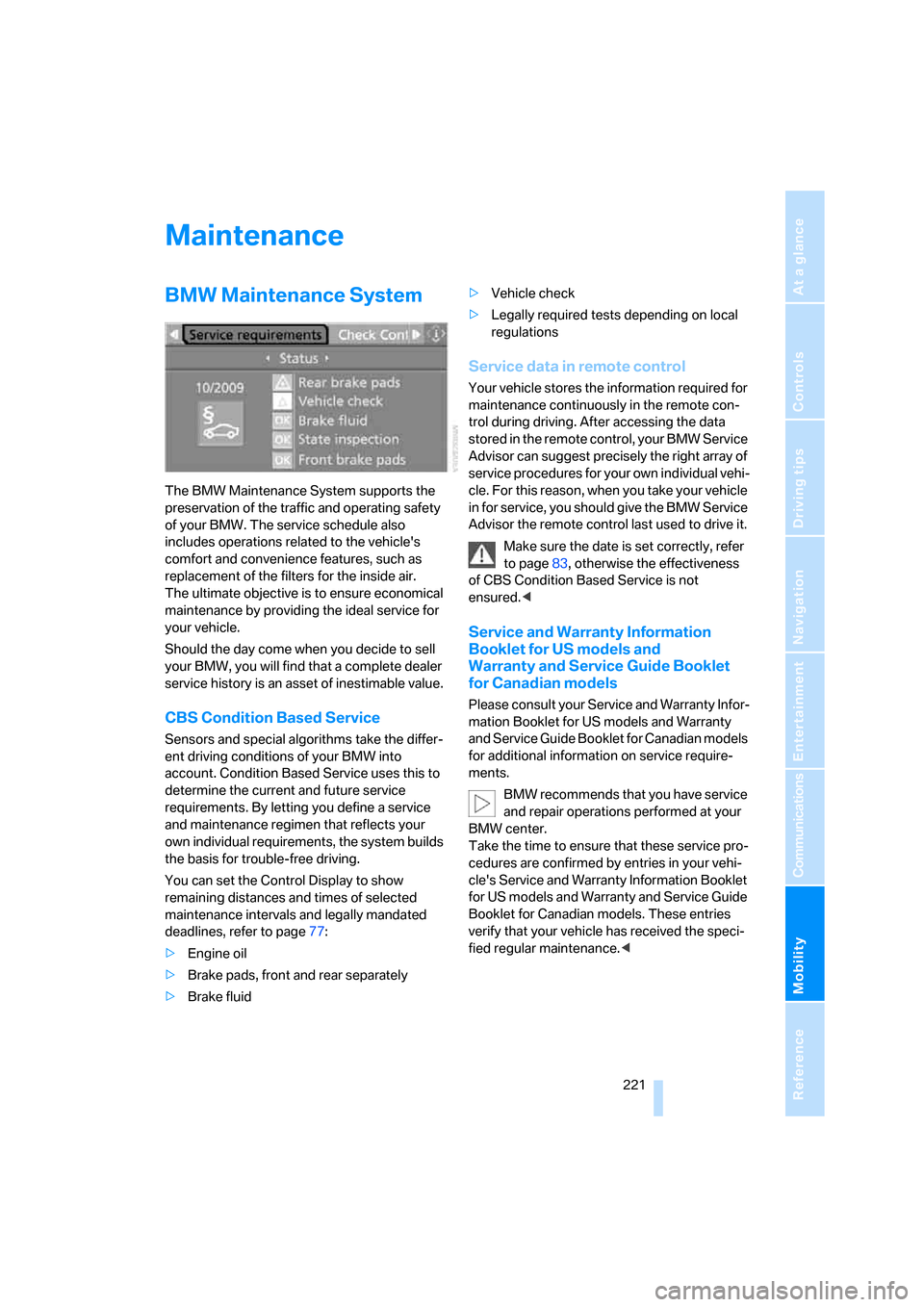
You can set the Control Display to show
remaining distances and times of selected
maintenance intervals and legally mandated
deadlines, refer to page77:
>Engine oil
>Brake pads, front and rear separately
>Brake fluid>Vehicle check
>Legally required tests depending on local
regulations
Service data in remote control
Your vehicle stores the information required for
maintenance continuously in the remote con-
trol during driving. After accessing the data
stored in the remote control, your BMW Service
Advisor can suggest precisely the right array of
service procedures for your own individual vehi-
cle. For this reason, when you take your vehicle
in for service, you should give the BMW Service
Advisor the remote control last used to drive it.
Make sure the date is set correctly, refer
to page83, otherwise the effectiveness
of CBS Condition Based Service is not
ensured.<
Service and Warranty Information
Booklet for US models and
Warranty and Service Guide Booklet
for Canadian models
Please consult your Service and Warranty Infor-
mation Booklet for US models and Warranty
and Service Guide Booklet for Canadian models
for additional information on service require-
ments.
BMW recommends that you have service
and repair operations performed at your
BMW center.
Take the time to ensure that these service pro-
cedures are confirmed by entries in your vehi-
cle's Service and Warranty Information Booklet
for US models and Warranty and Service Guide
Booklet for Canadian models. These entries
verify that your vehicle has received the speci-
fied regular maintenance.<
Page 224 of 264
Maintenance
222
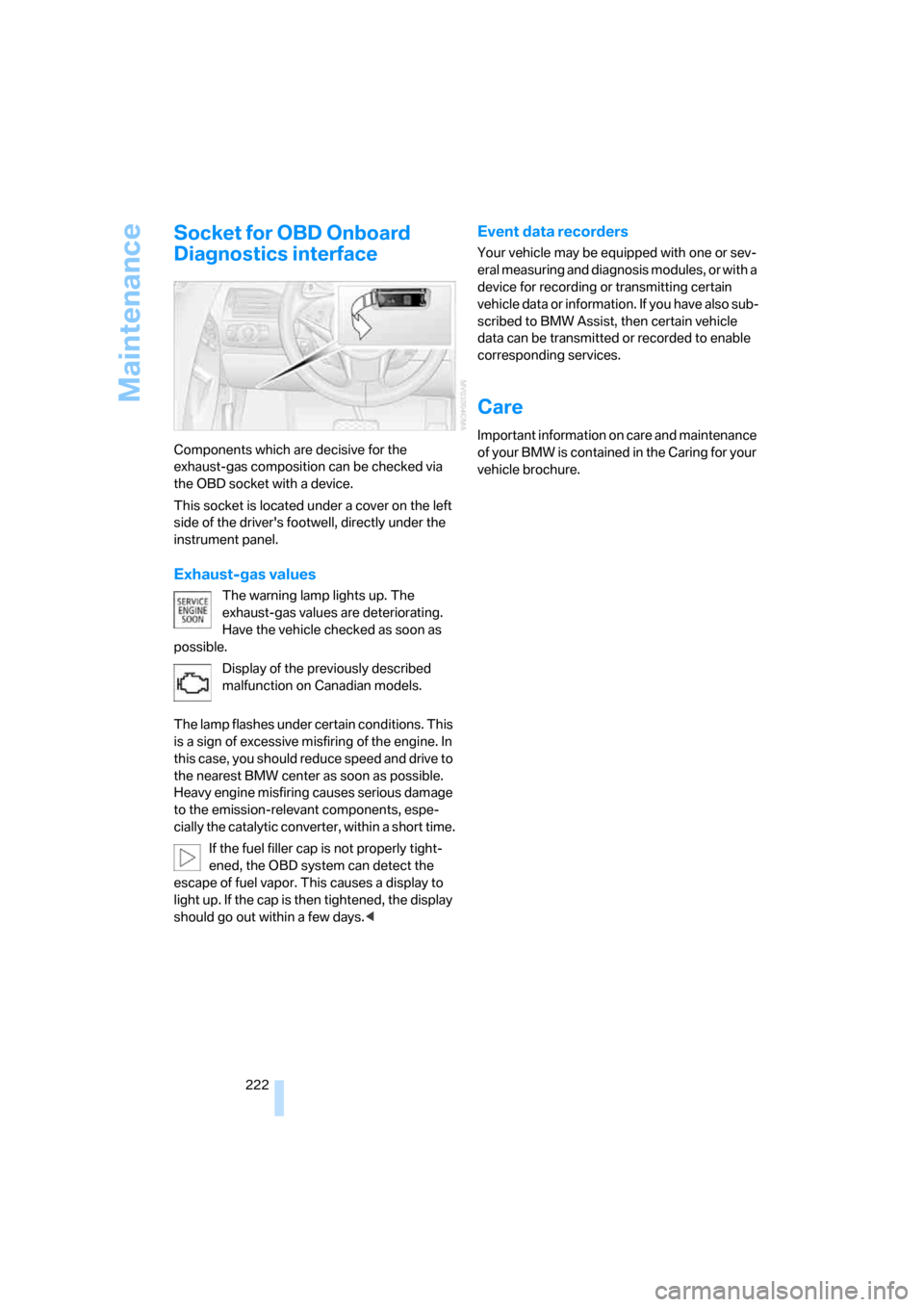
Socket for OBD Onboard
Diagnostics interface
Components which are decisive for the
exhaust-gas composition can be checked via
the OBD socket with a device.
This socket is located under a cover on the left
side of the driver's footwell, directly under the
instrument panel.
Exhaust-gas values
The warning lamp lights up. The
exhaust-gas values are deteriorating.
Have the vehicle checked as soon as
possible.
Display of the previously described
malfunction on Canadian models.
The lamp flashes under certain conditions. This
is a sign of excessive misfiring of the engine. In
this case, you should reduce speed and drive to
the nearest BMW center as soon as possible.
Heavy engine misfiring causes serious damage
to the emission-relevant components, espe-
cially the catalytic converter, within a short time.
If the fuel filler cap is not properly tight-
ened, the OBD system can detect the
escape of fuel vapor. This causes a display to
light up. If the cap is then tightened, the display
should go out within a few days.<
Event data recorders
Your vehicle may be equipped with one or sev-
eral measuring and diagnosis modules, or with a
device for recording or transmitting certain
vehicle data or information. If you have also sub-
scribed to BMW Assist, then certain vehicle
data can be transmitted or recorded to enable
corresponding services.
Care
Important information on care and maintenance
of your BMW is contained in the Caring for your
vehicle brochure.
Page 248 of 264
Everything from A to Z
246 Convertible top
– care, refer to Caring for your
vehicle brochure
– closing manually43
– convenient operation32
– emergency closing43
– opening and closing43
Coolant219
– checking level220
– temperature74
Cooling, maximum111
Cooling function, automatic
climate control111
Cooling system, refer to
Coolant219
Copyright2
Cornering Brake Control
CBC86
Country of destination for
navigation135
Courtesy lamps, refer to
Interior lamps106
Cradle for telephone or mobile
phone117
Cruise control65
– active cruise control66
Cruising range75
Cup holders15,118
Curb weight, refer to
Weights237
"Current position"153
Current position
– displaying153
– entering142
– storing142
"Curve mode" with
BMW Night Vision100
"Customer
Relations"194,202
Cylinders, refer to Engine
data234
D
Dashboard, refer to
Cockpit10
Data, technical234
– capacities237
– dimensions235
– engine234
– measurements235
– weights237
"Date"83
Date74
– date format83
– setting83
"Date format"83
"Daytime running
lamps"103,106
Daytime running lamps103
– replacing bulbs224
DBC Dynamic Brake Control
– warning lamp88
"Deactivated"50
Decommissioning the vehicle,
refer to Caring for your
vehicle brochure
Defect, tires
– refer to Flat Tire Monitor89
– refer to Tire Pressure
Monitor90
Defrosting windows110
Defrosting windows and
removing condensation110
Defrosting windshield, refer to
Defrosting windows110
Defrost position, refer to
Defrosting windows110
"Delete address book" for
navigation system143
"Delete all numbers" for
mobile phone193
"Delete data" for navigation
system143
"Delete" for mobile
phone193
Destination address
– deleting143
– entering134,137Destination for navigation
– destination list141
– entering via voice137
– entry134
– home address144
– selecting from address
book142
– selecting using
information140
– storing142
Destination guidance146
– bypassing route
sections150
– canceling voice
instructions55
– changing specified
route144
– displaying route147
– distance and arrival146
– interrupting146
– starting146
– terminating/continuing146
– voice instructions149
– volume of voice
instructions150
Destination list for
navigation141
Destinations recently driven
to141
"Details" in audio
mode174,180
"Dial" for mobile phone191
"Dial number"191
"Diamond button"55
Digital clock74
Digital radio, refer to High
Definition Radio166
Dimensions
– Convertible236
– Coupe235
Directional indicators, refer to
Turn signals63
Direction instructions, refer to
Voice instructions149
Directory, refer to Phone
book192
Directory for navigation, refer
to Address book142
Page 252 of 264
Everything from A to Z
250
I
IBOC, refer to High Definition
Radio166
Ice, refer to Outside
temperature warning74
ID3-Tag, refer to Information
about track174
Identification mark
– recommended tire
brands215
– run-flat tires214
– tire coding212
iDrive16
– adjusting brightness83
– assistance window20
– changing date and time82
– changing language84
– changing menu page19
– changing settings82
– changing units of measure
and display form84
– controller16
– controls16
– displays, menus17
– operating principle17
– selecting menu item19
– selecting or confirming
entry19
– start menu17
– status information20
– symbols18
Ignition58
– switched off59
– switched on58
Ignition key, refer to Keys/
remote control28
Ignition key position 1, refer to
Radio readiness58
Ignition key position 2, refer to
Ignition on58
Ignition lock58
– starting engine with comfort
access38
i menu17
Imprint2Indicator/warning lamps
– ABS Antilock Brake
System88
– active steering93
– airbags95
– brake system88
– DSC13,87
– DTC13,88
– Flat Tire Monitor90
– fog lamps13,106
– handbrake13,60
– safety belt warning52
– TPM Tire Pressure
Monitor92
Indicator and warning lamps,
overview13
Inflation pressure, refer to Tire
inflation pressure210
Inflation pressure monitoring
– refer to Flat Tire Monitor89
– refer to Tire Pressure
Monitor90
Info menu17
Information
– on another location140
– on current position140
– on town/city of
destination140
"Information" for navigation
system140
Information menu, refer to
imenu17
"Information on
destination"141
"Info sources"77
Initializing
– Flat Tire Monitor89
– radio, refer to Storing
stations164
– refer to Power failure226
– seat, mirror and steering
wheel memory49
– time and date82
"Input map"139
Installation location
– CD changer176
– drive for navigation DVD132Instructions for navigation
system, refer to Voice
instructions149
Instrument cluster12
Instrument illumination, refer
to Instrument lighting106
Instrument lighting106
Instrument panel, refer to
Cockpit10
Instrument panel, refer to
Instrument cluster12
Integrated key28
Integrated universal remote
control115
Interesting destination for
navigation140
"Interim time"82
Interior lamps106
– switching on with remote
control31
Interior motion sensor36
– switching off36
Interior rearview mirror,
automatic dimming
feature54
Intermittent wiper mode64
J
Jacking points225
Joystick, refer to iDrive16
Jump starting228
K
Keyless-Go, refer to Comfort
access36
Keyless opening and closing,
refer to Comfort access36
Key Memory, refer to Personal
Profile29
"Keypad"194
Keys28
– key-related settings, refer to
Personal Profile29
– spare key28
Kick-down, Sport automatic
transmission61
Page 256 of 264
Everything from A to Z
254 Presetting parked car
ventilation activation
times113
Pressure, tires210
Pressure monitoring of tires,
refer to TPM Tire Pressure
Monitor90
"Profile"205
Programmable buttons on
steering wheel55
Programmable memory
buttons21
Protective function, refer to
Pinch protection system
– glass sunroof41
– windows40
R
Radiator fluid, refer to
Coolant219
Radio
– Autostore164
– controls158
– High Definition Radio166
– sampling stations163
– satellite radio169
– selecting frequency
manually163
– selecting
waveband158,162
– station search163
– station selection162
– station with best
reception164
– storing stations164
– switching on/off158
– tone control159
– volume159
– Weather Band, refer to
Weather news flashes166
Radio key, refer to Keys/
remote control28
Radio position, refer to Radio
readiness58Radio readiness58
– switched off59
– switched on58
– with comfort access37
Radio stations, storing164
Rain sensor, windshield wiper
system64
"Random", random play
sequence175
"Random all" in audio
mode176
"Random directory" in audio
mode175
Random play sequence
– CD changer175
– CD player175
"RDS"165
Reading lamps107
Rear lamps, refer to Tail
lamps224
Rearview mirrors, refer to
Mirrors53
Rear window
– heating110
– opening and closing39
"Received calls"192
Reception
– quality165
– radio stations165
– regional station164
Reception quality of mobile
phone, refer to Status
information20
Rechargeable flashlight117
Recirculated-air mode, refer
to AUC Automatic
recirculated-air control111
Recirculation of air, refer to
AUC Automatic
recirculated-air control111
Reclining seat, refer to
Seats48
Recording times, refer to
Stopwatch82
"Redial" for mobile phone192
Redialing with mobile
phone197Reflectors, refer to Tail
lamps224
Refueling208
Releasing
– hood216
– locks, refer to Unlocking37
"Relock door if not
opened"33
Remaining distance, refer to
Cruising range75
Remaining distance to
destination, refer to
Computer76
Remote control28
– battery replacement38
– comfort access36
– garage-door opener115
– luggage compartment lid31
– malfunction31,38
Removing condensation from
windows110
"Repeat directory" in audio
mode175
"Repeat" in audio mode175
"Repeat track" in audio
mode175
Replacement fuses226
Replacement remote control,
refer to New remote
controls28
Replacing bulbs, refer to
Lamps and bulbs223
Replacing tires, changing a
wheel225
Reporting safety defects7
Required fuel209
Reserve warning, refer to Fuel
gauge75
"Reset"90,91
– stopwatch82
– tone settings161
Reset, refer to Resetting tone
settings161
Residual heat112
Restraint systems
– for children56
– refer to Safety belts52
Page 261 of 264
Reference 259
At a glance
Controls
Driving tips
Communications
Navigation
Entertainment
Mobility
Vent outlets of automatic
climate control108
"Vent settings"111
Viscosity219
Voice, refer to Destination
guidance with voice
instructions149
Voice command system
– overview23
– short commands238
Voice instructions for
navigation system149
– muting55
– repeating55,150
– switching on/off55,149
– volume150
Voice phone book196
Volume158
– audio sources158
– fuel tank, refer to
Capacities237
– luggage compartment237
– mobile phone190
– setting speed-
dependent160
– voice instructions150
– windshield cleaning system,
refer to Capacities237
Volume adjustment in audio
mode
– front-to-rear160
– right/left160
W
Warning lamps, refer to
Indicator and warning
lamps13
Warning messages, refer to
Check Control79
Warning on leaving lane, refer
to Leaving lane warning101
Warning triangle228
Warranty and Service Guide
Booklet for Canadian
models221
Washer fluid
– capacity of the reservoir65
– wiper system65Washing the vehicle, also refer
to Caring for your vehicle
brochure
Water on roads, refer to
Driving through water126
Waveband for radio162
"WB"158,166
Wear indicators in tires, refer
to Minimum tread depth213
Weather news flashes166
Website BMW4
Weights237
Welcome lamps102
Wheel/tire combination, refer
to New wheels and tires214
Wheel/tire damage213
Wheel/tire replacement, refer
to New wheels and tires214
Wheelbase, refer to
Dimensions235
Wheels and tires210
Width, refer to
Dimensions235
Wind deflector45
Windows38
– comfort closing with comfort
access37
– convenient operation31,32
– opening and closing,
Convertible39
– opening and closing,
Coupe38
– rear window, Convertible39
Windshield
– cleaning, refer to Wiper
system64
– defrosting, refer to
Defrosting windows110
– displays, refer to Head-Up
Display96
Windshield wash
– automatic, refer to Rain
sensor64
– capacities, reservoir237
– filler neck for washer
fluid217
– nozzles65
– washer fluid65
– wiper system64
Windshield wipers, refer to
Washer system, replacing
wiper blades223
Windshield wipers, refer to
Wiper system64
– care, refer to Caring for your
vehicle brochure
Winter tires215
– setting speed limit81
– storage215
Wiper blades
– care, refer to Caring for your
vehicle brochure
– replacing223
Wiper system64
– rain sensor64
– washer fluid65
– windshield washer
nozzles65
"With highways" for
navigation system144
Wood decoration, refer to
Caring for your vehicle
brochure
Word matching principle for
navigation145
Working in the engine
compartment216
Wrenches/screwdrivers, refer
to Onboard tool kit223
X
Xenon lamps224
– replacing bulbs224
Y
Your individual vehicle
– programmable buttons on
steering wheel55
– settings, refer to Personal
Profile29
Z
"Zoom" with BMW Night
Vision100