buttons BMW 650I COUPE 2009 E63 Owner's Guide
[x] Cancel search | Manufacturer: BMW, Model Year: 2009, Model line: 650I COUPE, Model: BMW 650I COUPE 2009 E63Pages: 272, PDF Size: 9.16 MB
Page 182 of 272
AUX-IN connection
180
AUX-IN connection
You can connect an external audio device, e.g.
an MP3 player, and play the sound via the vehi-
cle speakers. The sound can be adjusted via
iDrive.
Connecting
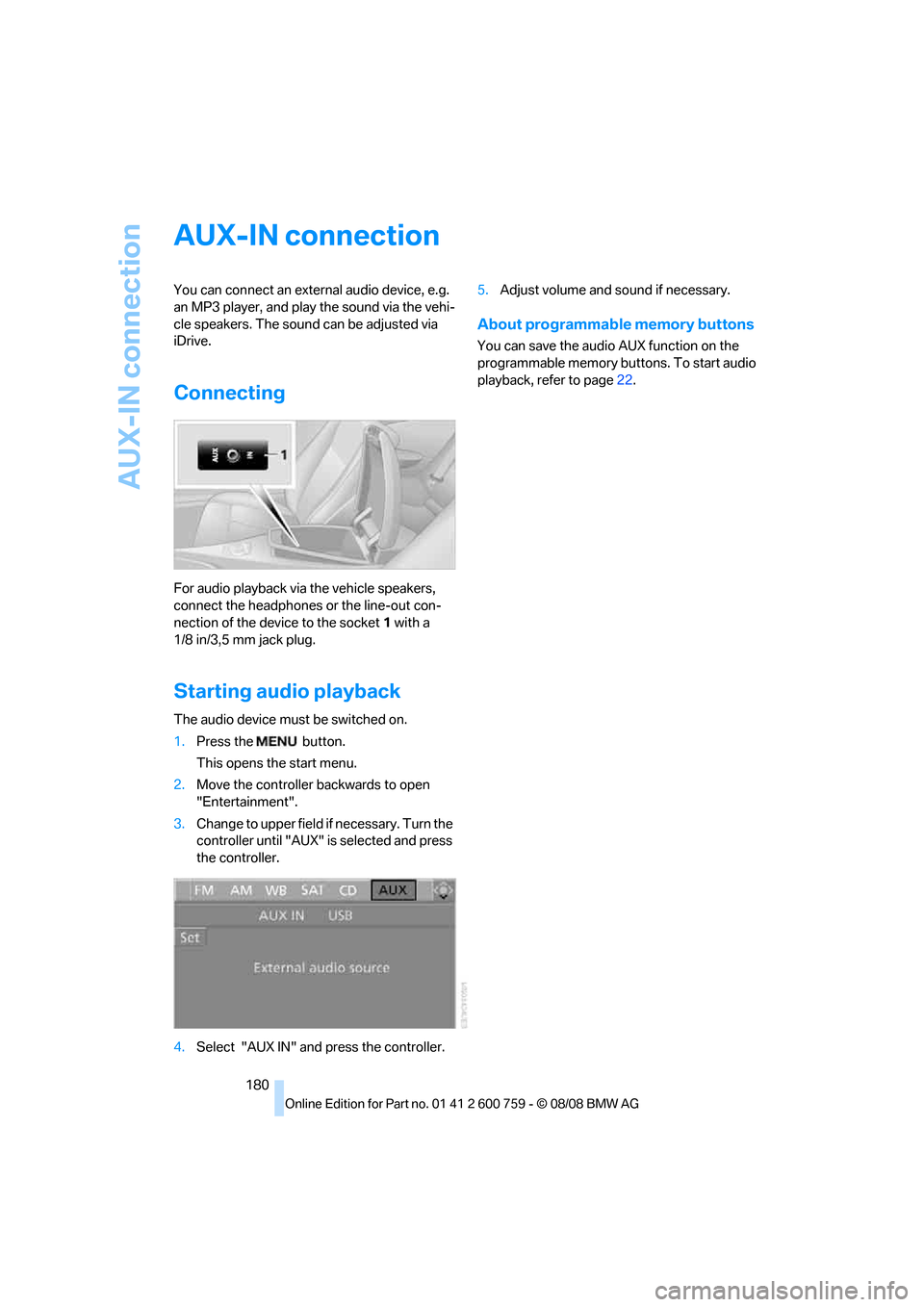
For audio playback via the vehicle speakers,
connect the headphones or the line-out con-
nection of the device to the socket1 with a
1/8 in/3,5 mm jack plug.
Starting audio playback
The audio device must be switched on.
1.Press the button.
This opens the start menu.
2.Move the controller backwards to open
"Entertainment".
3.Change to upper field if necessary. Turn the
controller until "AUX" is selected and press
the controller.
4.Select "AUX IN" and press the controller.5.Adjust volume and sound if necessary.
About programmable memory buttons
You can save the audio AUX function on the
programmable memory buttons. To start audio
playback, refer to page22.
Page 184 of 272
USB-audio interface/mobile phone audio interface
182 1.Press the button.
This opens the start menu.
2.Move the controller backwards to call up
"Entertainment".
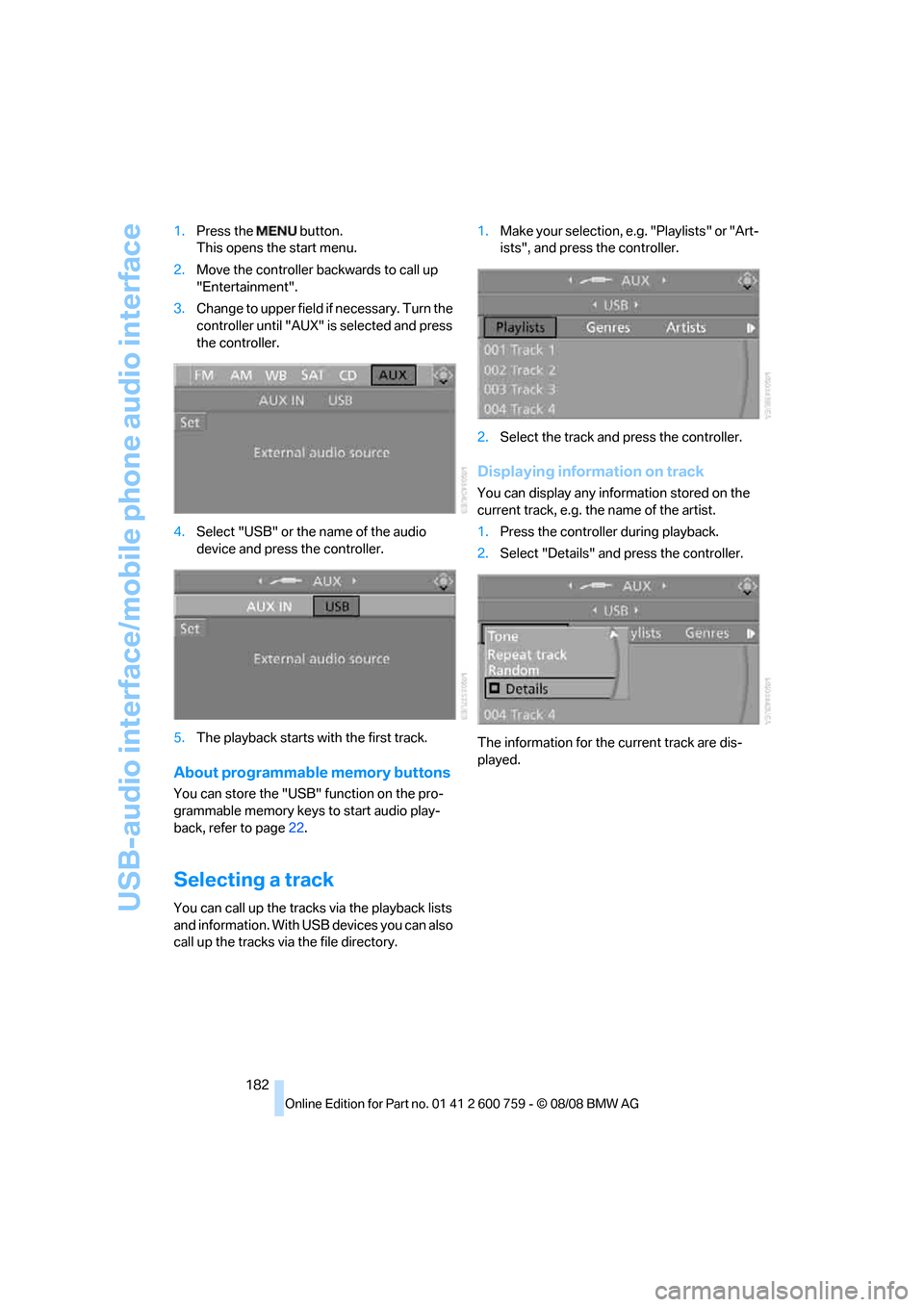
3.Change to upper field if necessary. Turn the
controller until "AUX" is selected and press
the controller.
4.Select "USB" or the name of the audio
device and press the controller.
5.The playback starts with the first track.
About programmable memory buttons
You can store the "USB" function on the pro-
grammable memory keys to start audio play-
back, refer to page22.
Selecting a track
You can call up the tracks via the playback lists
and information. With USB devices you can also
call up the tracks via the file directory.1.Make your selection, e.g. "Playlists" or "Art-
ists", and press the controller.
2.Select the track and press the controller.
Displaying information on track
You can display any information stored on the
current track, e.g. the name of the artist.
1.Press the controller during playback.
2.Select "Details" and press the controller.
The information for the current track are dis-
played.
Page 185 of 272
Navigation
Entertainment
Driving tips
183Reference
At a glance
Controls
Communications
Mobility
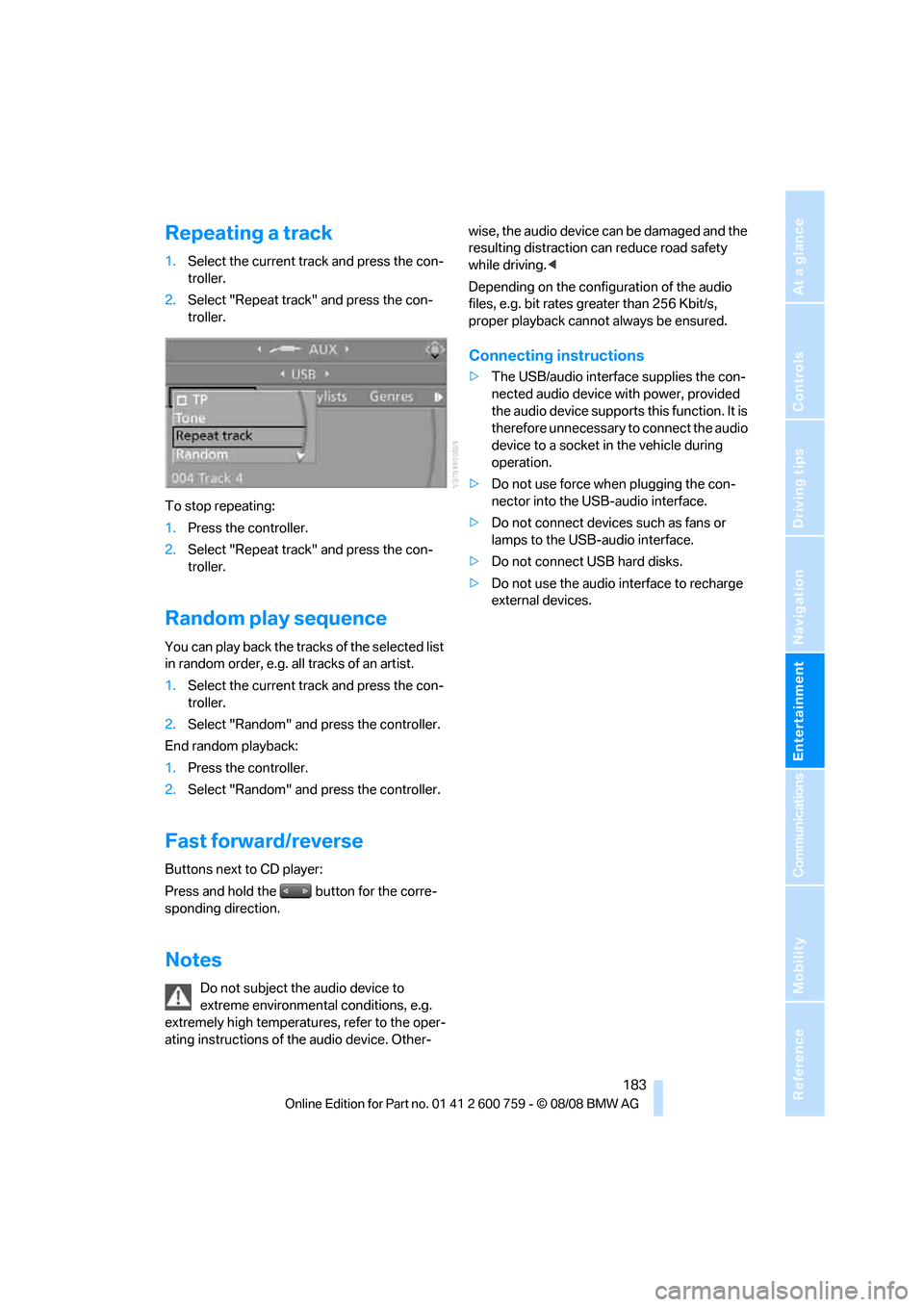
Repeating a track
1.Select the current track and press the con-
troller.
2.Select "Repeat track" and press the con-
troller.
To stop repeating:
1.Press the controller.
2.Select "Repeat track" and press the con-
troller.
Random play sequence
You can play back the tracks of the selected list
in random order, e.g. all tracks of an artist.
1.Select the current track and press the con-
troller.
2.Select "Random" and press the controller.
End random playback:
1.Press the controller.
2.Select "Random" and press the controller.
Fast forward/reverse
Buttons next to CD player:
Press and hold the button for the corre-
sponding direction.
Notes
Do not subject the audio device to
extreme environmental conditions, e.g.
extremely high temperatures, refer to the oper-
ating instructions of the audio device. Other-wise, the audio device can be damaged and the
resulting distraction can reduce road safety
while driving.<
Depending on the configuration of the audio
files, e.g. bit rates greater than 256 Kbit/s,
proper playback cannot always be ensured.
Connecting instructions
>The USB/audio interface supplies the con-
nected audio device with power, provided
the audio device supports this function. It is
therefore unnecessary to connect the audio
device to a socket in the vehicle during
operation.
>Do not use force when plugging the con-
nector into the USB-audio interface.
>Do not connect devices such as fans or
lamps to the USB-audio interface.
>Do not connect USB hard disks.
>Do not use the audio interface to recharge
external devices.
Page 188 of 272
Telephoning
186
Telephoning
The concept
Your BMW is equipped with a full mobile phone
preparation package. After pairing a suitable
mobile phone in the vehicle once, you can oper-
ate the mobile phone via iDrive, with the buttons
on the steering wheel and by voice.
A mobile phone that has been paired once is
automatically detected again with the engine
running or the ignition switched on as soon as
it is in the vehicle interior. The logon data of up
to four mobile phones can be stored simulta-
neously. If several mobile phones are detected
simultaneously, the respective last mobile
phone paired can be operated via the vehicle.
Using a phone in your vehicle
Using snap-in adapter*
The so-called snap-in adapter, a mobile phone
cradle, enables the battery to be charged and
the mobile phone to be connected to the exter-
nal antenna of your vehicle. This ensures
improved network reception and a consistent
voice reproduction quality. Ask your BMW cen-
ter which mobile phones snap-in adapters are
offered for.
For your safety
A car phone makes life more convenient in
many ways, and can even save lives in an emer-
gency. While you should consult your mobile
phone's separate operating instructions for a
detailed description of safety precautions and
information, we request that you direct your
particular attention to the following:
Only make entries when traffic conditions
allow you to do so. Do not hold the mobile
phone in your hand while you are driving; use
the hands-free system instead. If you do not
observe this precaution, your being distracted
can endanger vehicle occupants and other road
users.<
Suitable mobile phones
Ask your BMW center which mobile phones
with a Bluetooth interface are supported by the
mobile phone preparation package or which
mobile phones snap-in adapters are available
for. These mobile phones support the functions
described in this Owner's Manual with a certain
software version. Malfunctions can occur with
other mobile phones.
Care instructions
You can find valuable information on this topic
under Care, starting on page206 and the sepa-
rate operating instructions for the mobile
phone.
Operating options
You can operate the mobile phone* using:
>Buttons on steering wheel, refer to page11
>iDrive, refer to page16
>Voice commands, refer to page197
>Programmable memory buttons, refer to
page22
Avoid operating a mobile phone detected by
the vehicle with the keypad of the mobile
phone, otherwise malfunctions can occur.
Placing phone calls with BMW Assist
system*: BMW Assist calls
You can use the BMW Assist system via the
hands-free unit for BMW Assist calls.
When the status information "BMW Assist" or
"BMW Service" is displayed in "Communica-
tion", only BMW Assist calls are possible.
It may not be possible to establish a telephone
connection using the mobile phone while a con-
nection is being established to BMW Assist or
while a call to BMW Assist is already in
progress. If this happens, you must log off the
*
Page 194 of 272
Telephoning
192
Adjusting volume
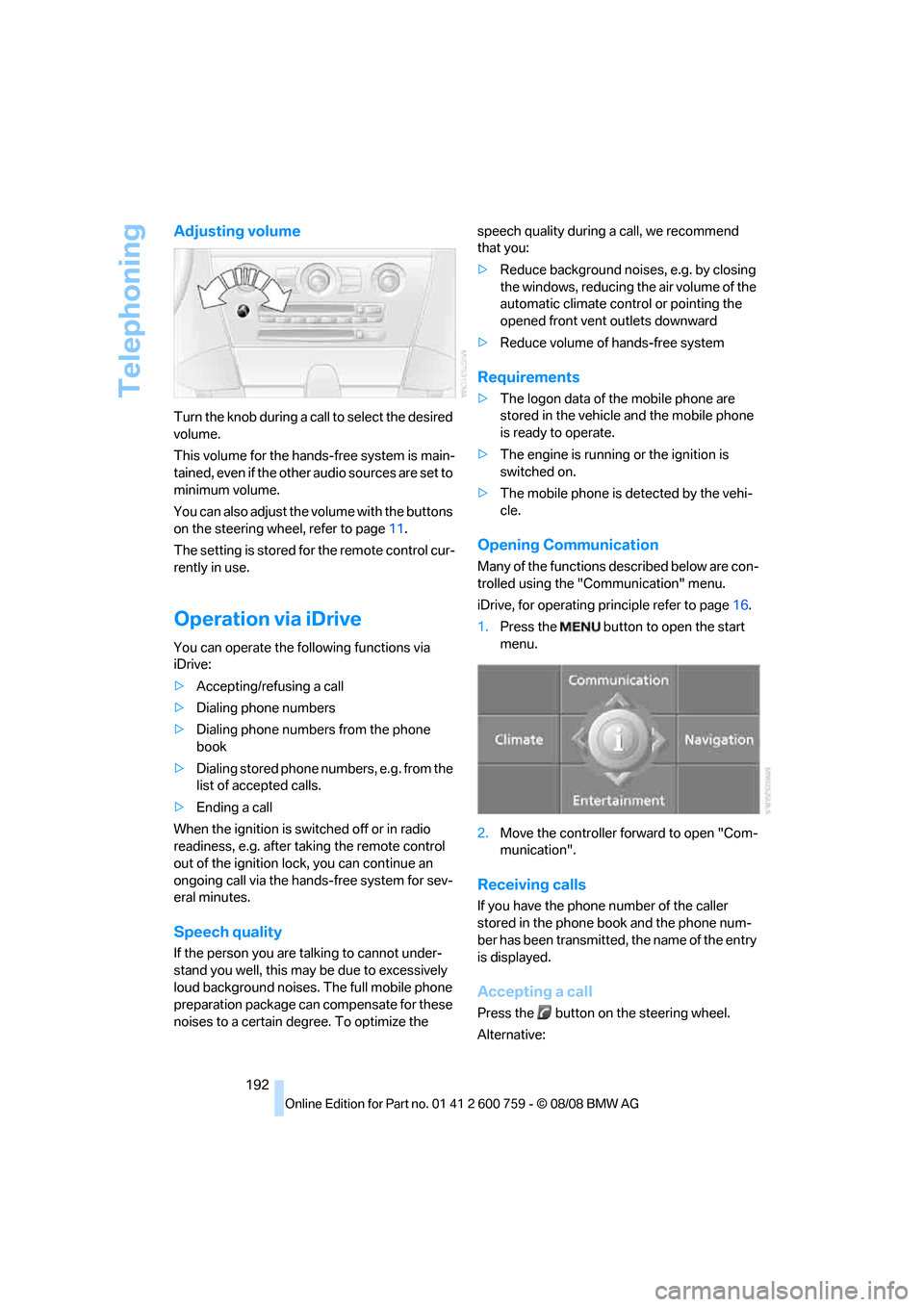
Turn the knob during a call to select the desired
volume.
This volume for the hands-free system is main-
tained, even if the other audio sources are set to
minimum volume.
You can also adjust the volume with the buttons
on the steering wheel, refer to page11.
The setting is stored for the remote control cur-
rently in use.
Operation via iDrive
You can operate the following functions via
iDrive:
>Accepting/refusing a call
>Dialing phone numbers
>Dialing phone numbers from the phone
book
>Dialing stored phone numbers, e.g. from the
list of accepted calls.
>Ending a call
When the ignition is switched off or in radio
readiness, e.g. after taking the remote control
out of the ignition lock, you can continue an
ongoing call via the hands-free system for sev-
eral minutes.
Speech quality
If the person you are talking to cannot under-
stand you well, this may be due to excessively
loud background noises. The full mobile phone
preparation package can compensate for these
noises to a certain degree. To optimize the speech quality during a call, we recommend
that you:
>Reduce background noises, e.g. by closing
the windows, reducing the air volume of the
automatic climate control or pointing the
opened front vent outlets downward
>Reduce volume of hands-free system
Requirements
>The logon data of the mobile phone are
stored in the vehicle and the mobile phone
is ready to operate.
>The engine is running or the ignition is
switched on.
>The mobile phone is detected by the vehi-
cle.
Opening Communication
Many of the functions described below are con-
trolled using the "Communication" menu.
iDrive, for operating principle refer to page16.
1.Press the button to open the start
menu.
2.Move the controller forward to open "Com-
munication".
Receiving calls
If you have the phone number of the caller
stored in the phone book and the phone num-
ber has been transmitted, the name of the entry
is displayed.
Accepting a call
Press the button on the steering wheel.
Alternative:
Page 195 of 272
193
Entertainment
Reference
At a glance
Controls
Driving tips Communications
Navigation
Mobility
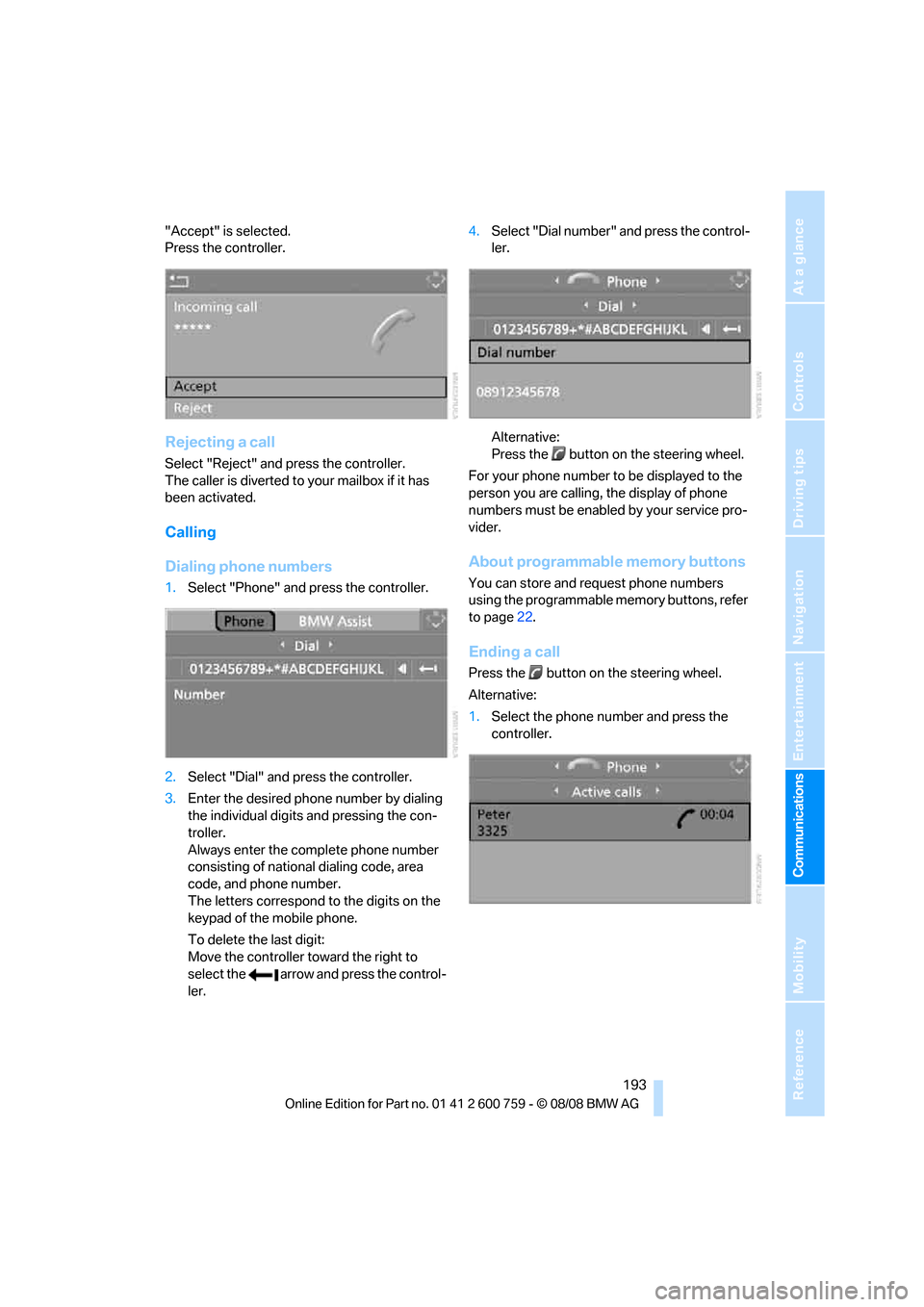
"Accept" is selected.
Press the controller.
Rejecting a call
Select "Reject" and press the controller.
The caller is diverted to your mailbox if it has
been activated.
Calling
Dialing phone numbers
1.Select "Phone" and press the controller.
2.Select "Dial" and press the controller.
3.Enter the desired phone number by dialing
the individual digits and pressing the con-
troller.
Always enter the complete phone number
consisting of national dialing code, area
code, and phone number.
The letters correspond to the digits on the
keypad of the mobile phone.
To delete the last digit:
Move the controller toward the right to
select the arrow and press the control-
ler.4.Select "Dial number" and press the control-
ler.
Alternative:
Press the button on the steering wheel.
For your phone number to be displayed to the
person you are calling, the display of phone
numbers must be enabled by your service pro-
vider.
About programmable memory buttons
You can store and request phone numbers
using the programmable memory buttons, refer
to page22.
Ending a call
Press the button on the steering wheel.
Alternative:
1.Select the phone number and press the
controller.
Page 202 of 272
Telephoning
200 that the mobile phone can engage in the
snap-in adapter.
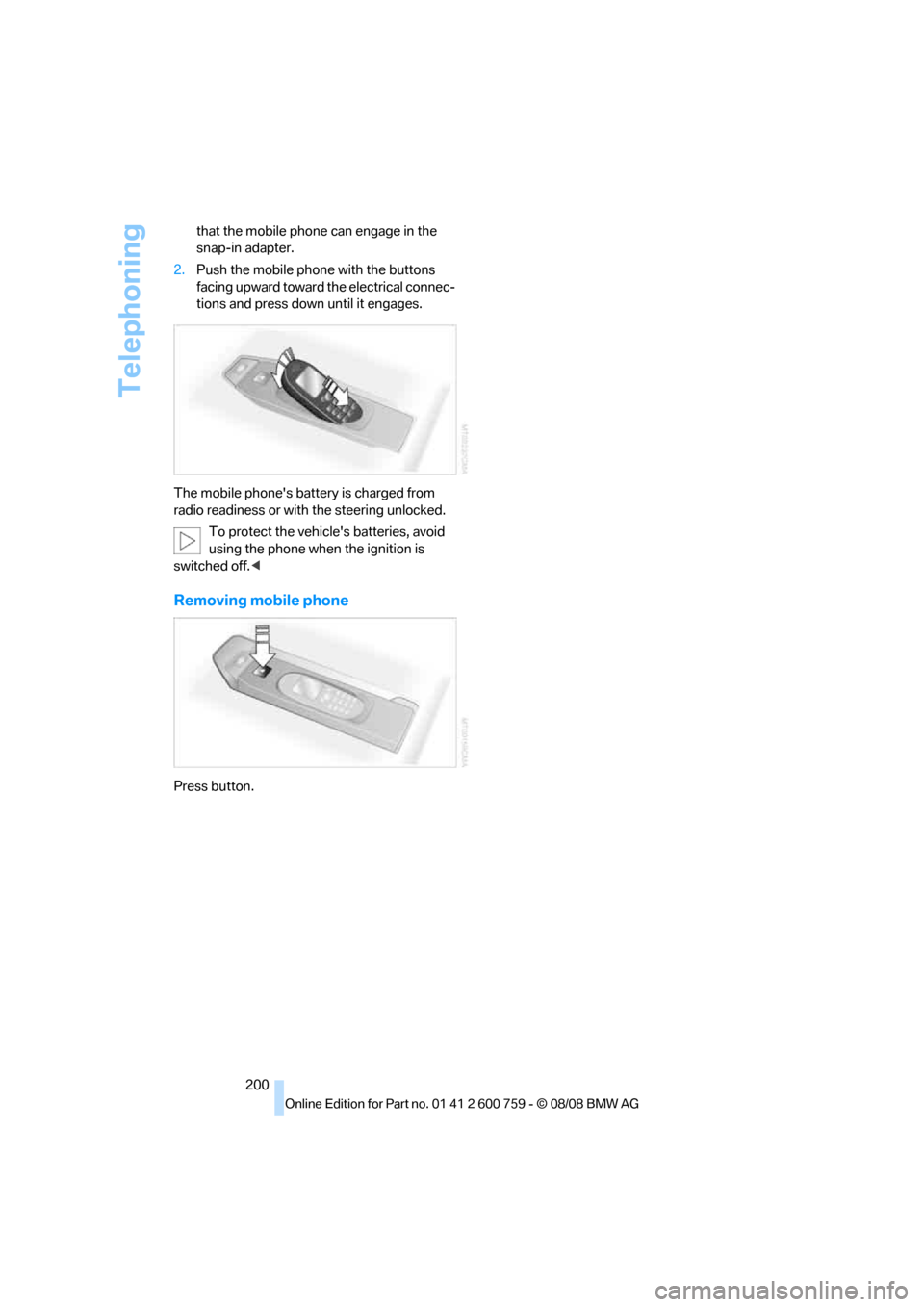
2.Push the mobile phone with the buttons
facing upward toward the electrical connec-
tions and press down until it engages.
The mobile phone's battery is charged from
radio readiness or with the steering unlocked.
To protect the vehicle's batteries, avoid
using the phone when the ignition is
switched off.<
Removing mobile phone
Press button.
Page 251 of 272
Reference 249
At a glance
Controls
Driving tips
Communications
Navigation
Entertainment
Mobility
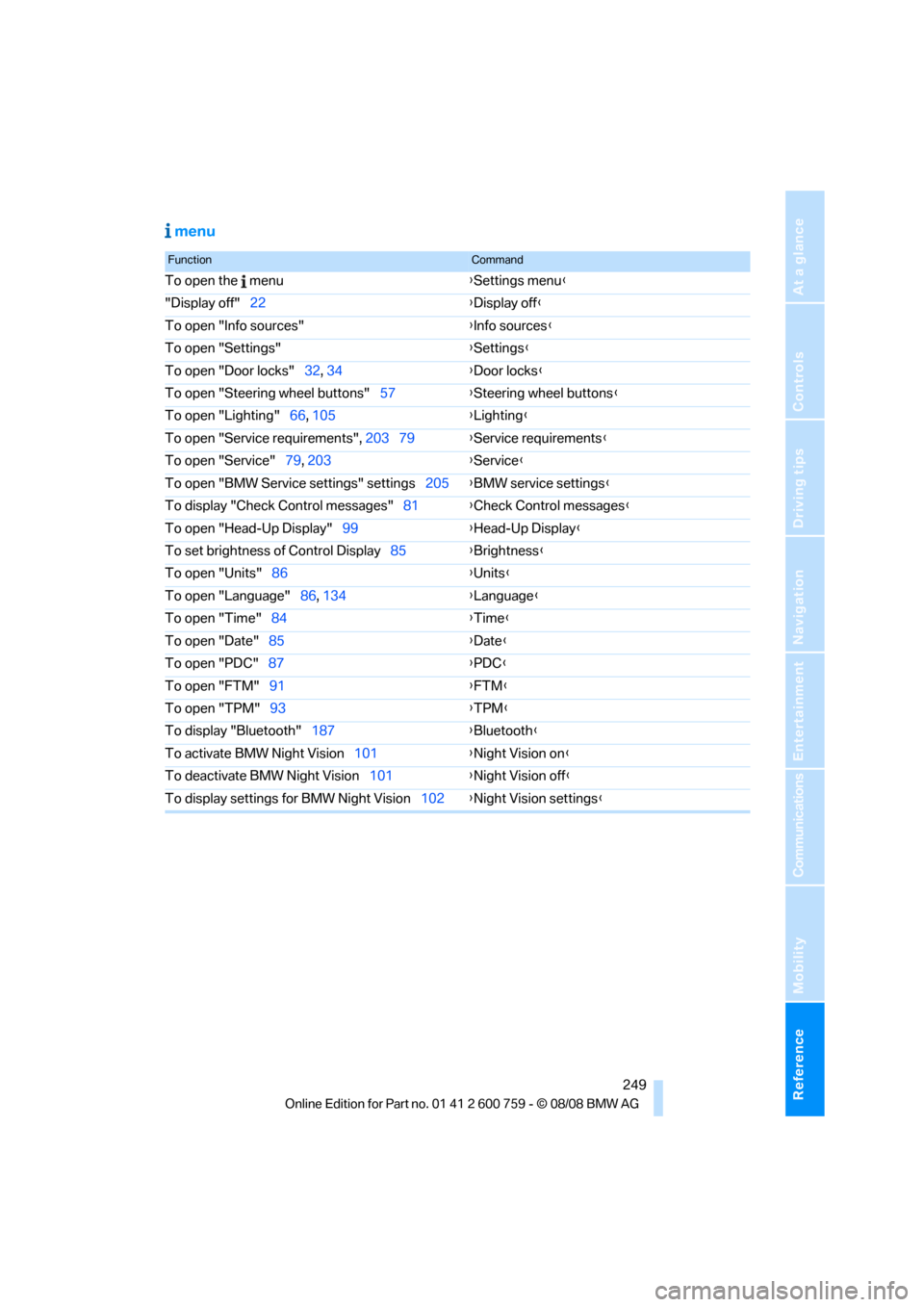
menu
FunctionCommand
To open the menu{Settings menu}
"Display off"22{Display off}
To open "Info sources"{Info sources}
To open "Settings"{Settings}
To open "Door locks"32, 34{Door locks}
To open "Steering wheel buttons"57{Steering wheel buttons}
To open "Lighting"66, 105{Lighting}
To open "Service requirements", 203 79{Service requirements}
To open "Service"79, 203{Service}
To open "BMW Service settings" settings205{BMW service settings}
To display "Check Control messages"81{Check Control messages}
To open "Head-Up Display"99{Head-Up Display}
To set brightness of Control Display85{Brightness}
To open "Units"86{Units}
To open "Language"86, 134{Language}
To open "Time"84{Time}
To open "Date"85{Date}
To open "PDC"87{PDC}
To open "FTM"91{FTM}
To open "TPM"
93{TPM}
To display "Bluetooth"187{Bluetooth}
To activate BMW Night Vision101{Night Vision on}
To deactivate BMW Night Vision101{Night Vision off}
To display settings for BMW Night Vision102{Night Vision settings}
Page 254 of 272
Everything from A to Z
252 BMW TeleServices services
– displaying204
– updating204
BMW website4
Bottle holder, refer to Cup
holders120
Bracket for telephone or
mobile phone
– refer to Snap-in adapter199
Brake assistant88
– adaptive89
Brake force display95
Brake lamps
– replacing bulbs, refer to Tail
lamps232
– two-stage95
Brake rotors
– breaking-in126
– refer to Braking safely128
Brakes
– ABS Antilock Brake
System88
– brake force display95
– breaking-in126
– CBC Cornering Brake
Control88
– handbrake62
– refer to Braking safely128
Brake system126
– brake pads126
– brake rotors128
– breaking-in126
– warning lamp13,90
Braking
– electronic brake-force
distribution88
Braking safely128
Breakdown services, refer to
Roadside Assistance236
Breaking-in brake pads126
Breaking-in the clutch126
Breaking-in the differential,
refer to Engine and
differential126
Break-in period126
"Brightness"86,99
Brightness of Control
Display85"Brightness" with BMW Night
Vision102
Button for starting engine,
refer to Start/Stop button60
Buttons on steering wheel11
C
California Proposition 65
Warning6
Call194,205
– accepting192
– displaying accepted195
– ending193
– in absence195
– rejecting193
– starting193
Calling
– by entering phone
number193
– from phone book194
– from Top 8 list195
– redialing195
Can holder, refer to Cup
holders120
Capacities245
Car battery, refer to Vehicle
battery233
"Car Data"78Care227
– car-care products227
– carpets229
– car washes227
– CD/DVD player230
– chrome components229
– convertible top228
– displays230
– exterior227
– fine wooden
components230
– hand washing228
– headlamps228
– high-pressure cleaning
jets227
– interior229
– leather229
– light-alloy wheels229
– paint228
– plastic components230
– rubber gaskets229
– safety belts230
– sensors and cameras230
– upholstery and cloth-
covered paneling229
– windows228
– wiper blades228
Cargo bay
– capacity245
– emergency release37
– opening/closing, refer to
Luggage compartment
lid36
– opening from inside36
– opening from outside
36
– opening with remote
control33
Caring for the vehicle
finish228
Car key, refer to Keys/remote
control30
Car phone186
– installation location, refer to
Center armrest119
– refer to Mobile phone186
– refer to separate operating
instructions
Car radio, refer to Radio164
Car Shampoo230
Page 257 of 272
Reference 255
At a glance
Controls
Driving tips
Communications
Navigation
Entertainment
Mobility
Dimensions
– Convertible244
– Coupe243
Directional indicators, refer to
Turn signals65
Direction announcements,
refer to Voice
instructions151
Direction instructions, refer to
Voice instructions151
Directory, refer to Phone
book194
Directory for navigation, refer
to Address book144
Displacement, refer to Engine
data242
"Display"86
Display, refer to iDrive
controls16
Display elements, refer to
Instrument cluster12
Displaying vehicle data207
Display lighting, refer to
Instrument lighting108
"Display off"22
Displays
– on Control Display, refer to
iDrive16
– refer to Instrument
cluster12
"Display settings"85,99
Displays on the windshield,
refer to Head-Up Display98
Disposal
– battery of remote control
with comfort access40
– coolant223
– vehicle battery233
Distance, refer to
Computer78
Distance control, refer to
Active cruise control68
Distance to destination, refer
to Computer78
Distance warning, refer to
PDC Park Distance
Control87
Door entry lighting, refer to
Interior lamps108Door key, refer to Keys/
remote control30
Door lock34
"Door locks"32,80
Doors
– manual operation34
– remote control32
DOT Quality Grades216
Draft-free ventilation114
Drinks holder, refer to Cup
holders120
"Driver's door only"32
Driving lamps, refer to Parking
lamps/low beams
104
Driving route, refer to
Displaying route149
Driving stability control
systems88
Driving through water128
Driving tips, refer to General
driving notes126
Dry air, refer to Cooling
function113
Drying the air, refer to Cooling
function113
DSC Dynamic Stability
Control89
– indicator lamp13,89
– malfunction90
DTC Dynamic Traction
Control89
– activating89
– indicator lamp13,90
DVD for navigation134
Dynamic Brake Control DBC
– warning lamp90
Dynamic Drive90
Dynamic Driving Control64
"Dynamic route" in
navigation147
Dynamic Stability Control
DSC89
Dynamic Traction Control
DTC89
E
Easy entry, refer to Entering
rear53Easy entry/exit56
Eject button, refer to Buttons
in area of CD player160
Electrical malfunction
– convertible top45
– door lock34
– driver's door34
– fuel filler door212
– glass sunroof43
– luggage compartment lid36
– storage compartment, hotel
function35
Electrical steering wheel
adjustment56
Electric convertible top44
Electronic brake-force
distribution88
Electronic oil level check222
Emergency operation, refer to
Manual operation
– convertible top45
– door lock34
– driver's door34
– fuel filler door212
– glass sunroof43
– hotel function35
– luggage compartment lid36
– transmission lock, sport
automatic transmission64
Emergency release for
luggage compartment lid in
cargo bay37
Emergency request235
Emergency services, refer to
Roadside Assistance236
"Enabled services"207
"Enabled TeleServices"204
"Enable services"207
"End call"194