key BMW 650I COUPE 2010 E63 User Guide
[x] Cancel search | Manufacturer: BMW, Model Year: 2010, Model line: 650I COUPE, Model: BMW 650I COUPE 2010 E63Pages: 252, PDF Size: 8.4 MB
Page 140 of 252
Destination guidance
138 1."Navigation"
2."Map"
3. Select the symbol.
For rapid access, the feature can be stored on a
programmable memory key, refer to page20.
Repeating a voice instruction
1."Navigation"
2."Map"
3. Highlight the symbol.
4.Press the controller twice.
Adjusting the volume of voice
instructions*
The volume can be adjusted only while a voice
instruction is being issued.
1.Repeat the last voice instruction, if neces-
sary.
2.Turn the knob during the voice instruction
to select the desired volume.
The setting is stored for the remote control cur-
rently in use.
Map display
Displaying map view
You can have your current position displayed on
a map. After starting the destination guidance,
the planned route is shown on the map.
1."Navigation"
2."Map"
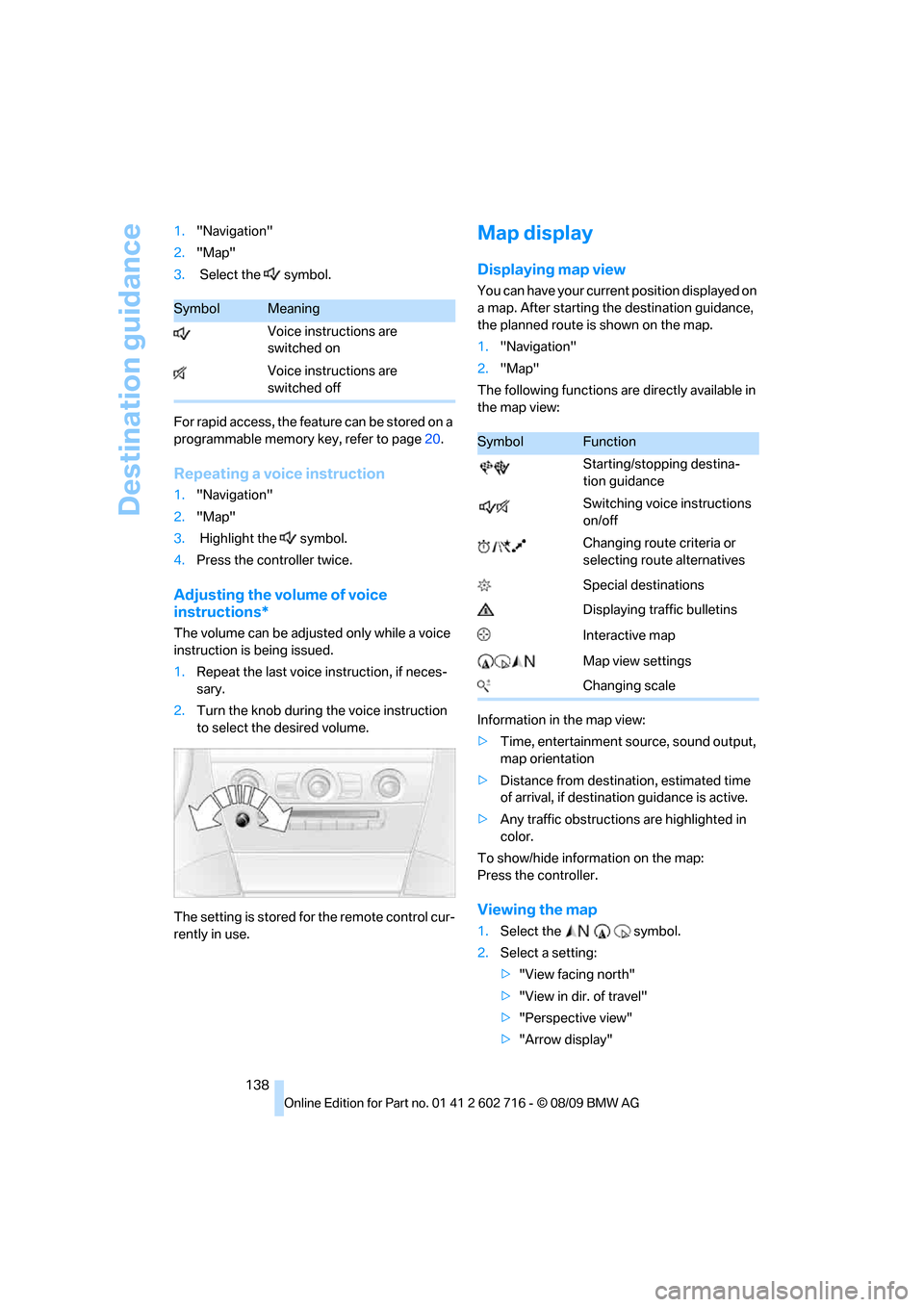
The following functions are directly available in
the map view:
Information in the map view:
>Time, entertainment source, sound output,
map orientation
>Distance from destination, estimated time
of arrival, if destination guidance is active.
>Any traffic obstructions are highlighted in
color.
To show/hide information on the map:
Press the controller.
Viewing the map
1.Select the symbol.
2.Select a setting:
>"View facing north"
>"View in dir. of travel"
>"Perspective view"
>"Arrow display"
SymbolMeaning
Voice instructions are
switched on
Voice instructions are
switched off
SymbolFunction
Starting/stopping destina-
tion guidance
Switching voice instructions
on/off
Changing route criteria or
selecting route alternatives
Special destinations
Displaying traffic bulletins
Interactive map
Map view settings
Changing scale
Page 148 of 252
On/off and tone
146
On/off and tone
The following audio and video sources share
the same control elements and adjustments:
>Radio
>CD/DVD player
>CD changer
*
>Video*
>External devices, e.g. MP3 player
Controls
The audio and video sources can be controlled
using the:
>Buttons in the area of the CD/DVD player
>iDrive
>Buttons on the steering wheel, refer to
page11
>Programmable memory buttons, refer to
page20
>Voice activation system
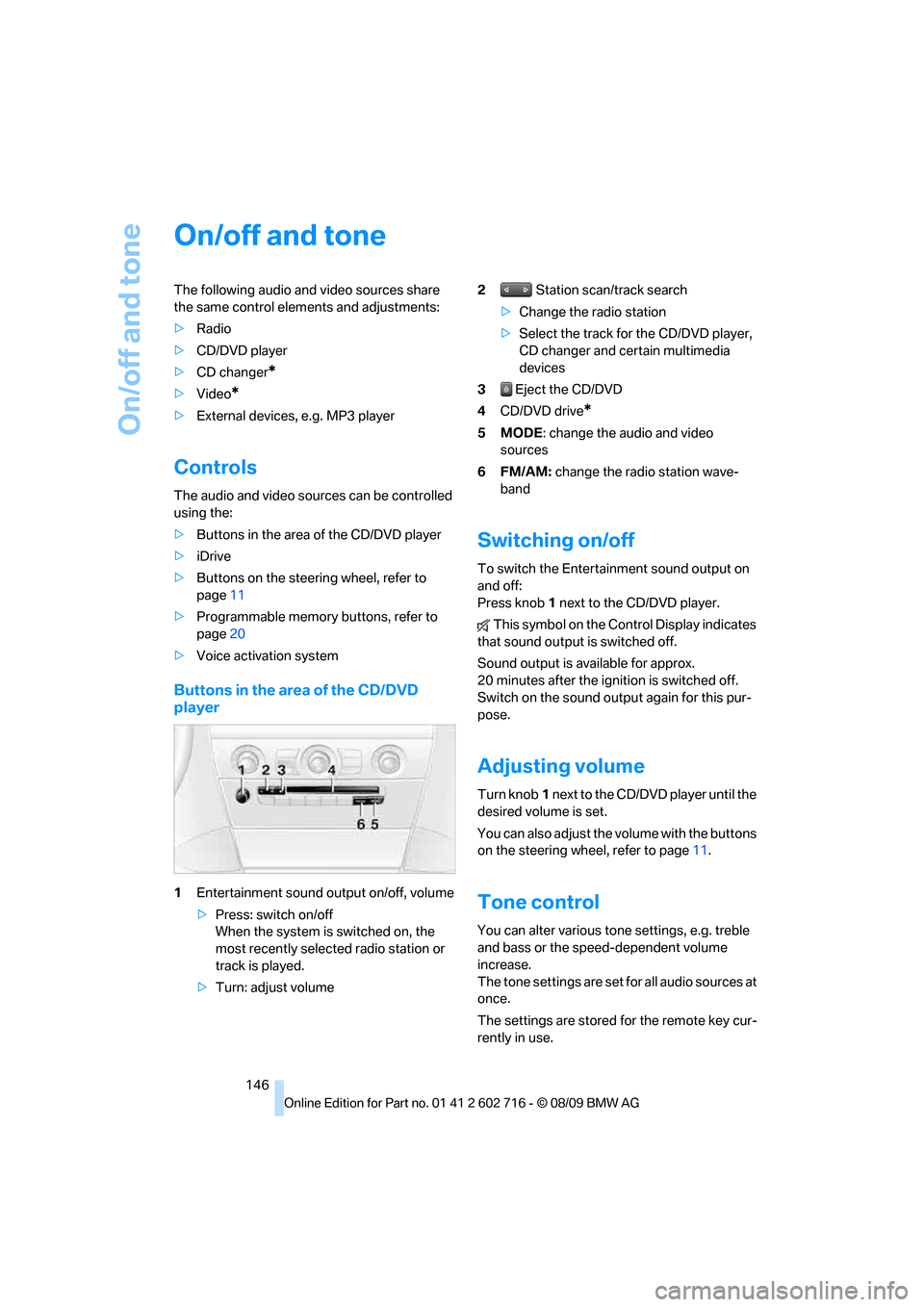
Buttons in the area of the CD/DVD
player
1Entertainment sound output on/off, volume
>Press: switch on/off
When the system is switched on, the
most recently selected radio station or
track is played.
>Turn: adjust volume2 Station scan/track search
>Change the radio station
>Select the track for the CD/DVD player,
CD changer and certain multimedia
devices
3 Eject the CD/DVD
4CD/DVD drive
*
5MODE: change the audio and video
sources
6FM/AM: change the radio station wave-
band
Switching on/off
To switch the Entertainment sound output on
and off:
Press knob1 next to the CD/DVD player.
This symbol on the Control Display indicates
that sound output is switched off.
Sound output is available for approx.
20 minutes after the ignition is switched off.
Switch on the sound output again for this pur-
pose.
Adjusting volume
Turn knob1 next to the CD/DVD player until the
desired volume is set.
You can also adjust the volume with the buttons
on the steering wheel, refer to page11.
Tone control
You can alter various tone settings, e.g. treble
and bass or the speed-dependent volume
increase.
The tone settings are set for all audio sources at
once.
The settings are stored for the remote key cur-
rently in use.
Page 174 of 252
Telephone
172
Telephone
The concept
Your BMW is equipped with a full preparation
package mobile phone. After pairing a suitable
mobile phone with the vehicle once, you can
operate the mobile phone via the iDrive, the
buttons on the steering wheel or using voice
commands
*.
A mobile phone that has been paired once is
automatically detected again with the engine
running or the ignition switched on as soon as
it is in the vehicle interior. The logon data of up
to four mobile phones can be stored simulta-
neously. If several mobile phones are detected
simultaneously, the respective last mobile
phone paired can be operated via the vehicle.
Using a phone in your vehicle
Using snap-in adapter*
The so-called snap-in adapter, a mobile phone
cradle, enables the battery to be charged and
the mobile phone to be connected to the exter-
nal antenna of your vehicle. This ensures
improved network reception and a consistent
voice reproduction quality. Ask your BMW cen-
ter which mobile phones snap-in adapters are
offered for.
For your safety
A car phone makes life more convenient in
many ways, and can even save lives in an emer-
gency. While you should consult your mobile
phone's separate operating instructions for a
detailed description of safety precautions and
information, we request that you direct your
particular attention to the following:
Only make entries when traffic conditions
allow you to do so. Do not hold the mobile
phone in your hand while you are driving; use
the hands-free system instead. If you do not
observe this precaution, your being distracted can endanger vehicle occupants and other road
users.<
Suitable mobile phones
Ask your BMW center which mobile phones
with a Bluetooth interface are supported by the
mobile phone preparation package or which
mobile phones snap-in adapters are available
for. These mobile phones support the functions
described in this Owner's Manual with a certain
software version. Malfunctions can occur with
other mobile phones.
Operating options
You can operate the mobile phone using:
>Buttons on steering wheel, refer to page11
>iDrive, refer to page16
>Voice commands
*, refer to page179
>Programmable memory buttons, refer to
page20
Avoid operating a mobile phone recognized by
the vehicle via the mobile phone's keypad, oth-
erwise malfunctions may result.
Commissioning
Pairing mobile phone in vehicle
The following prerequisites must be met:
>Compatible mobile phone: The mobile
phone is supported by the full preparation
package mobile phone. Information on this
subject is also provided on the Internet at:
www.bmw.com/bluetooth
>The mobile phone is ready to operate.
>Bluetooth is activated in the vehicle, refer to
page174, and on the mobile phone.
*
Page 175 of 252
173
Entertainment
Reference
At a glance
Controls
Driving tips Communications
Navigation
Mobility
>Depending on the mobile phone, certain
settings may be necessary on the mobile
phone, e. g. via the following menu items:
>Bluetooth activated
>Connection must be allowed without
requiring further confirmation
>Reconnect
>Depending on the mobile phone model, the
setting energy saving mode can, for exam-
ple, result in vehicle failing to detect the
paired mobile phone.
>For pairing, define a 4- to 16-digit number
of your choice as the Bluetooth Passkey,
e.g. 25081107. A long and complex number
offers better protection against unautho-
rized access. This Bluetooth passkey is no
longer required following successful pair-
ing.
>The ignition is switched on.
Only pair the mobile phone with the vehi-
cle stopped, otherwise the passengers
and other road users can be endangered due to
a lack of attentiveness on the part of the
driver.<
Switching on ignition
1.Insert the remote control as far as possible
into the ignition lock.
2.Switch on the ignition by pressing the Start/
Stop button without depressing the brake
or clutch pedal.
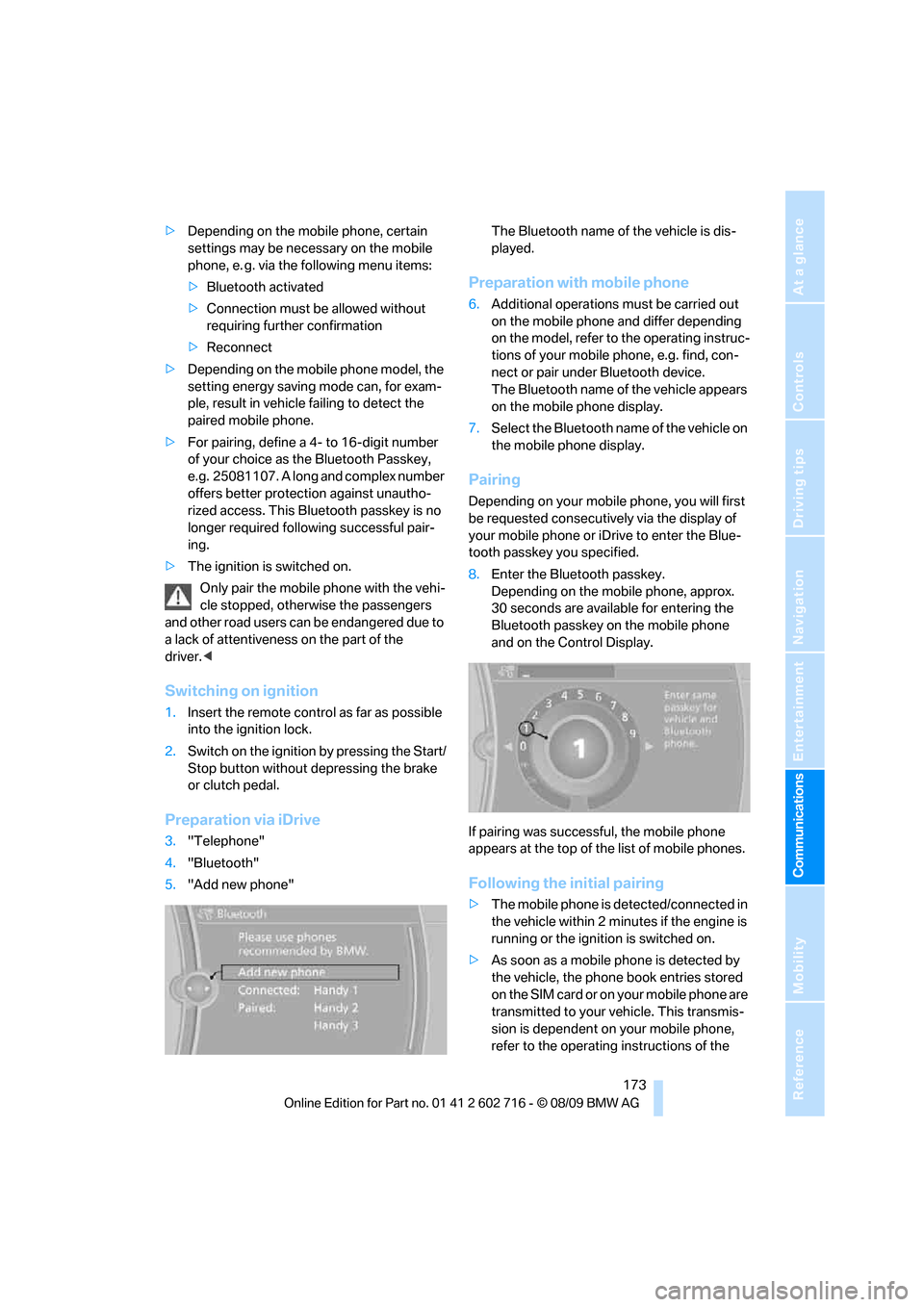
Preparation via iDrive
3."Telephone"
4."Bluetooth"
5."Add new phone"The Bluetooth name of the vehicle is dis-
played.
Preparation with mobile phone
6.Additional operations must be carried out
on the mobile phone and differ depending
on the model, refer to the operating instruc-
tions of your mobile phone, e.g. find, con-
nect or pair under Bluetooth device.
The Bluetooth name of the vehicle appears
on the mobile phone display.
7.Select the Bluetooth name of the vehicle on
the mobile phone display.
Pairing
Depending on your mobile phone, you will first
be requested consecutively via the display of
your mobile phone or iDrive to enter the Blue-
tooth passkey you specified.
8.Enter the Bluetooth passkey.
Depending on the mobile phone, approx.
30 seconds are available for entering the
Bluetooth passkey on the mobile phone
and on the Control Display.
If pairing was successful, the mobile phone
appears at the top of the list of mobile phones.
Following the initial pairing
>The mobile phone is detected/connected in
the vehicle within 2 minutes if the engine is
running or the ignition is switched on.
>As soon as a mobile phone is detected by
the vehicle, the phone book entries stored
on the SIM card or on your mobile phone are
transmitted to your vehicle. This transmis-
sion is dependent on your mobile phone,
refer to the operating instructions of the
Page 176 of 252
Telephone
174 mobile phone if necessary, and can take
several minutes.
>Four mobile phones can be paired.
>Specific settings may be necessary in some
mobile phones, e.g. authorization or a
secure connection, refer to the mobile
phone operating instructions.
If not all phone book entries are displayed:
>Transfer all phone book entries from the
SIM card to the mobile phone if necessary.
>It may not be possible to display phone
book entries with special characters.
Checking if pairing is unsuccessful
>Is the mobile phone supported by the
mobile phone preparation package? Infor-
mation on this subject is also provided on
the Internet at: www.bmw.com/bluetooth.
>Do the Bluetooth passkeys on the mobile
phone and the vehicle match? The same
Bluetooth passkey must be entered both on
the mobile phone display and via iDrive.
>Have you required longer than 30 seconds
to enter the Bluetooth passkey? Then
repeat the pairing procedure.
>Are too many Bluetooth devices connected
to the mobile phone? If so, delete the con-
nections with other devices on the mobile
phone.
>The mobile phone no longer reacts? Switch
the mobile phone off and then on again or
disconnect the power supply.
>Repeat the pairing procedure.
>If all items on the list have been checked
and the mobile phone still cannot be paired,
please contact Customer Relations.
Connecting a particular mobile phone
If more than one mobile phone is detected by
the vehicle, the mobile phone at the top of the
list is connected. A different mobile phone can
be connected by selecting it.
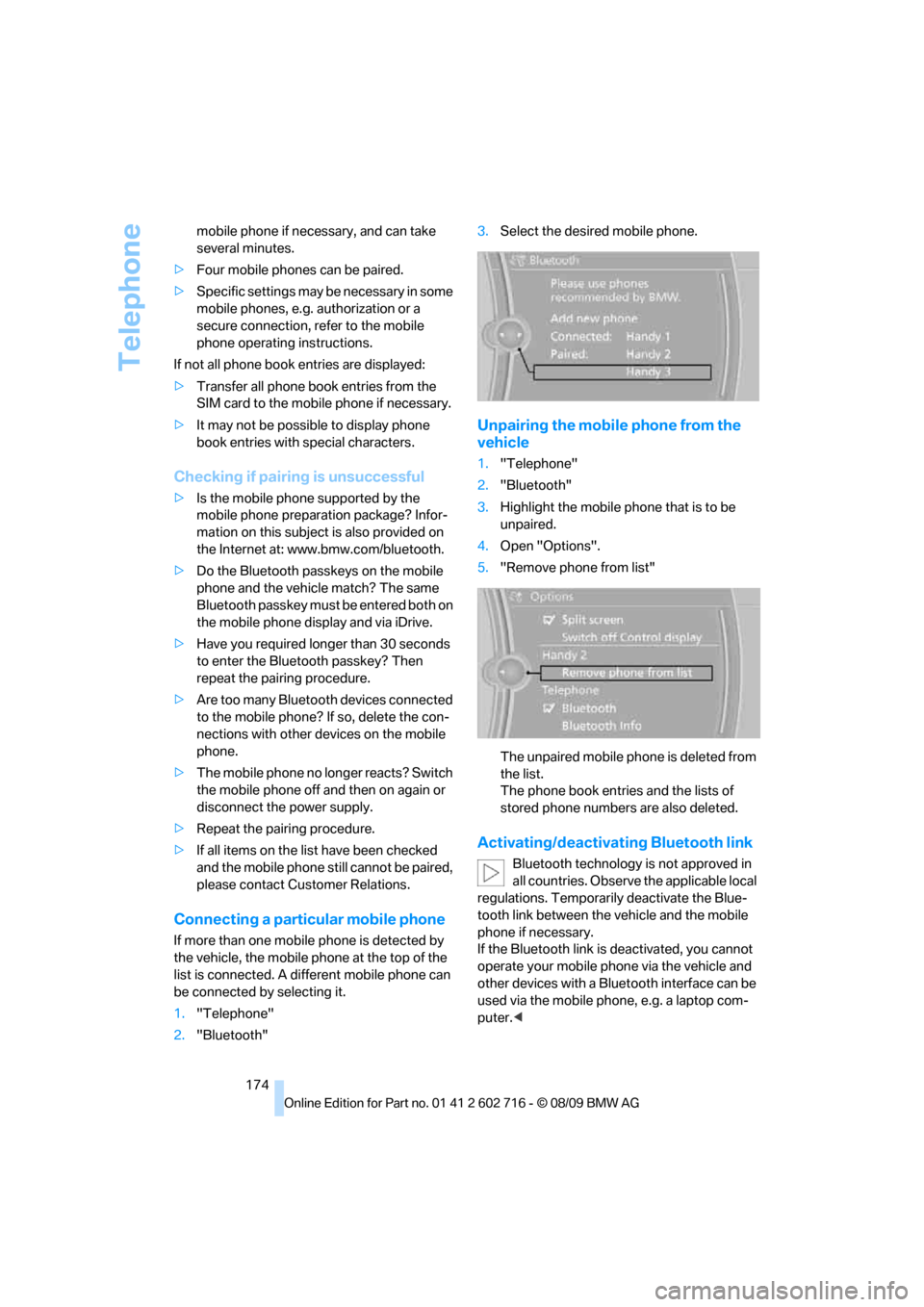
1."Telephone"
2."Bluetooth"3.Select the desired mobile phone.
Unpairing the mobile phone from the
vehicle
1."Telephone"
2."Bluetooth"
3.Highlight the mobile phone that is to be
unpaired.
4.Open "Options".
5."Remove phone from list"
The unpaired mobile phone is deleted from
the list.
The phone book entries and the lists of
stored phone numbers are also deleted.
Activating/deactivating Bluetooth link
Bluetooth technology is not approved in
all countries. Observe the applicable local
regulations. Temporarily deactivate the Blue-
tooth link between the vehicle and the mobile
phone if necessary.
If the Bluetooth link is deactivated, you cannot
operate your mobile phone via the vehicle and
other devices with a Bluetooth interface can be
used via the mobile phone, e.g. a laptop com-
puter.<
Page 236 of 252
Everything from A to Z
234
Everything from A to Z
Index
A
ABS Antilock Brake
System83
– indicator lamp84
ACC, refer to Active cruise
control64
Accessories6
Accident, refer to Emergency
request216
Activated-charcoal filter for
automatic climate
control107
Activation times of parked car
ventilation, preselecting107
Active cruise control64
– indicator lamp68
– radar sensor68
– selecting distance66
– warning lamps68
Active front head restraints48
Active steering89
– warning lamp89
Adapter for spare key26
Adaptive brake assistant83
Adaptive brake lamps, refer to
Brake force display90
Adaptive Light Control99
Additional connection of
music player in mobile
phone166
Additives
– coolant205
– engine oil, refer to Approved
engine oils204
Address, entering127,133
Address for navigation
– entering127
Adjusting interior
temperature104
Adjusting the tone during
audio operation, refer to
Tone control146Adjusting thigh support46
Airbags90
– deactivating, refer to
Exception for front
passenger seat53
– indicator/warning lamp92
– indicator lamp for front
passenger airbags91
– sitting safely45
Air distribution
– automatic104
– manual105
Airing, refer to Ventilation106
Air outlets, refer to
Ventilation106
Air recirculation, refer to AUC
Automatic recirculated-air
control105
Air supply, automatic climate
control103
Air volume105
AKI, refer to Fuel
specifications195
Alarm system33
– avoiding unintentional
alarms34
– interior motion sensor33
– switching off alarm33
– switching off tilt alarm
sensor and interior motion
sensor34
– tilt alarm sensor33
Albums of music
collection163
Alloy wheels210
All-season tires, refer to
Winter tires201
Alterations, technical, refer to
For your own safety5
Antenna for mobile phone172
Antifreeze
– coolant205
– washer fluid63Antilock Brake System
ABS83
Anti-theft alarm system, refer
to Alarm system33
Anti-theft system, refer to
Central locking system27
Approved axle loads, refer to
Weights227
Approved engine oils204
Approved gross vehicle
weight, refer to Weights227
Armrest, refer to Center
armrest111
Around the center console14
Around the steering wheel10
Arrival time
– refer to Computer74
Ashtray113
Assistance systems, refer to
Driving stability control
systems83
AUC Automatic recirculated-
air control105
Audio146
– controls146
– switching on/off146
– tone control146
– volume146
Audio device, external111
Automatic
– air distribution104
– air volume104
– cruise control63,64
– headlamp control98
– steering wheel
adjustment47
Automatic car washes
– also refer to Comfort
Access35
Page 238 of 252
Everything from A to Z
236 Care208
– car-care products208
– carpets210
– car washes208
– CD/DVD player211
– chrome components210
– convertible top209
– displays211
– exterior208
– fine wooden
components211
– hand washing209
– headlamps209
– high-pressure cleaning
jets208
– interior210
– leather210
– light-alloy wheels210
– paint209
– plastic components210
– rubber gaskets210
– safety belts211
– sensors and cameras211
– upholstery and cloth-
covered paneling210
– windows209
Cargo bay
– capacity227
– emergency release32
– opening/closing, refer to
Luggage compartment
lid31
– opening from inside31
– opening from outside31
– opening with remote
control28
Caring for the vehicle
finish209
Car key, refer to Keys/remote
control26
Car phone
– installation location, refer to
Center armrest111
– refer to separate operating
instructions
Car phone, refer to
Telephone172
Car radio, refer to Radio149
Car Shampoo211Car wash57
– with Comfort Access35
Car washes208
Catalytic converter, refer to
Hot exhaust system119
CBC Cornering Brake
Control83
CBS Condition Based
Service206
CD, audio playback154
CD changer154,158
– controls146
– fast forward/reverse156
– filling or emptying the
magazine158
– random sequence155
– selecting a track154
– switching on/off146
– tone control146
– volume146
CD player154
– controls146
– fast forward/reverse156
– random sequence155
– selecting a track154
– switching on/off146
– tone control146
– volume146
Center armrest, adjusting
height111
Center console14
Central locking
– from inside30
– from outside28
Central locking system27
– Comfort Access34
– hotel function30
Changes, technical, refer to
For your own safety5
Changing language on
Control Display80
Changing units of measure on
Control Display74
Changing wheels200,214
CHECK button78
Check Control77
Check Gas Cap194
Checking air pressure, refer to
Tire inflation pressure196Child restraint fixing system
LATCH54
Child restraint systems53
Child seats, refer to
Transporting children
safely53
Chrome-plated parts211
Chrome polish211
Cigarette lighter113
Cigarette lighter socket, refer
to Connecting electrical
devices113
Cleaning your BMW, refer to
Care208
Clock72
– 12h/24h format77
– setting time76
– setting time and date
77
Closing
– from inside30
– from outside28
Closing fuel filler cap194
Clothes hooks, Coupe112
Cockpit10
Cold start, refer to Starting
engine57
Comfort Access34
– observe in car wash35
– replacing battery, remote
control35
Compartment for remote
control, refer to Ignition
lock56
Compartments, refer to
Storage compartments112
Computer73
– displays on Control
Display74
Concierge service187
Condensation, refer to When
vehicle is parked120
Condition Based Service
CBS206
Confirmation signals for
locking and unlocking29
Connecting car vacuum
cleaner, refer to Connecting
electrical devices113
Page 240 of 252
Everything from A to Z
238 Displacement, refer to Engine
data224
Display, refer to iDrive
controls16
Display elements, refer to
Instrument cluster12
Display lighting, refer to
Instrument lighting102
Displays
– on Control Display, refer to
iDrive16
– refer to Instrument
cluster12
Displays on the windshield,
refer to Head-up Display93
Disposal
– battery of remote control
with Comfort Access36
– coolant205
– vehicle battery214
Distance, refer to
Computer74
Distance control, refer to
Active cruise control64
Distance to destination, refer
to Computer74
Distance warning, refer to
PDC Park Distance
Control82
Door entry lighting, refer to
Interior lamps102
Door key, refer to Keys/
remote control26
Door lock29
Doors
– manual operation30
– remote control28
DOT Quality Grades198
Draft-free ventilation106
Drinks holder, refer to
Cupholders112
Drive-off assistant85
Driving lamps, refer to Parking
lamps/low beams98
Driving stability control
systems83
Driving through water120
Driving tips, refer to General
driving notes118Dry air, refer to Cooling
function105
Drying the air, refer to Cooling
function105
DSC Dynamic Stability
Control83
– indicator lamp13,84
– malfunction84
DTC Dynamic Traction
Control84
– activating84
– indicator lamp13,84
DVD
– country codes156
– settings157
– video playback156
DVD menu157
DVD player, refer to CD
player154
DVD video156
Dynamic Brake Control DBC
– warning lamp85
Dynamic destination
guidance137
Dynamic Drive85
Dynamic Driving Control60
Dynamic Stability Control
DSC83
Dynamic Traction Control
DTC84
E
Easy entry, refer to Entering
rear49
Easy entry/exit52
Eject button, refer to Buttons
in area of the CD/DVD
player146
Electrical malfunction
– convertible top41
– door lock30
– driver's door30
– fuel filler flap194
– glass sunroof39
– luggage compartment lid32
– storage compartment, hotel
function31
Electric convertible top39Electric steering wheel
adjustment52
Electronic brake-force
distribution83
Electronic oil level check203
Emergency operation, refer to
Manual operation
– convertible top41
– door lock30
– driver's door30
– fuel filler flap194
– glass sunroof39
– hotel function31
– luggage compartment lid32
– transmission lock, sport
automatic transmission60
Emergency release for
luggage compartment lid in
cargo bay32
Emergency request216
Emergency services, refer to
Roadside Assistance217
Engine
– breaking-in118
– data224
– overheated, refer to Coolant
temperature72
– speed224
– starting57
– starting, Comfort Access34
– switching off57
– switching off when equipped
with Automatic
transmission, with Comfort
Access35
Engine compartment203
Engine coolant205
Page 242 of 252
Everything from A to Z
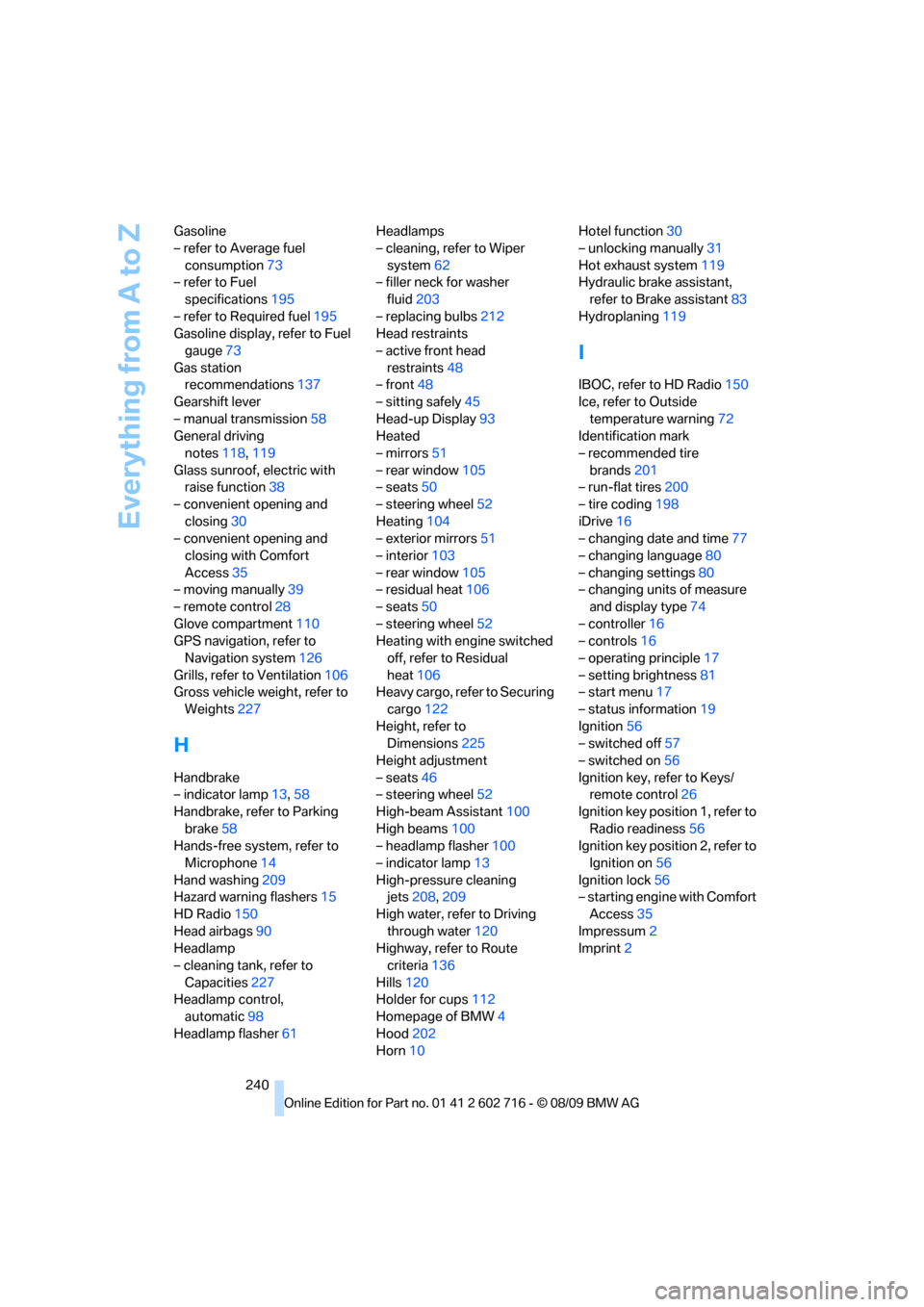
240 Gasoline
– refer to Average fuel
consumption73
– refer to Fuel
specifications195
– refer to Required fuel195
Gasoline display, refer to Fuel
gauge73
Gas station
recommendations137
Gearshift lever
– manual transmission58
General driving
notes118,119
Glass sunroof, electric with
raise function38
– convenient opening and
closing30
– convenient opening and
closing with Comfort
Access35
– moving manually39
– remote control28
Glove compartment110
GPS navigation, refer to
Navigation system126
Grills, refer to Ventilation106
Gross vehicle weight, refer to
Weights227
H
Handbrake
– indicator lamp13,58
Handbrake, refer to Parking
brake58
Hands-free system, refer to
Microphone14
Hand washing209
Hazard warning flashers15
HD Radio150
Head airbags90
Headlamp
– cleaning tank, refer to
Capacities227
Headlamp control,
automatic98
Headlamp flasher61Headlamps
– cleaning, refer to Wiper
system62
– filler neck for washer
fluid203
– replacing bulbs212
Head restraints
– active front head
restraints48
– front48
– sitting safely45
Head-up Display93
Heated
– mirrors51
– rear window105
– seats50
– steering wheel52
Heating104
– exterior mirrors51
– interior103
– rear window105
– residual heat106
– seats50
– steering wheel52
Heating with engine switched
off, refer to Residual
heat106
Heavy cargo, refer to Securing
cargo122
Height, refer to
Dimensions225
Height adjustment
– seats46
– steering wheel52
High-beam Assistant100
High beams100
– headlamp flasher100
– indicator lamp13
High-pressure cleaning
jets208,209
High water, refer to Driving
through water120
Highway, refer to Route
criteria
136
Hills120
Holder for cups112
Homepage of BMW4
Hood202
Horn10Hotel function30
– unlocking manually31
Hot exhaust system119
Hydraulic brake assistant,
refer to Brake assistant83
Hydroplaning119
I
IBOC, refer to HD Radio150
Ice, refer to Outside
temperature warning72
Identification mark
– recommended tire
brands201
– run-flat tires200
– tire coding198
iDrive16
– changing date and time77
– changing language80
– changing settings80
– changing units of measure
and display type74
– controller16
– controls16
– operating principle17
– setting brightness81
– start menu17
– status information19
Ignition56
– switched off57
– switched on56
Ignition key, refer to Keys/
remote control26
Ignition key position 1, refer to
Radio readiness56
Ignition key position 2, refer to
Ignition on56
Ignition lock56
– starting engine with Comfort
Access35
Impressum2
Imprint2
Page 243 of 252
Reference 241
At a glance
Controls
Driving tips
Communications
Navigation
Entertainment
Mobility
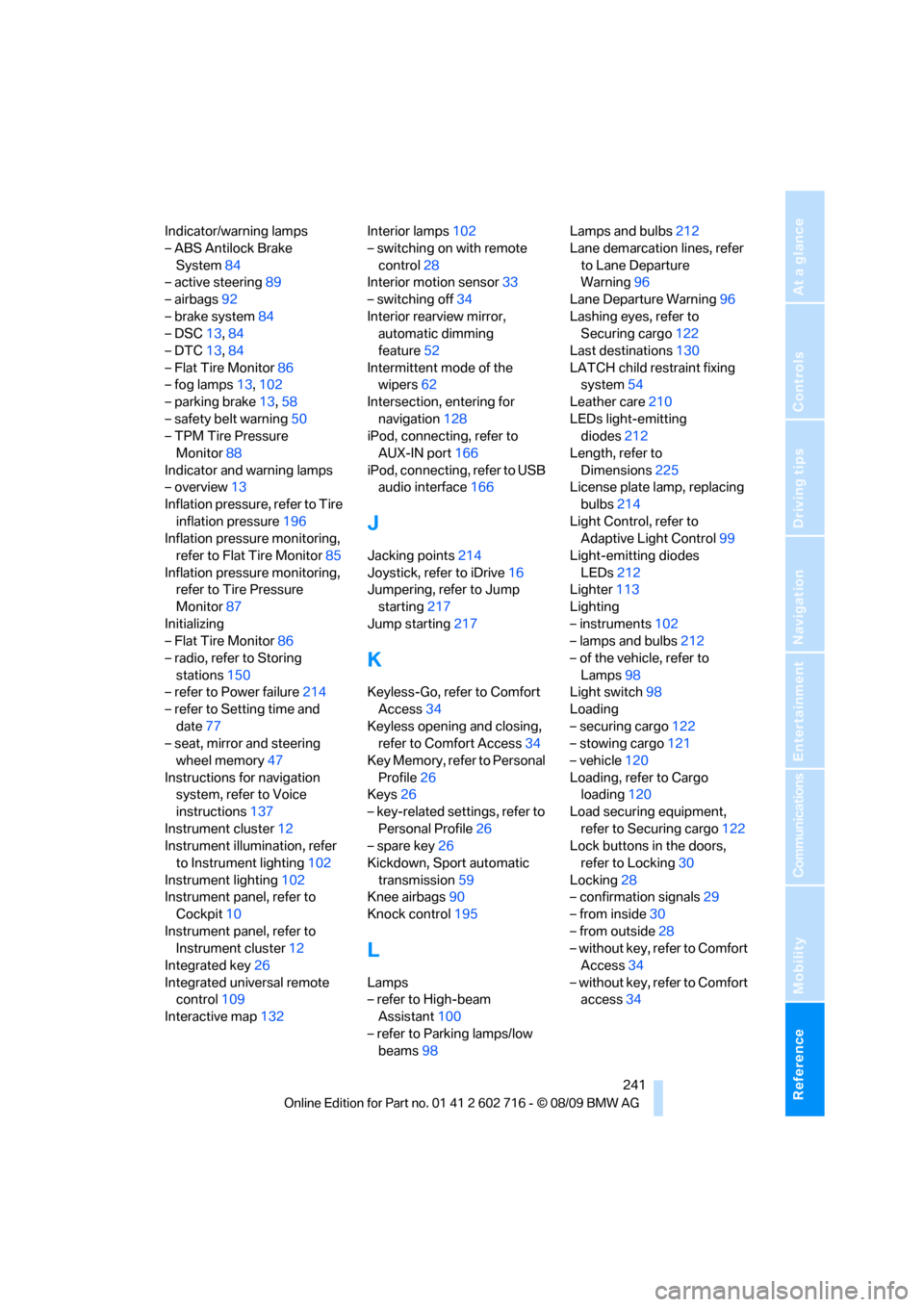
Indicator/warning lamps
– ABS Antilock Brake
System84
– active steering89
– airbags92
– brake system84
– DSC13,84
– DTC13,84
– Flat Tire Monitor86
– fog lamps13,102
– parking brake13,58
– safety belt warning50
– TPM Tire Pressure
Monitor88
Indicator and warning lamps
– overview13
Inflation pressure, refer to Tire
inflation pressure196
Inflation pressure monitoring,
refer to Flat Tire Monitor85
Inflation pressure monitoring,
refer to Tire Pressure
Monitor87
Initializing
– Flat Tire Monitor86
– radio, refer to Storing
stations150
– refer to Power failure214
– refer to Setting time and
date77
– seat, mirror and steering
wheel memory47
Instructions for navigation
system, refer to Voice
instructions137
Instrument cluster12
Instrument illumination, refer
to Instrument lighting102
Instrument lighting102
Instrument panel, refer to
Cockpit10
Instrument panel, refer to
Instrument cluster12
Integrated key26
Integrated universal remote
control109
Interactive map132Interior lamps102
– switching on with remote
control28
Interior motion sensor33
– switching off34
Interior rearview mirror,
automatic dimming
feature52
Intermittent mode of the
wipers62
Intersection, entering for
navigation128
iPod, connecting, refer to
AUX-IN port166
iPod, connecting, refer to USB
audio interface166
J
Jacking points214
Joystick, refer to iDrive16
Jumpering, refer to Jump
starting217
Jump starting217
K
Keyless-Go, refer to Comfort
Access34
Keyless opening and closing,
refer to Comfort Access34
Key Memory, refer to Personal
Profile26
Keys26
– key-related settings, refer to
Personal Profile26
– spare key26
Kickdown, Sport automatic
transmission59
Knee airbags90
Knock control195
L
Lamps
– refer to High-beam
Assistant100
– refer to Parking lamps/low
beams98Lamps and bulbs212
Lane demarcation lines, refer
to Lane Departure
Warning96
Lane Departure Warning96
Lashing eyes, refer to
Securing cargo122
Last destinations130
LATCH child restraint fixing
system54
Leather care210
LEDs light-emitting
diodes212
Length, refer to
Dimensions225
License plate lamp, replacing
bulbs214
Light Control, refer to
Adaptive Light Control99
Light-emitting diodes
LEDs212
Lighter113
Lighting
– instruments102
– lamps and bulbs212
– of the vehicle, refer to
Lamps98
Light switch98
Loading
– securing cargo122
– stowing cargo121
– vehicle120
Loading, refer to Cargo
loading120
Load securing equipment,
refer to Securing cargo122
Lock buttons in the doors,
refer to Locking30
Locking28
– confirmation signals29
– from inside30
– from outside28
– without key, refer to Comfort
Access34
– without key, refer to Comfort
access34